navigation AUDI Q2 2021 Owner´s Manual
[x] Cancel search | Manufacturer: AUDI, Model Year: 2021, Model line: Q2, Model: AUDI Q2 2021Pages: 364, PDF Size: 87.77 MB
Page 223 of 364
Navigation
CO
< o rN
IV
rN
t-H
o <
00
Map
How to
use
the map
Applies
to: vehicles with navigation system
H
an^fc Hetnuc'ijlo
'
in
1,2 km
Blaubach
in
1,0
km
Autobahn-Flugh
Fig.
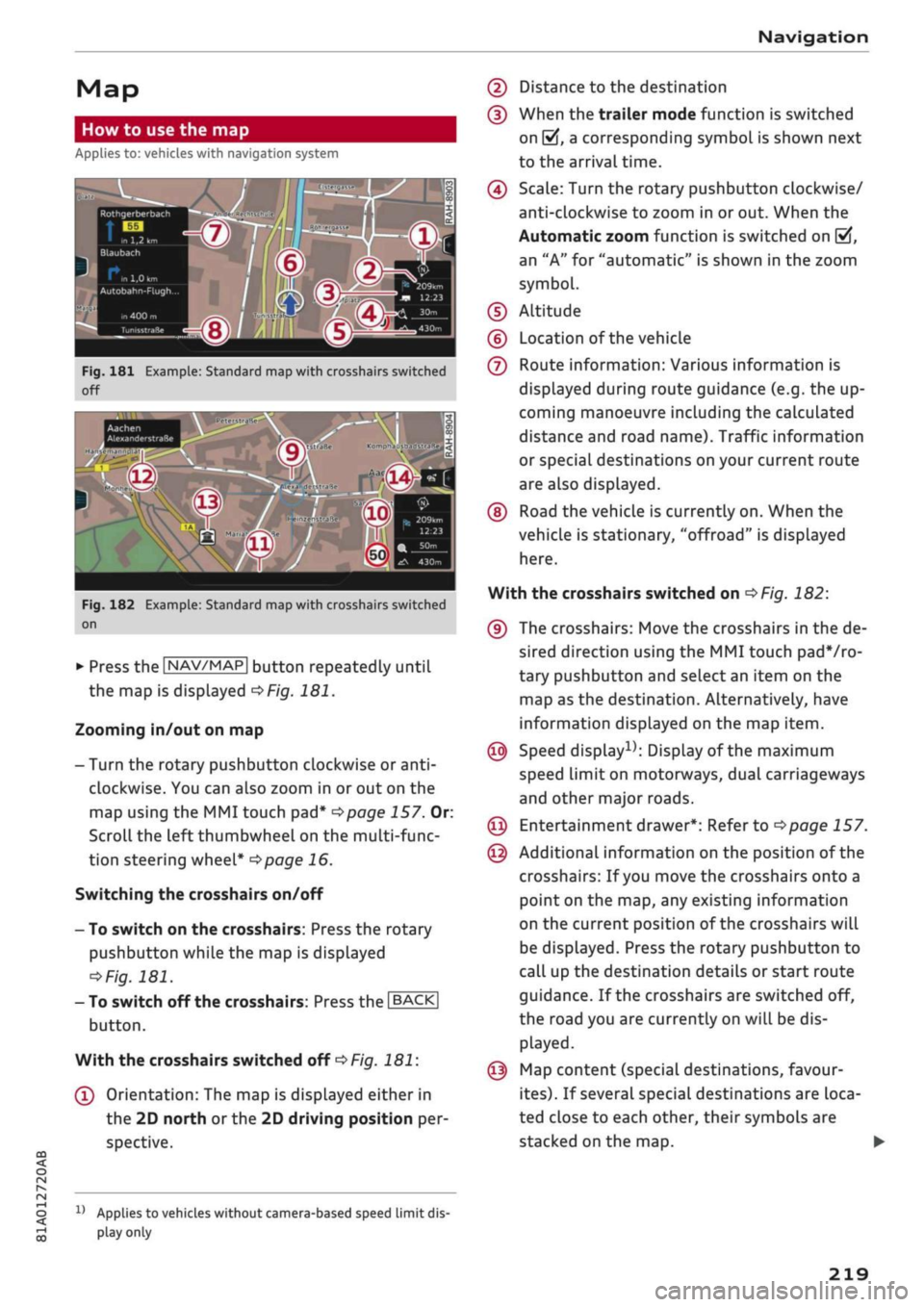
181 Example: Standard map with crosshairs switched
off
Aachen
AlexanderstraBe Komphausbad da n se m an n pi
a
Fig.
182 Example: Standard map with crosshairs switched
on
•
Press the |NAV/MAP| button repeatedly until
the map is displayed
^Fig.
181.
Zooming in/out on map
- Turn the rotary pushbutton clockwise or
anti
clockwise. You can also zoom in or out on the
map using the MMI touch
pad*
^>page
157. Or:
Scroll the left thumbwheel on the multi-func
tion steering wheel*
^>page
16.
Switching the crosshairs on/off
- To switch on the crosshairs: Press the rotary
pushbutton while the map is displayed
^Fig.
181.
- To switch off the crosshairs: Press the |BACK|
button.
With the crosshairs switched off
•=>
Fig.
181:
(l)
Orientation: The map is displayed either in
the 2D north
or
the 2D driving position per
spective.
1J
Applies to vehicles without camera-based speed limit
dis
play
only
(2) Distance to the destination
(D When the trailer mode function is switched
on
[vj,
a corresponding symbol is shown next
to the arrival time.
(4) Scale: Turn the rotary pushbutton clockwise/
anti-clockwise to zoom in or out. When the
Automatic zoom function is switched on
(vf,
an "A" for "automatic" is shown in the zoom
symbol.
(D Altitude
(?) Location of the vehicle
(7) Route information: Various information is
displayed during route guidance (e.g. the up
coming manoeuvre including the calculated
distance and road name). Traffic information
or special destinations on your current route
are also displayed.
(D Road the vehicle is currently on. When the
vehicle is stationary, "offroad" is displayed
here.
With the crosshairs switched on
^>Fig.
182:
(9) The crosshairs: Move the crosshairs in the de
sired direction using the MMI touch padVro-
tary pushbutton and select an item on the
map as the destination. Alternatively, have
information displayed on the map item.
© Speed display1); Display of the maximum
speed limit on motorways, dual carriageways
and other major roads.
© Entertainment drawer*: Refer to
^page
157.
© Additional information on the position of the
crosshairs: If
you
move the crosshairs onto a
point on the map, any existing information
on the current position of the crosshairs will
be displayed. Press the rotary pushbutton to
call up the destination details or start route
guidance. If the crosshairs are switched off,
the road you are currently on will be dis
played.
© Map content (special destinations, favour
ites).
If several special destinations are loca
ted close to each other, their symbols are
stacked on the map.
219
Page 224 of 364
Navigation
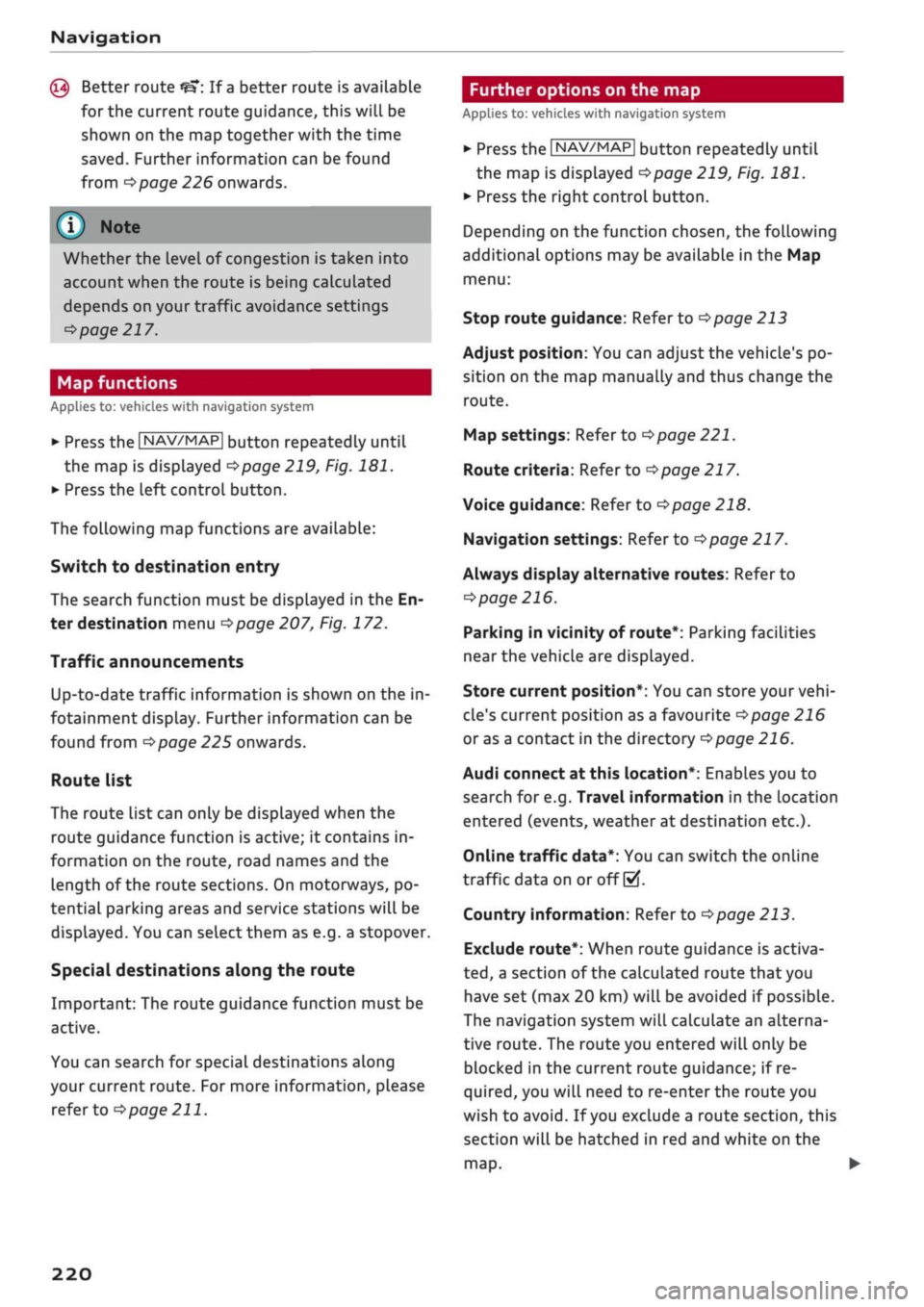
© Better route
If
a
better route is available
for the current route guidance, this will be
shown on the map together with the time
saved.
Further information can be found
from
^>page
226 onwards.
Further options on the map
Applies to: vehicles with navigation system
©
Whether the level of congestion is taken into
account when the route is being calculated
depends on your traffic avoidance settings
<=>
page 217.
Map functions
Applies to: vehicles with navigation system
•
Press the |NAV/MAP| button repeatedly until
the map is displayed
•=>page
219, Fig. 181.
•
Press the left control button.
The following map functions are available:
Switch to destination entry
The search function must be displayed in the En
ter destination menu
•=>page
207, Fig. 172.
Traffic announcements
Up-to-date traffic information is shown on the in
fotainment display. Further information can be
found from
^page
225 onwards.
Route list
The route list can only be displayed when the
route guidance function is active; it contains in
formation on the route, road names and the
length of the route sections. On motorways, po
tential parking areas and service stations will be
displayed.
You can select them as e.g. a stopover.
Special destinations along the route
Important: The route guidance function must be
active.
You can search for special destinations along
your current route. For more information, please
refer to
opage
211.
»•
Press the |NAV/MAP| button repeatedly until
the map is displayed
^>page
219, Fig. 181.
•
Press the right controL button.
Depending on the function chosen, the following
additional options may be available in the Map
menu:
Stop route guidance: Refer to
^>page
213
Adjust position: You can adjust the vehicle's po
sition on the map manually and thus change the
route.
Map settings: Refer to
^>page
221.
Route criteria: Refer to
•=>page
217.
Voice guidance: Refer to
^>page
218.
Navigation settings: Refer to
<=>page
217.
Always display alternative routes: Refer to
<=>page
216.
Parking in vicinity of route*: Parking facilities
near the vehicle are displayed.
Store current position*: You can store your
vehi
cle's current position as a favourite
opage
216
or as a contact in the directory
<^page
216.
Audi connect at this location*: Enables you to
search for e.g. Travel information in the location
entered (events, weather at destination etc.).
Online traffic data*: You can switch the onLine
traffic data on or off
(vf.
Country information: Refer to
^>page
213.
Exclude route*: When route guidance is activa
ted,
a section of the calculated route that you
have set (max 20 km) will be avoided if possible.
The navigation system will calculate an alterna
tive route. The route you entered will only be
blocked in the current route guidance; if re
quired,
you will need to re-enter the route you
wish to avoid. If
you
exclude a route section, this
section will be hatched in red and white on the
map.
•
220
Page 225 of 364
Navigation
Adjust route*: Move your finger
over
the MMI
touch padVrotary pushbutton to adjust the route
on the overview map.
Map settings
Applies
to: vehicles with navigation system
•
Press the
|NAV/MAP|
button repeatedly until
the map is displayed.
•
Select: right control button > Map settings.
Depending on the function seLected, you can use
the following settings:
Map colours
day/night: The map is displayed with a
Light/dark
background colour.
automatic: The colour of the map changes to
match the current light conditions (e.g. from day
to night when driving through tunnels).
Map display
Standard: Refer to
opage
219, Fig. 182.
Google Earth*: Refer to
^>page
222, Fig. 183.
Traffic*1);
Refer to
^>page
225, Fig. 187.
Map orientation
destination: The map indicates the destination
and is set to face north.
2D driving position/2D north map: The map de
picts the vehicle's current position. The map is
set to face the direction of travel or north.
3D driving position*: The current vehicle
posi
tion is displayed in a three-dimensional map, and
the map is set to face the direction of
travel.
If
the map scale is more than 100 km, the map is
set to
face north.
overview: The entire route from the vehicle
posi
tion to the final destination or next stopover is
displayed on the map. The map scale varies ac
cording to the Length of the route and is adapted
automatically. The map is set to face north.
Route information
The display of route information such as the
street you are currently on, upcoming turn-offs,
traffic information or special destinations on the
current route can be switched on/off.
Automatic zoom
on:
The map scale is adjusted automatically ac
cording to the category of the road you are on
(motorway, major
road,
other road) to ensure
that
you always have the best possible overview
of the route ahead. When there is an upcoming
turn-off, the map display will also be automati
cally adjusted so that you have a more detailed
view.
intersection: When route guidance is active and
there are upcoming turn-offs, the map dispLay
will temporarily switch to a more detailed scale
so that the road layout can be identified more
easily.
off: The map scale you have set will remain
unal
tered.
Map content
The dispLay of map content such as weather in
formation,
traffic information or favourite desti
nations can be switched on and off.
The weather* is shown on the map if the scale is
set to 5 km or more
^>page
216, Fig. 179.
CO
rN
IV
rN
t-H
o <
x)
This function is not available in the Mexican market.
221
Page 226 of 364

Navigation
Google Earth map
dispLay
Applies
to: vehicles with navigation system and Audi connect
(infotainment)
You
can have the map display satellite images
using the Google Earth map
display.
•• :•-:•
Fig.
183 Example: Google Earth map display
Ï7
--•
•
III
:•:•
in
in
Fig.
184 Example: Google Earth map display with Google
Street
View
Important: The requirements for Audi connect
(infotainment) must be met
^>page
191.
*•
Press the |NAV/MAP| button repeatedly until
the map is displayed.
*•
Select: right control button > Map settings >
Map display
>
Google Earth.
For this map dispLay the system uses data pack
ets received online in the form of satellite pic
tures and combines these pictures with the road
network from the Standard map display. The
MMI has 2 GB of flash memory for temporarily
storing the map/navigation data received online
(corresponds to map/navigation data for about
4000 km of route guidance). You can also use the
loaded satellite pictures for route guidance
with
out an active data connection as long as these
pictures are stored.
Google
Street View
With Google Street View, you can explore many
locations all over the world virtually from the
perspective of
a
pedestrian. Google Street View is
available as soon as the
symbol®
^>Fig.
183 is
shown in crosshairs mode.
To start Google Street View: Turn the rotary
pushbutton to select
a
scale below 30 m.
The following options are available:
-To explore a destination step-by-step: Press
the rotary pushbutton when the
symbol @
^>Fig.
184 is visible.
- To zoom in/out of the current display (up to
4x):
Turn the rotary pushbutton to the left/
right
(D'=>F/g.JS4.
- To navigate in the street view: Move your
fin
ger in the desired direction on the MMI touch
pad*
or move the rotary pushbutton in the de
sired direction.
Additional information
In the Map content menu
^>page
221, you can
activate the function to show additional informa
tion on the infotainment display. To show the ad
ditional information move the crosshairs onto an
item on the map and press the rotary pushbut
ton.
(i) Note
- You can delete the data stored by the Goo
gle Earth map dispLay by selecting Factory
settings
>
Navigation and online memory
•=>
page 256.
- Google Earth is an Audi connect infotain
ment service that is updated at regular in
tervals when it is called up. This can take a
few seconds.
-When the Google Earth 3D map display is
switched on, the map display automatically
switches to the 2D map while you are driv
ing through a tunnel.
- For safety reasons, the Google Street View
functions cannot be used while the vehicle
is moving.
- Please always note the information in the
chapter
^>page
204, General notes on Audi
connect (infotainment).
- Further information can be found on the In
ternet at www.audi.com.
222
Page 227 of 364

Navigation
Map
update
CO
< o rN
r^
rN
t-H
O
<
Introduction
Applies to: vehicles with navigation system
There are severaL different ways of updating the
map:
- Map updates via the online map update* func
tion
^
page 223.
- Map updates via the online map update* func
tion
•=>
page 223
1).
- Importing a map update to your MMI using an
SD card*
1).
Further information can be found
on the Internet at my.audi.com.
- Map update at your Audi dealer, who may
charge for this service.
Online map update
Applies to: vehicles with navigation system and Audi connect
(infotainment)
With the online map update function you can up
date the map material
of
your navigation system
directly in the vehicle.
New navigation database
-S>
Eastern Europe
An update is available for your destination
region (Eastern Europe).
"\
Updates can also be downloaded from
' my.audi.com and installed via an SD
card.
Switch to online update
Fig.
185 Example: Display of
a
new online map update
Eastern Europe
—>
Recommended regions
| Belarus
3,3 MB
O
O
j
T
m
Albania 18,2 MB
D
Packets required OB
Start download
Cancel
Fig.
186 Example: Selection of
a
country package
Important:
The requirements for Audi connect infotainment
services must be met
<=>page
191.
x)
This function is not available in the Mexican market.
You must have a myAudi account and have added
your vehicle to it.
The MMI uses the vehicle's position to establish
which regions you are most often in. The MMI
uses this information to suggest update pack
ages for these regions if any are available
<*Fig.
185.
•
Select and confirm
(T)
Switch to online update
oFig.
185 when the message informing you of
a new map update appears on the infotainment
display. Or:
•
Select:
IMENU|
button > Settings > left control
button > System maintenance > System up
date > Online update.
A list of the available update packages is shown
on the infotainment display
^>Fig.
186.
Selecting online map update
- Select an update package from the list
(5f).
If
update packages with a large volume of data
are available for certain countries (e.g. France),
you can choose to update individual regions
(e.g.
only southern France).
- Press the
I
BACK
|
button to confirm your selec
tion and return the list of available update
packages.
Starting download
- Select and confirm Start download.
- Confirm the safety query by selecting Start
download again.
The update packages will be downloaded, and
the download status will be shown on the info
tainment display.
Installing online map update
The installation of the downloaded maps only oc
curs after the vehicLe has been parked. The new
update packages are installed after the ignition is
switched off. When you restart the MMI, a mes
sage indicating
that
the updates have been in
stalled successfully will appear on the infotain
ment dispLay.
- Confirm the successful update with OK.
223
Page 228 of 364

Navigation
The
new
maps
can now be
used
for
navigation.
© CAUTION
If
you
cancel
a
map
update download,
the da
ta already downloaded
is
permanently
de
leted.
The
appropriate update package can
be
downloaded again
by
selecting
the
]MENU|
button > Settings > left control button
>
Sys
tem maintenance > System update.
© Note
- Please always note
the
information
in the
chapter
^>page
191,
Audi connect (infotain
ment).
- Because
of
the high level
of
data usage
when downloading large country update
packages
or the
entire package,
we
recom
mend that
in
these cases you download
the
data
on
your computer from your myAudi
account, save them
on an
SD card
and
then
import them
to
your
MMI
system. Further
information
can
be found
on the
Internet
at
my.audi.com.
- Please always note
the
information
in the
chapter
^>page
204,
General notes
on
Audi
connect (infotainment).
myAudi special
destinations
Introduction
Applies
to:
vehicles with navigation system
You
can
import your myAudi special destinations
in
two
ways:
- Importing myAudi special destinations
via the
online update*
^page
224.
- Importing myAudi special destinations
to the
MMI using
an SD
card. Further information
can
be found
on the
Internet
at
my.audi.com.
myAudi special destinations (online
update)
Applies
to:
vehicles with navigation system
and
Audi connect
(infotainment)
You
can download your myAudi special destina
tions from your myAudi account while
in the
ve
hicle
and
use them
for
route guidance.
Important:
You must have a myAudi account and have stored
myAudi special destinations.
You must have already sent myAudi special desti
nations from myAudi
to
your vehicle.
This function
is not
available
in the
Mexican
market.
•
Select:
|NAV/MAP|
button > left control button
> Special destinations
>
myAudi special desti
nations.
•
If
you
have already imported myAudi special
destinations, select
the
right control button
>
Import myAudi special destinations.
•
Log in
with your myAudi user data/myAudi
PIN
if necessary.
The
update sources available will
be listed
on the
infotainment display.
•
Select and confirm Online update.
Selecting myAudi special destinations
to
import
- SeLect
all the
myAudi special destinations
de
sired from
the
list
((vft.
- Select and confirm Start download.
Starting download
The size
of
the myAudi special destinations selec
ted
is
shown
on the
infotainment dispLay.
- Confirm
the
download again
by
selecting Start
download.
The myAudi special destinations will
be
downloa
ded,
and the
download status will
be
shown
on
the infotainment display.
- To finish importing
the new
myAudi special
destinations, confirm
the
update
by
selecting
OK.
•
224
Page 229 of 364
Navigation
CO
â
rN
r^
rN
•-H
•H
00
Activating myAudi
special
destinations in the
map view
The myAudi special destinations must now be ac
tivated in the map display so that they can be
used for the navigation system.
Traffic information (TMC/TMCpro*)
Applies to: vehicles with navigation system
- Select: |NAV/MAP| button > right control but
ton > Map settings
>
Map content. The impor
ted myAudi special destinations are Listed and
can be identified by the list names you assigned
to them.
- SeLect all myAudi special destinations that you
would like to be shown in the map dispLay.
- Press the
I
BACK|
button.
The selected myAudi special destinations are now
displayed in the map view and can be used for
route guidance.
Please always note the information in the
chapter
opage
204, General notes on Audi
connect (infotainment).
Calling
up
traffic
information
Dynamic traffic avoidance
Applies to: vehicles with navigation system
Using the traffic information received via TMC/
TMCproVonline
-
depending on availability - you
can have the MMI guide you past traffic obstruc
tions whenever possible. For this, the traffic
avoidance must be switched on
^>page
217.
(T) Note
The "Traffic information" function is not avail
able for the markets of the Gulf Cooperation
Council (GCC) member states or for the Mexi
can market.
Map:
Traffic messages
*?
A
better route
is
available Time saving: 30 min
Nùrnberg ^
Halle/Leipzig
NUrnberg •*
Halle/Leipzig
A. in
122 km
Nurnberg -•
Halle/Leipzig
Fig.
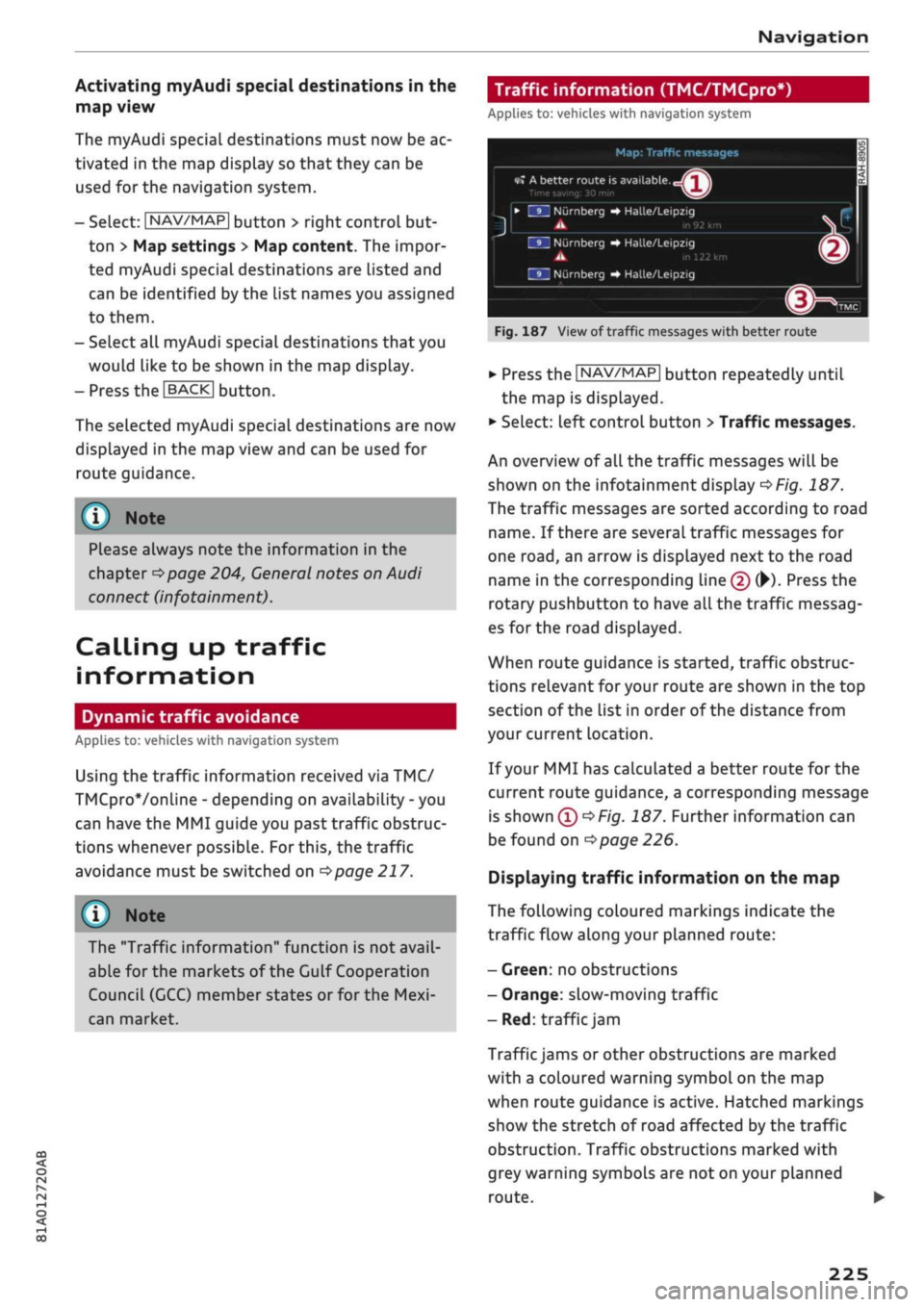
187 View of traffic messages with better route
*•
Press the |NAV/MAP| button repeatedly until
the map is displayed.
•
Select: left control button
>
Traffic messages.
An overview
of all
the traffic messages will be
shown on the infotainment dispLay
^>Fig.
187.
The traffic messages are sorted according to road
name.
If
there are several traffic messages for
one
road,
an arrow is displayed next to the road
name in the corresponding line
(f)
(•)•
Press the
rotary pushbutton
to
have all the traffic messag
es for the road displayed.
When route guidance is started, traffic obstruc
tions relevant for your route are shown in the top
section of the list in order of the distance from
your current location.
If your MMI has calculated a better route for the
current route guidance, a corresponding message
is
shown
(T)<=>F/g.
187. Further information can
be found on
^>page
226.
Displaying traffic information on the map
The following coloured markings indicate the
traffic flow along your planned route:
-
Green:
no obstructions
- Orange: slow-moving traffic
- Red: traffic
jam
Traffic jams or other obstructions are marked
with a coloured warning symbol on the map
when route guidance is active. Hatched markings
show the stretch of road affected by the traffic
obstruction. Traffic obstructions marked with
grey warning symbols are not on your planned
route.
•
225
Page 230 of 364

Navigation
All traffic jams or other obstructions are marked
with a coloured warning symbol on the map
when route guidance is not active.
You can adjust the settings for the display of the
coloured markings, warning symbols etc. in the
Map content menu
^>page
221.
Reception of traffic information is also indicated
by the
[TMc1/|TMCpro|*/|ONLiNE>
symbol in the
status Line of the infotainment display
(f)
OFig.
187.
- Urgent traffic information, such as a car
travelling in the wrong direction on the mo
torway, is displayed automatically. To hide
the traffic information, press the |BACK|
button or the rotary pushbutton.
- The "Traffic information" function is not
available for the markets of the Gulf Coop
eration Council (GCC) member states or for
the Mexican market.
Better route
Applies to: vehicles with navigation system
By
receiving traffic information via
TMC,
your
MMI calculates a better route (if
one
is availa
ble) and any possible time saving for the current
route guidance.
You
can then choose which route
you would like to use.
•
Press the |NAV/MAP| button repeatedly until
the map is displayed.
Important: The route guidance function must be
active.
Dynamic traffic avoidance must be set to manual
•=>poge 217
and the map must be displayed.
If your MMI has calculated a better route
for
the
current route guidance, the message A better
route is
available,
and the time saving will be
displayed on the map. In the map view, the
symbol
^page
219, Fig. 182
draws
your atten
tion to a better route.
Using a better route
- Press the rotary pushbutton. Or: Select the left
control button
>
Traffic messages. The better
route will be displayed along with your calcula
ted arrival time.
- SeLect and confirm the better route.
- The better route will be used for the continuing
route guidance.
Online traffic information
Applies to: vehicles with navigation system and Audi connect
(infotainment)
The
MMI system can receive real-time informa
tion from the Internet regarding traffic conges
tion, accidents, roadworks and other incidents.
Important: The requirements for Audi connect
(infotainment) must be met
^>page
191.
•
Press the |NAV/MAP| button repeatedly until
the map is displayed.
•
Select: right control button
>
Online traffic da
ta on (ED.
- To switch on the traffic map display: To have
the traffic information displayed in the best
possible way, select the
I
NAV/MAP]
button >
right control button > Map settings
>
Map dis
play
>
Traffic.
You can also have the traffic information dis
played on the Google Earth map
^>page
222 or
the standard map
•=>page
219, Fig. 181.
If online traffic information cannot be received,
the traffic information will automatically be re
ceived via
|TMC|/|TMCpro|» ^>
page 225.
Prayer
compass*15
Applies to: vehicles with prayer compass
Important: The display must be set to the map
view
<=>page
219.
- SeLect: Left controL button > Mecca. The direc
tion of prayer in relation to the current vehicle
position will then be shown on the infotain
ment display.
11
This function is only available
for
the markets of the Gulf
Cooperation Council (GCC) member states.
226
Page 231 of 364
Navigation
- Please always note the information in the
chapter
^>page
204, General notes on Audi
connect (infotainment).
- Every vehicle with active Online traffic data
contributes to specifying and predicting the
traffic situation as precisely as possible. For
this purpose, information on the position of
your vehicle is encrypted and transmitted
anonymously to the traffic data providers at
regular intervals. Should you not wish this
to happen, you can switch off the online
traffic information function at any time.
- The online traffic information network is
not yet available in all countries or areas.
Further information can be found on the In
ternet at www.audi.com.
CO
rN
r^
rN
•-H
00
Troubleshooting
Applies to: vehicles with navigation system
Subject
Search function: The desired des
tination cannot be found.
Advice
The destination may not be stored in the navigation database. Or:
Check that you have spelt the search term correctly and that the
desired country has been selected for the search function via the
Country selection option
^>page
213.
227
Page 233 of 364
Radio
Further options
• Select: |RADI0| button > right control button.
The following options may be available to you de
pending on the waveband:
- Sound settings: Refer to
^>page
260.
- Store as favourite: Refer to
^>page
231, Fa
vourites.
-Tag this song for
iTunes*:1)2)
Connect your Ap
ple device to the Audi music interface*. Select
and confirm Tag this song for iTunes. The track
that is currently playing will be copied to your
Apple device. Synchronise your Apple device
with iTunes. The next time you call up your
iTunes library, the tagged tracks
wiLl
be dis
played.
If no Apple device is connected, the
tagged tracks will be stored temporarily on the
MMI system (max.
50
tracks). As soon as you
connect your Apple device to the Audi music in
terface, the tags will be imported to the device.
- Programme
guide*:3'
The current and next ra
dio programmes are Listed in the digital pro
gramme guide* for all supported stations. Se
lect and confirm a radio programme to have
more details on the programme displayed.
- Manual station search:4' The frequency bar is
displayed.
Select and confirm the desired
fre
quency.
- Seek:5' The previous/next receivable frequency
will be set.
- Radio settings: Refer to
^>page
231.
Announcements
• Select: |RADI0| button > right control button >
Announcements.
Traffic
announcements*:6'
- off: Traffic announcements are not played.
- FM: Traffic announcements can be received via
FM and played
by
the system irrespective of the
selected waveband.
- FM/DAB*: You receive traffic announcements
from both wavebands. If DAB traffic announce
ments are not available from the station cur
rently set, they will be received from the FM
waveband.
DAB announcements*:6'
Depending on station availability, information
(e.g.
news, weather information) may be played
when the function
Fvf
is switched on.
Volume of announcements:6'
Refer to
•=>page
261.
Radio text
• Select: [RADIO] button > left control button > a
waveband (e.g. FM) > a station.
*•
Select: right control button > Radio text.
Additional information on the programme (e.g.
artist, composer, track) is shown.
To browse radio text entries: Turn the rotary
pushbutton clockwise or anti-clockwise.
Important: A radio text entry must be displayed,
and the station must be transmitting a telephone
number, navigation destination or a text mes
sage number as Radio Text Plus information.
If a location, telephone number or text message
number has been stored for a radio text entry,
the entry will be displayed with a coloured frame.
The following options are available:
CallVStart route guidanceVWrite text mes
sage*:
- Select a radio text entry with Radio Text Plus in
formation and press the rotary pushbutton.
CO
<
O
rN
IV
rN
t-H
o <
W
This function is only available in the Mexican market.
2'
Still under development at the time of print.
3)
Not in the FM, AM station lists
4)
Not in the DAB* waveband or in the mixed FM/DAB* sta
tion list.
5)
Not in the mixed station list FM/DAB*
6)
This function is not available in the Mexican market.
229