172 AUDI Q2 2021 Owner´s Manual
[x] Cancel search | Manufacturer: AUDI, Model Year: 2021, Model line: Q2, Model: AUDI Q2 2021Pages: 364, PDF Size: 87.77 MB
Page 5 of 364
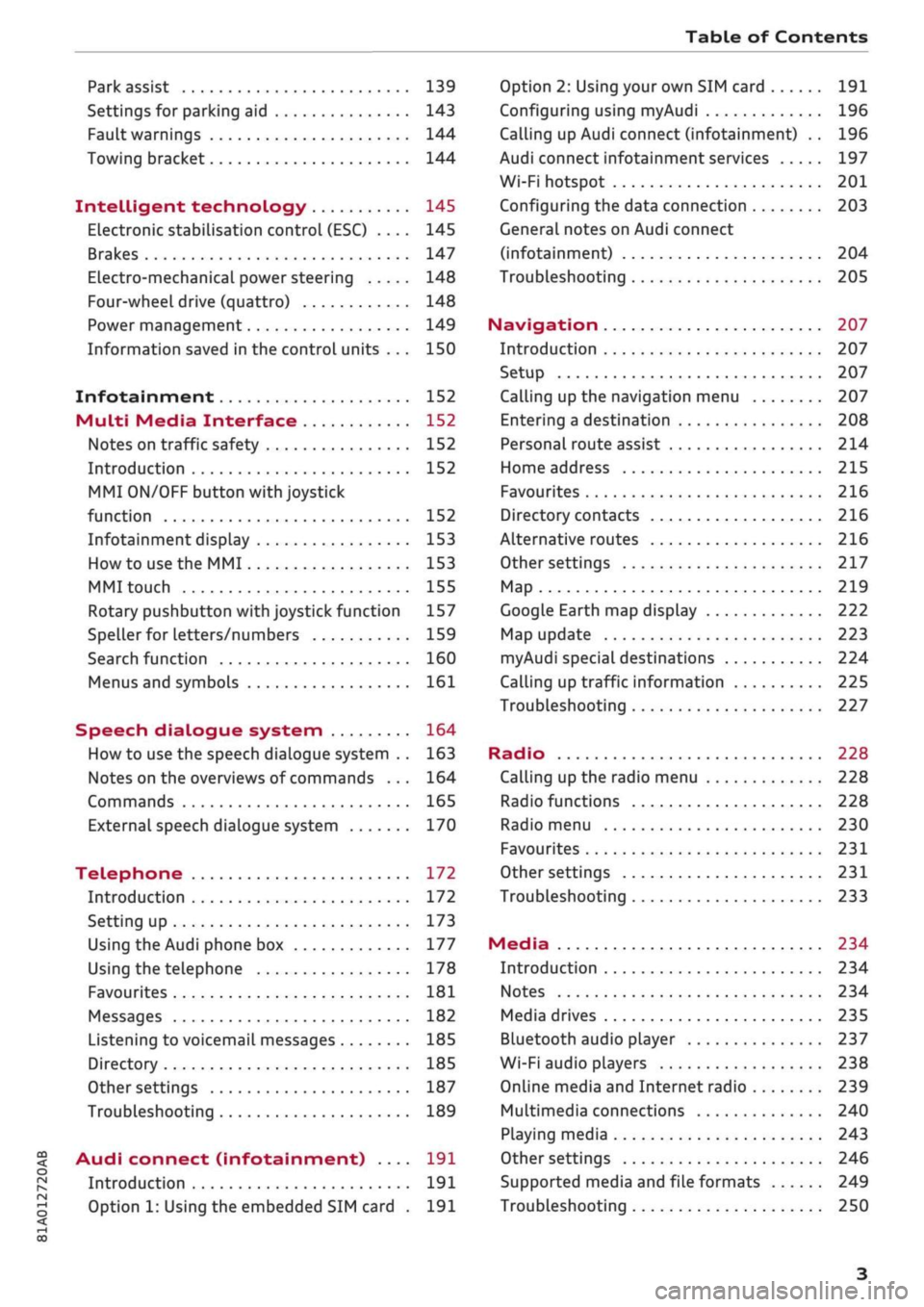
Table of Contents
CO
< o
rN
r^
rs
t-H
O
<
•H
00
Park assist 139
Settings for parking aid 143
Fault warnings 144
Towing bracket 144
Intelligent technology 145
Electronic stabilisation control (ESC) .... 145
Brakes 147
Electro-mechanical power steering 148
Four-wheel drive (quattro) 148
Power management 149
Information saved in the control units . . . 150
Infotainment 152
Multi
Media Interface 152
Notes on traffic safety 152
Introduction 152
MMI
ON/OFF button with joystick
function 152
Infotainment display 153
How to use the MMI 153
MMI touch 155
Rotary pushbutton with joystick function 157
Speller for letters/numbers 159
Search function 160
Menus and symbols 161
Speech dialogue system 164
How to use the speech dialogue system .. 163
Notes on the overviews of commands ... 164
Commands 165
External speech dialogue system 170
Telephone 172
Introduction 172
Setting up 173
Using the Audi phone box 177
Using the telephone 178
Favourites 181
Messages 182
Listening to voicemail messages 185
Directory 185
Other settings 187
Troubleshooting 189
Audi connect (infotainment) .... 191
Introduction 191
Option 1: Using the embedded SIM card . 191
Option 2: Using your own SIM card 191
Configuring using
myAudi
196
Calling up Audi connect (infotainment) .. 196
Audi connect infotainment services 197
Wi-Fi hotspot 201
Configuring the data connection 203
General notes on Audi connect
(infotainment) 204
Troubleshooting 205
Navigation 207
Introduction 207
Setup 207
Calling up the navigation menu 207
Entering a destination 208
Personal route assist
214
Home address 215
Favourites 216
Directory contacts 216
Alternative routes 216
Other settings 217
Map 219
Google Earth map display 222
Map update 223
myAudi special destinations 224
Calling up traffic information 225
Troubleshooting 227
Radio 228
Calling up the radio menu 228
Radio functions 228
Radio menu 230
Favourites 231
Other settings 231
Troubleshooting 233
Media 234
Introduction 234
Notes 234
Media drives 235
Bluetooth audio player 237
Wi-Fi audio players 238
Online media and Internet radio 239
Multimedia connections 240
Playing media 243
Other settings 246
Supported media and file formats 249
Troubleshooting 250
Page 174 of 364

Telephone
- Do not carry a mobile phone in your breast
pocket directly over the pacemaker when
the phone is switched on.
-If you suspect interference, switch the
mobile phone off immediately.
- The speech dialogue system*
^>page
164
must not be used in cases of emergency,
since the voice changes in stressful situa
tions.
This could result in a failed or delayed
telephone connection. Always dial emergen
cy numbers manually!
- Switch off your mobile phones in all areas
where there may be a risk of explosion. Re
member that these areas may not always be
adequately marked. Such places are filling
stations, fuel and chemical storage facilities
or transport vehicles and other places where
fumes, chemicals (e.g. from leaking
pro
pane or fuel vapours in vehicles or build
ings) or large quantities of dust particles
(e.g.
from flour, wood or metal) could accu
mulate in the air. This warning also applies
to all other places where you would normal
ly switch off your engine.
- Today's driving conditions require the full
attention of drivers. Please always note the
information in the chapter
^>page
152,
Notes on traffic safety.
Telephone
Introduction
Applies to: vehicles with telephone
You have different options for making calls in
your vehicle via the MMI; this depends on your
vehicle's equipment and the features of your mo
bile phone.
Handsfree operation
After connecting your mobile phone to the MMI
system via Bluetooth, you can operate the hands-
free system and the telephone functions conven
iently via the MMI. Your phone calls will be made
via the antenna of your mobile phone.
With the Audi phone box*, you can use the
vehi
cle's external aerial to make calls. The use of the
external aerial reduces radiation in the vehicle
and also ensures better reception quality
^>page
177.
Car
phone#1)
As part of Audi connect (infotainment)*, the Audi
phone box* includes a car telephone function
which can be used via a separate mini SIM card in
the SIM card reader* or an
rSAP-enabled
mobile
phone.
With the car telephone function, you can
use the vehicle's external aerial to make calls.
The use of the external aerial reduces radiation in
the vehicle and also ensures better reception
quality
^>page
177.
Once a connection has been established success
fully, you can also change the profiles at a later
time.
Refer to
^>page
257, Connection manag
er.
/\
WARNING
-According to health organisations, mobile
phones may interfere with the function of
pacemakers. A minimum distance of 20 cm
should be kept between the mobile phone
aerial and the pacemaker.
Not available in all markets. On vehicles with Audi connect
(infotainment)* and Audi phone
box*
Please always observe the information
^>®in
Wi-Fi hotspot on page 202.
(T)
Note
-The maximum range of the Bluetooth
con
nection is limited to the interior of the
vehi
cle.
The connection can be susceptible to in
terference from other electronic devices.
- For information regarding which Bluetooth
connections and functions your mobile
phone supports, contact your mobile net
work service provider or consult the mobile
device database
at
www.audi.com/blue-
tooth.
•
172
Page 176 of 364

Telephone
mobile network provider via the embedded SIM
card1)
^page
191. Your mobile phone will be
connected via Handsfree only
^>page
172, and
you will not be able to use the car telephone
function*
^>page
172.
•
No: All data connections for all Audi connect in
fotainment services will use your own SIM
card.
All connections via the embedded SIM
card1*
will be disconnected, and you will be able to
use the car telephone function*
^>page
172.
You can now use Audi connect infotainment serv
ices.
Applies to: vehicles with Audi connect (infotainment)
•
You can configure your vehicle's mobiLe Wi-Fi
hotspot*2)
and the Audi connect infotainment
services* immediately after connecting an
rSAP-enabled
mobile phone
^page
191. Or:
Select [TÊT]
button > right control button >
Connection manager
>
right controL button >
Wi-Fi settings.
Using the function Store as default telephone in
the Connection manager, you can store one of
your connected mobile phones as the default
phone
^>page
258.
(T)
CAUTION
Please always observe the information
^©/n
Wi-Fi hotspot on page 202.
- You can adjust further settings for connec
ted mobile phones using the connection
manager
^>page
257.
- You can also search for the MMI system via
the Bluetooth device search function on
your mobiLe phone.
- Bluetooth devices only have to be bonded
once.
Any devices that have already been
bonded to the MMI system are connected
automatically when the Bluetooth function
11
SIM card installed in vehicle at factory.
2'
Not available in all markets.
3)
The number of possible attempts depends on the SIM
card.
is switched on, the devices are within range
of the car and the ignition is on. The mobile
phone last connected is given priority.
-You will need to authorise the MMI connec
tion on your mobile phone to enable auto
matic connection.
- Please note any system queries on your mo
bile phone, e.g. whether the phone should
connect automatically in the future. On
some mobile phones, you may also need to
download the directory and allow access to
your text messages separately.
- You receive the SIM PIN code from your mo
bile network service provider together with
the SIM
card.
If
you
enter the SIM PIN code
incorrectly three
times35
in a row, the SIM
card will be be blocked. A PUK (personal un
blocking key) must be entered in order to
reactivate the SIM
card.
-The Bluetooth connection between the sys
tem and the mobile phone is automatically
terminated when you leave the car. Depend
ing on the mobile phone, telephone calls
may be transferred automatically from the
MMI to your mobile phone so that you can
continue talking.
- For further information regarding your mo
bile phone, contact your mobile network
service provider or refer to the operating in
structions for your mobile phone. For infor
mation on using a phone in your car, please
go online (e.g. www.audi.com/bluetooth)
or ask an Audi dealer.
174
Page 204 of 364
Navigation
Setting a destination from the map (via
MMI touch)
Applies
to: vehicles with navigation system (flash memory)
and
MMI touch pad
A location on the map can be set as a destina
tion.
- To set a convenient map scale: Turn the rotary
pushbutton clockwise or anti-clockwise.
- To activate the crosshairs: Press the rotary
pushbutton. The crosshairs will appear on the
map.
- To move the crosshairs: Use the MMI touch pad
to move the crosshairs to the destination
<^>page
156.
- To use the destination for route guidance:
Press the rotary pushbutton when the cross
hairs are displayed. If
you
wish to set
a
stop
over, select and confirm Set as stopover and
then Start route guidance.
-
To
hide the crosshairs: Press the
|BACK|
button.
Additional information on the point selected
with the crosshairs: If
you
use the crosshairs to
preselect a location on the map, any existing in
formation on this location (e.g. road name, ad
dress or special destinations) will be displayed ©
^>page
219, Fig. 182.
Using home address/favourite as the
destination
Applies
to: vehicles with navigation system
The
home address option is a quick and easy way
to have the system guide you home.
The
favour
ites make it easier to
access
destinations you re
quire regularly.
• Press the
|NAV/MAP|
button repeatedly until
the Enter destination menu is displayed
opage
207, Fig. 172.
Using the home address as the destination
Important: A home address must have been stor
ed
o
page 215.
Your home address is displayed in the Enter des
tination menu
(f) opage
207, Fig. 172.
- SeLect: Home address
>
Start route guidance.
Using a favourite as the destination
Important: At Least one favourite must have been
stored as a destination
<=>page
216.
- Enter at least the first three letters of the de
sired favourite in the entry field for the search
function.
The favourites found will be shown on
the infotainment display (4)
^>page
207,
Fig. 172.
- SeLect and confirm the desired item.
- Select and confirm Start route guidance.
- Further home address settings can be found
on
•=>page
215.
- Further favourites settings can be found on
^>page
216.
Using a destination from the directory
Applies
to: vehicles with navigation system
You
can navigate directly to entries in the direc
tory.
Options — Show contact details
H
^
i
i
C
Fiç
s
Max
Mustermann jy
.
E^
MusterstraGe
4,
54321 Musterstadt [
jr3^^
HauptstraSe
1,
54321
Musterstadt
h ^\
(D) 54321 Musterstadt,
MusterstraBe
^J
0°45'44.5"N,
l°25'30.7'O
•
•=
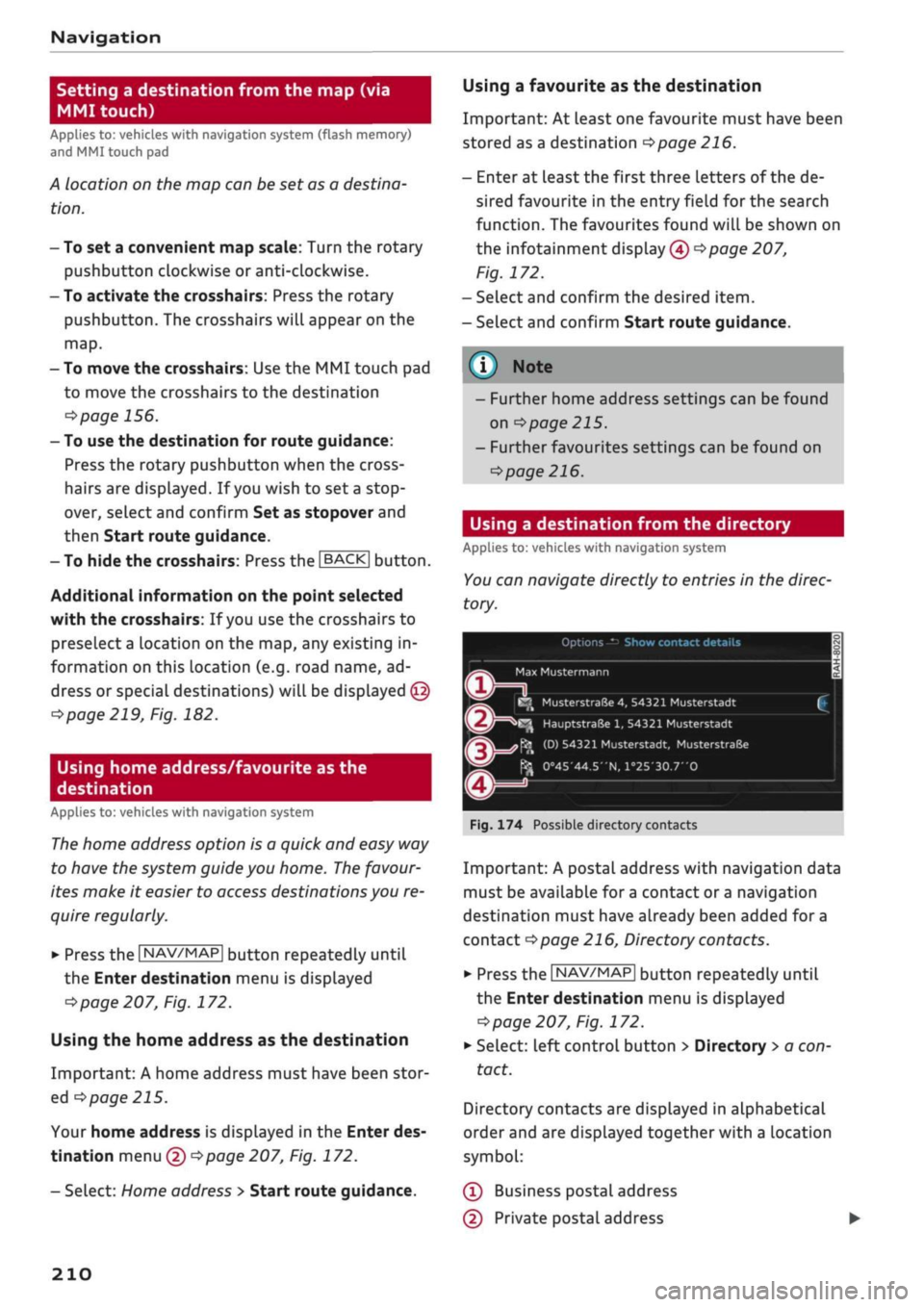
. 174 Possible directory contacts
Important: A postal address with navigation data
must be available for
a
contact or
a
navigation
destination must have already been added for a
contact
Opage
216, Directory contacts.
•
Press the
|NAV/MAP|
button repeatedly until
the Enter destination menu is displayed
^>page
207, Fig. 172.
*•
Select: left control button > Directory
>
a con
tact.
Directory contacts are displayed in alphabetical
order and are displayed together with a location
symbol:
(Î)
Business postal address
(D Private postal address
210
Page 205 of 364

Navigation
(D Business navigation destination
(4) Private navigation destination
- SeLect and confirm a postal address or
a
naviga
tion destination. If
you
select
a
navigation des
tination,
route guidance is started immediate-
iy.
- If
you
select a postal address, you can check the
address details again.
- You can then select and confirm Start route
guidance.
Further directory functions in the navigation sys
tem can be found on
<^>page
216.
- Addresses which you have imported from
your mobiLe phone into the MMI can also be
used as navigation destinations.
- If
a
directory contact is greyed out, no
navi
gation destination/postal address has yet
been added for the contact.
Point of interest search (special
destinations)
Applies
to: vehicles with navigation system
Navigation: enter destination
Search area
Find entry
Select category
Ç myAudi special destinations
H
Petrol station
P parking facilities
in vicinity of destination
Fig.
175 Example: Searching for a special destination
•
Press the |NAV/MAP| button repeatedly until
the Enter destination menu is displayed
•=>
page 207, Fig. 172.
*-
Select: left control button > Special destina
tions.
- To change the search area: Select and confirm
Search area and then a search area from the
list.
The following search categories are available:
In immediate vicinity: You can select special des
tinations from different categories. The special
destinations are displayed in a list, starting with
destinations in the immediate vicinity and going
up to destinations within a radius of 200 km.
In vicinity of route: Special destinations along
the route can only be selected when the route
guidance function is active. The special destina
tions are located directly on or in the immediate
vicinity of your route. You can also select special
destinations from different categories. For exam
ple,
you can look for
a
hotel or
a
car park at the
destination.
In vicinity of destination/In vicinity of stopover:
Special destinations near the
destination/stop
over can only be selected when the route
guid
ance function is active. You can also select special
destinations from different categories. For exam
ple,
you can look for
a
hotel or
a
car park at the
destination.
In new town: SeLect
a
country or search in a new
town.
Enter the name of the desired town. You
can select special destinations from different cat
egories. You can use this function to find special
destinations in any town irrespective of the desti
nation currently set or the vehicle position.
- To find the name of
a
special destination in
the selected search area: Enter the name of the
special destination.
- To search for a special destination in a specific
category: Choose Select category. SeLect and
confirm a category, for example Restaurant.
myAudi special
destinations*1525
In myAudi special destinations, you can find per
sonal special destinations which you have added
in your myAudi account and imported to the MMI
using an SD card or online*
^>page
224.
- To add further myAudi special destinations:
Select the right control button > Import •
CO
<
O
rN
IN
rN
t-H
o
<
^
Important: You must have created a myAudi account at
my.audi.com,
added a vehicle to the account and stored a
destination.
2)
This function is not available in the Mexican market.
211
Page 209 of 364
Audi connect (infotainment)
- Further information on Audi connect (info
tainment) is also available on the Internet
at www.audi.com. For information on the
conditions of your mobile phone contract,
please contact your mobile network service
provider.
- Please also observe the notes in the chapter
^>page
172, Telephone.
Data protection
Applies to: vehicles with Audi connect (infotainment)
© Note
AUDI AC collects, processes, transmits and
uses the personal data you provide in ac
cordance with legal requirements to ensure
that the individual Audi connect infotain
ment services are provided and function
properly. You can use our myAudi platform,
for example, to activate further Audi
con
nect infotainment services and to transfer
data to and from your vehicle. You must
register once in order to be able to connect
your vehicle to the platform. AUDI AC
col
lects,
processes, transmits and uses the
personal data you must provide for the
reg
istration as is necessary to ensure that AUDI
AG can provide the services and
that
you can
use them. Your data are not passed on to
third parties. Using the myAudi platform
and your mobile phone, you can transmit
data to your vehicle for the functions of your
Audi connect infotainment services und al
low certain vehicle data to be transmitted
from your vehicle.
- If
you
activate certain information services
included in your Audi connect (infotain
ment) portfolio, you can use the corre
sponding functions directly in your vehicle
after entering your personal identification
data (for example for access to social net
works). In this case we pass on your identifi
cation data to the corresponding service
provider. You can then access your personal
content via a secure communication chan
nel.
This content is displayed and can be
used in the vehicLe. AUDI AG will not store
your personal content. The necessary
con
nection data are processed and used in ac
cordance with legal requirements to ensure
that the services are provided and function
properly.
- Further information can also be found on
the MMI in the options menu of the Audi
connect infotainment service selected and
on the Internet at www.audi.com.
CO
rN
IN
rN
•-H
00
Troubleshooting
Applies to: vehicles with Audi connect (infotainment)
Subject
Audi connect infotainment serv
ices:
Some Audi connect infotain
ment services are greyed out/not
available.
Wi-Fi hotspot: No Wi-Fi connec
tion is possible.
Wi-Fi hotspot: The data connec
tion is interrupted.
Advice
Before you first use some Audi connect infotainment services, it
is necessary to activate/configure them via your personal myAudi
account. Detailed information can be found on the Internet at
my.audi.com.
Delete all existing Wi-Fi connections on your mobile device and
restart it.
Check whether the Connection to personal hotspot function is
switched on
•=>page
201. Switch the function off when you are
not using a personal hotspot.
205
Page 211 of 364
Navigation
CO
â
rN
IN
rN
•-H
•H
00
Navigation
Introduction
Applies to: vehicles with navigation system
Depending on your vehicle's equipment, the
navi
gation data
for
your navigation system is located
either on the SD card provided or on the internal
flash drive of the MMI. The information given
here always applies to both navigation systems
unless otherwise stated, e.g. "Applies to vehicles
with navigation system (SD card)".
The navigation system is designed for use on
ly with the SD card provided. AUDI AG shall
not accept any liability for the consequences
of the use of other SD cards.
Setup
Applies to: vehicles with navigation system (SD card)
•
Slide the SD card with navigation data (provi
ded) into the slot in the SD card reader until
you feel it engage. The missing corner of the SD
card should be at the front right.
© CAUTION
Do not store the SD card with navigation data
outside of the SD card reader slot (e.g. in the
glove box) for long periods. External factors,
such as excessive heat, may cause data loss.
Audi recommends
that
you make a backup
copy of the SD card and store it in a location
protected from external factors (outside of
the vehicLe).
©
Note
- Please note that the navigation system is
immediately no longer available if the SD
card is removed from the SD card reader.
- Store the SD cards in a suitable case to pro
tect them from dirt and dust and to avoid
damage.
Calling up the navigation
menu
Applies to: vehicles with navigation system
The navigation system guides you directly
to
your
destination, avoiding traffic obstructions and us
ing alternative routes if desired.
Navigation: enter destination
Î5^
Where would you like to go?
f
e.g. "Prague Charles Bridge"
1 Home address
Last destinations
I
Petrol station
<£
2,3 km (D)
M jnchener
StraSe,
Ingolstadt
John Smith
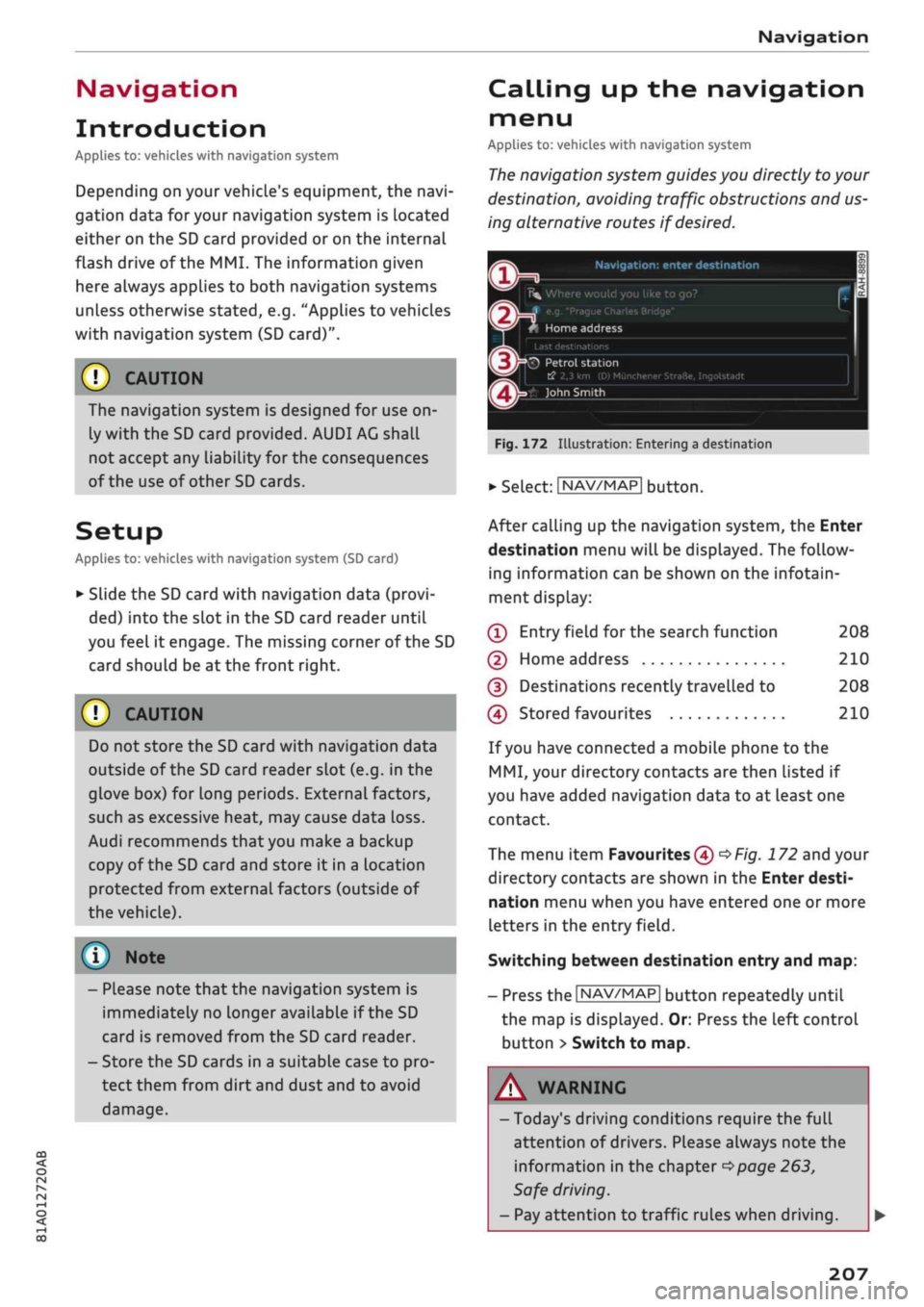
Fig.
172 Illustration: Entering a destination
•
Select: |NAV/MAP| button.
After calling up the navigation system, the Enter
destination menu will be displayed. The follow
ing information can be shown on the infotain
ment display:
(T)
Entry field
for
the search function
(D Home address
(5) Destinations recently travelled to
(Î)
Stored favourites
208
210
208
210
If you have connected a mobile phone to the
MMI,
your directory contacts are then listed if
you have added navigation data to at least one
contact.
The menu item Favourites (4)
^Fig.
172 and your
directory contacts are shown in the Enter desti
nation menu when you have entered one or more
Letters in the entry
field.
Switching between destination entry and map:
- Press the |NAV/MAP| button repeatedly until
the map is displayed. Or: Press the left control
button > Switch to map.
A WARNING
- Today's driving conditions require the full
attention of drivers. Please always note the
information in the chapter
^>page
263,
Safe driving.
- Pay attention to traffic rules when driving.
207
Page 212 of 364

Navigation
- The route calculated by the navigation sys
tem is a recommendation of how best to
reach a destination. Pay attention to traffic
lights,
no stopping signs, lane change re
strictions, one-way streets, etc.
© CAUTION
-Should the navigation directions contradict
the current traffic regulations, you must al
ways follow the traffic regulations.
- The volume should only be set at a level
which enables you to hear distant police and
emergency vehicles clearly - failure to do so
could result in an accident.
© Note
- Snow or other obstructions on the GPS aer
ial or interference caused by trees or large
buildings could affect the reception of the
satellite signals and make positioning
diffi
cult. GPS reception and vehicle positioning
can also be adversely affected by deactiva
tion or a malfunction of several satellites.
- Road names can change; therefore the
names stored on the MMI may be different
from the actual names in exceptional cases.
Entering a destination
Searching for navigation destinations
Applies to: vehicles with navigation system
With the search function, you can use the MMI
touch
pad*
or the speller for letters/numbers to
enter navigation destination information in any
order (e.g. Forest Road 20 London).
You
can
search for special destinations, contacts, recent
destinations or favourites in the same way to
help you navigate to the desired address.
Press the |NAV/MAP| button repeatedly untiL the
Enter destination menu is displayed
opage
207,
Fig. 172.
• Push the rotary pushbutton upwards. The entry
field will be displayed
@ ^>page
207, Fig. 172.
- Enter one or more search terms in the entry
field.
- If appropriate, confirm an autocomplete
sug
gestion*
or a suggested word*. Refer to
^page
159, Speller for letters/numbers.
- Turn the rotary pushbutton clockwise to switch
to the results list.
- Select a destination from the results list and
confirm it.
- Select and confirm Start route guidance.
The route will be displayed as an overview on the
map.
Route guidance is already active.
Narrowing the search area
All countries are preselected for the search func
tion at the factory.
-In the input menu
(T)<=>page207,
Fig. 172, se
lect the right controL button > Country selec
tion.
- Select the country flvj) which you would Like to
search in. This will limit the number of results
and speed up the search. The entry selected in
the country selection menu will be stored.
© Note
- The terms suggested by the MMI depend on
the destinations to which you have recently
driven.
- Up to 50 entries are stored in the list of des
tinations to which you have recently driven.
- For more information on the search func
tion,
please refer to
^>page
160.
Loading last destination
Applies to: vehicles with navigation system
The
destinations you have most recently driven
to are stored automatically and can be loaded
directly as new destinations.
Important: You must have set
a
destination in
the past.
•
Press the |NAV/MAP| button repeatedly until
the Enter destination menu is displayed
opage
207, Fig. 172.
The destinations to which you have recently driv
en are listed directly in the Enter destination
menu under your home address and marked with
the
symbol®^
page
207, Fig. 172. •
208
Page 213 of 364
Navigation
CO
â
rN
IN
rN
•-H
•H
00
- Select and confirm one of the recently set des
tinations from the List.
- Select and confirm Start route guidance.
Deleting recent destinations
- Select and confirm one of the recently set des
tinations from the list.
- Select: right control button > Delete destina
tion > Delete this recent destination or Delete
all recent destinations.
The destination selected or all the recent desti
nations will be deleted and no longer displayed in
the Enter destination menu.
Entering an address
Applies to: vehicles with navigation system
As an alternative to the search function, you can
also enter an address step by step.
•
Press the |NAV/MAP| button repeatedly until
the Enter destination menu is displayed
«*
page 207, Fig. 172.
•
Select: left control button > Enter address.
- To enter a destination via the country: Select
and confirm Country. Select
a
country from the
list and confirm it. Or: Search for
a
country via
the entry
field.
- To enter a destination via the town/post code:
Select and confirm Town/post code. Enter a
town or a post code. Or: Select and confirm a
town from the list.
- Select and confirm additional details for the
destination such as Street, House number or
Centre.
- To enter a destination via an intersection*: Se
lect and confirm Intersection. You must al
ready have entered a street. SeLect
a
street di
rectly from the list and confirm it. Or: Search
fora
street via the entry
field.
- Select and confirm Start route guidance.
Setting a destination from the map (via
rotary pushbutton)
Applies to: vehicles with navigation system (SD card) and ro
tary pushbutton with joystick function
A location on the map can be set as a destina
tion.
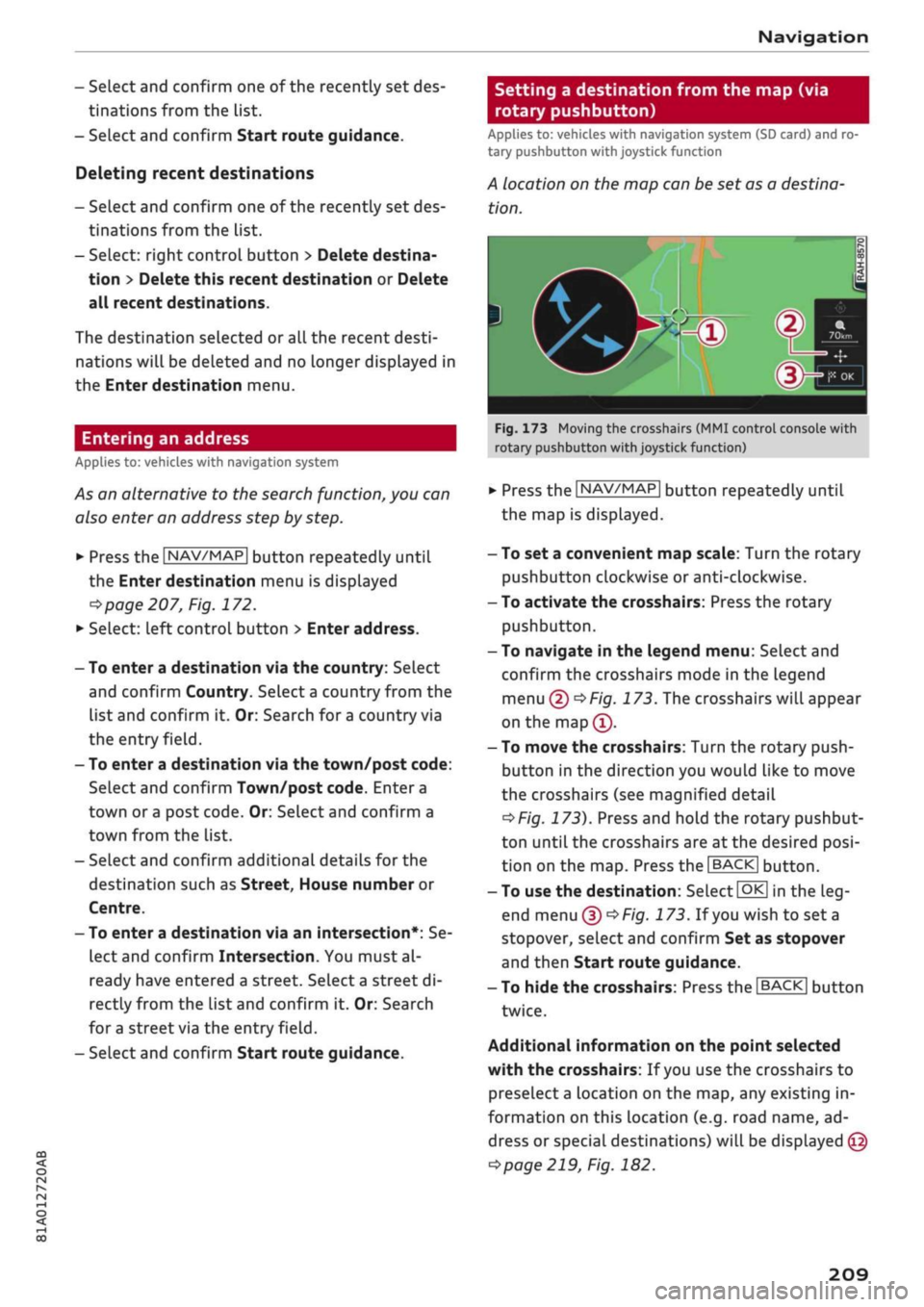
Fig.
173 Moving the crosshairs (MMI control console with
rotary pushbutton with joystick function)
•
Press the |NAV/MAP| button repeatedly until
the map is displayed.
- To set a convenient map scale: Turn the rotary
pushbutton clockwise or anti-clockwise.
- To activate the crosshairs: Press the rotary
pushbutton.
- To navigate in the legend menu: Select and
confirm the crosshairs mode in the legend
menu
(D^F/g.
173. The crosshairs will appear
on the
map(î).
- To move the crosshairs: Turn the rotary push
button in the direction you would like to move
the crosshairs (see magnified detail
^>Fig.
173). Press and hold the rotary pushbut
ton until the crosshairs are at the desired
posi
tion on the map. Press the |BACK| button.
- To use the destination: Select
|QK[
in the
Leg
end menu
(f)^>
Fig.
173.
If you
wish to set a
stopover, select and confirm Set as stopover
and then Start route guidance.
- To hide the crosshairs: Press the
I BACK |
button
twice.
Additional information on the point selected
with the crosshairs: If
you
use the crosshairs to
preselect a location on the map, any existing in
formation on this location (e.g. road name, ad
dress or special destinations) will be displayed ©
<=>page
219, Fig. 182.
209
Page 214 of 364
Navigation
Setting a destination from the map (via
MMI touch)
Applies
to: vehicles with navigation system (flash memory)
and
MMI touch pad
A location on the map can be set as a destina
tion.
- To set a convenient map scale: Turn the rotary
pushbutton clockwise or anti-clockwise.
- To activate the crosshairs: Press the rotary
pushbutton. The crosshairs will appear on the
map.
- To move the crosshairs: Use the MMI touch pad
to move the crosshairs to the destination
<^>page
156.
- To use the destination for route guidance:
Press the rotary pushbutton when the cross
hairs are displayed. If
you
wish to set
a
stop
over, select and confirm Set as stopover and
then Start route guidance.
-
To
hide the crosshairs: Press the
|BACK|
button.
Additional information on the point selected
with the crosshairs: If
you
use the crosshairs to
preselect a location on the map, any existing in
formation on this location (e.g. road name, ad
dress or special destinations) will be displayed ©
^>page
219, Fig. 182.
Using home address/favourite as the
destination
Applies
to: vehicles with navigation system
The
home address option is a quick and easy way
to have the system guide you home.
The
favour
ites make it easier to
access
destinations you re
quire regularly.
• Press the
|NAV/MAP|
button repeatedly until
the Enter destination menu is displayed
opage
207, Fig. 172.
Using the home address as the destination
Important: A home address must have been stor
ed
o
page 215.
Your home address is displayed in the Enter des
tination menu
(f) opage
207, Fig. 172.
- SeLect: Home address
>
Start route guidance.
Using a favourite as the destination
Important: At Least one favourite must have been
stored as a destination
<=>page
216.
- Enter at least the first three letters of the de
sired favourite in the entry field for the search
function.
The favourites found will be shown on
the infotainment display (4)
^>page
207,
Fig. 172.
- SeLect and confirm the desired item.
- Select and confirm Start route guidance.
- Further home address settings can be found
on
•=>page
215.
- Further favourites settings can be found on
^>page
216.
Using a destination from the directory
Applies
to: vehicles with navigation system
You
can navigate directly to entries in the direc
tory.
Options — Show contact details
H
^
i
i
C
Fiç
s
Max
Mustermann jy
.
E^
MusterstraGe
4,
54321
Musterstadt
[
Jr3^^
HauptstraSe
1,
54321
Musterstadt
h ^\
(D) 54321 Musterstadt,
MusterstraBe
^J
0°45'44.5"N,
l°25'30.7'O
•
•=
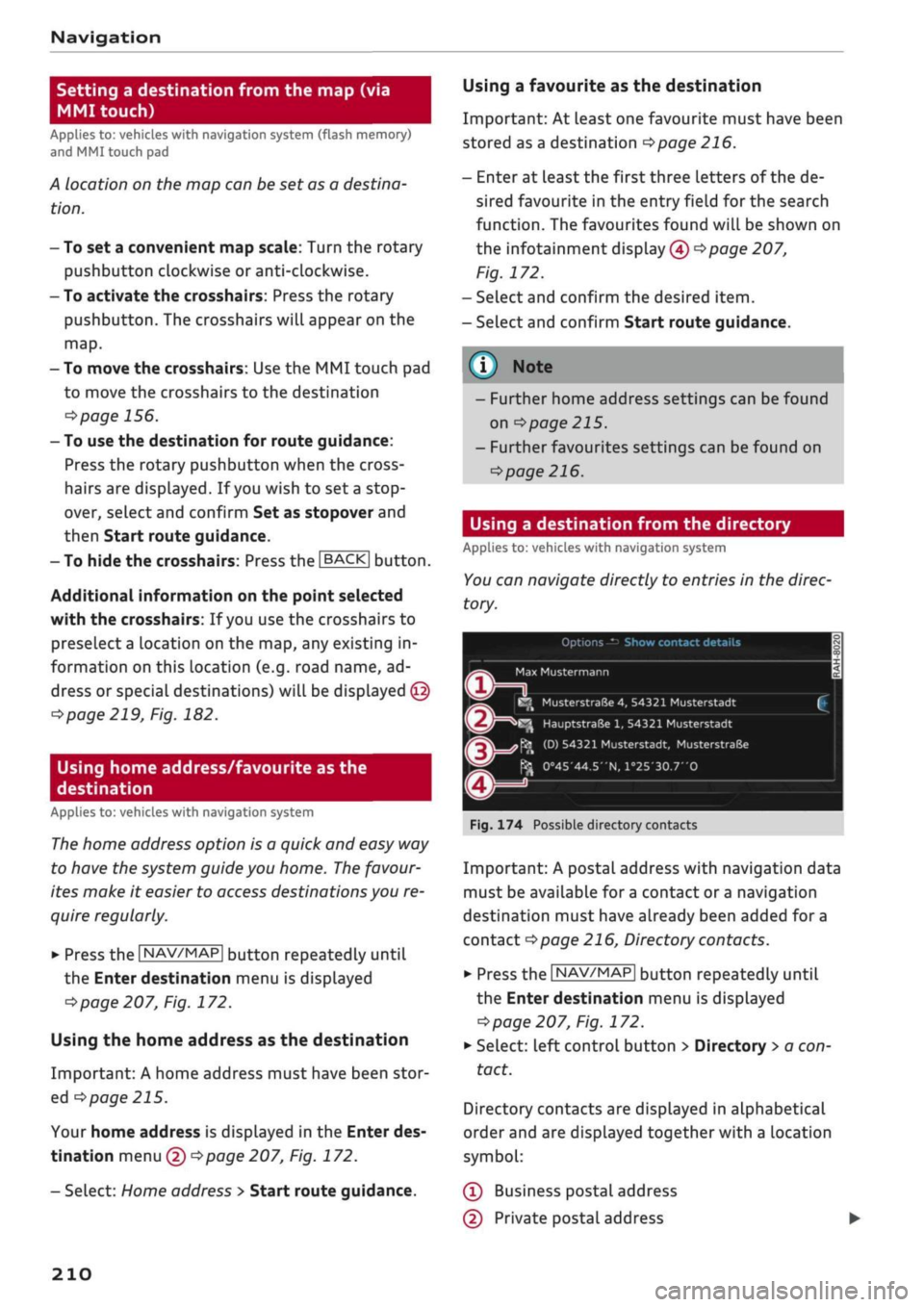
. 174 Possible directory contacts
Important: A postal address with navigation data
must be available for
a
contact or
a
navigation
destination must have already been added for a
contact
Opage
216, Directory contacts.
•
Press the
|NAV/MAP|
button repeatedly until
the Enter destination menu is displayed
^>page
207, Fig. 172.
*•
Select: left control button > Directory
>
a con
tact.
Directory contacts are displayed in alphabetical
order and are displayed together with a location
symbol:
(Î)
Business postal address
(D Private postal address
210