tyre press AUDI Q2 2021 Owner´s Manual
[x] Cancel search | Manufacturer: AUDI, Model Year: 2021, Model line: Q2, Model: AUDI Q2 2021Pages: 364, PDF Size: 87.77 MB
Page 6 of 364
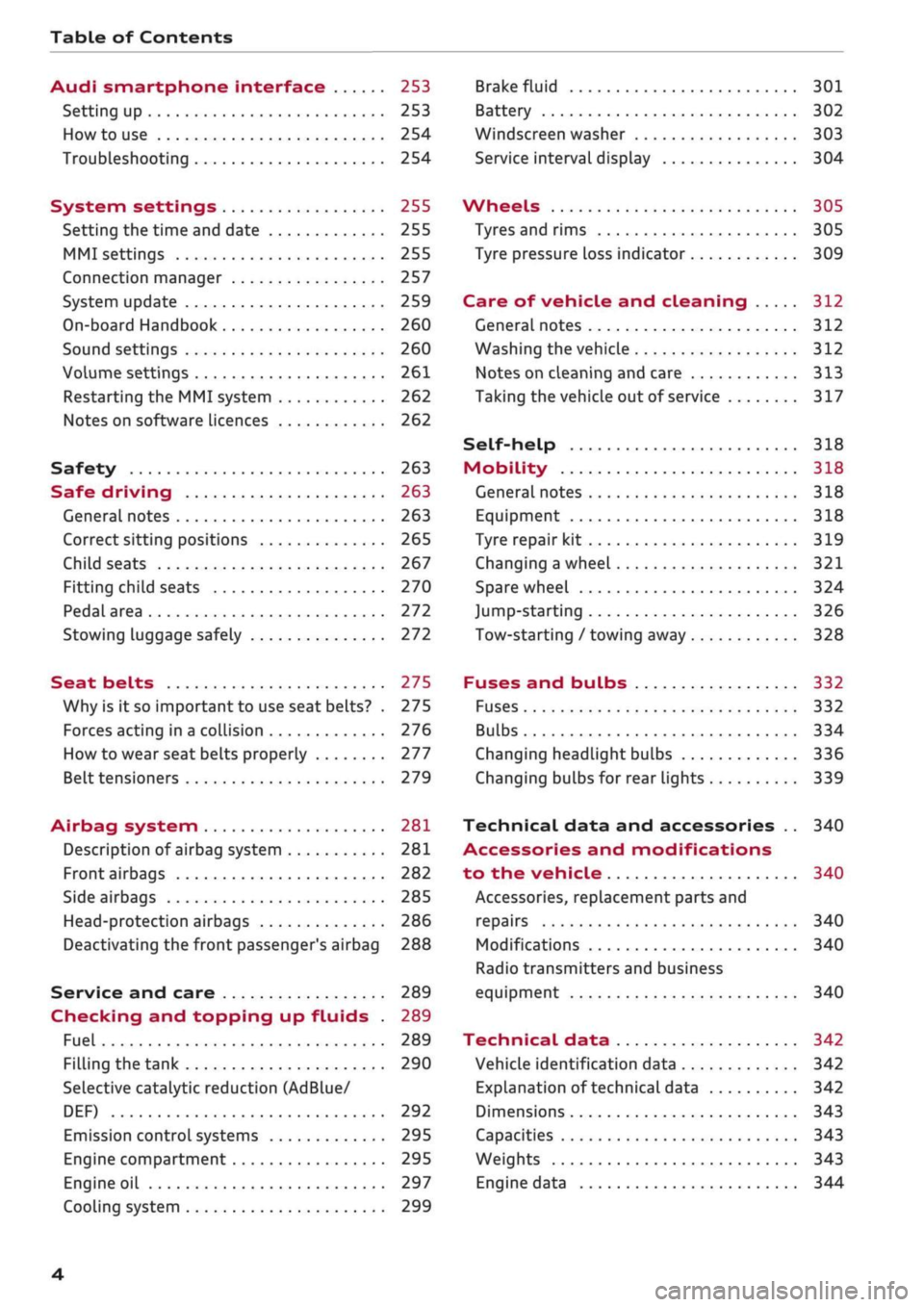
Table of Contents
Audi smartphone interface 253
Setting up
253
How to use 254
Troubleshooting 254
System settings 255
Setting the time and date 255
MMI settings 255
Connection manager 257
System update 259
On-board Handbook 260
Sound settings 260
Volume settings 261
Restarting the MMI system 262
Notes on software licences 262
Safety 263
Safe driving 263
General notes 263
Correct sitting positions 265
Child seats 267
Fitting child seats 270
Pedal area 272
Stowing luggage safely 272
Seat belts 275
Why is it so important to use seat belts? . 275
Forces acting in a collision 276
How to wear seat belts properly 277
Belt tensioners 279
Airbag system 281
Description of airbag system 281
Front airbags 282
Side airbags 285
Head-protection airbags 286
Deactivating the front passenger's airbag 288
Service and care 289
Checking and topping up fluids . 289
Fuel 289
Filling the tank 290
Selective catalytic reduction (AdBlue/
DEF) 292
Emission control systems 295
Engine compartment 295
Engine oil 297
Cooling system 299
Brake fluid 301
Battery 302
Windscreen washer 303
Service interval display 304
Wheels 305
Tyres and rims 305
Tyre pressure loss indicator 309
Care of vehicle and cleaning 312
General notes 312
Washing the vehicle 312
Notes on cleaning and care 313
Taking the vehicle out of service 317
Self-help 318
Mobility 318
General notes
318
Equipment 318
Tyre repair kit 319
Changing a wheel 321
Spare wheel 324
Jump-starting 326
Tow-starting / towing away 328
Fuses and bulbs 332
Fuses 332
Bulbs 334
Changing headlight bulbs 336
Changing bulbs for rear lights 339
Technical data and accessories .. 340
Accessories and modifications
to the vehicle 340
Accessories, replacement parts and
repairs 340
Modifications 340
Radio transmitters and business
equipment 340
Technical data 342
Vehicle identification data 342
Explanation of technical data 342
Dimensions 343
Capacities 343
Weights 343
Engine data 344
4
Page 10 of 364
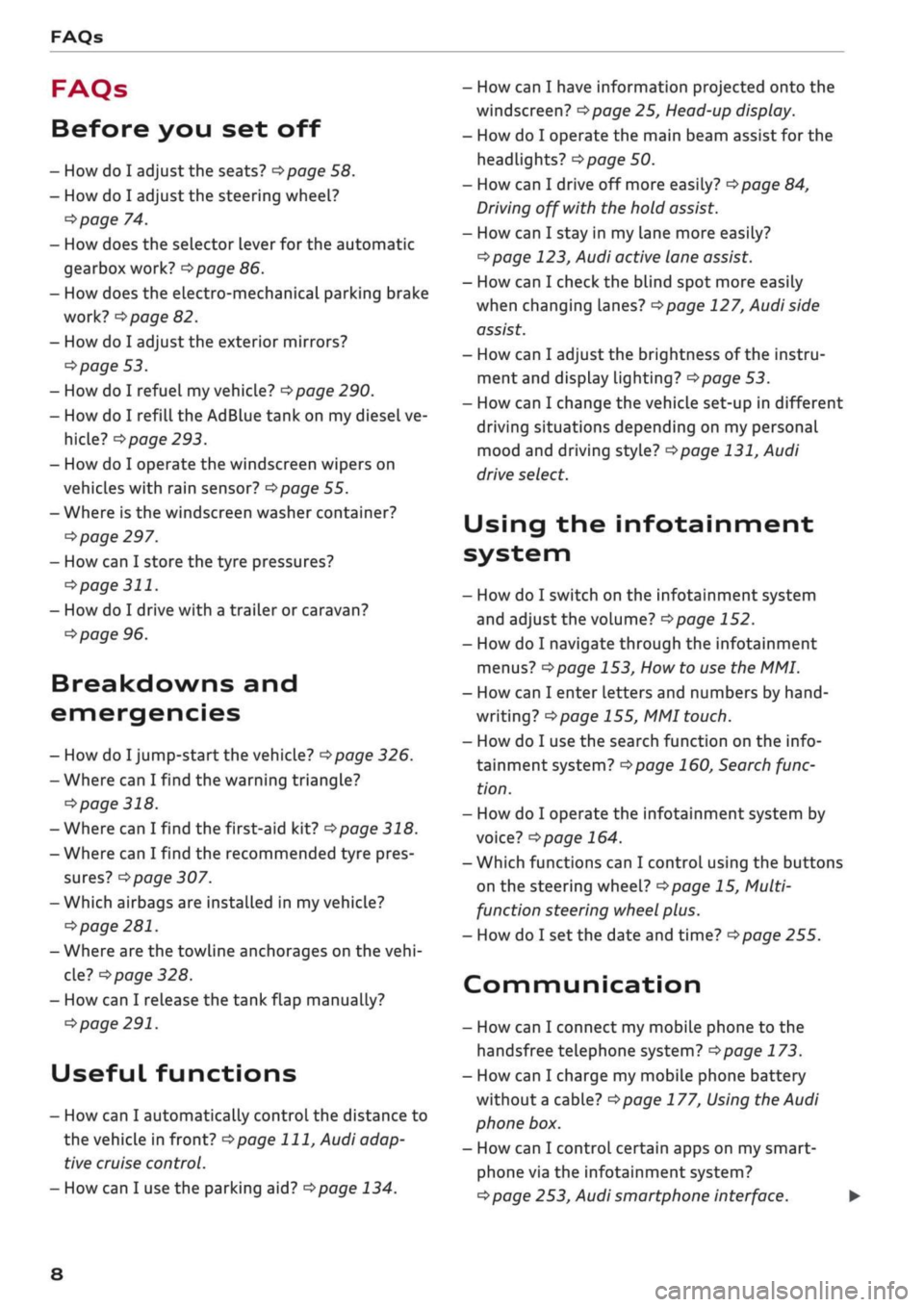
FAQs
FAQs
Before you set off
- How do I adjust the seats?
^page
58.
- How do I adjust the steering wheel?
^>page
74.
- How does the selector lever for the automatic
gearbox work?
opage
86.
- How does the electro-mechanical parking brake
work?
^>page
82.
- How do I adjust the exterior mirrors?
^>page
53.
- How do I refuel my vehicle?
^>page
290.
- How do I refill the AdBlue tank on my diesel ve
hicle?
•=>
page 293.
- How do I operate the windscreen wipers on
vehicles with rain sensor?
^>page
55.
- Where is the windscreen washer container?
•=>
page 297.
- How can I store the tyre pressures?
•=>
page
311.
- How do I drive with a trailer or caravan?
^>page
96.
Breakdowns and
emergencies
- How do I jump-start the vehicle?
^>page
326.
- Where can I find the warning triangle?
<=>page
318.
- Where can I find the first-aid kit?
•=> pagre
318.
- Where can I find the recommended tyre pres
sures?
•=>
page 307.
- Which airbags are installed in my vehicle?
•=>
page 281.
- Where are the towline anchorages on the
vehi
cle?
tapage
328.
- How can I release the tank flap manually?
•=>
page 291.
Useful functions
- How can I automatically control the distance to
the vehicle in front?
^>page
111,
Audi adap
tive cruise control.
- How can I use the parking aid?
^>page
134.
- How can I have information projected onto the
windscreen?
^>page
25, Head-up display.
- How do I operate the main beam assist for the
headlights?
^>page
50.
- How can I drive off more easily?
opage
84,
Driving off with the hold assist.
- How can I stay in my lane more easily?
cépage
123, Audi active lane assist.
- How can I check the blind spot more easily
when changing lanes?
^>page
127, Audi side
assist.
- How can I adjust the brightness of the instru
ment and display lighting?
^>page
53.
- How can I change the vehicle set-up in different
driving situations depending on my personal
mood and driving style?
^>page
131, Audi
drive select.
Using the infotainment
system
- How do I switch on the infotainment system
and adjust the volume?
^>page
152.
- How do I navigate through the infotainment
menus?
^>page
153,
How
to use the MMI.
- How can I enter letters and numbers by
hand
writing?
^>page
155, MMI touch.
- How do I use the search function on the info
tainment system?
^>page
160, Search func
tion.
- How do I operate the infotainment system by
voice?
^>page
164.
- Which functions can I control using the buttons
on the steering wheel?
^page
15, Multi
function steering wheel plus.
- How do I set the date and time?
^>page
255.
Communication
- How can I connect my mobile phone to the
handsfree telephone system?
opage
173.
- How can I charge my mobile phone battery
without a cable?
^>page
177, Using the Audi
phone box.
- How can I control certain apps on my smart-
phone via the infotainment system?
cépage
253, Audi smartphone interface. •
8
Page 29 of 364
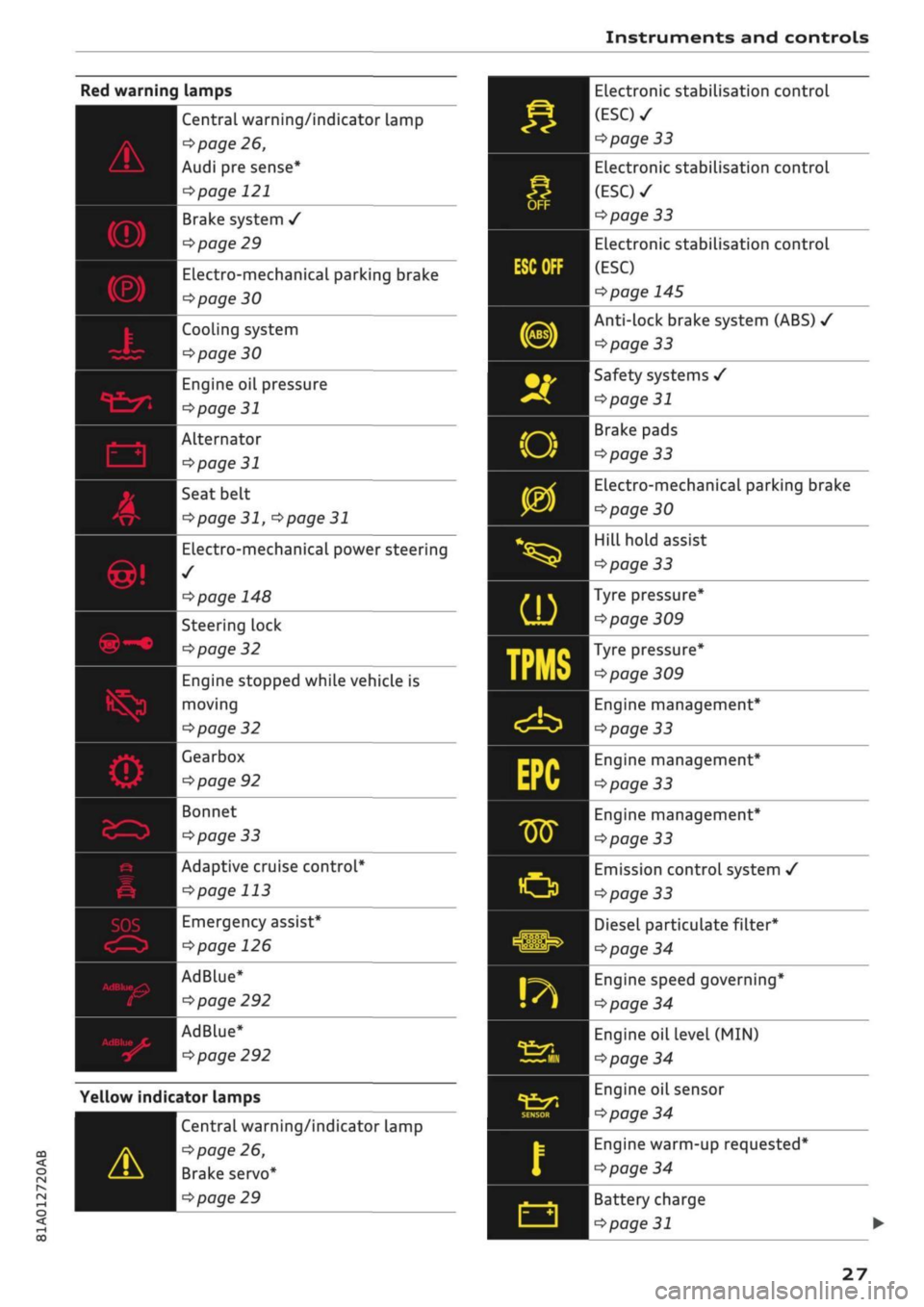
Instruments and controls
t/ï
SQ>
Central warning/indicator Lamp
•=>
page 26,
Audi pre sense*
\^>page
121
Brake system
/
^>page
29
ELectro-mechanical
parking brake
Pipage
30
| Cooling system
>page30
ngine
oil pressure
>page
31
Alternator
opage
31
| Seat belt
^>page
31,
^>page
31
Electro-mechanical power steering
1/
*$page
148
Steering lock
^>page
32
Engine stopped while vehicle is
I moving
^>page
32
Learbox
>page 92
Bonnet
^page
33
Adaptive cruise control*
cépage
113
Emergency assist*
•=>poge
126
AdBlue*
^>page
292
AdBlue*
^>page
292
Yellow indicator lamps
CO
< o rN
IV
rN
t-H
o < 00
Central warning/indicator lamp
^>
page 26,
Brake servo*
^>
page 29
Electronic stabilisation control
(ESC)
•
^>page
33
Electronic stabilisation control
(ESC)
•
^>page
33
Electronic stabilisation control
(ESC)
^>page
145
Anti-lock brake system (ABS)
•/
^>page
33
Safety systems
/
<>page 31
Brake pads
<=>page
33
Electro-mechanical parking brake
•=>page
30
Hill hold assist
<=s>page
33
Tyre
pressure*
*$page
309
Tyre pressure*
^>page
309
Engine management*
^>page
33
Engine management*
^>page
33
Engine management*
tapage
33
Emission control system
/
<=>page
33
Diesel particulate
filter*
^>page
34
Engine speed governing*
Opcrge
34
Engine oil level
(MIN)
^>page
34
Engine oil sensor
^>page
34
Engine warm-up
requested*
opage
34
Battery charge
^>page
31
27
Page 62 of 364
Seats and storage
The ashtray is inserted in the centre console and
can be placed on either the driver's or front pas
senger's side. Lift the lid to open the ashtray. Al
ways put the ashtray safely back into the holder
after removing it (e.g. after emptying it).
A WARNING
Never put waste paper in the ashtray, as this
could cause a fire
Cigarette lighter
Applies to: vehicles with cigarette lighter
-
c
cc
o
Fig.
54 Centre console: Cigarette lighter
• Press in the cigarette lighter.
• When the cigarette lighter springs out, pull it
out completely.
The cigarette lighter should only be used as a
power source in exceptional circumstances, e.g.
for the compressor of the tyre repair kit.
A WARNING
The cigarette lighter only works when the ig
nition is on. Improper use can cause serious
injury or start a fire. To avoid the risk of injury,
never leave children unsupervised in the
vehi
cle with the key.
60
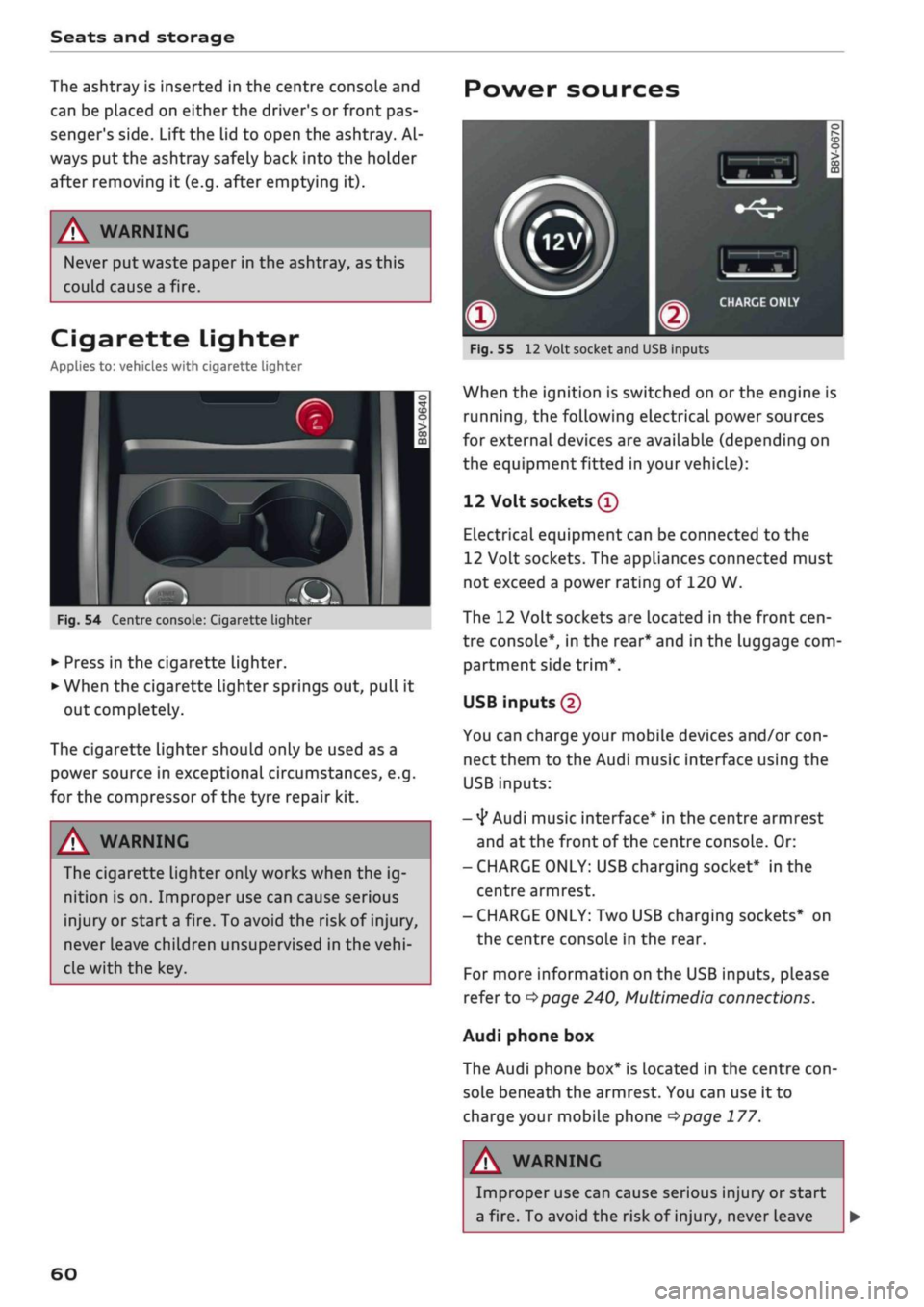
Power sources
-
CO
-
Fig.
55
12
Volt socket and USB inputs
When the ignition is switched on
or
the engine is
running,
the following electrical power sources
for external devices are available (depending on
the equipment fitted in your vehicle):
12 Volt sockets
®
Electrical equipment can be connected to the
12 Volt sockets. The appliances connected must
not exceed a power rating of 120 W.
The 12 Volt sockets are located in the front
cen
tre console*, in the rear* and in the luggage com
partment side
trim*.
USB inputs (2)
You can charge your mobile devices and/or
con
nect them to the Audi music interface using the
USB inputs:
-
4*
Audi music interface* in the centre armrest
and at the front of the centre console. Or:
- CHARGE ONLY: USB charging socket* in the
centre armrest.
- CHARGE ONLY: Two USB charging sockets* on
the centre console in the rear.
For more information on the USB inputs, please
refer to
^>page
240, Multimedia connections.
Audi phone box
The Audi phone box* is located in the centre
con
sole beneath the armrest. You can use it to
charge your mobile phone
<$page
177.
A
i
WARNING
Improper use can cause serious injury or start
a fire. To avoid the risk of injury, never Leave
Page 75 of 364

Driving
instance when you can see that the next traffic
lights are red. This takes advantage of the engine
braking effect, reducing wear on the brakes and
tyres.
Emissions and fuel consumption will drop
to zero due to the overrun fuel cut-off.
Change gear early to save fuel
An effective way of saving fuel is to change up
quickly through the gears. Running the engine at
high rpm in the lower gears uses an unnecessary
amount of
fuel.
Applies to: vehicles with manual gearbox
Shift up to second gear as soon as possible. If
possible, we recommend shifting up to the next
gear at approx. 2,000 rpm.
Applies to: vehicles with automatic gearbox
Press the accelerator slowly and avoid using the
"kick-down"
feature.
Avoid driving at high speed
Avoid travelling at top speed. Fuel consumption,
exhaust emissions and noise Levels all increase
very rapidly at higher speeds. Driving at moder
ate speeds will help to save
fuel.
Do not let the engine idle for longer than
necessary
Engine idling periods are automatically reduced
on vehicles with start/stop system*. On vehicles
without a start/stop system, it is worthwhile
switching off the engine at level crossings, for in
stance, or at traffic lights with a long red phase.
The fuel saved after about 5 seconds can be
greater than the amount of fuel needed to re
start a warm engine (the exact fuel saving de
pends on the engine version).
The engine takes a very long time to warm up
when it is running at idling speed. Mechanical
wear and pollutant emissions are also especially
high during this initial warm-up phase. It is
therefore best to drive off immediately after
starting the engine. Avoid running the engine at
high speed.
o
Regular servicing
Regular servicing can establish a basis for good
iS
fuel economy before you start driving. A
well-
serviced engine gives you the benefit of im
proved fuel efficiency as well as maximum relia
bility and an enhanced resale value. A poorly
maintained engine can consume up to ten per
cent more fuel than necessary.
Avoid short trips
The engine and emission control system need to
reach their proper working temperature in order
to minimise fuel consumption and emissions.
A cold engine uses disproportionately more
fuel.
The engine only reaches its working temperature
after about four kilometres, when fuel consump
tion will return to a normal level.
Check tyre pressures
Always make sure the tyres are inflated to the
correct pressures
•=>page
306 to save
fuel.
If the
tyre pressures
are
just 0.5
bar
too Low, this can
increase the fuel consumption by as much as 5
%. Due to the greater rolling resistance, under-
inflation also increases tyre wear and impairs
handling.
Do not use winter tyres all through the year; they
will increase fuel consumption by up to 10 %.
Avoid carrying unnecessary loads
Every kilo of extra weight will increase the fuel
consumption, so it is worth checking the Luggage
compartment occasionally to make sure that no
unnecessary loads are being transported.
The roof carrier increases the air resistance of the
vehicle and should be removed when not in use.
This will save about 12 % of fuel at speeds of be
tween 60 and 75
mph.
Save electrical energy
The engine drives the alternator to generate elec
tricity. This means that fuel consumption rises
when more power is required for electrical equip
ment. Switch off electrical equipment when it is
not needed. Electrical equipment which uses a
lot of electricity includes the blower (at a high
setting), the rear window heating and the seat
heating*.
73
Page 86 of 364

Driving
Driving off with the hold assist
Applies to: vehicles with hold assist
The hold assist helps the driver if the vehicle is
stationary for a Long period or very often, for in
stance at traffic lights, on steep gradients or in
stop-and-go traffic.
Important: The driver's door must be closed and
the engine must be running.
• To switch the hold assist on/off, press the but
ton
«59 © ^>page
82, Fig. 74,
•=»^.
The LED in
the button will light up or go out.
•
Once it detects that the vehicle has stopped,
the hold assist keeps the vehicle stationary. In
this case, a green indicator Lamp
^
Lights up in
the instrument cluster. You can now take your
foot
off the brake pedal.
•
Drive off in the normal way: the brake will be
released automatically and the vehicle will
start moving.
In certain situations, the hold assist transfers the
job of holding the vehicle to the parking brake.
As soon as the parking brake is holding the
vehi
cle
still,
the warning lamp || appears in the in
strument cluster. In addition, the LED in the ®)
button will light up.
Driver messages in the instrument cluster
display
P.]
Hold assist: unavailable
If this message appears, the hold assist is un
available or the system requirements have not
been met.
A WARNING
Applies to: vehicles with hill hold assist
If
you
do not drive away immediately after re
leasing the brake pedal, or if the engine
stalls,
the vehicle could start to roll back. You
should therefore immediately press the brake
pedal or apply the parking brake.
A WARNING
The intelligent technology in the hold assist*
and hill hold assist functions cannot defy the
laws of physics. Do not let the extra conven
ience afforded by the hold assist* and hill
hold assist functions tempt you into taking
any risks when driving - this can cause
acci
dents.
- The hold assist* and hill hold assist func
tions cannot keep the vehicle stationary in
all conditions on a gradient (e.g. if the road
is slippery or icy).
- Always ensure that the vehicle is stopped
properly and safely - risk of accident!
(T)
CAUTION
Switch off the hold assist* function before
driving the vehicle into a car wash.
©
r
Note
Applies to: vehicles with automatic gearbox
When the hold assist* function is switched
on,
it stops the vehicle from creeping for
wards when you take
your
foot off the brake
pedal.
Off-road driving
General notes
The functions of the electronic stabilisation
con
trol (ESC) have been augmented to provide extra
assistance when driving off-road. The
ESC
off-
road mode can be activated in situations when it
would be advantageous for the wheels to lock, or
when a differential Lock would normally be re
quired
^>page
146.
This Audi model is not an off-road vehicle, how
ever. When driving off-road you are advised to
avoid tracks or terrain which are not suited to
the design of the car and your own driving skills
and experience. Do not take any risks.
After driving off-road
- After driving, remove any pieces of foliage or
other objects which may be caught in the radia
tor grille, under the car or in the wheels. In par
ticular, inspect the tyre treads for stones.
- Clean the bodywork and underside of the
vehi
cle and check the underside for possible dam
age.
- Remove dirt from the windows, headlight
len
ses and number plates. •
84
Page 99 of 364
Towing a trailer
Tyre pressure
Check the tyre pressures on your car, and adjust
for "full
load"
conditions (refer to the sticker list
ing the tyre pressures)
^>page
307. It may also
be necessary to adjust the tyre pressures on the
trailer according to the recommendations of the
trailer manufacturer.
Exterior mirrors
Check whether you can see enough of the road
behind the trailer with the standard mirrors. If
this is not the case you should have additional
mirrors fitted. Both exterior mirrors should be
mounted on hinged extension brackets. Adjust
the mirrors to give sufficient vision to the rear.
Headlights
Before starting
a
journey, check the headlight
beam settings with the trailer hitched up. Adjust
the headlight settings if necessary.
On vehicles with halogen headlights, the
head
light range control must be adjusted, see
tapage
49.
The headlight range control will be adjusted au
tomatically if your vehicle is equipped with LED
headlights*.
Power supply
To ensure that the engine can be started again
after the ignition is switched off, the power
man
agement system
^>page
149 controls the distri
bution of electrical power and gradually switches
off unnecessary electrical equipment. The trailer
is supplied with power during this period. The
power supply to the trailer is interrupted while
the engine is being started.
Removable ball joint coupling
Vehicles with a factory-fitted towing bracket are
equipped with a removable
ball
joint coupling.
This is stored in the spare wheel well or in a sepa
rate bag on the floor of the luggage compart
ment, together with the necessary fitting instruc
tions.
We recommend having the car serviced be
tween the normal inspection intervals if it
used frequently for towing a trailer.
Trailer stabilisation system
Applies to: vehicles with towing bracket
Trailer stabilisation helps to reduce the risk of
the vehicle skidding when towing a
trailer.
When is the trailer stabilisation
system1'
activated?
Trailer stabilisation is active when the following
requirements are met:
- The ESC must be switched on
^>page
146 and
fully functional (no ESC malfunction).
- The trailer connector must be properly secured
in the vehicle socket.
- The vehicle speed must be higher than approx.
60 km/h.
How trailer stabilisation works
In many cases, the driver can stabilise a swaying
trailer by manually braking the vehicle.
However, if the ESC detects that the trailer is
swaying and this is affecting the towing vehicle,
it will automatically brake the vehicle in order to
stabilise the trailer. The indicator
Lamp Hi
will
flash in the instrument cluster. If possible, do
not turn the steering wheel at this stage.
In order to warn traffic behind you, the brake
lights will come on during this automatic braking
operation.
A trailer may sway quite considerably without the
trailer stabilisation system intervening.
If the system for activating the trailer brake
lights is defective, this will be indicated in the in
strument cluster display
opage
35,
:&
Bulb
monitor.
•
CO
rN
rN
t-H
o <
x)
Not available on vehicles for some markets.
97
Page 100 of 364
Towing a trailer
Requirements for correct functioning of the
trailer stabilisation system
If these conditions are not met in
full,
the trailer
stabilisation system will only intervene to a
limi
ted extent or not at all
>=>
A-
- The electrical connection between the towing
vehicle and the trailer must be functioning cor
rectly.
- The load on the trailer must be properly se
cured.
- The tyre pressures on both the vehicLe and the
trailer must be adapted to the load that is be
ing carried.
- Where possible, operate the trailer with the
maximum permitted draw bar weight.
- The trailer overrun brake must be set correctly.
This is important to ensure that the trailer can
be braked correctly, to avoid the vehicle and
trailer "jack-knifing" and to prevent excess
braking of the trailer.
- At low outside temperatures, both the towing
vehicle and the trailer should be fitted with
winter tyres.
A WARNING
It is essential that you adjust your speed to
suit the weather, road and traffic conditions.
Do not let the trailer stabilisation system
tempt you into taking any risks when driving -
this can cause accidents.
- The ESC and trailer stabilisation system
can
not defy the Laws of physics. This should be
kept in mind, particularly on slippery and
wet roads and when towing a trailer with a
light Load.
- The trailer stabilisation system is function
al,
regardless of whether the trailer has a
mechanical overrun brake or not.
- The trailer stabilisation system is not always
able to detect swaying of trailers with a
light load and will therefore not intervene.
- A trailer can still "jack-knife" on slippery
roads with little grip, even if the towing ve
hicle is equipped with the trailer stabilisa
tion system.
-Trailers with a high centre of gravity may
even tip over before they start to sway
side
ways.
-If
you
are not towing a trailer,
but
the
trail
er socket is being used (e.g. for an illumina
ted bicycle rack), the trailer stabilisation
system may be activated in extreme driving
conditions.
- Please note the additional information and
warnings
^>page
98, Driving tips.
Driving tips
Driving with a trailer always requires extra care.
Weight distribution
Try to avoid towing a loaded trailer with an unla
den vehicle. If this cannot be avoided, drive extra
slowly to allow for the unbalanced weight distri
bution.
Speed
Normally, you must not exceed 80 km/h when
towing a trailer or caravan. However, if the
trail
er/caravan is equipped with a trailer stabilisation
system,
you can drive at max. 100 km/h. Please
observe any other regulations applicable in the
country in which you are travelling.
The stability of the car and trailer is reduced with
increasing speed. For this reason it is advisable
not to drive at the maximum permissible top
speed in unfavourable
road,
weather or wind
con
ditions. This applies especially on a downhill gra
dient.
You should always reduce speed immediately if
the trailer shows the slightest sign of swaying.
Never try to stop the swaying by accelerating fur
ther.
Always brake in good time. If the trailer has an
overrun brake, apply the brakes gently at first
and then firmly. This will prevent the jerking that
can be caused by the trailer wheels locking.
Change down in good time before going down a
steep hill so
that
you can use the engine braking
effect to slow down the vehicLe.
Swaying and pitching can be reduced by attach
ing an extra stabiliser to the trailer. It should •
98
Page 106 of 364

Driver assist systems
Driver assist systems Cruise
control,
system
Speed warning function
Applies to: vehicles with speed warning function
The speed warning function can
help
you keep
below a pre-set maximum speed. It can be set,
changed and deleted on the infotainment sys
tem.
The speed warning function will warn you if the
vehicle exceeds the pre-set maximum speed. The
system gives an audible warning signal if the set
speed is exceeded by a small amount. At the
same time, a warning lamp [5] and a message
will appear on the instrument cluster display.
The indicator Lamp [5] and the message will dis
appear when the road speed drops below the set
value.
You are recommended to store this speed limit
warning if you wish to be reminded of a particu
lar speed limit. This could be when driving in
countries with general speed limits, or if you
need to keep below a particular speed when
win
ter tyres are fitted, etc.
Setting speed limit warning
•
Select the following on the infotainment sys
tem:
IMENUI
button > Car > left control button
> Driver assist > Speed warning > manual.
© Note
- Please bear in mind that, even with the
speed warning function, it is still important
to keep a check on the car's speed with the
speedometer and to observe the statutory
speed limits.
- On vehicles for some markets, the speed
warning function warns you when you reach
a speed of 120 km/h. This speed limit warn
ing is preset at the factory.
Switching on
Applies to: vehicles with cruise control system
The cruise control system allows you to drive at a
constant speed of 20 km/h or
higher.
Fig.
94 Control lever for cruise control system
• Pull
the lever to position
®
<^>Fig.
94 to switch
on the system.
•
Drive at the speed you wish to set the system
to.
• Press the button marked ® to store the speed.
The indicator lamp
[3]
in the instrument cluster
will light up. Information is also provided in the
head-up display*.
The instrument cluster display will briefly
indi
cate the stored or
pre-selected
speed.
A constant speed is maintained by adjusting the
engine power or braking the vehicle accordingly.
WARNING
- Always direct your full attention to the
road,
even when you are using the cruise control
system.
It is always the driver who is re
sponsible for determining the speed and for
keeping a safe distance to the other vehicles
on the
road.
- For safety reasons, the cruise control sys
tem must not be used in city traffic, stop-
and-go traffic, on roads with a lot of bends
or in difficult or slippery driving conditions
(such as ice, fog, Loose grit or gravel, heavy
rain,
etc.) - risk of accident!
- When you take a turn-off, drive along a mo
torway exit lane or pass through roadwork
104
Page 142 of 364
Parking aids
- Please note that the park assist only
han
dles the steering. As the driver you are al
ways responsible for braking and accelerat
ing.
- It is the driver's responsibility to decide
whether a parking space shown in the dis
play is suitable for the vehicLe.
- The front of the vehicle swings out during
the parking manoeuvre. Please take all nec
essary measures to ensure that other road
users are not endangered.
- The steering wheel turns rapidly on its own
when parking the vehicle and leaving the
space.
Injury may result if
a
person reaches
between the spokes on the steering wheel
when it is turning.
(T)
CAUTION
- Please observe the safety warnings
•=>©
in
General notes on page 134.
- In certain situations, the park assist will
guide the vehicLe onto or across the kerb,
for instance if other vehicles are parked on
the kerb. You should always be ready to
take over the steering wheel in order to pre
vent damage to the tyres and/or wheel
rims.
- Certain conditions in and around the park
ing space can cause unexpected results
when parking.
- Pillars, posts, etc.
- Loose gravel, snow, ice, etc.
© Note
-The electronic stabilisation control (ESC)
must not be switched off during the parking
manoeuvre
^>page
146.
- The park assist cannot be used to park the
vehicle on tight bends.
- The park assist cannot be used to park the
vehicle if
a
trailer is attached and the elec
trical connector for the trailer socket is
plugged in.
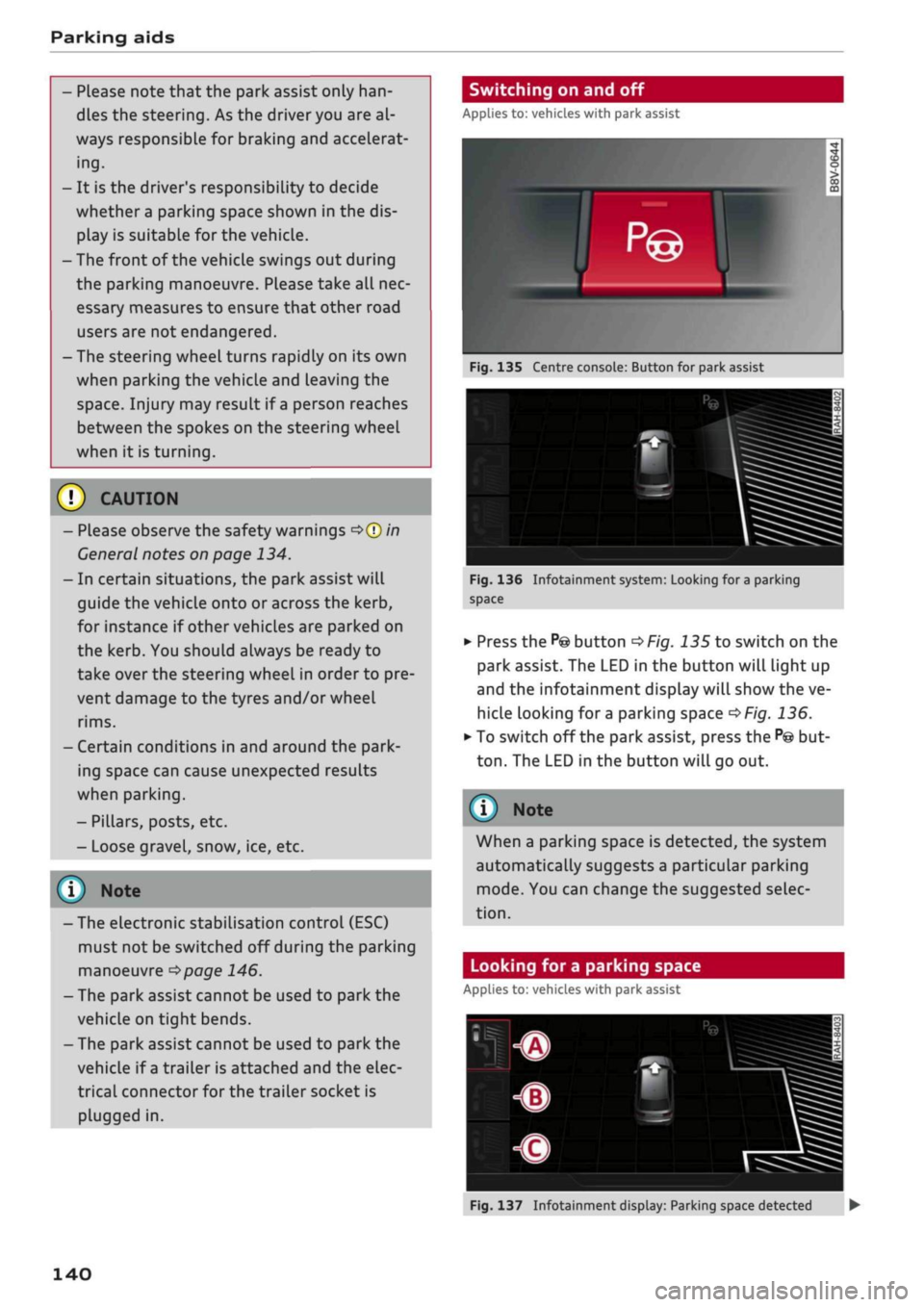
Switching on and off
Applies to: vehicles with park assist
Fig.
135 Centre console: Button for park assist
^^i=^k—
Bp-"1
Fig.
136 Infotainment system: Looking for
a
parking
space
•
Press the
P@
button
^>Fig.
135 to switch on the
park assist. The LED in the button will light up
and the infotainment display will show the ve
hicle looking for
a
parking space
^>Fig.
136.
• To switch off the park assist, press the
P@
but
ton.
The LED in the button will go out.
© Note
When a parking space is detected, the system
automatically suggests a particular parking
mode.
You can change the suggested selec
tion.
Looking for a parking space
Applies to: vehicles with park assist
140
Fig.
137 Infotainment display: Parking space detected •