light AUDI Q3 2015 User Guide
[x] Cancel search | Manufacturer: AUDI, Model Year: 2015, Model line: Q3, Model: AUDI Q3 2015Pages: 258, PDF Size: 64.9 MB
Page 19 of 258
Instrument s and warnin g/indic ator ligh ts 17
M N
M N
0 ::i co ,...., \!) ..,.,
not illuminate when you switch the ignition
on, this also means there is a malfunction .
A WARNING
If you have a malfunction in the safety sys
tems, contact your author ized Audi dealer
immediately. Otherw ise the safety sys
tems may not work properly in an acci
dent .
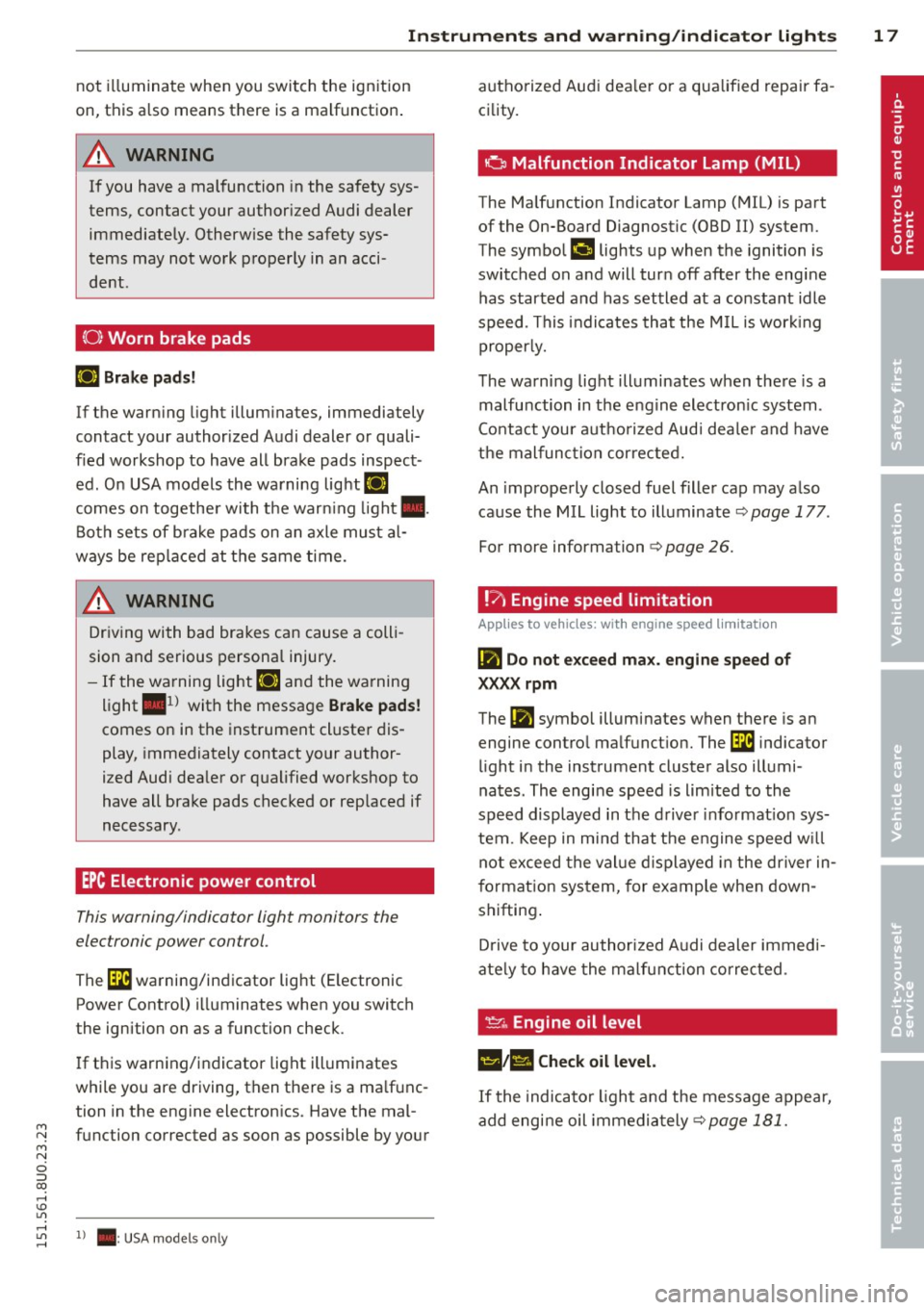
(0 ) Worn brake pads
Ill Brake pad s!
If the warn ing light illum inates, immediately
contact your authorized Audi dealer or quali
fied workshop to have all brake pads inspect
ed. On USA models the warning light
Ill
comes on together with the warn ing light •.
Both sets of b rake pads on an axle must al
ways be rep laced at the same time.
A WARNING
Dr iv ing with bad brakes can cause a coll i
sion and serious personal injury.
- If the wa rning light Ill and the warning
light
. ll with the message Brake pad s!
comes on in the instrument cluste r dis
play, immediately contact your author
i z ed Audi dealer or qualified workshop to
have all brake pads checked or replaced if
necessary .
EPC Electronic power control
This warning/indicator light monitors the
elec tronic power control .
The [31 warning/indicator light (E lectronic
Power Control) i lluminates when you switch
the ignition on as a function check .
-
If t his warning/indicator light ill uminates
while you are driving, then there is a ma lfunc
tion in the engine electron ics. Have the mal
function corrected as soon as possible by your
,....,
~ 1 ) . : USA models only
authorized Aud i dea le r or a qualified repair fa
cility.
· o Malfunction Indicator Lamp (MIL)
The Ma lfunction Indicator Lamp (MIL) is part
of the On-Board Diagnostic (OBD II) system.
The symbol
('4 lights up when the ignition is
switched on and will turn off after the eng ine
has started and has settled at a constant idle
speed . This i ndicates that the M IL is work ing
properly.
The warning light illuminates when there is a
malfu nction in the e ngine electron ic system .
Co ntact you r aut ho rized Aud i dea le r and have
t h e malfunc tion corrected.
An improperly closed fuel fille r cap may a lso
cause the MIL light to illuminate
q page 177 .
For more information q page 26.
!?; Engine speed limitation
App lies to vehicles: wi th engine speed limi tati on
(fl Do not e xce ed ma x. engin e speed of
XX.XX rpm
The Ill symbol illuminate s when there is an
engine contro l ma lf unct ion. The
(31 indicator
light in the instrument cluster also illumi
nates . The engi ne speed is limited to the
speed displayed in the d river info rmat ion sys
tem. Keep in mind that the engine speed w ill
not exceed the val ue d isplayed in the dr iver in
f ormat ion system, for example when down
shifting .
D rive to your authori zed A udi dealer immed i
ate ly to have the ma lfunction corrected .
!:( .. Engine oil level
1!1;111 Check oil level.
If the indicator light and the message appear,
add engi ne oil immediately
<=> page 181.
Page 20 of 258
18 Instruments and warning/indicator lights
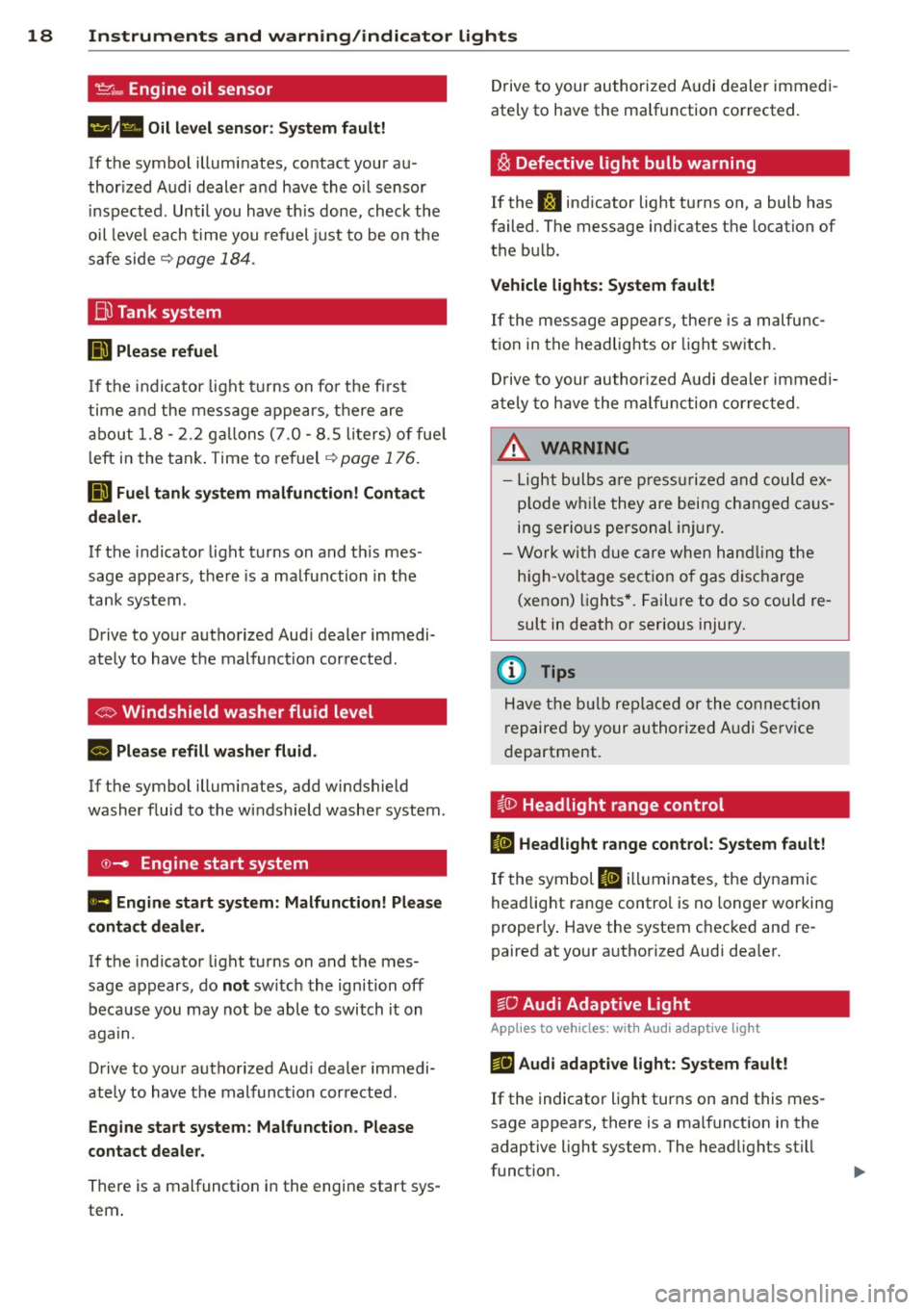
't':r.,. Engine oil sensor
1!11a Oil level sensor: System fault!
If the symbol illuminates, contact your au
thor ized Audi dealer a nd have the oil sensor
inspected. Until you have th is done, check the
oil level each time you refuel just to be on the
safe side~
page 184.
Bil Tank system
DD Please refuel
If the indicator light turns on for the first
time and the message appears, there are
about 1.8- 2.2 gallons (7.0 -8.5 li ters) of fue l
l eft in the tank . Time to refuel
~page 176.
ID'J Fuel tank system malfunction! Contact
dealer.
If the indicator light turns on and th is mes
sage appears, there is a malfunction in the
tank system.
Drive to your authorized Aud i dealer immedi
ately to have the malfunction corrected .
If the symbol illuminates, add windshield
washer fluid to the windshield washer system .
©-Engine start system
Ill Engine start system: Malfunction! Please
contact dealer.
If the indicator light turns on and the mes
sage appears, do
not sw itch the ignition off
because you may not be able to switch it on
again.
Drive to your authorized Aud i dealer immedi
ately to have the malfunction corrected .
Engine start system: Malfunction. Please
contact dealer.
There is a malfunction in the engine start sys
tem . Drive to
your authorized Audi dealer immedi
ately to have the ma lfunction corrected.
i§i Defective light bulb warning
If the J:I indicator light turns on, a bulb has
failed. The message ind icates the location of
the bu lb .
Vehicle lights: System fault!
If the message appears, there is a malfunc
tion in the headlights or lig ht switch.
Drive to your authorized Audi dealer immedi
ately to have the malfunction corrected .
&, WARNING
-Light bulbs are pressurized and could ex
p lode whi le they are being changed caus
ing serio us personal injury.
- Work with due care when handling the
high-vo ltage section of gas discharge
(xenon) lights*. Failure to do so could re
sult in death or serious injury.
{D Tips
Have the bulb replaced or the connect ion
r epaired by your authorized Audi Service
department.
~0 Headlight range control
II Headlight range control: System fault!
If the symbol II illuminates , the dynamic
headlight range control is no longer working
proper ly . Have the system checked and re
paired at your a uthorized Audi dea ler.
§0 Audi Adaptive Light
Appl ies to vehicles : wit h Audi adapt ive light
mfl Audi adaptive light: System fault!
If the indicator light turns on and this mes
sage appears, there is a malfunction in the
adaptive light system. The headlights still
funct ion.
Page 21 of 258
M N
M N
0 ::i co ,...., \!) ..,.,
,...., ..,., ,....,
Instrument s and warnin g/indic ator ligh ts 19
Go to an authorized dea lership to have the
headlights or the contro l unit for the adaptive
light repa ired.
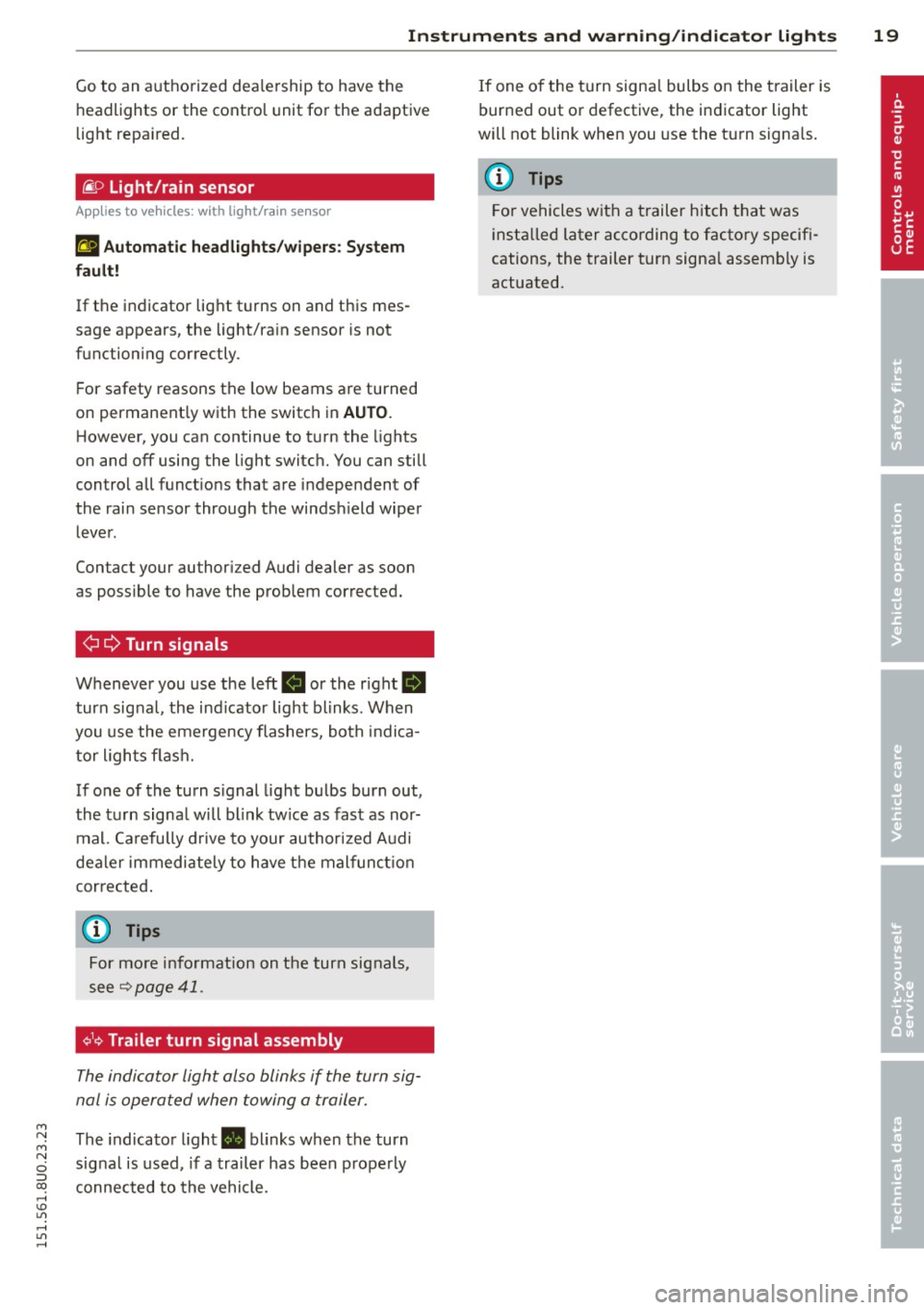
fi. D Light/rain sensor
Applies to vehicles: with light/rain sensor
t!;I Autom atic he adlight s/wi pers : Sys tem
f ault !
If the indicator light turns on and this mes
sage appears, the light/rain sensor is not
functioning correctly.
For safety reasons the low beams are turned
on permanent ly with the switch in
AUTO .
However, you can continue to turn the lights
on and
off using the light switc h. You can still
control all funct ions that are independent of
the rai n sensor through the windsh ield wiper
lever.
Contact your authorized Audi dealer as soon
as possible to have the prob lem corrected.
¢¢ Turn signals
Whenever you use the left R or the right II
turn signal, the indicator light blinks. When
you use the emergency flashers, both indica tor lights flash.
If one of the turn signal light bulbs burn out,
the turn signa l will blink tw ice as fast as nor
mal. Carefully drive to your author ized A udi
dealer immediately to have the malfunct io n
corrected .
@ Tips
For more information on the turn signals,
see
¢ page 41.
¢1<~ Trailer turn signal assembly
The indicator light also blinks if the turn sig
nal is operated when towing a trailer.
The indicator light. blinks when the turn
signal is used, if a trailer has been properly
connected to the vehicle. If one of the turn signa
l bulbs on the trailer is
burned out or defective, the indicator light
will not blink when you use the turn s ignals.
(D Tips
For vehicles with a trailer hitch that was
insta lled later according to factory specifi
cations, the trailer turn signa l assembly is
actuated.
Page 22 of 258
20 Driver in formation d ispl ay
Driver information
display
Overview
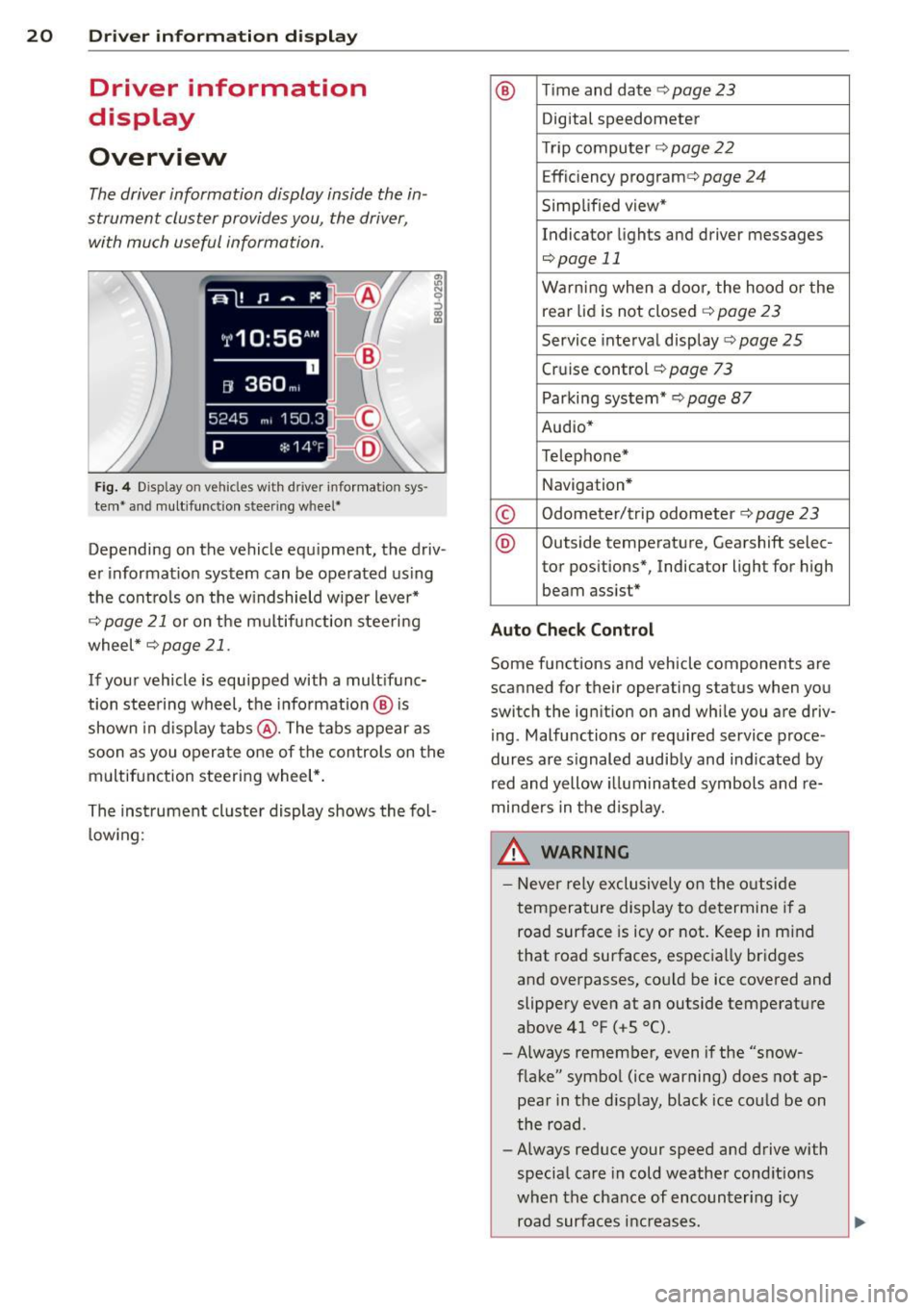
The driver information display inside the in
strument cluster provides you, the driver ,
with much useful information.
Fi g. 4 Dis play on vehicle s w it h dri ve r in fo rma tion sys
tem * and mult ifunc tion steering w hee l*
:ii N 9 ::> a, a,
Depending on the vehicle equ ipment, the driv
er informat ion system can be operated us ing
the cont rols on the w indshield wipe r lever*
¢
page 21 or on the m ultifunction steering
wheel *¢
page 21 .
If your vehicle is equ ipped with a mult ifunc
tion stee ring wheel, t he informat io n @ is
shown in d isplay tab s@ . The tabs appear as
soon as you opera te one of the controls on the
multif unction steering wheel* .
Th e inst rument cluster display shows the fol
l ow ing:
® T im e and date ¢ page23
Digital speedometer
Tr ip compu ter ¢
page 22
Effic iency program ¢ page 24
Simplified view*
Indicator lights and drive r me ssages
¢page 11
Warning when a door, the hood or the
rea r lid is not closed¢
page 23
Service inte rval display ¢ page 25
Cruise control ¢ page 73
Parking system* ¢page 87
Audio*
Telephone*
Navigation *
© Odometer/trip odometer ¢ page 23
® Outs ide temperature , Gearshift selec-
tor pos itions*, Indicator light for high
beam assist *
Auto Check Control
Some f unctions and vehicle components are
scanned for their operating status when yo u
switch the igni tion on and whi le you a re driv
i ng . Malfunctions or required service proce
dur es are s ignaled audib ly and ind icated by
red and yellow illuminated symbols and re
minders in the d isp lay.
8, WARNING -
- Never rely exclusively o n the o utside
t empera ture display to de termine i f a
road surface is icy or not. Keep in m ind
that road surfaces, espec ia lly bridges
and overpasses, co uld be ice
covered and
slippery
even at an outside tempe rature
above 41 °F ( +S 0
() .
-Always remember, even if the "snow
f lake" symbol (ice warning) does not ap
pear in the d isp lay, black ice cou ld be on
the road .
- Always reduce your speed a nd drive with
specia l care in cold weathe r cond itions
when the chance of encounter ing icy
road surfa ces inc reases .
Page 23 of 258
M N M N
0 ::i co
rl I.O
"' rl
"' rl
@ Tips
If the vehic le is stationary, or if you are
driving at a very low speed, the tempera
ture shown in the d isplay might be slightly
higher than the actual outside tempera
ture. This is caused by the heat being radi
ated from the engine.
Operation
Operation by windshield wiper lever
Applies to vehicles: without multifu nct ion stee ring w heel
~------------------gi
0
x CX) a:,
'------ ®
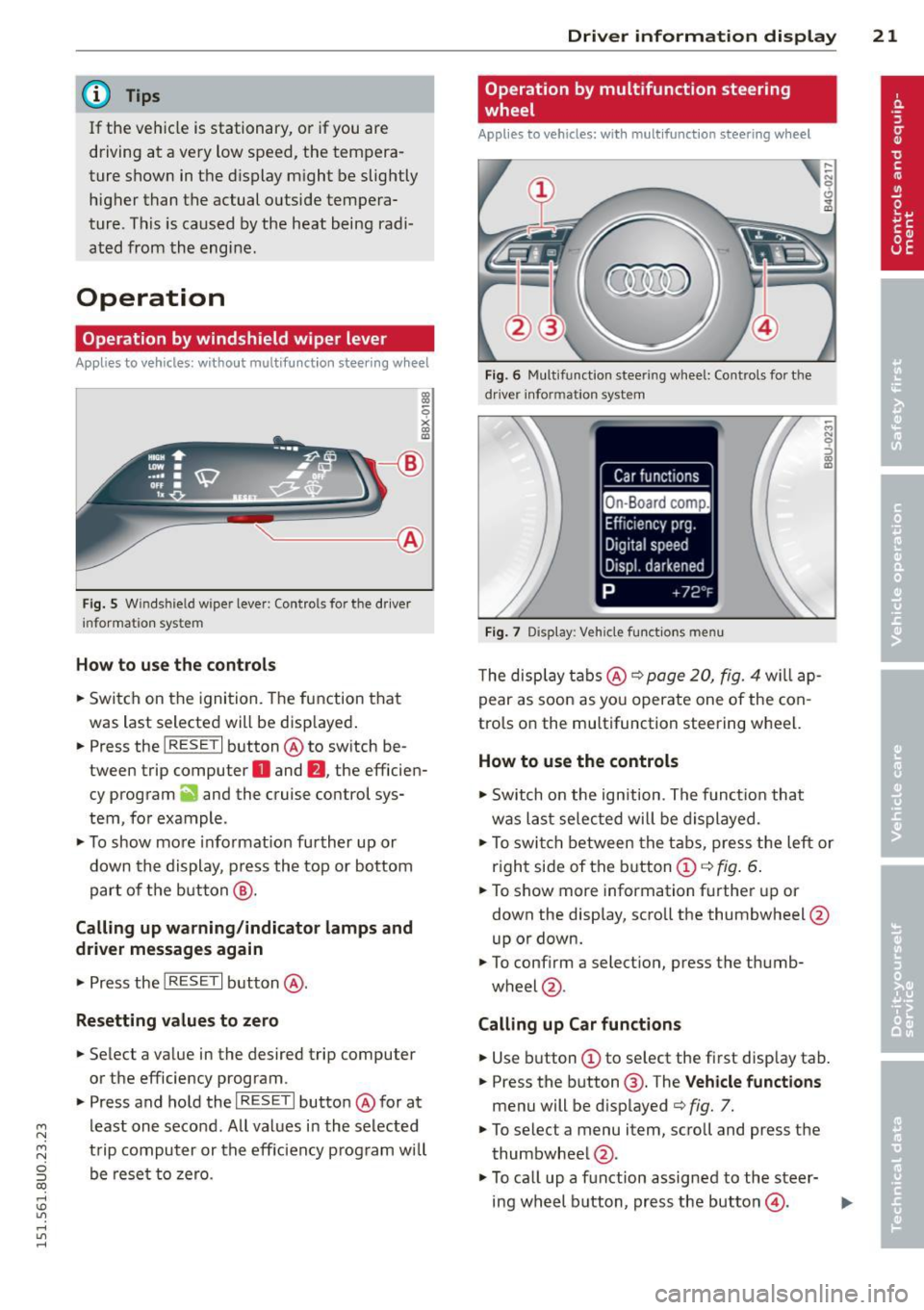
Fig . 5 Wi nds hield w ipe r lever : Contro ls fo r the d river
i nforma tion sy stem
H ow to use the control s
.. Switch on the ignition. The function that
was last selected will be disp layed .
.. Press the
I RESET I button @ to sw itch be
tween trip computer
O and fJ , the efficien
cy program
ii and the cruise control sys
tem, fo r example .
.,. To show more informat ion further up or
down the display , press the top or bottom
part of the button @.
Calling up warning /indicato r lamps and
driver messages again
.,. Press the I RES ET I button @.
Resetting values to zero
.. Select a value in the desired trip computer
or the efficiency program .
.. Press and hold the
I R ESET I butto n @ for at
least one second . All values in the se lected
trip computer or the eff iciency p rogram will
be rese t to zero.
Dri ver inform ation di spl ay 21
Operation by multifunction steering
, wheel
Appl ies to vehicles: with multifunction steering w heel
Fi g. 6 Mul tifu nct io n stee ring wheel: Co ntrols for t he
dr iv er info rmatio n sy stem
Fig . 7 D is play: Veh icle fun ctions men u
The disp lay t abs @ ¢ page 20, fig. 4 will ap
pear as soon as you operate one of the con
trols on the multifunction steering wheel.
How to use the controls
.,. Switch on the ign ition . The funct io n that
was last selec ted will be d isplayed.
M N
.,. To swi tch between the tabs, press the left or
r ight side of the b utton
CD ¢ fig . 6.
.. To show more information further up or
down the display, scroll the thumbwheel @
up or down.
.. To confirm a selection , press the thumb-
wheel @.
Calling up Car function s
.. Use button CD to select the first disp lay tab.
.. Press the button @. T he
V ehicle fun ctions
menu will be d isplayed ¢ fig. 7.
.,. To selec t a menu item, scroll and press the
thumbwheel @.
.,. To ca ll up a function assigned to the steer-
ing wheel button, press the button@.
IJ,-
Page 28 of 258
26 Drive r in form ation d ispl ay
(D Note
-Only reset the oi l change display when
you have completed an o il change .
- If you d isconnect the battery term inals,
no calculatio ns can be made for the serv
ice interval display during this time and
no service rem inder will appear . Remem
ber that observing the proper service in
tervals is vitally important to extending
the life of you r vehicle, particularly the
engine, and maintaining its value. Even if
the mileage dr iven is low, the max imum
period of one year from one serv ice to
the next must not be exceeded.
On-Board Diagnostic
system (OBD)
Malfunction Indicator Lamp (MIL)
The Malfunction Ind icator Lamp (MIL) ¢'4 i n
the instrument cluster is part of the On-Board
Diagnostic (OBD II) system.
The warning/indicator light illuminates when
the ign ition is switched on and goes o ut after
the engine starts and the idle has stabilized.
Th is indicates that the MIL is working proper
l y.
If the light doe s not go out after the eng ine
is started, or illuminates wh ile you are driv
ing, a ma lfunction may exist in the engine sys
tem . If the light illuminates, the catalytic con
verter cou ld be damaged.
Continue driving
w ith reduced pow er (avoid
ing sustained high speeds and/or rapid accel
erations) and have the condition corrected.
Contact your authorized Audi dealer .
If the light ill uminates, the electronic speed
limiter may also be ma lfunctioning . For more
information
¢ page 2 7, Electronic speed
limiter.
An imp roperly clo sed fuel filler c ap m ay als o
c a u se th e M IL l ight to illuminate
¢ page 177.
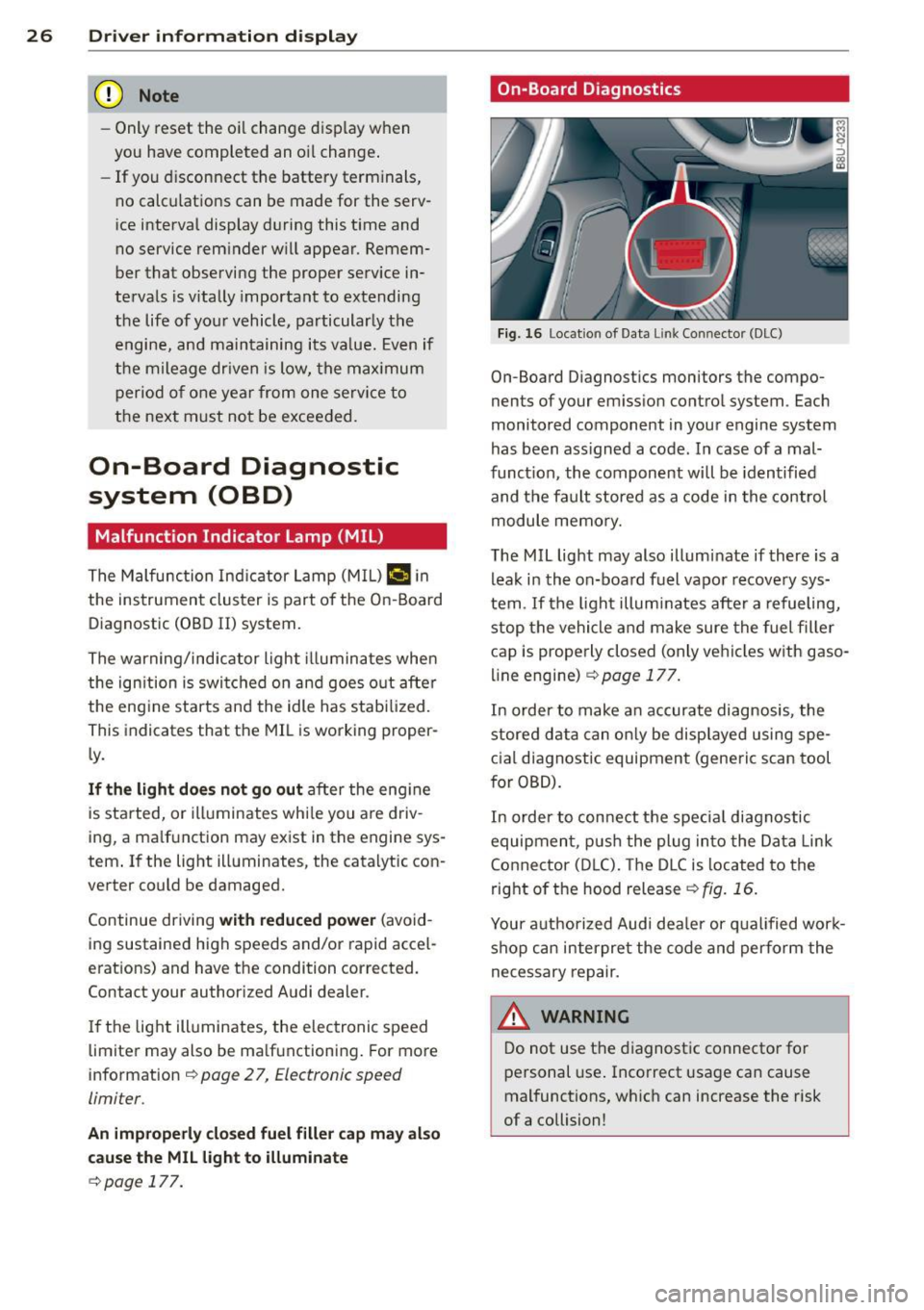
On-Board Diagnostics
Fig. 16 Locat io n of Data Li nk Conn ector (DLC)
On-Board D iagnostics monitors the compo
nents of your em ission contro l system . Each
monitored component in your engine system
has been ass igned a code . In case of a mal
funct ion, the component will be identified
and the fault stored as a code in the control
module memo ry.
The MIL light may also illuminate if there is a lea k in the on-board fuel vapor recove ry sys
tem . If the ligh t illuminates after a refueling,
stop the vehicle and make sure the fuel fille r
cap is prope rly closed (only vehicles w ith gaso
line engine) ¢
page 177.
In order to make a n accurate diagnosis, the
stored data can on ly be displayed using spe
c ial d iagnostic equipment (generic scan tool
for OBD).
In order to con nect t he special diagnostic
equipment, push the plug in to the Data Link
Connector (D LC). The D LC is located to the
right o f the hood release
<::!;> fig. 16.
Your a uthorized Audi dea le r or qua lified wor k
shop can interpret the code and perform the
necessary repair.
,&_ WARNING ~ -
Do not use t he diagnost ic connecto r fo r
personal use . Incorrect usage can cause
mal functions, wh ich can increase the risk
of a collision!
Page 32 of 258
30 Opening and clo sing
@ Tips
- The operation of the remote contro l key
can be temporarily disrupted by interfer
ence from transmitters in the vicinity of
the veh icle work ing in the same frequen
cy range (e.g. a cell phone, radio equip
ment) .
- For security reasons, replacement keys
are on ly available from author ized Audi
dealer .
- For Decla ration of Compliance to United
States FCC a nd Industry Canada regula
t ions
9 page 24 0.
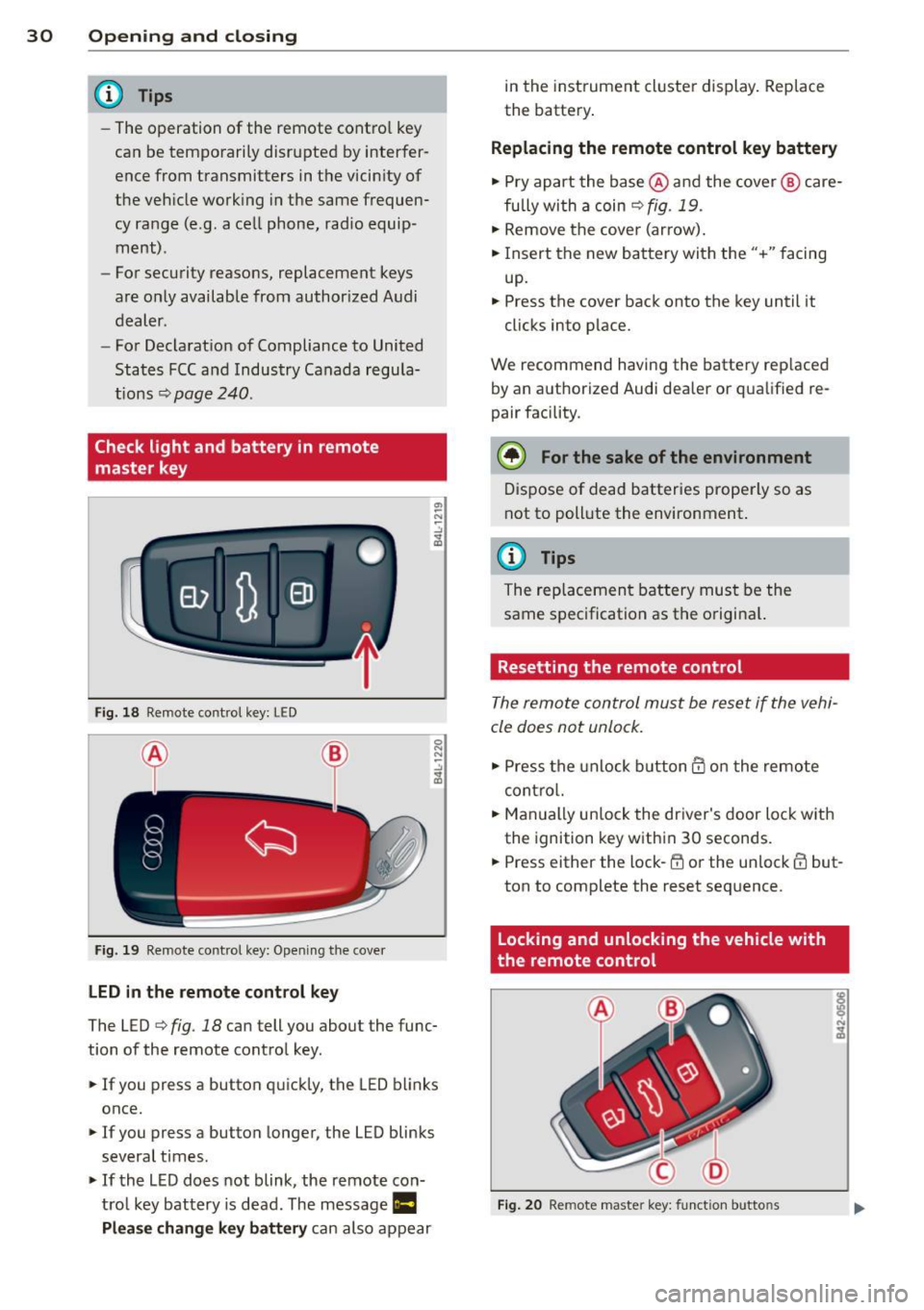
Check light and battery in remote
master key
Fig . 18 Remote co nt rol key : LE D
Fi g. 19 Remote co ntrol key: Open in g the cove r
LED in the remote cont rol key
The LED 9 fig . 18 can tell you about the func
tion of the remote contro l key .
.. If you press a button q uickl y, the LED blinks
once.
1> If you press a button longer, the LED blinks
several times .
.. If the L ED does not blink, the remote con
tro l key battery is dead. The message
Ill
Plea se change key battery can also appear in
the instrument cluster display . Rep lace
the batte ry .
Replacing the remote control key battery
.. Pry apart the base @and the cover @ care
fu lly with a coin~
fig. 19.
.,. Remove the cove r (ar row) .
.. Insert the new battery with the" +" facing
up.
.. Press the cove r back onto the key until it
clicks into p lace.
We recommend having the battery rep laced
by an a uthorized Audi dea ler or qua lified re
pair facility .
$ For the sake of the environment
Dispose of dead batteries prope rly so as
not to poll ute the environment.
(D Tips
The rep lacemen t battery mus t be the
same spec ification as the origina l.
Resetting the remote control
The remote control must be reset if the vehi
cle does not unlock .
.. Press the unlock b utton @on the re mote
contro l.
.. Man ually un lock the dr iver's door loc k with
the ignition key w ith in 30 seconds .
.. Press either the lock-~ or the unlock @ but
ton to complete the reset seq uence.
Locking and unlocking the vehicle with
the remote control
Fig . 20 Remote maste r key: funct ion butto ns
Page 34 of 258
32 Opening and clo sing
A WARNING
Read and heed all WARNINGS¢.&. in Gen
eral description on page 28.
(D Tips
If your vehicle has been standing for an ex
tended period, please note the following :
- The proximity sensors are deactivated af-
ter a few days to save power. You then
have to pull on the door handle once to
unlock the vehicle and a second time to
open the veh icle .
- To prevent the battery from being dis
charged and to preserve your veh icle's
ability to start for as long as possible,
the ene rgy management system gradu
ally switches off unnecessary conven
i ence funct ions .
It is possible that you
will not be able to unlock your vehicle us
ing these convenience functions.
- For Declarat ion of Compliance to Uni ted
States FCC and Industry Canada regu la
tions ¢
page 240.
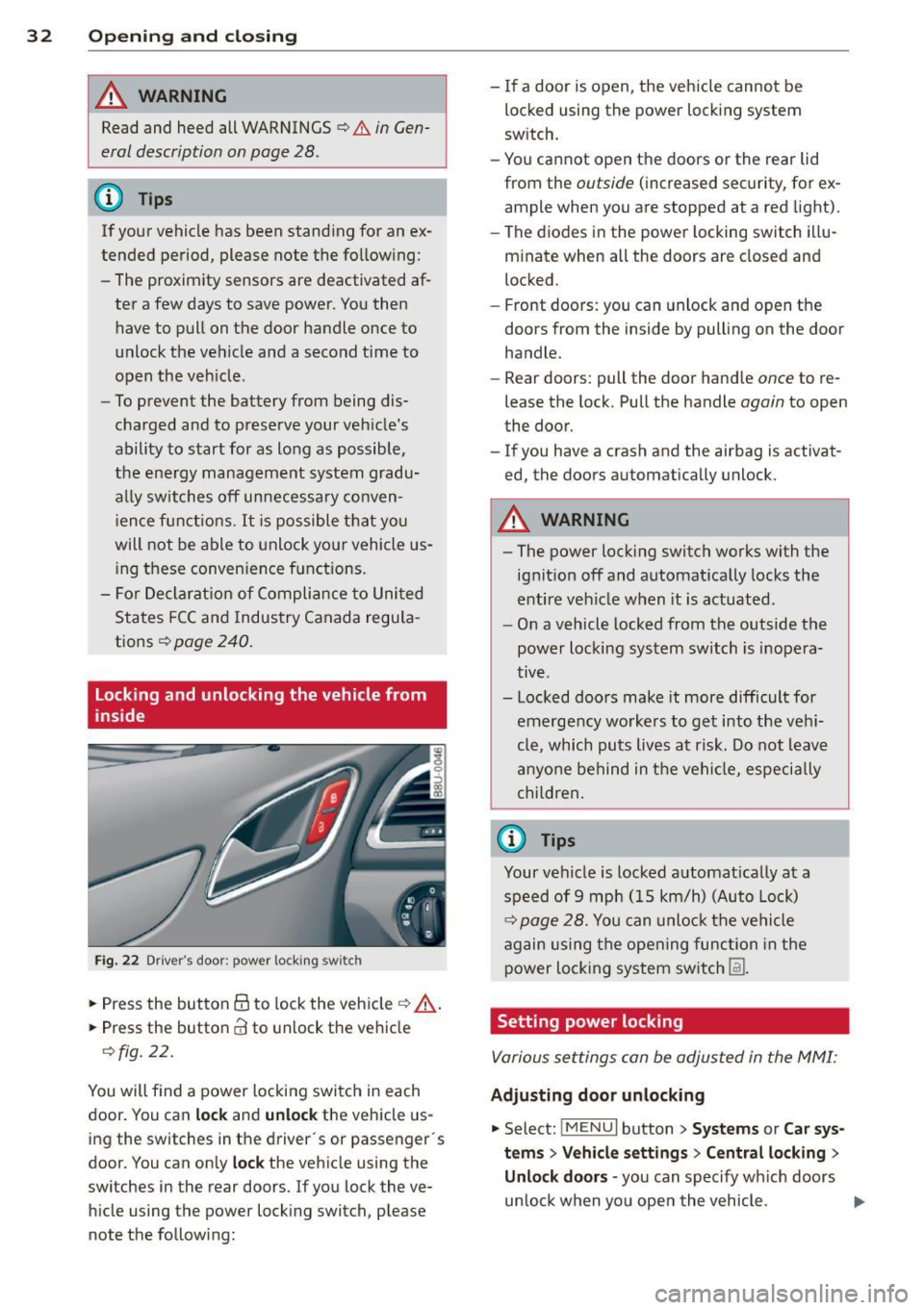
Locking and unlocking the vehicle from
inside
Fig. 22 Drive r's door ; p ow er lo ckin g sw it c h
.. Press the button @to lock the vehicle¢ A
.. Press the button CI! to unlock the vehicle
¢fig. 22.
You will f ind a power locking switch in each
door. You can
lock and unlock the vehicle us
ing the switches in the driver's or passenger 's
doo r. You can only
lock the vehicle using the
switches in the rear doors. If you lock the ve h icle using the power locking switch, please
note the following: -
If a door is open, the vehicle cannot be
locked using the power locking system
sw itch.
- You cannot open the doors or the rear lid
from the
outside ( increased security, for ex
ample when you are stopped at a red light).
- The diodes in the power locking switch illu
minate when all the doors are closed and
locked .
- Front doors: you can unlock and open the
doors from the inside by pulling on the door
handle.
- Rear doors: pull the door handle
once to re
lease the lock. Pull the handle
again to open
the door.
- If you have a crash and the ai rbag is activat
ed, the doors automatically unlock.
A WARNING
-
-The power locking switch works with the
ignition off and automatically locks the
entire veh icle when it is actuated .
- On a vehicle locked from the outside the
power locking system switch is inopera
tive .
- Locked doors make it more difficult for
emergency workers to get into the veh i
cle, which puts lives at risk. Do not leave
anyone behind in the vehicle, especia lly
children,
0) Tips
Your vehicle is locked automat ically at a
speed of 9 mph (15 km/h) (Auto Lock)
¢ page 28. You can unlock the vehicle
again using the opening function in the
power locking system sw itch
[fil .
Setting power locking
Various settings can be adjusted in the MMI:
Adjusting door unlocking
.. Select: iM ENUI button> Systems or Car sys
tems > Vehicle settings> Central locking>
Unlo ck doors -
you can spec ify which doors
un lock when yo u open the vehicle . ...
Page 37 of 258
M N M N
0 ::i co
rl I.O
"' rl
"' rl
close the rear lid again, it locks automat
ically.
- In case of an emergency or a fau lty han
dle, the luggage compartment lid can be
opened from the inside
c> page 36.
Power opening/closing rear lid
A pp lies to vehicles: with autom atic rear li d operatio n
The open position can be adjusted.
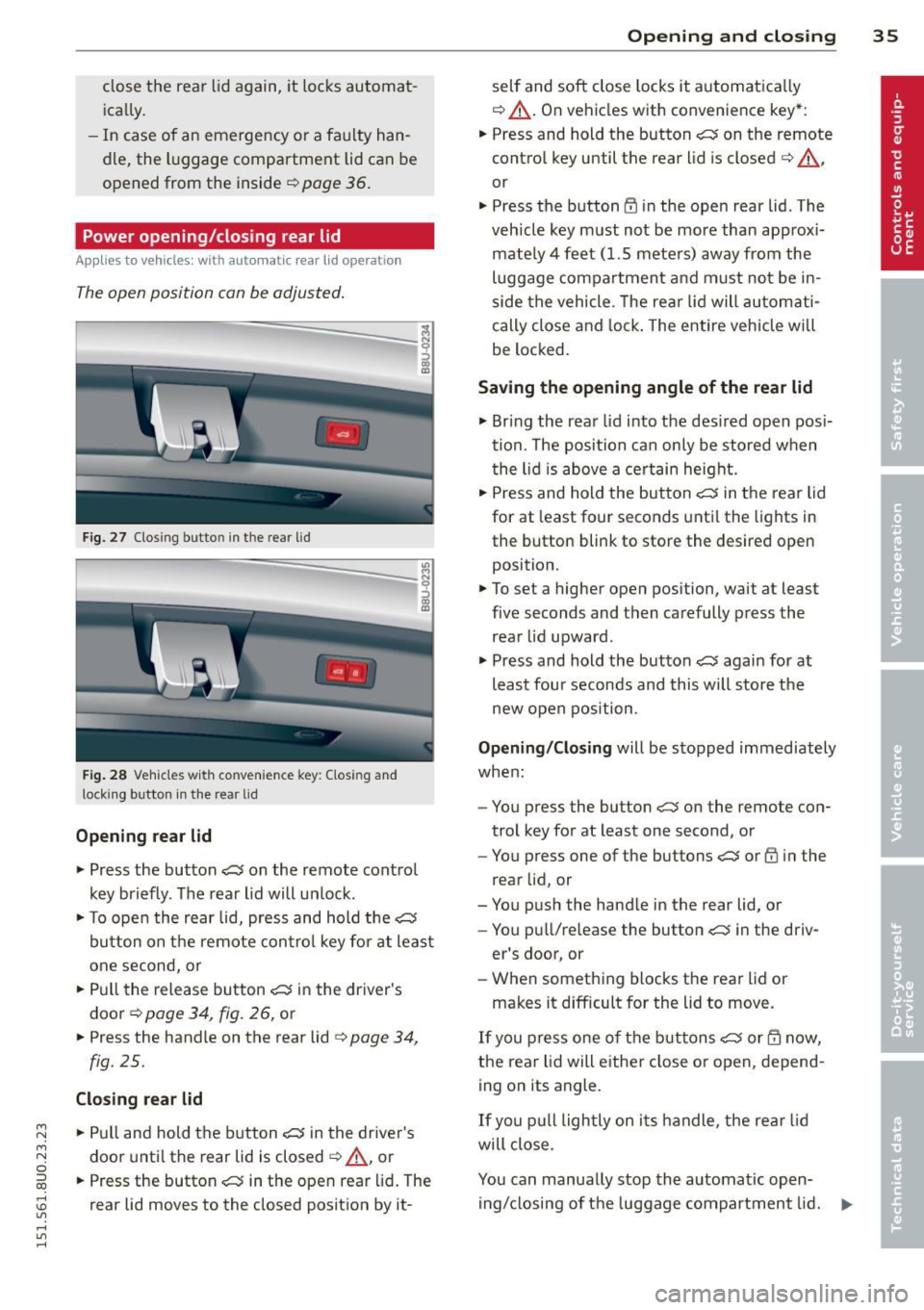
Fig. 27 Closing butto n in the rea r lid
Fig . 28 Ve hicles with co nve nience key: Clos ing and
lock ing button in the rear lid
Opening rear lid
.. Press the button ~ on the remote control
key briefly. The rear lid will un lock .
i
.. To open the rear lid, press and hold the~
button on the remote con trol key for at least
one second, or
.. Pull the release button~ in the driver's
door
c> page 34, fig. 26, or
.. Press the handle on the rear lid
c> page 34,
fig. 25.
Closing rear lid
.. Pull and hold the button~ in the driver's
door until the rear lid is closed
c> A, or
.. Press the button~ in the open rear lid. The
rear lid moves to the closed position by it-
Opening and closing 35
self and soft close locks it automatica lly
c> &_ . On vehicles with convenience key*:
.. Press and hold the button
~ on the remote
control key until the rear lid is closed
c> A ,
or
.. Press the button
CD in the open rear lid . The
veh icle key must not be more than approx i
mate ly 4 feet (1.5 meters) away from the
luggage compartment and must no t be in
side the vehicle. T he rear lid will automati
cally close and lock . The entire vehicle will
be locked.
Saving the opening angle of the rear lid
.. Bring the rear lid into the des ired open posi
tion. The position can only be stored when
the lid is above a certain height .
.. Press and hold the button
~ in the rear lid
for at least four seconds until the lights in
the button blink to store the desired open
position.
.. To set a higher open position, wait at least
five seconds and then carefully press the
rear lid upward .
.. Press and hold the button
~ again for at
least fou r seconds and this will store the
new open position.
Opening/Closing will be stopped immediately
when :
- You press the button
~ on the remote con
trol key for at least one second, or
- You press one of the buttons
~ or CD in the
rear lid, or
- You push the handle in the rear lid, or
- You pu ll/release the button~ in the driv-
er's door, or
- When something blocks the rear lid or
makes it difficult for the lid to move.
If you press one of the buttons~ or m now,
the rear lid will eithe r close or open, depend
ing on its angle.
If you pull lightly on its handle, the rear lid
will close.
You can manually stop the automatic open ing/closing of the luggage compartment lid. ...,
Page 39 of 258
M N M N
0 ::i co
rl I.O
"' rl
"' rl
.. To turn the child safety locks on , turn the ig
nition key in the direction of the arrow .
.. To turn
off , turn the ignition key opposite
the direction of the arrow.
When the child safety locks are activated, the
inside door handles do not work and the doors
can only be opened from the outside.
Power windows
Controls
The driver can control all power windows .
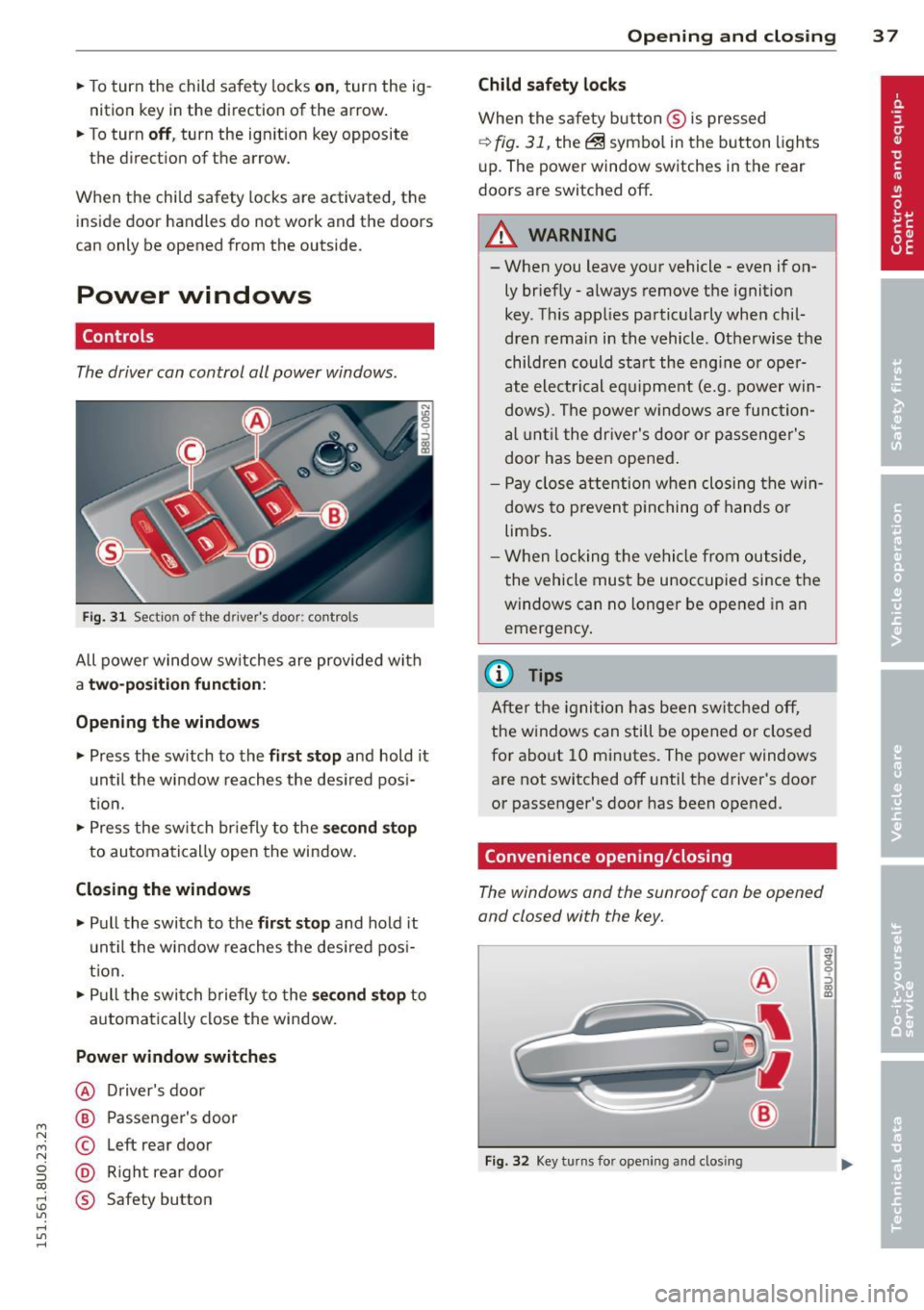
Fig. 31 Section of the driver's door: controls
All power window sw itches are provided with
a t w o-posi tion fun cti on:
Opening th e window s
.. Press the sw itch to the fi rs t sto p and hold it
until the window reaches the desired posi
t ion .
.. Press the sw itch br iefly to the
sec ond s top
to automatically open the window.
Closing th e windows
.. Pull the switch to the fir st stop and hold it
un til the window reaches the des ired pos i
tion.
.. Pull the switch briefly to the
se con d stop to
automatically close the window.
Power wind ow switche s
@ Driver's door
@ Passenger's door
© Left rear door
@ Right rea r doo r
® Safety button
Openin g an d clos ing 3 7
Child safety l ock s
When the safety button ® is pressed
¢ fig. 31, the~ symbol in the button lights
u p. The power window switches in the rear
doors are switched off.
&_ WARNING
--When you leave your vehicle -even if on-
ly briefly· always remove the ignition
key . Th is app lies particularly when chil·
dren remain in the vehicle. Otherwise the
children could start the eng ine or oper
ate electrical equ ipment (e.g. power w in
dows). The power windows are function
a l until the dr iver's door or passenger's
door has been opened.
- Pay close attention when closing the win
dows to prevent p inching o f hands o r
limbs.
- When locking the vehicle from outside,
the vehicle must be unoccupied since the
windows can no longer be opened in an
emergency.
(I} Tips
After the igni tion has been switched off,
the w indows can still be opened or closed
for about 10 minutes . The power windows
are not switched off until the driver's door
or passenger's door has been opened.
Convenience opening/closing
The windows and the sunroof can be opened
and closed with the key.
F ig. 32 Key turns for opening and closing
"' z 9 ::::, a, to