ESP AUDI Q3 2015 Owner's Manual
[x] Cancel search | Manufacturer: AUDI, Model Year: 2015, Model line: Q3, Model: AUDI Q3 2015Pages: 258, PDF Size: 64.9 MB
Page 65 of 258
M N
M N
0 ::i co ,...., \!) 1.1'1 ,...., 1.1'1 ,....,
Warm and cold Climate control
Description
The climate control system warms, cools and
adds humidity to the a ir in the veh icle inter io r.
It is the most effect ive when the windows and
sunroof are closed . If the re is a build-up of
h eat inside the vehicle, ventilation can help to
speed up the cooling process .
Condensat ion from the cooling sys tem can
drip and form a puddle of water under the ve
hicle. This is normal and does not mean there
is a leak .
Pollution filter
The po llution filte r removes impuri ties, such
as dus t and po llen, from the air.
The air pollutants filter must be changed at
the intervals spec ified in you r Wa rra nty
&
M aintenance book let, so tha t the air condi
tioner can prope rly work .
If you drive your vehicle in an area with h igh
a ir po llution, the fi lter may need to be
changed more frequent ly than specified in
your Aud i Warr anty
& Ma intenance booklet. If
in doubt, ask your authorized A udi Service Ad
visor for advice .
A WARNING
Reduced visibility is dangero us and can
cause accidents.
-
- For safe dr iv ing it is very important that
all windows be free of ice, snow and con
densation.
Warm and c old 63
-Comp letely fam iliarize yourse lf with the
proper use and f unct ion of the heat ing
a nd venti lation system and especially
how to defog and defrost the w indows.
- Never use the windshield wiper/washer
system in freez ing weather unt il you
have warmed the w indshield first, using
the heating and ve ntilation system. The
washer sol ution may freeze on the wi nd
shie ld and re duce visib ility.
0 Note
- If you suspect that the air conditioner
has been damaged, switch t he system
off to avoid furt her damage and have it
in spec ted by a q ual ified dea lership.
- Repairs to the Audi air conditioner re
quire specia l te ch nical know ledge and
speci al to ols. Conta ct an autho rized Aud i
dea ler fo r ass istance.
(® For the sake of the environment
B y reducing the a mou nt of f uel you use,
you also reduce the amount of pollu tants
emitted in to the air.
(D Tips
- Keep the air intake s lots ( in fro nt of the
w indshield) free from ice, snow and de
br is in order to maintain the proper f unc
t ion of the climate control sys tem.
- T he e nergy m ana gement system m ay
switch the seat heating * or rear window
defroster off temporari ly . These systems
are available again as soon as the energy
balance has been resto red.
Page 75 of 258
M N
M N
0 ::i co ,...., \!) ..,.,
,...., ..,., ,....,
vehicle to skid or the rear end to break away -risk ing an accident.
Speed warning system
Overview
T he speed warning system helps you to keep
your driving speed below a set speed limit.
The speed warning system warns if the driver
exceeds a prev iously stored maximum speed .
A warning tone will sound as soon as the vehi
cle speed exceeds the set speed by about
3 mph (3 km/h). At the same time , an indica
tor lamp
(mj (USA models) / ISJ (Canada mod
e ls) will light up in the instrument cluster dis
p lay and the driver message
Spe ed limit
wa rning exceeded.
wi ll appear. The indicator
l amp
1mj / i•j will go out when the speed
drops below the set speed lim it aga in.
Setting a thresho ld is recommended if you
wou ld like to be reminded when you reach a
certain maximum speed . Situations where yo u
may want to do so include driving in a country
with a general speed limit or if the re is a
specified max imum speed for winter tires .
(D Tips
Even though your vehicle is equipped with
a speed warning system, you should st ill
watch the speedometer to make sure you are not driving faster than the speed lim it.
Setting speed limit
You can set , change and delete the threshold
in the MMI.
.,. Se lect :
I CAR I funct ion button > S ystem s or
Car System s control button > Vehicle set
tings > Speed warning .
You can set any thresho ld between 20 mph
(30 km/h) and 150 mph (240 km/h). Settings
can each be adjusted in increments of 6 mph
(10 km/h) .
On the ro ad 73
Cruise control
Description
The cruise cont ro l system makes it poss ible to
drive at a constant speed start ing at 15 mph
(20 km/h).
The speed is kept constant by modifying en
gine powe r or th rough an active brake inte r
vention.
A WARNING
- Always pay attention to the traffic
around you when the cruise control is in
operation. You are always responsible for
your speed and the distance between
your vehicle and other vehicles.
- For reasons of safety, cr uise control
should not be used in the city, in stop
and-go traffic, on winding roads and
when road cond it ions are poor (such as
ice, fog, gravel, heavy rain and hydro
plan ing) -you could have an accident .
- Sw itch the cruise control off temporar ily
when dr iv ing in turning lanes, h ighway
exits or in constr uction zones.
- Please note that unconsc iously "resting"
your foot on the accelerator pedal pre
vents the cruise control from braking .
This is due to the control system be ing
overridden by the dr iver's acceleration .
- If a b rake system malfunction s uc h as
overheating occurs when the cruise con
trol system is swi tched on, the braking
function in the system may be switched off . The other cruise control functions re
main active as long as the indicator light
II (US models) !l'I (Canada mode ls) is
on .
(D Tips
-The cruise control system is ideal for
stretches w ith speed limits. The driver is
responsib le for adhering to the correct
speed.
- The cru ise control remains act ive when
shift ing gears .
Page 77 of 258
Audi side assist Lane change assistant
Description
Applies to vehicles: with Audi side assist
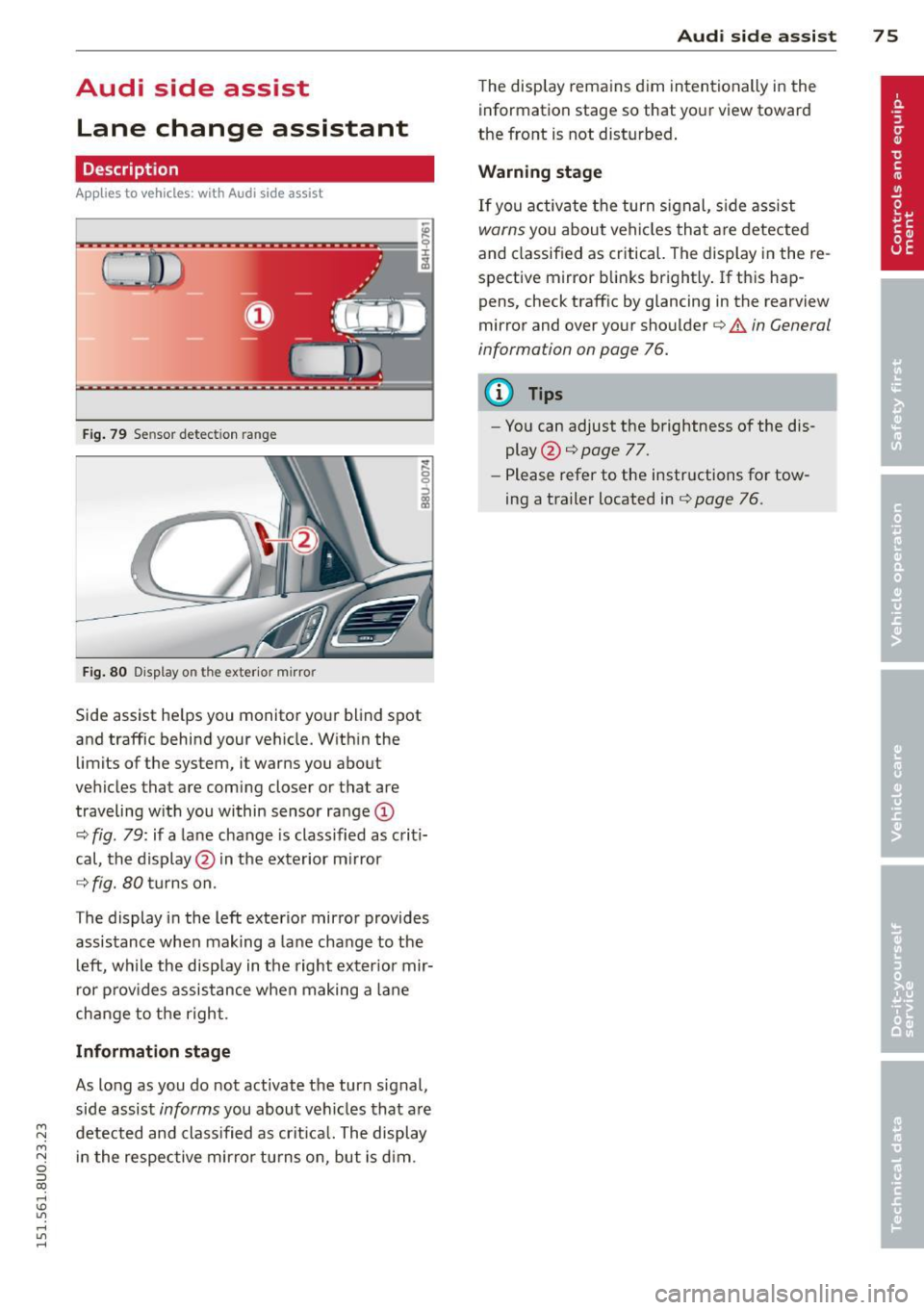
Fig . 79 Se nsor detec tion ra nge
Fig. 80 Display o n the exter io r mirro r
Side assist he lps you mon itor your blind spot
and traffic behind you r veh icle. W ith in the
limits of the system, it warn s you about
vehicles that are coming closer or that are
traveling w ith you within sensor ra nge
(D
c::, fig . 79: if a la n e change is classified as c riti
cal, the display @in the exterior m irror
c::> fig. 80 tu rns on.
The display in the left exterio r mirror provides
assistance when making a lane cha nge to t he
l eft, while the display in the right exter ior mir
r or p rov ides assistance when making a lane
change to t he righ t.
Information stage
As long as you do not activate the turn signal,
side assist
informs you about vehicles that are
~ detected and class ified as crit ica l. The display M
N in t he respec tive mirro r turns o n, but is d im . 0 ::i co
rl I.O
"' rl
"' rl
Aud i side assist 7 5
The display remains d im intentionally in the
information stage so that your view toward
the front is not disturbed .
Warning st age
If you activate the turn signal, s ide assist
warns you about veh icles tha t are detected
and classified as critical. The display in the re
spective mirror blinks brightly . If this hap
pens, check traff ic by glanc ing in the rearview
mirror and over your shoulder¢
A in General
information on page 76.
@ Tips
- Yo u can adjust the brightness of the dis
play @¢
page 77.
- Please refer to the instructions fo r tow
ing a trailer located in
¢ page 76.
Page 78 of 258
76 Audi side assist
General information
A pplies to vehicles: with Audi side assist
®
©
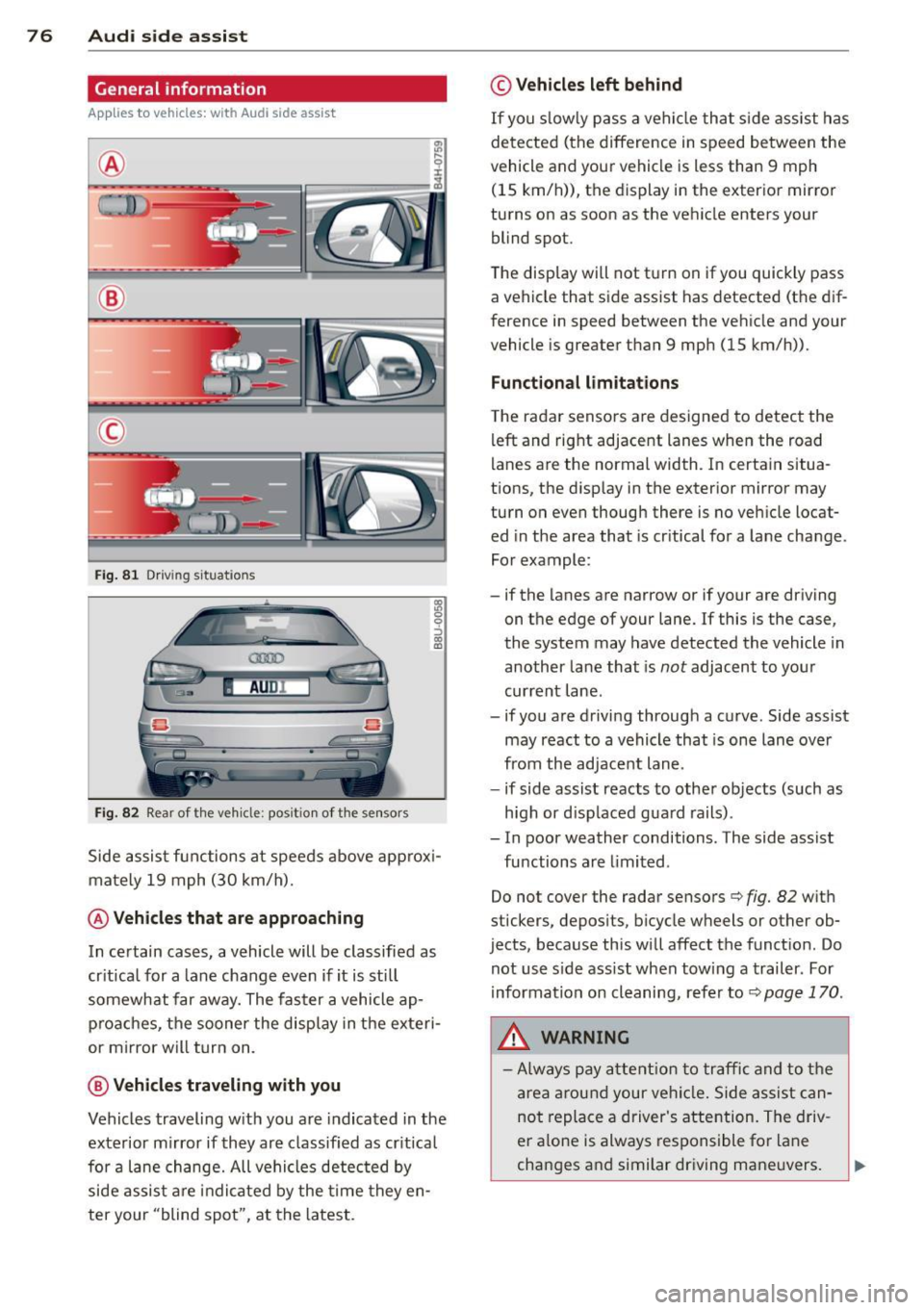
Fig. 81 Driving situations
AU Dr--
Fig. 82 Rear of the vehicle: posit ion of the sensors
1ll 0 0 :, a) a,
Side assist functions at speeds above approxi
mately 19 mph (30 km/h).
@ Vehicles that are approaching
In certain cases, a vehicle will be classified as
critical for a lane change
even if it is still
somewhat far away. The faster a vehicle ap
proaches, the sooner the display in the exteri
or mirror will turn on.
@ Vehicles traveling with you
Vehicles traveling with you are indicated in the
exterior mirror if they are classified as critical
for a lane change. All vehicles detected by
side assist are indicated by the time they en
ter your "blind spot", at the latest.
© Vehicles left behind
If you slowly pass a vehicle that side assist has
detected (the difference in speed between the
vehicle and your vehicle is less than 9 mph
(15 km/h)), the display in the exterior mirror
turns on as soon as the vehicle enters your blind spot.
The display wi ll not turn on if you quickly pass
a vehicle that side assist has detected (the dif
ference in speed between the vehicle and your
vehicle is greater than 9 mph (15 km/h)).
Functional limitations
The radar sensors are designed to detect the
left and right adjacent lanes when the road
lanes are the normal width. In certain situa
tions, the display in the exterior mirror may
turn on even though there is no vehicle locat ed in the area that is critical for a lane change.
For example:
- if the lanes are narrow or if your are driving
on the edge of your lane. If this is the case,
the system may have detected the vehicle in
another lane that is
not adjacent to your
current lane .
- if you are driving through a curve. Side assist may react to a vehicle that is one lane over
from the adjacent lane .
- if side assist reacts to other objects (such as
high or displaced guard rails).
- In poor weather conditions. The side assist
functions are limited.
Do not cover the radar sensors
c::> fig. 82 with
stickers, deposits, bicycle wheels or other ob
jects, because this will affect the function. Do
not use side assist when towing a trailer . For
information on cleaning, refer to
c::> page 170 .
&_ WARNING
-Always pay attention to traffic and to the
area around your vehicle. Side assist can
not replace a driver's attention. The driv
er alone is always responsible for lane
changes and similar driving maneuvers.
Page 81 of 258
M N M N
0 ::i co
rl I.O
"' rl
"' rl
Audi drive select Driving settings
Introduction
App lies to vehicles: with Audi drive select
Drive select provides the possibility to experi
ence different types of vehicle sett ings in one
vehicle. For instance, using the three
Com
fort , Auto
and Dynamic modes, t he driver can
switch from a sporty to a comfortab le driving
mode with the press of a button.
Description
Applies to vehicles : with Audi drive select
The vehicle setup in each mode depends on
the vehicle's features. However, the engine,
automatic transmission and steering are al
ways involved .
Engine and automatic transmission
Depending on the mode, the engine and the
automatic transmission respond quicker or in
a more balanced manner to accelerator pedal
movements. In the sporty dynamic mode, the
automatic transmission shifts at higher RPMs.
Steering
The steering adapts in terms of steering ef
fort. Indirect steering that moves easily, like
the steering in comfort mode, is best suited
to long drives on a highway . In contrast, dy
namic mode provides sporty, direct steering .
Curve light*
The curve light adapts to driving on curves.
The pivot ing action and the lighting are also
adapted to the mode .
@ Tips
Selecting the Dynamic mode results in
sporty shift ing characteristics. The S gear
position engages automatically.
Audi drive select 79
Selecting the driving mode
Applies to vehicles: with Aud i drive se lect
You can choose between Comfort, Auto and
Dynamic modes.
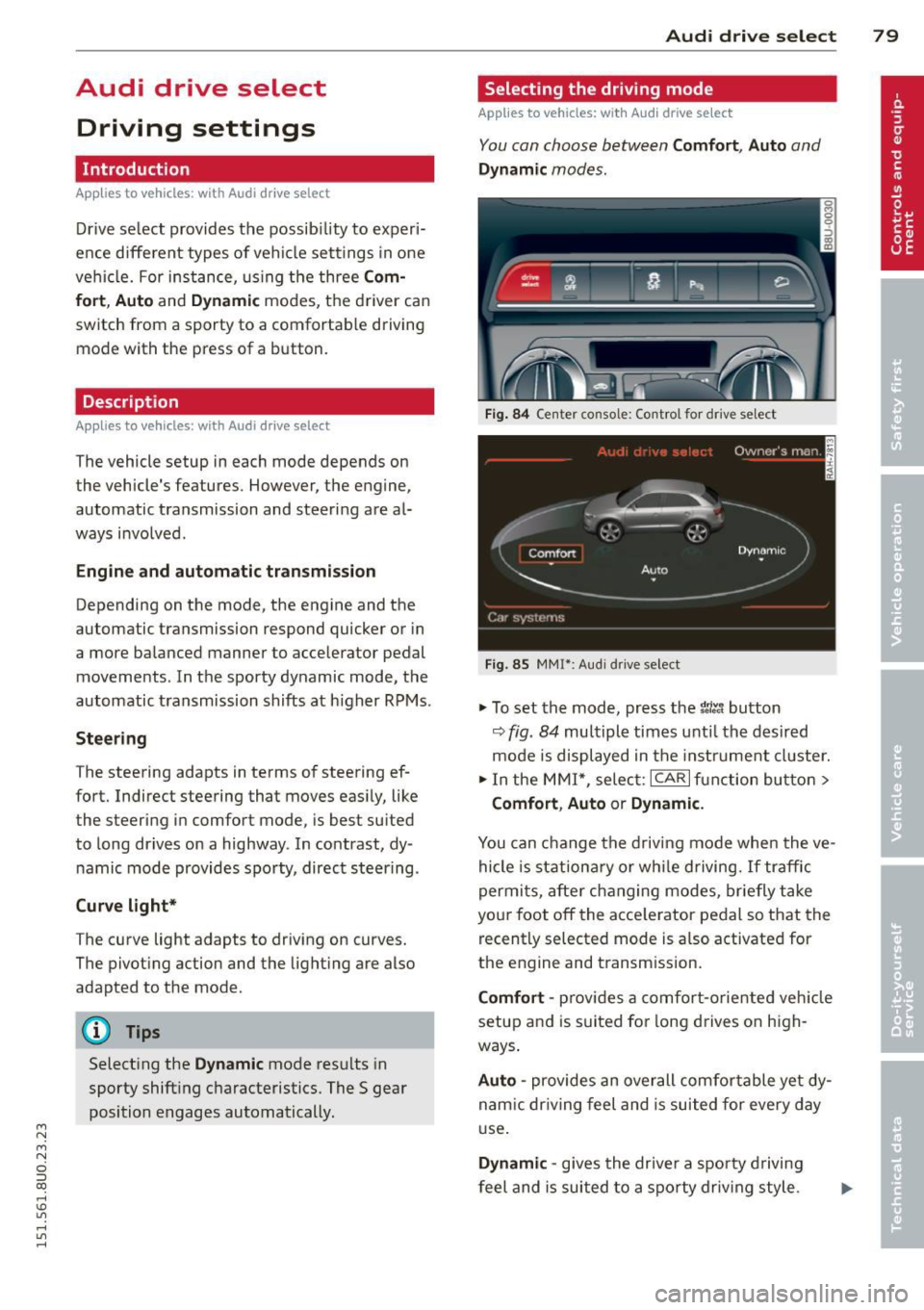
Fig. 84 Center console: Control for drive se lect
Fig . 85 MMI*: Aud i drive select
.,. To set the mode, press the t1ti button
9fig. 84 multiple times unti l the desired
mode is displayed in the instrument cluster.
.,. In the MMI*, select: ICARlfunction button>
Comfort, Auto or Dynamic.
You can change the driving mode when the ve
hicle is stationary or while driving. If traffic
permits, after changing modes, briefly take
your foot off the acce lerator pedal so that the
recently selected mode is a lso activated for
the engine and transm ission.
Comfort -provides a comfort-oriented vehicle
setup and is suited for long drives on high
ways .
Auto -provides an overall comfo rtable yet dy
nam ic dr iving feel and is suited for every day
use.
Dynamic -gives the drive r a sporty driving
feel and is suited to a sporty driving style.
Page 89 of 258
M N
M N
0 ::i co ,...., \!) 1.1"1 ,...., 1.1"1 ,....,
Parking systems
General information
App lies to vehicles: with rea r parking sys te m /pa rk in g sys
tem plus w ith rear view camera
Depending on your vehicle's equipment, vari
ous parking a ids w ill help you when parking
and maneuvering.
The
r ea r pa rk ing sys te m is an audible parking
aid that warns you of obstacles
behind the ve
hicle
¢ page 88 .
The p ark in g syste m plus assists you when
parking by audibly and visually indicat ing ob
jects detected
in front of and behind the vehi
cle
¢ page 88.
The re ar view ca mera shows the area behind
the veh icle in the Infotainment d isplay. This
display assists you when you are c ross or par
allel parking ¢
page 89. In addition , you are
assisted by the functions from the parking
system plus
q pag e 88.
A WARNING
-Always look for traffic and check the area
around your vehicle by looking at it di
rect ly as well. The parking system cannot
replace the driver's attent ion. The driver
is always respons ible for safety during
park ing and for all other maneuvers .
- Please note that some surfaces, such as
clothing, are not detected by the system .
- Sensors and cameras have blind spots in
wh ich people and objects cannot be de
tected . Be especially cautious of children
and animals.
- The sensors can be displaced by impacts
or damage to the radiato r grille, bumper ,
wheel housing and the underbody . The
par king systems may become impaired
as a result. Have your authorized Audi
dealer or qualified workshop check their
function.
- Make su re the sensors are not covered by
stickers, deposits or any other obstruc
tions as it may impair the sensor func
tion . For information on cleaning, refer
to
¢ page 170.
Par king system s 87
@ Note
-Some objects are not detected by the
system under certain circumstances :
- Objects such as barrier chains, trailer draw bars, vertical poles or fences
- Objects above the sensors such as wall extensions
- Objects w ith specific surfaces or struc
tures such as chain link fences or pow
der snow .
- If you continue driving closer to a low -ly
ing object, it may disappear from the
sensor range. Note that you w ill no lon
ger be warned about this obstacle.
(D Tips
- T he system may provide a warning even
though there are no obstacles in the cov
erage area i n some situations, such as:
- certain road surfaces or for long grass.
- externa l ultrasonic sources e .g . from
cleaning vehicles.
- heavy rain, snow or thick vehicle ex
ha ust.
- We recommend tha t you prac tice park
ing in a traffic-free location or par king
lot to become familiar with the system.
When doing this, there should be good
light and weather cond itions.
- You can change the vo lume and pitch of
the signals as we ll as the disp lay
¢ page 93.
-Please refer to the instructions for tow
ing a trailer
¢ page 93.
-What appears in the infotainment dis
play is somewhat time-delayed .
Page 96 of 258
94 Driving Safel y
Driving Safely
General notes
Safe driving habits
Please remember -safety first!
This chapter contains important information,
tips, instructions and warnings that you need
to read and observe for your own safety, the
safety of your passengers and others. We have
summarized here what you need to know
about safety belts, a irbags, ch ild restra ints as
well as child safety. Your safety is for us
priori
ty number 1.
Always observe the info rmat ion
and warn ings in th is sect ion -fo r yo ur own
safety as well as that of your passengers .
The information in this se ction app lies to all
model ve rsions of your veh icle. Some of the
feat ures described in this sec tions may be
standard equipment on some models, or may
be optional equipment on others . If you are
not sure, ask your authorized Audi dealer.
A WARNING
-Always make sure that you follow the in
struct ions and heed the WARNINGS in
this Manual. It is in your interest and in
the inte rest of you r passengers.
- Always keep the complete Owner's Liter
ature in your Audi when you lend or sell
your vehicle so that this important info r
mation will always be ava ilable to the
dr iver and passengers.
- Always keep the Owner's literature handy
so that you can find it eas ily if you have
ques tions.
Safety equipment
The safety features are part of the occupant
restraint system and work together to help
redu ce the risk of injury in a wide variety of
accident situations.
Your safety and the safety of your passenge rs
should not be left to chance. Advances in
technology have made a varie ty o f fea tures
avai la bl e to he lp re duce the risk of injury in an accident
. The following is a list of just a few of
the safety features in your Audi:
- sophis tic ated s afety be lts fo r drive r and a ll
passenger sea ting pos it ions,
- be lt fo rce limi ters fo r the front seats,
- belt p retensioners for the seats,
- be lt he ight adjustment for the front seats,
- head restra ints for each seating posit ion,
- front airbags,
- side airbags in the front seats,
- side curta in air bags w ith ejec tion mi tiga tion
features,
- speci al LATCH anchorages for child re-
st raints,
- adjustab le steeri ng colum n.
These ind iv idual safety features, can work to
gether as a system to help p rotect you and
you r passenge rs in a w ide range of accidents.
T hese features canno t work as a system if
they a re not always corre ct ly adjus ted and co r
rect ly used.
Safety is everybody' s respon sibil ity!
Important things to do before driving
Safety is everybody's job! Vehicle and occu
pant safety always depends on the informed
and careful driver.
For you r safety and the safety of your passen
gers,
b efore driv ing alway s:
.. Make sure that all lights and signals are op
erati ng correctly .
.. Make su re that the t ire p ressure is co rrect.
.. Make s ure that all windows are clean and af
ford good vis ibility to the outs ide .
.. Secure al l luggage and other items caref ully
qpage 100, qpage 54.
.. Ma ke s ure that nothing can interfe re wi th
the peda ls .
.. Adj ust front seat, head restraint and mirrors
co rrectly for your height.
.. Instruct passengers to adjust the head re
straints according to the ir height .
.. Make su re to use the r igh t child restraint
co rrectly to protect ch ildren
~ page 133,
~lld~~~-~
Page 97 of 258
M N M N
0 ::i co
rl I.O
"' rl
"' rl
.. Sit properly in your seat and make sure that
your passengers do the same¢
page 51,
Front seats .
.. Fasten your safety belt and wear it properly.
Also instruct your passengers to fasten their
safety belts properly¢
page 104 .
What impairs driving safety?
Safe driving is directly related to the condi
tion of the vehicle , the driver as well as the
driver's ability to concentrate on the road
without being distracted .
The driver is responsible for the safety of the
vehicle and all of its occupants. If your ability
to drive is impaired, safety r isks for everybody
in the vehicle increase and you a lso become a
hazard to everyone else on the road
~ .&_.
Therefo re:
.. Do not let yourself be dist racted by passen
gers or by using a cellular telephone .
.. NEVER drive when yo ur driving ability is im
paired (by medicat ions, alcohol, drugs, etc.).
.. Observe all traffic laws, rules of the road
and speed limits and plain common sense .
.. ALWAYS adjust your speed to road, traffic
and weather conditions .
.,. Take frequent breaks on long trips. Do not
drive for more than two hours at a stretch.
.. Do NOT drive when you are t ired, under
pressure or when you are stressed .
& WARNING
Impaired driving safety increases the risk
of serious personal injury and death when
ever a vehicle is being used.
Driving Safely 95
Proper occupant
seating positions
Proper seating position for the driver
The proper driver seating position is impor
tant for safe, relaxed driving.
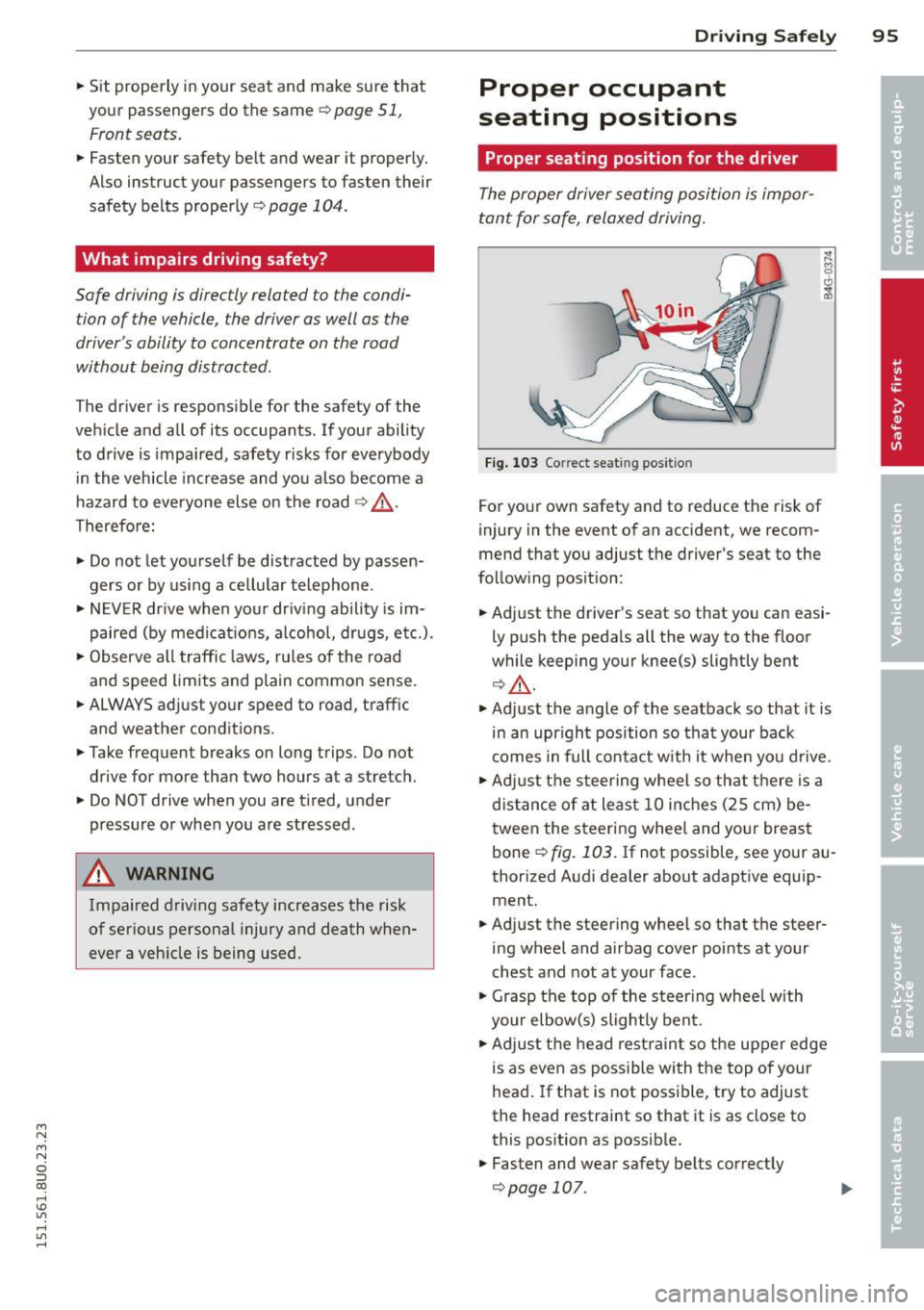
Fig. 103 Correct seat ing pos it ion
For your own safety and to reduce the risk of
injury in the event of an accident, we recom
mend that you adjust the driver's seat to the
follow ing pos ition:
.. Adjust the driver's seat so that you can easi
ly push the pedals all the way to the floor
wh ile keeping your knee(s) slightly bent
¢&_ .
.. Adjust the angle of the seatback so that it is
in an upr ight position so that your back
comes in full contact w ith it when you drive.
.. Adjust the steering wheel so that th ere is a
distance of at least 10 inches (25 cm) be
tween the steering wheel and yo ur breast
bone ~
fig. 103. If not possible, see your au
thorized Audi dealer about adaptive equip
ment.
.. Adjust the steering wheel so that the steer
ing wheel and airbag cover points at your
chest and not at your face .
.,. Grasp the top of the steer ing whee l with
your elbow(s) slightly bent .
.. Adjust the head rest raint so the upper edge
is as even as possible with the top of your
head. If that is not poss ible, try to adjust
the head restraint so that it is as close to
this position as possible.
.. Fasten and wear safety belts correctly
¢page 107.
Page 100 of 258
98 Driving Safely
• Adjust the head restraints so the upper edge
is as even as possible with the top of your
head. If that is not possib le, try to adjust
the head restraint so that it is as close to
this position as possible
Q fig . 104.
• If there is a passenger on the rear center
seat ing pos it ion, slide the center head re
stra int upward at least to the next notch .
Adjusting head restraints
Q page 52.
A WARNING
All seats are equipped with head re s traints. Dr iv ing without head restraints or
w ith head restra ints that a re not properly
adjusted increases the risk of ser ious or fa
t al nec k injury dramat ic a lly. T o help reduce
t he risk of in ju ry:
- Alw ays drive with the he ad restr aints in
place and properly adjusted.
- E very pe rson in the veh icle must have a
properly ad ju ste d head res tra int.
- Always make su re each pe rso n i n the ve
hicle properly adjusts the ir head re
strain t. Ad just the head restraints so the
upper edge is as even as possi ble with
the top of your head. If that is not possi
ble, try to adjust the head restra int so
that it is as close to this position as pos
sible .
- Never attempt to adjust head restraint
wh ile driving. If you have driven
off and
must adjust the dr iver head rest for any
reason, first stop the vehicle safe ly be
fore attempting to adjust the head re
st rain t.
- Children must always be properly re
strained in a ch ild restraint that is appro
pr iate for their age a nd s ize
Q page 133.
Examples of improper seating positions
The occupant restraint system can only re
duce the risk of injury if vehicle occupants are
properly seated.
Improper seating posit ions can cause serious
injury or de ath . Safety belts can only work
wh en they a re p rop erly positioned o n the body. Improper seating positions reduce the
effectiveness of safety belts and wi
ll even in
c rease the r is k of i njury and death by mov ing
the safety belt to crit ica l areas of the body.
Improper seating positions a lso increase t he
risk of serious inju ry and death when an a ir
bag deploys and str ikes an occupa nt w ho is
not in the proper s eating posit ion . A dr iver is
responsible for the safety of all ve hicle occu
pants and espe cially for child ren. The re fo re :
• Never allow anyone to assume an incor rect
s e ating position when the vehicle is being
used
Q & .
The following bullet ins list o nly some samp le
pos itions tha t w ill increase the r isk of serious
i njury and dea th . O ur hope is that t hese exam
ples will ma ke yo u more aw are o f seat ing po
s it ions tha t ar e dangerous.
Therefore , whenever the vehicle is
moving:
- neve r sta nd u p in t he vehicle
- neve r stand on the seats
- neve r kneel on the seats
- never ride wit h the seatback reclined
- never lie down on the rear seat
- never lean up against the instrument panel
- neve r sit on the e dge of the seat
- neve r sit s ideways
- neve r lean out t he window
- never put your feet out the window
- never put your feet on the instrument panel
- neve r rest your feet on the seat cush ion or
back of the seat
- neve r ride in the footwell
- neve r ride in the cargo a rea
A WARNING
Imp ro per seating posit ions increase the
risk of ser ious persona l injury and death
whenever a vehicle is being used.
- Always make sure that all vehicle occ u-
pants stay in a proper seating position
and are p roperly rest rained whenever the
veh icle is being used.
Page 103 of 258
M N
M N
0 ::i co ,...., \!) 1.1"1 ,...., 1.1"1 ,....,
to reduce the risk of injury when the vehi
cle is not be ing used.
- After closing the rear lid, always make
sure that it is properly closed and locked.
- Never leave your vehicle unattended es
pecially with the rear lid left open . A
child could crawl into the vehicle through
the luggage compartment and close the
rear lid becoming trapped and unable to
get out. Be ing trapped in a vehicle can
lead to serious persona l injury.
- Never let children play in or around the vehicle .
- Never let passe ngers r ide in the luggage
compartment . Ve hicle occupants must
always be properly restrained in one of
the vehicle's seating positions.
(D Tips
- Air c irculation helps to reduce window
fogging. Sta le air escapes to the outside
th rough vents in the trim pane l. Be su re
to keep these slots free and open.
- The t ire pressure must correspond to the
load. The t ire pressur e is shown o n the
tire p ress ure label. The tire pressure la
bel is loc ated on the d river's s ide B-pi ll a r.
The t ire pressure label lists the recom
mended cold ti re inflat ion pressu res for
the vehicle at its maximum capacity
weig ht and the tires that were on you r
vehicle at the time it was manufactured.
For recommended t ire pressures fo r nor
mal load conditions, please see chap ter
c:>page 199.
Tie-downs
The luggage compartment is equipped with
four tie-downs to secure luggage and other
items .
Use the tie-downs to secure your cargo prop
erly
c:> page 100, Loading the luggage com
partment.
In a coll is ion, the laws of phys ics mean that
even smalle r items that are loose in the vehi
cle will become heavy missiles that can cause
Dr iving S afel y 101
serious injury. Items in the ve hicle possess en
ergy which vary with vehicle speed and the
weight o f the item . Vehicle speed is the most
s ignificant factor.
Fo r example, in a fronta l collision at a speed
of 30 mph (48 km/h), the forces acting on a
10 -lb (5 kg) object a re about 20 times the
no rmal weight of the item. This means that
the weight of the item would sudden ly be
about 200 lbs. (90 kg) . You can imag ine the
i njur ies that a 200 lbs . (90 kg) item flying
fr eely th ro ugh the passenger compar tme nt
c ould cause in a co lli sion like this.
A WARNING
We ak, dam aged or improper str aps used
to secure items to tie -downs can fail dur
ing hard braking or in a collision and cause
serious personal injury .
-Always use s uita ble mount ing stra ps and
properly secu re items to the tie-downs in
the l uggage compa rtme nt to he lp pre
vent items from shift ing or f ly ing fo r
ward as dangerous missiles .
-When the rea r seat backrest is folded
down, a lways use suitable mounting
straps and properly secure items to the
tie-downs in the luggage compartment
to hel p prevent items from fly ing for
ward as dangerous missiles into the pas
s enger compartment.
- Never attach a chi ld safety seat te th er
strap to a t ie- down .
Reporting Safety
Defects
Applicable to U.S.A.
If you b elieve that your v ehi cle
has a d efe ct whi ch could cause
a crash or could cause injury or
d eath, you should imm ediately
inform the National Highway
Tr affic Safet y Admini stration ..,.
•
•