ESP AUDI Q3 2016 User Guide
[x] Cancel search | Manufacturer: AUDI, Model Year: 2016, Model line: Q3, Model: AUDI Q3 2016Pages: 252, PDF Size: 62.81 MB
Page 38 of 252
Opening and clo sin g
Power child safety lock
Applies to veh icles: W it h power c hild safety lock
The child safety locks t prevent the rear doors
from opening from the inside .
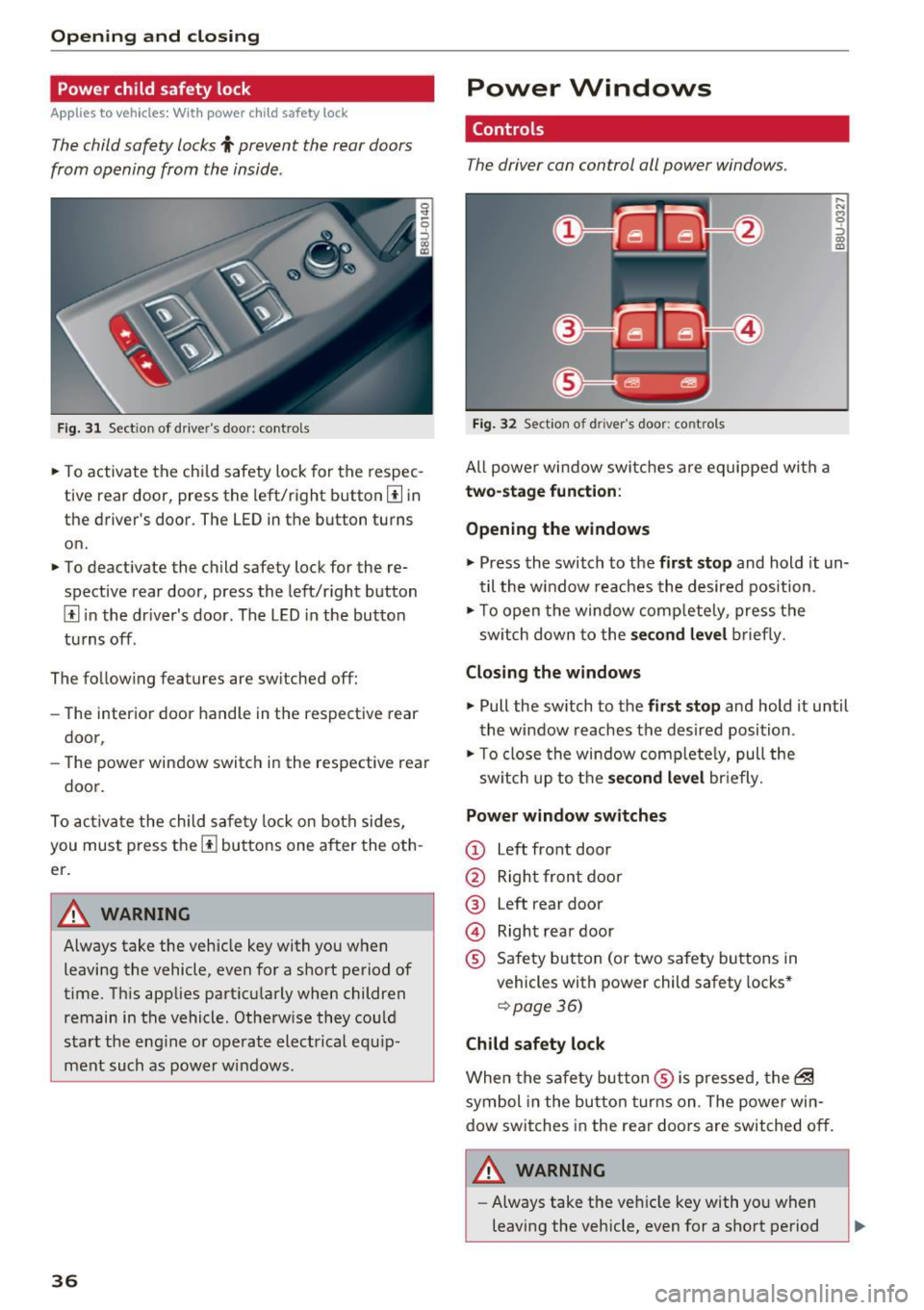
Fig. 31 Sect ion of dr iver's door: controls
.,. To activate the ch ild safety lock for the respec
tive rear door, press the left/right button
[I in
the driver's door. The LED in the button turns
on.
.,. To deactivate the child safety lock for the re
spective rear door , press the left/r ight button
[I i n the dr iver's door . The LED in the button
tu rns off .
The follow ing features are switched off:
- The interior door handle in the respective rear
door,
- The power window switch in the respective rear
door.
To act iva te the child sa fety lock on both sides,
you must press the
[I buttons one after the oth
er.
A WARNING
Always take the vehicle key with you when leaving the vehicle, even for a short period of
time. T his applies part icularly when children
remain in the vehicle. Otherw ise they could
start the eng ine o r operate elect rical equ ip
ment such as power windows.
36
-
Power Windows
Controls
The driver can control all power windows .
Fig. 32 Sect ion of driver 's door: controls
All powe r window swi tches a re equipped with a
two-stage funct ion :
Opening the windows
,.._ N M 0 ::, co m
.,. Press the switch to the fir st stop and hold it un
til the w indow reaches the desired position .
.,. To open the window comp letely, press the
sw itch down to the
s econd level b rief ly.
Closing the windows
.,. Pull the sw itch to the first stop and hold it until
the window reaches the desired position .
.,. To close the window complete ly, pull the
sw itch up to the
s econd level br iefly.
Power window switches
(D Left front door
@ Right front door
@ Left rear door
@ Right rear door
® Safety button (or two safety buttons in
vehicles with power child safety locks *
¢page 36)
Child safety lock
When the safe ty b utton ® is pressed, the~
symbol in the button turns on . The powe r win
dow switches in the rear doors are switched off .
./1. WARNING
- Always take the veh icle key with yo u when
leaving the vehicle, even for a short period
-
Page 40 of 252
Opening and closing
"'To set a position between opened and closed,
press/pull the button ~ up to the first level
u nt il the desired position is reached.
@ Sliding the roof
"'To open the sunroof completely , slide the but
ton
l""-I back up to the second level.
"'T o close the sunroof comp letely, slide the but
ton
l""'I forward briefly to the second level 9 &, .
"'To set a position between opened and closed,
slide the button~ forward/back up to the first
level until the des ired position is reached.
© Opening/closing the sun shade
"'To complete ly open the sun shade, briefly press
the right button.
"' To comp letely close the sun shade, briefly press
the left button.
"' To stop the sun shade, press the corresponding
button again.
After the ignition is switched off, you can still op
erate the panoramic sunroof for about 10 mi nutes . The sw itch is deactivated once the driver's
or front passenger's door is opened .
A WARNING
Be careful when clos ing the panoram ic sun
roof- otherwise serious injury could result!
For this reason, always remove the ignition
key when leaving the vehicle.
@ Note
Always close your panoram ic sunroof when
leaving your vehicle. Sudden ra in can cause
damage to the interior equ ipment of you r ve
hicle, particularly the electronic equipment.
@ Tips
-For informat ion about convenience open
ing /closing, refer to
9 page 37.
-The panorama roof will only open dow n to
-4 Of (-20 °().
Emergency closing the roof
If an object is detected when closing, the panora
ma roof will open again automatically. In this
38
case, you can then close it with the power emer
gency closing function.
"' Pull the respective button
¢ page 3 7, fig . 34
withi n 5 seconds after the roof opens automati
cally and hold until the panorama roof is
closed.
Page 41 of 252
Lights and Vision
Exterior Lighting
Switching lights on and off
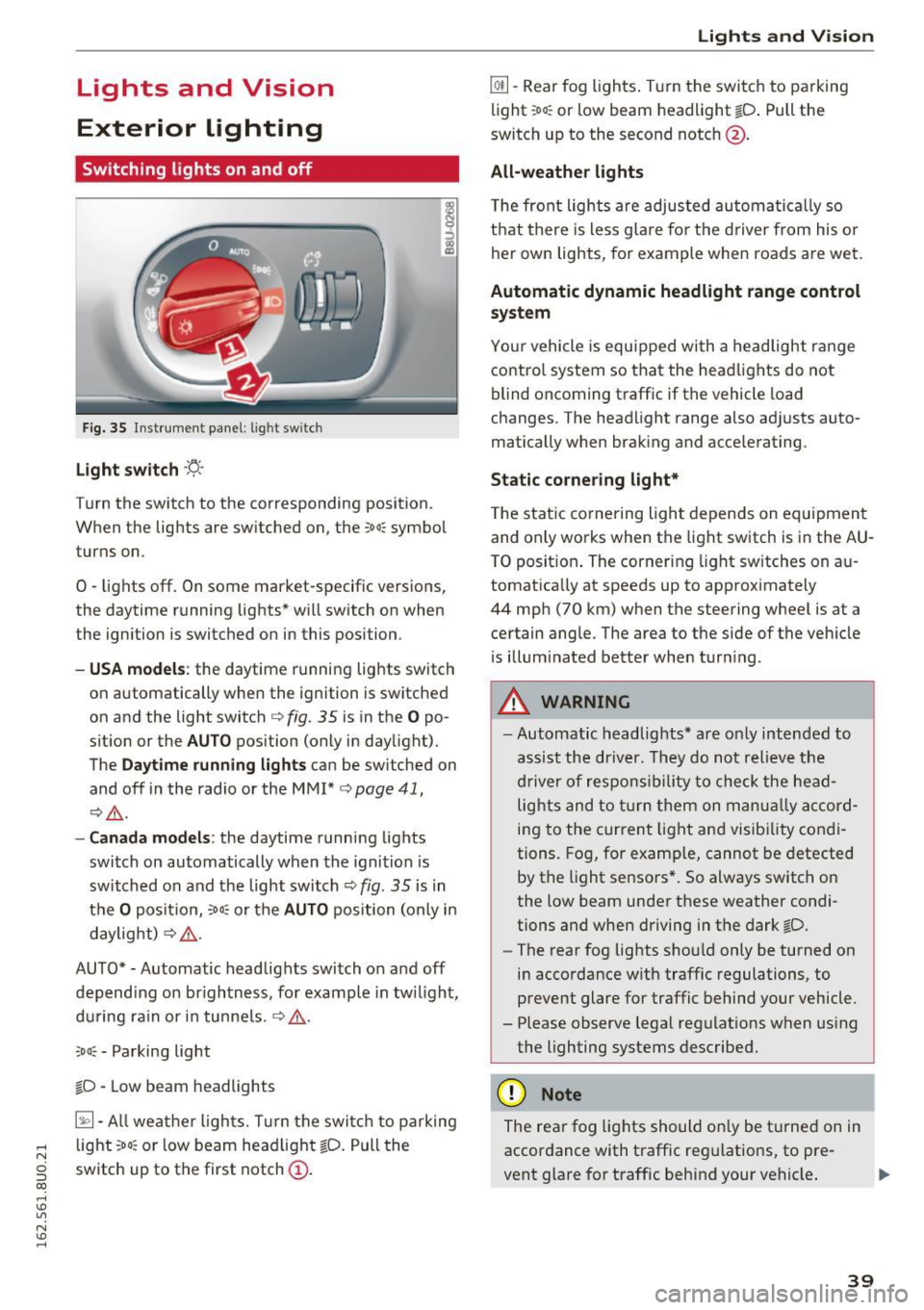
Fig. 35 Instrument panel: l ig ht switc h
Light switch ·'!;5-·
Turn the switch to the corresponding position.
When the lights are switched on, the ;oo: symbol
turns on.
0 -lights off. On some market-specific vers ions,
the daytime running lights* will switch on when
the ignition is switched on in this position .
-USA model s: the daytime running lights switch
on automatically when the ignition is switched
on and the light switch
c::> fig. 35 is in the O po
s it ion or the
AUTO position (only in daylight).
The
Daytime running lights can be switched on
and off in the radio or the MMI*
c::> page 41,
i:::> A .
-Canada models : the daytime runn ing lights
switch on automatically when the ignition is
switched on and the light switch
c::> fig. 35 is in
t h e
O positio n, :oo: or the AUTO position (only in
daylight)
i:::> A .
AUTO*· Automatic headlights switch on and off
depend ing on br igh tness, fo r example in tw ilight,
du ring rain or in tunne ls .
c::> A .
coo: - Parking light
~D · Low beam headlights
~· All weat her ligh ts. T urn the swi tc h to parking
.... light :oo: or low beam head light ~D. Pull the
N
g switch up to the first notch (D.
CX)
.... I.Cl U"I
N I.Cl ....
Lights and V ision
@ii -Rear fog ligh ts. T urn the swi tch to parking
light ;oo : or low beam headlight
tD . Pull the
switch up to the second notch@.
All -weather lights
T he front lights a re adjusted au toma tica lly so
t h at there is less g lare fo r the d river from his o r
her ow n lights, for example whe n roads are we t.
Automatic dynamic headlight range control
system
Yo ur vehicle is equ ipped wi th a headligh t range
contro l system so that the head lig hts do not
blind oncoming traff ic if the vehicle load
changes . The head light range also ad justs auto
matically when brak ing and accelerating .
Static corne ring light*
T he stat ic co rnering light depe nds on equipmen t
and on ly works when the light switch is in the AU
T O posit ion . The corner ing light sw itches on a u
tomat ically at speeds up to approximately
44 mp h (70 km) when the steering wheel is at a
ce rtain ang le . The area to the side of the vehicle
is illum inated better when tur ning .
.,&. WARNING ,~ -- Automatic headlights* are o nly inten ded to
assist the driv er. They do no t reli eve t he
dr iver of resp onsib ility to check the hea d
light s and to tur n them on m anual ly a ccord
i n g to the curren t light an d visib ility condi
tion s. Fog, for examp le, cannot be detected
by the light se nsors *. So always switch o n
the low beam under these weather condi
tions and when driving in the dark ~D.
- The rear fog lights sho uld only be turned on
in acco rdance w ith traffic regulations, to
prevent glare for traffic behind your vehicle.
- Please observe lega l reg ulat ions w hen us ing
the lighting systems desc ribe d.
(D Note
The rea r fog lights shou ld on ly be t urne d on in
accordance with traffic reg ulations, to pre
vent glare for traffic behind your vehicle .
39
Page 42 of 252
Lights and Vision
(D Tips
-The light sensor for the automatic head
lights* is in the rearview m irror mount.
Therefore, do not place any stickers in this
area on the windshield.
- Some of the exterior lighting functions can be adjusted
c:-page 41.
-If you turn off the ignition wh ile the exter ior
lights are on and open the door, you will
hear a warning tone.
- In cool or damp weather, the inside of the
headlights, turn s ignals and tail lights can
fog over due to the temperature d ifference
between the inside and outs ide . They will
clear short ly after sw itch ing them on . This
does not affect the serv ice life of the light
ing .
Turn signals and high beam lever
The lever operates the turn signals, the high
beams and the headlight flasher.
8 N 0
~
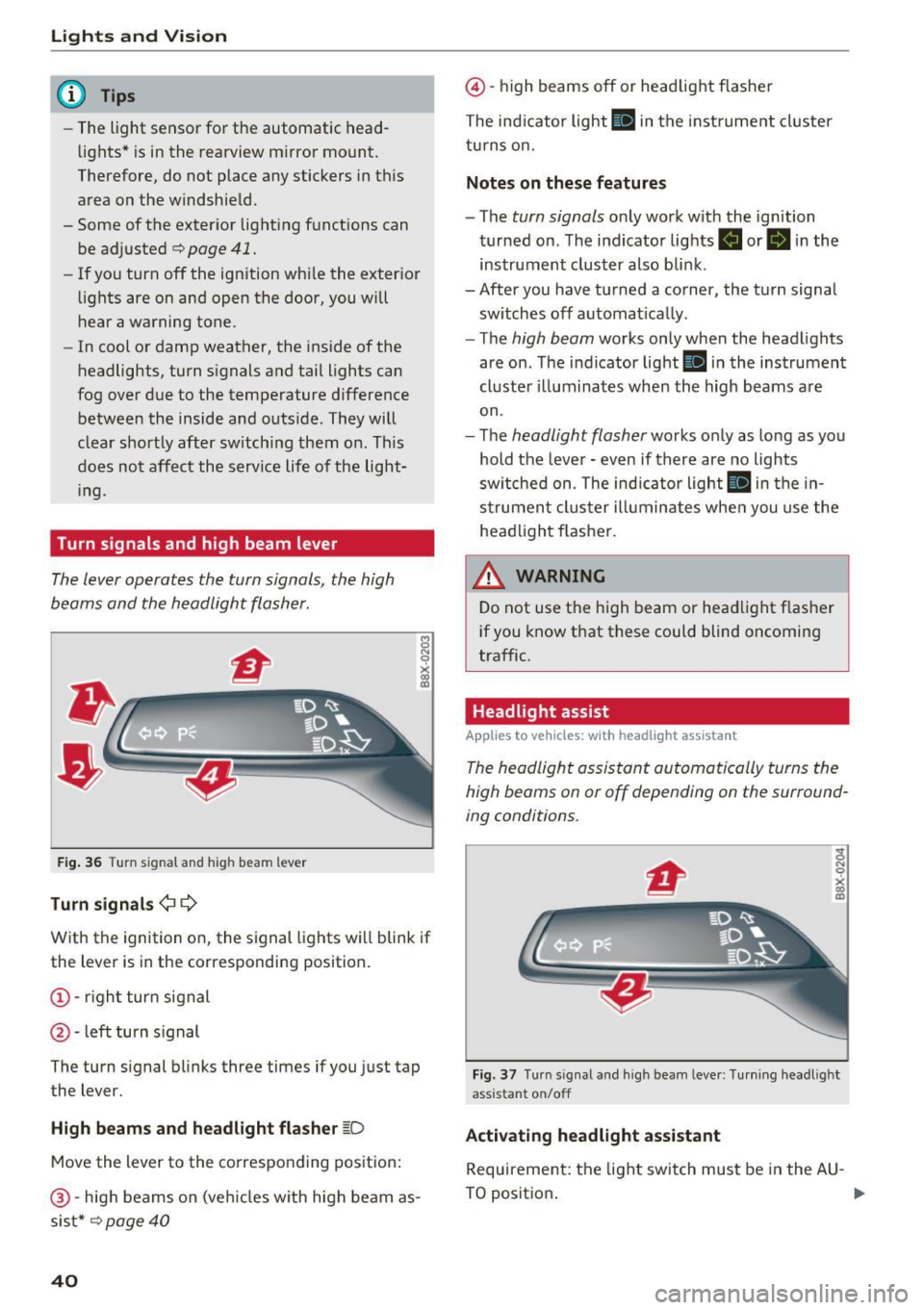
F ig . 36 Turn s ig nal and h ig h bea m lever
Turn signals ¢ Q
With the ignition on, the signal lights w ill blink if
the lever is in the corresponding position.
(!) -righ t turn signal
@ -left turn s ignal
The turn s ignal blinks three times if you just tap
the lever.
High beam s and headlight flasher ~D
Move the lever to the co rrespo nd ing posit ion:
@ -high beams on (ve hicles w ith high beam as
sis t*
c:-page 40
40
@ -high beams off or headlight flasher
The ind icator light
II in the instrume nt cl uster
turns o n.
Notes on these features
- The turn signals only work w ith the ignition
turned on . T he indicator lights . or
II in the
instrument cluster also bli nk.
- After you have tu rned a corner, the tu rn signa l
sw itches off automat ica lly .
- The
high beam works only when the head lights
are on . Th e ind icator light
Bl in the instrumen t
cl uste r ill um ina tes when the high beams a re
on.
- The
headlight flasher works o nly as long as yo u
hold the leve r - even if there are no lights
sw itched on . The ind icator light
II in the in
s trumen t clus te r i lluminates whe n you use the
head light flasher.
&_ WARNING
D o not use t he high beam or head light f lasher
if you know that these could blind oncoming
traffic.
Headlight assist
Applies to vehicles: wit h headlight assistant
The headlight assistant automatically turns the
high beams on or off depending on the surround
ing conditions .
Fig. 3 7 Turn s ig nal a nd hi gh beam lever: Tu rnin g headl ig ht
ass istant on/off
Activating headl ight assi stant
Requireme nt: the light sw itch must be in the AU -
TO positio n. .,.
Page 43 of 252
~ To activate the headlight assistant, tap the lev
er forward (!). The indicator light
ii appears
in the instrument cluster disp lay and the head
lights are switched on/off automatically. The
SI indicator light also turns on if the high
beams are switched on .
Switching the high beams on/off manually
If the high beams did not switch on/off automat
ically as expected, you may switch them on or off
manually instead:
~ To switch the high beams on manually, tap the
l ever forward (!). The
SI indicator light turns
on.
~ To switch the high beams off manually, pull the
lever back@. The headlight assistant is deacti
vated .
Operating the headlight flasher
~ Pull the lever into position @to operate the
headlight flasher when the headlight assist is
activated. The headlight ass istant remains ac
tive.
Messages in the instrument cluster display
Headlight assist: System fault!
Drive to an authorized Aud i dea ler or a uthorized
Aud i Serv ice Fac ility immediately to have the
malfunction corrected. You can still switch the
high beams on or off manually.
Headlight assist: Unavailable. No camera view
The camera view is blocked, for example by a
sticker or debris .
The sensor is located between the interior rear
view mirror and the windshield . Therefore, do not
place any st ickers in this area on the windshield .
A WARNING
Headlight assistant is only intended to assist
the driver. The driver is still responsible for
controlling the headlights and switching
them manually depending on light and visibil
ity conditions. It may be necessary to operate
them manually in situations such as:
- In adverse weather conditions such as fog,
heavy ra in, b lowing snow or spraying water.
Lights and Vision
-On roads where oncoming traffic may be
partially obscured, such as expressways.
- When there are road users that do not have
sufficient lighting, such as bicyclers or
veh icles with dirty tail lamps.
- In tight curves and on steep slopes.
- In poorly lit areas.
- With strong reflectors, such as signs .
- If the area of the windshield near the sensor
is fogged over, dirty, icy or covered with a
s ticker.
Adjusting exterior lighting
The functions are selected in the radio or MMI*.
~ Select: !CAR ! function button> (Car) Systems*
control button > Vehicle settings> Exterior
lighting .
Coming home (lights when leaving car}*,
Leaving home (lights when unlocking car)*
The coming home function illumi nates the area
around the vehicle when the ignition is switched
off and the driver's door is opened. Depending on
vehicle eq uipment, the function can be switched
on and off or the length of time the lights remain
on* can be adjusted .
T he
leaving home function illuminates the area
around the vehicle when unlock ing it. Thi s func
tion can be switched on and off.
The
coming home and leaving home functions
only operate when it is dark and the light switch
is i n the AUTO posit ion ~
page 39, fig. 35.
Daytime running lights
USA models:
You can switch the daytime running
l ights
on and off .
Canada models:
The function cannot be turned
off. It is activated automatically each time the ig
nition is switched on .
41
Page 46 of 252
Lights and Vision
@ Tips
If the power adjusting function malfunctions,
the glass in both mirrors can be adjusted by
pressing on the edge of it by hand.
Dimming the mirror
Your vehicle is equipped with o manual or auto
matic dimming rearview mirror.
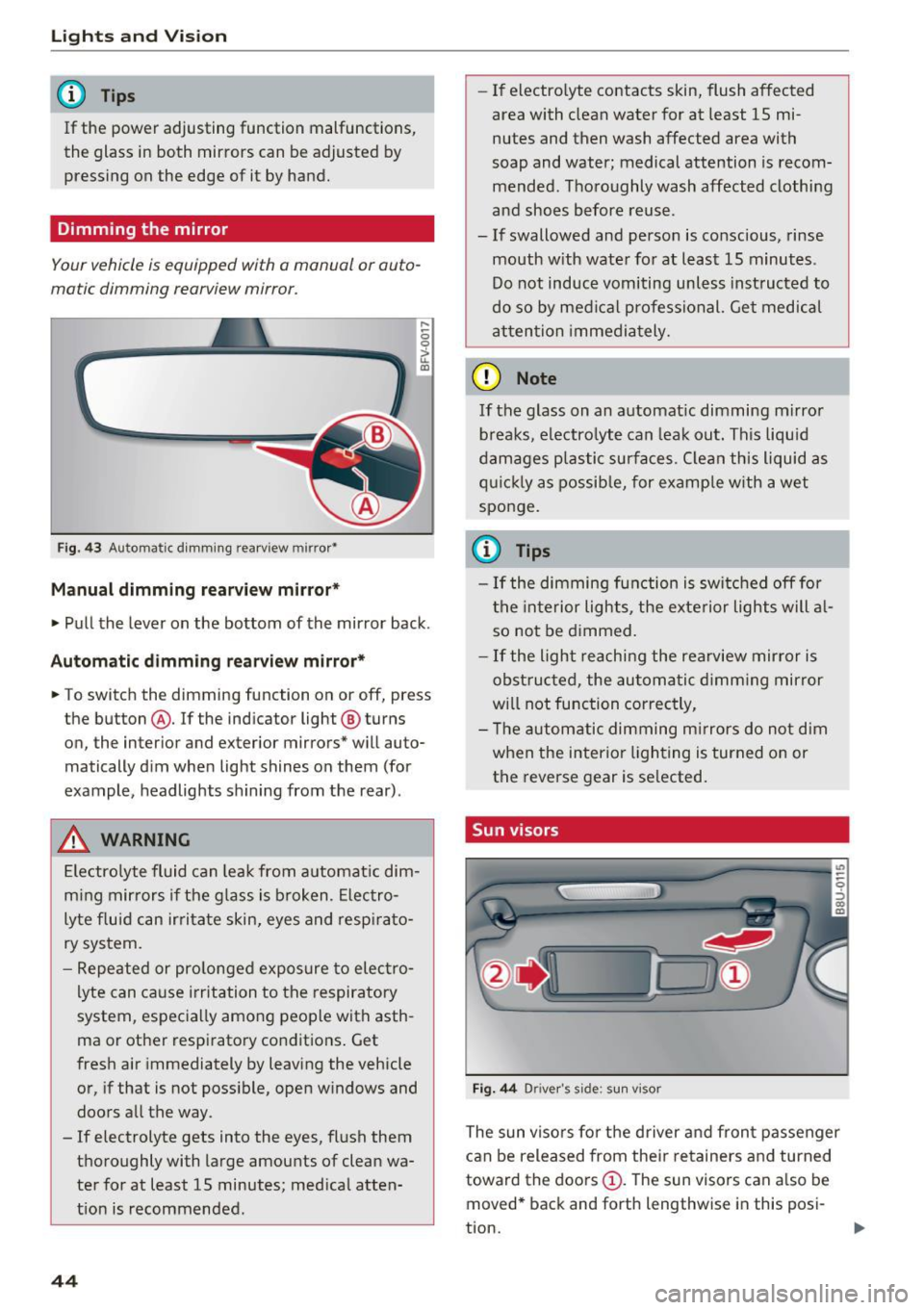
Fig. 43 Automatic dimming rearview mirror•
Manual dimming rearview mirror*
....
0 0
> u. Ill
• Pull the lever on the bottom of the mirror back .
Automatic dimming rearview mirror*
• To switch the dimming function on or off, press
the button @. If the ind icator light @ turns
on, the inter ior and exterior mirrors* will auto
matically dim when light shines on them (for
example, headlights shining from the rear).
A WARNING
Electrolyte fluid can leak from automatic dim
ming mirrors if the glass is broken. Electro
lyte fluid can irritate skin, eyes and respirato
ry system.
- Repeated or prolonged exposure to electro
lyte can cause irritation to the respiratory
system, especially among people with asth
ma or other respiratory conditions. Get
fresh air immediately by leaving the vehicle
or, if that is not possible, open windows and
doors all the way.
- If electrolyte gets into the eyes, flush them
thoroughly with large amounts of clean wa
ter for at least 15 minutes; medical atten
tion is recommended.
44
- If electro lyte contacts skin, flush affected
area with clean water for at least 15 mi
nutes and then wash affected area with
soap and water; medical attention is recom mended . Thoroughly wash affected clothing
and shoes before reuse.
- If swallowed and person is conscious, rinse mouth with water for at least 15 minutes.
Do not induce vomiting unless instructed to
do so by medical professional. Get medical
attention immediately.
(D Note
If the glass on an automatic dimming mirror
breaks, electrolyte can leak out. This liquid
damages plastic surfaces. Clean this liquid as
quickly as possible, for example with a wet
sponge.
(0 Tips
- If the dimming function is switched off for
the interior lights, the exterior lights will al
so not be dimmed.
- If the light reaching the rearview mirror is
obstructed, the automatic dimming mirror
will not function correctly,
- The automatic dimming mirrors do not dim
when the interior lighting is turned on or
the reverse gear is selected.
Sun visors
Fig. 44 Drive r's side ; s un visor
The sun visors for the driver and front passenger
can be released from their retainers and turned
toward the doors
(D. The sun visors can also be
moved* back and forth lengthwise in this posi-
tion. ..,.
Page 47 of 252
The mirror lighting* switches on when the cover
over the vanity mirror@opens.
Windshield wipers
Switching the windshield wipers on
Fig. 45 Windshie ld wiper lever
Fig. 46 Act uate the re ar window w iper
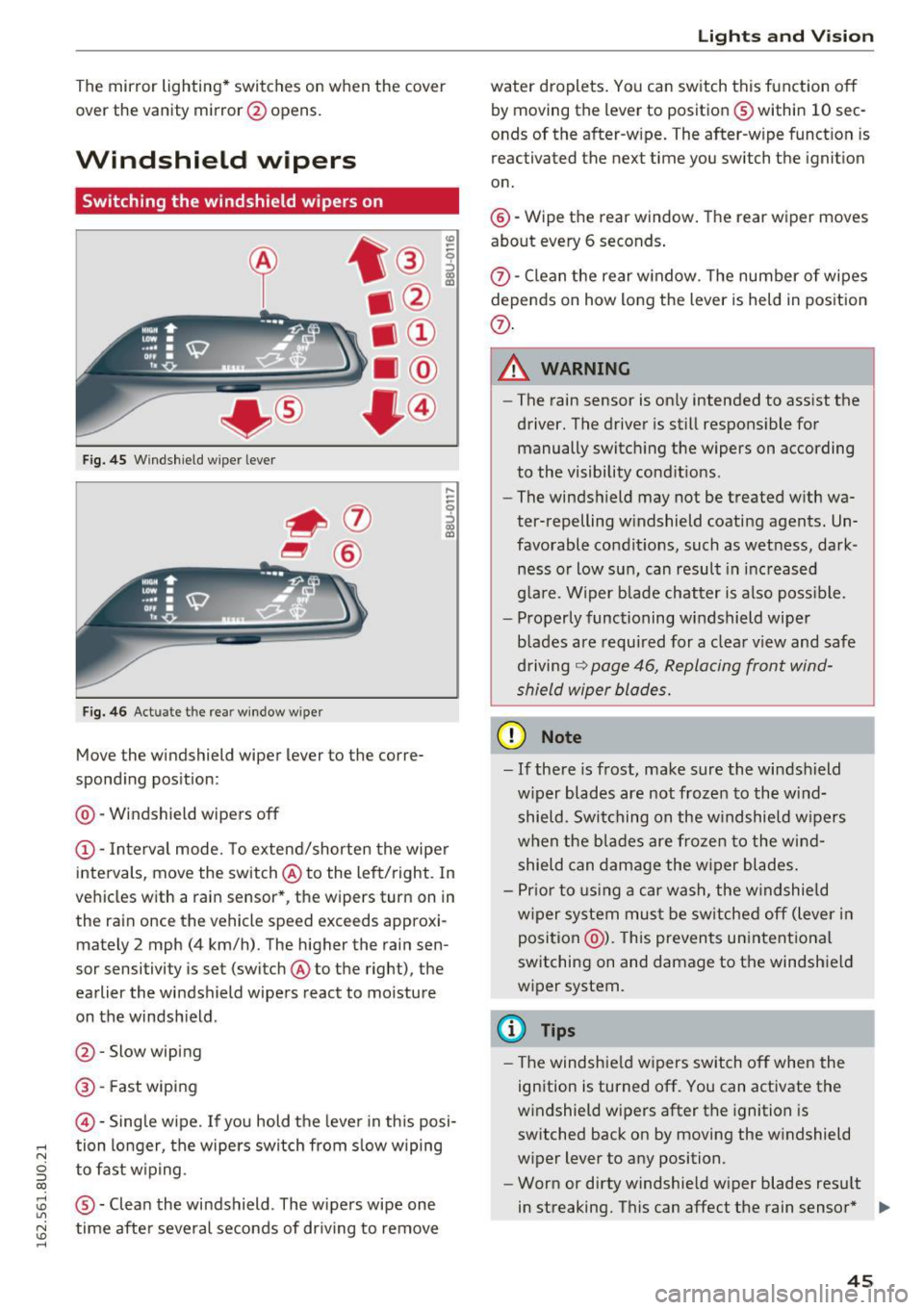
Move the windshield wiper lever to the corre
sponding position:
@ -Windshield wipers off
@ -Interva l mode. To extend/shorten the wipe r
intervals, move the switch @to the left/right. In
vehicles with a rain sensor *, the wipers turn on in
the rain once the vehicle speed exceeds approxi mately 2 mph (4 km/h). The higher the rain sen
sor sensitivity is set (switch @to the right), the
earlier the windshield wipers react to moisture
on the windsh ield .
@ -Slow wiping
@ -Fast wiping
©-Sing le wipe. If yo u hold the leve r in th is posi-
,.... tion longer, the wipers switch from s low wiping
N
g to fast w ip ing.
CX)
~ ® -Clean the windshield . The wipers wipe one U"I
~ time afte r severa l seconds of dr iving to remove
......
Lights and V ision
water droplets . You can switch this function o ff
by moving the lever to position ® within 10 sec
onds of the after-w ipe. The after-wipe funct ion is
reactivated the next time you switch the ignit ion
on.
@ -Wipe the rear window . The rear wiper moves
about every 6 seconds .
{J)-Clean the rear w indow . T he number of wipes
depends on how long the lever is held in position
{J) .
.&_ WARNING
-
-The rain sensor is on ly intended to ass ist the
driver. The driver is still respons ible for
manually switch ing the wipers on according
to the visibility cond it ions .
- The winds hield may not be treated w ith wa
ter-repelling w indshield coating agents. Un
favorable condit ions, such as wet ness, dark
ness o r low sun, can result in inc reased
g lare. Wiper b lade chatter is also poss ible.
- Properly functioning windshield wiper
blades are requ ired for a clea r view and safe
d riving
~ page 46, Replacing front wind
shield wiper blades.
(D Note
- If there is frost, make sure the wi ndshield
w iper blades are not frozen to the wind
shield. Swi tching on the w indshield w ipers
when the blades are frozen to the wind shield can damage the w iper blades.
- Pr ior to using a car wash, the w indshield
w iper system mus t be sw itched off (lever in
position @). This prevents un intentional
switching on and damage to the windshield
wiper system.
(D Tips
- T he windshie ld w ipers switch off when the
ignition is turned off. You can activate the
w indshield wipers after the ignition is
switched back on by moving the w indshield
wiper lever to any position.
- Worn or dirty windshie ld wiper blades resu lt
in streaking. This can affect the rain sensor * .,.
45
Page 51 of 252
Seats and storage
General information
Important information
A WARNING
-
Refer to ¢ page 95, Driving safety for i m
portant information, tips, suggestions and
warnings that you should read and follow for
your own safety and the safety of your pas
sengers.
Why is your seat adjustment so important?
The safety belts and the airbag system can only
provide maximum protection if the front seats
are correctly adjusted.
There are various ways of adjusting the front
seats to provide safe and comfortable support
for the driver and the front passenger. Adjust
your seat properly so that:
- you can easily and quick ly reach all the switches
and controls in the instrument pane l
- your body is properly supported thus reducing
physical stress and fatigue
- the safety belts and airbag system can offer
maximum protection
¢ page 112.
In the following sections, you will see exact ly
how you can best adjust your seats.
There are special regulations and instructions for in stalling a ch ild safety seat on the front pas
senger's seat . Always follow the information re
garding child safety provided in
¢ page 132,
Child safety .
A WARNING
Incorrect seating position of the driver and all
other passengers can result in serious person
al injury.
- Always keep yo ur feet on the floor when the
vehicle is in motion -never put your feet on
top of the instrument pane l, out of the win
dow or on top of the seat cushion. Th is ap
plies especially to the passengers. If your
seating pos it ion is inco rrect, you increase
Seat s and sto rage
the risk of injury in the case of sudden brak
ing or an accident. If the airbag inflates and
the seating posit ion is incorrect, th is could
result in persona l injury or even death.
- It is important for both the driver and front
passenger to keep a distance of at least
10 inches (25 cm) between themselves and
the steering wheel and/or instrument pan
el. If you're sitt ing any closer than this, the
ai rbag system cannot protect you properly.
I n addition, the front seats and head re
stra ints must be adjusted to you r body
height so that they can give you maximum
protection.
- Always try to keep as much dis tance as pos
sible between yourself and the steering
wheel or instrument pane l.
- Do not adjust the driver's o r front passeng
er's seat while the vehicle is moving . Your
seat may move unexpectedly, causing sud
den loss of vehicle contro l and personal in
jury. If you ad just your seat while the veh icle
is moving, you are o ut of pos ition.
Driver's seat
The correct seat position is important for safe
and relaxed driving.
We recommend that you adjust the driver's seat
in the following manner:
.. Adjust the seat in fore and aft direction so that
you can easi ly push the pedals to the f loor
while keeping yo ur knees slight ly bent ¢
A in
Why is your seat adjustment so important? on
page 49.
.. Adjust the seatback so that when you sit with
your back against the seatback, you can still
grasp the top of the stee ring wheel.
.. Adj ust the head restra int so the uppe r edge is
as
even as possib le w it h the top of yo ur head. If
tha t is no t possible, t ry to adjus t the hea d re
st raint so tha t it is as close to this pos it ion as
possible
¢ page 51. .,.
49
Page 56 of 252
Sea ts and stor age
of injuries, never leave ch ildren unattended in
the vehicle with the veh icle key.
(D Note
- To reduce the risk of damage to the vehicle
electrica l system, never attempt to charge
the vehicle battery by connecting accesso
ries that prov ide power , such as solar panels
or battery chargers, to the 12 Volt sockets
or the cigarette lighter .
- To reduce the risk of damage to the sockets,
only use plugs that fit correct ly.
{!) Tips
The vehicle battery drains when accessories
are turned on but the engine is off.
Storage
General overview
A WARNING
- Always remove objects from the instrument panel. Any items not put away could slide
around inside the vehicle wh ile driving or
when accelerat ing or when applying the
brakes or when drivi ng a round a corner .
- When you are dr iving make sure that any
thing you may have placed in the center con
so le or othe r storage locations cannot fall
o ut into the footwells. In case of sudden
br ak in g you would not be able to brake or
acce lerate .
- Any pieces of cloth ing that you have hung
up mus t not in te rfe re with the driver 's view.
The coat hooks a re designed only fo r light
weight clothing. Never hang any clothing
with hard, pointed or heavy objects in the
pockets on the coat hooks. Dur ing sudden
braking or in an accident- especially if the
airbag is deployed -these objects could in
jure any passengers inside the vehicle .
54
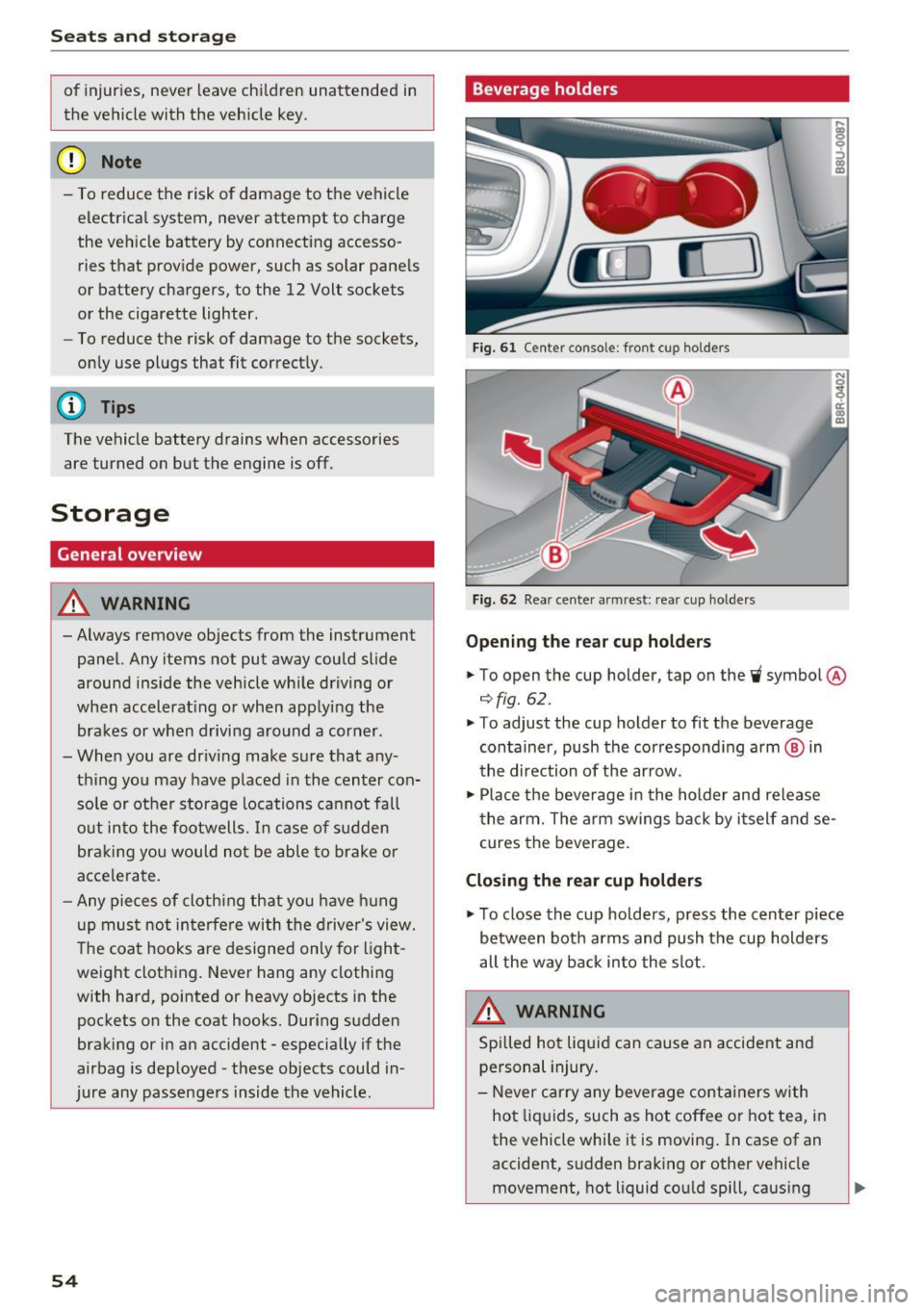
Beverage holders
Fig. 61 Center consol e: fr ont cup holders
Fi g. 62 Rea r cen te r armrest : rea r cup ho lde rs
Opening the re a r cup ho lder s
.. To open the cup holder , tap on the~ symbol @
¢fig. 62.
.. To adjust the cup holder to fit the beverage
container, push the correspond ing arm ® in
the direction of the ar row .
.,. Place the beverage in the holder and release
t he arm. The a rm swings ba ck by i tself and se
cures the beverage .
Closing the rear cup holders
.,. To close the cup holders , press the center piece
between both arms and push the cup holders
all the way back into the slot.
A WARNING
Spilled ho t liqui d can cause a n accident and
personal injury .
- Never carry any beverage containers with
ho t liquids, such as hot coffee or hot tea, i n
the vehicle while it is moving . In case of an
accident, s udden braking or other vehicle
movement, hot liquid cou ld spill , causing
-
Page 58 of 252
Seats and storage
To switch the cooling off
.,. Turn the rotary switch @clockwise to switch
the cooling off.
The cooling box works only in the cooling mode.
If the climate control is in the heating mode, we
recommend switching the cooling box off.
& WARNING
To reduce the risk of personal injury in an acci
dent or sudden stop, always keep the glove
compartment closed while driving.
Additional storage
There are a variety of storage compartments and
fasteners in various places in the vehicle.
- In the front center console.
- At the front end of the front seats*. You can
store objects weighing up to 3.3 lbs (1.5 kg) in
the drawer and objects weighing up to 2.2 lbs (1 kg) in the hinged compartment.
- In the door trim.
- Coat hooks next to and above the rear doors.
- Nets* on the backrests of the front seats.
- Coat hooks/retaining hooks in the luggage
compartment.
& WARNING
- When driving, do not leave any hard objects
on the rear window shelf or allow your pet
to sit on the shelf. They could become a haz
ard for vehicle occupants in the event of
sudden braking or a crash.
- Always remove objects from the instrument
panel. Any items not stored could slide
around inside the vehicle while driving or
when accelerating or when applying the
brakes or when driving around a corner.
- When you are driving make sure that any
thing you may have placed in the center con
sole or other storage locations cannot fall
out into the footwells. In case of sudden
braking you would not be able to brake or
accelerate.
- Any articles of clothing that you have hung
up must not interfere with the driver's view.
56
The coat hooks are designed only for light
weight clothing. Never hang any clothing
with hard, pointed or heavy objects in the pockets on the coat hooks. During sudden
braking or in an accident - especially if the
airbag is deployed - these objects could in
jure any passengers inside the vehicle.
- To reduce the risk of personal injury in an
accident or sudden stop, always keep the
glove compartment closed while driving.
- Read and follow all WARNINGS
~ page 128, Important safety instructions
on the side airbag system.
-Hang clothes in such a way that they do not
impair the driver's vision.
- The coat hooks must only be used for light
weight clothing. Do not leave any heavy or
sharp edged objects in the pockets which
may interfere with the side curtain airbag
deployment and can cause personal injury in
a crash.
- Do not use coat hangers for hanging cloth
ing on the coat hooks as this can interfere
with proper deployment of the side curtain airbags in an accident.
- Do not hang heavy objects on the coat
hooks, as they could cause personal injury in
a sudden stop.
- Always keep the compartment above the
rearview mirror closed while driving to re
duce the risk of injury in the event of sudden
braking maneuvers or a collision.
(D Note
Objects located on the rear shelf that rub
against the rear window could damage the heating wires for the rear window defogger.
(D Tips
-A vent slot is located between the shelf and
the rear window. Do not block the vent with
any items you may place on the rear window
shelf.
- Do not place bulky items on the rear window shelf as they could restrict or block the driv
er's vision in the rear view mirror.