instrument cluster AUDI Q3 2016 User Guide
[x] Cancel search | Manufacturer: AUDI, Model Year: 2016, Model line: Q3, Model: AUDI Q3 2016Pages: 252, PDF Size: 62.81 MB
Page 77 of 252
-For reasons of safety, cruise control should
not be used in the city, in stop-and-go traf
fic, on winding roads and when road condi
t ions are poor (such as ice, fog, gravel,
heavy ra in and hydroplaning) -you could
have an acc ident.
- Switch the cruise control off temporar ily
when driving in turning lanes, h ighway exits
o r in construction zones.
(D Tips
-The cruise control system is ideal for
stretches w ith speed limits. The driver is re
spons ible for adhering to the correct speed.
- The cruise control remains active when
sh ifting gears.
Changing speed
A ppl ies to vehicles: with c ruise control system
.. To inc rease o r decrease the speed in incre
ments, push the lever towa rd
0 10 <=> page 74,
fig. 82.
.. To increase or decrease the speed quickly, hold
the lever in the
010 direction until the de
sired speed is displayed .
You can also press the accelerator pedal down to
increase your speed, for example i f you want to
pass someone. The speed you saved earlier will
resume as soon as you re lease the accelerator
pedal.
However, if you exceed your saved speed by 5
mph (10 km/h) for longer than 5 minutes, the
cruise control system turns off temporari ly. The
tij ;(i)~i~ (USA models)/ . (Canada models) ind ica
tor light in the instrument cluster turns off and
the stored speed is retained.
Preselecting the speed
Appl ies to veh icles: with c ruise control system
You can preselect your desired speed when the
vehicle is stationary.
.... "' .. Switch the ignition on. ci ~ .. Pull the lever into position (D <=> page 74,
~ fig. 82. Lil
N v:, ....
Driving
.. To increase or decrease the speed, push the lev-
er toward
0 10 .
.. To store the speed displayed, release the lever.
T his function makes it possible, fo r example, to
save the desired speed before driving on the
highway. Once on the highway, activate the
cruise control by pulling the lever toward @.
Switching off
App lies to vehicles : with cruise co nt ro l sys te m
Temporary deactivation
.. Press the brake pedal, or
.. Press the lever into position @ (not clicked into
place)
<=> page 74, fig. 82 .
Switching off completely
.. Press the lever into position @(clicked into
place), or
.. Switch the ignit ion off .
T he speed you stored will be retained if the cruise
contro l has been switched off temporari ly. To re
sume the stored speed, release the brake pedal
and pull the lever into position@.
Switching the ignition off wi ll erase the stored
speed.
A WARNING
You should only resume the stored speed if it
i s not too high for existing traff ic conditions.
Otherw ise you risk an accident.
75
Page 82 of 252
Audi drive select
Audi drive select
Drive settings
Introduction
Applies to vehicles: with Aud i drive select
Drive select makes it possible to experience dif
ferent types of vehicle settings in one vehicle.
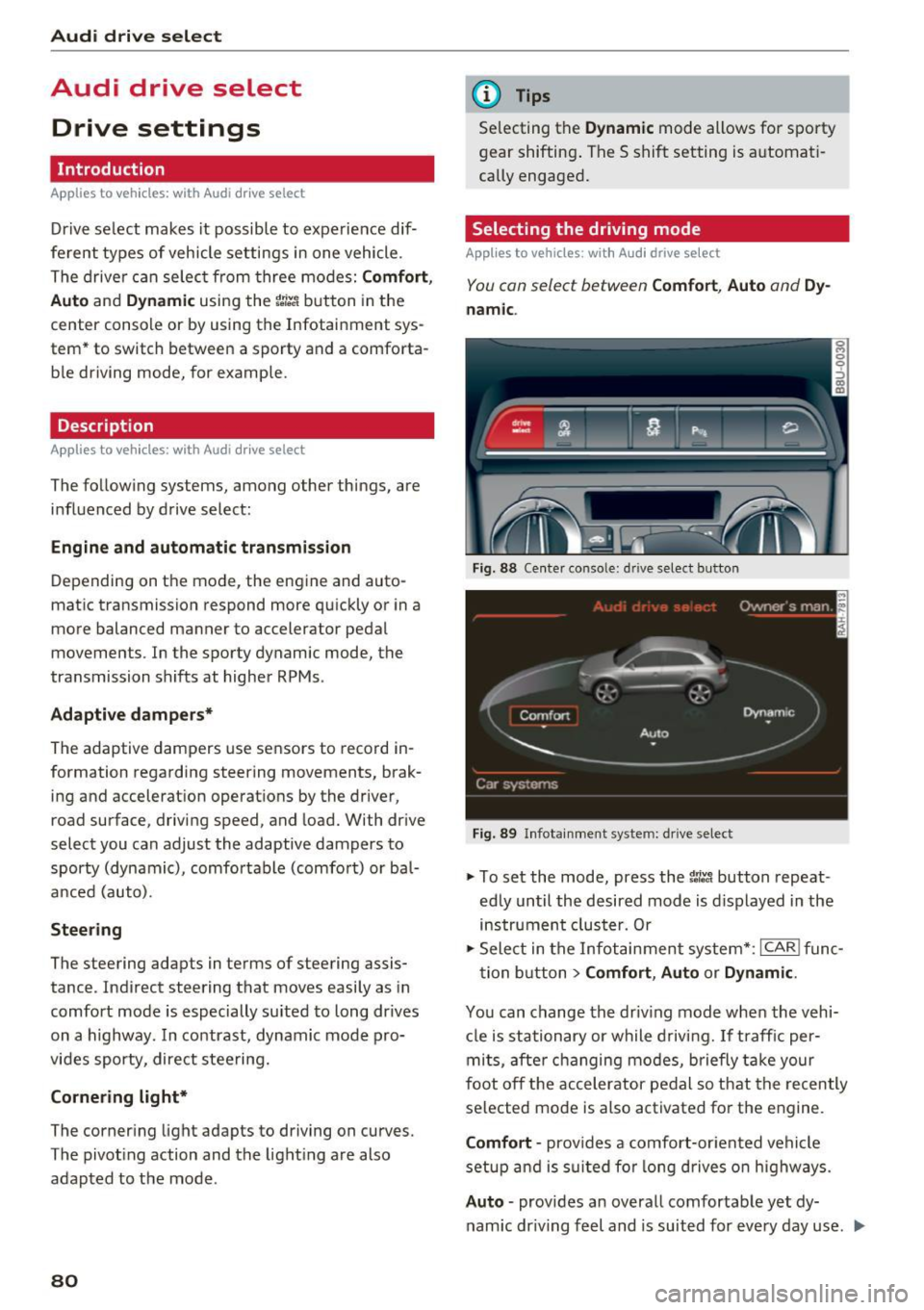
The driver can select from three modes:
Comfort,
Auto
and Dynamic using the t:i:.~ button in the
center console or by using the Infotainment sys
tem* to switch between a sporty and a comforta
ble driving mode, for example.
Description
App lies to veh icles: with Aud i drive select
The following systems, among other things , are
influenced by drive select:
Engine and automatic transmission
Depending on the mode, the engine and auto
matic transmission respond more quickly or in a
more balanced manner to accelerator pedal
movements . In the sporty dynamic mode, the
transmission shifts at higher RPMs .
Adaptive dampers*
The adaptive dampers use sensors to record in
formation regarding steering movements, brak
ing and acceleration operations by the driver,
road surface, driving speed, and load. With drive
select you can adjust the adaptive dampers to
sporty (dynamic), comfortable (comfort) or ba l
anced (auto).
Steering
The steering adapts in terms of steering assis
tance . Indirect steering that moves easily as in
comfort mode is especially suited to long dr ives
on a h ighway. In contrast, dynamic mode pro
vides sporty, direct steering.
Cornering light*
The cornering light adapts to driving on curves.
The pivoting action and the lighting are also
adapted to the mode .
80
@ Tips
Selecting the Dynamic mode allows for sporty
gear shifting . The S shift setting is automati
cally engaged.
Selecting the driving mode
Applies to veh icles: with A udi drive se lect
You can select between Comfort, Auto and Dy
namic.
Fig. 88 Center conso le: d rive select button
Fig. 89 Infotainment system: drive select
.,. To set the mode, press the 1:i:Jl button repeat
edly until the desired mode is displayed in the
instrument cluster. Or
.,. Select in the Infotainment system* :
ICAR! func-
tion button
> Comfort, Auto or Dynamic .
You can change the driving mode when the vehi-
cle is stationary or while driving. If traffic per-
mits, after changing modes, briefly take your
foot off the accelerator pedal so that the recently
selected mode is also activated for the engine.
Comfort -provides a comfort-oriented vehicle
setup and is suited for long drives on highways.
Auto -provides an overall comfortable yet dy
namic dr iving feel and is suited for every day use . ..,.
Page 85 of 252
.... N
c:i ::J CX)
.... I.Cl U"I
N I.Cl ......
,&_ WARNING
Read and follow all WARNINGS¢ A in Driv
ing tips on page 84.
(D Note
Coasting downhill w ith the transm ission in N
and the engine not running will result in dam
age to the automatic transmission and possi
bly the catalytic converter.
@ Tips
- If you accidentally select N while driving,
take your foot off the accelerator pedal and
wait for the engine to slow down to idle be
fore selecting Dor S.
- If there is a power failure, the selector lever
will not move out of the P position. The
emergency release can be used if this hap
pens
¢ page 86.
Selector lever lock
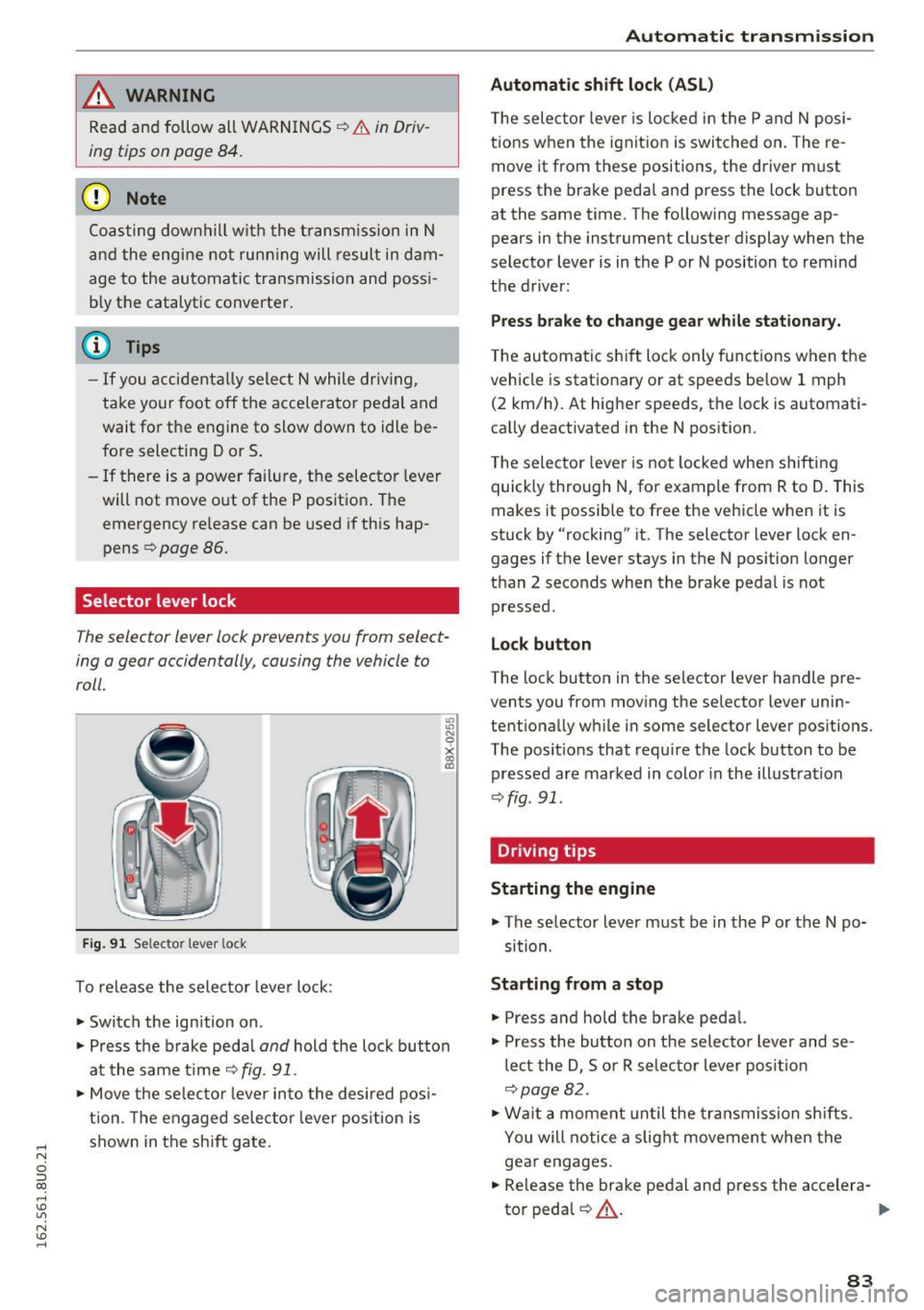
The selector lever lock prevents you from select
ing o gear occidentally, causing the vehicle to
roll.
Fig. 91 Selecto r lever loc k
To release the selector lever lock:
• Switch the ign ition on .
• Press the b rake peda l
and hold the lock button
at the same time ¢
fig. 91.
• Move the selector lever into the desired posi
tion. The engaged selecto r lever position is
shown in the shift gate .
-
Automatic transmission
Automatic shift lock (ASL)
The selec tor lever is locked in the P and N posi
tions when the ignit ion is switched on. The re
move it from these positions , the driver m ust
press the brake pedal and press the lock button
at the same time. The following message ap
pears in the instrument cluster display when the
selector lever is in the P or N position to remind
the driver:
Press brake to change gear while stationary.
The automatic shift lock only funct ions when the
vehicle is stat ionary o r at speeds be low 1 mph
(2 km/h). At higher speeds, the lock is automati
cally deactivated in the N position.
The selector lever is not locked when shifting
quick ly through N, for example from R to D. This
makes it possible to free the vehicle when it is
stuck by "rocking" it. The selector lever lock en
gages if the lever stays in the N position longer
than 2 seco nds when the brake pedal is not
pressed.
Lock button
The lock button in the selector lever handle pre
vents you from moving the selector lever unin
tentionally while in some selector lever positions.
The positions that require the lock button to be
pressed are marked in color in the illustration
¢fig . 91.
Driving tips
Starting the engine
• The se lector lever must be in the P or the N po
sit ion.
Starting from a stop
• Press and hold the brake pedal.
• Press the button on the selector lever and se
lect the D , Sor R selector lever posit ion
¢page 82.
• Wait a moment until the transmission shifts.
You will notice a slight movement when the
gear engages.
• Release the brake pedal and press the accelera-
tor pedal
QA - .,..
83
Page 121 of 252
greater detail below. Because the front passen
ger seat contains important parts of the Ad
vanced A irbag System, you must take care to pre
vent it from being damaged. Damage to the seat may prevent the Advanced Airbag for the front
passenger seat from doing its job in a crash .
The front Ad vanced Airb ag S ystem con sis ts
of the follo wing :
-Crash sensors in the front of the vehicle that
measure vehicle acceleration/decelerat io n to
provide information to the Advanced Airbag
System about the severity of the crash .
- An electronic control unit, with integrated crash sensors for front and side impacts . The
contro l unit "decides" whethe r to fire the front
airbags based on the information received from
the crash sensors. The control unit also "de
cides" whether the safety be lt pretensioners
shou ld be activated.
- An Advanced Airbag with gas generator and
contro l valve for the driver inside the steering
whee l hub .
- An Advanced Airbag with gas generator and
contro l valve inside the instrument pane l for
the front passenger.
- A weight -sensing mat under the upho lstery
padding of the front passenger seat cushion
that measures the total weight on the seat . The
information registered is sent continuously to
the e lectron ic control unit to regulate dep loy
ment of the front Adva need A irbag on the pas
senger side.
- An airbag monitoring system and indicator
light i n the instrument cluster
¢ page 122.
-A sensor in each front seat registers the dis
tance between the respective seat and the
steering wheel or instrument panel. The infor
mation reg istered is sent cont inuous ly to the
electronic control unit to regulate deployment
of the fro nt Adv a need A irbags.
- T he
PASS EN GE R AIR BAG OFF light comes on
and stays on in the center of the instrument
pane l¢
page 122, fig . 124 and tells you when
the front Advanced Airbag on the passenge r
side has been turned off.
- A sensor below the safety belt latch fo r the
front seat passenger to meas ure the tension on
Airb ag sys tem
the sa fety belt. The tension on the safety belt
and the weight registered by the weight-sens
ing mat help the contro l unit "decide" whether
the front airbag for the front passenger seat should be turned off or not¢
page 113, Child
restraints on the front seat -some important
things to know.
- A sensor in the safety belt latch for the driver
and for the front seat passenger that senses
whether that safety belt is latched or not and
transmits this information to t he electronic
cont rol un it.
_& WARNING
Damage to the front passenge r seat can pre
vent the front airbag from working properly.
- Imp roper repair or disassembly of the front
passenger and driver seat will p revent the
Advanced Airbag System from f unctioning
p roperly.
- Repairs to the front passenger seat must be
performed by qualified and properly trained
workshop personne l.
- Never remove the front passenger or driver
seat from the vehicle.
- Never remove the upholstery from the front
passenger seat.
- Never d isassemble o r remove par ts from the
seat o r disconnect w ires from it.
- Never carry sh arp objects in your pocke ts or
p lace them on the seat. If the weight-sens
ing mat in the passenger seat is punctu red
it cannot work proper ly.
- Never carry things on your lap or carry ob
jects on the passenger seat. S uch items can
increase the weight reg istered by the
weight-sensing mat and send the wrong in
formation to the a irbag control unit.
- Never store items under the front passenger
seat. Parts of the Advanced Airbag System
under the passenger seat could be dam
aged, p reventing them and the airbag sys
tem from working p roper ly.
- Never p lace seat covers or replacement up
holstery that have not been specifically ap
p roved by A udi on the front seats.
- Seat covers can prevent the Advanced A ir
bag System from recognizing chi ld
119
Page 126 of 252
Airbag syste m
-the adu lt on the front passenger seat is proper
ly seated on the center of the seat cushion with
his or her back up against the backrest and the
backrest is not reclined
c> page 96, Correct pas
senger seating positions,
- the adult is not taking weight off the seat by
holding on to the passenger assist handle
above the front passenger door or supporting
their we ight on the armrest,
- the safety belt is being properly worn and that
there is not a lot of slack in the safety belt web
bing,
- accessory seat covers or cushions or other
th ings that may cause an incorrect read ing or
impression on the weight-sensing mat under
the upho lstery of the seat have been removed
from the front passenge r seat,
- a safety be lt extender has not been left in the
safety belt latch for the front passenge r seat.
In addition to the
PA SSE NGER AIR BA G OFF
lig ht in the center of the instrument panel, the
message
PASSENGER AIR BAG OFF or PASSEN
GER AIR BAG ON
w ill briefly appear in the inst ru
ment cluster display . T his is to inform the driver
of the current front passenger airbag status.
Important safety instructions on
monitoring the Advanced Airbag System
A WARNING
An airbag system that is not funct ion ing prop
er ly cannot p rovide supplemental p rotection
in a frontal crash.
- If the airbag indicato r light
c>page 16
comes when the vehicle is be ing used, h ave
the system inspected immediate ly by yo ur
authorized Audi dealer. It is possible that
the airbag will inflate when it is not s up
posed to, or will not inflate when it should.
A WARNING
If the front airbag inflates, a child without a
child restraint, in a rearward-facing child safe
ty seat or in a forward-facing child restra int
that has not been properly installed w ill be
ser iously injured and can be killed .
124
-Even tho ugh your vehicle is equipped with
an Advanced A irbag System, make certain
that a ll children, espec ia lly 12 years and
younger, always ride on the back seat prop
erly restrained for their age and s ize.
- Always install forward or rear-facing child
safety seats on the rear seat - even with an
Advanced A irbag System.
- If you must install a rearward-facing child
safety seat on the front passenger seat be
cause of exceptional circumstances and the
PASSENGER AIR BAG OFF light does not
appear and s tay on, immedi ately ins tall the
rear-facing child safety seat in a re ar seat ing
position and have the a irbag system in
spected by your authorized Audi dea ler.
- A t ight tether or other s trap on a rearward
facing chi ld restraint attached to the front
passenger seat can put too much pressure
on the weight-sensing mat in the seat and
register more weight than is actually on the
seat. The heavier weight registered can
make the system work as thoug h an adu lt
were on the seat and deploy the Advanced
Airbag when it must be suppressed causing
serious or even f atal injury to the child.
- If, in exceptional circumstances, you must
install a forward-facing child res traint on
the front p assenge r seat, always move the
seat into i ts rearmost position in the sea t's
fore and aft ad justment range, as far away
from the ai rbag as possible . The backrest
must be adjusted to an upr ight position.
Make sure that the
PASSENGER AIR BAG
OFF
li ght comes on and stays on all the time
wheneve r the ignit ion is switched on.
A WARNING
- If the PASSENG ER AIR BAG OFF light does
not go out when an adult is sitting on the
front passenger seat afte r taking the steps
described above, make s ure the adult is
p roper ly sea ted and restra ined at one o f the
rear sea ting posit ions .
- Have the ai rbag system inspected by your
author ized Audi dealer befo re t ransporting
anyone on the front passenger seat.
Page 156 of 252
Intelligent Technology
When the hill descent assist is on, the current
driving speed, when your vehicle entered the in
cline is maintained. It is only possible to switch
on the assist when driving slower than 37 mph (60 km/h). The assist works between approxi
mately 2 and 19 mph (4 and 30 km/h). The driver
can increase or decrease the vehicle speed within
these limits by depressing the accelerator or brake pedal.
There must be however sufficient ground adhe
sion . The hill descent assist
cannot do its job if
the incline is icy or if the incline ground is loose
¢ ,&.
Active assistance at a specific speed up to about 19 mph (30 km/h) is shown in the instrument
cluster through a blinking indicator light •. The
indicator light shines continuously when in the
ready mode.
The system does not work at speeds between 19
and 37 mph (30 and 60 km/h) . The system is
then in the ready-mode. This is shown through
the LED turned on in the button . The system au
tomatically switched off when you drive faster
than 37 mph (60 km/h). The LED will also go out
in this scenario.
Hill descent assist is automatically activated un
der the following conditions:
- The LED in the button turns on ,
- the vehicle speed is lower than 19 mph (30 km/
h) ,
-the incline angle is at least around 10% .
A WARNING
-Always adapt your speed to the weather ,
road and traffic conditions . Do not let the
increased safety provided tempt you into
taking risks, because this increases the risk
of an accident.
- The hill descent assist system cannot over
come the laws of physics. Your driving style
must always be adapted to the current road
and traffic conditions.
- The hill descent assist may not be able to
hold your vehicle at a constant speed under
all conditions while driving on an incline (for
154
example if ground under the vehicle is
loose).
Brakes
New brake pads
New brake pads do not achieve their full braking
effect during the first
250 mi (400 km). They
must be "broken in" first¢& . However, you can
compensate for the slightly reduced braking
force by pressing firmly on the brake pedal. Avoid heavy braking during the break-in period.
Operating conditions and driving habits
The brakes on today's automobiles are still sub
ject to wear, depending largely on operating con
ditions and driving habits¢,& . On vehicles that
are either driven mostly in stop-and-go city traf
fic or are driven hard, the brake pads should be checked by your authorized Audi dealer more of
ten than specified in the
Warranty & Mainte
nance booklet.
Failure to have your brake pads
inspected can result in reduced brake perform
ance.
On steep slopes, you should use the braking ef
fect of the engine. This way, you prevent unnec
essary wear on the brake system. If you must use
your brakes, do not hold the brakes down contin
uously. Pump the brakes at intervals.
Operating noise
Noises may occur when braking depending on the
speed, braking force and outside conditions such
as temperature and humidity.
Effect of water or road salt
In certain situations, for example after driving
through water, in heavy rain, after overnight con densation or after washing your car , the braking
effect can be reduced by moisture or ice on the
brake rotors and brake pads. The brakes must be
"dried" first with a few careful brake applica
tions.
At higher speeds and with the windshield wipers
turned on, the brake pads press against the brake
rotors for a short amount of time. This action
which is not felt by the driver happens at regular .,.
Page 181 of 252
.... N
c:i ::J CX)
.... I.Cl U"I
N I.Cl ......
Checking and Filling
Engine compartment
Engine compartment overview
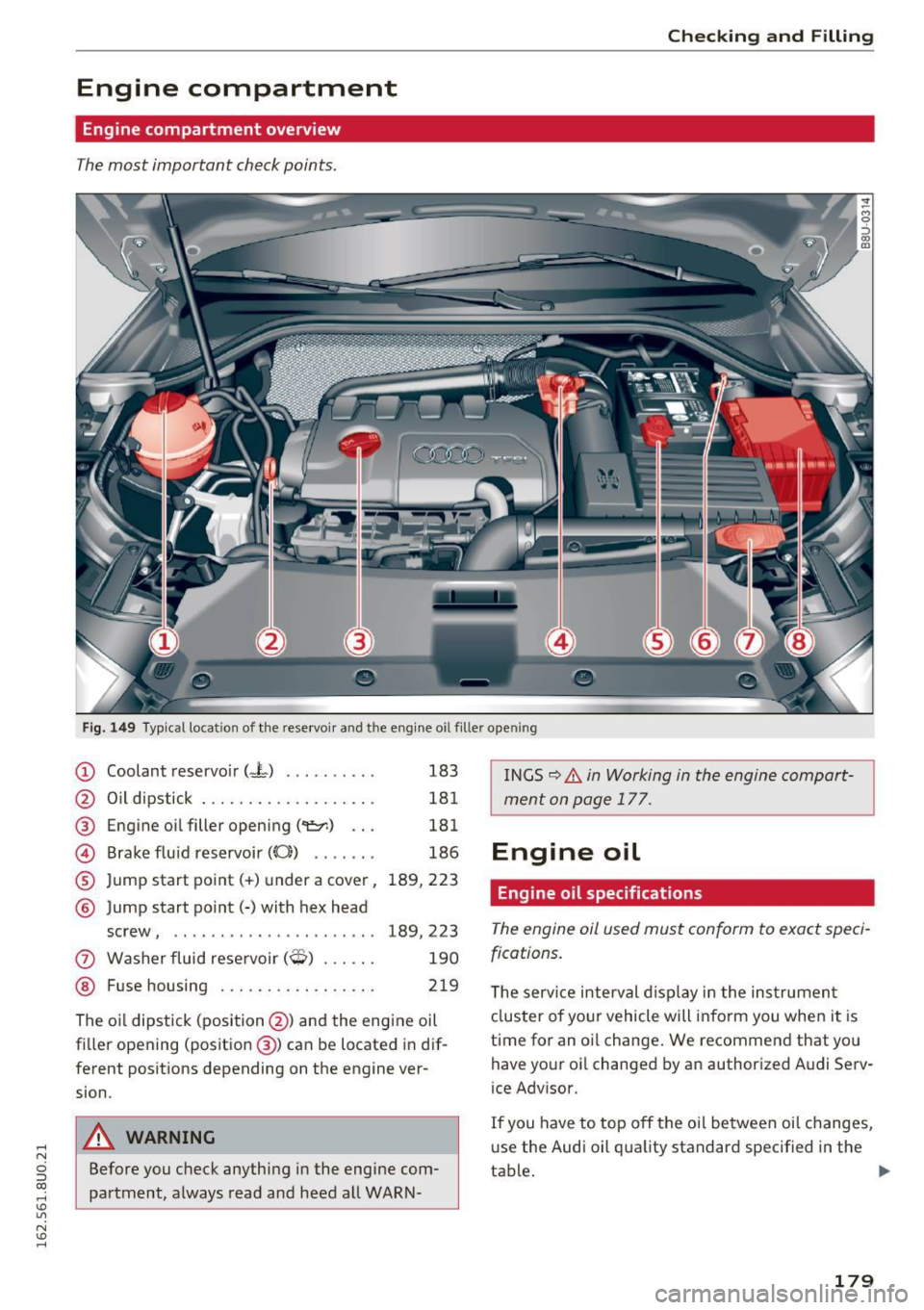
The most important check points.
Fig. 149 Typical location of the reservoir a nd the engine o il fil ler ope ning
(D Coolant reservoir (-L) . . . . . . . . . . 183
@ Oil dipstick . . . . . . . . . . . . . . . . . . . 181
@ Engine oil filler opening ('1!::r.) . . . 181
@ Brake fluid reservoir (0) . . . . . . . 186
® Jump start point(+) under a cover, 189, 223
® Jump start point(-) with hex head
screw, . . . . . . . . . . . . . . . . . . . . . .
189, 223
0 Washer fluid reservoir($) . . . . . . 190
@ Fuse housing . . . . . . . . . . . . . . . . . 219
The oil dipstick (position @) and the engine oil
filler opening (position @) can be located in dif
ferent positions depending on the engine ver
sion.
A WARNING
Before you check anything in the engine com
partment, always read and heed all WARN- INGS
9 .&. in Working in the engine
compart
ment on page 177.
Engine oil
Engine oil specifications
The engine oil used must conform to exact speci
fications.
T he serv ice interval d isplay in the instrument
cluster of your vehicle will inform you when it is
time for an oil change . We recommend that you
have your oil changed by an authorized Audi Serv
ice Advisor.
If you have to top off the oil between oil changes,
us e the Audi oil quality standard specified in the
tab~ .
~
179
Page 182 of 252
Check ing and F illing
Audi oil quality standard
Gas olin e
VW 502 00 or
engi ne vw 50400
Using the proper engine oil is important for the
functionality and service life of the engine. Your
engine was factory-filled with a high-quality oil
which can usually be used throughout the entire
year .
Q) Note
Your Limited New Vehicle Warranty does not
cover damage or malfunctions due to failure
to follow recommended maintenance and use
requirements as set fo rth in the Audi Owner's
Manual and Wa rranty
& Maintenance booklet.
- Use only a high qua lity eng ine oi l th at ex-
pressly complies with the Audi oil qua lity
stan dard specified for your vehi cle's engine.
Using any o ther oil can cause serious engine
damage .
- Do not mix any lubricants o r other addit ives
i nto the engine oil. Doing so can cause en
gine damage.
(D Tips
I f you nee d to add oi l and there is none availa
ble that meets the Audi o il qu ality st andard
your engine requires, you may ad d a total of
no more than 0 .5 quart/liter of a high-quality
"synthet ic"oil that meets the following speci
fications.
- ACEA A3 o r API SM with a viscosity g rade of
SAE OW-30, SAE 5W-30 or SAE 5W-40.
- For more information about engine oi l that
has been approved for your vehicle, please
contact either your authorized Audi dea ler
or Audi Custome r Relat ions at
1 (800) 822-2834 or visit our web site at
www.audiusa.com or www .aud icanada .ca.
Engine oil consumption
The engine in your vehicle depends on an ade
quate amount of oil to lubricate and cool all of
its moving parts .
In order to provide effective lubrication and cool
ing of internal engine components, all internal
180
combust ion engines consume a certa in amo unt
of oil. Oil consumption varies from engine to en
gine and may change significantly over the life of
the engine. Typically, engines w ith a specified
break-in period (see
c:::;, page 159) consume more
o il dur ing the break-in per iod than they consume
af ter o il consumption has stab ilized .
Under normal conditions, the rate of oil con
sumption depends on the quality and viscos ity of
the oil, the RPM (revo lutions per m inute) at
wh ich the engine is operated, the amb ient tem
perature and road condit ions. Further factors a re
the amount of o il di lution from wate r co ndensa
tion or fue l resid ue an d the oxidation level of the
o il. As any engine is sub ject to wear as mileage
builds up, the oi l cons umption may increase over
time unt il replacement of worn components may
become necessary.
With a ll these variab les coming into p lay, no
standard rate of oil consumption can be estab
li shed or specified. The re is no alternative to reg
u lar and frequent checking of the oi l level, see
Note.
If the yellow engine oil level warning symbo l Ell
in the instrument cluster lights up, you sho uld
check the oil level as soon as possible
c:::;, page 181. Top off the oil at your earliest con
venience
c:::;,page 181.
A WARNING
Before you check anyth ing in the e ng ine com
partment, always read and heed all WARN
I NGS
c:::;, .&. in Working in the engin e compart
ment on page 177.
(D Note
Driving w ith an insuffic ient oil level is likely to
cause severe damage to the eng ine.
(D Tips
- The oil pressure warn ing d isplay. is not
an indicator of the oil level. Do not rely on
it. Instead, check the oil level in your en
g ine at regular int ervals , pr eferably each
time you refuel, and alway s before going
on a long trip .
Page 211 of 252
.... N
c:i :::J CX)
.... I.Cl U"I
N I.Cl ......
also reduces fuel efficiency and tire tread life,
and may affect the vehicle's handling and stop
ping ability.
Please note that the TPMS is not a substitute for
proper tire maintenance, and it is the driver's re
sponsibility to maintain correct tire pressure,
even if under-inflation has not reached the level
to trigger illumination of the TPMS low tire pres
sure telltale.
Your vehicle has also been equipped with a TPMS
malfunction indicator to indicate when the sys
tem is not operating properly. The TPMS mal
function indicator is combined with the low tire
pressure telltale. When the system detects a
malfunct ion, the telltale will flash for approxi
mately one minute and then remain continuous ly
illuminated. This sequence will continue upon
subsequent vehicle start-ups as long as the mal
function exists.
When the malfunction indicator is illuminated,
the system may not be ab le to detect or signal
low tire pressure as intended . TPM S malfunctions
may occur for a variety of reasons, including the
installation of replacement or alternate tires or
wheels on the vehicle that prevent the TPMS
from functioning properly . Always check the
TPMS malfunction telltale after replacing one or
more tires or wheels on your vehicle to ensure
that the replacement or alternate tires and
wheels allow the TPMS to continue to function
properly.
Wheels
If the Tire Pressure Monitoring System
indicator appears
Applies to vehicles : wi th tire pressure mo nito rin g sys te m
The tire pressure indicator in the instrument
cluster informs you if the tire pressure is too low
or if there is a system malfunction.
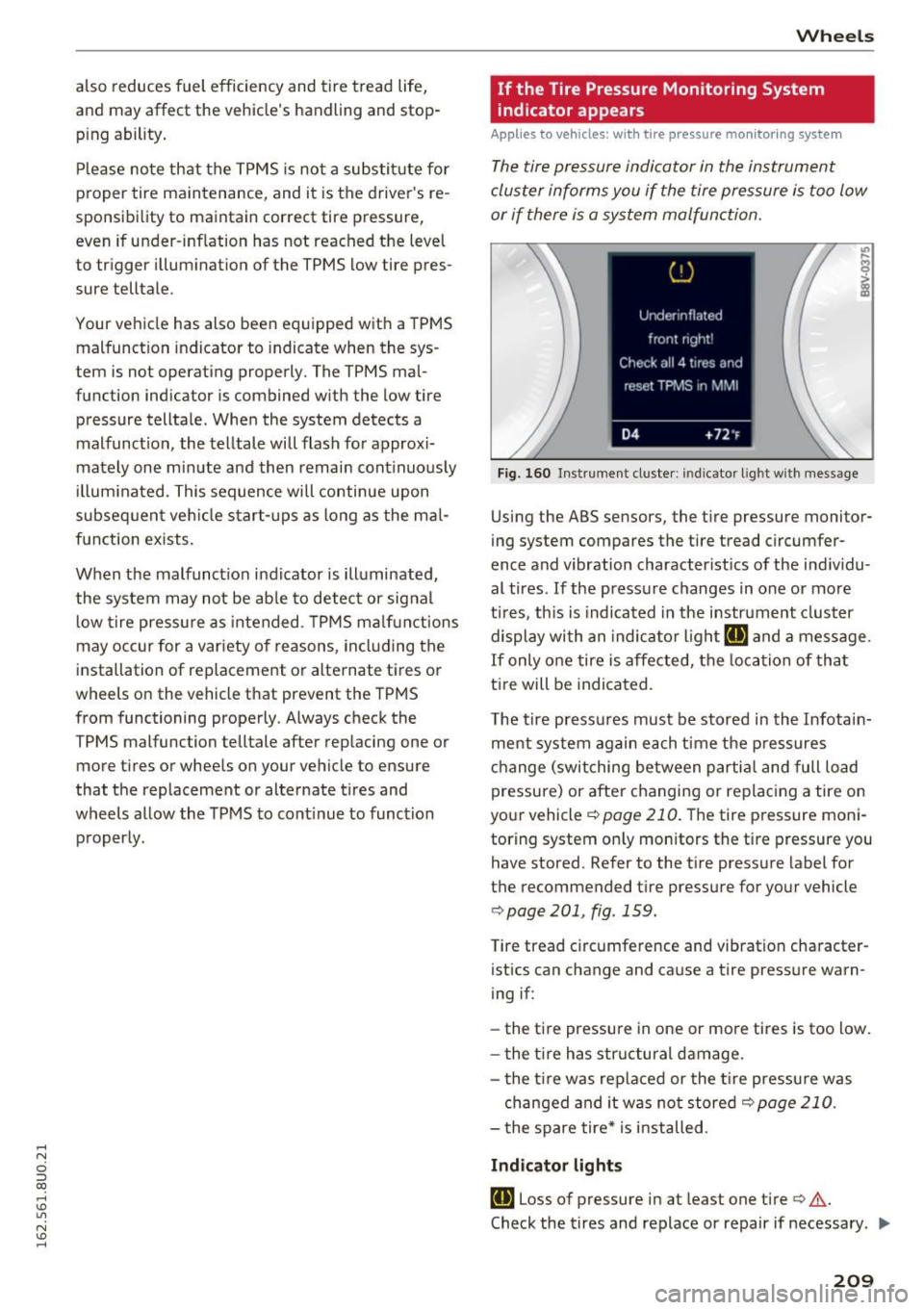
Fig. 160 Instrument cluster : indicator lig ht with message
Using the ABS sensors, the tire pressure monitor
ing system compares the tire tread circumfer
ence and vibration characterist ics of the ind ividu
al tires. If the pressure changes in one or more
t ire s, this is indicated in the instrument cluster
display with an indicator light
[I] and a message.
If only one tire is affected, the location of that
ti re will be indicated.
The tire pressures must be stored in the Infotain
ment system again each time the pressures
change (switching between partial and full load
pressure) or after changing or replacing a tire on
your vehicle ~
page 210. The tire pressure moni
toring system on ly monitors the tire pressure you
have stored. Refer to the tire pressure label for
the recommended tire pressure for your vehicle
¢ page 201, fig . 159.
Tire tread c ircumference and vibration character
istics can change and cause a tire pressure warn
ing if :
- the tire pressure in one or more tires is too low.
- the tir e has str uctural damage.
- the tir e was replaced or the tire pressure was
changed and it was not stored¢
page 210.
-the spare tire* is installed .
Indicator lights
[I] Loss of pressure in at least one tire¢,& .
Check the tires and replace or repair if necessary . ..,
209
Page 222 of 252
Fuses and bulbs
(D Tips
- The following table does not list fuse loca
tions that are not used.
- Some of the equipment listed in the follow
ing tables applies only to certain model ver
sions or certain optional equipment.
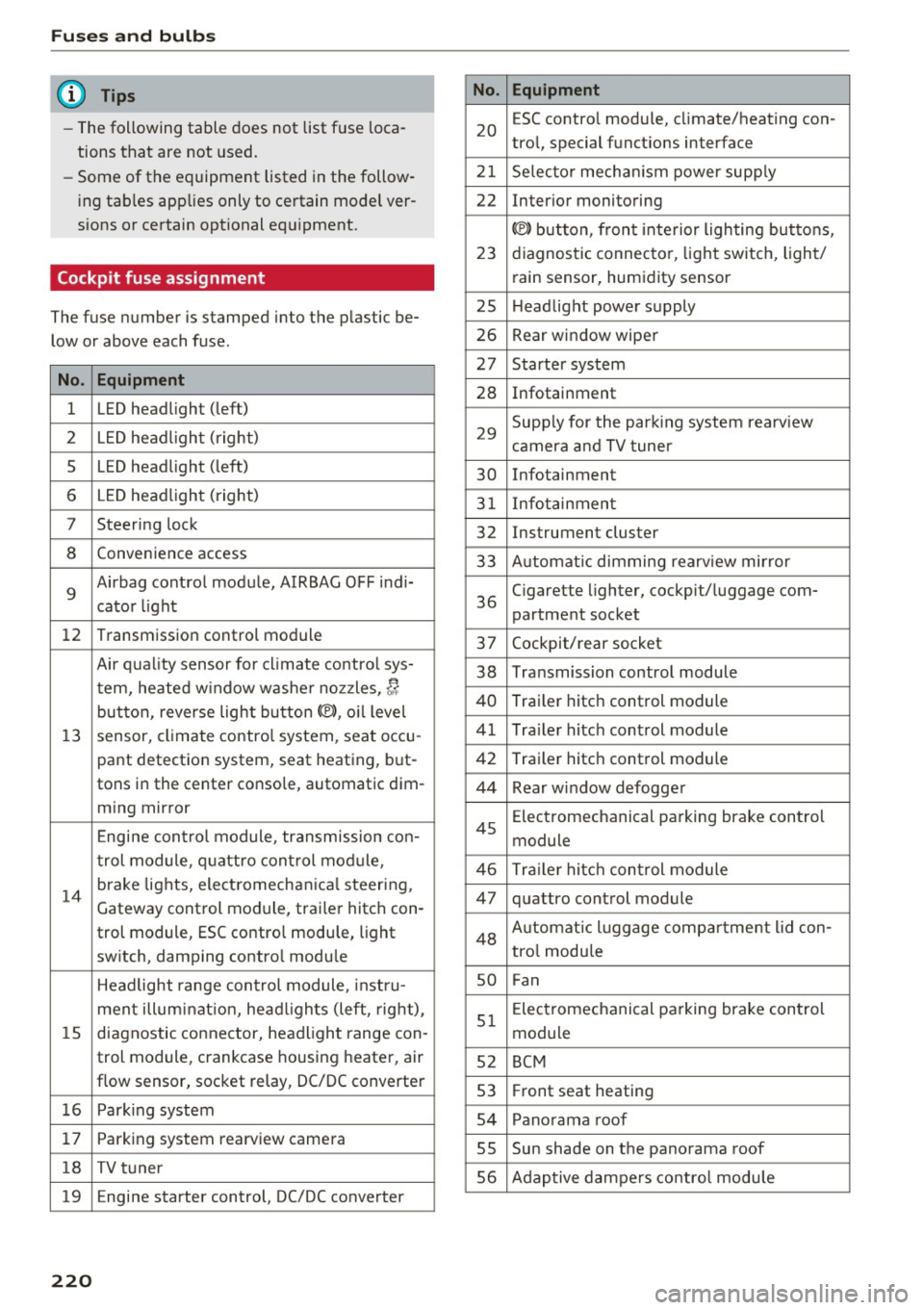
Cockpit fuse assignment
The fuse number is stamped into the plastic be
low or above each fuse.
No. Equipment
1 LED headlight (left)
2 LED headlight ( right)
5 LED headlight (left)
6 LED headlight (right)
7 Steering lock
8 Convenience access
9
Airbag control module, AIRBAG OFF indi-
cator light
12 Transmission control module
Air quality sensor for climate contro l sys-
tern, heated w indow washer nozzles,~
button, reverse light button<®>, oil level
13 sensor, climate control system, seat occu-
pant detection system, seat heating , but-
tons in the center console, automatic dim-
ming mirror
Engine control module, transmission con-
trol module, quattro control module,
14
brake lights, electromechanica l steering,
Gateway cont rol module, trailer hitch con-
trol module, ESC contro l module, light
switch, damping control module
Headlight range control module, instru-
ment illuminat ion, headl ights (left, right),
15 diagnostic connector, headlight range con-
trol module, crankcase housing heater, air
flow sensor, socket relay, DC/DC converter
16 Park ing system
17 Parking system rearview camera
18 TV tuner
19 E ngine starter control, DC/DC converter
220
No . Equipment
20
ESC contro l module, climate/heating con-
tro l, special functions interface
21 Selecto r mechanism power supply
22 Interior monitoring
© button, front interior lighting buttons,
23 diagnostic connector, light switch, light/
rain sensor, humidity sensor
25 Headlight power supply
26 Rear window wiper
27 Starter system
28 Infotainment
29
Supply for the park ing system rearv iew
camera and TV tuner
30 Infotainment
31 Infotainment
32 Instrument cluster
33 A utomat ic dimming rearview mirror
36
Cigarette lighter, cockpit/ luggage com-
partment socket
37 Cockpit/rear socket
38 Transmission control module
40 Trailer hitch control module
41 Trailer hitch control module
42 Trailer hitch control module
44 Rear window defogger
45
Electromechanical parking brake control
module
46 Trailer hitch control module
47 quattro control module
48 Aut omat ic lu ggage compartment lid con-
tro l module
so Fan
51
Electromechanical parking brake control
module
52 BCM
53 Fr ont seat heating
54 Panorama roof
55 Sun shade on the panorama roof
56 Adaptive dampers control module