phone AUDI Q3 2016 Owners Manual
[x] Cancel search | Manufacturer: AUDI, Model Year: 2016, Model line: Q3, Model: AUDI Q3 2016Pages: 252, PDF Size: 62.81 MB
Page 7 of 252
In addition to this Owner's Manual, your Audi
comes with the
- MMI Operat ing Instructions
- Warranty
& Maintenance booklet.
If you are missing one of these publications , or if
you believe that the information is not complete,
contact your author ized Audi dealer for assis
tance .
MMI Operating Instructions
contain detailed description of the Aud i Mu lti
Media Interface (MMI) includ ing the nav igation
system, the sound system and the hand held
phone.
The Warranty & Maintenance booklet
explains how you can keep your Audi in top d riv
ing condition by having it serviced regu larly and
contains detailed information about the warran
ties covering your Aud i. Always have the booklet
with you when you take your veh icle to an author
iz ed A udi dealer for serv ice. Your Audi Serv ice Ad
visor w ill record each scheduled service and can
answer any questions you may have regarding
h ow to maintain your vehicle.
In Canada,
the vehicle literature is also available in French .
To obtain a copy, co nta ct you r dealer or write to:
Au Canada, on peut se procurer un exemplaire en
frarn;ais de ce document aupres du concession
naire ou de:
Aud i Canada .
Client Assistance
Assistance a la Clientele
777 Bayly Street, West ,
Ajax, Ontario LlS 7G7
If you sell your Audi
all literature should be left in the vehicle to make
the Warranty terms as well as all operating, safe
ty and maintenance informat ion ava ilable to the
next owner.
Owner 's Literature
If you change your address or if you bought
this Audi used
be sure to send in a "Notice of Address Change" I
"Not ice of Used Car Purchase" post card. This
card can be found in the Warranty
& Mainte
nance booklet or obtained from your authorized
Audi dealer.
It is in your own interest that we are able to
contact you should the need arise.
5
Page 11 of 252
,....,
N
ci ::, co ,....,
@
®
©
®
®
(J)
®
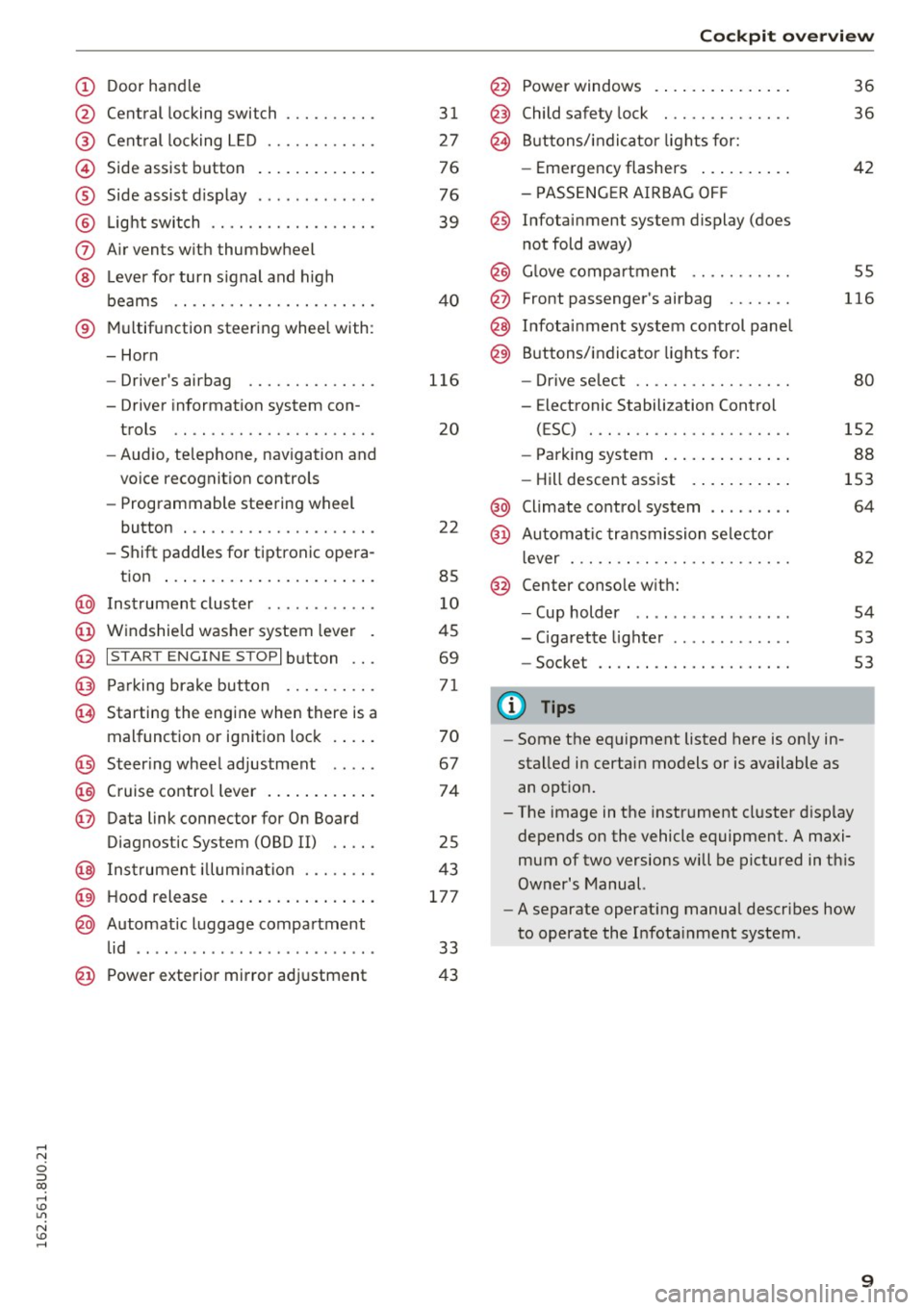
Central locking switch
Cent ral locking L ED ......... .. .
Side assist button
Side assist d isplay
L ig ht swit ch .... . .......... .. .
A ir vents with thumbwheel
L ever for turn s ignal and h igh
beams .. .. .... . .......... .. .
® Multifunction ste ering wheel with :
- Horn
- Driver's airbag ........... .. .
- Driver information system con-
trols .. .. ............... .. .
- Audio , te lephone, nav igation and
vo ice recognit ion controls
- Programmable steering wheel
button . .. .. ........... .. .. .
- Shift paddles for tiptronic opera-
tion ... .. .. ... ..... ... .. .. .
@ Instrument cluster ........... .
@ Windshield washer system lever
@ I S TART EN GIN E ST OPI button .. .
@ Pa rking brake button ....... .. .
~ Starting the engine when there is a
malfunction or ignition lock . ... .
@ Steer ing whee l adjustment .... .
@ Cruise contro l lever .... ... .. .. .
@ Data link connector for On Board
Diagnostic System (OBD II) .. .. .
@ Inst rument illum ina tion ... .. .. .
@ Hood r ele as e .... ..... ... .. .. .
@ Automat ic luggage compartment
lid .. .. ... ............. ..... .
31
27
76
76
39
40
116
20
22
85
10
45
69
71
70
67
74
25
43
177
33
@ Power exterior mirror adjustment 43 Coc
kpit o ve rv iew
@ Power windows . .. .. .. ..... .. .
@ Child safety lock ............. .
@ Buttons/indi cator lights for:
- Eme rgency flashers .. ..... .. .
- PASSENG ER AIRBAG OF F
@ Infotainment system display (does
not fold away)
@ Glove compartment .......... .
@ Front passenger's airbag ...... .
@ Infota inment system control panel
@ Buttons/indicator lights for:
- Drive se lect .. .. ............ .
- E lectronic Stabilization Control
( E SC) . .. .. .. .. ....... ..... .
- Park ing system .... .. ..... .. .
- Hill descent ass ist . .. ..... .. .
@ Climate contro l system .. ...... .
@ Automa tic tr an smission se lector
lever ... .. .. .. .. ....... ..... .
@ Center conso le w ith:
- Cup holder .. .. ............ .
- Cigarette lighter ............ .
- Socket
0) Tips
-Some the eq uipment listed here is on ly in
stalled in certain models or is available as
an opt ion.
36
36
42
55
116
80
152
88
153
64
82
54
53
53
- The image in the instrument cluster d isplay
depends on the vehicle equipment. A maxi
mum of two versions will be pictured in th is
Owner's Manual.
- A separate operat ing manua l describes how
to operate the Infota inment system .
9
Page 22 of 252
Driver i nf orm ati on sy stem
Driver information
system
Overview
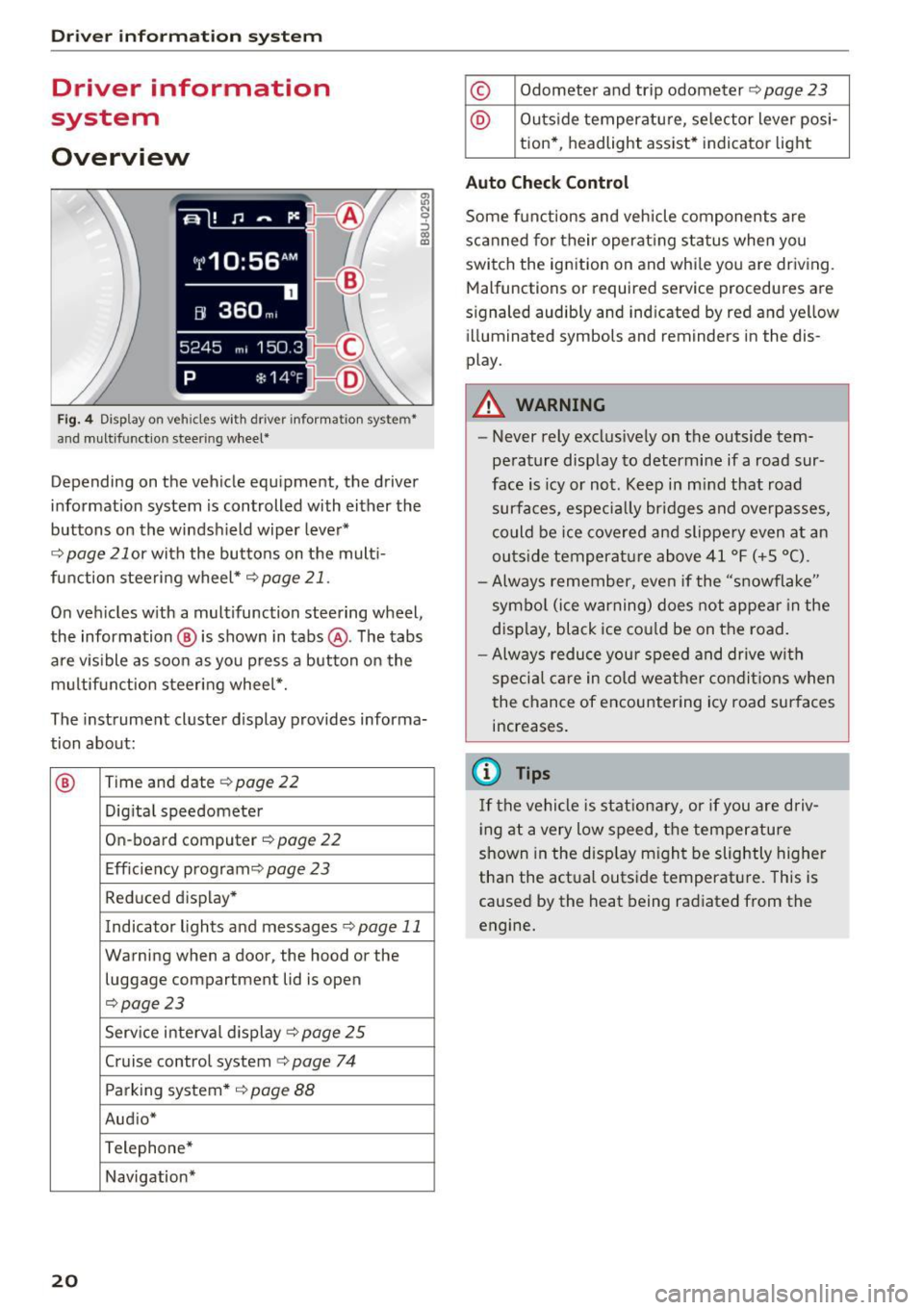
Fig. 4 Disp lay on vehicles with driver information system*
and multifunction steering wheel*
~ N 0 :::, 00 m
Depending on the vehicle equipment, the driver
information system is controlled with either the
buttons on the windshield wiper lever*
r='.> page 21 or wi th the buttons on the mult i
function steering wheel*
r='.> page 21 .
On vehicles w ith a multifunction steering wheel,
the information @ is shown in tabs @. The tabs
are v isible as soon as you press a button on the
multifunct ion steering wheel*.
The instrument cluster display provides informa
tion about:
® Time and date r='.> page 22
Digi tal speedometer
On-board computer
r='.> page 22
Eff iciency program ¢
page 23
Reduced display *
Indicator lights and messages
r='.>p age 11
Warning when a door, the hood or the
luggage compartment lid is open
r='.>page 23
Service interval display ¢ page 25
Cruise control system¢
page 74
Parking system* ¢
page 88
Aud io*
Telephone*
Navigation*
20
© Odometer and trip odometer r='.> page 23
@ Outside temperature, se lector lever posi -
tion* , headlight assist* indicator light
Auto Chec k Contro l
Some functions and vehicle components are
scanned for their operat ing status when you
switch the ignition on and while you are driving.
Malfunctions or requ ired service procedures are
s ignaled audibly and indicated by red and yellow
illuminated symbols and reminders in the dis
play.
A WARNING
-
- Never rely exclus ively on the outside tem
perature display to determine if a road sur
face is icy or not. Keep in m ind that road
surfaces, especially br idges and overpasses,
co uld be ice covered and slippe ry even at an
outs ide temperature above 41 °F (+ S °C).
- Always remember, even if the "snowflake"
symbol (ice warning) does not appear in the
display, black ice co uld be on the road.
- Always reduce you r speed and drive with
special care in cold weather condit ions when
the chance of encountering icy road surfaces
increases.
(D Tips
If the vehicle is stationary, or if you are driv
i ng at a very low speed, t he temperature
shown in the disp lay m ight be slightly higher
than the actual outside temperature. This is
caused by the heat being radiated from the
engine.
Page 30 of 252
Opening and closin g
(D Tips
- In the event of a crash with airbag deploy
ment all locked doors will be automat ica lly
unlocked to give access to the vehicle occu
pants from the outside.
- If the power locking system should mal
funct ion, you can lock the driver's door us
ing the ignit ion key
¢ page 32.
- If the power lock ing system should fail, you
can still open the fuel tank flap in an emer
gency ¢
page 176.
-You are well adv ised not to keep valuables
i nside an unattended vehicle, vis ible or not.
Even a properly locked vehicle cannot pro
v ide the secur ity of a safe .
- If the LED in the upper edge of the driver's
door panel comes on for about 30 seconds
after the vehicle is locked, there is a mal
funct ion in the power lock ing o r the anti
theft warning system. Have the malfunct ion
correc ted by an authorized Audi dea lership
or q ualified repair facility .
Key set
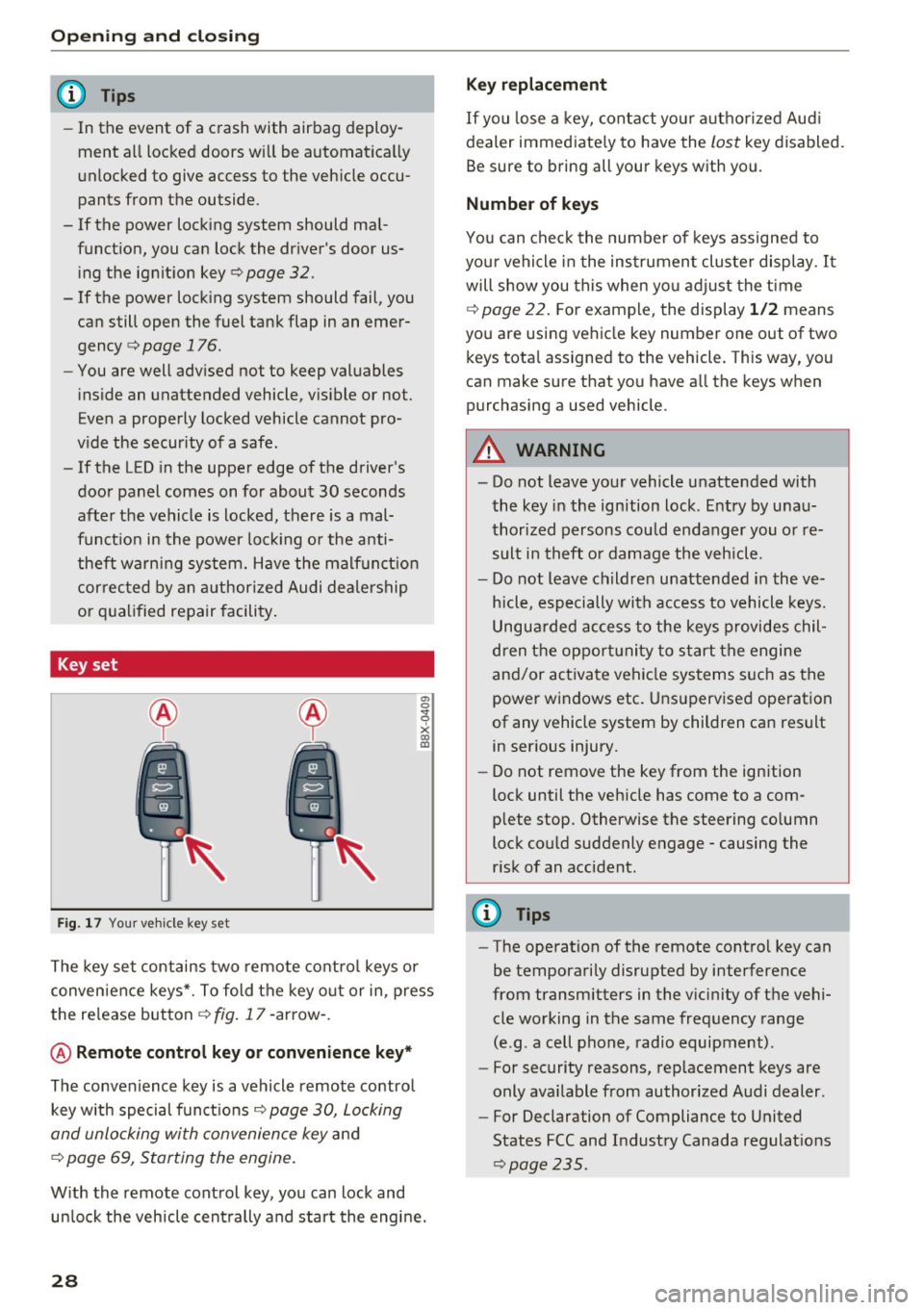
Fig . 17 You r ve hicle key set
a, 0
~
x (X) Cll
The key set contains two remote co ntro l keys or
conven ience keys*. To fold the key o ut or in, press
the re lease button
¢ fig . 17 -arrow -.
@ Remote control key or convenience key *
The convenience key is a vehicle remote contro l
key with special funct ions
Q page 30, Locking
and unlocking with convenience key
and
¢ page 69, Starting the engine .
With the remote control key, yo u can lock and
un lock the vehicle cent rally and start the engine.
28
Key replacement
If you lose a key, contact you r autho rized Aud i
dealer immed iate ly to have the
lost key disabled.
Be sure to bring all your keys w ith you.
Number of keys
You can chec k the numbe r of keys assigned to
you r vehicle in the ins trument cluster display .
It
will show you this when yo u adjust the t ime
¢
page 22. F or example, the display 1 /2 means
you are us ing vehicle key number one out of two
keys tota l assigned to the vehicle. This way, you
can make sure that you have a ll the keys when
purchasing a used vehicle .
.&, WARNING
-Do not leave your vehicle unatte nded with
the key in the ignition lock . E ntry by u nau
thori zed persons cou ld endanger you or re
sult in theft o r damage the vehicle.
- Do not leave childre n unattended i n the ve
h icle, especially with access to vehicle keys.
Ungua rded access to the keys provides chil
dren t he oppor tunity to start the engine
and/or activate vehicle systems s uch as the
power windows etc . Uns upervised ope ration
of any vehicle system by children can result in ser ious injury.
- Do not remove the key from the ign ition
lock until the veh icle has come to a com
plete stop. Otherwise the steering co lumn
lock cou ld suddenly engage -causing the
r isk of an accident.
(D Tips
- The operation of the remote contro l key can
be temporarily disrupted by interference
from transmitters in the v icinity of the vehi
cle working in the same frequency range
(e.g . a cell phone, radio equipment) .
- For security reasons, rep lacement keys are
only ava ilable from authorized Audi dealer .
- For Declaration of Compliance to United
States FCC and Industry Canada regulat ions
~ page 235.
Page 73 of 252
.... N
c:i ::J CX)
.... I.Cl U"I
N I.Cl ......
.. Drive to an authorized A udi dealer or author
ized Audi Service Facility immediately to have
the malfunction corrected.
@ Tips
You can view the message again by pressi ng
the
I START E NGINE STOP! button.
Driver messages
Turn off ignit ion. Battery di scharging
This message appears and a war ning tone sounds
if you open the driver's doo r whe n the ignition is
sw itched on.
Pr ess brake pedal to start engine
This message appears if you do not step on the
brake pedal to start the eng ine on a vehicle with
a n automatic transm ission .
Please engage Nor P.
This message appears when starting or stopping
the eng ine and Nor Pis not engaged. The engine
will not start/stop.
Ill Is key in the vehicle ?
The indicator light turns on and this message ap
pea rs if the conven ience key* was removed from
the veh icle when the eng ine was runn ing. If t he
conven ience key is no longer in the vehicle, you
cannot switch the ignition on or start the engine
once yo u stop it. Yo u also ca nnot lock the vehicle
from the outside.
Shift to P , vehicle can roll away . Doors can only
be locked in P.
This message appea rs fo r safe ty re asons a long
with a warn ing sound if the se lector lever is not
e ng aged in P a fter swi tching the ignition off.
Move the selector lever to the P positio n. Other
wise the vehicle is not protected from rolling and
it cannot be loc ked.
DJ No key identified . See owner's manual.
This message appears if the re is no convenience
key * in side the veh icle or if the system does not
r ecognize the key. The conve nience key may not
be re cognized, for examp le, i f it is cove red by an
D rivi ng
obje ct that disrupts the signa l (such as a br ie f
case), or if the key battery is wea k. E lectronic de
vices such as cell phones can a lso inte rfere with
the signal.
T o still be able to start or stop the engine, re fer
to
¢ page 70.
Electromechanical
parking brake
Operating
The electromechanical parking brake replaces
the hand brake.
Fi g. 81 Center console: parking brake
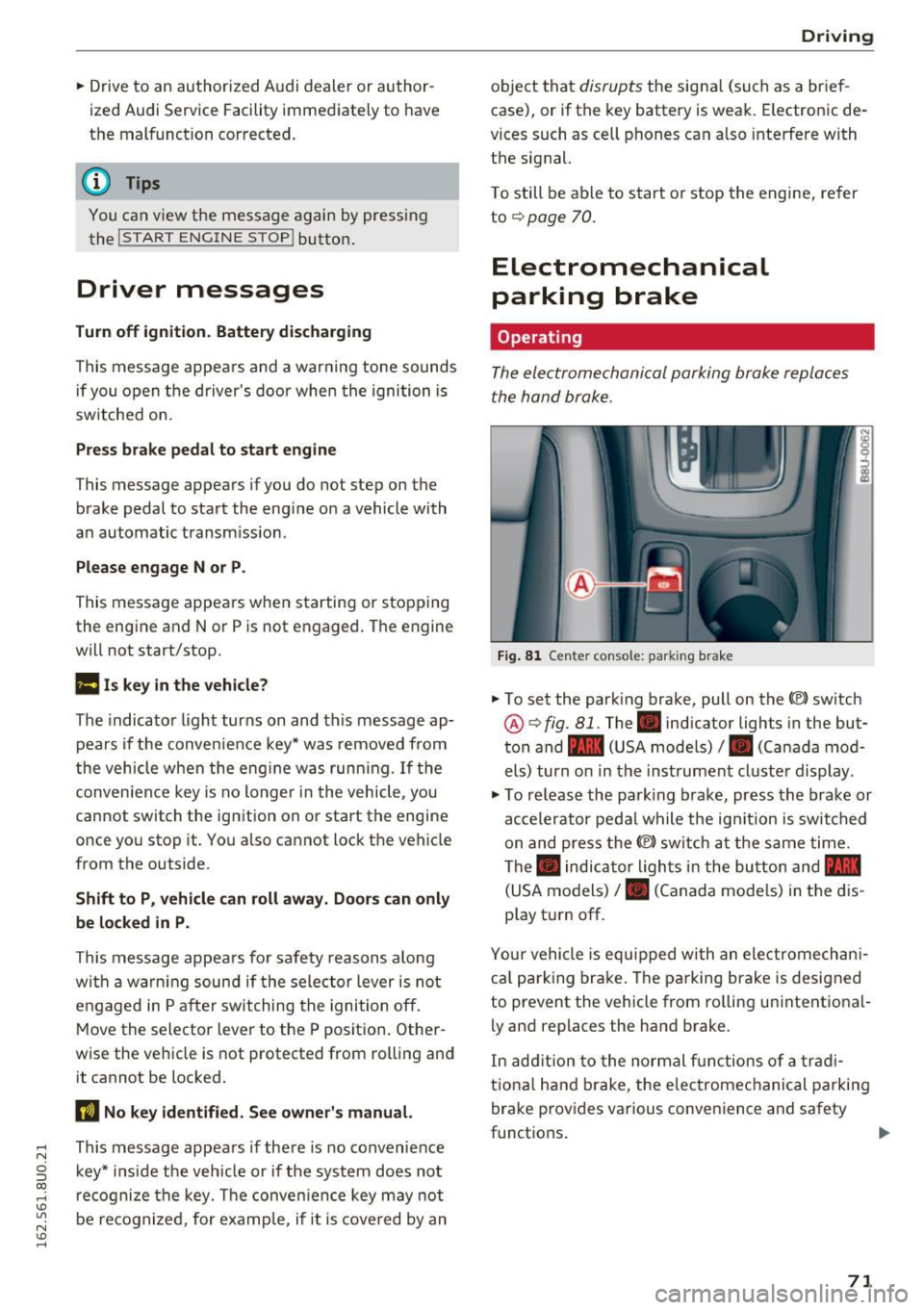
.. To set the park ing brake, pull on the(®) switch
@¢ fig. 81. The . indicator lights in the but
ton and - (USA models)/ . (Canada mod
els) turn o n in the ins trument cluste r display.
.,. To re lease the park ing brake, press the brake or
ac celerator pedal w hile the ign it ion is switched
on and press the(®) switch at the s ame time.
The . indicator ligh ts in t he bu tton and -
(USA models)/ . (Canada mode ls) in the dis
play t urn off.
Yo ur vehicle is equipped with an elect romechan i
ca l p a rk ing brake . The pa rking brake is designed
to prevent the vehicle from ro lling un intent ional
ly and replaces the hand brake.
In add ition to the normal f unctions of a tra d i
t iona l h and b rake, t he elec tromec hanical parking
bra ke prov ides various conven ience and safety
functions .
71
Page 98 of 252
Driving safety
• Sit properly in your seat and make sure that
your passengers do the same
c:> page 50, Front
seats .
• Fasten your safety belt and wear it properly . Al
so instruct your passengers to fasten their safe
ty belts properly
c:>page 104.
What impairs driving safety?
Safe driving is directly related to the condition of
the vehicle, the driver as well as the driver 's abili
ty to concentrate on the road without being dis
tracted .
The driver is responsible for the safety of the ve
hicle and all of its occupants. If your ability to
drive is impaired, safety risks for everybody in the
vehicle increase and you also become a hazard to
everyone else on the road
c:> Li').. Therefore :
• Do not let yourself be distracted by passengers
or by using a cellular telephone .
• NEVER drive when your driving ability is im
paired (by medications, alcohol, drugs , etc.).
• Observe all traffic laws, rules of the road and
speed limits and plain common sense.
• ALWAYS adjust your speed to road, traffic and
weather conditions.
• Take frequent breaks on long trips. Do not drive
for more than two hours at a stretch.
• Do NOT drive when you are tired, under pres
sure or when you are stressed.
A WARNING
Impaired driving safety increases the risk of
ser ious personal injury and death whenever a
vehicle is being used.
96
Correct passenger
seating positions
Proper seating position for the driver
The proper driver seating position is important
for safe, relaxed driving.
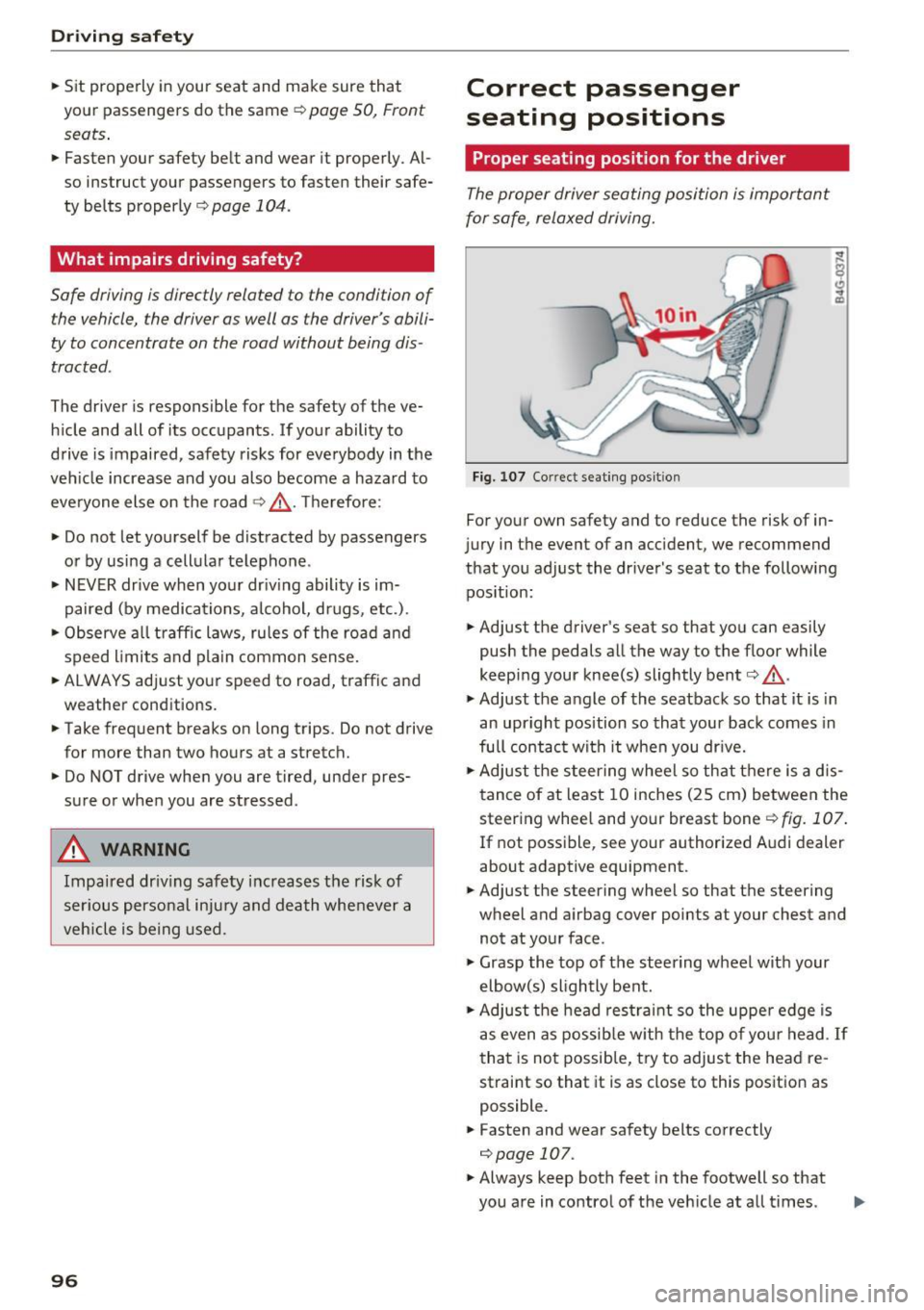
Fig. 107 Correct seating posit ion
For your own safety and to reduce the risk of in
jury in the event of an accident, we recommend
that you adjust the driver's seat to the following position:
• Adjust the driver's seat so that you can easily
push the pedals all the way to the floor while
keeping your knee(s) slightly bent
c:> .&, .
• Adjust the angle of the seatback so that it is in
an upright position so that your back comes in
full contact with it when you drive.
• Adjust the steering wheel so that there is a dis
tance of at least 10 inches (25 cm) between the
steering wheel and your breast boner::!)
fig. 107.
If not possible, see your authorized Audi dealer
about adaptive equipment.
• Adjust the steering wheel so that the steering
wheel and airbag cover points at your chest and
not at your face.
• Grasp the top of the steering wheel with your
elbow(s) slightly bent.
• Adjust the head restraint so the upper edge is
as even as possible with the top of your head .
If
that is not possible, try to adjust the head re
straint so that it is as close to this position as
possible.
• Fasten and wear safety belts correctly
c:>page 107.
• Always keep both feet in the footwell so that
you are in control of the veh icle at all times .
Page 124 of 252
Airbag syste m
-Never place or attach accessories or other
objects (such as cupholders, telephone
brackets, large, heavy or bulky objects) on
the doors, over or near the area marked "AIRBAG" on the steering wheel, instru
ment panel, seat backrests or between
those areas and yourself. These objects
could cause injury in a crash, especially
when the airbags inflate.
- Never recline the front passenger's seat to
transport objec ts. Items can also move into
the area of the side airbag or the front a ir
bag dur ing braking or in a sudden maneu
ver. Objects near the airbags can become projectiles and cause injury, particularly
when the seat is reclined.
A WARNING
The f ine dust created when airbags deploy can
cause breath ing problems for people w ith a
history of asthma or other breathing condi
t ions.
- To reduce the risk of breathing problems,
those w ith asthma or other respiratory con
ditions should get fresh air right away by
gett ing out of the vehicle o r opening w in
dows or doors.
- If you are in a collision in which airbags de
ploy, wash your hands and fa ce with mild
soap and water befo re eat ing.
- Be careful not to get the dust into your eyes,
o r into any cu ts or sc ratches.
- If the resid ue should get into yo ur eyes,
flush them with water.
Monitoring the
Advanced Airbag System
!f Airbag monitoring indicator light
Two separate indicators monitor the function of
the Advanced Airbag System: the airbag moni
toring indicator light and the
PA SSENGER AIR
BAG OFF
light.
The Advanced Airbag System as well as the side airbags and side curtain airbags with eject ion
mit igat ion features ( including the electronic con
trol unit, sensors and system wiring) are all
122
monitored continuous ly to make sure that they
are functioning properly whenever the ignition is
on . Each time you turn on the ignit ion, the airbag
monitoring indicator light
m will come on for a
few seconds (se lf diagnostics) .
The system mu st be inspected wh en th e
indicat or light
E,I:
- does not come on when the ignition is switched
on,
- does not go out a few seconds after you have
switched on the ignit ion, or
- comes on while driving.
If an airbag system malfunc tion is detec ted, the
indicator light will first start flashing to catch the
driver's attention and then stay on continuously
to serve as a constant rem inder to have the sys
tem inspected immediately.
If a malfunction occurs that turns the front air
bag on the passenger side off, the
PASSENGER
AIR BAG O FF
light will come on and stay on
whenever the ignition is on.
A WARNING
An airbag system that is not functioning prop
erly cannot provide supplemental protect ion
in a frontal crash .
- If the airbag ind icator light
q page 16
comes when the veh icle is being used, have
the system inspected immediately by your
author ized Audi dealer. It is possib le that
the airbag will i nfla te when i t is no t sup
posed to, or wi ll not inf late when it sho uld.
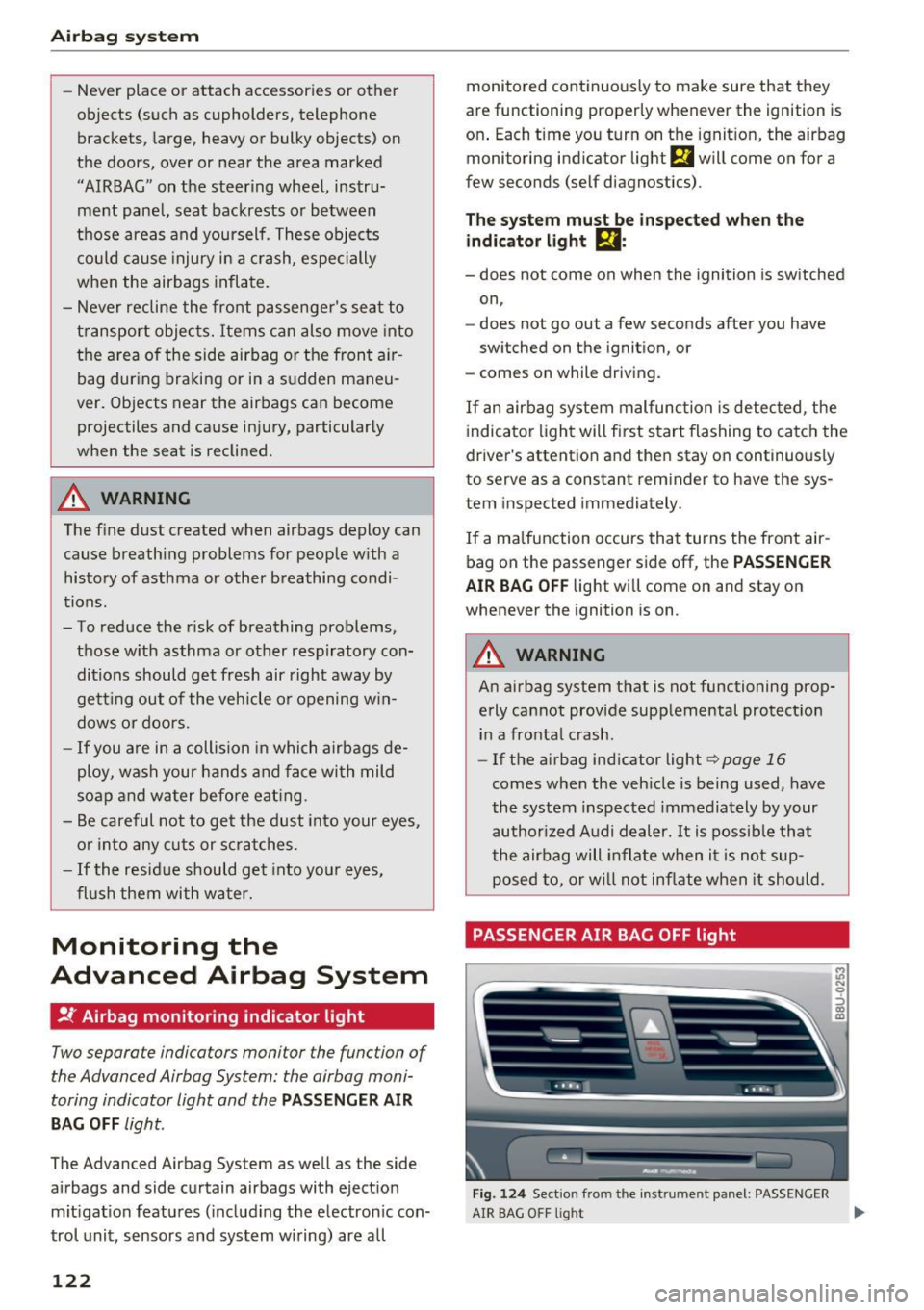
PASSENGER AIR BAG OFF light
Fig. 12 4 Section from the inst rument panel: PASSENGER
&l N 9 ::::, CD m
AIR BAG OFF l ight ...
Page 127 of 252
(D Tips
If the weight-sensing mat in the front passen
ger seat detects an empty seat, the front air
bag on the passenger side will be turned off,
and
P ASS ENGER AIR B AG OFF will stay on.
Repair , care and disposal of the airbags
Parts of the a irbag system are installed at many
d ifferent p laces on your Aud i. Installing, remov
ing, servicing o r repa iring a part in an area of the
vehicle can damage a pa rt of an airbag system
and prevent that system from working properly in a co llision.
There are some importa nt things you have to
know to make sure that the effectiveness of the
system w ill not be impaired and that discarded
components do not cause injury or pollute the
environment.
A WARNING
Improper care, serv icing and repair proce
dures can increase the r isk of personal injury
and death by preventing an airbag from de
ploying when needed or deploying an airbag
unexpectedly :
-
-Never cover, obstruct, or change the steer
ing wheel horn pad or a irbag cover or the in
strument panel or mod ify them in any way .
- Never attach any objects such as cupholders
or telephone mountings to the surfaces cov
er ing the airbag units .
- For cleaning the horn pad or instrument panel, use only a soft, dry cloth or one mois
tened with plain water. Solvents or cleaners
cou ld damage the a irbag cover or change
the stiffness or strength of the mater ial so
that the airbag cannot dep loy and protect
properly.
- Never repair, adjust, or change any parts of
the airbag system.
- All work on the stee ring wheel, instr ument
pane l, front seats or electrical system (in
cluding the installation of audio equipment,
cellu lar telephones and CB radios, etc .)
must be performed by a qualified technician
Airb ag sys tem
who has the training and special equ ipment
necessary.
- For any wo rk on the airbag system, we
strong ly recommend that you see your au
thorized Audi dealer or qualified workshop .
- Never modify the front bumper or parts of
the vehicle body.
- Always make sure that the side a irbag can
inflate without interference:
- Never install seat covers or replacement
upholstery ove r the front seatbacks that
have not been specifica lly approved by
Audi .
- Never use addi tional seat cushions that
cove r the areas where the side airbags in
flate.
- Damage to the orig inal seat cove rs or to
the seam in the area of the s ide airbag
module must a lways be repaired immedi
ate ly by an authorized Aud i dealer.
- The airbag system can be activated only
once . A fter an airbag has inflated, it must
be replaced by an authorized Audi dealer or
qualified technic ian who has the technical
information, training and spec ial equ ipment
necessary.
- The airbag system can be deployed only
once . After an airbag has been deployed, it
must be replaced with new rep lacement
parts des igned and approved especially for
your Aud i model version. Replacement of
comp lete airbag systems or airbag compo
nents must be performed by qualified work
shops only. Ma ke sure that any airbag serv
ice act ion is en tered in your Aud i Wa rranty
& Maintenance booklet under AIRBAG RE
PLACEMENT RECORD.
@ For the sake of the environment
Un deployed airbag modules and p retension-
ers might be classif ied as Perchlorate Materi -
al -special handling may apply, see
www.dtsc .ca.gov/hazardouswaste/perchlo-
rate . When the vehicle or parts of the re-
straint system including airbag modu les safe-
ty belts with pretensioners are scrapped, all
applicable laws and regu lations must be ob
se rved. Your authorized Audi dealer is familiar .,.
125
Page 130 of 252
Airbag syste m
Although they are not a soft pillow, they can
"cushion" the impact and in this way they can
he lp to reduce the risk of injury to the upper part
of the body.
A fine dust may develop when the airbag deploys.
This is normal and does not mean there is a fire in the vehicle.
Important safety instructions on the side
airbag system
Airbags are only supplemental restraints. Always
properly wear safety belts and ride in a proper
seating position.
There is a lot that you and your passengers must
know and act accordingly to help the safety belts
and a irbags do the ir job to provide supplemental
protection .
A WARNING
An inflating side airbag can cause ser ious or
fatal injury. Improperly wea ring safety belts
and improper seating positions increase the
r is k of serious personal injury and death
whenever a vehicle is being used.
- In order to red uce the risk of injury when
the supplemental side airbag inflates :
- Always sit in an upright position and never
lean aga inst the area where the supple-
mental side airbag is located.
- Never let a chi ld or anyone else rest the ir
head against the side trim panel in the
area where the supplemental s ide a irbag
inflates.
- Always make sure that safety belts are
worn correctly,
- Do not let anyone sitting in the front seat
put their hand or any other parts of t he ir
body out of the window.
- Always make sure that the side airbag can
inflate without interference.
- Never install seat covers o r rep lacemen t
upho lstery over the front seatbacks that
have not been specifically approved by
Aud i.
128
- Never use additional seat c ushions that
cover the areas where the side airbags de
ploy.
- Damage to the orig inal seat covers or to
the seam in the area of the s ide airbag
module must a lways be repaired immedi
ate ly by an autho rized Aud i dealer .
- Objects between you and the airbag can in
crease the r isk of injury in an acc ident by in
terfering with the way the airbag unfolds or
by being pushed into you as the airbag in
flates.
- Never place or attach accessor ies or other
ob jects (s uch as c upholders, telephone
brackets, or even large, b ulky objects) on
the doors, over or near the area marked "AIRBAG" on the seat backrests.
- Such objects and accessories can become
dangero us projecti les and cause injury
when the supplemental side airbag de ploys.
- Never carry any objects or pets in the de
ployment space between them and the
airbags or allow children or other passe n
gers to trave l in this position .
- Always use the b uilt-in coat hooks only fo r
lightweight clo thing. Never leave any heavy
or sharp-edged objec ts in the po ckets that
may i nterfere wi th s ide airb ag deployment
and can cause persona l injury in an accident.
- Always prevent the side ai rbags from being
damaged by heavy objec ts knocking against
or hit ting the sides of the seatbacks.
- The a irb ag sys tem can only be triggere d
once. If the airbag has been triggered, the
system must be replaced by an authorized
Audi dea lership .
- Damage (cracks, deep scratches etc.) to the
original seat covers or to the seam in the
area of the side airbag module must always
be repaired immediately by an authorized
Aud i dea ler .
- If ch ildren are seated improperly, their risk
of injury increases in the case of an accident
c::;, page 132, Child safety.
- Never attempt to mod ify any components of
the airbag system in any way.
Page 177 of 252
.... N
c:i ::J CX)
.... I.Cl U"I
N I.Cl ......
(D Note
Never d rive your vehicle unti l the fuel tank is
completely empty. The ir regu lar supply of
fue l can ca use misfir ing. Gasoline co uld enter
the ex haust system and damage the catalyt ic
converter.
Refueling
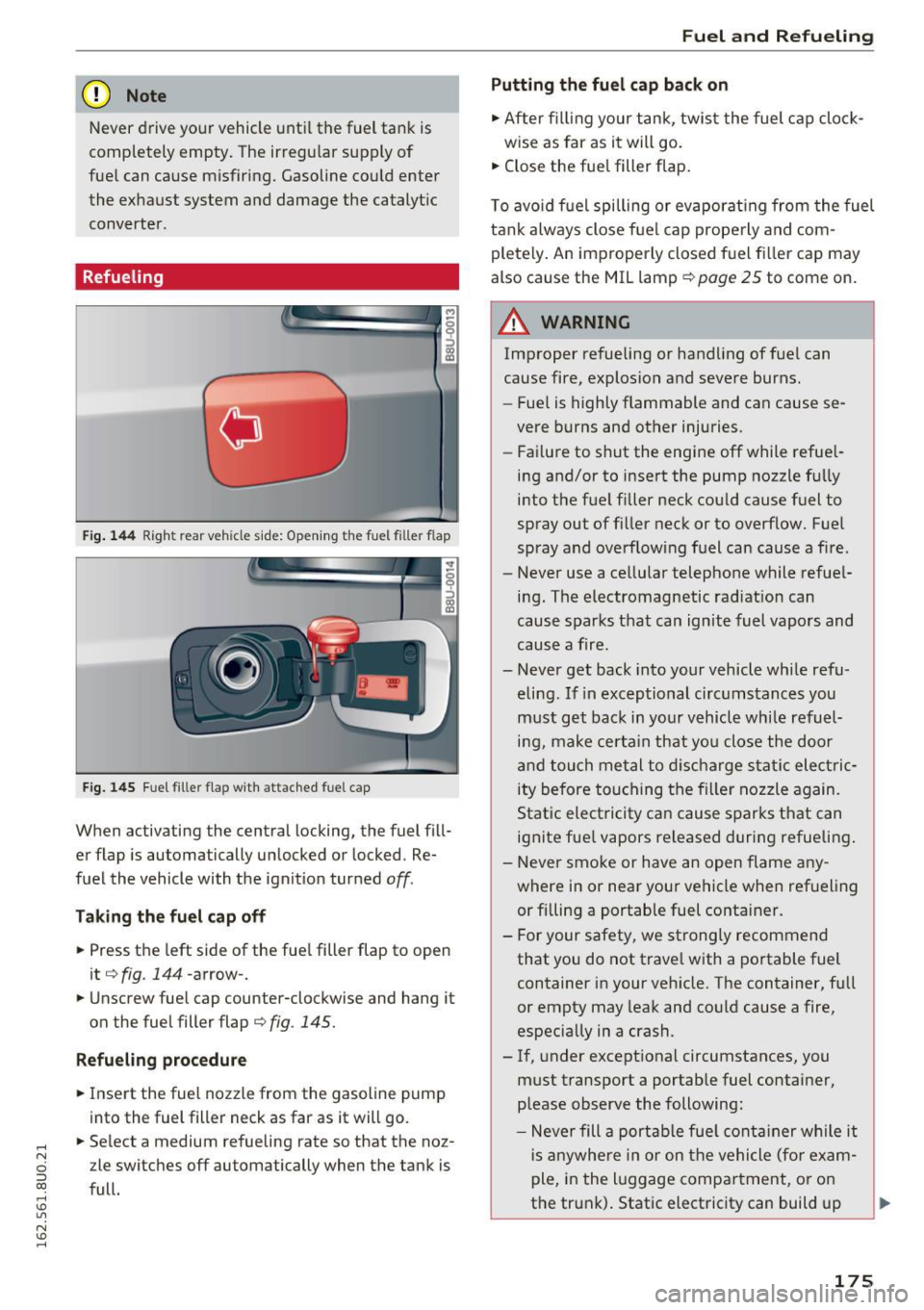
F ig . 14 4 Rig ht rea r ve hicle side: Open ing the fue l fill er flap
F ig. 1 45 Fu el fil ler fla p w ith attached fuel cap
When activating the central locking, the fuel fill
er flap is automatically un locked or locked . Re
fuel the vehicle with the ignit ion turned
off.
Taking the fuel cap off
• Press t he left side of the fue l filler flap to open
it
¢ fig. 144-arrow-.
• Unscrew fue l cap counter-clockwise and hang it
on the fuel filler flap
¢ fig. 145.
Refueling procedure
• Insert the fuel nozzle from the gasoline pump
into the fuel filler neck as far as it will go .
• Select a medium refueling rate so that the noz
zle switches
off automatically when the tank is
f ull.
Fuel and Refueling
Putting the fuel cap back on
• After fi lling your tank, twis t the fuel c ap cloc k-
w ise as far as i t will go.
• Close the fue l filler flap .
T o avo id f uel spilling or evaporat ing from the fuel
tank always close f ue l cap prope rly and com
pletely . An im properly closed f uel fi ller cap may
also cause the MIL lamp¢
page 25 to come on.
A WARNING
- -
Improper refueling or handling of f ue l can
cause fire, explosion and severe burns .
- Fue l is highly flammable and can cause se
vere burns and other injuries.
- Fa ilure to shut the engine
off while refue l
ing and/or to inse rt the pump nozzle f ully
into the f ue l filler neck cou ld cause fuel to
spray out of fi ller neck or to overflow. Fue l
spray and ove rflowing fuel can cause a f ire.
- Never use a cellular telephone while refue l
i n g . The electromagnetic rad iat io n can
cause sparks t hat can ignite fuel vapors and
cause a fire.
- Never get back into yo ur vehicle whi le refu
eling . If in excep tional circ umstances you
m ust g et ba ck in yo ur vehicle wh ile refuel
i n g, make certa in tha t yo u close the doo r
and touch me tal to di scha rge s ta ti c elec tric
ity before tou ching the fi lle r n ozzle a gain.
Stat ic elect ricity ca n cause s parks that can
ignite fue l vapors released duri ng refuelin g.
- Never smo ke or have an open flame any
where i n or near your vehicle when ref ueling
or fi lling a portab le fuel container.
- For your safety, we strong ly recommend
that you do not trave l w ith a portable fuel
container in your veh icle. The container, full
or empty may leak and co uld cause a fire,
especia.lly in a crash.
- If , under except ional circumstances, you
m ust t ransport a portable fuel contai ner,
p lease observe the following :
- Neve r fill a por table f ue l con tai ner w hile it
i s an ywhe re in or on t he vehicle (f or exam
p le, in the l ugg age compa rtment, o r on
the trun k). Static electricity can build up
~
175