steering AUDI Q3 2017 Owner´s Manual
[x] Cancel search | Manufacturer: AUDI, Model Year: 2017, Model line: Q3, Model: AUDI Q3 2017Pages: 236, PDF Size: 58.93 MB
Page 62 of 236
Driving
correspond to you r actua l consumption on the
road, which will vary depending upon vehicle
load and speed, road and weather conditions,
trip length, etc.
Steering
Adjusting the steering wheel position
The steering column can be adjusted up and
down and forward and back.
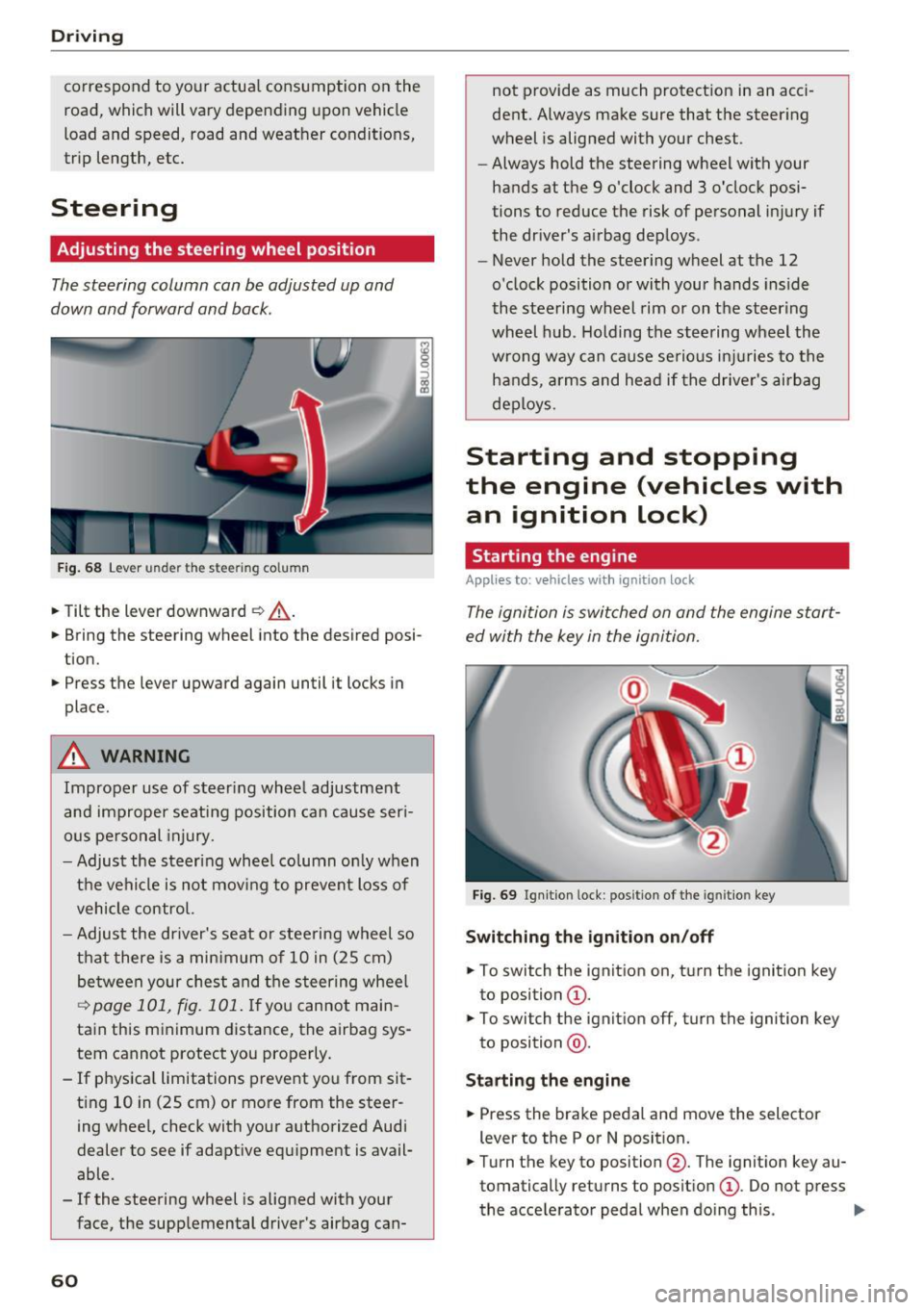
F ig . 68 Lever u nde r the stee ring column
.,. Tilt the lever downward ¢ _A.
.,. Bring the steering wheel into the desired posi
tion .
.,. Press the lever upward again until it locks in
place .
.&_ WARNING
Improper use of steer ing whee l adjustment
and improper seating position can cause ser i
ous pe rsonal injury.
- Adjust the steering wheel column on ly when
the vehicle is not mov ing to prevent loss of
vehicle control.
- Adjust the driver's seat o r steering wheel so
that there is a minimum of 10 in (25 cm)
be tween your chest and t he s teering wheel
~ page 101, fig. 101 . If yo u cannot main
tain this minimum distance, the airbag sys
tem cannot protect you properly.
- If physica l limitations prevent you from sit
t ing 10 in (25 cm)
or more from the steer
ing wheel, check with your authorized Audi
dealer to see if adaptive equipment is avail
able .
- If the steering wheel is aligned with your
face, the supplemental driver's airbag can-
60
not provide as much protect ion in an acci
dent. Always make sure that the steer ing
wheel is aligned with your chest.
- Always hold the steering wheel with your
hands at the 9 o'clock and 3 o'clock posi
tions to reduce the risk of personal in jury if
the driver's airbag deploys .
- Never hold the steering wheel at the 12
o'clock position or with your hands inside
the steering wheel rim or on t he steering
wheel hub . Holding the steering wheel the
wrong way can cause serious in juries to the
h an ds, arm s and head if the drive r's airbag
deploys.
Starting and stopping
the engine (vehicles with an ignition lock)
Starting the engine
Applies to: vehicles wit h ignition lock
The ignition is switched on and the engine start
ed with the key in the ignition.
Fig. 69 Ign it ion lock : pos ition of the ig ni tio n key
Switching the ignition on/off
.,. To switch the ignition on, turn the ignition key
to position
(D .
.,. To switch the ignit ion off, turn the ignition key
to position @.
Starting the engine
.,. Press the brake pedal and move the selector
lever to the P or N posit ion.
.,. Turn the key to position @. The ignit ion key au
tomatically returns to posit ion
(D . Do not press
the accelerator peda l when doing this . ..,.
Page 63 of 236
00
00
......
"' ,....
"' ...... 0 0 :::,
00
E quipment that uses a lot of electricity is switch
ed off temporari ly when you start the engine.
I f the engine does not start im mediately, stop
the s tart ing proced ure and repeat afte r 30 sec
onds. To restart the engine, t urn the ignition key
back to position @.
A WARNING
-Never allow the engine to run in confined
spaces -danger of asphyxiation .
- Never remove the ignition key from the igni
tion look while the vehicle is moving. Other
wise, the steering lock could suddenly en gage and you would not be able to steer the
vehicle .
- Always take the key with you whenever you
leave your vehicle. Otherw ise, the engine
could be started or electrical equ ipme nt
such as the power windows cou ld be operat
ed . T his can lead to serious injury.
- Never leave children or persons requiring as
sistance unattended in the vehicle. The
doo rs can be loc ked using the remote trans
mitter, preventing people from escap ing
from the vehicle on the ir own in the event o f
an emergency. Depend ing on the t ime of
year, peop le inside the vehicle can be ex
posed to very high or very low tempera
tures .
(D Note
Avoid high engine speed, full throttle, and
heavy engine load if the engine has not
reached operating temperature yet. You could
damage the engine.
@ For the sake of the environment
Do not let the engine run while parked to
warm up. Begin driving immediately . This re
duces unnecessary emissions.
(D Tips
- If it is difficu lt to turn the key to position
(D, turn the steering wheel back and forth
slightly to release the steering wheel lock .
- Some noise after starting the engine is nor
mal and is no cause for concern.
D riving
Stopping the engine
App lies to : vehicles wi th ignition lock
Stopping the engine
.,. Br ing the veh icle to a full stop.
.,. Tu rn the key to position @.
Engaging the steering lock
Requirement: the selector lever must be in P.
.,. Remove the ignition key in position @
¢ page 60, fig. 69 ¢ .&_.
.,. Turn the steering wheel until you hear the
steering whee l lock .
The locked steering helps prevent vehicle theft.
A WARNING ....._ --Never turn off the engine before the vehicle
has come to a complete stop. The full func
tion of the brake booster and the power
steer ing is not guaranteed. You must use
more force to turn or brake if necessary. Be
cause yo u cannot stee r and brake as you
usually would, th is could lead to crashes
and serious injuries .
- For safety reasons, you should always park
your veh icle w ith the selector lever in P.
Otherwise, the vehicle could inadvertently
ro ll away .
- The radiator fan can continue to run for up
to 10 minu tes even after you have turned
off the engine and removed the ignition key.
The radiator fan can also turn on again if the
engine coolant heats up because of intense
sunlight or heat build-up in the eng ine com
partment.
- Always take the key with you whenever you leave your vehicle. Otherwise, the engine
could be started or electrical equipment
such as the power windows could be operat
ed. This can lead to ser ious injury.
- Never leave children or persons requ iring as
sistance unattended in the vehicle . The
doors can be locked using the remote t rans
mitter, preventing people from escaping
from the vehicle on their ow n in the event of
an emergency . Depending on the time of
year, people inside the vehicle can be
61
Page 65 of 236
a:,
a:,
...... N r--. N .-< 0 0 ::, a:,
Engaging the steering lock1
)
The steering locks when you tu rn the engine off
using the
! S TART ENGINE ST OP I butto n and
open the driver's door. The locked stee ring he lps
p revent vehicle theft .
Emergency off function *
If it is absolutely necessary, the engine can also
be turned off while driv ing at speeds starting at
4 mph (7 km/h). To switch the engine off, p ress
the
! STA RT ENGINE ST OP I button twice in a row
bri efly or press and hold for long er than two sec
onds.
A WARNING
- Never turn off the engine before the veh icle
has come to a complete stop. The f ull func
ti on of the brake booster and the power
steering is not gua ranteed. You must use
more fo rce to turn or b rake if necessary. Be
c a use you canno t steer and brake as you
usually wou ld, this could lead to c rashes
and serious injuries .
- For safety reasons, you should always par k
yo ur vehicle wi th the selector lever in P .
Otherwise, the vehicle could inadvertently
roll away .
- The radiator fan can continue to run for up
to 10 min utes even afte r you have turned
off the engine and removed the ignition key.
The radiator fan can also tu rn on again if the
engine coolant heats up because of intense
sunlight or heat bui ld -up in the engine com
partment.
- Always take the key with you whenever you
leave your vehicle. Otherw ise, the engine
cou ld be sta rted or electrical equ ipme nt
such as the power w indows cou ld be opera t
ed . T his can lead to se rious inj ury.
(D Note
If the eng ine has been under heavy load for
an extended per iod of t ime, heat builds up in
the engine compa rtme nt after the eng ine is
sw itched off and there is a risk of dam aging
ll Th is fun ctio n is not a vail able in al l countries .
Drivi ng
the engine. For th is reason, let the engine run
at idle for approximate ly two minutes before
shutting it off .
Starting the engine when there is a
malfunction
Applies to: vehicles with convenience key
Other circumstan ce s can cause the engine no t to
s tar t, such as the battery in the remote control
key has drained , there is interference with the
key or there is a system malfunction.
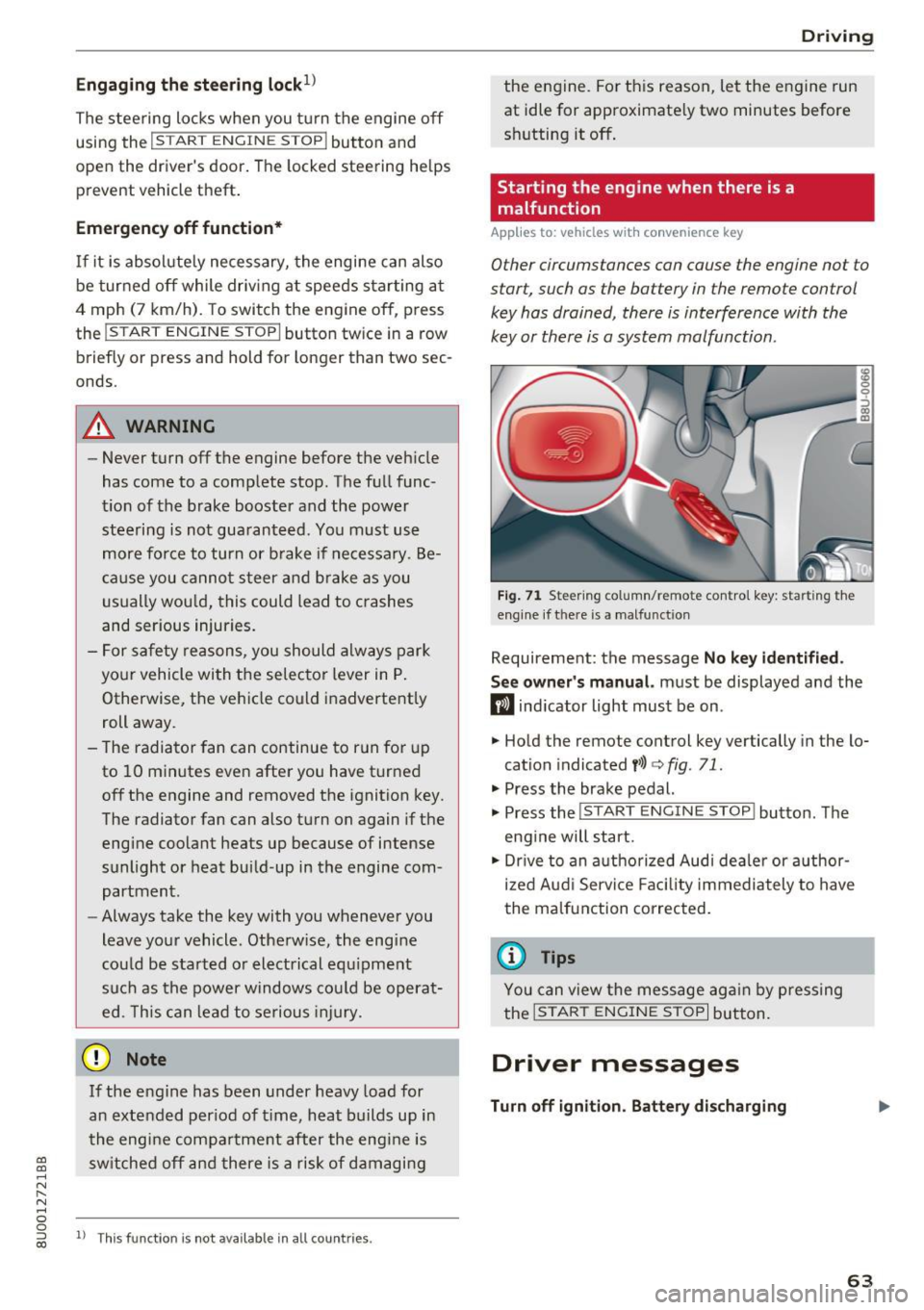
F ig . 7 1 Steer ing co lumn/remo te con trol k ey: star ting the
eng ine if t here is a ma lfun ction
Requirement: the message No key id entified .
S ee owner's manual.
must be displayed and the
m ind icator light must be on .
.,. Hold the remote control key vertically in the lo
cation indicated
y> l) q fig. 71 .
.,. Press the brake pedal.
... Press the
!START E NGINE STOP ! button. The
eng ine will start.
.,. Dr ive to an a uthorized Audi dea ler or a uthor
ized Aud i Servi ce Fa cili ty immediately to have
the malfunct ion correc ted.
(D Tips
You can view the message ag ai n by pressing
the
I START ENGI NE STOP I bu tton.
Driver messages
Turn off ignition . Battery discharging
63
Page 67 of 236

00
00
......
"' ,....
"' ...... 0 0 :::,
00
~ To prevent the parking brake from releasing au
tomatically, pull and hold the(®) switch and
press the accelerator pedal. The parking brake
remains set and prevents the vehicle from roll
ing backward .
~ You can release the(®) switch again once you
are sure that you are giving enough driving
force to the wheels by pressing the accelerator pedal.
Emergency braking function
You can use the emergency braking function in an
emergency situation, or if the standard brake op
eration malfunctions or is disabled.
~ Pull and hold the(®) switch.
~ As soon as you release the (®) switch or acceler-
ate, the braking stops .
Pulling and holding the(®) switch while driving
the vehicle activates the emergency braking func
tion . The vehicle is braked at all four wheels by
activating the hydraulic brake system. The brak
ing effect is similar to heavy braking
Q &_.
To reduce the risk of activating the emergency
braking by mistake, a warning tone (buzzer)
sounds when the(®) switch is pulled. Emergency
braking stops as soon as the (®) switch is released
or the accelerator pedal is pressed .
Parking
~ Press the brake pedal to stop the vehicle.
~ Pull the(®) switch to set the parking brake.
~ Place the selector lever in the P position .
~ Turn the engine off Q &_.
~ Turn the steering wheel when parking on in
clines so that the wheels will roll into the curb
if the vehicle starts moving.
WARNING
- Do not press the accelerator pedal inadver
tently if a gear is selected when the vehicle
is stationary and the engine is running. Oth
erwise, the vehicle will start to move imme
diately and this could result in an accident.
- Emergency braking should only be used in
an emergency, when the normal brake pedal
has failed or the brake pedal is obstructed .
Driving
During emergency braking, your vehicle will
brake similar to heavy braking. ESC and the
associated components (ABS, ASR, EDL)
cannot overcome the laws of physics . In cor
ners and when road or weather conditions
are bad, a full brake application can cause
the vehicle to skid or the rear end to swerve,
which increases the risk of an accident.
- If the power supply fails, you cannot set the
parking brake if it is released. In this case,
park the vehicle on level ground and secure
it by placing the selector lever in the P posi
tion. See an authorized Audi dealer or au
thorized Audi Service Facility for assistance.
- Always take the vehicle key with you when leaving your vehicle, even for a short period
of time. This applies particularly when chil
dren remain in the vehicle. Otherwise chil
dren could start the engine, release the
parking brake or operate electrical equip
ment such as power windows, which in
creases the risk of an accident .
- No one should remain in the vehicle when it
is locked -especially children . Locked doors
make it more difficult for emergency work
ers to get into the vehicle, which puts lives
at risk.
(D Tips
- When stopping at a traffic signal or stop
ping in city traffic, you can set the parking
brake manually . The vehicle does not have
to be held with the brake pedal. The parking
brake eliminates the tendency to creep
when a selector lever position is engaged.
As soon as you press the accelerator pedal,
the parking brake releases automatically
and your vehicle starts to move
Q poge
66 .
-Occasional noises when the parking brake is
set and released are normal and are not a
cause for concern .
- The parking brake goes through a self-test
cycle at regular intervals when the vehicle is
stopped . Any noises associated with this are
normal. .,.
65
Page 73 of 236
a:,
a:,
...... N r--. N .... 0 0 ::, a:,
technical limitations . If may st ill be necessary to
adjust the speed with the brake pedal.
H ill descent contro l sw itches off once the hill lev
e ls o ut or yo u press the accelerator pedal.
& WARNING
Hi ll descent contro l cannot overcome physical
limitations, so it may not be able to maintain
a constant speed under a ll conditions. Always
be ready to apply the brakes.
Manual shifting (tiptronic mode)
The tiptronic mode allows the driver to shift the
gears manually .
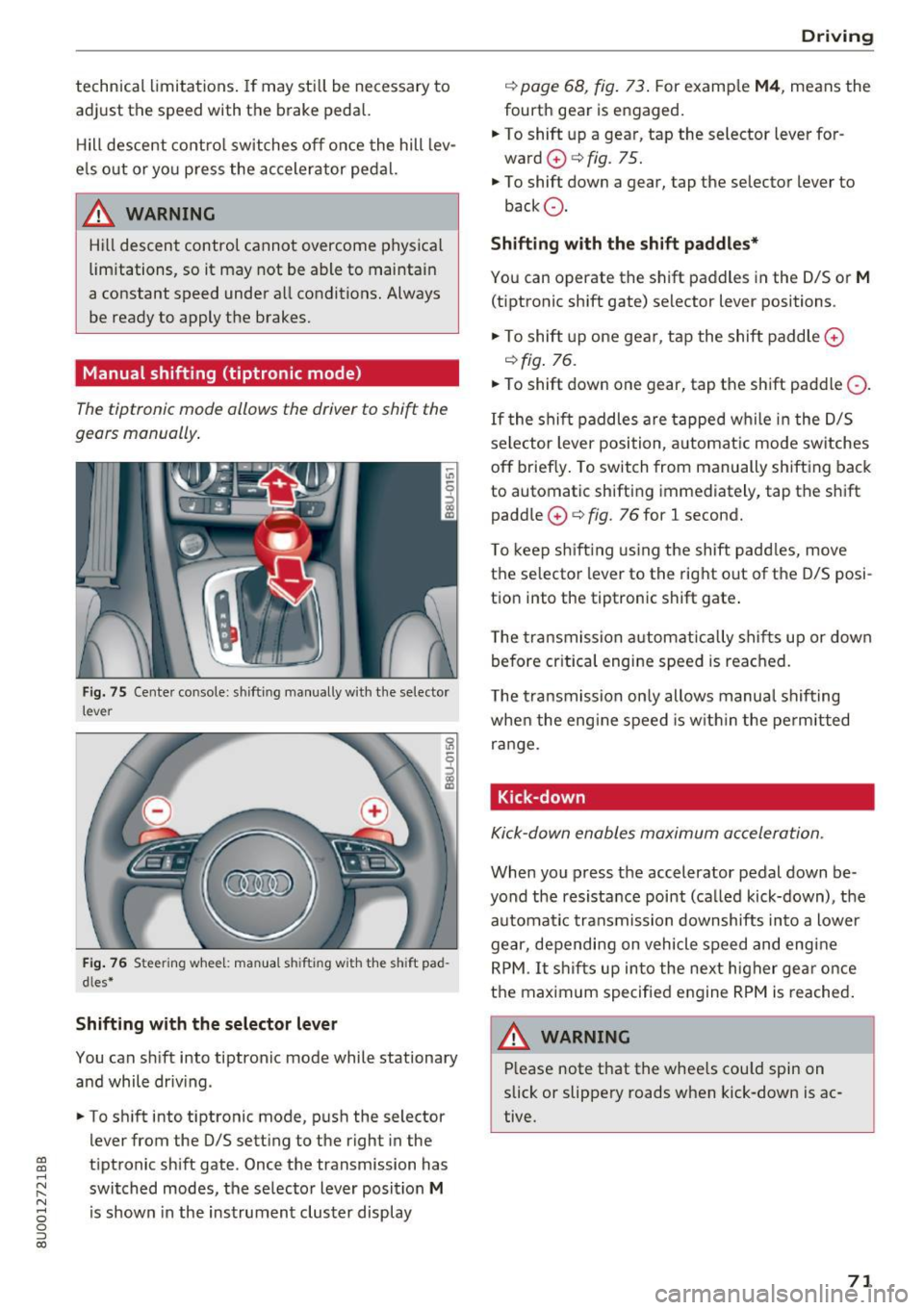
Fig . 75 Cente r console: shifting manually with the selector
lever
F ig. 76 Steering whee l: man ua l sh ifting with the sh ift pad
dles *
Shifting with the selector lever
You can s hift into tiptronic mode while stationary
and while driv ing.
• To sh ift into t iptronic mode, p ush the selector
lever from the 0/5 setting to the right in the
tiptronic sh ift gate. Once the transmission has
switched modes, the se lecto r lever position
M
is shown in the instrument cluster display
D rivi ng
c::> page 68, fig . 73 . For examp le M4 , means the
fourth gear is engaged .
.. To shift up a gear, tap the selector lever for
ward
0 c::> fig. 75.
• To shift down a gear, tap the se lector lever to
back Q.
Shifting with the shift paddles*
Yo u can operate the shift paddles in the 0/5 or M
(tiptronic shift gate) selector lever positions .
• To shift up one gear, t ap the shift paddle
0
c::>fig . 76.
• To shift down one gear, tap the shift paddle Q.
If the shi ft paddles are tapped wh ile in t he D/S
se lector lever position, a utomat ic mode sw itches
off briefly . To switch from manually shifting back
to automatic shifting immediately, tap the shift
paddle
0 c::> fig. 76 for l second.
T o kee p sh ift ing using the shift padd les, move
the selector lever to the rig ht out of the 0/5 posi
t ion into the tiptron ic shift gate .
T he transmission a utomatically shif ts up or down
b efore cr itica l engi ne speed is reached.
T he t ransmission on ly allows manua l shif ting
whe n the eng ine speed is w it hi n the pe rmitted
range.
Kick-down
Kick-down enables maximum ac celeration.
When you press the accelerator pedal down be
yond the resistance point (ca lled kick-down), t he
automa tic transmission downshifts in to a lower
gear, depending on vehicle speed and eng ine
RPM. It s hifts up into the next h igher gear o nce
the maximum specifie d engine RPM is reached .
,&_ WARNING
-= -Please note that the whee ls cou ld spin on
slick or slippery roads when kick-down is ac
tive.
71
Page 77 of 236

00
00
......
"' ,....
"' ...... 0 0 :::,
00
Operating instructions
6" r-2
~·~
1/2"
1·1/2"
ill
Fig. 79 Perm itted ball pos itio n of th e t rail er hitch
Trailer towing weights
With a
factory-installed or an aftermarket trailer
hitch, the maximum permissible trailer weight is
2,200 lbs (1,000 kg) . The maximum permissible
unbraked trailer weight is 1,650 lbs (750 kg) .
These specifications apply when driving on roads having an incline of less than 12%.
Permissible tongue load
For best vehicle handling under these changed
conditions, adjust the trailer load so that the
tongue load is at the maximum allowable or
slightly lower. You can get an approximation of
the tongue load with a bathroom scale or you can
measure the load at a trucking company or
weighing station.
With a
factory-installed or an aftermarket trailer
hitch, the maximum permissible load on the ball
hitch may not exceed 220 lbs (100 kg) .
It is rec
ommended to use the maximum permissible
load.
Trailer load distribution Be sure the load in the trailer is held securely in
place to prevent it from shifting forward, back
ward or sideways.
Never allow a passenger to ride in a trailer ¢.&.
in Driving instructions on page 76 .
Ball mount
The trailer hitch may only be used with suitable ball mount and ball¢
fig. 79. Installation of the
hitch ball must be carried out in accordance with
the manufacturer's instructions .
Trailer towing
Engine cooling system
Towing a trailer makes the engine work harder. It
is important that the cooling system's perform
ance is up to the additional load. Make sure that
the cooling system has enough fluid.
Tire pressure
When towing a trailer, inflate the tires of your
vehicle to the tire pressure listed under "Full
load" on the tire pressure label
¢page 181. In
flate trailer tires to trailer and tire manufactur
ers' specifications.
Lights
The headlight settings should be checked with
the trailer attached before driving off. Check to
make sure both vehicle and trailer lights are
working properly.
Safety chains
Be sure trailer safety chains are properly connect
ed from the trailer to the hitch on the vehicle .
Leave enough slack in the chains to permit turn
ing corners. When you install safety chains, make
sure they will not drag on the road when you are
driving.
The chains should cross under the trailer tongue
to prevent it from dropping in case of separation
from the hitch.
· Driving instructions
Driving with a trailer always requires extra care
ond consideration.
Weight distribution
Towing a loaded trailer with an empty car results
in a highly unstable distribution of weight. If this
cannot be avoided, drive at very low speeds only
to avoid the risk of losing steering control.
A "balanced " rig is easier to operate and control.
This means that the tow vehicle should be loaded
to the extent possible and permissible, while
keeping the trailer as light as possible under the
circumstances. Whenever possible, transfer
some cargo to the luggage compartment of the
tow vehicle while observing tongue load require-
ments and vehicle loading considerations. .,.
75
Page 85 of 236
a:,
a:,
...... N r--. N .-< 0 0 ::, a:,
Audi drive select
Introduction
Applies to: vehicles with Audi drive select
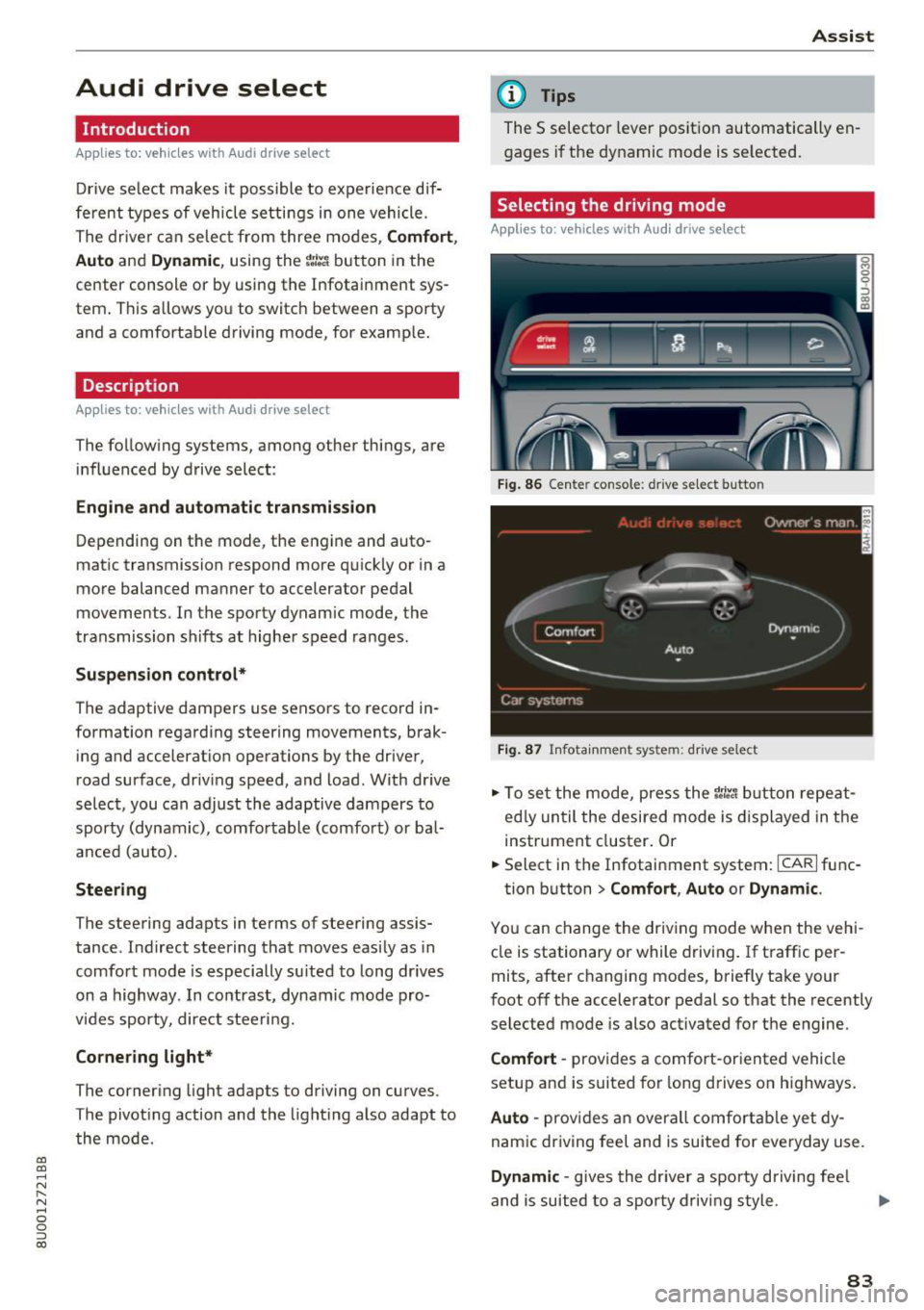
Drive select makes it possible to experience dif
ferent types of vehicle settings in one vehicle.
The driver can selec t from three modes,
Comfort,
Auto
and Dynamic , using the ~:/:a button in the
center console or by using the Infotainment sys
tem . This allows yo u to switch between a sporty
and a comfortable driving mode, for example.
Description
App lies to: ve hicles with Audi drive select
The following systems, among other things , are
influenced by drive select:
Engine and automatic transmission
Depending on the mode, the engine and auto
matic transmission respond more quickly or in a
more balanced manner to accelerator pedal
movements. In the sporty dynamic mode, the
transmission shifts at higher speed ranges.
Suspension control*
The adaptive dampers use sensors to record in
formation regarding steering movements, brak ing and accelerat ion operations by the driver,
road surface, driv ing speed, and load . With dr ive
select, you can adjust the adaptive dampers to
sporty (dynamic), comfortable (comfort) or bal
anced (auto).
Steering
The steering adapts in terms of steering assis
tance . Indirect steering that moves easily as in
comfort mode is especially su ited to long drives
on a highway . In contrast, dynamic mode pro
vides sporty, direct steeri ng.
Cornering light*
The cornering light adapts to driving on curves .
The pivoting action and the lighting also adapt to
the mode.
Assist
(D Tips
The 5 selector lever position automatically en
gages if the dynamic mode is se lected.
Selecting the driving mode
Applies to: vehicles wit h Audi drive select
Fig. 86 Cente r console : dr ive se lect button
Fig. 87 Infota inment sys tem: drive select
" To set the mode, press the r:i:., button repeat
ed ly until the desired mode is displayed in the
instrument cluster. Or
" Select in the Infotainment system:
ICARI func-
tion button
> Comfort , Auto or Dynamic .
You can change the driving mode when the vehi
cle is stationary or while driving . If traffic per
mits, after changing modes, briefly take your
foot off the accelerator pedal so that the recently
selected mode is also activated for the engine.
Comfort -provides a comfort-oriented vehicle
setup and is suited for long drives on highways.
Auto -provides an overall comfortable yet dy
namic driving feel and is suited for everyday use .
Dynamic -gives the driver a sporty driving fee l
and is suited to a sporty driving style.
83
Page 90 of 236
Parking systems
-If the position and the installation angle of
the rearview camera was changed, for ex
ample after a collision, do not continue to
use the system for safety reasons . Have it
checked by an authorized Audi dealer or au
thorized Audi Service Facility.
- Only use the rearview camera to assist you if
it shows a good, clear picture. For example,
the image may be affected by the sun shin
ing into the lens, dirt on the lens, or if there
is a malfunction.
- Use the rearview camera only if the luggage
compartment lid is completely closed. Make
sure any objects you may have mounted on
the luggag e compartment lid do not block
the rearview camera.
- The camera lens enlarges and distorts the
field of vision. The object appears both al
tered and inaccurate on the screen.
- In certain situations, people or objects in the display appear closer or farther away:
- For objects that do not touch the ground,
such as the bumper of a parked vehicle, a
trailer hitch or the rear of a truck . Do not
use the orientation lines in this case.
- If driven from a level surface onto an in
cline, or a downward slope.
- If driven toward protruding objects .
- If the vehicle is carrying too much load in
the rear .
Q) Note
-Always read and follow the applicable warn
ings
¢ (I) in General information on
page 85.
- The orange-colored orientation lines in the
Infotainment display show the vehicle path
based on the steering wheel angle . The
front of the vehicle swings out more than
the rear of the vehicle. Maintain plenty of
distance so that an exterior mirror or a cor
ner of the vehicle does not collide with any
obstacles.
88
· Sw itching on /off
Applies to: vehicles with parking system plus with rearview
camera
Switching on
.. Shift into reverse, or
.. Press the
PwA button in the center console
¢ page 86, fig. 89. A short confirmation tone
sounds and the LED in the button turns on .
Switching between the rearview camera and
optical display
.. Press the Car graphic control button ®
c:> page 89, fig. 95 to see the optical display .
.,. Press the
Rearview control button to see the
rearview camera image.
Switching off
.. Drive faster than 6 mph (10 km/h), or
.,. Press the
PwA button, or
.. Switch the ignition off.
(D Tips
The visual display in the left part of the dis
play should help you detect the critical vehicle
areas .
Page 91 of 236
a:,
a:,
...... N r--. N
'"' 0 0 ::, a:,
Perpendicular parking
Applies to: vehicles with parking system plus wit h rearv iew
camera
This view may be used when parking in a garage
or in a parking space .
Fig. 95 Infotainment system: aiming at a parking space
Fig. 96 Infota inment system : aligning the veh icle
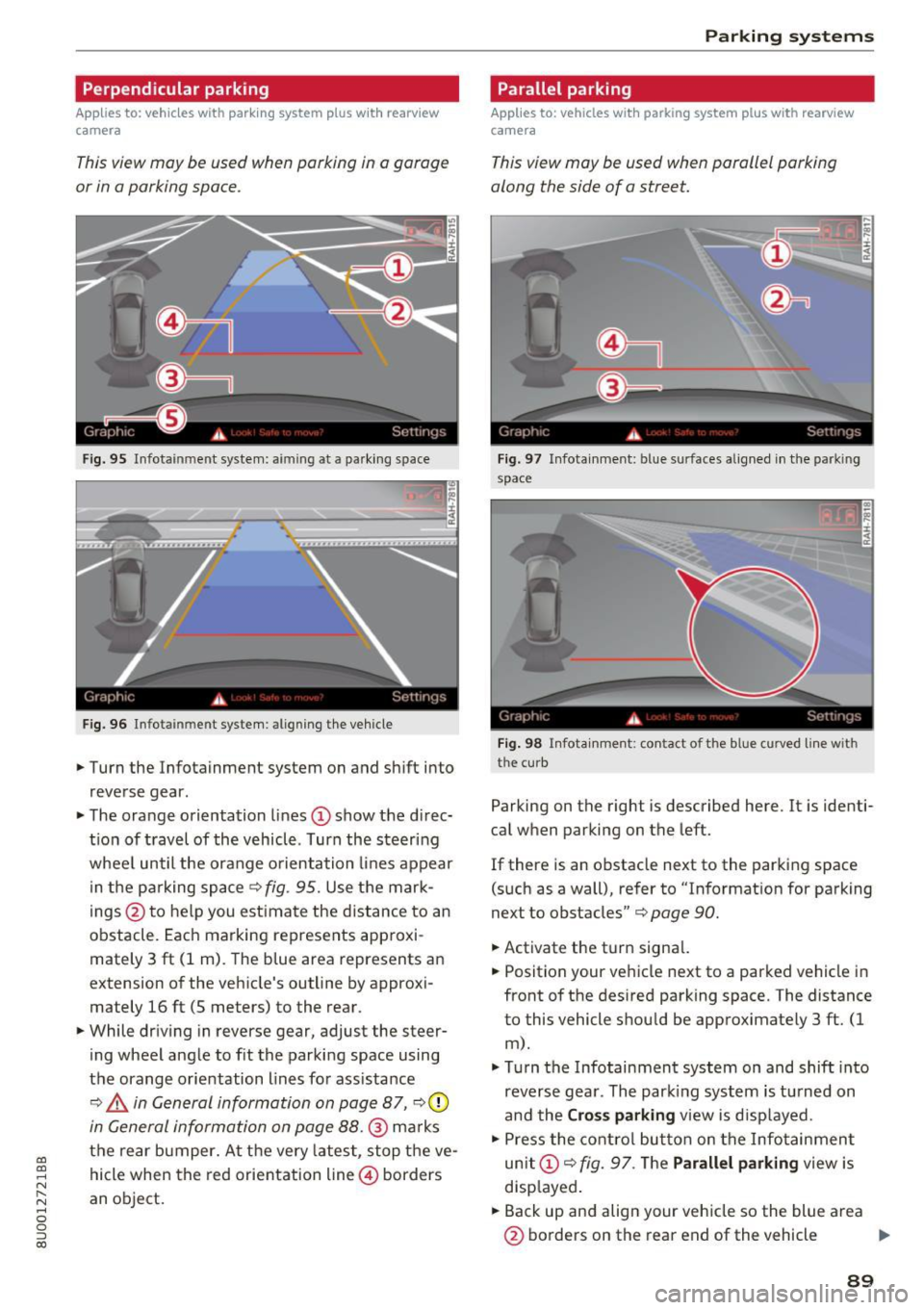
.,. Turn the Infotainment system on and sh ift into
reverse gear.
.,. The orange orientation lines
CD show the di rec·
tio n of travel of the vehicle . Turn the steering
whee l until the orange orientation lines appear
in the parking space
c:> fig. 95. Use the mark
ings @to help you est imate the distance to an
obstacle. Each marking represents approxi
mately 3 ft (1 m). The b lue area represents an
extension of the vehicle's outline by approxi
mately 16 ft (5 meters) to the rear.
.,. While driv ing in reverse gear, adjust the steer
ing wheel angle to f it the parking space using
the orange orientation lines for assistance
¢ ,& in General information on page 87, c:>0
in General information on page 88.@ marks
the rear bumper. At the very latest, stop the ve
hicle when the red orientation line@ borders
an object.
Parking systems
Parallel parking
Applies to: vehicles with parking system pl us with rearview
came ra
This view may be used when parallel parking
along the side of a street.
Fig . 97 Infotainment: blue surfaces aligned in the park ing
space
Fig. 98 Infota inmen t: co ntact of the blue curved li ne w ith
the curb
Parking on the right is described here. It is identi·
cal when parking on the left.
If there is an obstacle next to the parking space
(such as a wall), refer to "Informat ion for parking
next to obstacles"
c:> page 90.
.,. Activate the turn signal.
.,. Position your vehicle next to a parked vehicle in
front of the desired parking space. The distance
to this vehicle shou ld be approximately 3 ft. (1
m).
.,. Turn the Infotainment system on and shift into
reverse gear. The par king system is turned on
and the
Cross parking view is displayed.
.,. Press the control button on the Infotainment
unit
CD ¢ fig. 97. The Parallel parking view is
disp layed .
.,. Back up and align your vehicle so the blue area
@ borders on the rear end of the vehicle .,,.
89
Page 94 of 236
Intelligent Technology
Intelligent Technology
Electronic Stabilization
Control (ESC)
Description
Elect ronic Stabilization Control (ESC) suppo rts
driver safety.
It red uces the risk of slipping and
improves dr iving stability. ESC detects crit ica l sit
uations such as the veh icle oversteering and un
dersteering or the wheels are sp inning. The vehi
cle is stabilized by app lying the brakes or reduc
ing engine torque. When ESC engages, the
G1 i n
d icator light blinks in the inst rument cluste r.
The fo llow ing systems are integrated in the ESC:
Anti -lock b raking system (ABS)
ABS prevents the whee ls from loc king when brak
i n g . The vehicle can sti ll be steered even d uring
hard brak ing. Apply steady press ure to the brake
pedal. Do not pump the pedal. A puls ing in the
brake pedal indicates that the system is acting to
stabilize the vehicle .
Brake assi st sy stem
The brake assist system can dec rease braking dis
tance. It increases brak ing power when the driver
presses the brake pedal quick ly in emergency sit
uations . You must press and hold the brake pedal
until the dangerous situat io n is over .
Anti- s lip regulation (ASR )
ASR reduces eng ine power when the drive w heels
begin spinning and adapts the force to the road
conditions. This makes it easier to start, acceler
ate and dr ive up h ills .
Electron ic differential lock (EDL)
The ED L bra kes wheels that a re spinning and
transfers the drive power to the other drive
wheel or wheels if the ve hicle is equipped with a ll
wheel drive*) . This funct ion is not ava ilable at
h igher speeds.
In extreme cases, EDL automatically switches off
to keep the brake on the braked wheel from over heating. The vehicle is still work ing correctly. EDL
92
will switch on again au tomatically when condi
tions have returned to normal.
Steering recommendation
The ESC he lps to s tabili ze the vehicle by cha ng ing
t h e s teer ing torque .
Selective wheel torque control
Selective wheel to rque cont rol is used when d riv
i ng o n curves . The front whee l on the inside of
t h e curve or both wheels on the i nside of th e
cu rve are braked se lective ly as needed. This al
l ows mo re pre cise driving in curves .
Automatic post -collision braking system
The "automat ic post -coll is io n braking system"
can help to reduce the risk of sl iding and of addi
tiona l co llisions after an acc ident. If the a irbag
c ontro l modu le detects a collision above a cert ain
vehicle speed, the veh icle is braked by the ESC.
The veh icle does n ot brake automatically if:
- the drive r presses the accelerator pedal, or
- the bra king force generate d by the pressed
brake pedal is greater than the b raking force
that would be in itiated by the system, or
- the ESC, the bra ke system or the vehicle elect ri
cal system are not functioning.
A WARNING
- The ESC and its integ rated systems can not
overcome the lim its imposed by natura l
p hys ica l laws. This is es pec ially impo rtan t
on sl ippery or wet roads. If the systems be
gi n a cting to stabili ze yo ur vehicle, you
s hould immedi ately alte r your speed to
match the road and tra ffic conditions . Do
not let t he in creased safety provi ded tempt
you into taking risks . This could increase
your r is k of a coll is ion.
- Please note the r is k of a coll is ion increases
when dr iv ing fast, especially th rough c urves
and on slippery or wet roa ds, and when dr iv
ing too close to objects ahead. The ESC and
its integrated systems cannot always pre
ve nt co llisions - there is st ill a risk of acci
dents!