ignition AUDI Q3 2017 Owner´s Manual
[x] Cancel search | Manufacturer: AUDI, Model Year: 2017, Model line: Q3, Model: AUDI Q3 2017Pages: 236, PDF Size: 58.93 MB
Page 46 of 236
Sea ts and stor age
Seats and storage
General information
A WARNING
See c::> page 100, Driving safety for important
information, tips, suggestions and warnings
that you should read and follow for your own
safety and the safety of yo ur passengers .
Front seats
Manual seat adjustment
Appl ies to vehicles with manual adiustable seats
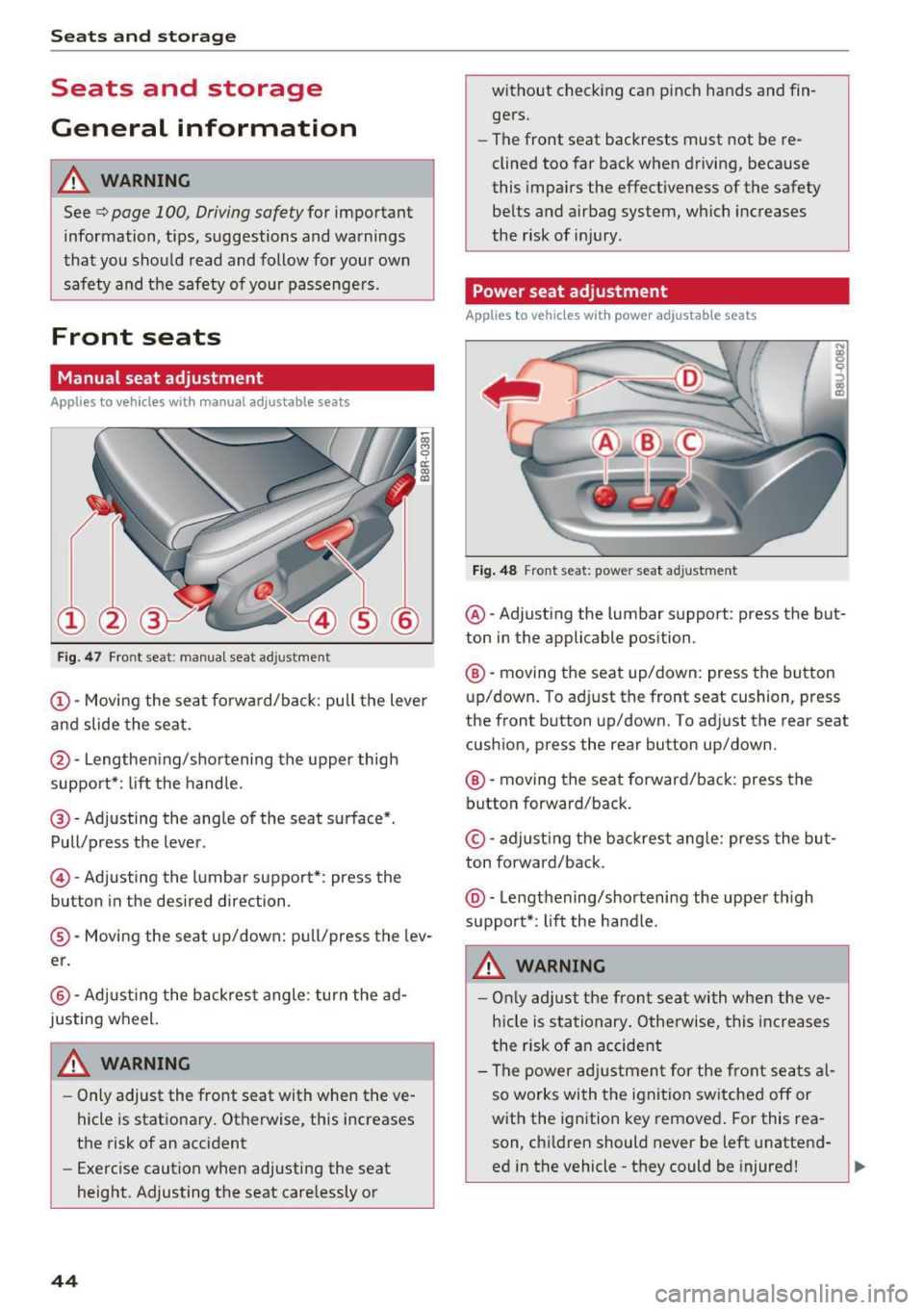
Fig. 4 7 Front seat: manual seat ad justment
@ -Moving the seat fo rwa rd/back: pull the lever
and slide the seat.
@ -Lengthen ing/shortening the upper thigh
support*: lift the hand le.
@ -Adjusting the angle of the seat surface*.
Pull/press t he lever.
© -Adjusting the lumbar support*: press the
button in the desired direction .
®-Moving the seat up/down: pull/press the lev
er.
@ -Adjusting the backrest angle : turn the ad
justing wheel.
WARNING
- Only adjust the front seat with when the ve
hicle is stationary . Otherwise, this increases
the risk of an accident
- Exercise caution when adjusting the seat
height. Adjusting the seat care lessly or
44
w ithout checking can p inch hands and fin
gers.
- The front seat backrests must not be re
clined too far back when driving, because
this impa irs the effectiveness of the safety
be lts and airbag system, which increases
the risk of inj ury .
Power seat adjustment
App lies to vehicles w it h power adjustab le seats
Fig . 48 Front seat: power seat adjustment
@ -Adjust ing the lumbar support : press the but
ton in the applicable position.
®-moving the seat up/down: press the button
up/down. To adjust the front seat cushion, press
the front button up/down. To adjust the rear seat
cushion, press the rear button up/down.
®-moving the seat forward/back : press the
button forward/back.
© -adjust ing the backrest ang le: press the bu t
ton forward/back .
@-Lengthening/shortening the upper th igh
support*: lift the handle.
A WARNING
- Onl y adjust the front seat with when the ve
hicle is sta tionary . Otherwise, this inc reases
the risk of an accident
- The power adj ustmen t for the front se ats al
so works wi th the ignit ion sw itched off or
with the ignition key removed . For this rea
son, chi ldren should never be left unattend
ed in the vehicle -they could be injured!
Page 61 of 236

00
00
......
"' ,....
"' ...... 0 0 :::,
00
consumption to zero (fuel shut-off during decel
eration).
Shift efficiently
An effective way to save fuel is to upshift earlier .
Staying in a gear too long uses fuel unnecessari
ly. Press down on the accelerator pedal slowly
and avoid "kick-down".
Avoid full acceleration
You should rarely travel at the maximum vehicle
speed. High speeds cause a disproportionately
high increase in fuel consumption, emissions and
traffic noise. Slower driving saves fuel.
Reduce idling time
There are benefits to stopping the engine, for ex
ample when at railroad crossings or traffic lights
with longer red lights. Stopping the engine for
30-40 seconds already saves more fuel than the
amount of extra fuel needed to restart the en
gine.
It takes a very long time in idle to warm the en
gine up to operating temperature . Wear and
emissions are especially high in the warm-up
phase. Therefore, you should begin driving im
mediately after starting the engine. Avoid high
RPMs while doing this.
Have maintenance performed regularly
By having maintenance performed regularly on
your vehicle, you can help to reduce fuel con
sumption before you even start to drive. The maintenance condition of your vehicle not only
affects traffic safety and long-term value but al
so impacts
fuel consumption. A poorly main
tained engine can lead to fuel consumption that
is 10% higher than normal.
Also check the
oil level when refueling. The oil
consumption
depends largely on the engine load
and speed . It is normal for the oil consumption
of a new engine to reach its lowest point only af
ter a certain amount of use. Therefore, the oil
consumption can only be properly judged after
approximately 3,000 miles (5,000 km) have been
driven.
Driving
Fewer short trips
The engine and catalytic converter have to reach
their optimal
operating temperature to reduce
fuel consumption and noxious emissions effec
tively.
Just after starting, a cold engine in a mid-size car
only achieves a fuel economy of 6-8 mpg
(30-40 l/100 km). After about a half a mile, fuel
economy climbs to 12 mpg (20 l/100 km). After
about 2.5 mi
(4 km), the engine is at its proper
operating temperature and fuel economy has
reached a normal level. So you can see that you
should avoid short trips whenever possible .
The
outside temperature is also critical in this re
gard. Your car consumes more fuel in the winter
than in the summer.
@ Note
Do not leave engine idling unattended after
starting. If warning lights should come on to indicate improper operation, they would go
unheeded. Extended idling also produces
heat, which could result in overheating or
other damage to the vehicle or other proper
ty.
(D Note
- Have your vehicle maintained properly and
in accordance with the service recommenda
tions in your Warranty & Maintenance book
let. Lack of proper maintenance as well as
improper use of the vehicle will impair the
function of the emission control system and could lead to damage.
- Do not alter or remove any component of
the Emission Control System unless ap
proved by the manufacturer.
- Do not alter or remove any device, such as
heat shields, switches, ignition wires,
valves, which are designed to protect your
vehicle's Emission Control System and other
important vehicle components .
(j) Tips
The consumption estimates as published by
ENVIRONMENTAL PROTECTION AGENCY
(EPA) and Transport Canada may not
59
Page 62 of 236
Driving
correspond to you r actua l consumption on the
road, which will vary depending upon vehicle
load and speed, road and weather conditions,
trip length, etc.
Steering
Adjusting the steering wheel position
The steering column can be adjusted up and
down and forward and back.
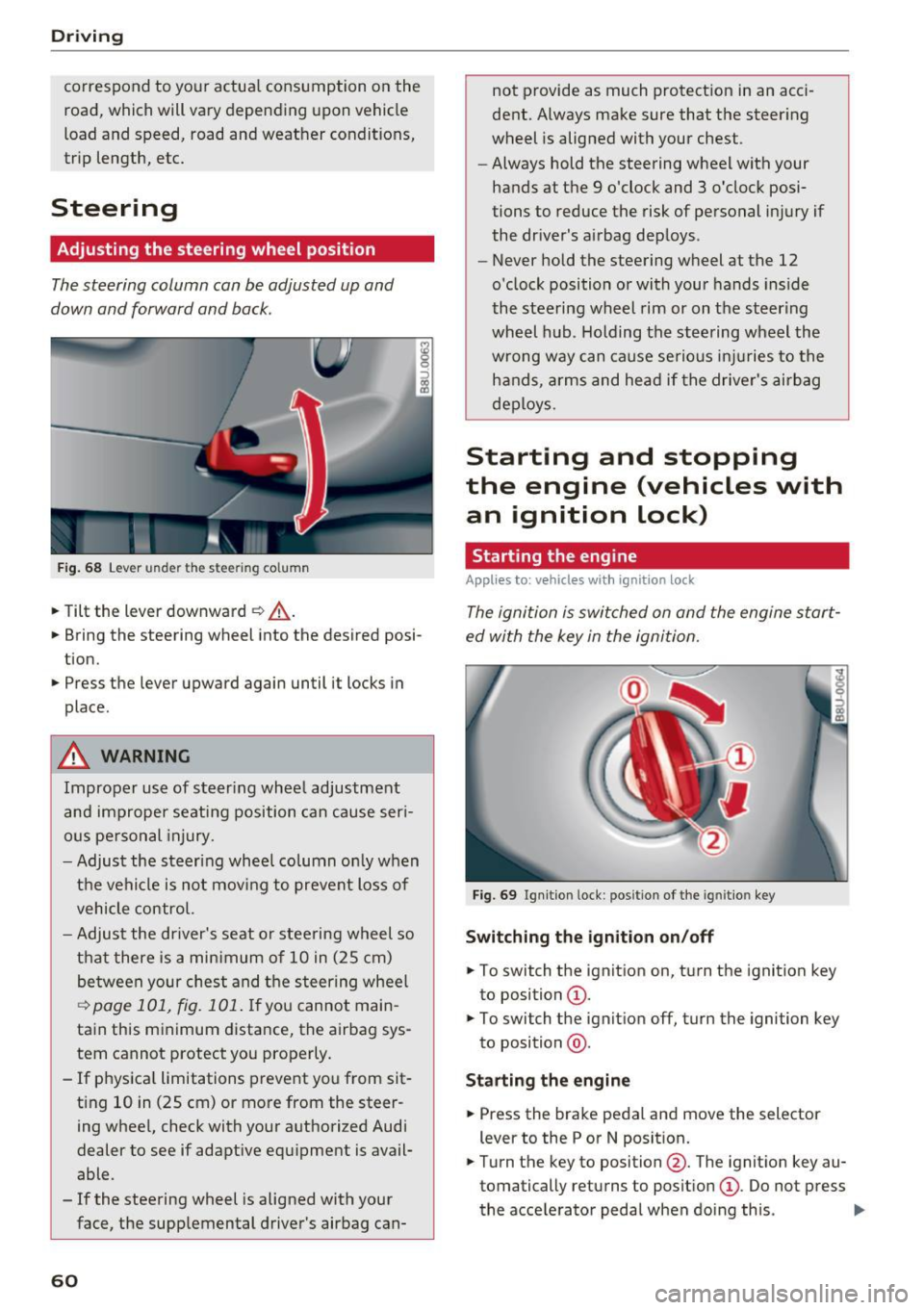
F ig . 68 Lever u nde r the stee ring column
.,. Tilt the lever downward ¢ _A.
.,. Bring the steering wheel into the desired posi
tion .
.,. Press the lever upward again until it locks in
place .
.&_ WARNING
Improper use of steer ing whee l adjustment
and improper seating position can cause ser i
ous pe rsonal injury.
- Adjust the steering wheel column on ly when
the vehicle is not mov ing to prevent loss of
vehicle control.
- Adjust the driver's seat o r steering wheel so
that there is a minimum of 10 in (25 cm)
be tween your chest and t he s teering wheel
~ page 101, fig. 101 . If yo u cannot main
tain this minimum distance, the airbag sys
tem cannot protect you properly.
- If physica l limitations prevent you from sit
t ing 10 in (25 cm)
or more from the steer
ing wheel, check with your authorized Audi
dealer to see if adaptive equipment is avail
able .
- If the steering wheel is aligned with your
face, the supplemental driver's airbag can-
60
not provide as much protect ion in an acci
dent. Always make sure that the steer ing
wheel is aligned with your chest.
- Always hold the steering wheel with your
hands at the 9 o'clock and 3 o'clock posi
tions to reduce the risk of personal in jury if
the driver's airbag deploys .
- Never hold the steering wheel at the 12
o'clock position or with your hands inside
the steering wheel rim or on t he steering
wheel hub . Holding the steering wheel the
wrong way can cause serious in juries to the
h an ds, arm s and head if the drive r's airbag
deploys.
Starting and stopping
the engine (vehicles with an ignition lock)
Starting the engine
Applies to: vehicles wit h ignition lock
The ignition is switched on and the engine start
ed with the key in the ignition.
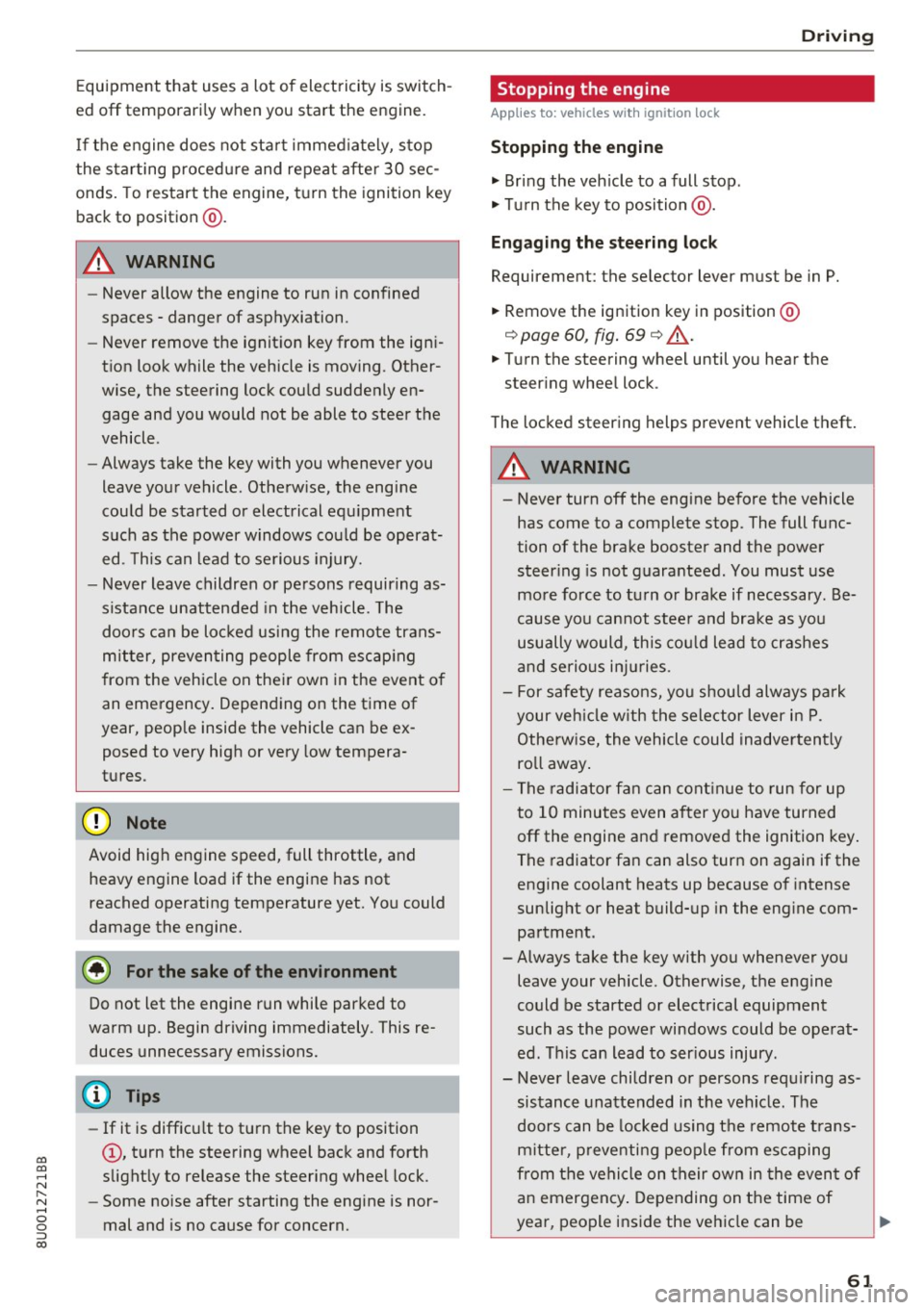
Fig. 69 Ign it ion lock : pos ition of the ig ni tio n key
Switching the ignition on/off
.,. To switch the ignition on, turn the ignition key
to position
(D .
.,. To switch the ignit ion off, turn the ignition key
to position @.
Starting the engine
.,. Press the brake pedal and move the selector
lever to the P or N posit ion.
.,. Turn the key to position @. The ignit ion key au
tomatically returns to posit ion
(D . Do not press
the accelerator peda l when doing this . ..,.
Page 63 of 236
00
00
......
"' ,....
"' ...... 0 0 :::,
00
E quipment that uses a lot of electricity is switch
ed off temporari ly when you start the engine.
I f the engine does not start im mediately, stop
the s tart ing proced ure and repeat afte r 30 sec
onds. To restart the engine, t urn the ignition key
back to position @.
A WARNING
-Never allow the engine to run in confined
spaces -danger of asphyxiation .
- Never remove the ignition key from the igni
tion look while the vehicle is moving. Other
wise, the steering lock could suddenly en gage and you would not be able to steer the
vehicle .
- Always take the key with you whenever you
leave your vehicle. Otherw ise, the engine
could be started or electrical equ ipme nt
such as the power windows cou ld be operat
ed . T his can lead to serious injury.
- Never leave children or persons requiring as
sistance unattended in the vehicle. The
doo rs can be loc ked using the remote trans
mitter, preventing people from escap ing
from the vehicle on the ir own in the event o f
an emergency. Depend ing on the t ime of
year, peop le inside the vehicle can be ex
posed to very high or very low tempera
tures .
(D Note
Avoid high engine speed, full throttle, and
heavy engine load if the engine has not
reached operating temperature yet. You could
damage the engine.
@ For the sake of the environment
Do not let the engine run while parked to
warm up. Begin driving immediately . This re
duces unnecessary emissions.
(D Tips
- If it is difficu lt to turn the key to position
(D, turn the steering wheel back and forth
slightly to release the steering wheel lock .
- Some noise after starting the engine is nor
mal and is no cause for concern.
D riving
Stopping the engine
App lies to : vehicles wi th ignition lock
Stopping the engine
.,. Br ing the veh icle to a full stop.
.,. Tu rn the key to position @.
Engaging the steering lock
Requirement: the selector lever must be in P.
.,. Remove the ignition key in position @
¢ page 60, fig. 69 ¢ .&_.
.,. Turn the steering wheel until you hear the
steering whee l lock .
The locked steering helps prevent vehicle theft.
A WARNING ....._ --Never turn off the engine before the vehicle
has come to a complete stop. The full func
tion of the brake booster and the power
steer ing is not guaranteed. You must use
more force to turn or brake if necessary. Be
cause yo u cannot stee r and brake as you
usually would, th is could lead to crashes
and serious injuries .
- For safety reasons, you should always park
your veh icle w ith the selector lever in P.
Otherwise, the vehicle could inadvertently
ro ll away .
- The radiator fan can continue to run for up
to 10 minu tes even after you have turned
off the engine and removed the ignition key.
The radiator fan can also turn on again if the
engine coolant heats up because of intense
sunlight or heat build-up in the eng ine com
partment.
- Always take the key with you whenever you leave your vehicle. Otherwise, the engine
could be started or electrical equipment
such as the power windows could be operat
ed. This can lead to ser ious injury.
- Never leave children or persons requ iring as
sistance unattended in the vehicle . The
doors can be locked using the remote t rans
mitter, preventing people from escaping
from the vehicle on their ow n in the event of
an emergency . Depending on the time of
year, people inside the vehicle can be
61
Page 64 of 236
Driving
exposed to very high or very low tempera
tures.
CD Note
If the engine has been under heavy load for
an extended period of time, heat builds up in
the engine compa rtment after the engine is
sw itched off and there is a risk of damaging
the engine. For this reason, let the engine run
at idle for approximately two minutes before
shutt ing it off .
Starting and stopping
the engine (vehicles with
a convenience key)
Starting the engine
Applies to: vehicles with convenience key
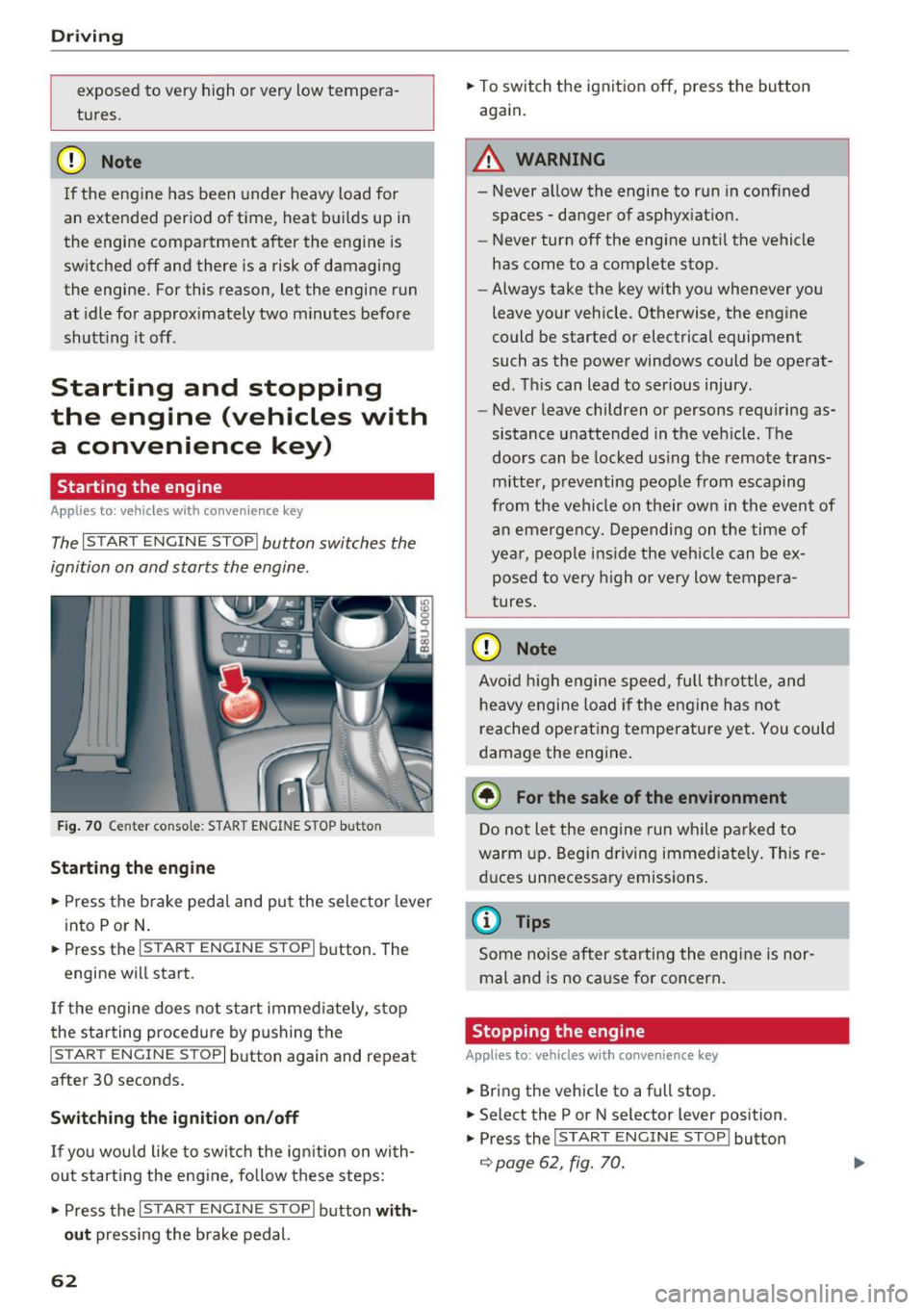
The I START E N GINE STOP I button switches the
ignition on and starts the engine .
Fig. 70 Center conso le : STAR T ENGINE S TOP b utt o n
Starting the engine
.,. Press t he b rake pedal and pu t the sele ctor leve r
into P or N .
.,. Press the
I S TART ENGINE STOPI button . The
engine wi ll start .
If the engine does not sta rt immed iate ly, stop
the starting procedure by pushing the
I START ENGINE STOP I button again and repeat
after 30 seconds.
Switch ing the ignition on/off
If you wou ld like to swi tch the ig nition on wi th
out starting the e ngine, fo llow these steps:
.,. Press the
I S TAR T ENGIN E STOPI button with
out
press ing the brake pedal.
62
.,. To switch the ignition off, press the button
again.
A WARNING
- Never a llow the engine to run in conf ined
spaces -danger of asphyx iat ion.
- Never turn off the engine until the vehicle
has come to a complete stop.
- Always take the key with you whenever yo u
leave your vehicle . Otherwise, the engine
could be started or electrical equipment
such as the powe r windows could be operat
ed. This can lead to serious injury .
- Never leave children o r persons requ iring as
sistance unattended in the ve hicle. The
doors can be locked us ing t he remote trans
m itter, p reventing peop le from escaping
from the vehi cle on their own in the even t of
an emergen cy. Depending on t he time of
year, peo ple ins ide the veh icle can be ex
posed to very high o r very low tempera
tures .
CD Note
Avoid high engi ne spee d, full t hrott le, and
h eavy engine load if the e ngine has not
reached operat ing temperatu re ye t. You could
d amage the eng ine.
@ For the sake of the environment
D o not le t the eng ine run wh ile parked to
warm up. Beg in driving immed iate ly . Th is re
d uces un necessa ry emissions .
@ Tips
Some noise after s tarting the eng ine is nor
mal and is no ca use for concern .
Stopping the engine
Applies to: vehicles with convenience key
.,. Bring the vehicle to a full stop .
.,. Select the P or N se lector lever position .
.,. Press the
I START E NGINE STOP I button
¢ page 62, fig. 70.
-
Page 65 of 236
a:,
a:,
...... N r--. N .-< 0 0 ::, a:,
Engaging the steering lock1
)
The steering locks when you tu rn the engine off
using the
! S TART ENGINE ST OP I butto n and
open the driver's door. The locked stee ring he lps
p revent vehicle theft .
Emergency off function *
If it is absolutely necessary, the engine can also
be turned off while driv ing at speeds starting at
4 mph (7 km/h). To switch the engine off, p ress
the
! STA RT ENGINE ST OP I button twice in a row
bri efly or press and hold for long er than two sec
onds.
A WARNING
- Never turn off the engine before the veh icle
has come to a complete stop. The f ull func
ti on of the brake booster and the power
steering is not gua ranteed. You must use
more fo rce to turn or b rake if necessary. Be
c a use you canno t steer and brake as you
usually wou ld, this could lead to c rashes
and serious injuries .
- For safety reasons, you should always par k
yo ur vehicle wi th the selector lever in P .
Otherwise, the vehicle could inadvertently
roll away .
- The radiator fan can continue to run for up
to 10 min utes even afte r you have turned
off the engine and removed the ignition key.
The radiator fan can also tu rn on again if the
engine coolant heats up because of intense
sunlight or heat bui ld -up in the engine com
partment.
- Always take the key with you whenever you
leave your vehicle. Otherw ise, the engine
cou ld be sta rted or electrical equ ipme nt
such as the power w indows cou ld be opera t
ed . T his can lead to se rious inj ury.
(D Note
If the eng ine has been under heavy load for
an extended per iod of t ime, heat builds up in
the engine compa rtme nt after the eng ine is
sw itched off and there is a risk of dam aging
ll Th is fun ctio n is not a vail able in al l countries .
Drivi ng
the engine. For th is reason, let the engine run
at idle for approximate ly two minutes before
shutting it off .
Starting the engine when there is a
malfunction
Applies to: vehicles with convenience key
Other circumstan ce s can cause the engine no t to
s tar t, such as the battery in the remote control
key has drained , there is interference with the
key or there is a system malfunction.
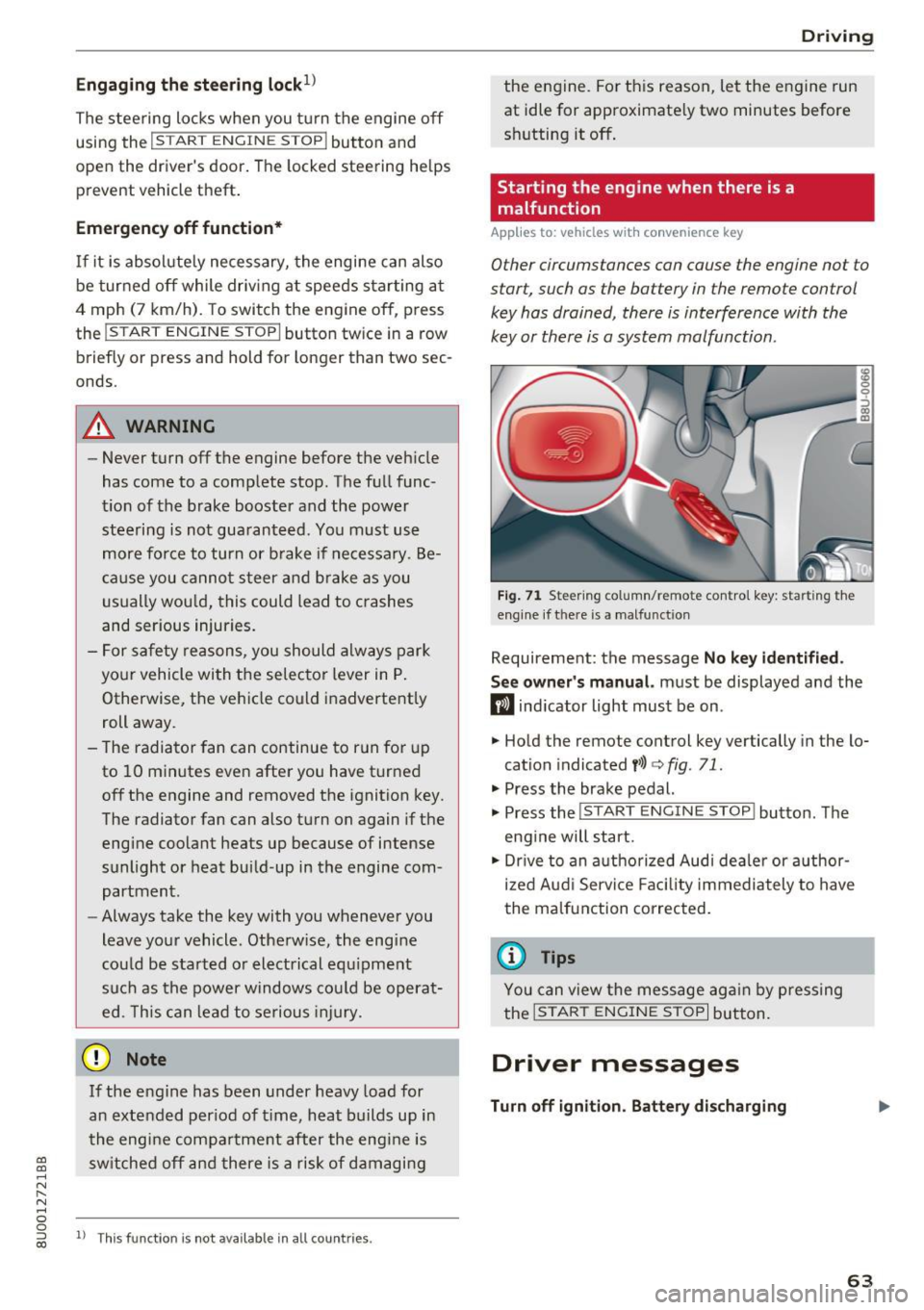
F ig . 7 1 Steer ing co lumn/remo te con trol k ey: star ting the
eng ine if t here is a ma lfun ction
Requirement: the message No key id entified .
S ee owner's manual.
must be displayed and the
m ind icator light must be on .
.,. Hold the remote control key vertically in the lo
cation indicated
y> l) q fig. 71 .
.,. Press the brake pedal.
... Press the
!START E NGINE STOP ! button. The
eng ine will start.
.,. Dr ive to an a uthorized Audi dea ler or a uthor
ized Aud i Servi ce Fa cili ty immediately to have
the malfunct ion correc ted.
(D Tips
You can view the message ag ai n by pressing
the
I START ENGI NE STOP I bu tton.
Driver messages
Turn off ignition . Battery discharging
63
Page 66 of 236
Driving
This message appea rs and a warning tone sounds
if you open the driver's door when the ignition is
sw itched on.
Pr es s brake pedal to start engine
This message appears if you do not step on the
brake pedal to sta rt the eng ine on a vehicle wi th
an automatic transm ission .
Please engage N or P
This message appears when starting or stopping
the engine and Nor Pis not engaged. The engine
will not start/stop .
Ill Key not in veh icl e?
The indica to r li ght tur ns on and this message ap
pears i f the convenience key* was removed from
the vehicle when the engine was running. If the
convenience key is no longer in the v ehicle, you
cannot switch the ignition on or start the engine
once you stop it . You also cannot lock the vehicle
from the outside.
Shift to P , vehicle can roll awa y. Doors can onl y
be locked in P .
This message appea rs for safe ty reasons a long
with a warning sound if the se lector lever is not
engaged in P after switching the ignition off .
Move the selector lever to the P position. Other
wise the vehicle is no t protected from rolling and
it cannot be locked .
II No key identified. See owner' s manual.
This message appe ars if the re is no convenience
key * ins ide the vehicle or if t he system does not
recognize the key . The convenience key may not
be recognized, for example, if it is covered by an
object that
disrupts the signal (such as a brief
case), or if the key batte ry is weak. Electronic de
vices suc h as cell phones can also interfere w it h
the s ignal.
To still be able to start or stop the engine, refer
to
c:::> page 63.
64
Electromechanical
parking brake
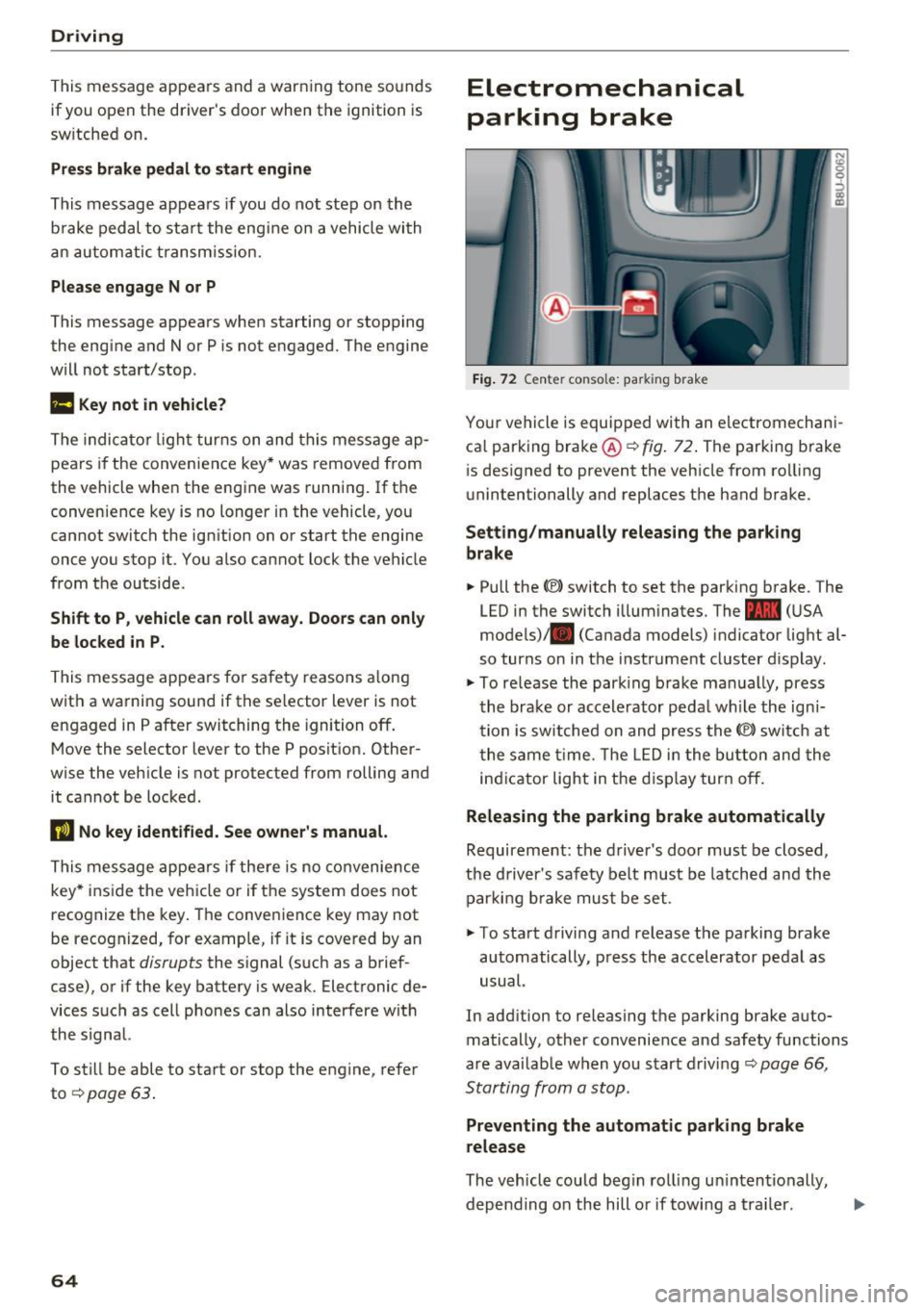
Fig . 7 2 Ce nter co nso le: pa rk in g brake
You r vehicle is equipped with an electromechani
ca l parking bra ke @
c:::> fig . 72. The parking brake
i s des igned to prevent the veh icle from ro lling
unintentionally and replaces the hand brake.
Setting /manually releasing the parking
brake
.. Pull the(®) switch to set the parking b rake . The
LED in the switch illum inates. The -
(U SA
mode ls)/ . (Canada models) indicator light al
so turns on in the instrument cluster d isplay .
.,. To re lease the par king brake ma nually, press
the brake or accele rator peda l w hile the ign i
tion is sw itched on and press the(®) switch at
t he same t ime. The L ED i n the bu tton and the
in dicator light in the d isp lay turn off.
Releasing the parking brake automatically
Requireme nt: the d river 's door must be closed,
the driver's saf ety be lt must be latched and the
par king b rake mus t be set .
.. To sta rt d riving and release the parking brake
automatically , press the accelerator pedal as
usual.
In add ition to releasing the parking brake auto
matically, other convenience and safety functions
a re availab le when you start driving
c:::> page 66 ,
Starting from a stop.
Preventing the automatic parking brake
release
The veh icle could beg in rol ling u ninten tionally,
depending on the hill or if towing a tra iler . .,..
Page 70 of 236
Driving
Selector lever positions
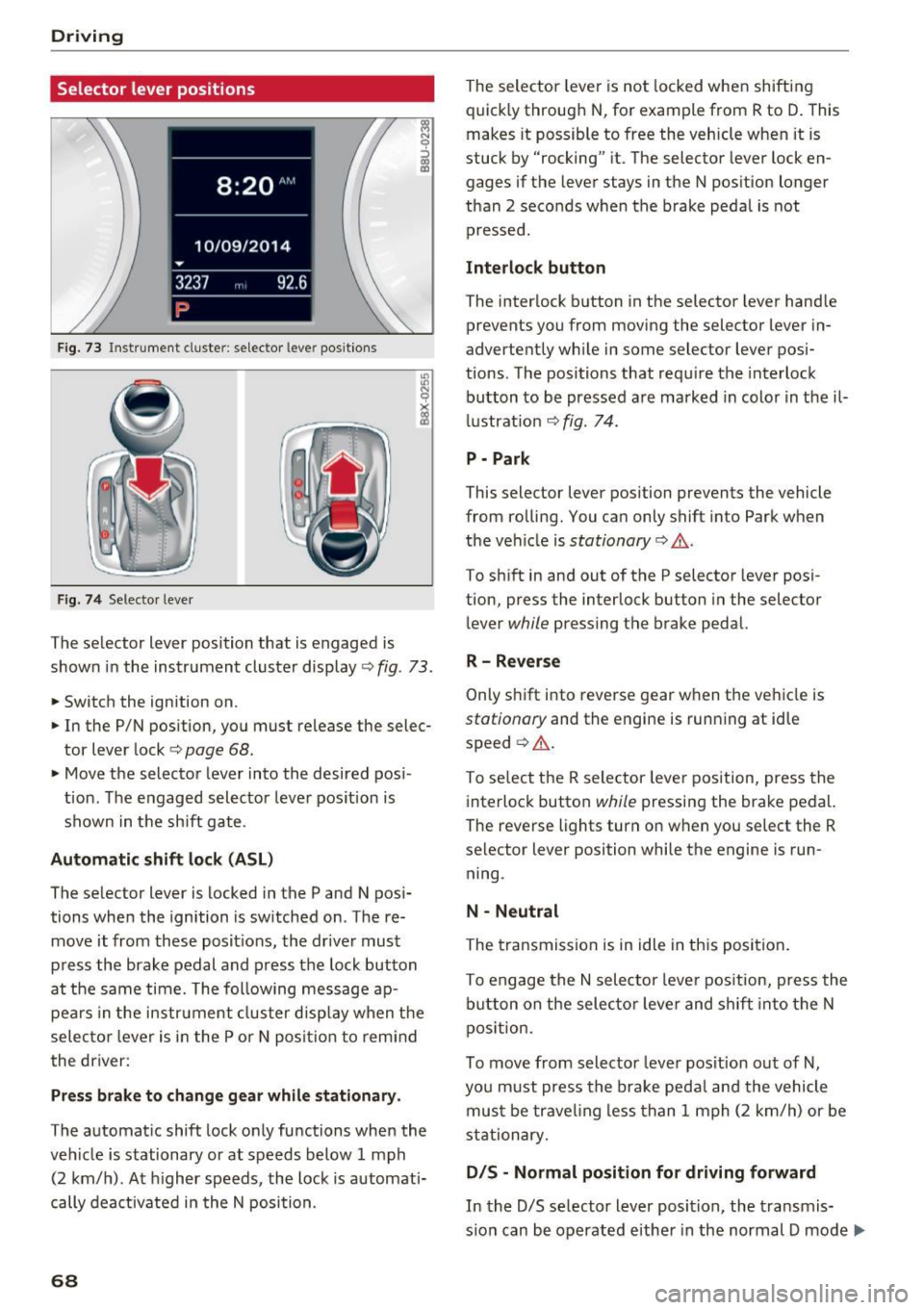
Fig. 73 Instrument cluste r: selector leve r positions
Fig. 74 Selecto r lever
The selector lever position that is engaged is
shown in the instrument cluster display
<=> fig . 73 .
.,. Switch the ignition on .
.. In the P/N position, you must release the selec
tor lever lock
c:> page 68.
• Move the selector leve r into the desired pos i
tion . The engaged selector lever pos ition is
shown in the sh ift gate .
Automatic shift lock (ASL )
The selector lever is locked in the P and N pos i
tions when the ignition is sw itched on . The re
move it from these posit ions, the driver must
press the brake pedal and press the lock button
at the same time. The following message ap pears in the instr ument cluster disp lay when t he
selec to r l ever is in the P or N posi tion to remi nd
the driver:
Pr ess brake to change gear while stationar y.
The automatic shift lock only functions when the
veh icle is stationary or at speeds below 1 mph
(2 km/h). At h igher speeds , the lock is automati
cally dea ctivated i n the N position.
68
The selector leve r is not locked whe n shifting
quick ly through N , for example from R to D. This
makes it possible to free the veh icle when it is
stuck by "rocking" it. The selector lever lock en
gages if the lever stays in the N pos ition longer
than 2 seconds when the brake peda l is not
pressed .
Interlock button
The interlock b utton in the selector lever hand le
prevents you from moving the selector lever in
advertently wh ile in some selector lever posi
tions. The positions that requ ire the interlock
button to be pressed a re marked in colo r in t he il
l ustrat ion <=>
fig. 74.
P - Park
This selector lever position prevents the vehicle
from rolling. You can only shift into Park when
the ve hicle is
stationary c:> A .
To sh ift in and out of the P selector lever posi
tion, press the interlock button in the selector
lever
while pressing the brake pedal.
R -Rever se
Only s hift i nto reve rse gear when the veh icle is
stationary and the engine is running at id le
speed ¢
A.
To se lect the R selector leve r position, press the
interlock button
while pressing the brake pedal.
The reverse lights turn on when you select the R
selector lever position while the engine is run
ning .
N -Neutral
The transmission is in idle in th is posi tion .
To engage the
N sele ctor leve r pos it ion, press the
b utton on the selecto r leve r and shift into the N
pos ition.
To move from selector leve r pos it ion out of
N,
you m ust press the brake peda l and the vehicle
mus t be trave ling less than 1 mph (2 k m/h) or be
stationary.
D IS -Normal position for driving forward
In the D/S se lector lever position, the transmis
s io n can be operated eithe r in the normal D mode ..,_
Page 71 of 236
00
or in the 5 sport mode. The instrument cluster
display shows the selected driving mode.
In the
normal mode D, the transmission auto
matically selects the suitable gear ratio.
It de
pends on engine load, vehicle speed and driving
style.
Select the
sport mode 5 for sporty driving. The
vehicle makes full use of the engine's power.
Shifting may become noticeable when accelerat
ing.
To move from selector lever position N to D, you
must press the brake pedal and the vehicle must
be traveling less than 1 mph (2 km/h) or be sta
tionary ¢&. .
A WARNING
Read and follow all WARNINGS¢&. in Driv
ing tips on page
70.
@ Note
Coasting downhill with the transmission in N
and the engine not running will result in dam
age to the automatic transmission and possi
bly the catalytic converter.
(D Tips
- If you accidentally select N while driving,
take your foot off the accelerator pedal and
wait for the engine to slow down to idle be
fore selecting Dor 5.
- If there is a power failure, the selector lever
will not move out of the P position. The
emergency release can be used if this hap
pens ¢
page 72.
Driving tips
Starting the engine
.. The selector lever must be in the P or the N po
sition.
Starting from a stop
.. Press and hold the brake pedal.
~ .. Press and hold the interlock button in these-
"' ~ lector lever handle, select the desired selector .... 0 0
:::,
00
Driving
lever position such as D ¢ page 68 and release
the lock button.
.. Wait a moment until the transmission shifts.
You will notice a slight movement when the
gear engages.
.. Release the brake pedal and press the accelera
tor pedal ¢_& .
Stopping temporarily
.. Press the brake pedal to stop the vehicle, for
example at a traffic light. Do not press the ac
celerator pedal when doing this.
.. To prevent the vehicle from rolling when you
start driving, set the parking brake when stop
ping on steep inclines¢,& .
.. The parking brake will release automatically
and the vehicle will start moving once you press
the accelerator pedal.
Stopping/parking
If the selector lever is not in the P position when
you open the driver's door, the vehicle could roll.
In vehicles with a convenience key*, the message
Shift to P and turn off ignition, or vehicle can
roll away
appears.
.. Press and hold the brake pedal¢ _&.
.. Set the parking brake .
.. Select the P selector lever position.
Stopping on an incline
.. Always press the brake pedal to hold the vehi
cle in place and prevent it from "rolling back"
¢
&_ . Do not try to prevent the vehicle from
" rolling back" when a gear is engaged by in
creasing the engine speed
¢(D .
Starting on a hill
.. Set the parking brake .
.. Select the D position .
.. Press the accelerator pedal carefully. If your
safety belt is fastened, the parking brake is au
tomatically released and your vehicle begins to
move.
69
Page 81 of 236
00
00
......
"' ,....
"' ...... 0 0 :::,
00
@ Tips
The cruise control system cannot maintain
the speed cons istently if you are driving on
steep hills. The vehicle weight ca uses the
speed to increase. Due to th is, shift into a
lower gear in t ime or apply the brakes .
Changing speed
Applies to: vehicles with cruise control system
~ To inc rease or decrease the speed in incre
me nts, push the lever towa rd
0 10 ~ page 78,
fig. 80.
~ T o inc rease o r decrease the speed quickly , hold
the leve r in the
0 10 direction until the de
si red speed is displayed .
Overriding the cruise control system
Applies to: veh icles with cru ise control system
You can a lso press the accelerator pedal down to
increase your speed, for example if you want to
pass someone. The speed you set earlier w ill re
sume as soon as you release the accelerator ped
al.
However, if you are exceeding the stored speed
by a cons iderable amount for a long time, the
cru ise control system will temporar ily switch off .
The
M;ll)~i~ (USA models) 1 B (Canada models) in
d icator light in the instrument cluster turns off
and the sto red speed is maintai ned.
Preselecting the speed
Applies to: vehicles with cruise control system
You can pre-select your desired speed when the
vehicle is stationary.
~ Switch the ign ition on .
~ Pull the lever into position (D c:> page 78,
fig . 80 .
~ To inc rease o r decrease the speed, push the lev-
er toward
0 10 .
~ To store the speed disp layed, release the lever .
This f unct io n ma kes it possib le, for examp le, to
save the speed yo u wan t before dr iving on the
hi ghway. Once on the h ighway, ac tiva te the
cru ise control by pu lling the lever toward
(D .
Switching off
Applies to: vehicles with cruise control system
Temporary deactivation
~ Press the brake pedal, or
Assist
~ Press the lever into position @ (not clicked into
p lace)
c:> page 78, fig. 80, o r
~ Dr ive fo r longer t han five minutes at mo re than
6 mph ( 10 km/h) above the sto red speed .
Switching off completely
~ Press the lever into position @(clicked into
place), o r
~ Switch the ignit ion off.
The speed you stored will be maintained if the
c ruise contro l has been switched off temporarily .
T o resume the stored speed, re lease the bra ke
pedal and pull the lever into pos ition
(D .
Switching the ignition off w ill erase the stored
speed .
,&. WARNING
You should only resume the s to red speed if it
i s no t too high fo r exis ting t raffic conditions.
Otherw ise you can inc rease the risk of an acci
dent .
79