display AUDI Q3 2018 User Guide
[x] Cancel search | Manufacturer: AUDI, Model Year: 2018, Model line: Q3, Model: AUDI Q3 2018Pages: 230, PDF Size: 57.03 MB
Page 25 of 230
Key set
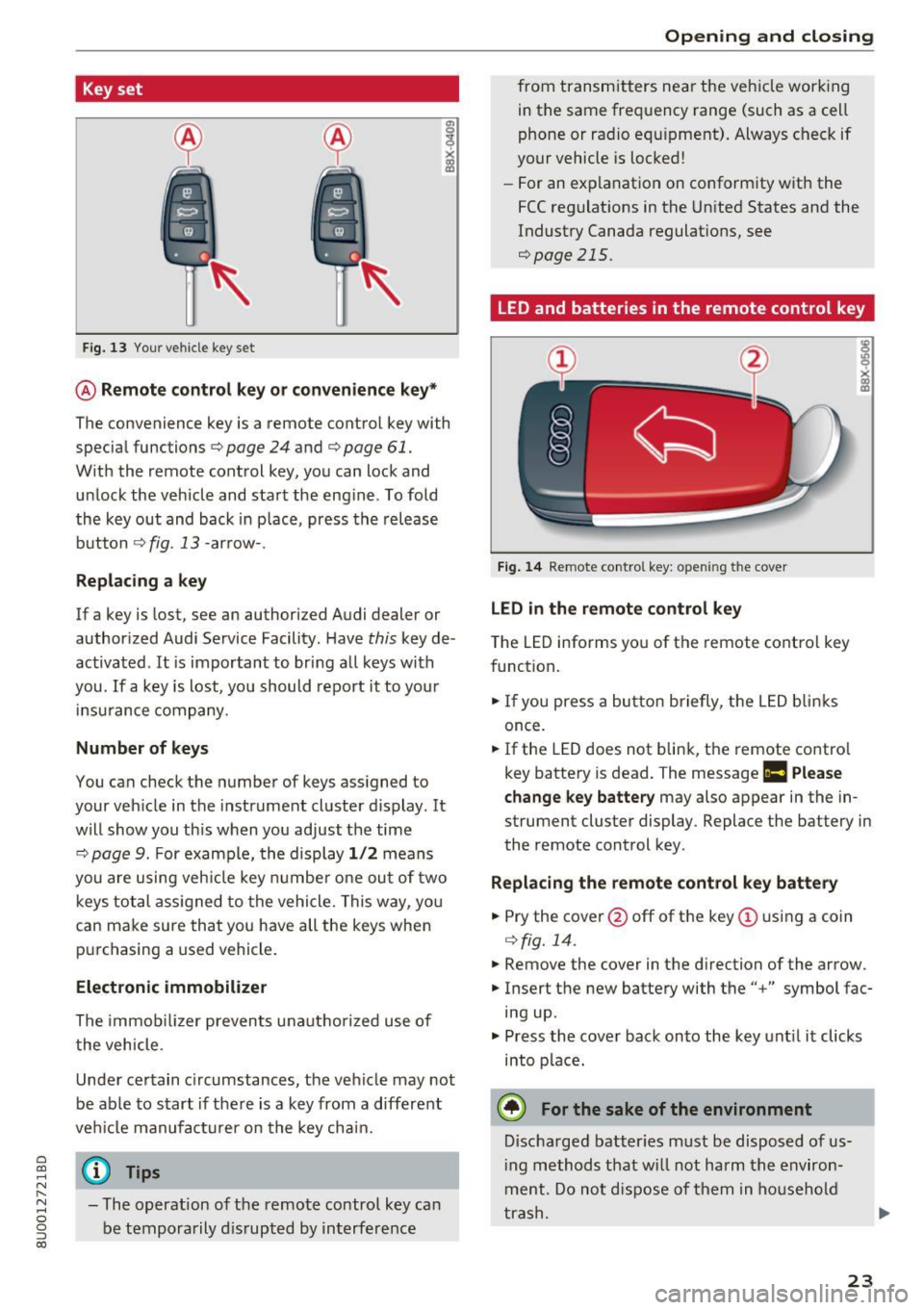
Fig. 13 Your vehicle key set
@ Remote control key or conven ience key*
The convenience key is a remote control key with
specia l functions ¢
page 24 and¢ page 61.
With the remote cont rol key, you can lock and
u nlock the vehicle and sta rt the eng ine . To fold
the key out and back in p lace, press the release
b utton ¢
fig. 13 -arrow- .
Replacing a key
If a key is lost, see an authorized Audi dealer or
author ized Audi Service Facility. Have
this key de
activated .
It is important to bring a ll keys with
you .
If a key is lost, yo u should report it to you r
in su rance company.
Number of keys
You can check the number of keys ass igned to
your veh icle in the instrument cluste r d isplay. It
will show you th is when you ad just the time
¢
page 9. For examp le, th e display 1/2 m eans
you are u sing veh icle key numbe r one ou t of two
keys tot al ass igned to th e vehicle. This w ay, yo u
can ma ke sure that you have all the keys whe n
pur chasing a used vehicle .
Electronic immobilizer
The immob ilizer prevents unautho riz e d use of
t he vehicle.
Unde r certain c ircumstances , the vehicle may not
be ab le to s tart if the re is a key from a different
ve hicl e manufact urer on the key cha in.
~ @ Tips N r--.
~ - The operation of the remote control key ca n
0 g be temporarily dis rupted by in terfe rence
(X)
Open ing and closing
fro m transmitters ne ar the veh icle wor king
in t he same fre quency range (such as a ce ll
phone or ra dio e quip ment) . Alwa ys c heck if
your vehicle is locked !
- For an ex pla nat io n on co nform ity w it h the
FCC regulat ions in t he Un ite d States and the
Indust ry Canada regulat ions,
see
¢page 215.
LED and batteries in the remote control key
Fig. 14 Re mote contro l key: ope ning the cover
LED in the remote control key
T he LED informs yo u of the remote co ntro l key
f unct ion .
... If you press a bu tton briefly, t he LED blinks
once.
... If the LED does not blin k, t he remote co ntro l
key batte ry is dead. The message
Ill Please
change key battery
may also appear in the in
strument cluster display . Replace the battery in
the remote cont rol key .
Replacing the remote control key battery
... Pry the cover@off of the key(!) usin g a coin
¢ fig. 14.
... Remove the cover in the d irection of the arrow.
... Inse rt the new batte ry with the" +" symbol fac
ing up .
... Press the cove r back onto the ke y unt il it clicks
into p lac e.
@ For the sake of the environment
Discha rg ed batter ies must be disposed o f us
i ng methods t hat w ill not harm t he env iron
m ent. Do no t disp ose of the m in hous ehold
t ra sh.
23
Page 37 of 230
a
co
...... N r-N .... 0 0 ::, co
"' Press the &I. button to switch the emergency
flashers on or off.
You can indicate a lane change or a turn when the
emergency flashers are switched on by using the
turn signal lever . The eme rgency flashers stop
temporarily .
The emergency flashers also work when the igni
tion is turned off.
(D Tips
You shou ld sw itch the emergency flashers on
if:
- you are the last car in a t raff ic jam so that
all othe r vehicles approach ing from beh ind
ca n see you, or if
- you r vehicle has bro ken down or you are
having an emergency, or if
- you r vehicle is being towed or if you a re tow
i ng anot her vehicle
Interior Lighting
Front interior lighting
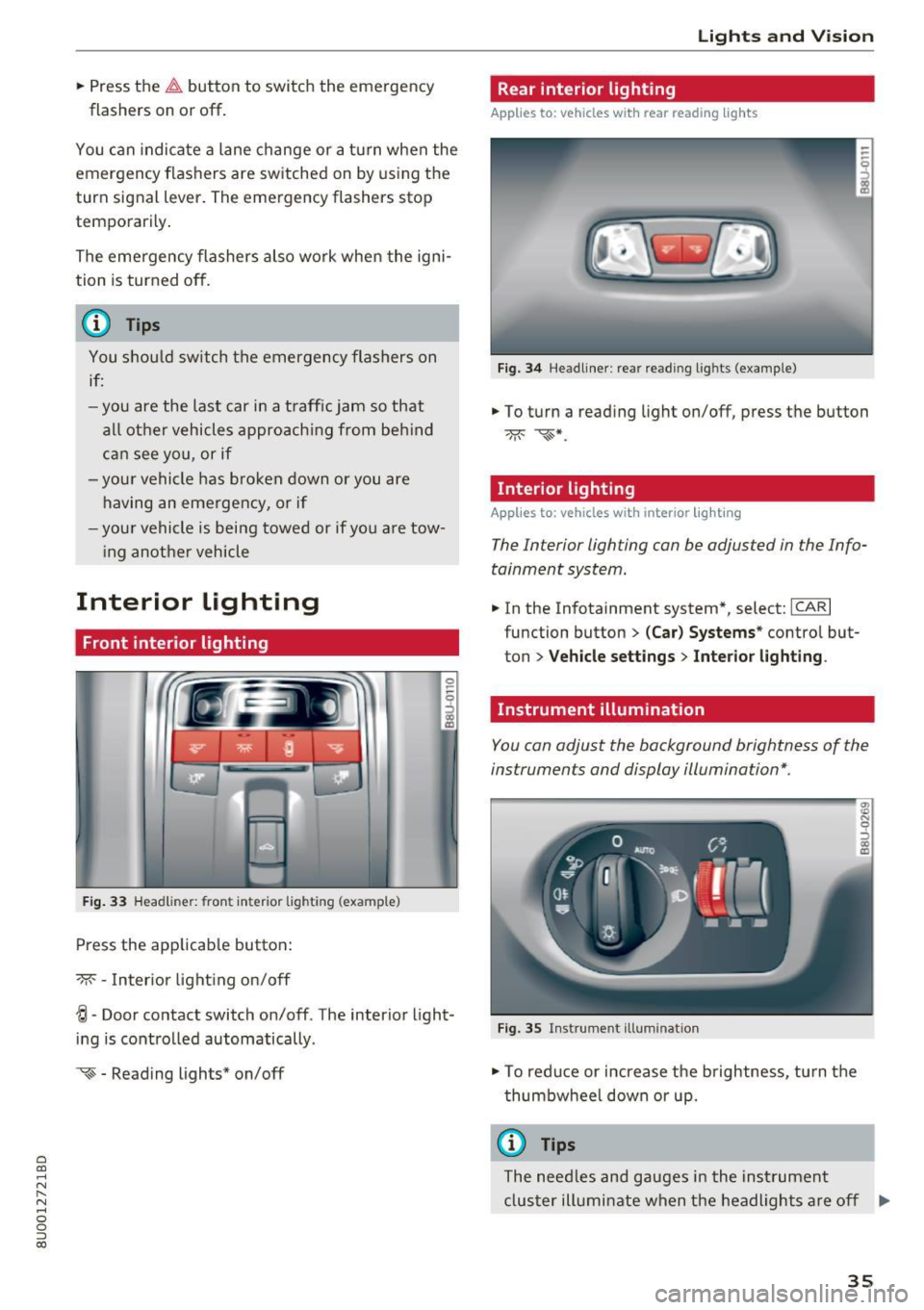
Fig . 33 Headliner: front inter ior lighting (example)
Press the app licab le button :
-M- -Inter ior light ing on/off
0
~
"' a,
~ - Door contact switch on/off . The interior light
ing is controlled automatically.
~ - Reading lights* on/off
Lights and V ision
Rear interior lighting
Applies to: vehicles with rear reading lights
Fig. 3 4 Headliner: rear reading l ights (example)
"' To turn a read ing light on/off, press the button
Interior lighting
Applies to: vehicles with interior lighting
The Interior lighting can be adjusted in the Info
tainment system.
"' In the Infotainment system*, select: ICARI
function button > (Car) Sy stems * control but
ton
> Vehicle setting s > Interior lighting .
Instrument illumination
You can adjust the background brightness of the
instruments and display illumination*.
F ig. 35 Instrument illuminat ion
"' To red uce or increase the b rightness, tu rn the
thumbwhee l down or up.
(D Tips
The need les and gauges i n the inst rument
cluster illumi nate when the headlights a re off
Iii>
35
Page 42 of 230
Lights and Vision
Replacing rear wiper blades
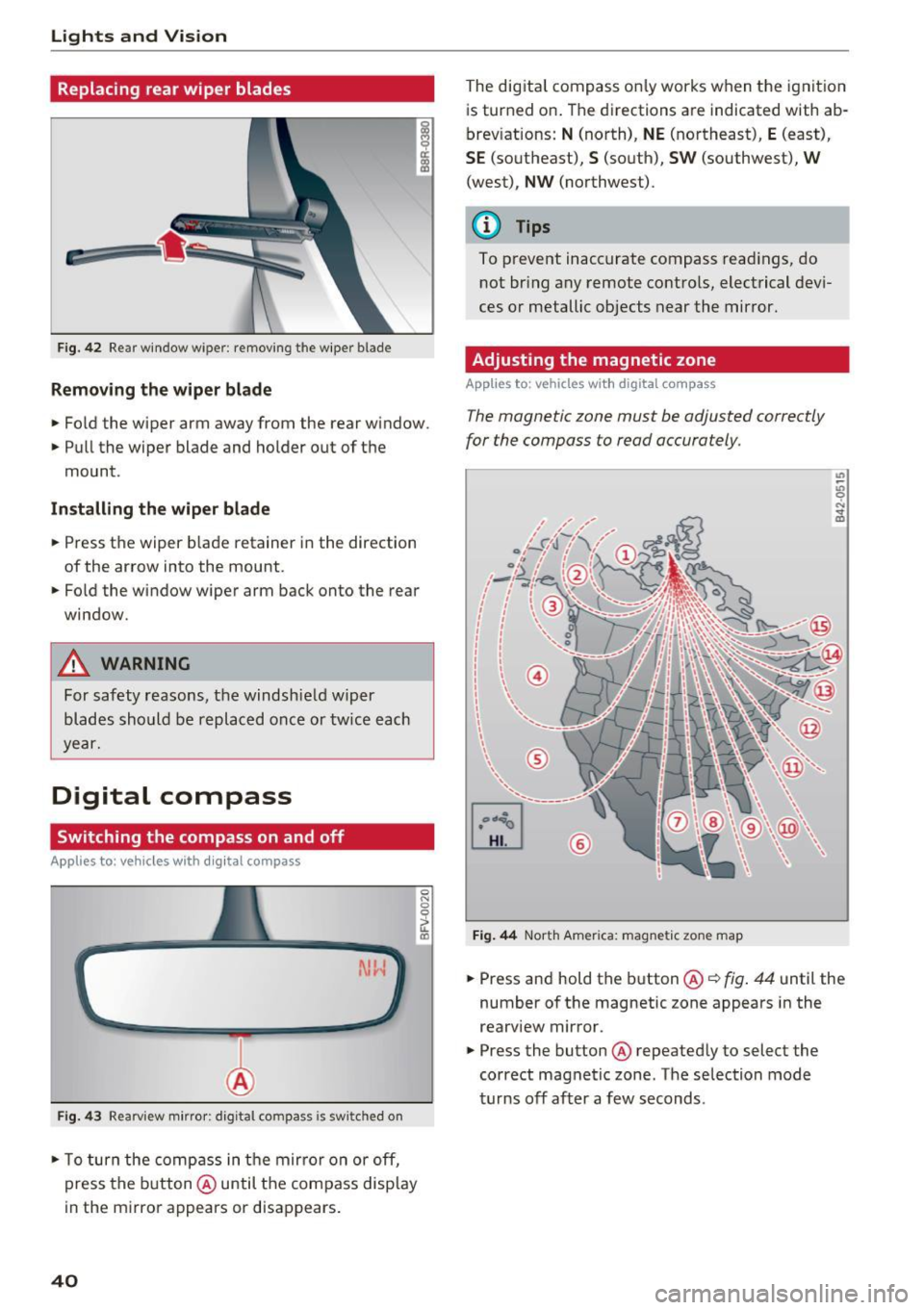
Fig. 42 Rear window wiper: removing the w iper blade
Remov ing the wiper blade
.. Fo ld the wiper arm away from the rear window.
.. Pull the wiper blade and holder out of the
mount.
In stall ing th e wip er blade
.. Press the wiper b lade retainer i n the direction
of the arrow into the mount .
.. Fold the window wiper arm back onto the rear
window .
.,&. WARNING
For safety reasons, the windshie ld wiper
blades should be replaced once or tw ice each
year.
Digital compass
Switching the compass on and off
Applies to: veh icles with d ig ital compass
Fig. 4 3 Rearv iew m irro r: digital compass is sw itched on
.. To turn the comp ass in t he mir ro r on or off,
press the b utton @ until the compass display
in the mirro r appears or disappears .
40
0
fl (0
The dig ital compass on ly works when the ignit io n
is turned on . The directions a re indicated with ab
brev iations:
N (north), NE (northeast), E (east),
SE (so utheast), S (south), SW (southwest), W
(west), NW (northwest).
(l') Tips
To prevent inaccurate compass read ings, do
not br ing any remote contro ls, electrical devi
ces or metallic objects near the mirror.
Adjusting the magnetic zone
App lies to : vehicles with digital compass
The magnetic zone must be adjusted correctly
for the compass to read accurately .
®
Fig. 44 North America: magnetic zone map
.. Press and hold the button @c::> fig . 44 until the
number of the magnetic zone appears in the
rearview mir ror .
.. Press the button @ repeated ly to select the
correct magnetic zone . The selection mode
turns off after a few seconds.
Page 43 of 230
0 co ......
"' ,....
"' ...... 0 0 :::,
00
Calibrating the compass
Appl ies to: vehicl es with digital compass
You must recalibrate the compass if it does not
display the correct direction .
.. Press and hold the button @ ¢ page 40, fig. 43
until a C appears in the interior rearview mirror .
.,. Drive in a circle at about 6 mph (10 km/h) until
a d irection is displayed in the rearview mirro r.
A WARNING
- T o reduce the risk to yourself and othe r driv
ers, cal ibrate the compass in an area where
there is no traffic.
- Always pay attention to the t raff ic and the
area aro und you r vehicle if you are reading
the compass while driving . Light
s and Vision
41
Page 56 of 230
Warm and cold
Automatic climate control system
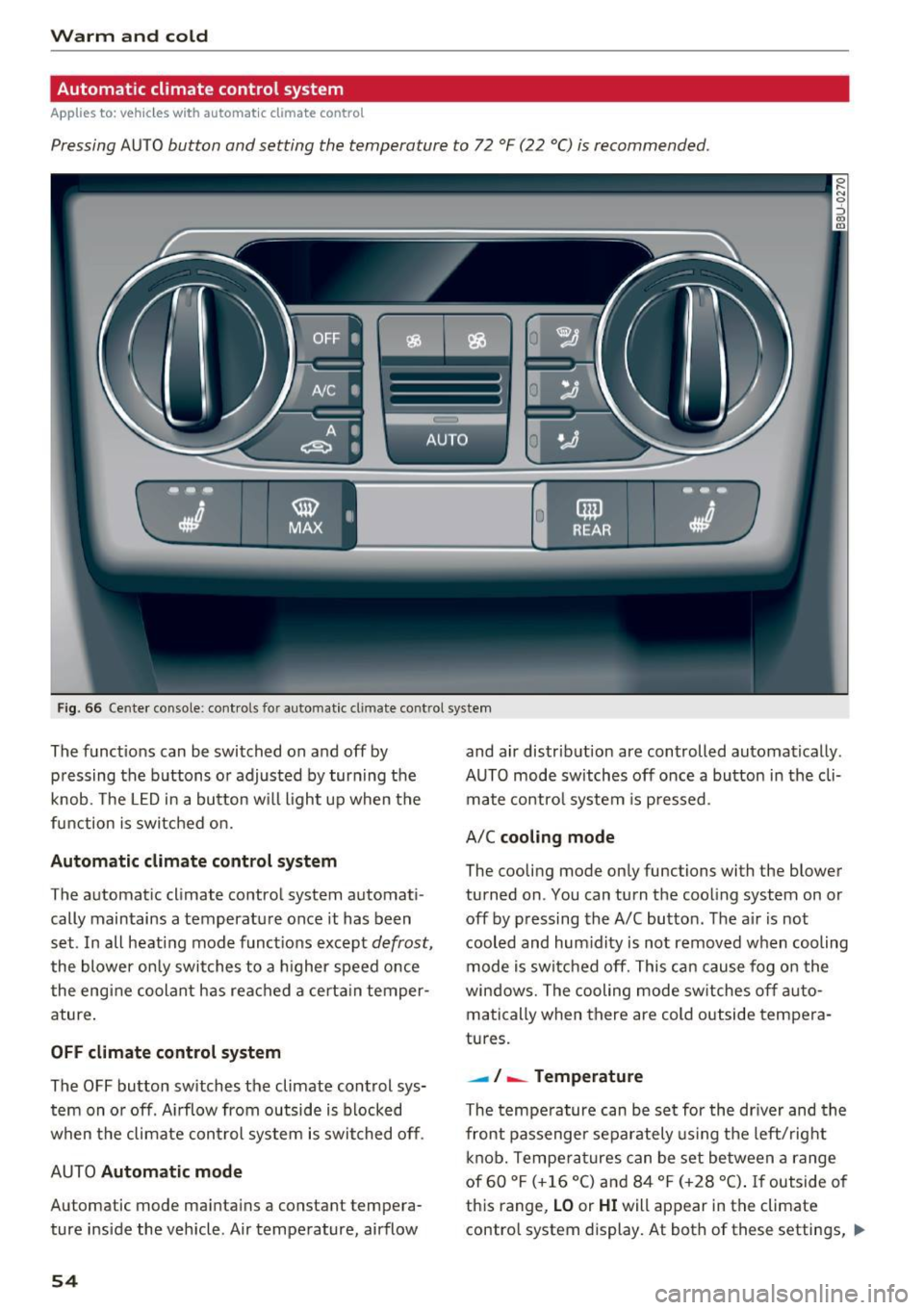
Applies to: vehicles with automatic climate control
Pressing AUTO button and setting the temperature to 72 °F (22 °C) is recommended.
Fig . 66 Cente r console: cont ro ls fo r auto matic cl imate co ntrol system
The f unct ions can be switched on and off by
pressing the b uttons or adjusted by turning the
knob. The
LE D in a button w ill light up when the
function is switched on.
Autom atic climate control sy stem
The automat ic climate control system automat i
cally maintains a temperatu re once it has been
set . In all heat ing mode funct ions except
defrost,
the blower on ly switches to a higher speed once
the engine coolant has rea ched a certa in temper
ature .
OFF climate control s ystem
The OFF button switches the climate control sys
tem on or off . A irflow from outside is blocked
when the climate con trol system is swit ched off .
AUTO
Automatic mode
Automatic mode ma intains a constant tempera
ture ins ide the vehicle . Air temperature, airflow
54
and air distrib ution are controlled automatically .
AUTO mode switches off once a button in the cli mate contro l system is pressed .
A/C
cooling mode
The cooling mode only functions with the blower
turned on . You can turn the cooling system on or
off by pressing the A/C button . The a ir is not
cooled and hum idity is not removed when cooling
mode is sw itc hed off. This can cause fog o n the
windows. The cooling mode sw itches off a uto
matically when there are cold outside tempera
tures.
- ! -Temperature
The tempe rature can be set for the dr iver and the
front passenger separately using the left/rig ht
knob. Tempe ra tu res can be set between a range
of 60 °F (+16 °C) and 84 °F (+28 °C) .
If outside of
th is range,
LO or HI will appear in the climate
contro l system display. At both of these settings, ..,_
Page 57 of 230

0 co ......
"' ,....
"' ...... 0 0 :::,
00
the climate control system runs continuously at
maximum cooling or heating power. There is no
temperature regulation.
Synchronization : by pressing the AUTO button
for two seconds, the temperature setting for the
driver's side is transferred to the front passeng
er's side. This applies a temperature change to
the front passenger's side.
Be Blower
Using the regulator 8ft, you can manually adjust
the volume of air generated by the blower to your
preference.
Use the left
8ft butto n to decrease the air speed,
and use the right
8ft button to increase the air
speed .
The blower should always run at a low setting to
prevent the windows from fogging and to ensure
a continuous exchange of a ir inside the vehicle.
To have the airflow regulated automatically,
press the AU TO button.
!,.i /:,0/!,DAir distribution and vents
The air distr ibut ion can adjusted with the but
tons. To have the air dist rib ut ion regulated a uto
matica lly, press the AUTO button.
You can open or close the center and rear vents in
the cockpit and the vents in the rear center con
sole using the r idged thumbwheels . T he levers
adjust the direction of the airflow from the vents .
To keep the front s ide windows from fogging up
in damp weathe r, we recommend opening the
side air vents and tilting them to the side.
~ MAX Defrosting
The windshield and side windows are defrosted
or cleared of condensation as quickly as possible.
The maximum amount of air flows mainly from
the vents below the windshie ld. Recirculation
mode switches off. The temperature should be
set at +72°F (22°() or highe r.
The AUTO button sw itches the defroster off.
Warm and cold
~A Recirculation mode
To switch on the recircu lation mode, press the
~A button . The lower LED in the button turns
on .
In rec ircu lation mode, the air inside the vehicle is
circulated and filtered. This prevents the unfi l
tered air outside the vehicle from entering the
vehicle interior. Switching recirculat ion mode on
when driving through a tunnel or when sitting in
traffic is recommended
¢ ,&..
The AU TO button or@ button switches recircula
tion mode off.
T o switc h on the automatic recirculation mode,
press the
~A button again. The upper LED in the
button turns on. The system switches to recircu
lation mode when driving in reverse when the en
gine is cold. The air quality sensor that is de
s igned for diese l and gasoline exhaust automati
ca lly switches the recirculation mode on or off
depending on the level of pollutants in the out
s ide air . Automatic rec irculat ion mode is time re
stricted when cooling mode (A/C) is sw itched off
and frost temperatures are ide ntif ied.
QW REAR Rear window defogger
The rear window defogger on ly operates when
the engine is running and will be automatically
switched off after approximately 10 minutes.
.J Seat heating*
Pressing the button switches the seat heating on
at the highest setting (level 3).
The LEDs indicate the temperature level. To re
duce the temperature, press the button again. To
switch the seat heating off, press the button re
peatedly until the LED turns off.
A ft er approximately 10 minutes, the seat heating
automatica lly switches from level 3 to level 2.
Switching the temperature measurement
units
The temperature display can be switched be
tween °C and °F. Press and hold the
~A button
¢ fig. 66 and turn the knob on the driver's side to
- for three seconds. ..,
55
Page 66 of 230

Driving
Your vehicle is equipped with an electromechani
cal parking brake @
c> fig. 71. The parking brake
is designed to prevent the vehicle from rolling
un intent ionally and replaces the hand brake .
Setting/manuall y releasing the pa rking
brake
... Pull the(®) switch to set the parking brake . The
LED in the sw itch turns on. The -(USA mod
els) . (Canada models) indicator light also
turns on in the instrument cluster display .
.,. To release the parking brake manually, press
the b rake o r accelerato r pedal whi le the igni
tion is switched on and p ress t he
C®) switch a t
the same time. The L ED in t he b utton and t he
i ndica tor light in the display turn off .
Releasing the parking brake automatically
Requirement: the dr iver's door must be closed,
the dr iver's safety be lt must be latched and the
pa rking brake must be set.
... To start driving and re lease the park ing brake
automat ica lly, press the accele rato r pedal as
us ua l.
In addi tion to releasing the park ing brake auto
mat ically, other convenience and safety funct ions
are available whe n you start driving
c> page 65,
Starting from a stop .
Preventing the automatic parking brake
release
The vehicle could begin rolling unintentionally ,
dependi ng on the h ill or if towing a trailer .
... To preve nt the parking brake from releasing au
tomat ica lly, pull and hold the®) sw itch and
press the accelerator pedal. The park ing b rake
remains set and prevents the veh icle from ro ll
in g backward.
.,. Yo u can re le ase the(®) switch aga in once you
are sure that you are g iv ing eno ugh dr iv ing
force to the wheels by pressing the accele rator
pedal.
Emergency braking function
You can use the emergency bra king f unct ion in an
emergen cy situ ation , or if the stand ard bra ke op
era tion mal func tions or is disabled.
64
... Pull and ho ld the C®) swi tc h.
... As soon as you re lease the
C®> switch or acceler-
ate, the braking stops.
P ulli ng and ho ld ing t he
C®) switch wh ile driving
the veh icle activates the eme rgency braking func
tion . The ve hicle is bra ked at a ll four wheels by
activating the hydraulic b rake system . The bra k
i ng effect is sim ilar to heavy brak ing
c> ,&. .
To reduce the risk of act ivat ing t he emergency
bra kin g by mista ke, a warning tone (buzzer)
sounds when the
C®) sw itch is p ulled . Eme rgency
braking stops as soon as the© switch is released
or the accelerator pedal is pressed.
Park ing
... Press the brake peda l to stop the ve hicle.
... Pull the
C®> switch to set the par king brake .
... Place the selecto r lever in the P position .
... Turn the engine off
c> ,&. .
... Turn the steering w heel when parking on in
clines so that the w heels w ill roll into the curb
if the vehicle starts moving.
8,,. WARNING
- Do not press the a ccele ra to r peda l inadve r
tently if a ge ar i s selected whe n the vehicle
is st ationary an d th e engine is running . Oth
erwise, the vehicle will s tart to move imme
diate ly and this could result i n an accident.
- Eme rgency brak ing s hou ld only be used i n
an emergency, when the norma l bra ke pe dal
has failed or the bra ke peda l is obstructed .
During eme rgency brak ing, your vehicle will
brake s imilar to heavy braking. ESC and the
associated components (ABS, ASR, EDL)
cannot ove rcome the laws of physics .
Around curves a nd whe n road or wea ther
conditions a re bad, a full brake applicat io n
can ca use the veh icle to skid or the rear end
to swerve, w hich incr eases the ris k of an ac
cident.
- I f th e power s upply fail s, you cannot set the
parking br ake if it is released. In this case,
pa rk the vehicle on leve l ground and secure
it by p lacing the selector leve r in the P posi
tion. See an authorized A udi dealer or au -
thorized A udi Service Fac ility for assistance.
IIJ.
Page 69 of 230
a
co
...... N r--. N .-< 0 0 ::, co
When a moderate driving s tyle is used, the
transmission selects the most economical driving
mode. The transm iss ion upsh ifts at a lower RPM
and downshifts at a higher RPM to improve fuel
efficiency .
The transmission switches to a sporty mode after a kick-down or when the driver uses a
spo rt y
dri ving st yle
character iz ed by quick accelerator
pedal movements, heavy acceleration, frequent
changes in speed and traveling at the maximum
speed .
If desired , the driver can also select the gears
manually (tip tronic mode ) ¢ page 70, Manual
shifting (tiptronic mode) .
Power is transferred using a torque converter.
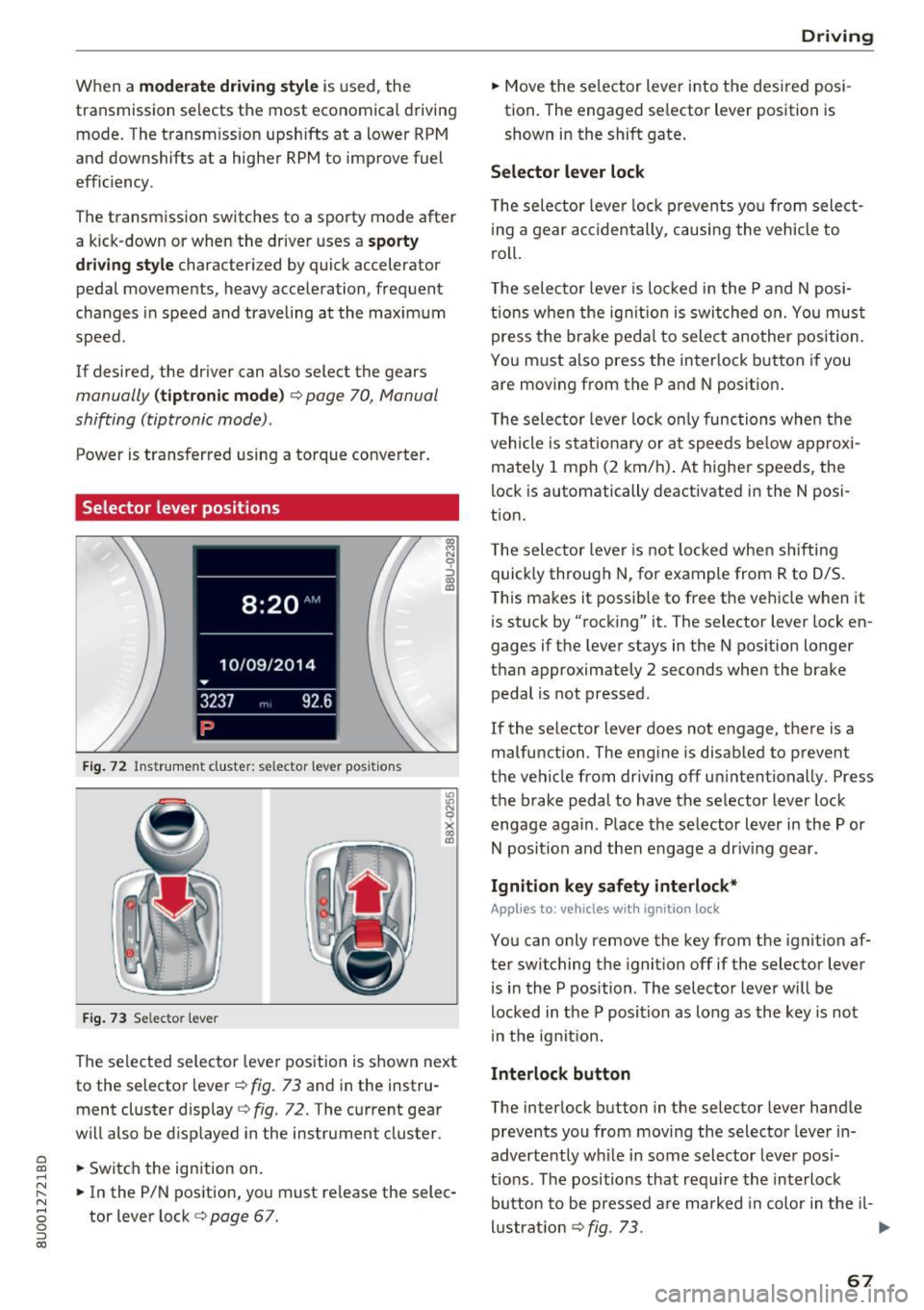
Selector lever positions
Fig. 72 Inst rument cluste r: selector leve r pos it ions
F ig. 7 3 Selec tor lever
The selected selector lever position is shown next
to the selector lever ¢
fig. 73 and in the instru
ment cluster display
¢ fig . 72. The current gear
will also be d isp layed in the instrument cluster.
.. Switch the ign ition on.
.. In the P/N position, you must release the selec
tor lever lock ¢
page 67.
Drivi ng
.. Move the selector lever into t he des ired posi
tion. The engaged se lector lever position is
shown in the shift gate .
Selector lever lock
The selec tor leve r lock p revents yo u from select
i ng a gear accidentally, causing the vehicle to
roll.
T he selector leve r is lo cked in the P and N posi
ti ons when the ig nit ion is switched on. You mus t
press the brake peda l to sele ct another position.
You must also press the interlock button if you are moving from the P and N position.
T he selec tor leve r lock o nly functions when the
vehicle is stat ionary or at speeds be low approxi
mately 1 mph (2 km/h) . At higher speeds, the
lock is automatically deactivated in the N posi
tion.
T he selec tor leve r is not locked whe n shifting
quick ly through N, for example from R to 0/S.
This makes it possib le to free the vehicle when it
is stuck by "rocking" it. The selector lever lock en
gages if the lever stays in the N pos ition longer
than approximately 2 seconds when the brake peda l is not pressed .
If the selector lever does not engage, there is a
malfunction . The engine is disabled to prevent
the vehicle from driv ing off un intent ionally. Press
the brake pedal to have the se lector lever lock
engage again . Place the selector lever in the P or
N position and then engage a dr iv ing gear.
Ignition key safety interlock*
Applies to: vehicles with ignition lock
You can only remove the key from the ignition af
ter switching the ignition off if the selector lever
is in the P position . The selector leve r will be
locked in the P position as long as the key is not
in the ignit ion.
Interlock button
The interlock button in the selector lever handle
prevents you from movi ng the selector lever in
advertently wh ile in some selector lever posi
tio ns. The positions that requ ire the interlock
button to be pressed a re marked in color in the il-
l u strat io n ¢
fig. 73. .,.
67
Page 70 of 230
Driving
P - Park
This selector lever position prevents the vehicle
from rolling. You can only shift into Park when
the vehicl e is
stationary ¢&. .
To shift in and out of the P selector lever posi
tion, press the interlock button in the selector
lever
while pressing the brake pedal.
R- Reverse
Only shift into reverse gear when the vehicle is
stationary and the engine is running at idle
speed ¢&, .
To select the R selector lever position, press the
interlock button
while pressing the brake pedal.
N - Neutral
The transmission is in idle in this position.
To engage the N selector lever position, press the
button on the selector lever and shift into the N
position.
To
move from selector lever position out of N,
you must press the brake pedal and the vehicle
must be traveling less than 1 mph (2 km/h) or be
stationary.
DIS -Normal position for driving forward
In the D/S selector lever position, the transmis
sion can be operated either in the normal D mode
or in the S sport mode. To select the S sport
mode, pull the selector lever back briefly. Pulling
the lever back again will select the normal D
mode. The instrument cluster display shows the
selected driving mode .
In the
normal mode D, the transmission auto
matically selects the suitable gear ratio. It de
pends on engine load, vehicle speed and driving
style.
The engine's power reserves are used fully in the
Sport mode S. Shifting may become noticeable
when accelerating.
To
move from selector lever position N to D, you
must press the brake pedal and the vehicle must
be traveling less than 1 mph (2 km/h) o r be sta
t ionary ¢&, .
68
A WARNING
-
Read and follow all WARNINGS.
-The vehicle can roll
even if the ignition is
switched off.
- Never select R or P while driving, because
this increases the risk of an accident.
- Power is still transmitted to the wheels
when the engine is running at idle. To pre
vent the vehicle from "creeping", you must keep your foot on the brake in all selector
lever positions (except P) when the engine is
running .
- Do not inadvertently press the accelerator
pedal when the vehicle is stopped if a gear is
engaged . Otherwise, the vehicle will imme
diately start to
move -sometimes even if
the parking brake is firmly applied. This in
creases the risk of an accident.
- To reduce the risk of an accident, do not
press the accelerator pedal when changing
the selector lever position while the vehicle
is stationary and the engine is running.
- Never leave your vehicle with the engine
running while in gear. If you must leave
your vehicle when the engine is running, set
the parking brake and move the selector lev
er to the P position.
- Before you or other persons open the hood
and work on a running engine, the selector
lever must be in the P position and the park ing brake must be applied to reduce the risk
of an accident . Always read and follow the
applicable warnings ¢
page 155, Working
in the engine compartment.
- Read and following all WARNINGS¢&. in
Driving tips on page 69 .
(D Note
Never let the vehicle roll downhill with engine
off and the selector lever in the N position,
because this could damage the automatic
transmission and catalytic converter.
(D Tips
- If you accidentally select N while driving,
take your foot off the accelerator pedal and .,.
Page 72 of 230
Driving
reduces braking performance, increases
braking distance or causes complete failure
of the brake system.
- If you must stop on an incline, always hold
the vehicle in place with the foot brake or
parking brake to prevent it from rolling
back.
- Never hold the vehicle on an incline with a
slipping clutch. The clutch opens automati
cally when it becomes too hot from the
overload . The . indicator light turns on
and a message appears~
page 71 when
the clutch is overloaded.
- Read and following all WARNINGS
9 &, .
(D Note
-When stopping on an incline, do not try to
hold the vehicle in place by pressing the ac
celerator pedal while a driving gear is se lected . This can cause the automatic trans
mission to overheat and can damage it. Set
the parking brake or press the brake pedal
to prevent the vehicle from rolling.
- Allowing the vehicle to roll when the engine
is stopped while the selector lever is in the
N position will damage the automatic trans
mission, because it is not lubricated under
those circumstances ~
page 205, Towing
with a tow truck.
- The transmission can overheat and be dam
aged under certain driving and traffic condi
tions su ch as frequent starts, creeping for a
long time, or stop-and-go traffic. If the.
indicator light turns on, stop the vehicle at
the next opportunity and let the transmis
sion cool down
~ page 71.
H ill descent contr ol
The hill descent control system assists the driver
when driving down hills .
Hill descent contro l is activated when the selec
tor lever is in the Dor S position and you press
the brake pedal. The transmission automatically
selects a gear that is suitable for the hill. Hill de
scent control tries to maintain the speed ach
ieve d at the time of braking, within physical and
70
technical limitations. If may still be necessary to
adjust the speed with the brake pedal.
Hill descent control switches off once the hill lev
els out or you press the accelerator pedal.
&_ WARNING
Hill descent control cannot overcome physical
limitations, so it may not be able to maintain
a constant speed under all conditions. Always
be ready to apply the brakes .
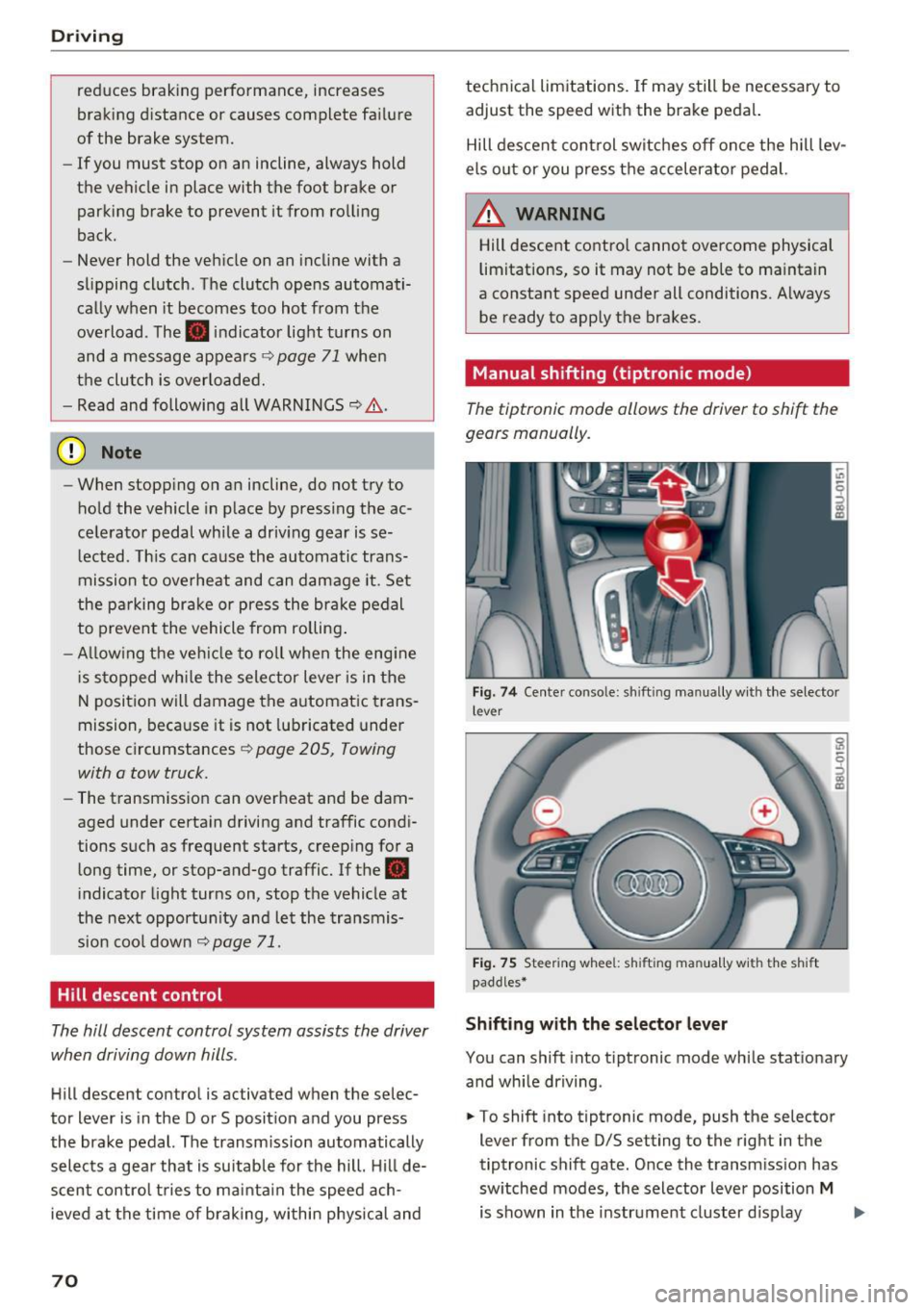
Manual shifting (tiptronic mode }
The tiptronic mode allows the driver to shi~ the
gears manually .
Fig. 7 4 Center console: sh ift ing manually w ith the selector
l ever
Fig. 75 Steering whee l: sh ift ing ma nuall y wi th th e s hift
paddles*
Shifting with the selector lever
You can shift into tiptronic mode while stationary
and while driving .
.. To shift into tiptronic mode, push the selector
lever from the 0/S setting to the right in the
tiptronic shift gate. Once the transmission has
switched modes, the selector lever position
M
is shown in the instrument cluster display .,..