engine AUDI Q3 2018 User Guide
[x] Cancel search | Manufacturer: AUDI, Model Year: 2018, Model line: Q3, Model: AUDI Q3 2018Pages: 230, PDF Size: 57.03 MB
Page 24 of 230
Opening and closing
Opening and closing
Central locking
Description
You can lock and unlock the vehicle centrally . You
have the following options:
- Remote control key <=>
page 24,
-Sensors in the door handles" <=> page 24,
-Inner central locking switch <=>page 25, or
- Lock cylinder on the driver's door<=>
page 26.
Turn signals
The turn s ignals flash twice when you unlock the
veh icle and flash once when you lock the vehicle.
If they do not flash, then the ignition may still be
sw itched on, or one of the doors or the luggage
compa rtment lid may be open, fo r example.
Automatic locking (Auto Lock)
The Auto Lock function locks all doors and the
luggage compartment lid once the speed has ex
ceeded approx imately 9 mph (15 km/h).
The vehicle will unlock again if the ignition key* is
removed, the opening function from the central
locking switch is activated, or one of the door
handles is operated .
In the event of a crash with airbag deployment,
the doors will also automatically unlock to allow
access to the vehicle.
Selective door unlocking
The doors and luggage compartment lid wi ll lock
when they close. You can set in the Infotainment
system if
only the driver's door or the entire vehi
cle should unlock when unlocking<=>
page 26,
Setting the central locking system .
Unintentionally locking yourself out
Only lock your vehicle when all of the doors and
the luggage compartment lid are closed and the
remote control key is not in the vehicle. This
helps to prevent you from locking yourself out
accidentally .
The fo llow ing conditions prevent you from lock
ing your remote control key in the vehicle :
22
-If the driver's door is open, the vehicle cannot
be locked by pressing the
!'.II button on the re
mote contro l key or by touching the locking
sensor* on a door .
- If the most recently used convenience key* is in
the luggage compartment, the luggage com
partment lid automatically unlocks again after
closing it<=>
page 2 7. The emergency flashers
blink four t imes.
- If the convenience key* that was last used is de
tected inside the veh icle, then the vehicle will
not be able to lock from the outside .
A WARNING
-Always take the key with you when leaving
your vehicle, even if for a short pe riod of
time. This applies particularly when children
remain in the vehicle. Otherwise, children
could start the engine or operate electrical
equipment (such as power windows), which increases the risk of an accident.
- No one, especially children, should stay in
the vehicle when it is locked from the out
side, because the windows can no longer be
opened from the inside <=>
page 2 7. Locked
doors make it more difficult for emergency
workers to get into the vehicle, which puts
lives at r isk .
A WARNING
Appl ies to: ve hicles with ignition loc k
Do not remove the key from the ignition lock
until the vehicle has come to a complete stop.
Otherwise, the steering lock could engage
suddenly and increase the risk of an accident.
(D Tips
-Do not leave va luables unattended in the ve
hicle. A loc ked vehicle is not a safe!
- The LED in the dr iver's door rail b links when
you lock the vehicle. If the LED lights up for
approximate ly 30 seconds after locking,
there is a malfunction in the centra l locking
system . Have the problem corrected by an
authorized Audi dealer or authorized Aud i
Service Facility.
Page 26 of 230
Opening and clo sin g
@ Tips
The replacement battery must meet the same
specifications as the orig inal battery in the re
mote control key.
Remote control key synchronization
If the veh icle cannot be unlocked/locked by the
remote control, you can synchron ize the remote
control key .
• Press the remote control key button
III-
• Insert the key in the driver's door lock within 30
seconds.
• Press the
III button or cf'.I butto n.
Unlocking /locking by remote control
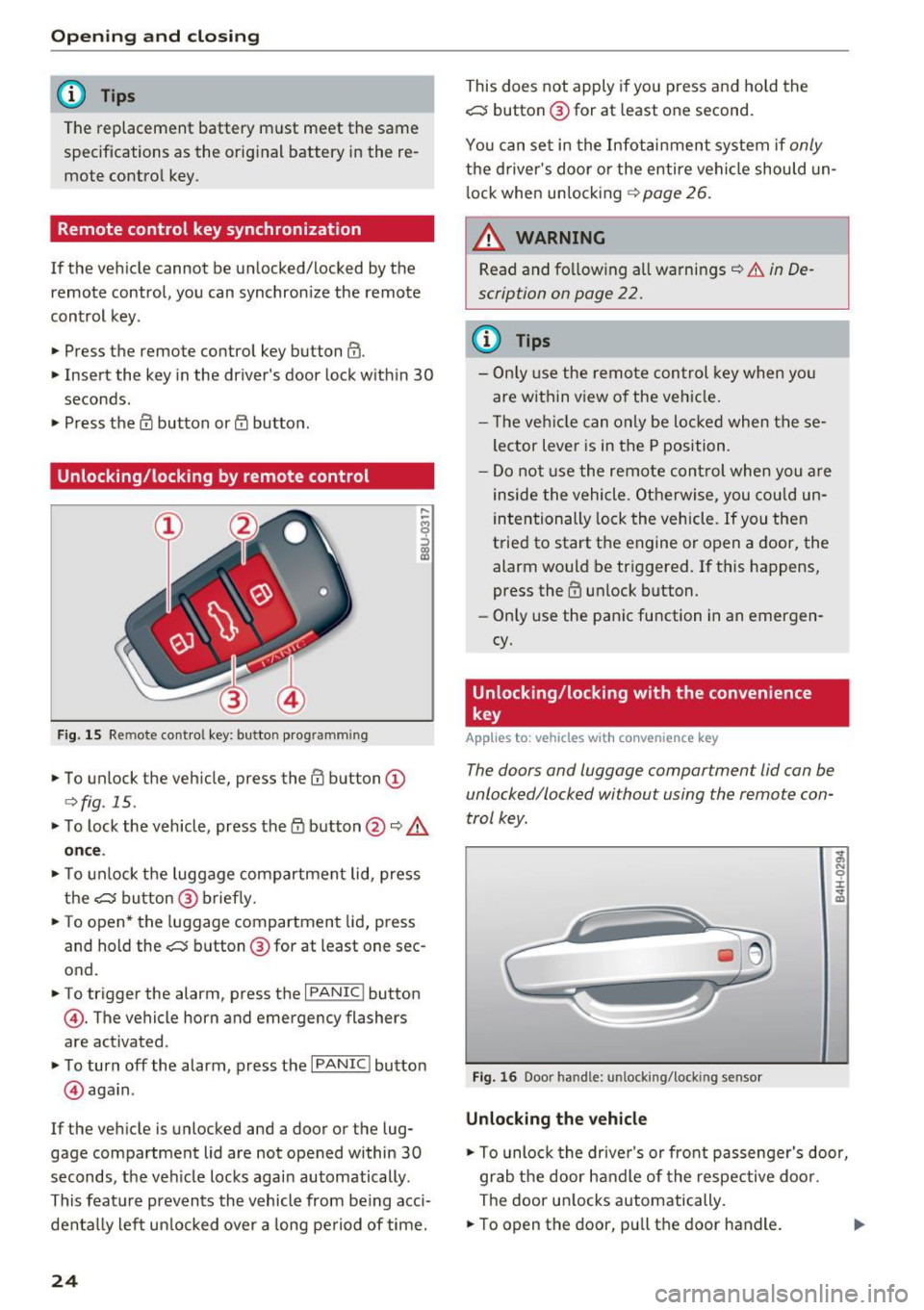
F ig. 15 Remote control key: button programming
• To unlock the vehicle, press the III button (D
c>fig. 15.
• To lock the vehicle, press the /fl button @¢&.
on ce .
• To unlock the luggage compartment lid, press
the~ button@ brief ly.
• To open* the luggage compartment lid, press
and hold the~ button @ for at least one sec
ond.
• To trigger the alarm, press the
I PANIC I button
©-The vehicle horn and emergency flashers
are activated .
• To turn off the alarm, press the
I PANIC I button
@ aga in .
If the veh icle is unlocked and a door or the lug
gage compartment lid are not opened within
30
seconds, the ve hicle locks again automatically .
This feat ure prevents the vehicle from be ing acci
denta lly lef t un locked over a long pe riod of time.
24
This does not apply i f you press and hold the
~ button @for at least one second.
You can set in the Infot ain ment system if
only
the d river's door o r the entire vehicle should un
l ock whe n unlocking ¢
page 26.
~ WARNING
Read and fo llow ing all warnings¢ &. in De
scription on page
22.
(D Tips
- Only use the remo te control key when yo u
are within view of the veh icle.
- T he ve hicle can only be loc ke d when these
lector Lever is in the P position.
- Do not use the remote con trol when you a re
inside the vehicle. O therwise, you cou ld un
intentionally lock the vehicle . If you then
t ried to start the engine or open a door, the
alarm would be triggered. If this happens,
press the
III unlock button.
- Only use the panic function in an emergen
cy.
Unlocking/locking with the convenience
key
Applies to: vehicles with convenience key
The doors and luggage comportment lid con be
unlocked/locked without using the remote con
trol key .
Fig. 16 Door handle: unlocking/lock ing sensor
Unlocking the vehicle
-
;;, N 0 :i: ... m
• To unlock the drive r's or front passenge r's door,
grab the door ha ndle of the respective door .
The door u nlocks automatically.
• To open the door, pu ll the door handle. .,.
Page 32 of 230
Opening and clo sin g
Child safety lock
The child safety lock prevents the rear doors
from being opened from the inside and the rear
power windows from be operated .
Fig. 26 Sect ion of driver's doo r: co ntrols
F ig. 27 Rear door: c hild safety lock
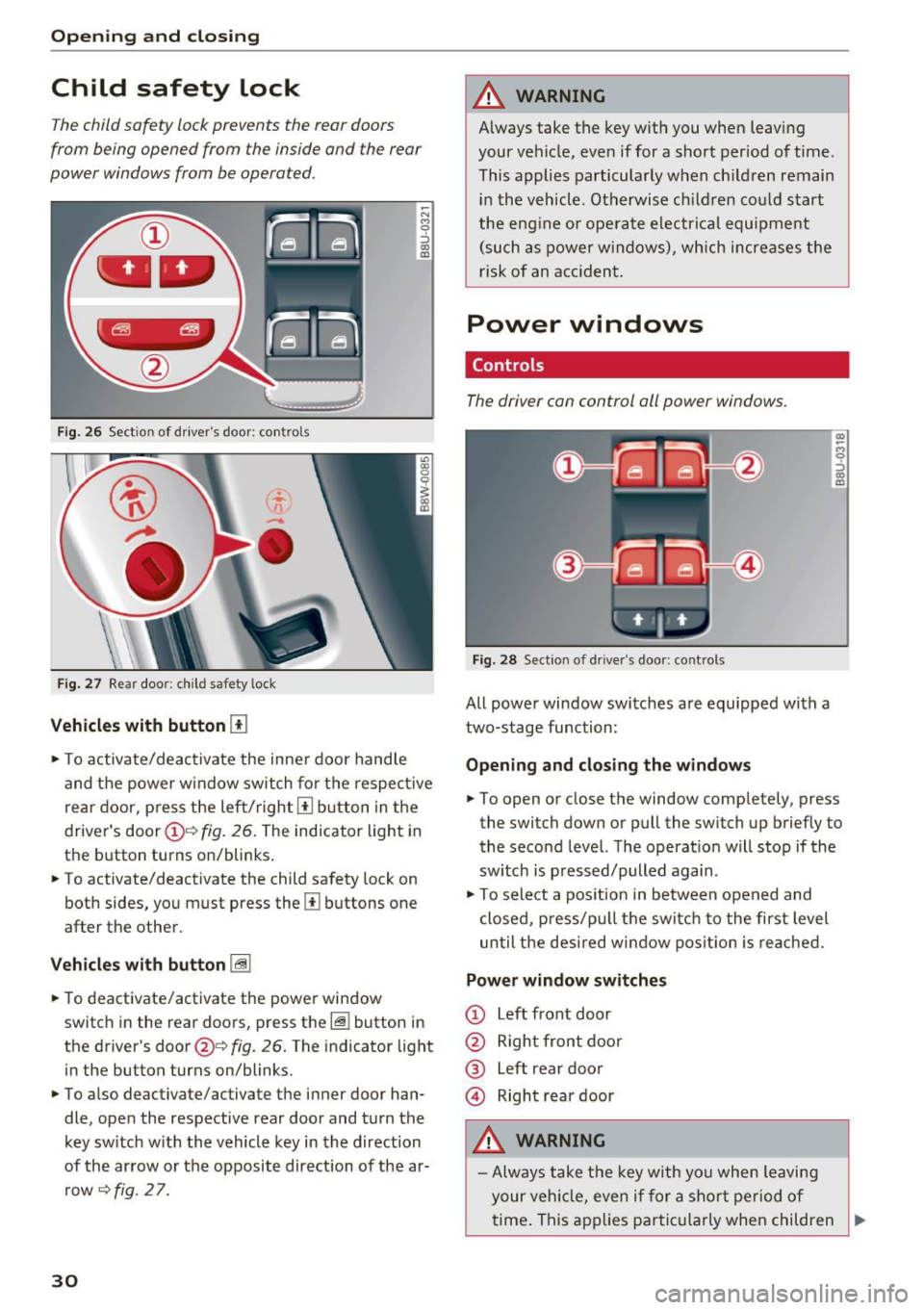
Vehicles with button [TI
~ N M 9 ::J
co
(D
., To activate/deactivate the inne r door handle
and the power w indow switch for the respective
rea r door, p ress the left/right
[II b utton in the
driver's door(!)'=~
fig. 26. The indicator light in
the button turns on/blinks.
., To activate/deactivate the child safety lock on
both sides, you must press the
Ii] buttons one
after the other.
V eh icl es with button [@
., To deactivate/activate the power window
switch in the rear doors, press the~ button in
the driver's door@¢
fig. 26. The indicator light
in the button turns on/blinks.
., To also deactivate/activate the inner door han
dle, open the respective rear door and turn the key sw itch w ith the vehicle key in the direction
of the arrow or the opposite direction of the ar row
~ fig. 2 7.
30
A WARNING
A lways take the key with you when leaving
your vehicle, eve n if for a short period of time .
This applies particularly w hen ch ildren remain
in the vehicle . Otherwise ch ildren cou ld start
the engine or ope rate electr ical equ ipment
(such as power w indows), which increa ses the
risk of an acciden t.
Power windows
Controls
The driver con control oil power windows.
Fig. 28 Section of driver's door: controls
All powe r window switches are equipped with a
two-stage function:
Openin g and clos in g the w ind ows
(I) ~
9 ::J (I)
(D
., To open or close the window completely, press
the switch down or pull the switch up briefly to
the second level. The operat ion will stop if the
sw itch is p ressed/pulled again .
., To select a position in between opened and
closed, p ress/pu ll the switch to the first level
until the des ired window posit ion is reached.
Power window switches
CD Left front door
@ Right front door
® left
rear door
© Right rear door
A WARNING
- Always take the key with yo u when leaving
your veh icle, even if for a sho rt period of
.
time . This applies parti cularly when children ..,
Page 33 of 230
a
co
...... N r--. N .... 0 0 ::, co
remain in the vehicle. Otherwise, children
could start the engine or operate electrical
equipment (such as power windows), which
increases the risk of an accident .
- Pay careful attention when closing the win
dows. Pinching could cause serious injuries.
- When locking the vehicle from outside, the vehicle must be unoccupied since the windows can no longer be opened in an emer
gency .
(D Tips
After switching the ignition off, you can still
open and close the windows for approximate
ly 10 minutes. The power windows do not
sw itch off until the driver's door or front pas
senger's door has been opened .
Convenience opening/closing
All of the windows and the panorama glass roof
can be opened/closed at the same time .
Convenience opening feature
"'Hold the key in the open position in the driver's
door lock until all of the windows are in the de
sired position and the panorama glass roof is
tilted open .
Convenience closing feature
"'Hold the key in the lock position in the driver's
door lock until all the windows and the panora
ma glass roof are closed .
When the panorama glass roof is opened/closed,
the electric sunshade also opens/closes.
A WARNING
Never close the windows or panorama glass
roof carelessly or in an uncontrolled manner,
because this increases the risk of injury.
Correcting power window malfunctions
You can reactivate the one-touch up/down func
tion if it malfunctions.
"'Pull the power window switch up until the win
dow is completely raised.
-
Open ing and closing
"'Release the switch and pull it up again for at
least one second .
"' Press the power window switch until the w in
dow is completely lowered.
"' Release the switch and press it again for at
least one second . Now you can close the win
dow as usual.
Panorama glass roof
Description
Applies to : veh icles with pano rama glass roof
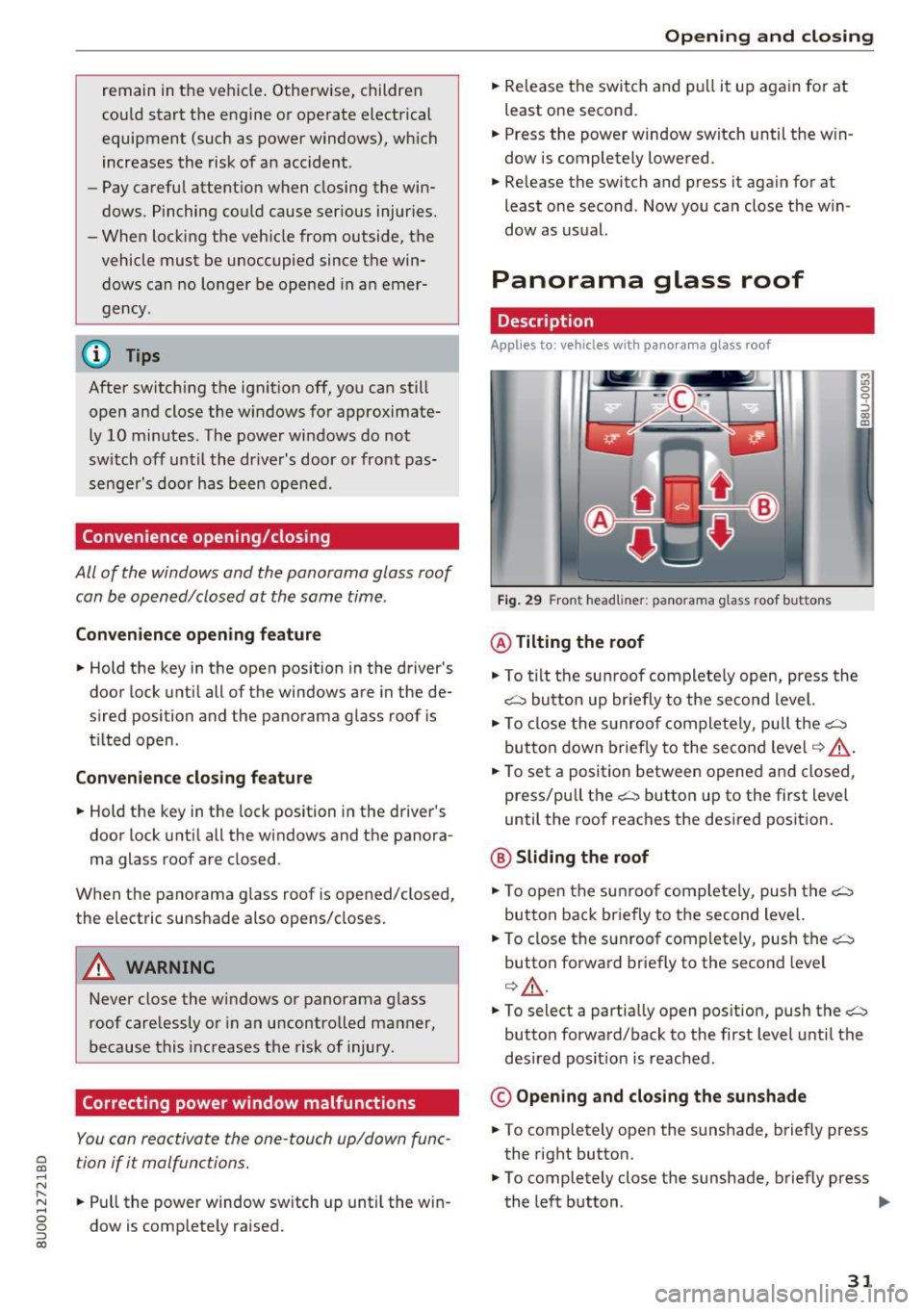
Fig. 29 F ront headline r: pa norama glass roof buttons
@ Tilting the roof
"'To tilt the sunroof complete ly open, press the
~ button up briefly to the second level.
"' To close the sunroof completely, pull the~
button down briefly to the second level
¢ ,&. .
"'To set a position between opened and closed ,
press/pull the~ button up to the first level
until the roof reaches the desired position.
@ Sliding the roof
"'To open the sunroof completely, push the~
button back briefly to the second level.
"' To close the sunroof completely, push the~
button forward briefly to the second level
¢ ,&. .
M ~., 0
0
:, (X) m
"'To select a partially open position, push the~
button forward/back to the first level until the
desired posit ion is reached .
© Opening and closing the sunshade
"'To completely open the sunshade, briefly press
the right button.
"' To completely close the sunshade, briefly press
the left button . ..,
31
Page 47 of 230
a
co
...... N r--. N .-< 0 0 ::, co
A WARNING
The sockets and the electrical accessories connected to them only funct ion when the igni
tion is switched on . Incorrect usage can lead
to ser ious injuries or b urns . To reduce the risk
of injur ies, neve r leave child ren unat tended i n
t he vehicle with the veh icle key .
CD Note
-To reduce the risk of damage to the vehicle
electrical system, never attempt to charge
the veh icle bat tery by connect ing accesso
ries that prov ide power, such as solar pa ne ls
or battery chargers, to the 12 Volt sockets.
- To reduce the risk of damage to the sockets,
on ly use plugs that fit cor rect ly.
@ Tips
The vehicle battery d rains when accessories
are turned on b ut the engine is off .
Storage
Cup holders
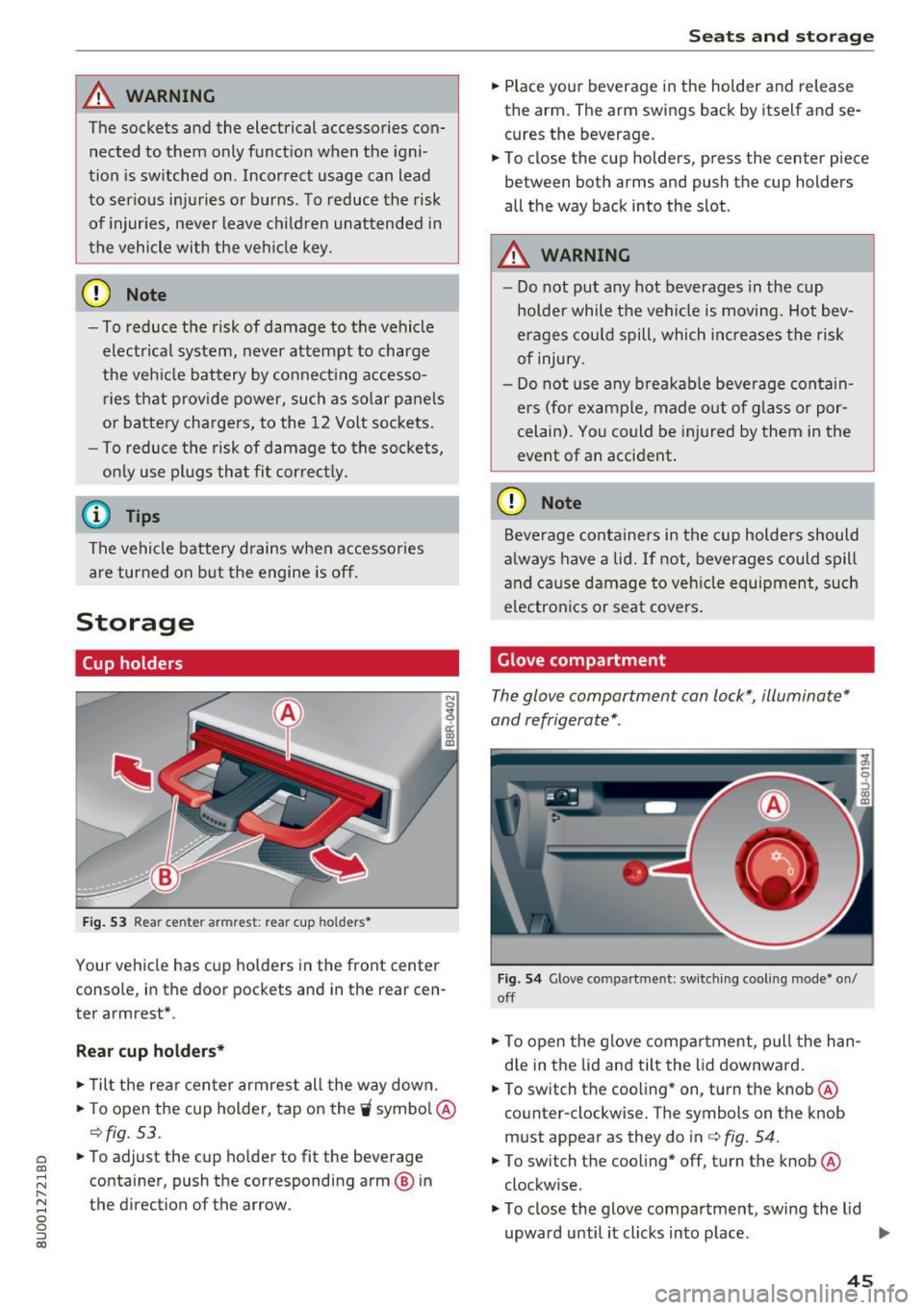
Fig. 53 Rea r ce nter a rmrest: rea r cup holders•
Your vehicle has cup holders in the front center
console, in the door pockets and in the rear cen
ter armrest *.
Rear cup holder s*
.. Til t the rear center armrest all the way down .
.. To open the cup holder, tap on the
'i symbo l@
c:::> fig. 53.
.. To adjust the cup ho lder to fit the beverage
container, push the corresponding arm @ in
the direction of the arrow .
Seats and storage
.. Place your beverage in the holder and release
the arm. The arm swings back by itself and se
cures the beverage.
.. To close the cup holders , press the center piece
between both arms and push the cup holders
all the way back into the slot .
A WARNING
--
-Do not put any hot beverages in the cup
holder while the vehicle is moving. Hot bev
erages could spill, which increases the risk
of injury.
- Do not use any b reakab le beve rage contain
e rs (for example, made out of g lass or por
celain). Yo u could be injured by them in the
event of an accident .
CD Note
Beverage containers in the cup holders should
a lways have a lid.
If not, beverages could spill
and cause damage to veh icle equipment, such
electron ics or seat covers .
Glove compartment
The glove compartment can lock*, illuminate*
and refrigerate* .
Fig. 54 G love co mpart m en t: sw itching cooling mode * on /
off
.. To open the glove compa rtment, pull the han
d le in the lid and tilt the lid downward .
.. To switch the cooling* on, turn the knob@·
co unter -clockwise . T he symbols on the knob
must appear as they do in c:::>
fig. 54.
.. To switch the cooling* off, turn the knob @
clockw ise .
.. To close the glove compartment, swing the lid
upward until it clicks in to p lace . ..,.
45
Page 56 of 230
Warm and cold
Automatic climate control system
Applies to: vehicles with automatic climate control
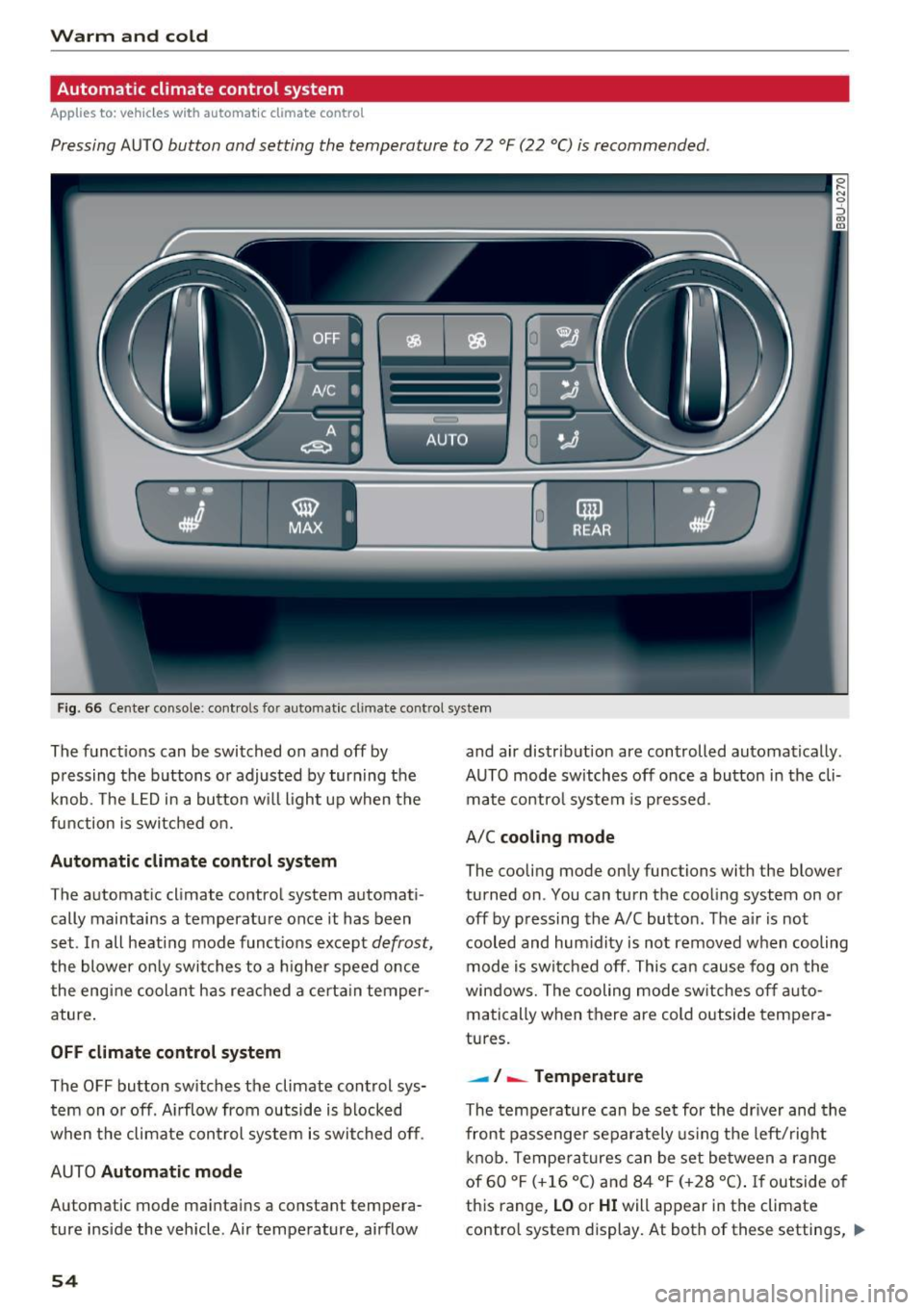
Pressing AUTO button and setting the temperature to 72 °F (22 °C) is recommended.
Fig . 66 Cente r console: cont ro ls fo r auto matic cl imate co ntrol system
The f unct ions can be switched on and off by
pressing the b uttons or adjusted by turning the
knob. The
LE D in a button w ill light up when the
function is switched on.
Autom atic climate control sy stem
The automat ic climate control system automat i
cally maintains a temperatu re once it has been
set . In all heat ing mode funct ions except
defrost,
the blower on ly switches to a higher speed once
the engine coolant has rea ched a certa in temper
ature .
OFF climate control s ystem
The OFF button switches the climate control sys
tem on or off . A irflow from outside is blocked
when the climate con trol system is swit ched off .
AUTO
Automatic mode
Automatic mode ma intains a constant tempera
ture ins ide the vehicle . Air temperature, airflow
54
and air distrib ution are controlled automatically .
AUTO mode switches off once a button in the cli mate contro l system is pressed .
A/C
cooling mode
The cooling mode only functions with the blower
turned on . You can turn the cooling system on or
off by pressing the A/C button . The a ir is not
cooled and hum idity is not removed when cooling
mode is sw itc hed off. This can cause fog o n the
windows. The cooling mode sw itches off a uto
matically when there are cold outside tempera
tures.
- ! -Temperature
The tempe rature can be set for the dr iver and the
front passenger separately using the left/rig ht
knob. Tempe ra tu res can be set between a range
of 60 °F (+16 °C) and 84 °F (+28 °C) .
If outside of
th is range,
LO or HI will appear in the climate
contro l system display. At both of these settings, ..,_
Page 57 of 230

0 co ......
"' ,....
"' ...... 0 0 :::,
00
the climate control system runs continuously at
maximum cooling or heating power. There is no
temperature regulation.
Synchronization : by pressing the AUTO button
for two seconds, the temperature setting for the
driver's side is transferred to the front passeng
er's side. This applies a temperature change to
the front passenger's side.
Be Blower
Using the regulator 8ft, you can manually adjust
the volume of air generated by the blower to your
preference.
Use the left
8ft butto n to decrease the air speed,
and use the right
8ft button to increase the air
speed .
The blower should always run at a low setting to
prevent the windows from fogging and to ensure
a continuous exchange of a ir inside the vehicle.
To have the airflow regulated automatically,
press the AU TO button.
!,.i /:,0/!,DAir distribution and vents
The air distr ibut ion can adjusted with the but
tons. To have the air dist rib ut ion regulated a uto
matica lly, press the AUTO button.
You can open or close the center and rear vents in
the cockpit and the vents in the rear center con
sole using the r idged thumbwheels . T he levers
adjust the direction of the airflow from the vents .
To keep the front s ide windows from fogging up
in damp weathe r, we recommend opening the
side air vents and tilting them to the side.
~ MAX Defrosting
The windshield and side windows are defrosted
or cleared of condensation as quickly as possible.
The maximum amount of air flows mainly from
the vents below the windshie ld. Recirculation
mode switches off. The temperature should be
set at +72°F (22°() or highe r.
The AUTO button sw itches the defroster off.
Warm and cold
~A Recirculation mode
To switch on the recircu lation mode, press the
~A button . The lower LED in the button turns
on .
In rec ircu lation mode, the air inside the vehicle is
circulated and filtered. This prevents the unfi l
tered air outside the vehicle from entering the
vehicle interior. Switching recirculat ion mode on
when driving through a tunnel or when sitting in
traffic is recommended
¢ ,&..
The AU TO button or@ button switches recircula
tion mode off.
T o switc h on the automatic recirculation mode,
press the
~A button again. The upper LED in the
button turns on. The system switches to recircu
lation mode when driving in reverse when the en
gine is cold. The air quality sensor that is de
s igned for diese l and gasoline exhaust automati
ca lly switches the recirculation mode on or off
depending on the level of pollutants in the out
s ide air . Automatic rec irculat ion mode is time re
stricted when cooling mode (A/C) is sw itched off
and frost temperatures are ide ntif ied.
QW REAR Rear window defogger
The rear window defogger on ly operates when
the engine is running and will be automatically
switched off after approximately 10 minutes.
.J Seat heating*
Pressing the button switches the seat heating on
at the highest setting (level 3).
The LEDs indicate the temperature level. To re
duce the temperature, press the button again. To
switch the seat heating off, press the button re
peatedly until the LED turns off.
A ft er approximately 10 minutes, the seat heating
automatica lly switches from level 3 to level 2.
Switching the temperature measurement
units
The temperature display can be switched be
tween °C and °F. Press and hold the
~A button
¢ fig. 66 and turn the knob on the driver's side to
- for three seconds. ..,
55
Page 59 of 230
0 co ......
"' ,....
"' ...... 0 0 :::,
00
Driving
General information
Breaking in
A new vehicle must be broken in for the first
1,000 mi les (1,500 km). For the first 600 miles
(1,000 km), do not drive at speeds that are more
than 2/3 of the maximum permitted RPM, avoid
full acce leration, and do not tow a trailer . You
may gradually start increasing the RPM and the
speed between 600 miles (1,000 km) and 1,000
miles (1,500 km) .
During the first hours of use, the engine has a
higher internal friction than later on when all
moving parts have settled into p lace with each
other.
How the vehicle is driven during the first 1,000
miles (1,500 km) also affects the engine quality.
Drive at moderate engine speeds after the initia l
break-in period, particularly when running a cold
engine . This will reduce eng ine wear and improve
the m ileage .
Do not drive at too
low of an engine speed (RPM).
Shift down if the engine stops running "smooth ly". Extremely high eng ine speeds are automati
cally reduced.
Reducing the risk of vehicle damage
([) Note
When driving on poor roads, by curbs and on
steep ramps , make su re that low-hang ing
components such as the spoiler and exhaust
system do not come into contact with these
or they could be damaged. This especially ap
plies to vehicles with low ground clearance
and vehicles that are heavily loaded.
Driving through water on roads
Note the following to reduce the risk of vehicle
damage when driv ing through water, for example
on flooded roads :
- The water must not be any higher than the bot
tom of the vehicle body.
D riving
- Do not drive faster than walking speed.
A WARNING
After driv ing through water or mud, the effec
tiveness of the brakes may be reduced due to moisture on the brake rotors and brake pads.
A few careful brake applications should dry
off the brakes and restore the full braking ef
fect .
(D Note
Vehicle components such as the engine,
transmission, suspension or electrical system
can be severely damaged by driving through
water.
(D Tips
-Determine the depth before driving through
water.
- Do not stop the vehicle, drive in reverse or
switch the engine off when driving through
water.
- Keep in mind that oncom ing vehicles may
create waves that raise the water level and
make it too deep for your vehicle to drive
through safely.
- Avoid dr iving through salt water, because
this can cause corrosion .
Economical and environmentally-friendly
driving
T he amount o f fuel consumption, the environ
mental impact and the wear to the engine,
brakes and tires depends mostly on your driving
style. With an anticipatory and economic driving
style, fuel consumption can be reduced by ap proximately 10-15% . The following tips will help
you conserve the environment and your money at
the same time .
Anticipatory driving
A vehicle uses the most fuel when accelerating.
When you drive with anticipation, you do not
need to brake as often and so you accelerate less.
When possible, let your vehicle coast with a
gear
engaged,
for examp le when you notice that the
next t raffic light is red. This produces an engine
llll-
57
Page 60 of 230
Driving
braking effec t, which he lps to protect the brakes
and tires and reduces the emissions and fuel con
sumpt ion to zero (fuel shut-off during dece lera
tion) .
Shift effici en tly
Upshift ing earlier is an effective way to save fuel.
Staying in a gear too long uses fue l unnecessari
ly.
P ress down o n the acce le ra tor peda l slowly and
avoid " kick -down ".
Avoid full acceleration
You should rare ly trave l at the maximum vehicle
speed. High speeds cause a d isproportionately
h igh inc rease in fuel consump tion, emissions and
tr affic no ise. Slower driving saves fuel.
Reduce idling time
There are benefits to stopp ing the engine, for ex
ample when at railroad crossings or traffic lights
with longer red lights. Stopping the engi ne for
30 -40 seconds already saves mo re fuel than the
amount of extra fuel needed to restart the en
gine.
It takes a very long time in idle to wa rm the en
g ine up to ope ra ting tempe ra tu re. Wea r and
emissions are especially high in the wa rm -up
phase . Therefore, yo u should begi n driving im
mediately after starting the engine. Avoid high
RP Ms while doing t his .
Have maintenance performed r egularly
By having m ainten ance perfo rmed regu larly on
your ve hicle, yo u can he lp to reduce f uel con
sumpt ion befo re yo u even start to dr ive. The
maintenance condition of your vehicle not only
affects traffic safety and long-te rm value but a l
so impacts
fuel consumpt ion . A poorly main
tained engine can lead to fuel consumption that
is 10% higher than normal.
Also check th e
oil level when refueling . T he oil
consumption
depends large ly on the engine load
and speed. It is normal for the oil consumpt ion
of a new eng ine to reach its lowest point only af
ter a certain amount of use. Therefo re, the oil
consumpt ion can o nly be properly judged after
58
approximately 3,0 00 miles (S,000 km) have been
driven .
Avoid short trips
The eng ine and exhaust clean ing system mus t
r each their optima l
operating temperature to ef
fe ct ively reduce consump tion and emissions.
A cold engine uses a d isp roportionately high
amount of fue l. The engine reac hes operat ing
temperat ure and cons umption no rmal izes on ly
a fter approximate ly 2.5 m iles (4 km) .
Check the tire pressure
To save fuel, make sure the t ires are always in
flated to the correct pressure ~
page 175. The
fuel consumpt ion can increase by 5% if the p res
s ur e is on ly 0.5 bar too low. Due to the i ncreased
rol ling resis tance, low tire p ressures w ill also
l ead to greater tire
wear and will affect driving
behavior .
Do no t drive on
winter tir es ye ar-r ound, as this
will consume up to 10% more f uel.
Eliminate unnecessary weight
S ince every po und of ext ra weight increases fuel
consump tion , a quick inspect io n of the luggage
compartmen t may be wo rth it to avoid unneces
s ar y we ight.
When not be ing used, a roof rack shou ld be re
moved to decrease the w ind resistance of the ve
hi cle. This will save yo u ap prox imately 1 2% fue l
at speeds from 62 -75 mph (100 -12 0 km/h).
Save energy
The eng ine drives the generator, which generates
e lectric ity; the fuel consumpt io n also increases
with t he demand for e lectricity . T he refore, sw itch
electrica l eq uipm ent off whe n you no longe r
need i t. Exa mples of eq uipme nt tha t uses a lo t of
energy a re air blowe rs at a high setting, the rea r
window defogger and seat heating* .
([) Note
-Do not leave engine idling un attended afte r
sta rting. If warn ing li ghts should come on
to ind icate improper ope ration, they wou ld
go unheeded . Extended idling also pro duces .,.
Page 62 of 230
Driving
Starting and stopping
the engine (vehicles with
an ignition lock)
Starting the engine
A pp lies to: vehicl es w ith igni tion lock
The ignition is switched on and the engine start
ed with the key in the ignition .
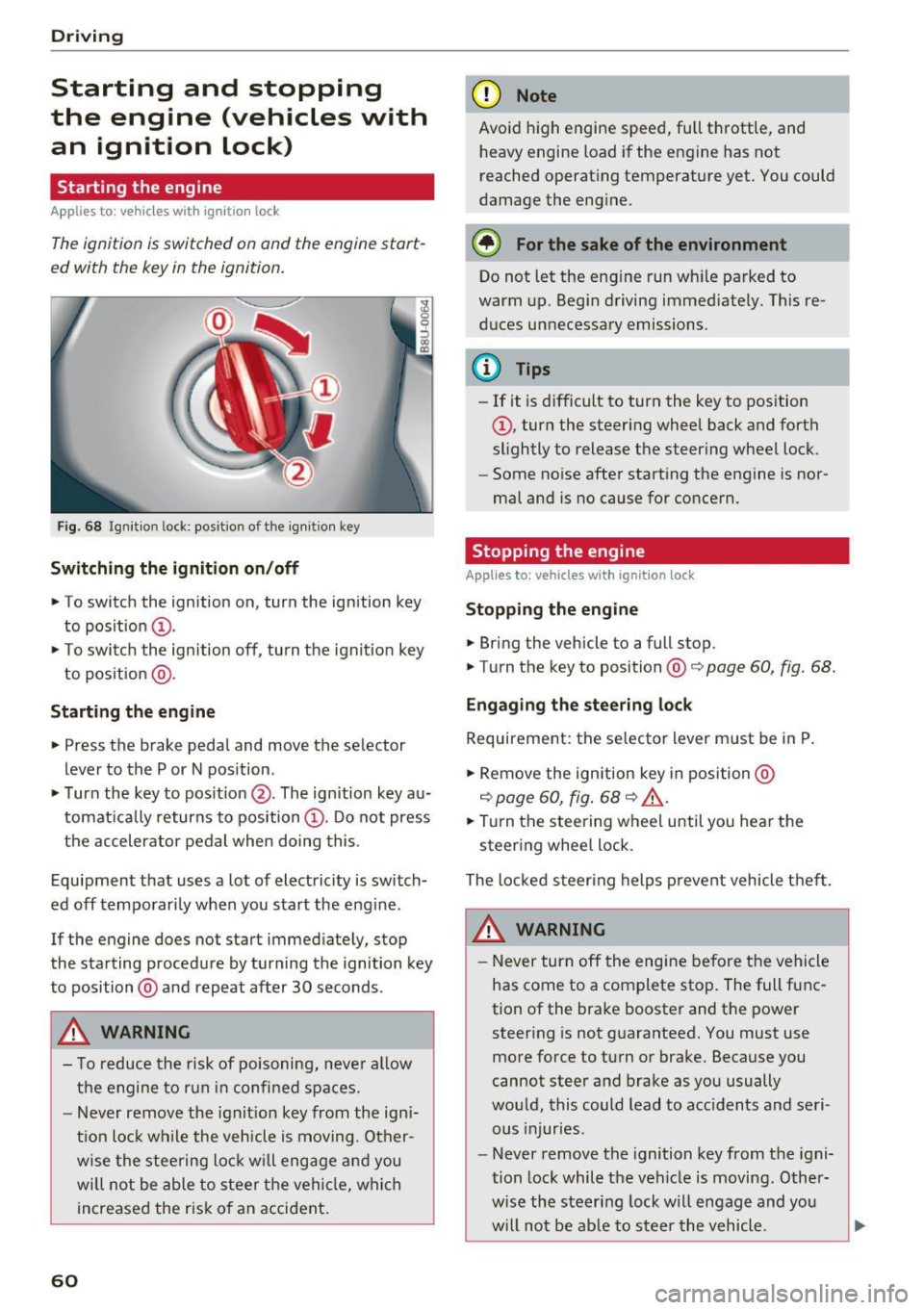
Fig. 68 Ignition lock: position of the ign it ion key
Sw itch ing the ignit ion on /off
• To switch the ignition on, turn the ignition key
to posit ion
(D .
• To switc h the ignition off, turn the ignit io n key
to posit ion @.
Starting the engine
• Press the brake pedal and move the selector
lever to the P or N pos ition.
• Turn the key to posit ion @. The ignition key au
tomat ica lly returns to position
(D . Do not press
the accelerator pedal when doing this.
Equipment that uses a lot of electricity is switch
ed off temporari ly when you start the eng ine .
If the engine does not start immediately, stop
the starting procedure by turning the ignition key
to position @and repeat after 30 seconds .
&, WARNING
- To reduce the risk of poisoning, neve r al low
the engine to run in confined spaces.
- Never remove the ign it ion key from the ign i
t ion loc k while the veh icle is moving. Other
wise the stee ring lock w ill engage a nd you
will not be able to stee r th e vehicle, whi ch
increased the r isk of an accident .
60
(D Note
Avoid high engine speed, full throttle, and
heavy engine load if the engine has not
reached operat ing temperat ure yet. You could
damage the engine.
® For the sake of the environment
Do not let the eng ine run wh ile parked to
warm up. Begin driving immediate ly. This re
d uces unnecessary emissions .
(D Tips
-If it is d ifficult to turn the key to position
(D , turn the steering wheel back and forth
slightly to release the steering wheel lock.
- Some no ise after starting the engine is nor
ma l and is no cause for conce rn.
Stopping the engine
Applies to: vehicles with ignition lock
Stop ping the engin e
• Bring the vehicle to a full stop.
• Turn the key to position@co
page 60, fig. 68.
Engag ing the ste ering lock
Requirement: the se lector lever m ust be in P .
• Remove the ignition key in position @
co
page 60, fig. 68 co ,& .
• Tur n the steering whee l until yo u hear the
steer ing whee l lock.
The locked steer ing helps p revent vehicle t hef t.
&, WARNING
- Never turn off the engi ne be fore the vehicle
has come to a complete stop. The full func
tion of the brake booster and the power steer ing is not g uaranteed. You must use
more force to turn or brake. Because you
cannot steer and brake as you usually
wou ld, this could lead to acc idents a nd seri
ous injuries.
- Never remove the ignition key from the igni
tion lock while the veh icle is moving . Other
w ise the steering lock will engage and you
w ill not be ab le to s teer the vehicle.