steering AUDI Q3 2018 User Guide
[x] Cancel search | Manufacturer: AUDI, Model Year: 2018, Model line: Q3, Model: AUDI Q3 2018Pages: 230, PDF Size: 57.03 MB
Page 35 of 230

a
co
...... N r--. N
'"' 0 0 ::, co
Lights and Vision
Exterior Lighting
Switching lights on and off
Fig. 30 Instrument panel: l ig ht switc h
Light s witch ·'!;5- ·
Turn the switch to the corresponding position.
When the lights are sw itched on, the
;oo: symbol
turns on.
0 -lights off. On some market-specific vers ions,
the daytime running lights* will switch on when
the ign ition is switched on in this position .
-USA model s: the daytime running lights switch
on automatically when the ignition is switched
on and the light switch is in the
O position or in
the
AUTO position (on ly in daylight) . The Day
tim e running lights
can be switched on and off
in the radio or the MMI*
c:> page 34, c:> A.
-Canada models: the dayt ime running lights
switch on automatically when the ignition is
switched on and the light switch is set to the
0
pos ition, ;oo: o r the AUTO position (on ly in day
li gh t)
c::> A .
AUTO* -automatic headlights switch o n and off
depending on br ightness, for example in tw ilight,
du ring ra in or in tunne ls .
::oo: -Parking lights
io -Low beam headlights
io -All weather ligh ts. T urn the switch to parking
light
; oo : or low beam head light io . Pull the
sw itch up to the first notch@.
0$-Rear fog lights . Tur n the switch to parking
l ight
000: o r low beam head light gD. P ull the
switch up to the second notch @.
Lights and V ision
All-weather lights
T he front lights are adjusted au toma tic a lly so
t h at there is less g lare for the driver from his or
her own lights, fo r example whe n roads are wet.
Automatic dynamic headlight range control
Yo ur vehicle is equ ipped with a headlight range
contro l system so tha t there is less g la re for on
com ing traff ic if the vehicle load changes. The
headlig ht range also adjusts automatica lly when
braking and acce lerating.
Static cornering light *
The s tat ic co rnering light may be available de
pend ing on veh icle equipment and it only works
when the light switc h is in the AUTO pos ition. The
corner ing light switches on automat ica lly at
speeds up to approximately 44 mph (70 km)
when the steering wheel is at a certain angle. The area to the side of the veh icle is illuminated bet
ter when turning .
A WARNING ,-
- Automatic headlights* are on ly intended to
assist the dr iver . T hey do not relieve the
d river of respo nsibi lity to check the head
lights and to tu rn them on m anu ally based
on t he current l ight a nd v is ibility condi tions.
F or exam ple, fog cannot be detected by t he
light sensors. So always switch on the low
beams under these weat her con ditions an d
when dr iv ing in the dark
io.
- The rear fog lights sho uld only be turned on
in accordance w ith traffic regulations, to
prevent glare for traffic behind your vehicle.
- Always observe legal regulations when us
ing the lighting systems described.
@ Tips
- T he lig ht sensor for the automatic he ad
lights * is in the rearview mir ror mount. Do
not p lace any stickers in this area on the
windshield.
- Some exter io r lighting functio ns can be ad
justed
c::> page 34 .
33
Page 61 of 230
heat, which could result in overheating or
other damage to the vehicle or other prop
erty.
- Have your vehicle maintained properly and
in accordance with the service recommenda
tions in your Warranty
& Maintenance book
let. Lack of proper maintenance as well as
improper use of the vehicle will impair the
function of the emission control system and
could lead to damage .
- Do not alter or remove any component of
the Em ission Control System unless ap
proved by the manufacturer .
- Do not alter or remove any device, such as
heat shields , switches, ignition wires,
valves, which are designed to protect your
vehicle's Emission Control System and other
important vehicle components .
@ Tips
The consumpt ion estimates as published by
ENVIRONMENTAL PROTECTION AGENCY
(EPA) and Transport Canada may not corre
spond to your actual consumption on the
road, which will vary depending upon vehicle
load and speed, road and weather conditions,
trip length, etc.
Steering
Adjusting the steering wheel position
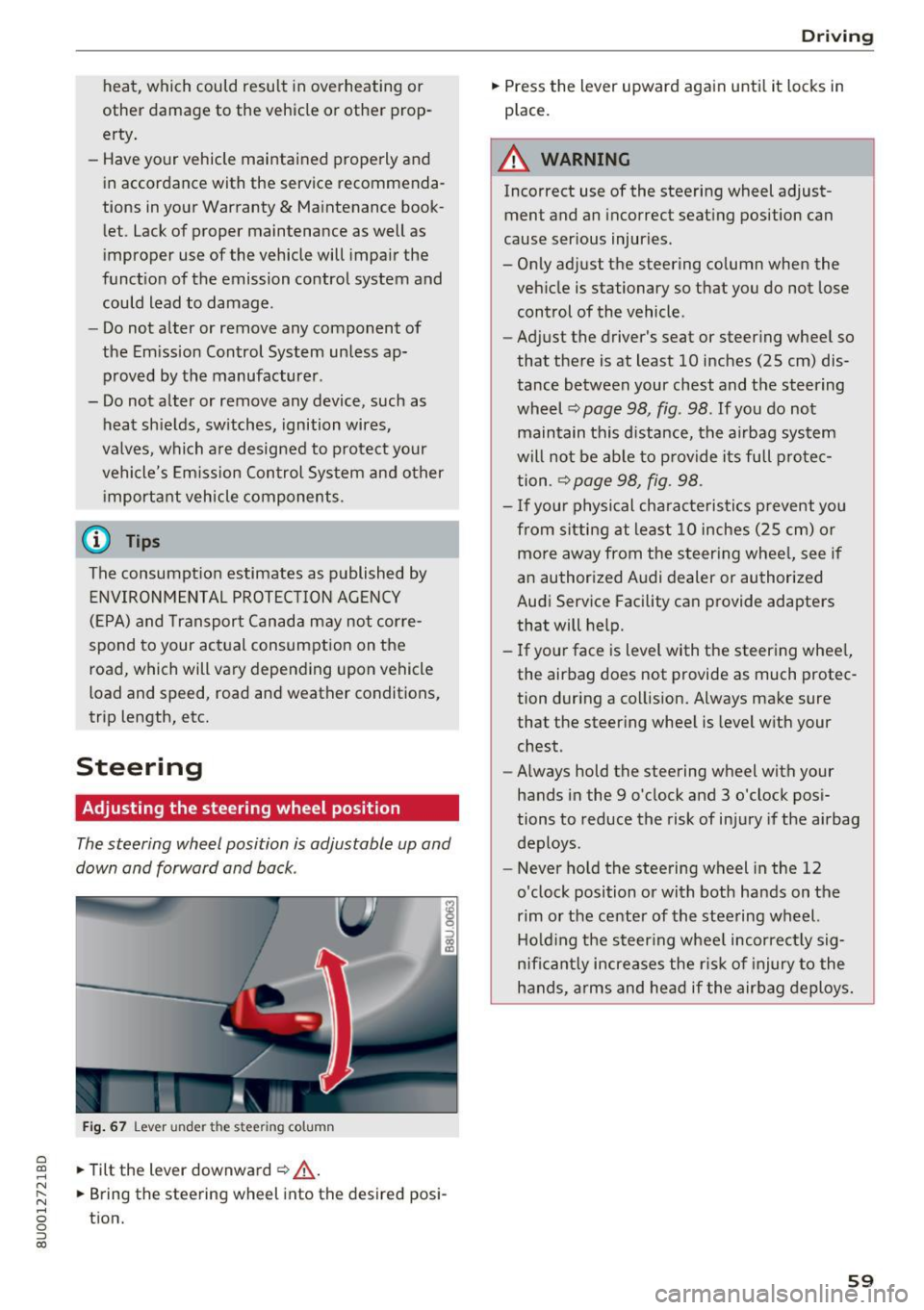
The steering wheel position is adjustable up and
down and forward and back .
Fig. 67 Lever under the s tee rin g colu mn
~ .,. Tilt the lever downward ¢ .&, . ......
~ .,. Bring the steering wh eel into the d esired posi-N
8 tion. 0 ::, (X)
Driving
.,. Press the lever upward again until it locks in
place .
A WARNING
Incorrect use of the steering wheel adjust
ment and an incorrect seating position can
cause serious injuries.
- Only adjust the steering column when the
vehicle is stationary so that you do not lose control of the vehicle.
-
- Adjust the driver's seat or steering wheel so
that there is at least 10 inches (25 cm) dis
tance between your chest and the steering
wheel ¢
page 98, fig. 98 . If you do not
maintain this d istance, the airbag system
will not be able to provide its full protec
tion .
~ page 98, fig . 98 .
-If your physical characteristics prevent you
from sitting at least 10 inches (25 cm) or
more away from the steering wheel, see if
an authorized Audi dealer or authorized
Audi Service Facility can provide adapters
that will help.
- If your face is level with the steering wheel,
the airbag does not provide as much protec
tion during a collision. Always make sure
that the steering wheel is level with your
chest .
- Always hold the steering wheel with your
hands in the 9 o'clock and 3 o'clock posi
tions to reduce the risk of injury if the airbag
deploys.
- Never hold the steering wheel in the 12
o'clock position or with both hands on the
rim or the center of the steering wheel.
Holding the steering wheel incorrectly sig
n ificantly increases the r isk of injury to the
hands, arms and head if the airbag deploys.
59
Page 62 of 230
Driving
Starting and stopping
the engine (vehicles with
an ignition lock)
Starting the engine
A pp lies to: vehicl es w ith igni tion lock
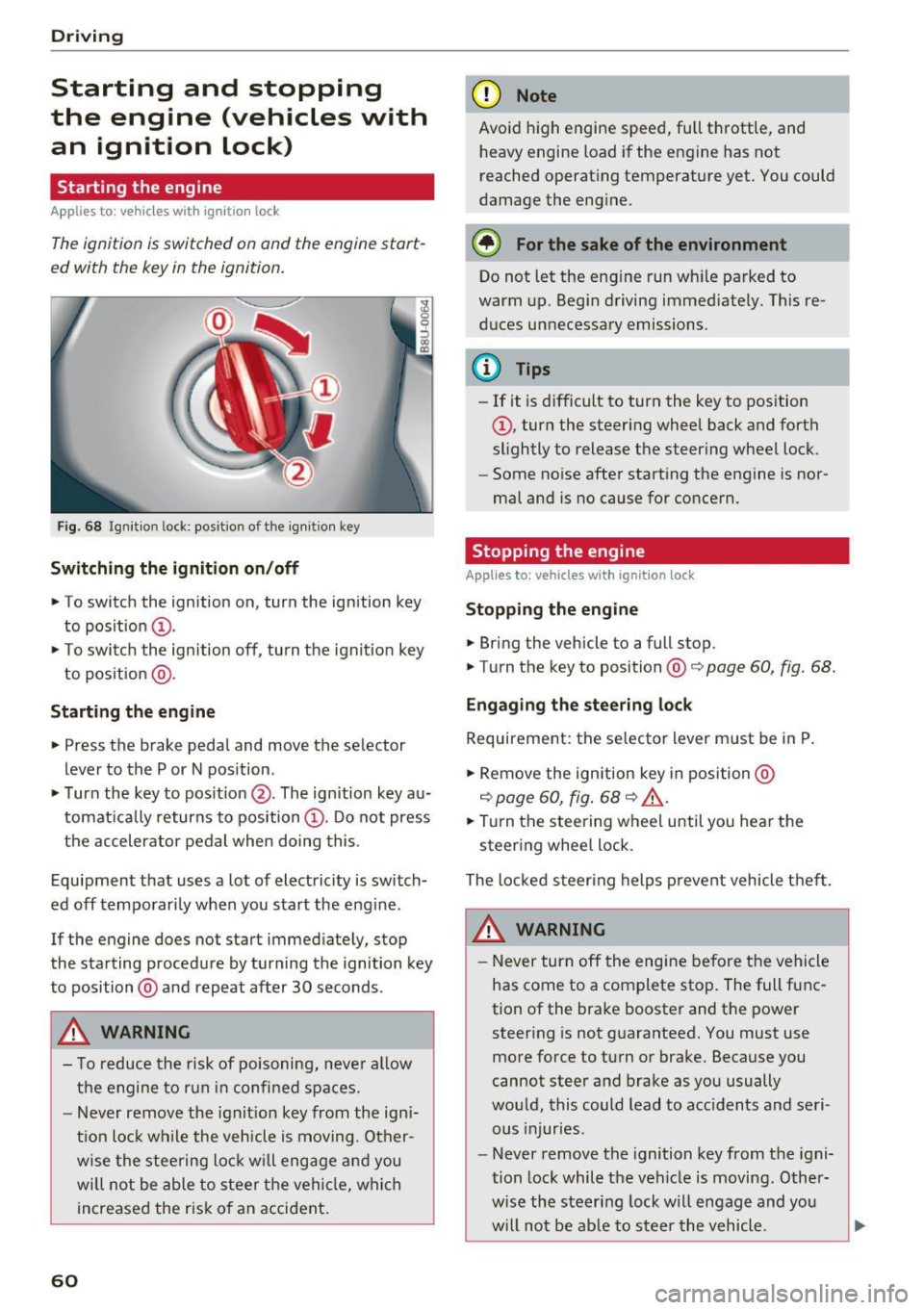
The ignition is switched on and the engine start
ed with the key in the ignition .
Fig. 68 Ignition lock: position of the ign it ion key
Sw itch ing the ignit ion on /off
• To switch the ignition on, turn the ignition key
to posit ion
(D .
• To switc h the ignition off, turn the ignit io n key
to posit ion @.
Starting the engine
• Press the brake pedal and move the selector
lever to the P or N pos ition.
• Turn the key to posit ion @. The ignition key au
tomat ica lly returns to position
(D . Do not press
the accelerator pedal when doing this.
Equipment that uses a lot of electricity is switch
ed off temporari ly when you start the eng ine .
If the engine does not start immediately, stop
the starting procedure by turning the ignition key
to position @and repeat after 30 seconds .
&, WARNING
- To reduce the risk of poisoning, neve r al low
the engine to run in confined spaces.
- Never remove the ign it ion key from the ign i
t ion loc k while the veh icle is moving. Other
wise the stee ring lock w ill engage a nd you
will not be able to stee r th e vehicle, whi ch
increased the r isk of an accident .
60
(D Note
Avoid high engine speed, full throttle, and
heavy engine load if the engine has not
reached operat ing temperat ure yet. You could
damage the engine.
® For the sake of the environment
Do not let the eng ine run wh ile parked to
warm up. Begin driving immediate ly. This re
d uces unnecessary emissions .
(D Tips
-If it is d ifficult to turn the key to position
(D , turn the steering wheel back and forth
slightly to release the steering wheel lock.
- Some no ise after starting the engine is nor
ma l and is no cause for conce rn.
Stopping the engine
Applies to: vehicles with ignition lock
Stop ping the engin e
• Bring the vehicle to a full stop.
• Turn the key to position@co
page 60, fig. 68.
Engag ing the ste ering lock
Requirement: the se lector lever m ust be in P .
• Remove the ignition key in position @
co
page 60, fig. 68 co ,& .
• Tur n the steering whee l until yo u hear the
steer ing whee l lock.
The locked steer ing helps p revent vehicle t hef t.
&, WARNING
- Never turn off the engi ne be fore the vehicle
has come to a complete stop. The full func
tion of the brake booster and the power steer ing is not g uaranteed. You must use
more force to turn or brake. Because you
cannot steer and brake as you usually
wou ld, this could lead to acc idents a nd seri
ous injuries.
- Never remove the ignition key from the igni
tion lock while the veh icle is moving . Other
w ise the steering lock will engage and you
w ill not be ab le to s teer the vehicle.
Page 64 of 230
Driving
reached operating temperature yet. Yo u could
damage the engine .
@ For the sake of the environment
Do not let the engine r un while par ked to
warm up . Begin driving immediately . This re
duces unnecessary emissions .
@ Tips
Some noise after starting the engine is nor
mal and is no cause for concern.
Stopping the engine
A pp lie s to: ve hicles w ith conve nien ce key
~ Bring the vehicle to a fu ll stop.
~ Move the selector lever into the P position.
~ Press the I STAR T ENGINE ST OPI button
¢ page 61, fig. 69 .
Engaging the stee ring lock1
)
The steering locks when you turn the engine off
using the !STAR T ENGINE ST OP I button and
open the dr iver's door.
The locked steering he lps prevent vehicle theft.
Emergency off function*
If it is absolutely necessary, the engine can also
be turned
off while driv ing at speeds starting at
4 mph (7 km/h). To switch the engine
off, press
the lS T AR T
ENGINE ST OPlbutton twice in a row
b riefly or press and hold for longer than two sec
onds .
.8_ WARNING
- Never turn off the engine before the veh icle
has come to a complete stop. The brake
booster and power steering only work when
the engine is running. If the engine is
off,
you have to use more force when steer ing or
braking . Because you cannot steer and brake
as you usually wou ld, this could lead to acci
dents and serious injuries.
- Always ta ke the key with you whenever you
leave you r vehicle. Othe rw ise, the engine
l) This fun ction is not availab le in all coun tries.
62
could be started or electrical equipment
such as the power windows could be operat
ed. Th is can lead to serious injury.
- For safety reasons, always park the vehicle
with the selector lever in the P position.
Otherwise, there is the risk that the vehicle
could roll unintentionally .
(D Note
If the engine has been under heavy load for
an extended period of time, heat builds up in
the eng ine compartment after the engine is
switched
off and there is a r isk of damag ing
the eng ine . For th is reason, let the engine run
for at idle for approximately two minutes be
fo re shutti ng it
off.
(D Tips
For up to 10 minutes after stopping the en
gine, the radiator fan may turn on again auto
matically or it may continue to run (even if
the ign ition is switched off) for the following
r easons:
- The coolant temperature is increas ing due
to trapped heat.
-If the eng ine is warm and the engine com
partment a lso heats up from strong sun
light.
Page 65 of 230

a
co
...... N r--. N
'"' 0 0 ::, co
Starting the engine when there is a
malfunction
Applies to: vehicles with conven ience key
Other circumstances can cause the engine not to
start, such as the battery in the remote control key has drained , there is interference with the
key or there is a system malfunction .
Fig . 7 0 Steering co lumn /remote co ntro l key: st arting t he
en gine if there is a malfunc tion
Req uiremen t: the message No k ey identified .
See owne r's manual
must be disp layed and the
II indicator light m ust be on.
.,. Hold the remo te contro l key ve rtic ally in the lo
c ation ind ic a ted
y>l) c::> fig. 70 .
.,. Press the brake peda l.
.,. Press the
I ST AR T ENGINE STOP I button. The
engine will start.
.,. Drive to an authorized Audi dealer or author
iz ed Audi Service Facility immediately to have
the mal function corrected .
@ Tips
You can view the message again by pressing
the
I START ENGINE STOP ! button.
Messages
Turn off ignit io n. Battery discharging
This message appears and a warning tone sounds
if you open the driver's doo r when the ignition is
switched on .
Press brake pedal to start engine
This message appears if you do not step on the
b rake pedal to sta rt the eng ine o n a vehicle wi th
a n autom atic transm ission.
D rivi ng
Plea se engage Nor P.
This message appears when sta rt ing o r stopping
t h e e ngine if t he se lecto r lever is no t in the Nor P
pos ition. The e ngine will not star t/stop.
IS Is key in the vehicle?
The ind icator light turns on and this message ap
pears if the convenience key* was removed from
t h e veh icle when the e ngine was ru nning. If the
convenience key is no longer in the veh icle , you
c annot sw itch the ignition on or sta rt the eng ine
o nce you stop i t. You also canno t loc k the vehicle
from the o utside.
Shift to P, vehicle can roll away . Doors c an only
be lo cked in P .
This message appears for safety reasons if the
selector lever for the au tomatic transm ission is
not in the P position after the ignition is switched
off . M ove the selector leve r to the P posi tion.
Otherwise the ve hicle is not pro tec ted from ro ll
ing and i t cannot be locked .
II No key identified. See owner's manual.
This message appears if there is no conven ience
key* inside the vehicle or if the system does not
recognize the key . The co nvenience key may not
be recognized, for example, if it is covered by an
obje ct tha t
disrup ts the signa l (such as a br ief
c ase), or if the key b attery is we ak. El ectro nic de
vi ces such as cell phones c an also inte rfe re wi th
the signal.
T o still be ab le to start or stop the engine, refer
to
i=:> page 63 .
Electromechanical
parking brake
Fig. 71 Cen te r conso le : pa rk in g b rake
63
Page 66 of 230

Driving
Your vehicle is equipped with an electromechani
cal parking brake @
c> fig. 71. The parking brake
is designed to prevent the vehicle from rolling
un intent ionally and replaces the hand brake .
Setting/manuall y releasing the pa rking
brake
... Pull the(®) switch to set the parking brake . The
LED in the sw itch turns on. The -(USA mod
els) . (Canada models) indicator light also
turns on in the instrument cluster display .
.,. To release the parking brake manually, press
the b rake o r accelerato r pedal whi le the igni
tion is switched on and p ress t he
C®) switch a t
the same time. The L ED in t he b utton and t he
i ndica tor light in the display turn off .
Releasing the parking brake automatically
Requirement: the dr iver's door must be closed,
the dr iver's safety be lt must be latched and the
pa rking brake must be set.
... To start driving and re lease the park ing brake
automat ica lly, press the accele rato r pedal as
us ua l.
In addi tion to releasing the park ing brake auto
mat ically, other convenience and safety funct ions
are available whe n you start driving
c> page 65,
Starting from a stop .
Preventing the automatic parking brake
release
The vehicle could begin rolling unintentionally ,
dependi ng on the h ill or if towing a trailer .
... To preve nt the parking brake from releasing au
tomat ica lly, pull and hold the®) sw itch and
press the accelerator pedal. The park ing b rake
remains set and prevents the veh icle from ro ll
in g backward.
.,. Yo u can re le ase the(®) switch aga in once you
are sure that you are g iv ing eno ugh dr iv ing
force to the wheels by pressing the accele rator
pedal.
Emergency braking function
You can use the emergency bra king f unct ion in an
emergen cy situ ation , or if the stand ard bra ke op
era tion mal func tions or is disabled.
64
... Pull and ho ld the C®) swi tc h.
... As soon as you re lease the
C®> switch or acceler-
ate, the braking stops.
P ulli ng and ho ld ing t he
C®) switch wh ile driving
the veh icle activates the eme rgency braking func
tion . The ve hicle is bra ked at a ll four wheels by
activating the hydraulic b rake system . The bra k
i ng effect is sim ilar to heavy brak ing
c> ,&. .
To reduce the risk of act ivat ing t he emergency
bra kin g by mista ke, a warning tone (buzzer)
sounds when the
C®) sw itch is p ulled . Eme rgency
braking stops as soon as the© switch is released
or the accelerator pedal is pressed.
Park ing
... Press the brake peda l to stop the ve hicle.
... Pull the
C®> switch to set the par king brake .
... Place the selecto r lever in the P position .
... Turn the engine off
c> ,&. .
... Turn the steering w heel when parking on in
clines so that the w heels w ill roll into the curb
if the vehicle starts moving.
8,,. WARNING
- Do not press the a ccele ra to r peda l inadve r
tently if a ge ar i s selected whe n the vehicle
is st ationary an d th e engine is running . Oth
erwise, the vehicle will s tart to move imme
diate ly and this could result i n an accident.
- Eme rgency brak ing s hou ld only be used i n
an emergency, when the norma l bra ke pe dal
has failed or the bra ke peda l is obstructed .
During eme rgency brak ing, your vehicle will
brake s imilar to heavy braking. ESC and the
associated components (ABS, ASR, EDL)
cannot ove rcome the laws of physics .
Around curves a nd whe n road or wea ther
conditions a re bad, a full brake applicat io n
can ca use the veh icle to skid or the rear end
to swerve, w hich incr eases the ris k of an ac
cident.
- I f th e power s upply fail s, you cannot set the
parking br ake if it is released. In this case,
pa rk the vehicle on leve l ground and secure
it by p lacing the selector leve r in the P posi
tion. See an authorized A udi dealer or au -
thorized A udi Service Fac ility for assistance.
IIJ.
Page 72 of 230
Driving
reduces braking performance, increases
braking distance or causes complete failure
of the brake system.
- If you must stop on an incline, always hold
the vehicle in place with the foot brake or
parking brake to prevent it from rolling
back.
- Never hold the vehicle on an incline with a
slipping clutch. The clutch opens automati
cally when it becomes too hot from the
overload . The . indicator light turns on
and a message appears~
page 71 when
the clutch is overloaded.
- Read and following all WARNINGS
9 &, .
(D Note
-When stopping on an incline, do not try to
hold the vehicle in place by pressing the ac
celerator pedal while a driving gear is se lected . This can cause the automatic trans
mission to overheat and can damage it. Set
the parking brake or press the brake pedal
to prevent the vehicle from rolling.
- Allowing the vehicle to roll when the engine
is stopped while the selector lever is in the
N position will damage the automatic trans
mission, because it is not lubricated under
those circumstances ~
page 205, Towing
with a tow truck.
- The transmission can overheat and be dam
aged under certain driving and traffic condi
tions su ch as frequent starts, creeping for a
long time, or stop-and-go traffic. If the.
indicator light turns on, stop the vehicle at
the next opportunity and let the transmis
sion cool down
~ page 71.
H ill descent contr ol
The hill descent control system assists the driver
when driving down hills .
Hill descent contro l is activated when the selec
tor lever is in the Dor S position and you press
the brake pedal. The transmission automatically
selects a gear that is suitable for the hill. Hill de
scent control tries to maintain the speed ach
ieve d at the time of braking, within physical and
70
technical limitations. If may still be necessary to
adjust the speed with the brake pedal.
Hill descent control switches off once the hill lev
els out or you press the accelerator pedal.
&_ WARNING
Hill descent control cannot overcome physical
limitations, so it may not be able to maintain
a constant speed under all conditions. Always
be ready to apply the brakes .
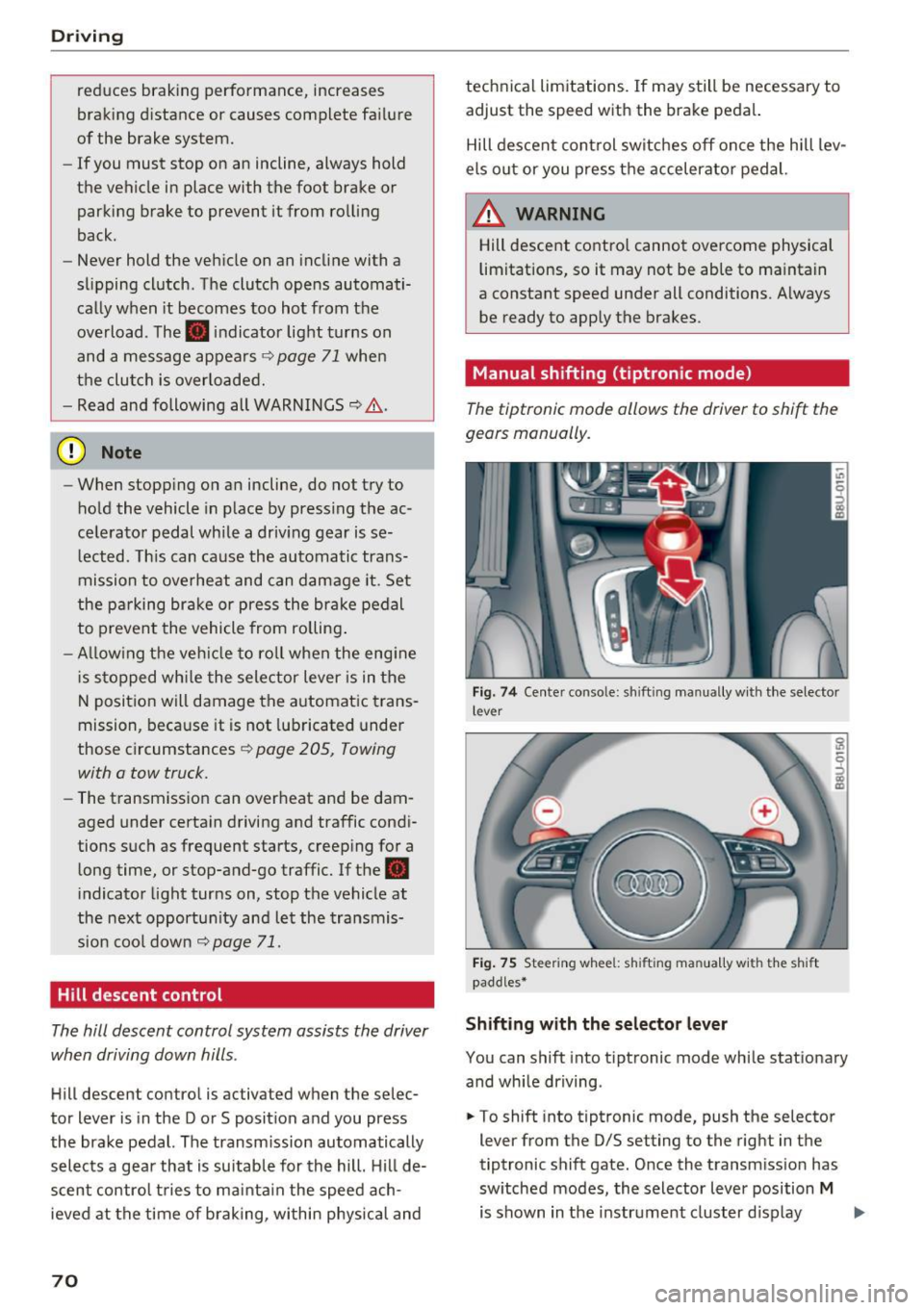
Manual shifting (tiptronic mode }
The tiptronic mode allows the driver to shi~ the
gears manually .
Fig. 7 4 Center console: sh ift ing manually w ith the selector
l ever
Fig. 75 Steering whee l: sh ift ing ma nuall y wi th th e s hift
paddles*
Shifting with the selector lever
You can shift into tiptronic mode while stationary
and while driving .
.. To shift into tiptronic mode, push the selector
lever from the 0/S setting to the right in the
tiptronic shift gate. Once the transmission has
switched modes, the selector lever position
M
is shown in the instrument cluster display .,..
Page 83 of 230

a
co
...... N r---. N .-< 0 0 ::, co
Auto and Dynamic, using the r:l.l'e'i button in the
center console or by using the Infotainment sys
tem . This allows you to switch between a sporty
and a comfortable driving mode, for examp le.
Description
Applies to: vehicles with Audi drive select
The following systems, among other things, are
influenced by drive select:
Engine and automatic transmission
Depending on the mode, the engine and auto
matic transmission respond more quickly or in a
more balanced manner to accelerator pedal
movements. In the sporty dynamic mode, the
transmission shifts at higher speed ranges .
Suspension control*
The suspension control uses sensors to record in
formation regarding steering movements, brak ing and accelerat ion operations by the driver, as
well as information about the road surface, dr iv
ing speed, and load. With dr ive select, you can
adjust the suspension control to sporty (dynam ic), comfortable (comfort) or balanced (a uto).
Steering
The steering adapts in terms of steering assis
tance . Indirect steering that moves easily as in
comfort mode is especially su ited to long dr ives
on a highway. In contrast, dynamic mode pro
vides sporty, direct steering.
Cornering light*
The cornering light adapts to driving on curves.
The pivot ing action and the lighting also adapt to
the mode.
(D Tips
The S selector lever position automatically en
gages if the dynamic mode is selected.
Assistance systems
Selecting the driving mode
Applies to: vehicles with Audi drive select
Fig. 84 Center console : dr ive select button
.,. To set the mode, press the ~:1;:e'i button repeat
edly until the desired mode is d isplayed in the
instrument cluster. Or
.,. Select in the Infotainment system: ICARlfunc-
tion button
> Comfort , Auto or Dynamic .
You can change the driving mode when the vehi
cle is stationary or while driving . If traff ic per
mits, after changing modes, briefly take your
foot off the accelerator pedal so that the recently
selected mode is also activated for the engine.
Comfort -provides a comfort-or iented vehicle
setup and is suited fo r long drives on h ighways.
Automatic -provides an overall comfortable yet
dynamic driving feel and is suited for everyday
u se.
Dynam ic -gives the driver a sporty driving fee l
and is suited to a sporty driving style.
A WARNING
Pay attention to traffic when operating the
drive select to reduce the ris k of an accident.
81
Page 87 of 230
a
co
...... N r-,. N
'"' 0 0 ::, co
General information
Applies to: vehicles with parking system plus with rearv iew
camera
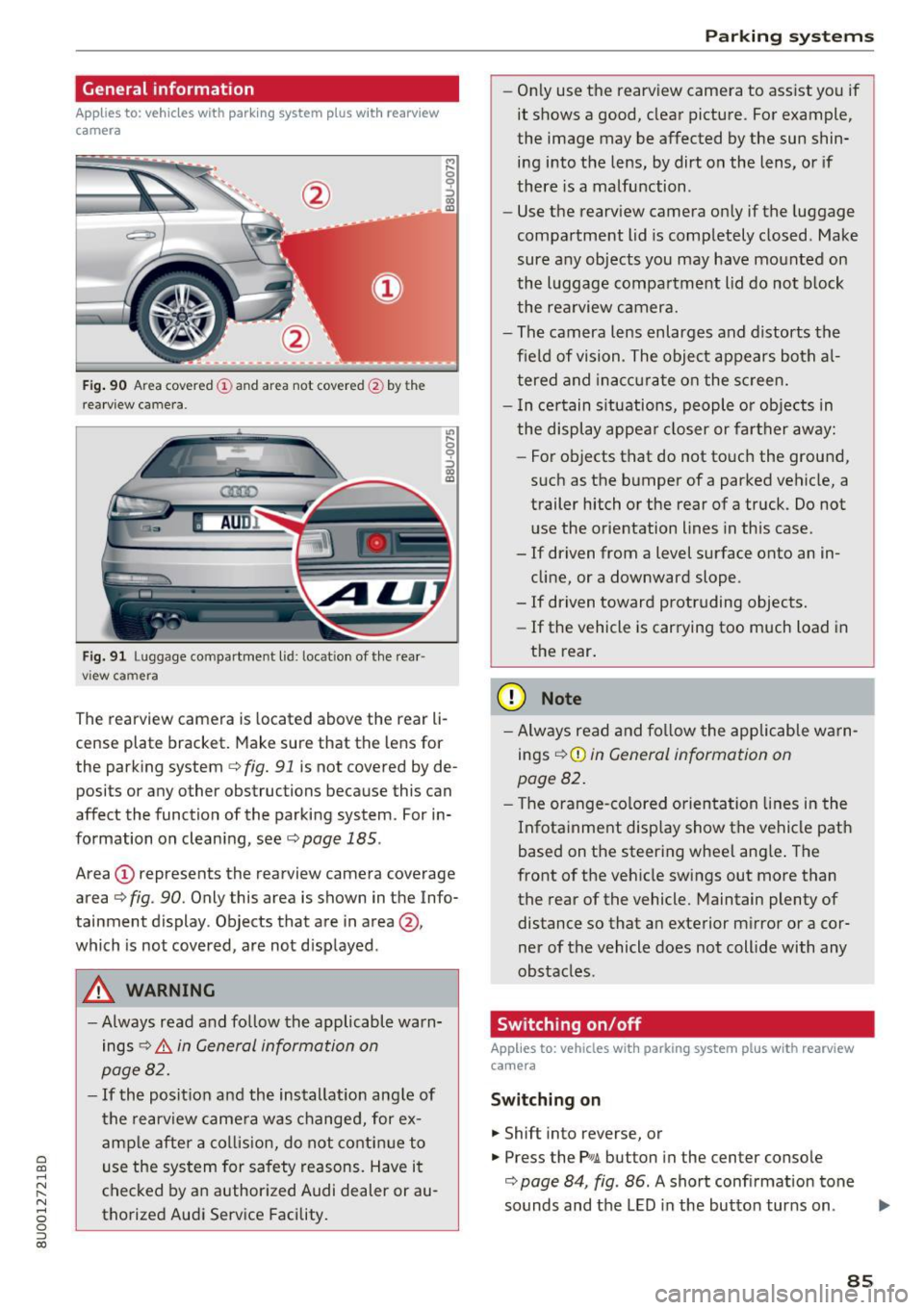
F ig. 90 A rea covered (D an d ar ea not cov ered @ by t he
r ea rvi ew ca mera.
Fig. 91 L u ggage compartment l id : loc ation of the rear ·
vi ew ca mera
,.._ 0
0
::'> co OJ
"' ~ 0
::'> co OJ
The rearview camera is located above the r ear li
c e nse plat e bracket. Mak e sure that the lens for
the park ing system
c> fig. 91 is not covered by de
posi ts or any other obstructions because this can
affect the function of the parking system . For in
formation on clean ing, see
c> page 185 .
Area (D represents the rearview camera coverage
area
c> fig . 90 . Only this area is shown in the Info
tainment display. Objects that are in area@,
which is not covered, are not d isplayed .
A WARNING
-Always read and follow the applicable warn
ings
c> .&. in General information on
page 82.
- If the position and the installat ion ang le of
the rearview came ra was changed, for ex
amp le after a collis ion, do not contin ue to
use the system for safety reasons. Have it
checked by a n author ized Audi dealer or au
thorized Audi Service Facility.
Parking systems
-On ly use the rearv iew camera to ass ist you if
it shows a good, clear picture. For example,
the image may be affected by the sun shin·
ing i nto the lens, by dirt on the lens, or if
there is a malfunction .
- Use the rearv iew camera on ly if the luggage
compa rtment lid is comp letely closed . Make
sure any objects you may have mounted on
the l uggage compar tment lid do not b lock
the rea rview camera.
- The camera lens enlarges and d istorts the
f ield of vision . The object appears both a l
t ered and inac curate on the s creen.
- I n ce rtain s itu ations, people or objects in
the display appea r closer or fa rther away:
- For objects that do not touc h the grou nd,
such as the bumper of a parked vehicle, a
trailer hitch or the rear of a truck . Do not
use the orie ntation lines in this case .
- If driven from a level s urface onto an in
cline, or a downward slope .
- If driven toward protruding objects.
- If the vehicle is carrying too much load in
the rear.
(D Note
-Alw ays read and fo llow the applicable w arn
ings
c> (D in General information on
page 82.
- T he orange-co lored orientation lines in the
Infotainment display show the vehicle path
based on the steering wheel ang le . The
front o f the vehicle swings out more than
the rear of the vehicle. Maintain plenty of distance so that a n exterior m irror or a cor
ner of the vehicle does not coll ide with any
obstacles.
Switching on/off
Applies to: vehicles with parking system plus with rearview
camera
Switching on
... Shift into reverse, or
... Press the Pw.A. but ton in the center console
c> page 84, fig . 86 . A short confirmation tone
sounds and the LED in the butto n tur ns on.
Ill>-
85
Page 88 of 230
Parking systems
Switching between the rearview camera and
optical display
.. Press the Graphic control button ®
t=:> page 86, fig. 92 to see the optical display.
• Press the
Rear view control button to see the
rearview camera image.
Switching off
.. Drive faster than 6 mph (10 km/h), or
.. Press the p,,.,.6. button, or
• Switch the ignition off .
@ Tips
The visual display in the left part of the dis
play should help you detect the critical veh icle
areas.
Perpendicular parking
Applies to: vehicl es with parking system plus with rearv iew
camera
This view may be used when parking in a garage
or in a parking space.
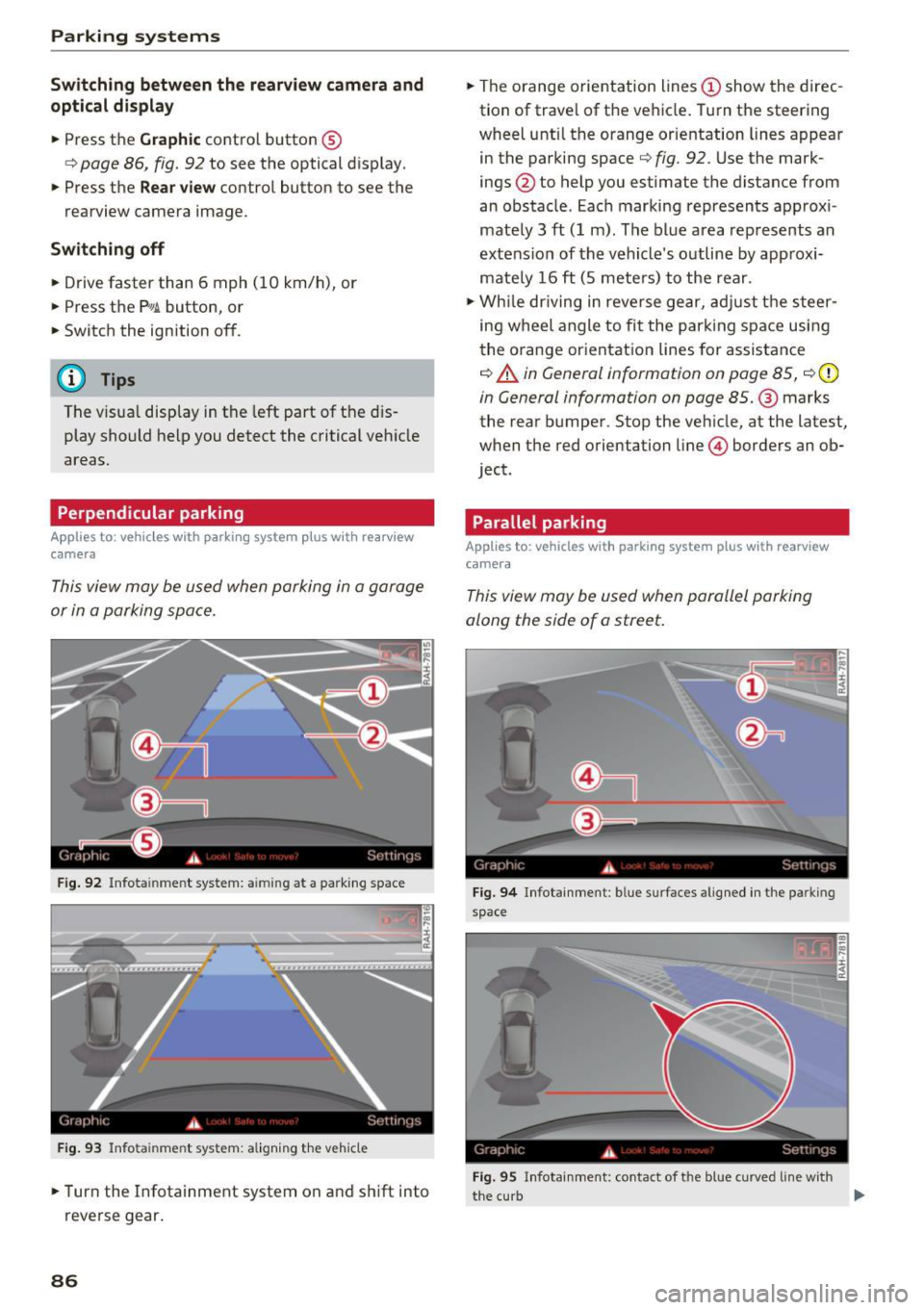
Fig . 92 Infota inme nt system: a iming at a parking space
Fig. 93 Infota in me nt system: a lign ing the veh icle
.. Turn the Infotainment system on and shift into
reverse gear.
86
.. The orange orientation lines (D show the direc
tion of travel of the vehicle. Turn the steering
wheel unt il the orange orientation lines appear
in the parking space
t=:> fig . 92 . Use the mark
ings @to help you estimate the distance from
an obstacle . Each marking represents approx i
mately 3
ft (1 m). The blue area represents an
extension of the vehicle's outline by approxi
mately 16
ft (5 meters) to the rear .
.. While driving in reverse gear, adjust the steer
ing wheel angle to fit the park ing space using
the orange orientation lines for assistance
¢ A in General information on page 85, ¢ (D
in General information on page 85 .@ marks
the rear bumper . Stop the veh icle, at the latest,
when the red orientation line© borders an ob
ject .
Parallel parking
App lies to : vehicles with parking system plus with rearview
camera
This view may be used when parallel parking
along the side of a street.
Fig. 94 Infotainment : b lue s urfaces aligned in the parkin g
space
Fig. 95 Infotai nment: contact of t he blue curved line w ith
the curb
II-