warning AUDI Q3 2018 User Guide
[x] Cancel search | Manufacturer: AUDI, Model Year: 2018, Model line: Q3, Model: AUDI Q3 2018Pages: 230, PDF Size: 57.03 MB
Page 26 of 230
Opening and clo sin g
@ Tips
The replacement battery must meet the same
specifications as the orig inal battery in the re
mote control key.
Remote control key synchronization
If the veh icle cannot be unlocked/locked by the
remote control, you can synchron ize the remote
control key .
• Press the remote control key button
III-
• Insert the key in the driver's door lock within 30
seconds.
• Press the
III button or cf'.I butto n.
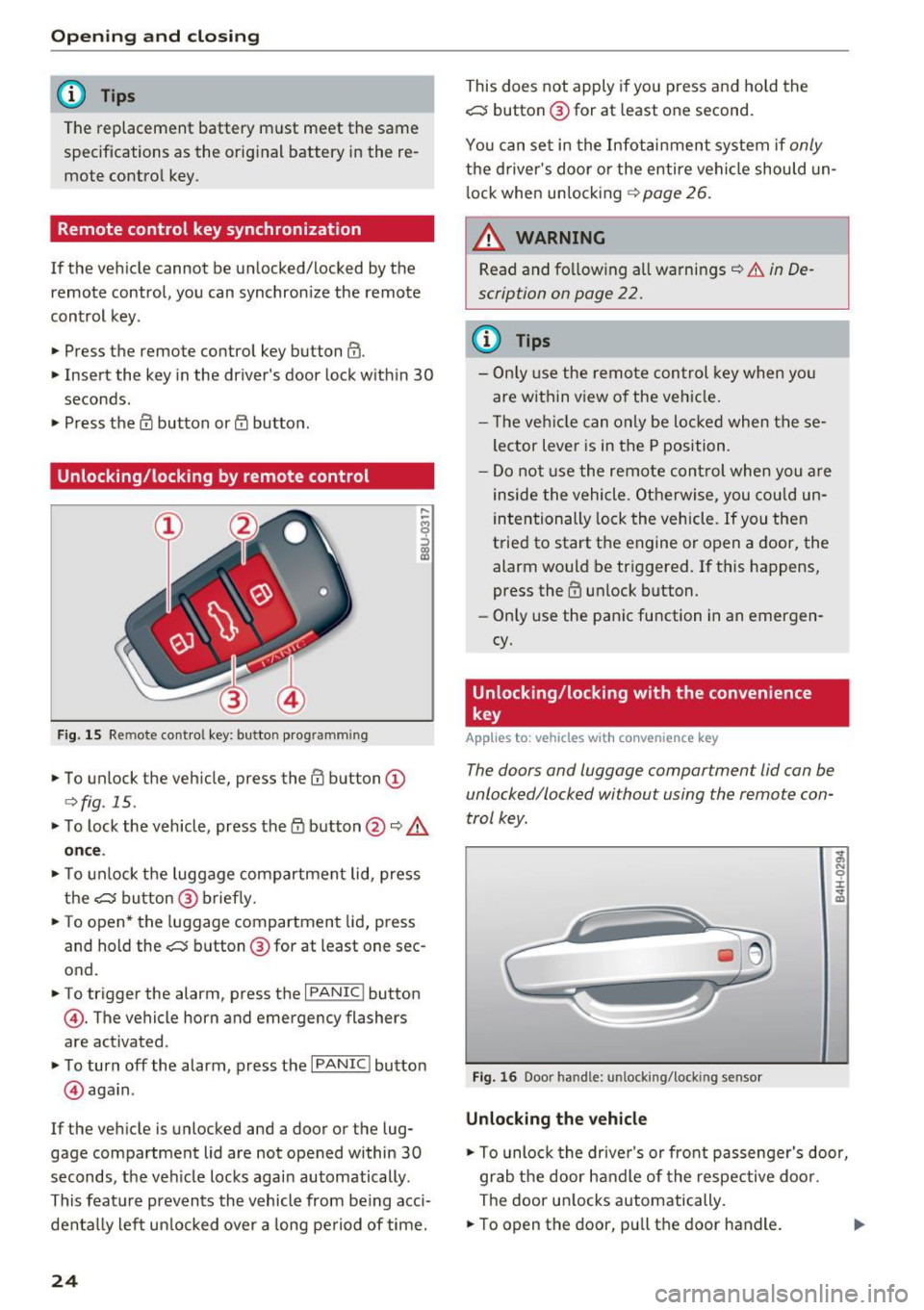
Unlocking /locking by remote control
F ig. 15 Remote control key: button programming
• To unlock the vehicle, press the III button (D
c>fig. 15.
• To lock the vehicle, press the /fl button @¢&.
on ce .
• To unlock the luggage compartment lid, press
the~ button@ brief ly.
• To open* the luggage compartment lid, press
and hold the~ button @ for at least one sec
ond.
• To trigger the alarm, press the
I PANIC I button
©-The vehicle horn and emergency flashers
are activated .
• To turn off the alarm, press the
I PANIC I button
@ aga in .
If the veh icle is unlocked and a door or the lug
gage compartment lid are not opened within
30
seconds, the ve hicle locks again automatically .
This feat ure prevents the vehicle from be ing acci
denta lly lef t un locked over a long pe riod of time.
24
This does not apply i f you press and hold the
~ button @for at least one second.
You can set in the Infot ain ment system if
only
the d river's door o r the entire vehicle should un
l ock whe n unlocking ¢
page 26.
~ WARNING
Read and fo llow ing all warnings¢ &. in De
scription on page
22.
(D Tips
- Only use the remo te control key when yo u
are within view of the veh icle.
- T he ve hicle can only be loc ke d when these
lector Lever is in the P position.
- Do not use the remote con trol when you a re
inside the vehicle. O therwise, you cou ld un
intentionally lock the vehicle . If you then
t ried to start the engine or open a door, the
alarm would be triggered. If this happens,
press the
III unlock button.
- Only use the panic function in an emergen
cy.
Unlocking/locking with the convenience
key
Applies to: vehicles with convenience key
The doors and luggage comportment lid con be
unlocked/locked without using the remote con
trol key .
Fig. 16 Door handle: unlocking/lock ing sensor
Unlocking the vehicle
-
;;, N 0 :i: ... m
• To unlock the drive r's or front passenge r's door,
grab the door ha ndle of the respective door .
The door u nlocks automatically.
• To open the door, pu ll the door handle. .,.
Page 27 of 230
a
co
...... N r-,. N
"" 0 0 ::, co
.. To open the luggage compartment lid, press
the grip p iece in the luggage compartment lid
¢page 27.
Locking the vehicle
.. Place the selector lever in the P position, or else
the vehicle will not be able to lock .
.. To lock the vehicle, close the door and touch
the sensor on the door handle
once¢ fig. 16,
¢ ,&.. Do not hold the door handle while doing
this.
Unlocking and locking the vehicle can only be
done at the front doors. The remote control key
cannot be more than approximately 4 ft (1.5 m)
away from the door handle . It makes no differ
ence whether the remote control key is in your
jacket pocket, purse or briefcase .
The door cannot be opened for a brief period di rectly after locking it. Th is way you have the op
portunity to check if the doors locked correctly .
You can set in the Infotainment system if
only
the driver's door or the entire vehicle should un lock when unlocking ¢
page 26.
A WARNING
Read and following all warnings¢.& in De
scription on page 22.
(D} Tips
If your vehicle is left standing for a long peri
od of time, note the following:
- The proximity sensor switches off after a
few days to save energy. You then have to
pull once on the door handle to unlock the
vehicle and a second time to open it .
- The energy management system gradually
turns off unnecessary convenience functions
to prevent the vehicle battery from draining
and to maintain the vehicle's ability to start
for as long as possible. You then may no
longer be able to unlock your vehicle with
this convenience function.
Opening and closing
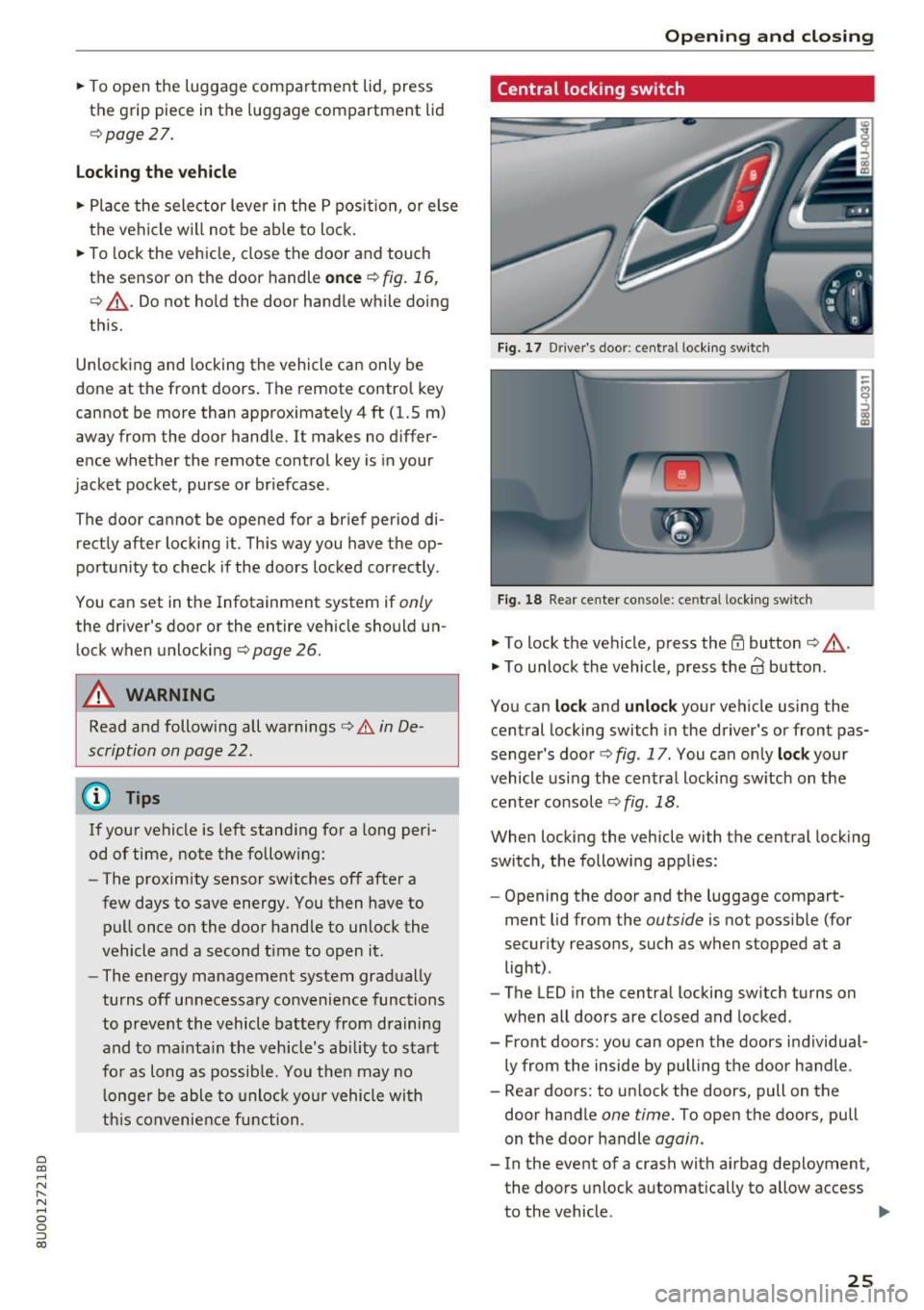
Central locking switch
Fig. 17 Driver 's doo r: centr al locking switc h
Fig. 18 Rear center co nsole: ce ntra l locking sw itch
• To lock the vehicle, press the ff! button ¢ ,A.
• To unlock the vehicle, press the al button .
You can
lock and unlock your vehicle using the
central locking switch in the driver's or front pas
senger's door¢
fig. 17 . You can only lock your
vehicle using the central locking switch on the
center console
¢ fig . 18 .
When locking the vehicle with the central locking
switch, the following applies:
- Opening the door and the luggage compart
ment lid from the
outside is not possible (for
security reasons, such as when stopped at a light) .
- The L ED in the central locking switch turns on
when all doors are closed and locked.
- Front doors : you can open the doors individual
ly from the inside by pulling the door handle .
- Rear doors: to unlock the doors, pull on the door handle
one time. To open the doors, pull
on the door handle
again.
- In the event of a crash with airbag deployment, the doors unlock automatically to allow access
to the vehicle .
IJII>
25
Page 28 of 230
Opening and clo sin g
_& WARNING
- Read and following all warn ings c::> .&. in De
scription on page
22 .
- The centra l locking switch also works when
the ignition is switched off and automatical
ly locks the entire vehicle when the
i'.D but
ton is pressed.
- The central locking switch is inoperative
when the vehicle is locked from the outside .
- Locked doors make it more difficult for
emergency workers to get into the vehicle,
which puts lives at risk. Do not leave anyone behind i n the vehicle, especially children .
(D Tips
-Your vehicle locks automatically when it
reaches a speed of 9 mph (15 km/h) (Auto
Lock)
c::> page 22 . You ca n unlock the vehicle
again using the
63 button in the central loc k
i ng swi tch.
- The doors cannot be unlocked with the cen
tral lock ing swi tch on the rear center con
sole .
Setting the central locking system
In the Infotainment system, you can set which
doors the central locking system will unlock .
• Select : the !CARI function button> (Ca r) Sys
t e m s*
contro l button > Vehicle s ettings > (Ce n
t ral l ocking )*.
Unlo ck doors
- you can decide if All doors or only
the
D riv er door should unlock . The luggage com
pa rtment lid also unlocks when
All is se lected. If
you select
Driv er in a veh icle w ith a convenience
key* , only the door whose handle you pull will un
lock .
When the
Dri ver setting is selected , a ll doo rs and
the luggage compa rtment l id will u nlock when
you press the
@ button on the remote control key
tw ice or turn the key in the door lock cylinder in
the opening direction twice .
To ne when lo ckin g -if you se lect On , a tone will
sound when you lock the vehicle.
26
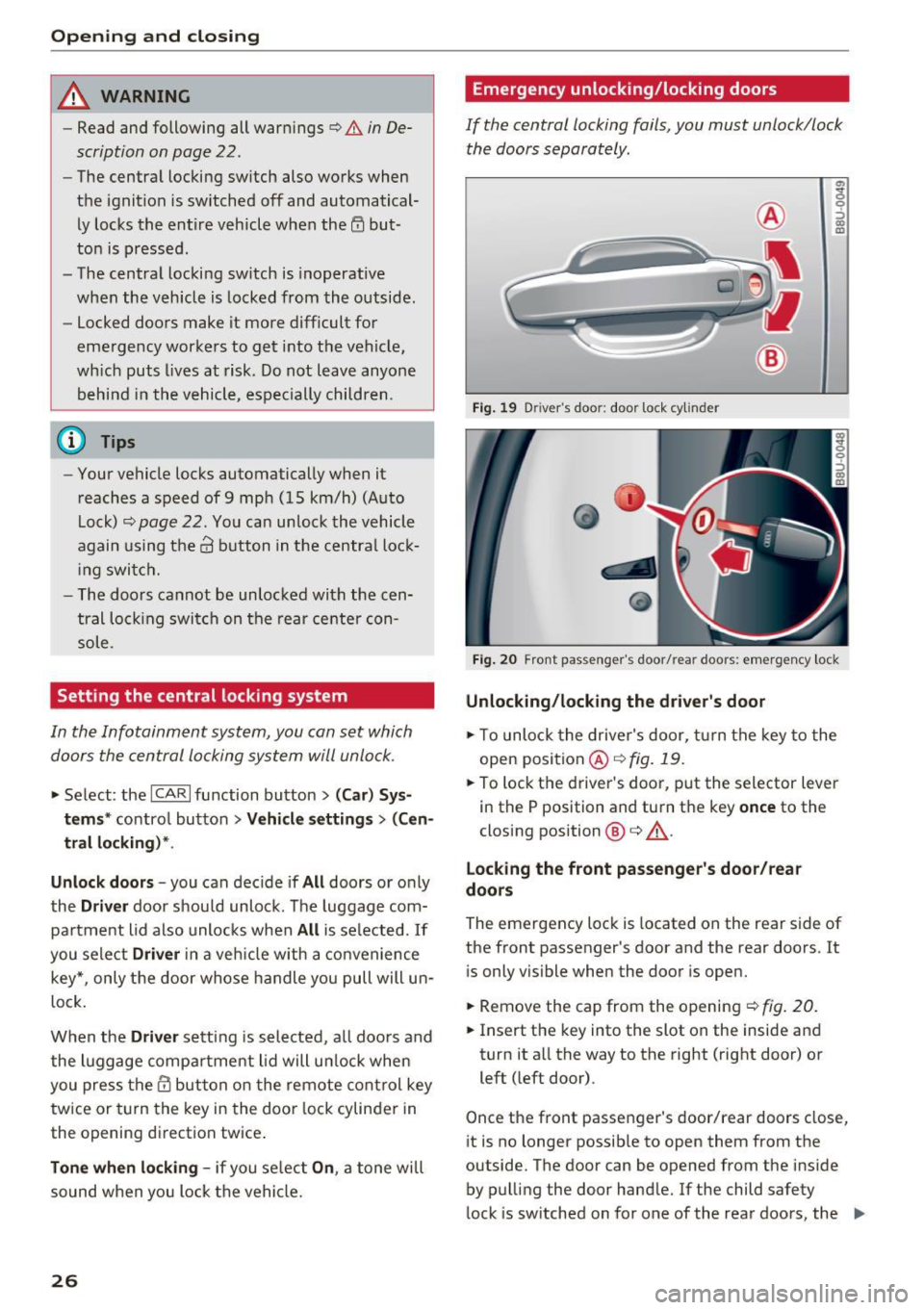
Emergency unlocking/locking doors
If the central locking fails, you must unlock/lock the doors separately.
Fig . 19 Driver 's doo r: door lock cy lin der
a,
i 0 ::, a, m
Fig . 20 Front pas senger's door/ rear doo rs : e mergenc y loc k
Unlocking /locking the d river' s door
• To unlock the driver's door, turn the key to the
open position @
c::>fig. 19.
• To lock the driver's door, put the selector lever
in the P position and turn the key
o nce to the
closing position @
c::> ,&..
Lo cking the front pas senger's d oor /rear
doo rs
The emergency lock is located on the rear side of
the front passenger's door and the rear doors . It
is only visible when the door is open.
• Remove the cap from the opening
c::> fig. 20.
• Insert the key into the slot on the inside and
turn it all the way to the right (right door) or
left (left door).
Once the front passenger's door/rear doors close,
it is no longer possib le to open them from the
outside. The door can be opened from the inside by pulling the door handle. If the child safety
lock is sw itched on for one of the rear doors, the
IJI.
Page 29 of 230
a
co
...... N r--. N
'"' 0 0 ::, co
door can be opened from the outside after pulling the door hand le once from the ins ide.
A WARNING
Read and following all warnings ¢ &. in De
scription on page 22.
Anti-theft alarm system
If the anti-theft alarm system detects a vehicle
break-in, audio and visual warning signals are
triggered . The anti -theft alarm system is activat
ed when the vehicle is locked as usual. It
switches off when the veh icle is unlocked .
If the alarm is triggered, it w ill shut off automat
ically after a certain amount of time. Switch the
ignition on or press them button on the remote
control key to turn off the alarm.
Luggage compartment
lid
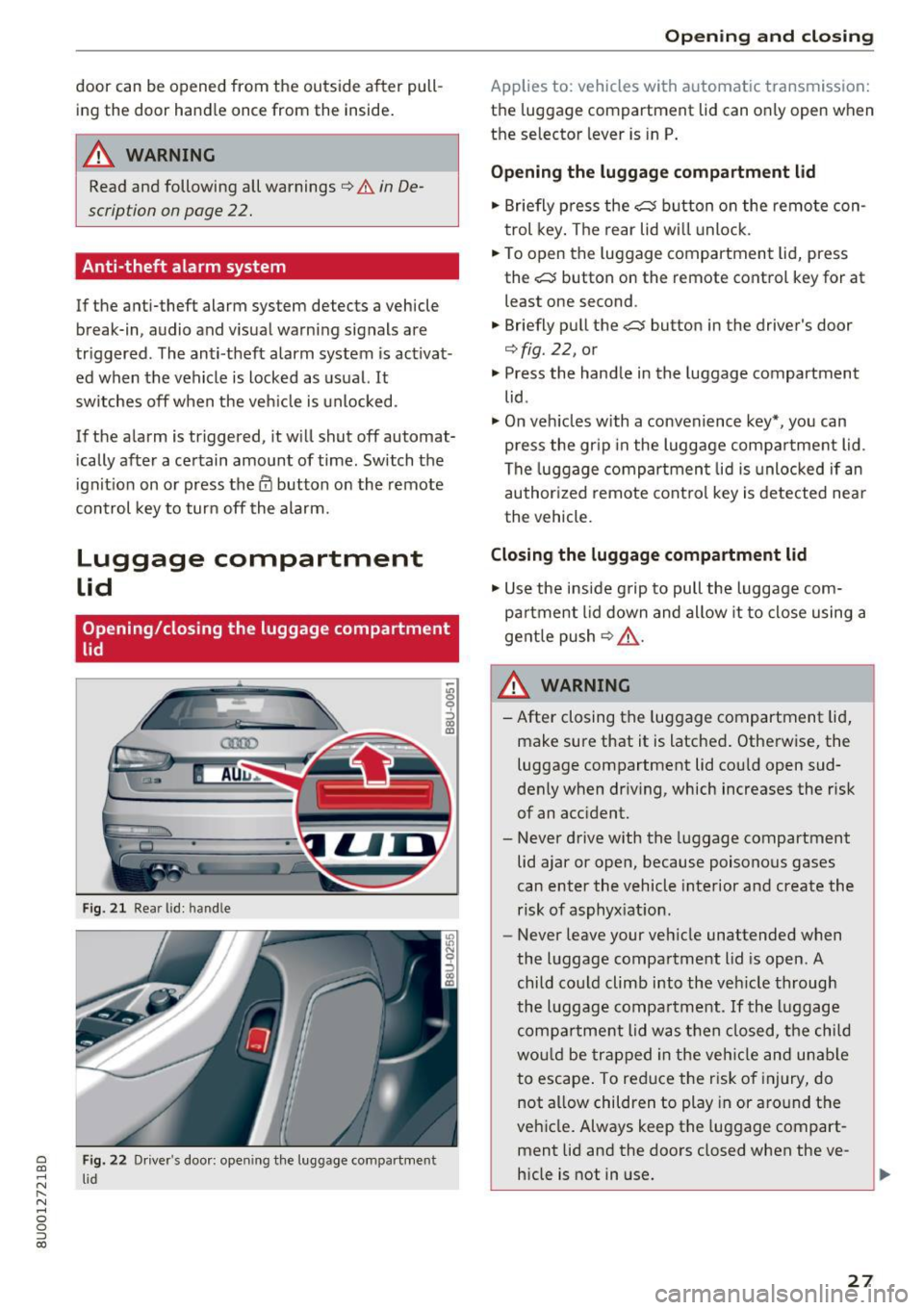
Opening/closing the luggage compartment
lid
Fig. 21 Rear lid: hand le
Fig. 22 Drive r's door: opening the luggage compartment
l id
Open ing and closing
Applies to: vehicles with automatic transmission:
the luggage compartment lid can only open when
the selector lever is in P.
Opening the luggage compartment lid
"' Briefly press the cs button on the remote con
trol key. The rear lid wi ll unlock.
"' To open the luggage compartment lid, press
the
cs button on the remote control key for at
least one second .
"' Briefly pull the
cs button in the driver's door
¢fig. 22, or
"' Press the handle in the luggage compartment
lid .
"'On vehicles with a convenience key*, you can
press the gr ip in the luggage compa rtment lid .
The luggage compartment lid is unlocked if an
author ized remote control key is detected nea r
the vehicle.
Closing the luggage compartment lid
"'Use the inside g rip to pull the luggage com
pa rtment lid down and allow it to close using a
gentle push
¢ ,& .
& WARNING
- After closing the luggage compartment lid,
make sure that it is latched. Otherwise, the luggage compartment lid cou ld open sud
denly when driv ing, which increases the risk
of an accident.
- Never drive with the luggage compartment
lid ajar or open, because poisonous gases
can enter the vehicle interior and create the
risk of asphyxiation .
- Never leave your vehicle unattended when
the luggage compartment lid is open . A
child could climb into the veh icle through
the luggage compartment. If the luggage
compa rtment lid was then closed, the child
wou ld be trapped in the vehicle and unable
to escape . To reduce the risk of injury, do
not a llow children to play in or around the
veh icle . Always keep the luggage compart
ment lid and the doors closed when the ve
hicle is not in use.
27
Page 31 of 230
a
co
...... N r--. N .-< 0 0 ::, co
If there is difficulty in moving or obstacles that b lock the operation, the process will stop.
St oring the open po sition
., Bring the luggage compartment lid into the de
s ired open position. The pos ition must be at a
certain height o r higher to store.
... Press and hold the
cs button for at least four
seconds to store th e new open position . A visu
al and audio signal wi ll follow .
., To set a higher open position, wait at least five
seconds and then carefully press the luggage
compartment lid upward .
., Press and hold the
cs button again for at least
four seconds to store the new open position .
_& WARNING
-Pay ca reful attent ion when closing the lug
gage compartment lid. Otherw ise, you could
cause se rious inj ury to yourself or othe rs de
spite the pinch protection.
- To reduce the risk of pinc hing injuries, al
ways make sure that no one is in the operat ing area of the luggage compartment lid, in
cluding the hinge areas and the upper and
lower edge of the luggage compartment lid.
- Never drive with the luggage compartment
lid ajar or open, because po isonous gases
can enter the vehicle interior and create the
risk of asphyxiation .
- Never leave your vehicle unattended when
the luggage compartment lid is open. A child could crawl into the luggage compart
ment . If the luggage compa rtment lid was
then closed, the ch ild wou ld be trapped in
the vehicle and unable to escape. To reduce
the risk of injury, do not a llow children to
play in or a round t he vehicle . Always keep
the luggage compartment lid and the doors
closed when the vehicle is not in use.
- If there is a luggage rack (such as a bicycle
rack) on the l uggage compartment l id, the
l u ggage compartment lid may not open
completely under certain circumstances or it could close by itself if open due to the extra
we ight. Therefore, the ope n luggage com
partment lid must be given add itional sup-
Op enin g an d clos ing
port or the cargo must f irst be removed
from the luggage rack.
(D Tips
- The luggage compartment lid can be oper
ated manua lly if the vehicle battery is low.
It is necessary to use more force when doing
this. Move the lid slowly to reduce the
amount of force needed.
- When the vehicle is locked, the luggage
compartment lid can be unlocked separately
by pressing the
cs button on the remote
control key . The luggage compartment lid
locks automatically when it is closed again.
Emergency unlocking the luggage
compartment l id
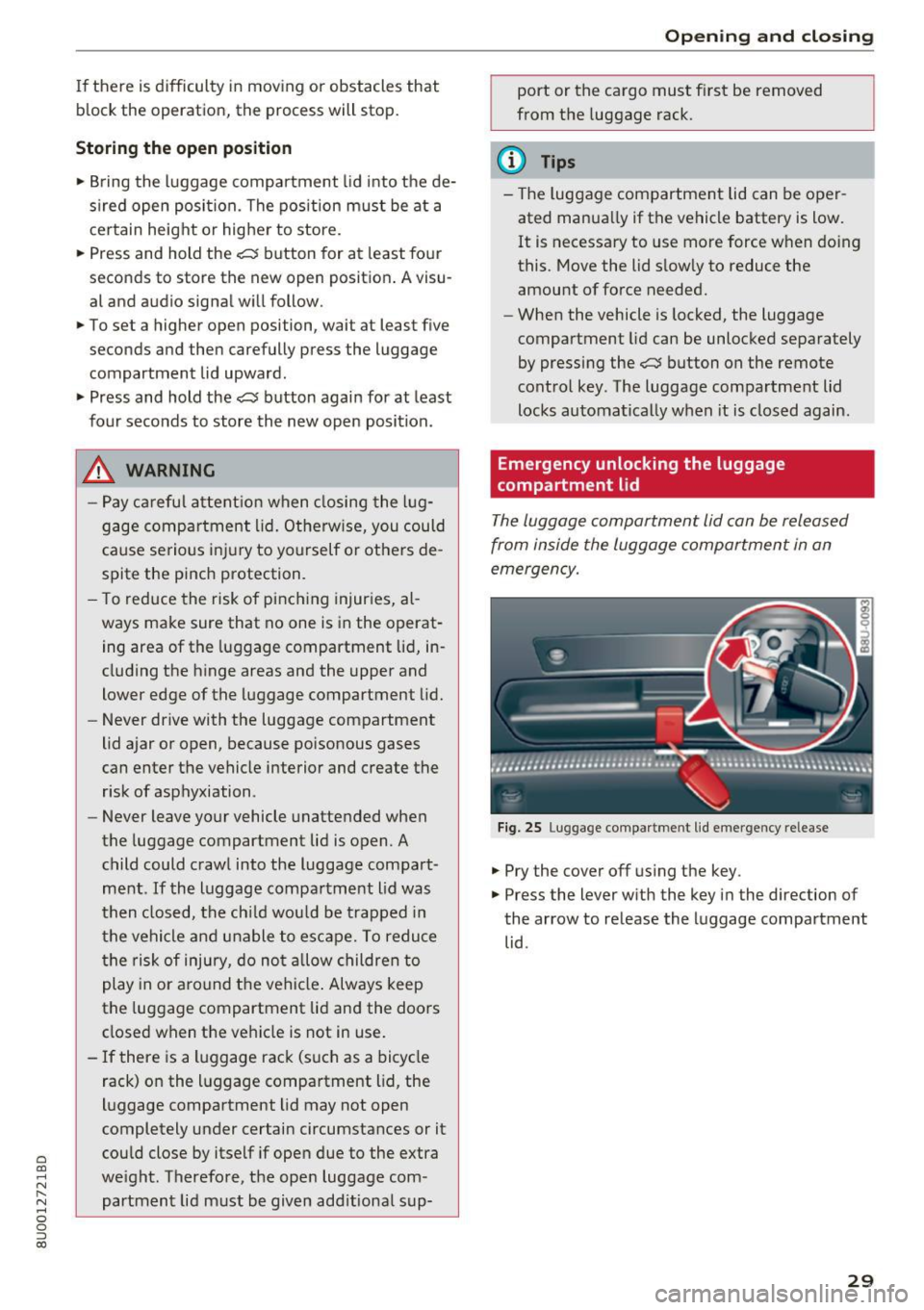
The luggage compartment lid can be released
from inside the luggage compartmen t in an
emergency.
F ig. 25 Lugg age compar tme nt lid e mergency release
... Pry the cover off using the key .
., Press the lever w ith the key in the direction of
the arrow to release the luggage compartment lid .
29
Page 32 of 230
Opening and clo sin g
Child safety lock
The child safety lock prevents the rear doors
from being opened from the inside and the rear
power windows from be operated .
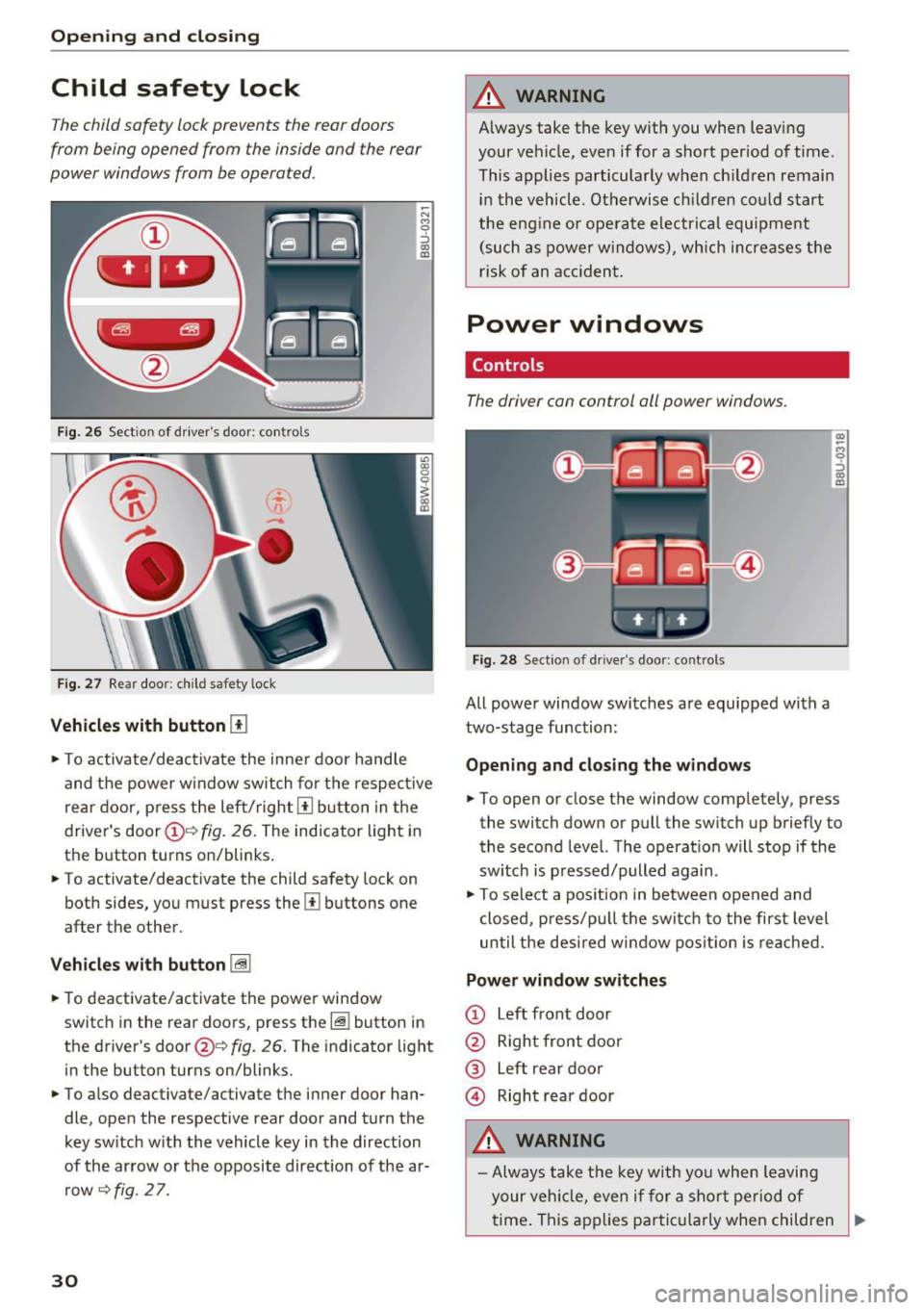
Fig. 26 Sect ion of driver's doo r: co ntrols
F ig. 27 Rear door: c hild safety lock
Vehicles with button [TI
~ N M 9 ::J
co
(D
., To activate/deactivate the inne r door handle
and the power w indow switch for the respective
rea r door, p ress the left/right
[II b utton in the
driver's door(!)'=~
fig. 26. The indicator light in
the button turns on/blinks.
., To activate/deactivate the child safety lock on
both sides, you must press the
Ii] buttons one
after the other.
V eh icl es with button [@
., To deactivate/activate the power window
switch in the rear doors, press the~ button in
the driver's door@¢
fig. 26. The indicator light
in the button turns on/blinks.
., To also deactivate/activate the inner door han
dle, open the respective rear door and turn the key sw itch w ith the vehicle key in the direction
of the arrow or the opposite direction of the ar row
~ fig. 2 7.
30
A WARNING
A lways take the key with you when leaving
your vehicle, eve n if for a short period of time .
This applies particularly w hen ch ildren remain
in the vehicle . Otherwise ch ildren cou ld start
the engine or ope rate electr ical equ ipment
(such as power w indows), which increa ses the
risk of an acciden t.
Power windows
Controls
The driver con control oil power windows.
Fig. 28 Section of driver's door: controls
All powe r window switches are equipped with a
two-stage function:
Openin g and clos in g the w ind ows
(I) ~
9 ::J (I)
(D
., To open or close the window completely, press
the switch down or pull the switch up briefly to
the second level. The operat ion will stop if the
sw itch is p ressed/pulled again .
., To select a position in between opened and
closed, p ress/pu ll the switch to the first level
until the des ired window posit ion is reached.
Power window switches
CD Left front door
@ Right front door
® left
rear door
© Right rear door
A WARNING
- Always take the key with yo u when leaving
your veh icle, even if for a sho rt period of
.
time . This applies parti cularly when children ..,
Page 33 of 230
a
co
...... N r--. N .... 0 0 ::, co
remain in the vehicle. Otherwise, children
could start the engine or operate electrical
equipment (such as power windows), which
increases the risk of an accident .
- Pay careful attention when closing the win
dows. Pinching could cause serious injuries.
- When locking the vehicle from outside, the vehicle must be unoccupied since the windows can no longer be opened in an emer
gency .
(D Tips
After switching the ignition off, you can still
open and close the windows for approximate
ly 10 minutes. The power windows do not
sw itch off until the driver's door or front pas
senger's door has been opened .
Convenience opening/closing
All of the windows and the panorama glass roof
can be opened/closed at the same time .
Convenience opening feature
"'Hold the key in the open position in the driver's
door lock until all of the windows are in the de
sired position and the panorama glass roof is
tilted open .
Convenience closing feature
"'Hold the key in the lock position in the driver's
door lock until all the windows and the panora
ma glass roof are closed .
When the panorama glass roof is opened/closed,
the electric sunshade also opens/closes.
A WARNING
Never close the windows or panorama glass
roof carelessly or in an uncontrolled manner,
because this increases the risk of injury.
Correcting power window malfunctions
You can reactivate the one-touch up/down func
tion if it malfunctions.
"'Pull the power window switch up until the win
dow is completely raised.
-
Open ing and closing
"'Release the switch and pull it up again for at
least one second .
"' Press the power window switch until the w in
dow is completely lowered.
"' Release the switch and press it again for at
least one second . Now you can close the win
dow as usual.
Panorama glass roof
Description
Applies to : veh icles with pano rama glass roof
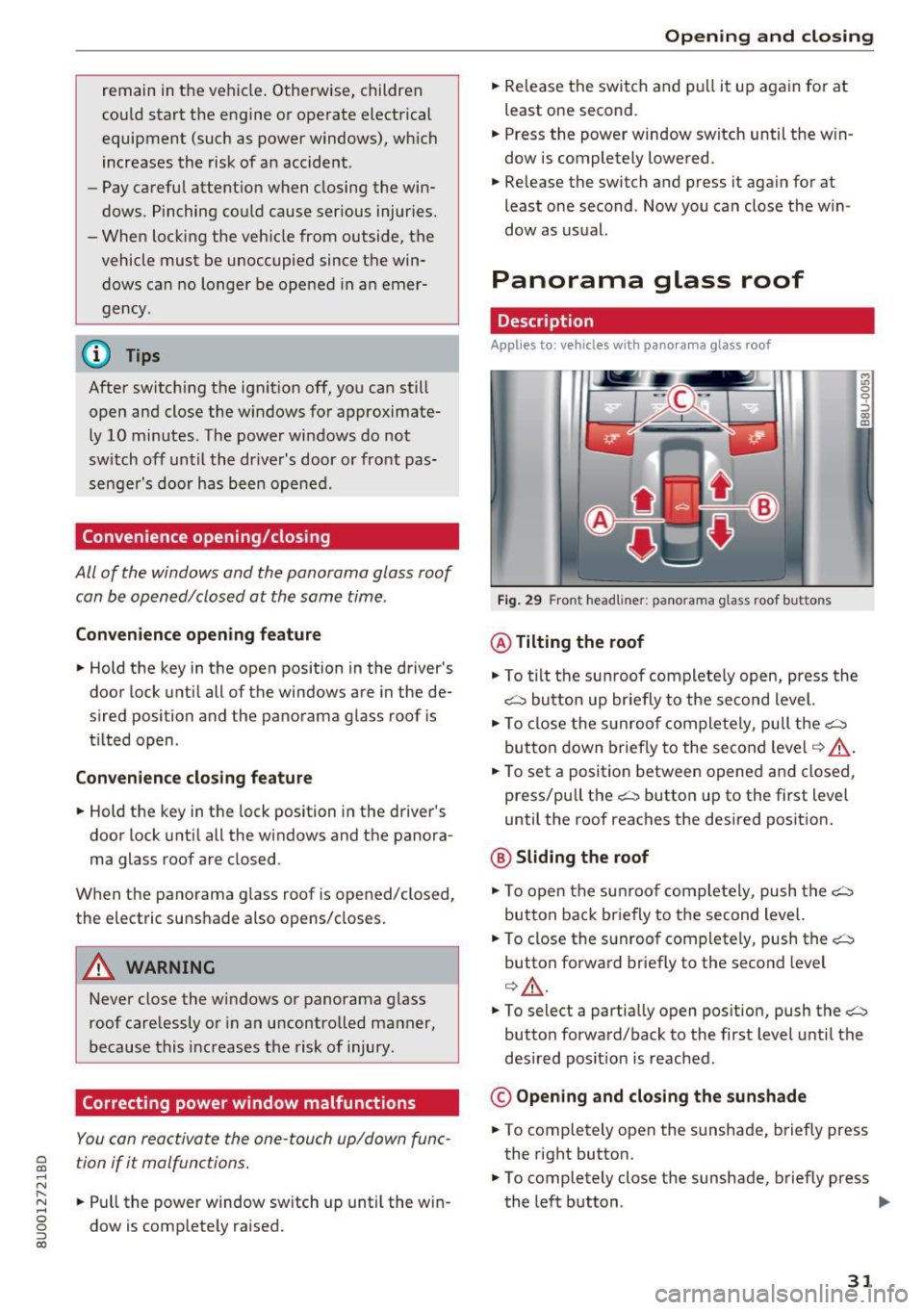
Fig. 29 F ront headline r: pa norama glass roof buttons
@ Tilting the roof
"'To tilt the sunroof complete ly open, press the
~ button up briefly to the second level.
"' To close the sunroof completely, pull the~
button down briefly to the second level
¢ ,&. .
"'To set a position between opened and closed ,
press/pull the~ button up to the first level
until the roof reaches the desired position.
@ Sliding the roof
"'To open the sunroof completely, push the~
button back briefly to the second level.
"' To close the sunroof completely, push the~
button forward briefly to the second level
¢ ,&. .
M ~., 0
0
:, (X) m
"'To select a partially open position, push the~
button forward/back to the first level until the
desired posit ion is reached .
© Opening and closing the sunshade
"'To completely open the sunshade, briefly press
the right button.
"' To completely close the sunshade, briefly press
the left button . ..,
31
Page 34 of 230
Opening and closin g
"'T o stop the sunshade, press the corresponding
button again .
You can still ope rate the panorama glass roof for
about 10 minutes after the ignition is switched
off . The switch is deactivated once the driver's or
front passenger's door is opened .
A WARNING
To reduce the risk of injury, always pay atten
tion when closing the panorama glass roof.
Always take the ign ition key with you when
leaving the vehicle .
(D Note
Always close the panorama glass roof when
leaving your veh icle. Rain can cause damage
to the inter ior equipment of your vehicle, par
ticularly the electronic equipment .
@ Tips
-For informat ion about convenience open
i ng/closing, see
c:> page 31.
- The panorama glass roof will only open
down to -4°F (-20°).
Emergency closing the panorama glass roof
Applies to: vehicl es with panorama glass roof
If an object is detected when closing, the panora
ma glass roof will open again automatically . In
this case, you can then close it with the power
emergency clos ing function.
"' Pull the respective button
c:> page 31, fig . 29
within five seconds after the roof opens auto
matically and hold until the panorama glass
roof* is closed.
If you release the switch early, the panorama
g lass roof will open again .
32
Page 35 of 230

a
co
...... N r--. N
'"' 0 0 ::, co
Lights and Vision
Exterior Lighting
Switching lights on and off
Fig. 30 Instrument panel: l ig ht switc h
Light s witch ·'!;5- ·
Turn the switch to the corresponding position.
When the lights are sw itched on, the
;oo: symbol
turns on.
0 -lights off. On some market-specific vers ions,
the daytime running lights* will switch on when
the ign ition is switched on in this position .
-USA model s: the daytime running lights switch
on automatically when the ignition is switched
on and the light switch is in the
O position or in
the
AUTO position (on ly in daylight) . The Day
tim e running lights
can be switched on and off
in the radio or the MMI*
c:> page 34, c:> A.
-Canada models: the dayt ime running lights
switch on automatically when the ignition is
switched on and the light switch is set to the
0
pos ition, ;oo: o r the AUTO position (on ly in day
li gh t)
c::> A .
AUTO* -automatic headlights switch o n and off
depending on br ightness, for example in tw ilight,
du ring ra in or in tunne ls .
::oo: -Parking lights
io -Low beam headlights
io -All weather ligh ts. T urn the switch to parking
light
; oo : or low beam head light io . Pull the
sw itch up to the first notch@.
0$-Rear fog lights . Tur n the switch to parking
l ight
000: o r low beam head light gD. P ull the
switch up to the second notch @.
Lights and V ision
All-weather lights
T he front lights are adjusted au toma tic a lly so
t h at there is less g lare for the driver from his or
her own lights, fo r example whe n roads are wet.
Automatic dynamic headlight range control
Yo ur vehicle is equ ipped with a headlight range
contro l system so tha t there is less g la re for on
com ing traff ic if the vehicle load changes. The
headlig ht range also adjusts automatica lly when
braking and acce lerating.
Static cornering light *
The s tat ic co rnering light may be available de
pend ing on veh icle equipment and it only works
when the light switc h is in the AUTO pos ition. The
corner ing light switches on automat ica lly at
speeds up to approximately 44 mph (70 km)
when the steering wheel is at a certain angle. The area to the side of the veh icle is illuminated bet
ter when turning .
A WARNING ,-
- Automatic headlights* are on ly intended to
assist the dr iver . T hey do not relieve the
d river of respo nsibi lity to check the head
lights and to tu rn them on m anu ally based
on t he current l ight a nd v is ibility condi tions.
F or exam ple, fog cannot be detected by t he
light sensors. So always switch on the low
beams under these weat her con ditions an d
when dr iv ing in the dark
io.
- The rear fog lights sho uld only be turned on
in accordance w ith traffic regulations, to
prevent glare for traffic behind your vehicle.
- Always observe legal regulations when us
ing the lighting systems described.
@ Tips
- T he lig ht sensor for the automatic he ad
lights * is in the rearview mir ror mount. Do
not p lace any stickers in this area on the
windshield.
- Some exter io r lighting functio ns can be ad
justed
c::> page 34 .
33
Page 36 of 230
Lights and Vision
-If you turn off the ignition whi le the exter ior
lights are on and open the door, a warning
tone sounds.
- In cool o r damp weather, the inside of the
headlights, turn s ignals and tail lights can
fog over due to the temperature d if f erence
between the inside and outside. They will
clear short ly after switch ing them on. This
does not affect the serv ice life of the light
i ng .
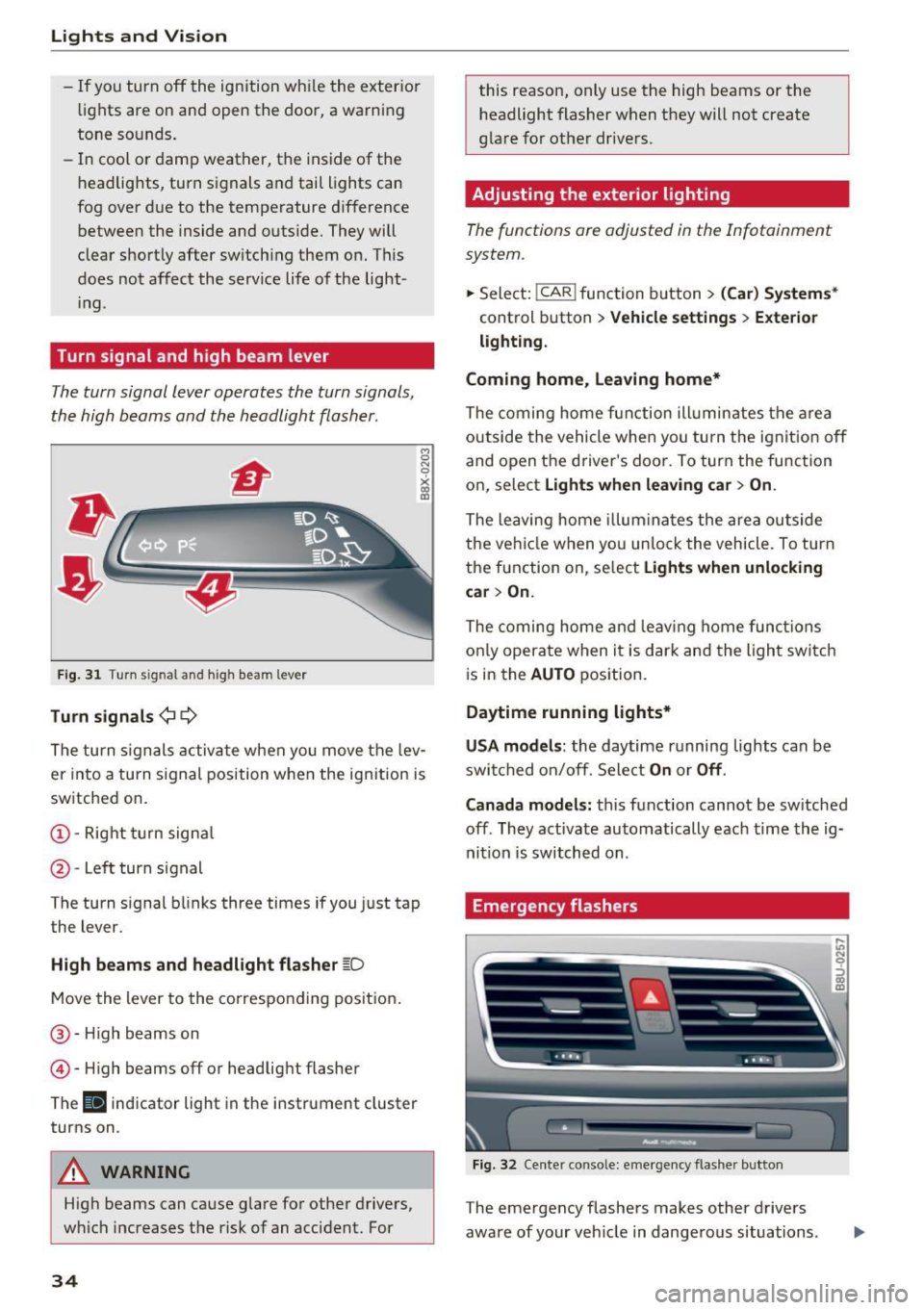
Turn signal and high beam lever
The turn signal lever operates the turn signals,
the high beams and the headlight flasher .
Fig. 31 Turn signal and high beam lever
Tu rn signals ¢ 9
The turn s ignals activate when you move the lev
er into a turn s ignal position w hen the ign ition is
sw itched on.
@ -Right turn signa l
@-Left turn signal
The turn signal blinks three times if you just tap
the lever.
High b eams and headl ight flasher ~D
Move the lever to the co rrespo nd ing pos it ion .
@ -High beams on
© -High beams off or headlig ht flasher
The
II indicator light in the instrument cluster
turns on .
A WARNING
High beams can cause glare fo r other drivers,
w hi ch increases the risk of an accident. For
34
this reason, only use the high beams or the
headlight flasher when they will not create
glare for other dr ivers.
Adjusting the exterior lighting
The functions are adjusted in the Infotainment
system .
.,.. Sele ct: !CAR ! function b utton> (Car ) Systems *
control button > Vehicle settings > Exte rior
lighti ng.
Coming home, Leaving home*
The coming home fun ction ill umin ates the a rea
outside the vehicle when you tu rn the ignit io n off
and open the driver's doo r. To turn the func tion
on, select
Light s when leaving car > On .
The leaving home illum ina tes the area ou tside
the ve hicle when yo u un lo ck the vehicle . To turn
the function on, se lect
Lights when unlocking
car > On.
The coming home and leav ing home func tions
on ly opera te when it is dar k and the l ight switc h
i s in the
AUTO position.
Daytime running lights*
USA models :
the daytime running lights can be
swit ched on/off. Sele ct
On or Off .
Canada models:
this function cannot be sw itched
off . They activate automatically each time the ig
nit ion is switched on .
Emergency flashers
Fig. 32 Center conso le: emerge ncy flasher button
The emergency flashers makes other drivers
aware of your veh icle in dange rous situations.
In N 0
~ Cl) m