ignition AUDI Q3 2018 Owner's Manual
[x] Cancel search | Manufacturer: AUDI, Model Year: 2018, Model line: Q3, Model: AUDI Q3 2018Pages: 230, PDF Size: 57.03 MB
Page 63 of 230
a
co
...... N r--. N .-< 0 0 ::, co
-Always take the key with you whenever you
leave your vehicle. Otherw ise, the engine
could be started or electrical equ ipment
such as the power windows could be operat
ed . This can lead to serious injury.
- For safety reasons, always park the vehicle
with the se lector lever in the P position .
Otherwise, there is the r is k that the vehicle
cou ld roll unintentionally.
CD Note
If the engine has been under heavy load for
an exte nded per iod of t ime, heat bu ilds up in
the engi ne compartment after the engine is
sw itched off an d there is a risk of damaging
t he engi ne. For this re ason, let the eng ine r un
for at idle fo r ap proxim ately two minu tes be
fore shutting it off .
(D Tips
For up to 10 minu tes after stopp ing the en
g ine, the r adiator fan may t urn o n again a uto
matically or it may con tinue to run (eve n if
the ignition is switched off) for the following
reasons :
- The coolant tempera ture is inc reasing due
to trapped heat .
-If the engine is warm and the engine com
partment also heats up from strong sun
light .
Drivi ng
Starting and stopping
the engine (vehicles with
a convenience key)
Starting the engine
Applies to: vehicles with convenience key
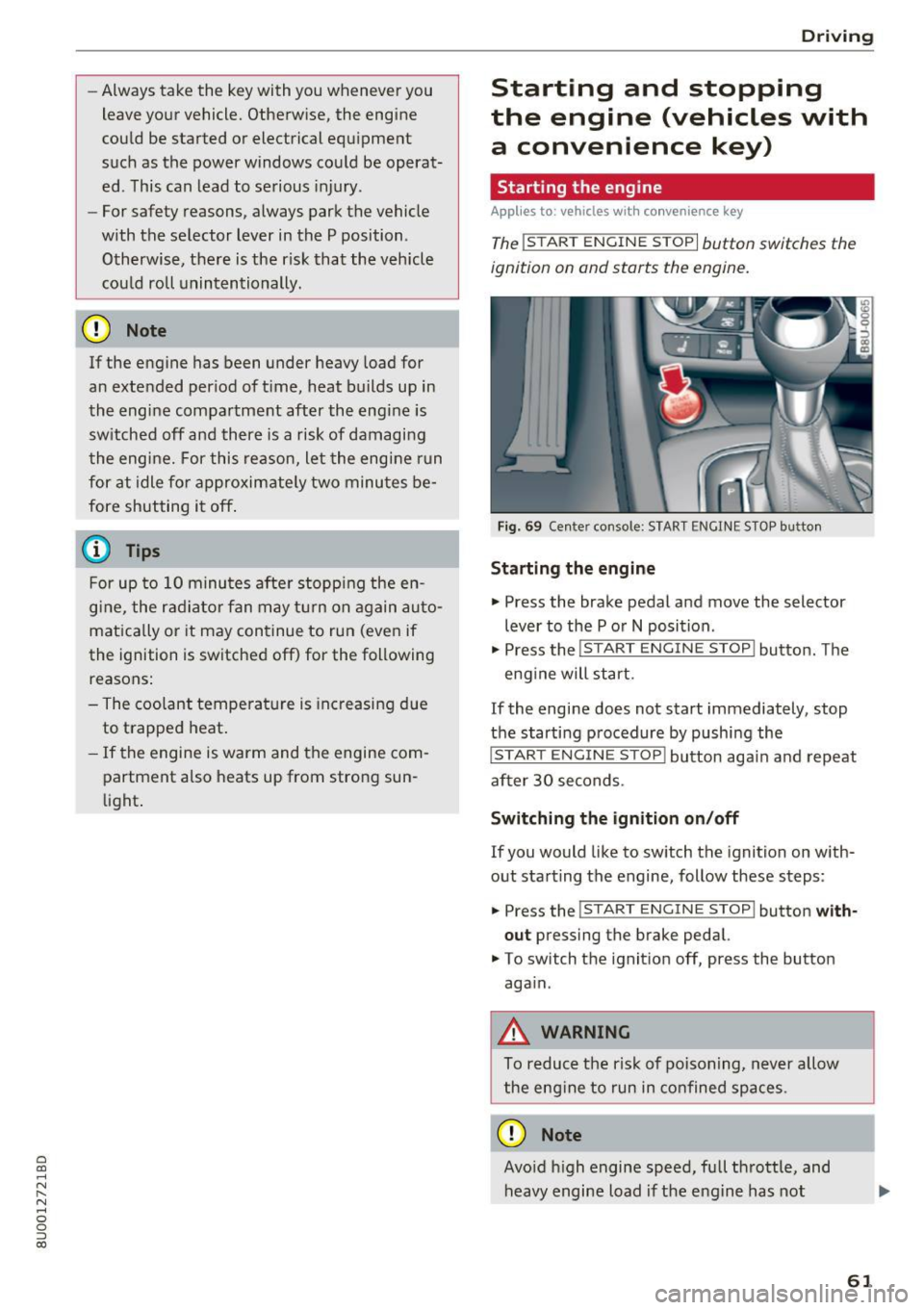
The !START ENGINE STOPI button switches the
ignition on and starts the engine.
Fig. 69 Ce nter console: START ENGI NE ST OP butto n
Starting the engine
• Press the brake pedal and move the selector
lever to the P o r
N position .
• Press the
!START ENGINE STOP! button. The
eng ine will start.
If the engine does not start immediately, stop
the starti ng procedure by pushi ng the
!START EN GINE STOP! button aga in and repeat
after 30 seconds .
Switching the ignition on /off
If you would like to sw itch the ignition on with
out starting the engine, follow these steps:
• Press the
!S T ART ENGINE STOP! button with
out
press ing the brake pedal.
• To switch th e ignit ion off, press the button
aga in.
_&. WARNING
-
To reduce the ris k of poisoning, never allow
t he eng ine to run in confined spaces .
CD Note
Avoid h igh engine speed, full thrott le, and
heavy engine load i f th e eng ine has not
-
61
Page 65 of 230

a
co
...... N r--. N
'"' 0 0 ::, co
Starting the engine when there is a
malfunction
Applies to: vehicles with conven ience key
Other circumstances can cause the engine not to
start, such as the battery in the remote control key has drained , there is interference with the
key or there is a system malfunction .
Fig . 7 0 Steering co lumn /remote co ntro l key: st arting t he
en gine if there is a malfunc tion
Req uiremen t: the message No k ey identified .
See owne r's manual
must be disp layed and the
II indicator light m ust be on.
.,. Hold the remo te contro l key ve rtic ally in the lo
c ation ind ic a ted
y>l) c::> fig. 70 .
.,. Press the brake peda l.
.,. Press the
I ST AR T ENGINE STOP I button. The
engine will start.
.,. Drive to an authorized Audi dealer or author
iz ed Audi Service Facility immediately to have
the mal function corrected .
@ Tips
You can view the message again by pressing
the
I START ENGINE STOP ! button.
Messages
Turn off ignit io n. Battery discharging
This message appears and a warning tone sounds
if you open the driver's doo r when the ignition is
switched on .
Press brake pedal to start engine
This message appears if you do not step on the
b rake pedal to sta rt the eng ine o n a vehicle wi th
a n autom atic transm ission.
D rivi ng
Plea se engage Nor P.
This message appears when sta rt ing o r stopping
t h e e ngine if t he se lecto r lever is no t in the Nor P
pos ition. The e ngine will not star t/stop.
IS Is key in the vehicle?
The ind icator light turns on and this message ap
pears if the convenience key* was removed from
t h e veh icle when the e ngine was ru nning. If the
convenience key is no longer in the veh icle , you
c annot sw itch the ignition on or sta rt the eng ine
o nce you stop i t. You also canno t loc k the vehicle
from the o utside.
Shift to P, vehicle can roll away . Doors c an only
be lo cked in P .
This message appears for safety reasons if the
selector lever for the au tomatic transm ission is
not in the P position after the ignition is switched
off . M ove the selector leve r to the P posi tion.
Otherwise the ve hicle is not pro tec ted from ro ll
ing and i t cannot be locked .
II No key identified. See owner's manual.
This message appears if there is no conven ience
key* inside the vehicle or if the system does not
recognize the key . The co nvenience key may not
be recognized, for example, if it is covered by an
obje ct tha t
disrup ts the signa l (such as a br ief
c ase), or if the key b attery is we ak. El ectro nic de
vi ces such as cell phones c an also inte rfe re wi th
the signal.
T o still be ab le to start or stop the engine, refer
to
i=:> page 63 .
Electromechanical
parking brake
Fig. 71 Cen te r conso le : pa rk in g b rake
63
Page 69 of 230
a
co
...... N r--. N .-< 0 0 ::, co
When a moderate driving s tyle is used, the
transmission selects the most economical driving
mode. The transm iss ion upsh ifts at a lower RPM
and downshifts at a higher RPM to improve fuel
efficiency .
The transmission switches to a sporty mode after a kick-down or when the driver uses a
spo rt y
dri ving st yle
character iz ed by quick accelerator
pedal movements, heavy acceleration, frequent
changes in speed and traveling at the maximum
speed .
If desired , the driver can also select the gears
manually (tip tronic mode ) ¢ page 70, Manual
shifting (tiptronic mode) .
Power is transferred using a torque converter.
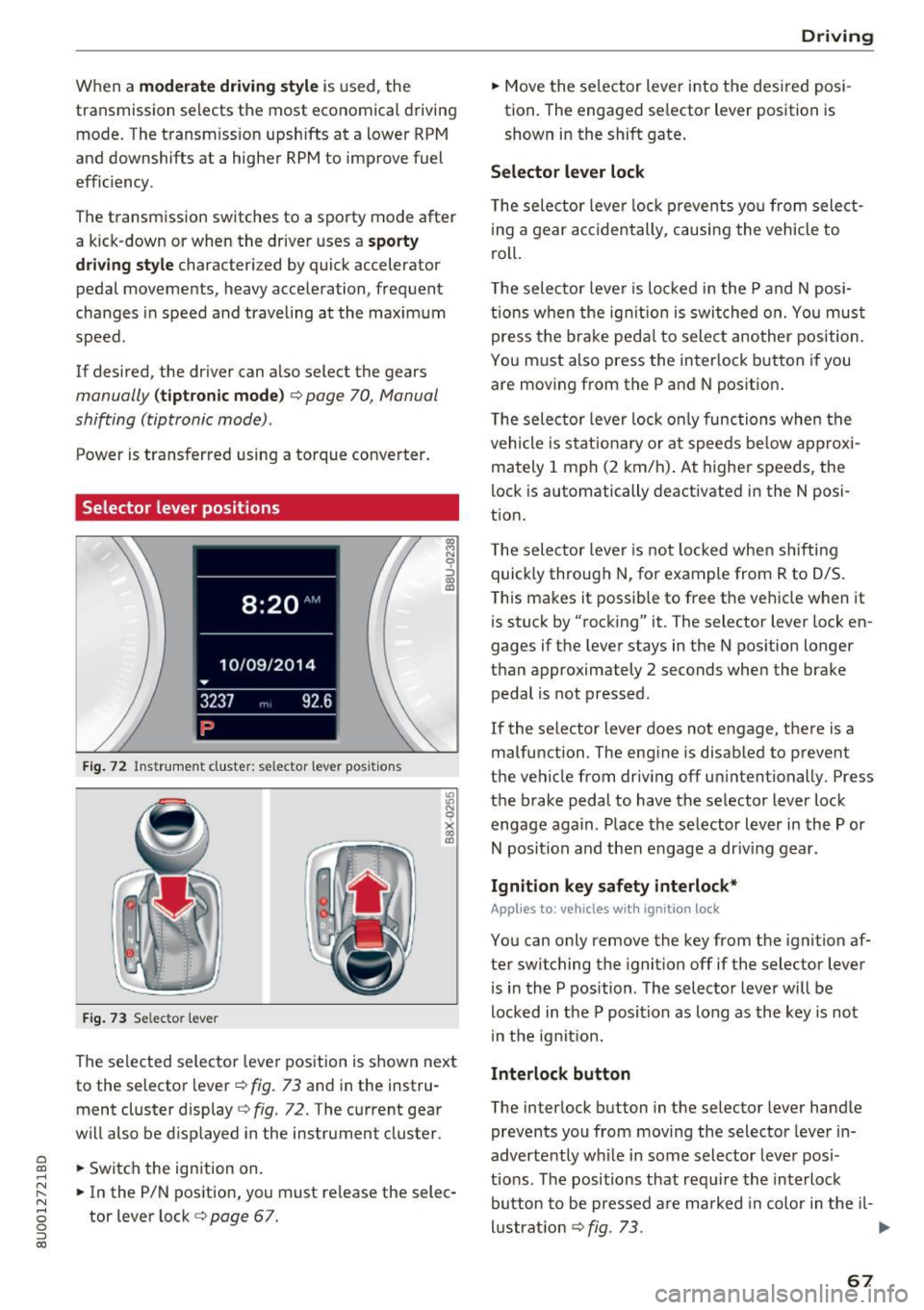
Selector lever positions
Fig. 72 Inst rument cluste r: selector leve r pos it ions
F ig. 7 3 Selec tor lever
The selected selector lever position is shown next
to the selector lever ¢
fig. 73 and in the instru
ment cluster display
¢ fig . 72. The current gear
will also be d isp layed in the instrument cluster.
.. Switch the ign ition on.
.. In the P/N position, you must release the selec
tor lever lock ¢
page 67.
Drivi ng
.. Move the selector lever into t he des ired posi
tion. The engaged se lector lever position is
shown in the shift gate .
Selector lever lock
The selec tor leve r lock p revents yo u from select
i ng a gear accidentally, causing the vehicle to
roll.
T he selector leve r is lo cked in the P and N posi
ti ons when the ig nit ion is switched on. You mus t
press the brake peda l to sele ct another position.
You must also press the interlock button if you are moving from the P and N position.
T he selec tor leve r lock o nly functions when the
vehicle is stat ionary or at speeds be low approxi
mately 1 mph (2 km/h) . At higher speeds, the
lock is automatically deactivated in the N posi
tion.
T he selec tor leve r is not locked whe n shifting
quick ly through N, for example from R to 0/S.
This makes it possib le to free the vehicle when it
is stuck by "rocking" it. The selector lever lock en
gages if the lever stays in the N pos ition longer
than approximately 2 seconds when the brake peda l is not pressed .
If the selector lever does not engage, there is a
malfunction . The engine is disabled to prevent
the vehicle from driv ing off un intent ionally. Press
the brake pedal to have the se lector lever lock
engage again . Place the selector lever in the P or
N position and then engage a dr iv ing gear.
Ignition key safety interlock*
Applies to: vehicles with ignition lock
You can only remove the key from the ignition af
ter switching the ignition off if the selector lever
is in the P position . The selector leve r will be
locked in the P position as long as the key is not
in the ignit ion.
Interlock button
The interlock button in the selector lever handle
prevents you from movi ng the selector lever in
advertently wh ile in some selector lever posi
tio ns. The positions that requ ire the interlock
button to be pressed a re marked in color in the il-
l u strat io n ¢
fig. 73. .,.
67
Page 70 of 230
Driving
P - Park
This selector lever position prevents the vehicle
from rolling. You can only shift into Park when
the vehicl e is
stationary ¢&. .
To shift in and out of the P selector lever posi
tion, press the interlock button in the selector
lever
while pressing the brake pedal.
R- Reverse
Only shift into reverse gear when the vehicle is
stationary and the engine is running at idle
speed ¢&, .
To select the R selector lever position, press the
interlock button
while pressing the brake pedal.
N - Neutral
The transmission is in idle in this position.
To engage the N selector lever position, press the
button on the selector lever and shift into the N
position.
To
move from selector lever position out of N,
you must press the brake pedal and the vehicle
must be traveling less than 1 mph (2 km/h) or be
stationary.
DIS -Normal position for driving forward
In the D/S selector lever position, the transmis
sion can be operated either in the normal D mode
or in the S sport mode. To select the S sport
mode, pull the selector lever back briefly. Pulling
the lever back again will select the normal D
mode. The instrument cluster display shows the
selected driving mode .
In the
normal mode D, the transmission auto
matically selects the suitable gear ratio. It de
pends on engine load, vehicle speed and driving
style.
The engine's power reserves are used fully in the
Sport mode S. Shifting may become noticeable
when accelerating.
To
move from selector lever position N to D, you
must press the brake pedal and the vehicle must
be traveling less than 1 mph (2 km/h) o r be sta
t ionary ¢&, .
68
A WARNING
-
Read and follow all WARNINGS.
-The vehicle can roll
even if the ignition is
switched off.
- Never select R or P while driving, because
this increases the risk of an accident.
- Power is still transmitted to the wheels
when the engine is running at idle. To pre
vent the vehicle from "creeping", you must keep your foot on the brake in all selector
lever positions (except P) when the engine is
running .
- Do not inadvertently press the accelerator
pedal when the vehicle is stopped if a gear is
engaged . Otherwise, the vehicle will imme
diately start to
move -sometimes even if
the parking brake is firmly applied. This in
creases the risk of an accident.
- To reduce the risk of an accident, do not
press the accelerator pedal when changing
the selector lever position while the vehicle
is stationary and the engine is running.
- Never leave your vehicle with the engine
running while in gear. If you must leave
your vehicle when the engine is running, set
the parking brake and move the selector lev
er to the P position.
- Before you or other persons open the hood
and work on a running engine, the selector
lever must be in the P position and the park ing brake must be applied to reduce the risk
of an accident . Always read and follow the
applicable warnings ¢
page 155, Working
in the engine compartment.
- Read and following all WARNINGS¢&. in
Driving tips on page 69 .
(D Note
Never let the vehicle roll downhill with engine
off and the selector lever in the N position,
because this could damage the automatic
transmission and catalytic converter.
(D Tips
- If you accidentally select N while driving,
take your foot off the accelerator pedal and .,.
Page 71 of 230
0 co ......
"' ,....
"' ...... 0 0 :::,
00
wait for the engine to slow down to idle
before selecting Dor S.
- If there is a power failure, the selector lever
will not move out of the P position. The
emergency release can be used if this hap
pens
¢ page 72.
Driving tips
Starting the engine
~ The selector lever must be in the P or the N po
sition.
Starting from a stop
~ Press and hold the brake pedal.
~ Press and hold the lock button in the selector
lever handle, select the desired selector lever
position such as D ¢
page 67 and release the
lock button.
~ Wait a moment until the transmission shifts .
You will notice a slight movement when the gear engages .
~ Release the brake pedal and press the accelera-
tor pedal ¢,&. .
Various convenience functions are available for
starting on hills
¢ page 65 .
Stopping temporarily
~ Press the brake pedal to stop the vehicle, for
example at a traffic light. Do not press the ac
celerator pedal when doing this .
~ To prevent the vehicle from rolling when you
start driving, set the parking brake when stop
ping on steep hills ¢
8. and ¢0.
~ The parking brake will release automatically
and the vehicle will start moving once you press
the accelerator pedal.
Stopping/parking
If the selector lever is not in the P position when
you open the driver's door, the vehicle could roll.
In vehicles with a convenience key*, the message
Shift to P and turn off ignition, or vehicle can
roll away
appears.
~ Press and hold the brake pedal¢,&. .
~ Set the parking brake .
~ Select the P selector lever position .
Driving
Under certain circumstances, (such as driving in
the mountains or towing a trailer), it may be use
ful to switch temporarily to the manual shift pro
gram in order to adjust the gears to the driving
conditions by hand
¢page 70.
On inclines, activate the parking brake first and
then move the selector lever to the P position
¢
page 64. This prevents the locking mechanism
from being loaded too heavily and will make it
easier to move the selector lever out of the P po
sition.
A WARNING
= -- The vehicle can roll even when the engine is
switched off.
- Unintended vehicle movement can lead to
serious injuries .
- Never leave your vehicle with the engine
running while in gear. If you must leave
your vehicle when the engine is running, set
the parking brake and move the selector lev
er to the P position.
- Power is still transmitted to the wheels
when the engine is running at idle. To pre
vent the vehicle from "creeping", you must
keep your foot on the brake in all selector
lever positions (except P) when the engine is
running.
- Do not inadvertently press the accelerator
pedal when the vehicle is stopped if a gear is
engaged. Otherwise the risk of an accident
increases because the vehicle will start to
move immediately, even if the parking brake
is set.
- To reduce the risk of an accident, do not
press the accelerator pedal when changing
the selector lever position while the vehicle
is stationary and the engine is running.
- Never engage the R or P selector level posi
tions while driving. It could cause a crash.
- Before driving down a steep slope, reduce your speed and shift into a lower gear in tiptronic mode.
- Do not ride the brakes or press the brake
pedal too often or too long when driving
downhill. Constant braking causes the
brakes to overheat and substantially ..,.
69
Page 79 of 230
0 co ......
"' ,....
"' ...... 0 0 :::,
00
@ Tips
The cruise control system cannot maintain
the speed cons istently if you are driving on
steep hills. The vehicle weight ca uses the
speed to increase. Due to th is, shift into a
lower gear in t ime or apply the brakes .
Changing the speed
Applies to: vehicles with cruise control system
• To inc rease or decrease the speed in incre
me nts, p ush the lever tow ard
010 c> page 76,
fig. 78.
• To in cr ease o r decrease the speed qu ickly , hol d
the leve r in the
010 direction un til the de
si red spee d is displayed .
Overriding the speed
Applies to: vehicles with cru ise control system
You can a lso press the accelerator pedal down to
i ncrease you r speed, for example if you want to
pass someone. The speed you set earlier w ill re
sume as soo n as you release the accelerator ped
al.
However, if you are driving cons iderably faster
than the stored speed for a long period of time,
the cruise cont rol system wi ll temporarily switch
off . Th e
A;[l)~i4 (USA models) !l'I (Canada mod
e ls) indica to r li ght in the inst rument cluste r
turns off and the stored speed is m ain taine d.
Preselecting a speed
Applies to: vehicles with cruise control system
You can pre-select your desired spe ed when the
v e hicle is sta tionary.
.,. Switch the ign ition on .
.. Pull the lever into position ©
c> page 76,
fig. 78 .
.,. To inc rease o r decrease the speed, push the lev -
er towar d
010 .
.. To store the speed disp laye d, re lease the lever .
This f unct io n ma kes it poss ib le, for examp le, to
save the spee d yo u wan t be fo re dr iving on the
hig hway. On ce on t he h ighw ay, activa te the
Assistance systems
cruise contro l system by p ulling the lever towa rd
the position ©-
Switching off
Applies to: vehicles with cruise control system
Deact ivating temporarily
• Press the brake pe dal, or
• Press the lever into position @ (not clicked into
place)
c> page 76, fig . 78, o r
• Dr ive for longer t han five minutes at more than
6 mph (10 km/h) above the sto red speed .
Switching off completely
• Press the lever into position @(clicked into
place), or
• Switch the ignit ion off.
T he speed you stored will be maintained if the
c ruise contro l has been switched o ff temporarily.
To resume the stored speed, re lease the bra ke
pedal and pull the lever into pos ition ©-
Switching t he ignition off w ill erase the stored
speed.
A WARNING ,_
You should only resume the sto red speed if it
i s not too high fo r existing t raff ic conditions.
Ot he rw ise you can inc rease the risk of an acci
dent.
77
Page 86 of 230
Parking systems
Switching on/off
Applies to: ve hicles w ith park ing system p lus
F ig. 86 Center console: park ing aid button
Fig. 87 Infota inmen t system: visua l dista nce dis play
Switching on
.. Shift into reverse, or
.. Press the
P"'A button in the center console
c> fig. 86. A short confirmat ion tone sounds and
the LED in the button turns on.
Switching off
.. Drive faster than 6 mph (10 km/h), or
.. Press the
p,,.,A button, or
.. Switch the ignition off.
Segments in the visual display
The red segments in front of and behind the vehi
cle
9 fig. 87 help you to determine the distance
between you and a detected obstacle. As your ve
hicle comes closer to the obstacle, the segments
move closer to the vehicle. The collision area has been reached when the next to last segment is
displayed . Do not continue driving forward or in
reverse
q .&. in General information on page 82,
q (J) in General information on page 82!
84
Rearview camera
Introduction
App lies to: vehicles with parking system plus w ith rearview
came ra
Fig. 88 Illu strat ion: cross parking
Fig. 89 Illust rat ion: para llel park ing
In addition to parking system plus r=>page 83,
this parking system a lso has a rearview camera.
You can use cross parking for example, to park in
a parking space or in a garage
q fig. 88. You can
use parallel parking if you would like to park on
the side of the road
q fig. 89 .
Page 88 of 230
Parking systems
Switching between the rearview camera and
optical display
.. Press the Graphic control button ®
t=:> page 86, fig. 92 to see the optical display.
• Press the
Rear view control button to see the
rearview camera image.
Switching off
.. Drive faster than 6 mph (10 km/h), or
.. Press the p,,.,.6. button, or
• Switch the ignition off .
@ Tips
The visual display in the left part of the dis
play should help you detect the critical veh icle
areas.
Perpendicular parking
Applies to: vehicl es with parking system plus with rearv iew
camera
This view may be used when parking in a garage
or in a parking space.
Fig . 92 Infota inme nt system: a iming at a parking space
Fig. 93 Infota in me nt system: a lign ing the veh icle
.. Turn the Infotainment system on and shift into
reverse gear.
86
.. The orange orientation lines (D show the direc
tion of travel of the vehicle. Turn the steering
wheel unt il the orange orientation lines appear
in the parking space
t=:> fig . 92 . Use the mark
ings @to help you estimate the distance from
an obstacle . Each marking represents approx i
mately 3
ft (1 m). The blue area represents an
extension of the vehicle's outline by approxi
mately 16
ft (5 meters) to the rear .
.. While driving in reverse gear, adjust the steer
ing wheel angle to fit the park ing space using
the orange orientation lines for assistance
¢ A in General information on page 85, ¢ (D
in General information on page 85 .@ marks
the rear bumper . Stop the veh icle, at the latest,
when the red orientation line© borders an ob
ject .
Parallel parking
App lies to : vehicles with parking system plus with rearview
camera
This view may be used when parallel parking
along the side of a street.
Fig. 94 Infotainment : b lue s urfaces aligned in the parkin g
space
Fig. 95 Infotai nment: contact of t he blue curved line w ith
the curb
II-
Page 118 of 230
Airbag system
about children and Advanced Airbags
c:>page 134.
Even though your vehicle is equipped with an Ad
vanced Airbag System, make certain that all chil
dren, especially those 12 years and younger, al
ways ride in the back seat proper ly restrained for
their age and size. The airbag on the passenger
side makes the front seat a potentially dangerous place for a child to ride. The front seat is not the
safest place for a child in a forward-facing child
safety seat . It can be a very dangerous place for
an infant or a child in a rearward-fac ing seat.
The Advanced Airbag System in your veh icle has
been cert ified to comply with the requirements
of United States Federal Motor Vehicle Safety
Standard (FMVSS) 208, as well as Canada Motor
Veh icle Safety Standard (CMVSS) 208 as applica
b le at the time your vehicle was manufactured.
According to requirements, the front Advanced
Airbag System on the passenger side has been
certified for "suppression" for infants of about
12 month old and younger and for "low risk de
ployment" for children aged 3 to 6 years o ld (as
defined in the standard) .
The
PASSENGER AIR BAG OFF light in the instru
ment panel tells you when the front Advanced
Airbag on the passenger side has been turned off by the electronic control unit.
Each time you switch on the ignition, the
PAS
SENGER AIR BAG OFF
light will come on for a
few seconds and:
- will stay on if the front passenger seat is not
occupied,
-will stay on if there is a small chi ld or child re
straint on the front passenger seat,
- will go off if the front passenger seat is occu
pied by an adult as registered by the weight
sensing mat
c:> page 124, Monitoring the Ad
vanced Airbag System.
The PASSENGER AIR BAG OFF light comes on
when the control unit detects a tota l we ight on
the front passenger seat that requires the front
airbag to be turned off.
If the total weight on the front passenger seat is
more than that of a typical 1 year-old child but
116
less than the weight of a sma ll adult, the front
airbag on the passenger side can dep loy (the
PASSENGER AIR BAG OFF light does not come
on). If the
PASSENGER AIR BAG OFF light does
not come on, the front airbag on the passenger
s ide has not been turned off by the electron ic
control unit and can deploy if the control unit
senses an impact that meets the conditions stor
ed in its memory.
For example, the airbag may deploy if:
-a small ch ild that is heav ier than a typica l 1
year-old child is on the front passenger seat (regardless of whether the child is in one of the
child safety seats listed
c:> page 136), o r
- a child who has outgrown ch ild restraints is on
the front passenger seat.
If the front passenger airbag is turned off, the
PASSENGER AIR BAG OFF light comes on in the
i nstrument cluster and stays on.
The front airbag on the passenger side may
not
deploy (the PASSENGER AIR BAG OFF light does
not illuminate and stay lit) even if a small adult
or teenager, or a passenger who is not sitting up
right with their back against a non-reclined back
rest with the ir feet on the vehicle floor in front of
the seat is on the front passenger seat
c:> page 98, Proper seating position for the driver.
If the front passenger a irbag deploys, the Feder
al Standard requires the airbag to meet the "low
risk" deployment criteria to reduce the r isk of in
jury through interact ion w ith the airbag. "Low
risk" deployment occurs in those crashes that
take place a t lower decelerations as defined in
the e lectronic control unit
c:> page 125, PASSEN
GER AIR BAG OFF light.
Always remember, a child safety seat or infant
carrier installed on the front seat may be struck
and knocked out of position by the rapidly inflat
i ng passenger's airbag in a frontal collision . The
airbag could greatly reduce the effectiveness of
the child restraint and even seriously injure the
ch ild during inflation.
For this reason, and because the back seat is the
safest place for children -when proper ly restrain
ed according to their age and size -we strongly
Ill>
Page 123 of 230

more. The function of the system in the front
passenger seat is checked by the electronic con
trol unit when the ignition is on . The control unit
monitors the Advanced Airbag System and turns
the airbag indicator light on when a malfunct ion
i n the system components is detected . The func
tion of the airbag indicator light is descr ibed in
greater detail below . Because the front passen
ge r seat contains important parts of the Ad
vanced A irbag System, you m ust take care to p re
vent it from being damage d. Damage to the seat
may prevent the Advanced Airbag for the front
passenger seat from doing its job in a crash.
The front Advanced Airbag System consists
of the following :
-Crash sensors in the front of the vehicle t hat
measure vehicle acceleration/deceleration to
provide information to the Advanced Airbag
System a bout the severity of the crash.
- An electronic control un it, with integrated
crash sensors for front and side impacts. The
contro l unit "decides" whether to fire the front
airbags based on the information received from
the crash sensors. The control unit a lso "de
c ides " whether the safety be lt pretens ione rs
sho uld be activated .
- An Advanced Airbag with gas generator and
contro l valve for the d river ins ide the s teer ing
whee l hub.
- An Advanced Airbag with gas generator and
contro l valve inside the instrument pa ne l for
the fron t passenger.
- A weig ht-sensing mat unde r the upho lstery
padding of the front passenge r seat c ushion
that meas ures the to tal weight on the sea t. The
informa tion registered is sen t continuously to
the e lectronic cont ro l unit to reg ulate dep loy
ment of the front Adv a need Ai rbag on the pas
senger side.
- An airbag monitoring system and indicator
light in the instrument cluster
¢ page 124.
-A sensor in each front seat reg isters the dis
tance between the respective seat and the
steering wheel or instrument pane l. The infor
o co mation reg istered is sent continuously to the ......
~ electronic control unit to regulate deployment N
8 of the fro nt Advanced A irbags . 0
:::,
00
Airb ag sys tem
-The PASSENGER AIR BAG OFF light comes on
and stays on in the center of the instrument
pane l¢
page 125, fig . 115 and te lls yo u when
the front Advanced Airbag on the passenger side has been turned off.
- A sensor below the safety be lt latch for the
front seat passenger to measure the tension on the safety belt. The tension on the safety belt
and the we igh t registered by the weight -sens
ing mat help the contro l unit "decide" whethe r
the front airbag fo r th e fron t passe nger seat
should be tu rned off o r not ¢
page 115, Child
restrain ts on the front seat -some impor tant
things to know.
- A sensor in the s afety be lt latch for the drive r
an d for the front seat passenger that senses
whether tha t safety be lt is la tched o r not and
transmits this information to the e lectronic
control un it.
A WARNING ,-
Damage to the front passenge r seat can pre-
vent the front airbag from working properly.
- Improper repair or disassembly of the front
passenger and driver seat will prevent the
Advanced Airbag System from f unct ion ing
properly .
- Repairs to the front passenger seat must be
performed by qualified and p roper ly trained
wo rkshop personne l.
- Never remove the front passenger or d river
seat from the vehicle.
- Never remove the upholstery from the front
passenger seat.
- Never d isassemble or remove parts from the
seat or disconnect w ires from it.
- Never carry sharp objects in your pockets or
p lace them on the seat . If the weight-sens
ing mat in the passenger seat is punctu red
it cannot work p roper ly .
- Never carry things on your lap or carry ob
jects on the passenge r seat . S uch items can
increase the weight reg istered by the
weight-sensing mat and s end the wrong in
formation to the a irbag control unit.
- Never store i tems unde r the front passenger
seat. Parts of the Advanced Airbag System
un der t he passenger se at could be
~
121