wheel AUDI Q3 2018 Owner's Manual
[x] Cancel search | Manufacturer: AUDI, Model Year: 2018, Model line: Q3, Model: AUDI Q3 2018Pages: 230, PDF Size: 57.03 MB
Page 77 of 230
0 co ......
"' ,-...
"' ...... 0 0 :::,
00
Bra kes
Brake i n a t imely man ner. Downsh ift before driv
ing downhill so that the engine can assist wit h
braking
~ .&. .
When using a tra ile r with ove rru n b rakes, first
b ra ke gen tly the n qu ickly . T his red uces the risk of
je rking wh ile braking if the trailer wheels loc k up.
Engine coolant temperature
P ay a ttention specifica lly to the coolant tempera
ture d isp lay when t here are high ou tside tempe r
a tures, a nd when dr iv ing on long inclines
~ page 8. Shift to a highe r gear in a t imely m an
n e r.
,&. WARNING -
Constant b raking causes the brakes to ove r
heat and substant ia lly reduces b raking per
formance, increases braking distance or caus es complete fa ilure of the brake system .
Trailer towing
75
Page 81 of 230

0 co ......
"' ,....
"' ...... 0 0 :::,
00
Side assist functions at speeds above approxi
mately 19 mph (30 km/h).
@ Vehicles that are approaching
I n certain cases, a vehicle will be classified as
cr itica l for a la ne change even if it is still some
what far away . The faste r a vehicle approaches,
the sooner the display in the exterior mirror will
turn on.
@ Vehicles traveling with you
Veh icles traveling with you are indicated in the
exterior mirror if they are classified as critical for
a lane change. All vehicles detected by side assist
are indicated by the time they enter your "blind
spot", at the latest.
© Vehicles you are passing
If you slowly pass a vehicle that side assist has
detected (the difference in speed between the
vehicle and your vehicle is less than
9 mph (lS
km/h)), the display in the exterior mirror turns
on as soon as the vehicle enters your blind spot .
The
display will not tu rn on if you quick ly pass a
vehicle that side assist has detected (the differ
ence in speed is greater than 9 mph (15 km/h)).
Functional limitations
The radar sensors are desig ned to detect the left
and right adjacent lanes when the road lanes are
the normal width . In some situations, the display
in the exterior mirror may turn on even though
there is no vehicle located in the area that is criti
cal for a lane change. For example:
- If the lanes are narrow or if your are driving on
the edge of your lane. If this is the case , the
system may have detected a vehicle in another
lane that is
not adjacent to your current lane.
- If you are driving through a curve . Side assist
may react to a vehicle that is one lane over
from the adjacent lane .
- If side assist reacts to other objects (such as
high or displaced guard rails).
- In poor weather conditions . The side assist
functions are limited.
Do not cover the radar sensors
c!:> fig. 82 with
stickers, deposits, bicycle whee ls or other ob-
Assistance systems
jects, because they will impair the function. Do
not use side assist when towing a trai ler. For in
formation on cleaning, see
c!:> page 185.
A WARNING
=
- Always pay attention to traffic and to the
area around your vehicle. S ide assist cannot
replace a driver's attention. The driver alone
is always respons ible for lane changes and
similar dr iv ing maneuve rs .
- In some situations, the system may not
function or its function may be l imited. For
examp le:
- If vehicles are approaching or being left
behind very quickly. The disp lay may not
turn on in time.
- In poor weather conditions such as heavy
rain, snow or heavy mist.
- On very wide lanes, in tight curves, or if
there is a rise in the road surface. Vehicles i n the adjacent lane may not be detected
because they are outside of the sensor
range.
(D Note
The sensors can be displaced by impacts or
damage to the bumper, wheel housing and
underbody. This can impair the system. Have
an authorized Audi dealer or author ized Audi
Service Facility check their funct ion .
(D Tips
- If the window glass in the dr iver's door or
front passenger's door has been tinted, the display in the exterior mirror may be incor
rect .
- For an explanation on conform ity with the
FCC regulat ions in the United States and the
Industry Canada regulat ions, see
c!:> page 215.
-
79
Page 84 of 230

Parking systems
Parking systems
General information
A ppl ies to: ve hicles w ith a rea r parking sys te m /pa rking sys
tem p lus/rearv iew camera
Depending on your vehicle's equipment, various
parking aids will help you when parking and ma
neuvering.
The
rear park ing system is an audible parking aid
that warns you of obstacles
behind the vehicle
¢ page 83.
The parking system plus assists you when park
ing by audibly and visually indicating objects de
tected
in front of and behind the veh icle
¢ page 83.
The rearview camera shows the area behind the
vehicle in the Infotainment system display . The
lines in the rearview camera image help you to
park or maneuver
¢ page 84.
_& WARNING
-Always look for traff ic and check the area
around your vehicle by looking at it directly
as well . The parking system cannot replace
the driver's attention. The driver is always
responsible when entering or leaving a park
ing space and during similar maneuvers.
- Please note that some surfaces, such as
clothing, are not detected by the system.
- Sensors and cameras have blind spots in
which people and objects cannot be detect
ed. Be especially cautious of small children
and animals.
-
- Always pay attention to the area around the
vehicle -using the rearview mirror, too.
- The sensors can be displaced by impacts or
damage to the radiator grille, bumper,
wheel housing and the underbody . The park
ing system may be impaired as a result.
Have an authorized Audi dealer or author
ized Audi Service Facility check their func
t io n.
- Make sure the sensors are not obstructed by
stickers, deposits or other materia ls. If they
are, the sensor function could be impaired.
82
For additional information on cleaning, see
¢page 185.
(D Note
-Some objects are not detected or displayed
by the system under certain circumstances:
- objects such as barrier chains, trailer draw
bars, vertical poles or fences
- objects above the sensors such as wall ex
tensions
- objects with certain surfaces or structures
such as chain link fences or powder snow
- If you continue driving closer to a low ob
ject, it may disappear from the sensor range. Note that you will no longer be
warned about th is obstacle.
@ Tips
- The system may provide a warning even
though there are no obstacles in the cover
age area in some situations, such as:
- certain road surfaces or when there is tall
grass
- external ultrasonic sources such as from
cleaning vehicles
- in heavy rain, snow, or thick vehicle ex
haust
- We recommend that you practice parking in
a traffic-free location or parking lot to be
come familiar with the system . When doing
this, there should be good light and weath
er conditions.
- The sensors must be kept clean and free of
snow and ice for the parking aid to operate .
For information on cleaning, see
¢page 185.
- You can change the volume and pitch of the
signals as well as the display¢
page 87.
-Please refer to the instructions for towing a
trailer located in
¢page 88.
- What appears in the infotainment display is
somewhat time-delayed.
Page 87 of 230
a
co
...... N r-,. N
'"' 0 0 ::, co
General information
Applies to: vehicles with parking system plus with rearv iew
camera
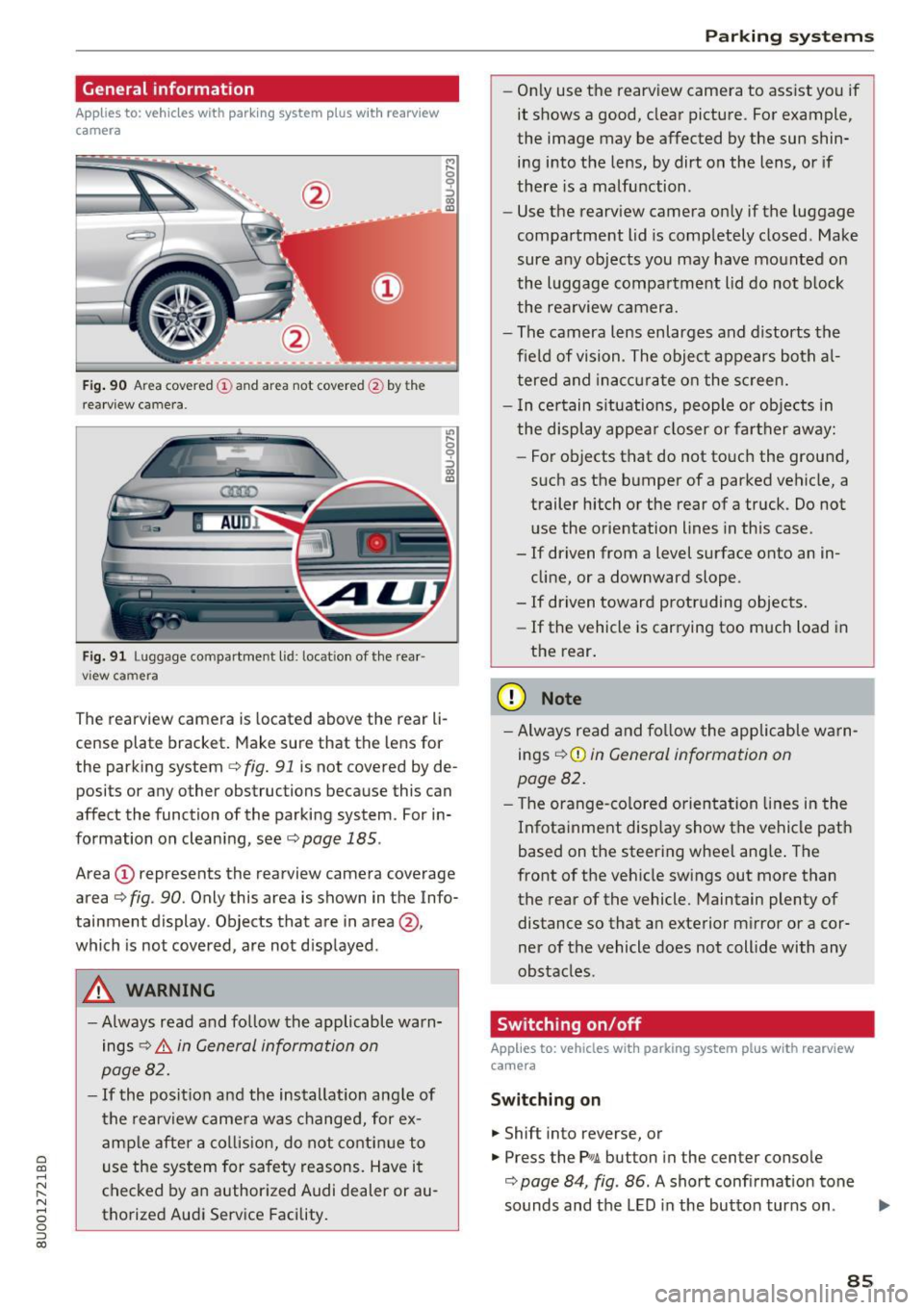
F ig. 90 A rea covered (D an d ar ea not cov ered @ by t he
r ea rvi ew ca mera.
Fig. 91 L u ggage compartment l id : loc ation of the rear ·
vi ew ca mera
,.._ 0
0
::'> co OJ
"' ~ 0
::'> co OJ
The rearview camera is located above the r ear li
c e nse plat e bracket. Mak e sure that the lens for
the park ing system
c> fig. 91 is not covered by de
posi ts or any other obstructions because this can
affect the function of the parking system . For in
formation on clean ing, see
c> page 185 .
Area (D represents the rearview camera coverage
area
c> fig . 90 . Only this area is shown in the Info
tainment display. Objects that are in area@,
which is not covered, are not d isplayed .
A WARNING
-Always read and follow the applicable warn
ings
c> .&. in General information on
page 82.
- If the position and the installat ion ang le of
the rearview came ra was changed, for ex
amp le after a collis ion, do not contin ue to
use the system for safety reasons. Have it
checked by a n author ized Audi dealer or au
thorized Audi Service Facility.
Parking systems
-On ly use the rearv iew camera to ass ist you if
it shows a good, clear picture. For example,
the image may be affected by the sun shin·
ing i nto the lens, by dirt on the lens, or if
there is a malfunction .
- Use the rearv iew camera on ly if the luggage
compa rtment lid is comp letely closed . Make
sure any objects you may have mounted on
the l uggage compar tment lid do not b lock
the rea rview camera.
- The camera lens enlarges and d istorts the
f ield of vision . The object appears both a l
t ered and inac curate on the s creen.
- I n ce rtain s itu ations, people or objects in
the display appea r closer or fa rther away:
- For objects that do not touc h the grou nd,
such as the bumper of a parked vehicle, a
trailer hitch or the rear of a truck . Do not
use the orie ntation lines in this case .
- If driven from a level s urface onto an in
cline, or a downward slope .
- If driven toward protruding objects.
- If the vehicle is carrying too much load in
the rear.
(D Note
-Alw ays read and fo llow the applicable w arn
ings
c> (D in General information on
page 82.
- T he orange-co lored orientation lines in the
Infotainment display show the vehicle path
based on the steering wheel ang le . The
front o f the vehicle swings out more than
the rear of the vehicle. Maintain plenty of distance so that a n exterior m irror or a cor
ner of the vehicle does not coll ide with any
obstacles.
Switching on/off
Applies to: vehicles with parking system plus with rearview
camera
Switching on
... Shift into reverse, or
... Press the Pw.A. but ton in the center console
c> page 84, fig . 86 . A short confirmation tone
sounds and the LED in the butto n tur ns on.
Ill>-
85
Page 88 of 230
Parking systems
Switching between the rearview camera and
optical display
.. Press the Graphic control button ®
t=:> page 86, fig. 92 to see the optical display.
• Press the
Rear view control button to see the
rearview camera image.
Switching off
.. Drive faster than 6 mph (10 km/h), or
.. Press the p,,.,.6. button, or
• Switch the ignition off .
@ Tips
The visual display in the left part of the dis
play should help you detect the critical veh icle
areas.
Perpendicular parking
Applies to: vehicl es with parking system plus with rearv iew
camera
This view may be used when parking in a garage
or in a parking space.
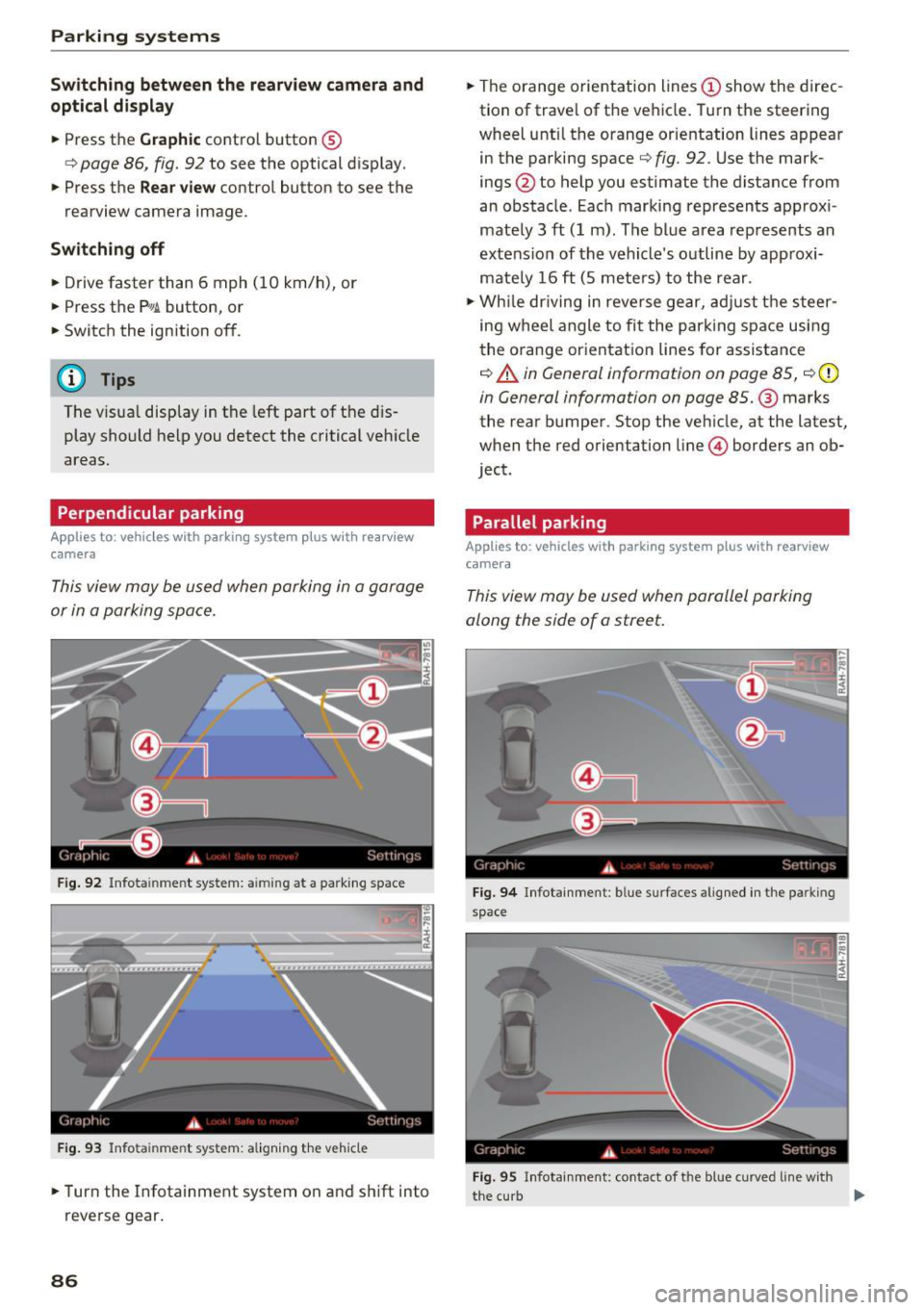
Fig . 92 Infota inme nt system: a iming at a parking space
Fig. 93 Infota in me nt system: a lign ing the veh icle
.. Turn the Infotainment system on and shift into
reverse gear.
86
.. The orange orientation lines (D show the direc
tion of travel of the vehicle. Turn the steering
wheel unt il the orange orientation lines appear
in the parking space
t=:> fig . 92 . Use the mark
ings @to help you estimate the distance from
an obstacle . Each marking represents approx i
mately 3
ft (1 m). The blue area represents an
extension of the vehicle's outline by approxi
mately 16
ft (5 meters) to the rear .
.. While driving in reverse gear, adjust the steer
ing wheel angle to fit the park ing space using
the orange orientation lines for assistance
¢ A in General information on page 85, ¢ (D
in General information on page 85 .@ marks
the rear bumper . Stop the veh icle, at the latest,
when the red orientation line© borders an ob
ject .
Parallel parking
App lies to : vehicles with parking system plus with rearview
camera
This view may be used when parallel parking
along the side of a street.
Fig. 94 Infotainment : b lue s urfaces aligned in the parkin g
space
Fig. 95 Infotai nment: contact of t he blue curved line w ith
the curb
II-
Page 89 of 230
Parking on the r ight is described here . It is identi
cal when parking on the left.
I f the re is an obstacle next to the pa rking space
(such as a wa ll), refer to "Information for par king
next to obstacles" ¢
page 87.
~ Activate the tu rn s ignal.
~ Pos ition your vehicle next to a parked veh icle in
front of the desired parking space. The d istance
to this vehicle should be approximately 3 ft. (1
m) .
~ Turn the Infotainment system on and sh ift into
reverse gear. The parking system is turned on
and the
Cr oss park ing view is displayed.
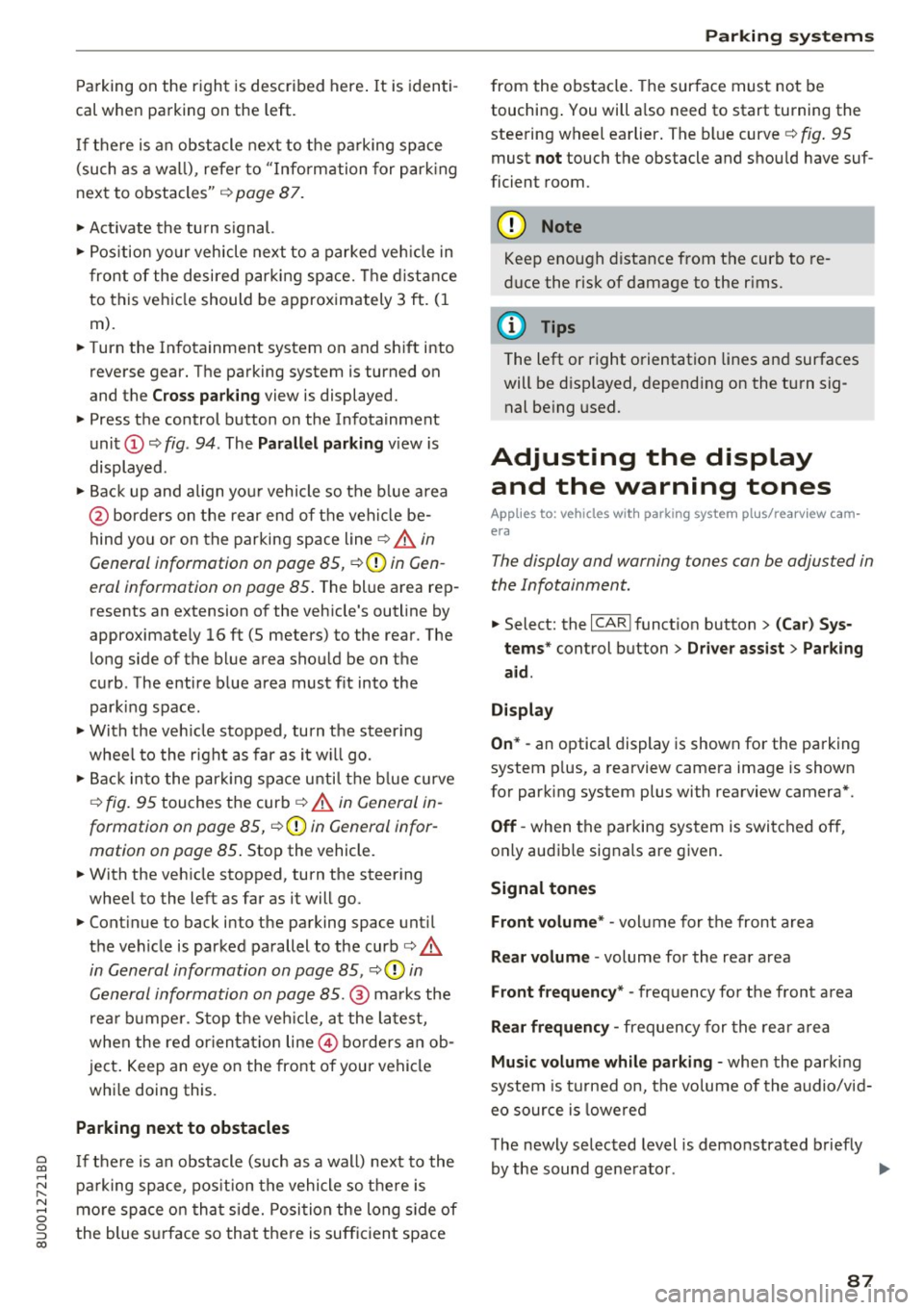
~ Press the control button on the Infotainment
unit
(D ¢ fig . 94 . The Parall el parking view is
displayed .
~ Backup and align you r vehicle so the b lue a rea
@ borders on the rear end of the veh icle be
hind you or on the parking space line
¢ .&. in
General information on page 85,
¢ -Ol) in Gen
eral information on page 85 .
The blue area rep
resents an extension of the veh icle's outline by
approxim ately 16 ft (5 meters) to the rear. The
long side of the blue area shou ld be on the
curb . The entire blue area must fit into the
park ing space.
~ With the veh icle stopped, turn the steer ing
whee l to the r ight as far as it w ill go.
~ Bac k in to the park ing space unti l the b lue curve
¢ fig. 95 tou ches the curb¢.&. in Gen eral in
formation on page 85, ¢(Din General infor
mation on page 85 .
Stop the vehicle.
~ With the vehicle stopped, turn the steer ing
wheel to the left as far as it will go .
~ Continue to back into the parking space un til
the veh icle is parked parallel to the curb¢&.
in General information on page 85 , ¢ (Din
General information on page 85.@
ma rks the
rea r bumpe r. Stop t he veh icle, a t the la test,
when the red or ien tat io n line @ borders an ob
ject . Keep an eye on the front o f your vehicle
whi le doing this.
Parking next to obstacles
~ I f the re is an obstacle (such as a wall) next to the ......
~ pa rking space, pos ition the vehicle so t here is
8 mo re space on that side. Posi tion the long s ide of
g the blue s urface so that the re is sufficient space 00
Parking sy stem s
from the obstacle. The surface must not be
touching . You will a lso need to start turning the
stee ring wheel earlier . The bl ue curve
r:=:> fig . 95
must not touch the obstacle and shou ld have suf
ficien t room .
@ Note
Keep eno ugh distance from the curb to re
duce the risk of damage to the r ims.
(D Tips
The left or right orientation lines and surfaces
will be d isp layed , depend ing on the tu rn sig
nal be ing used.
Adjusting the display
and the warning tones
Applies to : vehicles wit h parking system pl us/rearview cam
era
The display and warning tones can be adjus ted in
the Infotainment.
~ Select: the I CAR I funct ion button > ( C ar) Sys
tems *
control but ton > Driver assist > Parking
aid .
Display
On * -
an optical display is shown for the parking
system p lus, a rearview came ra image is shown
for parking system plus with rearview camera*.
Off -when the parking system is switched off,
o n ly audib le signals are given .
Signal tones
Front volume* -
vol ume for the front area
Rear volume -volume for the rear area
Front frequency * -frequency for the front area
Rear frequency -frequency for the rea r a rea
Music volume while parking -when the par kin g
system is turned on, the vo lume of the audio/v id
eo source is lowered
The newly se lected level is demonstrated briefly
by the sound gene ra to r. .,.
87
Page 91 of 230
Intelligent Technology Electronic stabilization
control (ESC)
Description
Ele ctronic stabilization control (ESC) supports
driver safety . It reduces the risk of slipping and
improves d riving stability. ESC detects critica l sit
uations such as the vehicle oversteering and un
dersteer ing or the wheels are spinning. The vehi
cle is stabilized by apply ing the brakes or reduc
ing engine torque . When the ESC engages, the
G1 indicator light b links in the instrument clus
ter.
T he follow ing systems are integrated in the ESC:
Ant i-loc k bra king s ystem (ABS)
ABS prevents the whee ls from locking when brak
ing. The vehicle can still be steered even during
hard brak ing. Apply steady pressure to the brake
pedal. Do not pump the pedal. A pulsing in the
b rake pedal indicates that the system is act ing to
stabilize the vehicle .
Brak e a ssist s ystem
The brake assist system can decrease braking dis
tance. It increases brak ing power when the driver
presses the brake pedal quickly in emergency sit
uations . You must press and hold the brake pedal
unti l the dangerous sit uat io n is ove r.
Anti-Slip Regulation (ASR )
ASR reduces eng ine power when the drive wheels
begin spinning and ad apts the force to the road
conditions . This makes it easier to start, acceler
ate and dr ive up hills .
Electronic differential lock (EDL )
The EDL applies the brakes to a whee l that starts
spinning and transfers the drive power to the
other driving wheel or wheels ( if the veh icle is
equ ipped w ith all wheel dr ive*) . This function is
n ot available at higher speeds .
0 ~ In extreme cases, EDL automatically switches off
~ to keep the brake on the braked wheel from over-N
8 heat ing . The vehicle is still work ing correctly . EDL 0
:::,
00
Intellig ent Technology
will swi tch on again automatically when condi
tions have returned to normal.
Steering recommendation
T he ESC he lps to s tabilize the vehicle by cha nging
t h e steer ing torque .
Selective wheel torque control
Se lective wheel torque control is used when driv
i ng on curves . The front whee l on the ins ide of
t h e curve or both wheels on the i nside of the
c ur ve are braked se lectively as needed. This al
lows mo re prec ise dr iving in c urves .
Automatic post -collision braking system
The "automat ic post -collis ion braking system"
can help to reduce the risk of sliding and of addi
tiona l co llisions after an accident.
If the a irbag
contro l modu le detects a collision above a certa in
vehicle speed, the ve hicle is br ake d by the ESC.
The vehicle does not brake automatically if:
- the dr iver presses the acce lerator pedal, or
- the bra king fo rc e generated by the pressed
brake pedal is greater than the braking force
that would be in itiated by the system, or
- the ESC, the brake system or the veh icle electri
cal system are not functioning.
A WARNING
- The ESC and its integrated systems cannot
overcome the lim its imposed by natura l
phys ica l laws. This is especially impo rtant
on slippery or wet roads. If the systems be
gi n a cting to s tabilize yo ur vehicle, you
should immedi ately alter your speed to
match the road and traffic conditions. Do
not let the inc reased safety provided tempt
you into taking risks. This could increase
your r isk o f a collis ion.
- Please note the r isk of a coll is ion increases
when dr iv ing fast, especially t hrough curves
and on slippery or wet roads, and when dr iv
ing too close to objects ahead. The ESC and
its integrated systems cannot always pre
vent co llisions - there is st ill a risk of acci
dents!
89
Page 92 of 230
Intelligent Technology
-Press the accelerator pedal carefully when
accelerating on even, slippery surfaces such
as ice and snow. The drive wheels can spin
even when these control systems are instal
led and this can affect driving stability and
increase the risk of a collision.
{D) Tips
-The ABS and ASR only function correctly
when all four wheels have a similar wear
Switching on/off
condition. Different tire sizes can lead to a
reduction in engine power.
- You may hear noises when the systems de
scribed are working .
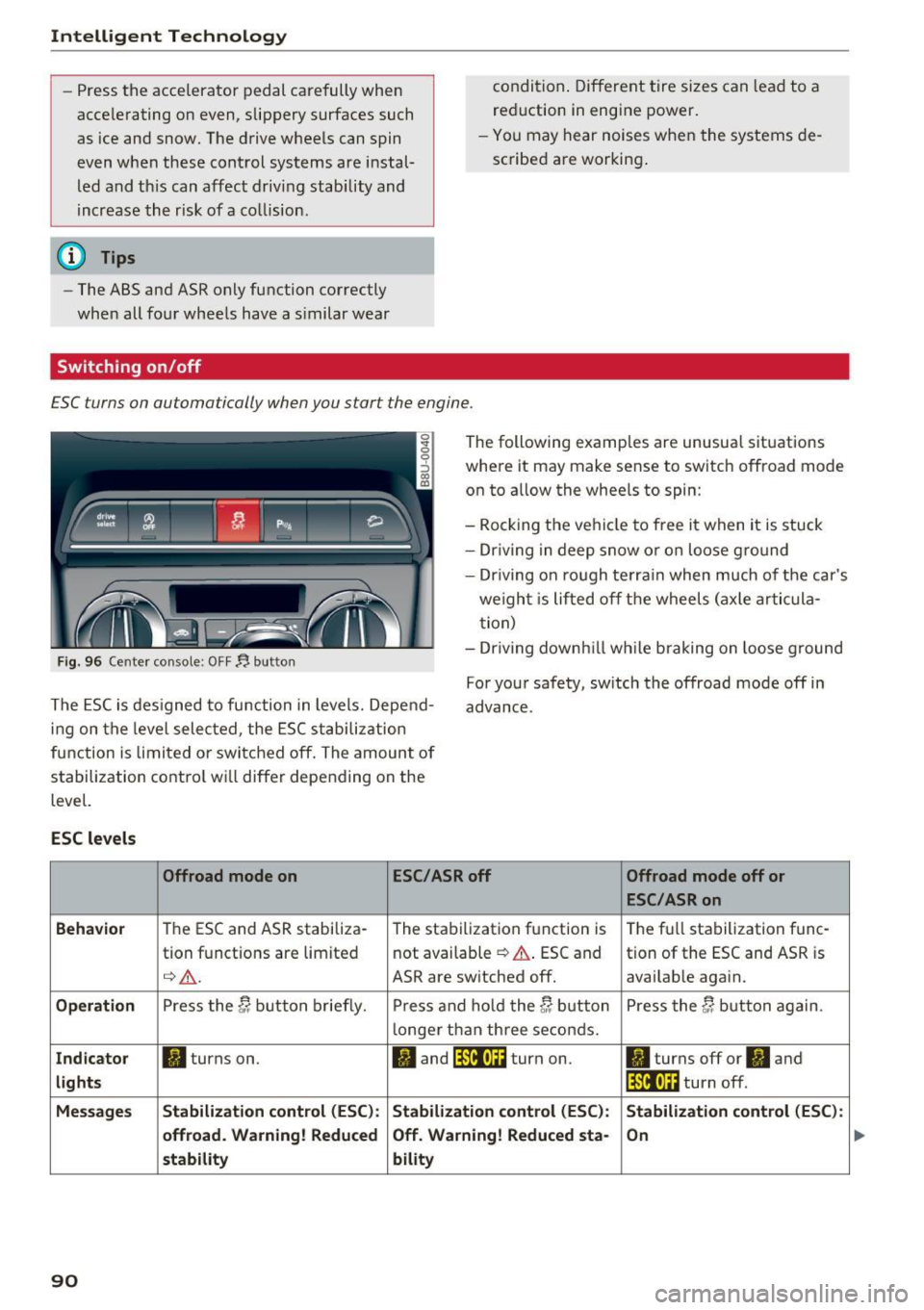
£SC turns on automatically when you start the engine .
Fig. 96 Center console : OFF~ button
The following examples are unusual situations
where it may make sense to switch offroad mode
on to allow the wheels to spin:
- Rocking the vehicle to free it when it is stuck
- Driving in deep snow or on loose ground
- Driv ing on rough terrain when much of the car's
we ight is lifted off the wheels (axle artic ula
tion)
- Dr iv ing downh ill wh ile braking on loose g round
The ESC is designed to function in levels. Depend
ing on the level selected, the ESC stabilization
function is limited or switched off . The amount of
stabilization control wi ll differ depending on the
level. For your safety, sw
itch the offroad mode off in
advance.
ESC levels
Offroad mode on ESC/ASR off
Offroad mode off or
ESC/ASR on
Behavior
The ESC and ASR stabiliza-
The stabilization function is The
full stabilization func-
tion functions are limited not
available
¢ .&.. ESC and tion of the ESC and ASR is
¢ .&. . ASR are switched off. availab le again.
Operation Press the C; button briefly. Press and hold the C; button Press the C; button again.
longer than three seconds.
Indicator II turns on. II and lfil•U~ turn on. II turns off or II and
lights lfil•l~i turn off.
Messages Stabilization control (ESC):
Stabilization control (ESC): Stabilization control (ESC):
offroad. Warning! Reduced Off
. Warning! Reduced sta-
On
stability bility
90
...
Page 93 of 230
A WARNING
You should only switch offroad mode on or
switch ESC/ ASR off if your driving abilities
and the traffic conditions perm it. There is a
risk of s lid ing .
- The stabilization function is limited when
offroad mode is switched on . The driving
wheels could spin and the vehicle could
swerve, especially on slick or s lippery road
surfaces.
- There is no vehicle stabilization when ESC/
ASR are switched off.
Hill descent assist
Appl ies to: vehicles with hill hold assist
Hill descent assist makes it possible to drive
down a hill at a constant speed.
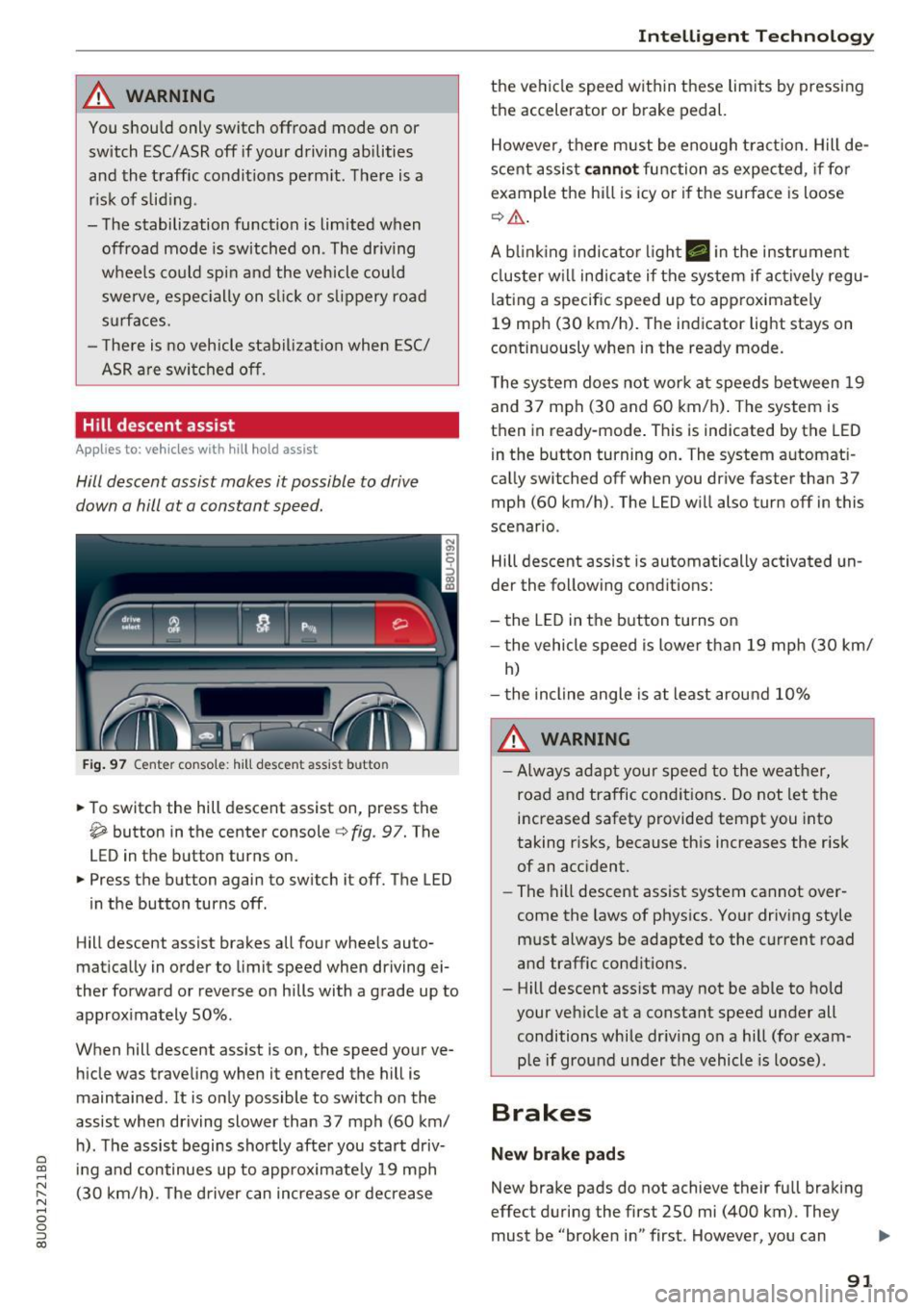
Fig. 97 Center console : hill descent assist butto n
• To switch the hill descent assist on, press the
~ button in the center console c} fig. 97. The
LED in the button turns on.
• Press the button again to switch it off. The LED
in the button turns off .
Hill descent assist brakes all four whee ls auto
matically in order to limit speed when driving ei
ther forward or reverse on hills with a grade up to
approximately 50% .
When hill descent assist is on, the speed your ve hicle was traveling when it entered the hill is
maintained . It is only possible to switch on the
assist when driving slower than 37 mph (60 km/
h). The assist begins shortly after you start driv-
e '.:: ing and continues up to approximate ly 19 mph
N r--. (30 km/h) . T he driver can increase or decrease N .... 0 0 ::, (X)
Intelligent Technology
the vehicle speed within these limits by pressing
the accelerator or brake pedal.
However, there must be enough tract ion. Hill de
scent assist
cannot function as expected, if for
example the hill is icy or if the surface is loose
¢,&. .
A blinking indicato r light. in the instrument
cluster will indicate if the system if actively regu
lating a specific speed up to approximately
19 mph (30 km/h). The indicator light stays on
continuously when in the ready mode.
The system does not work at speeds between 19
and 37 mph (30 and 60 km/h) . The system is
then in ready-mode . This is indicated by the LED
in the button turning on. The system automat i
cally switched off when you drive faster than 37
mph (60 km/h) . The LED will also turn off in this
scenario .
Hill descent assist is automatically activated un
der the following conditions:
- the LED in the button turns on
- the vehicle speed is lowe r than 19 mph (30 km/
h)
- the incline angle is at least around 10%
A WARNING
-
-Always adapt your speed to the weather,
road and traffic conditions. Do not let the
increased safety provided tempt you into
taking risks, because this increases the risk
of an accident.
- The hill descent assist system cannot over
come the laws of physics. Your driving style
must always be adapted to the current road
and traffic conditions .
- Hill descent ass ist may not be able to hold
your vehicle at a constant speed under all
conditions while dr iving on a hill (for exam
p le if ground under the vehicle is loose).
Brakes
New brake pads
New brake pads do not achieve their full braking
effect during the first 250 mi (400 km) . They
must be "broken in" first . However, you can
IJ,,
91
Page 94 of 230
Intelligent Technology
compensate for the slightly reduced brak ing
force by pressing firmly on the brake peda l. Avoid
heavy b raking during the break -in per iod .
Wear
Brake pad wear depends largely on the way the
veh icle is driven and on operat ing cond it ions.
This is especially t rue if you are driving frequently
in the city and on c urves or with a sporty driving
style.
Operating noise
Noises may occur when br aking depend ing on the
speed, b raking force and outs ide cond itions such
as temperature and humidity.
Effect of water or road salt
I n ce rtain s ituations, fo r example after driving
through water, in heavy ra in, afte r ove rnig ht con
densat ion or after washing your car, the braking
effe ct can be red uced by moisture or ice on the
b rake rotors and brake pads. The brakes must be
"dr ied" first with a few careful brake applica
tions.
At highe r speeds and with the windshie ld wipers
turned on, the brake pads press against the brake rotors for a short amount of time . This action,
which is not felt by the driver, happens at regular
intervals and ensures a better reaction time for
the brakes in wet weather.
The braking effect can also be reduced if you are
driving on salted roads and you do not apply the brakes for long periods of time. The laye r of salt
on the brake rotors and brake pads must be worn
off first when t he brakes a re applied ¢ ,& .
Corros ion
L eaving the vehicle par ked for long periods of
time, low mi leage and avo id ing heavy brak ing
can contribute to corrosion on the brake rotors
and to d irty b rake pads .
If you usually avoid heavy b raking or if there is
corros ion present, occasional heavy braking at
h igh speeds is recommended to clean the brake
rotors and pads¢,&.
92
Brake system malfunction
if you no tic e th at the b rake peda l t ravel has sud
denly gotten larger, then a brake ci rc u it may have
failed ¢.&. .
Low brake fluid level
When the b rake fluid level is low, malfunctions in
t h e b rake system may occur. The b rake fl uid leve l
i s e lec tron ically moni to red.
Brake booster
The brake booster amplifies the pressure you ap
ply to the brake pedal. It only works when the en
gine is runni ng ¢ ,& .
.8, WARNING
-On ly app ly the bra kes for the p urpose o f
cleaning the brake sys tem w hen road and
t raffic conditions permi t. You mus t not en
danger other roa d users . This increases the
risk of an accident.
-
- Never let the ve hicl e roll whi le the engine is
stopped because t his increases the risk of an
accident .
(D Note
- Never let the brakes "rub'' by pressing the
peda l lightly when braking is not actually
necessary . This causes t he b rakes to over
heat and increases braking distance and
causes wear.
- Be fore driving downhill a long d istance on a
steep hill, decrease your speed and select a lower gear. This makes use of the engine
brak ing effect and relieves the brakes . If
you need to bra ke add itiona lly, bra ke in in
te rvals and not cont inuous ly.
(D Tips
- If the brake booster is not working, you
must press the b rake peda l with much more
forc e than normal.
- If you retrofit your veh icle with a front spo il
er , wheel covers or sim ila r i tems, make su re
t h at the air flow to the fro nt wheels is not
inter rup ted. O therwise t he b rake system
c an be come too hot.