buttons AUDI Q3 2019 User Guide
[x] Cancel search | Manufacturer: AUDI, Model Year: 2019, Model line: Q3, Model: AUDI Q3 2019Pages: 280, PDF Size: 72.73 MB
Page 41 of 280
83A012721BA
Opening and closing
@® Left rear door
@® Right rear door
Opening and closing the windows
The driver can control all power windows. All
power window switches are equipped with a two-
stage function:
> To open or close the window completely, press
the switch down or pull the switch up briefly to
the second level. The operation will stop if the
switch is pressed or pulled again.
> To select a position in between opened and
closed, press or pull the switch to the first level
until the desired window position is reached.
Correcting a malfunction in the one-touch
up/down function
You can reactivate the one-touch up/down func-
tion if it malfunctions.
> Pull the power window switch up until the win-
dow is completely raised.
> Release the switch and pull it up again for at
least one second.
Z\ WARNING
— Follow the safety precautions > page 28.
— Never close the windows carelessly or in an
uncontrolled manner, because this increases
the risk of injury.
@) Tips
You can still open and close the windows for
several minutes after turning the ignition off.
The power window switch is not disabled until
the driver's door or front passenger's door is
opened.
Convenience opening and closing
Applies to: vehicles with convenience key
Convenience opening and closing the
windows and roof*
You can set in the MMI if all windows or the roof*
should open or close all at once > page 29, Set-
ting the central locking system.
> Press and hold the &@ or fj button on the vehicle
key until all windows and the roof* have
reached the desired position > /A\.
> Applies to: vehicles with convenience key:
Touch the sensor* on the door handle until all
of the windows and the roof* are closed. Do not
place your hand in the door handle when doing
this.
When all of the windows and the roof* are
closed, the turn signals will flash once.
ZN WARNING
— Never close the windows or the roof* care-
lessly or in an uncontrolled manner, because
this increases the risk of injury.
— For security reasons, the windows and the
roof* can only be opened and closed with
the vehicle key at a maximum distance of
approximately 6.5 feet (2 m) away from the
vehicle. Always pay attention when using
the f button to close the windows and the
roof* so that no one is pinched. The closing
process will stop immediately when the f
button is released.
Panorama glass roof
CeyeY Tee latnre maa Malel mie Mele arTe(]
Applies to: vehicles with panoramic glass roof and roof sun-
shade
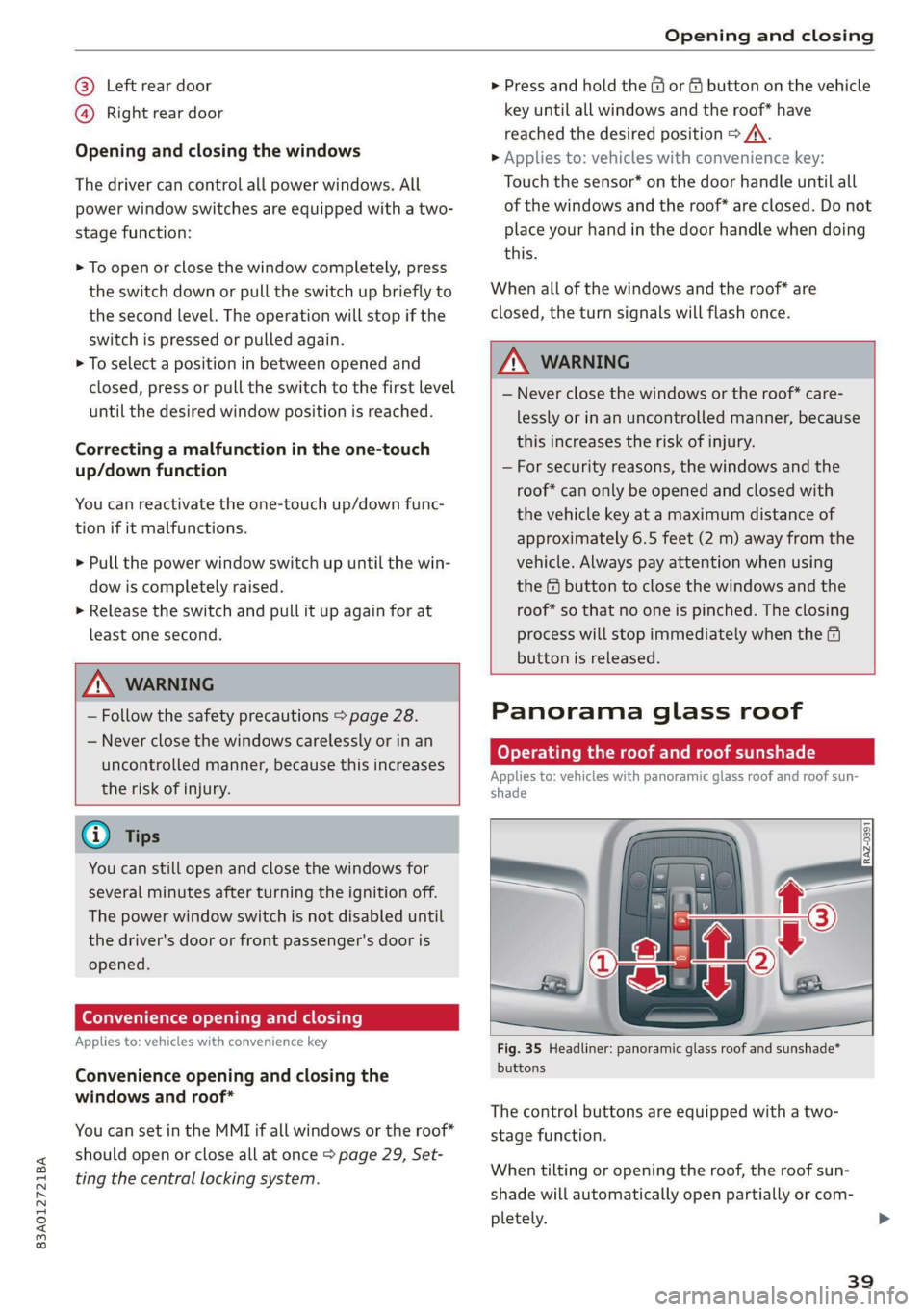
Fig. 35 Headliner: panoramic glass roof and sunshade*
buttons
The control buttons are equipped with a two-
stage function.
When tilting or opening the roof, the roof sun-
shade will automatically open partially or com-
pletely.
39
Page 57 of 280
83A012721BA
Sitting correctly and safely
Adjusting the power front seats
Applies to vehicles with power adjustable seats
RAZ-0569
i
s —y
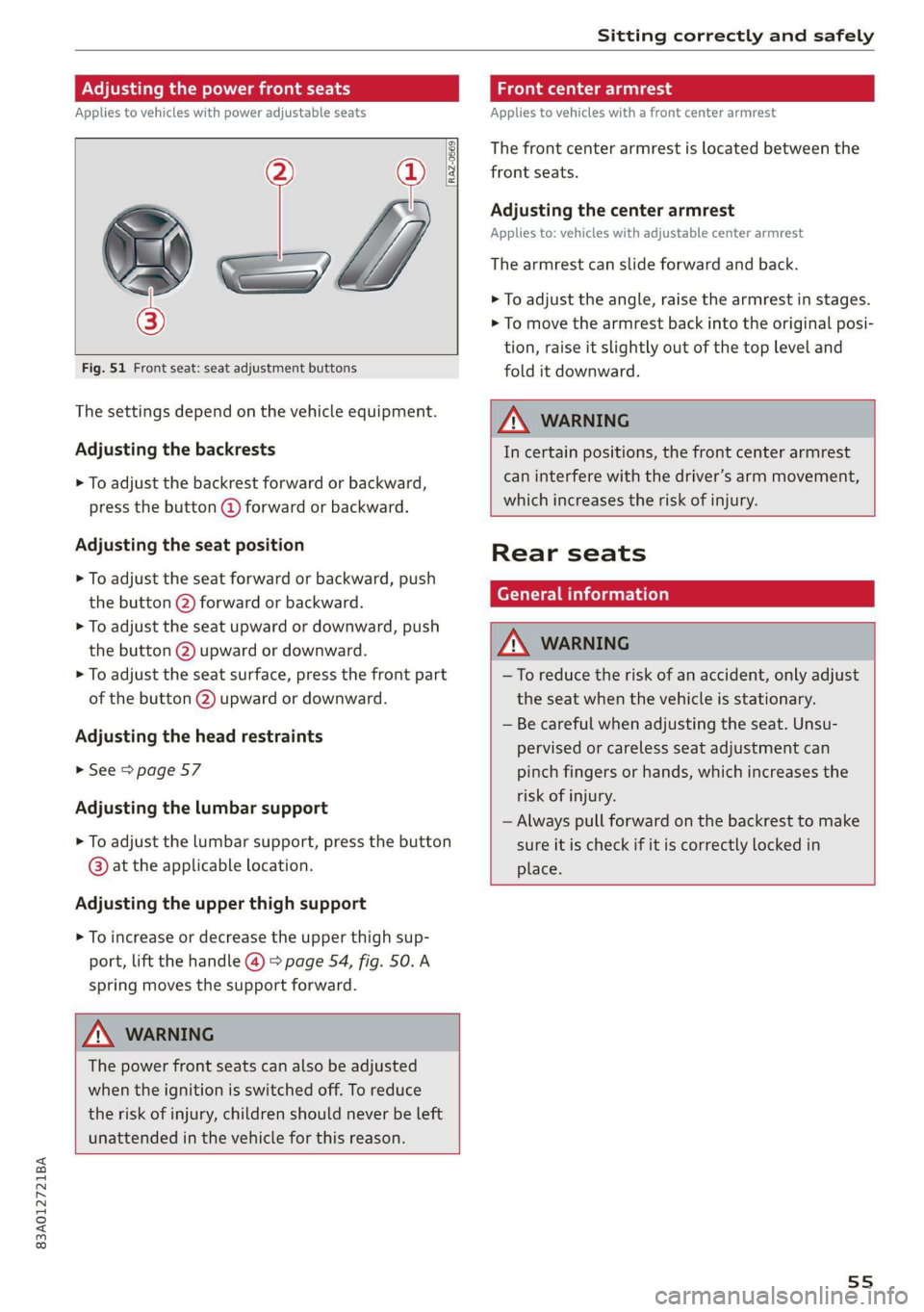
Fig. 51 Front seat: seat adjustment buttons
The settings depend on the vehicle equipment.
Adjusting the backrests
> To adjust the backrest forward or backward,
press the button @ forward or backward.
Adjusting the seat position
> To adjust the seat forward or backward, push
the button @) forward or backward.
> To adjust the seat upward or downward, push
the button @) upward or downward.
> To adjust the seat surface, press the front part
of the button @) upward or downward.
Adjusting the head restraints
> See > page 57
Adjusting the lumbar support
> To adjust the lumbar support, press the button
@ at the applicable location.
Adjusting the upper thigh support
> To increase or decrease the upper thigh sup-
port, lift the handle @ > page 54, fig. 50. A
spring moves the support forward.
ZA WARNING
The power front seats can also be adjusted
when the ignition is switched off. To reduce
the risk of injury, children should never be left
unattended in the vehicle for this reason.
Front center armrest
Applies to vehicles with a front center armrest
The front center armrest is located between the
front seats.
Adjusting the center armrest
Applies to: vehicles with adjustable center armrest
The armrest can slide forward and back.
> To adjust the angle, raise the armrest in stages.
> To move the armrest back into the original posi-
tion, raise it slightly out of the top level and
fold it downward.
ZX WARNING
In certain positions, the front center armrest
can interfere with the driver’s arm movement,
which increases the risk of injury.
Rear seats
General information
ZX WARNING
—To reduce the risk of an accident, only adjust
the seat when the vehicle is stationary.
— Be careful when adjusting the seat. Unsu-
pervised or careless seat adjustment can
pinch fingers or hands, which increases the
risk of injury.
— Always pull forward on the backrest to make
sure it is check if it is correctly locked in
place.
55
Page 80 of 280
Warm and cold
2-zone deluxe automatic climate control
Applies to: Vehicles with 2-zone deluxe automatic climate control
B8V-0590
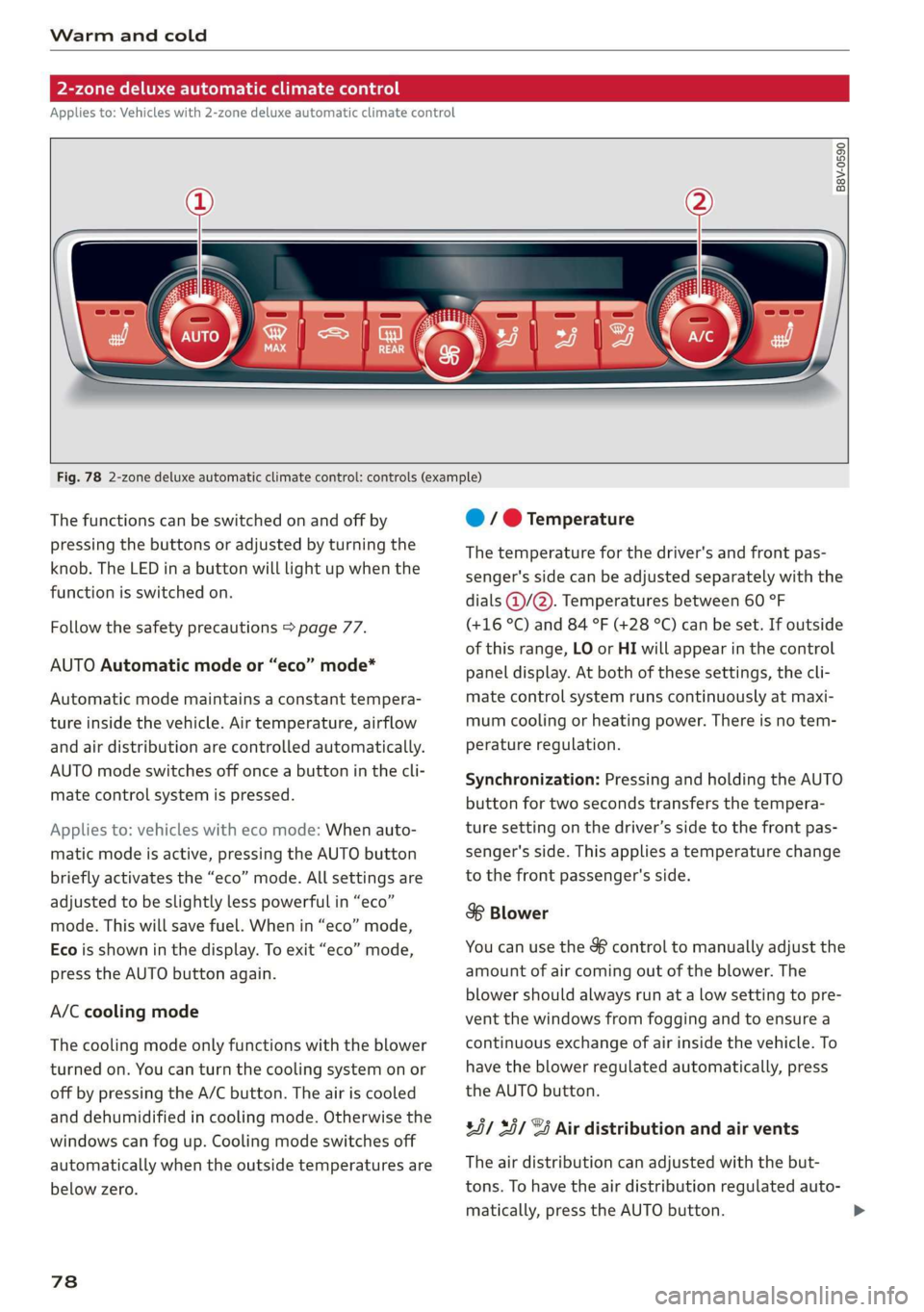
Fig. 78 2-zone deluxe automatic climate control: controls (example)
The functions can be switched on and off by
pressing the buttons or adjusted by turning the
knob. The LED in a button will light up when the
function is switched on.
Follow the safety precautions > page 77.
AUTO Automatic mode or “eco” mode*
Automatic mode maintains a constant tempera-
ture inside the vehicle. Air temperature, airflow
and air distribution are controlled automatically.
AUTO mode switches off once a button in the cli-
mate control system is pressed.
Applies to: vehicles with eco mode: When auto-
matic mode is active, pressing the AUTO button
briefly activates the “eco” mode. All settings are
adjusted to be slightly less powerful in “eco”
mode. This will save fuel. When in “eco” mode,
Eco is shown in the display. To exit “eco” mode,
press the AUTO button again.
A/C cooling mode
The cooling mode only functions with the blower
turned on. You can turn the cooling system on or
off by pressing the A/C button. The air is cooled
and dehumidified in cooling mode. Otherwise the
windows can fog up. Cooling mode switches off
automatically when the outside temperatures are
below zero.
78
@ / @ Temperature
The temperature for the driver's and front pas-
senger's side can be adjusted separately with the
dials @/@). Temperatures between 60 °F
(+16 °C) and 84 °F (+28 °C) can be set. If outside
of this range, LO or HI will appear in the control
panel display. At both of these settings, the cli-
mate control system runs continuously at maxi-
mum cooling or heating power. There is no tem-
perature regulation.
Synchronization: Pressing and holding the AUTO
button for two seconds transfers the tempera-
ture setting on the driver’s side to the front pas-
senger's side. This applies a temperature change
to the front passenger's side.
8 Blower
You can use the & control to manually adjust the
amount of air coming out of the blower. The
blower should always run at a low setting to pre-
vent the windows from fogging and to ensure a
continuous exchange of air inside the vehicle. To
have the blower regulated automatically, press
the AUTO button.
85/ 35/ @ Air distribution and air vents
The air distribution can adjusted with the but-
tons. To have the air distribution regulated auto-
matically, press the AUTO button.
Page 154 of 280
Telephone
— Contacts that were downloaded from a mo-
bile device cannot be exported.
— There should be no other files or folders on
the storage medium containing the contacts
to be imported.
— Apple devices and MTP devices (such as
smartphones) are not recognized as USB
storage devices.
Mobile phone network
settings
Applies to: vehicles with telephone
Applies to: MMI: Select on the home screen: SET-
TINGS > Connection settings > Mobile phone
network.
Switching the car phone or data module on
Applies to: vehicles with car phone/data module
See > page 150.
Instrument cluster
Telephone
Applies to: vehicles with multifunction steering wheel and
telephone
In the instrument cluster display, you can control
the MMI functions with the multifunction steer-
Troubleshooting
Applies to: vehicles with telephone
The information that follows lists some trouble-
shooting options. They depend on the equip-
ment.
ing wheel. Operating > page 12 and > page 26,
Additional function buttons.
Requirement: the Telephone tab must be select-
ed in the instrument cluster.
> Press the [=] button.
Possible options:
— Call list: Requirement: the call list must con-
tain a phone number.
— Favorites: Requirement: favorites must be stor-
ed inthe MMI.
— Switch telephones: Requirement: two mobile
devices must be connected to the MMI.
— Back to call: Requirement: there must be a call
in progress.
(i) Tips
—The call list and favorites can only be edited
through the MMI.
— Depending on the selected function, it may
be necessary to use the MMI.
Problem Solution
Pairing the mobile device to the
MMI failed.
Make sure the requirements for connecting a cell phone have been
met > page 140, or
make sure you did not accidentally decline the PIN for establishing
a connection on your cell phone. If necessary, repeat the pairing
process > page 140.
Certain telephone functions are
grayed out or unavailable.
The telephone functions depend on the mobile device service pro-
vider and the mobile device you are using. You can obtain more in-
formation from your mobile device service provider, in your mobile
device user guide, or online at www.audiusa.com/bluetooth.
152
Page 272 of 280
Index
PANIC Button ssicsooe © 2 cocvise © avant ww rumen @ eee 32
Replacing the battery...............0-. 34
Unlocking and locking...............005 33
Vehicle Code ssicve x + swine ee etre oe eas a 2 one 32
Kick#dOWn'. 2 scons e senea oe ae ao ca @ eee 84
L
Lane assist
refer to Lane departure warning......... 119
Lane departure warning................. 119
Cleaning the camera area.............. 237
LATCH (securing child safety seats)......... 68
Leather care/cleaning...............005 239
Legal information
License subscriptions................. 197
Software information................. 197
Software:licensesies . sowie ae iawn ws nsenn a 6 197
Version
information.................. 197
License plate bracket................0.. 260
Lifting points (vehicle jack).............. 243
Light/rain sensor
Headlights...............00 020-0 ee eee 43
Intermittent mode (windshield wipers) .... 49
Light functions
Interior lighting!sc . = ssw = 2 ese sy eee eee 46
Lighting
Exterior. « ic © wesen ae ease a 2 wane vo ore 43
Interior... 0... eee eee 46
Lights 0.0... eee eee eee 43
Listening to music
refertoMedia................005. 182,185
Load... 6.6... eee 264
Locking and unlocking
By remote control............2.2.0005. 33
Using the lock cylinder................. 30
With the convenience key............... 33
Low beam headlights.................... 43
Lowering the cargo floor................. 76
Luggage compartment...............05. 73
COVER ime x x cena % 2 soamere # x wemnER oo en aw Re 74
Double cargo floor..............0..000- 76
Increasing the size............0--.00 ee 75
also refer to Luggage compartment...... 73
Luggage compartment lid
Closing button. ...............000 ee eee 36
Emergency releasing:ss : < waa x x aeax ¢ gaee 37
270
General information 34
Opening and closing 35
Opening and closing with foot motion..... 37
Power opening/closing................. 36
Lumbar'support:s + ses so sews oo owen oo 54,55
M
Maintenance’: « « sews + » sen + e awe + pores a 258
Maintenance intervals................-. 245
Malfunction Indicator Lamp (MIL)........ 202
Manual shifting ................0020 eee 84
Map
Changing the scale ............ee eves 164
Display’ « sncine 2 2 setese a a comes ow anes ve to 166
Operating. ..... 0.0... cece eee eee eee 165
Setting the destination................ 164
Map preview...............0- 00-00 e eee 163
Map update................0 20. e ee eee 170
Oli: 2 gems + 2 wise = pense & ¥ em ee See = 170
SD card/USB connection........0.. 00006 170
Media somes: i sxonns ao eevee ¥ oe orem wae 182,185
Supported formats.................-. 190
Media Cemberin. « . acewus « w snonsue = auarems wo meriite 186
Memory card
SD card reader (MMI).............0... 182
Supported types and formats........... 190
Menu language
refer to Setting the language........... 195
MeSSaQeSixc: « ¢ sews & ¢ ese 2s ees § oe ees es 147
MIrforcompass:s « « ues cs wean: 2 meee + eee 51
Mirrors
Adjusting exterior mirrors............... 47
DUUANTING Ss, « scersiss ow snouts om exons 6 x oxmanm x 48
Vanity mirror... 1.2... eee ee eee 48
MMI Navigation plus
refer to Multi Media Interface........... 18
MMI Radio plus
refer to Multi Media Interface........... 18
Mobile device
referto Telephone..............0.0005 139
Mobile phone network
Connection settings...............00. 152
Mountain passeS....... 00.0. e cece ee eee 93
MouintainirOadsivn. « scins a 6 vimses a 6 nraeiise #6 om 93
Multifunction steering wheel
Buttons......... 0... ee eee eee eee 12, 26
Page 273 of 280
83A012721BA
Index
Operating « « secs + x sess 6 ot wees v aeaueee w & cams 12
Programming buttons...............00. 26
Voice recognition system.............-. 24
Multi Media Interface................... 18
Menus and symbols...............--00. 19
Operating ....... 0... cee ee eee eee 16,19
Switching on or off...........-....-00. 18
Muting (mute)............. 0002s 26
MmyAUdi..... eee eee eee 27,155
myAudi navigation................. 159, 163
N
Natural leather care/cleaning............ 239
Navigation susie c+ asco xv anti © oreo wn oan 159
Better route ......... 0.0... e cece 172
GalliniGis: s vem sv news ss tee ov eee see 163
Changing the scale. ......... cece eves 163
also refertoMap............-000 eee 165
Navigation database
Version information...............04- 197
Navigation (instrument cluster).......... 166
SY 260
Notification:cemter’. csiccis . « sessue oo ernuous oo weet 20
Oo
Octane rating (gasoline)................ 199
OMOMCLER wisi & 2 mace & oO + ¥ eOER oH ERED « 14
Resetting...............0..0..000000. 14
Office address
refer to Business address.............. 168
Offroad
refer to Offroad driving...............5. 93
Offroad ArivVinG!s + = sss <= evan ¢ = Hares ¢ = Hom 93
Oil
refer to Engine oils = acs 22 ees ee eees ee 205
On-board computer................-.04. 14
On Board Diagnostic System (OBD)... 202, 255
Online destination
refer to Point of interest............... 162
Online map
refer to Satellite map................. 169
Online: Mediates. «vies ss wees ss wees @ vee 183
OnliMePAdIO sx « weam x gogo gx mem Ge Se 178
also refer to Online radio.............. 178
Online services
refertoconnect...........0+-008 154,155
Online system update.................. 196
OPO bes » sccmesnse © axensies wo > vase @ 8 meme = = com 28
Automatic luggage compartment lid...... 36
Convenience opening................085 39
Fuel filler door........ 0... c eee eee ee 200
Hood... 0... eee ee 204
Luggage compartmentlid............... 35
Luggage compartment lid with foot motion . 37
Panoramic glass roof................... 39
Sunshade (FOOT): « 2 some a @ ears oo eee a eae 39
Wind OWS 3s « cence wv cmermes a a smenees oa omemee es 38
Opening and closing
refer to Unlocking and locking........ 28, 33
Operating
Instrument cluster.................00. 12
Multifunction steering wheel............ 12
Multi Media Interface ...... 0 cece eee 16,19
Text input......... 0.00.00... eee eee 22
Touch displays: « veces s eae x > wee se ree 16
Optional equipment number............. 263
Options
Media’. » 2 seas 2 4 segue 2s sete go ewe te ee 189
NAVIQAtIOMsc i « sunsais « x wrens o 0 suessun w seats 1 172
Radio... 2.6... cece eee cee eee eee 180
Overview (cockpit) ............00 eee eee ee 6
P
Paint damage.......... cece eee eee eee 238
Paintmumbe ttc 5 cscs 2 x ennme o « cereus 6 2 sownate 1 263
PANIC: DUttONY « & cresce: 6 0 cemmmes an awawons 1 a anos 32
Pani@ TUMGtion. « secs x x covers 2 2 serie ¥ 3 aoa © 3 32
Panorama glass roof...............-.05. 39
Panoramic glass roof
Convenience opening and closing......... 39
Emergency closing..............0eeeeae 40
QuickOpening << : sree ¢ = veces s eee se we 40
Park assist... 0.0.0... cc cece eee eee eee 136
Parking aid... ... 2... eee ee eee 127
Cleaning the sensors and camera........ 237
Parking space search.................. 134
Peripheral cameraS......- 0.0. - eee eee 129
Rearview Cameraiew. ss ews a vee as bees 129
Trailee views. 2s swavece x x sens « anamens a a amenees oo 130
271