display AUDI Q3 2019 User Guide
[x] Cancel search | Manufacturer: AUDI, Model Year: 2019, Model line: Q3, Model: AUDI Q3 2019Pages: 280, PDF Size: 72.73 MB
Page 19 of 280
83A012721BA
Touch display
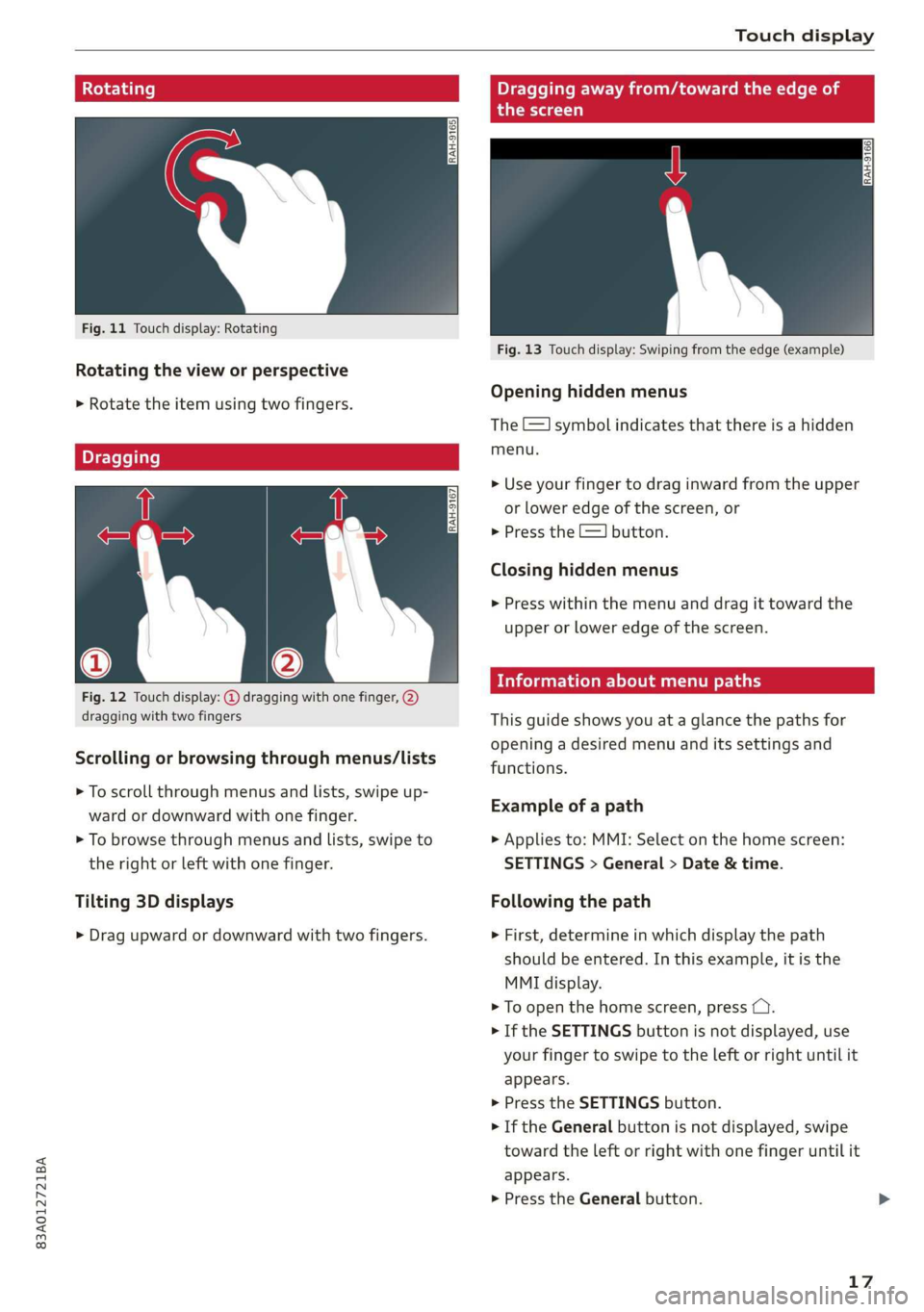
Rotating
Fig. 11 Touch display: Rotating
Rotating the view or perspective
> Rotate the item using two fingers.
Dragging
Fig. 12 Touch display: @ dragging with one finger, @
dragging with two fingers
Scrolling or browsing through menus/lists
> To scroll through menus and lists, swipe up-
ward or downward with one finger.
> To browse through menus and lists, swipe to
the right or left with one finger.
Tilting 3D displays
> Drag upward or downward with two fingers.
Dragging away from/toward the edge of
the screen
a
Fig. 13 Touch display: Swiping from the edge (example)
Opening hidden menus
The E=] symbol indicates that there is a hidden
menu.
>» Use your finger to drag inward from the upper
or lower edge of the screen, or
>» Press the =] button.
Closing hidden menus
> Press within the menu and drag it toward the
upper or lower edge of the screen.
cleric imum r ary
This guide shows you at a glance the paths for
opening a desired menu and its settings and
functions.
Example of a path
> Applies to: MMI: Select on the home screen:
SETTINGS > General > Date & time.
Following the path
> First, determine in which display the path
should be entered. In this example, it is the
MMI display.
> To open the home screen, press CY.
> If the SETTINGS button is not displayed, use
your finger to swipe to the left or right until it
appears.
> Press the SETTINGS button.
> If the General button is not displayed, swipe
toward the left or right with one finger until it
appears.
> Press the General button.
17
Page 20 of 280
Touch display
> If the Date & time button is not displayed,
swipe upward or downward with one finger un-
til it appears.
> Press the Date & time button.
@ Tips
If a menu or symbol is in parentheses in the
path, for example, (General) or (423), then it is
an optional menu item that does not need to
be used in every system.
Settings
> Applies to MMI: Select on the home screen:
SETTINGS > Display & brightness > MMI.
Possible settings:
— Brightness
— Audio feedback during touch input
Multi Media Interface
sic laitet inmate)
Audi recommends performing certain Infotain-
ment system functions, such as entering a desti-
nation, only when the vehicle is stationary. Al-
ways remember: Take a break from using your In-
fotainment system if needed for the benefit of
your safety and the safety of others on the road.
ZA\ WARNING
Only use the Infotainment system when road,
traffic, weather, and visibility conditions per-
mit and always in a way that allows you to
maintain complete control over your vehicle.
@ Tips
Certain functions are not available while driv-
ing.
Switching on or off
Switching the MMI on or off
> To switch the MMI off, press and hold the vol-
ume knob > page 26, fig. 20 until all Infotain-
ment functions are switched off.
18
> To switch the MMI on, press the volume knob.
Restarting the MMI
> Press and hold the volume knob for at least 10
seconds.
Switching the center display on or off
> To switch the center display off, press [Jin the
notification center > page 20.
> To switch the center display on, touch the dis-
play or press LwJagain.
Introduction
You can display and operate Infotainment system
and vehicle functions using the touch display in
the Multi Media Interface, abbreviated MMI.
Configuration wizard
After starting for the first time, the configuration
wizard helps you to set up the vehicle, for exam-
ple to set the desired system language and con-
nect a telephone.
> Follow the instructions in the center display.
> Applies to: MMI: To access the configuration
wizard at a later time, select on the home
screen: HELP > Configuration wizard.
Tool tips
Tool
tips are displayed on the center display after
starting for the first time. They introduce various
MMI functions to you.
> Follow the instructions in the center display.
> Applies to: MMI: To access the tool tips at a lat-
er time, select on the home screen: SETTINGS
> Help > Show tool tips.
> Applies to: MMI: To receive additional tool tips,
select on the home screen: HELP > Tool tips >
Basic information or Expert information.
Page 21 of 280
83A012721BA
Touch display
Menus and symbols
ee) Pe Sian Ics}
Maat recs
RAX-0103,
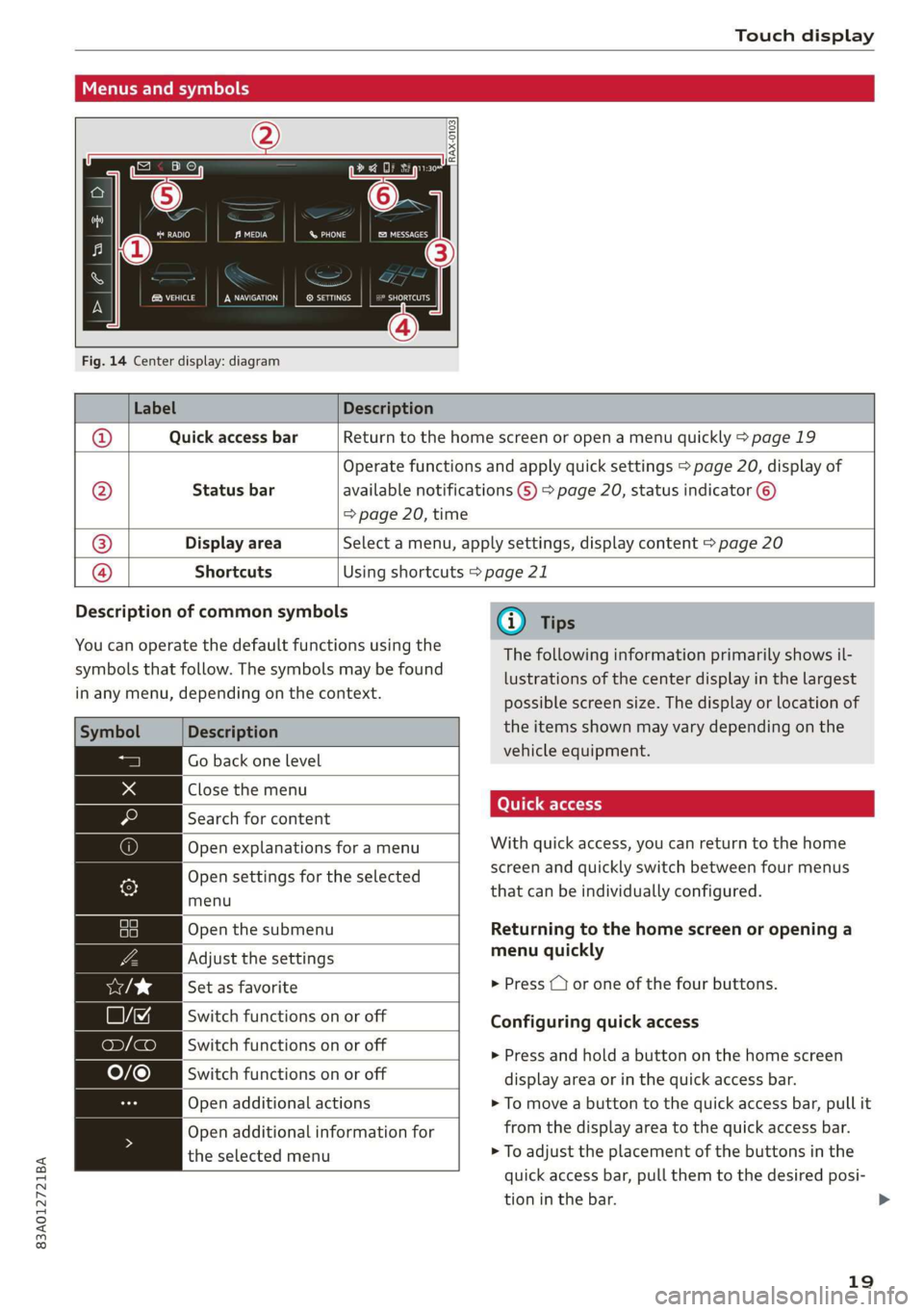
Fig. 14 Center display: diagram
Label Description
Quick access bar Return to the home screen or open a menu quickly > page 19
Status bar
Operate functions and apply quick settings > page 20, display of
available notifications G) > page 20, status indicator ©)
=> page 20, time
Display area Select a menu, apply settings, display content > page 20
®|O,
©
|O
Shortcuts Using shortcuts > page 21
Description of common symbols
You can operate the default functions using the
symbols that follow. The symbols may be found
in any menu, depending on the context.
Description
Close the menu
Search for content
menu
Open the submenu
Set as favorite
Switch functions on or off
Open additional actions
the selected menu
Go back one level
Open explanations for a menu
Open settings for the selected
Adjust the settings
Switch functions on or off
Switch functions on or off
Open additional information for
@) Tips
The following information primarily shows il-
lustrations of the center display in the largest
possible screen size. The display or location of
the items shown may vary depending on the
vehicle equipment.
With quick access, you can return to the home
screen and quickly switch between four menus
that can be individually configured.
Returning to the home screen or opening a
menu quickly
> Press ( or one of the four buttons.
Configuring quick access
» Press and hold a button on the home screen
display area or in the quick access bar.
> To move a button to the quick access bar, pull it
from the display area to the quick access bar.
> To adjust the placement of the buttons in the
quick access bar, pull them to the desired posi-
tion in the bar.
19
>
Page 22 of 280
Touch display
@) Tips
The position of © cannot be adjusted.
Display area
You can freely change the location of the buttons
on the home screen display area.
Configuring the display area
> Press and hold a button on the home screen
display area.
> To adjust the placement of the buttons, pull
them to the desired locations.
Switching between menu pages
If a menu contains multiple menu pages, Feit is
displayed in the display area. The white bar
shows the location of the current menu page.
> To switch between menu pages, swipe your fin-
ger to the right or left.
yeh mele) EN]
Of 8 68 of
8 OB OB om
[RAZ-0513,
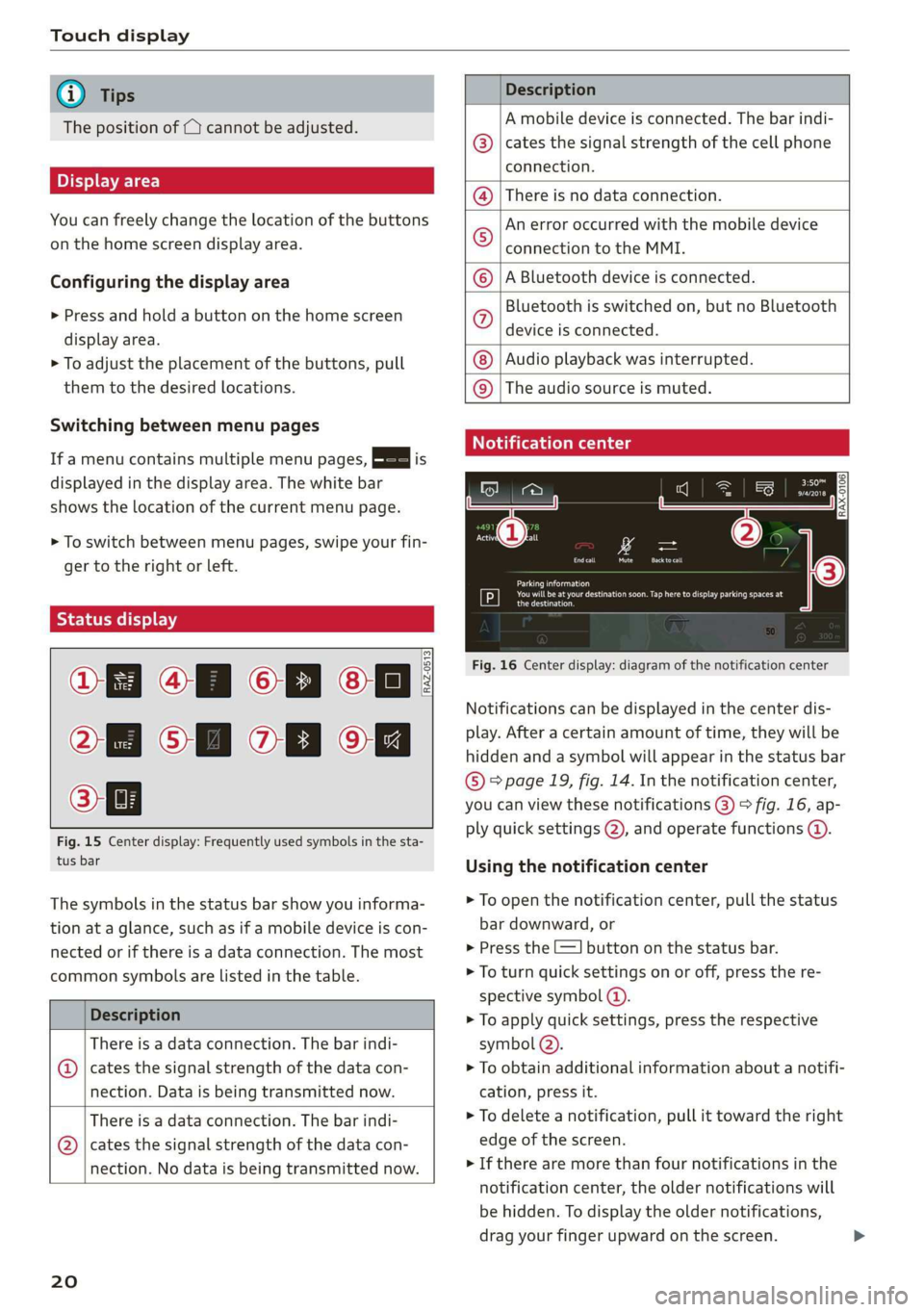
Fig. 15 Center display: Frequently used symbols in the sta-
tus bar
The symbols in the status bar show you informa-
tion at a glance, such as if a mobile device is con-
nected or if there is a data connection. The most
common symbols are listed in the table.
Description
There is a data connection. The bar indi-
@ | cates the signal strength of the data con-
nection. Data is being transmitted now.
There is a data connection. The bar indi-
@ | cates the signal strength of the data con-
nection. No data is being transmitted now.
20
Description
A mobile device is connected. The bar indi-
cates the signal strength of the cell phone
connection.
There is no data connection.
An error occurred with the mobile device
connection to the MMI.
A Bluetooth device is connected.
Bluetooth is switched on, but no Bluetooth
device is connected.
Audio playback was interrupted.
©O|©|
© |E|
©
|@|
@
The audio source is muted.
Notification center
RAX-0106
Parking information
aeons
Regier
Fig. 16 Center display: diagram of the notification center
Notifications can be displayed in the center dis-
play. After a certain amount of time, they will be
hidden and a symbol will appear in the status bar
® page 19, fig. 14. In the notification center,
you can view these notifications @) > fig. 16, ap-
ply quick settings (2), and operate functions @.
Using the notification center
> To open the notification center, pull the status
bar downward, or
> Press the E=] button on the status bar.
> To turn quick settings on or off, press the re-
spective symbol ().
> To apply quick settings, press the respective
symbol (2).
> To obtain additional information about a notifi-
cation, press it.
> To delete a notification, pull it toward the right
edge of the screen.
> If there are more than four notifications in the
notification center, the older notifications will
be hidden. To display the older notifications,
drag your finger upward on the screen.
Page 23 of 280
83A012721BA
Touch display
Setting displayed content
You can set whether some notifications should be
displayed.
> To set the displayed content, press &S, or
> Applies to MMI: Select on the home screen:
SETTINGS > Notifications.
>» Select and confirm which notifications should
be displayed.
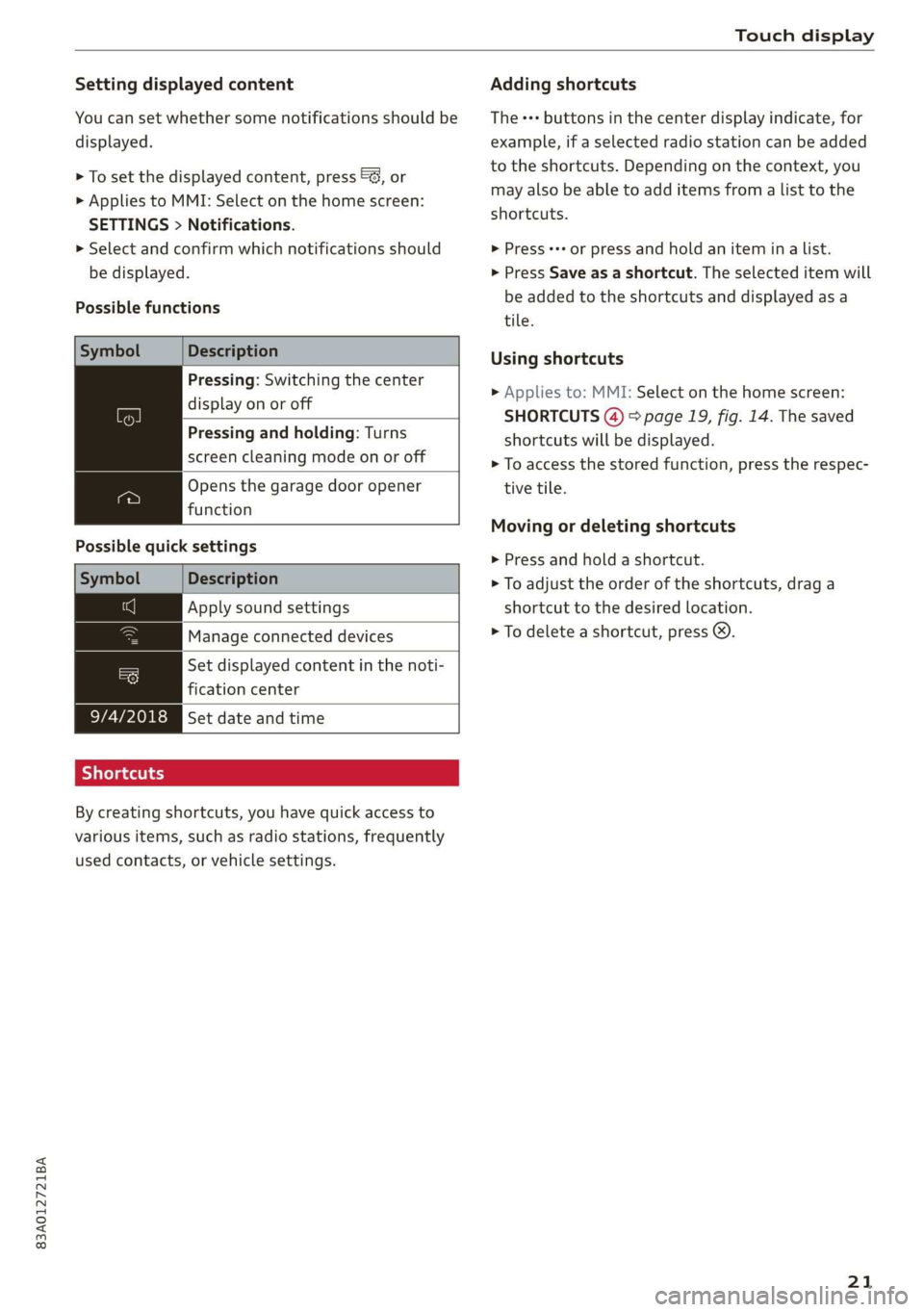
Possible functions
Symbol Description
Pressing: Switching the center
display on or off
Pressing and holding: Turns
screen cleaning mode on or off
Opens the garage door opener
function
Possible quick settings
Symbol Description
Apply sound settings
Manage connected devices
= Set displayed content in the noti-
fication center
9/4/2018 Set date and time
SJielana eg ay
By creating shortcuts, you have quick access to
various items, such as radio stations, frequently
used contacts, or vehicle settings.
Adding shortcuts
The «++ buttons in the center display indicate, for
example, if a selected radio station can be added
to the shortcuts. Depending on the context, you
may also be able to add items from a list to the
shortcuts.
> Press +++ or press and hold an item ina list.
> Press Save as a shortcut. The selected item will
be added to the shortcuts and displayed as a
tile.
Using shortcuts
> Applies to: MMI: Select on the home screen:
SHORTCUTS (4) > page 19, fig. 14. The saved
shortcuts will be displayed.
> To access the stored function, press the respec-
tive tile.
Moving or deleting shortcuts
> Press and hold a shortcut.
> To adjust the order of the shortcuts, drag a
shortcut to the desired location.
> To delete a shortcut, press ®.
21
Page 24 of 280
Touch display
acalileltia
pee
les
ae
Downtown
Coa
Downtown
Los Angeles, W
Pea)
> oo
RAZ-0700!
J John Smith ©)
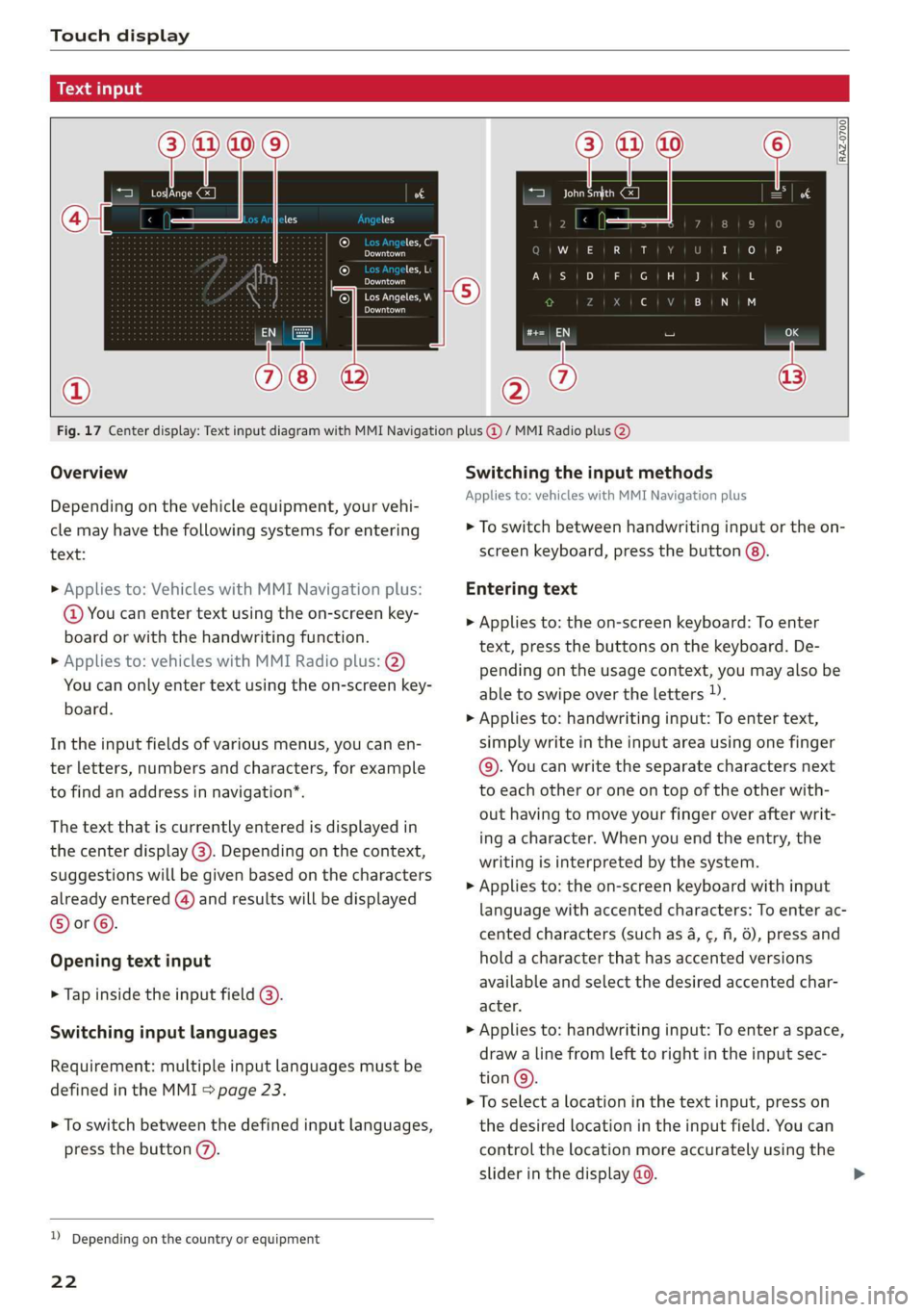
Fig. 17 Center display: Text input diagram with MMI Navigation plus @ / MMI Radio plus @)
Overview
Depending on the vehicle equipment, your vehi-
cle may have the following systems for entering
text:
> Applies to: Vehicles with MMI Navigation plus:
@ You can enter text using the on-screen key-
board or with the handwriting function.
> Applies to: vehicles with MMI Radio plus: @)
You can only enter text using the on-screen key-
board.
In the input fields of various menus, you can en-
ter letters, numbers and characters, for example
to find an address in navigation’.
The text that is currently entered is displayed in
the center display @). Depending on the context,
suggestions will be given based on the characters
already entered () and results will be displayed
®or©.
Opening text input
> Tap inside the input field @).
Switching input languages
Requirement: multiple input languages must be
defined in the MMI > page 23.
> To switch between the defined input languages,
press the button (7).
) Depending on the country or equipment
22
Switching the input methods
Applies to: vehicles with MMI Navigation plus
> To switch between handwriting input or the on-
screen keyboard, press the button (8).
Entering text
> Applies to: the on-screen keyboard: To enter
text, press the buttons on the keyboard. De-
pending on the usage context, you may also be
able to swipe over the letters )).
> Applies to: handwriting input: To enter text,
simply write in the input area using one finger
©. You can write the separate characters next
to each other or one on top of the other with-
out having to move your finger over after writ-
ing a character. When you end the entry, the
writing is interpreted by the system.
> Applies to: the on-screen keyboard with input
language with accented characters: To enter ac-
cented characters (such as 4, ¢, fi, 6), press and
hold a character that has accented versions
available and select the desired accented char-
acter.
> Applies to: handwriting input: To enter a space,
draw a line from left to right in the input sec-
tion@.
> To select a location in the text input, press on
the desired location in the input field. You can
control the location more accurately using the
slider in the display @0.
Page 25 of 280
![AUDI Q3 2019 User Guide 83A012721BA
Touch display
> To delete individual characters, press &] @, or
> Applies to: handwriting input: Draw a line from
right to Left in the input section @).
> To delete multiple charac](/img/6/57626/w960_57626-24.png "AUDI Q3 2019 User Guide 83A012721BA
Touch display
> To delete individual characters, press &] @, or
> Applies to: handwriting input: Draw a line from
right to Left in the input section @).
> To delete multiple charac")
83A012721BA
Touch display
> To delete individual characters, press &] @, or
> Applies to: handwriting input: Draw a line from
right to Left in the input section @).
> To delete multiple characters, press and hold
> To delete all characters in a specific location,
press and hold
location ). When released, the highlighted
characters are deleted.
Applying suggested words or entries from
the results list
Applies to: vehicles with MMI Navigation plus
> To accept a suggested word (@) or entry from
the results list ©), press on it.
> To display more content in the results list, drag
your finger upward or downward on the screen.
> To expand the results list, press the button @
or drag it to the desired position.
Selecting entries from the results list
Applies to: vehicles with MMI Radio plus
> To display the results list, press the button ©)
or @.
> To display more content in the results list, drag
your finger upward or downward on the screen.
Setting the input language or keyboard
layout
» Select on the home screen: SETTINGS > Lan-
guage & keyboard > Keyboard.
> To define additional input languages, press the
© button.
> To change the keyboard layout for an input lan-
guage, press >. For example, you can select be-
tween QWERTZ and QWERTY.
2) Depending on the country or equipment
23
Page 26 of 280
Voice operation
Voice operation
General information
You can operate many functions in the vehicle
easily using voice commands.
Using the voice operation system effectively
> Speak clearly and distinctly at a normal volume.
Speak louder when driving faster.
> Emphasize the words in the commands evenly
and do not leave long pauses.
> Close the doors, the windows, and the sunroof*
to reduce background noise. Make sure that
passengers are not speaking when you are giv-
ing a voice command.
> Do not direct the vents toward the hands-free
microphone, which is in the roof headliner near
the front interior lights.
> Only the driver should speak to the system, be-
cause the handsfree microphone is aimed to-
ward this seating position.
ZA\ WARNING
— Direct your full attention to driving. As the
driver, you have complete responsibility for
safety in traffic. Only use the functions in
such a way that you always maintain com-
plete control over your vehicle in all traffic
situations.
— Do not use voice operation in emergencies
because your voice may change in stressful
situations. The system may take longer to
dial the number or may not be able to dial it
at all. Dial the emergency number manually.
@ Tips
There are no voice guidance* prompts when a
dialog is active.
24
Voice recognition system
Applies to: vehicles with voice recognition system
See
Dat)
Where is a
Connect
Diala
coy
Es
ea
cog
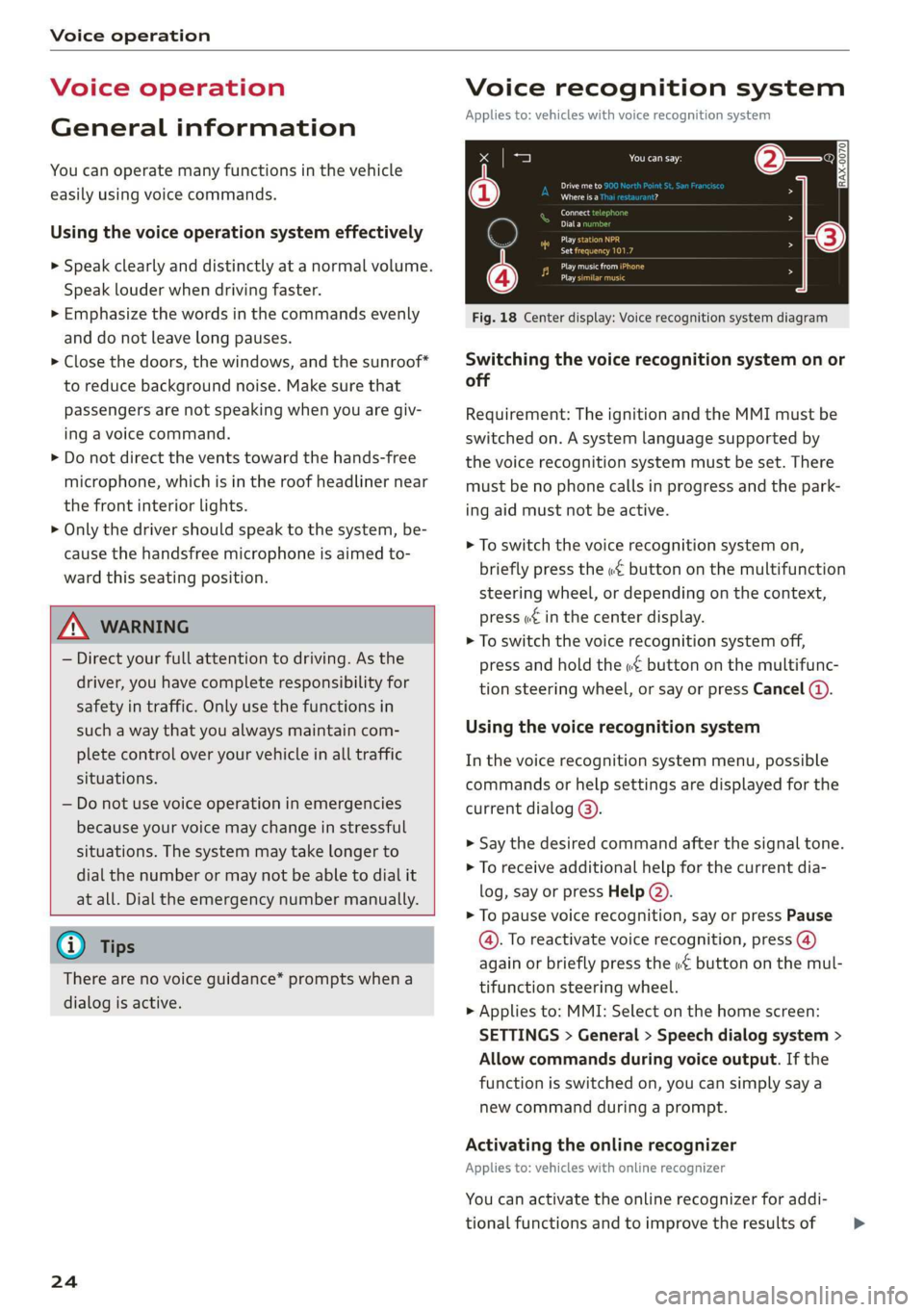
Fig. 18 Center display: Voice recognition system diagram
Switching the voice recognition system on or
off
Requirement: The ignition and the MMI must be
switched on. A system language supported by
the voice recognition system must be set. There
must be no phone calls in progress and the park-
ing aid must not be active.
> To switch the voice recognition system on,
briefly press the «€ button on the multifunction
steering wheel, or depending on the context,
press w£ in the center display.
> To switch the voice recognition system off,
press and hold the « button on the multifunc-
tion steering wheel, or say or press Cancel (a).
Using the voice recognition system
In the voice recognition system menu, possible
commands or help settings are displayed for the
current dialog @).
> Say the desired command after the signal tone.
> To receive additional help for the current dia-
log, say or press Help (2).
> To pause voice recognition, say or press Pause
@. To reactivate voice recognition, press (@)
again or briefly press the «€ button on the mul-
tifunction steering wheel.
> Applies to: MMI: Select on the home screen:
SETTINGS > General > Speech dialog system >
Allow commands during voice output. If the
function is switched on, you can simply say a
new command during a prompt.
Activating the online recognizer
Applies to: vehicles with online recognizer
You can activate the online recognizer for addi-
tional functions and to improve the results of >
Page 35 of 280
83A012721BA
Opening and closing
— You can display the number of vehicle keys
programmed to the vehicle: Select on the
home screen: VEHICLE > Settings & service
> Vehicle info.
— For an explanation on conformity with the
FCC regulations in the United States and the
Industry Canada regulations, see
> page 261.
Unlocking and locking the vehicle
RAZ-0025
:
A ,
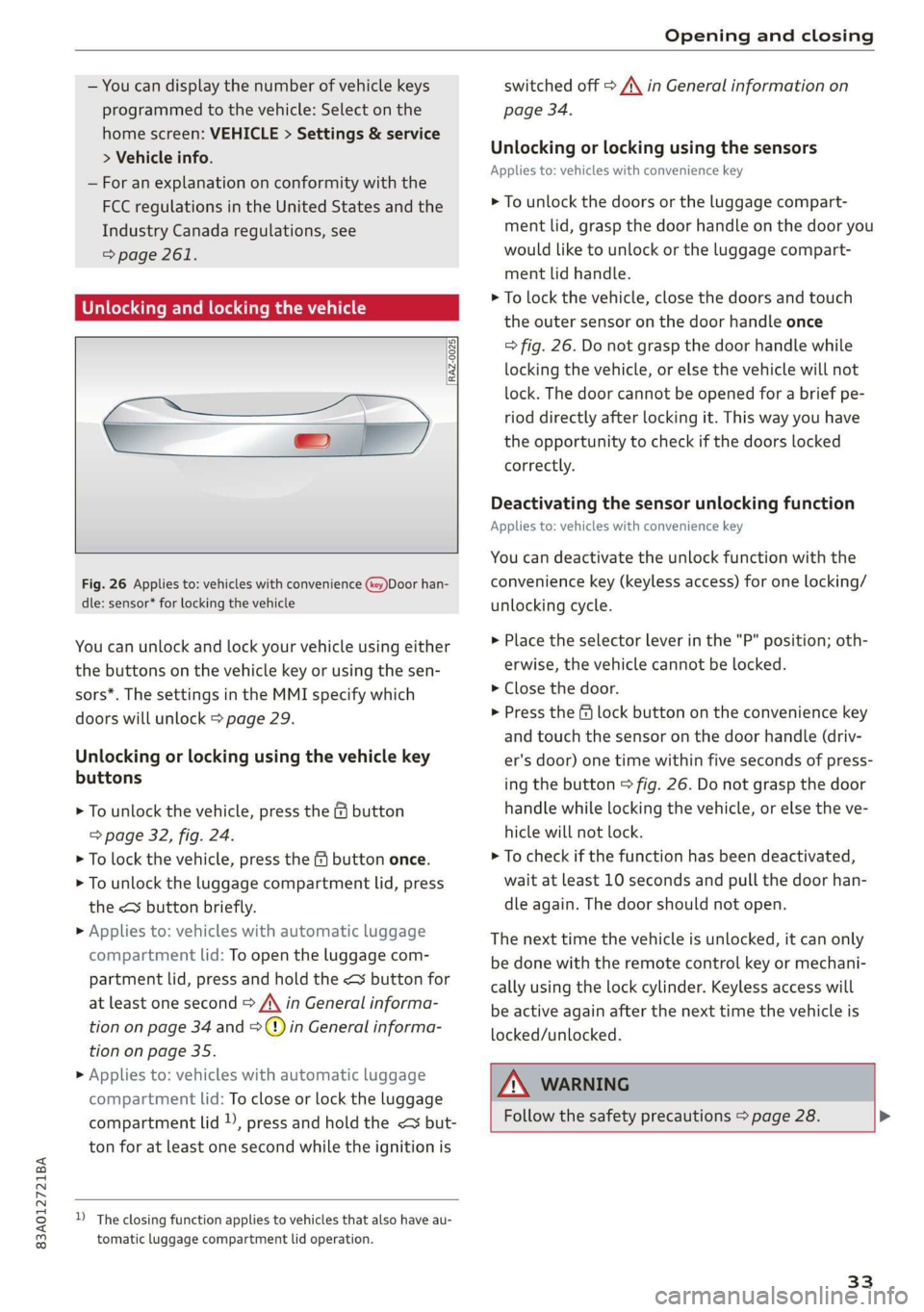
Fig. 26 Applies to: vehicles with convenience (key)Door han-
dle: sensor* for locking the vehicle
You can unlock and lock your vehicle using either
the buttons on the vehicle key or using the sen-
sors*. The settings in the MMI specify which
doors will unlock > page 29.
Unlocking or locking using the vehicle key
buttons
> To unlock the vehicle, press the G button
=> page 32, fig. 24.
> To lock the vehicle, press the & button once.
> To unlock the luggage compartment lid, press
the < button briefly.
> Applies to: vehicles with automatic luggage
compartment lid: To open the luggage com-
partment lid, press and hold the < button for
at least one second > /\ in General informa-
tion on page 34 and =>) in General informa-
tion on page 35.
> Applies to: vehicles with automatic luggage
compartment lid: To close or lock the luggage
compartment lid )), press and hold the << but-
ton for at least one second while the ignition is
D_ The closing function applies to vehicles that also have au-
tomatic luggage compartment lid operation.
switched off A\ in General information on
page 34.
Unlocking or locking using the sensors
Applies
to: vehicles with convenience key
> To unlock the doors or the luggage compart-
ment lid, grasp the door handle on the door you
would like to unlock or the luggage compart-
ment lid handle.
> To lock the vehicle, close the doors and touch
the outer sensor on the door handle once
=> fig. 26. Do not grasp the door handle while
locking the vehicle, or else the vehicle will not
lock. The door cannot be opened for a brief pe-
riod directly after locking it. This way you have
the opportunity to check if the doors locked
correctly.
Deactivating the sensor unlocking function
Applies to: vehicles with convenience key
You can deactivate the unlock function with the
convenience key (keyless access) for one locking/
unlocking cycle.
> Place the selector lever in the "P" position; oth-
erwise, the vehicle cannot be locked.
> Close the door.
> Press the f lock button on the convenience key
and touch the sensor on the door handle (driv-
er's door) one time within five seconds of press-
ing the button > fig. 26. Do not grasp the door
handle while locking the vehicle, or else the ve-
hicle will not lock.
> To check if the function has been deactivated,
wait at least 10 seconds and pull the door han-
dle again. The door should not open.
The next time the vehicle is unlocked, it can only
be done with the remote control key or mechani-
cally using the lock cylinder. Keyless access will
be active again after the next time the vehicle is
locked/unlocked.
ZA WARNING
Follow the safety precautions > page 28. >
33
Page 40 of 280
Opening and closing
Child safety lock
The child safety lock prevents the rear doors
from being opened from the inside and the rear
power windows from be operated.
RAZ-0372
B8W-0085
Fig. 33 Rear door: manual child safety lock
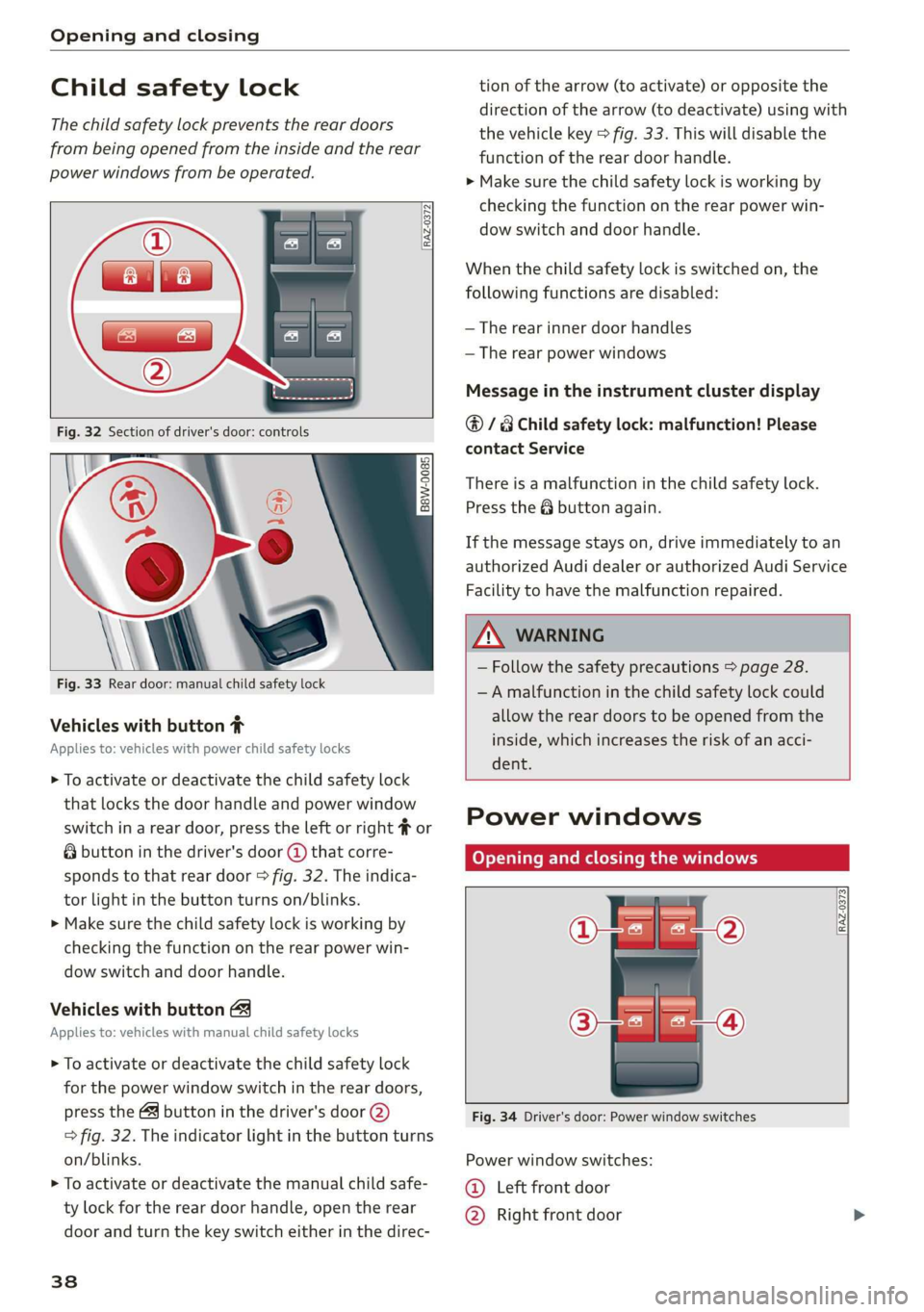
Vehicles with button #
Applies to: vehicles with power child safety locks
> To activate or deactivate the child safety lock
that locks the door handle and power window
switch in a rear door, press the left or right # or
& button in the driver's door @ that corre-
sponds to that rear door > fig. 32. The indica-
tor light in the button turns on/blinks.
> Make sure the child safety lock is working by
checking the function on the rear power win-
dow switch and door handle.
Vehicles with button
Applies to: vehicles with manual child safety locks
> To activate or deactivate the child safety lock
for the power window switch in the rear doors,
press the 4 button in the driver's door @)
> fig. 32. The indicator light in the button turns
on/blinks.
> To activate or deactivate the manual child safe-
ty lock for the rear door handle, open the rear
door and turn the key switch either in the direc-
38
tion of the arrow (to activate) or opposite the
direction of the arrow (to deactivate) using with
the vehicle key > fig. 33. This will disable the
function of the rear door handle.
> Make sure the child safety lock is working by
checking the function on the rear power win-
dow switch and door handle.
When the child safety lock is switched on, the
following functions are disabled:
— The rear inner door handles
— The rear power windows
Message in the instrument cluster display
@/8 Child safety lock: malfunction! Please
contact Service
There is a malfunction in the child safety lock.
Press the @ button again.
If the message stays on, drive immediately to an
authorized Audi dealer or authorized Audi Service
Facility to have the malfunction repaired.
ZA WARNING
— Follow the safety precautions > page 28.
—A malfunction in the child safety lock could
allow the rear doors to be opened from the
inside, which increases the risk of an acci-
dent.
Power windows
Opening and closing the windows
[RAZ-0373
Fig. 34 Driver's door: Power window switches
Power window switches:
©@ Left front door
@ Right front door