navigation system AUDI Q3 2019 User Guide
[x] Cancel search | Manufacturer: AUDI, Model Year: 2019, Model line: Q3, Model: AUDI Q3 2019Pages: 280, PDF Size: 72.73 MB
Page 167 of 280
83A012721BA
Navigation
Map
Map functions
Applies to: vehicles with navigation system
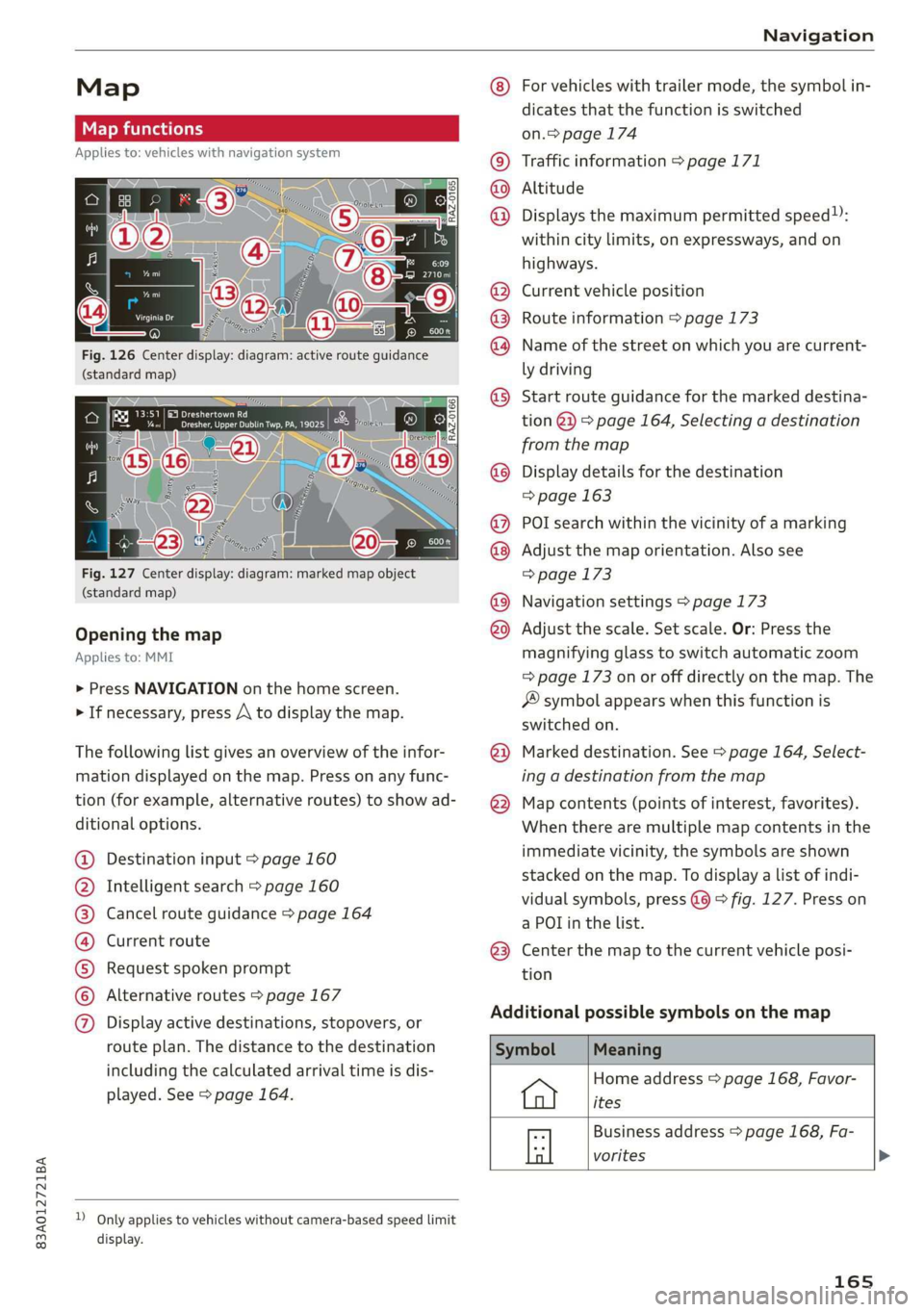
Fig. 126 Center display: diagram: active route guidance
(standard map)
Fig. 127 Center display: diagram: marked map object
(standard map)
Opening the map
Applies to: MMI
> Press NAVIGATION on the home screen.
> If necessary, press A to display the map.
The following list gives an overview of the infor-
mation displayed on the map. Press on any func-
tion (for example, alternative routes) to show ad-
ditional options.
Destination input > page 160
Intelligent search > page 160
Cancel route guidance > page 164
Current route
Request spoken prompt
Alternative routes > page 167
CGOOOOLOHO Display active destinations, stopovers, or
route plan. The distance to the destination
including the calculated arrival time is dis-
played. See > page 164.
D_ Only applies to vehicles without camera-based speed limit
display.
OOo
®
®0O®8
®®
O88
@
®
®
@
For vehicles with trailer mode, the symbol in-
dicates that the function is switched
on.> page 174
Traffic information > page 171
Altitude
Displays
the maximum permitted speed):
within city limits, on expressways, and on
highways.
Current vehicle position
Route information > page 173
Name of the street on which you are current-
ly driving
Start
route guidance for the marked destina-
tion @}) > page 164, Selecting a destination
from the map
Display details for the destination
=> page 163
POI search within the vicinity of a marking
Adjust the map orientation. Also see
=> page 173
Navigation settings > page 173
Adjust the scale. Set scale. Or: Press the
magnifying glass to switch automatic zoom
=> page 173 on or off directly on the map. The
® symbol appears when this function is
switched on.
Marked destination. See > page 164, Select-
ing a destination from the map
Map contents (points of interest, favorites).
When there are multiple map contents in the
immediate vicinity, the symbols are shown
stacked on the map. To display a list of indi-
vidual symbols, press @@ > fig. 127. Press on
a POT in the list.
Center the map to the current vehicle posi-
tion
Additional possible symbols on the map
Home address > page 168, Favor-
ites
Business address > page 168, Fa-
a vorites >
165
Page 168 of 280
Navigation
Symbol
*
By Previous destinations display
Meaning
Favorites > page 168
Traffic information display on the map or
map preview
Color-coded markings along the route indicate
the traffic flow:
Green: traffic is flowing freely.
Yellow: stop-and-go traffic.
Red: traffic jam or traffic obstructions.
Shaded markings indicate the length of the area
with congestion.
Traffic information
— Colored warning symbols: There is an upcom-
ing traffic incident on your route.
— Grayed out warning symbols: Traffic incidents
that are not on your route
— All traffic incidents will display in color when
route guidance is inactive.
— Warning symbols with arrow: traffic incident
that you have been routed around, for example
3.
You can adjust the display of colored markings
for traffic information on the maps > page 173.
Applies to: vehicles with navigation system
You can operate the map > page 165, fig. 126
with the movements described in the following
information.
Moving the map
> Drag your finger across the map in the desired
direction.
Moving the map quickly
> Drag your finger across the map in the desired
direction and lift your finger off the screen.
166
Zooming in on the map
> Place two fingers on the map and pull your fin-
gers apart. Or: double tap on the map with one
finger.
Zooming out on the map
> Place two fingers on the map and pull your fin-
gers together. Or: double tap on the map with
two fingers.
Rotating the map
> Rotate the map using two fingers.
Tilting the map
> Drag upward or downward with two fingers.
(Gi) Tips
Certain gestures may not be available on all
touch displays or in every menu.
Navigation view with route guidance
Berar
Applies to: vehicles with navigation system and Audi virtual
cockpit
Fig. 128 Instrument cluster: default view: Turning maneu-
ver when route guidance is active (Audi virtual cockpit)
Requirement: route guidance must be on
=> page 160.
The following information will be displayed in the
driver information system, if available:
@ Current vehicle position
@A bar graph appears when there is an upcom-
ing turn. The fewer the bars that are shown, the
shorter the distance is until the turn. If there is
no upcoming turn immediately ahead, the dis-
tance to the destination or stopover, the
Page 169 of 280
83A012721BA
Navigation
calculated arrival time, and a direction arrow for
the upcoming maneuver will be displayed in the
right speedometer. If there is no upcoming ma-
neuver, the distance to the next maneuver will be
displayed.
@® Lane recommendation
Personal route
assistance
Applies to: vehicles with navigation system and personal
route assistance
Your MMI can learn the routes that you drive fre-
quently (such as your daily commute to work and
back) and suggest route guidance based on the
current vehicle position.
When the function is switched on, the MMI re-
cords the routes driven regardless of whether or
not you are using navigation.
Without starting route guidance, your MMI
checks the traffic conditions and shows possible
traffic incidents for the possible routes to be driv-
en.
Opening personal routes
Requirement: personal route assistance must be
switched on > page 174. Route guidance must
not be active. A notification is displayed.
> The MMI displays up to three suggestions.
Press on a suggestion. Route guidance will
start.
Better routes
If there are major traffic incidents, the MMI will
display a notification regardless of the selected
menu. If the MMI has calculated a better route,
you can select it as the route.
> Press on the notification.
As soon as you switch off personal route assis-
tance, your personal routes will no Longer be re-
corded. Routes that were already stored remain
stored.
Deleting personal routes
> Applies to: MMI: Select on the home screen:
NAVIGATION > & > Personal route assistance
> Delete recordings from the last 24 hours or
Delete all personal routes and destinations.
@ Tips
If personal route assistance is switched off
and you press F&, the personal route assis-
tance settings will be displayed > page 174.
Alternative routes
Applies to: vehicles with navigation system
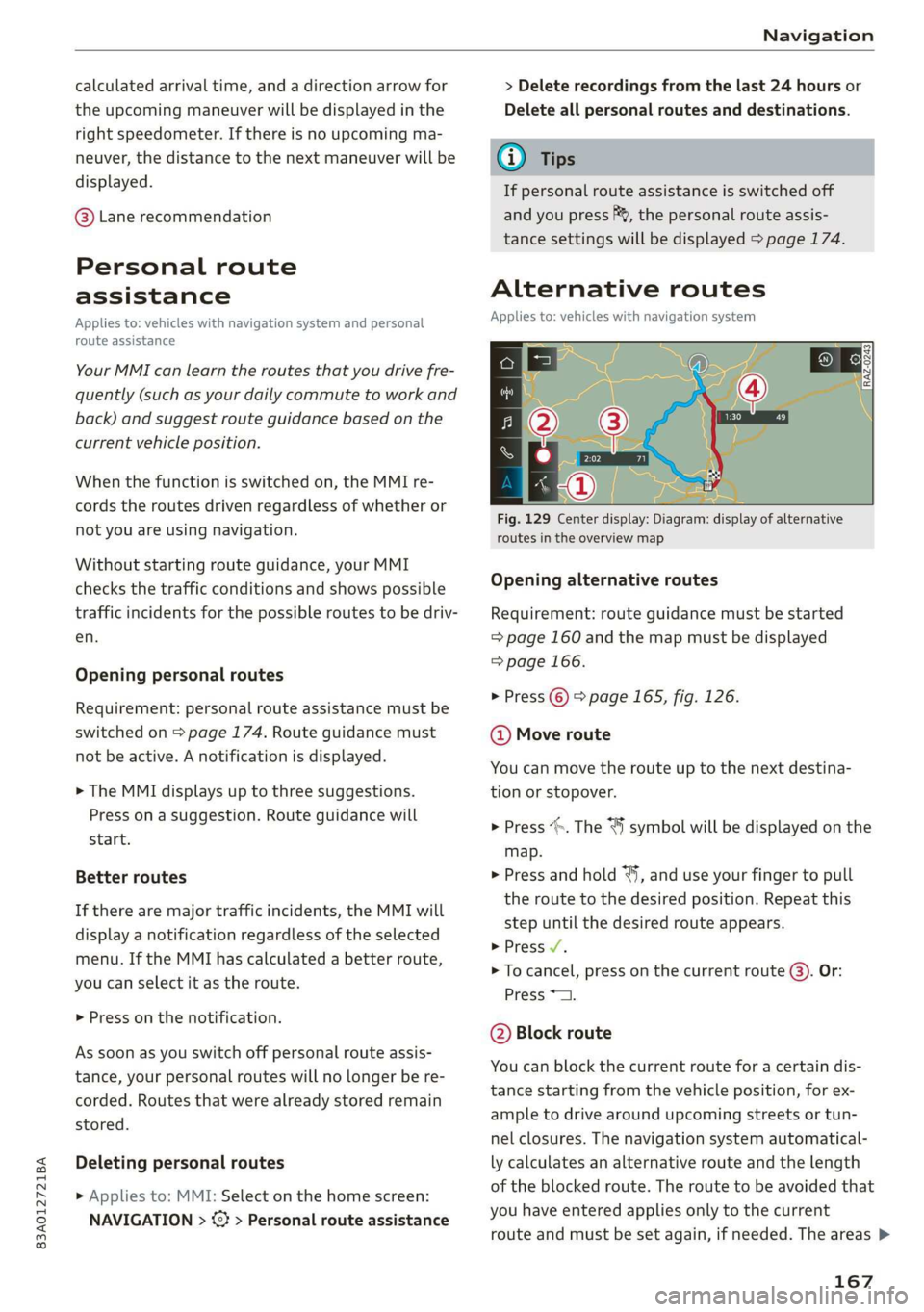
Fig. 129 Center display: Diagram: display of alternative
routes in the overview map
Opening alternative routes
Requirement: route guidance must be started
= page 160 and the map must be displayed
=> page 166.
> Press ©) > page 165, fig. 126.
@ Move route
You can move the route up to the next destina-
tion or stopover.
> Press “». The ¥ symbol will be displayed on the
map.
> Press and hold “, and use your finger to pull
the route to the desired position. Repeat this
step until the desired route appears.
> Press V.
> To cancel, press on the current route ©. Or:
Press *2.
@ Block route
You can block the current route for a certain dis-
tance starting from the vehicle position, for ex-
ample to drive around upcoming streets or tun-
nel closures. The navigation system automatical-
ly calculates an alternative route and the length
of the blocked route. The route to be avoided that
you have entered applies only to the current
route and must be set again, if needed. The areas >
167
Page 170 of 280
Navigation
you have selected to avoid will appear with red
and white shading on the map.
> Block route: press @) > fig. 129.
> Cancel route block: press Q.
@ Current route
The distance to the destination and the calculat-
ed arrival time will be displayed for the current
route.
@ Alternative route
As long as traffic information is available, the
congestion along the route including the time de-
lay will be displayed. The distance to the destina-
tion and the calculated arrival time will be dis-
played for the alternative route.
Select route
> Press on the information window for the appli-
cable alternative route (for example (@)
> fig. 129).
Additional functions
a Wol gia)
Applies to: vehicles with navigation system
You can access frequent destinations in the fa-
vorites. You can quickly and easily start route
guidance using the home address or business ad-
dress function.
Accessing favorites
> Applies to: MMI: Select on the home screen:
NAVIGATION > (G8) > Favorites.
If you have met the requirements for myAudi
navigation, your favorites list will be synchron-
ized with your myAudi account > page 159.
Storing favorites
> Press yY¥ in the details > page 163, fig. 125. Or:
press Store as favorite in the options
> page 172.
Storing a home address or business address
> Press Home address or Business address.
When accessed for the first time, you will be
prompted to set the address.
> Select: Create now > enter a destination > OK.
168
Editing a home address or business address
Requirement: the favorites list must be dis-
played. Your home address or business address
must be stored.
> Press Home address or Business address until
the Options menu is displayed.
> Select: Change address > enter a destination >
(Set as destination) or (Add to address) > OK.
Editing a favorite
Requirement: the favorites list must be dis-
played. At least one favorite must be stored.
> Setting a favorite as a destination: press ona
favorite.
> Rename favorite: press on a favorite until the
Options menu is displayed. Select: Change
name > enter a name > OK.
> Deleting a favorite: select: 2 > one or more
entries or Select all > Delete > (Done).
Requirement: the favorites list must be dis-
played. At least two favorites must be stored.
> Moving a favorite: Press Z. Touch the $ sym-
bol and move the entry to the desired position.
Press Done.
@) Tips
— After deleting the home address or business
address, only the address is deleted and the
entry will still be displayed in the favorites.
— Please note when moving favorites that
items 1 and 2 are reserved for the home ad-
dress and business address.
(ey era marae lac me(ia rhe (elay
Applies to: vehicles with navigation system
Two addresses (private/business) can be added
as destinations for each contact. Addresses for
contacts on your mobile device are displayed as a
mailing address.
Accessing contacts
> Applies to: MMI: Select on the home screen:
NAVIGATION > (G2) > Contacts.
Page 171 of 280

83A012721BA
Navigation
Adding a destination to a contact
Requirement: A mobile device must be connected
to the MMI > page 140. Or: You must have im-
ported contacts > page 151, Importing and ex-
porting contacts. The Hide grayed-out contacts
option must be switched off > page 169. There
must be no business address or private address
stored for the desired contact.
> Select: a contact > |---| > Add destination.
> Follow the system instructions.
Settings
» Applies to: MMI: Select on the home screen:
NAVIGATION > (G2) > Contacts > ©.
Hide grayed-out contacts
When the function is switched on, contacts that
have no address or navigation destination stored
will be hidden in navigation. You can find infor-
mation for additional settings under > page 151,
Directory settings.
G) Tips
If you add a navigation destination to a con-
tact, the destination will only be stored in the
MMI. The MMI does not change any contacts
on your phone.
le dem clear h a cela)
Applies to: navigation system and parking information
In supported areas, you can display parking
along the route.
Requirement: the Parking notification must be
switched on > page 20, Notification center. The
MMI must be connected to the Internet
= page 154, Audi connect. Route guidance must
be active, you must be close to your destination,
and a notification must be displayed. Or: a point
is marked on the map.
> Press on the notification. Or: press on §j on the
map.
2) AUDI AG provides access to services from third party pro-
viders. Permanent availability cannot be guaranteed, be-
cause that depends on the third party provider.
> To navigate to a parking: space, press ona col-
ored marking on the map.
> Select: F2 > Start.
Depending on availability, colored markings on
the map indicate the probability of open parking
spaces.
Color Meaning
Green | High probability
Orange |Medium probability
Red Low probability
@) Note
Read the information about Audi connect, and
be sure to note the connectivity costs section
=@ in General information on page 154.
Satellite map
Applies to: vehicles with navigation system and satellite map
You can display the navigation map with satel-
lite images.
Requirement: The MMI must be connected to the
Internet > page 154, Audi connect.
> Applies to: MMI: Select on the home screen:
NAVIGATION > <} > Map settings > Satellite
map).
The map view is based on data packets received
from the Internet in the form of satellite images,
which are then combined with the roadways from
the > page 165, fig. 126 standard map view.
@) Note
Read the information about Audi connect, and
be sure to note the connectivity costs section
=@ in General information on page 154.
@) Tips
—The satellite map) is updated regularly
whenever the function is opened. The proc-
ess may take several seconds.
169
Page 172 of 280
Navigation
— When the satellite map display is switched
on )) with the 3D position map type, the dis-
play automatically switches to the 2D map
type when driving through tunnels.
— Depending on the Internet connection, the
standard map may also be displayed when
the satellite map is switched on ).
Map update
Applies to: vehicles with navigation system
You can update the map data in the MMI witha
map update. The functions depend on the coun-
try and vehicle equipment:
— Map updates through online map update
=> page 170.
— Import map updates from the SD card or USB
connection to your MMI page 170.
— Map update at an authorized Audi dealer or au-
thorized Audi Service Facility. This can result in
additional costs.
Online map update
Applies to: vehicles with MMI, navigation system, and Audi
connect Infotainment
Using map update online, you can update the
map material in your navigation system directly
from your vehicle.
Using your vehicle position, the MMI identifies
regions which you are frequently in. Based on
this, update data for these regions are available
for your MMI.
Start map update
Applies to: MMI
Requirement: The MMI must be connected to the
Internet > page 154, Audi connect.
> A notification for a map update will appear in
the center display.
2) AUDI AG provides access to services from third party pro-
viders. Permanent availability cannot be guaranteed, be-
cause that depends on the third party provider.
170
> If the option Automatic online map update
=> page 171 is switched on, the MMI will start
the map update. Or:
> Press on the notification. Or: access the notifi-
cation in the notification center on > page 20
and press on the notification.
> If the Automatic online map update option
= page 171 is switched off, press on Allow
once or Always allow.
The MMI will start the map update. The progress
of the download and installation will be shown in
the center display.
When the update has ended, a notification will
be displayed.
C) Note
Read the information about Audi connect, and
be sure to note the connectivity costs section
=@ in General information on page 154.
G) Tips
Because of the high volume of data, down-
loading large country packages or the whole
package to your PC from your myAudi ac-
count, storing it on an SD card or a USB stick,
and then importing it to your MMI is recom-
mended & page 170.
Map update using an SD card or USB
(lola lat-vastela)
Applies to: vehicles with MMI, navigation system, and Audi
connect Infotainment
With the map update, you can update the map
material in your navigation system.
Requirement: You must have a registered myAudi
account at my.audi.com. Your vehicle must be
registered in your myAudi account.
Prepare map update
> Download the map update at my.audi.com and
store it on an SD card or on a USB flash drive.
For additional information, visit my.audi.com. >
Page 173 of 280
83A012721BA
Navigation
Start map update
Requirement: a map update for your vehicle must
be onan SD card or a USB flash drive.
> Insert the SD card in your vehicle's SD card
reader > page 182. Or: connect the USB flash
drive to the Audi music interface > page 184.A
notification for a map update will appear in the
center display.
> Press on the notification. Or: access the notifi-
cation in the notification center on > page 20
and press on the notification. The update pack-
age is shown.
> Press Next. The status of the installation is
shown in the center display.
> When the update has ended, a notification will
be displayed.
Map updates settings
Applies to: vehicles with navigation system and Audi connect
Infotainment
> Applies to: MMI: Select on the home screen:
SETTINGS > System maintenance.
Automatic online map update: map updates are
automatically downloaded and installed when
this function is switched on.
@) Note
Read the information about Audi connect, and
be sure to note the connectivity costs section
=>@ in General information on page 154.
Traffic information
Introduction
Applies to: vehicles with navigation system
50}
RAX-0020] MA PR eae niches ni
eee en
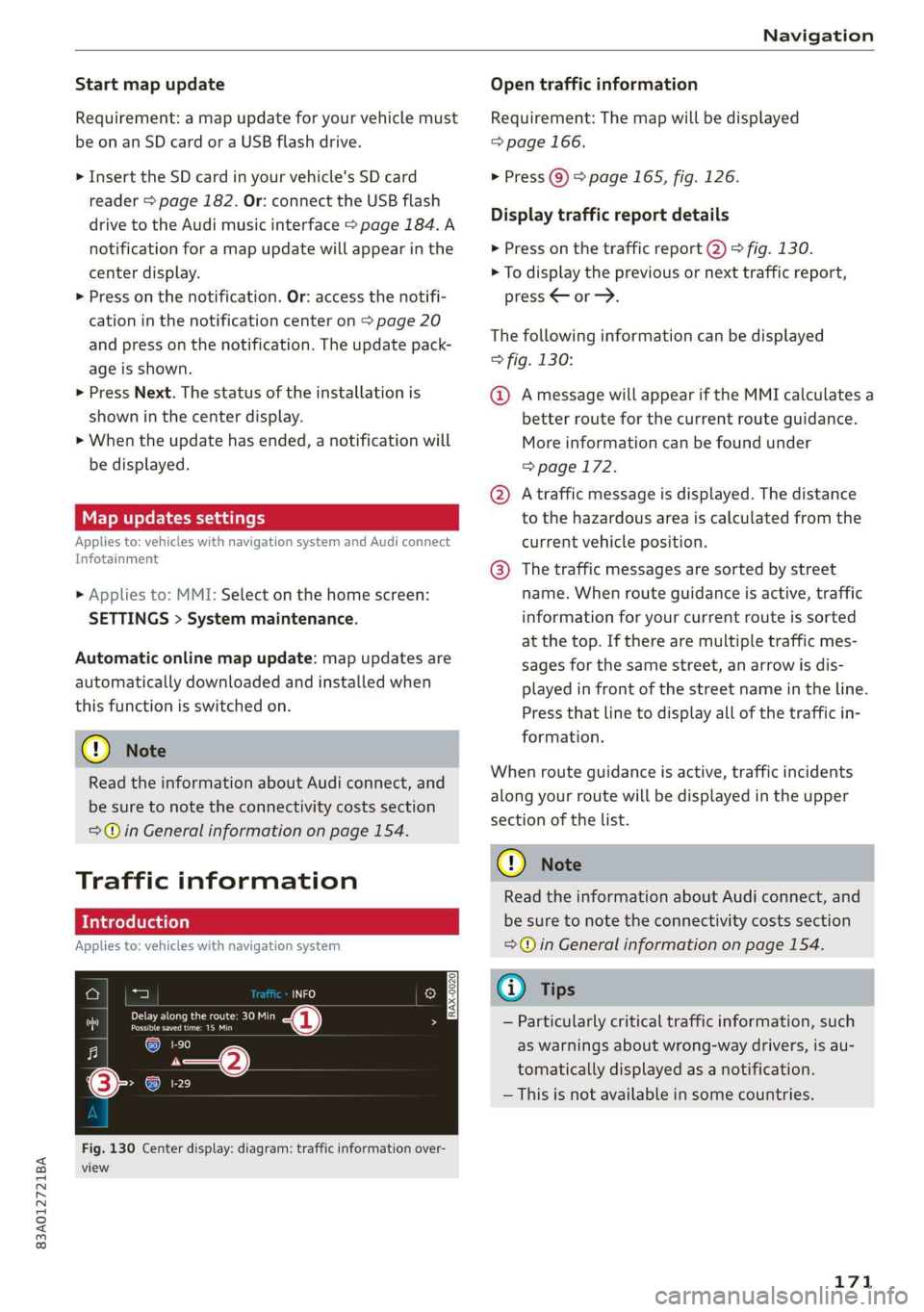
Fig. 130 Center display: diagram: traffic information over-
view
Open traffic information
Requirement: The map will be displayed
=> page 166.
> Press Q) > page 165, fig. 126.
Display traffic report details
> Press on the traffic report @) > fig. 130.
> To display the previous or next traffic report,
press < or.
The following information can be displayed
> fig. 130:
@ Amessage will appear if the MMI calculates a
better route for the current route guidance.
More information can be found under
=> page 172.
@ Atraffic message is displayed. The distance
to the hazardous area is calculated from the
current vehicle position.
@® The traffic messages are sorted by street
name. When route guidance is active, traffic
information for your current route is sorted
at the top. If there are multiple traffic mes-
sages for the same street, an arrow is dis-
played in front of the street name in the line.
Press that line to display all of the traffic in-
formation.
When route guidance is active, traffic incidents
along your route will be displayed in the upper
section of the list.
@) Note
Read the information about Audi connect, and
be sure to note the connectivity costs section
=@ in General information on page 154.
(i) Tips
— Particularly critical traffic information, such
as warnings about wrong-way drivers, is au-
tomatically displayed as a notification.
— This is not available in some countries.
171
Page 174 of 280
Navigation
Tad ite
Applies to: vehicles with navigation system
By receiving traffic, your MMI calculates a better
route if available and the possible time saved
compared to the current route. You can decide
which route you would like to use.
A notification will appear for several seconds if
your MMI calculates a better route for the cur-
rent route guidance.
A message will also appear in the traffic informa-
tion overview @) > page 171, fig. 130.
Accept better route
Requirement: A notification about a better route
is displayed.
> Press PF. The better route is used for route
guidance and the route is recalculated. Or:
press the notification in the central area. The
better route with the calculated arrival time is
displayed > page 167, Alternative routes. Press
on a better route (for example @) > page 167,
fig. 129).
CON eee aie leleurliela)
Applies to: vehicles with navigation system and online traffic
information
The MMI can receive real-time online traffic in-
formation about congestion, accidents, road
construction, and other incidents.
Requirement: The MMI must be connected to the
Internet > page 154, Audi connect. Traffic infor-
mation must be switched on in the MMI
=> page 173.
Traffic information will be displayed on the
standard map > page 165, fig. 126.
Online traffic information is also displayed on the
standard map > page 169.
@) Note
Read the information about Audi connect, and
be sure to note the connectivity costs section
=@ in General information on page 154.
172
G) Tips
— Having the Online traffic information func-
tion switched on provides the most accurate
reports of traffic situations and traffic fore-
casting. Your vehicle transmits and process-
es its anonymous, encrypted position infor-
mation at regular intervals to the traffic da-
ta provider. You can switch off data transfer
at any time > page 256.
— The online traffic information network is
not available in all countries, and the cover-
age is not nationwide.
Options and settings
Applies to: vehicles with navigation system
Context-specific functions and settings may be
available depending on the vehicle equipment.
Requirement: a list with navigation destinations
(such as last destinations) must be displayed.
> Press and hold an element until the Options
menu is displayed.
Storing a favorite
See > page 168.
Edit address
You can edit an address for the next destination
entry and navigate to the destination. Select: Ed-
it address > enter a street > Use address > Start.
If the address is permanently stored (for exam-
ple, in the favorites), the stored entry will not be
changed.
Change address
See > page 168, Favorites.
Entering an address
See > page 168, Contacts as navigation destina-
tions.
Change name
See > page 168, Favorites.
Save as a shortcut
See > page 21, Shortcuts.
Page 175 of 280

83A012721BA
Navigation
Applies to: vehicles with navigation system
You can adjust the navigation system settings in
the instrument cluster and the center display
separately. The settings depend on the country
and vehicle equipment.
Accessing settings
> Applies to: MMI: Select on the home screen:
NAVIGATION > &
Accessing settings using the multifunction
steering wheel
> Applies to: multifunction steering wheel: Select
in the instrument cluster: Navigation tab >
button.
Please note that a setting applied to the multi-
function steering wheel is only valid for the in-
strument cluster map.
Map settings
Satellite map: see > page 169.
Traffic: you can display current traffic informa-
tion on the map. See > page 166, Traffic infor-
mation display on the map or map preview
— Free flow of traffic
— Traffic obstructions
— Traffic information
Map colors
— Automatic: the map display adapts to the light-
ing conditions (for example, by changing from
day to night when driving through a tunnel).
— Day or Night
Map orientation
— 2D map or 2D north up: the current vehicle po-
sition is displayed. The map is oriented in the
direction of travel or to the north.
— 3D map: the current vehicle position is shown
on a three-dimensional map and is oriented to
the direction of travel.
— Overview: the entire route from the vehicle po-
sition to the destination or the next stopover is
displayed on the map. The map is oriented to
the north.
Automatic zoom
— On: the map scale adapts automatically de-
pending on the type of road being traveled (ex-
pressway, highway, other roads) so that you al-
ways have an optimal overview of the road
ahead. When route guidance is active, the scale
is adjusted automatically for a better detailed
view when there are upcoming maneuvers.
— Intersection: when route guidance is active, the
scale is adjusted automatically for a better de-
tailed view when there are upcoming maneu-
vers.
— Off
MMI map contents/Map content: you can switch
the display of additional information (such as
POIs) on the map in the center display on or off.
— Always follow >@ for the following map con-
tent:
— 3D city model
— The weather forecast is displayed on a 3 mile (5
km) scale on the map.
Voice guidance
Voice guidance: you can adjust the voice guid-
ance settings. With the Traffic setting, the MMI
will only give prompts if there are traffic inci-
dents on your route.
Voice guidance during phone call
Entertainment fader during navigation: the au-
dio playback volume is temporarily lowered when
navigation prompts are active.
Route criteria
You can adjust which route criteria should be al-
lowed or avoided for the route calculation.
HOV/carpool lanes
Highways
Toll roads
Ferries
Route information
When this function is switched on and route
guidance is active, route information ®
=> page 165, fig. 126 is displayed. The next ma-
neuver will be displayed at the bottom. POIs and >
173
Page 176 of 280
Navigation
traffic information will also be displayed. Press
route information to display a preview of the next
maneuver on the map. You can switch the follow-
ing information on or off in route information.
— POIs along the route
— Traffic information
Personal route assistance
Personal route assistance is switched off at the
factory.
Your trips are recorded and destinations are sug-
gested by the MMI when this function is switched
on > page 167.
Trailer mode
Trailer mode is switched off at the factory.
When the function is switched on, the maximum
permitted speed for vehicles with trailers is in-
cluded during route guidance and the calculated
arrival time is adjusted accordingly. When the
function is switched on, the symbol
= page 165, fig. 126 is displayed on the map.
Troubleshooting
Applies to: vehicles with navigation system
The information that follows lists some trouble-
shooting options. They depend on the equip-
ment.
Presentation mode
In presentation mode, the system simulates driv-
ing on the center display along the planned route
without the vehicle actually moving. You can use
Specify starting point when you would like to
calculate a route starting from a location other
than the current vehicle position, for example.
Simulating route guidance: start route guidance
and press Presentation mode.
() Note
Read the information about Audi connect, and
be sure to note the connectivity costs section
=@ in General information on page 154.
G) Tips
You can adjust the volume of navigation
prompts during voice guidance using the
On/Off knob = page 18. Also see > page 195.
Problem Solution
Intelligent search: the desired
destination cannot be found.
essary.
The destination might not be entered in the navigation database.
Or: check the spelling of the term that was searched.
Check the current search area > page 160 and use another, if nec-
174