wheel AUDI Q3 2019 Manual Online
[x] Cancel search | Manufacturer: AUDI, Model Year: 2019, Model line: Q3, Model: AUDI Q3 2019Pages: 280, PDF Size: 72.73 MB
Page 236 of 280
Wheels
check your tires as soon as possible, and inflate
them to the proper pressure. Driving ona signifi-
cantly under-inflated tire causes the tire to over-
heat and can lead to tire failure. Under-inflation
also reduces fuel efficiency and tire tread life,
and may affect the vehicle's handling and stop-
ping
ability.
Please note that the TPMS is not a substitute for
proper tire maintenance, and it is the driver's re-
sponsibility to maintain correct tire pressure,
even if under-inflation has not reached the level
to trigger illumination of the TPMS low tire pres-
sure telltale.
Your vehicle has also been equipped with a TPMS
malfunction indicator to indicate when the sys-
tem is not operating properly. The TPMS mal-
function indicator is combined with the low tire
pressure telltale. When the system detects a
malfunction, the telltale will flash for approxi-
mately one minute and then remain continuously
illuminated. This sequence will continue upon
subsequent vehicle start-ups as long as the mal-
function exists.
When the malfunction indicator is illuminated,
the system may not be able to detect or signal
low tire pressure as intended. TPMS malfunctions
may occur for a variety of reasons, including the
installation of replacement or alternate tires or
wheels on the vehicle that prevent the TPMS
from functioning properly. Always check the
TPMS malfunction telltale after replacing one or
more tires or wheels on your vehicle to ensure
that the replacement or alternate tires and
wheels allow the TPMS to continue to function
properly.
If the tire pressure monitoring indicator
appears
The tire pressure indicator in the instrument
cluster informs you if the tire pressure is too low
or if there is a system malfunction.
Using the ABS sensors, the tire pressure monitor-
ing system compares the tire tread circumference
and vibration characteristics of the individual
tires. If the pressure changes in one or more
tires, this is indicated in the instrument cluster
234
display with an indicator light @ and a message.
If only one tire is affected, the location of that
tire will be indicated.
The tire pressures must be stored again each
time you change the pressures (switching be-
tween partial and full load pressure) or after
changing or replacing a tire on your vehicle
=> page 235. The tire pressure monitoring system
only monitors the tire pressure you have stored.
Refer to the tire pressure label for the recom-
mended tire pressure for your vehicle
=> page 226, fig. 152.
Tire tread circumference and vibration character-
istics can change and cause a tire pressure warn-
ing if:
—the tire pressure in one or more tires is too low
— The tires have structural damage
— the tire was replaced or the tire pressure was
changed and it was not stored > page 235
— Tires that are only partially used are replaced
with new tires
Indicator lights
@ - Loss of pressure in at least one tire > A\.
Check the tires and replace or repair if necessary.
Check and correct the pressures of all four tires
and store the pressure again > page 235.
/TPMS| (Tire Pressure Monitoring System) Tire pres-
sure: malfunction! See owner's manual. If i
appears after switching the ignition on or while
driving and the @ indicator light in the instru-
ment cluster blinks for approximately one minute
and then stays on, there is system malfunction.
Try to store the correct tire pressures
= page 235. In some cases, you must drive for
several minutes after storing the pressures until
the indicator light turns off. If the indicator light
does turn off or turns on again after a short peri-
od of time, drive to an authorized Audi dealer or
authorized Audi Service Facility immediately to
have the malfunction corrected.
ZA\ WARNING
— If the tire pressure indicator appears in the
display, reduce your speed immediately and
avoid any hard steering or braking
Page 237 of 280
83A012721BA
Wheels
maneuvers. Stop as soon as possible and
check the tires and their pressure.
— The driver is responsible for maintaining the
correct tire pressure. You must check the
tire pressure regularly.
— Under certain conditions (such as a sporty
driving style, winter conditions or unpaved
roads), the tire pressure monitoring system
indicator may be delayed.
@ Tips
— The tire pressure monitoring system can al-
so stop working when there is an ESC mal-
function.
— Using snow chains may result in a system
malfunction.
— The tire pressure monitoring system in your
Audi was calibrated with “Audi Original
Tires” > page 223. Using these tires is rec-
ommended.
Storing tire pressures
If the tire pressure changes or a tire is replaced,
it must be confirmed in the system.
> Before storing the tire pressures, make sure the
tire pressures in all four tires meet the speci-
fied values and are adapted to the load
=> page 226.
> Switch the ignition on.
> Select on the home screen: VEHICLE > Settings
& Service > Tire pressure monitoring > Store
tire pressure > Yes, store now.
@) Tips
Do not store the tire pressures if snow chains
are installed.
235
Page 239 of 280
83A012721BA
Care and cleaning
—To reduce the risk of cuts, protect yourself
from sharp metal components when wash-
ing the underbody or the inside of the wheel
housings.
— After washing the vehicle, the braking effect
may be delayed due to moisture on the
brake rotors or ice in the winter. This in-
creases the risk of an accident. The brakes
must be dried first with a few careful brake
applications.
@) Note
— If you wash the vehicle in an automatic car
wash, you must fold the exterior mirrors in
to reduce the risk of damage to the mirrors.
Power folding exterior mirrors* must only
be folded in and out using the power folding
function.
—To reduce the risk of damage to the rims
and tires, compare the width between the
wheels on your vehicle with the distance be-
tween the guide rails in the car wash.
—To reduce the risk of damage, compare the
height and width of your vehicle with the
height and width of the inside of the car
wash.
—To reduce the risk of paint damage, do not
wash the vehicle in direct sunlight.
—To reduce the risk of damage, do not wash
decorative decals* with a pressure washer.
—To reduce the risk of damage to the surface,
do not use insect removing sponges, kitchen
sponges or similar items.
— Matte finish painted vehicle components:
—To reduce the risk of damage to the sur-
face, do not use polishing agents or hard
wax.
— Never use protective wax. It can destroy
the matte finish effect.
— Do not place any stickers or magnetic
signs on vehicle parts painted with matte
finish paint. The paint could be damaged
when the stickers or magnets are re-
moved.
@) For the sake of the environment
Only wash the vehicle in facilities specially de-
signed for that purpose. This will reduce the
risk of dirty water contaminated with oil from
entering the sewer system.
Cleaning and care information
When cleaning and caring for individual vehicle
components, refer to the following tables. The
information contained there is simply recommen-
dations. For questions or for components that
Exterior cleaning
are not listed, consult an authorized Audi dealer
or authorized Audi Service Facility. Also follow
the information found in > A.
Component Situation Solution
Windshield wiper | Deposits Soft cloth with glass cleaner > page 50
blades
Headlights/ Deposits Soft sponge with a mild soap solution®
Tail lights
Sensors/ Deposits Sensors: soft cloth with solvent-free cleaning solution
Camera lenses Camera lenses: soft cloth with alcohol-free cleaning solu-
tion
Snow/ice Hand brush/solvent-free de-icing spray
Wheels Road salt Water
Brake dust Acid-free special cleaning solution >
237
Page 241 of 280
83A012721BA
Care and cleaning
Water-based deposits
such as coffee, tea,
blood, etc.
Component Situation Solution
Textiles
Deposits adhering to | Vacuum cleaner
artificial leather, | the surface
Alcantara Absorbent cloth and mild soap solution®
Oil-based deposits
such as oil, make-up,
etc.
Apply a mild soap solution ®), blot away the dissolved oil or
dye, treat afterward with water, if necessary
Special deposits such
as ink, nail polish, la-
tex paint, shoe pol-
ish, etc.
Special stain remover, blot with absorbent material, treat
afterward with mild soap solution, if necessary ®
Natural leather Fresh stains Cotton cloth with a mild soap solution®
Water-based deposits
such as coffee, tea,
blood, etc.
Fresh stains: absorbent cloth
dried stains: stain remover suitable for leather
Oil-based deposits
such as oil, make-up,
etc.
Fresh stains: absorbent cloth and stain remover suitable
for leather
dried stains: oil cleaning spray
Special deposits such
as ink, nail polish, la-
tex paint, shoe pol-
ish, etc.
Spot remover suitable for leather
Care Regularly apply conditioning cream that protects from
light and penetrates into the material. Use special colored
conditioning cream, if necessary.
Carbon parts Deposits clean the same way as plastic parts
a) Mild soap solution: maximum two tablespoons of neutral soap in 1 quart (1 liter) of water
Z\ WARNING
The windshield must not be treated with wa-
ter-repelling windshield coating agents. Un-
favorable conditions such as wetness, dark-
ness, or low sun can result in increased glare.
Wiper blade chatter is also possible.
— Never use any paint polish or other abra-
sive materials.
— Damage to the protective layer on the
rims such as stone chips or scratches must
be repaired immediately.
— Camera lenses
— Never use warm or hot water to remove
@) Note
— Headlights/tail lights
— Never clean headlights or tail lights with a
dry cloth or sponge.
— Do not use any cleaning product that con-
tains alcohol, because they could cause
cracks to form.
— Wheels
snow or ice from the camera lens. This
could cause the lens to crack.
— Never use abrasive cleaning materials or
alcohol to clean the camera lens. This
could cause scratches and cracks.
— Door windows
— Remove snow and ice on windows and ex-
terior mirrors with a plastic scraper. To
239
Page 244 of 280
Emergency assistance
Emergency assistance
General information
> Park the vehicle as far as possible from moving
traffic in the event of a breakdown. In the event
of a flat tire, park the vehicle ona level surface.
It you are ona steep hill, be especially careful.
> Set the parking brake.
> Switch the emergency flashers on.
> Have the passengers exit the vehicle. They
should move to a safe place, for example be-
hind a guard rail.
Z\ WARNING
Follow the steps given above. This is for your
protection and the for the safety of other driv-
ers.
Equipment
Vehicle tool kit/vehicle jack
Applies to: vehicles with vehicle tool kit and vehicle jack
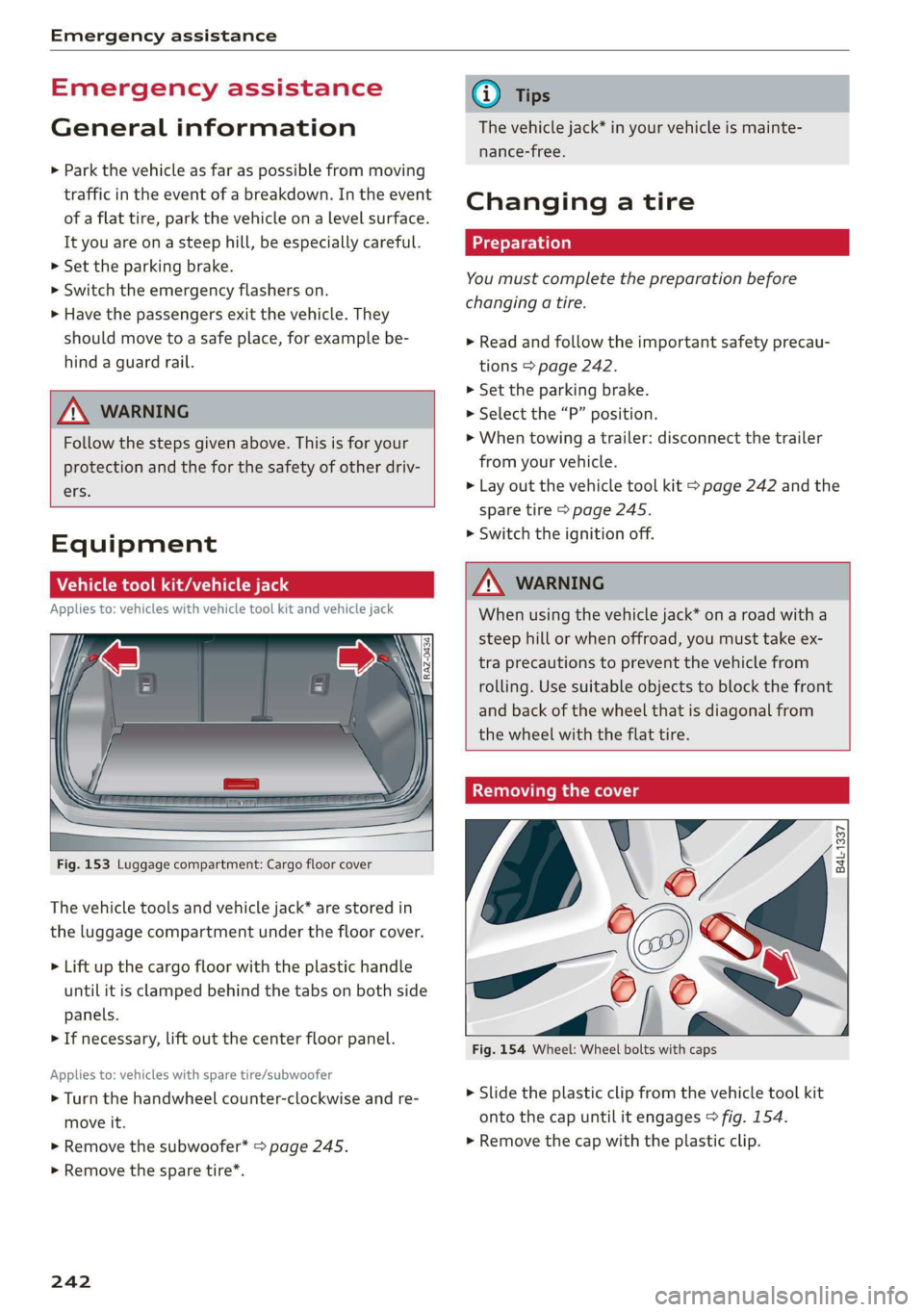
Fig. 153 Luggage compartment: Cargo floor cover
The vehicle tools and vehicle jack* are stored in
the luggage compartment under the floor cover.
> Lift up the cargo floor with the plastic handle
until it is clamped behind the tabs on both side
panels.
> If necessary, lift out the center floor panel.
Applies to: vehicles with spare tire/subwoofer
> Turn the handwheel counter-clockwise and re-
move it.
> Remove the subwoofer* > page 245.
> Remove the spare tire*.
242
@ Tips
The vehicle jack* in your vehicle is mainte-
nance-free.
Changing a tire
You must complete the preparation before
changing a tire.
> Read and follow the important safety precau-
tions > page 242.
> Set the parking brake.
> Select the “P” position.
>» When towing a trailer: disconnect the trailer
from your vehicle.
> Lay out the vehicle tool kit > page 242 and the
spare tire > page 245.
> Switch the ignition off.
Z\ WARNING
When using the vehicle jack* on a road with a
steep hill or when offroad, you must take ex-
tra
precautions to prevent the vehicle from
rolling. Use suitable objects to block the front
and back of the wheel that is diagonal from
the wheel with the flat tire.
Removing the cover
\
i
Fig. 154 Wheel: Wheel bolts with caps
X
me) 4
> Slide the plastic clip from the vehicle tool kit
onto the cap until it engages > fig. 154.
> Remove the cap with the plastic clip.
Page 245 of 280
83A012721BA
Emergency assistance
ON elated ere) od
Applies to: vehicles with anti-theft wheel bolts
i
»
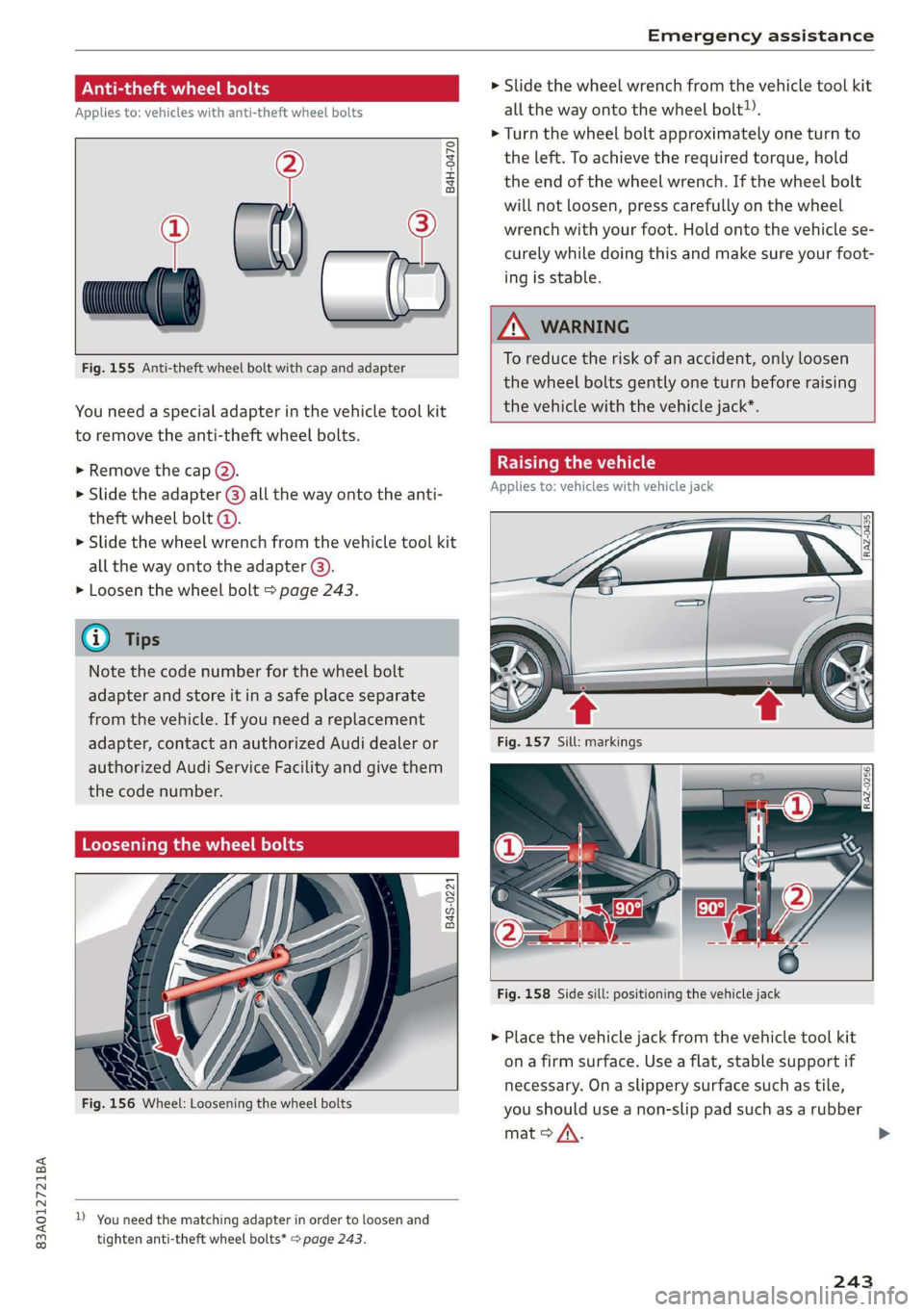
Fig. 155 Anti-theft wheel bolt with cap and adapter
B4H-0470
ie
You need a special adapter in the vehicle tool kit
to remove the anti-theft wheel bolts.
» Remove the cap @).
> Slide the adapter @) all the way onto the anti-
theft wheel bolt @.
> Slide the wheel wrench from the vehicle tool kit
all
the way onto the adapter @).
> Loosen the wheel bolt > page 243.
@ Tips
Note the code number for the wheel bolt
adapter and store it in a safe place separate
from the vehicle. If you need a replacement
adapter, contact an authorized Audi dealer or
authorized Audi Service Facility and give them
the code number.
Loosening the wheel bolts
B4S-0221
Sh
Fig. 156 Wheel: Loosening the wheel bolts
D_ You need the matching adapter in order to loosen and
tighten anti-theft wheel bolts* > page 243.
> Slide the wheel wrench from the vehicle tool kit
all the way onto the wheel bolt).
> Turn the wheel bolt approximately one turn to
the left. To achieve the required torque, hold
the end of the wheel wrench. If the wheel bolt
will not loosen, press carefully on the wheel
wrench with your foot. Hold onto the vehicle se-
curely while doing this and make sure your foot-
ing is stable.
ZA\ WARNING
To reduce the risk of an accident, only loosen
the wheel bolts gently one turn before raising
the
vehicle with the vehicle jack*.
Raising the vehicle
Applies to: vehicles with vehicle jack
Fig. 158 Side sill: positioning the vehicle jack
> Place the vehicle jack from the vehicle tool kit
ona firm surface. Use a flat, stable support if
necessary. On a slippery surface such as tile,
you should use a non-slip pad such as a rubber
mat > A\.
243
>
Page 246 of 280
Emergency assistance
> Find the marking on the sill that is closest to
the tire that will be changed > fig. 157. Behind
the marking, there is a lifting point on the side
sill for the vehicle jack.
> Raise the vehicle jack under the lifting point on
the side sill until the bracket on the jack @)
completely covers the notch on the vehicle.
> Align the vehicle jack so the bracket @ covers
the notch and the base (2) is flat on the ground.
The base @) must be directly under the mount-
ing point @.
> Install the rod on the vehicle jack: Insert the
rod into the opening on the handwheel. Turn
the crank to the left or right to secure it.
> Continue raising the vehicle jack with the crank
until the wheel lifts off the ground slightly.
ZX WARNING
— To reduce the risk of injury, make sure no
one is in the vehicle before raising it.
— Make sure the vehicle jack is stable. The risk
of
injury is increased when the ground is
slippery or soft, because the vehicle jack
could slide or sink.
— Only raise your vehicle with the vehicle jack
provided by the factory. If you use a vehicle
jack designed for another vehicle, your vehi-
cle could slip and cause injury.
— Position the vehicle jack only at the desig-
nated mounting points on the side sill and
align the jack. Otherwise, the vehicle jack
could slip and cause an injury if it does not
have sufficient hold on the vehicle.
—To reduce the risk of injury, do not raise any
other vehicles or other loads using the vehi-
cle jack provided by the factory.
— To reduce the risk of an accident, never start
the engine when the vehicle is raised.
—To reduce the risk of injury, support the vehi-
cle securely with suitable stands if work is to
be performed underneath the vehicle.
@) Note
Do not lift the vehicle by the sill. Position the
vehicle jack only at the designated mounting
points on the side sill. Otherwise, your vehicle
could be damaged.
244
Removing and installing a wheel
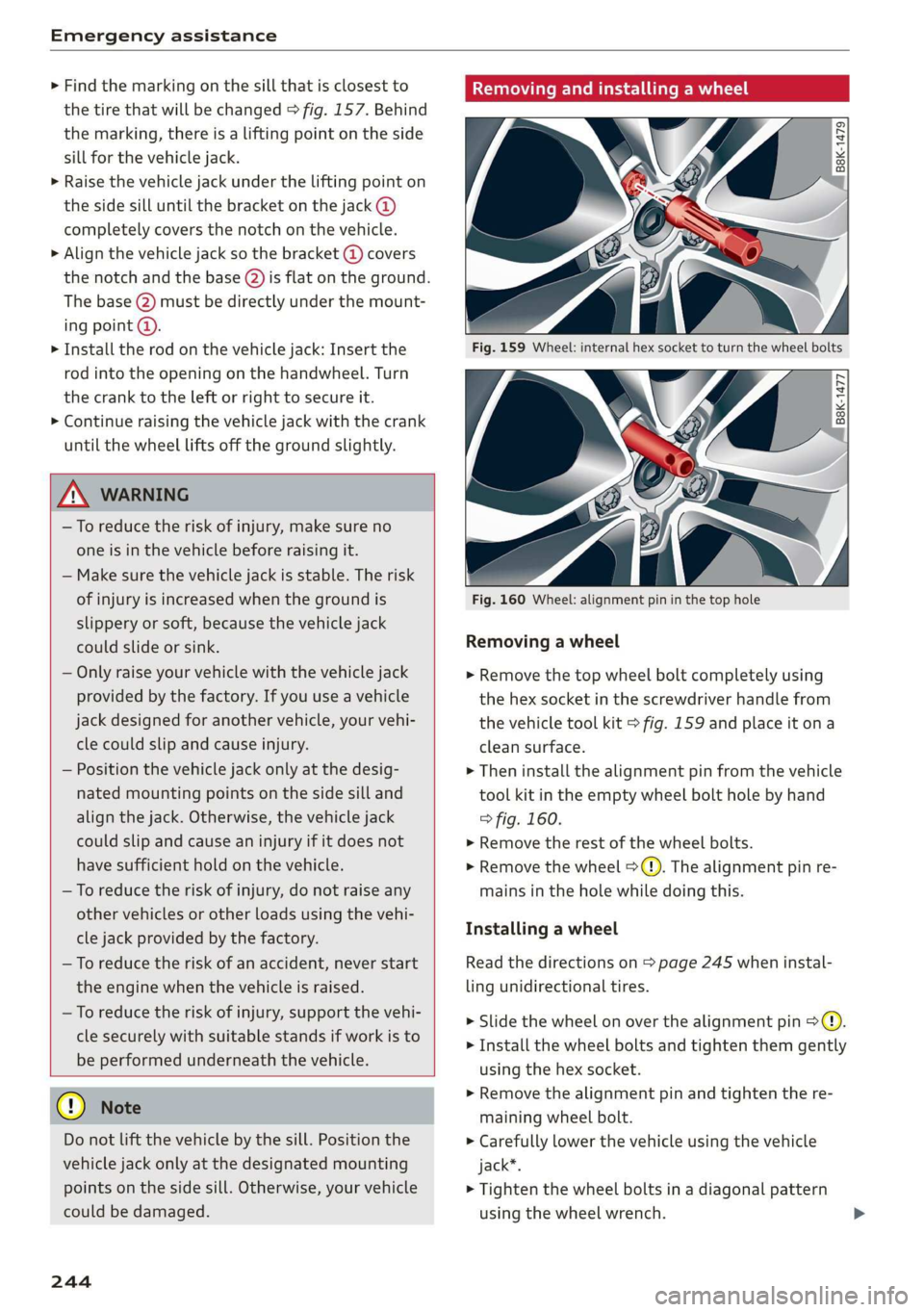
Fig. 159 Wheel: internal hex socket to turn the wheel bolts
|
©
B8k-1477
Fig. 160 Wheel: alignment pin in the top hole
Removing a wheel
> Remove the top wheel bolt completely using
the hex socket in the screwdriver handle from
the vehicle tool kit > fig. 159 and place it ona
clean surface.
> Then install the alignment pin from the vehicle
tool kit in the empty wheel bolt hole by hand
> fig. 160.
> Remove the rest of the wheel bolts.
> Remove the wheel >(). The alignment pin re-
mains in the hole while doing this.
Installing a wheel
Read the directions on > page 245 when instal-
ling unidirectional tires.
> Slide the wheel on over the alignment pin >@.
> Install the wheel bolts and tighten them gently
using the hex socket.
> Remove the alignment pin and tighten the re-
maining wheel bolt.
> Carefully lower the vehicle using the vehicle
jack*.
> Tighten the wheel bolts in a diagonal pattern
using the wheel wrench.
Page 247 of 280
83A012721BA
Emergency assistance
The wheel bolts must be clean and loosen and
tighten easily. Check the contact surfaces for the
wheel and hub. Contaminants on these surfaces
must be removed before installing the wheel.
Z\ WARNING
— Read and follow the important information
and notes under > page 223.
— Never use the hex socket in the screwdriver
handle to tighten the wheel bolts. Using the
hex socket will not achieve the required
tightening torque, which increases the risk
of an accident.
C) Note
When removing or installing the wheel, the
rim
could hit the brake rotor and damage the
rotor. Work carefully and have a second per-
son help you.
Unidirectional tires
A unidirectional tire profile is identified by arrows
on the tire sidewall that point in the running di-
rection. You must always maintain the specified
running direction. This is necessary to ensure the
tire's optimal performance in regard to adhesion,
running noise, and friction, and to reduce the risk
of
hydroplaning.
To benefit fully from the advantages of the uni-
directional tire design, you should replace faulty
tires as soon as possible and restore the correct
running direction on all of the tires.
> Reinstall the caps on the wheel bolts if necessa-
ry.
> Store the vehicle tool kit in its designated
place.
> If the removed wheel does not fit in the spare
wheel well, store it securely in the luggage
compartment > page 73.
> Check the tire pressure on the installed wheel
as soon as possible.
> Correct the tire pressure and store it
=> page 235.
> The wheel bolt tightening specification must be
100 ft lbs (140 Nm). Have it checked as soon as
possible with a torque wrench. Drive carefully
until then.
> Have the faulty wheel replaced as quickly as
possible.
Spare tire
tute Mae eis
Applies to: vehicles with subwoofer
The subwoofer must be removed before the
spare tire*/temporary spare tire* can be re-
moved.
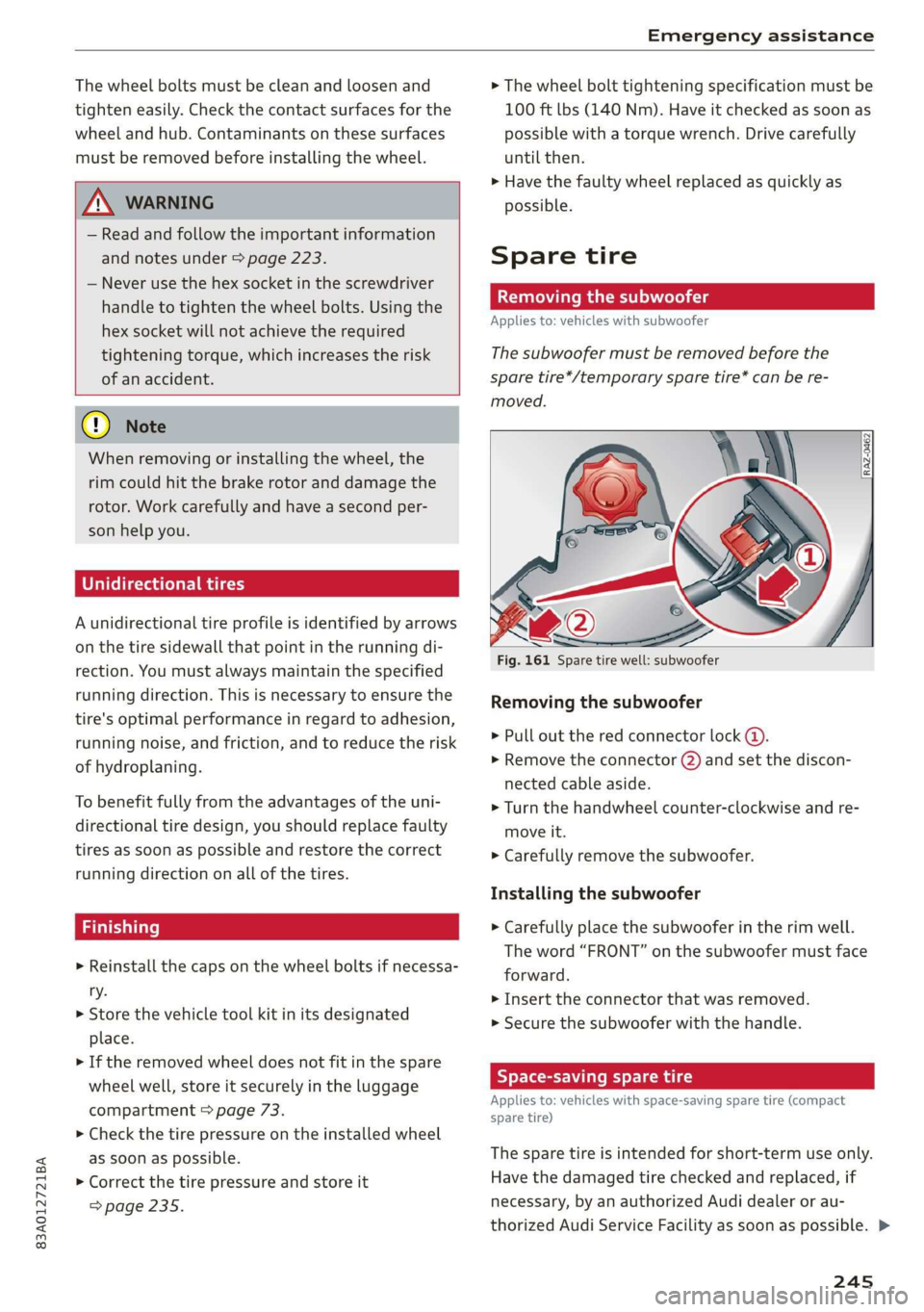
Fig. 161 Spare tire well: subwoofer
Removing the subwoofer
> Pull out the red connector lock @).
>» Remove the connector (2) and set the discon-
nected cable aside.
> Turn the handwheel counter-clockwise and re-
move it.
> Carefully remove the subwoofer.
Installing the subwoofer
> Carefully place the subwoofer in the rim well.
The word “FRONT” on the subwoofer must face
forward.
> Insert the connector that was removed.
> Secure the subwoofer with the handle.
Byer leet Ue iy re
Applies to: vehicles with space-saving spare tire (compact
spare tire)
The spare tire is intended for short-term use only.
Have the damaged tire checked and replaced, if
necessary, by an authorized Audi dealer or au-
thorized Audi Service Facility as soon as possible. >
245
Page 248 of 280
Emergency assistance
There are some restrictions on the use of the
compact spare tire. The compact spare tire has
been designed specifically for your type of vehi-
cle. Do not replace it with the spare tire from an-
other type of vehicle.
The compact spare tire is located in the luggage
compartment under the cargo floor cover
=> page 242.
The tire pressure must be 61 PSI (420 kPA).
Snow chains
For technical reasons, the use of snow chains on
the compact spare tire is not permitted.
If you have to drive with snow chains and a front
tire fails, mount the spare tire in place of a rear
tire. Install the snow chains on the rear tire that
you removed, and install that in place of the
front tire that failed.
ZA WARNING
— After installing a spare tire, the tire pressure
must be checked as soon as possible.
— Do not drive faster than 50 mph (80 km/h)
with a compact spare tire. Driving faster
than that increases the risk of an accident.
— To reduce the risk of an accident, avoid hard
acceleration or braking and driving fast
around curves with the compact spare tire.
— To reduce the risk of an accident, never drive
with more than one compact spare tire.
— Normal summer or winter tires must not be
mounted on the compact spare wheel rim.
battery that is giving power must not be less
than the capacity of the drained vehicle battery.
Jump start cable
Only use a jump start cable with a large enough
diameter. Note the manufacturer's specifica-
tions.
Only use a jump start cable with insulated termi-
nal clamps.
Positive cable - usually red.
Negative cable - usually black.
ZA WARNING
— A drained battery can freeze at tempera-
tures around 32 °F (0 °C). If the vehicle bat-
tery is frozen, it must be thawed before con-
necting the jump start cables. If it is not,
the risk of an explosion and chemical burns
increases. After jump starting the vehicle,
drive to an authorized Audi dealer or author-
ized Audi Service Facility immediately to
have the vehicle battery checked.
— Read the warnings when working in the en-
gine compartment > page 203.
— Handling the jump start cables incorrectly
may cause the vehicle battery to explode
and lead to serious injuries.
—To reduce the risk of chemical burns, do not
bend over the vehicle battery.
Jump starting
You should only perform the steps that follow if
you have the necessary tools and technical ex-
pertise.
If the engine does not start because the vehicle
battery is drained, you can jump start your vehi-
cle using another vehicle. Jump start cables are
needed to do this.
Both vehicle batteries must have 12 V nominal
voltage. The voltage capacity (Ah) of the vehicle
246
() Note
Jump start cables can cause considerable
damage to the vehicle electrical system if
they are connected incorrectly.
G) Tips
— There must be no contact between the vehi-
cles, or else voltage could flow when con-
necting the positive terminal and drain the
vehicle battery of the vehicle providing the
jump start.
— The drained vehicle battery must be con-
nected correctly to the electrical system.
— Switch off electrical equipment that is not
needed.
Page 251 of 280
83A012721BA
Emergency assistance
— Follow the local legal regulations for tow-
ing.
Read and follow the important information under
=> page 248.
Preparations
> Only secure the towing cable or tow bar at the
designated towing loops > page 249,
=> page 249.
> Make sure the towing cable is not twisted. Oth-
erwise it could disconnect from the towing loop
while towing.
> Switch the emergency flashers on in both vehi-
cles > page 45. However, do not do this if it
prohibited by law.
Towing vehicle (front)
> Only start to drive when the towing cable is
taut.
> Press the brake pedal very carefully.
> Avoid sudden braking or driving maneuvers.
Vehicle being towed (rear)
> Make sure the ignition is switched on so that
the steering wheel is not locked and so that you
can use the turn signals, the horn, and the
windshield wipers if needed > A\.
> Switching it off before the vehicle has stopped
may impair the function of the brake booster
and power steering. You would then need to
use more force to steer and brake the vehicle.
> Release the parking brake > page 90.
> Select the “N” selector lever position.
> Make sure the towing cable is always taut.
A WARNING
Never tow a vehicle using a tow bar or towing
cable if the vehicle does not have electrical
power.
Front towing loop
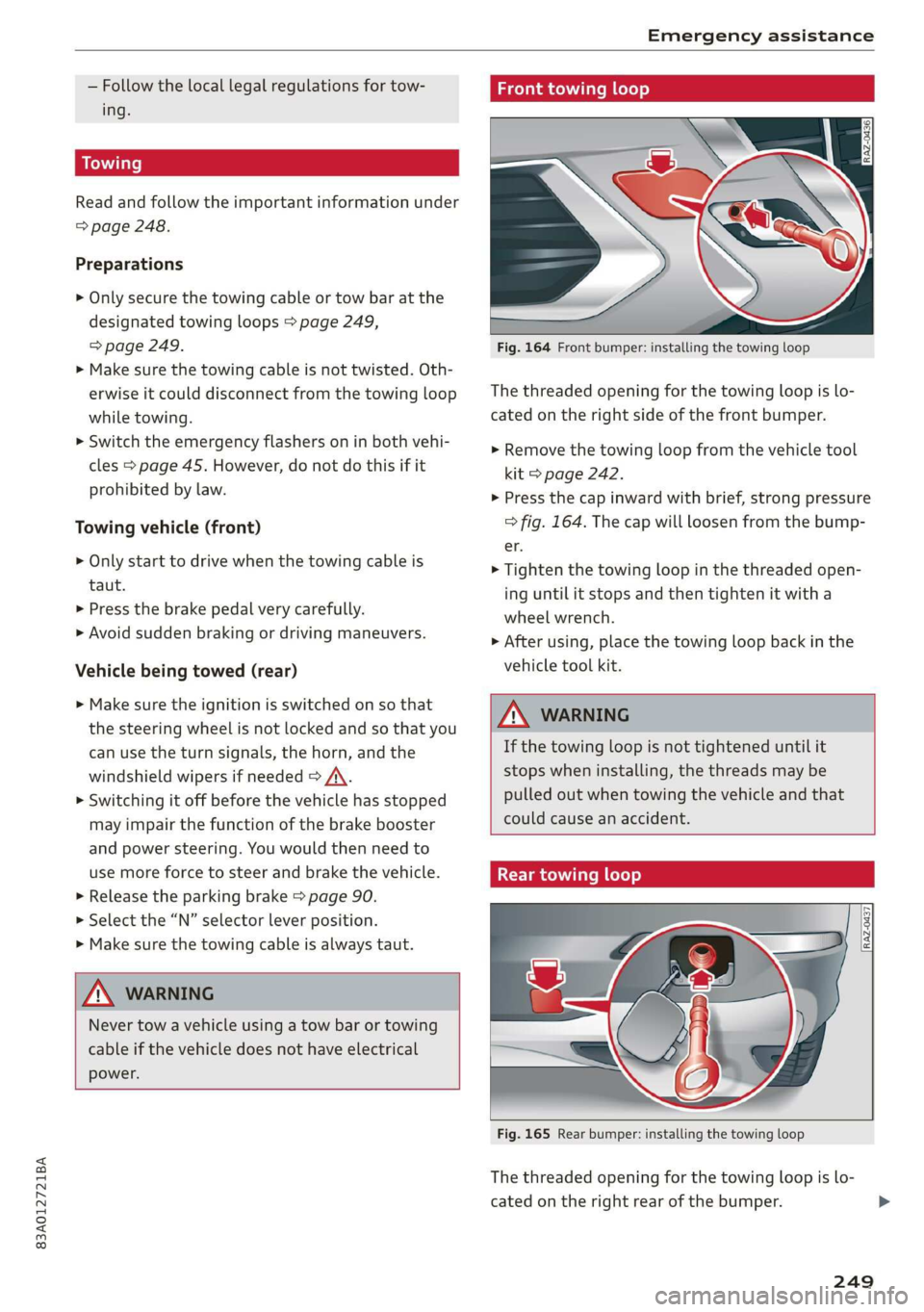
Fig. 164 Front bumper: installing the towing loop
The threaded opening for the towing loop is lo-
cated on the right side of the front bumper.
> Remove the towing loop from the vehicle tool
kit > page 242.
> Press the cap inward with brief, strong pressure
> fig. 164. The cap will loosen from the bump-
er.
> Tighten the towing loop in the threaded open-
ing until it stops and then tighten it with a
wheel wrench.
> After using, place the towing loop back in the
vehicle tool kit.
ZX WARNING
If the towing loop is not tightened until it
stops when installing, the threads may be
pulled out when towing the vehicle and that
could cause an accident.
Rear towing loop
Fig. 165 Rear bumper: installing the towing loop
The threaded opening for the towing loop is lo-
cated on the right rear of the bumper.
249