mirror AUDI Q3 2020 User Guide
[x] Cancel search | Manufacturer: AUDI, Model Year: 2020, Model line: Q3, Model: AUDI Q3 2020Pages: 278, PDF Size: 72.66 MB
Page 109 of 278
83A012721BB
Assist systems
@) Tips
— The coverage areas of the sensors > fig. 85
are diagrams and do not represent a true-
to-scale image of the sensor ranges. The ra-
dar sensors are designed to detect the left
and right adjacent lanes when the road
lanes are the normal width.
— The sensors and the areas around them
must not be obstructed because this can im-
pair the function of the systems that de-
pend on them. Make sure that the sensors
are free of snow, ice, and other deposits. Do
not use any accessories, stickers, or other
objects that extend into the range of the
sensors.
— Do not use a license plate bracket different
from the one installed by the factory in the
front of the vehicle, because it may impair
the function of some systems.
— The sensors can shift from an accident,
manual force, impacts, or from damage to
the radiator grill, bumper, wheel housing,
or underbody. Do not continue using the as-
sistance systems if the sensors have shifted,
because this is unsafe. Have an authorized
Audi dealer or authorized Audi Service Fa-
cility check their function.
— The function of the sensors may be limited
when light and visibility conditions are poor,
for example when driving into a tunnel,
when there is glare, or when there are re-
flective objects.
— External ultrasonic sensors, such as those in
other vehicles, can interfere with the sen-
sors.
—The side area ©)* is detected and evaluated
when passing. There may have been
changes to the surrounding area after
switching the ignition off and on again, af-
ter opening the doors, or if the vehicle is left
stationary for a period of time. In this case,
the area will appear black until the area has
been detected and evaluated.
— For an explanation on conformity with the
FCC regulations in the United States and the
Industry Canada regulations, see
=> page 259.
CO Vane Mey (TAU
[RAzZ-0211
[RAZ-0381
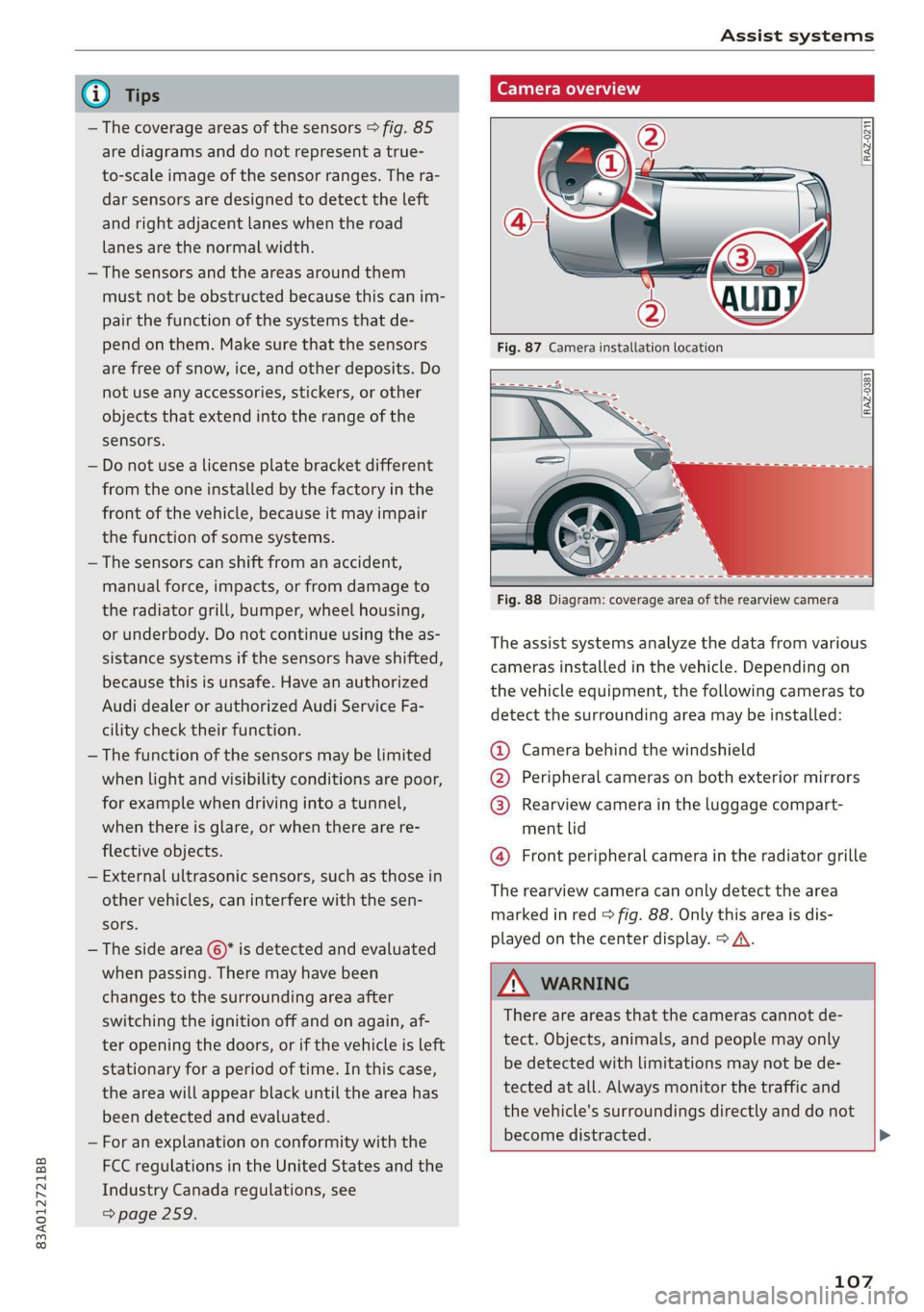
Fig. 88 Diagram: coverage area of the rearview camera
The assist systems analyze the data from various
cameras installed in the vehicle. Depending on
the vehicle equipment, the following cameras to
detect the surrounding area may be installed:
@ Camera behind the windshield
@ Peripheral cameras on both exterior mirrors
@ Rearview camera in the luggage compart-
ment lid
@ Front peripheral camera in the radiator grille
The rearview camera can only detect the area
marked in red > fig. 88. Only this area is dis-
played on the center display. > A\.
ZA WARNING
There are areas that the cameras cannot de-
tect. Objects, animals, and people may only
be detected with limitations may not be de-
tected at all. Always monitor the traffic and
the vehicle's surroundings directly and do not
become distracted. >
107
Page 127 of 278
83A012721BB
Driver assistance
If the malfunction remains, drive to an author-
ized Audi dealer or authorized Audi Service Facili-
ty immediately to have the malfunction correct-
ed.
Side assist
pled f ola Cola)
Applies to: vehicles with side assist
8 5 N g é
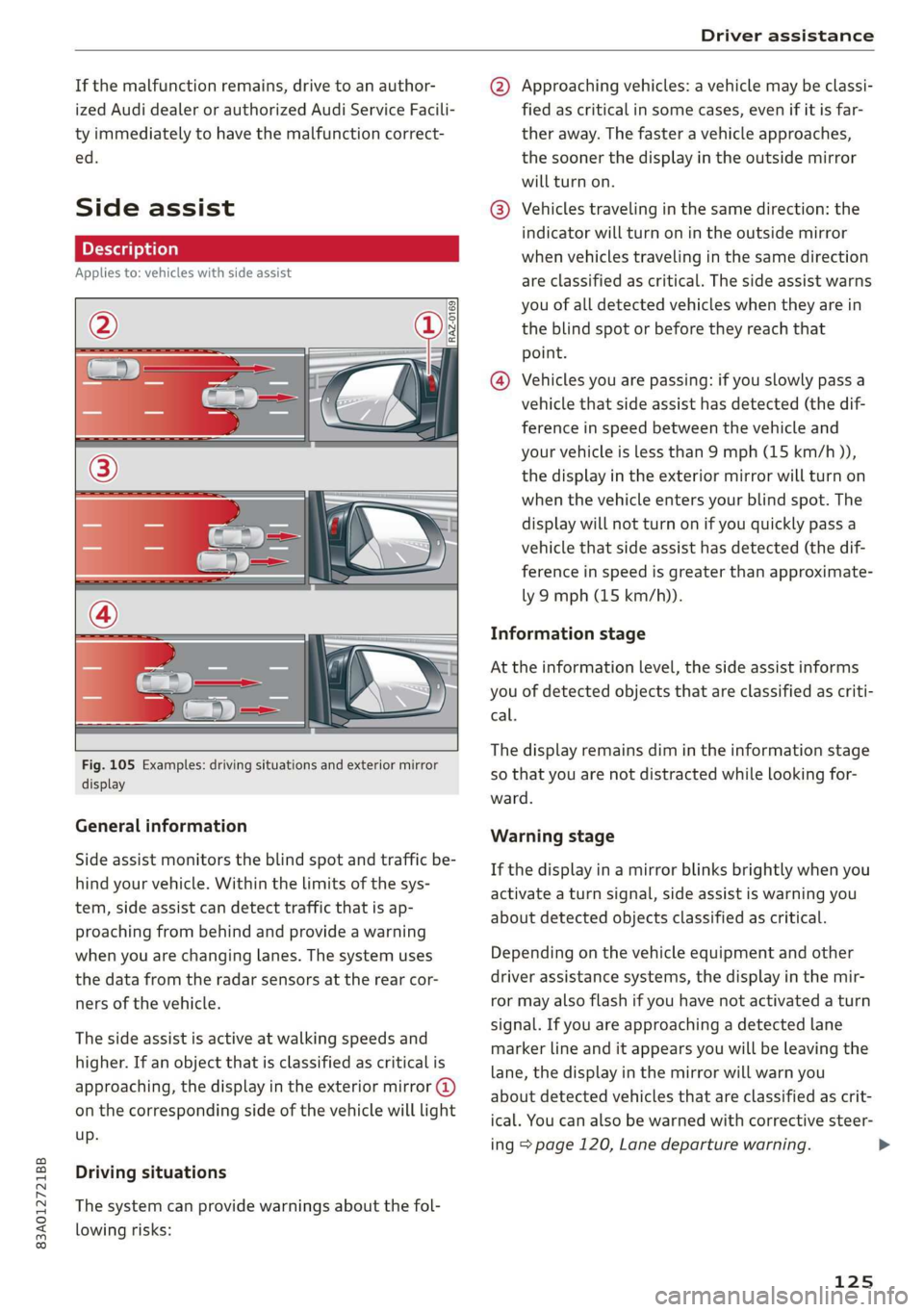
Fig. 105 Examples: driving situations and exterior mirror
display
General information
Side assist monitors the blind spot and traffic be-
hind your vehicle. Within the limits of the sys-
tem, side assist can detect traffic that is ap-
proaching from behind and provide a warning
when you are changing lanes. The system uses
the data from the radar sensors at the rear cor-
ners of the vehicle.
The side assist is active at walking speeds and
higher. If an object that is classified as critical is
approaching, the display in the exterior mirror @)
on the corresponding side of the vehicle will light
up.
Driving situations
The system can provide warnings about the fol-
lowing risks:
@ Approaching vehicles: a vehicle may be classi-
fied as critical in some cases, even if it is far-
ther away. The faster a vehicle approaches,
the sooner the display in the outside mirror
will turn on.
® Vehicles traveling in the same direction: the
indicator will turn on in the outside mirror
when vehicles traveling in the same direction
are classified as critical. The side assist warns
you of all detected vehicles when they are in
the blind spot or before they reach that
point.
@® Vehicles you are passing: if you slowly pass a
vehicle that side assist has detected (the dif-
ference in speed between the vehicle and
your vehicle is less than 9 mph (15 km/h )),
the display in the exterior mirror will turn on
when the vehicle enters your blind spot. The
display will not turn on if you quickly pass a
vehicle that side assist has detected (the dif-
ference in speed is greater than approximate-
ly 9 mph (15 km/h)).
Information stage
At the information level, the side assist informs
you of detected objects that are classified as criti-
cal.
The display remains dim in the information stage
so that you are not distracted while looking for-
ward.
Warning stage
If the display in a mirror blinks brightly when you
activate a turn signal, side assist is warning you
about detected objects classified as critical.
Depending on the vehicle equipment and other
driver assistance systems, the display in the mir-
ror may also flash if you have not activated a turn
signal. If you are approaching a detected lane
marker line and it appears you will be leaving the
lane, the display in the mirror will warn you
about detected vehicles that are classified as crit-
ical. You can also be warned with corrective steer-
ing page 120, Lane departure warning.
125
Page 128 of 278
Driver assistance
Detection range
The radar sensors are designed to detect the left
and right adjacent lanes when the road lanes are
the normal width. In some situations, the display
in the exterior mirror may turn on even though
there is no vehicle located in the area that is criti-
cal for a lane change. For example:
— If the lanes are narrow or if you are driving on
the edge of your lane. If this is the case, the
system may have detected a vehicle in another
lane that is not adjacent to your current lane.
— If you are driving through a curve. Side assist
may react to a vehicle that is in the same lane
or one lane over from the adjacent lane.
—If side assist reacts to other objects (such as
roadside structures like guard rails).
ZA WARNING
— Follow the safety precautions and note the
limits of the assist systems, sensors, and
cameras > page 105.
— The display may not appear in time when
vehicles are falling behind or approaching
very quickly.
@ Tips
— If the window glass in the driver's door or
front passenger's door has been tinted, the
display in the exterior mirror may be incor-
rect.
— The system is not available when towing a
trailer. There is no guarantee the system
will switch off when using a retrofitted trail-
er hitch. Do not use these functions when
towing a trailer.
— For an explanation on conformity with the
FCC regulations in the United States and the
Industry Canada regulations, see
=> page 259.
One eC
Applies to: vehicles with side assist
You can adjust the side assist to your preferences.
The settings depend on the vehicle equipment.
> Applies to: MMI: Select on the home screen:
VEHICLE > Driver assistance > Side assist.
126
Possible settings:
The system can be switched on and off. If the sys-
tem is switched on, the displays in the exterior
mirrors will turn on briefly each time the ignition
is switched on.
Brightness - Change the brightness only when
side assist is switched on, so that the selected
setting can be checked in the exterior mirror dis-
plays. Adjust the brightness to a level where the
display will not interfere with your view ahead.
Because the display brightness automatically
adapts to the ambient light, it may have already
been adjusted to the highest or lowest setting
during the automatic adaptation.
Applies to: vehicles with side assist
if fg or is displayed when there is a malfunc-
tion, the side assist functions may be unavailable
or may be limited.
A message that indicates the cause and possible
solution may appear with some displays. The
weather conditions may be too poor or a sensor
may be covered. Clean the sensor area in the ve-
hicle rear and try to turn the systems on again
later.
If the malfunction remains, drive to an author-
ized Audi dealer or authorized Audi Service Facili-
ty immediately to have the malfunction correct-
ed.
Page 133 of 278

83A012721BB
Parking and maneuvering
@ You should stop driving in reverse when the
red orientation line touches the edge of an
object, at the latest.
Trailer view
Applies to: vehicles with trailer view
The trailer view > fig. 111 assists you in position-
ing the vehicle in front of a trailer.
— Applies to: vehicles with peripheral cameras:
Switch to the Rear view > page 132, fig. 112.
— Select || > Trailer view in the center display
when the parking system is active.
Now you can position your vehicle in front of the
trailer. The orange orientation line ©) > fig. 111
indicates the expected path toward the trailer
hitch. Use the blue markings © to help you esti-
mate the distance to the trailer hitch. Each mark-
ing represents approximately 1 foot (0.30 me-
ters). The width of the blue surface represents
the maximum steering wheel angle.
Symbols
Applies to: vehicles with peripheral cameras
If 2/&9/< is displayed and the display area
represented by that symbol is not available, then
the camera on the that side is not available. The
power exterior mirrors may have been folded in
or a door or the luggage compartment lid may
have been opened.
If # is displayed, there is a system malfunction
and the display area represented by that symbol
is not available. The camera is not working in this
area.
If one of the symbols continues to be displayed,
drive immediately to an authorized Audi dealer or
authorized Audi Service Facility to have the mal-
function repaired.
ZA WARNING
— Follow the safety precautions and note the
limits of the assist systems, sensors, and
cameras > page 105.
— Sensors and cameras have spots in which
the surrounding area cannot be detected.
Objects, animals, and people may only be
detected with limitations may not be detect-
ed at all. Always monitor the traffic and the
vehicle's surroundings directly and do not
become distracted.
@) Note
— The orange orientation lines @ show the di-
rection the rear of the vehicle will be travel-
ing, based on the steering wheel angle. The
front of the vehicle swings out more than
the rear of the vehicle. Maintain plenty of
distance so that an exterior mirror or a cor-
ner of the vehicle does not collide with any
obstacles.
— Keep enough distance from the curb to
avoid damage to the rims.
— Only use the images provided by the camera
on the rear of the vehicle when the luggage
compartment lid is completely closed. Make
sure any objects you may have mounted on
the luggage compartment lid do not block
the rearview camera.
@) Tips
There is no distance warning for the rear and
the sides* when trailer towing mode is detect-
ed. The front sensors remain activated. The
visual display switches to trailer mode. The
rearview camera image will not show the ori-
entation lines and the blue surfaces. There is
no guarantee the functions will be deactivat-
ed when using a retrofitted trailer hitch.
131
Page 135 of 278

83A012721BB
Parking and maneuvering
AN WARNING
— Follow the safety precautions and note the
limits of the assist systems, sensors, and
cameras > page 105.
— The Surroundings view is created from the
individual camera images. The vehicle image
is shown by the system. Objects and obsta-
cles above the camera are not displayed.
@® Note
— Only use the images provided by the camera
on the rear of the vehicle when the luggage
compartment lid is completely closed. Make
sure any objects you may have mounted on
the luggage compartment lid do not block
the rearview camera.
— The front of the vehicle swings out more
than the rear of the vehicle. Maintain plenty
of distance so that an exterior mirror ora
corner of the vehicle does not collide with
any obstacles.
6 Tips
— Depending on the selected gear, it will auto-
matically switch between the Front and
Rear views. If you switch the view manually,
the automatic front/rear camera change will
be temporarily deactivated.
— When first activated while a forward gear is
engaged, the Front corner is displayed.
Rear cross-traffic assist
Applies to: vehicles with rear cross-traffic assist
ire}
2 g
= + a
Fig. 113 Sensor detection range for rear cross-traffic assist
Fig. 114 Center display: rear cross-traffic assist display
General information
The rear cross-traffic assist monitors the area be-
hind and next to the vehicle using radar sensors
at the rear corners of the vehicle. The system can
detect moving objects that are approaching, such
as vehicles > fig. 113. A display in the MMI and
various warnings provide assistance when exiting
a parking space.
Requirements for using the rear cross-traffic
assist:
— Reverse gear must be engaged and the speed
while driving in reverse must not be higher than
6 mph (10 km/h).
Displays, warnings, and braking
— Display: the display @ appears only when the
parking system is active. In vehicles with pe-
ripheral cameras, the display appears in the
Rear and Rear corner camera views. Arrows
show the direction from which the cross traffic
is approaching.
— Audible warnings: a continuous tone may
sound as an additional warning when driving in
reverse.
— Automatic brake activation: if you do not react
to a warning, a brief braking by the system can
warn you of a potential collision with an ap-
proaching object.
The audible warning signal and the automatic
brake activation occur only when driving in re-
verse.
Switching rear cross-traffic assist on and off
— Applies to MMI: Select on the home screen: VE-
HICLE > Parking aid > Rear cross-traffic assist.
— Select |: > Rear cross-traffic assist in the cen-
ter display when the parking system is active.
133
>
Page 237 of 278
83A012721BB
Care and cleaning
—To reduce the risk of cuts, protect yourself — To reduce the risk of paint damage, do not
from sharp metal components when wash- wash the vehicle in direct sunlight.
ing the underbody or the inside of the wheel ~— To reduce the risk of damage, do not wash
housings. decorative decals* with a pressure washer.
— After washing the vehicle, the braking effect — To reduce the risk of damage to the surface,
may be delayed due to moisture on the do not use insect removing sponges, kitchen
brake
rotors or ice in the winter. This in- sponges, or similar items.
creases the risk of an accident. The brakes — When washing matte finish painted vehicle
must be dried with a few careful brake appli- components:
cations. —To reduce the risk of damage to the sur-
face, do not use polishing agents or hard
@) Note wax.
— If you wash the vehicle in an automatic car — Never use protective wax. It can destroy
wash, you must fold the exterior mirrors in the matte finish effect.
to reduce the risk of damage to the mirrors. — Do not place any stickers or magnetic
Power folding exterior mirrors* must only signs on vehicle components painted with
be folded in and out using the power folding matte finish paint. The paint could be
function. damaged when the stickers or magnets
—To reduce the risk of damage to the rims are removed.
and tires, compare the width between the
wheels on your vehicle with the distance be- @) For the sake of the environment
tween the guide rails in the car wash. Only wash the vehicle in facilities specially de-
—To reduce the risk of damage, compare the signed for that purpose. This will reduce the
height and width of your vehicle with the risk of dirty water contaminated with oil from
height and width of the inside of the car entering the sewer system.
wash.
Cleaning and care information
When cleaning and caring for individual vehicle are not listed, consult an authorized Audi dealer
components, refer to the following tables. The or authorized Audi Service Facility. Also follow
information contained there is simply recommen- __ the information found in > A.
dations. For questions or for components that
Exterior cleaning
Component Situation Solution
Windshield wiper | Deposits Soft cloth with glass cleaner > page 51
blades
Headlights/ Deposits Soft sponge with a mild soap solution®
Tail lights
Sensors/ Deposits Sensors: soft cloth with solvent-free cleaning solution
Camera lenses Camera lenses: soft cloth with alcohol-free cleaning solu-
tion
Snow/ice Hand brush/solvent-free de-icing spray
Wheels Road salt Water
Brake dust Acid-free special cleaning solution >
235
Page 240 of 278
Care and cleaning
— Never use warm or hot water to remove
snow or ice from the camera lens. This
could cause the lens to crack.
— Never use abrasive cleaning materials or
alcohol to clean the camera lens. This
could cause scratches and cracks.
— Door windows
— Remove snow and ice on windows and ex-
terior mirrors with a plastic scraper. To re-
duce the risk of scratches, move the scra-
per only in one direction and not back and
forth.
— Never remove snow or ice from door win-
dows and mirrors using warm or hot water
because this could cause cracks to form.
—To reduce the risk of damage to the rear
window defogger, do not apply any stick-
ers on the heating wires on the inside of
the window.
— Decorative parts and trim
— Never use chrome care or cleaning prod-
ucts.
— Paint
— To reduce the risk of scratches, the vehicle
must be free of dirt and dust before pol-
ishing or waxing.
—To prevent paint damage, do not polish or
wax the vehicle in direct sunlight.
—To reduce the risk of paint damage, do not
polish away rust spots.
— Remove cosmetics and sunscreen immedi-
ately because they could damage the
paint.
— Decorative decals
—To reduce the risk of damage, do not use
any rough powder or abrasive cleaning
products.
—To reduce the risk of damage, do not pol-
ish decorative decals that have a matte or
printed finish.
— Due to the risk of damage, do not use an
ice scraper to remove snow and ice on win-
dows with decorative decals on them.
— Displays and instrument cluster
— Make sure that the display and instrument
cluster are switched off and have cooled
down before cleaning. To switch off the
238
center display, select on the MMI home
screen: SETTINGS > Display & brightness
> MMI > Screen cleaning.
— Displays, the instrument cluster, and the
trim surrounding it must not be cleaned
with dry cleaning methods because they
could become scratched.
— Make sure no fluids enter the spaces be-
tween the instrument cluster and the
trim, because that could cause damage.
— Controls
— Make sure that no fluids enter the con-
trols, because this could cause damage.
— Safety belts
— Do not remove the safety belts to clean
them.
— Never clean safety belts or their compo-
nents with chemicals or with corrosive flu-
ids or solvents and never allow sharp ob-
jects to come into contact with the safety
belts. This could cause damage to the belt
webbing.
—If there is damage to the webbing, the
connections, the retractors, or the buck-
les, have them replaced by an authorized
Audi dealer or authorized Audi Service Fa-
cility.
— Textiles, artificial leather, and Alcantara
— Never treat artificial leather or Alcantara
with leather care products, solvents, floor
polish, shoe polish, spot remover, or simi-
lar products.
— Have a cleaning specialist remove stub-
born stains to reduce the risk of damage.
— Never use steam cleaners, brushes, hard
sponges, etc. when cleaning.
— Do not turn on the seat heating* to dry
the seat.
— Objects with sharp edges, such as zippers
or rivets on clothing or belts, can cause
damage to the surface.
— Open hook and loop fasteners, for exam-
ple on clothing, can damage seat covers.
Make sure hook and loop fasteners are
closed.
— Natural leather
Page 253 of 278
83A012721BB
Fuses and bulbs
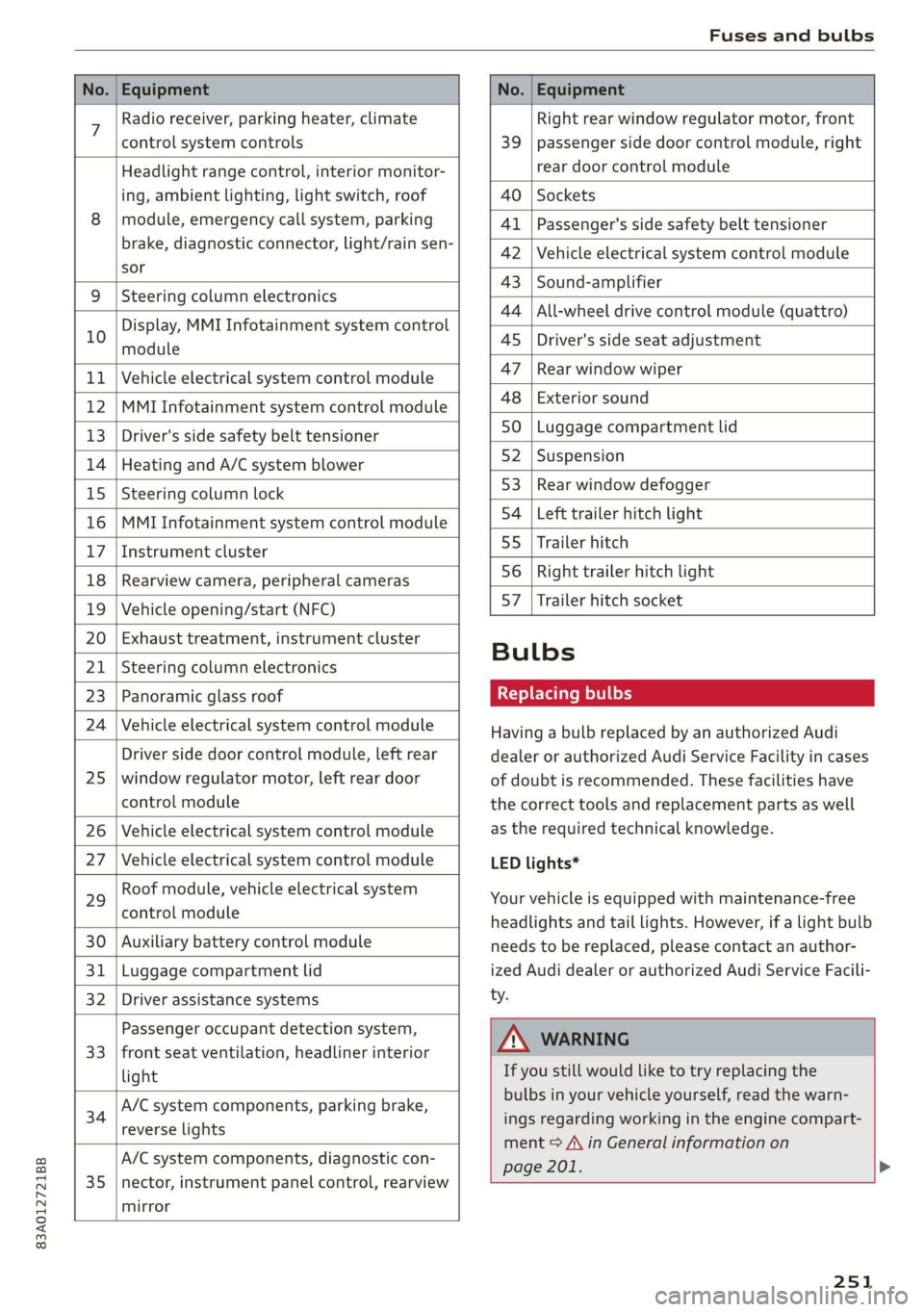
No. | Equipment No. | Equipment
7 Radio receiver, parking heater, climate Right rear window regulator motor, front
control system controls 39 | passenger side door control module, right
Headlight range control, interior monitor- rear door control module
ing, ambient lighting, light switch, roof 40 | Sockets
8 | module, emergency call system, parking 41 |Passenger's side safety belt tensioner
brake, diagnostic connector, light/raih'sen- 42 |Vehicle electrical system control module
sor
= - 43 |Sound-amplifier
9 |Steering column electronics
- - 44 | All-wheel drive control module (quattro)
Display, MMI Infotainment system control
10 anadtile 4S Driver's side seat adjustment
11 | Vehicle electrical system control module 47 | Rearwindow wiper
12 |MMI Infotainment system control module a6 || Exteriorsound
13 | Driver's side safety belt tensioner 50 | tuggage: compartment lid
14 | Heating and A/C system blower 52. || Suspension
15 | Steering column lock 53 | Rear;window defogger
16 |MMI Infotainment system control module 54 | Left trailer hitch light
17 |Instrument cluster 29 | Ualler hitch
18 | Rearview camera, peripheral cameras 56. | Right trailer hitch light
19 | Vehicle opening/start (NFC) 87 [Trailer'hitch'socket
20 | Exhaust treatment, instrument cluster
; Bulbs
21 | Steering column electronics
23 | Panoramic glass roof Replacing bulbs
24 | Vehicle electrical system control module
25
Driver side door control module, left rear
window regulator motor, left rear door
control module
26 Vehicle electrical system control module
27 Vehicle electrical system control module
29
Roof module, vehicle electrical system
control module
30 Auxiliary battery control module
31 Luggage compartment lid
32 Driver assistance systems
33
Passenger occupant detection system,
front seat ventilation, headliner interior
light
34
A/C system components, parking brake,
reverse lights
35
A/C system components, diagnostic con-
nector, instrument panel control, rearview
mirror
Having a bulb replaced by an authorized Audi
dealer or authorized Audi Service Facility in cases
of doubt is recommended. These facilities have
the correct tools and replacement parts as well
as the required technical knowledge.
LED lights*
Your vehicle is equipped with maintenance-free
headlights and tail lights. However, if a light bulb
needs to be replaced, please contact an author-
ized Audi dealer or authorized Audi Service Facili-
ty.
ZA\ WARNING
If you still would like to try replacing the
bulbs in your vehicle yourself, read the warn-
ings regarding working in the engine compart-
ment > A\ in General information on
page 201. >
251
Page 263 of 278

83A012721BB
Technical data
Technical data
Identification data
Vehicle identification label
XXX X= HKNK WOK XX
(Hae wrccnce XX XNKKKNKK
Frm XXX XX
2
XX XXKKXKK XK KX XK
3 }—— MOTORS / GET. 8
eco au cone XXX
XXX KW XXX
XXX WX
CQ -ASRAINER YyNX XXX NOK
M. - AUSST. / OPTIONS
EOA 7D5 4UB 6XM 5SG SRW
2EH JOZ 1LB 1AS_ 1BA
3FC SMU 7X1
FOA 9G3 0G7 OYH OJF
SG TLE 3KA 8EH U1A X9B QZ7
1XW 8Q3 9Q8 8Z4 D2D
716 CV7 7KO 4X3 2K2
34 4KC 3Y0 413 5D2
1SA 7GB QIA 4GQ
RAZ-0668
ee
Fig. 170 Vehicle identification label
The vehicle identification label = fig. 170 is locat-
ed in the luggage compartment under the cargo
floor cover.
The vehicle identification label information can
also be found in the Warranty & Maintenance
booklet.
Vehicle data
The sticker contains the following vehicle data:
@® Vehicle Identification Number (VIN)
@ Vehicle type, engine output, transmission
® Engine and transmission codes
@) Paint and interior codes
© Optional equipment numbers
Vehicle identification number (VIN)
The VIN is located in the following areas:
— Select on the home screen: VEHICLE > Settings
& Service > Vehicle info.
— On the vehicle identification label
— At the front behind the windshield*
—In the right front footwell under the carpet
Notes about technical data
The values may vary based on special equipment
as well as market-specific equipment and meas-
uring methods.
Please note that the specifications listed in the
vehicle documentation always take precedence.
G) Tips
Any technical data that is missing was not
available at the time of printing.
Length (in (mm)) Width (in (mm)) Width across the | Height at curb
mirrors (in (mm)) | weight (in (mm))
Q3 176.6 (4,485)
72.8 (1,849) 79.7 (2,024) 62.9 (1,598)
261
Page 266 of 278
Index
Brake fluid
Checking the brake fluid level........... 209
Brakes... 2... eee eee 91
BrakevassiSt': scase < « seme 2s ae a eee eB: 99
Brakerflidl: «2 cso 2 assim 2 a conse oo emai 9 209
Emergency braking function............. 93
Le (0) 94
New brake pads « sisi: ss esos se cees s ween e 91
Break-in security feature.............0004 31
Breaking in
New brake pads « snessis se were sv awa wenn « 91
Newtires. 2... 0.0... cee cece ee eee 221
Browser
refer to Media center...............005 184
Business address...........00--0000eee 166
Cc
California Proposition 65 Warning........ 201
Battery SpecifiCes ¢ 2 cee s vowed pasa as 210
Calllist.. 0... eee eee ee 143,145
Cameras
Coverage areaS...... eee cee eee eee 107
LOCATIONS ics. 6 6 sciewe os wwnee oo eee wo wee 107
Capacities
Fueltank... 00.0.0... cee eee eee ee eee 262
Washer fluid reservoir...............-- 262
Cargo floor......... eee eee eee eee 76
Cargonet.... 2... cece eee ee 76
Car key... eee eee eee eee 32
Car phone
Serial number (IMEI) .................. 150
SWITCHING Olljews « « asus = ayew 2 = gees se ae 149
Car WaShis < cca = = sees 5 ¢ hes oe ees yo cee 234
Catalytic converter..................00. 200
Cell phone
refer to Telephone...........eee eee eae 139
Cell phone compartment
refer to Audi phone box............... 141
Central locking): ss sep 5 sees so eaes ve ees 28
Auto Lock... .. 0... cee eee eee 28
Convenience key............ 0 eee eee ees 33
Convenience opening and closing......... 39
Luggage compartment lid............... 35
Mechanically unlocking and locking....... 30
MESSAGES saris + ¢ Haven o & eee © e ewe oe ews 30
Remote control key... vss ve ewe ee eee o 33
264
SCC: 2 x cusewes o 2 somuses wow sarees 4 o seamen oo awe
Vehicle key
Central locking switch...............0--. 29
Ceramic brakes.........0 00.000 e eee eee 92
Certificationvins «6 cscs x + emcee ve eoenene ve esecene 259
Charging
refer to Power sourceS.........-- 00s eee 73
Charging the battery (mobile devices). 141, 182
Child safety lock
Power WINdOWS........ 0. eee cece e ee eens 38
ReardOOrSicn s = wey sv aes s Hom oo Kee ee 38
Child
safety seats................-00000- 67
Securing to the top tether anchor........ 71
Securing with a safety belt.............. 70
Securing with LATCH................00. 69
Cleaning... 2.2... . cee eee eee eee 234
Cleaning Alcantara.............-.00000. 237
Cleaning artificial leather............... 237
Cleaning carbon components........ 236, 237
Cleaning controls:. « sw se ewes «sens oo ov 236
Cleaning decorative parts andtrim........ 236
Cleaning exhaust tail pipes.............. 236
Cleaning plastic parts.................. 236
Cleaning textiles...................00, 237
Climate control system...........2.0000. 78
Closing
Automatic luggage compartment lid...... 36
Convenience closing.............+-.04. 39
Engine compartment lid............... 202
Luggage compartment lid............... 35
Luggage compartment lid with foot motion . 37
Panoramic glass roof.............000005 40
Sunshade (roof) ......... 0.000 e eee eee 40
WINdOWSS x 2 ones 5 2 awe & 2 yasew ¢ e came * 38
Cockpit GIMMMING e: « 2 ses ¢ ¢ owes ¢ o ews a ys 48
COCKPIT OVEFVIEW)'s « x eas 5 2 neue ot ees ge 6
Color number............ 2.02. cece eee 261
Compact spare tire...............000004 243
Compartments..............0 0.0.00 0005 74
Compass inthe mirror...............00-. 52
Compliance tse: « « ssccav: so aes
Configuration wizard.................00. 18
CONMECE cams + nary & + ewe a x mew at eR eee 152
Data:plans). « » svat « 0 wenn » 4 sae 6 2 sommes 155
Data Privacy.... 0.2... cece eee eee eee 255