turn signal AUDI Q3 2020 Owner's Manual
[x] Cancel search | Manufacturer: AUDI, Model Year: 2020, Model line: Q3, Model: AUDI Q3 2020Pages: 278, PDF Size: 72.66 MB
Page 129 of 278

83A012721BB
Parking and maneuvering
Parking and
maneuvering
Introduction
Depending on the vehicle equipment, various
parking aids will help you when parking and ma-
neuvering.
Parking system
The parking system plus assists you while park-
ing using audio and visual signals to warn you
about objects detected in front of, behind, and
next to* the vehicle > page 127.
The rearview camera shows the area behind the
vehicle in the center display. The lines in the rear-
view camera image help you to park and maneu-
ver > page 129.
The peripheral cameras are an addition to the
rearview camera and help you to see various
areas around the vehicle while parking and ma-
neuvering > page 129.
The rear cross-traffic assist can warn you of ap-
proaching cross traffic when driving in reverse or
exiting a parking space > page 133.
Assisted parking
Park assist helps you to find suitable parking
spaces and to park in and exit these spaces while
the driver monitors the area around the vehicle
and
controls the parking process. Park assist con-
trols the steering movements when parking in
free parking spaces. The driver is still responsible
for accelerating, braking, and shifting gears
=> page 134.
Settings options
You can adjust parking system functions individu-
ally. The adjustment options depend on the vehi-
cle equipment.
— Activating automatically > page 127
— Front and rear volume > page 128
— Entertainment fader > page 128
— Trailer view > page 131
— View > page 132
— Rear cross-traffic assist > page 133
ZX WARNING
Follow the safety precautions and note the
limits of the assist systems, sensors, and
cameras > page 105.
@ Tips
Practicing parking in a traffic-free location or
parking lot to become familiar with the sys-
tems is recommended. Practice parking in
good light and weather conditions.
Parking system plus
ONS eel ete rcs (ae)
Applies to: vehicles with parking system plus
B8V-0643|
Fig. 106 Center console: parking aid button
General information
The parking system assists when parking and ma-
neuvering by providing warnings about obstacles.
If the ultrasonic sensors on the vehicle
= page 106 detect an obstacle, the system will
provide audio and visual warnings.
Activating/deactivating
Requirement: the vehicle speed must be under
approximately 6 mph (10 km/h).
> Press the Pa button in the center console.
When activating, a brief tone will sound and
the LED in the button will turn on.
Automatic activation
> The system activates automatically when re-
verse gear is engaged while the engine is run-
ning. A brief tone will sound.
> If Automatic activation is switched on in the
MMI and if the vehicle approaches ) an obstacle >
127
Page 136 of 278

Parking and maneuvering
Messages
if or > is displayed when there is a mal-
function, the rear cross traffic assist functions
may be unavailable or may be limited.
A message that indicates the cause and possible
solution may appear with some displays. The
weather conditions may be too poor or a sensor
may be covered. Clean the sensor area in the ve-
hicle rear and try to turn the systems on again
later.
If the malfunction remains, drive to an author-
ized Audi dealer or authorized Audi Service Facili-
ty immediately to have the malfunction correct-
ed.
ZA WARNING
— Follow the safety precautions and note the
limits of the assist systems, sensors, and
cameras > page 105.
— The rear cross-traffic assist will not provide
alerts about people and cannot warn you
about every type of approaching objects,
such as cyclists. Always monitor the traffic
as well as the vehicle's surroundings with di-
rect eye contact.
— The system may not react if objects are ap-
proaching very quickly.
— The rear cross-traffic assist will not provide
alerts if your vehicle is parallel or diagonally
parked or if your vehicle is pulled too far in-
to the parking space so that it is hidden by
adjacent vehicles.
@ Tips
— Once an automatic brake activation occurs,
the system cannot brake automatically
again for several seconds.
— System functions may not be available if the
ESC is limited or switched off, or if there is a
malfunction.
— If there is an acoustic warning signal from
the rear cross-traffic assist, then the park-
ing system may not warn you of detected
obstacles under certain circumstances.
— The system is not available when the vehicle
detects that you are towing a trailer. There
134
is no guarantee the functions will be deacti-
vated when using a retrofitted trailer hitch.
Do not use these functions when towing a
trailer.
— For an explanation on conformity with the
FCC regulations in the United States and the
Industry Canada regulations, see
=> page 259.
— The coverage areas of the sensors > fig. 113
are diagrams and do not represent a true-
to-scale image of the sensor ranges.
Assisted parking
General information
Applies to: vehicles with park assist
If your vehicle is equipped with park assist, this
system helps you find suitable parking spaces.
Parking spaces are measured using ultrasonic
sensors on the sides of the vehicle.
If a parking space is found, the system helps you
to park while the driver monitors the vehicle's
surroundings with the parking aids, cameras”,
and direct eye contact. The vehicle moves the
steering wheel autonomously.
ZA\ WARNING
Follow the safety precautions and note the
limits of the assist systems, sensors, and
cameras > page 105.
Page 137 of 278
83A012721BB
Parking and maneuvering
|
he
Fig. 115 Parking options overview
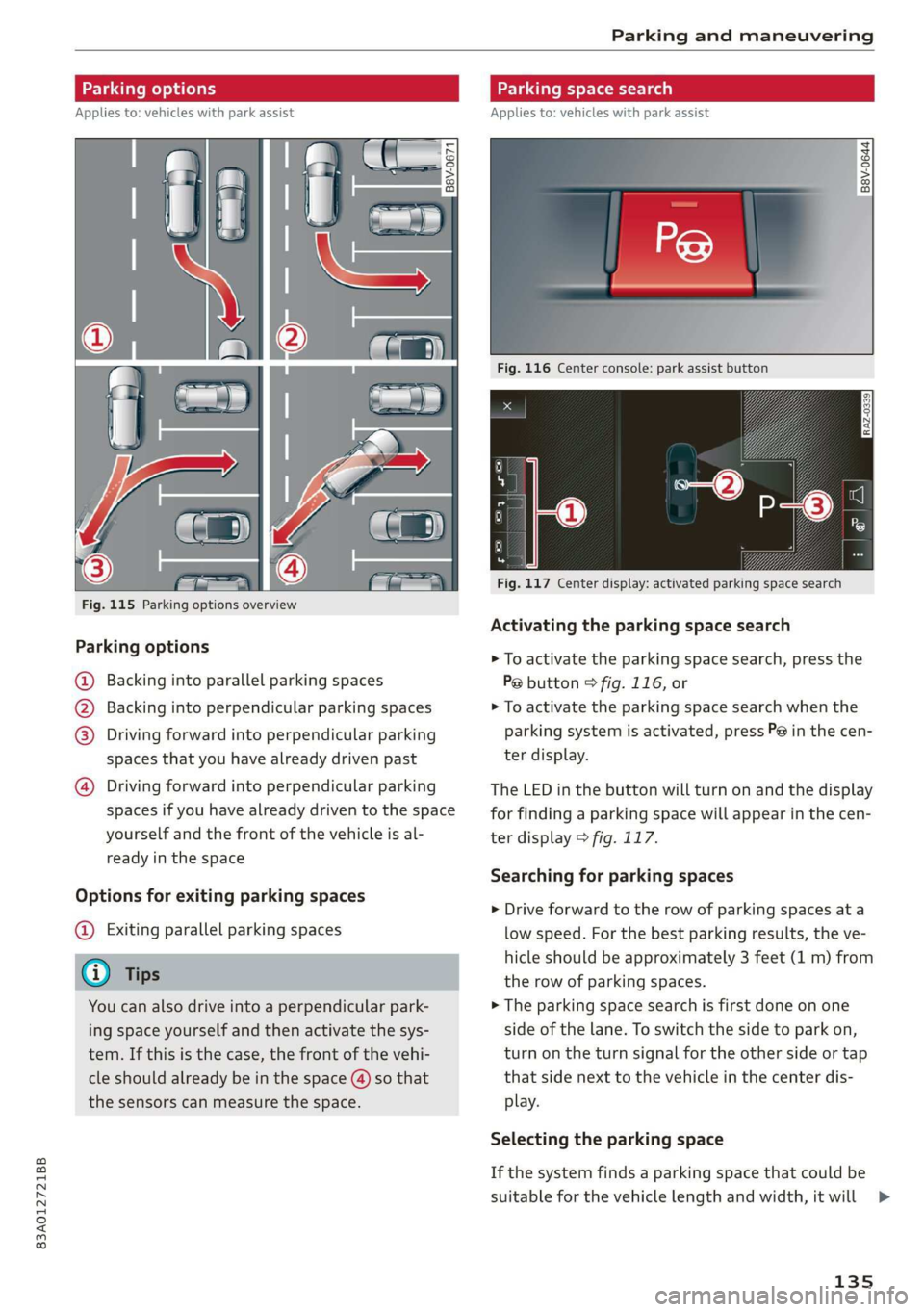
Parking options
@ Backing into parallel parking spaces
) Backing into perpendicular parking spaces
Driving forward into perpendicular parking
spaces that you have already driven past
Driving forward into perpendicular parking
spaces if you have already driven to the space
yourself
and the front of the vehicle is al-
ready in the space
Options for exiting parking spaces
@ Exiting parallel parking spaces
You can also drive into a perpendicular park-
ing space yourself and then activate the sys-
tem. If this is the case, the front of the vehi-
the sensors can measure the space.
Applies to: vehicles with park assist
= +
3}
g > io ao
Fig. 116 Center console: park assist button
RAZ-0339
Fig. 117 Center display: activated parking space search
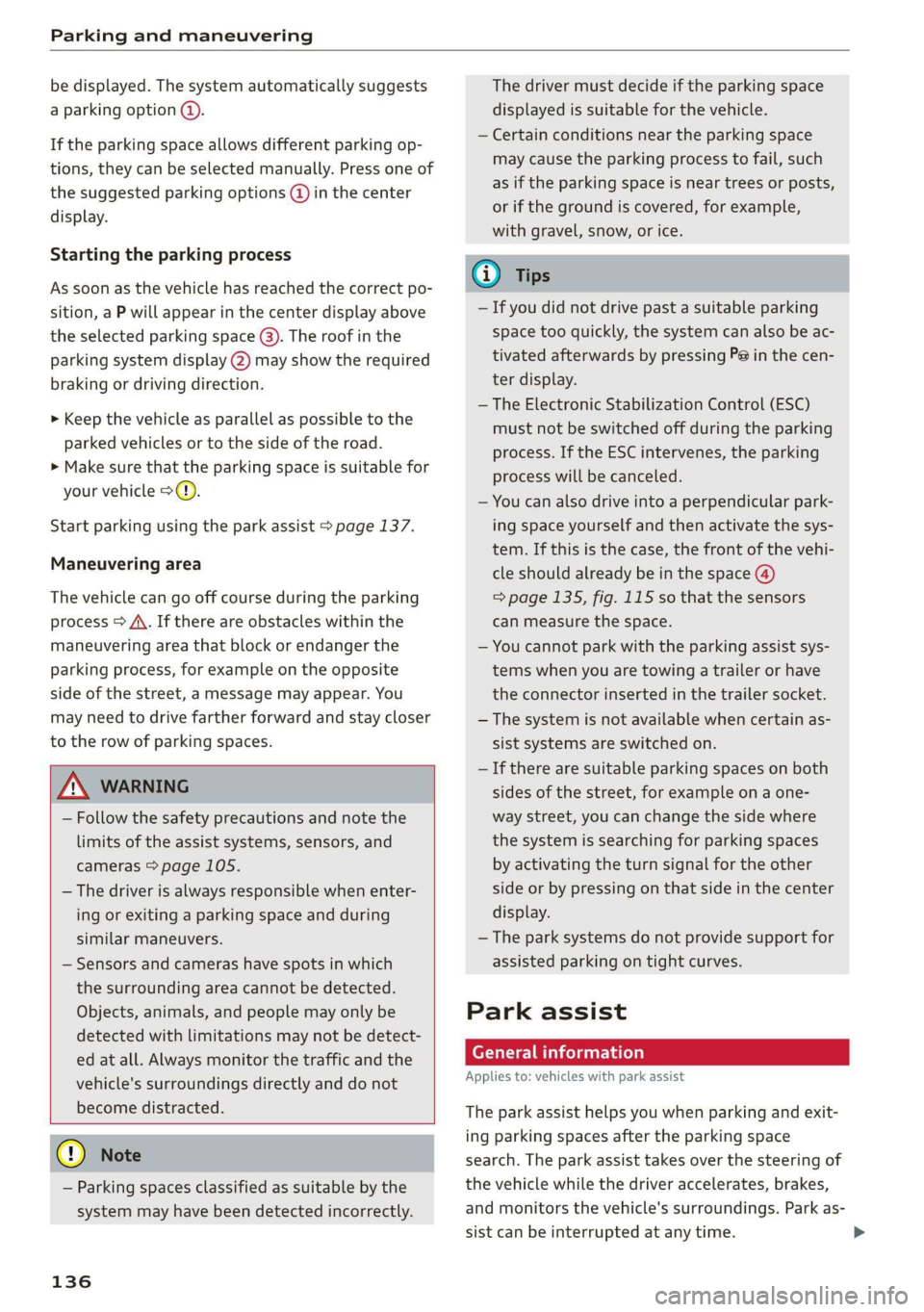
Activating the parking space search
> To activate the parking space search, press the
P@ button © fig. 116, or
> To activate the parking space search when the
parking system is activated, press P@ in the cen-
ter display.
The LED in the button will turn on and the display
for finding a parking space will appear in the cen-
ter display > fig. 117.
Searching for parking spaces
> Drive forward to the row of parking spaces ata
low speed. For the best parking results, the ve-
hicle should be approximately 3 feet (1 m) from
the row of parking spaces.
> The parking space search is first done on one
side of the lane. To switch the side to park on,
turn on the turn signal for the other side or tap
that side next to the vehicle in the center dis-
play.
Selecting the parking space
If the system finds a parking space that could be
suitable for the vehicle length and width, it will
135
>
Page 138 of 278
Parking and maneuvering
be displayed. The system automatically suggests
a parking option @.
If the parking space allows different parking op-
tions, they can be selected manually. Press one of
the suggested parking options (@ in the center
display.
Starting the parking process
As soon as the vehicle has reached the correct po-
sition, a P will appear in the center display above
the selected parking space @). The roof in the
parking system display @) may show the required
braking or driving direction.
> Keep the vehicle as parallel as possible to the
parked vehicles or to the side of the road.
> Make sure that the parking space is suitable for
your vehicle >@).
Start parking using the park assist > page 137.
Maneuvering area
The vehicle can go off course during the parking
process
> A\. If there are obstacles within the
maneuvering area that block or endanger the
parking process, for example on the opposite
side of the street, a message may appear. You
may need to drive farther forward and stay closer
to the row of parking spaces.
ZA WARNING
— Follow the safety precautions and note the
limits of the assist systems, sensors, and
cameras > page 105.
— The driver is always responsible when enter-
ing or exiting a parking space and during
similar maneuvers.
— Sensors and cameras have spots in which
the surrounding area cannot be detected.
Objects, animals, and people may only be
detected with limitations may not be detect-
ed at all. Always monitor the traffic and the
vehicle's surroundings directly and do not
become distracted.
@) Note
— Parking spaces classified as suitable by the
system may have been detected incorrectly.
136
The driver must decide if the parking space
displayed is suitable for the vehicle.
— Certain conditions near the parking space
may cause the parking process to fail, such
as if the parking space is near trees or posts,
or if the ground is covered, for example,
with gravel, snow, or ice.
(i) Tips
— If you did not drive past a suitable parking
space too quickly, the system can also be ac-
tivated afterwards by pressing P@ in the cen-
ter display.
— The Electronic Stabilization Control (ESC)
must not be switched off during the parking
process. If the ESC intervenes, the parking
process will be canceled.
— You can also drive into a perpendicular park-
ing space yourself and then activate the sys-
tem. If this is the case, the front of the vehi-
cle should already be in the space @)
=> page 135, fig. 115 so that the sensors
can measure the space.
— You cannot park with the parking assist sys-
tems when you are towing a trailer or have
the connector inserted in the trailer socket.
— The system is not available when certain as-
sist systems are switched on.
—If there are suitable parking spaces on both
sides of the street, for example on a one-
way street, you can change the side where
the system is searching for parking spaces
by activating the turn signal for the other
side or by pressing on that side in the center
display.
— The park systems do not provide support for
assisted parking on tight curves.
Park assist
General information
Applies to: vehicles with park assist
The park assist helps you when parking and exit-
ing parking spaces after the parking space
search. The park assist takes over the steering of
the vehicle while the driver accelerates, brakes,
and monitors the vehicle's surroundings. Park as-
sist can be interrupted at any time.
Page 140 of 278
Parking and maneuvering
> Activate the turn signal on the desired side or
press that side next to the vehicle in the center
display.
> Remove your hands from the steering wheel.
> Pay attention to the path of the vehicle. If the
traffic situation permits, accelerate carefully
of.
> Follow the visual instructions in the center dis-
play and the warning tones until the vehicle has
finished exiting the parking space.
> The indicators in the center display show the
necessary direction of travel. Drive in the direc-
tion indicated by the arrows or symbols on the
roof in the parking aid image @) > page 135,
fig. 117.
> The process of exiting the parking space has
ended if additional corrective movements are
no longer necessary and the specified steering
wheel angle is sufficient to drive out of the
parking space. Resume control of the steering
wheel >@).
Park assist automatically steers the vehicle out of
the parking space while the driver presses the
pedals. The maximum speed for exiting a parking
space is 3 mph (5 km/h).
ZA\ WARNING
— Follow the safety precautions and note the
limits of the assist systems, sensors, and
cameras > page 105.
— The park assist is an assist system. The driv-
er is still responsible for monitoring the ve-
hicle's surroundings and preventing colli-
sions when using the system.
— When using park assist to drive into or out
of a parking space, the steering wheel turns
quickly on its own. Reaching into the steer-
ing wheel spokes while this is happening can
result in injury.
@) Note
Resume steering immediately after the last
corrective movement and the takeover
prompt, so that the specified steering wheel
angle is not recentered.
138
Interrupting the park assists
Applies to: vehicles with park assist
Park assist will be canceled automatically in the
following scenarios:
— You switch the system off.
— You start steering.
— The speed is too high.
—The time limit is exceeded.
— An obstacle is detected.
— ESC intervenes.
Resume control of the vehicle, end the parking
process manually, or:
— You can resume the parking process in some sit-
uations. Press the P@ button.
— To continue exiting the parking space, switch
the engine off and on. Press the Pe button.
ZA\ WARNING
Follow the safety precautions and note the
limits of the assist systems, sensors, and
cameras > page 105.
Applies to: vehicles with park assist
If the Poo" or indicator light turns on, park as-
sist is not available or was interrupted.
A message that indicates the cause and possible
solution may appear with some displays. The
weather conditions may be too poor or a sensor
may be covered. Clean the area in front of the
sensors > page 106, fig. 85 and try to turn on
the systems again later.
If the malfunction remains, drive to an author-
ized Audi dealer or authorized Audi Service Facili-
ty immediately to have the malfunction correct-
ed.
Page 249 of 278

83A012721BB
Emergency assistance
Read and follow the important information under
=> page 246.
Preparations
> Only secure the towing cable or tow bar at the
designated towing loops > page 247,
=> page 247.
> Make sure the towing cable is not twisted. Oth-
erwise it could disconnect from the towing loop
while towing.
> Switch the emergency flashers on in both
vehicles > page 46. However, do not do this if it
prohibited by law.
Towing vehicle (front)
> Only start to drive when the towing cable is
taut.
> Press the brake pedal very carefully.
> Avoid sudden braking or driving maneuvers.
Vehicle being towed (rear)
> Make sure the ignition is switched on so that
the steering wheel is not locked and so that you
can use the turn signals, the horn, and the
windshield wipers if needed > A\.
> Switching it off before the vehicle has stopped
may impair the function of the brake booster
and power steering. You would then need to
use more force to steer and brake the vehicle.
> Release the parking brake > page 93.
» Select the “N” selector lever position.
> Make sure the towing cable is always taut.
ZX WARNING
Never tow a vehicle using a tow bar or towing
cable if the vehicle does not have electrical
power.
Front towing loop
Fig. 163 Front bumper: installing the towing loop
The threaded opening for the towing loop is lo-
cated on the right side of the front bumper.
> Remove the towing loop from the vehicle tool
kit > page 240.
> Press the cap inward with brief, strong pressure
> fig. 163. The cap will loosen from the bump-
er.
> Tighten the towing loop in the threaded open-
ing until it stops and then tighten it with a
wheel wrench.
> After using, place the towing loop back in the
vehicle tool kit.
ZX WARNING
If the towing loop is not tightened until it
stops when installing, the threads may be
pulled out when towing the vehicle and result
in an accident.
@) Tips
Depending on the model, the shape of the
cover can vary.
Rear towing loop
Fig. 164 Rear bumper: installing the towing loop
247
Page 259 of 278
83A012721BB
Accessories and technical changes
Usually maintenance and repair work requires
special tools, measuring devices, and other
equipment that is available to trained vehicle
technicians in order to help ensure that your vehi-
cle and all of its systems operate correctly, relia-
bly, and safely. Performing work on the vehicle
incorrectly can impair the operation and reliabili-
ty of your vehicle and may void one or more of
your vehicle's warranties.
Technical Modifications
Interference with electronic components, their
software, the wiring, and data transfer may cause
malfunctions. Because of the way electronic com-
ponents are interconnected, such malfunctions
can also impair systems that are not directly in-
volved. This means that you risk both a substan-
tial reduction in the operational safety of your ve-
hicle and increased wear of vehicle components.
Some convenience functions, such as the conven-
ience turn signal function, individual door open-
ing function, and displays, can be reprogrammed
using special workshop equipment. If functions
are reprogrammed, the information and descrip-
tions about these functions in this Owner's Man-
ual may no longer apply to the changed func-
tions. Audi recommends that an authorized Audi
dealer or authorized Audi Service Facility perform
and verify any reprogramming procedures.
carry out the job and have the correct tech-
nical information and the correct tools.
— If you are uncertain about what to do, have
the work performed by an authorized Audi
dealer, an authorized Audi Service Facility,
or another qualified workshop. Serious per-
sonal injury may result from improperly per-
formed work.
ZA WARNING
Maintenance procedures, repairs, or technical
modifications that are performed incorrectly
increase the risk of an accident and can lead
to serious injuries.
ZA WARNING
The engine compartment in any motor vehicle
is a potentially dangerous area and can cause
serious personal injury.
— Always use extreme caution when doing any
work in the engine compartment. Always
follow commonly accepted safety practices
and use common sense. Never risk personal
injury.
— Never perform any work in the engine com-
partment unless you know exactly how to
@) Note
— Maintenance procedures, repairs or techni-
cal modifications that are performed incor-
rectly can cause damage to the vehicle, such
as corrosion.
— If emergency repairs must be performed,
take your vehicle to an authorized Audi deal-
er or authorized Audi Service Facility as soon
as possible.
— Audi is not liable for damage to the vehicle
resulting from failure to comply with these
guidelines.
@) For the sake of the environment
— Regular maintenance can help protect the
environment.
— Technical modifications to the vehicle can
have a negative impact on fuel consumption
and vehicle emissions.
(@) For the sake of the environment
Undeployed airbag modules and pretension-
ers are classified as Perchlorate Material -
special handling may apply, See www.dtsc.ca.
gov/hazardouswaste/perchlorate. When the
vehicle or parts of the restraint system includ-
ing airbag modules and safety belts with pre-
tensioners are scrapped, all applicable laws
and regulations must be observed. Your au-
thorized Audi dealer is familiar with these re-
quirements and we recommend that you have
your dealer perform this service for you.
G) Tips
Because of your vehicle's aluminum body de-
sign, all service and repair procedures affect-
ing the body should be performed by an au-
thorized Audi dealer or authorized Audi
257
Page 275 of 278

83A012721BB
Service life ics + anew ow amavas w stamens wo aeciewe 223
Tire pressure... 02... cee ee eee ee eee 224
Tire pressure monitoring system........ 232
Tire pressure table.................00. 226
Tire pressure (trailer mode)............ 102
Treadwear indicators.................. 223
Unidirectionals. . sass as isso « 6 ssasee x 216, 243
Uniform tire quality grading............ 231
Tires and wheels
Glossary of tire and loading terminology .. 217
Tires and vehicle load limits............ 226
TOG sow x 2 seen 2 2 mauem 5 a BORE & & Gores 2 240
Top tether anchor (securing the child safety
SOAt) co coco o a smomees wo gamete ee ae vn comer ow 71
Touch display
Adjusting the brightness................ 18
Operating...............2.. 2.00.2 e eee 16
TOWING... 6. eee eee 246
Towing loop....... eee e ee eee eee eee 247
Towing protection monitoring............. 31
TPMS
Tire pressure monitoring system........ 232
Traffic information . woo. cee ee 169, 170
Traffic light information................ 109
Traffic SIQgKSicias x + severe x 2 awn ¢ o seten «oes 110
Trailer lOaGies « & seas s & sises = x eouns « 2 eaves ¥ 262
Trailer mode
Trailer mode (navigation).............. 172
Trailer towing ies 2 2 src 2 6 wets 2 6 waren 3 ewe 102
Tongue weight................00-000. 102
TraileP load s casas x x komm 9c aemm as eewR Fd 102
Trailer View. ... 00... cee eee ee eee ee 131
Turn signals. ... 2.2... 6.0 cece eee eee AS
U
Unable to pass...........-.. 00. e eee eee 115
Uniform tire quality grading............. 231
Unlocking and locking..............00005 28
By remote control..............2.0005. 33
Using the lock cylinder................. 30
With the central locking switch.......... 29
With the convenience key.............0- 33
Update (software) .............00 0200 ee 194
Updating stations (radio)................ 173
USB
Adapter. ..... 2... e cee cece eee 141
USB charging Ports. . sss vo ese so eens 6 w eee 73
USB stick
refer to Audi music interface........... 182
V
Vanity tier ccasos +. piesexvie semneze a 6 ewer « & exonene 50
Vehicle
Care/cleaning.............0--00 ee eee 234
DIMe@NSIONS sacers ¢ « eeems ¢ ¢ aes ¢ epee a ee 261
Identification data.................4. 261
Out of service... 6... eee eee eee 239
RaiSING's = eeu: 5 : ewe & a ceeE Fg nee 8 eee 241
StAPtIMGhin 6 6 semen so awe ov omRON 6H SaaS wT 82
Vehicle-car@iess ¢ «ness oo een oo eso Pees 234
Vehicle identification number............ 261
Vehiclejack’s « sacs = s wees = y wees oy eee x ee 240
LITING POINTS! « secias oo amas ow eenaee 2 a cone 241
Vehicle keys « saws x « sais ¢ & eas oo Rees 28,32
Vehicle starting system..............200. 91
Vehiclé tool:kit: : eee: 2 y eens x x cess 5 ees 240
Ventilation... 2.2.0... 0. eee eee eee 78
VIEW button ..... 0.0.0... eee eee eee 12
Voicemail. ... 2.0... eee eee eee eee 145
Voice recognition system
External... . cc eee cee eee eee 25
OpPGratinig’s s » asww + ears & + yom & + RoR 4 x Be 24
Ww
Warning lights
refer to Indicator lights...............00. 7
Washing matte finish paint.............. 234
Weights: « + cess «2 par a o saws 3 ¢ sees + 2 ee 262
WITEELBOLES = earns x & says ge semis x canes eee 229
Changing’a tire = cscs
Cleaning.......... 0. cece eee eee eee 235
Glossary of tire and loading terminology .. 217
Loose wheel warning.............-.... 229
Replacing.......... 0. cece eee eee ee 240
Tire pressure monitoring system........ 232
Tires and vehicle load limits............ 226
Wheel Wrench): « « cies + nase ss nome so cee 240
Wi-Fi
HOtSPOESEETINGS iss 5 ences 6 samme 6 aces o L55
Online media................00--005. 181
USING a hotspot ; sass sheen cs bees tees 153