warning lights AUDI Q3 2020 Owner's Manual
[x] Cancel search | Manufacturer: AUDI, Model Year: 2020, Model line: Q3, Model: AUDI Q3 2020Pages: 278, PDF Size: 72.66 MB
Page 116 of 278
Driver assistance
PYRE aad (ai)
Applies to: vehicles with adaptive cruise assist
2 S
Sy e ee
RAZ-0397
Fig. 94 Instrument cluster: driver assistance display
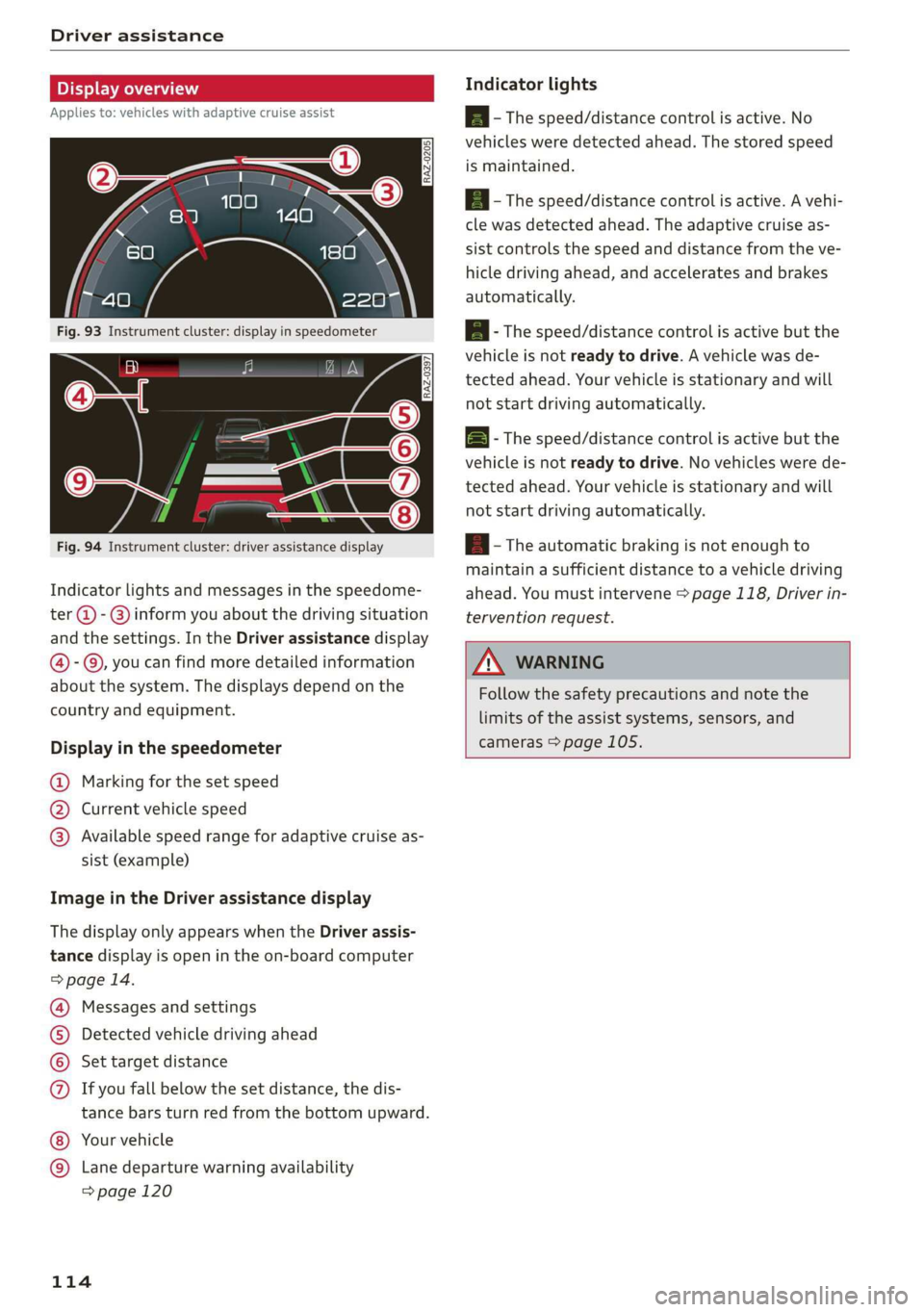
Indicator lights and messages in the speedome-
ter @ -@ inform you about the driving situation
and the settings. In the Driver assistance display
@-©, you can find more detailed information
about the system. The displays depend on the
country and equipment.
Display in the speedometer
@ Marking for the set speed
@ Current vehicle speed
@® Available speed range for adaptive cruise as-
sist (example)
Image in the Driver assistance display
The display only appears when the Driver assis-
tance display is open in the on-board computer
> page 14.
Messages and settings
Detected vehicle driving ahead
Set target distance
If you fall below the set distance, the dis-
tance bars turn red from the bottom upward.
Your vehicle
©®
CO®
Lane departure warning availability
=> page 120
114
Indicator lights
Ba - The speed/distance control is active. No
vehicles were detected ahead. The stored speed
is maintained.
Aa - The speed/distance control is active. A vehi-
cle was detected ahead. The adaptive cruise as-
sist controls the speed and distance from the ve-
hicle driving ahead, and accelerates and brakes
automatically.
AB - The speed/distance control is active but the
vehicle is not ready to drive. A vehicle was de-
tected ahead. Your vehicle is stationary and will
not start driving automatically.
BS - The speed/distance control is active but the
vehicle is not ready to drive. No vehicles were de-
tected ahead. Your vehicle is stationary and will
not start driving automatically.
B- The automatic braking is not enough to
maintain a sufficient distance to a vehicle driving
ahead. You must intervene > page 118, Driver in-
tervention request.
ZA WARNING
Follow the safety precautions and note the
limits of the assist systems, sensors, and
cameras > page 105.
Page 118 of 278
Driver assistance
responsible for controlling the vehicle. The
driver is especially responsible for braking,
starting to drive, controlling the speed, and
maintaining the distance to other vehicles.
— Turn on the adaptive cruise assist only if the
surrounding conditions permit it. Always
adapt your driving style to the current visu-
al, weather, road, and traffic conditions.
— Switch the adaptive cruise assist off tempo-
rarily when driving in turning lanes or high-
way exits. This prevents the vehicle from ac-
celerating to the stored speed when in these
situations.
ZA WARNING
If you press the SETK2) button when driving
at speeds below 20 mph (30 km/h), then 20
mph (30 km/h) will be set because that is the
minimum speed that can be set. If no vehicle
is detected ahead of you, the vehicle will ac-
celerate up to that speed.
@ Tips
— Always keep your hands on the steering
wheel. The driver is always responsible for
adhering to the regulations applicable in
the country where the vehicle is being oper-
ated.
— If you switch the ignition or the adaptive
cruise assist off, the stored speed is erased
for safety reasons.
— When the adaptive cruise assist is switched
on, the ESC and the ASR are switched on au-
tomatically.
— The system cannot be switched off if the
road exceeds the maximum possible grade
for safe operation.
— If you signal to pass and the adaptive cruise
assist suggests a passing maneuver, the
adaptive cruise assist will accelerate just be-
fore changing lanes to shorten the distance
to the vehicle driving ahead.
116
Setting the distance
Applies to: vehicles with adaptive cruise assist
B4M-0234
Fig. 97 Operating lever: setting the distance
If you adjust the speed, you must also change the
time gap to the vehicle driving ahead. The higher
the speed, the greater the distance that is need-
ed.
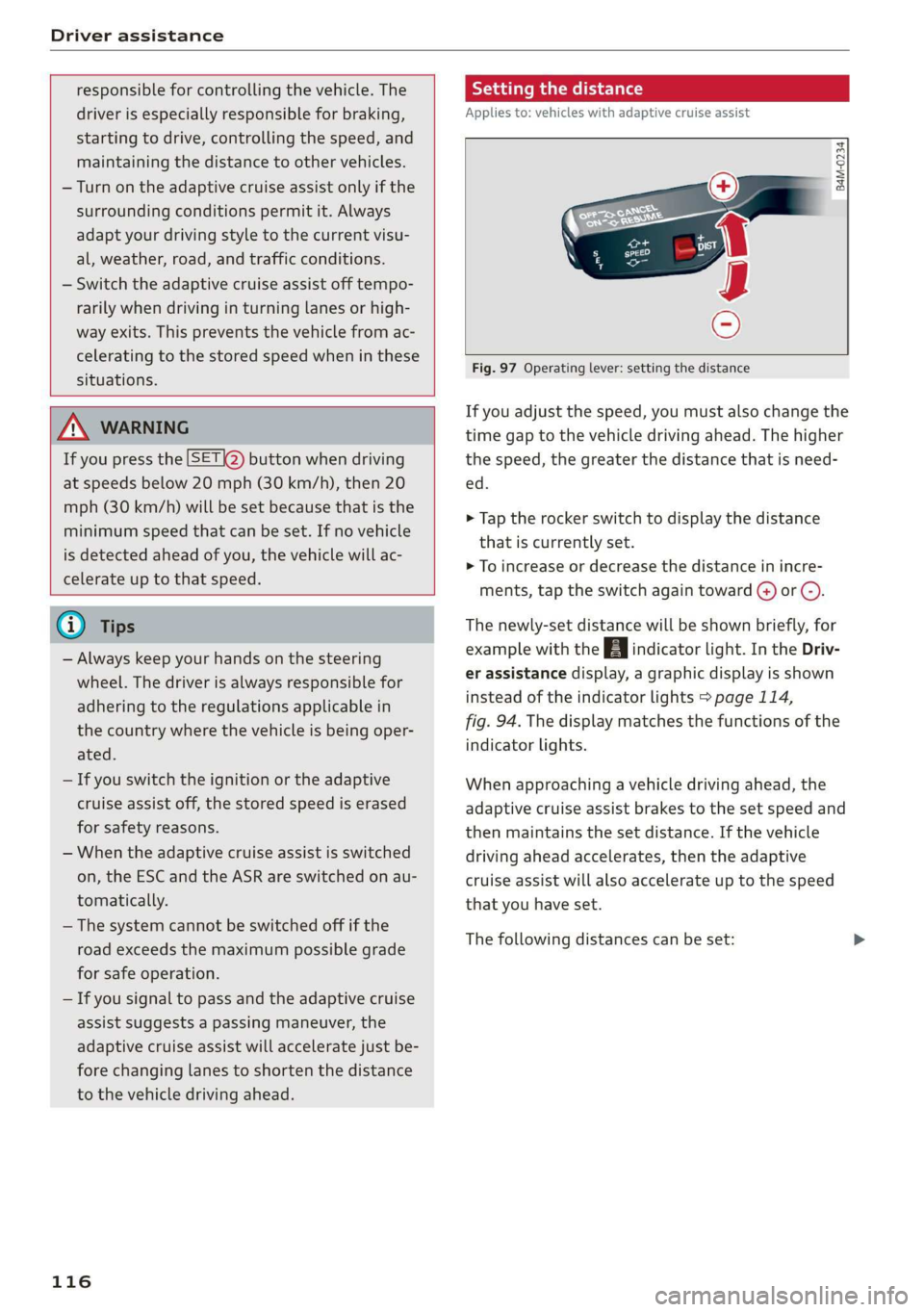
> Tap the rocker switch to display the distance
that is currently set.
> To increase or decrease the distance in incre-
ments, tap the switch again toward G) or ().
The newly-set distance will be shown briefly, for
example with the indicator light. In the Driv-
er assistance display, a graphic display is shown
instead of the indicator lights > page 114,
fig. 94. The display matches the functions of the
indicator lights.
When approaching a vehicle driving ahead, the
adaptive cruise assist brakes to the set speed and
then maintains the set distance. If the vehicle
driving ahead accelerates, then the adaptive
cruise assist will also accelerate up to the speed
that you have set.
The following distances can be set:
Page 123 of 278
83A012721BB
Driver assistance
Applies to: vehicles with lane departure warning
B4M-0064
Fig. 103 Turn signal lever: switching the lane departure
warning on or off
RAZ-0107
Fig. 104 Instrument cluster: driver assistance display
Switching the lane departure warning on and
off
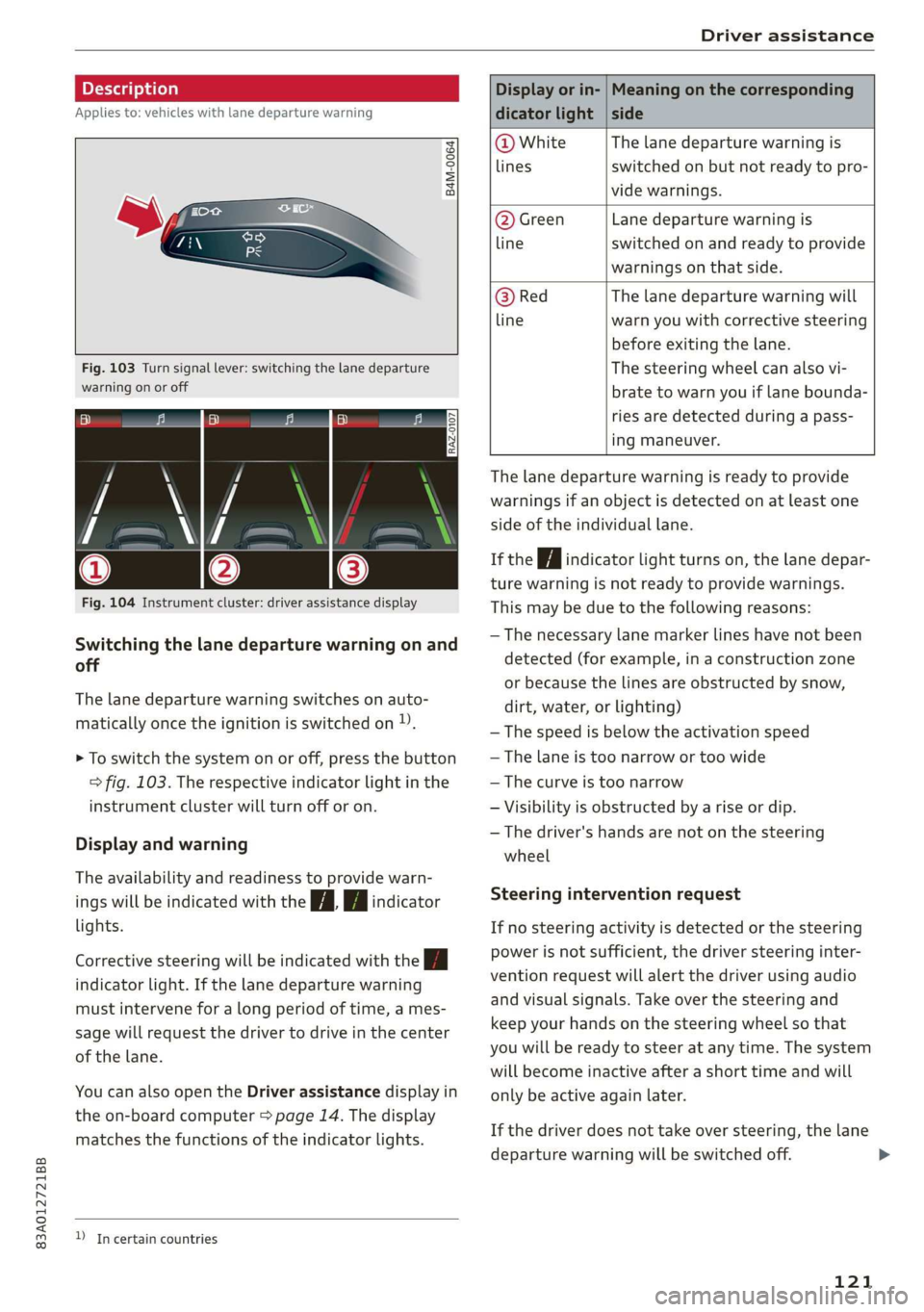
The lane departure warning switches on auto-
matically once the ignition is switched on )).
> To switch the system on or off, press the button
=> fig. 103. The respective indicator light in the
instrument cluster will turn off or on.
Display and warning
The availability and readiness to provide warn-
ings will be indicated with the i | fA indicator
lights.
Corrective steering will be indicated with the |
indicator light. If the lane departure warning
must intervene for a long period of time, a mes-
sage will request the driver to drive in the center
of the lane.
You can also open the Driver assistance display in
the on-board computer > page 14. The display
matches the functions of the indicator lights.
D_ In certain countries
Display or in- | Meaning on the corresponding
dicator light | side
@ White The lane departure warning is
lines switched on but not ready to pro-
vide warnings.
@ Green Lane departure warning is
line switched on and ready to provide
warnings on that side.
@ Red The lane departure warning will
line warn you with corrective steering
before exiting the lane.
The steering wheel can also vi-
brate to warn you if lane bounda-
ries are detected during a pass-
ing maneuver.
The lane departure warning is ready to provide
warnings if an object is detected on at least one
side of the individual lane.
If the Hi indicator light turns on, the lane depar-
ture warning is not ready to provide warnings.
This may be due to the following reasons:
— The necessary lane marker lines have not been
detected (for example, in a construction zone
or because the lines are obstructed by snow,
dirt, water, or lighting)
—The speed is below the activation speed
— The lane is too narrow or too wide
— The curve is too narrow
— Visibility is obstructed by a rise or dip.
— The driver's hands are not on the steering
wheel
Steering intervention request
If no steering activity is detected or the steering
power is not sufficient, the driver steering inter-
vention request will alert the driver using audio
and visual signals. Take over the steering and
keep your hands on the steering wheel so that
you will be ready to steer at any time. The system
will become inactive after a short time and will
only be active again later.
If the driver does not take over steering, the lane
departure warning will be switched off.
121
>
Page 235 of 278
83A012721BB
Wheels
— Tires that are only partially used are replaced
with new tires
Indicator lights
@ - Loss of pressure in at least one tire > A\.
Check the tires and replace or repair if necessary.
Check and correct the pressures of all four tires
and store the pressure again > page 233.
ia (Tire Pressure Monitoring System) Tire pres-
sure: malfunction! See owner's manual. if
appears after switching the ignition on or while
driving and the @ indicator light in the instru-
ment cluster blinks for approximately one minute
and then stays on, there is system malfunction.
Try to store the correct tire pressures
=> page 233. In some cases, you must drive for
several minutes after storing the pressures until
the indicator light turns off. If the indicator light
does turn off or turns on again after a short peri-
od of time, drive to an authorized Audi dealer or
authorized Audi Service Facility immediately to
have the malfunction corrected.
ZA WARNING
— If the tire pressure indicator appears in the
display, reduce your speed immediately and
avoid any hard steering or braking maneu-
vers. Stop as soon as possible and check the
tires and their pressure.
— The driver is responsible for maintaining the
correct tire pressure. You must check the
tire pressure regularly.
— Under certain conditions (such as a sporty
driving style, winter conditions, or unpaved
roads), the tire pressure monitoring system
indicator may be delayed.
(i) Tips
—The tire pressure monitoring system can al-
so stop working when there is an ESC mal-
function.
— Using snow chains may result in a system
malfunction.
—The tire pressure monitoring system in your
Audi was calibrated with “Audi Original
Tires” > page 221. Using these tires is rec-
ommended.
Storing tire pressures
If the tire pressure changes or a tire is replaced,
it must be confirmed in the system.
> Before storing the tire pressures, make sure the
tire pressures in all four tires meet the speci-
fied values and are adapted to the load
=> page 224.
> Switch the ignition on.
> Select on the home screen: VEHICLE > Settings
& Service > Tire pressure monitoring > Store
tire pressure > Yes, store now.
(i) Tips
Do not store the tire pressures if snow chains
are installed.
233
Page 239 of 278
83A012721BB
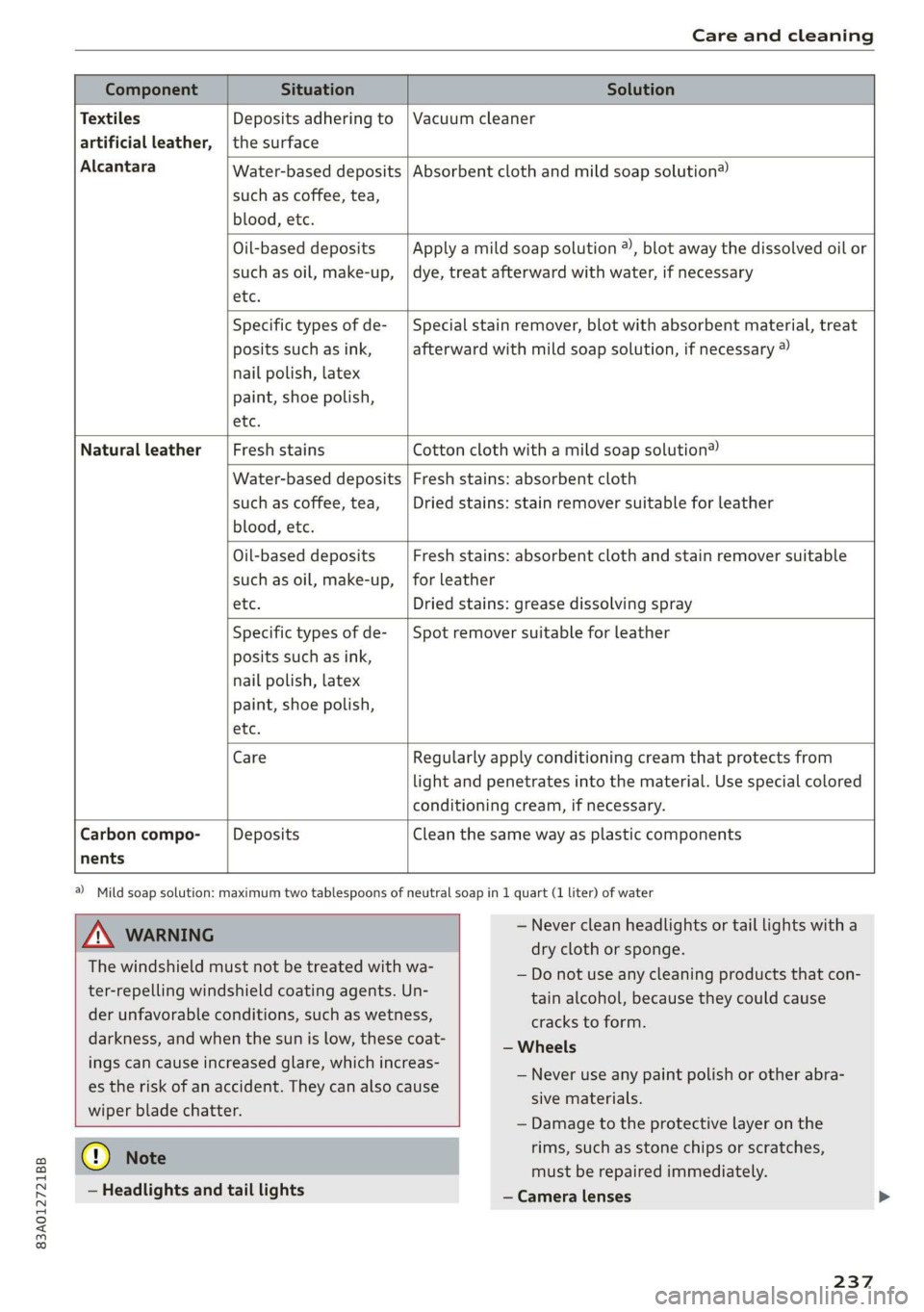
Care and cleaning
Water-based deposits
such as coffee, tea,
blood, etc.
Component Situation Solution
Textiles
Deposits adhering to | Vacuum cleaner
artificial leather, | the surface
Alcantara Absorbent cloth and mild soap solution®
Oil-based deposits
such as oil, make-up,
etc.
Apply a mild soap solution ®), blot away the dissolved oil or
dye, treat afterward with water, if necessary
Specific types of de-
posits such as ink,
nail polish, latex
paint, shoe polish,
etc.
Special stain remover, blot with absorbent material, treat
afterward with mild soap solution, if necessary ®
Natural leather Fresh stains Cotton cloth with a mild soap solution®
Water-based deposits
such as coffee, tea,
blood, etc.
Fresh stains: absorbent cloth
Dried stains: stain remover suitable for leather
Oil-based deposits
such as oil, make-up,
etc.
Fresh stains: absorbent cloth and stain remover suitable
for leather
Dried stains: grease dissolving spray
Specific types of de-
posits such as ink,
nail polish, latex
paint, shoe polish,
etc.
Spot remover suitable for leather
nents
Care Regularly apply conditioning cream that protects from
light and penetrates into the material. Use special colored
conditioning cream, if necessary.
Carbon compo- Deposits Clean the same way as plastic components
a) Mild soap solution: maximum two tablespoons of neutral soap in 1 quart (1 liter) of water
ZX WARNING
The windshield must not be treated with wa-
ter-repelling windshield coating agents. Un-
der unfavorable conditions, such as wetness,
darkness, and when the sun is low, these coat-
ings can cause increased glare, which increas-
es the risk of an accident. They can also cause
wiper blade chatter.
— Never clean headlights or tail lights with a
dry cloth or sponge.
— Do not use any cleaning products that con-
tain alcohol, because they could cause
cracks to form.
— Wheels
— Never use any paint polish or other abra-
sive materials.
— Damage to the protective layer on the
@) Note
— Headlights and tail lights
rims, such as stone chips or scratches,
must be repaired immediately.
— Camera lenses
237
Page 247 of 278
![AUDI Q3 2020 Owners Manual 83A012721BB
Emergency assistance
aaa) itl aalare]
Both jump start cables must be connected in the
correct order.
S
g = & oO
Fig. 161 Engine compartment: connectors for jump start
cabl](/img/6/57625/w960_57625-246.png "AUDI Q3 2020 Owners Manual 83A012721BB
Emergency assistance
aaa) itl aalare]
Both jump start cables must be connected in the
correct order.
S
g = & oO
Fig. 161 Engine compartment: connectors for jump start
cabl")
83A012721BB
Emergency assistance
aaa) itl aalare]
Both jump start cables must be connected in the
correct order.
S
g = & oO
Fig. 161 Engine compartment: connectors for jump start
cables or a charger
RAZ-0128
Fig. 162 Connecting the jump start cables
The jump start cable connections are located in
the engine compartment.
Follow the information about the vehicle battery
=> page 210.
Connecting the positive cable (red) to the
positive terminal
> Open the cover on the positive terminal
> fig. 161.
1. Attach one end of the positive cable (red) to
the positive terminal on the vehicle battery
@ ° fig. 162.
2. Attach the other end of the positive cable
(red) to the positive terminal @ on the pow-
er source.
Connecting the negative cable (black) to the
negative terminal
3. Attach one end of the negative cable (black)
to the negative terminal @) on the power
source.
4. Attach the other end of the negative cable
(black) to the jump-start pin @ on the vehi-
cle.
Starting the engine
> Start the engine in the vehicle giving the charge
and let it run at idle.
> Now start the engine in your vehicle, which has
the
drained battery.
> If the engine does not start, stop the starting
procedure after 10 seconds and then repeat it
after approximately 30 seconds.
> Turn on the rear window defogger in your vehi-
cle in order to reduce any voltage peaks that
may occur when disconnecting the jump start
cables. The headlights must be switched off.
> With the engines running, remove the cables in
reverse order of the way they were installed.
> Close the cover on the positive terminal.
ZA WARNING
— Do not touch the non-insulated parts of the
terminal clamps. The cable must also not
come into contact with vehicle components
that conduct electricity when it is connected
to the positive vehicle battery terminal. This
can cause a short circuit.
— The plugs on the battery cells must not be
opened.
— Keep ignition sources (such as open flames,
burning cigarettes, etc.) away from the vehi-
cle batteries to reduce the risk of an explo-
sion.
— Route the jump start cables so they cannot
get caught in the moving parts in the other
vehicle's engine compartment.
q@ Note
— Do not use the negative terminal on the ve-
hicle battery for jump starting. A malfunc-
tion could occur in the vehicle electrical sys-
tem.
— Please note that the connecting process
previously described for the jump start ca-
bles is intended for when your vehicle is be-
ing jump started.
245
Page 253 of 278
83A012721BB
Fuses and bulbs
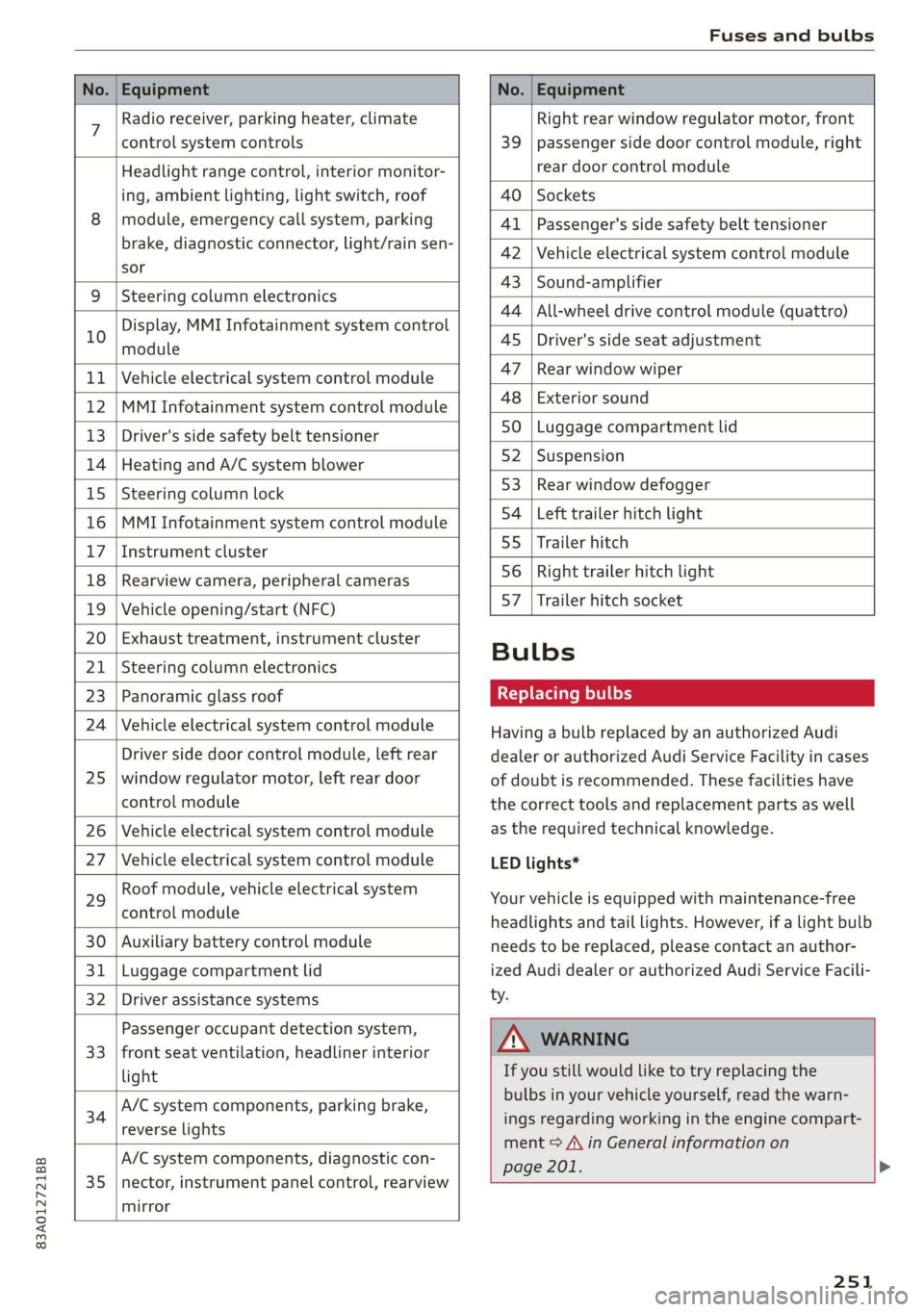
No. | Equipment No. | Equipment
7 Radio receiver, parking heater, climate Right rear window regulator motor, front
control system controls 39 | passenger side door control module, right
Headlight range control, interior monitor- rear door control module
ing, ambient lighting, light switch, roof 40 | Sockets
8 | module, emergency call system, parking 41 |Passenger's side safety belt tensioner
brake, diagnostic connector, light/raih'sen- 42 |Vehicle electrical system control module
sor
= - 43 |Sound-amplifier
9 |Steering column electronics
- - 44 | All-wheel drive control module (quattro)
Display, MMI Infotainment system control
10 anadtile 4S Driver's side seat adjustment
11 | Vehicle electrical system control module 47 | Rearwindow wiper
12 |MMI Infotainment system control module a6 || Exteriorsound
13 | Driver's side safety belt tensioner 50 | tuggage: compartment lid
14 | Heating and A/C system blower 52. || Suspension
15 | Steering column lock 53 | Rear;window defogger
16 |MMI Infotainment system control module 54 | Left trailer hitch light
17 |Instrument cluster 29 | Ualler hitch
18 | Rearview camera, peripheral cameras 56. | Right trailer hitch light
19 | Vehicle opening/start (NFC) 87 [Trailer'hitch'socket
20 | Exhaust treatment, instrument cluster
; Bulbs
21 | Steering column electronics
23 | Panoramic glass roof Replacing bulbs
24 | Vehicle electrical system control module
25
Driver side door control module, left rear
window regulator motor, left rear door
control module
26 Vehicle electrical system control module
27 Vehicle electrical system control module
29
Roof module, vehicle electrical system
control module
30 Auxiliary battery control module
31 Luggage compartment lid
32 Driver assistance systems
33
Passenger occupant detection system,
front seat ventilation, headliner interior
light
34
A/C system components, parking brake,
reverse lights
35
A/C system components, diagnostic con-
nector, instrument panel control, rearview
mirror
Having a bulb replaced by an authorized Audi
dealer or authorized Audi Service Facility in cases
of doubt is recommended. These facilities have
the correct tools and replacement parts as well
as the required technical knowledge.
LED lights*
Your vehicle is equipped with maintenance-free
headlights and tail lights. However, if a light bulb
needs to be replaced, please contact an author-
ized Audi dealer or authorized Audi Service Facili-
ty.
ZA\ WARNING
If you still would like to try replacing the
bulbs in your vehicle yourself, read the warn-
ings regarding working in the engine compart-
ment > A\ in General information on
page 201. >
251
Page 265 of 278
83A012721BB
Index
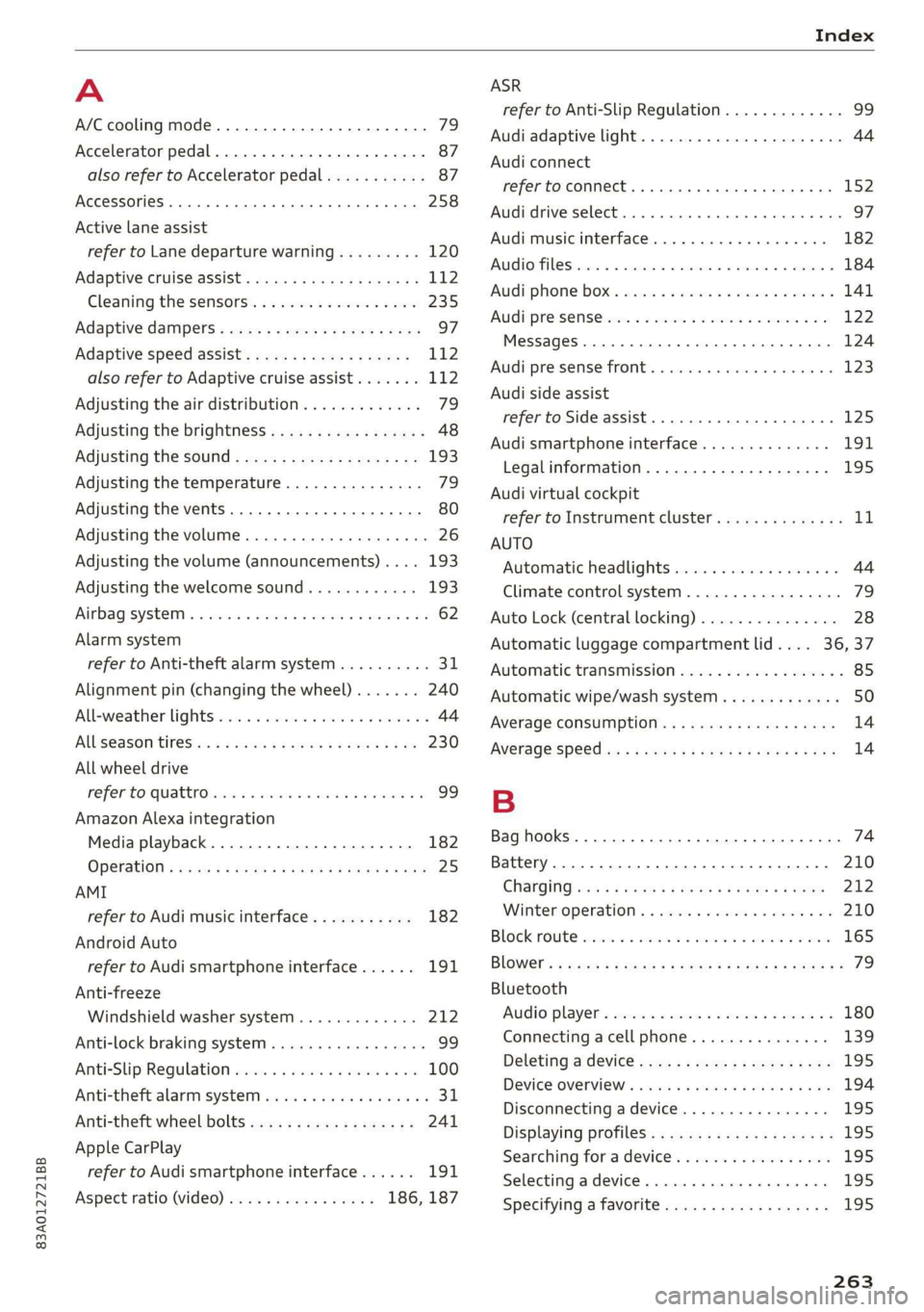
A
A/C cooling mode............. ee eee eee ee 79
Accelerator pedal.............--00000005 87
also refer to Accelerator pedal........... 87
AccessorieS .. 0.00... cece eee eee ee 258
Active lane assist
refer to Lane departure warning......... 120
Adaptive cruise assist................00. 112
Cleaning the sensors...............--- 235
Adaptive dampers...........--000e-0 eee 97
Adaptive speed assist.................. 112
also refer to Adaptive cruise assist....... 112
Adjusting the air distribution. ............ 79
Adjusting the brightness................. 48
Adjusting the sound..............-...-- 193
Adjusting the temperature............... 79
Adjusting the vents............. eee eee 80
Adjusting the volume..............000005 26
Adjusting the volume (announcements) .... 193
Adjusting the welcome sound............ 193
Airbagisystem « s sesuew « wainwn @ + ween eo scams sw 0 62
Alarm system
refer to Anti-theft alarm system.......... 31
Alignment pin (changing the wheel)....... 240
Alleweather lights:esi: « s mss « © seve ov ewes 6 y 44
AL S@aSON IFES a5 6s caenu vs saws oe Hews oo He 230
All wheel drive
He fer Co quattro cies cv cess wv cero « 0 nsw oo 99
Amazon Alexa integration
Media playback.................00000. 182
OPCTATION ¢ cows « y wasps 5 ¥ eves s 7 ew ea ee 25
AMI
refer to Audi music interface........... 182
Android Auto
refer to Audi smartphone interface...... 191
Anti-freeze
Windshield washer system............. 212
Anti-lock braking system.............0005 99
AntisSlip: Regulation sso ss sissies 0 seme 6 8 os 100
Anti-theft alarm system..............005. 31
Anti-theft wheel bolts.................. 241
Apple CarPlay
refer to Audi smartphone interface...... 191
Aspect ratio (video)................ 186, 187
refer to Anti-Slip Regulation
Audi adaptive light
Audi connect
refer to connect
Audi drive select
Audi music interface
Audio files
Audi phone box
Audi pre sense
Messages
Audi pre sense front
Audi side assist
refer to Side assist
Audi smartphone interface
Legal information
Audi virtual cockpit
refer to Instrument cluster
AUTO
Automatic headlights
Climate control system
Auto Lock (central locking)
Automatic luggage compartment lid....
Automatic transmission
Automatic wipe/wash system
Average consumption
Average speed
Bag hooks
Battery
Charging
Winter operation
Block route
Bluetooth
Audio player
Connecting a cell phone
Deleting a device
Device overview
Disconnecting a device
Displaying profiles
Searching for a device
Selecting a device
Specifying a favorite
263
Page 267 of 278
83A012721BB
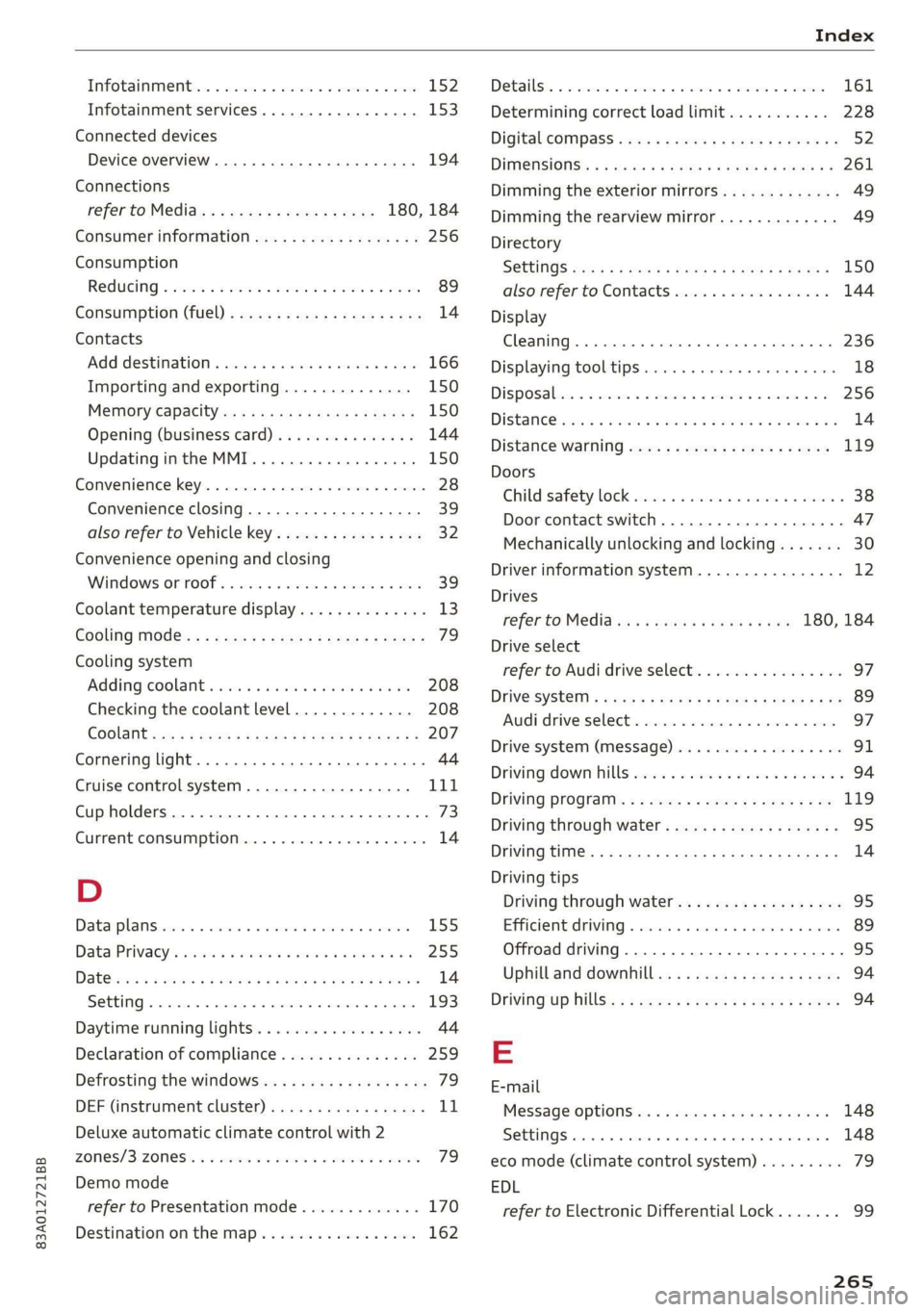
Infotainment... «ccc eo esc waver ov ome 152
Infotainment services............0000- 153
Connected devices
Device overview ....... cee e eens 194
Connections
referto Media.............-.+++- 180, 184
Consumer information.................- 256
Consumption
REGUGING & oes oo xem o soem ao oa oe oe 89
GONSUMPtiON (TUE) = sec 2 x ewe 2 game 2 2 rem 14
Contacts
Add destinations ssw: « + cima © 2 aesen @ 2 sone 166
Importing and exporting.............. 150
MGIIGrY{Capacitycs « i seas ss mene sy eae 5 150
Opening (business card)............... 144
Updatinginthe MMI.................. 150
Convenience key............00 020 eee eee 28
Convenience closing................00 39
also refer to Vehicle key..............-- 32
Convenience opening and closing
Windows O60 « wiisss & wees so eames 6 & ere 39
Coolant temperature display.............. 13
Cooling MOE: s sexx s wean o + qome ee eg 79
Cooling system
Adding
coolant wos < « siesa ss ewe se ween 208
Checking the coolant level............. 208
COOlSTit sev: 5 = eaene =e meme & E eeG se ee 207
Cornering light.............. 00sec eee eee 44
Cruise control system.................. 111
Cup
holders. ....... 0.0... eee eee ee eee 73
Current CONSUMPLIOMN ese. . « cceses 6 0 cass © econ 14
D
DatarplanSierie a x cnvew + 2 ceva wo eevee a 9 cownae 155
Data: Privacy’. ssa + 2 owen ov omnes ve tee soe 255
Dat@sios s x saws xs ees 4 e Ree & 2 RSW se EEG 14
SOCEING « cnense: ao cuezoae wo aoneres sv oremine © @ ovens 193
Daytime running lights...............0.. 44
Declaration of compliance............... 259
Defrosting the windows.................. 79
DEF (instrument cluster)................- 11
Deluxe automatic climate control with 2
ZONCS/3:- ZONES. = 2 ess vx we es eee ee EMT 79
Demo mode
refer to Presentation mode............. 170
Destination onthe map................. 162
Dettailst. 2 1 swoveise « scams oo wciawe a axtsiwe os coawae 161
Determining correct load limit........... 228
Digital'cOmpass saccs se sews ve ees yo pees vs 52
DIMENSIONS's « avy & 2 wos « 4 aotEe 4s eEUE ae 261
Dimming the exterior mirrors............. 49
Dimming the rearview mirror............. 49
Directory
S@ttingS ces s x eee + wien gv Re a x OE 150
also refer to Contacts...............4. 144
Display
CLE ATTIG se « «. eserves 1 « souneite 4 o eveuene ol sneer aw 6 236
Displaying tooltips cose « x secnss +o onmnane a o voces 18
Disposable co nei a 2 svar a a amass wn anaes a wo 256
DistanG@rend 2 2 cows ot awere oo omen vo oem 2 os 14
Distance Warning sms: » « sews ¢ » saws 2 x eee 119
Doors
Childisafety lock sessies « ¢ sors oo ewe ao races @ 38
Door contact switch................00-. 47
Mechanically unlocking and locking....... 30
Driver information system................ 12
Drives
fefer te Medidies 5 & wees «x eww sv exw 180, 184
Drive select
refer to Audi drive select................ 97
DriveSystem « caus « x yor o © ome o x Rom Fe Be 89
Audi driverselect.. sors. «2 somos © x snus x 2 syn ‘G7
Drive system (message)...............0048. 91
Driving down Rill sia s & sass 2 x cose 2 wees o 94
Driving:program: « ¢ sos + ¢ somes 2 s eews eo ee 119
Driving through water..............0000- 95
DFIVINGUENTIG 5 « neue 4 < mews a Bee oF ee se 14
Driving tips
Driving through water...............0-. 95
EER cher FV cocies 2 x conan x x camasine we wsaenen 89
Offroad driving................ eee eee 95
Uphill and downhill...
E
E-mail
MessageroptionSie: « & sexs « » sewer x = caw 148
SOUS: ccawen a: ps asoxvin «. priexene ws: samen w 4 stiewens 148
eco mode (climate control system)......... 79
EDL
refer to Electronic Differential Lock....... 99
265
Page 270 of 278

Index
Internet radio
refer to Online radio..............005- 176
iPhone
refer to Audi music interface........... 182
J
Jump starting ......... 2... eee eee ee eee 244
K
Key... eee eee eee eee 28, 32
Convenience opening and closing......... 39
Key replacement............. cece ee eee 32
PANIC button.....................000. 32
Replacing the battery.................. 34
Unlocking and locking................0. 33
Vehicle code... 66... cece eee eee eee ee 32
Kick-down ... 2... eee ee eee 87
L
Lane assist
refer to Lane departure warning......... 120
Lane departure warning...............-. 120
Cleaning the camera area.............. 235
LATCH (securing child safety seats)......... 69
Leather care and cleaning............... 237
Legal information
License subscriptions................. 195
Software information...............05 195
Software licenses..................0-. 195
Version information..............000 195
License plate bracket...............0005 258
Lifting points (vehicle jack).............. 241
Light/rain sensor
Headlights << ¢ secss veea ss besa es Fees = 44
Intermittent mode (windshield wipers).... 50
Light functions
Triterion LIQhtingsses «+ coun « x sunsens 5 sxsinas 6 ws 47
Lighting
Exterior... 0... . cece eee eee 44
TNt@riGk seam = = see ¢ ¢ came 5 s eee ss eee ex 47
Lights... 2... ee eee eee eee 44
Listening to music
referto Mediate: « «sexs se enes 3s eee 180, 184
LOdd 's ceux : sees = wees ce pees se mE ee 262
268
Locking and unlocking
By remote control. ..... 2... eee eee 33
Using the lock cylinder. .........00..008 30
With the convenience key............... 33
Low beam headlights.................... 44
Lowering the cargo floor................. 77
Luggage compartment...........0....0% 74
GOVE lisse © 2 messes ae semeen ooo mae on ve oo we 75
Double cargo floor............. eee eae 76
Increasing the siz@s.« : sus « : yauu & s wom » 76
also refer to Luggage compartment...... 74
Luggage compartment lid
Closing button.................000000. 36
General information..............00005 34
Mechanically unlocking..........-....-- 37
Opening and closing...............005- 35
Opening and closing with foot motion..... 37
Power opening and closing.............. 36
Lumbar support’: : sess ss een ee ees ses 55, 56
M
Maiiitenance:: « « sans + s sana ss eee s caer ae 256
Maintenance intervals.................. 213
Malfunction Indicator Lamp (MIL)........ 200
Manual shifting..............0.00ee eee 86
Map
Changing thescale................... 162
Display’: = seen = ¢ seus 5 o ooops 5 Fes oe ee 164
Operating ’s « « wie ao caosis 6 7 soexine wv Hee vo 163
Setting the destination................ 162
MAP
refer to Message Access Profile......... 147
Map preview........ 0.0. cee cece eee 161
Map update.......... 0... eee eee 168
ONLNG: « meee 2 y wom 2 Rew g 2 BOR eo Ha 168
SD card/USB connection............... 168
Melia « sumcm 2 0 sane oo ms oo em 2 8 ae 180, 184
Supported formats................04- 188
Media Centel ns + cena + 4 amu « semen = 2 ence 184
Memory card
SD card reader (MMI)...........-00005 180
Supported types and formats........... 188
Menu language
refer to Setting the language........... 193
Message Access Profile................. 147
MESSaGeSine « ¢ seins 2 3 ems so Bae germ 147