park assist AUDI Q3 2020 Owner's Guide
[x] Cancel search | Manufacturer: AUDI, Model Year: 2020, Model line: Q3, Model: AUDI Q3 2020Pages: 278, PDF Size: 72.66 MB
Page 140 of 278
Parking and maneuvering
> Activate the turn signal on the desired side or
press that side next to the vehicle in the center
display.
> Remove your hands from the steering wheel.
> Pay attention to the path of the vehicle. If the
traffic situation permits, accelerate carefully
of.
> Follow the visual instructions in the center dis-
play and the warning tones until the vehicle has
finished exiting the parking space.
> The indicators in the center display show the
necessary direction of travel. Drive in the direc-
tion indicated by the arrows or symbols on the
roof in the parking aid image @) > page 135,
fig. 117.
> The process of exiting the parking space has
ended if additional corrective movements are
no longer necessary and the specified steering
wheel angle is sufficient to drive out of the
parking space. Resume control of the steering
wheel >@).
Park assist automatically steers the vehicle out of
the parking space while the driver presses the
pedals. The maximum speed for exiting a parking
space is 3 mph (5 km/h).
ZA\ WARNING
— Follow the safety precautions and note the
limits of the assist systems, sensors, and
cameras > page 105.
— The park assist is an assist system. The driv-
er is still responsible for monitoring the ve-
hicle's surroundings and preventing colli-
sions when using the system.
— When using park assist to drive into or out
of a parking space, the steering wheel turns
quickly on its own. Reaching into the steer-
ing wheel spokes while this is happening can
result in injury.
@) Note
Resume steering immediately after the last
corrective movement and the takeover
prompt, so that the specified steering wheel
angle is not recentered.
138
Interrupting the park assists
Applies to: vehicles with park assist
Park assist will be canceled automatically in the
following scenarios:
— You switch the system off.
— You start steering.
— The speed is too high.
—The time limit is exceeded.
— An obstacle is detected.
— ESC intervenes.
Resume control of the vehicle, end the parking
process manually, or:
— You can resume the parking process in some sit-
uations. Press the P@ button.
— To continue exiting the parking space, switch
the engine off and on. Press the Pe button.
ZA\ WARNING
Follow the safety precautions and note the
limits of the assist systems, sensors, and
cameras > page 105.
Applies to: vehicles with park assist
If the Poo" or indicator light turns on, park as-
sist is not available or was interrupted.
A message that indicates the cause and possible
solution may appear with some displays. The
weather conditions may be too poor or a sensor
may be covered. Clean the area in front of the
sensors > page 106, fig. 85 and try to turn on
the systems again later.
If the malfunction remains, drive to an author-
ized Audi dealer or authorized Audi Service Facili-
ty immediately to have the malfunction correct-
ed.
Page 242 of 278

Emergency assistance
Emergency assistance
General information
> Park the vehicle as far as possible from moving
traffic in the event of a breakdown. In the event
of a flat tire, park the vehicle ona level surface.
If you are ona steep hill, be especially careful.
> Set the parking brake.
> Switch the emergency flashers on.
> Have the passengers exit the vehicle. They
should move to a safe place, for example be-
hind a guard rail.
Z\ WARNING
Follow the steps given above. This is for your
protection and the for the safety of others on
the road.
Equipment
Vehicle tool kit/vehicle jack
Applies to: vehicles with the vehicle tool kit and vehicle jack
Fig. 152 Luggage compartment: cargo floor cover
The vehicle tools and vehicle jack* are stored in
the luggage compartment under the floor cover.
> Lift up the cargo floor with the plastic handle
until it is clamped behind the tabs on both side
panels.
> If necessary, lift out the center floor panel.
Applies to: vehicles with spare tire/subwoofer
> Turn the handwheel counter-clockwise and re-
move it.
> Remove the subwoofer* > page 243.
> Remove the spare tire*.
240
@ Tips
The vehicle jack* does not require any mainte-
nance.
Changing a tire
You must complete the preparation before
changing a tire.
> Read and follow the important safety precau-
tions > page 240.
> Set the parking brake.
> Select the “P” position.
>» When towing a trailer: disconnect the trailer
from your vehicle.
> Lay out the vehicle tool kit > page 240 and the
spare tire > page 243.
> Switch the ignition off.
ZA\ WARNING
The vehicle must also be secured to prevent it
from rolling when using the vehicle jack”. Use
suitable objects to block the front and back of
the wheel that is diagonal from the wheel
with the flat tire.
Removing the cover
\
> a
Fig. 153 Wheel: wheel bolts with caps
N
> Slide the plastic clip from the vehicle tool kit
onto the cap until it engages > fig. 153.
> Remove the cap with the plastic clip.
Page 248 of 278

Emergency assistance
@) Tips
Make sure that the connected jump start ca-
bles have sufficient contact with metal.
Towing
General information
You should only perform the steps that follow if
you have the necessary tools and technical ex-
pertise.
Towing requires a certain amount of practice.
Audi recommends contacting a towing company
to have the vehicle transported.
You should only have your vehicle towed by an-
other vehicle when disabled in exceptional cir-
cumstances. Inexperienced drivers should not
tow.
Notes on towing
When the engine is stopped, the transmission
will not be sufficiently lubricated if traveling at
high speeds and long distances:
— The maximum permitted towing speed is 30
mph (50 km/h).
— The maximum permitted towing distance is 30
miles (50 km).
Additional information on towing with a tow
truck
The vehicle may only be towed with the front axle
raised. Do not wrap any chains or cables around
the brake lines.
If the vehicle should be towed with the axle
raised, then the ignition must be switched off to
reduce the risk of damage to the drivetrain.
Tow bar and towing cable
The vehicle can be towed with a tow bar or tow-
ing cable. Both drivers should be familiar with
the special considerations when towing, especial-
ly when using a towing cable.
Always make sure the traction force does not ex-
ceed the permitted level and there are no shock
loading conditions. There is always the risk of the
246
coupling becoming overloaded when driving off-
road.
For the most safety and security, drive with a tow
bar. You should use a towing cable only if a tow
bar is not available. Use a towing cable made of
synthetic elastic cable similar elastic material.
ZA WARNING
— Towing highly increases the risk of an acci-
dent, for example from colliding with the
towing vehicle.
— To reduce the risk of an accident, do not al-
low anyone to remain inside the vehicle
when it is being transported by a tow truck
or a special transporter.
@) Note
— If normal towing is not possible, for exam-
ple if the transmission is faulty or if the
towing distance is greater than 30 miles
(50 km), then transport the vehicle on a
special carrier.
— If the vehicle is towed by a tow truck at the
axle that is not permitted, this can cause se-
vere damage to the transmission.
— The vehicle must not be tow started for
technical reasons.
@ Tips
— If the power supply is interrupted, then it
will not be possible to move the selector
lever out of the "P" position. The parking
lock must be released using the emergency
release before towing the vehicle
=> page 87.
— Switch Audi pre sense* off > page 124 when
loading the vehicle onto a vehicle carrier,
train, ship, or other type of transportation,
or when towing the vehicle. This can prevent
an undesired intervention from the pre
sense* system.
— Follow the local legal regulations for tow-
ing.
Page 249 of 278

83A012721BB
Emergency assistance
Read and follow the important information under
=> page 246.
Preparations
> Only secure the towing cable or tow bar at the
designated towing loops > page 247,
=> page 247.
> Make sure the towing cable is not twisted. Oth-
erwise it could disconnect from the towing loop
while towing.
> Switch the emergency flashers on in both
vehicles > page 46. However, do not do this if it
prohibited by law.
Towing vehicle (front)
> Only start to drive when the towing cable is
taut.
> Press the brake pedal very carefully.
> Avoid sudden braking or driving maneuvers.
Vehicle being towed (rear)
> Make sure the ignition is switched on so that
the steering wheel is not locked and so that you
can use the turn signals, the horn, and the
windshield wipers if needed > A\.
> Switching it off before the vehicle has stopped
may impair the function of the brake booster
and power steering. You would then need to
use more force to steer and brake the vehicle.
> Release the parking brake > page 93.
» Select the “N” selector lever position.
> Make sure the towing cable is always taut.
ZX WARNING
Never tow a vehicle using a tow bar or towing
cable if the vehicle does not have electrical
power.
Front towing loop
Fig. 163 Front bumper: installing the towing loop
The threaded opening for the towing loop is lo-
cated on the right side of the front bumper.
> Remove the towing loop from the vehicle tool
kit > page 240.
> Press the cap inward with brief, strong pressure
> fig. 163. The cap will loosen from the bump-
er.
> Tighten the towing loop in the threaded open-
ing until it stops and then tighten it with a
wheel wrench.
> After using, place the towing loop back in the
vehicle tool kit.
ZX WARNING
If the towing loop is not tightened until it
stops when installing, the threads may be
pulled out when towing the vehicle and result
in an accident.
@) Tips
Depending on the model, the shape of the
cover can vary.
Rear towing loop
Fig. 164 Rear bumper: installing the towing loop
247
Page 253 of 278
83A012721BB
Fuses and bulbs
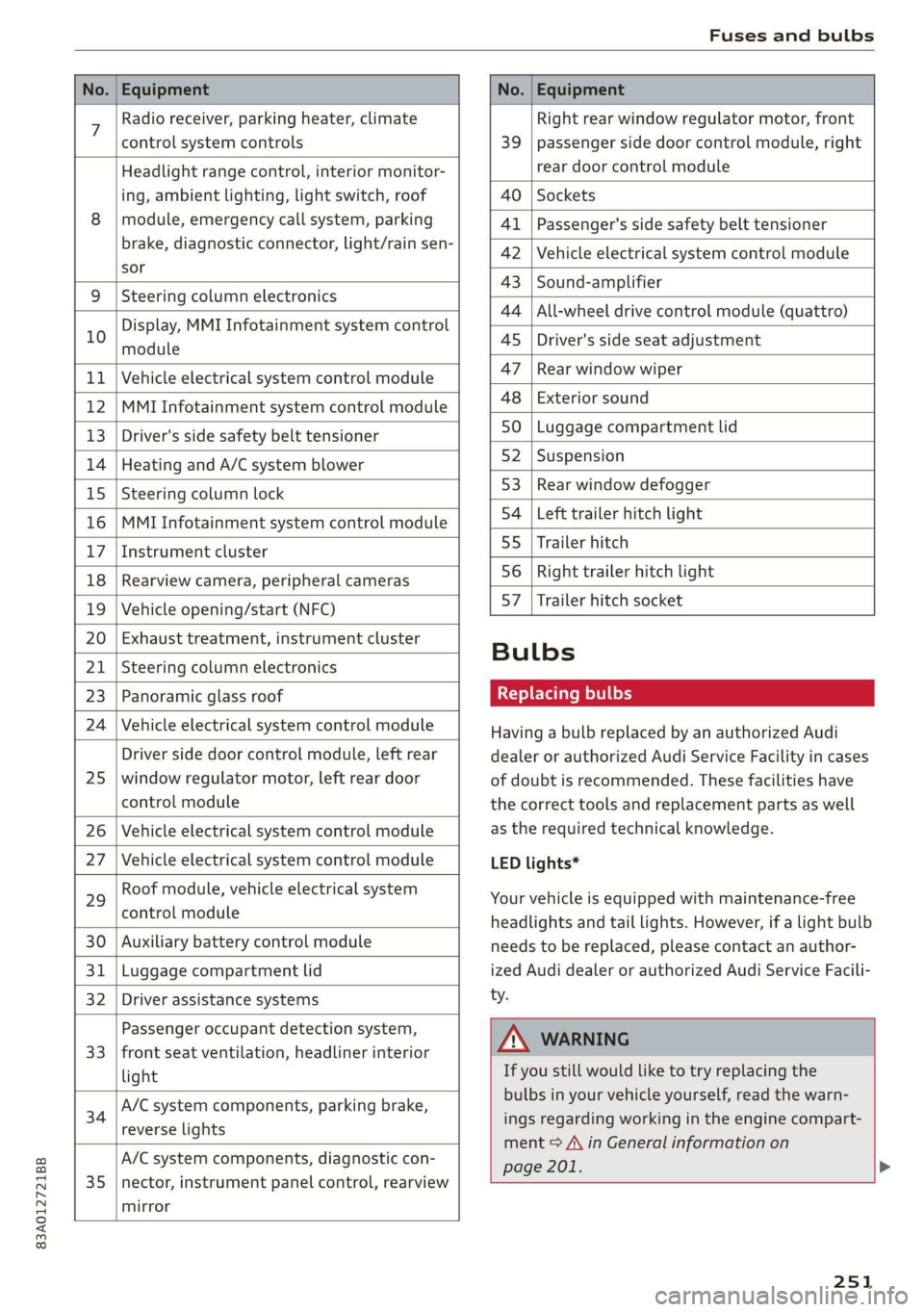
No. | Equipment No. | Equipment
7 Radio receiver, parking heater, climate Right rear window regulator motor, front
control system controls 39 | passenger side door control module, right
Headlight range control, interior monitor- rear door control module
ing, ambient lighting, light switch, roof 40 | Sockets
8 | module, emergency call system, parking 41 |Passenger's side safety belt tensioner
brake, diagnostic connector, light/raih'sen- 42 |Vehicle electrical system control module
sor
= - 43 |Sound-amplifier
9 |Steering column electronics
- - 44 | All-wheel drive control module (quattro)
Display, MMI Infotainment system control
10 anadtile 4S Driver's side seat adjustment
11 | Vehicle electrical system control module 47 | Rearwindow wiper
12 |MMI Infotainment system control module a6 || Exteriorsound
13 | Driver's side safety belt tensioner 50 | tuggage: compartment lid
14 | Heating and A/C system blower 52. || Suspension
15 | Steering column lock 53 | Rear;window defogger
16 |MMI Infotainment system control module 54 | Left trailer hitch light
17 |Instrument cluster 29 | Ualler hitch
18 | Rearview camera, peripheral cameras 56. | Right trailer hitch light
19 | Vehicle opening/start (NFC) 87 [Trailer'hitch'socket
20 | Exhaust treatment, instrument cluster
; Bulbs
21 | Steering column electronics
23 | Panoramic glass roof Replacing bulbs
24 | Vehicle electrical system control module
25
Driver side door control module, left rear
window regulator motor, left rear door
control module
26 Vehicle electrical system control module
27 Vehicle electrical system control module
29
Roof module, vehicle electrical system
control module
30 Auxiliary battery control module
31 Luggage compartment lid
32 Driver assistance systems
33
Passenger occupant detection system,
front seat ventilation, headliner interior
light
34
A/C system components, parking brake,
reverse lights
35
A/C system components, diagnostic con-
nector, instrument panel control, rearview
mirror
Having a bulb replaced by an authorized Audi
dealer or authorized Audi Service Facility in cases
of doubt is recommended. These facilities have
the correct tools and replacement parts as well
as the required technical knowledge.
LED lights*
Your vehicle is equipped with maintenance-free
headlights and tail lights. However, if a light bulb
needs to be replaced, please contact an author-
ized Audi dealer or authorized Audi Service Facili-
ty.
ZA\ WARNING
If you still would like to try replacing the
bulbs in your vehicle yourself, read the warn-
ings regarding working in the engine compart-
ment > A\ in General information on
page 201. >
251
Page 268 of 278

Index
EDR
Event Data Recorder.............-.00. 253
Electrical system. .........-.0 00 eee eee 209
Electromechanical parking brake.......... 93
Electronic Differential Lock.............. 100
Electronic immobilizer................--. 32
Electronic Stabilization Control............ 99
Embedded SIM card
Emergency assistance...
Emergency braking function.............. 93
Emergency call............ 002: 0e ee eee 145
Emergency flashers...............000005 46
Emergency mode.............-.000ee0 0 88
Emergency operation
DOOrs ... 2... eee 30
Fuel Tillerdoors = sce ¢ 2 sews « 5 wees x 2 oe 200
Luggage compartment lid............... 37
Panoramic glass roof................--. 40
Emissions control system............... 200
EMe@ngy’GONSUMENSE. « & ssn 6 « ses 6 seemaas & 6 ire 15
Energy management...........0 eee eee ee 89
Engine
Breakingin........... 2.0.0 eee eee eee 89
Coolant... 6... ee eee eee eee eee eee 207
EM@rgency Stops « « saws x s seas g 2 gees & eae 82
JUMP Starting « sais
Start/Stop systeM........... 02. eee eee 90
Starting/stopping = « « sess s+ wees se eee: s 82
Engine compartment
Opening and closing the engine compart-
mentlid.......... 2. eee eee 202
OVERUIEW snes 5 2 wees 5 2 eee 7 a ees ba ee 203
Safety precautions.............0. ee eee 201
Engine oil
Adding.....
0.0... . cece cece ee eee ee 203
Changing.......... eee cece ee eee eee 206
Checking oil level.............----0000- 203
COMSUMPEIOM. 5 & sisi oa carvers + «orate oo onan 203
Indicator light..............00.000 eee 204
Replacement interval................. 213
Engine sound
Audi drive:selects asics x « masa «6 semen a 2 vase 97
Engine Start/Stop mode
refer to Start/Stop system........... 90,91
Engine startsystent sous +o asin + oxen 2 x meee 83
266
Engine stop
refer to Start/Stop system........... 90,91
Entry/exit lighting...............--.000- 46
Environment
Unleaded gasoline. ........... cee eee 197
eSIM
refer to Embedded SIM card............ 153
Event Data Recorder (EDR).............. 253
Exterior lighting. ...............e eee eee 44
Exterior Mirrors... 1... eee ee eee 48
Folding’settingS oss <= 2ecn es xeen es reese 29
External voice operation................. 25
F
Factory default settings
Multi Media Interface................. 194
Fast forwarding and rewinding (media file). 184
Fast forwarding (media files)............ 184
Fast route... 2.2... eee 158
Favorites
Bluetooth); « 2 aes sy eems 2 e eee se eee 195
NavigatiOMssios & wines wo wee 6 & eames 6 © eres 160
Radio... 2... ee eee ee ee 175
TelEPhONne escas s & cers 2 ows ¢ dae 8 xe 144
Federal Communications Commission (FCC) . 259
File formats (media drives) .............. 188
Folding the rear seats.............-..00. 76
For the sake of the environment
Disposing of engine oil................ 206
Fueling ss: = = sees ¢ = saws Fo Gees fo ewe 2 oe 198
Leaks 0... eee eee eee 202
Forward gear
refer to Gears... ... eee eee eee 85
Free text search
Media.... 2... eee eee 187
RaGiG savos x 2 awe ¢ ¢ gem ¢ 2 mews ge ney ® 175
also refer to Intelligent search.......... 158
Freeze protection
Coolant...... 2... eee eee eee 207
Front center armrest...............0.00. 56
Front collision warning
refer to Audi pre sense front............ 122
Fuel... cece eee eee 197
Additives: = secs c= pees ee seen ep eee ee 198
Current: consuMptiON:: & sve 6 e eens ss cee 14
Fuel display....... 0.00... cece eee eee rT
Page 272 of 278
Index
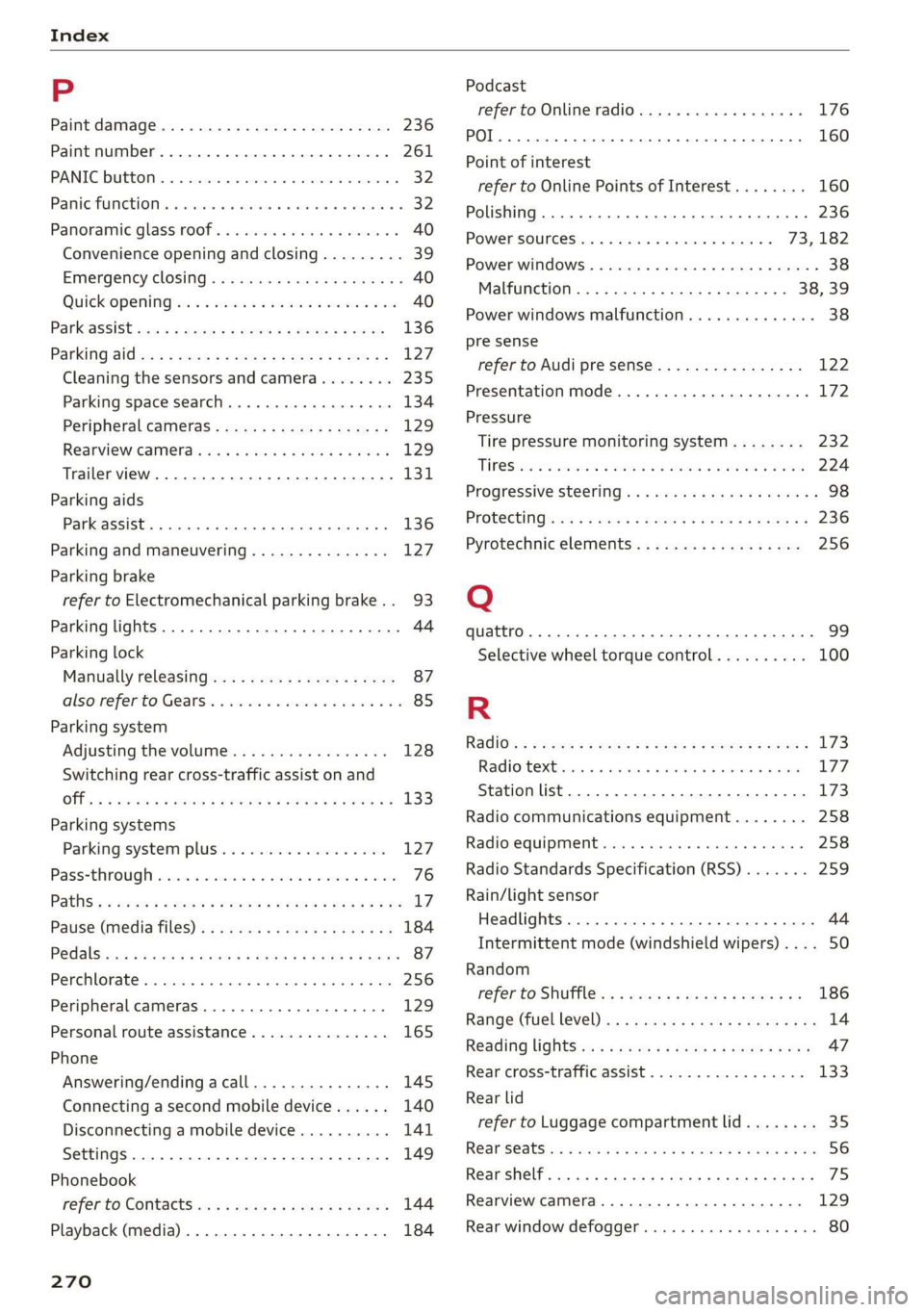
P
Paint damage............2.- cee eee eae 236
Paint number............. 00. e ee eee eee 261
PANIC-DUEEOMY: » « seswees «a cameice = x omewene 0 semen & 32
Panic FUMGtiOn & sews « a amwene + a sswone a o ctiteoue oo 32
Panoramic glass roof..............000005 40
Convenience opening and closing......... 39
Emergency closing........-..seeeeeeees 40
Quickopening ie: = svc es wee se ore eo oe 40
Parktassist «ce: ¢ 2 sam « x nese & 2 Roe & ¢ see 136
Parking aid es « » exes ¢ e seen ¢ ees so ees 127
Cleaning the sensors and camera........ 235:
Parking space search...............05. 134
Peripheral cameras. ..............0005 129
Rearview camerabiies os saves oo sere ao aero 129
Trailer view...............0000000 eee 131
Parking
aids
Park assist... 0.2.0.0... eee eee ee eee 136
Parking and maneuvering............... 127
Parking brake
refer to Electromechanical parking brake.. 93
Parking lights. ............ 00 eee e eee ee 44
Parking lock
Manually releasing..............-..00- 87
alsovreferto Gears. « cmes ss van vo ewe ewe 85
Parking system
Adjusting the volume................. 128
Switching rear cross-traffic assist on and
Offs « = noms & 2 sume 4 e Beene x 2 Keo ae a 133
Parking
systems
Parking system plus...............0.. 127
Pass=through sissies 2s seeone 2 eens = sateen ee ae 76
Paths: « auws 2 2 anew 2 8 cagon ¢ Kamps 5 Heme & 3 BY L?
Pause (media files). ss wens oy eeea a been a es 184
P@dalSizaie x samm = seesu ¢ 2 Rass 3 F NaUER 3 t cere 87
Perchlorate. ... 0.2... 0c cee eee eee eee 256
Peripheral cameras...............0000. 129
Personal route assistance............... 165
Phone
Answering/ending acall............... 145
Connecting a second mobile device...... 140
Disconnecting a mobile device.......... 141
Settings ........ 0.0.2. ee eee eee eee 149
Phonebook
refer to ContactSies « s seas sc pees se ewes a 144
Playback (media) ..............2--00005 184
270
Podcast
refer to Online radio........... 2... eee 176
10) 160
Point of interest
refer to Online Points of Interest........ 160
Polishing .... 0.6.00. cece eee eee eens 236
Power sourceS.........000 eee eee 73,182
Power windows ...........--00 eee eee eee 38
Malfunction .......... 0.0 e eee eee 38,39
Power windows malfunction............05 38
pre sense
refer to Audi presense................ 122
Presentation mode............0e eee ane 172
Pressure
Tire pressure monitoring system........ 232
TIPO Sivas & axes 6 w amines 6 a omnes ow earn oH are 224
Progressive StGGringis + ewes s + wees s & wes sé 98
PFOtGCtinGhwes « 2 gama < 2 mama & BOER Fs HOR 8 8 236
Pyrotechnic elements...........--00 00 256
Q
quattro... 2... ee eee eee eee 99
Selective wheel torque control.......... 100
R
Radio’: = s sss = + eeree 5 ¢ eve + & eee 3s ew 173
RAGIOPOKE ics 1 5 senses © x samesne » v aenowms & 7 eaten 177
Station list... 2.0... 2. cee ee eee eee 173
Radio communications equipment........ 258
Radio equipment..................0 0 258
Radio Standards Specification (RSS) ....... 259
Rain/light sensor
Headlights............ 0.0.0 e eee eee 44
Intermittent mode (windshield wipers).... 50
Random
refer to Shuffle... cscseeeveasveeweaes 186
Range (fueLlevel)inu se wswa a wae x 2 mem a 6 we 14
Reading lightSis« < = cess s & ees se ees 3 ves 47
Rear cross-traffic assist............00005 133
Rear lid
refer to Luggage compartment lid........ 35
REanSEStS:: « = suas & Ga & © HGH & E SES 4s ES 56
Rear shelf... ..... ccc cece e ee eee eee eee 75
Rearview camera.......... 0. eee eee ee 129
Rear window defogger...............000 80