buttons AUDI Q3 2020 Owners Manual
[x] Cancel search | Manufacturer: AUDI, Model Year: 2020, Model line: Q3, Model: AUDI Q3 2020Pages: 278, PDF Size: 72.66 MB
Page 4 of 278
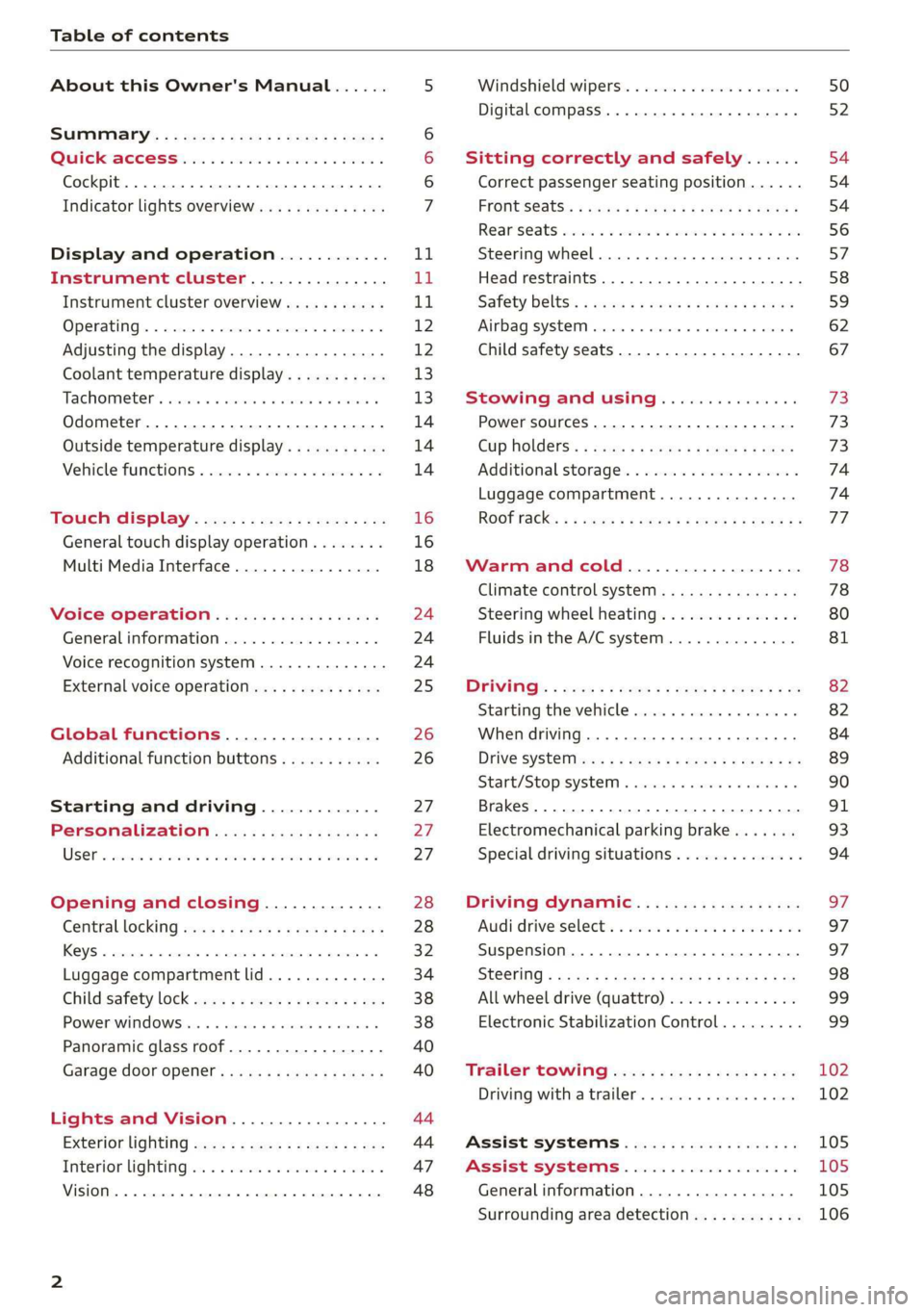
Table of contents
About this Owner's Manual......
SUMIMALY: ; « ss6% : osen ss sean cs poe s
QC CCeS Skis: si esis a 6 ores os ewe
Cockpit... 2... ee eee eee eee
Indicator lights overview...........0.
Display and operation............
Instrument cluster...............
Instrument cluster overview...........
Operating. ecco ws swacemn o © aero o erm 9
Adjusting the display.................
Coolant temperature display...........
Tachometer’. series s ewie so sie ¥ & overs
Odometer............ 0. cee eee eee eee
Outside temperature display...........
Vehicle functions « se-0 2. ese ve eee ees
Touch’ display . 22... : secs ie eses ees
General
touch display operation........
Multi Media Interface................
Voice operation..................
Generalinformation.................
Voice recognition system..............
External voice operation..............
Global functions.................
Additional function buttons...........
Starting and driving.............
Personalization..................
Luggage compartment lid.............
Child safety lock sa04 45 eec4 es eee e ee ees
Power Windows. . 6 sce « 6 umes #6 enna o
Panoramic glass roof................-
Garage door Opener’: sens ss esas se cess
Lights and Vision.................
Exterior lighting sees < = sees « « eee% sv oe
Interior liQhtingios . esas + exe ee ews x
VISION... eee eee
NOD
OO
13)
16 16 18
24 24 24
25
26 26 27 27 27 28 28
32
34
38 38
40
40
44 44
47 48
Windshield wipers............--..+-- 50
Digital compass............0 000 eens 52
Sitting correctly and safely...... 54
Correct passenger seating position...... 54
FRONUSGAtS s + astns s ¢ ewes +o eo te eoeee F 54
Rearseats sic 2 sea oo awn oo coon 7 9 oe 56
SLEEKIMG WHEEL esses 4 0 sneceas » s sxereye 9 6 eunaece 57
Head restraints..................000. 58
Safety belts: « ssa: s 2 wens 5 2 worms x s sawn 59
Airbag system... .. cc eee eee eee 62
Child safety seats..............0.00.. 67
Stowing and using............... 73
Power SOUrCeES ...... eee eee eee 73
Cup Holders: « saws = ¢ seme + ¢ eas ¢ e ees 73
Additional storage...............005. 74
Luggage compartment............... 74
ROOT ACK: « a waxem 2 2 soem 4 x em Foe tee oY 77
Warm and cold................... 78
Climate control system.............0. 78
Steering wheel heating............... 80
Fluids in the A/Csystem.............. 81
PICEVITIG:: ¢ ecces « 2 wees & o pees 5 oe oc oe 82
Starting the vehicle..............000- 82
When driving............. ee eee eee ee 84
Drive sySteliteves: + « wwe & & ews so eee es we 89
Start/Stop'system « sce ee ewer vo essere a « 90
Brakes. .............0000 0c cece eee 91
Electromechanical parking brake....... 93
Special driving situations.............. 94
Driving dynamic.................. 97
Audi driveiseleetss «isis ss naan a 2 cain a ve 97
Suspension.........-..00 eee eee eee 97
StGOriNG « awu & x Secs 5 = Hoves + F RevOS FE 98
All wheel drive (quattro).............. 99
Electronic Stabilization Control......... 99,
Trailer towing.................... 102
Driving with atrailer................. 102
Assist systems................005 105
Assist systems................005 105
Generalinformation................. 105
Surrounding area detection............ 106
Page 8 of 278
Quick access
Quick access
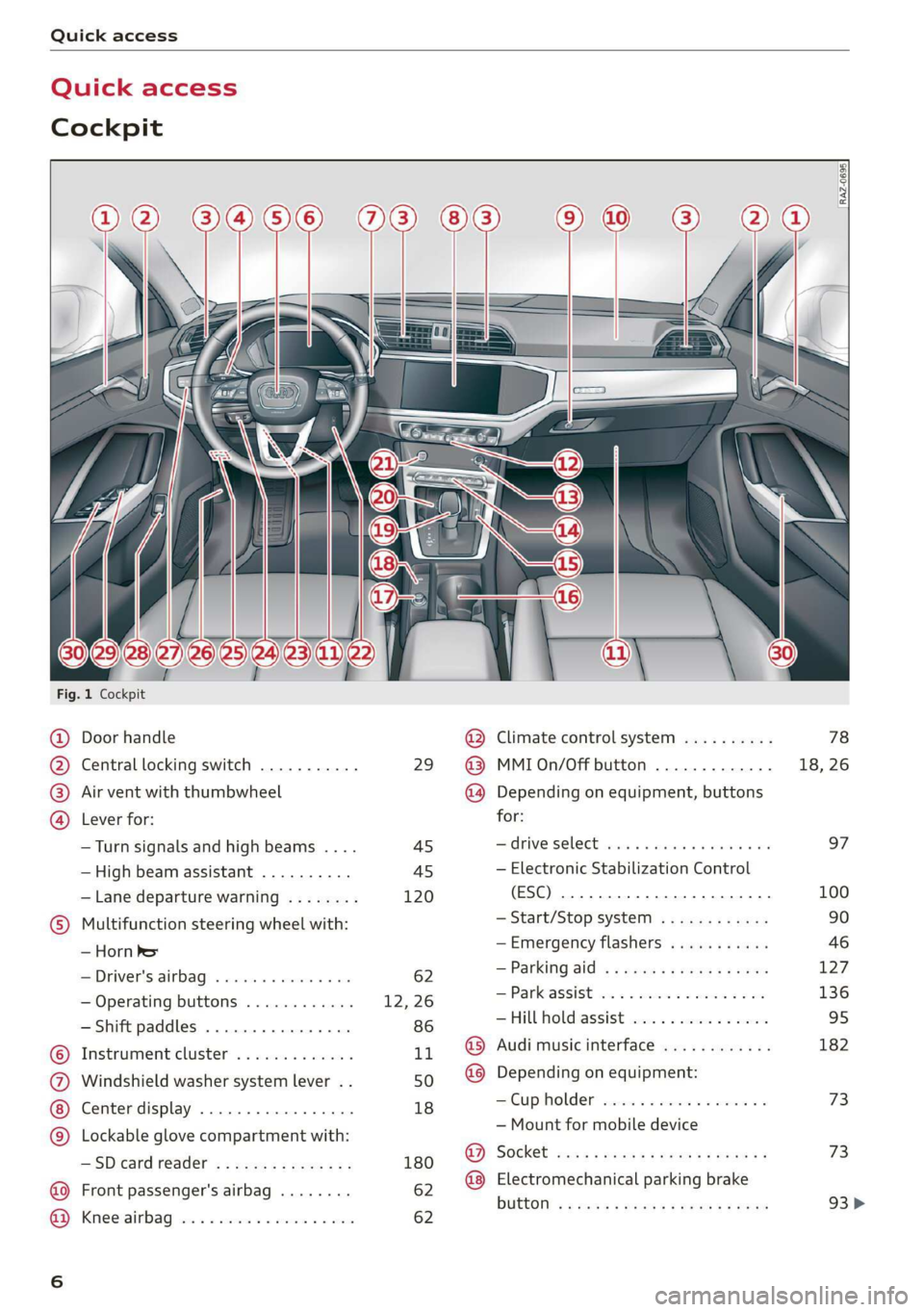
Cockpit
3 3 3
q
i
Fig. 1 Cockpit
@ Door handle @® Climate control system .......... 78
@ Central locking switch ........... 29 @ MMIOn/Off button ............. 18, 26
® Air vent with thumbwheel @ Depending on equipment, buttons
@ Lever for: for:
—Turn signals and high beams .... 45 ardrive Select woes. 5 caws sess ee 97
—High beam assistant .......... 45 — Electronic Stabilization Control
—Lane departure warning ........ 120 (ESC) «0. eee eee eee eee 100
© Multifunction steering wheel with: ~ Start/Stop system ............ 90
— Horn ber —Emergency flashers ........... 46
=(Driveris.airbag) » esas» » wecens = ae 62 ~ Farking alg & MGIES SF EGHHE 3 EMER 127
— Operating buttons ............ 12, 26 = HathsaSSioE ts = stats 23 secon 3 2 =
— Shift paddles 86 —Hill hold assist ............04. 95
© Instrument cluster 11 @ Audi music interface ............ 182
@ Windshield washer system lever .. 50 @ Depending on equipment:
Center display .............000- 18 = Cup halder* vee conten a
© Lockable glove compartment with: = Mounttorimobile’device
—SDcardreader ........000.005 180 fee, Bch sacs yeman uncom 2g vom 2 8
@ Front passenger's airba 62 @ Electromechanical parking brake
P - Bi mene snes button <= ¢ case x yereg ec pew sv eee 93>
GB) Kineetairbagy sac. a ssowees x x ansesse v soans 62
Page 9 of 278
![AUDI Q3 2020 Owners Manual 83A012721BB
Quick access
Selector lever (automatic transmis-
SION) 2... cee eee ee tee eee 85
Audi phone Dox scsiie + sine © o cere 141
START ENGINE STOP] button .... 82
®®® Dep](/img/6/57625/w960_57625-8.png "AUDI Q3 2020 Owners Manual 83A012721BB
Quick access
Selector lever (automatic transmis-
SION) 2... cee eee ee tee eee 85
Audi phone Dox scsiie + sine © o cere 141
START ENGINE STOP] button .... 82
®®® Dep")
83A012721BB
Quick access
Selector lever (automatic transmis-
SION) 2... cee eee ee tee eee 85
Audi phone Dox scsiie + sine © o cere 141
START ENGINE STOP] button .... 82
®®® Depending on equipment:
— Starting the engine when there is
amalfunction ............2... 83
—Ignition lock ................. 82
@3) Steering wheel adjustment ...... 57
@4 Lever for:
— Cruise control system ......... 111
— Adaptive cruise assist .......... 112
@3) Data link connector for On Board
Diagnostic System (OBD) ........ 253
@8 Hood release ...............0.. 202
@) Buttons for:
— LIGHES ws s 2 seme x ¢ seme Fo oem es 44
—All-weather lights ............ 44
Luggage compartment lid button . 34
@3 Exterior mirror adjustment ...... 48
G9 Buttons for:
— Power windows .............- 38
—Child safety lock .............. 38
@ Tips
Some the equipment listed here is only instal-
led in certain models or is available as an op-
tion.
Indicator lights overview
The indicator lights in the instrument cluster
blink or turn on. They indicate functions or mal-
functions.
With some indicator lights, messages may ap-
pear and warning signals may sound. The indica-
tor lights and messages may be covered by other
displays. To show them again, select the second
tab for messages with the multifunction steering
wheel > page 12.
Some indicator lights in the display can display in
several colors.
A\ Central indicator light
If the wa or A indicator light turns on, check
the message in the instrument cluster.
Some indicator lights turn on briefly as a function
check
when you switch the ignition on. These sys-
tems are marked with a V in the following tables.
If one of these indicator lights does not turn on,
there is a malfunction in that system.
The following indicator lights may be available,
depending on the vehicle equipment:
Red indicator lights
Central indicator light ¥
=> page 7,
Instrument cluster
=>page 11
Safety belt ¥
=> page 61
Transmission
=> page 88
Drive system
=> page 89
Electromechanical parking brake
=> page 94
Electromechanical parking brake
=> page 94
Brake system ¥
=> page 92, > page 94,
=> page 209
Brake system ¥
=> page 92, > page 94,
=> page 209
Steering ¥
=> page 98
Steering lock
=> page 98
Electrical system
=> page 209
Engine oil pressure
=> page 204
Page 21 of 278
83A012721BB
Touch display
Menus and symbols
ee) Pe Sian Ics}
Maat recs
RAX-0103,
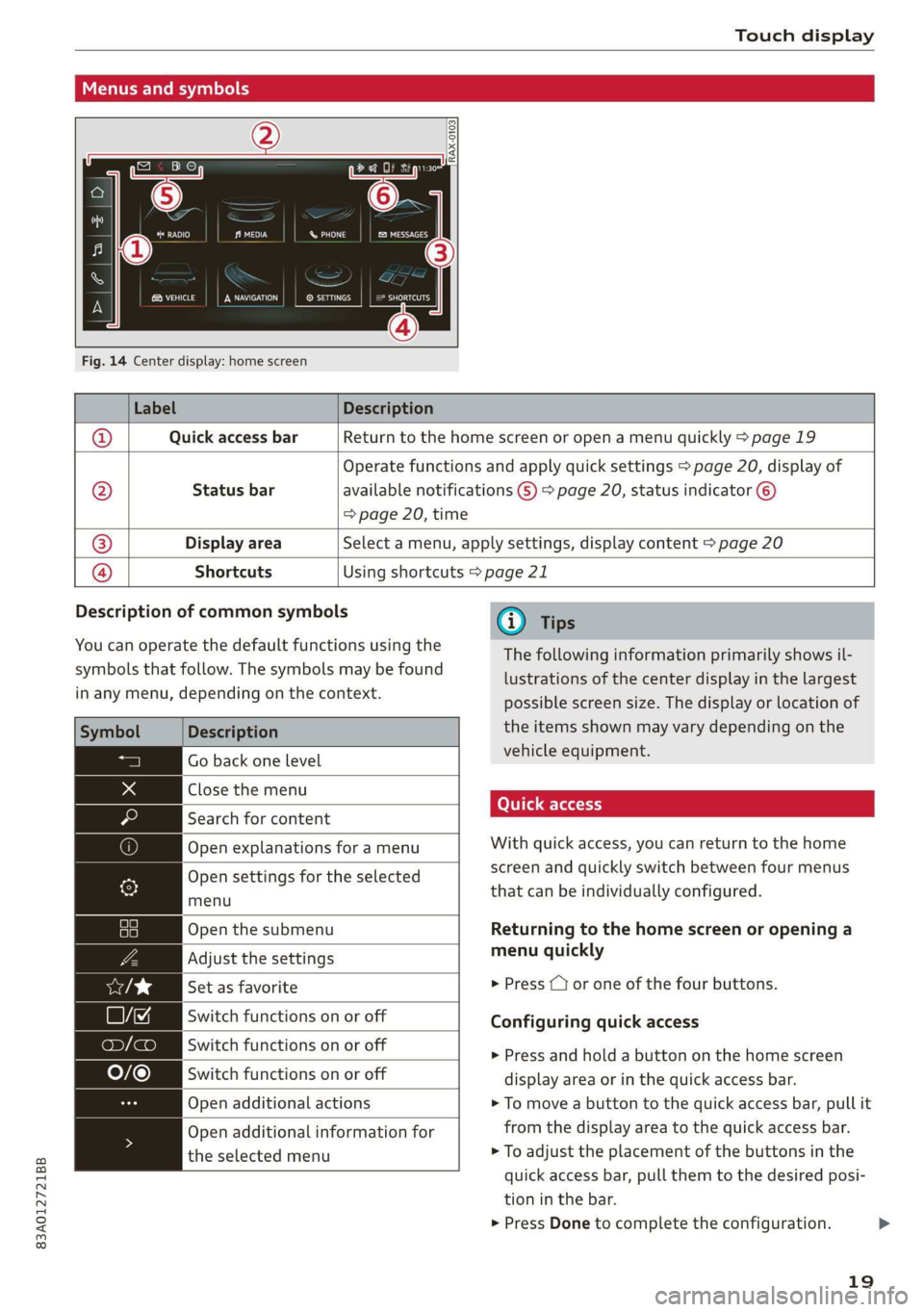
Fig. 14 Center display: home screen
Label Description
Quick access bar Return to the home screen or open a menu quickly > page 19
Status bar
Operate functions and apply quick settings > page 20, display of
available notifications G) > page 20, status indicator ©)
=> page 20, time
Display area Select a menu, apply settings, display content > page 20
®|O,
©
|O
Shortcuts Using shortcuts > page 21
Description of common symbols
You can operate the default functions using the
symbols that follow. The symbols may be found
in any menu, depending on the context.
Description
Go back one level
Close the menu
Search for content
Open explanations for a menu
Open settings for the selected
menu
Open the submenu
Adjust the settings
Set as favorite
Switch functions on or off
Switch functions on or off
Switch functions on or off
Open additional actions
Open additional information for
the selected menu
@) Tips
The following information primarily shows il-
lustrations of the center display in the largest
possible screen size. The display or location of
the items shown may vary depending on the
vehicle equipment.
With quick access, you can return to the home
screen and quickly switch between four menus
that can be individually configured.
Returning to the home screen or opening a
menu quickly
> Press ( or one of the four buttons.
Configuring quick access
» Press and hold a button on the home screen
display area or in the quick access bar.
> To move a button to the quick access bar, pull it
from the display area to the quick access bar.
> To adjust the placement of the buttons in the
quick access bar, pull them to the desired posi-
tion in the bar.
> Press Done to complete the configuration.
19
>
Page 22 of 278
Touch display
@) Tips
The position of © cannot be adjusted.
Display area
You can freely change the location of the buttons
on the home screen display area.
Configuring the display area
> Press and hold a button on the home screen
display area.
> To adjust the placement of the buttons, pull
them to the desired locations.
> Press Done to complete the configuration.
Switching between menu pages
If a menu contains multiple menu pages, faiata iS
displayed in the display area. The white bar
shows the location of the current menu page.
> To switch between menu pages, swipe your fin-
ger to the right or left.
Sle deemel CoE,
[RAZ-0784
Of Of of
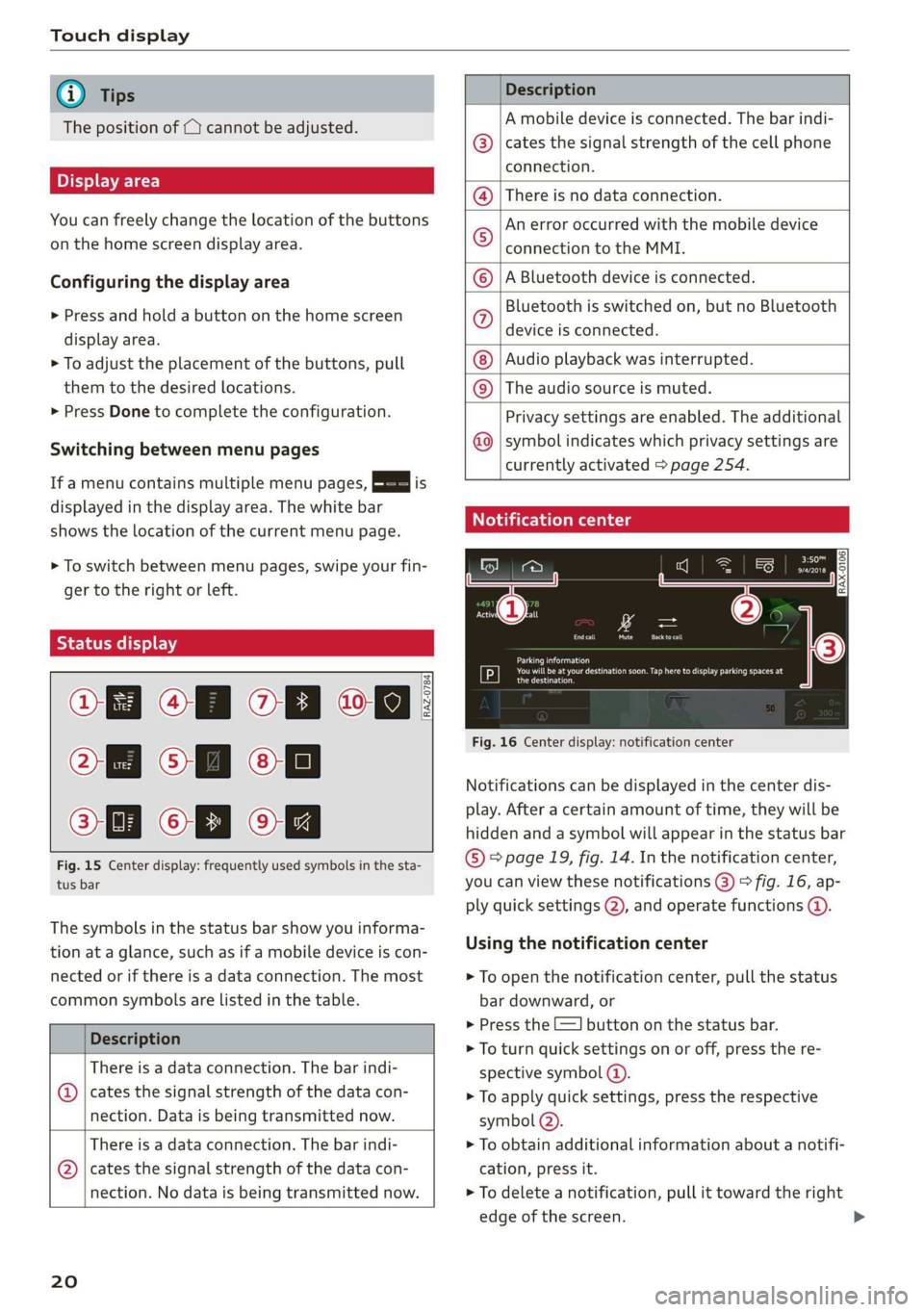
Fig. 15 Center display: frequently used symbols in the sta-
tus bar
The symbols in the status bar show you informa-
tion at a glance, such as if a mobile device is con-
nected or if there is a data connection. The most
common symbols are listed in the table.
Description
There is a data connection. The bar indi-
© | cates the signal strength of the data con-
nection. Data is being transmitted now.
There is a data connection. The bar indi-
@ | cates the signal strength of the data con-
nection. No data is being transmitted now.
20
Description
A mobile device is connected. The bar indi-
cates the signal strength of the cell phone
connection.
There is no data connection.
An error occurred with the mobile device
connection to the MMI.
A Bluetooth device is connected.
Bluetooth is switched on, but no Bluetooth
device is connected.
Audio playback was interrupted.
©|©|
© |E|
©
|@|
@
The audio source is muted.
Privacy settings are enabled. The additional
symbol indicates which privacy settings are
currently activated > page 254.
Notification center
©
Parking information
Tr st ii Eek og ure ces
Cera)
Fig. 16 Center display: notification center
Notifications can be displayed in the center dis-
play. After a certain amount of time, they will be
hidden and a symbol will appear in the status bar
© page 19, fig. 14. In the notification center,
you can view these notifications (@) > fig. 16, ap-
ply quick settings @), and operate functions @.
Using the notification center
> To open the notification center, pull the status
bar downward, or
> Press the E=] button on the status bar.
> To turn quick settings on or off, press the re-
spective symbol @).
> To apply quick settings, press the respective
symbol @).
> To obtain additional information about a notifi-
cation, press it.
> To delete a notification, pull it toward the right
edge of the screen.
Page 23 of 278
83A012721BB
Touch display
> If there are more than four notifications in the
notification center, the older notifications will
be hidden. To display the older notifications,
drag
your finger upward on the screen.
Setting displayed content
You can set whether some notifications should be
displayed.
> To set the displayed content, press ©, or
> Applies to MMI: Select on the home screen:
SETTINGS > Notifications.
>» Select and confirm which notifications should
be displayed.
Possible functions
Description
Press: switches the center display
on or off
Press and hold: switches screen
clearing mode on or off
Opens the garage door opener
function
Possible quick settings
Description
Apply sound settings
Manage connected devices
Set displayed content in the noti-
fication center
EZYASEM Set dateandtime ——_——i|
Shortcuts
By creating shortcuts, you have quick access to
various items, such as radio stations, frequently
used contacts, or vehicle settings.
Adding shortcuts
The +++ buttons in the center display indicate, for
example, if a selected radio station can be added
to the shortcuts. Depending on the context, you
may also be able to add items from a list to the
shortcuts.
> Press +++ or press and hold an item ina list.
>» Press Save as a shortcut. The selected item will
be added to the shortcuts and displayed as a
tile.
Using shortcuts
> Applies to: MMI: Select on the home screen:
SHORTCUTS (4) > page 19, fig. 14. The saved
shortcuts will be displayed.
> To access the stored function, press the respec-
tive tile.
Moving or deleting shortcuts
> Press and hold a shortcut.
> To adjust the order of the shortcuts, drag a
shortcut to the desired location.
> To delete a shortcut, press ©.
acetal hg
be ure
< les
he
Downtown
oan
Downtown
eee
Pern
RAZ-0700.
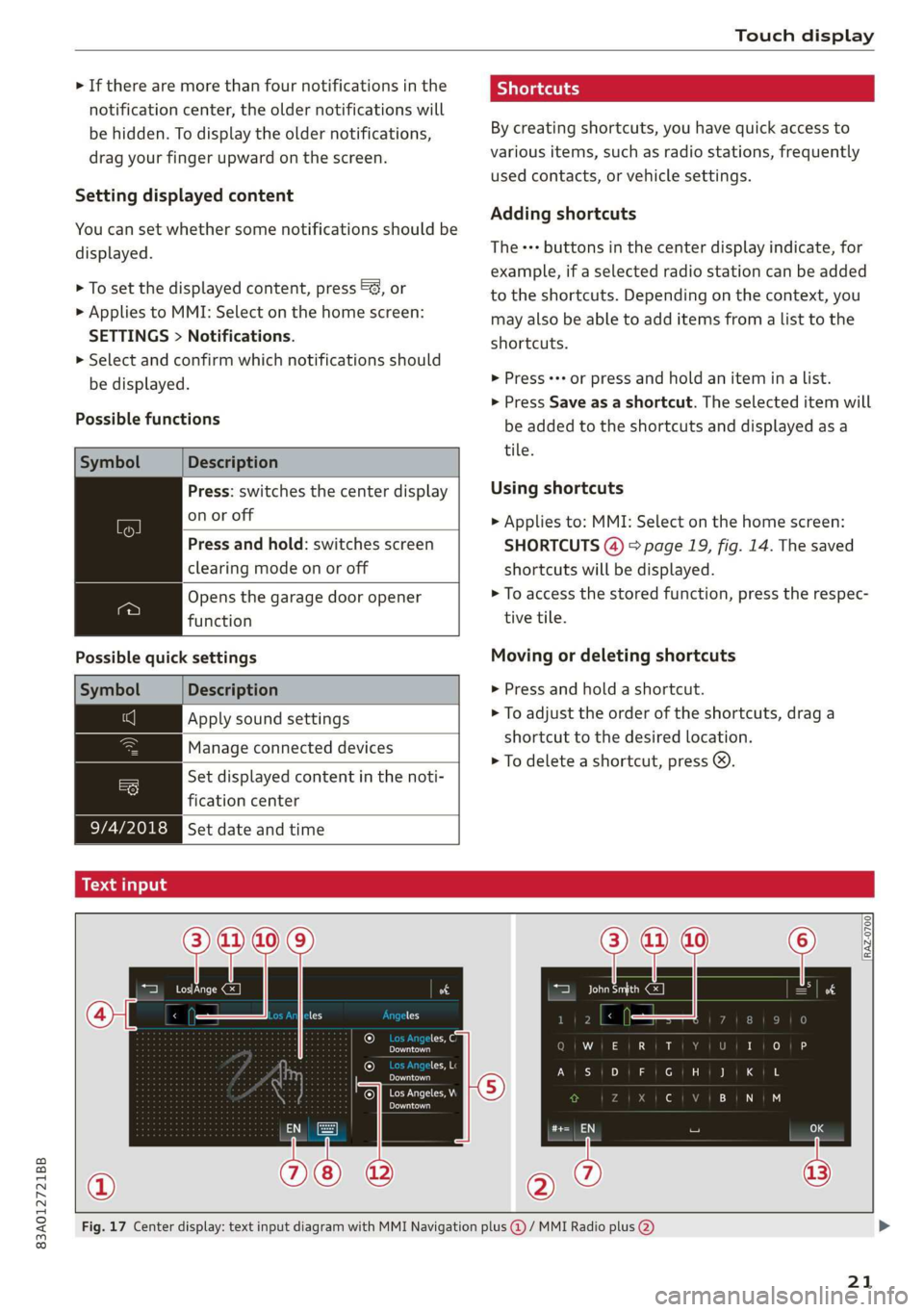
Fig. 17 Center display: text input diagram with MMI Navigation plus @) / MMI Radio plus @)
21
Page 24 of 278
Touch display
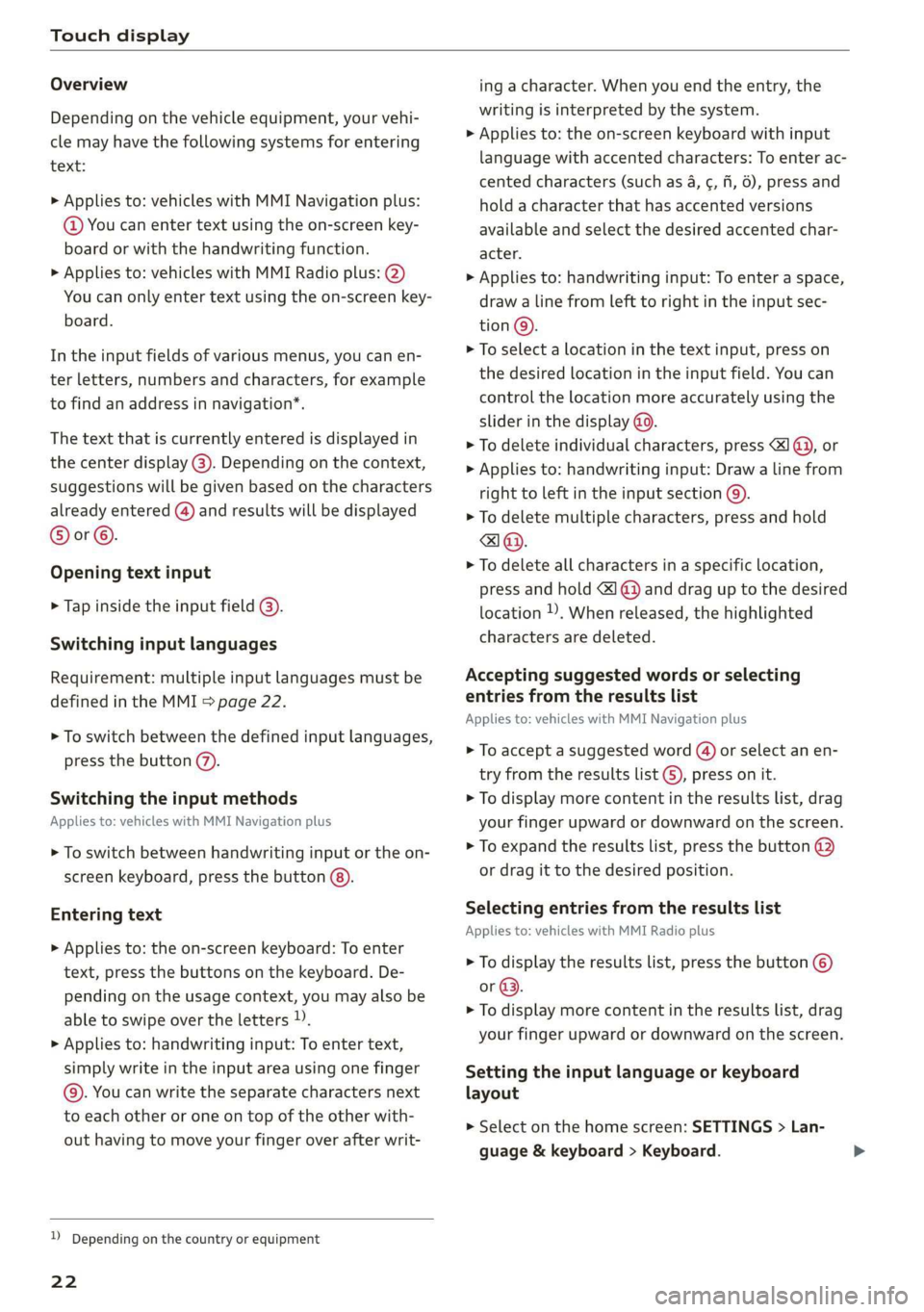
Overview
Depending on the vehicle equipment, your vehi-
cle may have the following systems for entering
text:
> Applies to: vehicles with MMI Navigation plus:
@ You can enter text using the on-screen key-
board or with the handwriting function.
> Applies to: vehicles with MMI Radio plus: @)
You can only enter text using the on-screen key-
board.
In the input fields of various menus, you can en-
ter letters, numbers and characters, for example
to find an address in navigation*.
The text that is currently entered is displayed in
the center display @). Depending on the context,
suggestions will be given based on the characters
already entered () and results will be displayed
®or©.
Opening text input
> Tap inside the input field @).
Switching input languages
Requirement: multiple input languages must be
defined in the MMI > page 22.
> To switch between the defined input languages,
press the button (7).
Switching the input methods
Applies to: vehicles with MMI Navigation plus
> To switch between handwriting input or the on-
screen keyboard, press the button @).
Entering text
> Applies to: the on-screen keyboard: To enter
text, press the buttons on the keyboard. De-
pending on the usage context, you may also be
able to swipe over the letters )).
>
Applies to: handwriting input: To enter text,
simply write in the input area using one finger
©. You can write the separate characters next
to each other or one on top of the other with-
out having to move your finger over after writ-
D Depending on the country or equipment
22
ing a character. When you end the entry, the
writing is interpreted by the system.
> Applies to: the on-screen keyboard with input
language with accented characters: To enter ac-
cented characters (such as 4, ¢, ff, 6), press and
hold a character that has accented versions
available and select the desired accented char-
acter.
> Applies to: handwriting input: To enter a space,
draw a line from left to right in the input sec-
tion®.
> To select a location in the text input, press on
the desired location in the input field. You can
control the location more accurately using the
slider in the display @9.
> To delete individual characters, press I @, or
> Applies to: handwriting input: Draw a line from
right to left in the input section @).
> To delete multiple characters, press and hold
> To delete all characters in a specific location,
press and hold <1 @) and drag up to the desired
location ), When released, the highlighted
characters are deleted.
Accepting suggested words or selecting
entries from the results list
Applies to: vehicles with MMI Navigation plus
> To accept a suggested word (4) or select an en-
try from the results list ©), press on it.
> To display more content in the results list, drag
your finger upward or downward on the screen.
> To expand the results list, press the button @
or drag it to the desired position.
Selecting entries from the results list
Applies to: vehicles with MMI Radio plus
> To display the results list, press the button ©
or @.
> To display more content in the results list, drag
your finger upward or downward on the screen.
Setting the input language or keyboard
layout
> Select on the home screen: SETTINGS > Lan-
guage & keyboard > Keyboard.
Page 28 of 278
Global functions
Global functions
Additional function
buttons
Fig. 20 Volume knob with joystick function
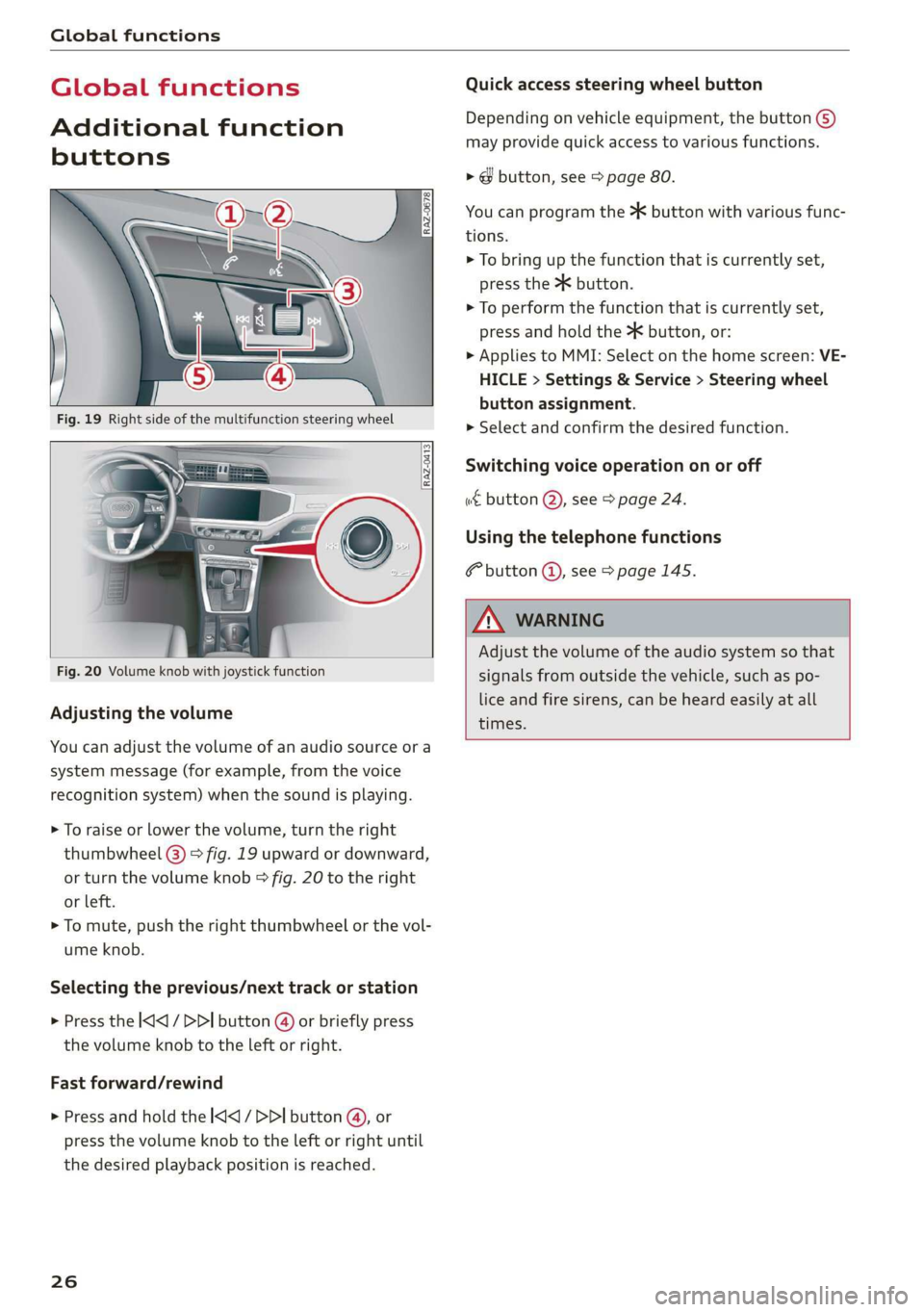
Adjusting the volume
You can adjust the volume of an audio source or a
system message (for example, from the voice
recognition system) when the sound is playing.
> To raise or lower the volume, turn the right
thumbwheel @) > fig. 19 upward or downward,
or turn the volume knob > fig. 20 to the right
or left.
> To mute, push the right thumbwheel or the vol-
ume knob.
Selecting the previous/next track or station
> Press the |<] / DDI button @ or briefly press
the volume knob to the left or right.
Fast forward/rewind
> Press and hold the
the desired playback position is reached.
26
Quick access steering wheel button
Depending on vehicle equipment, the button @)
may provide quick access to various functions.
> @ button, see > page 80.
You can program the >K button with various func-
tions.
> To bring up the function that is currently set,
press the button.
> To perform the function that is currently set,
press and hold the >K button, or:
» Applies to MMI: Select on the home screen: VE-
HICLE > Settings & Service > Steering wheel
button assignment.
> Select and confirm the desired function.
Switching voice operation on or off
«€ button @, see > page 24.
Using the telephone functions
button @, see > page 145.
ZA\ WARNING
Adjust the volume of the audio system so that
signals from outside the vehicle, such as po-
lice and fire sirens, can be heard easily at all
times.
Page 35 of 278
83A012721BB
Opening and closing
— You can view the number of keys program-
med to the vehicle by selecting on the home
screen: VEHICLE > Settings & Service > Ve-
hicle information.
— For an explanation on conformity with the
FCC regulations in the United States and the
Industry Canada regulations, see
=> page 259.
Unlocking and locking the vehicle
RAZ-0025
1
\ ’
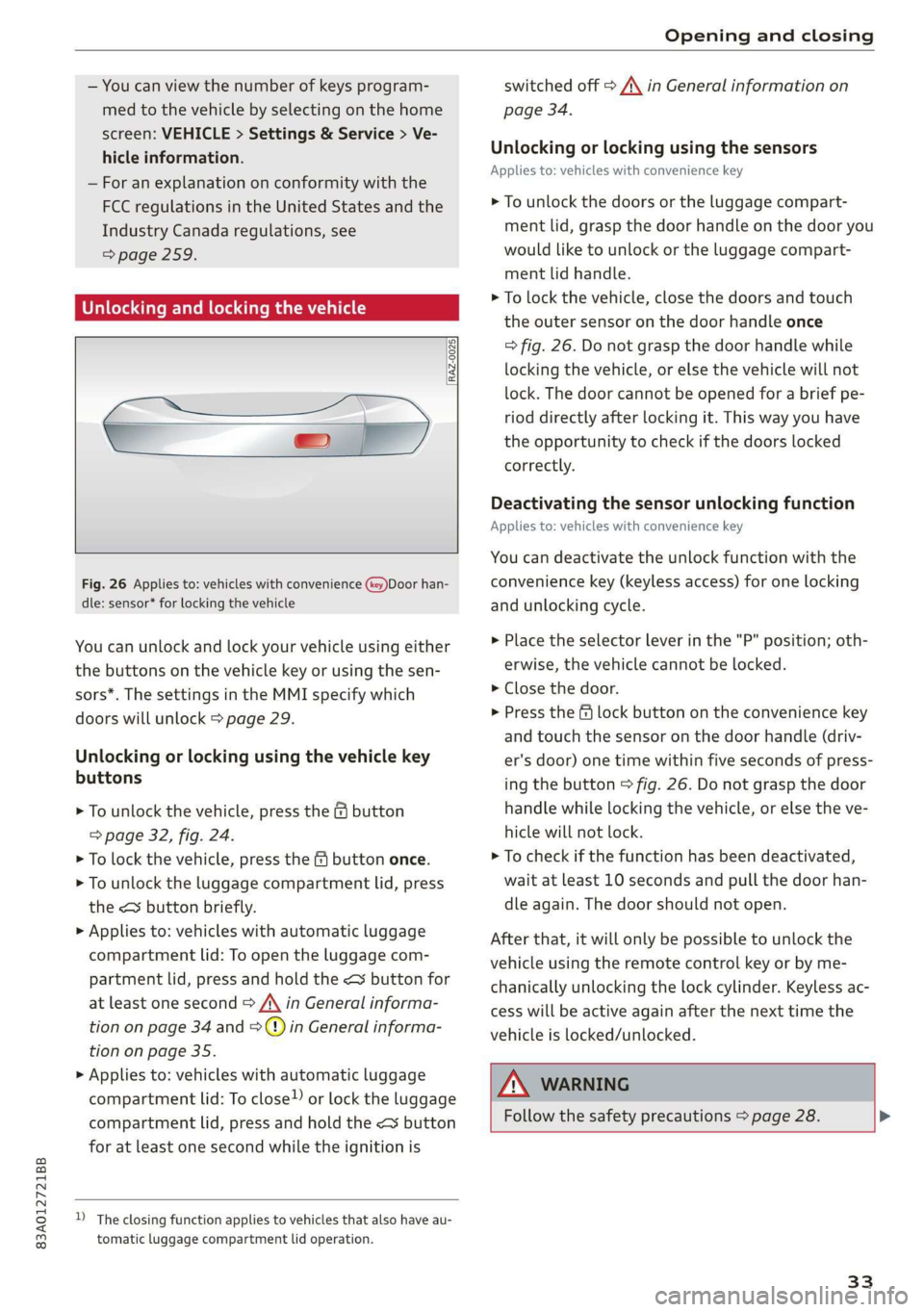
Fig. 26 Applies to: vehicles with convenience (key)Door han-
dle: sensor* for locking the vehicle
You can unlock and lock your vehicle using either
the buttons on the vehicle key or using the sen-
sors*. The settings in the MMI specify which
doors will unlock > page 29.
Unlocking or locking using the vehicle key
buttons
> To unlock the vehicle, press the G button
=> page 32, fig. 24.
> To lock the vehicle, press the & button once.
> To unlock the luggage compartment lid, press
the < button briefly.
> Applies to: vehicles with automatic luggage
compartment lid: To open the luggage com-
partment lid, press and hold the < button for
at least one second > /\ in General informa-
tion on page 34 and =>) in General informa-
tion on page 35.
> Applies to: vehicles with automatic luggage
compartment lid: To close) or lock the luggage
compartment lid, press and hold the << button
for at least one second while the ignition is
D_ The closing function applies to vehicles that also have au-
tomatic luggage compartment lid operation.
switched off > A\ in General information on
page 34.
Unlocking or locking using the sensors
Applies
to: vehicles with convenience key
> To unlock the doors or the luggage compart-
ment lid, grasp the door handle on the door you
would like to unlock or the luggage compart-
ment lid handle.
> To lock the vehicle, close the doors and touch
the outer sensor on the door handle once
=> fig. 26. Do not grasp the door handle while
locking the vehicle, or else the vehicle will not
lock. The door cannot be opened for a brief pe-
riod directly after locking it. This way you have
the opportunity to check if the doors locked
correctly.
Deactivating the sensor unlocking function
Applies to: vehicles with convenience key
You can deactivate the unlock function with the
convenience key (keyless access) for one locking
and unlocking cycle.
> Place the selector lever in the "P" position; oth-
erwise, the vehicle cannot be locked.
> Close the door.
> Press the f lock button on the convenience key
and touch the sensor on the door handle (driv-
er's door) one time within five seconds of press-
ing the button > fig. 26. Do not grasp the door
handle while locking the vehicle, or else the ve-
hicle will not lock.
> To check if the function has been deactivated,
wait at least 10 seconds and pull the door han-
dle again. The door should not open.
After that, it will only be possible to unlock the
vehicle using the remote control key or by me-
chanically unlocking the lock cylinder. Keyless ac-
cess will be active again after the next time the
vehicle is locked/unlocked.
ZA WARNING
Follow the safety precautions > page 28. >
33
Page 38 of 278
Opening and closing
Automatic luggage compartment lid
Applies to: vehicles with automatic luggage compartment lid
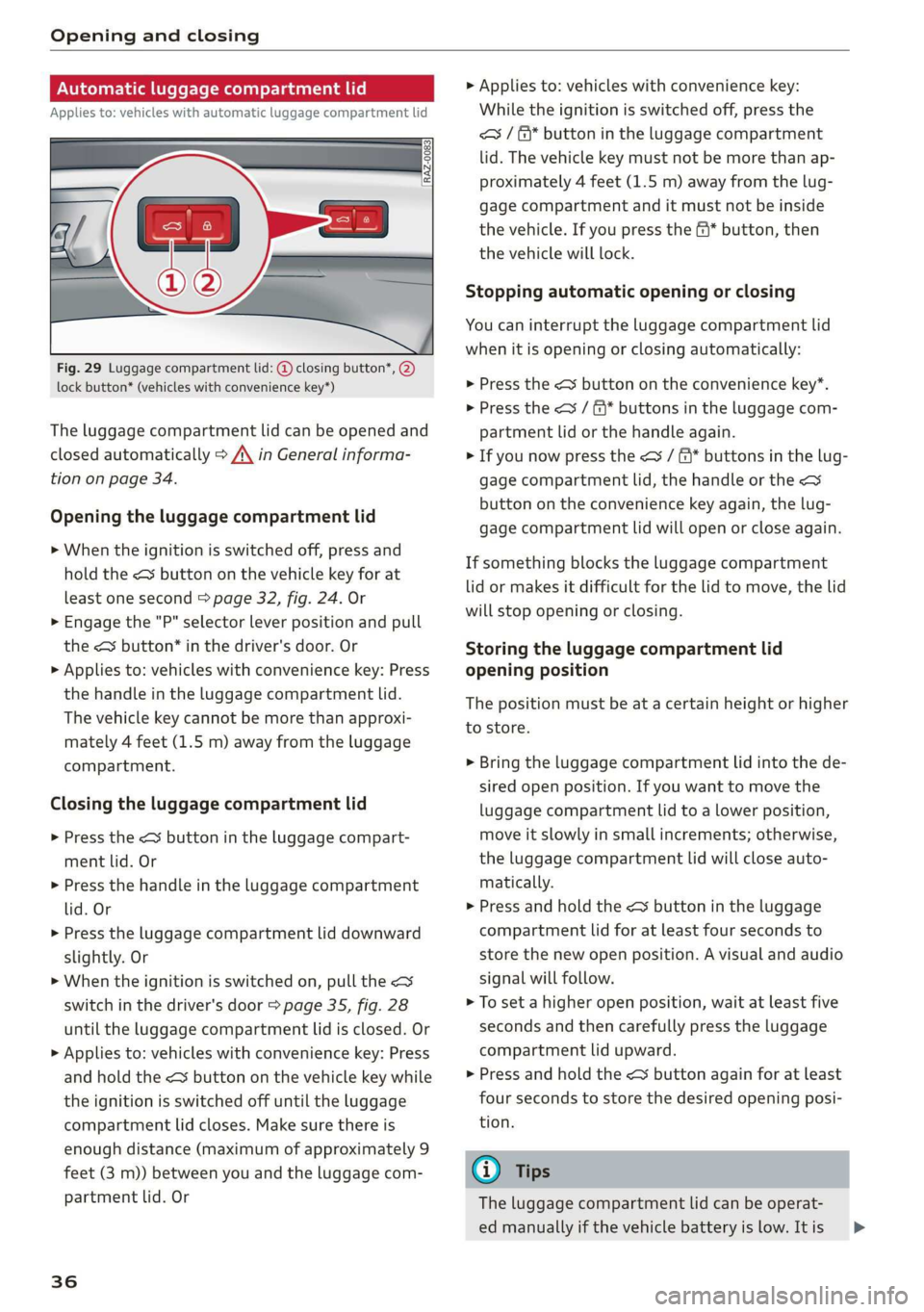
Fig. 29 Luggage compartment lid: @ closing button*, @)
lock button* (vehicles with convenience key*)
The luggage compartment lid can be opened and
closed automatically > A\ in General informa-
tion on page 34.
Opening the luggage compartment lid
> When the ignition is switched off, press and
hold the < button on the vehicle key for at
least one second > page 32, fig. 24. Or
> Engage the "P" selector lever position and pull
the <3 button* in the driver's door. Or
> Applies to: vehicles with convenience key: Press
the handle in the luggage compartment lid.
The vehicle key cannot be more than approxi-
mately 4 feet (1.5 m) away from the luggage
compartment.
Closing the luggage compartment lid
> Press the <% button in the luggage compart-
ment lid. Or
> Press the handle in the luggage compartment
lid. Or
> Press the luggage compartment lid downward
slightly. Or
> When the ignition is switched on, pull the <>
switch in the driver's door > page 35, fig. 28
until the luggage compartment lid is closed. Or
> Applies to: vehicles with convenience key: Press
and hold the < button on the vehicle key while
the ignition is switched off until the luggage
compartment lid closes. Make sure there is
enough distance (maximum of approximately 9
feet (3 m)) between you and the luggage com-
partment lid. Or
36
> Applies to: vehicles with convenience key:
While the ignition is switched off, press the
<= / &* button in the luggage compartment
lid. The vehicle key must not be more than ap-
proximately 4 feet (1.5 m) away from the lug-
gage compartment and it must not be inside
the vehicle. If you press the f* button, then
the vehicle will lock.
Stopping automatic opening or closing
You can interrupt the luggage compartment lid
when it is opening or closing automatically:
> Press the < button on the convenience key*.
> Press the << / f* buttons in the luggage com-
partment lid or the handle again.
> If you now press the <3 / &* buttons in the lug-
gage compartment lid, the handle or the <
button on the convenience key again, the lug-
gage compartment lid will open or close again.
If something blocks the luggage compartment
lid or makes it difficult for the lid to move, the lid
will stop opening or closing.
Storing the luggage compartment lid
opening position
The position must be at a certain height or higher
to store.
> Bring the luggage compartment lid into the de-
sired open position. If you want to move the
luggage compartment lid to a lower position,
move it slowly in small increments; otherwise,
the luggage compartment lid will close auto-
matically.
> Press and hold the < button in the luggage
compartment lid for at least four seconds to
store the new open position. A visual and audio
signal will follow.
> To set a higher open position, wait at least five
seconds and then carefully press the luggage
compartment lid upward.
> Press and hold the < button again for at least
four seconds to store the desired opening posi-
tion.
G) Tips
The luggage compartment lid can be operat-
ed manually if the vehicle battery is low. It is >