suspension AUDI Q3 2020 Owners Manual
[x] Cancel search | Manufacturer: AUDI, Model Year: 2020, Model line: Q3, Model: AUDI Q3 2020Pages: 278, PDF Size: 72.66 MB
Page 4 of 278
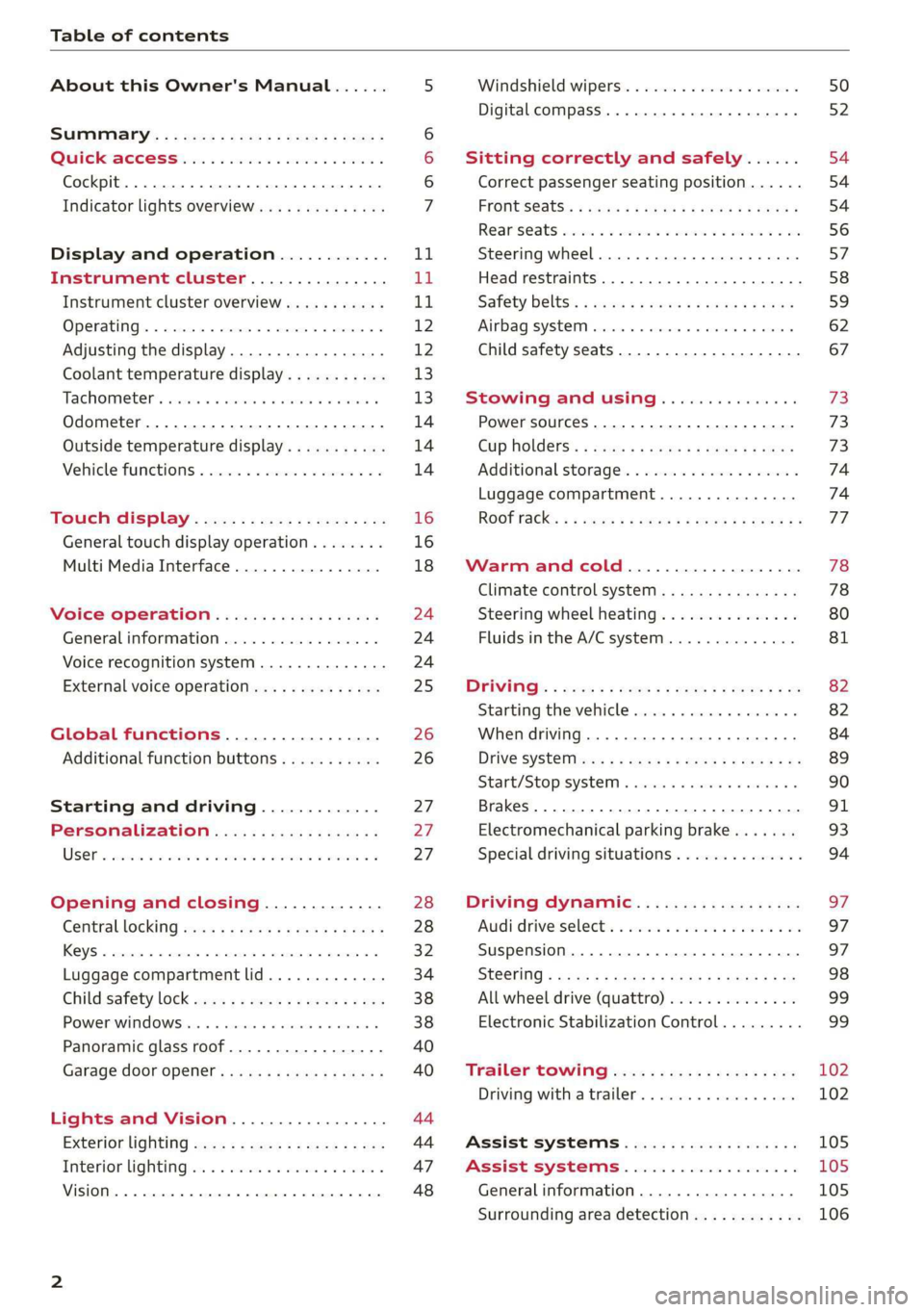
Table of contents
About this Owner's Manual......
SUMIMALY: ; « ss6% : osen ss sean cs poe s
QC CCeS Skis: si esis a 6 ores os ewe
Cockpit... 2... ee eee eee eee
Indicator lights overview...........0.
Display and operation............
Instrument cluster...............
Instrument cluster overview...........
Operating. ecco ws swacemn o © aero o erm 9
Adjusting the display.................
Coolant temperature display...........
Tachometer’. series s ewie so sie ¥ & overs
Odometer............ 0. cee eee eee eee
Outside temperature display...........
Vehicle functions « se-0 2. ese ve eee ees
Touch’ display . 22... : secs ie eses ees
General
touch display operation........
Multi Media Interface................
Voice operation..................
Generalinformation.................
Voice recognition system..............
External voice operation..............
Global functions.................
Additional function buttons...........
Starting and driving.............
Personalization..................
Luggage compartment lid.............
Child safety lock sa04 45 eec4 es eee e ee ees
Power Windows. . 6 sce « 6 umes #6 enna o
Panoramic glass roof................-
Garage door Opener’: sens ss esas se cess
Lights and Vision.................
Exterior lighting sees < = sees « « eee% sv oe
Interior liQhtingios . esas + exe ee ews x
VISION... eee eee
NOD
OO
13)
16 16 18
24 24 24
25
26 26 27 27 27 28 28
32
34
38 38
40
40
44 44
47 48
Windshield wipers............--..+-- 50
Digital compass............0 000 eens 52
Sitting correctly and safely...... 54
Correct passenger seating position...... 54
FRONUSGAtS s + astns s ¢ ewes +o eo te eoeee F 54
Rearseats sic 2 sea oo awn oo coon 7 9 oe 56
SLEEKIMG WHEEL esses 4 0 sneceas » s sxereye 9 6 eunaece 57
Head restraints..................000. 58
Safety belts: « ssa: s 2 wens 5 2 worms x s sawn 59
Airbag system... .. cc eee eee eee 62
Child safety seats..............0.00.. 67
Stowing and using............... 73
Power SOUrCeES ...... eee eee eee 73
Cup Holders: « saws = ¢ seme + ¢ eas ¢ e ees 73
Additional storage...............005. 74
Luggage compartment............... 74
ROOT ACK: « a waxem 2 2 soem 4 x em Foe tee oY 77
Warm and cold................... 78
Climate control system.............0. 78
Steering wheel heating............... 80
Fluids in the A/Csystem.............. 81
PICEVITIG:: ¢ ecces « 2 wees & o pees 5 oe oc oe 82
Starting the vehicle..............000- 82
When driving............. ee eee eee ee 84
Drive sySteliteves: + « wwe & & ews so eee es we 89
Start/Stop'system « sce ee ewer vo essere a « 90
Brakes. .............0000 0c cece eee 91
Electromechanical parking brake....... 93
Special driving situations.............. 94
Driving dynamic.................. 97
Audi driveiseleetss «isis ss naan a 2 cain a ve 97
Suspension.........-..00 eee eee eee 97
StGOriNG « awu & x Secs 5 = Hoves + F RevOS FE 98
All wheel drive (quattro).............. 99
Electronic Stabilization Control......... 99,
Trailer towing.................... 102
Driving with atrailer................. 102
Assist systems................005 105
Assist systems................005 105
Generalinformation................. 105
Surrounding area detection............ 106
Page 10 of 278
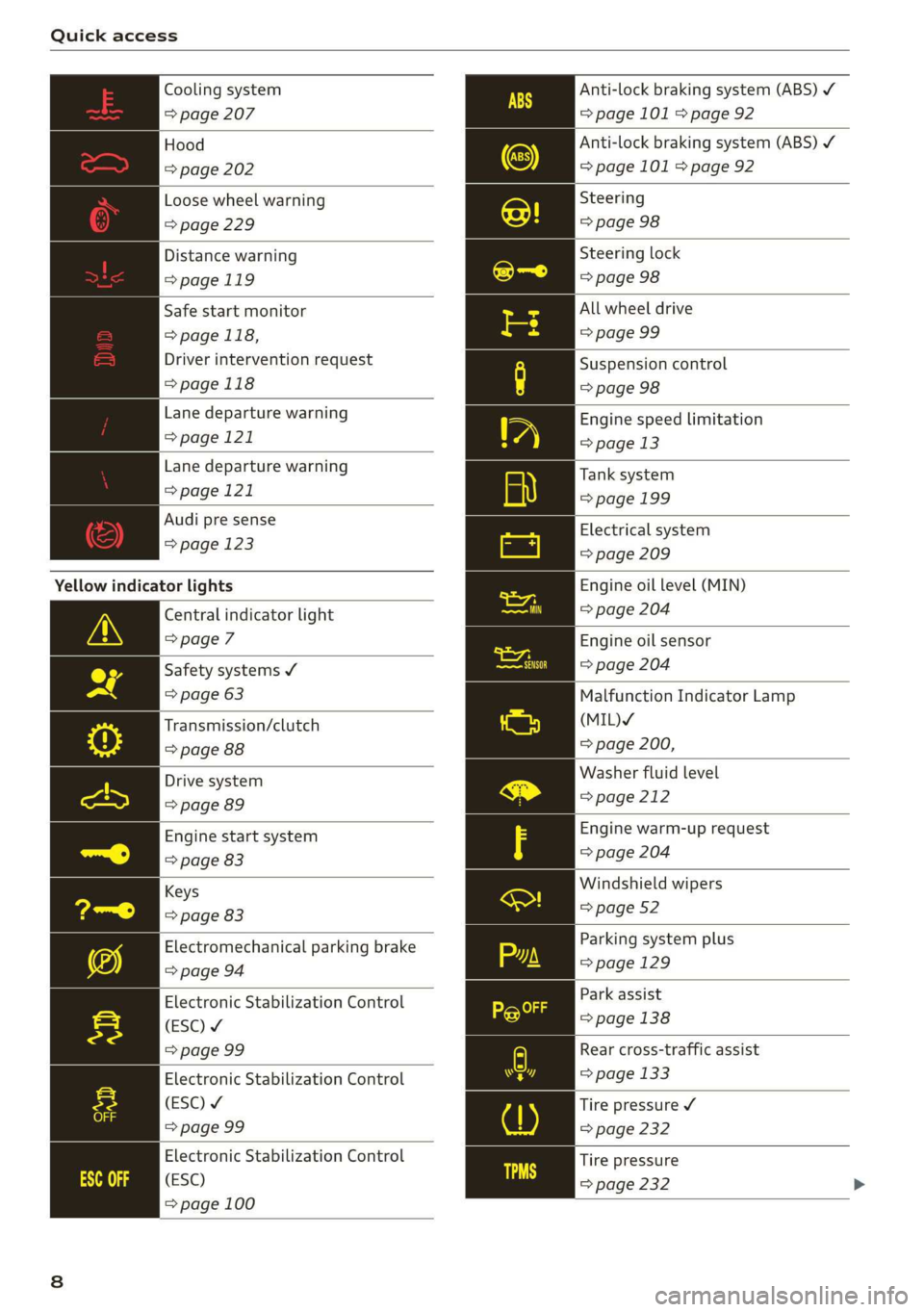
Quick access
Cooling system
=> page 207
Hood
=> page 202
Loose wheel warning
=> page 229
Distance warning
=>page 119
Safe start monitor
=> page 118,
Driver intervention request
=>page 118
Lane departure warning
=> page 121
Lane departure warning
=> page 121
Audi pre sense
=> page 123
Yellow indicator lights
Central indicator light
> page 7
Safety systems ¥
=> page 63
Transmission/clutch
> page 88
Drive system
=> page 89
Engine start system
=> page 83
Keys
=> page 83
Electromechanical parking brake
=> page 94
Electronic Stabilization Control
(ESC) ¥
=> page 99
Electronic Stabilization Control
(ESC) ¥
=> page 99
Electronic Stabilization Control
(ESC)
=> page 100
Anti-lock braking system (ABS) /
=> page 101 > page 92
Anti-lock braking system (ABS) ¥
=> page 101 > page 92
Steering
=> page 98
Steering lock
=> page 98
All wheel drive
=> page 99
Suspension control
=> page 98
Engine speed limitation
=> page 13
Tank system
=> page 199
Electrical system
=> page 209
Engine oil level (MIN)
= page 204
Engine oil sensor
=> page 204
Malfunction Indicator Lamp
(MIL)Y
=> page 200,
Washer fluid level
= page 212
Engine warm-up request
=> page 204
Windshield wipers
=> page 52
Parking system plus
=> page 129
Park assist
=> page 138
Rear cross-traffic assist
=> page 133
Tire pressure ¥
> page 232
Tire pressure
=> page 232
Page 97 of 278

83A012721BB
Driving
must immediately start steering in the di-
rection of the downward slope to reduce the
risk of an accident.
— Always be ready to brake when using the hill
descent control function.
tice LM dial)
Your vehicle is not an offroad vehicle. Note the
following points when driving offroad:
— Drive slowly and carefully.
—To reduce the risk of underbody damage, pay
attention to the vehicle's ground clearance and
drive across raised areas of the ground with the
wheels on one side of the vehicle, instead of al-
lowing the center of the vehicle to pass over the
raised areas.
—To reduce the risk of becoming stuck, drive
through sandy or swampy areas at a steady
speed and without stopping, if possible.
If necessary, use the following functions:
— Audi drive select* Offroad mode > page 97
— Hill descent assist* > page 95
— Limit ESC > page 100
ZA\ WARNING
Only drive in terrain that is suitable for the ve-
hicle and your driving ability.
@ For the sake of the environment
Avoid actions that are damaging to the envi-
ronment. Show respect for the natural envi-
ronment and remain on marked routes.
@) Tips
Clean your vehicle after driving offroad. Dirt
and stones falling off your vehicle can affect
other road users.
Driving through water
If you must drive through water, follow these in-
structions:
— Check the stability of the ground, the current,
and the water depth. If the ground is unstable,
there is a strong current, or there are waves,
the water must only reach up to the lower edge
of the body at the most.
— Deactivate the Start/Stop system*.
— Drive carefully and no faster than at walking
speeds to prevent the front of the vehicle from
creating waves, because they could splash
above the lower edge of the body. Oncoming
vehicles could also create waves.
— Do not stop the vehicle while in the water.
— Drive in reverse.
— Do not turn the engine off.
ZA\ WARNING
After driving through water, press the brake
pedal carefully to dry the brakes so that the
full braking effect will be restored.
@) Note
Vehicle components such as the engine, drive
system, suspension, or electrical system, can
be severely damaged by driving through wa-
tera
@) Tips
If possible, avoid driving through salt water
because it increases the risk of corrosion. Use
fresh water to clean any vehicle components
that come into contact with salt water.
Hill descent assist
Applies to: vehicles with hill hold assist
The “& button is located above the selector lever
in the center console. It lights up when the sys-
tem is turned on.
Hill descent assist can assist you when driving
down hills by maintaining a constant vehicle
speed by automatically braking all four wheels.
You can adjust the speed using the accelerator
and brake pedals. The regulation depends on the
hill and the vehicle speed.
> Switching on: press “2.
> Switching off: press “ again.
Active regulation
Regulation begins shortly after you start driving
and is possible at speeds up to approximately 19 >
95
Page 99 of 278
83A012721BB
Driving dynamic
Driving dynamic
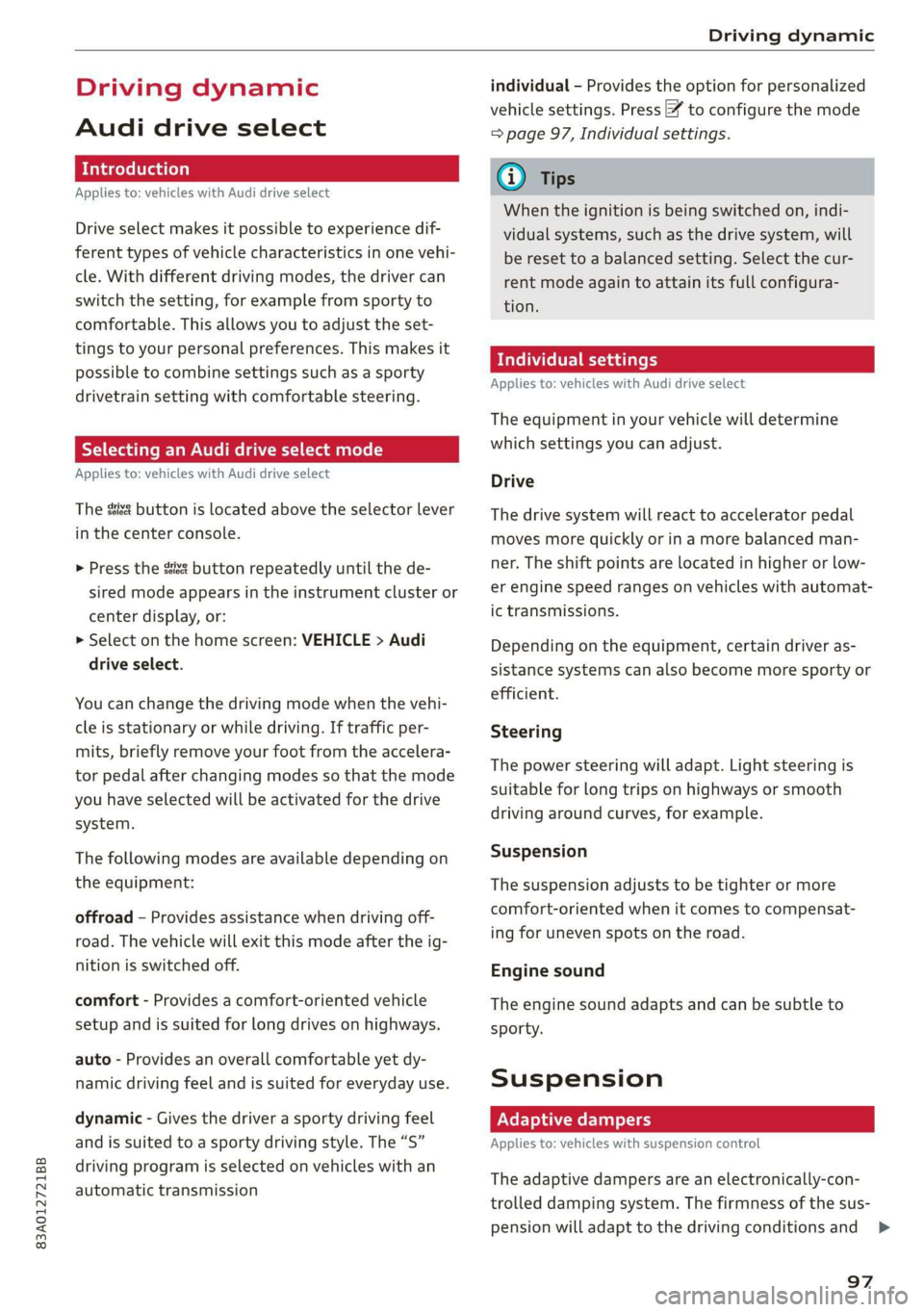
Audi drive select
Introduction
Applies to: vehicles with Audi drive select
Drive select makes it possible to experience dif-
ferent types of vehicle characteristics in one vehi-
cle. With different driving modes, the driver can
switch the setting, for example from sporty to
comfortable. This allows you to adjust the set-
tings to your personal preferences. This makes it
possible to combine settings such as a sporty
drivetrain setting with comfortable steering.
Selecting an Audi drive select mode
Applies to: vehicles with Audi drive select
The ssise button is located above the selector lever
in the center console.
> Press the sis@ button repeatedly until the de-
sired mode appears in the instrument cluster or
center display, or:
> Select on the home screen: VEHICLE > Audi
drive select.
You can change the driving mode when the vehi-
cle is stationary or while driving. If traffic per-
mits, briefly remove your foot from the accelera-
tor pedal after changing modes so that the mode
you have selected will be activated for the drive
system.
The following modes are available depending on
the equipment:
offroad - Provides assistance when driving off-
road. The vehicle will exit this mode after the ig-
nition is switched off.
comfort - Provides a comfort-oriented vehicle
setup and is suited for long drives on highways.
auto - Provides an overall comfortable yet dy-
namic driving feel and is suited for everyday use.
dynamic - Gives the driver a sporty driving feel
and is suited to a sporty driving style. The “S”
driving program is selected on vehicles with an
automatic transmission
individual - Provides the option for personalized
vehicle settings. Press % to configure the mode
= page 97, Individual settings.
G) Tips
When the ignition is being switched on, indi-
vidual systems, such as the drive system, will
be reset to a balanced setting. Select the cur-
rent mode again to attain its full configura-
tion.
Individual settings
Applies to: vehicles with Audi drive select
The equipment in your vehicle will determine
which settings you can adjust.
Drive
The drive system will react to accelerator pedal
moves more quickly or in a more balanced man-
ner. The shift points are located in higher or low-
er engine speed ranges on vehicles with automat-
ic transmissions.
Depending on the equipment, certain driver as-
sistance systems can also become more sporty or
efficient.
Steering
The power steering will adapt. Light steering is
suitable for long trips on highways or smooth
driving around curves, for example.
Suspension
The suspension adjusts to be tighter or more
comfort-oriented when it comes to compensat-
ing for uneven spots on the road.
Engine sound
The engine sound adapts and can be subtle to
sporty.
Suspension
Adaptive dampers
Applies to: vehicles with suspension control
The adaptive dampers are an electronically-con-
trolled damping system. The firmness of the sus-
pension will adapt to the driving conditions and >
97
Page 100 of 278

Driving dynamic
the driving situation. The settings depend on the
selected Audi drive select* mode.
Ground clearance
The vehicle height and clearance can be influ-
enced by the following factors:
— Change in temperature
— Change in load
ZA\ WARNING
To reduce the risk of injury, make sure no one
gets pinched when the vehicle level is chang-
ing, for example when cleaning the under-
body or the wheel housings.
©) Note
Always make sure there is enough clearance
above and below the vehicle. This is especially
important for entrances with height restric-
tions, for example, before driving into under-
ground garages. You could also scrape the
ground when driving over the edges of curbs
or on steep ramps, which could damage your
vehicle.
Werle
| 8 | Suspension: malfunction! You can continue
driving\
There is a malfunction. See an authorized Audi
dealer or authorized Audi Service Facility for as-
sistance.
Steering
Electromechanical steering supports the driver's
steering movements by electronically adapting
the power steering depending on the vehicle
speed. The settings depend on the selected Audi
drive select* mode.
Progressive steering
Applies to: vehicles with progressive steering
The driving dynamic and driving stability are in-
creased by the steering ratio based on the steer-
98
ing wheel angle. The steering is very direct when
the steering wheel angle is sharp, and indirect
when the angle is low. This enables comfortable
maneuvering and a precise steering response at
higher driving speeds.
Messages
a Steering: malfunction! Please stop vehicle
The power steering may have failed. Adapt your
driving style immediately to compensate for the
fact that it may be more difficult to turn the
steering wheel, and stop your vehicle in a safe lo-
cation as soon as possible. Do not continue driv-
ing. See an authorized Audi dealer or authorized
Audi Service Facility for assistance.
|@—e| Steering: malfunction! Please stop vehicle
There is a malfunction in the electronic steering
lock. You cannot turn the ignition on. Do not tow
your vehicle because it cannot be steered. See an
authorized Audi dealer or authorized Audi Service
Facility for assistance.
a Steering: malfunction! You can continue
driving
There is a malfunction. Steering may be more dif-
ficult or more sensitive. Adapt your driving style.
Have the steering system checked immediately
by an authorized Audi dealer or authorized Audi
Service Facility. Please note that the red indicator
light may turn on after restarting the engine. Do
not continue driving if it does.
|e —e| Steering lock: malfunction! Please contact
Service
There is a malfunction in the electronic steering
lock. Drive immediately to an authorized Audi
dealer or authorized Audi Service Facility to have
the malfunction repaired.
ZA\ WARNING
Do not tow your vehicle if there is a malfunc-
tion in the electronic steering lock because
this increases the risk of an accident. >
Page 253 of 278
83A012721BB
Fuses and bulbs
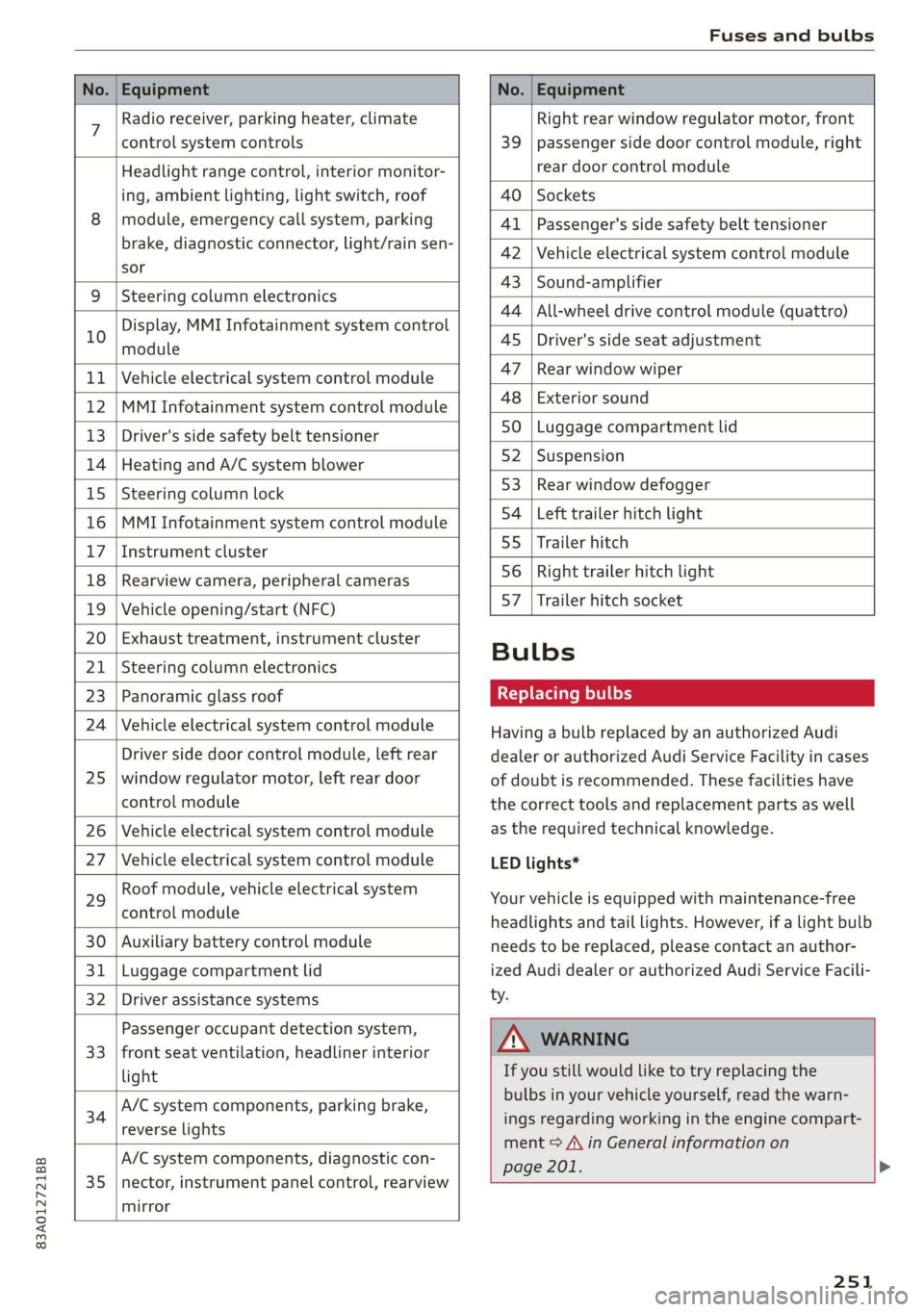
No. | Equipment No. | Equipment
7 Radio receiver, parking heater, climate Right rear window regulator motor, front
control system controls 39 | passenger side door control module, right
Headlight range control, interior monitor- rear door control module
ing, ambient lighting, light switch, roof 40 | Sockets
8 | module, emergency call system, parking 41 |Passenger's side safety belt tensioner
brake, diagnostic connector, light/raih'sen- 42 |Vehicle electrical system control module
sor
= - 43 |Sound-amplifier
9 |Steering column electronics
- - 44 | All-wheel drive control module (quattro)
Display, MMI Infotainment system control
10 anadtile 4S Driver's side seat adjustment
11 | Vehicle electrical system control module 47 | Rearwindow wiper
12 |MMI Infotainment system control module a6 || Exteriorsound
13 | Driver's side safety belt tensioner 50 | tuggage: compartment lid
14 | Heating and A/C system blower 52. || Suspension
15 | Steering column lock 53 | Rear;window defogger
16 |MMI Infotainment system control module 54 | Left trailer hitch light
17 |Instrument cluster 29 | Ualler hitch
18 | Rearview camera, peripheral cameras 56. | Right trailer hitch light
19 | Vehicle opening/start (NFC) 87 [Trailer'hitch'socket
20 | Exhaust treatment, instrument cluster
; Bulbs
21 | Steering column electronics
23 | Panoramic glass roof Replacing bulbs
24 | Vehicle electrical system control module
25
Driver side door control module, left rear
window regulator motor, left rear door
control module
26 Vehicle electrical system control module
27 Vehicle electrical system control module
29
Roof module, vehicle electrical system
control module
30 Auxiliary battery control module
31 Luggage compartment lid
32 Driver assistance systems
33
Passenger occupant detection system,
front seat ventilation, headliner interior
light
34
A/C system components, parking brake,
reverse lights
35
A/C system components, diagnostic con-
nector, instrument panel control, rearview
mirror
Having a bulb replaced by an authorized Audi
dealer or authorized Audi Service Facility in cases
of doubt is recommended. These facilities have
the correct tools and replacement parts as well
as the required technical knowledge.
LED lights*
Your vehicle is equipped with maintenance-free
headlights and tail lights. However, if a light bulb
needs to be replaced, please contact an author-
ized Audi dealer or authorized Audi Service Facili-
ty.
ZA\ WARNING
If you still would like to try replacing the
bulbs in your vehicle yourself, read the warn-
ings regarding working in the engine compart-
ment > A\ in General information on
page 201. >
251
Page 274 of 278

Index
Sideiassistesc «x cues 2 v awsome ao omnes oo ance 125
Cleaning the sensors..........--.00005 235
SIM card ..... 2.2.22. cece eee 153
SiriusXM alert notifications.............. 177
Sliding/tilting sunroof
refer to Panoramic glass roof............ 40
Smart favorites ..... 0.0... eee eee eee 176
Smartphone
Wireless charging................+00 141
also refer to Telephone...............- 139
SHOW ChalniSs = = semn +» mse se ee c eR Es 230
Socket... 0.2.20... cece eee eee 73
Software
UBOStG: xen: 2 nese ss que & x Hee eB 194
Software information
Legal information....... 00.0... ce sees 195
Software version (MMI)
Version information.................. 195
Sound
refer to Adjusting the sound............ 193
Space-saving spare tire (compact spare tire) . 243
SParestines. x « waves 2 0 were © wiaeens ew een « Have 243
Speedometer’. csi. xx cvsees vo eeu oo emate v ve 11,
Speed warning system..............000. 109
Start/Stop'system'.« ¢ cces a e neeu ae ree a ve 90
Switching Off ANGION . « scr s+ memes ao omen « 91
Starting toidrives. « . ssa es aware ex onene ao eace 84
Starting (GNGine)is «2 soos « v cence wo amneie @ 2 oe 90
Ste@erinGies » s cwwe sy ewe £ o Rew so HGS F RRS 98
Audi drive:select. ccs so sansnis + # aceon « 5: ese 97
also refer to Steering............000005 98
Steering lock..............000005 82, 83,98
Steering wheel
Adjusting. ......... 0... cee ee eee ee eee 57
Adjusting manually.................00- 57
Shift paddles............. 0.000200 ee 86
Steering wheel heating................. 80
also refer to Multifunction steering wheel. . 12
Steps for determining correct load limit... 228
Stopover (navigation) ................-. 162
Stopping (engine).......... cece eee eee ee 90
Storage... 6.66... cece eee eee eee 74,75
Storage bag... 1... eee eee eee eee 74
Storage: compartMente:. « ses. scene so onsen 74
Stored stations
refer to Favorites... .... cee eee eee 175
272
Streaming
refer to Online media...............4. 181
Subwoofer............. 0. cece eee ee eee 243
Sunshade
ROOF... eee eee ee eee eee 40
SUN VISOFS. 1... ee eee 49
Suspension ....... 0.00 e eee cece ee eee ee 97
Audi drive select............0. cece eee 97
Swap call... ... 2. cee eee eee eee 146
Symbols
NaViddttOfsss + waene + wou « ¥ seme ¢ 5 res 163
Waters: « 6 sewse + waves © veers © 2 oem ov 169
also refer to Indicator lights.............. 7
System SECLINGS « ceri «6 s. cceveie © create wn soecata 193
T
Tachometer...........0.0 cee een eae 11,13
Tail lights
Cleaning... ..... cece eee ee eee eee 235
Techinicalidattars, « . vscms ie « siasave ov cvatase ow ese 261
Technical modifications ..............005 256
Telephonetis: ¢ ssc s wasn 3 6 vscem « © arene so 8 139
Audi phone box..............--0000e 141
Connecting acellphone............... 139
Dialing amumber.................00-- 145
Options during aphonecall............ 146
PlayiMO MUSIC « ces 3 < ces se Ree eB eR 180
Temperature display (outside temperature) .. 14
Temperature gauge
GOOISNE » saves ¢ 2 omy s 2 ees s eee s HE ee 11
Text input...... 2.0... 0.000000 0 202 21
Text messages
SOtUINGS scan « = seme & 2 sere sy Mowe ores 147
Text messaging settings 0.0... cc eee 147
also refer to Text messages............ 147
Tie-downs .... 2.0... eee eee 76
Tightening specification
Wheel bolts.............0 0. s ee eee 243
Tightening specification (wheel bolts) ..... 243
Time 0 eee 14
tiptronic
refer to Manual shifting................ 86
Tir€S eee eee 214
Changing =x « = sass « x sees = ¢ come ee eee 240
Loose wheel warning...............005 229
Low-profile tires.............02. 000 230