mirror AUDI Q5 2013 User Guide
[x] Cancel search | Manufacturer: AUDI, Model Year: 2013, Model line: Q5, Model: AUDI Q5 2013Pages: 316, PDF Size: 78.89 MB
Page 120 of 316
118 Audi sid e as sist
- Improper reliance on the side ass ist sys
tem can cause co llisions and serious
persona l injury:
- Never rely only o n side assist when
ch anging lanes.
- Always check rear view m irrors to make
sure that it is safe to change lanes.
- Side ass ist cannot detect a ll vehicles un
der all cond it ions -danger of ac cident!
- Please note that side assist indicates
there are approachi ng veh icles, o r
vehicles in your blind spot, on ly afte r
yo ur vehicle has rea ched a driving speed
of at least 19 mph (30 km/h).
- In certain s ituations, the system may not
f unc tion o r its fun ct io n may be lim ite d.
For example:
- if veh icles are approaching or being left
behind very quick ly . The display may
not turn on in time.
- in poor weather co ndit ions such as
heavy ra in, snow or heavy m ist .
- on very wide lanes, in tight curves or if
there is a rise in the road surface.
Vehicles in the adjacent lane may not be detected because they are outside
of the sensor range.
(D Note
The sensors ca n be displaced by impacts or
damage to the bumpe r, wheel housing and
unde rbody . This can affect the system.
Have your author ized Audi dealer or au
thori zed A udi Se rvice Facility check the ir
function.
@ Tips
- If the window g lass in the driver 's door
o r fro nt passenger's door has been tin t
ed, the disp lay in the exterior mirror may
be misinterp reted.
- Fo r De clarat ion of Compliance to Uni ted
Sta tes FCC and Industry Canada regu la
tions¢
page 298.
Activating and deactivating
Applies to vehicles: with A udi side assist
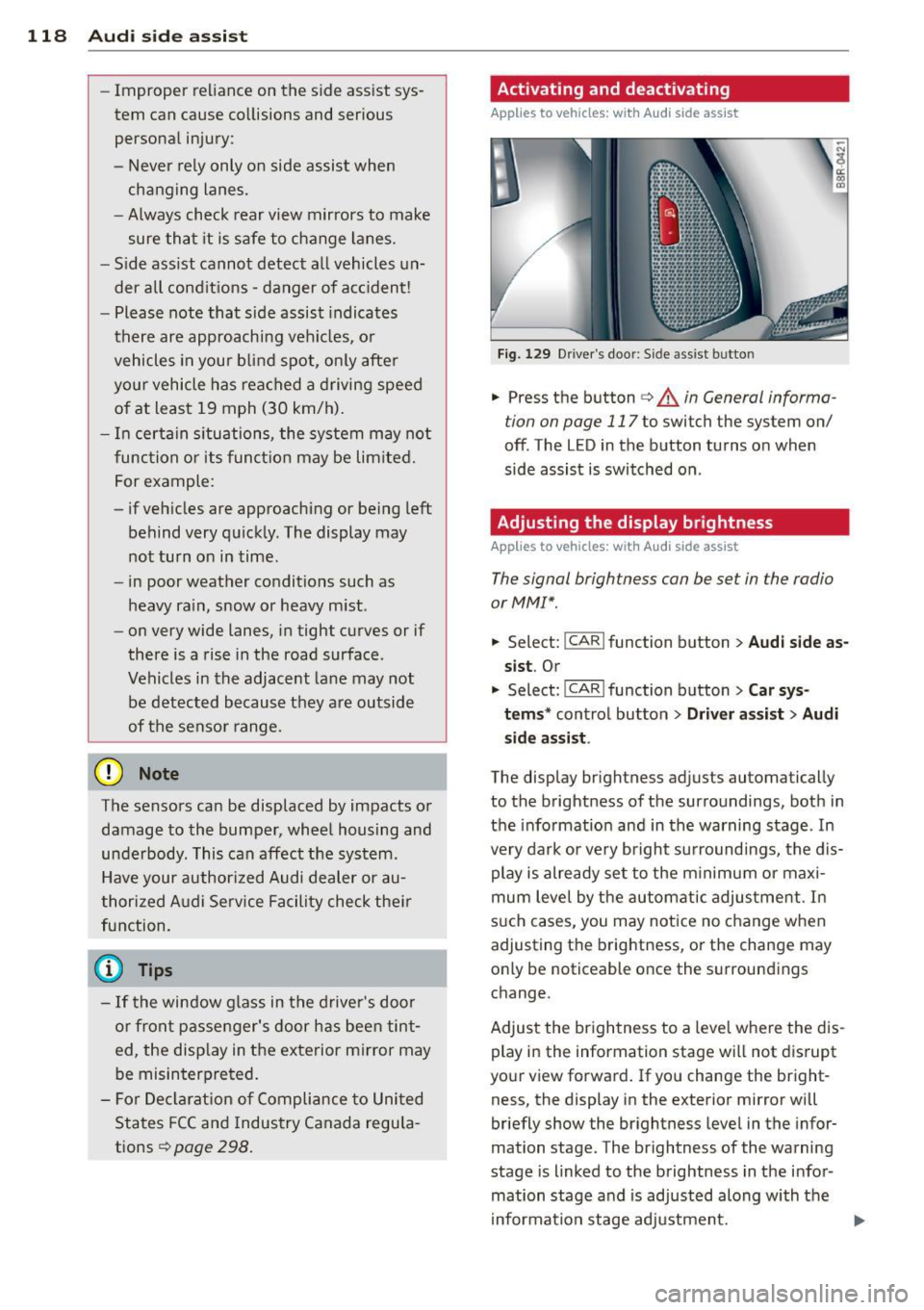
Fig. 129 D river 's doo r: Side ass ist butto n
-"' ~ a: co a,
.. Press the button c> & in General informa
tion on page 117
to switch the system on/
off. The LED in the button turns on when
side assist is switched on .
Adjusting the display brightness
Applies to vehicles: wit h Audi s ide assist
The signal brightness con be set in the radio
or MM!* .
.. Select: !CAR ! function b utton> Aud i side a s
s ist .
Or
.. Select:~ , C~ A~ R~ I function button > Car sy s
t e m s*
control button > Dri ver a ssis t > Au di
s id e a ss is t .
The display br ightness adjusts automatical ly
to the brightness of the surroundings, both in
the info rmation and in the warning stage . In
very dark or very bright su rroundi ngs, the dis
play is already se t to the m inimum or maxi
mum leve l by the automatic adjus tme nt. In
s u ch cases, you may notice no change when
adjusting the brightness, or the change may only be noticeable once the surroundings
change.
Adjust the br ightness to a leve l whe re the dis
play in the information stage wi ll not d isrupt
your view forward. If you change the bright
ness, the display in the exterior mirror will
briefly show the br ightness level in the infor
mation stage. The brightness of the warning
stage is linked to the brightness in the infor
mation stage and is adjusted along with the
i nformation stage adjustment.
Page 134 of 316
132 Parking system
Reverse Parking
App lies to vehicles: with Audi parking system p lus w ith
rea rview camera
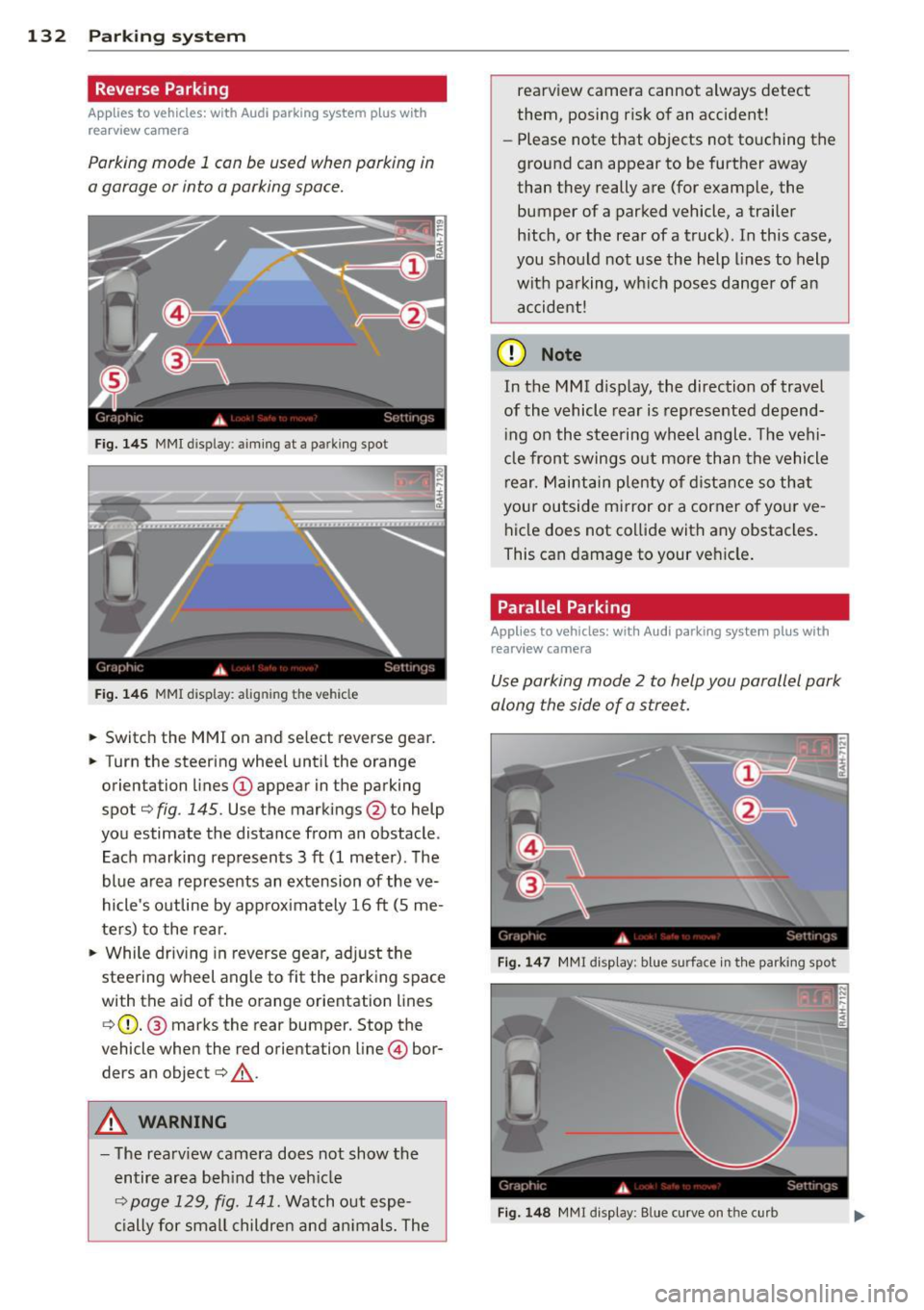
Parking mode 1 con be used when parking in
a garage or into a parking space.
Fig. 145 MMI disp lay : aiming at a pa rking spot
Fig. 146 MMI display: alig nin g th e veh icle
... Switch the MMI on and select reverse gear .
... Turn the steering wheel until the orange
orientation lines
(D appear in the parking
spot¢
fig . 145. Use the markings @to help
you estimate the distance from an obstacle .
Each marking represents 3
ft (1 meter). The
blue area represents an extension of the
ve
hicle's outline by approximately 16 ft (5 me
ters) to the rear.
"' While driving in reverse gear, adjust the
steering wheel angle to fit the parking space
with the aid of the orange orientation lines ¢ (D. @ marks the rear bumper. Stop the
vehicle when the red orientation line © bor
ders an object¢ _&..
A WARNING
-The rearview camera does not show the
entire area behind the vehicle
¢ page 129, fig. 141. Watch out espe
cially for small children and animals. The rearview camera cannot always detect
them, posing risk of an accident!
- Please note that objects not touching the
ground can appear to be further away
than they really are (for example, the
bumper of a parked vehicle, a trailer
hitch, or the rear of a truck). In this case,
you should not use the help lines to help
with parking, which poses danger of an accident!
(D Note
In the M MI dis play , the direction of travel
of the vehicle rear is represented depend
ing on the steering wheel angle . The vehi
cle front swings out more than the vehicle
rear. Maintain plenty of distance so that
your outside mirror or a corner of your
ve
hicle does not collide with any obstacles.
This can damage to your vehicle.
Parallel Parking
Applies to vehicles: with Aud i parking system plus with
rearv i ew camera
Use parking mode 2 to help you parallel park
along the side of a street .
Fig. 147 MMI disp lay: blue surface in th e parking spot
Fig. 148 MM! display : B lue curve on th e curb
Page 135 of 316
The following steps apply only when there is
no obstacle such as a wall near the parking
spot. Otherwise, please read the information
prov ided in the "Parking Next to Obstacles"
section.
~ Activate the turn signal.
~ Position your vehicle parallel to the edge of
the street, approxim ately 3 ft (1 meter)
from a parked vehicle .
~ Switch the MMI on and se lect reverse gear .
The parking aid tu rns o n and parking mode
1 appears on the display .
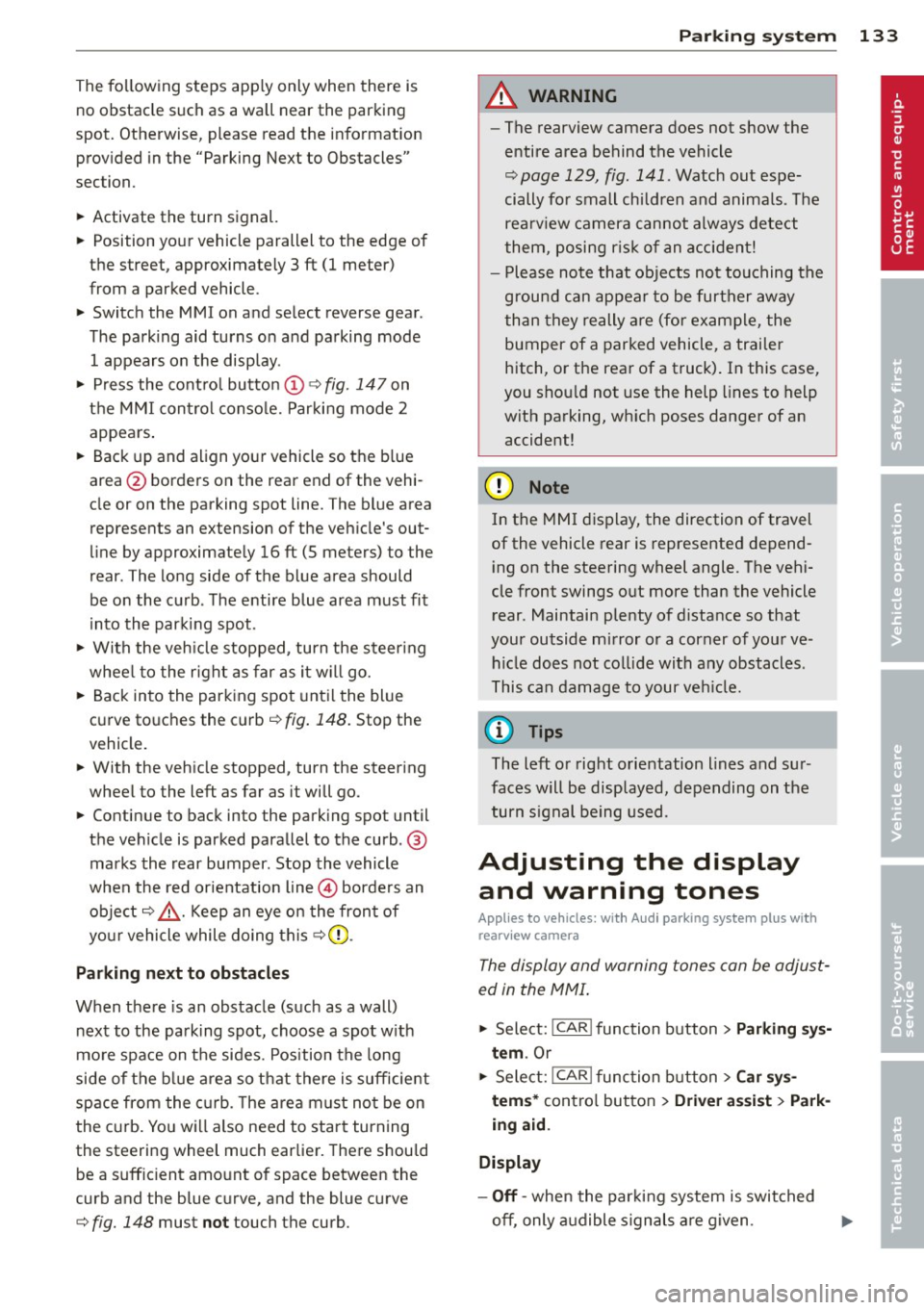
~ Press the contro l button (D ¢ fig. 147 on
the MMI contro l conso le. Parking mode
2
appea rs .
~ Back up and align yo ur vehicle so t he b lue
area @ borders on the rear end of the vehi
cle or on the parking spot line. The bl ue area
represents an extension of the veh icle's out
line by approximate ly
16 ft (S meters) to the
rear . The long side of the blue area should
be o n the curb . The entire blue area must fit
i nto the parking spot .
~ With the vehicle stopped, turn the steer ing
whee l to the right as far as it w ill go.
~ Back into the park ing spot until the blue
cu rve to uches the curb¢
fig. 148. Stop the
vehicle.
~ With the veh icle stopped, turn the steer ing
wheel to the left as far as it will go .
~ Continue to back into the park ing spot until
the vehicle is parked parallel to the curb .@
marks the rear bumper. Stop the vehicle
when the red orientation line@ borde rs an
object ¢.&, . Keep an eye o n the fron t of
yo ur vehicle while do ing this ¢Ci) .
Parking n ext to obstacles
When t here is an obstacle (such as a wall)
next to the pa rking spot, choose a spot w ith
mo re space on t he sides. Position the long
side of the b lue a rea so that there is sufficient
space from the curb. The a rea m ust no t be on
the c urb. You w ill also need to start turn ing
the steering wheel much earlie r. T he re should
be a suffic ient amo unt of space between the
curb and the blue curve, and the blue c urve
¢ fig. 148 must not touch the curb.
Par king system 133
A WARNING
- The rearview camera does not show the
entire area behind the vehicle
¢ page 129, fig. 141 . Watch out espe
cially fo r small children and anima ls . The
rea rv iew camera cannot always detect
them, posing r is k of an a ccident!
- P lease note that objects not touching the
g rou nd can appear to be further away
than they really are (for example, the
bumper of a parked vehicle, a trai ler
hitch, or the rea r of a truck) . In this case,
you shou ld not use the help lines to help
with parking, wh ich poses danger of an
accident!
(D Note
In the MMI display, the direction of travel
of the vehicle rear is represented depend
i ng on the steering wheel angle . The vehi
cle front swings out more than the vehicle rear. Maintain ple nty of d istance so that
your outside mirror or a corner of your ve
hicle does not col lide with any obstacles.
T his can damage to your ve hicle.
(0 Tips
The left o r right orientation lines and su r
faces will be disp layed, depending on the
turn s ignal being used .
Adjusting the display
and warning tones
App lies to v ehicl es: wi th Audi parking sys te m plus wi th
rearv iew camera
The display and warning tones can be adjust
ed in the MMI .
~ Select: !CAR ! function button> Parking sys
tem .
Or
~ Select: ~I C- A- R~I func tion button > Car sy s
tems *
contro l bu tton > Driver a ssist > Park
ing aid.
Display
- Off -when the par king system is switched
off, only a udible s ignal s are given .
Page 214 of 316
212 Trailertowing
Trailer towing
Driving with a trailer
General information
Your Audi was designed primarily for passen
ger transportation .
If you plan to tow a trai ler, p lease remember
that the additional load will affect durability,
economy and performance .
Trailer towing not on ly places more stress on
the vehicle, it also calls for more concentra
tion from the driver.
For this reason, always fo llow the operating
and driving instructions provided and use
common sense.
Technical requirements
T ra ile r hitch
Use a weight-carrying hitch conforming to the
gross trailer weight. The hitch must be suita
ble for your vehicle and trailer and mu st be
mounted securely on the veh icle's chassis at a
technically sound location. Use only a trailer
h itch with a removable ball mount. A lways
check with the trai ler h itch manufact urer to
make sure that you are using the correct
hitch.
Do n ot use a bumper hi tch.
The hitch must be installed in such a way that
it does not interfere with the impact-absorb
ing bumper system . No modifications should
be made to the vehicle exhaust and brake sys
tems . From t ime to time, check that all hitch
mounting bo lts remain securely fastened.
When you are not towing a trailer, remove the
trailer h itch ball mount. This prevents the
h itch from causing damage should your veh i
cle be struck from behind
¢ A .
Traile r brak es
If your tra iler is equipped w ith a braking sys
tem, check to be sure that it conforms to a ll
regulat ions . The trailer hydraulic brake system must not be
direct ly connected to the vehicle's hydraulic
brake system
~ A .
Saf ety ch ain s
Always use safety chains between your veh icle
and the trai le r.
Trail er light s
Trailer lights must meet all regulations. Be
sure to check w ith your authorized Audi dealer
for correct wiring, sw itches, and relays.
Mirror s
If you are unable to see the traffic behind you
using the regular outside mirrors, then you
must install extended mirrors .
It is important
that you always have clea r vis io n to the rear.
,8. WARNING
- I f a trai ler has electrical brakes p lease
note that these brakes are not activated
by the factory -fitted control unit -risk of
accident!
- Afte r removing the trailer hitch, do not
store it in your vehicle. In case of sudden
braking, the hitch could fly forward and
injure you or your passengers.
- Never install a "weight distributing" or
"load equalizing" trailer hitch on your ve
h icle. The vehicle was not designed for
these kinds of trailer h itches. The h itch
attachment can fail, caus ing the trailer
to tear loose from the veh icle.
- The Gross Vehicle Weight Rating for your
veh icle, found on the safety compliance
label on the driver's s ide B-pillar, must
never be exceeded under any c ircumstan
ces. Exceeding the Gross Vehicle Weight
Rating of yo ur vehicle is likely to damage
your vehicle, and such damage will not
be covered by yo ur Limited New Ve hicle
Warranty . Exceeding the Gross Vehicle
Weight Rating will a lso change the per
formance and handling characteristics of
your veh icle, wh ich could cause a crash
resulting in serious injury or death.
-
Page 223 of 316
Aluminum trim
Use only neutral -pH products to remove spots
and depos its from alum in um s urfaces.
Chrome care products and alkaline cleaners
will attack aluminum surfaces and can dam
age them over time.
A WARNING
Always read and heed all WARNINGS and other information ¢
page 216.
Touch-up paint
Minor paint damages should be touched up
immediately.
"" Use either a touch-up pa int stick or spray
paint to cover minor scratches and nicks.
Your author ized A udi dealer has touch-up
pa int for minor sc ra tches and stone ch ips.
Scratches shou ld be touched up soon after
they occur to prevent corrosion .
If a spot starts to rust, howeve r, a simple
t ouch- up job w ill not be enough. The affected
sur face must be sanded smooth and coated
with an anti-r ust primer before the painted
finish can be restored.
The number for the origina l vehicle paint can
be found on the vehicle identi ficat ion labe l
¢page 290.
A WARNING
Always read and heed a ll WARNINGS and
other information
¢ page 216.
Windows
Clear vision to all sides .
Clea n all windows regularly to remove road
fi lm and ca r wash wax b uild up.
"" Remove snow from windows using a brush .
"" Use a plast ic ice scraper to remove ice from
windows and mirro rs.
"" Remove other res idue on the windows with
a sp ray -on glass cleaner.
Cleaning and protec tion
"" Wipe the windows dry with a clean piece of
cloth or kitchen paper towe l.
T he best way to remove snow from windows
and mirrors is to use a brush . Use a non-abra
sive
plastic ice scrape r -better sti ll, a spray
deicer - to remove
ice from windows and mir
rors.
T he windows must not be cleaned with insect
remover or wax since these can interfere with
the function of the windshie ld w iper blades
(chatter) .
Oil, grease, o r si licone residue can be removed
with
gla ss cleane r or silicone remove r. How
ever, wax residue requires the use of a specia l
ly formulated so lvent. Please contact your au
thori zed Audi dealer for advice on safe prod
ucts for wax removal.
Windows should also be cleaned on the inside
at regu lar intervals .
Never dry windows wit h the same chamo is
that you use to dry painted surfaces . Wax resi
due o n the chamois can impair vision through
the windows .
A WARNING
-Always read and heed all WARNINGS and
other information ¢
page 216.
-The windsh ield must not be treated with
water-repellent materials. They can in
crease glare under poor v is ibility condi
tions such as wetness, darkness, or when the sun is low on the hor izon. In addi
tion, they can ca use the w indshie ld w ip
ers to ch atter.
@ Note
- Never use warm o r hot wate r to remove
snow and ice from w indows and mirro rs.
T his could cause the glass to crack.
- T o prevent damage to the wires of the
rear defogger, do not place any adhesive
st ic kers on the ins ide of the rear w indow
over the wires.
221
•
•
Page 283 of 316
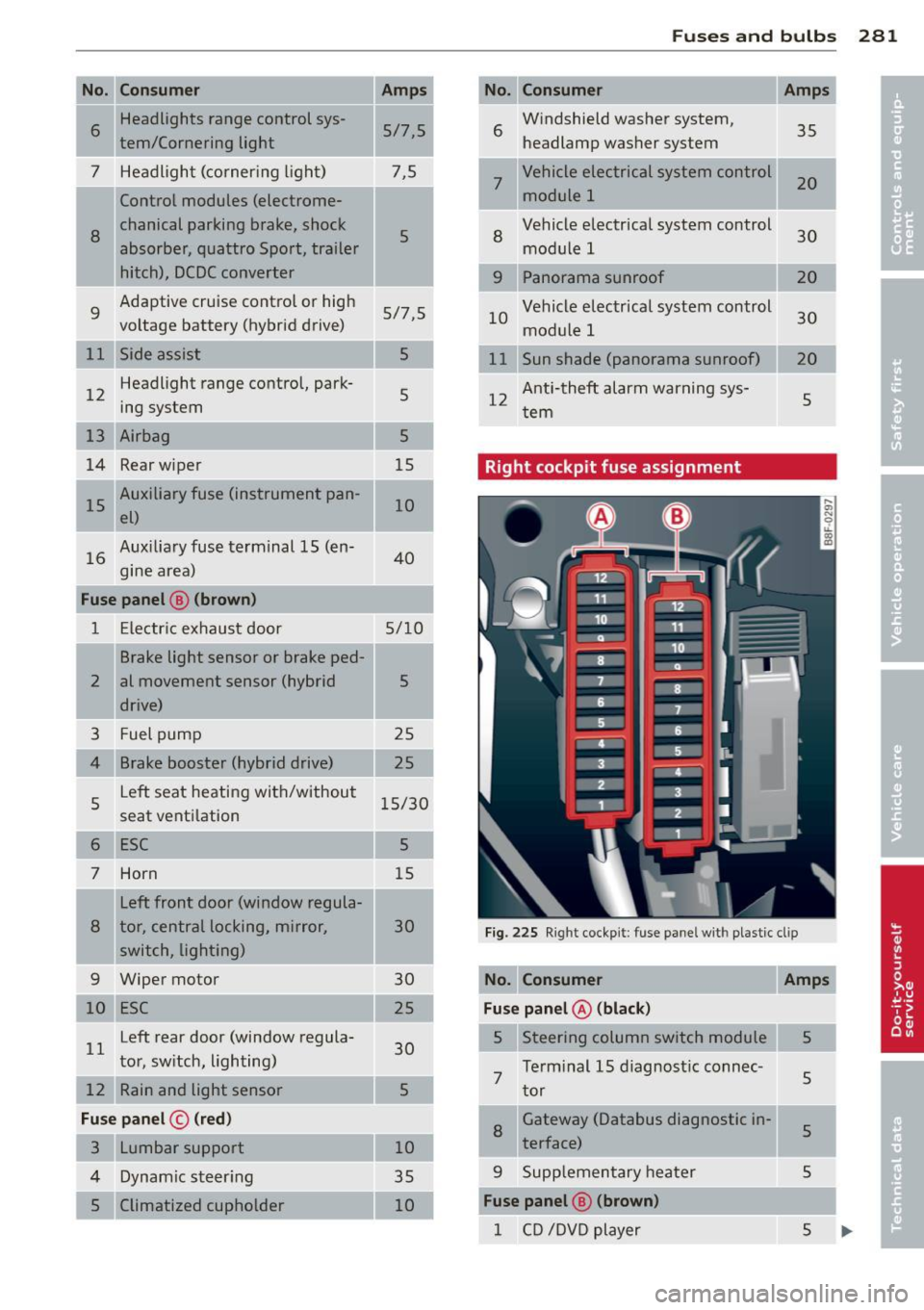
I
I
I
-No. Consumer
6
Headlights range control sys-
tern/Co rnering light
7 Headligh t (corner ing l ight)
Control modules (electrome-
8
chanical parking brake, shock
absorber, quattro Sport, trailer
hitch), DCDC converter
9 Adaptive cruise contro
l or high
voltage battery (hybrid drive)
12 Headlight range contro
l, park
ing system
13 Airbag
14 Rear wiper
15 Auxiliary fuse (ins
trument pan
el)
Auxilia ry fuse terminal 15 (en-
16 gine area)
Fuse panel
@ (brown )
1 E lectric exhaust door
2
3
4
5
6
7 Brake light sensor or brake ped
al movement sensor (hybrid
drive)
Fuel pump
Brake booster (hybrid drive)
Left seat heating with/without
seat venti
lation
ESC
Horn
Left fron t door (window regula -
8 tor, central locking, mirror,
sw itch, lighting)
-9 Wiper motor
10 ESC
Left rear door (window regula
l l tor, sw itch, light ing)
12 Rain and light sensor
Fuse panel © (red)
3 Lumbar support
4 Dynam ic ste ering
5 Climatized cupholder
-Amps
5/ 7,5
7,5
5
5/7,5
5
5
5
15
10
40
5/10
5
25
25
1 5/30
5
15
30
30
2 5
30
5
10
35 10
-
Fu se s and bulb s 281
No. Consumer
6 W
indshield washer system,
headlamp washer system 35
7
Vehicle electrical system control
module 1 20
8
Vehicle electrical system control
module 1 30
9 Panorama su
nroof
10 Vehicle elec
trical system control
30
mod ule 1
11 Sun shade (panorama sunroof)
20
12 Anti-theft alarm warning sys-
tern 5
Right cockpit fuse assignment
Fi g. 22 5 Right cockp it : fuse panel wit h plast ic cl ip
No. Consumer Amps
Fuse panel @ (black )
5 Steering column switch module 5
7 Te
rm inal 15 d iagnost ic connec-
tor
5
8 Gateway (Databus diagnostic in-5 terface)
-..
9 Supp
lementary heater 5
Fuse panel @ (brown)
1 CD /D V D p layer 5
Page 284 of 316
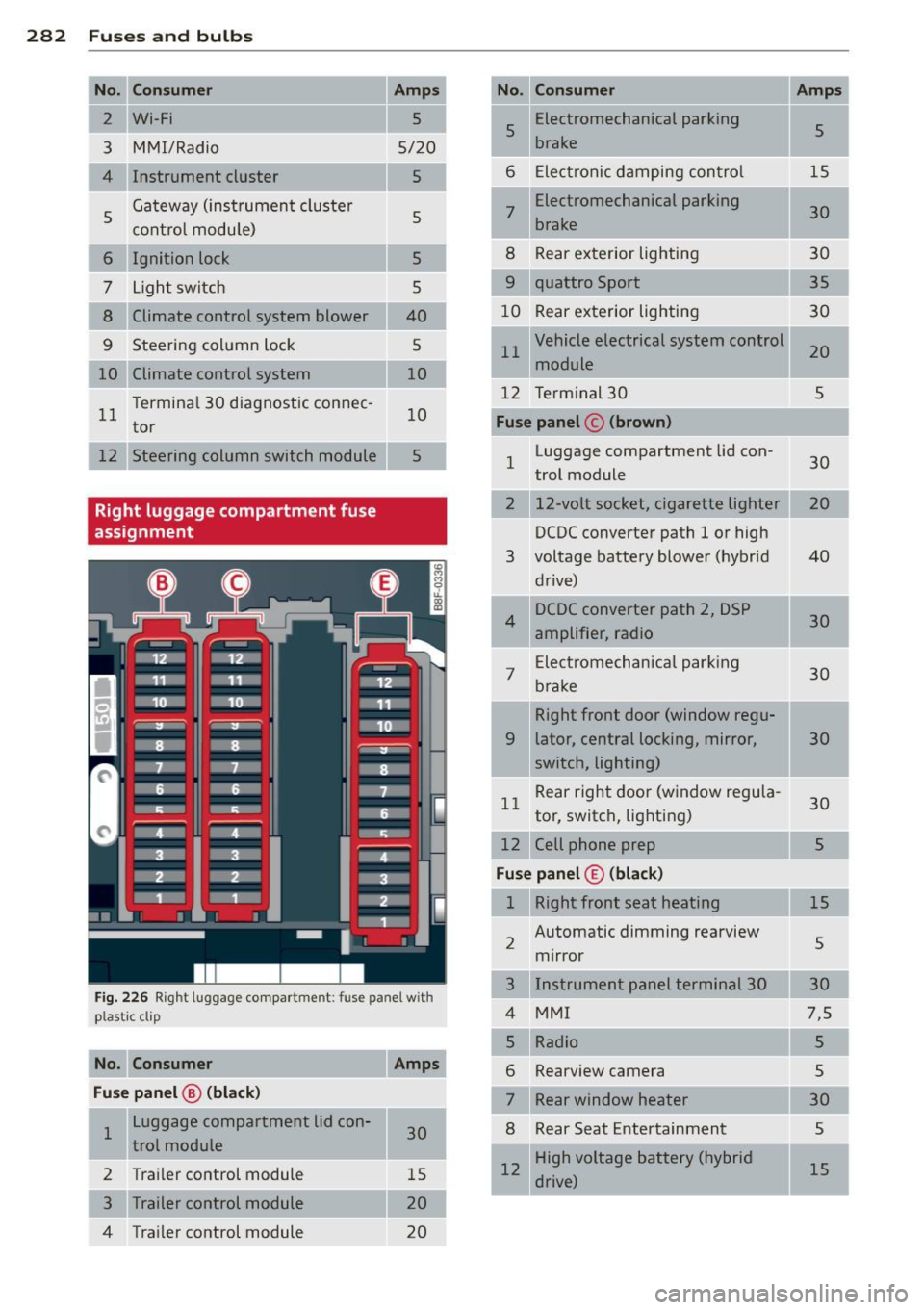
282 Fuses and bulbs
I
-
No. Consumer
2 Wi-Fi
3 MMI/Radio
4 Instrument cluster
5 Gateway (instrument cluster
control
module)
6 Ignition lock
7 Light switch
8 Climate control system blower
9 Steering column lock
10 Climate control system
11 Terminal 30 diagnostic connec-
tor
12 Steering column switch module
Right luggage compartment fuse
assignment
Amps
5
5/20
5
5
5 5
40
5
10
10
5
Fig. 226 Right luggage compartment: fuse panel with
plastic cl ip
No. Consumer Amps
Fuse panel
@ (black)
1 Luggage compartment lid con-
30
trol module
2 Trailer control module 15
3 Trailer control module 20
4 Trailer control module
20
-No. Consumer Amps
5 Electromechanical
parking
5
brake
•
6 Electronic damping control 15
7 Electromechanical parking
30
brake
8 Rear exterior lighting 30
9 quattro Sport
35
10 Rear exterior lighting 30
11 Vehicle electrical system control
20
module
12 Terminal 30
5
Fuse panel c (brown)
1 Luggage compartment lid con-
30
trol module
2 12-volt socket, cigarette lighter
DCDC converter path 1 or high
3 voltage battery blower (hybrid 40
drive)
4 DCDC
converter path 2, DSP
30
amplifier, radio
7 Electromechanical
parking
30
brake
Right front door (window regu-
9 later, central locking, mirror, 30
switch, lighting)
11 Rear
right door (window regula-
30
tor, switch, lighting)
12 Cell phone prep 5
Fuse panel© (black)
1 Right front seat heating
15
2 Automatic dimming rearview
5
mirror
3 Instrument panel terminal 30
4 MMI 7,5
Rearview camera
Rear window heater
8 Rear Seat Entertainment
12 High voltage battery (hybrid
drive)
Page 294 of 316
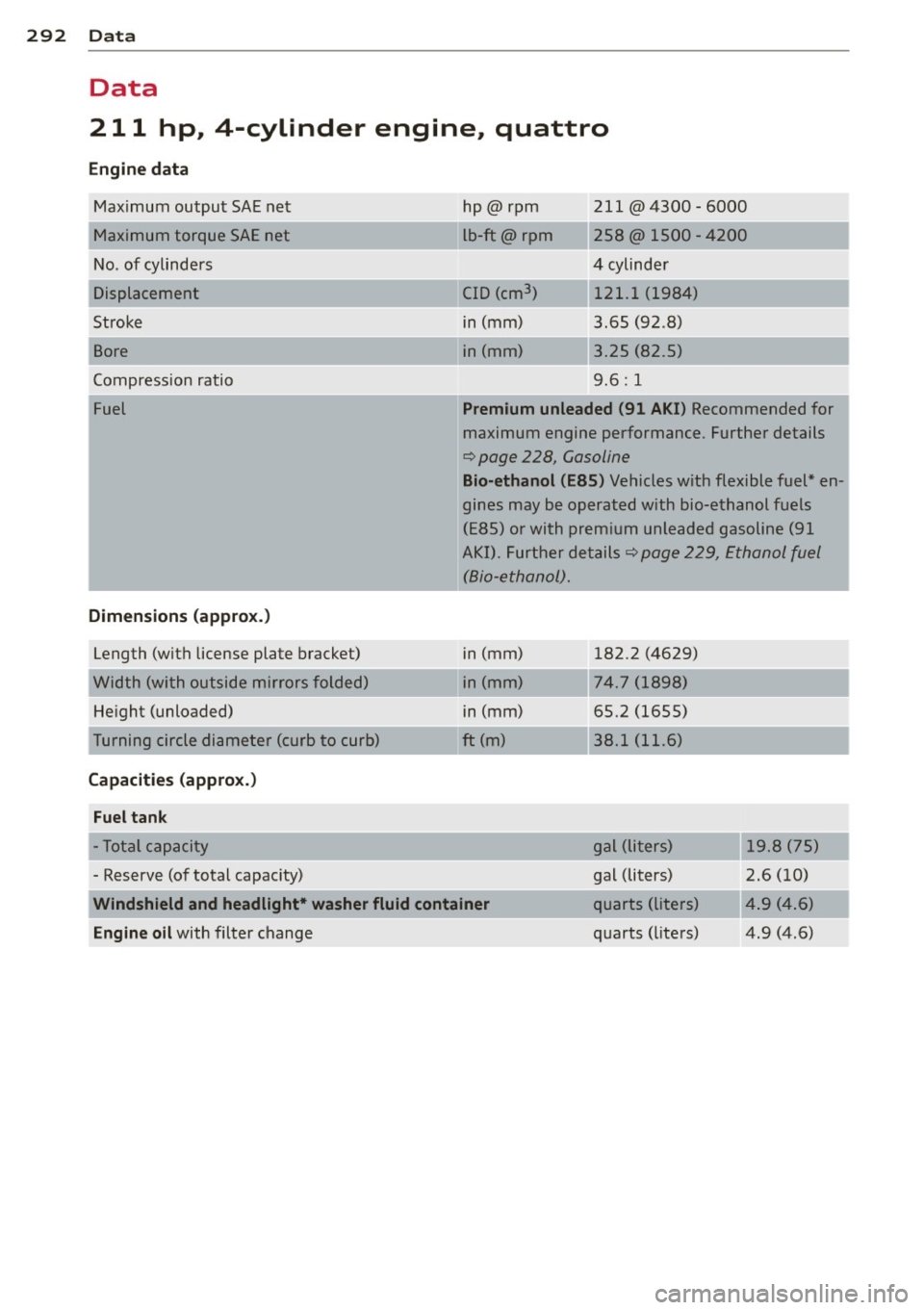
292 Data
Data
211 hp, 4-cylinder engine, quattro
Engine data
Maximum output SA E ne t
M aximum torque SAE net
No . of cylinders
Displacement
Stroke
Bore
C ompression ratio
Fuel
Dimensions (approx.)
Length (with license plate bracket)
W idth (with outside mirrors folded)
He ight (unloaded)
Tu rning circle di ame ter (curb to c urb)
Capacities (approx.)
Fuel tank
h p@rpm
l b-ft@rpm
C ID (cm
3
)
in (mm)
i n (mm) 211 @4300 - 6000
258@ 1500 -
4200
4 cylinde r
121.1 (1984)
3.65 (92 .8)
3 .25 (82.5)
9.6: 1
Premium unleaded (91 AKI ) Recommended for
m aximum engine performance. Further details
¢ page 228, Gasoline
Bio-ethanol (E85 ) Vehicles with flexible fuel* en
g ines may be operated with bio-ethanol fuels
( E85) or with premium unleaded gasoline (91
A KI). Further details~ page 229, Ethanol fuel
(Bio-e thanol) .
in (mm)
i n (mm)
i n (mm)
ft
(m)
182.2 (4629)
74 .7 ( 1898)
65.2 (1655)
3 8 .1 ( 11.6)
- To tal cap acity gal (
liters)
-------------
1 9.8 (75)
2 .6 ( 10)
- Reserve (o f total capacity) gal (liters)
Windshield and headlight* washer fluid container
Engine oil
with filter change quarts (liters)
q
uarts (liters) 4.9 (4 .6)
Page 295 of 316
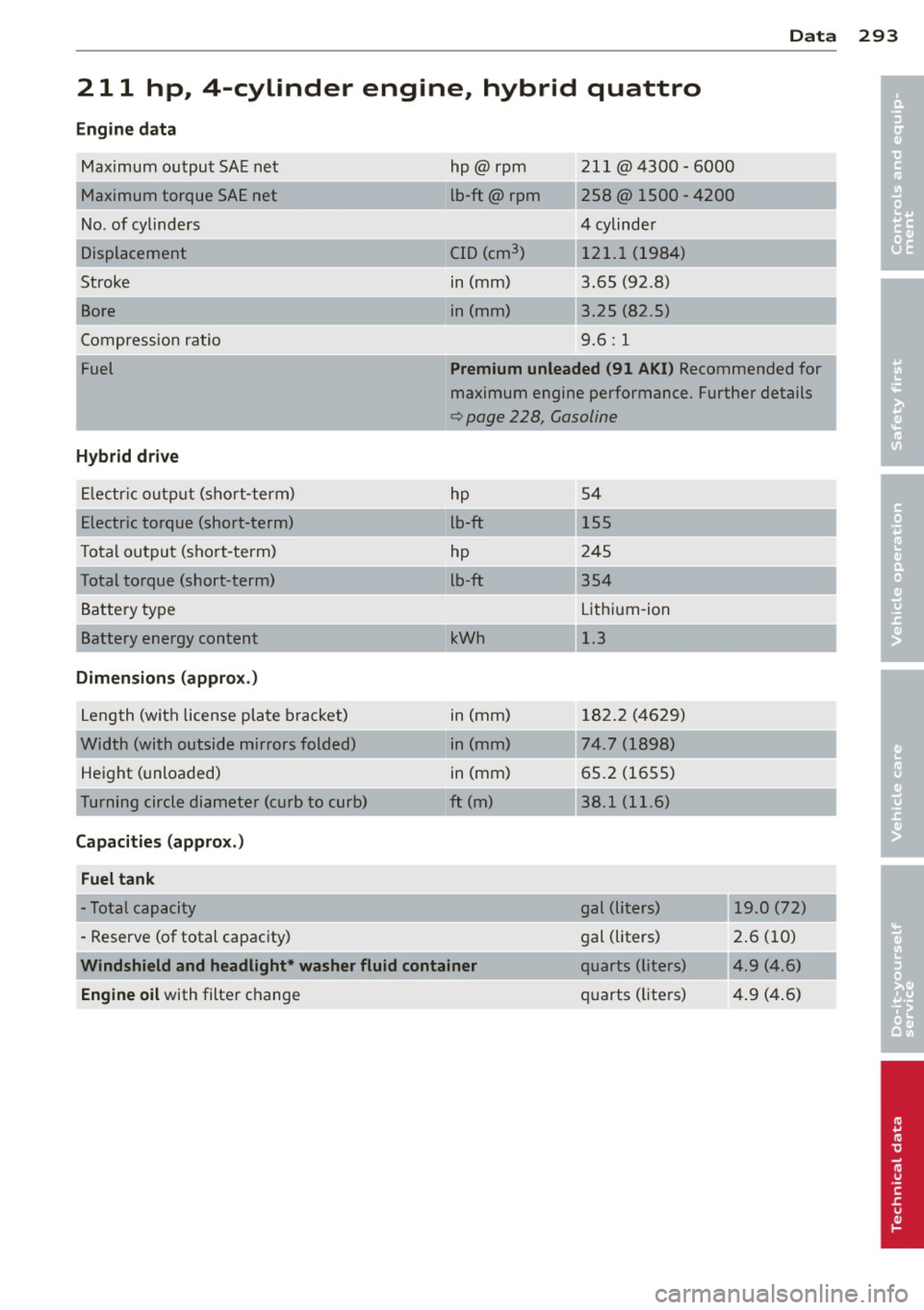
Data
211 hp, 4-cylinder engine, hybrid quattro
Engine data
Maximum output SAE net
Maximum torque SAE net
No . of cylinders
Displacement
Stroke
Bore
Compression ratio
Fuel
Hybrid drive
Electric output (short-term)
Electric torque (short-term)
T otal output (short-term)
Total torque (short-term)
Battery type
Battery energy content
Dimensions (approx.)
Length (with license plate bracket)
Width (with outside mirrors folded) Height (unloaded)
Turning circle diameter (curb to curb)
Capacities (approx.)
Fuel tank
- Total capacity
- Reserve (of total capacity) hp@rpm
lb-ft@ rpm
-~,
ClD (cm3
)
in (mm)
in (mm) 211 @4300
-6000
258@ 1500 -4200
4 cylinder 121.1 (1984)
3.65 (92 .8)
3.25 (82 .5)
9.6: 1
Premium unleaded (91 AKI) Recommended for
maximum engine performance. Further details
c:> page 228, Gasoline
hp 54
lb-ft 155
hp 245
lb-ft 354
Lithium-ion
kWh 1.3
in (mm) 182.2 (4629)
in (mm) 74.7 (1898)
in (mm) 65.2 (1655)
ft (m)
38.1 (11.6)
gal (liters) 19 .0 (72)
gal (liters) 2.6 (10)
Windshield and headlight* washer fluid container quarts (liters) 4.9 (4.6)
Engine
oil with filter change quarts
(liters) 4 .9 (4 .6)
293
•
•
Page 296 of 316
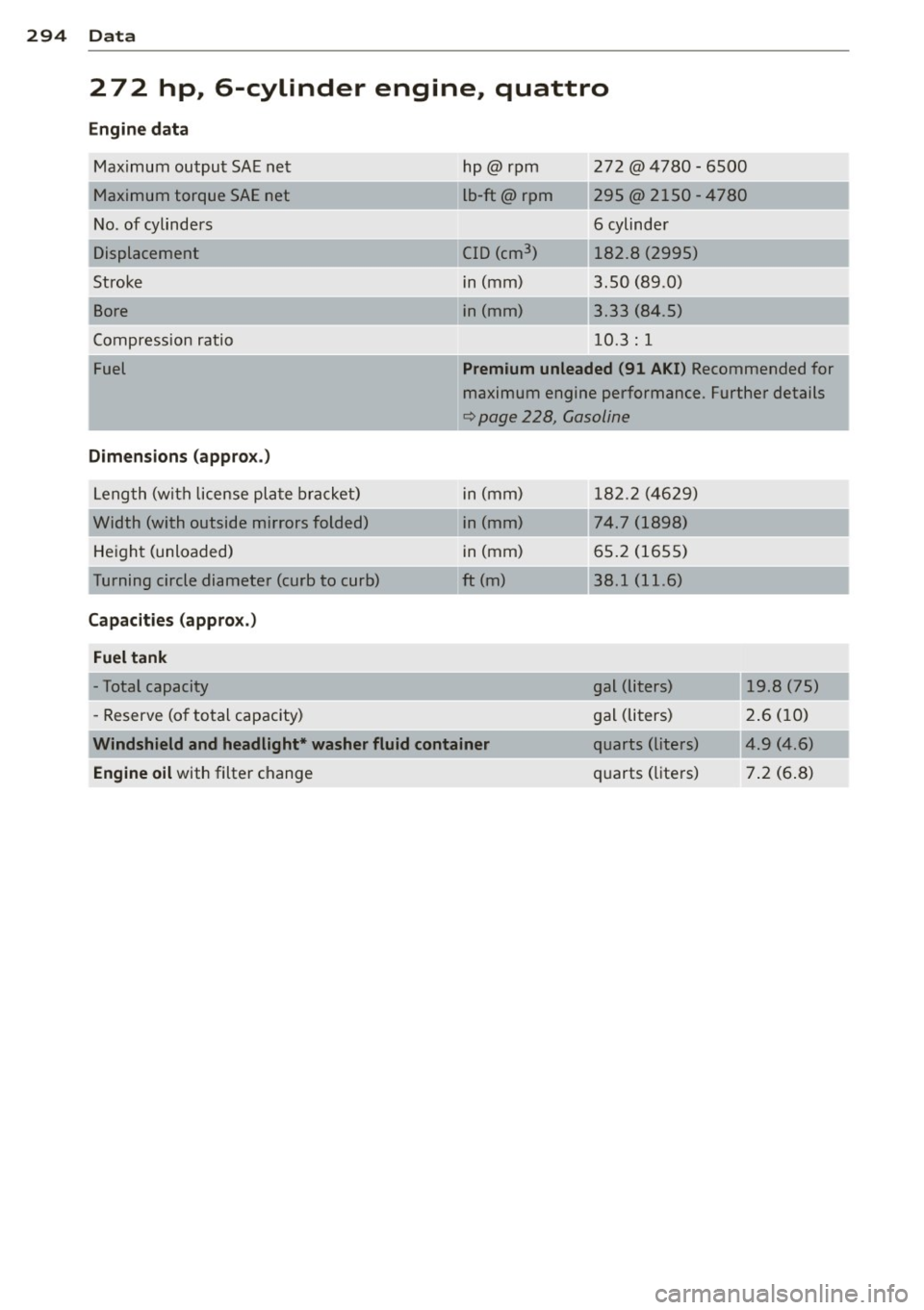
294 Data
2 72 hp, 6-cylinder engine, quattro
Engine data Maximum output SAE net
Maximum torque SAE net
N o. of cylinders
Displacement
Strok e
Bore
C ompression ratio
Fuel
Dimensions (approx .)
Leng th (wit h license pl ate brac ket)
Width (with outside mirrors folded) He igh t (unloaded)
T urning circle diamet er (curb to curb)
Capacities (appro x.)
Fuel tank
- Total capacity
- Reserve (o f to tal capacity) h
p@rpm
L b-ft@ rpm
C ID (cm
3
)
in (mm)
i n (mm) 272 @4780 - 6500
295@ 2
150- 4780
6 cylinde r
182.8 (2995)
3.50 (89.0)
3 .33 (84.5)
1 0.3 : 1
Premium unleaded (91 AKI) Recommended for
m aximum engine performance. Further details
¢ pag e 228, Gasoline
i n (mm) 1 82.2 (4 629)
i n (mm)
74.7 (1898)
i n (mm) 65.2 (165 5)
ft (m) 38.1 (11.6)
gal (liters) 19.8 (75)
g al (li ters) 2.6 (1 0)
Windshield and headlight* washer
fluid container quarts (liters) 4.9 (4.6)
Engine oil with filter c hange q
uarts (lite rs) 7 .2 (6 .8)