key AUDI Q5 2013 Owner's Guide
[x] Cancel search | Manufacturer: AUDI, Model Year: 2013, Model line: Q5, Model: AUDI Q5 2013Pages: 316, PDF Size: 78.89 MB
Page 87 of 316
Starting the vehicle with the emergency
key
You can use the emergency key as an ignition
key in an emergency.
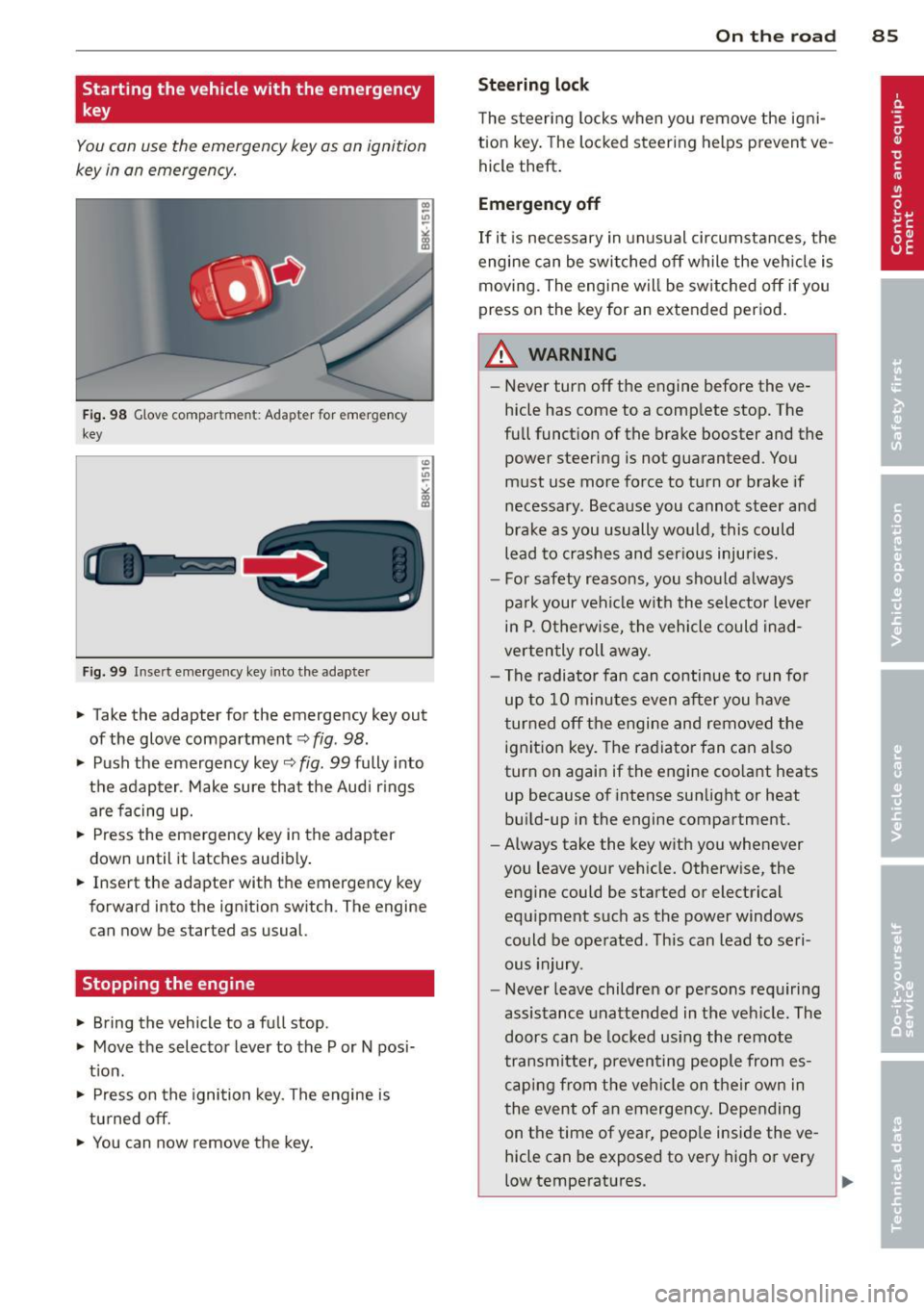
Fig . 98 G love compar tment: Adapter for emergency
key
Fig. 99 Inse rt emergency key into the adapter
.. Take the adapter for the emergency key out
of the glove compartment
c:> fig . 98.
.. Push the emergency key c::> fig. 99 fully into
the adapter . Make sure that the Audi r ings
are facing up .
.. Press the emergency key in the adapter
down until it latches audibly .
.. Insert the adapter with the emergency key
forward into the ignition switch. The engine
can now be started as usual.
Stopping the engine
.. Bring the vehicle to a full stop .
.. Move the selector lever to the P or N posi
t ion .
.. Press on the igni tion key. The engine is
turned off.
.. You can now remove the key.
On th e road 8 5
Steering lo ck
The steering locks when yo u remove the ig ni
tion key. The lo cked steering helps prevent ve
hicle theft .
Emergency off
If it is necessary in unusual circumstances, the
engine can be switched off while the veh icle is
moving. The engine will be switched off if you
press on the key for an extended period .
A WARNING
-Never turn off the engine before the ve
hicle has come to a comp lete stop. The
full funct ion of the brake booster and the
power steering is not guaranteed . You
must use more force to turn or brake if
necessary. Because you cannot steer and
brake as you usually would, this could
lead to crashes and ser ious injuries.
- For safety reasons, you should always
pa rk your vehicle w ith the selector lever
in P . Otherwise, the vehicle could inad
verten tly roll away.
- The radiator fan can continue to run fo r
up to 10 minutes even after you have
turned off the engine and removed the ignition key. The radiator fan can a lso
turn on again if the engine coo lant heats
up because of intense sunlight or heat
bu ild-up in the engine compartment.
- Always take the key with you whenever
you leave your vehicle. Otherw ise, the
engine could be started or electrical
equipment such as the power windows
could be operated . This can lead to seri
ous injury.
- Never leave children or persons requiring
assistance unattended in the vehicle. The
doors can be locked using the remote
transmitter, preven ting people from es
caping from the veh icle on their own in
the event of an emergency . Depending
on the time of year, peop le inside the ve
hicle can be exposed to very high or very
low temperatures.
Page 88 of 316
86 On the road
(D Note
If the engine has been under heavy load
for an extended period, heat builds up in
the engine compartment after the engine
is switched off -there is a risk of damaging
the engine. Allow the engine to run at idle
for about two minutes before switching it
off.
Convenience key
Starting the engine
Appl ies to vehicles: with Convenience key
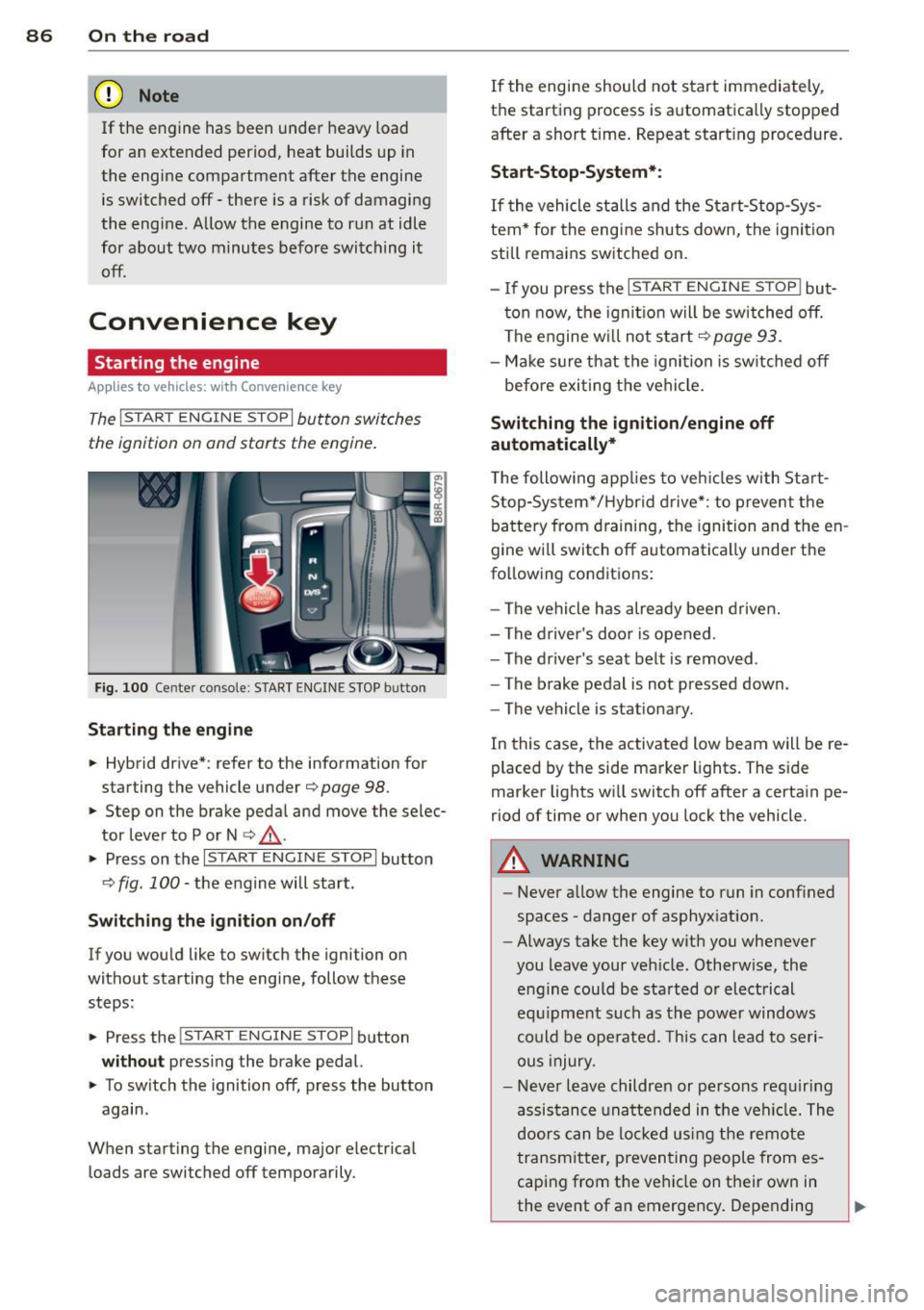
The I STAR T ENGINE S TOP! button switches
the ignition on and starts the engine .
Fig. 100 Center console: START ENGINE STOP butto n
Starting the engine
.. Hybrid drive* : refer to the information for
starting the vehicle under
¢ page 98 .
.. Step on the brake peda l and move the selec
tor lever to P or N
¢ ,& .
.. Press on the r:I s==T::-:: A--=R== T=-c E=-c N:-;--:::: G-.,,.I ::-:N-;::: E-,S== T;:-; O:;--;P:cil button
c;, fig . 100 -the engine will start .
Switching the ignition on/off
If you would like to switch the ignition on
without starting the eng ine, follow these
steps :
.. Press the
!START ENGINE STOP! button
without pressing the brake pedal.
.. To sw itch the ignition off, press the button
again .
When starting the engine, major electr ical
loads are switched off temporarily . If
the engine should not start immediately,
the starting process is automatically stopped
after a short t ime. Repeat start ing procedure.
Start -Stop-System*:
If the vehicle stalls and the Start-Stop-Sys
tem* for the eng ine shuts down, the ignition
still remains switched on.
- If you press the
I START ENGINE STOP I but
ton now, the ignitio n will be switched off.
The engine w ill not start
¢page 93.
-Make sure that the igni tion is sw itched off
befo re exiting the vehicle.
Switching the ignition /engine off
automatically*
T he following app lies to veh icles with Start
Stop-System*/Hybrid drive*: to prevent the
battery from draining, the ignition and the en
gine wi ll switch off automatically unde r the
following conditions:
- The vehicle has already been driven.
- The driver's door is opened .
- The driver 's seat belt is removed .
- The brake pedal is not pressed down .
- The vehicle is stat ionary.
In this case, the activated low beam will be re
placed by the side marker lights. The side
marker lights wi ll switch off after a certain pe
riod of time or when you lock the vehicle.
A WARNING
--Never allow the engine to run in conf ined
spaces -danger of asphyx iat ion.
- Always take the key with you whenever
you leave your veh icle. Otherw ise, the
engine could be sta rted or electrical
equ ipment such as the power windows
could be operated. This can lead to seri
ous injury.
- Never leave children or persons requiring
assistance unattended in the vehi cle. The
doors can be locked us ing the remote
transmitter, preventing people from es
caping from the veh icle on their own in
the event of an emergency . Depending
Page 89 of 316
on the time of year, people inside the ve
hicle can be exposed to very high or very
low temperatures .
0 Note
Avoid high engine rpm, full throttle and
heavy engine loads until the engine has
reached operating temperature -other-
wise you risk engine damage.
@ For the sake of the environment
Do not let the engine run while parked to
warm up . Begin driving immediately. This
reduces unnecessary emissions.
@ Tips
- After starting a cold engine, there may
be a brief period of increased noise be
cause the oil pressure must first build up in the hydraulic valve adjusters . This is
normal and not a cause for concern .
- If you leave the vehicle with the ignition
switched on, the ignition will switch off
after a certain period of time . Please
note that electrical equipment such as
exterior lights will switch off as well
when that happens .
Switching engine off
App lies to vehicles: with Conve nie nce key
"" Bring your vehicle to a complete stop.
... Move the selector lever to the P or N posi
tion.
"" Press the
!START ENGINE STOPI button
r:::;, page 86, fig. 100 .
Steering lock
The steering locks when you turn the engine
off using the
I S TAR T ENGINE STOP I button
and open the d river 's doo r. T he locked steer
ing helps prevent vehicle theft.
Emergency off
If necessary, the engine can be switched off
with the selector lever in the R or D/S posi
tions. To do so , step on the brake pedal and
press and hold the
I START ENGINE STOP I but-
On the road 87
ton. The vehicle speed must be less than 6
mph/ 10 km/h.
A WARNING
- Never turn off the engine before the ve
hicle has come to a complete stop . The
full function of the brake booster and the power steering is not guaranteed . You
must use more force to turn or brake if
necessary . Because you cannot steer and
brake as you usually would, this could
lead to crashes and serious injuries.
- For safety reasons, you should always
park your vehicle with the selector lever
in P . Otherwise, the vehicle could inad
vertently roll away.
- The radiator fan can continue to run for
up to 10 minutes even after you have
turned off the engine and removed the ignition key. The radiator fan can also
turn on again if the engine coolant heats
up because of intense sunlight or heat
build-up in the engine compartment.
- Always take the key with you whenever you leave your vehicle. Otherwise, the
engine could be started or electrical
equipment such as the power windows
could be operated. This can lead to seri
ous inJury.
- Never leave children or persons requiring
assistance unattended in the vehicle. The
doors can be locked using the remote
transmitter, preventing people from es
caping from the vehicle on their own in
the event of an emergency. Depending
on the time of year, people inside the ve hicle can be exposed to very high or very
low temperatures.
(D Note
If the engine has been under heavy load
for an extended period, heat builds up in
the engine compartment after the engine is switched off -there is a risk of damaging
the engine. Allow the engine to run at idle
for about two minutes before switching it
off .
Page 90 of 316
88 On the road
Driver messages
Ignition is on
This message appears and a warn ing tone
sounds if yo u open the dr iver's door when the
ignition is switched on.
No key identified
This message appears when the
I STAR T ENGIN E ST OP !* button is pressed if
there is no master key inside the vehicle or if
the system does not recognize it. For exam
p le, the master key cannot be recognized if it
is co vered by an object (e.g. aluminum brief
case) which screens the radio signal. Electron
ic devices s uch as ce ll phones can also inter
fere with the radio signal.
Press brake pedal to start engine
This message appears if you do not press the
brake peda l to start the engine .
Shift to N or P to start engine
This message appears when attempting to
start the engine if the selector lever for the
automatic transmission is not in the P or N
position . The engine can only be started with
the selector in these posit ions .
!I Is the key in the vehicle ?
This message appears in a veh icle w ith Con
ve nience key* if the master key is removed
from the veh icle with the engine running . If
the master key is no longer in the vehicle, you
cannot switch on the ignition after stopping
the eng ine and you also cannot start the en
g ine again . Moreover, you cannot lock the ve
h icle from the outside with the key .
Shift to P otherwise vehicle can roll away.
Doors do not lock if lever is not in P.
This message appears for safety reasons
a long with a warning signal. It appears if the
selector lever for the automatic transm ission
is not in the P position when switch ing off the
ignition . Move the selector lever to the P pos i
tion, otherwise the veh icle is not sec ured
against rolling away . You also cannot lock the vehicle
using the locking button* on the door
handle or using the remote key.
Turn off ignition before leaving car
Th is message appears if the driver's door is
opened wh ile the ignition is switched on. Al
ways switch off the ignition if you are leaving
the vehicle. See also
r::} page 84 or¢ page 86.
Shift to P and turn off ignition, otherwise ve
hicle can roll away
This message appears if the driver's door is
opened w hile the ignition is switched on and
t h e selecto r lever is not in the P position. Shift
the selecto r lever into the P position and
switch off the ignition when you exi t the vehi
cl e. Otherwise the vehicle could roll. See also
¢ page 84 or¢ page 86.
Convenience key defective! Use ignition lock
This message appears if the engine must be
started or stopped using the ign ition key and
not the
I START ENGINE STOP I* button.
Electro mechanical
parking brake
Operation
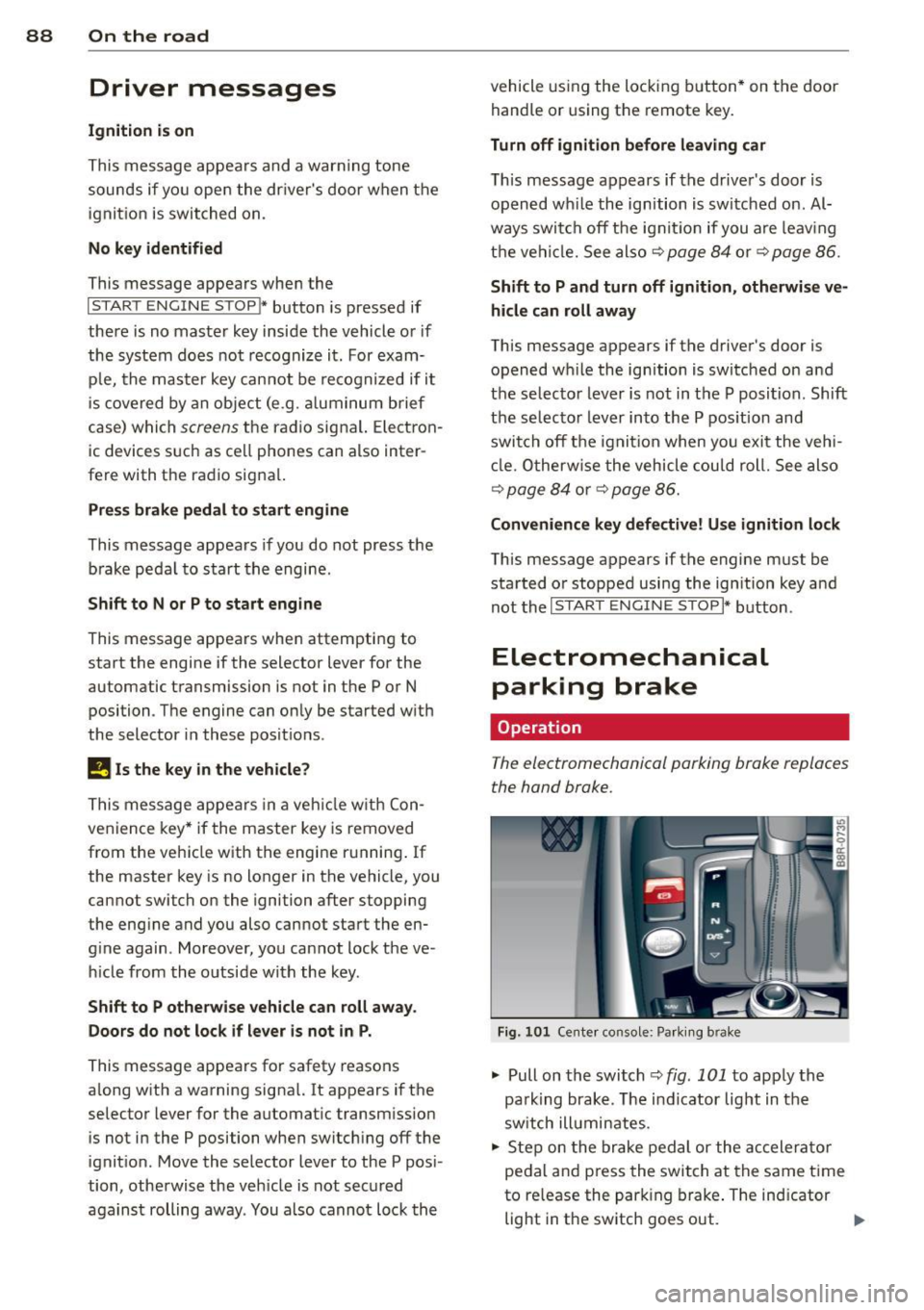
The electromechonicol parking broke replaces
the hand broke.
Fig. 101 Cente r console: Park ing b rake
"' Pull on the switch ¢ fig. 101 to apply the
pa rking brake . The indicator light in the
sw itch ill uminates.
"' Step on the brake pedal or the accelerator
pedal and press the swit ch at the same time
to release the park ing brake. The indicator
light in the switch goes out.
Ill>
Page 91 of 316
Your vehicle is equipped with an electrome
chanica l parking brake . The parking brake is
des igned to prevent the vehicle from ro lling
un intent ionally and replaces the hand brake.
I n addition to the norma l functions of a tradi
tional hand brake, the electromechanica l
parking brake provides various convenience
and safety functions.
When start ing f rom re st
- T he integral starting assist helps you when
driving by automatically releasing the park
ing brake ¢
page 90, Starting from rest.
-When starting on inclines, the starting as
sist prevents the vehicle from unintentional
l y rolling back. The braking force of the
parking brake is not released until sufficient
driv ing force has been built up at the
wheels .
Emergenc y bra ke function
An emergency brake ensures that the vehicle
can be slowed down even if the
normal brakes
fa il¢
page 90, £mergency braking.
Ind icator light s
-If the parking brake is closed w ith the igni
tion
s witched on the indicator lights come
on . (USA models)/ . (Canada models) in
the instrument cluster and the sw itch.
- If the parking brake is closed with the igni
tion
switched off the indicator lights come
on . (USA models)/ . (Canada mode ls) in
the instrument cluster and the switch for
about 20 seconds.
A WARNING
If a drive range is engaged with the veh icle
stat ionary and the engine runni ng, you
must in no instance accelerate care lessly.
Otherw ise the vehicle will start to move
immediate ly- risk of an accident.
W Note
If the symbo l. in the display or the ind i
cato r light .. (USA models) . (Cana
da mode ls) in the instrument cluster flash-
On th e ro ad 89
es, there is a ma lf u nction in the brake sys
tem . By pressing the
ISETI button, you can
bring up a dr iver message which explains
the malfunct ion in more detai l. If the driv
er message
Pa rking brake s ystem fault!
See owner 's manual
appears, there is an
ope rat ing malfunction in the parking brake
which yo u should have repaired immedi
ate ly by an autho rized Aud i dea le r o r other
q ualified wor ks hop ¢
page 29.
(D Tips
-Yo u can app ly the parking brake at any
t ime -even with the ig nition turned off.
T he ign it io n m ust be tu rned on in o rder
to release the parking brake .
- Occasional noises when the pa rking
brake is app lied and released are no rmal
and are no t a cause for conce rn.
- Whe n the vehicle is pa rked, the park ing
brake goes through a sel f-test cycle at
regu lar interva ls. Any associated noises
are normal.
Parking
Parking
.,. Stop the vehicle with the foot brake .
.,. Pull the switch to apply the parking brake.
.,. Move the selector lever to P .
.,. Turn the engine off¢.&_.
In addit ion on incline s and grades
.,. Turn the steering wheel so that yo ur vehicle
wi ll roll against the curb in case it should
start to move.
A WARNING
--When you leave your vehicle -even if on-
ly briefly -always remove the ignition
key. Th is applies pa rticularly when chil
dren remain in the vehicle. Otherwise the
children could sta rt the eng ine, release
the par king brake or operate electrical
equ ipment (e.g. power windows). There
is the risk of an acc ident.
Page 95 of 316
- After engaging the reverse gear.
er.
Engine automatically restarts
The stop phase is interrupted in the following
situations, for example . The engine restarts
without any act ion by the driver .
- The interior temperature varies from the
temperature selected in the A/C system.
- The windshield is beeing defrosted
Q page 81.
-The brake pedal is pressed several times in a
row.
- The battery charge level becomes too low.
- High power consumption .
@ Tips
If you shift into the 0/5 or N positions af
ter shifting into reverse, the vehicle must
be driven faster than 6 mph (10 km/h) in
order for the engine to switch off again.
Switching the Start-Stop-System on/off
manually
Applies to vehicles: with Sta rt-Stop-System
If you do not wish to use the system, you can
switch it off manually .
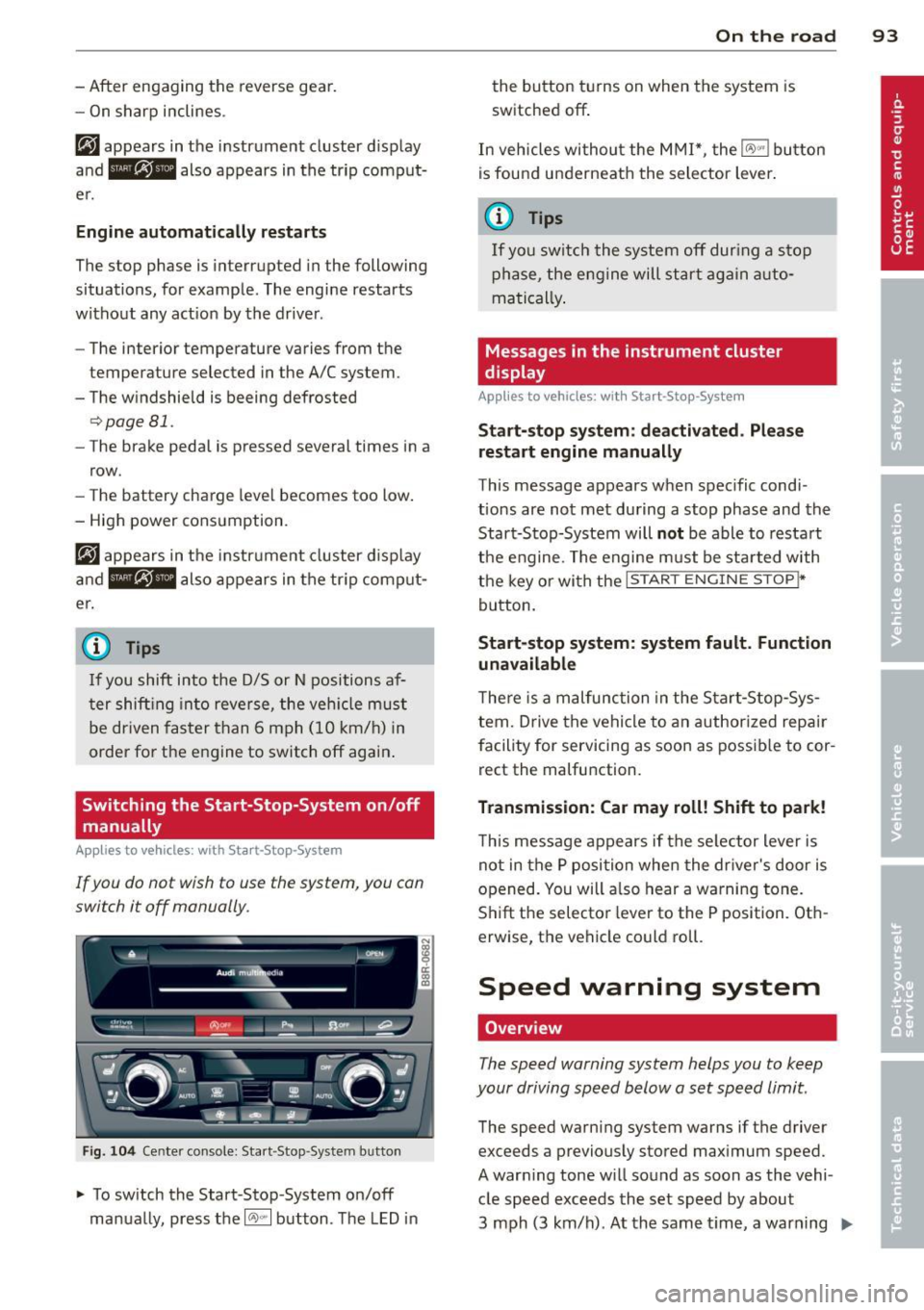
Fig. 104 Center console: Start -Stop -System button
.,. To switch the Start-Stop -System on/off
manually, press the
1 (1;)~ 1 button . The LED in
On the road 93
the button turns on when the system is
switched off .
In vehicles without the MMI*, the
IO\> .. j button
is found underneath the selector lever .
(j} Tips
If you switch the system off during a stop
phase, the engine will start again auto
matically.
Messages in the instrument cluster
display
App lies to vehicles: wit h Start-Stop-Syste m
Start-stop system: deactivated . Please
restart engine manually
This message appears when specific condi
tions are not met during a stop phase and the
Start-Stop-System will
not be able to restart
the engine. The engine must be started with
the key or with the
I STAR T ENGINE STOP t*
button.
Start-stop system: system fault. Function
unavailable
There is a malfunction in the Start-Stop-Sys
tem. Drive the vehicle to an authorized repair
facility for servicing as soon as possible to cor
rect the malfunction.
Transmission: Car may roll! Shift to park!
This message appears if the selector lever is
not in the P position when the driver's door is
opened. You will a lso hear a warning tone.
Shift the selector lever to the P position . Oth
erw ise, the vehicle could roll.
Speed warning system
Overview
The speed warning system helps you to keep
your driving speed below a set speed limit.
The speed warning system warns if the driver
exceeds a previously stored maximum speed.
A warning tone will sound as soon as the vehi cle speed exceeds the set speed by about
3 mph (3 km/h) . At the same time, a warning
IJJ,,
Page 100 of 316
98 Hybrid -Do not transport fluids in open contain
ers in the luggage compartment. Spilled
fluids can seep underneath the cargo
floor. This can damage the high voltage
system.
Starting the vehicle
App lies to vehicles: with hybrid drive
The vehicle is started and turned off either
with the ignition key~
page 83 or with the
I START ENGIN E STOP ! button* ~ page 86 in
the same way as a conventional vehicle .
When starting the vehicle, the needles in the instrument cluster move upward briefly .
When the vehicle enters drive ready mode,
the status message
hybrid ready appears
briefly in the instrument cluster display and
the needle in the power meter points to
READY ~ page 98.
Depending on the operation mode of the hy
brid system, there are two possible drive
ready modes after the vehicle has been start
ed:
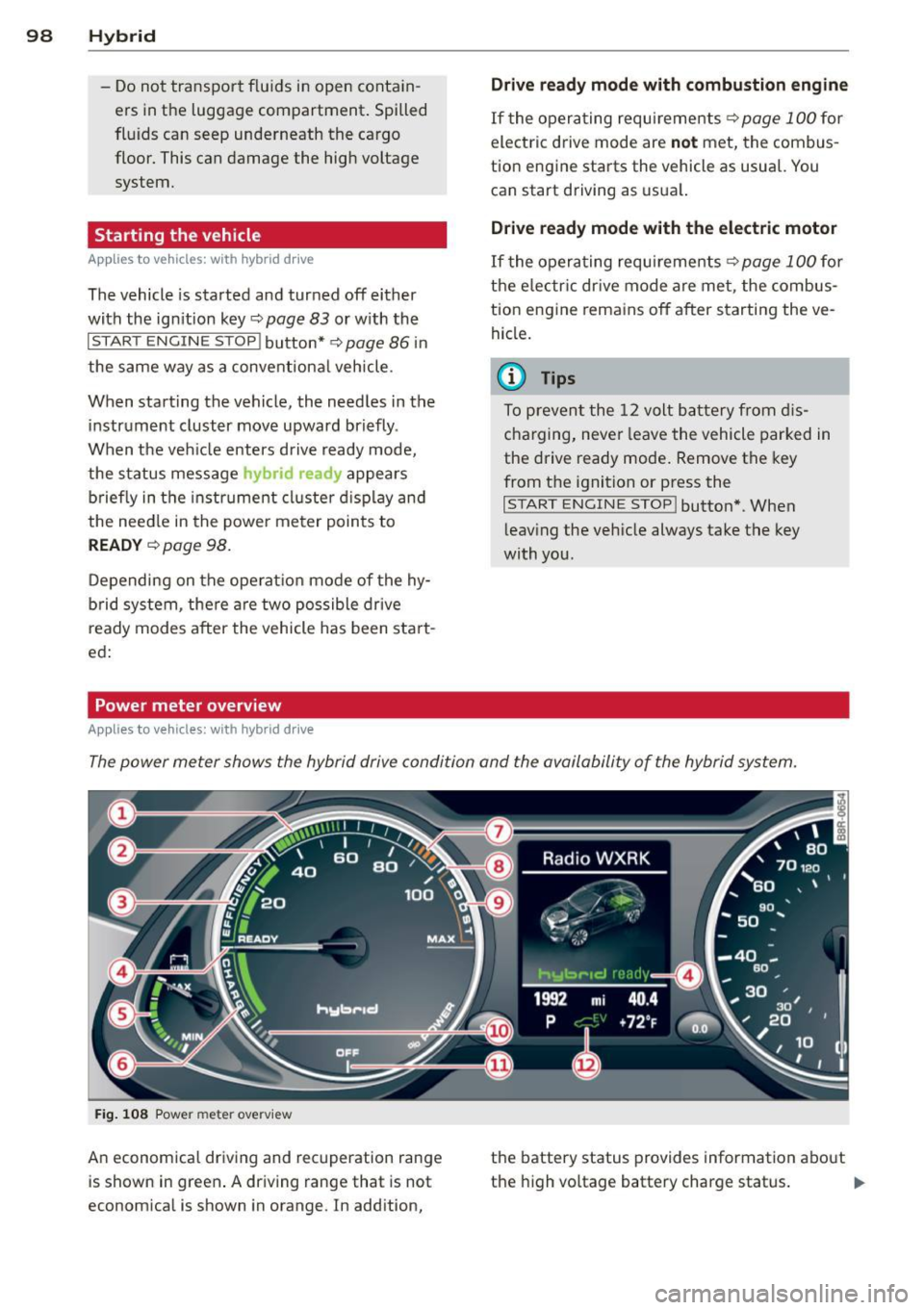
Power meter overview
Applies to vehicles: with hybrid dr ive
Drive ready mode with combustion engine
If the operating requirements~ page 100 for
electric drive mode are
not met, the combus
tion engine starts the vehicle as usual. You can start driving as usual.
Drive ready mode with the electric motor
If the operating requirements~ page 100 for
the electric drive mode are met, the combus
tion engine remains off after starting the ve
hicle.
(0 Tips
To prevent the 12 volt battery from dis
charging, never leave the vehicle parked in
the drive ready mode. Remove the key
from the ignition or press the
I START ENGINE STOP! button* . When
leaving the vehicle always take the key
with you.
The power meter shows the hybrid drive condition and the availability of the hybrid system.
Fig. 108 Power meter overv iew
An economical driving and recuperation range
is shown in green. A driving range that is not
economical is shown in orange. In addition, the battery status
provides information about
the high voltage battery charge status.
lill-
Page 101 of 316
(!) Fuel efficient driv ing within the
comb ustion engine's partia l
l oad range
@ System limits fo r electric d riving
i n the EV mode
® Elect ric driving or d riving w it h
the combustion engine (EFFI -
CI ENCY)
© Vehicle d rive ready (READY)
® H igh vo ltage bat tery c ha rge sta -
tus
® Recuperation (CHARGE)
0 Dr iving w it hi n the combus tion
engine's fu ll loa d range
® 100% combust io n engine
® Boost ing -the elect ric e ngine
assists the combus tion engine
( B OOST)
@ Engaging the conventiona l
brakes w ith recuperat ion
@ Vehicle not drive ready ( OFF)
@ EV mode active
The needle rema ins at
OFF when the igni tion
is tur ned on. W hen the veh icle en ters drive
ready mode, t he stat us message
hybrid ready
ap pears briefly in the instrument cluster dis
p lay and the needle in the power meter po ints
to
READY .
Indicator lights and messages
Applies to vehicles: with hybrid drive
The indicator lights in the instrument cluste r
b link or t urn on . Th ey i ndicate fu nctions o r
malfunct ions .
W ith some ind icator lights, messages may ap
pear and a warning tone may sound. Also note
the indicator lights in c::,;,
pag e 27.
Press brake pedal to start vehicle
This message appea rs if you do not press the
brake peda l when starting the vehicle.
Hybrid 99
Shift to N or P to start vehicle
T his mess age appears if the se lector lever for
the automatic t ransmission is not in t he N or
P positions when starting the vehicle.
- Hybrid drive: System fault! Power
brakes, steering malfunction possible
I f the indica tor ligh t turns on and this mes
sage a ppears, t here is a ma lf u nction in the hy
bri d system. The brake booster and the power
steering may stop working. Stop the vehicle i n
a safe l ocat io n as soo n as poss ible.
You may cont in ue dr iving if the indicator light
turns
off afte r start ing the ve hicle severa l
times. Dr ive to an a uthorized repa ir facility
immediately to have the malfunct ion correct
ed .
EHithjj,j Hybrid drive : Sy stem fault!
Contact dealer
If the indicator light turns on and this mes
sage appears , there is a malfunct ion in the hy
br id system . Drive to a n author ized repair fa
c ili ty immediat ely to hav e th e m alfunc tion
corrected.
Ill Hybrid system: Performance
restricted. Please contact dealer
If th e i ndica to r light turns on and this mes
sag e appea rs, there is an engine contro l ma l
f unct io n .
The @B indi cator light in t he instr u
m ent cluster also tur ns on. The engine ou tput
i s re duced. Drive to yo ur autho rize d Au di dea l
er or qualifie d repair facility immediately to
have the malfunct io n corrected .
Hybrid drive deactivated. Please restart
engine manually.
Th is message ap pears if the high vo ltage bat
te ry charge leve l has fallen below a certa in
range or if the ignition key is no longer inside
the ve hicle for ve hicles with the convenience
key *.
Start the eng ine with e it h er the ignitio n key
¢page 83 or with the !STAR T EN GINE STOPI
button* c::> page 86.
Page 114 of 316
112 Audi adaptive cruise control and braking guard
<:::::> ___ <:::::>_ Distance 3: This setting cor re-
sponds to a d istance of 164 feet/SO meters
when traveling at 62 mph (100 km/h), or a
time interval of 1.8 second s.
<:::::> ____ <:::::> Distance 4: This setting cor re-
sponds to a d istance of 210 feet/64 meters
when traveling at 62 mph (100 km/h), or a
time interva l of 2 .3 seconds .
A WARNING
Following other vehicles too closely in
creases the risk of collisions and serious
personal injury.
- Setting short distances to the traffic
ahead reduces the t ime and distance
available to br ing your vehicle to a safe
stop and makes it even more necessary
to pay close attention to traffic.
- Always obey applicable traffic laws, use
good judgment, and select a safe follow
ing distance for the traffic, road and
weather conditions.
(0 Tips
- Distance 3
is set automatically each time
you sw itch the ignition on.
- Your standa rd settings are automatically
stored and assigned to the remote con
trol key being used
c:::> page 36.
Setting the driving program
Applies to vehicles: with Audi adaptive cruise control
Depending on the selected dr iving program
and distance, driving behavior when accelerat
ing will vary from dynamic to comfortable.
Setting the driving program for vehicles
without Audi drive select*
• In the radio/MMI*, select: !CAR !function
button
> adaptive cruise control > Driving
program
> Comfort, Standard or Dynamic .
Or
• Select : ICARI function button>
Car sys
tems *
control button > Driver assist> Adap
tive cruise control> Driving program
>
Comfort, Standard or Dynamic. Setting the driving mode for vehicles with
Audi drive
select*
Refer to c:::> page 121.
(D Tips
Your settings are automatical ly stored and
assigned to the remote control key being
used
c:::> page 36 .
· Request for driver intervention
Applies to vehicles: with Audi adaptive cruise contro l
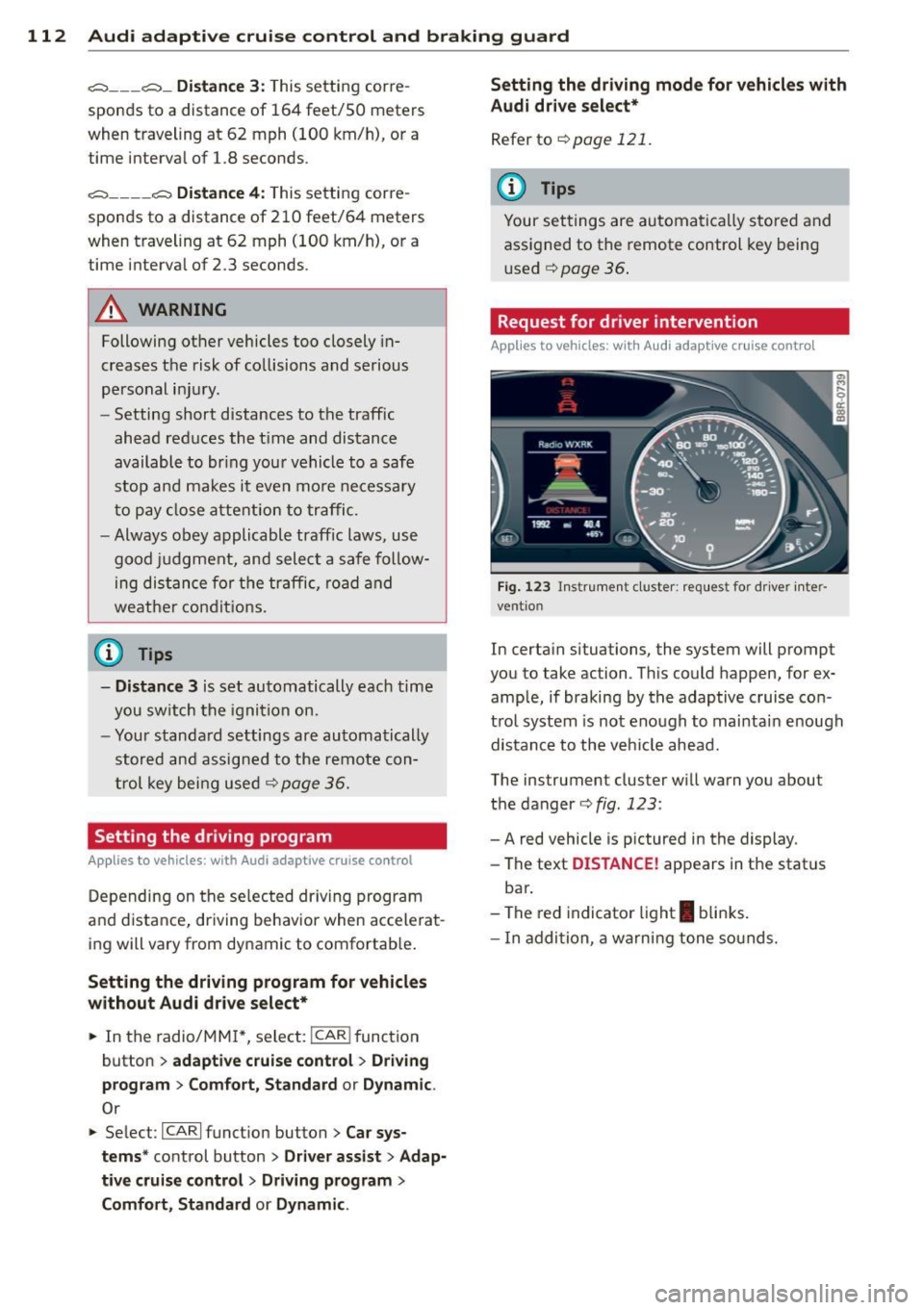
Fig. 123 Inst rumen t cl uster: r eque st for dr ive r in te r
ve ntion
In certain situations, the system will prompt
you to take ac tion . This could happen, for ex
ample, if braking by the adaptive cruise con
trol system is not enough to mai ntai n enough
distance to the vehicle ahead.
The ins trumen t cluster will warn you abou t
the danger
c:::> fig. 123 :
-A red vehicle is p ictured in the display.
- The text
DISTANCE! appears in the stat us
bar .
- The red indicator light
I blinks.
- In addition, a warning tone sounds.
Page 116 of 316
114 Audi adaptive cruise control and bra king guard
- Always remember t hat t he radar sens or
fo r the braking guard wo rks only within
defined detection and range limits that
may preve nt the proper detection of oth
er v eh icles.
- The radar senso r's fu nction and range
can be reduced by rain, s now a nd heavy
spray. Mo ving v ehicl es u p ahead may not
b e promptly det ecte d or may not be de
te cte d at al l.
- Reflective surfaces in cl udi ng c ras h barri
ers or tu nnel ent ran ces may impair the
f unc tion of the r ad ar sen sor.
(D Tips
- You can cance l th e braking tha t is initiat
ed by the system by braking yours elf, by
a cce lerati ng noticeab ly o r by swerving.
- Brak ing guard er ror m essages
Qpag e
114.
- Keep in mi nd that braking gua rd can
brake u nexpect edly . Always secure any
ca rgo or objects that you are tr ansport
i ng to reduce the risk of d amage or in
ju ry.
Settings in the radio/MM!*
Applies to vehicles: with Audi adaptive cruise control
• Se lect: ICARI f u nct io n button > Audi brak
ing guard.
O r
• Se lect :
ICARI fu nct ion button > Car sys
tems *
control button > Driver assist > Audi
braking guard .
System -
Switch bra king g uard On and Off .
When you sw itch the ignition on, the message
Brak ing guard: Off appears if the system is
switched off .
Early warning -The d istance and approach
warn ings in the display can be switched
On /
Off .
(D Tips
-Your settings are automatica lly sto red
and ass igned to the remote control key
being used at the t imes t he settings are
made¢ page
36.
- If you switch the ESC to ESC O ff road
mode, the braking guar d switches off a u
toma tically¢ page
198.
-Swit ch braking guar d off when you a re
loading the vehicle onto a veh icle carrier,
train, ship o r other type of t ransporta
tion. This can prevent undesired warn ings from the braking gua rd system .
Messages
Applies to vehicles: wit h Aud i adapt ive cru ise control
Braking guard : Off
T his dr iver message a ppears if t he system is
tu rned off via the radio/M M!* . Otherw ise, if
the system is turned off, the in formation ap
pears every t ime sho rtly after the start of the
trip .
T his dr iver's i nfo rmation also ap pears w hen
the system is not available because of a ma l
funct ion or if ESC is switched to the Offroad
m ode
Q page 198. In t his state the system
no longe r warns of a pend ing coll is io n.
Braking guard : Activated
T his dr iver mess age a ppears if shar p brake
p ressure was applie d due to a n acute warning.
•••
Three white dots appea r if a sett ing cannot be
selected w ith the operating lev er. For exam
ple, this happens if you want to raise/lower
t h e speed even thoug h there was no prev ious
l y saved speed.
ACC: Sensor blocked
Th is message appears if the senso r view is ob
structed, for examp le by leaves, snow, heavy
spray or d irt. Clean the sensor¢ page
107,
fig. 114.
ACC: Unavailable
The driver message appears if, for example,
t h e b rake temperat ure is too high . The ada p
tive cru ise contro l is temporarily unava ilable.
A ch ime sounds as a rem inder .
ACC: Not available