tire pressure AUDI Q5 2014 Owners Manual
[x] Cancel search | Manufacturer: AUDI, Model Year: 2014, Model line: Q5, Model: AUDI Q5 2014Pages: 316, PDF Size: 78.41 MB
Page 5 of 316
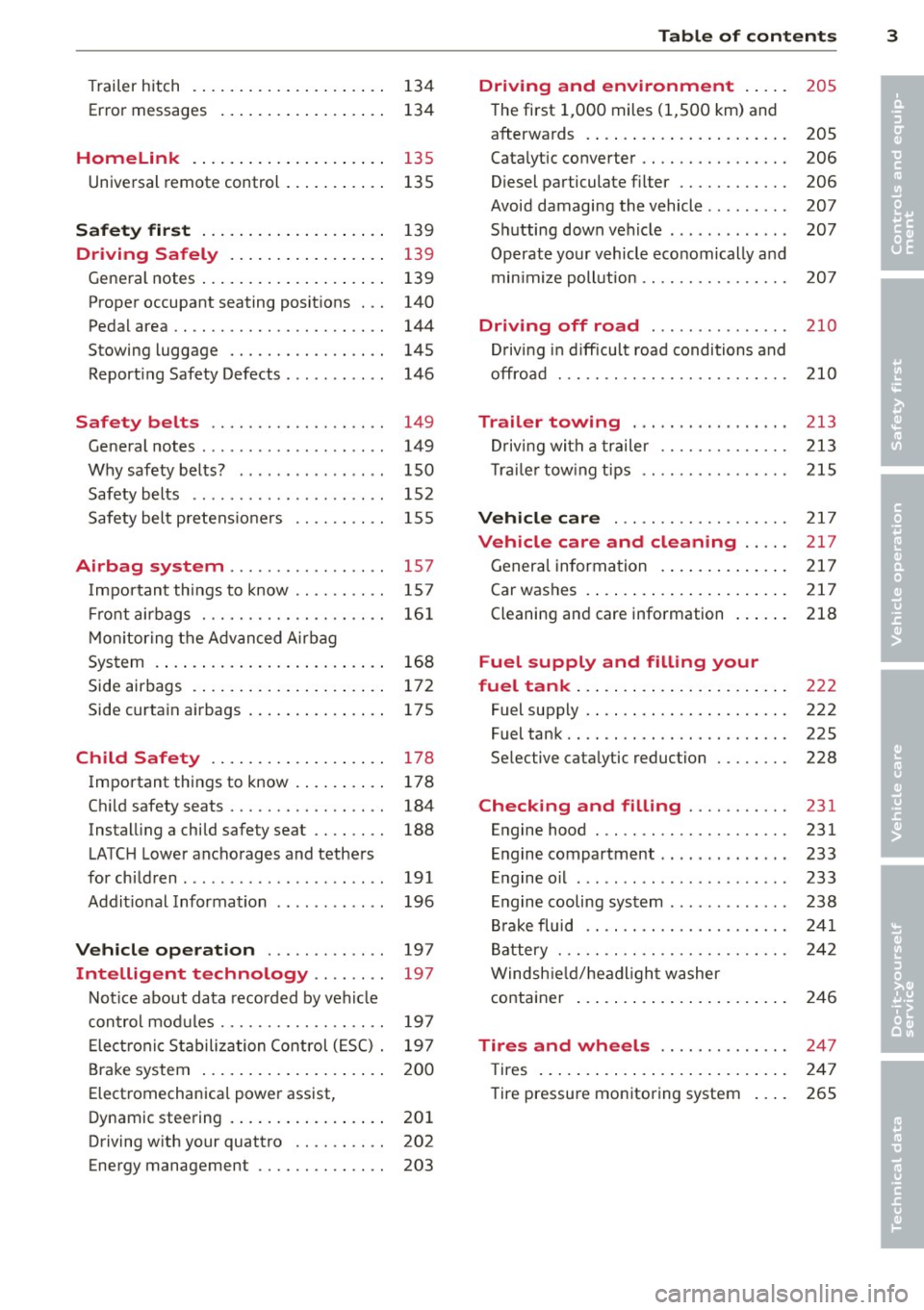
Trailer hitch ................... . .
Error messages
Homelink ................ ... . .
Universal remote control .......... .
Safety first ................... .
134
134
135
135
139
Dri ving Safely . . . . . . . . . . . . . . . . . 139
General notes . . . . . . . . . . . . . . . . . . . . 139
Proper occupant seating positions . . . 140
Pedal area . . . . . . . . . . . . . . . . . . . . . . . 144
Stowing luggage . . . . . . . . . . . . . . . . . 145
Reporting Safety Defects . . . . . . . . . . . 146
Safety belts . . . . . . . . . . . . . . . . . . . 149
General notes . . . . . . . . . . . . . . . . . . . . 149
Why safety belts? . . . . . . . . . . . . . . . . 150
Safety belts . . . . . . . . . . . . . . . . . . . . . 152
Safety belt pretensioners . . . . . . . . . . 155
Airbag sy stem .......... ... ... . 157
Important things to know . . . . . . . . . . 157
Front airbags . . . . . . . . . . . . . . . . . . . . 161
Monitoring the Advanced Airbag
System . . . . . . . . . . . . . . . . . . . . . . . . . 168
Side airbags . . . . . . . . . . . . . . . . . . . . . 172
Side curtain airbags . . . . . . . . . . . . . . . 175
Child Safety ................. . .
Important things to know ........ . .
Child safety seats ......... .... .. . .
Installing a child safety seat .. .. .. . .
LATCH Lower anchorages and tethers
for children .... .. .. ...... .. .. .. . .
Additional Information
Vehicle operation ....... .. .. . .
Intelligent technology .. .. . .. .
178
178
184
188
191
196
197
197
Notice about data recorded by vehicle
control modules . . . . . . . . . . . . . . . . . . 197
Electronic Stabilization Control (ESC) . 197
Brake system . . . . . . . . . . . . . . . . . . . . 200
Electromechanical power assist,
Dynamic steering . . . . . . . . . . . . . . . . . 201
Driving with your quattro . . . . . . . . . . 202
Energy management . . . . . . . . . . . . . . 203
Table of contents 3
Driving and environment . . . . .
205
The first 1,000 miles (1,500 km) and
afterwards . . . . . . . . . . . . . . . . . . . . . . 205
Catalytic converter . . . . . . . . . . . . . . . . 206
Diesel particulate filter . . . . . . . . . . . . 206
Avoid damaging the vehicle . . . . . . . . . 207
Shutting down vehicle . . . . . . . . . . . . . 207
Operate your vehicle economically and
min imize pollution . . . . . . . . . . . . . . . . 207
Driving off road . . . . . . . . . . . . . . . 210
Driving in difficult road conditions and
offroad . . . . . . . . . . . . . . . . . . . . . . . . . 210
Trailer towing . . . . . . . . . . . . . . . . . 213
Driving with a trailer . . . . . . . . . . . . . . 213
Trailer towing tips . . . . . . . . . . . . . . . . 215
Vehicle care . . . . . . . . . . . . . . . . . . . 217
Vehicle care and cleaning . . . . . 217
General information . . . . . . . . . . . . . . 217
Car washes . . . . . . . . . . . . . . . . . . . . . . 217
Cleaning and care information . . . . . . 218
Fuel supply and filling your
fuel tank . . . . . . . . . . . . . . . . . . . . . . .
222
Fuel supply . . . . . . . . . . . . . . . . . . . . . . 222
Fuel tank. . . . . . . . . . . . . . . . . . . . . . . . 225
Selective catalytic reduction . . . . . . . . 228
Checking and filling . . . . . . . . . . . 231
Engine hood . . . . . . . . . . . . . . . . . . . . . 231
Engine compartment . . . . . . . . . . . . . . 233
Engine oil . . . . . . . . . . . . . . . . . . . . . . . 233
Engine cooling system . . . . . . . . . . . . . 238
Brake fluid . . . . . . . . . . . . . . . . . . . . . . 241
Battery . . . . . . . . . . . . . . . . . . . . . . . . . 242
Windshield/headlight washer
container . . . . . . . . . . . . . . . . . . . . . . . 246
Tires and wheels . . . . . . . . . . . . . . 247
T ires . . . . . . . . . . . . . . . . . . . . . . . . . . . 247
Tire pressure monitoring system . . . . 265
•
•
Page 16 of 316
14 Instruments and warning/indicator lights
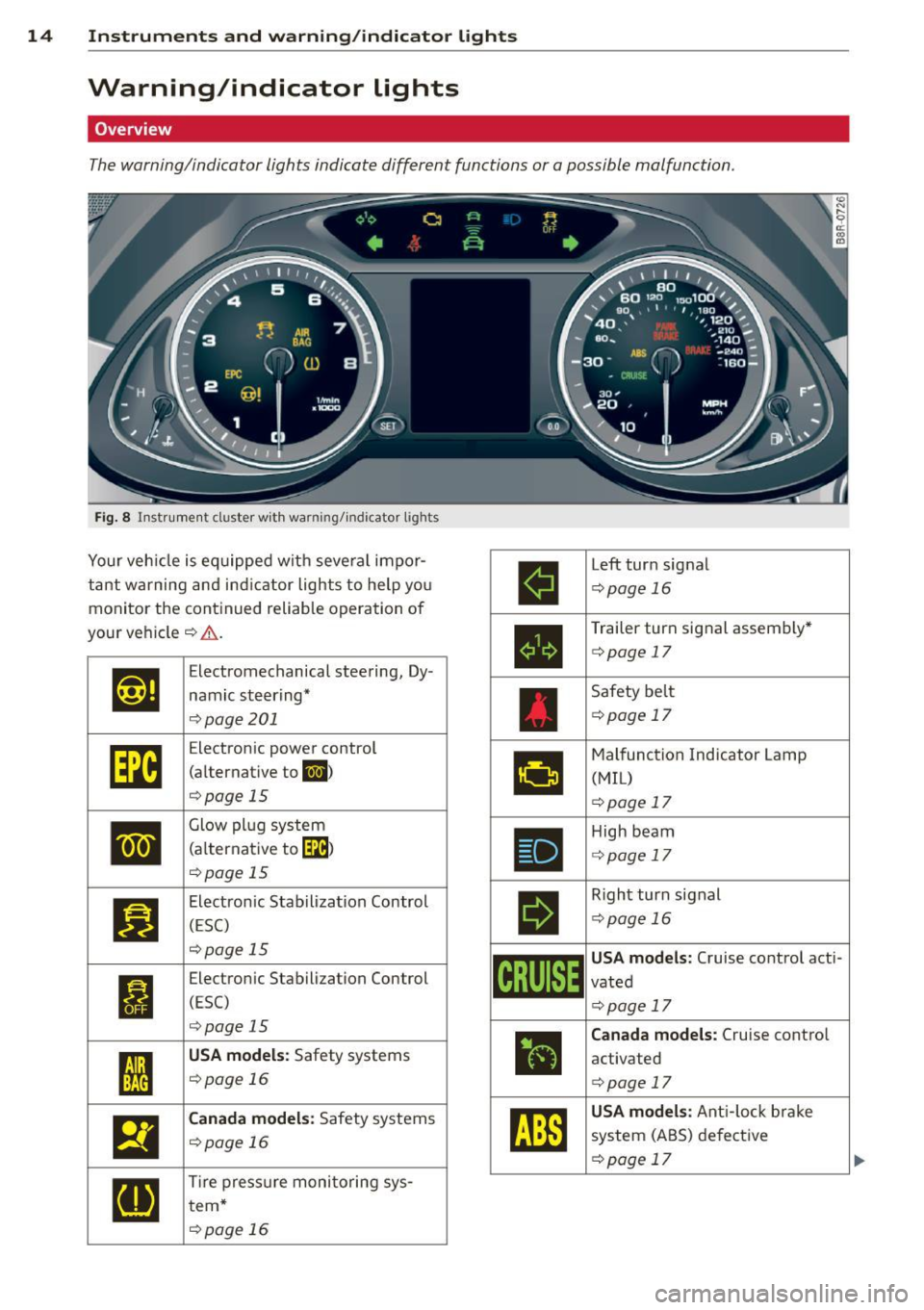
Warning/indicator lights
Overview
The warning/indicator lights indicate different functions or a possible malfunction.
Fig. 8 In str umen t cluster with warning/indicator lights
Your veh icle is equipped with seve ral impor
tant warning and indicator lights to help you
monitor the continued reliable operation of
your veh icle
c:> .&. .
Et·ff
Elect romechanical steering, Dy-
namic steering*
c:>pag e 201
[m
Electron ic power control
(alternative to
II)
c:>page 15
•
Glow plug system
(a lternat ive to
[IB)
c:>poge 15
II
Electronic Stabilization Control
(ESC)
c:>page 15
I
Electronic Stabilization Control
(ESC)
c:>page 15
I
USA models: Safety systems
c:>poge 16 .
El
Canada models: Safety systems
c:>page 16
[IJ
Tire pressure monitoring sys-
tern*
c:>poge 16
ll
Left turn signal
c:>page 16
•
Trailer turn signal assembly*
c:>page 17
Safety belt
c:>page 17
•
Malfunction Indicator Lamp
(MIL)
c:>page 17
•
High beam
<::>page 17
II
Right turn signal
<::>pag e 16
~i[~~1~
USA models: Cruise control acti-
vated
<::>pag e 17
ii
Canada models: Cruise control
activated
c:> page 17
~
USA models : Anti-lock brake
system (ABS) defective
c:> page 17
Page 18 of 316
![AUDI Q5 2014 Owners Manual 16 Instruments and warning/indicator lights
If the Jj;] indicator light turns on, the system
has switched the ESC
off . In this case, you can
switch the ignition
off and then](/img/6/57636/w960_57636-17.png "AUDI Q5 2014 Owners Manual 16 Instruments and warning/indicator lights
If the Jj;] indicator light turns on, the system
has switched the ESC
off . In this case, you can
switch the ignition
off and then")
16 Instruments and warning/indicator lights
If the Jj;] indicator light turns on, the system
has switched the ESC
off . In this case, you can
switch the ignition
off and then on to switch
the ESC on again. The indicator light turns
off
when the system is functioning fully.
If the
11 indicator light turns on, ESC was re
str icted using the
I~ OFF I button ¢ page 197.
Stabilization control (ESC/ABS): Fault! See
owner's manual
I f the
Jj;] indicator light and the ABS ind icator
l ight ~ (USA models)
Iii] (Canada models)
turn on and the message appears, the ABS or
e lectronic differential lock is ma lfunctioning.
This a lso causes the ESC to malfunction . The
brakes st ill function with the ir normal power,
but ABS is not active.
Drive to your authorized Audi dea ler or quali
fied workshop immediately to have the mal
function corrected.
A WARNING
-
If the ~ (USA models)/ . (Canada
models) brake system ind icator light turns
on together with the ABS and ESC ind ica
tor lights, the ABS/ESC regulating function
may have fai led. Functions that stabilize
the vehicle a re no longer ava ilab le. This
could cause the vehicle to swerve and in
crease the risk of sliding. Drive carefully to
the nearest a uthorized Audi dea ler or oth
er qualified workshop and have the mat-
function corrected.
(D Tips
For additional information on ESC and
ABS, refer to¢
page 197.
it !f Safety systems
The fl (USA models) tE,I (Canada models) in
dicator light monitors the safety systems (e.g.
a ir bags, pretensioners) and illuminates for a
few seconds each time you switch the ignition
on .
If the
fl (USA models) tE,I (Canada models)
indicator light does not go out, or if it illumi- nates while you are driving, or if it starts to
blink,
then there is a malfunction somewhere
in the system. If the light does not illuminate
when you switch the ign ition on, this also
means there is a malfunction.
A WARNING '"--
If you have a malfunction in the safety sys-
tems, contact your authorized Audi dealer
imme diately. Otherwise the safety sys
tems may not work properly in an acc i
dent.
ill Tire pressure monitoring system -
telltale indicator lamp
Applies to vehicles: wit h tire p ressu re mo nito rin g system
The warning/indicator light appears in the
event of a significant loss of tire pressure or if
there is a malfunction .
The ind icator light IE illuminates to check
the function when you switch on the ignition.
If the
IE symbol remains on or blinks after
you sw itch on the ign it ion, there is a loss of
t ir e pressure or a system malfunction. If there
is a system ma lfunction, see your authorized
Audi dealer as soon as possible.
Detailed informat io n on the tire p ressure
monitoring system can be found in
¢page 265.
¢¢Turn signals
The indicator light blinks when you use either
turn signal.
Whenever you use the left (I or the r ight II
turn sig nal, the indicator light blinks. When
you use the emergency flashers, both indica
tor lights flash .
If one of the turn signa l light bulbs burn out,
the turn sig nal will blink twice as fast as nor
mal.
This does not apply, however, in towing mode .
The indicator light does not flash if a turn sig
nal is out on the tra ile r or the towing vehicle. .,.
Page 22 of 316

20 Driver in formation d ispl ay
Driver information
display
Introduction
General notes
The driver information display inside the in
strument cluster provides you , the driver ,
with much useful information.
Fig . 9 Instrument cl uster: ce nte r dis play
Information from the driver information sys
tem is shown in the display in the center of
t he instrument cluster .
When you turn on the ignition and while you
are driving, some functions and vehicle com
ponents are scanned for their operating sta
tus. Malfunctions or required service proce
dures are signaled audibly and shown by red
and yellow lighted symbols and rem inders to
the dr iver in the display.
T he driver is also shown information about ra
d io and CD operation and directions for the
navigation system*. You can find add itional
information on these subjects in the rad io or
MMI* manual.
The illustrations in the instrument panel dis
play differ in some of the vehicles .
The driver information system provides the
following functions :
Sound system disp lay
Q page 20
Outside air temperature Qpage 21
Digital speedometer Qpage 21
Open door- and luggage com-Qpage 21
partment warning
Service interval display
Q page22
Auto Check system <::>page27
Driver information Qpage27
Speed warning Qpage 93
Trip computer Qpage23
Tire pressure monitoring sys-Qpage265
tern*
Digita l clock with date display
Qpage 12
Odometer and trip odometer Qpage 13
Selector lever position Qpage 123
Cruise control c::>page95
Adaptive cruise control* c::> page 10 7
Energy flow display* <::> page 103
¢j) Tips
In the event of a malfunction either a red
or yellow icon appears in the display . Red
symbols indicate
Danger c::> page 28. Yel
l ow symbo ls indicate a
Warning
c::> page 31.
Sound system display
Fig. 10 D isplay : sound system
(0
"' .... 9 a:
~
If priority 1 or pr iority 2 faults are not shown
by the Auto Check Control , the name of the ra
dio sta tion you are tuned to or the frequency
and the reception range are shown in the up
per area of the display.
When the CD is in use, the title of the track
being played is shown . T he CD changer dis
plays the number of the current CD (CD
1 to
CD6) .
Page 34 of 316
32 Driver in formation d isplay
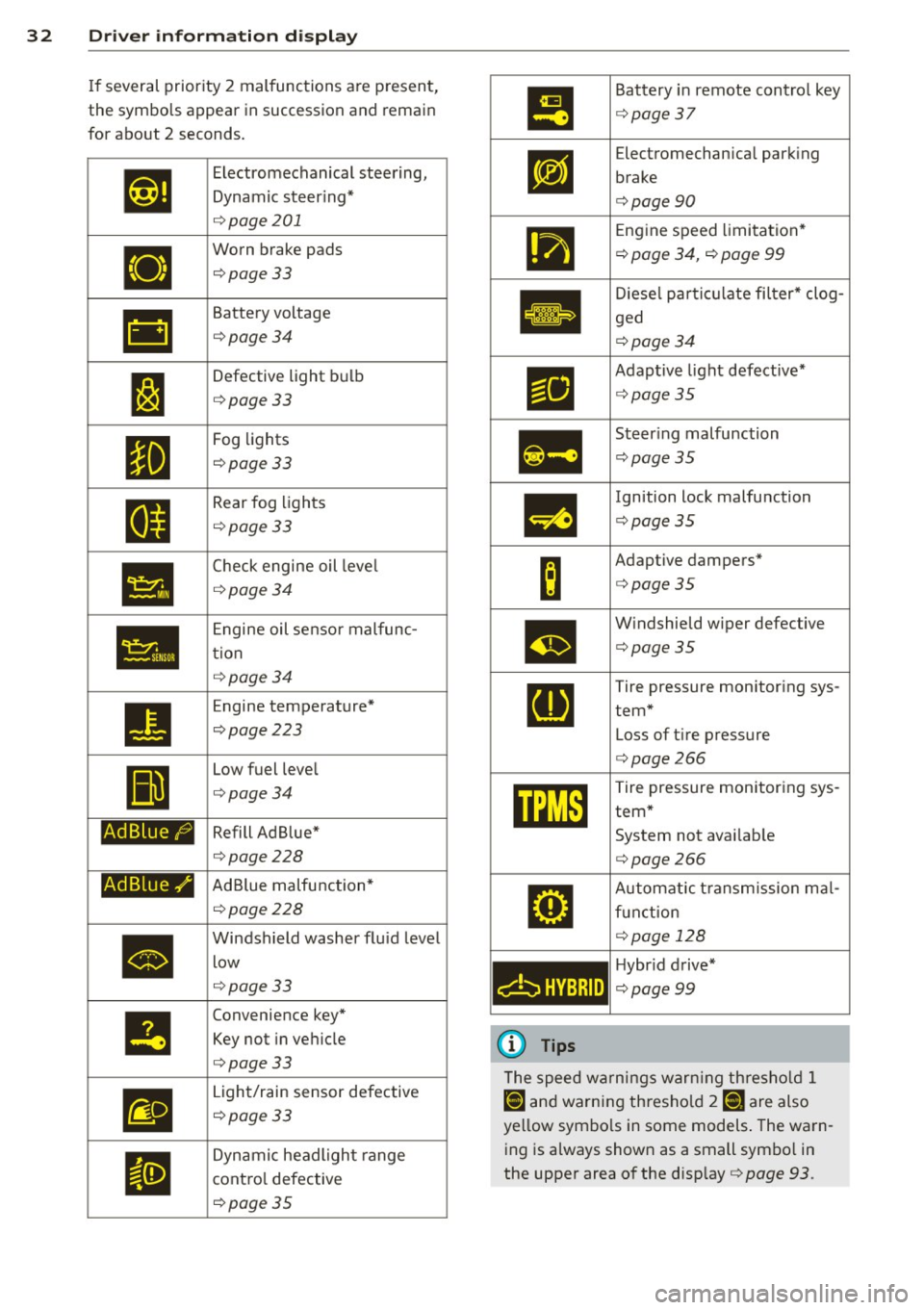
If several priority 2 malfunctions a re present,
the symbols appear in succession and remain
for about 2 seconds.
•
•
•
Ad B lue /9
Ad Blue./'
•
Electromechanical steering,
Dynamic steer ing*
q page 201
Worn brake pads
¢page 33
Battery voltage
¢page34
Defective light bulb
¢page 33
Fog lights
¢page 33
Rear fog lights
¢ page 33
Check engine oil leve l
¢page 34
Engine oil senso r malfunc
tion
¢ page 34
Engine temperature*
¢page 223
Low fuel level
¢page 34
Refill Ad Blue*
¢page228
AdBlue malfunction*
¢page 228
Windsh ield washer flu id level
low
q page 33
Convenience key*
Key not in vehicle
¢ page 33
Light/rain sensor defective
¢ page 33
Dynamic headlight range
cont ro l defective
¢ page 35
•
m
c:bHYBRID
(D Tips
Battery in remote contro l key
¢ page 37
Electromechan ical park ing
brake
¢ page90
Engine speed limitation *
¢ page 34, ¢ page 99
Diese l partic ulate fi lter* clog
ged
¢ page34
Adaptive light defective*
¢page35
Steer ing malfunction
¢ page 35
Ignition lock malfunction
¢page35
Adaptive dampers*
¢page35
W indshield wiper defective
¢page35
Tire pressure monitoring sys
tem* Loss of tire pressure
¢ page266
Tire pressure monitoring sys
tem*
System not avai lab le
¢ page266
Automat ic t ransm ission ma l
f u nct ion
¢ page 128
Hybr id drive*
¢ page99
The speed warnings warn ing th res ho ld 1
lDl and warning thresho ld 7 [DJ ;ire also
yellow symbo ls in some models . The warn
ing is always shown as a small symbo l in
the upper area of the disp lay¢
page 93.
Page 141 of 316
Driving Safely
General notes
Safe driving habits
Please remember -safety first!
This chapter contains important information,
tips, instructions and warnings that you need
to read and observe for your own safety, the
safety of your passengers and others . We have
summarized here what you need to know
about safety belts, airbags, child restraints as
well as child safety. Your safety is for us
priori
ty number 1.
Always observe the information
and warnings in this section - for your own
safety as well as that of your passengers.
The information in this section applies to all
model versions of your vehicle . Some of the
features described in this sections may be
standard equipment on some models, or may
be optional equipment on others. If you are
not sure, ask your authorized Audi dealer.
A WARNING
- Always make sure that you follow the in
structions and heed the WARNINGS in
this Manual. It is in your interest and in
the interest of your passengers.
- Always keep the complete Owner's Liter
ature in your Audi when you lend or sell
your vehicle so that this important infor
mation will always be available to the
driver and passengers.
- Always keep the Owner's literature handy
so that you can find it easily if you have
questions.
Safety equipment
The safety features are part of the occupant
restraint system and work together to help
reduce the risk of injury in a wide variety of
accident situations .
Your safety and the safety of your passengers
should not be left to chance. Advances in
technology have made a variety of features
available to help reduce the risk of injury in an
Driving Safely 139
accident. The following is a list of just a few of
the safety features in your Audi :
- sophisticated safety belts for driver and all
passenger seating positions,
- belt force limiters for the front seats,
- belt pretensioners for the seats,
- belt height adjustment for the front seats,
- head restraints for each seating position,
- front airbags,
- side airbags in the front seats and outer rear
seats*,
- side curtain airbags,
- special LATCH anchorages for child re-
straints,
- adjustable steering column.
These individual safety features, can work to gether as a system to help protect you and
your passengers in a wide range of accidents.
These features cannot work as a system if
they are not always correctly adjusted and cor
rectly used.
Safety is everybody's responsibility!
Important things to do before driving
Safety is everybody 's job! Vehicle and occu
pant safety always depends on the informed
and careful driver.
For your safety and the safety of your passen
gers,
before driving always:
.,. Make sure that all lights and signals are op
erating correctly .
.,. Make sure that the tire pressure is correct .
.,. Make sure that all windows are clean and af
ford good visibility to the outside .
.,. Secure all luggage and other items carefully
qpage 76.
.,. Make sure that nothing can interfere with
the pedals.
.,. Adjust front seat, head restraint and mirrors
correctly for your height .
.,. Instruct passengers to adjust the head re
straints according to their height .
.,. Make sure to use the right child restraint
correctly to protect children ¢
page 178,
and~~~-~
•
•
Page 142 of 316
140 Driving Safely
• Sit properly in your seat and make sure that
your passengers do the same¢
page 61,
General recommendations.
• Fasten your safety belt and wear it properly.
Also instruct your passengers to fasten their
safety belts properly¢
page 149 .
What impairs driving safety?
Safe driving is directly related to the condi
tion of the vehicle, the driver as well as the
driver's ability to concentrate on the road
without being distracted.
The driver is responsible for the safety of the
vehicle and all of its occupants . If your ability
to drive is impaired, safety risks for everybody
in the vehicle increase and you also become a
hazard to everyone else on the road
9 .&,.
Therefore:
• Do not let yourself be distracted by passen
gers or by using a cellular telephone.
• NEVER drive when your driving ability is im
paired (by medications, alcohol, drugs, etc.).
• Observe all traffic laws, rules of the road
and speed limits and plain common sense.
• ALWAYS adjust your speed to road, traffic
and weather conditions .
• Take frequent breaks on long trips. Do not
drive for more than two hours at a stretch.
> Do NOT drive when you are tired, under
pressure or when you are stressed .
A WARNING
Impaired driving safety increases the risk
of serious personal injury and death when
ever a vehicle is being used.
Proper occupant
seating positions
Proper seating position for the driver
The proper driver seating position is impor
tant for safe, relaxed driving.
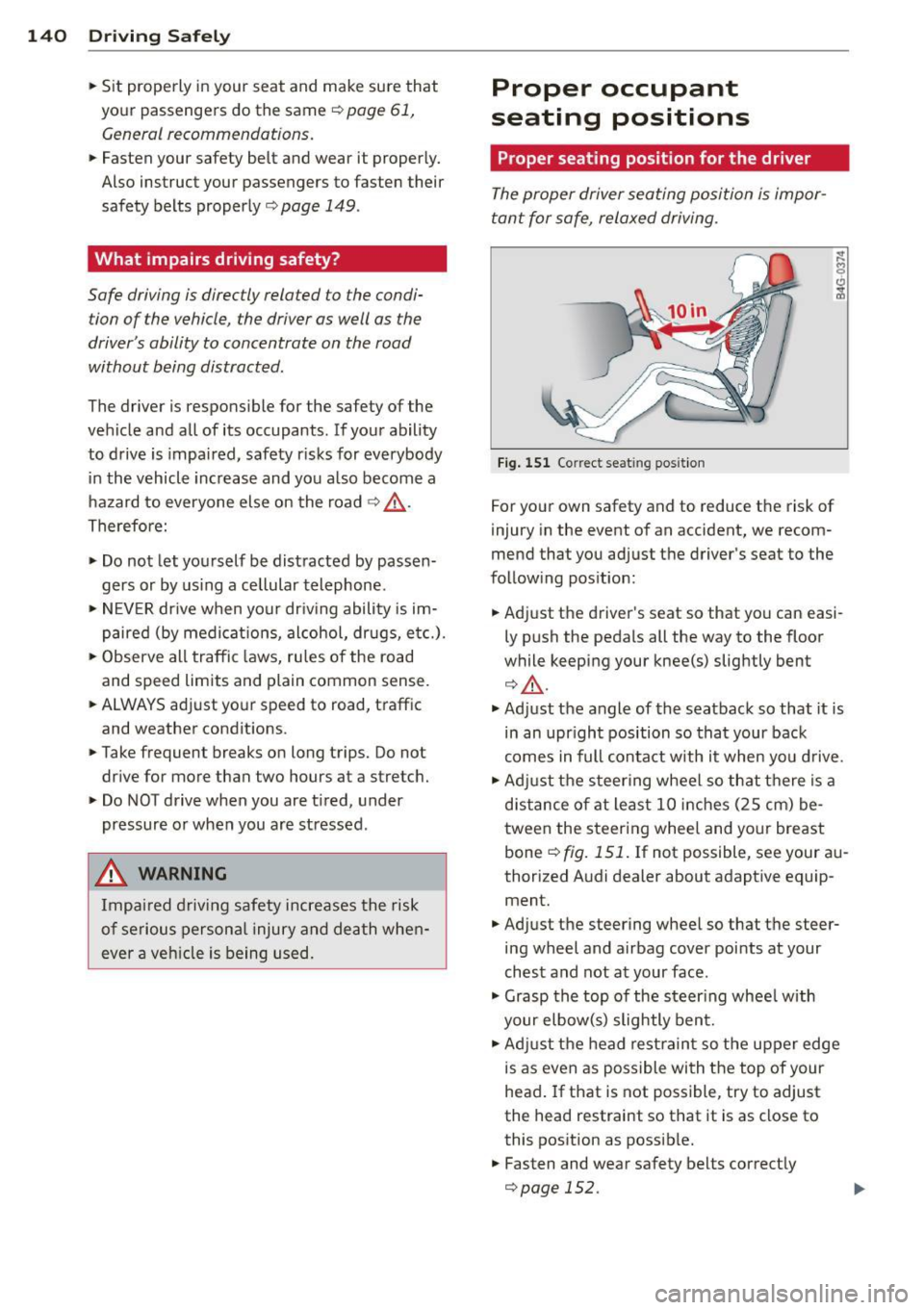
Fig. 151 Correct seat ing position
For your own safety and to reduce the risk of
injury in the event of an accident, we recom
mend that you adjust the driver's seat to the
following position:
• Adjust the driver's seat so that you can easi
ly push the pedals all the way to the floor
while keeping your knee(s) slightly bent
¢,&. .
• Adjust the angle of the seatback so that it is
in an upright position so that your back
comes in full contact with it when you drive.
• Adjust the steering wheel so that there is a
distance of at least 10 inches (25 cm) be
tween the steering wheel and your breast
bone ¢
fig. 151. If not possible, see your au
thorized Audi dealer about adaptive equip ment.
• Adjust the steering wheel so that the steer
ing wheel and airbag cover points at your
chest and not at your face .
• Grasp the top of the steering wheel with
your elbow(s) slightly bent.
• Adjust the head restraint so the upper edge
is as even as possible with the top of your
head. If that is not possible, try to adjust
the head restraint so that it is as close to
this position as possible.
• Fasten and wear safety belts correctly
¢page 152.
Page 148 of 316

146 Driving Safel y
to reduce the risk of inj ury when the vehi
cle is not be ing used.
- After closing the rear lid, always make
sure that it is properly closed and locked.
- Never leave your vehicle unattended es
pecially with the rear lid left open . A
child could crawl into the vehicle through
the luggage compartment and close the
rear lid becoming trapped and unable to
get out . Be ing trapped in a vehicle can
lead to serious persona l injury.
- Never let children p lay in or around the
vehicle .
- Never let passengers r ide in the luggage
compartment . Veh icle occupan ts must
always be proper ly restrained in one of
the vehicle's seating positions.
(D Tips
- Air circulation helps to reduce window
fogging . Sta le air escapes to the o utside
th rough vents in the trim pane l. Be su re
to keep these slots free and open.
- The tire pressure must correspond to the
load . The t ire pr essure is shown on the
tire p ressu re label. The tire pressure la
bel is loc ate d on the driver's s ide B-pi lla r.
The tire pressure label lists the recom
men ded cold t ire inflat ion pressu res for
the veh icle at its maximum capacity
weight and the tires that were on your
vehicle at the time it was manufact ured.
For recommended t ire pressures for nor
mal load conditions, please see chapter
Q page 251.
Tie-downs
The luggage compartment is equipped with
four tie-downs to secure luggage and other
items .
Use the tie-downs to secure your cargo prop
erly ¢ page 145, Loading the luggage com
partment .
In a coll is ion, the laws of phys ics mean that
even smaller items that are loose in the vehi
cle will become heavy missiles that can cause se
rious injury. Items in t he vehi cle possess en
ergy which vary with vehicle speed and the
weight of t he item . Vehicle speed is the most
s ignificant factor.
F or example, in a frontal collision at a speed
of 30 mph (48 km/h), the forces acting on a 10 -lb (5 kg) object a re abo ut 20 times the
normal weight of the item. This means that
the weight of the item would sudden ly be
about 200 lbs . (90 kg) . You can imag ine the
injur ies that a 200 lbs . (90 kg) item fly ing
fr ee ly t hro ugh the passenger compa rtment
cou ld cause in a col lision like this.
_& WARNING
We ak, damaged or imprope r straps used
to secure items to tie-downs can fail dur
i ng hard braking or in a collision and cause
se rious pe rsonal injury.
-Always use s uita ble mo unt ing straps an d
p roperly secu re items to the tie-downs in
the l uggage compa rtment to he lp pre
vent items from shift ing or fly ing fo r
ward as dangerous missiles.
- When the rea r seat backrest is folded
down, a lways use suitable mounting
straps and properly secure items to the
tie-downs in the luggage compartment
to hel p prevent items from fly ing for
ward as dangerous missiles into the pas
senger compartment.
- Never attach a chi ld safety seat t ether
s trap to a t ie-down .
Reporting Safety
Defects
Applicable to U.S.A.
If yo u b eli eve that your vehi cle
has a def ect whi ch could cau se
a crash or could cau se injury or
death, you should immediately
inform the National Highway
Traffic Safet y Administration ""
Page 203 of 316
Fa u lts in th e brake sy stem
If you should notice a sudden increase in
brake peda l travel, then one of the two brake
circuits may have failed~.&..
Low brak e flu id level
Malfunct ions can occur in the brake syste m if
the brake fl uid leve l is too low. The b rake fluid
l eve l is monito red electronically.
Brake boost er
The brake booster increases the pressure that
you generate w ith the brake pedal.
It only op
e rates while the eng ine is running or with the
i gnit ion sw itched on (hybr id dr ive*)~ .&,.
Brake lining wear statu s
Brake lining wear may be checked by visual in
spection of the condition of the brake pads
through the openings in the whee l. If neces
sa ry, the wheel may be removed for this in
spection
~ page 2 73, Changing a wheel.
.&_ WARNING
=
- You should perform braking maneuvers
for the purpose of clean ing the brake
system on ly if road conditions permit.
Other road users must not be put at risk -
you may cause an acc ident!
- Before descending a steep grade, reduce speed and shift transmiss ion into a lower
gear or lower driving range. Do not ride
the brakes or hold the pedal down too long or too often. This could cause the
brakes to get hot and dimin ish b raking
efficiency.
- Do not "ride the brakes" by resting your
foot on the pedal when you do not intend
to brake. Th is may cause the b rakes to
overheat, premat ure wear and increased
stopp ing distance .
- Under certain climat ic and operating
c ondit ions such as passing through wa
ter, driving in heavy rain or after wash ing
the vehicle, the effectiveness of the brakes can be reduced. In winter, ice can
accumulate on the brake pads, linings,
discs and drums. Carefully apply brakes
Int ellig ent technolog y 201
for a test . Brakes will dry and ice coat
ings w ill be cleaned
off after a few care
ful brake applicat ions.
- Driving for an extended period of time on
salt-covered roads without using your
brakes can a lso affect braking efficiency.
Clean
off accumulated salt coating from
brake discs and pads with a few ca reful
brake applications.
- If you damage the front spoiler, or if you install a different spoiler, be sure the ai r
f low to the front brakes is not obst ruct
ed. Otherw ise the bra ke system could
overhea t reducing the effectiveness of
the entire brake system .
- Failure of one b rake circuit will impair
the braking capab ility result ing in an in
creased stopping distance. Avoid driving
the vehicle and have it towed to the near
est a uthorized Audi dea ler or q ualified
workshop.
- Never let the vehicle roll to a stop with
the eng ine shut off .
- If the b rake booster is not working, the
brake peda l must be pressed considera
bly harder to make up for the lack of
booster assistance.
Electromechanical
power assist, Dynamic
steering
The electromechonical power assist helps the
driver when steering.
Power s teer ing adap ts electronically based on
the ve hicle speed .
Indicator lights and messages
• Stee ring d efec tiv e! Do not d rive vehi cle!
If this indicator light turns on and stays on
and this message appears, the power steer ing
may have failed .
Stop the vehicle in a safe location as soon as
poss ible. Do
not continue driving. See your
authorized Aud i dea ler or other qualified re-
pair facility fo r ass istance. ..,.
•
•
Page 216 of 316
214 Trailer towing
Operating instructions
6"
i ~
I 1,2 ..
{ ~
~
,,
-
2
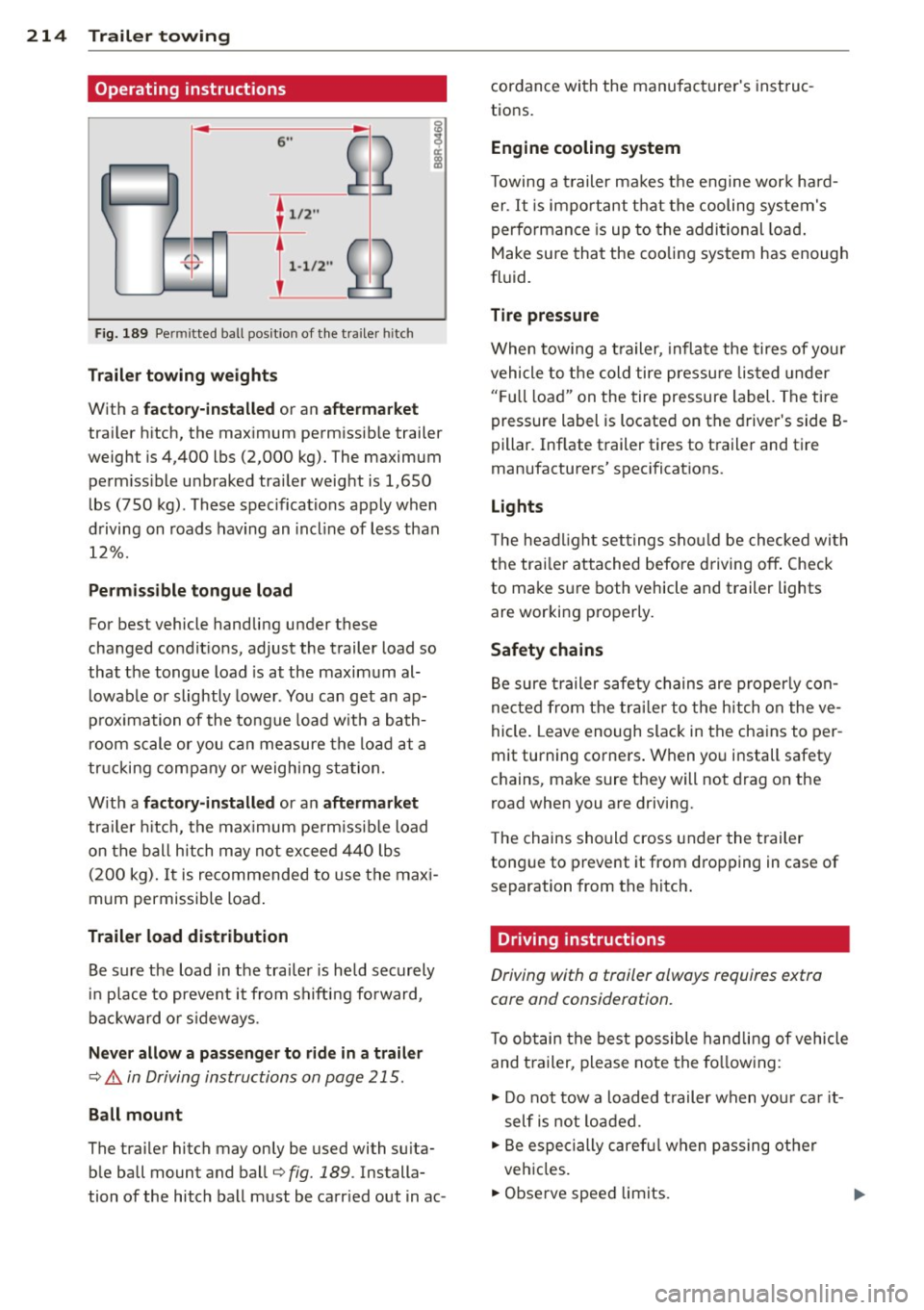
Fig. 189 Pe rmi tted ball posit ion of the tra iler h itch
T ra ile r tow ing weight s
With a factor y-insta lled or an afte rm arket
trailer h itch, the max imum permissib le trailer
weight is 4,400 lbs (2,000 kg). The maximum perm iss ible unbraked trailer weight is 1,650
lbs (750 kg). These spec ifications apply when
driving on roads hav ing an incl ine of less than
12%.
P erm is s ible tongue load
For best vehicle handling under these
changed condit ions, adjust the trailer load so
that the tongue load is at the maximum al
l owable or slightly lower . You can get an ap
p rox imation of the tongue load w ith a bath
room scale or you can measure the load at a
tr ucking company or weighing sta tion.
W ith a
fact ory -in stall ed or an aftermarket
trailer h itch, the max imum pe rm issible load
on the ball hitch may not exceed 440 lbs (200 kg).
It is recommended to use the maxi
mum permissible load .
Trailer lo ad distribut ion
Be sure the load in the trai ler is held securely
in place to prevent it from shifting fo rward,
backward or s ideways.
N eve r allow a p assenger to rid e in a trail er
¢ .&. in Driving instructions on page 215.
Ball mount
The trailer hitch may only be used with su ita
ble ball mount and ball¢
fig. 189. Installa
tion of the hitch ball must be carr ied out in ac- cordance with the manufacturer's instruc
tions.
Eng ine cooling system
T owing a t railer makes the engine work hard
er . It is important that the cooling system's
performance is up to the additional load .
Make sure that the cooling system has enough
fluid.
Tire pressur e
When towing a trailer, inflate the tires of your
vehicle to the cold tire pressu re listed under
" F u ll load" on the tire pressure label. The tire
pressure label is located on the driver's side B·
pillar. Inflate trailer tires to trailer and tire
manufacturers' spec ificat ions.
Lights
T he headlight settings shou ld be checked wi th
the trai ler attached before driving off . Check
to make sure both vehicle and trailer lights
are working properly.
Safety chains
Be sure trailer safety chains are properly con
nected from the tra iler to the hitch on the ve
hicle . Leave enough slack in the chains to per
mit turning corners . When you install safety
chains, make sure they will not drag on the
road when you are driving.
T he chains should cross under the trailer
tongue to prevent it from dropping in case of separation from the hitch .
Driving instructions
Driving with a trailer always requires extra
core and consideration.
T o obtain the best possible handling of vehicle
and t railer, please note the fo llowing :
.,. Do not tow a loaded t railer when you r ca r it
self is not loaded .
.. Be especially caref ul when passing ot her
vehicles.
.. Observe speed limits.