radio AUDI Q5 2015 User Guide
[x] Cancel search | Manufacturer: AUDI, Model Year: 2015, Model line: Q5, Model: AUDI Q5 2015Pages: 302, PDF Size: 75.01 MB
Page 55 of 302
M N
co ~ co
rl I.O
"' N
"' rl
-Some exterior lighting functions can be ad
j u sted
¢page 53.
-W hen yo u remove your key from the ignition
while the vehicle 's lights are turned on, a
buzzer sounds as Long as the driver 's doo r is
open.
- In coo l or damp weather, t he inside of the
headlig hts, turn signals and tail lights can
fog over d ue to the temperature difference
between the inside and outs ide. They will
clea r sho rtly after sw itching them on. This
does not affect t he service life of the light
ing .
- In the event of a light sensor malfunct ion,
the driver is not ified in the instr ument clus
te r d is play ¢
pag e 32.
Fog lights
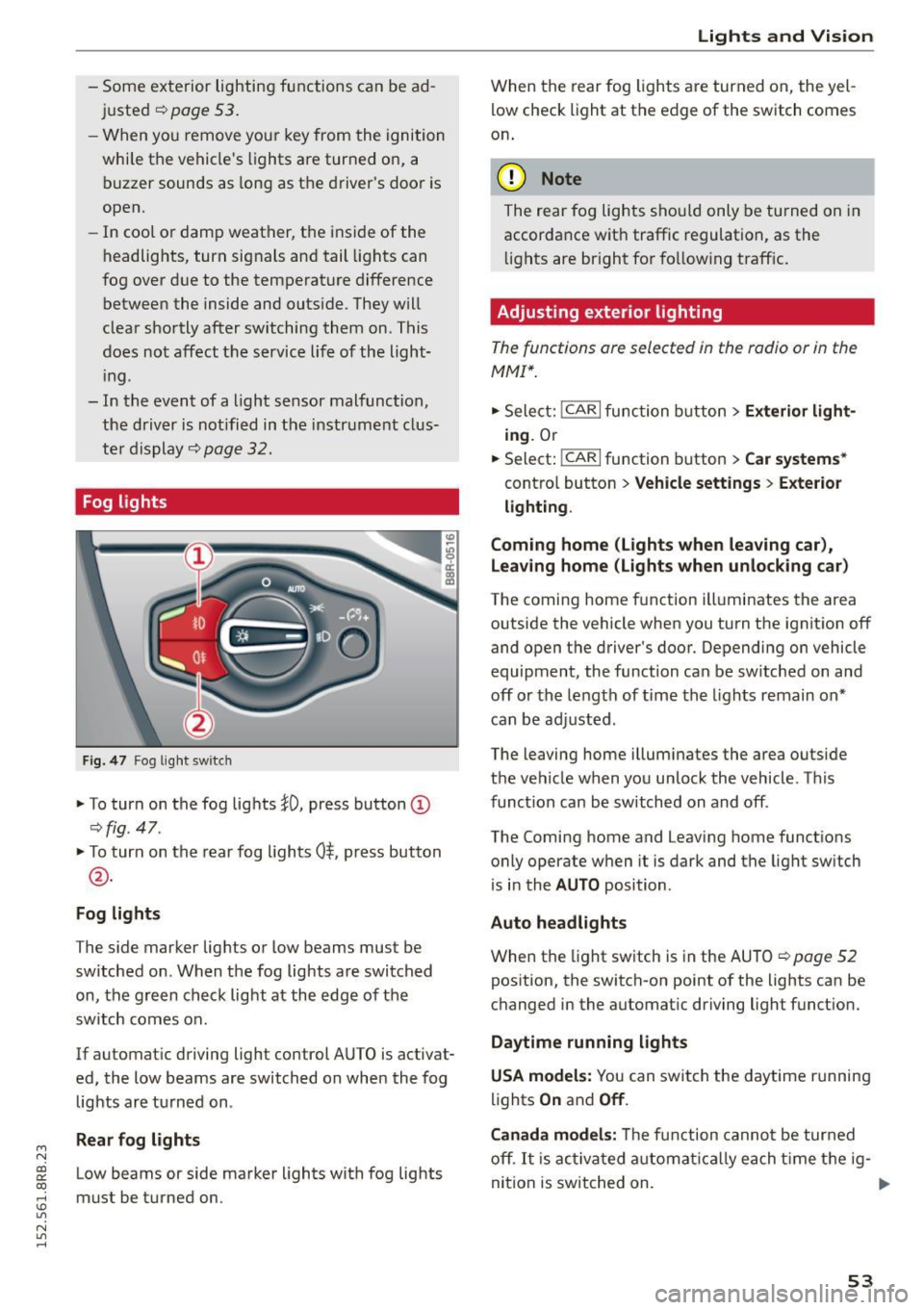
Fig . 4 7 Fog lig ht sw itch
" To turn on the fog lights }D, press button (D
¢fig. 47.
"To turn on the rear fog lights 0$. p ress button
@ .
Fog lights
The s ide marker lights or Low beams must be
switched on. When the fog lights are swi tched
on, the g re e n check light at the edge of the
sw itch comes on.
If automat ic driving light control AUTO is activat
ed, the low beams are switched on whe n the fog
lights a re turned on .
Rear fog light s
Low beams or side marker lights with fog lights
must be turned on.
Lights and Vis ion
W hen the rear fog ligh ts are turned on, the yel
low check light at the edge of the s witch comes
o n.
(D Note
The rear fog lights sho uld only be turned on in
accorda nce with traffic regulation, as the
li g hts are bright fo r fo llow ing traff ic .
Adjusting exterior lighting
The functions are selected in the radio or in the
MMI* .
"Sele ct: !CARI func tion button> Exterior light
ing.
Or
.. Select:
~,c- A- R~ I function button > Car systems *
contro l button > Vehicle settings > Exterior
lighting .
Coming home (Lights when leaving car) ,
Leav ing home (Lights when unlocking car )
The coming home function ill uminates the area
outside the vehicle when you turn the ignit io n off
and open t he d river 's doo r. Depending on vehicle
equipment, the function ca n be sw itched on an d
off or the le ngth of time the lights remain on"
can be ad justed .
The leaving home i llum inates the area outside
t h e ve hicle w hen you un lock the vehicle. T his
func tion can be switched on and off .
The Comi ng home and Leaving home funct ions
o nly operate w hen it is dark and t he lig ht sw itch
is i n the
AUTO position .
Auto headlights
When the light sw itch is in the AU TO ¢ page 52
pos ition, the switch-on point of the lights can be
c h anged in the automat ic dr iving light funct ion.
Daytime running lights
USA models: Y ou can swit ch the d aytime r unning
lig hts
On and Off .
Canada models:
Th e f unc tion cann ot be tur ned
off .
It is acti vat ed a utom aticall y each t ime t he ig-
ni tion is switched on. .,,_
53
Page 60 of 302

Lights and Vision
switched back on by moving the windshield
wiper lever to any position .
- Worn or dirty windshie ld wiper blades result
in streaking . This can affect the rain sensor
function . Check your windshield wiper
blades regularly.
- The washer fluid nozzles of the windshield
washer system are heated at low tempera
tures when the ignit ion is on.
- When stopp ing temporarily, e.g. at a traffic
light, the set speed of the windshield wipers
i s automatically reduced by one speed.
Cleaning windshield wiper blades
Clean the windshield wiper blades when they be
g in to leave streaks. Use a soft cloth and glass
cleane r to clean the windshield wiper blades .
Front wiper
.,. Place the windshield wiper arms in the service
position. Refer to
c> page 58.
.,. Lift the w iper arm away from the front w indow.
Rear wiper
.,. Lift the wiper arm away from the rear window.
A WARNING
Dirty w indshield wiper blades can impair your
view. This can lead to acc idents.
Replacing windshield wiper blades
Fig. 58 Removing the w iper blade
Wiper service position/blade replacement
posit ion
"' ij
a: CX) ID
.,. Switch the ignition off and move the windshield
wiper lever to posit ion ©
c> page 57, fig. 56.
58
The windshie ld wipers move into the service po
sition .
.,. To bring the wipers back into the origina l posi
tion, switch the ignition on and press the wind
shield w iper lever.
You can also turn the service position on or off in
the radio or MMI*:
.,. Switch the windshie ld wipers off (position @
c>page 57, fig. 56).
.,. Select: !CAR I function button> Windshield
wipers
> Service position > On /Off . Or
.,. Select:
!CAR I function button> Car systems*
cont rol butto n > Servicing
& checks > Wiper
s ervice position
> On/Off .
Removing the wiper blade
.,. Lift the windsh ield wiper arm up from the wind
shield .
.,. Press the locking knob@
c> fig. 58 on the wiper
blade. Ho ld the wiper blade firmly .
.,. Remove the wiper blade in the direction of the
arrow .
Attaching the wiper blade .,. Insert the new wiper blade into the mount on
the wipe r arm @until you hear it latch into
place .
.,. Place the wiper arm back on the winds hield.
.,. Tur n the se rvice position off.
A WARNING
F or your safety, you shou ld rep lace the wiper
b lades once or twice a year. See your author
ized Audi dealer for rep lacement blades.
(D Note
- Th e windshie ld wiper blades must only be
replaced when in the service position! Oth
erwise, you risk damaging the paint on the
hood or the w indshield wiper motor.
- Yo u should not move your vehicle or press
the windsh ield wiper lever when the wiper
arms are fo lded away from the windshield.
The windshield w ipers would move back in
to their original position and could damage
the hood and windshie ld .
Page 67 of 302
M N
co
a:
co
,...., \!) ..,.,
N ..,., ,....,
In addition to the setting for the drive r's seat ,
the exterior rear view mirror setting can be stor
ed and reca lled through seat memory if the veh i
cle is properly equipped.
Storin g and recallin g se tting s
With the help of the memory buttons 1 and 2
¢ fig. 65 the settings for two different drivers
can be stored and reca lled
r::!> page 65.
The cu rrent settings are also a utomat ica lly as
signed to the remote control key being used
when the vehicle is locked . When the vehicle is
un locked, the settings assigned to the remote
contro l key being used are automatica lly recalled .
Turnin g seat m emo ry on and off
If the IO FF I sw itch is depressed, the seat memory
is inoperative . When the Memory function is off,
the LED in the button lights up.
All the stored settings a re retained. We recom
mend using the
I O FF I sw itch and de activating the
seat memory if the vehicle is only go ing to be
used
temporarily by a driver whose settings are
not going to be stored .
Storing and recalling settings
Applies to vehicles: with seat memory
Storing settings
~ Adjust the driv er's seat.
~ Adjust the two exter ior mirrors.
~ Press the !SET I button. The light in the button
will come on.
~ Now p ress a memory button (III or~). If the
stor ing procedure is correct, a confirmation
tone w ill sound .
Recall ing setting s
~ If the dr iver 's door is open and the ignit ion is
switched off, tap the correspond ing memory
button br iefly .
~ If the dr iver's door is closed or the ignit ion is
switched on, p ress the approp riate memo ry
button until the s to red pos ition is rea ched .
Successful storage is confirmed audibly and by
the light in the
ISET I button illum inat ing
r::!> page 64, fig . 65.
S eat s and stor age
When the vehicle is lo cked , the current settings
are stored and assigned to the remote contro l
key . But the settings stored on memory buttons
1 to 2 are not deleted . They can be recalled at
any time . When the vehicle is
unlocked , the set
t ings assigned to the remote control key a re re
stored .
If your vehicle is driven by other persons using
your remote control key, you should save your in
dividua l seat position on one of the memory but
tons . You can recall your settings again simply
and conveniently by p ress ing the corresponding
memo ry butto n. When the vehicle is locked,
these settings are automatica lly re-assigned to
the remote control key and stored .
& WARNING
- For safety reasons, the seat setting can only
be recalled when the vehicle is stationary -
otherwise you risk hav ing an accident.
- In an emergency the recall proced ure can be
cancelled by pressing the
I OFF I switch or by
tapp ing of the memory buttons.
Activating remote control key memory
Applies to vehicles: wit h seat memory
To assign the dr iver 's seat settings to the remote
control key when locking the vehicle, the function
must be activated in the radio or MMI*.
~ Select: ! CAR I function button > Seat adju st
ment > Dri ver's seat > Key mem. p ro fi le > On .
Or
~ Select: !CARI function button> Car sy ste ms*
cont ro l butto n > Vehicl e se tting s > Seats >
Driver 's seat > Remote control ke y> On .
(j) Tips
If you do not want anothe r driver's sett ings to
be assigned to the remote control key, switch
off the memory function usi ng the rad io or
M MI* or t he
I OFF I button r::!> page 64.
65
Page 83 of 302
M N
co ~ co
rl I.O
"' N
"' rl
Warm and cold
Operation
We recommend pressing the IAUTO I button and setting the temperature to 72 °F (22 °C) .
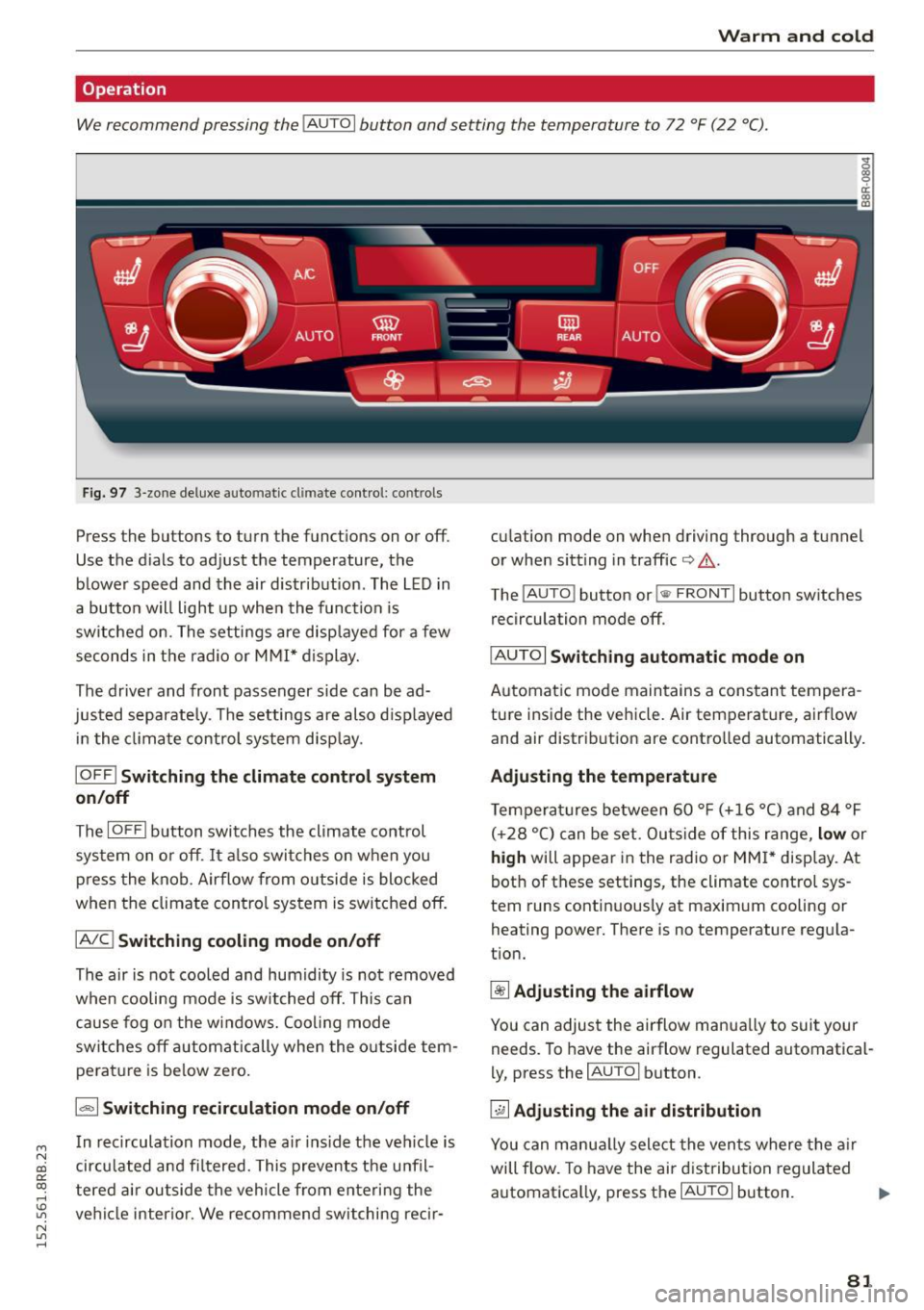
Fig. 97 3-zone de luxe au to ma tic c lima te contro l: co ntrols
Press the bu ttons to turn the funct ions on or off.
Use the d ials to adjust the temperature, the
blower speed and the air distr ibution . The L ED in
a button w ill light up when the function is
switched on . The settings are disp layed for a few
seconds in the radio or M MI* d isplay.
The driver and front passenger side can be ad
justed separate ly . The settings are also d isp layed
i n the climate control system disp lay .
IOFF ! Switching the climate control syst em
on/off
The IOFFI b utton switches the climate control
system on o r off. It also switches on when you
p ress the knob . Airflow from o utside is blocked
when the climate con trol system is switched off.
IAIC ! Switching cooling mode on /off
The air is not cooled and humidity is not removed
when cooling mode is switched off. This can
cause fog o n the windows. Cooling mode
switches off autom atically when the o utside tem
pe rat ure is be low zero.
1.,,., 1 Switching recirculation mode on /off
In recirculation mode, the a ir ins ide the ve hicle is
cir culated and fi ltered. This prevents the u nfil
tered air outside the vehicle from enteri ng the
ve hicl e interior . We recommend switching recir- cu
la tion mode on whe n driving thro ugh a tunnel
or when sitt ing in traffic
io A .
The IAU TO I button or !<11> F RONT I button switches
recirculation mode off .
IAU TOI Switch ing automatic mode on
Automatic mode maintains a cons tant tempera
ture inside the vehicle. Air temperature, airf low
and air distrib ution are contro lled automatically.
Ad justing the temp erature
Temperatures between 60 ° F (+16 °C) and 84 °F
( + 28 °C) can be set. Outs ide of this range,
low or
high will appear in the radio or MM I* display. At
bot h of these settings , the climate control sys
tem runs contin uous ly at maximum cooling or
heating power. There is no temperature regu la
t ion.
~ Adjusting the airflow
You can adjust the airflow manua lly to suit your
needs. To have the ai rflow regulated automatical
l y, press the
IAU TO I button .
~ Adjusting the air di stribution
You can manu ally select the vents where the a ir
will flow. To have the air dist ribution regulated
automatica lly, press the
IAU TOI button. .,.
81
Page 84 of 302
![AUDI Q5 2015 User Guide Warm and cold
[i] Adjusting seat heating*
Pressing the but ton switches the seat heating on
at the highest setting (level 3). The LEDs indicate
the temperat ure leve l. To red](/img/6/57635/w960_57635-83.png "AUDI Q5 2015 User Guide Warm and cold
[i] Adjusting seat heating*
Pressing the but ton switches the seat heating on
at the highest setting (level 3). The LEDs indicate
the temperat ure leve l. To red")
Warm and cold
[i] Adjusting seat heating*
Pressing the but ton switches the seat heating on
at the highest setting (level 3). The LEDs indicate
the temperat ure leve l. To red uce the tempera
ture, press the button again. To switch the seat heating off, press the button repeatedly until the
LED turns off.
After
10 minutes, the seat heating automatica lly
switches from leve l
3 to leve l 2.
lil Adjusting seat ventilation*
Press ing the button switches the seat ventilation
on at the highest setting ( leve l
3). The LEDs ind i
cate the venti lation level. To reduce the venti la
tion level, press the button aga in. To switch the
seat ventilation off, press the button repeatedly
until the L ED turns off.
l(;I> FRONT I S w itch the d efroster on/off
The windshield and s ide windows are defrosted
or cleared of condensation as quickly as possible.
The maximum amo unt of air flows mainly from
the vents below the windshield. Recirculation
mode switches off. The temperature should be
set to 72 °F (22 °C) or higher. The temperature is
cont ro lled automatically .
The
IAUTOI button switches the defroster off.
I Qiil REAR I Switching rear window heater on /
o ff
The rear window heater only operates when the
engine is running. It switches off automatically
after a few m inutes, depending on the outs ide
temperature .
To prevent the rear window heater from switch
ing off automatically, press and hold the
!lliD REARI
button for more than 2 seconds. This rema ins
stored unt il the ignition is switched off.
Air vent s
You can open and close the center and rea r air
vents using the thumbwheels. The levers adjust
the direction of the airflow from the vents .
You can adjust the air temperatu re in the rear by
turning the thumbwheel toward the red side to
82
make it wa rmer or towa rd the blue side to make
it coo ler .
A WARNING
- Do not use the recircu lation for extended
periods of time. The windows could fog up
since no fresh air can enter the vehicle. If
the windows fog up, press the air rec ircula
tion button again immed iately to sw itch off
the air recircu lation function or se lect de
frost.
- Individuals w ith reduced sensitivity to pain
or temperatu re could develop burns when
using the seat heating* function . T o reduce
the r isk of in ju ry, these indiv iduals should
no t use seat hea ting.
(D Note
To avoid damage to the heat ing e lements* in
the seats, do not kneel on the sea ts or place
h eavy loads on a sma ll are a of the seat .
Setup
-
The basic climate control settings can be adjust
ed in the radio or MMI".
"'Select : !CAR I function button> A/C control but
ton. O r
"' Sele ct:
I CAR I function b utton > Car sy stem s*
cont ro l bu tton
> A /C.
Automatic recirculation
When switched on, automat ic recirculation con
trols the recirculation mode automatically . If the
windows fog up , p ress the!@
F RON T! butto n.
Synchronization
When synchronization is switched on, the same
settings are applied to both the driver and front passenger, except for the seat heating/ventila
t ion* . Synchron izat ion switches off when you ad
just the settings on the front passenge r's side.
You can also switch synchronization on by press -
i ng and holding the knob on t he d river 's side . ..,_
Page 90 of 302
Driving
-If you leave the vehicle with the ignit ion
switched on, the ignition will switc h off af
ter a certa in period of time. P lease note that
e lectr ica l equipment s uch as exterior lights
will switch off as well when that happens.
Switching engine off
A pp lies to veh icles: w ith Convenie nce key
.,. Bring your veh icle to a complete stop.
.. Move the selector lever to the P or N position .
.,. Press the
!START ENGINE STOPI button
"*page 87, fig. 102.
Stee ring lock
The steering locks when you turn the engine off
using the
!START ENGINE STOP I button and open
the dr iver's door. The locked steering helps pre
vent vehicle theft.
Emergen cy off
If necessary, the eng ine can be sw itched off with
the selector lever in the R or D/S position . The en
g ine stops if you press and hold the
I STAR T ENGINE ST OP ! button at speeds below
6 mph ( 10 km/h) a nd p ress the brake pedal.
..&, WARNING
- Never turn off the engine be fore the ve hicle
has come to a comp lete stop. The fu ll func
tion of the b rake booster and the power
stee ring is not guaranteed. Yo u must use
more force to turn or bra ke i f necessary. Be
cause you cannot steer and brake as you
usually wou ld, this could lead to crashes
and serious injur ies.
- For safety reasons, you should always park
your vehicle with the selector lever in P. Oth
erwise , the vehicle could inadver tently roll
away.
- The rad iator fan ca n continue to run for up
to 10 m inutes eve n after you have turned
off the engine a nd removed the ignition key.
T he ra diato r fan ca n also turn on aga in if the
engi ne coola nt he ats up becau se of intense
s u nligh t or heat bui ld-up in the engine com
partment.
88
- Always take the key with you whenever you
leave your vehicle. Otherwise, the engine
could be started or electrical equipment
such as the power windows could be operat
ed. This can lead to serious in jury.
- Never leave children or persons requiring as
sistance unattended in the vehicle. The
doors can be locked using the remote t rans
m itter, prevent ing people from escaping
from the vehicle on the ir own in the event of
a n emergency. Depe nding on the time o f
yea r, peop le inside the vehicle can be ex
posed to very high or very low tempera
tures .
(D Note
If the engine h as been unde r heavy lo ad for
an ex tended pe riod, hea t bu ilds up in t he en
gine compartment after the engine is switch
ed off -there is a risk of damaging the engine .
A llow the engine to run at id le for about two
minutes before switching it off.
Driver messages
Ignition is on
This message appears and a warning tone sounds i f you open the drive r's door when the ign ition is
switched on .
No key identified
This message appears when the
I START ENGI NE STO PI* button is p ressed if the re
i s no master key ins ide the ve hicle or if the sys
tem does no t re cogn ize it. For examp le, the mas
te r k ey cannot be recogn ized if it is covered by an
ob ject (e.g. a luminum brief case) wh ic h
screens
the radio sig na l. Electro nic devices such as cell
phones can a lso interfere with the radio signa l.
Press brake pedal to start engine
This message appears if yo u do not p ress the
brake pedal to start the eng ine.
Shift to N or P to start engin e
This message appears when attempt ing to start
the engine if the selector lever for the automat ic .,.
Page 97 of 302
M N
co ~ co
rl I.O
"' N
"' rl
Speed warning 2
Storing wa rning 2 is recomme nded if you always
want to be reminded of a certa in speed, for ex
ample when you are trave ling in a co untry that
has a genera l maxim um speed limit, or if you do
not want to exceed a specified speed fo r w inter
ti res.
The speed warning 2 symbol ,. (USA mode ls)/
• (Canada models) app ears in the display when
you exceed the stored speed lim it . Unlike warning
1, it w ill not go out until the vehicle speed d rops
be low the stored speed limit .
Sett ing speed warning 2
~ page 95 .
@ Tips
Even tho ugh you r vehicle is equipped with a
spee d warn ing system, you sho uld still watch
the speedomete r to make s ure you are not
driving faster than the speed limit.
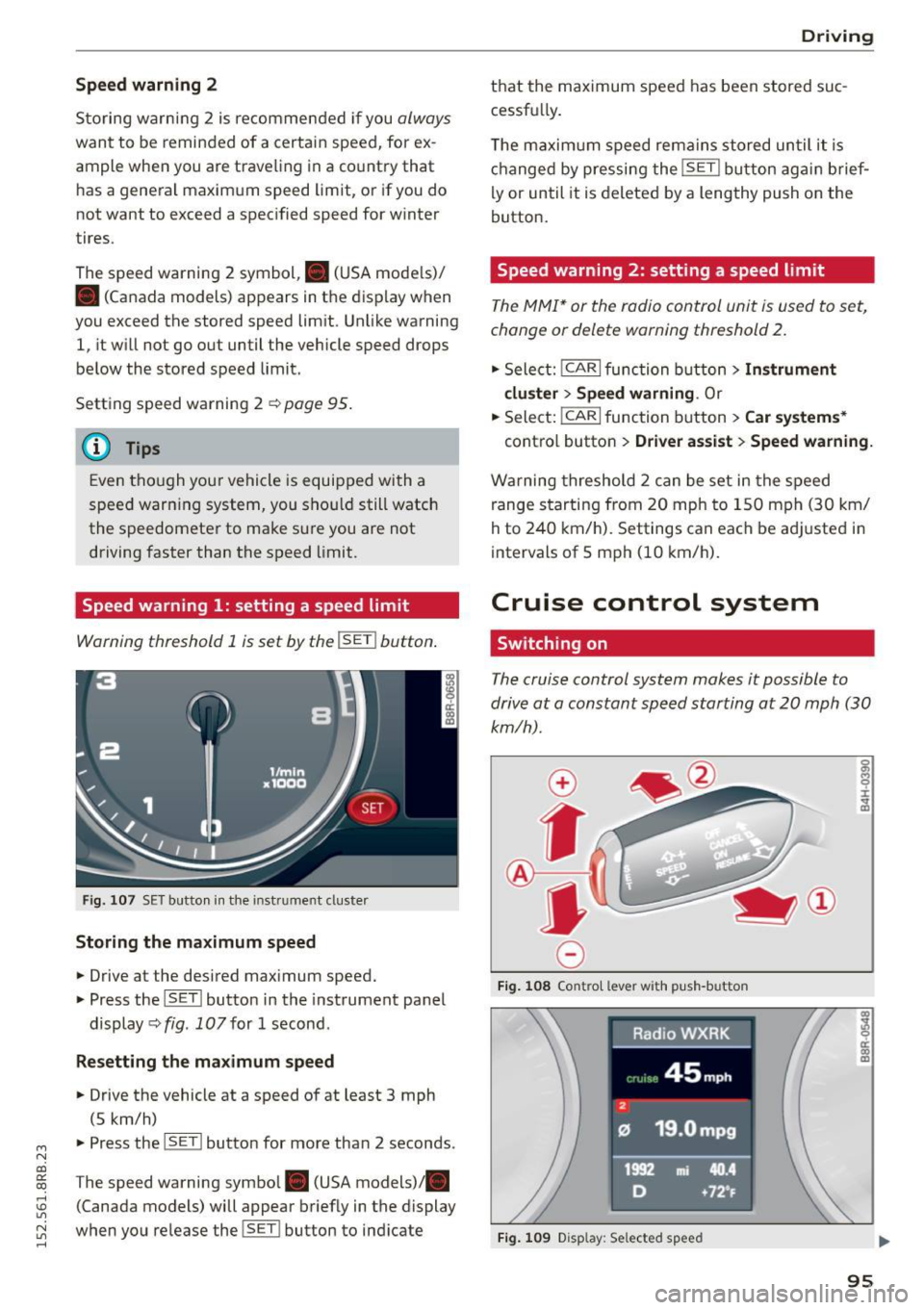
Speed warning 1: setting a speed limit
Warning threshold 1 is set by the !SET I button .
Fig. 10 7 SET butto n in t he in st ru me nt cl uster
Storing the maximum speed
.,. Drive at the desired max imum speed.
.,. Press the ISET l button in the instrument panel
display ~fig .
107for 1 second .
Resetting the maximum speed
.,. Drive the vehicle at a speed of at least 3 mph
(5 km/h)
.,. Press the l~S -ET~ ! butto n for more than 2 seconds.
T he speed warning symbol. (USA models) .
(Canada models) will appear briefly in the display
when you release the !SET l button to ind icate
D riv ing
th at the maximum speed has been stored suc
cessfu lly.
T he maxim um s peed rema ins stored un til i t is
ch anged by pressing the !SE T! button ag ain brief
ly or until it is deleted by a lengthy push on the
button.
Speed warning 2: setting a speed limit
T he MMI* or the radio control unit is u sed to s et,
change or delete warning threshold
2.
.,. Sele ct: !CAR!func tion butt on> Instrument
cluster > Speed warning .
Or
.,. Select: I CAR I function button > Car systems *
contro l butto n > Driver as sist > Speed warning.
W arning threshold 2 can be set in the speed
range s tarting from 20 mph to 1 50 mph (3 0 km/
h to 240 km/ h). Settings can each be ad justed i n
intervals of 5 mph (10 km/h).
Cruise control system
Switching on
The cruise control system makes it possible to
drive at a constant speed starting at
20 mph (30
km/h).
0
f
®t
0
F ig. 1 08 Co ntr ol leve r w ith p ush -b u tto n
Fig. 1 09 Disp lay : Se lected speed
a)
8 ci: a) m
95
Page 114 of 302
Audi adapt ive cru ise control and brak ing gu ard
c::::, ___ c::::,_ Distan ce 3: This setting corresponds
to a distance of 164 feet/SO meters when travel
ing at 62 mph (100 km/h), or a t ime interval of
1.8 seconds.
c::::, ___ _ c::::, Di stan ce 4: This setting corresponds
to a distance of 210 feet/64 meters when travel
ing at 62 mph (100 km/h), or a t ime interval of
2 .3 seconds.
_&. WARNING
Following other vehicles too closely increases
the risk of collisions and ser ious personal in
jury .
- Setting short distances to the traffic ahead
reduces the time and d istance available to
br ing your vehicle to a safe stop and makes
it eve n mo re necessa ry to pay close atten
t ion to traffic.
- Always obey applicable traffic laws, use
good judgment, and select a safe followi ng
distance for the traffic, ro ad an d wea ther
cond itio ns.
¢j) Tips
- Distance 3
is set automatically each time
you sw itch the ignit ion on.
- Your standard settings are automatically
stored and assigned to the remote contro l
k ey being used
~ page 36.
Setting the driving program
A ppl ies to veh icles: w ith Audi adaptive cruise co ntrol
Depending on the se lected dr iv ing program and
distance, driving behavior when acce le rat ing will
vary from dynamic to comfortab le .
Setting the driving program for vehicles
w ithout Audi dr ive s elect*
~ In the radio/MM! *, select: I CAR ! function but
ton
> adaptive cruise control > Dri ving pro
gram
> C omfort , Stan dard or Dynamic . Or
~ Select : ICARI funct ion button > Car s ystems *
control button > Driver ass ist > Adap tive crui se
contro l> Driving program > Comfort , Stand
ard or Dynamic .
112
Setting the driving mode for vehicles with
Audi drive se lect*
Refer to r:!> page 121.
(D Tips
Your settings are automat ica lly stored and as
signed to the remote control key being used
r:!> page 36 .
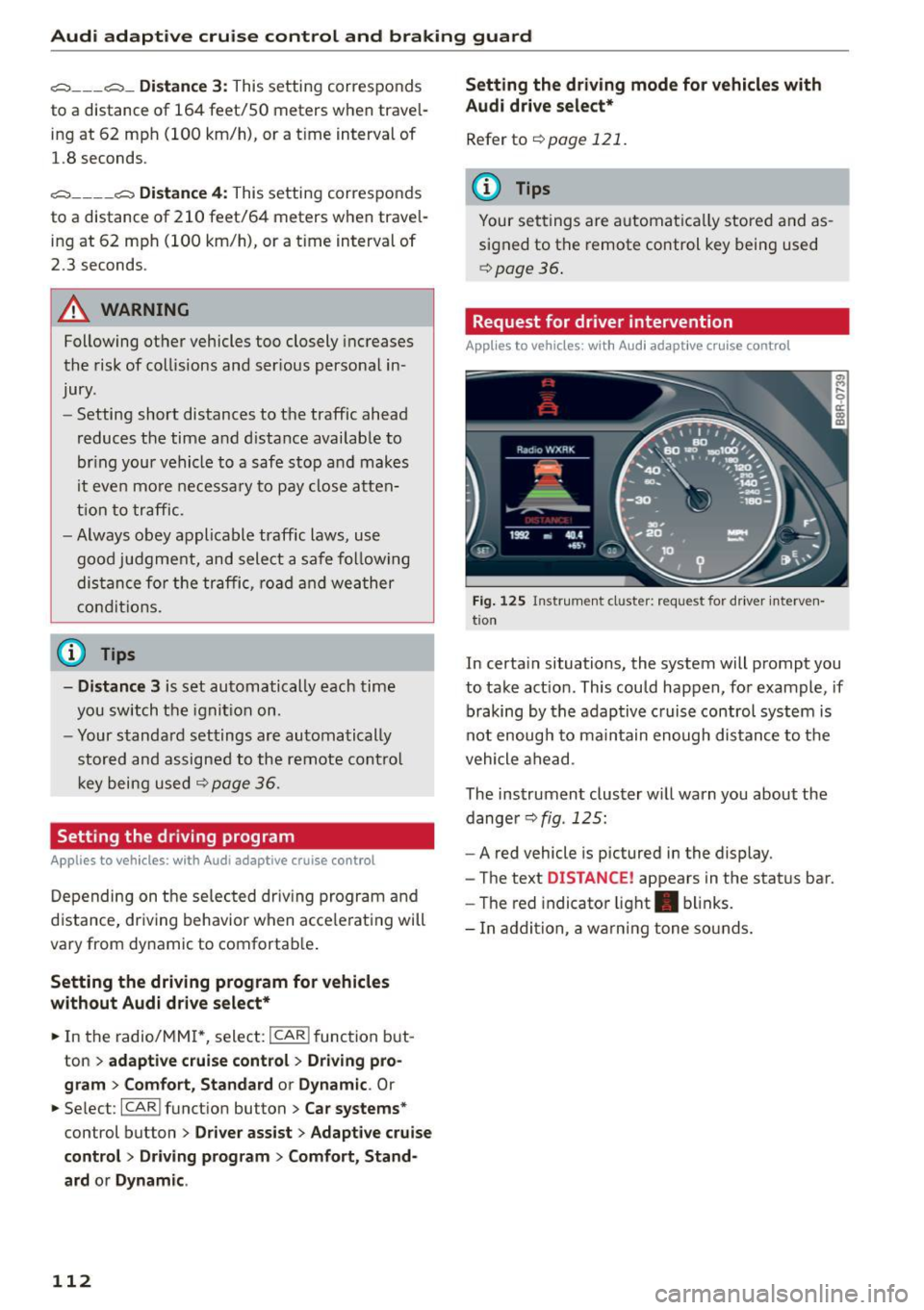
Request for driver intervention
App lies to vehicles: wit h Aud i adapt ive c ru ise contro l
Fig. 125 Instr um ent cl uster: reque st for driver interven
t io n
In certa in situations, the system will prompt you
to take act ion . This could happen, for example , if
braking by the adaptive c ruise control system is
not enough to maintain enough distance to the
vehicle ahead .
The instrument cluster w ill warn you about the
dange r
r:!> fig. 125:
-A red vehicle is pictured in the display.
- The text
DISTANCE! appears in the status bar.
- The red indicator light . blinks.
- In addition, a wa rn ing tone so unds.
Page 115 of 302

Audi adapt ive crui se cont rol and bra king gu ard
Audi braking guard
Description
Applies to vehicles: with Audi adaptive cruise co ntrol
F ig. 126 Instrument cluste r: app roac h warn ing
Braking guard uses a radar sensor. It also func
tions within the limits of the system when adap tive cruise control is switched off .
What can bra king gu ard do ?
When detected in time, the system can assess
situations when a vehicle ahead brakes suddenly
or if your own veh icle is traveling at a high speed
and approaching a vehicle up ahead that is mov
ing more slowly . Braking guard does not react if it
cannot detect the s ituation.
The system advises you of various situations:
- The
di sta nce wa rning is given if you are too
close to the vehicle ahead for a long time.
If the
vehicle ahead brakes sharply, you will not be
able to avoid a collision. The indicator light .
in the d isplay comes o n.
- The
app roach warning is g iven when a detected
vehicle up ahead in your lane is moving much
more slowly than you are or if it brakes sharply .
When this warning is g iven, it may only be pos
s ible to avoid a co llision by swerving or braki ng
sharp ly. The indicator light . and indicator in
t h e d isplay w ill warn yo u about the danger
¢ fig. 126. You wi ll also hear an acoust ic signa l.
If you do not react fast enough or do not react at
all to the situation, braking guard will intervene by bra king and the message
Br aking guard : A cti-
~ vat ed will appear. co ~ co
rl I.O
"' N "' 11
This is not ava ilable in som e count ries. rl
- If a collision is imminent, the system wi ll first
provide an
a cute war ning by brief ly and sharply
app ly ing the brakes.
- If you do not react to the acute warning, brak
ing guard can brake within the limits of the sys
tem. This reduces the veh icle speed in the event
of a collision.
- At speeds under 20 mph (30 km/h), the system
can initiate a comp lete deceleration shortly be
fore a collisionl).
- If the braking guard senses that you are not
braking hard enough when a collision is immi
nent, it can increase the braking force.
Which function s can b e cont roll ed ?
You can switch braking guard and the distance/
approach warning on or off in the radio/MMI*
¢ page 114, Settings in the radio/MM!*.
A WARNING
-
Lack of attention can cause collisions, other
accidents and serious personal injuries. The b raking guard is an ass ist system and cannot
p revent a coll is ion by itself. The dr iver must
a lways intervene. The driver is always respon
s ib le for b ra ki ng at the corre ct time.
- Always pay close attent ion to traffic, even
when the b rak ing guard is switched on. Be
ready to intervene and be ready to take com
p lete control whenever necessary . Always
keep the safe a nd legal distance between
your vehicle and vehicles up ahead.
- Braking guard works within limits and will not respond outside the system limits, for
examp le when approaching a stopped vehi
cle or stationary obstacle (end of a traffic
jam or vehicle that has broken down in traf f ic).
- Always remember that the radar sensor for
the braking guard works on ly w ithin defined
detection and range limits that may prevent
the prope r detection of other vehicles.
- The radar sensor's funct ion and range can
be reduced by ra in, snow and heavy spray.
Moving vehicles up ahead may not be
,.
113
Page 116 of 302

Audi adaptive cru ise control and b ra king guard
promptly detected or may not be detected
at all.
- Reflective surfaces including cras h barriers
or tunnel entrances may impair the function
of the radar sensor.
(D Tips
- You can cance l the braking that is initiated
by the system by braking yourself, by accel
erating noticeably or by swerving.
- Braking g uard error messages ¢page
114 .
-Keep in mind that braking guard can brake
unexpected ly . Always sec ure any cargo or
objects that you are transporting to red uce
the risk of damage or injury.
Settings in the radio/MMI*
Applies to veh icles: with Audi adaptive cruise control
.,. Se lect : I CAR I funct ion button > Audi brak ing
guard .
Or
.,. Select :
~ I C~ A~ R~ I funct ion button > Car sy stem s*
control button > Drive r ass is t> Audi braking
guard .
Syst em -
Sw itch braking guard On and Off . When
you switch the ign ition on, the message
Braking
guard : Off
appears if the system is switched off.
Earl y warning -The dis tance and appro ach war n
ing s in the display can be sw itched
On/ Off.
(D Tips
-Your settings are automat ica lly stored and
assigned to the remote control key being used at the times the sett ings are made
¢ page
36 .
-If you restrict the ESC, the b raking guard al
so switches itself off¢ page
192 .
-Switch brak ing guard off when you are load
i ng the veh icle onto a vehicle carr ier, tra in ,
sh ip or other type of transpo rtation . Th is
can prevent undesired wa rnings from the
braking guard system.
Messages
Applies to vehicles: w ith Aud i adaptive cruise control
B raking guard: Off
114
This driver message appears if the system is
turned off via the radio/MM I *. Otherwise, if th e
system is turned off, the information appears ev
ery time short ly after the s tart of the tr ip .
The driver message a lso appears if the system is
not available due to a malfunction or if the ESC is
not switched on ¢ page
192 . If th is is the case,
the system w ill not provide warn ings about a
poss ible collis ion.
B raking gu ard: Ac tivat ed
This dr iver message appears if sharp b rake pres
sure was applied due to an a cute warn ing.
•••
Th ree white dots appear if a sett ing cannot be se
l ected w ith the operating lever . For example, th is
happens if you want to raise/lower the speed
even though there was no prev ious ly saved
speed .
ACC: Sensor block ed
This messag e appears if th e sensor v iew is ob
structed, for examp le by leaves, snow, heavy
spray or d i rt . Cle an the sensor ¢ page
10 7,
fig. 116 .
ACC: Una vailable
The driver message appears if, for example, the
brake temperature is too h igh. The adaptive
cru ise control is temporarily unavailable. A chime
sounds as a r emind er.
ACC: Not avail able
The driver message appears if there is a malfunc
tion. The adaptive cruise cont ro l tu rns off . A
c hi me so unds as a rem inder. Have the system
che cked by an a utho riz ed Aud i dealer o r auth o r
i zed Audi Serv ice Facility.
Shift lev er po sition!
T he driver message appears if the selector lever
i s sh ifted to the N pos it ion . The adaptive cru ise
control is not ava ilable while in this posit io n .
Stab ilizat ion control (ESC )
This message appears if the Elect ronic Stabiliza
tion Contro l (ESC) is taking act ion to stabilize the .,..