remote AUDI Q5 2015 User Guide
[x] Cancel search | Manufacturer: AUDI, Model Year: 2015, Model line: Q5, Model: AUDI Q5 2015Pages: 302, PDF Size: 75.01 MB
Page 62 of 302

Lights and Vision
The mirror returns to its initia l position as soon
as reverse gear is disengaged and vehicle speed is
above about 9 mph (15 km/h). The mirror a lso
returns to its initial position if the switch is
moved to the driver's exterior mirror
(0 or the ig
nition is switched off .
If the position of the mirror surface is changed
on a tilted mirror , this new position will be auto
matically assigned to the remote key when the
vehicle is taken out of reverse gear .
(D Note
- Curved mirror surfaces (convex or spheri cal*) increase your field of view. Remember
that vehicles or other objects will appear
smaller and farther away than when seen in
a f lat mirror .
If you use this mirror to esti
mate distances of following vehicles when
changing lanes, you could estimate incor
rectly and cause an accident.
- If the mirro r housing is moved un intent ion
al ly (for example, while parking yo ur vehi
cle), then you must first fold the mirror
electrical ly. Do not readjust the mirror hous
i ng manua lly. You could damage the motor
which controls the mirror.
- If you wash the vehicle in an automatic car
wash, you must fold the exterior mirrors in
to reduce the risk of damage to the mirrors.
Never fold power folding exterior mirrors*
by hand . Only fold them in and out using
the power controls.
(D Tips
If there should be a malfunction in the elec
trical system, you can still adjust the exter ior
m irrors by pressing the edge of the mirror.
60
Dimming the mirrors
Fig. 61 Auto matic d immin g rearv iew mirror*
Manual anti-glare adjustment
.. Move the small lever (located on the bottom
edge of the mirror) to the rear .
Automatically dimming mirrors* .. To dim the rearview m irror and both exterior
mirrors*, press the® button. The diode @
turns on . The rearview and exterior mirrors*
dim automatically when light shines on them,
for example from headlights on a vehicle to the
rear.
& WARNING
Electrolyte fluid can leak from automatic dim
ming mirrors if the glass is b roken. Electrolyte
fluid can irritate skin, eyes and respiratory
system.
- Repeated or prolonged exposure to electro
lyte can cause irritat ion to the respiratory
system, especially among people with asth
ma or other respiratory conditions. Get
fresh air immediately by leaving the vehicle
or, if that is not possible, open windows and
doors all the way.
- If electrolyte gets into the eyes, f lush them
thoroughly with large amounts of clean wa
ter for at least 15 minutes; medical atten
tion is recommended .
- If electrolyte contacts skin, fl ush affected
area with clean water for at least 15 mi
nutes and then wash affected area with
soap and water; medical attention is recom
mended. Thoroughly wash affected clothing
and shoes before reuse.
Page 63 of 302

M N
co ~ co
rl I.O
"' N
"' rl
-If swallowed and person is conscious, rinse
mouth with water for at least 15 minutes.
Do not induce vomiting unless instructed to
do so by medical professional. Get medical
attent ion immed iately .
(D Note
Liquid electrolyte leaking from broken mirror
glass will damage any plastic surfaces it
comes in contact with . C lean up spilled elec
trolyte immed iately w ith clean water and a
sponge.
@ Tips
- Switching off the dimming function of the
i nside rear view mirror also deactivates the
automat ic dimming function of the exterior
mir rors*.
- The automatic dimming mirrors do not d im
when the interior lighting is turned on or
the reverse gear is selected.
-Automatic dimming for the m irror only op
erates properly if the light striking the in
side mirror is not hindered by other objects.
Digital compass
Activating or deactivating the compass
App lies to vehicles: with dig ital compass
The direction is displayed on the interior rear
view mirror.
Fig. 62 Inside rea r view m irror: digital compa ss activated
.,. To activate or deactivate, hold the@ button
down until the red display appears or disap
pears .
Lights and Vision
The digital compass on ly works with the ignition
turned on. The directions are displayed as initials:
N (North), NE (Northeast), E (East), SE (South
east),
S (South), SW (Southwest), W (West), NW
(Northwest) .
(!_) Tips
To avoid inaccurate directions, do not allow
any remote controls, electrical systems, or
metal parts close to the mirror.
Setting the magnetic deflection zone
Applies to vehicles: wit h dig ita l compass
The correct magnetic deflection zone must be
set in order to display the directions correctly.
®
Fig. 63 North Ame rica: magne tic deflection zo ne bo unda
ri es
.,. Hold the@~ page 61, fig . 62 button down un
til the number of the set magnet ic deflection
zone appears on the inter io r r ear view mirror .
.,. Adjust the magnetic deflection zone by repeat
ed ly pressing on the @button . The set mode
automatically deactivates after a few seconds .
61
Page 67 of 302
M N
co
a:
co
,...., \!) ..,.,
N ..,., ,....,
In addition to the setting for the drive r's seat ,
the exterior rear view mirror setting can be stor
ed and reca lled through seat memory if the veh i
cle is properly equipped.
Storin g and recallin g se tting s
With the help of the memory buttons 1 and 2
¢ fig. 65 the settings for two different drivers
can be stored and reca lled
r::!> page 65.
The cu rrent settings are also a utomat ica lly as
signed to the remote control key being used
when the vehicle is locked . When the vehicle is
un locked, the settings assigned to the remote
contro l key being used are automatica lly recalled .
Turnin g seat m emo ry on and off
If the IO FF I sw itch is depressed, the seat memory
is inoperative . When the Memory function is off,
the LED in the button lights up.
All the stored settings a re retained. We recom
mend using the
I O FF I sw itch and de activating the
seat memory if the vehicle is only go ing to be
used
temporarily by a driver whose settings are
not going to be stored .
Storing and recalling settings
Applies to vehicles: with seat memory
Storing settings
~ Adjust the driv er's seat.
~ Adjust the two exter ior mirrors.
~ Press the !SET I button. The light in the button
will come on.
~ Now p ress a memory button (III or~). If the
stor ing procedure is correct, a confirmation
tone w ill sound .
Recall ing setting s
~ If the dr iver 's door is open and the ignit ion is
switched off, tap the correspond ing memory
button br iefly .
~ If the dr iver's door is closed or the ignit ion is
switched on, p ress the approp riate memo ry
button until the s to red pos ition is rea ched .
Successful storage is confirmed audibly and by
the light in the
ISET I button illum inat ing
r::!> page 64, fig . 65.
S eat s and stor age
When the vehicle is lo cked , the current settings
are stored and assigned to the remote contro l
key . But the settings stored on memory buttons
1 to 2 are not deleted . They can be recalled at
any time . When the vehicle is
unlocked , the set
t ings assigned to the remote control key a re re
stored .
If your vehicle is driven by other persons using
your remote control key, you should save your in
dividua l seat position on one of the memory but
tons . You can recall your settings again simply
and conveniently by p ress ing the corresponding
memo ry butto n. When the vehicle is locked,
these settings are automatica lly re-assigned to
the remote control key and stored .
& WARNING
- For safety reasons, the seat setting can only
be recalled when the vehicle is stationary -
otherwise you risk hav ing an accident.
- In an emergency the recall proced ure can be
cancelled by pressing the
I OFF I switch or by
tapp ing of the memory buttons.
Activating remote control key memory
Applies to vehicles: wit h seat memory
To assign the dr iver 's seat settings to the remote
control key when locking the vehicle, the function
must be activated in the radio or MMI*.
~ Select: ! CAR I function button > Seat adju st
ment > Dri ver's seat > Key mem. p ro fi le > On .
Or
~ Select: !CARI function button> Car sy ste ms*
cont ro l butto n > Vehicl e se tting s > Seats >
Driver 's seat > Remote control ke y> On .
(j) Tips
If you do not want anothe r driver's sett ings to
be assigned to the remote control key, switch
off the memory function usi ng the rad io or
M MI* or t he
I OFF I button r::!> page 64.
65
Page 82 of 302
Warm and cold
Warm and cold Climate control system
Description
The climate control system warms, cools and
adds humidity to the air in the vehicle interior. It
is the most effective when the windows and pan
oramic sliding sunroof* are closed . If there is a
build-up of heat inside the vehicle, ventilation
can help to speed up the cooling proc ess.
In all heating mode functions except
defrost, the
blower only switches to a higher speed once the
engine coolant has reached a certain tempera
ture.
Condensation from the cooling system can drip
and form a puddle of water under the vehicle.
This is normal and does not mean there is a leak.
Pollutant filter
The pollutant filter removes pollutants such as
dust and pollen from the air.
The air pollutants filter must be changed at the
intervals specified in your Warranty & Mainte
nance booklet, so that the air conditioner can
properly work.
If you drive your vehicle in an area with high air pollution , the filter may need to be changed
more frequently than specified in your Audi War
ranty
& Maintenance booklet. If in doubt, ask
your authorized Audi Service Advisor for advice.
Key coded settings
The climate control settings are automatically
stored and assigned to the remote control key
that is in use .
.8, WARNING
Reduced visibility is dangerous and can cause
accidents.
- For safe driving it is very important that all
windows be free of ice, snow and condensa
tion.
80
- Completely familiarize yourself with the
proper use and function of the heating and
ventilation system and especially how to de
fog and defrost the windows .
- Never use the windshield wiper/washer sys
tem in freezing weather until you have
warmed the windshield first, using the heat
ing and ventilation system . The washer solu
tion may freeze on the windshield and re
duce visibility .
(D Note
-If you suspect that the air conditioner has
been damaged, switch the system off to
avoid further damage and have it inspected
by a qualified dealership.
- Repairs to the Audi air conditioner require
special technical knowledge and special
tools. Contact an authorized Audi dealer for
assistance.
@ For the sake of the environment
By reducing the amount of fuel you use, you
also reduce the amount of pollutants emitted
into the air.
(D Tips
-Keep the air intake slots (in front of the
windshield) free from ice, snow and debris
in order to maintain the proper function of
the climate control system.
- The energy management system may switch
the seat heating* or rear window defroster
off temporarily. These systems are available
again as soon as the energy balance has
been restored.
- The air flowing out of the vents and
throughout the vehicle's entire interior is
discharged at the rear of the vehicle. Make
sure that the outlet slots are not covered by clothing, etc.
Page 87 of 302
M N
co
a:
co
,...., \!) 1.1"1
N 1.1"1 ,....,
~ It is possible that there wi ll be a slight de lay
when starting the engine for diesel vehicles* in
colder temperatures. Therefore, yo u must hold
the brake peda l down until the engine starts.
The ind icator lamp
1,1 illuminates when the en
gine is preheated .
Switching the ignition on /off
If you wou ld like to switch the ignition on with
out sta rt ing the engine, fo llow these steps:
~ In se rt the key into the ignition lock .
~ Press the key briefly without press the brake
peda l.
~ To switch the ignition off, press the key again .
D iese l vehicles * are prehea ted whi le the ignition
is switched on.
W hen sta rting the engine, ma jor e lectr ica l load s
a re sw itche d
off temporar ily.
You can only remove the key w ith the ignition
sw itched off. To do this, you have to p ress on the
key again.
I f the engine sho uld not start immediately, the
start ing process is a utomat ica lly stopped after a
short time. Repeat start ing procedure.
Start-Stop-System*:
Note the information on c:> page 91, Start/Stop
system .
A WARNING
-Never allow the engine to run i n confined
spaces - dange r of asphyxiation .
- Never remove the ign ition key from the ign i
t io n lock while the vehicle is moving . O ther
wise, the stee ring loc k cou ld suddenly e n
gage and you would not be able to stee r th e
vehicle .
- Always ta ke t he key with y ou wheneve r you
leave you r vehicle. Othe rwi se , the eng ine
cou ld be started or ele ctrical eq uipment
s u ch as the power windows co uld be operat
ed. This can lead to ser ious injury.
- Never le ave c hildren o r persons requi ring as
sistance unattended in the vehicle. The doo rs can be locked using the remote trans-
-
Dri ving
mitter, preventing people from escaping
from the veh icle on the ir own in the event of
an emergency. Depend ing on the time of
year, peop le inside the vehicle can be ex
posed to very high or very low tempera
tures.
(D Note
Avoid high eng ine rpm, full throttle and heavy
engine loads unti l the engine has reached op
era ting temperature - othe rwise you r isk en
g in e damage .
@ For the sake of the environment
Do not let the engine run wh ile pa rked to
warm up. Begin dr iving immediat ely . T hi s re
duces unnecessa ry em iss ions .
(D Tips
-If the key cannot be removed from the ign i
t ion lock, you have to pull the mecha nica l
key out of th e mas ter key in orde r to be able
to lo ck the vehicle
c:> page 38.
-After starting a cold engine, ther e may be a
br ief per iod of incr eased nois e because the
oil p ress ure mu st fi rst bu ild up in the hy
dr au lic valve adju ste rs. This i s norm al a nd
no t a cause fo r concern.
- If you leave the ve hicle with the ignition
s witched on, the ig nit ion w ill switch
off af
t er a ce rtain period of time . Please note that
elect rical eq uipment such as exterior lights
w ill switch off as well when that happens .
85
Page 88 of 302
Driving
Starting the vehicle with the emergency
key
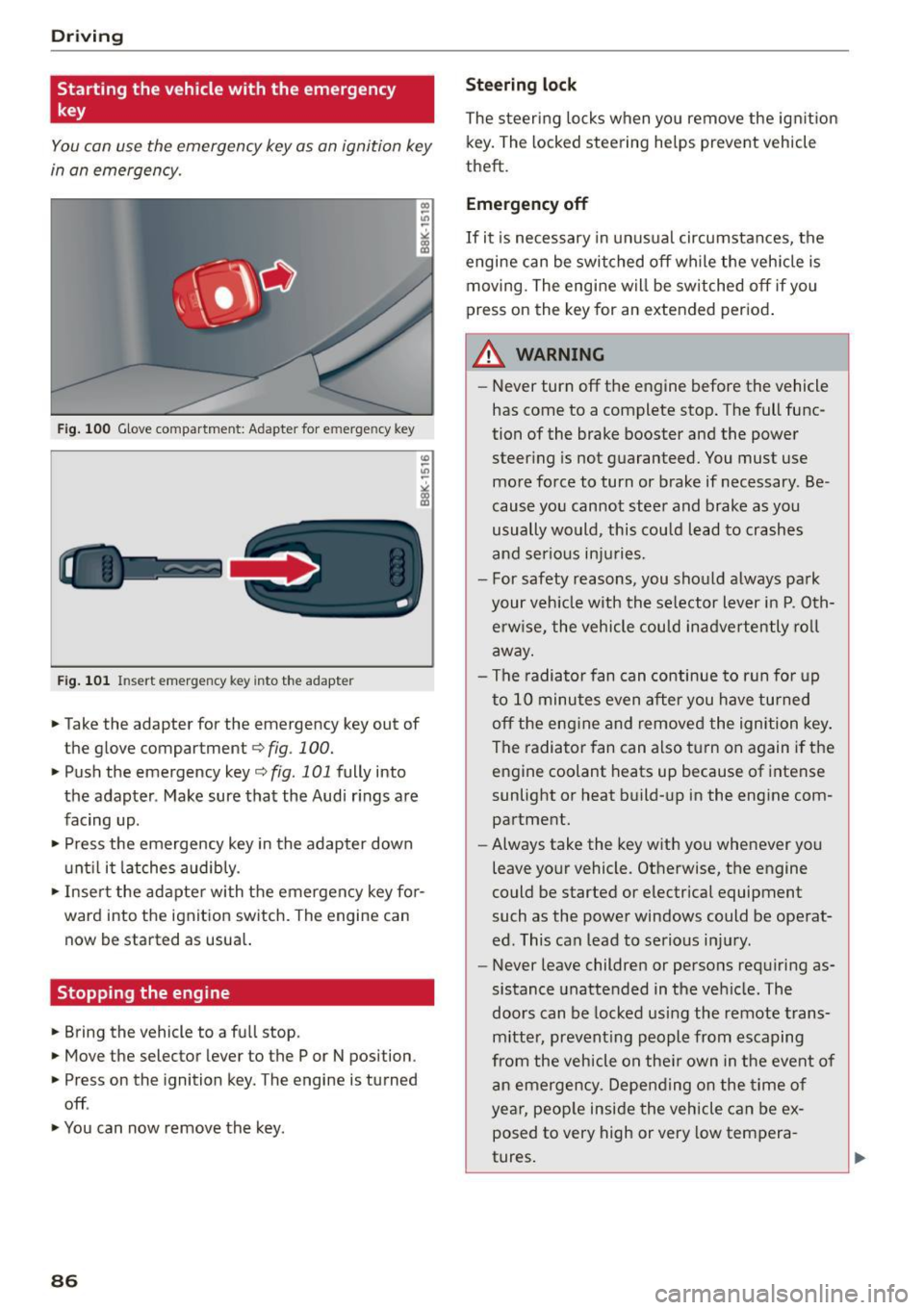
You can use the emergency key as an ignition key
in an emergency.
Fig. 100 Glove compartment: Adapter for e merg en cy key
Fig. 101 In sert emergency key into the adapter
... Take the adapter for the emergency key out of
the glove compartment
r:::;, fig . 100 .
.,. Push the emergency key r:::;, fig. 101 fully into
the adapter . Make sure that the Audi rings are
facing up .
.,. Press the emergency key in the adapter down
until it latches audibly.
.,. Insert the adapter with the emergency key for
ward into the ignition switch. The engine can now be started as usual.
Stopping the engine
... Bring the vehicle to a full stop.
... Move the selector lever to the P or N position .
.,. Press on the ignition key. The engine is turned
off .
.,. You can now remove the key.
86
Steering lock
The steering locks when you remove the ignition
key. The locked steering helps prevent vehicle
theft.
Emergency off
If it is necessary in unusual circumstances, the
engine can be switched off while the vehicle is
moving. The engine will be switched off if you
press on the key for an extended period.
A WARNING
- Never turn off the engine before the vehicle
has come to a complete stop. The full func
tion of the brake booster and the power
steering is not guaranteed. You must use
more force to turn or brake if necessary . Be
cause you cannot steer and brake as you
usually would, this could lead to crashes
and serious injuries.
- For safety reasons, you should always park
your vehicle with the selector lever in P. Oth erwise, the vehicle could inadvertently roll
away.
- The radiator fan can continue to run for up
to 10 minutes even after you have turned off the engine and removed the ignition key .
The radiator fan can also turn on again if the
engine coolant heats up because of intense
sunlight or heat build-up in the engine com
partment .
- Always take the key with you whenever you
leave your vehicle. Otherwise, the engine
could be started or electrical equipment
such as the power windows could be operat
ed. This can lead to serious injury.
- Never leave children or persons requiring as
sistance unattended in the vehicle. The
doors can be locked using the remote trans
mitter, preventing people from escaping
from the vehicle on their own in the event of
an emergency. Depending on the time of
year, people inside the vehicle can be ex
posed to very high or very low tempera
tures.
Page 89 of 302
M N
co ~ co
rl I.O
"' N
"' rl
CD Note
If the engine has been under heavy load for
an extended per iod, heat builds up in the en
gine c ompartment after the engine is switch
ed off -there is a risk of damag ing the eng ine .
Allow t he engine to run at idle fo r about two
m inutes befo re switch ing it off.
Convenience key
Starting the engine
Applies to vehicles: with Conven ience key
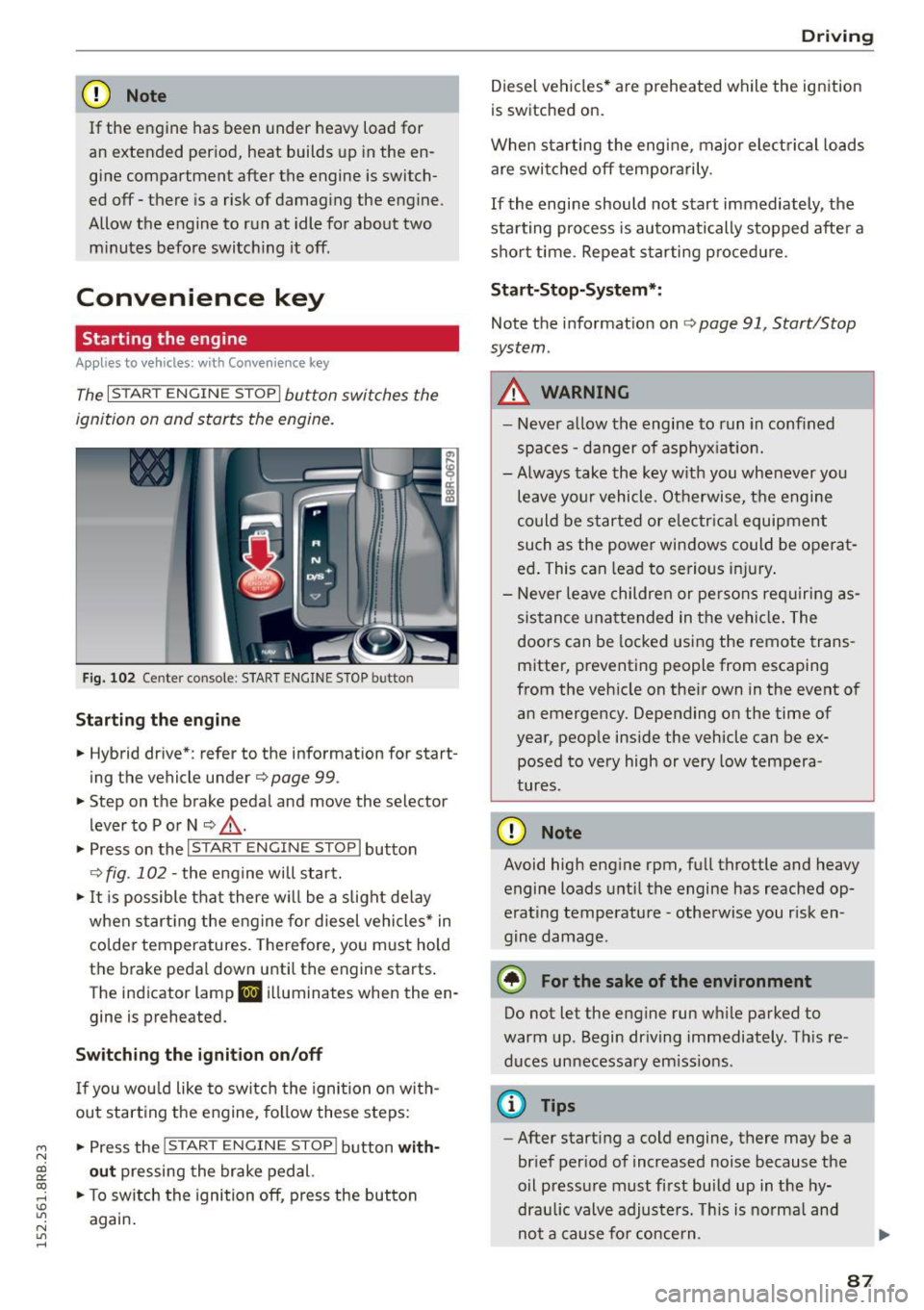
The I STAR T ENGINE S TOP I button switches the
ignition on and starts the engine.
Fi g. 1 02 Cente r co nsole : STAR T ENGIN E STOP b utto n
Starting the engine
• Hybrid dr ive *: refer to the information for start
ing the vehicle under
Q page 99 .
• Step on t he brake pedal and move the selector
lever to P o r N
Q ,& .
• Press on the 1~s= T~A_R_T_E_N--GI N_E_S_T_O_P_I button
Q fig. 102 -the engine will start.
• It is possible that there w ill be a slight de lay
when start ing the eng ine for diesel vehicles * in
colder temperatures. Therefore, yo u must hold
t h e brake pedal down until the engine starts .
The indicator lamp
II i ll uminates when the en
gine is preheated.
Switching the ignition on /off
If yo u wou ld like to switch the ignition on with
out start ing the engine, fo llow these steps:
• Press the
!S TAR T EN GINE STOPI button with
out pressing the brake ped al.
• To sw itch the ignition off, press the button
again .
Driv ing
Diesel vehicles * are preheated while the ignition
is switched on.
When sta rting the engine, major electrical loads
are swi tched off temporarily .
If the engine should not start immediately, the
sta rting process is au tomatically s topped afte r a
sho rt time. Repeat s tarting p roced ure.
Sta rt-Stop-System* :
Note the information on Q page 91, Start/Stop
system .
A WARNING
=
-Never a llow th e engine to run in confined
spaces -da nger of asphyx iat io n.
- Always take the key w ith you whenever you
leave your vehicle. Ot herwise, t he engine
could be started or e lectr ica l equipment
such as the power win dows could be ope rat
ed . This can lead to se rious i njury.
- Never le ave children or pe rsons re quiring as
sistance unattende d in the vehi cle. The
doors can be locked us ing the remote trans
mitter, preventing people from escaping
from the veh icle on the ir own in the event o f
an emergency. Depending on the time of
year, people inside the vehicle can be ex posed to very high or very low tempera
tures.
CD Note
Avoid high eng ine rpm, full throttle and heavy
engine loads u ntil the engine has reached op
erating temperature -otherwise you r isk en
gine damage.
@ For the sake of the environment
Do not let the engine run wh ile parked to
warm up. Begin dr iving immediately . Th is re
duces unnecessa ry em iss io ns.
@ Tips
- After starting a cold engine, there may be a
brief per iod of increased noise because the
oil p ressu re must f irst build up in the hy
draulic valve adjusters. Th is is norma l and
-
no t a cause fo r concern . ..,
87
Page 90 of 302
Driving
-If you leave the vehicle with the ignit ion
switched on, the ignition will switc h off af
ter a certa in period of time. P lease note that
e lectr ica l equipment s uch as exterior lights
will switch off as well when that happens.
Switching engine off
A pp lies to veh icles: w ith Convenie nce key
.,. Bring your veh icle to a complete stop.
.. Move the selector lever to the P or N position .
.,. Press the
!START ENGINE STOPI button
"*page 87, fig. 102.
Stee ring lock
The steering locks when you turn the engine off
using the
!START ENGINE STOP I button and open
the dr iver's door. The locked steering helps pre
vent vehicle theft.
Emergen cy off
If necessary, the eng ine can be sw itched off with
the selector lever in the R or D/S position . The en
g ine stops if you press and hold the
I STAR T ENGINE ST OP ! button at speeds below
6 mph ( 10 km/h) a nd p ress the brake pedal.
..&, WARNING
- Never turn off the engine be fore the ve hicle
has come to a comp lete stop. The fu ll func
tion of the b rake booster and the power
stee ring is not guaranteed. Yo u must use
more force to turn or bra ke i f necessary. Be
cause you cannot steer and brake as you
usually wou ld, this could lead to crashes
and serious injur ies.
- For safety reasons, you should always park
your vehicle with the selector lever in P. Oth
erwise , the vehicle could inadver tently roll
away.
- The rad iator fan ca n continue to run for up
to 10 m inutes eve n after you have turned
off the engine a nd removed the ignition key.
T he ra diato r fan ca n also turn on aga in if the
engi ne coola nt he ats up becau se of intense
s u nligh t or heat bui ld-up in the engine com
partment.
88
- Always take the key with you whenever you
leave your vehicle. Otherwise, the engine
could be started or electrical equipment
such as the power windows could be operat
ed. This can lead to serious in jury.
- Never leave children or persons requiring as
sistance unattended in the vehicle. The
doors can be locked using the remote t rans
m itter, prevent ing people from escaping
from the vehicle on the ir own in the event of
a n emergency. Depe nding on the time o f
yea r, peop le inside the vehicle can be ex
posed to very high or very low tempera
tures .
(D Note
If the engine h as been unde r heavy lo ad for
an ex tended pe riod, hea t bu ilds up in t he en
gine compartment after the engine is switch
ed off -there is a risk of damaging the engine .
A llow the engine to run at id le for about two
minutes before switching it off.
Driver messages
Ignition is on
This message appears and a warning tone sounds i f you open the drive r's door when the ign ition is
switched on .
No key identified
This message appears when the
I START ENGI NE STO PI* button is p ressed if the re
i s no master key ins ide the ve hicle or if the sys
tem does no t re cogn ize it. For examp le, the mas
te r k ey cannot be recogn ized if it is covered by an
ob ject (e.g. a luminum brief case) wh ic h
screens
the radio sig na l. Electro nic devices such as cell
phones can a lso interfere with the radio signa l.
Press brake pedal to start engine
This message appears if yo u do not p ress the
brake pedal to start the eng ine.
Shift to N or P to start engin e
This message appears when attempt ing to start
the engine if the selector lever for the automat ic .,.
Page 91 of 302
transmission is not in the P or N position . The en
gine can only be started with the se lecto r in
these posit ions.
l!,JI Is the key in the vehicle ?
This message appears in a veh icle w ith Conven
i en ce key* if the mas ter key is removed from the
ve hicl e with the eng ine running.
If th e maste r
key is no longer in the vehicle, you c annot sw itch
on the i gnition after s topping the engine and you
also ca nnot start the engine again . Moreover, you
cannot lock the veh icle from the o utside with the
key .
Shift to P otherwi se vehicle can roll awa y. Doors
do not lock if lever is not in P.
This mes sage appea rs for sa fe ty rea sons a long
w ith a w arning s ignal.
It ap pears if the se lector
l ever fo r the automatic t ransmission is not in the
P posit ion when switching
off the ignition. Move
the selector lever to the P posit ion, otherwise the
ve hicle is not secured aga inst ro lling away. You
also ca nnot lock the vehicle using the locking
button* on the door ha ndle or using the remote
key .
Turn off ignition before leav ing car
This message appears i f the driver's door is
opened while the ignition is switched on. Always
sw itch
off the ign ition if yo u are leaving the vehi
cle . See a lso
c;, page 93.
Turn off ignition before leaving car . Batter y is
discharging
This mes sage appea rs if the driver's door is
opened while the igni tion is sw itched on . Always
switch
off the ignition if yo u are leaving the vehi
cle. See a lso
c;, page 93.
Shift to P and turn off ignition, oth erwise ve hi
cle can roll away
This m essage appears if the driv er's door is
ope ned while the igni tion is sw itched on and t he
se lec to r lever i s not in t he P po siti on. Shift these
l ec to r l ever in to the P pos ition and switch
off t he
~ ignit ion when yo u exit the vehicle . Otherwise the
co ~ ve hicle co uld roll. See also c;, page 93.
rl
:5: Convenien ce key defec tive! Use ignition lock
N l/1 rl
D riv ing
This message appears if the engine m ust be
started or stopped using the ignition key and not
the
I START ENGINE STOPi* button.
Electromechanical
parking brake
Operation
The electromechanical parking brake replaces
the hand brake.
Fig . 103 Ce nte r console : Parki ng b rake
.,. Pull on the switch «el) c:;, fig. 103 to apply the
parking brake . The i ndicator lig hts in the switch
and . (USA models) . (Canada models) in
th e inst rument cluste r illuminat e.
.,. With the ignition swi tch ed on, step o n the
b rak e ped al or t he ac celer ato r pe dal an d pre ss
t he swi tch
(®) at the same time to release the
pa rking brake. The ind icator lights in the switch
and . (USA mode ls) . (Canada models) in
the inst rument cluste r go out.
Your vehicle is equipped with an electromechani ca l park ing brake . The pa rking brake is designed
to prevent the vehicle from ro lling u nintent io na l
l y and replaces the hand brake .
In add ition to the normal f unctions of a tradition
al hand brake, the electromechanical parki ng
brake prov ides various conve nience and safety
funct ions.
When starting from rest
- The integr al st art ing ass ist helps yo u when
d riving by automa tica lly re leasi ng the par king
brake
c:;, page 90, Starting from rest. IJo-
89
Page 114 of 302
Audi adapt ive cru ise control and brak ing gu ard
c::::, ___ c::::,_ Distan ce 3: This setting corresponds
to a distance of 164 feet/SO meters when travel
ing at 62 mph (100 km/h), or a t ime interval of
1.8 seconds.
c::::, ___ _ c::::, Di stan ce 4: This setting corresponds
to a distance of 210 feet/64 meters when travel
ing at 62 mph (100 km/h), or a t ime interval of
2 .3 seconds.
_&. WARNING
Following other vehicles too closely increases
the risk of collisions and ser ious personal in
jury .
- Setting short distances to the traffic ahead
reduces the time and d istance available to
br ing your vehicle to a safe stop and makes
it eve n mo re necessa ry to pay close atten
t ion to traffic.
- Always obey applicable traffic laws, use
good judgment, and select a safe followi ng
distance for the traffic, ro ad an d wea ther
cond itio ns.
¢j) Tips
- Distance 3
is set automatically each time
you sw itch the ignit ion on.
- Your standard settings are automatically
stored and assigned to the remote contro l
k ey being used
~ page 36.
Setting the driving program
A ppl ies to veh icles: w ith Audi adaptive cruise co ntrol
Depending on the se lected dr iv ing program and
distance, driving behavior when acce le rat ing will
vary from dynamic to comfortab le .
Setting the driving program for vehicles
w ithout Audi dr ive s elect*
~ In the radio/MM! *, select: I CAR ! function but
ton
> adaptive cruise control > Dri ving pro
gram
> C omfort , Stan dard or Dynamic . Or
~ Select : ICARI funct ion button > Car s ystems *
control button > Driver ass ist > Adap tive crui se
contro l> Driving program > Comfort , Stand
ard or Dynamic .
112
Setting the driving mode for vehicles with
Audi drive se lect*
Refer to r:!> page 121.
(D Tips
Your settings are automat ica lly stored and as
signed to the remote control key being used
r:!> page 36 .
Request for driver intervention
App lies to vehicles: wit h Aud i adapt ive c ru ise contro l
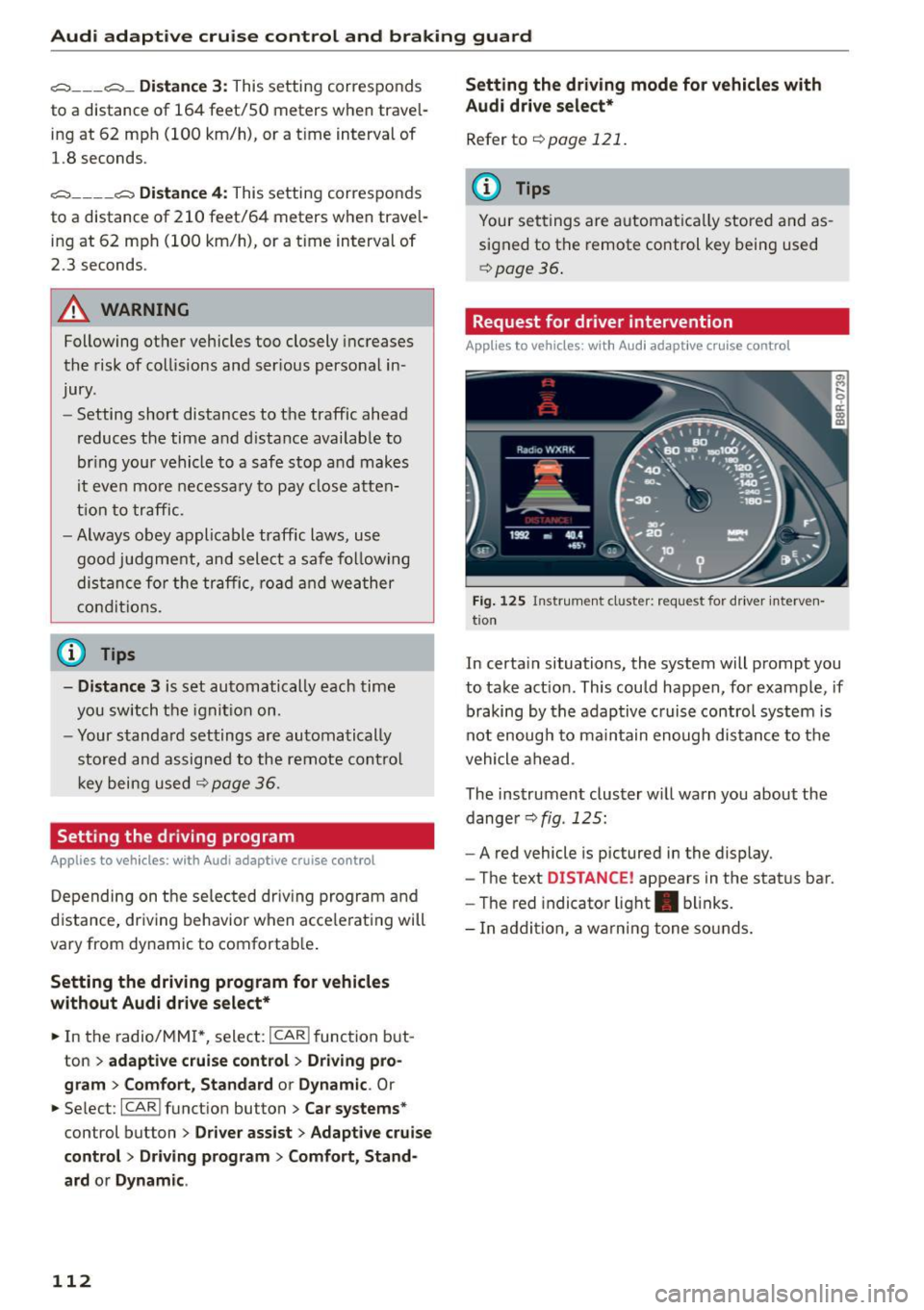
Fig. 125 Instr um ent cl uster: reque st for driver interven
t io n
In certa in situations, the system will prompt you
to take act ion . This could happen, for example , if
braking by the adaptive c ruise control system is
not enough to maintain enough distance to the
vehicle ahead .
The instrument cluster w ill warn you about the
dange r
r:!> fig. 125:
-A red vehicle is pictured in the display.
- The text
DISTANCE! appears in the status bar.
- The red indicator light . blinks.
- In addition, a wa rn ing tone so unds.