power steering AUDI Q5 2015 Owners Manual
[x] Cancel search | Manufacturer: AUDI, Model Year: 2015, Model line: Q5, Model: AUDI Q5 2015Pages: 302, PDF Size: 75.01 MB
Page 5 of 302
M N
co
a:
co
,...., \!) 1.1'1
N 1.1'1 ,....,
Safety . . . . . . . . . . . . . . . . . . . . . . . . . . . . 135
Driving safety . . . . . . . . . . . . . . . . . . . . 135
Basics . . . . . . . . . . . . . . . . . . . . . . . . . . . . . 135
Correct passenger seat ing positions . . . . . 136
Pedal area . . . . . . . . . . . . . . . . . . . . . . . . . . 139
Storing cargo correct ly . . . . . . . . . . . . . . . 140
Reporting Safety Defects . . . . . . . . . . . . . . 142
Safety belts . . . . . . . . . . . . . . . . . . . . . . 144
General information . . . . . . . . . . . . . . . . . 144
Why use safety belts? . . . . . . . . . . . . . . . . 145
Safety belts . . . . . . . . . . . . . . . . . . . . . . . . 147
Belt tensioners . . . . . . . . . . . . . . . . . . . . . . 150
Airbag system . . . . . . . . . . . . . . . . . . . . 152
Important information . . . . . . . . . . . . . . . 152
Front airbags . . . . . . . . . . . . . . . . . . . . . . . 156
Monito ring the Advanced Airbag System . 162
Side airbags . . . . . . . . . . . . . . . . . . . . . . . . 166
Side curtain airbags . . . . . . . . . . . . . . . . . . 169
Child safety . . . . . . . . . . . . . . . . . . . . . . 172
Important information . . . . . . . . . . . . . . . 172
Child seats .............. .... .. .. ... 177
Secur ing ch ild seats . . . . . . . . . . . . . . . . . . 181
LATCH system (Lower anchorages and
tethers for children) . . . . . . . . . . . . . . . . . . 184
Addit ional info rmation . . . . . . . . . . . . . . . 189
Driver messages . . . . . . . . . . . . . . . . . 190
Smart Technology . . . . . . . . . . . . . . . 190
Notice about data recorded by the Event
Data Recorder and vehicle control
modules . . . . . . . . . . . . . . . . . . . . . . . . . . . 190
E lect ronic Stabilization Control (ESC) . . . . 191
B raking . . . . . . . . . . . . . . . . . . . . . . . . . . . . 193
Electromechanica l power assist, Dynamic
steering . . . . . . . . . . . . . . . . . . . . . . . . . . . 195
Driving with your quattro . . . . . . . . . . . . . 195
Energy management . . . . . . . . . . . . . . . . . 196
Driving and the environment . . . . 198
Breaking in . . . . . . . . . . . . . . . . . . . . . . . . . 198
Cata lytic converter . . . . . . . . . . . . . . . . . . . 198
Diesel particu late filter . . . . . . . . . . . . . . . 199
Avoid damaging the vehicle . . . . . . . . . . . . 199
Econom ical and environmentally-friend ly
driving . . . . . . . . . . . . . . . . . . . . . . . . . . . . 199
Table of contents
Offroad driving . . . . . . . . . . . . . . . . . . .
202
Driving under difficult conditions and off-
road . . . . . . . . . . . . . . . . . . . . . . . . . . . . . . 202
Trailer mode . . . . . . . . . . . . . . . . . . . . . . 204
Driving with a trailer . . . . . . . . . . . . . . . . . 204
Tra iler mode notes . . . . . . . . . . . . . . . . . . . 206
Operating instructions . . . . . . . . . . . 208
Care and cleaning . . . . . . . . . . . . . . . . 208
General information . . . . . . . . . . . . . . . . . 208
Car washes . . . . . . . . . . . . . . . . . . . . . . . . . 208
Cleaning and care information . . . . . . . . . 209
Placing your vehicle out of service . . . . . . 212
Fuel and Refueling .......... ... .. 213
Fuel .. ..... ... .. .. ........ ...... ... 213
Refueling ... .. .. .. ... .. ... ..... .. .. 215
Selective catalytic reduction 218
Checking and Filling . . . . . . . . . . . . . 221
Hood . . . . . . . . . . . . . . . . . . . . . . . . . . . . . . 221
Eng ine compartm ent . . . . . . . . . . . . . . . . . 223
En gine oil . . . . . . . . . . . . . . . . . . . . . . . . . . 223
Cooling system . . . . . . . . . . . . . . . . . . . . . . 227
Brake fluid . . . . . . . . . . . . . . . . . . . . . . . . . 229
Battery . . . . . . . . . . . . . . . . . . . . . . . . . . . . 230
Windshield/headlight washer container 234
Wheels .. .... .. .. ... ........ .. .. .. 235
Wheels and Tires . . . . . . . . . . . . . . . . . . . . 235
Tire pressure monitoring system . . . . . . . 252
Troubleshooting . . . . . . . . . . . . . . . . . 255
Emergency assistance . . . . . . . . . . . 255
Vehicle jack, vehicle tool kit and
collapsib le spare tire . . . . . . . . . . . . . . . . . 255
Tire repair set . . . . . . . . . . . . . . . . . . . . . . . 258
Replacing wheels . . . . . . . . . . . . . . . . . . . . 260
Fuses and bulbs . . . . . . . . . . . . . . . . . . 266
Fuses. ...... .. .. .. ... .. ... ..... .. .. 266
Bulbs. . . . . . . . . . . . . . . . . . . . . . . . . . . . . . 269
Emergency situations . . . . . . . . . . . . 271
General . . . . . . . . . . . . . . . . . . . . . . . . . . . . 271
Starting by pushing or towing . . . . . . . . . . 271
Starting with jumper cables . . . . . . . . . . . 27 1
3
Page 11 of 302
M N
co
a:
co
,...., \!) 1.1"1
N 1.1"1 ,....,
(!) Memory buttons (driver's seat)
@ Door handle
@ Power locking switch ........ .. .
© Side assist button ............ .
® Air outlets ............ .. .. .. .
@ Turn signal and high beam ..... .
(j) Multifunction steering wheel with:
- Horn
- Driver's airbag ........ .. .. .. .
- Audio/video, telephone, naviga-
tion and voice recognition but
tons
- Rocker switches for tiptron ic op-
eration ... ........... .. .. .. .
@ ISETI button ............... .. .
® Instrument cluster ............ .
@ Reset button for trip odometer .. .
@ Switches for:
- Windshield wiper/washer ..... .
- Trip computer .............. .
@ Ignition lock ........... .. .. .. .
@ Adjustable steering column
~ Control lever for: 64
42
116
81
55
156
127
11
10
13
57
22
84
84
- Cruise control . . . . . . . . . . . . . . . 95
- Adaptive cruise control . . . . . . . 107
@ Data Link Connector for On Board
Diagnostics (OBD II) . . . . . . . . . . . 26
@ Release lever for the engine hood . 221
@ Instrument illumination . . . . . . . . 56
@ Light switch . . . . . . . . . . . . . . . . . . 52
@ Switch for unlocking the trunk lid . 43
@ Adjuster control for outside mirrors . . 59
@ Power window switches . . . . . . . . . 46
@ Radio system or Audi multimedia
(see separate manual)
@ Radio or MMI display (see separate
manual)
@ Button/Indicator light for:
- Emergency flasher .......... .
- PASSENGER AIR BAG OFF
@ Glove compartment (lockable) .. .
@ Front passenger's airbag ....... .
@ Depending on options:
- Audi drive select button ...... .
- Start-Stop-System button or .. .
- Id'! button (hybrid drive) .... . .
- Parking system button ....... .
- Electron ic Stabilization Control
(ESC) button ............... .
- Hill descent assist button ..... .
@ Climate control ............. . .
@ Shift lever for automatic transmis-
sion ........................ .
@ Ashtray with cigarette lighter
@ Coin storage
@ Depending on options:
- MMI control console or
- Parking system button ....... .
- Electron ic Stabilization Control
(ESC) button ............... .
Cockpit
54
78
156
120 91
101
129
191
193
80
123
76, 76
129
191
- Hill descent assist button . . . . . . 193
-Audi drive select button . . . . . . . 120
- Start-Stop-System button . . . . . 91
@ I START ENGINE STOPI button . . . 87
@> Electromechanical parking brake 89
(D Tips
Some of the equipment or features shown in
the general illustration may be standard
equipment on your vehicle or may be optional
equipment depending on your model. Always
ask your authorized Audi dealer if you have a
question about your vehicle.
9
Page 16 of 302
Instruments and indicato r Lights
Indicator lights
Overview
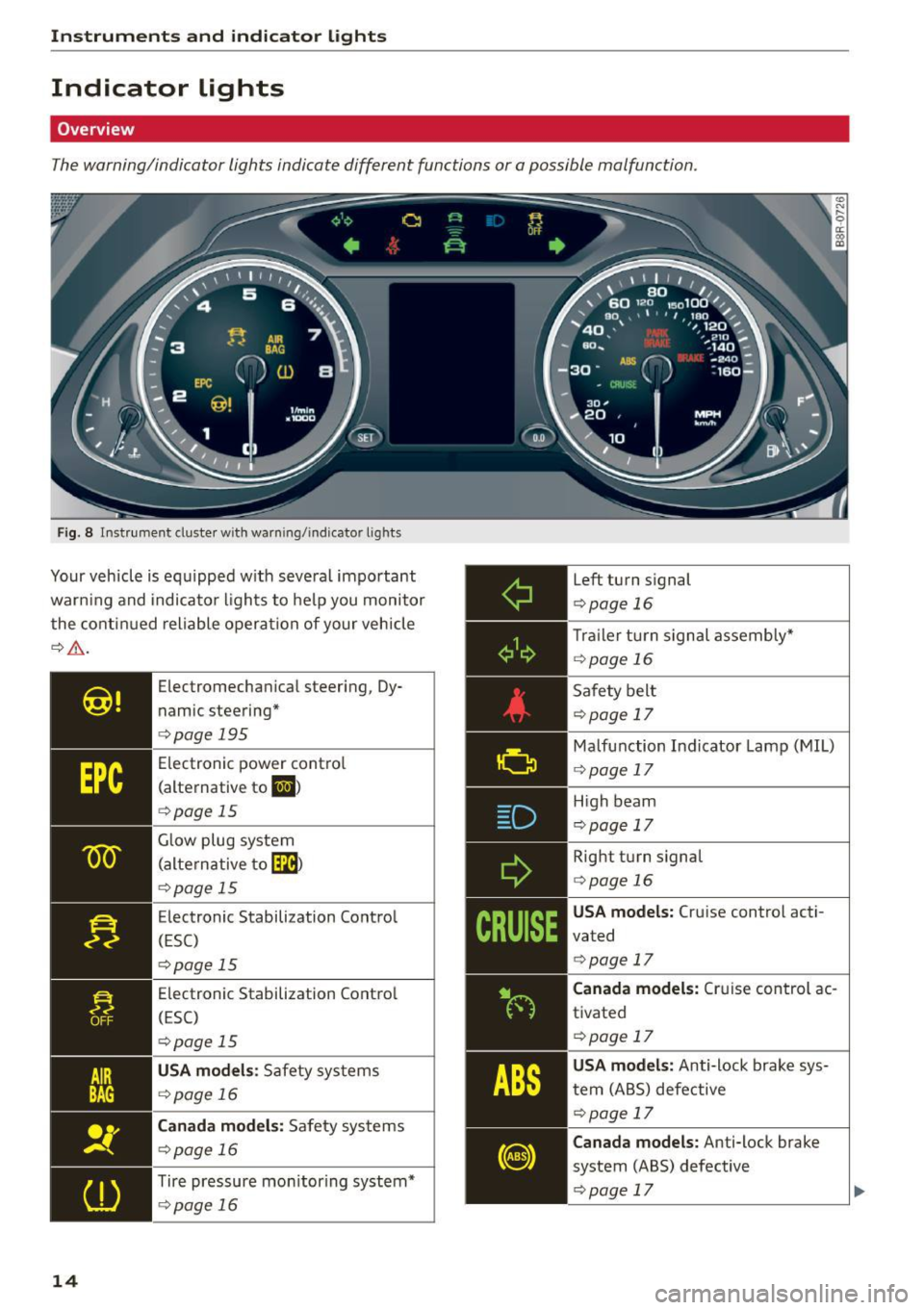
The warning/indicator lights indicate different functions or a possible malfunction.
Fig. 8 Instrument cluster with warn ing/indicator lights
Your vehicle is equipped w ith several important
warn ing and indicator lights to help you monitor
the continued reliable operation of your vehicle
¢,&. .
14
Electromechan ical steering, Dy
n amic steering*
¢page 195
Electronic power control
(alternative to
li,I )
¢page 15
Glow plug system
(alternative to
[m)
¢p age 15
Electronic Stabilization Control
(ESC)
¢pag e 15
Electronic Stabilization Contro l
(ESC)
¢ page 15
USA models : Safety systems
¢page 16
Canada models: Safety systems
¢page 16
Tire pressure mon itor ing system*
¢ page 16
Left turn signal
¢page 16
Trailer turn signal assembly"
¢page 16
Safety belt
¢page 17
Malfunction Indicator Lamp (MIL)
¢ page 17
High beam
¢page 17
Right turn signal
¢page 16
USA models: Cruise control acti
vated
¢ page 17
Canada models: Cruise control ac
tivated
¢page 17
USA models: Anti-lock brake sys
tem (ABS) defective
¢page 17
Canada models: Anti-lock brake
system (ABS) defective
¢page 17
Page 38 of 302
Opening and closing
Opening and closing
Keys
Key set
F ig . 25 Key set
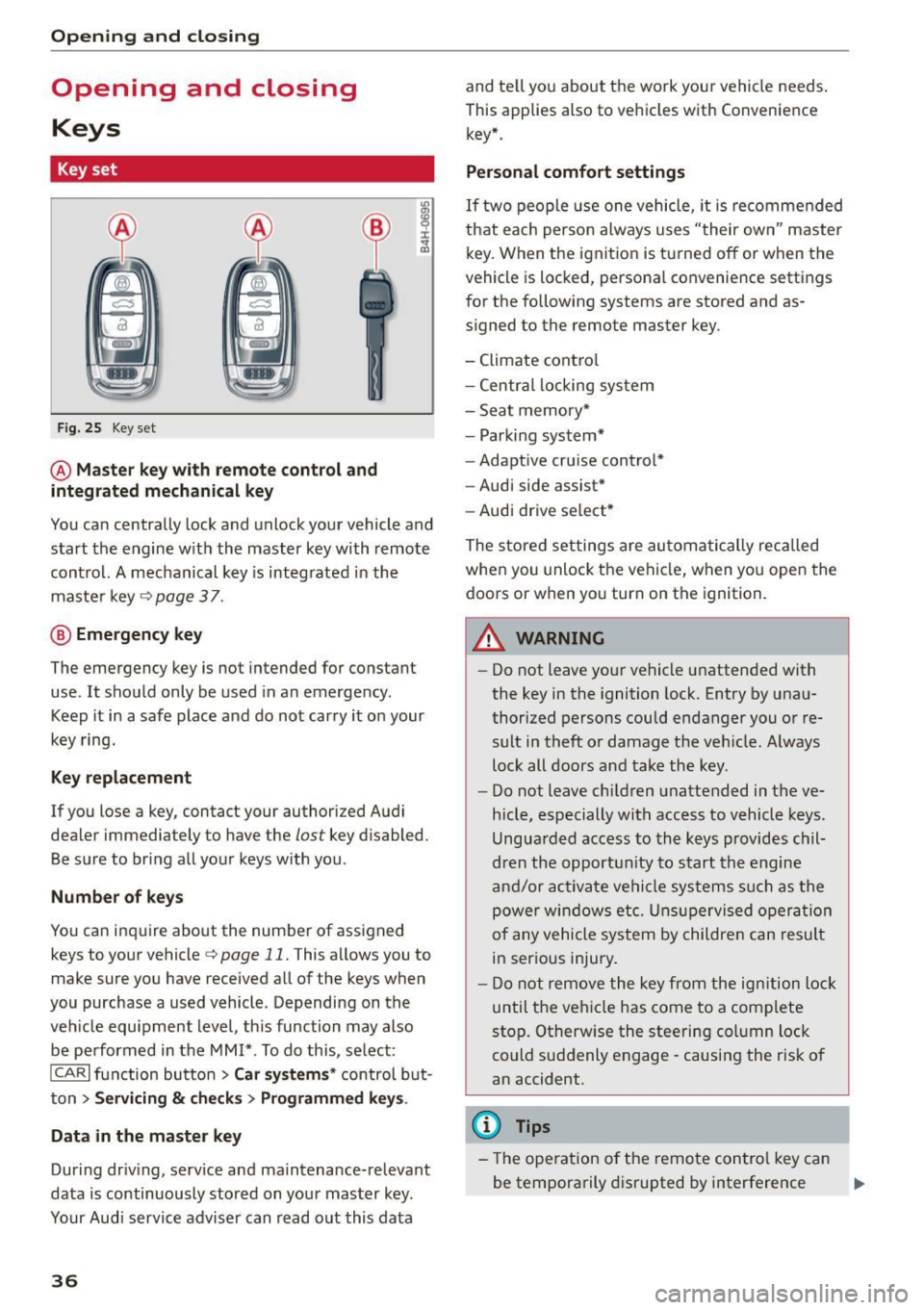
@ Master key with remote control and
integrated mechanical key
You can centrally lock and unlock your vehicle and
start the engine w ith the master key with remote
contro l. A mechanical key is integ rated in the
maste r key
¢page 37 .
@ Eme rgency key
The emergency key is not intended for constant
use . It shou ld only be used in an emergency .
Keep it in a safe place and do not carry it on your
key ring.
Key replacement
If you lose a key, contact your authorized Audi
dealer immediately to have the
lost key disabled.
Be sure to bring all your keys with you .
Number of key s
You ca n inquire about the number of assigned
keys to your vehicle¢
page 11. This allows you to
make sure you have received all of the keys when
you purchase a used vehicle . Depending on the
veh icle equ ipment level , th is function may also
be performed in the
MM I* . To do this, se lect:
ICARI function button > Car systems * control b ut
ton
> Servicing & c h eck s> Programmed key s.
Data in the master key
During dr iv ing, serv ice and ma intenance-relevant
data is continuously stored on you r mas ter key.
Your Audi service adviser can read o ut this data
36
and te ll yo u about the work you r vehicle needs .
This applies also to vehicles with Convenience key* .
Personal comfort settings
If two people use one vehicle, it is recomme nded
that each perso n always uses "their own" master
key. When the ignition is tu rne d off or when the
vehicle is locked, persona l convenience settings
for the following systems are stored and as
signed to the remote master key.
- Climate cont ro l
- Centra l locking system
- Sea t memory*
- Parki ng system*
- Adaptive cru ise cont rol*
- Audi side assist*
- Aud i drive se lect *
The store d settings are au toma tic ally reca lled
when you unlock the vehi cle, when yo u open the
doors or when yo u turn on the ignition.
A WARNING
-
- Do not leave your ve hicle unattended with
the key in the ignition lock. Entry by una u
thorized persons could endanger you or re
sult in theft or damage the ve hicle. Always
loc k all doors and take the key .
- Do not leave ch ild ren unattended in the ve
hicle, especially with access to vehicle keys .
Ungua rded access to the keys provides chil
dren the opportu nity to s tart the engine
a nd/or ac tiva te ve hicle sys te m s su ch as the
power w ind ow s etc. Unsup ervised op eration
of any vehicle system by childre n can resul t
in ser ious injury.
- Do not remove the key fr om the ign ition lock
until the ve hicle has come to a com plete
sto p. Otherwise the steering co lumn lock
could suddenly engage -causing the risk of
an accident.
(D Tips
- The operation o f the remote con trol key ca n
be temporarily d isrupted by interference .,..
Page 88 of 302
Driving
Starting the vehicle with the emergency
key
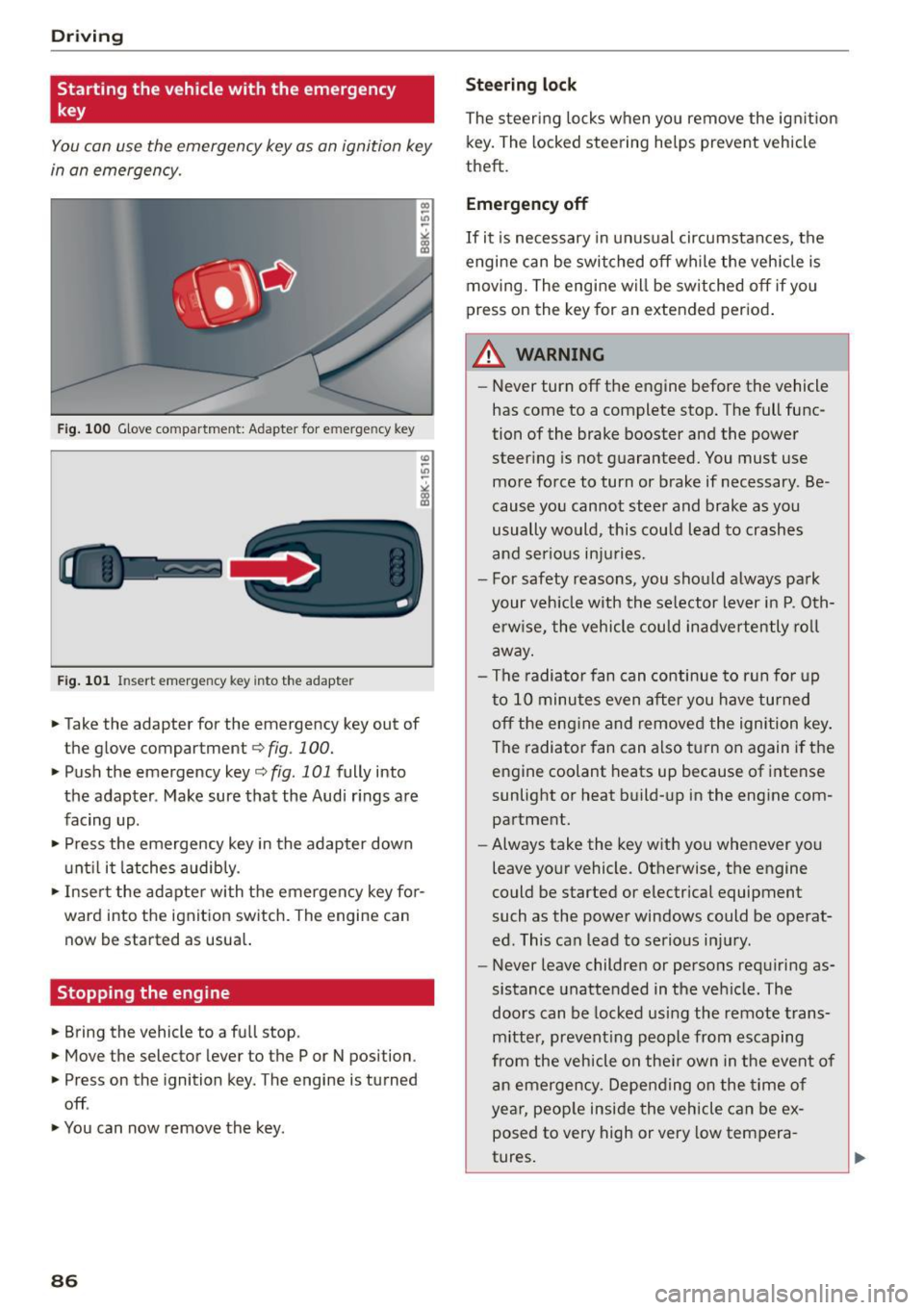
You can use the emergency key as an ignition key
in an emergency.
Fig. 100 Glove compartment: Adapter for e merg en cy key
Fig. 101 In sert emergency key into the adapter
... Take the adapter for the emergency key out of
the glove compartment
r:::;, fig . 100 .
.,. Push the emergency key r:::;, fig. 101 fully into
the adapter . Make sure that the Audi rings are
facing up .
.,. Press the emergency key in the adapter down
until it latches audibly.
.,. Insert the adapter with the emergency key for
ward into the ignition switch. The engine can now be started as usual.
Stopping the engine
... Bring the vehicle to a full stop.
... Move the selector lever to the P or N position .
.,. Press on the ignition key. The engine is turned
off .
.,. You can now remove the key.
86
Steering lock
The steering locks when you remove the ignition
key. The locked steering helps prevent vehicle
theft.
Emergency off
If it is necessary in unusual circumstances, the
engine can be switched off while the vehicle is
moving. The engine will be switched off if you
press on the key for an extended period.
A WARNING
- Never turn off the engine before the vehicle
has come to a complete stop. The full func
tion of the brake booster and the power
steering is not guaranteed. You must use
more force to turn or brake if necessary . Be
cause you cannot steer and brake as you
usually would, this could lead to crashes
and serious injuries.
- For safety reasons, you should always park
your vehicle with the selector lever in P. Oth erwise, the vehicle could inadvertently roll
away.
- The radiator fan can continue to run for up
to 10 minutes even after you have turned off the engine and removed the ignition key .
The radiator fan can also turn on again if the
engine coolant heats up because of intense
sunlight or heat build-up in the engine com
partment .
- Always take the key with you whenever you
leave your vehicle. Otherwise, the engine
could be started or electrical equipment
such as the power windows could be operat
ed. This can lead to serious injury.
- Never leave children or persons requiring as
sistance unattended in the vehicle. The
doors can be locked using the remote trans
mitter, preventing people from escaping
from the vehicle on their own in the event of
an emergency. Depending on the time of
year, people inside the vehicle can be ex
posed to very high or very low tempera
tures.
Page 90 of 302
Driving
-If you leave the vehicle with the ignit ion
switched on, the ignition will switc h off af
ter a certa in period of time. P lease note that
e lectr ica l equipment s uch as exterior lights
will switch off as well when that happens.
Switching engine off
A pp lies to veh icles: w ith Convenie nce key
.,. Bring your veh icle to a complete stop.
.. Move the selector lever to the P or N position .
.,. Press the
!START ENGINE STOPI button
"*page 87, fig. 102.
Stee ring lock
The steering locks when you turn the engine off
using the
!START ENGINE STOP I button and open
the dr iver's door. The locked steering helps pre
vent vehicle theft.
Emergen cy off
If necessary, the eng ine can be sw itched off with
the selector lever in the R or D/S position . The en
g ine stops if you press and hold the
I STAR T ENGINE ST OP ! button at speeds below
6 mph ( 10 km/h) a nd p ress the brake pedal.
..&, WARNING
- Never turn off the engine be fore the ve hicle
has come to a comp lete stop. The fu ll func
tion of the b rake booster and the power
stee ring is not guaranteed. Yo u must use
more force to turn or bra ke i f necessary. Be
cause you cannot steer and brake as you
usually wou ld, this could lead to crashes
and serious injur ies.
- For safety reasons, you should always park
your vehicle with the selector lever in P. Oth
erwise , the vehicle could inadver tently roll
away.
- The rad iator fan ca n continue to run for up
to 10 m inutes eve n after you have turned
off the engine a nd removed the ignition key.
T he ra diato r fan ca n also turn on aga in if the
engi ne coola nt he ats up becau se of intense
s u nligh t or heat bui ld-up in the engine com
partment.
88
- Always take the key with you whenever you
leave your vehicle. Otherwise, the engine
could be started or electrical equipment
such as the power windows could be operat
ed. This can lead to serious in jury.
- Never leave children or persons requiring as
sistance unattended in the vehicle. The
doors can be locked using the remote t rans
m itter, prevent ing people from escaping
from the vehicle on the ir own in the event of
a n emergency. Depe nding on the time o f
yea r, peop le inside the vehicle can be ex
posed to very high or very low tempera
tures .
(D Note
If the engine h as been unde r heavy lo ad for
an ex tended pe riod, hea t bu ilds up in t he en
gine compartment after the engine is switch
ed off -there is a risk of damaging the engine .
A llow the engine to run at id le for about two
minutes before switching it off.
Driver messages
Ignition is on
This message appears and a warning tone sounds i f you open the drive r's door when the ign ition is
switched on .
No key identified
This message appears when the
I START ENGI NE STO PI* button is p ressed if the re
i s no master key ins ide the ve hicle or if the sys
tem does no t re cogn ize it. For examp le, the mas
te r k ey cannot be recogn ized if it is covered by an
ob ject (e.g. a luminum brief case) wh ic h
screens
the radio sig na l. Electro nic devices such as cell
phones can a lso interfere with the radio signa l.
Press brake pedal to start engine
This message appears if yo u do not p ress the
brake pedal to start the eng ine.
Shift to N or P to start engin e
This message appears when attempt ing to start
the engine if the selector lever for the automat ic .,.
Page 102 of 302
Hybrid
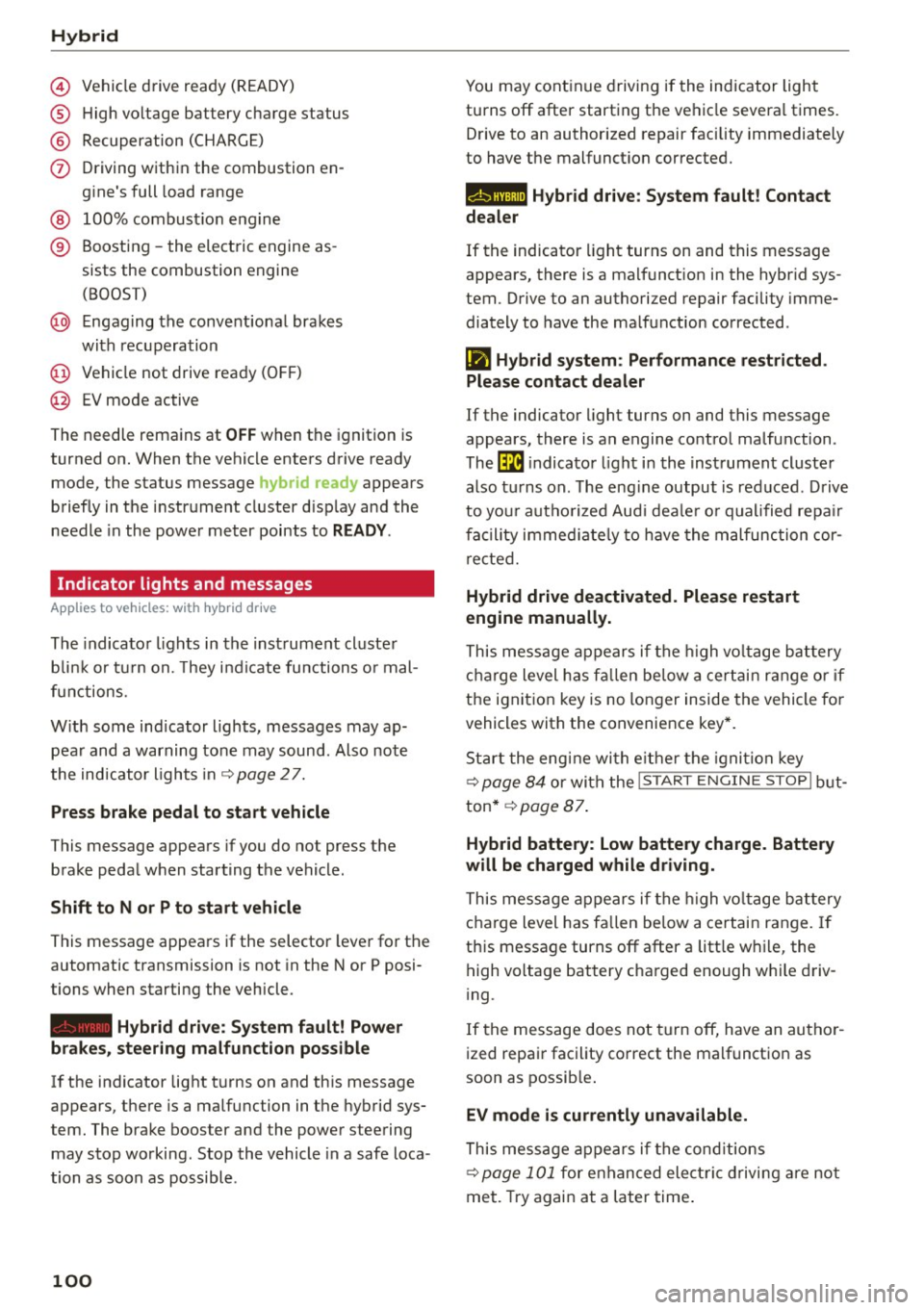
© Vehicle drive ready (READY)
® High voltage battery charge status
® Recuperation (CHARGE)
(f) Driving within the combustion en
gine's full load range
@ 100% combust ion engine
® Boosting -the electric engine as
sists the combustion engine (BOOST)
@ Engaging the convent ional brakes
with recuperation
@ Vehicle not drive ready (OFF)
@ EV mode active
The needle remains at
OFF when the ignition is
turned on. When the vehicle enters drive ready mode, the status message
hybrid ready appears
briefly in the instrument cluster d isplay and the
needle in the power meter points to
READY .
Indicator lights and messages
Applies to vehicles: with hybrid drive
The indicator lights in the instrument cluster
b lin k or tu rn on. They i ndicate functions o r mal
functions.
W ith some ind icator lights, messages may ap
pear and a warning tone may sound. Also note
the indicator l ights in ¢
page 2 7.
Press brake pedal to start vehicle
This message appears if you do not press the
brake pedal when starting the vehicle.
Shift to N or P to start vehicle
This message appears if the selector lever for the
automatic transmission is not in the Nor P posi
tions when starting the vehicle .
-Hybrid drive: System fault! Power
brakes, steering malfunction pos sible
lfthe indicator light turns on and this message
appears, there is a malfunction in the hybrid sys
tem. The brake booster and the power steering
may stop working. Stop the vehicle in a safe loca
tion as soon as possible.
100
You may continue driving if the indicator light
turns off after starting the vehicle severa l times.
Drive to an authorized repair facility immediately
to have the malfunct ion corrected.
Q/ij:@ ,j rlybrid drive: System fault! Contact
dealer
If the indicator light turns on and this message
appears, there is a malfunct ion in the hybr id sys
tem. Drive to an authorized repair facility imme
diately to have the ma lfunction corrected.
Ill Hybrid system : Performance restricted .
Please contact dealer
If the indicator light turns on and this message
appears, there is an engine control malfunction .
The
ffa i ndicator light in the instrument cluster
also t urns on. The eng ine output is red uced . Drive
to you r autho rized Aud i deale r o r qualified repair
facility immediate ly to have the malfunction cor
rected.
Hybrid drive deactivated. Please restart
engine manually.
This message appears if the high volta ge battery
charge level has fallen be low a certain range or if
the ignition key is no longer inside the vehicle fo r
vehicles with the convenience key*.
Start the engine with e ither the ignition key
¢
page 84 or with the !S TAR T EN GINE STOPI but
ton* ¢
page 87.
Hybrid battery: Low battery charge. Battery
will be charged while driving.
This message appears if the high volta ge battery
charge level has fa llen below a certain range. If
this message turns off after a litt le while, the
high voltage battery charged enough w hile driv
i ng .
If the message does not turn off, have an autho r
ized repair facility correct the malfunct ion as
soon as possible.
EV mode is currently unavailable.
This message appears if the cond itions
¢ page 101 for enhanced elect ric driving are not
met. Try again at a later time.
Page 104 of 302
Hybrid
St art-Stop function
The combust ion engine is operated only as need
ed . Genera lly, the combustion engine turns
off
when the vehicle is stationary and the high volt
age battery powers the electrical vehicle sys
tems .
The purpose o f automatica lly shutting the com
bustion engine
off in hybrid drive mode is to save
fue l. All of the important vehicle systems, such
as steering, brakes and the A/C system, contin ue
to remain active. In some cases, systems may re
qu ire the combustion engine to continue running
when the vehicle is stationary. When driv ing in
congested traffic for long periods of t i me, the
combustion engine will cycle on when the veh icle
is stationa ry to keep the h igh voltage battery
charged .
Gliding
If the gas pedal is not pressed and the D position
is selected, the combustion engine rema ins
turned
off up to speeds of approximate ly 99 mph
(160 km/h). Dr iving conse rvative ly like this can
r educe fue l consumpt ion.
Energy recovery (recup eration )
When braking, the e lectr ic motor will act as a
generator creating electric energy that is then
s to red in the h igh voltage batte ry. This also oc
curs when the ve hicle is coas ting or dr iv ing down
hi ll. The combust ion engine is automatically
turned
off in t his case.
Tips for Driving Efficiently with your Hybrid
Applies to veh icles: w ith hybrid drive
Driving situa- Conditions
tions
- Shift into the D pos ition .
Starting from a -
Release the brake pedal.
stop -
Only press mode rate ly on the ac-
celer ator peda l.
102
The vehicle is braked with the electric motor by
applying early and even press ure to t he brakes
and us ing short pedal movements¢
page 99,
fig. 110@. By do ing th is, a large amount of the
k inet ic energy is recovered and may be stored as
electric energy in the high voltage batte ry. Dur
i ng heavy braking, the convent ional brakes are al
so act ivated
¢ page 99, fig . 110 @.
The energy recovery is shown in the MMI display
¢page 105 .
Automatic start of the combu stion engine
Various operating conditions cause the combus
tion eng ine to start a utomatica lly :
- T he high vo ltage battery charge leve l is low.
- T he temperature of the combustion engi ne is
low.
- Th e temperature of the cataly tic converte r is
low.
- T he power output needed for the A/C system is
high.
- T he veh icle speed is high .
- The vehicle acceleration is h igh .
- The incline is steep.
- High charge level for the high voltage battery
when coasting. In this case, the hig h voltage
battery cannot absorb any more ene rgy and so
the electric motor cannot s low down the veh i
cle. The combustion engine tur ns on (eng ine
brake) . In this situation the high voltage bat
tery will show a Max cha rge.
Vehicle behavior
In the D posit io n, the hybrid system adapts
to the driving s ituat ion by automatically
sw itch ing between the combust io n engine
a nd e lectr ic dr ive types or by combini ng
them.
Page 193 of 302
M N
co
a:
co
,...., \!) 1.1"1
N 1.1"1 ,....,
shared, please see your contract with the
wireless telecommunications provider and the
"About Aud i connect" tab in your vehicle's
MMI*:
IMENU I button> Audi connect > About
Audi connect .
Electronic Stabilization
Control (ESC)
Description
The Electronic Stabilization Control (ESC) reinfor
ces driver safety. It reduces the risk of slipping
and improves driving stability. ESC detects criti
cal s ituations such as the vehicle oversteering
and understeering or the wheels sp inning. The
veh icle is stab ilized by applying the brakes or re
ducing engine torque. Once the ESC is act ive, the
indicator light
m blinks in the instrument clus
ter.
The fol low ing systems a re integrated in the ESC:
Anti-lock brake system (ABS)
ABS prevents the wheels from locking up when
brak ing . The vehicle can still be steered even dur
ing hard braking. Apply steady pressure to the
brake pedal. Do not pump the pedal. A pulsing in
the brake pedal indicates that the system is help
ing you to brake the vehicle.
Brake assist system
The brake assist system can decrease braking d is
tance . It increases braking power when the dr iver
presses the brake pedal quick ly in emergency s it
uations. You must press and hold the brake pedal
unti l the situation is over. In vehicles w ith adap
tive cruise control*, the brake assist system is
more sensitive if the distance detected to the ve
hicle ahead is too small.
Anti-slip regulation (ASR)
ASR reduces engine power when the drive whee ls
begin to spin and adapts the force to the road
conditions. This makes it easier to start, acceler
ate and drive up hills.
Smart Technology
Electronic differential lock (EDL)
The EDL brakes whee ls that are spinning and
trans fers the drive power to the other whee ls.
This function is not avai lable at higher speeds .
In extreme cases, EDL automatically sw itches off
to help keep the brake on the braked wheel from
overheating. EDL will switch on again automati
ca lly when conditions have returned to normal.
Steering recommendation
The ESC helps to stabilize the vehicle by changing
the steering torque.
On vehicles with dynam ic steering*, ESC helps
stab ilize the steer ing in crit ical situat ions .
Selective wheel torque control
Selective wheel torque control is used when driv
ing on curves. The front wheel on the inside of
the curve or both wheels on the inside of the
curve are braked select ively as needed. This al
lows more precise driving in curves. The applica
ble system may not activate when driving in wet
o r snowy conditions .
A WARNING
-
-The ESC and its integrated systems cannot
overcome the laws of physics. This is espe
cially important on slippery or wet roads. If
the systems begin acting to stabilize your
vehicle, you should immediately change
your speed to match the road and traffic conditions . Do not let the increased safety
provided by these systems tempt you to
take risks. Doing so will increase the risk of a
loss of vehicle control, collision and serious
personal injuries.
- Always adapt your speed to road, traffic and
weather conditions. The risk of los ing con
trol of the vehicle increases when driving
too fast, especially through curves and on
slippery or wet roads, and when driving too
close to vehicles up ahead . The ESC and its
integrated systems cannot a lways prevent
coll isions - there is st ill a risk of acc idents!
- Always accelerate with special care on even,
smooth surfaces such as those that are wet
or covered with ice and snow. The drive
191
Page 197 of 302
M N
co
a:
co
,...., \!) 1.1'1
N 1.1'1 ,....,
brake. This may cause the brakes to over
heat, premature wear and increased stop
ping distance.
- Under certain climatic and operating condi
tions such as passing through wate r, driving
in heavy rain o r after washing the vehicle,
the effectiveness of the brakes can be re duced. In w inter, ice can accumulate on the
brake pads, linings, discs and drums . Care
fully apply b rakes for a test. B rakes wi ll dry
and ice coatings wi ll be cleaned off after a
f ew caref ul bra ke applications .
- Dr iv ing for an extended period of time on
salt-covered roads w ithout using you r
brakes can also affect braking efficiency .
Clean off accumulated salt coating from
brake discs and pads w ith a few caref ul
brake applicat ions.
- If you damage the front spoiler, or if you in
stall a different spoi ler, be sure the air flow
to the front brakes is not obstructed. Other
wise the brake system could overheat reduc ing the effectiveness of the ent ire brake sys
tem .
- Failure of one brake c ircuit will impair the
braking capab ility result ing in an increased
stopp ing distance. Avoid driv ing the veh icle
and have it towed to the nearest authori zed
Audi dealer or qu alified workshop.
- Never let the vehicle roll to a stop w ith the
eng ine shut off.
- If the brake booster is not work ing, the
brake pedal must be pressed conside rably
harder to make up fo r the lack of booste r as
sist ance.
Electromechanical power
assist, Dynamic steering
The electromechanical power assist helps the
driver when steering.
Power stee ring adapts electronically based on
the vehicle speed.
Indicator light s and mess age s
• Stee ring def ective! Do not drive vehicle!
Smart T echno log y
If this indicato r light turns on and stays on and
t h is message appears, the power steering may
have failed.
Stop the vehi cle in a sa fe location as soo n as pos
s ible . Do
not cont inue driving . See yo ur author
ized Audi dea ler or other qualified repair facility
for assistance .
'Iij Dynamic steering: Sy stem fault! You c an
continue dri ving
If the indicato r light turns on and the message
appea rs, the stee ring may be more d ifficult to
move o r more sensit ive th an usua l. The steering
may also be at an angle when driving straight .
Drive slowly to you r authorized Audi dea le r o r
qualified wo rkshop to have the ma lf u nct ion co r
re cted.
,~n D ynamic steering: Initializing
Audi drive select*: if the indicator light blinks and
the driver message appears, the dynamic steer
i ng* is reinitialized. After starting the engine, the
stee ring wheel will move slightly . Re-in itia liza
t ion m ight be necessa ry if the stee ring wheel was
moved h ard to the left and r ight while the veh icle
was not moving. The disp lay t urns off if the ini ti
alization was success ful.
(D Tips
- If the . or
(~fl indica tor light only stays on
for a sho rt time, you may cont inue driving.
- T he dynamic s teering* stab ility systems
<:!> page 191 are no t available in the event of
a system mal func tion .
- For add ition al information on dynamic
steer ing*
<:!> page 120.
Driving with your quattro
With all -wheel drive, all four wheels are driven.
General information
With a ll-wheel d rive, power is distr ibuted to a ll
fo ur wheels. This happens automati ca lly depend
i ng on your d riving s tyle and the road condi tions
a t t he t ime . See a lso <:!>
page 191. .,.
195