key AUDI Q5 2016 Owner's Manual
[x] Cancel search | Manufacturer: AUDI, Model Year: 2016, Model line: Q5, Model: AUDI Q5 2016Pages: 300, PDF Size: 75.02 MB
Page 66 of 300
Sea ts and stor age
Front passenger 's seat
Always move the front passenger seat into the
rearmost position.
To avoid contact with the airbag wh ile it is de
ploying, do not sit any closer to the instrument
panel than necessary and always wear the three
point safety belt prov ided adjusted correctly. We
recommend that yo u adj ust the passenger's seat
i n t he following ma nner:
.. Move the front passenger seat into the rear
most position of the fore and aft adjustment
range
c:> .&. in Why is your seat adjustment so
important? on page 63.
.. Bring the back rest up to a n (a lmost) upright
position .
Do not ride with the seat recl ined.
.. Adjust the head restraint so the upper edge is
as even as possible with the top of your head . If
that is not possible, try to adjust the head re
straint so that it is as close to this position as
poss ible<=>
page 67 .
.. Place your feet on the floor in front of the pas
senger's seat .
Front seats
Power seat adjustment
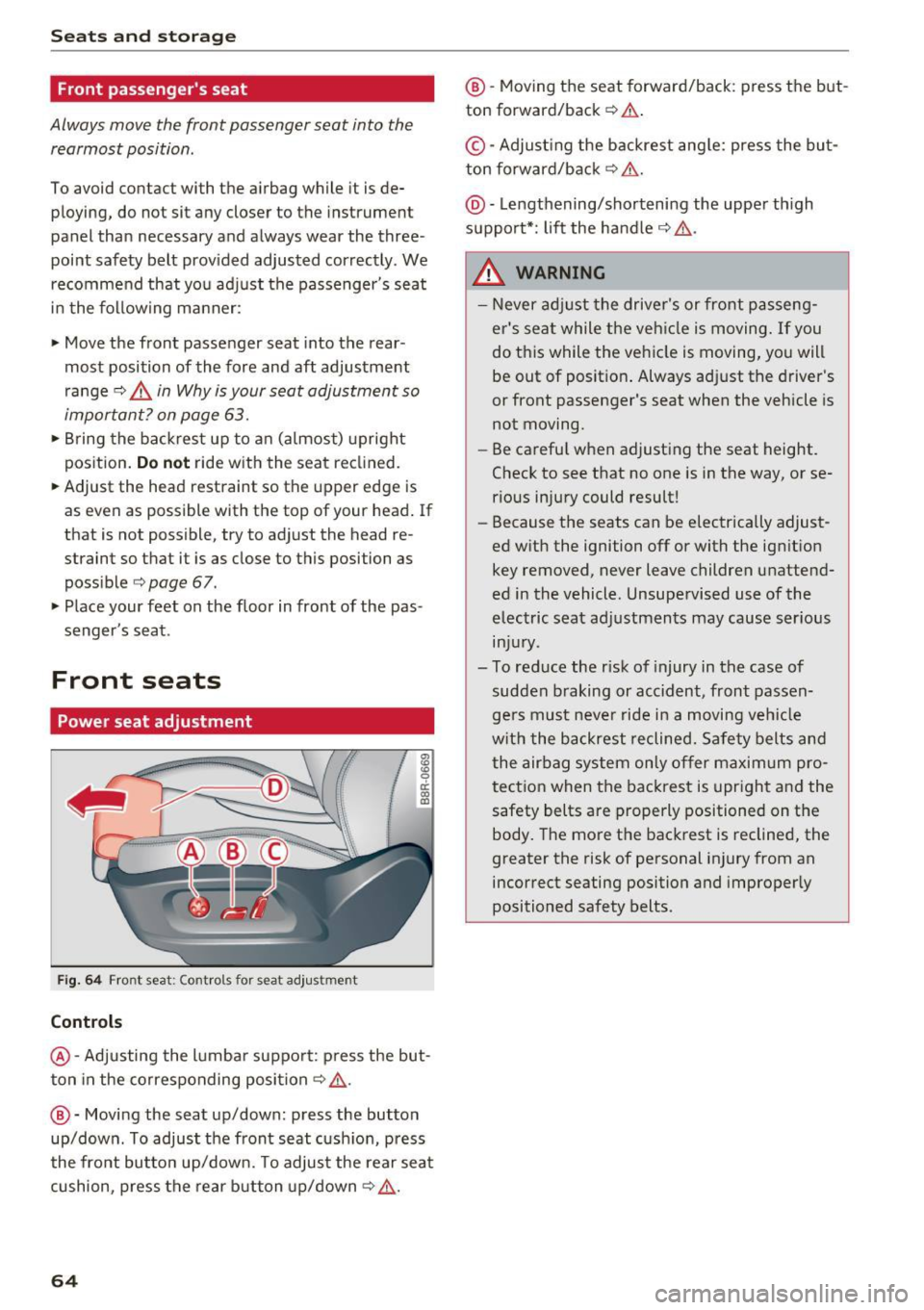
Fig. 64 Front seat: Cont rols for seat adju stment
Controls
~ a: a, a:,
@-Adjusting the l umba r suppo rt: p ress the but
ton in the correspo nding position
c:> ,& .
@ -Movi ng the seat up/down: p ress the button
up/down. To adjust the front seat c ush ion, press
the front bu tton up/ down. To adjus t the rear sea t
cushion, press the rear b utton up/down
c:> ,& .
64
@ -Moving the seat forward/back: press the but
ton forward/back
c:> .&..
©-Adjust ing the b ackrest ang le: press the bu t
ton forward/back
c:> &. .
@ -Lengthening/sho rteni ng the upper th igh
suppo rt*: lift the handle
c:> &,.
.&, WARNING
- Never adjust the drive r's or front p asseng
er 's sea t while t he veh icle is moving.
If you
do t his while the vehicle is moving, yo u will
be out of posit ion . Always ad just the driver 's
or front passenger's seat when the vehicle is
not moving .
- Be carefu l when adjusting the seat height.
Check to see that no one is in the way, or se
rious injury could resu lt!
- Because the seats can be electrically adjust
ed w ith the ignition off or with the ign ition
key removed, never leave children unattend
ed in the vehicle. Unsupe rvised use of the
electric seat ad justmen ts may cause serious
in ju ry.
- To reduce the r isk of injury in the case of
sudden b raking or accident, front passen
ge rs must neve r ride i n a moving ve hicle
w it h the backrest reclined. Safety belts a nd
the airbag system only o ffer maxim um pro
t ection when the bac krest is upr igh t and the
safety belts are properly positioned on the
body. The mo re the bac krest is reclined, the
greater the risk of personal injury from an
incorrect seating position and improperly
positioned safety belts.
-
Page 67 of 300
..... N
co ~ CX)
..... I.Cl U"I
..... I.Cl .....
Memory function
Memory for driver's seat
Applies to vehicles: with seat memory
The seat adjustment settings for two drivers con
be stored using the memory buttons in the driv
er's door .
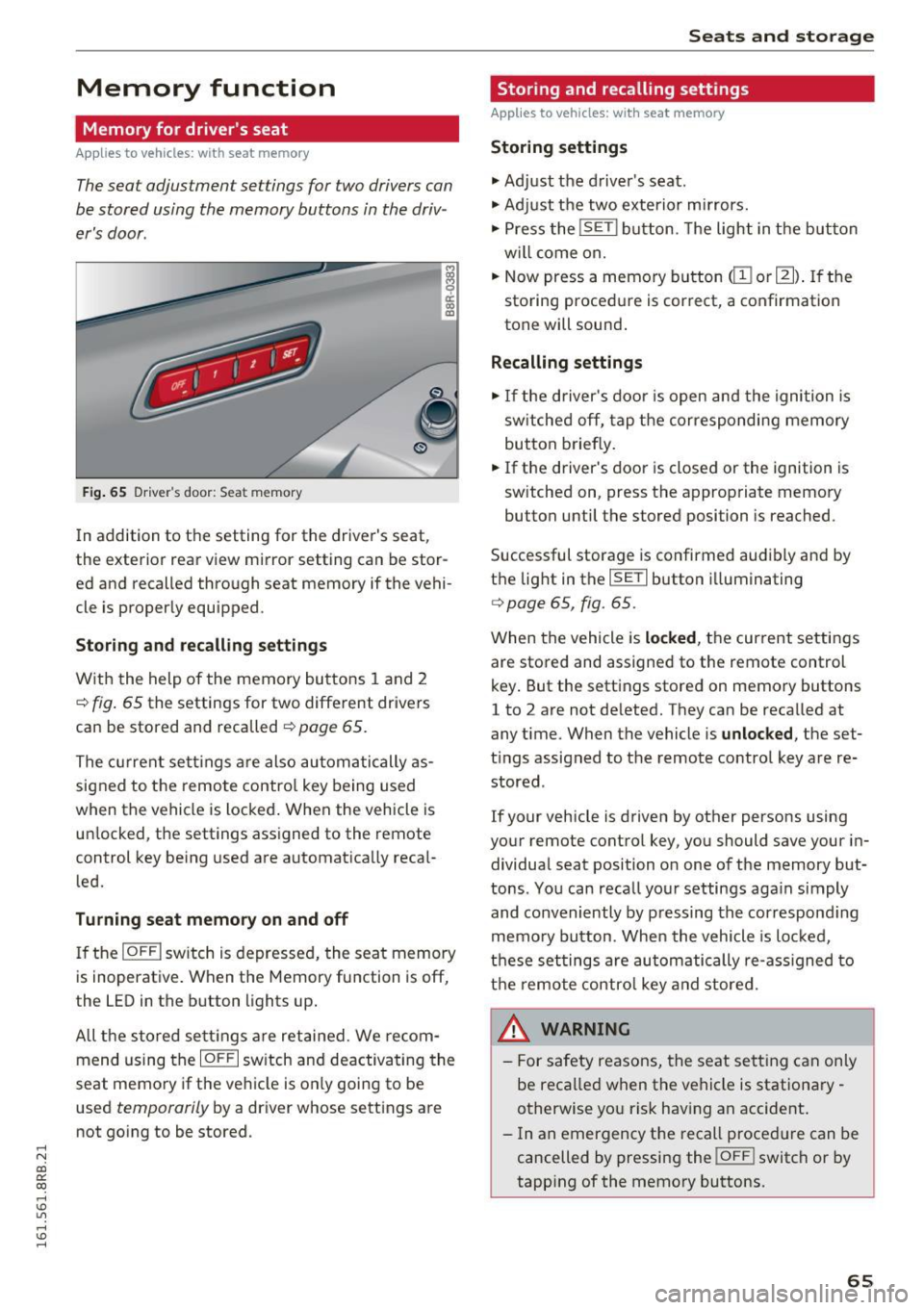
Fig . 65 D ri ver's door : Sea t memory
! co ID
In addition to the setting for the driver's seat ,
the exterior rear view mirror setting can be stor
ed and recalled through seat memory if the vehi
cle is proper ly equ ipped .
Storing and recall ing s ettings
With the help of the memory buttons 1 and 2
¢ fig . 65 the settings for two different drivers
can be stored and recalled
¢ page 65.
The cu rrent sett ings are also automatically as
signed to the remote contro l key being used
when the vehicle is locked . When the vehicle is
un locked, the settings ass igned to the remote
control key being used are automatica lly reca l
led.
Turning seat memory on and off
If the IO FFI sw itch is depressed, the seat memory
is inoperat ive . When the Memory fu nction is off,
the LED in the button lights up .
All the sto red se ttings a re retained. We recom
mend us ing the
IO FF I sw itch and deactivating the
seat memory if the ve hicle is on ly going to be
used
temporarily by a driver whose settings are
not go ing to be stored .
Seats and storag e
Storing and recalling settings
Applies to vehicles: with seat memory
Storing settings
.,. Adj ust the d river's seat.
.,. Adjust the two exterior mirrors.
.,. Press the
!S ET I button. The light in the button
w ill come on.
.,. Now press a memory button
(ill or 121) . If th e
sto ring procedure is correct, a confirmation
tone will sound .
Recalling settings
.,. If the driver's door is open and the ignition is
sw itched off, tap the corresponding memory
button briefly .
.,. If the driver's door is closed or the ignition is
sw itched on, press the approp riate memory
button until the stored position is reached.
Successful storage is confirmed audibly and by
t h e light in the
ISET I button i lluminating
r=> poge 65, fig. 65.
When the vehicle is locked , the current settings
are stored and assigned to the remote control
key . But the settings stored on memory buttons
1 to 2 are not de leted. They can be reca lled at
any time . When the vehicle is
unlocked , the set
t ings assigned to the remote control key are re
stored .
If your vehicle is driven by other persons using
your remote control key, you should save your in
dividua l seat position o n one of the memory but
tons . You can reca ll you r settings aga in simply
and conveniently by pressing the correspond ing
memo ry button. When the vehicle is loc ked,
t h ese settings are automatically re-ass igned to
t h e remo te contro l key and stored.
_& WARNING
-
- For safety reasons, the seat sett ing can on ly
be recalled when the vehicle is stationa ry -
otherwise yo u risk having an accident .
- In an emergency the recall proced ure can be
cancelled by pressing the
! OF FI switch or by
tapp ing of the memory bu ttons.
65
Page 68 of 300
Sea ts and stor age
Activating remote control key memory
Applies to vehicles: with seat memory
To assign the drive r's seat settings to the remote
con trol key when locking the vehicle, the function
m ust be activated in the radio or M MI*.
• Select:
ICARI funct ion button > Seat adjust
ment > Dr iver' s se at
> Key mem. profi le > On .
Or
• Se lect:
I CARI funct io n button > Car sy stem s*
contro l button > Vehicle sett ing s > S eats >
Driv er's s eat > Remote control key > On .
@ Tips
If you do not want another driver's settings to
be assigned to the remote control key, switch
off the memory function using the radio or
MMI* or the
j o FF I button ¢ page 65.
Rear seat
General information
Safe transportation of passengers on the rear
seats requires proper safety precautions.
All passengers on the rear seats must be seated
in compliance w ith the safety guidelines ex
p lai ned in
¢ page 143 and ¢page 151. The cor
rect seating positio n is critical for the safety of
fron t
and rear seat passengers a like ¢ page 13 7.
_8. WARNING
- O ccupan ts in the front and rear seats m ust
always be properly res trained.
- Do not let anyone ride in the vehicle withou t
t h e head restraints prov ided. Head re
straints hel p to reduce injuries.
- Loose items ins ide the passenger compa rt
ment, can fly forward in a crash or sudden
maneuver and injure occupants. Always
store articles in the luggage compartment
and use the fasten ing eyes, especially when
t h e rear seatbacks have been folded down.
- Read and heed all WARNINGS
¢page 137,
Proper seating positions for passengers in
rear seats.
66
Adjusting seat
The fore-and-a~ adjustment of the seat cushion
and the seatback angle can be adjusted .
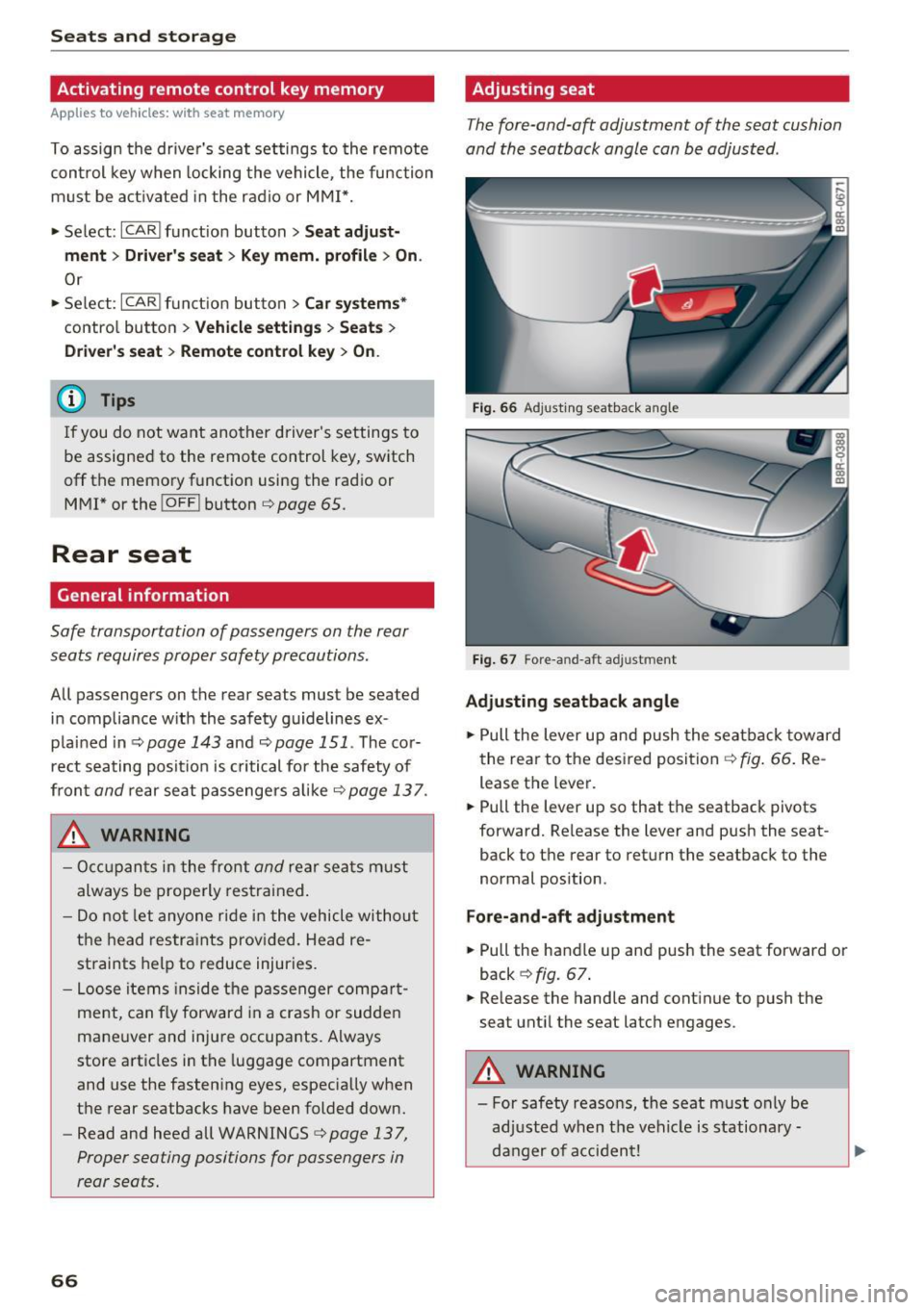
Fig. 66 Ad justing seatback angle
F ig . 67 Fore -a n d-aft ad justment
Adjusting seatback angle
• Pull the lever up and push the seatba ck toward
the rea r to the desired position~
fig. 66 . Re
lease the lever.
• Pull the lever up so that the seatback pivots
forward. Release the lever and push the seat
back to the rear to retu rn the seatback to the
normal pos ition .
Fore-and-aft adju stment
• Pull the handle up and push the seat forward or
back ¢
fig. 67.
• Release the handle and cont inue to push the
seat until the seat latch engages .
_8. WARNING
- For safety reasons, the seat must only be
ad justed when t he vehicle is stationa ry -
danger of acci dent!
Page 69 of 300
,...,
N
co ~ CX) ,...,
I.Cl U"I ,...,
I.Cl ,...,
- Exercise caution when adjustin g the seat .
Adjusting t he seat w ithout checking or pay
ing attention can pinch fingers or limbs -
danger of injury!
Head restraints
Front head restraints
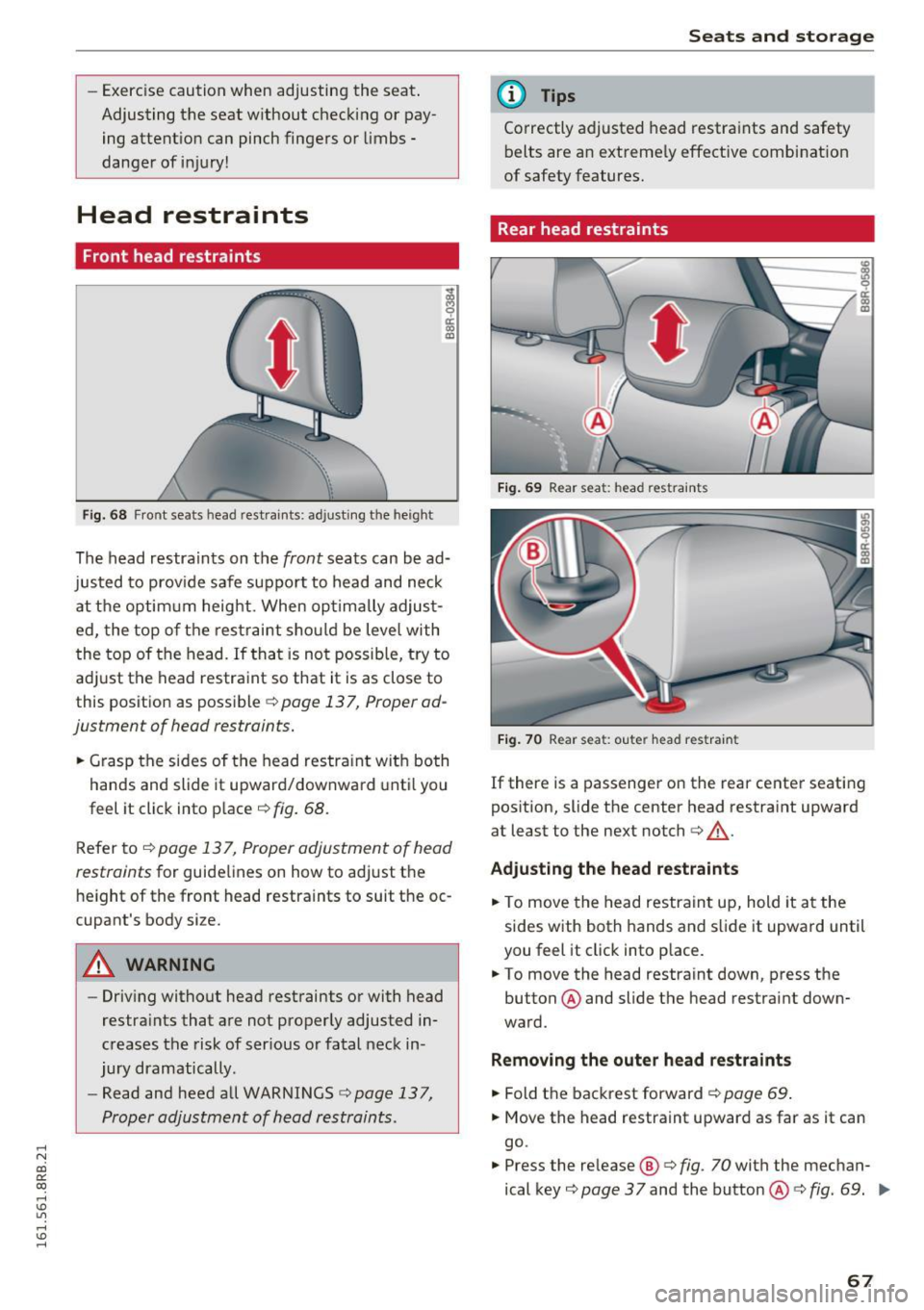
F ig. 68 Fro nt seats hea d restrai nts: adjusti ng the he ight
The head restraints on the front seats can be ad
justed to prov ide safe suppo rt to head and neck
at the optim um height. When optimally adjus t
ed, the top of t he restraint sho uld be leve l with
the top of the head. If that is not possib le, try to
ad just the head restraint so that it is as close to
this position as possible
<:!) page 137, Proper ad
justment of head restraints.
.. Grasp the sides of the head res tra int wit h both
hands and slide it upward/downward unt il you
feel it click into p lace
¢ fig. 68.
Refer to ¢ page 13 7, Proper adjustment of head
restraints
for guidelines on how to adjust t he
h e ight of the front head restra ints to suit the oc
cupant's body size.
A WARNING
- Driv ing without head rest raints or with head
restra ints that are not properly adjusted in
creases the risk of ser ious or fatal neck in
jury dramatically.
- Read and heed all WARNINGS
r:.> page 137,
Proper adjustment of head restraints.
Seats and storag e
(D Tips
Correctly adjusted head restraints and safety
belts are an extremely effective combinat ion
of safety features.
Rear head restraints
F ig . 6 9 Rear seat : head restra ints
Fig. 70 Rear seat: o ute r head restraint
If there is a passenger on the rear center seating
pos it ion, slide the center head restra int upward
at least to the next notch
c:> ,A .
Adju sting the head restraints
.. To move the head restrain t up, hold it a t the
sides with both hands and s lide it upward until
you feel it click into p lace.
.. To move the head restraint down , press the
button @ and slide the head restraint down
ward.
Removing the outer h ead restra ints
.. Fold t he backrest forward c:!) page 69 .
.. Move the head restraint upward as far as it can
go.
.. Press the re lease ®
c:> fig. 70 with the mec han
ical key
c> page 37 and the button @ c:> fig. 69. IIJJ,
67
Page 80 of 300
Sea ts and stor age
when accelerat ing or when app lying the
brakes or when driving around a corner.
- When you are driving make sure that any
thing you may have placed in the center con
so le or other storage locations cannot fall
out into the footwells. In case of sudden
braking you would not be able to brake or
acce le rate .
- Any pieces of cloth ing that you have hung
up must not interfere with the driver's view.
The coat hooks are designed only for light
weight cloth ing . Neve r hang any clothing
with hard , po inted or he avy objects in the
poc kets on the coat hooks . Dur ing s udden
braking or in an accident -especia lly i f the
airbag is dep loyed -these objects could in
jure any passengers inside the vehicle .
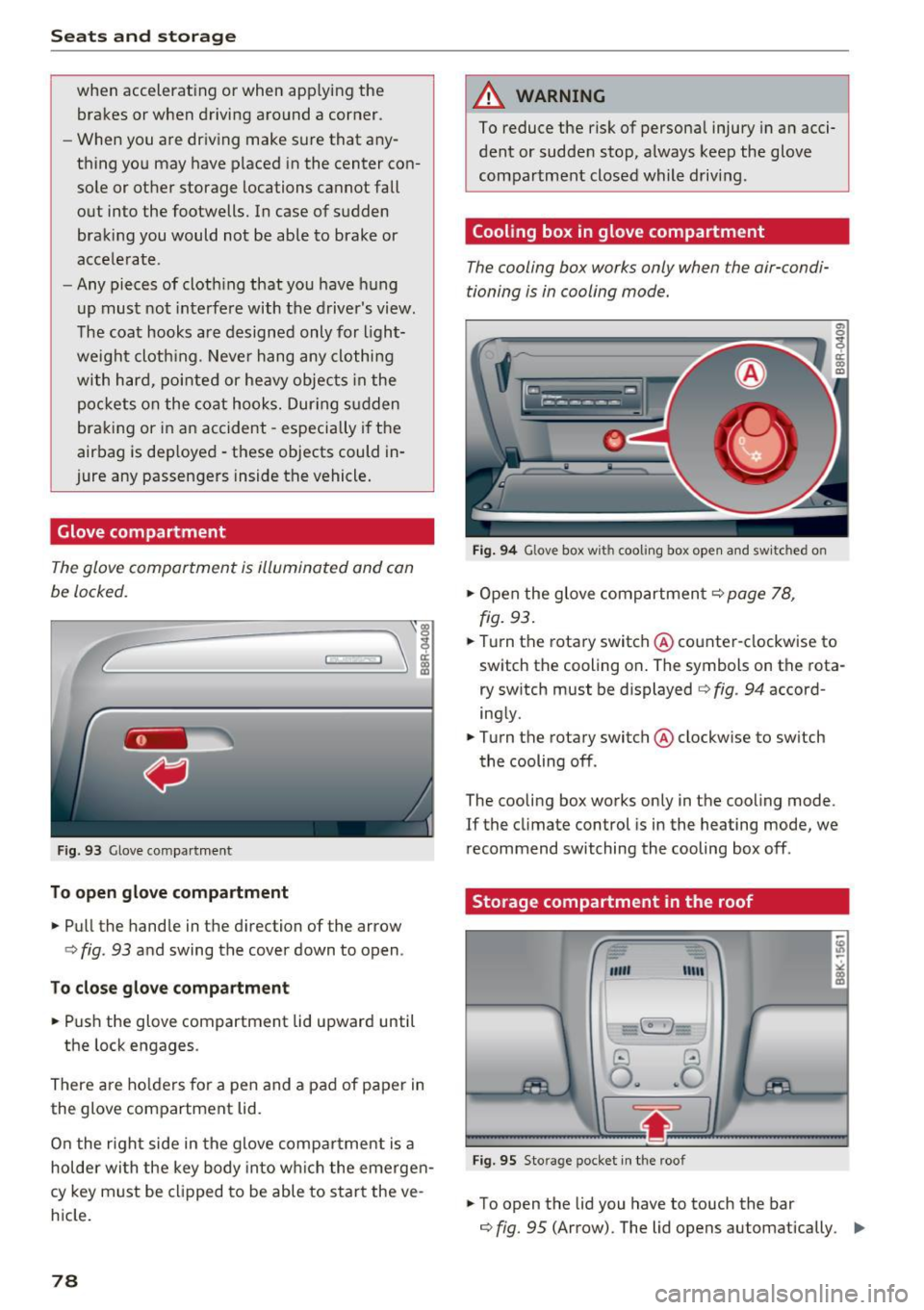
Glove compartment
The glov e comportm ent is illuminat ed and con
be locked.
F ig . 93 Glove co mpa rt men t
To open glove compartment
.. Pull the handle in the d irection of the arrow
c> fig . 93 and swing the cover down to open .
To clo se glove c omp artm ent
.. Push the glove compartment lid upward until
the lock engages .
There are ho lders for a pen and a pad of paper in
the glove compartment lid.
On the r ight side in the glove compa rtment is a
hol der wi th the key body into w hich the emerge n
cy key must be clipped to be able to star t the ve
h icle.
78
A WARNING
To reduce the risk of persona l injury in a n acci
dent or sudde n stop, a lways keep the glove
compartment closed while driving .
Cooling box in glove compartment
The cooling box works only when the air-condi
tioning i s in cooling mode.
Fig . 94 Glove box w ith cooli ng box ope n and sw itc hed on
.. Open the glove compartmen t c> page 78,
fig. 93 .
.. Tu rn the rotary switch @ counte r-clockwise to
switch th e cooling on . The symbols on th e rota
ry sw it c h must be displayed c> fig . 94 accord
ing ly .
.. Turn the rotary switch @ clockwise to sw itch
the cooling off .
The cooling box works only in the cooling mode.
If the climate con trol is in the heating mode, we
recommend switching the cooling box off .
Storage compartment in the roof
""' "'"
-~
@ ..!J
O .. ~O
Fig. 95 Sto ra g e pocket in t he roof
.. To open the lid you have to touch the bar
c> fig. 95 (Arrow). The lid open s automatically . ..,.
Page 82 of 300
Warm and cold
Warm and cold
Climate control system
Description
The climate control system warms, cools and
adds humidity to the air in the veh icle inter ior. It
is the most effective when the windows and pan
oramic sliding sunroof* are closed. If there is a
bui ld-up of heat inside the vehicle, ventilation
can help to speed up the cooling process.
I n all heating mode functions except
defrost, the
b lower only switches to a higher speed once the
engine coolant has reached a certain tempera
ture .
Condensat ion from the cooling system can drip
and form a puddle of water under the veh icle.
This is normal and does not mean there is a leak.
P ollutant filt er
The pol lutant filte r removes pollutants such as
dust and pollen from the a ir.
The air pollutants filter must be changed at the intervals specif ied in your Warranty
& Mainte
nance booklet, so that the a ir cond it ioner can
properly work.
If you drive your vehicle in an area with high air pollut ion, the filter may need to be changed
more frequently than specified i n your Aud i War
ranty
& Maintenance booklet. If in doubt, ask
your author ized Audi Service Advisor for advice.
Ke y cod ed setting s
The climate control settings are automatically
stored and assigned to the remote control key
that is in use .
.8, WARNING
Reduced visib ility is dangerous and can ca use
accidents.
- For safe dr iv ing it is very impo rtant that all
windows be free of ice, snow and condensa
tion .
80
-Complete ly familiarize yourself with the
proper use and function of the heating and
ventilation system and espec ially how to de
fog and defrost the windows .
- Never use the windshield wiper/washer sys
tem in freezing weather until you have
warmed the windshield first, using the heat ing and vent ilation system. The washer solu
tion may freeze on the windshield and re
duce visibi lity.
(D Note
- If you suspect that the air conditioner has
been damaged, sw itch the system off to
avoid further damage and have it inspected
by a qualified dealership.
- Repa irs to the Aud i air cond itioner requ ire
special techn ica l know ledge and spec ial
tools. Contact an authorized Audi dealer fo r
assistance.
@ For the sake of the environment
By reduc ing the amo unt of fuel you use, you
also reduce the amount of pollutants emitted
into the a ir.
(D Tips
- Keep the a ir intake slots (in front of the
windshield) free from ice, snow and debr is
in orde r to maintain the prope r funct ion of
the climate control system .
- The energy management system may sw itch
the seat heating* o r rear window defroster
off temporarily. These systems are available
again as soon as the energy balance has
been restored.
- The air flowing out of the vents and
throughout the ve hicle's ent ire interior is
discharged at the rear of the vehicle. Make
sure that the out let slots are not covered by
clothing, etc.
Page 86 of 300
Driving
Driving
Steering
Manually adjustable steering wheel
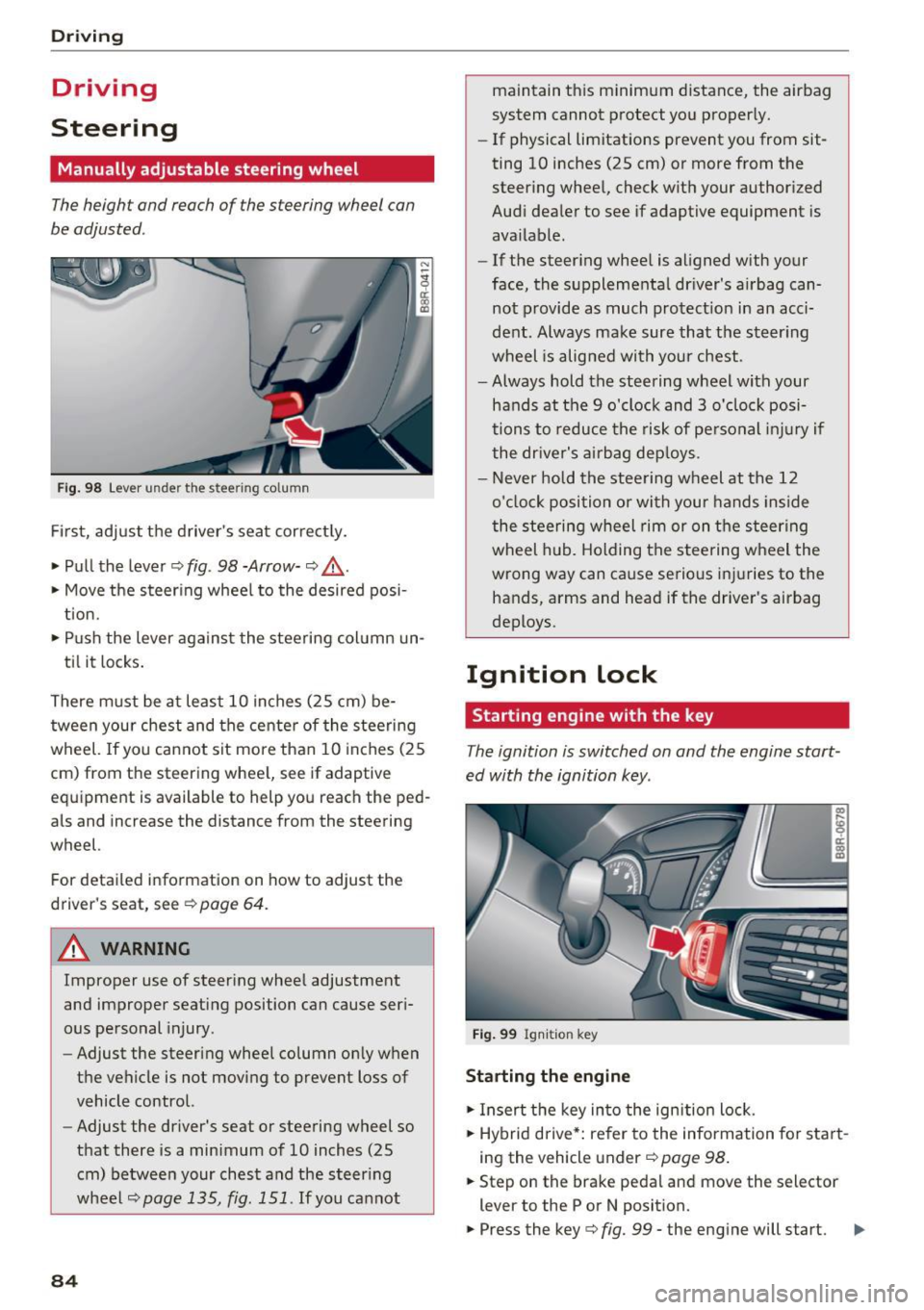
The height and reach of the steering wheel can
be adjusted .
Fig . 98 Lever under the s tee ring column
Fi rs t, adjust t he driver 's sea t cor rect ly.
• Pull the lever¢
fig. 98 -Arrow-¢ &_.
• Move the steer ing whee l to the desired posi
t ion.
• Push the lever agains t the steering col umn un-
ti l it locks .
There m ust be at least 10 inches (25 cm) be
tween your chest and the cente r of the steering
wheel. If you cannot sit more than 10 inches (25
cm) from the steering whee l, see if adaptive
eq uipment is available to help you reach the ped
als and increase the distance from the steering
wheel.
For detailed information on how to adjust the
driver's seat, see ¢
page 64.
A WARNING
Improper use of steering whee l adjustment
and improper seati ng position can cause ser i
ous pe rsonal injury.
- Adjust the steering wheel column on ly when
the vehicle is not moving to prevent loss of
vehicle control.
- Adjust the dr iver's seat o r steering wheel so
that there is a min imum o f 10 inches (25
cm) be twee n your chest and the s teer ing
wheel
¢page 135, fig. 151 . If you ca nnot
84
maintain t his minim um distance, the airbag
system cannot p rotect yo u properly.
- If physical limitations prevent you from sit
ting 10 inches (25 cm) or more from the
steer ing whee l, check with your author ized
Aud i dea ler to see if adaptive equipment is
ava ilable.
- If the steer ing whee l is aligned with your
face, the s upplementa l dr iver's a irbag can
not provide as much protect ion in an acci
dent . Always make sure that the steer ing
wheel is alig ned wi th your chest.
- Always hold the steering w heel with your
hands at the 9 o'clock and 3 o'clock posi
tions to reduce the ris k of pe rsonal injur y if
the dr ive r's ai rb ag de ploys .
- Never ho ld the stee ring w heel at t he 12
o' cl oc k position or with your hands inside
the stee ring wheel rim or on t he steering
wheel hub. Holding the steering w heel the
wrong way can cause se rious i njuries to the
hands, arms and head if the driver's airbag
deploys .
Ignition lock
Starting engine with the key
The ignition is switched on and the engine start
ed with the ignition key.
F ig . 9 9 Ign iti on key
Starting the engine
• In sert the key in to the ignition lock.
• Hybrid d rive *: refer to the information fo r sta rt
i ng the veh icle under ¢
page 98 .
• Step on the brake pedal and move the selector
lever to the P or N posit ion.
• Press the key¢
fig. 99 -the eng ine will start. .,.
Page 87 of 300
,....,
N
co
er::
co
,....,
when starting the engine for diesel vehicles* in
colder temperatures. Therefore, you must hold
the brake pedal down until the engine starts.
The indicator lamp
1,1 illuminates when the en
gine is preheated .
Switching the ignit ion on /off
If you would like to switch the ignition on with
out starting the engine, follow these steps:
~ Inse rt the key into the ignition lock .
~ Press the key briefly without press the brake
pedal.
~ To switch the ignition off, press the key again.
Diese l vehicles* are preheated while the ignition
is switched on.
When start ing the e ngine, major electrical loads
are switched off tempora rily.
You can on ly remove the key with the ignition
switched off. To do th is, you have to press on the
key aga in.
I f the engine should not start immediately, the
starting process is automat ically stopped after a
short time. Repeat sta rting procedu re .
St art-Sto p-S ystem*:
Note the information on c:> page 91, Start/Stop
system .
A WARNING
-Never allow the engine to run in confined
spaces -dange r of asphyxiation .
- Never remove the ignit ion key from the ign i
t ion lock while the vehicle is moving . Other
wise, the stee ring lock cou ld suddenly en
gage and you would not be able to stee r the
vehicle .
- Always ta ke the key with you whenever you
leave you r vehicle. Othe rw ise, the engine
c ou ld be started or electrical eq uipment
such as the power windows cou ld be operat
ed. This can lead to serious injury.
- Never leave children or persons requiring as
sistance unattended in the vehicle. The
doors can be locked using the remote trans-
-
Driv ing
mitter, preventing peop le from escaping
from the vehicle on their own in the event of
an emergency. Depending on the time of
year, people ins ide the veh icle can be ex
posed to very h igh or very low tempera
tures.
(D Note
Avo id h igh engine rpm, full throttle and heavy
engine loads until the engine has reached op
erating temperature -otherw ise you risk en
gine damage .
@ For the sake of the environment
Do not let the engine run wh ile parked to
warm up. Beg in driving immed iately. T his re
duces unnecessa ry emissions.
(D Tips
- If the key cannot be removed from the ign i
tion lock, you have to pull the mechanical key out of the master key in o rder to be able
to lock the vehicle
c:> page 38.
- Some noise after start ing the engine is nor
ma l and is no cause for conce rn.
- If you leave the vehicle w ith the ignition
switched on, the ignit ion w ill switch off af
ter a ce rtain per iod of t ime. Please note that
elect rical eq uipment such as exterior lights
w ill switch off as we ll when that happens.
85
Page 88 of 300
Driving
Starting the vehicle with the emergency
key
You can use the emergency key as an ignition key
in an emergency.
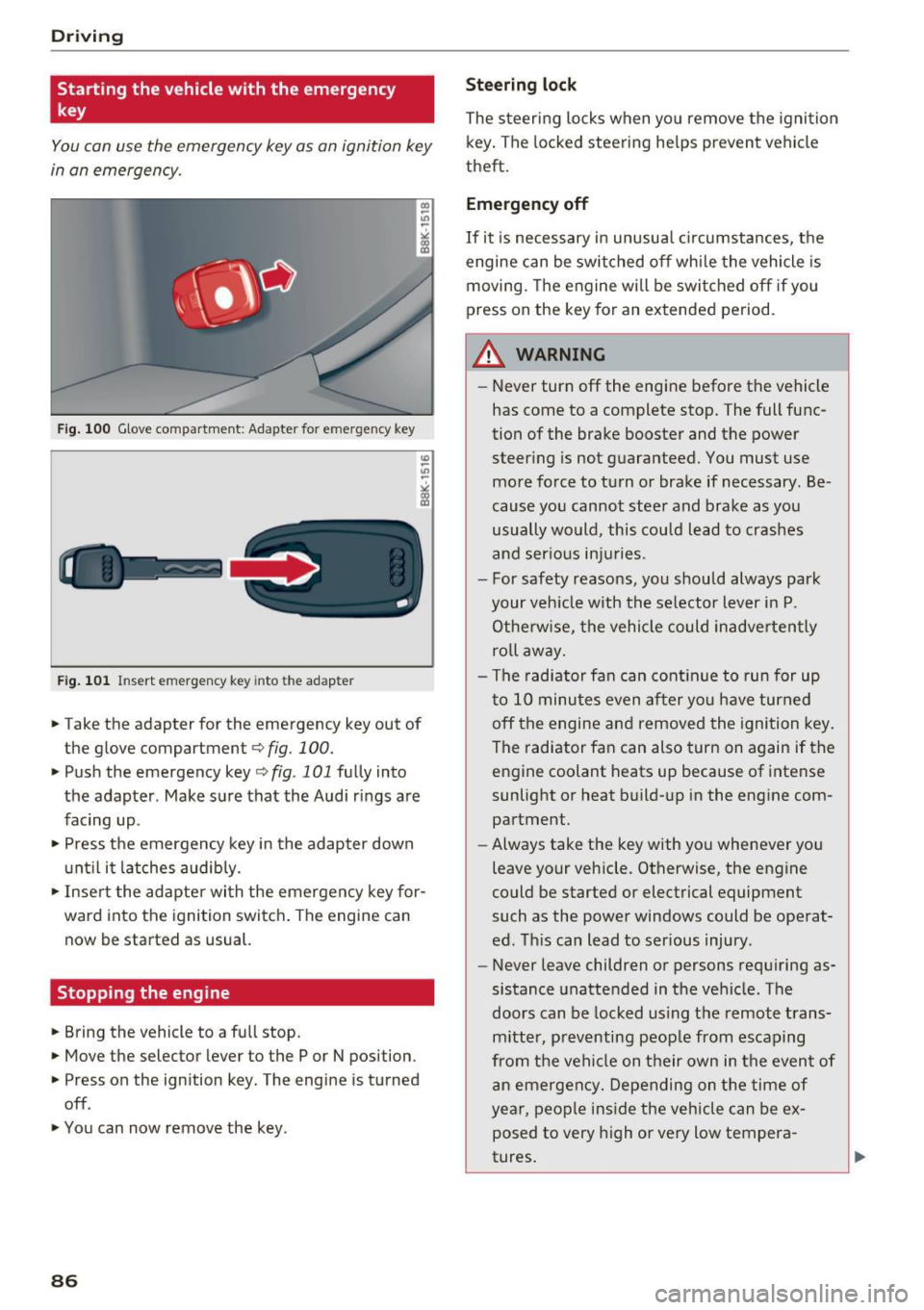
Fig. 100 Glove compartment : Ada pte r fo r em erg en cy key
Fig. 101 In sert emergency key into the adap te r
... Take the adapter for the emergency key out of
the glove compartment ¢
fig. 100.
.,. Push the emergency key ¢ fig . 101 fully into
the adapter . Make sure that the Audi rings are
facing up .
.,. Press the emergency key in the adapter down
until it latches audibly.
.,. Insert the adapter with the emergency key for
ward into the ignition switch. The engine can
now be started as usual.
Stopping the engine
... Bring the vehicle to a full stop.
... Move the selector lever to the P or N position .
.. Press on the ignition key . The engine is turned
off .
.,. You can now remove the key .
86
Steering lock
The steering locks when you remove the ignition
key. The locked steering helps prevent vehicle
theft.
Emergency off
If it is necessary in unusual circumstances, the
engine can be switched off while the vehicle is
moving. The engine will be switched off if you
press on the key for an extended period .
A WARNING
-Never turn off the engine before the vehicle
has come to a complete stop. The full func
tion of the brake booster and the power
steering is not guaranteed. You must use
more force to turn or brake if necessary . Be
cause you cannot steer and brake as you
usually would, this could lead to crashes
and serious injuries .
- For safety reasons, you should always park
your vehicle with the selector lever in P .
Otherwise, the vehicle could inadvertently
roll away.
- The radiator fan can continue to run for up
to 10 minutes even after you have turned
off the engine and removed the ignition key .
The radiator fan can also turn on again if the
engine coolant heats up because of intense
sunlight or heat build-up in the engine com
partment .
- Always take the key with you whenever you
leave your vehicle . Otherwise, the engine
could be started or electrical equipment
such as the power windows could be operat
ed. This can lead to serious injury .
- Never leave children or persons requiring as
sistance unattended in the vehicle. The
doors can be locked using the remote trans
mitter, preventing people from escaping
from the vehicle on their own in the event of
an emergency. Depending on the time of
year, people inside the vehicle can be ex
posed to very high or very low tempera
tures.
Page 89 of 300
..... N
co ~ CX)
..... I.Cl U"I
..... I.Cl .....
CD Note
If the engine has been under heavy load for
an extended per iod, heat builds up in the en
gine compartment after the engine is switch
ed off- there is a risk of damaging the eng ine .
Allow the engine to run at idle for about two
m inutes before switching it off .
Convenience key
Starting the engine
Applies to vehicles: with Conve nien ce key
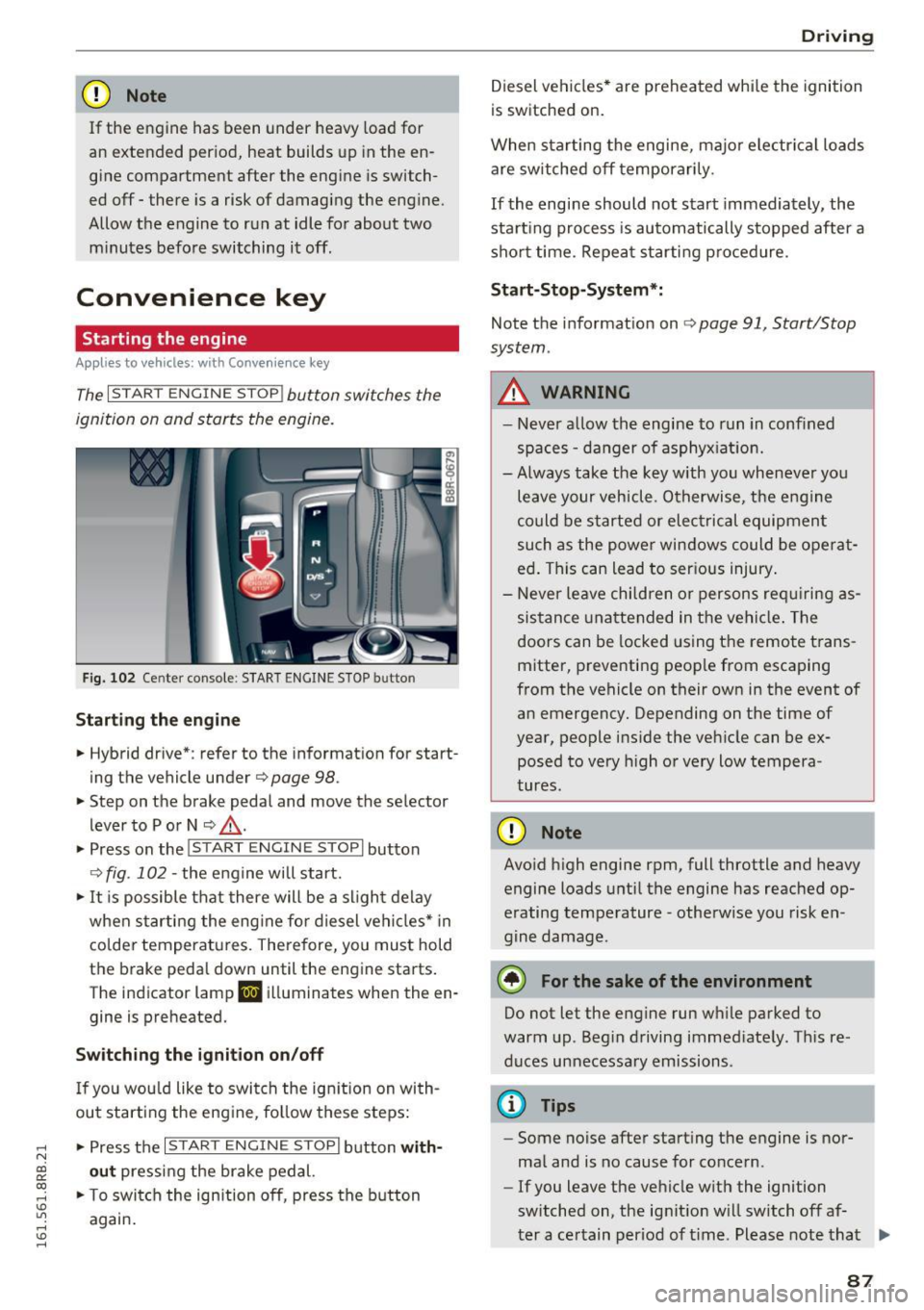
The I S TA RT ENGINE S TOP ! button switches the
ignition on and starts the engine.
Fig. 102 Ce nter console : S TART E NGINE STOP b utto n
Starting the engine
• Hybrid drive *: refer to the informat ion fo r start
ing the vehicle under
Q page 98 .
• Step on the brake pedal and move the selector
lever to P or
N Q LD, .
• Press on the~ , S_T_A_R_ T_E _N _G_ I_N_E_S_T_O_P~I button
Q fig . 102 -the engine will start.
• It is possible that there will be a sligh t delay
when starting the eng ine fo r die sel vehi cles* in
colder temperatu res. Therefore, you mus t hold
the brake peda l down until the engine starts .
The indicator lamp
II illuminates when the en
gine is preheated.
Switching the ignition on/off
I f you wou ld like to switch the ign ition on wi th
ou t starting the eng ine , follow these steps :
• Press t he
I S T AR T ENG IN E STOPI button with
out pressing the brake pedal.
• To swi tch the ignition off, press the b utton
again .
Drivi ng
Diesel vehi cles* are preheated whi le the ignition
is switched on.
When starting the e ngine, majo r electrical loads
are switched off temporarily.
If the engine should not start immediately, the
sta rt ing process is au tomatically s topped after a
sho rt time. Repea t starti ng procedure.
Start-Stop-System*:
Note the information on Q page 91, Start/Stop
system .
A WARNING
--Never allow the engine to r un in conf ined
spaces -danger of asphyx iat ion.
- Always take the key with you whenever yo u
leave your vehicle . Otherwise, the eng ine
co uld be started or elect rical equipmen t
such as the powe r windows could be operat
ed . This can lead to ser ious injury .
- Never le a ve chi ldren o r persons re quiring as
sis tan ce una ttende d in the ve hicl e. The
doors can be locked us ing the remote t rans
mitter, preventing peop le from escaping
from the vehicle on their own in the event of an emergency. Depending on the time of
year, people ins ide the veh icle can be ex
posed to very high o r very low tempera
tures .
CD Note
Avoid h igh engine rpm, full throttle and heavy
engine loads u ntil the engine has reached op
erating temperature -otherwise you risk en
g ine damage.
@ For the sake of the environment
Do n ot let the engine run wh ile parked to
warm up . Beg in d riving immed iate ly. T his re
d uces unnecessa ry emissions .
@ Tips
-Some noise after start ing the engine is nor
ma l and is no cause for co ncern.
- If you leave the vehicle w ith the ignition
switched on , the ignit ion w ill switch of f af-
-
ter a certain per iod of time . Please note that .,,_
87