warning lights AUDI Q5 2017 Owner's Manual
[x] Cancel search | Manufacturer: AUDI, Model Year: 2017, Model line: Q5, Model: AUDI Q5 2017Pages: 296, PDF Size: 74.43 MB
Page 56 of 296
Lights and Vision
Windshield wipers
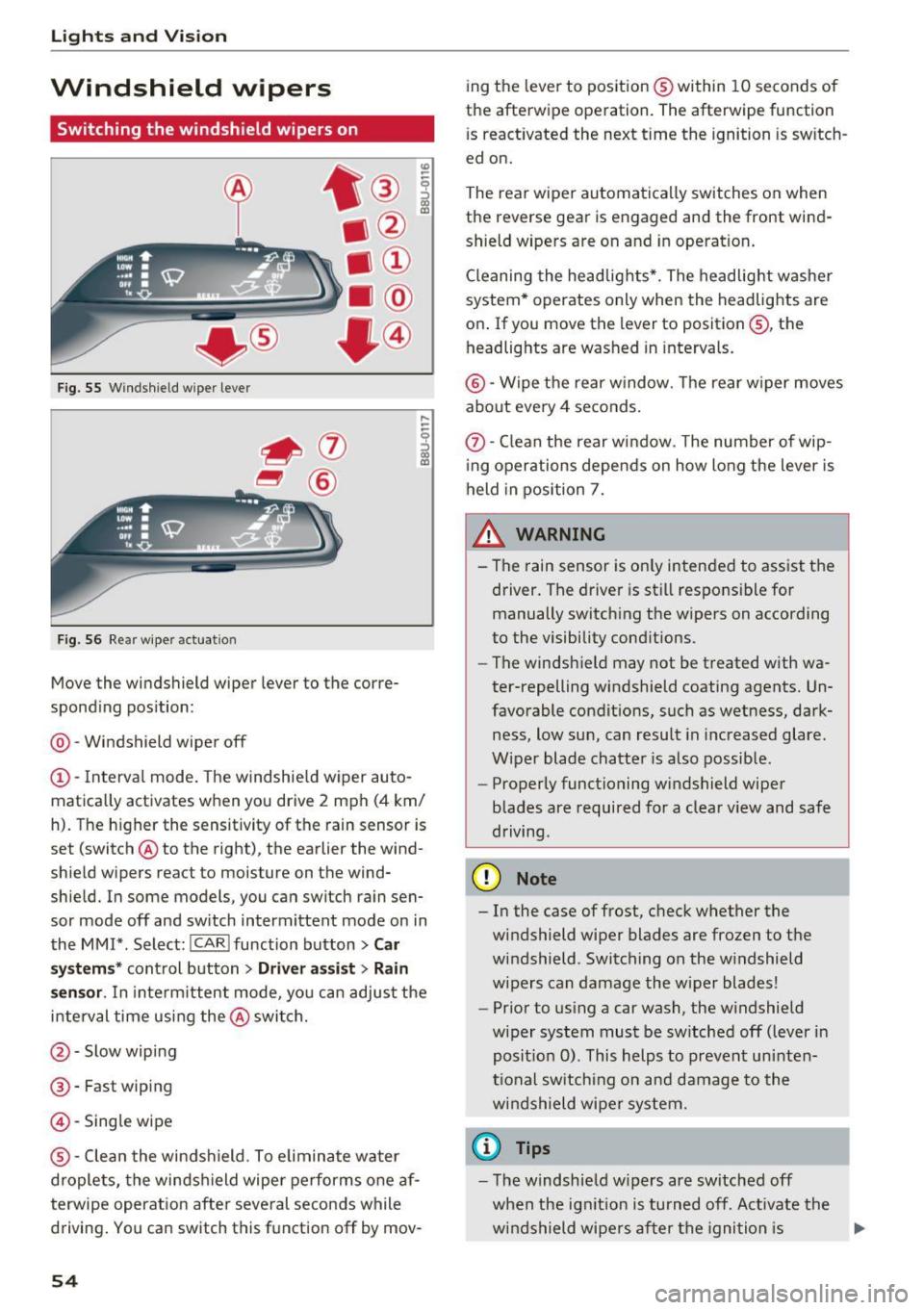
Switching the windshield w ipers on
F ig. 55 W indshield wiper lever
F ig. 56 Rear w iper actuat ion
Move the windshield wiper lever to the corre
spond ing pos ition:
@ -Windshield wiper off
(D -Interval mode. The windshie ld w iper auto
matica lly activates when you drive 2 mph (4 km/
h). The h igher the sensit ivity of the rain sensor is
set (switch @to the right), the earlier the wind
shield wipers react to moisture on the wind
shie ld. In some models, you can switch rain sen
sor mode off and sw itch intermittent mode on in
the MM!* . Select:
!CARI function button> Car
s y stem s*
control button > Driver a ssi st > Rain
s en sor .
In inte rm ittent mode, yo u can adjust the
i n terval time using the @switch.
@-Slow wipi ng
@ -Fast wiping
@-Sing le wipe
® -Clean the windshield . To elimin ate water
d roplets, the winds hield wipe r performs one af
terwipe operatio n afte r seve ral seconds while
driving . You can switch this f unction off by mov -
54
ing the leve r to pos ition ® within 10 seconds of
the afterwipe ope ration. The afterwipe function
i s react ivated the next time the ignition is sw itch
ed on.
The rear wiper automatica lly switches on when
the reverse gear is engaged and the front wind
shield wipers are on and in operation .
Cl eaning the headlig hts*. The headlight was he r
system * operates only when the headlights are
on . If you move the lever to position@, the
headlights are washed in intervals.
@ -Wipe the rear w indow. The rear w iper moves
a bout every 4 se conds .
(!)-Clean the rear w indow . T he number of wip
i ng operations depe nds on how long the lever is
held in position 7.
& WARNING
- Th e rain sensor is on ly inten ded to ass ist the
driver. The driver is st ill responsi ble for
manually switch ing the wipers on according
to the visibility cond itions.
- The windsh ield may not be t reated with wa
ter-repelling windshield coating agents. Un
favorable condit ions, such as wetness, dark
ness, low sun, can resu lt in i ncreased glare.
Wiper blade chatte r is also possib le.
- Properly functioning windshield wiper
blades are required for a clea r view and safe
driving.
@ Note
- In the case of frost, c heck whether the
windshield wiper blades are frozen to the
windshield . Switching on the w indshield
w ipers can damage the w iper blades!
- Pr ior to us ing a car wash, the w indshield
wiper system must be sw itched off (lever in
posit io n 0) . This helps to preven t un inte n
ti onal sw itchi ng on and damage to the
w indshield wipe r sy stem.
(D Tips
-The windshie ld w ipers are switched off
when the ig nitio n is turned off. Activate th e
w ind shield wipe rs a fter the igni tion is .,.
Page 57 of 296
CD
CD
.... N ,-... N ..... 0 0 C<'. 00
switched back on by moving the windshield
wiper lever to any position .
- Worn or dirty windshield wiper blades result
i n streaking. This can affect the rain sensor
funct ion . Check yo ur windshield wiper
blades regularly.
- The washer fluid nozzles of the windshield
washer system are heated at low tempera
tures when the ignition is on.
- When stopping temporarily, e .g . at a traffic
light, the set speed of the windsh ield wipers
i s automatically reduced by one speed.
Cleaning windshield wiper blades
Clean the windshield wiper blades when they be
g in to leave streaks . Use a soft cloth a nd glass
cleane r to clean the w indshield wiper blades .
Front w ipe r
.. Place the windshield wiper arms in the service
pos ition. Refer to
9 page 55 .
.. Lift the wiper arm away from the front window .
Rear wiper
.. Lift the wiper arm away from the rear window.
A WARNING
Dirty windshield wiper blades can impair your
view. This can lead to accidents.
Replacing windshield wiper blades
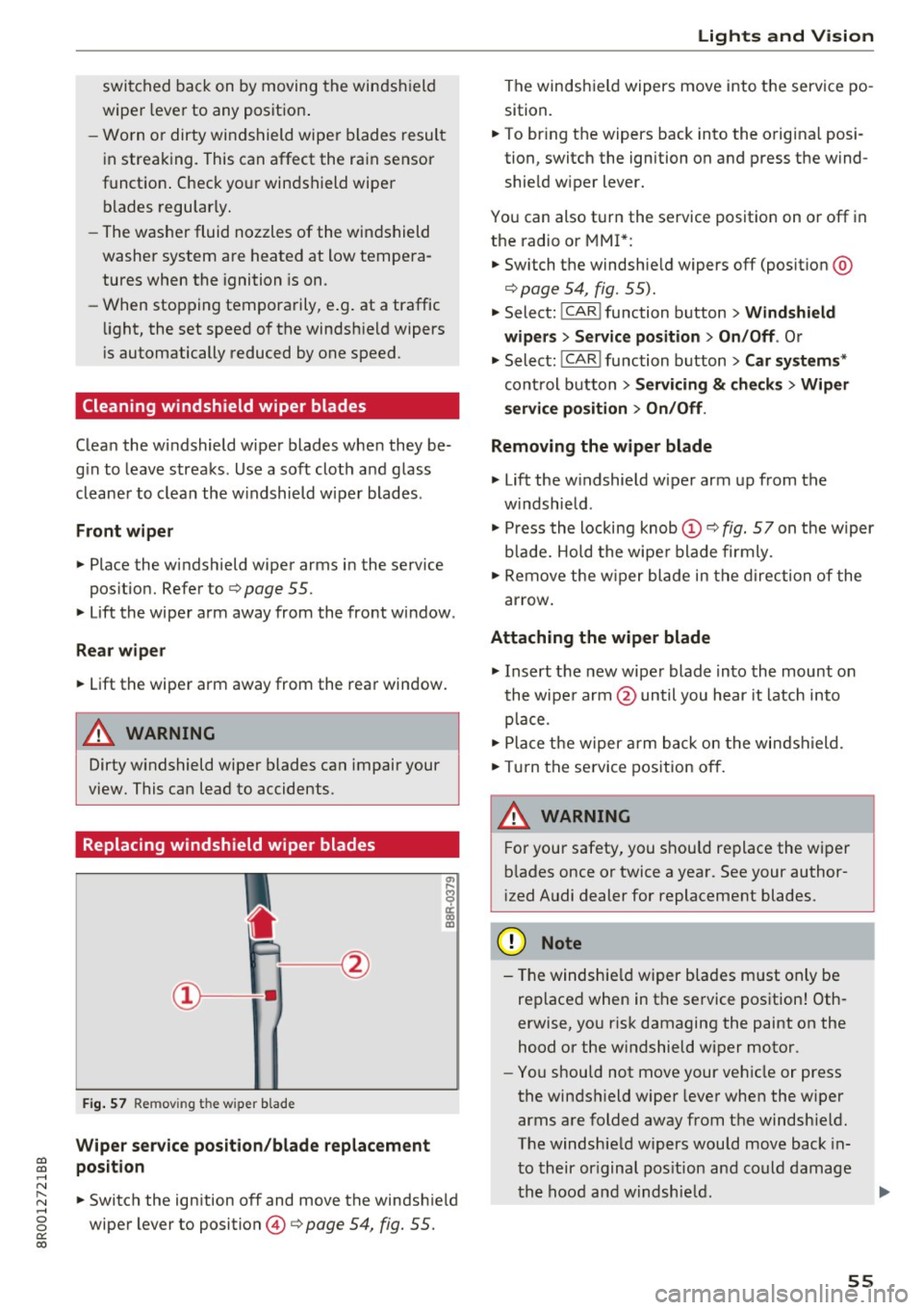
F ig. 57 Remov ing the w ipe r blade
Wiper s ervice position /blade replac em ent
posit ion
a,
ij
a: co
"'
.. Switch the ign ition off and move the windsh ield
wiper lever to position @
9 page 54, fig. 55.
Lights and Vision
The windshield wipers move into the service po
sition .
.. To br ing the wipers back into the orig ina l posi
tion, switch the ignition on and press the wind shie ld w iper lever.
You can also turn the service position on or off in
the radio or MMI*: .. Switch the windshie ld wipers
off (posit ion @
9page 54, fig. 55).
.. Select: !CAR ! function button > Wind shield
wiper s
> Servic e po sition > On /Off . Or
.. Select:
!CAR ! function button> Car syst em s*
cont rol button > Servicing & c heck s> Wiper
s ervi ce po sition
> On /Off .
Removing the wiper blade
.,. Lift the w indshield wiper arm up from the
w indshield .
.,. Press the locking knob
(D 9 fig. 57 on the wiper
b lade. Hold the wipe r blade firmly .
.. Remove the w iper blade in the direction of the
ar row .
Attaching the wiper blade
.. Insert t he new wipe r blade into the mount on
the wipe r arm @until you hear it latch into
p lace.
.. Place t he w iper arm back on the windshield.
.. Turn the se rvice pos ition off.
A WARNING ~ -
F or your safety, you should replace the wiper
b lades once or twice a year . See your author
i zed Audi dealer for replacement blades.
(D Note
- T he windshie ld wiper blades must on ly be
replaced when in the service position! Oth
erwise, you r isk damaging the paint on the
hood or the w indshield wiper motor .
- You should not move your vehicle or press
the windsh ield wiper lever when the wiper
arms a re folded away from the windshie ld.
The windshield wipers would move back in
t o their or iginal pos ition and could damage
the hood and w indshie ld .
55
Page 58 of 296
Lights and Vision
-To help prevent damage to the wiper sys
tem, a lways loosen blades which are frozen
to the windshie ld before operating w ipers .
- To help prevent damage to wiper blades, do
not use gasoline, kerose ne, paint thinner, or
other solvents on or near the wiper blades.
- To help prevent damage to the wiper arms
or other components, do not attempt to
move the wipers by hand.
@ Tips
- Comme rcial hot waxes applied by a utomat ic
car washes affect the how eas ily the glass
surface can be cleaned.
- You can also use the service position, fo r ex
ample, if you want to protect the windsh ield
from icing by using a cover.
Replacing the rear wiper blade
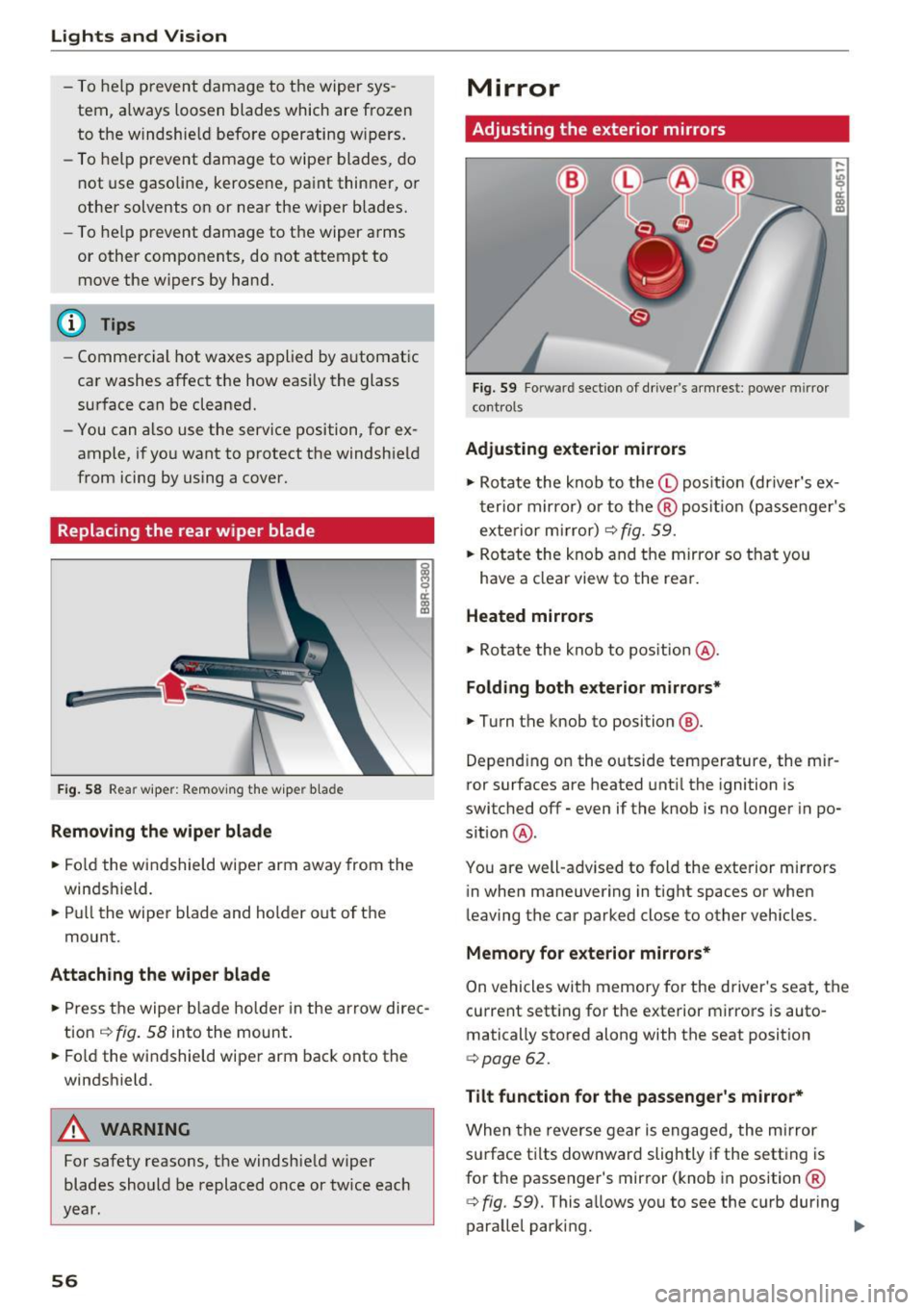
F ig. 58 Rea r wiper: Remov ing the w iper b lade
Removing the wiper blade
.. Fo ld the wi ndshield wipe r arm away from the
windshield.
.. Pu ll the wiper blade and holder out of t he
mount.
Attaching the wiper blade
~ M 0 a: a, (C
.. Press t he wiper b la d e holde r in the arrow dire c
tion
c:> fig. 58 into the mount.
.. Fo ld the windshield wiper arm bac k onto the
windshield.
A WARNING
-
For safety reasons, the windshield w iper
blades sho uld be replaced once or twice each
year .
56
Mirror
Adjusting the exterior mirrors
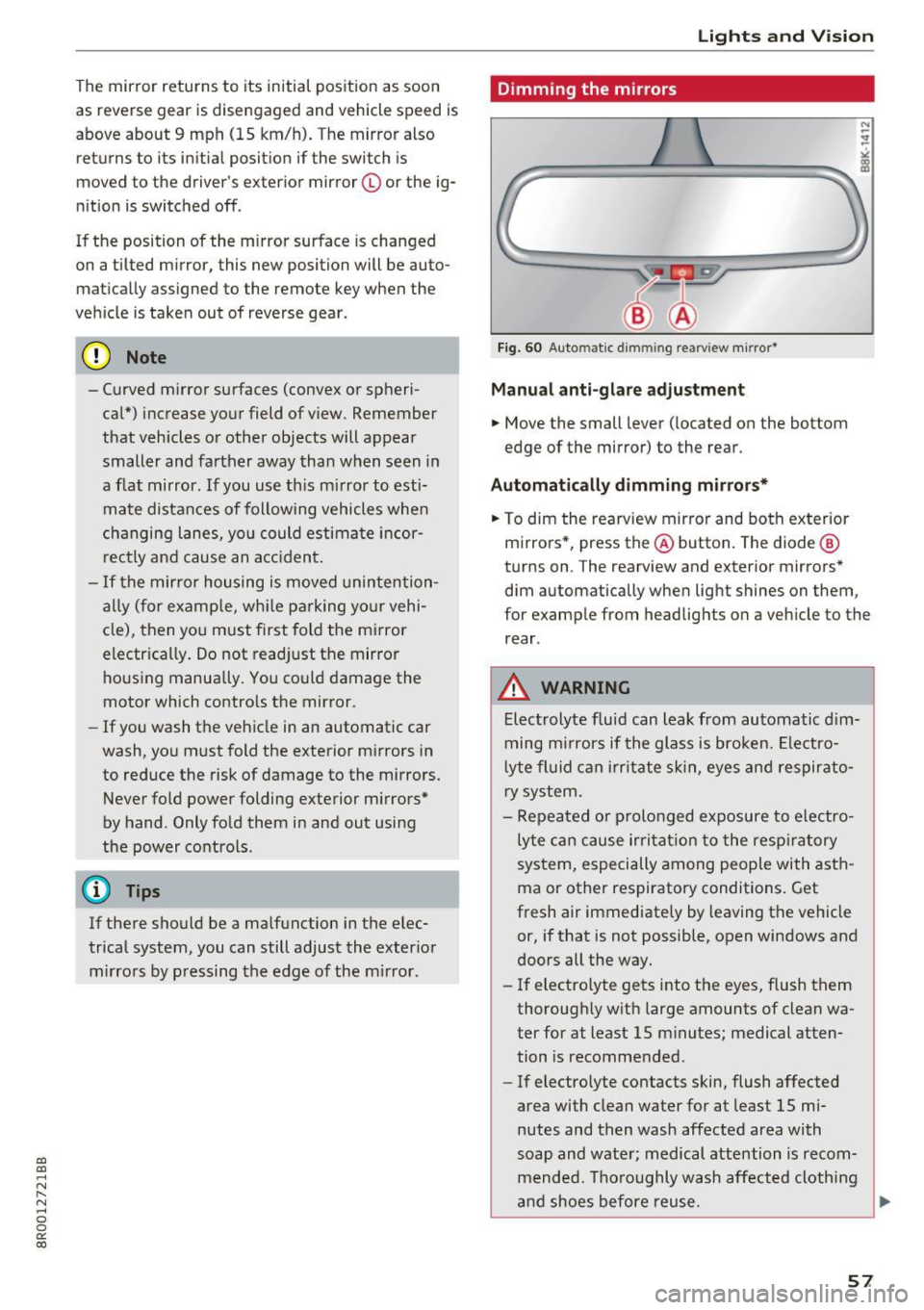
Fig. 59 Forwa rd sect ion of dr ive r's armrest : power mirror
cont rols
Adjusting exterior mirrors
,...
-"' 9 a: ::,:
• Ro tate the knob to the© pos it io n (dr iver's ex
t erior mirro r) o r to t he ® posi tion (passe nger's
exterior m irror)
c:> fig. 59.
.. Rotate the knob and the mirro r so that you
have a clear view to the rea r.
Heated mirrors
.,. Ro tate the knob to pos ition @.
Folding both exterior mirrors*
.,. Turn the knob to position @.
Depend ing o n the outside temperature, the mi r
ror surfaces are heated unt il the ignition is
switched
off -even if the knob is no longer in po
s it ion @.
You are well-adv ised to fold the exte rior m irrors
in when maneuvering in tight spaces or when
leaving the car parked close to other vehicles .
Memory for e xterior mirrors*
On vehicles with memory for the driver's seat, the
current sett ing fo r the exterior mirrors is auto
matically stored along with the seat posit ion
<=> page 62.
Tilt function for the passenger 's mirror*
When the reverse gear is engaged, the mirror
s u rface t ilts downwar d slightly if the setting is
for t he passenger's mirror (knob in position ®
c:> fig. 59). This allows you to see the curb during
parallel parking. ..,_
Page 59 of 296
a,
a,
..... N r-N ..... 0 0
0:
co
The mirror returns to its initial position as soon
as reverse gear is dis e ngaged and vehicle speed is
above about 9 mph (15 km/h) . T he mirror also
returns to its ini tial posit ion if the switch is
moved to the driver's exter ior mirror © or the ig
n ition is switched off .
If the position of the m irror surface is changed
on a ti lted mirror , this new position will be auto
matically assigned to the remote key when the
vehicle is taken out of reverse gear .
(D Note
- Curved mirror surfaces (convex or spheri
cal") increase your field of v iew . Remember
that vehicles or other objects will appear
smaller and farther away than when seen in
a flat mirror . If you use th is m irror to esti
ma te distances of following vehicles when
changing lanes, yo u could estimate incor
rectly and cause an a ccident.
- If the mir ror housing is moved unin tention
ally (for example, wh ile pa rking yo ur vehi
cle), then you must first fold the m irror
electrica lly. Do not read just the mirror
hous ing manua lly. You could damage the
motor which contro ls the mirror.
- If you wash the vehicle in an automatic car
wash, yo u m ust fold the exterior m irrors in
to reduce the risk of damage to the mirrors. Never fold power folding exterior m irrors*
by hand . Only fold them in and out using
the power contro ls .
@ Tips
If there should be a ma lfunction in the e lec
trical system, you can still adjust the exterior m irro rs by p ressing the edge of the m irror .
Lights and V ision
Dimming the mirrors
Fig. 60 Auto ma tic dimmin g rearvi ew m irror*
Manu al anti-glare adjustment
.. Move the small lever ( located on the bottom
edge of the mirror) to the rear .
Automat ically dimm ing mirro rs*
.. To dim the rearview mir ror and both exterior
m irrors *, press the@ button. The diode @
turns on . The rearv iew and exterior mirrors*
dim automatically when light shines on them ,
for example from headlights on a veh icle to the
rear .
_&. WARNING
-Electrolyte flu id can leak from automatic d im
ming m irrors if the glass is broken. Ele ctro
l yte fluid can i rr itate sk in, eyes and respirato
ry system .
- Repeated or p rolonged exposure to electro
ly te ca n cause irri tat ion to the resp iratory
system, especially among people with asth
ma or other respiratory conditions. Get
fresh air immediately by leaving the vehicle
or, if that is not possible, open windows and
doors all the way.
- If electro lyte gets into the eyes, flush them
thorough ly w ith large amounts of clean wa
ter for at least 15 m inutes; medical atten
tion is recomme nded .
- If electrolyte contacts skin, flush affected
area with clean water for at least 15 mi
nutes and then wash affected area with
soap and water; medical attention is recom mended. Thoroughly wash affected cloth ing
and shoes before reuse .
~
57
Page 61 of 296
CD
CD
.... N ,-... N .... 0 0 C<'. 00
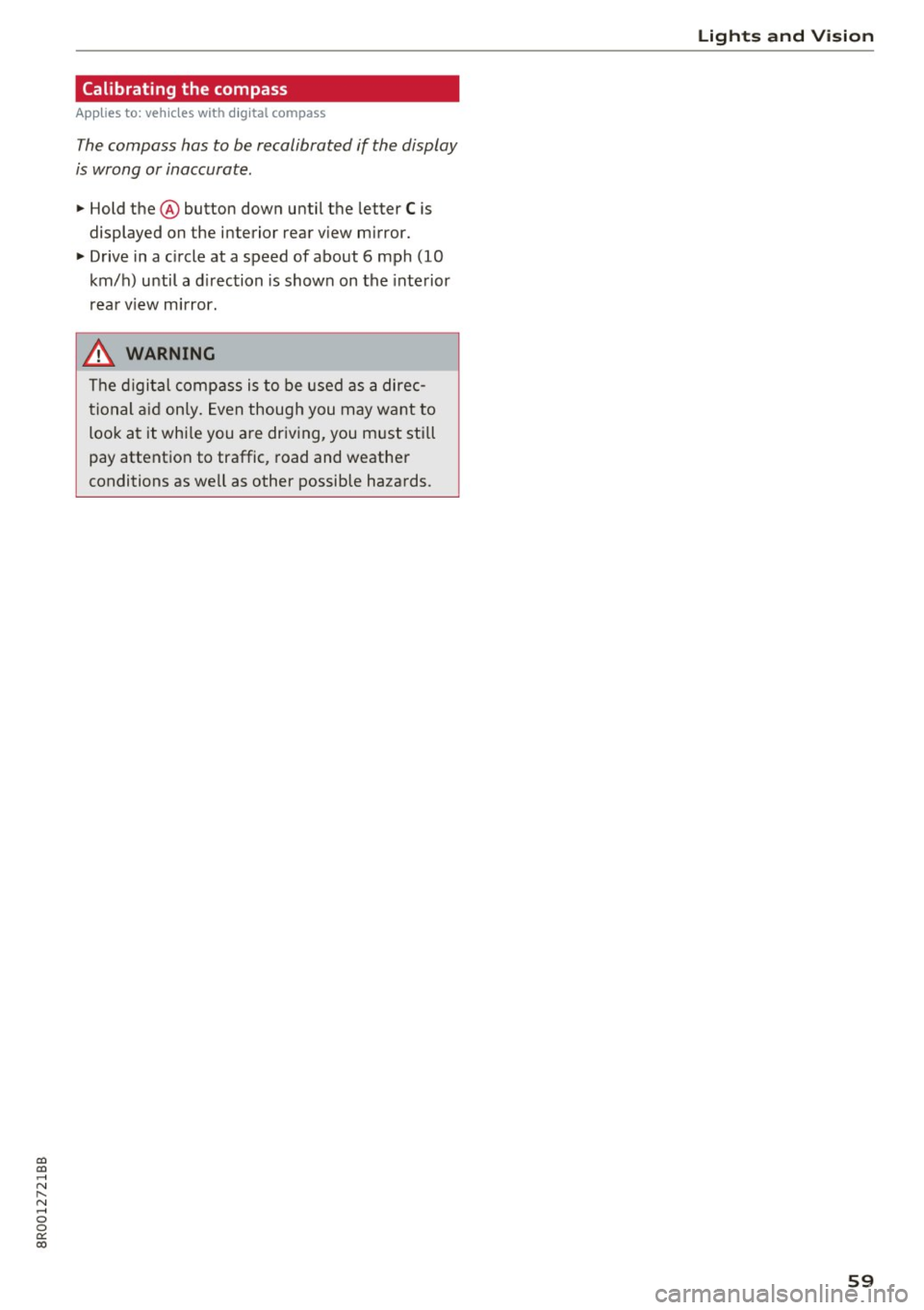
Calibrating the compass
Applies to: vehicles with digital compass
The compass has to be recalibrated if the display
is wrong or inaccurate .
.. Hold the@ button down until the letter C is
displayed on the interior rear view mirror .
.,. Drive in a circle at a speed of about 6 mph (10
km/h) until a d irection is shown on the interior
. . rear view mirror.
A WARNING
The digital compass is to be used as a direc
tional aid only. Even though you may want to
look at it whi le you are dr iving, you must sti ll
pay attention to traffic, road and weather
conditions as well as other possible hazards.
-
Lights and Vision
59
Page 64 of 296
Sea ts and stor age
Memory function
Memory for driver's seat
Applies to: vehicles with seat memory
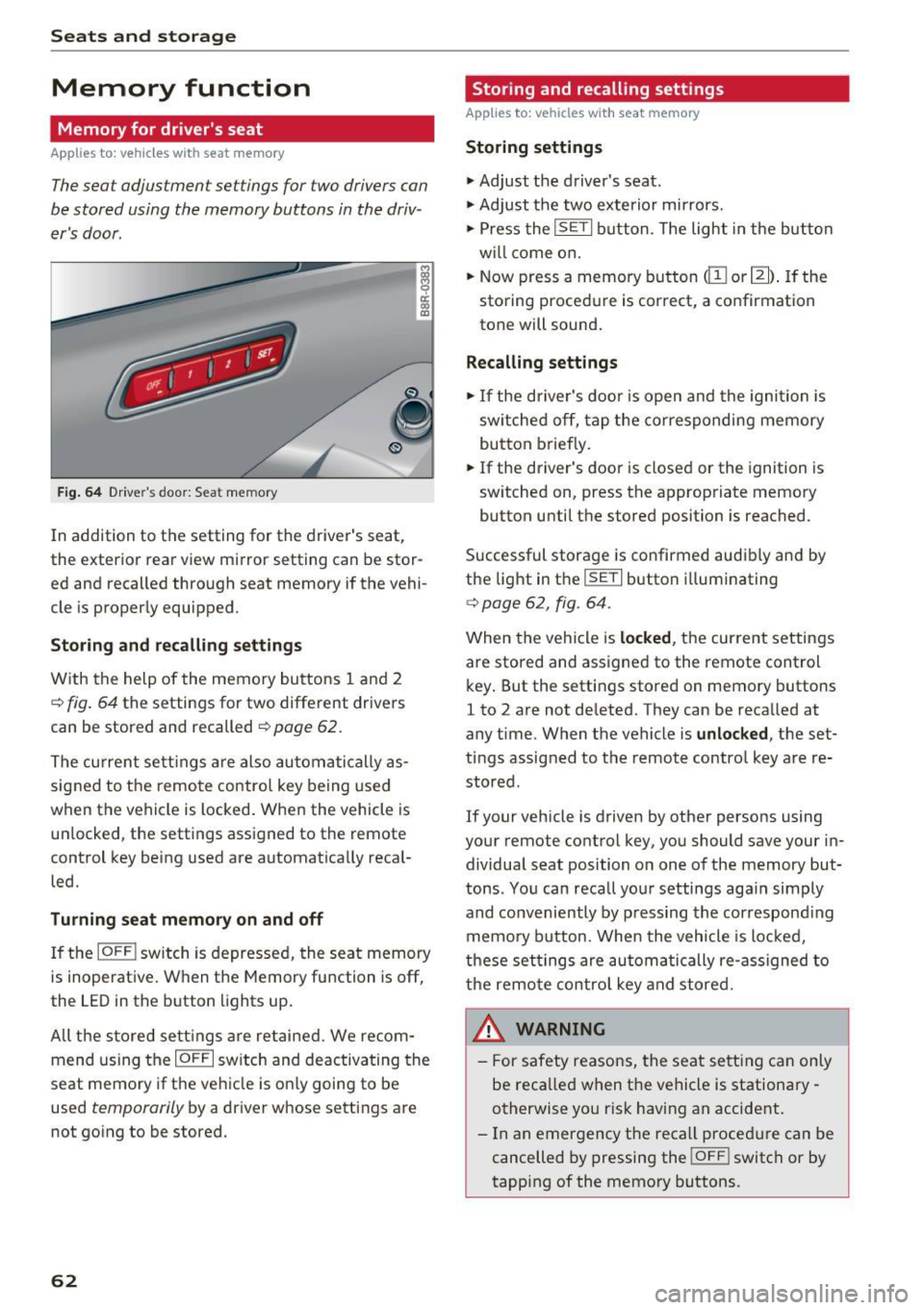
The seat adjustment settings for two drivers can
be stored using the memory buttons in the driv
e r's door.
F ig . 64 Dr ive r's doo r: Sea t memory
i ci: co a,
In addition to the setting for the drive r's seat,
the exterior rear view mirror setting can be stor ed and recalled through seat memory if the vehi
cle is properly equipped .
Storing and re calling s ettings
With the help of the memory buttons 1 and 2
c> fig . 64 the settings for two different drivers
can be stored and recalled
¢ page 62.
The cu rrent se ttings are also automatically as
signed to the remote contro l key being used
when the vehicle is locked . When the vehicle is
un locked , the settings assigned to the remote
control key being used are automatically recal
led.
Tu rnin g se at memo ry on and off
If the IO FFI switch is depressed, the seat memory
is inoperative. When the Memory function is off,
the LED in the button lights up.
All t he s tored se tt ings are retai ned. We recom
mend using the
I O FF I sw itch and deactivating the
seat memory if the vehicle is on ly going to be
used
temporarily by a driver whose settings are
not going to be stored.
62
Stor ing and recalling settings
Applies to: vehicles with seat memory
Storing settings
.,. Adjust the driver's seat .
.,. Adjust the two exterior mirrors.
.,. Press the
ISETI button . The light in the button
w ill come o n.
.,. Now press a memory button
dII or I]]) . If the
storing procedu re is correct, a confirmation
tone will sound.
Recalling settings
"' If the driver's door is open and the ignition is
sw itched off, tap the corresponding memory
button briefly .
.,. If the driver's door is closed or the ignition is
switched on, press the appropriate memory
button until the stored position is reached .
Successful storage is confirmed audib ly and by
the light in the
ISE TI button illuminating
c> page 62, fig. 64 .
When the vehicle is locked , the current settings
are stored and assigned to the remote control
key . But the settings stored on memory buttons
1 to 2 are not de leted. They can be recalled at
any time . When the vehicle is
unlocked , the set
tings assigned to the remote control key a re re
stored .
If your vehicle is driven by other persons using
your remote control key, you should save your in dividual seat position on one of the memory but
tons . You can recall your settings again simply
and conveniently by p ressing the correspond ing
memory button. When the vehicle is locked,
these settings are automatically re-ass igned to
the remo te contro l key and stored.
A WARNING
- For safety reasons, the seat sett ing can only
be reca lled when the vehicle is stationary
otherwise yo u ris k having an accident.
- In an emergency the reca ll proced ure can be
cancelled by pressing the
! OF F! switch or by
tapping of the memory buttons.
Page 84 of 296
Driving
"' It is possible that there will be a slight de lay
when starting the engine for diesel vehicles* in
colder temperatures. Therefore, you must hold
the brake pedal down until the eng ine starts.
The ind icator lamp
IJ i llumina tes when the en
gine is preheated .
Switching the ignit ion on /off
If you would like to switch the ign ition on with
out starting the engine, fo llow these steps:
"' Inse rt the key into the igni tion lock .
"' Press the key briefly
without press the brake
pedal.
"' To switch the ignition off, press the key aga in.
Diese l vehicles * are p reheate d while the ignition
is switched on.
W hen start ing the e ngine, major elec trical loads
are swi tched off temporarily.
You can only remove the key with the ignition
sw itched off. To do this, yo u have to press on the
key again.
I f the engine sho uld not start immed iately, the
s tarting p rocess is a utomat ica lly stopped after a
short t ime. Repeat sta rt ing procedu re .
Start-Stop-System*:
Note the information on ¢ page 88, Start/S top
system.
A WARNING
- Never allow t he engine to ru n in confined
spaces - dange r of asphyxiation .
- Never remove the ig nit ion key from the ign i
t ion loc k w hile the veh icle is moving . Other
wise, the steering lock cou ld sudde nly en
g age and you would not be able to stee r the
vehicle.
- Always ta ke the key with you w henever you
leave yo ur vehicle. Othe rw ise, the engi ne
c ould be s tar ted or ele ctrica l e qui pme nt
s u ch as the power windows cou ld be operat
ed. This can lead to se rious i njury.
- Never leave childre n or pe rsons requiring as
sistance unattended i n the vehicle. The
doors can be locked usi ng the remote trans-
82
-
m itter, p reventing peop le from escaping
from the vehicle on their own in the event of
an emergency. Depending on the time of
yea r, people ins ide the veh icle can be ex
posed to very high or very low tempera
t ures .
(D Note
Avoid h igh engine rpm, full throttle and heavy
engine loads unti l the engine has reached op
e rating temperature - otherwise you risk en
gine damage.
@ For the sake of the environment
Do not let the eng ine run wh ile parked to
warm up . Beg in d riving immed iate ly . Th is re
d uces unnecessa ry emissions .
(D Tips
-If the key cannot be removed from the igni
t ion loc k, you have to pull the mechan ical
key out of the master key in o rder to be able
to loc k the vehicle ¢
page 35.
-Some no ise afte r start ing the e ngine is nor
ma l and is no cause fo r co nce rn.
- If you leave the ve hicle w ith the ignition
switched on, the ig nitio n w ill switch off af
ter a ce rtain per io d of t ime. Please note that
ele ct rical eq uipme nt such as e xte rior lights
w ill swit ch off as we ll whe n th at happens .
Page 87 of 296
CD
CD
.... N ,-... N .... 0 0 C<'. 00
electrical equipment s uch as exterior lights
will switch off as well when that happens.
Switching engine off
A pp lies to: ve hicles with Conve nien ce key
~ Bring your vehicle to a complete stop.
~ Move the selector lever to the P or N position.
~ Press the I STAR T ENGINE ST OPI button
¢ page 84, fig. 101.
Ste ering lock
The steering locks when you turn the engine off
using the
! S TART ENGINE STOPI button and
open the dr iver's door. The locked steering helps
prevent vehicle theft.
Emer gency off
If necessary, the engine can be switched off with
the selector lever in the R or D/S position. The
engine stops if you press and ho ld the
I START ENGINE STOPI button at speeds below
6 mph (10 km/h) and press the brake pedal.
A WARNING
- Never turn off the engine before the veh icle
has come to a comp lete stop. The fu ll func
t ion of the brake booster and the power
steering is no t gua ranteed. You must use
more fo rce to turn or brake i f necessary. Be
cause you cannot steer and b rake as you
usually wou ld, this could lead to crashes
and ser ious injuries.
- For safety reasons, you should a lways park
your vehicle with the selector lever in P .
Otherwise, the vehicle could inadvertently
roll away.
- The radiator fan can continue to run for up
to 10 m inutes even after you have turned
off the engine and removed the ignition key.
The radiator fan can also turn on again if the engine coolant heats up because of intense
sunlight or heat bui ld-up in the engine com
partment.
- Always take the key with you whenever you
leave you r vehicle. Othe rw ise, the engine
c ou ld be started o r electrical equ ipme nt
D riv ing
such as the power windows could be operat
ed. This can lead to ser ious injury.
- Never leave chi ldren or persons requiring as
sistance unattended in the vehicle. The
doors can be locked using the remote trans mitter, preventing people from escaping
from the vehicle on their own in the event of
a n emergency. Depending on the time of
year, people ins ide the veh icle can be ex
posed to very high o r very low tempera
tures.
0 Note
If the engine has been under heavy load for
an extended pe riod, heat bu ilds up in the en
g ine compartment afte r the engine is switch
ed off -there is a ris k of damaging the engine.
A llow the engine to run at id le for about two
minutes before switching it off.
Driver messages
Ignition i s on
This message appears and a warning tone sounds
if you open the drive r's door when the ig nition is
swi tched on.
No k ey id ent ified
This message appears when the
I START ENGINE STOP !* button is pressed if there
is no master key inside the vehicle or if the sys
tem does not recognize it. For example, the mas
ter key cannot be recognized if it is covered by an
obje ct (e.g. al uminum brief case) which
screens
the radio s ignal. Elec tronic devices such as ce ll
phones can a lso interfere with the radio signal.
Pre ss brake p edal to start en g ine
This message appears if you do not press the
brake pedal to start the engine.
S hift to N or P to start en gine
This message appears when attempting to start
the engine if the se lector lever for the automatic
transm ission is not in the P or N position. The en
gine can on ly be started with the se lector in
these positions.
Ill-
85
Page 88 of 296
Driving
!I Is the key in the vehicle ?
This message appears in a veh icle with Conven
ience key* if the master key is removed from the
ve hicle w ith the engine r unning.
If the maste r
key is no longer in the vehicle, you cannot switch
on the ignition after stopping the engine and you
also cannot start the eng ine again. Moreover, you
cannot lock the veh icle from the outside with the
key.
Shift to P otherw ise vehicle can roll awa y. Door s
do not lo ck if le ver i s not in P.
This message appea rs fo r sa fe ty reasons a long
with a warning signal.
It appears i f the se lector
lever for the automatic transmission is not in the
P posit ion when switching off the ignition. Move
the selector lever to the P position, otherwise the
vehicle is not secured aga inst rolling away. You
also cannot lock the vehicle using the locking
button* on the door handle or using the remote
key .
Turn off ignition befo re lea ving car
This message appears if the driver's door is
opened while the ignit ion is switched on. A lways
switch off the ignition if you are leaving the vehi
cle . See also
c::> page 90.
Turn off ignition before lea ving car. Batte ry is
discha rging
This message appea rs if the d river's doo r is
opened while the ignition is sw itched on. A lways
switch off the ignition if you are leaving the vehi
cle . See also
c::> page 90.
Shift to P and turn off ignition, otherwi se vehi
cle can roll awa y
This message appea rs if the d river's door is
ope ned while t he igni tion is switched on and the
selec to r l ever is not in the P posi tion. Shift t he
selector lever in to the P position and switch off
the ignition when you exit the vehicle . Otherwise
the vehicle cou ld roll. See also¢
page 90.
Convenien ce key defective! Use ignition lock
This message appea rs if the eng ine must be
started or stopped using the ignit io n key and no t
t he !STAR T
ENGINE ST OPI* b utton .
86
Electromechanical
parking brake
Operation
The electromechanical parking brake replaces
t he hand brake.
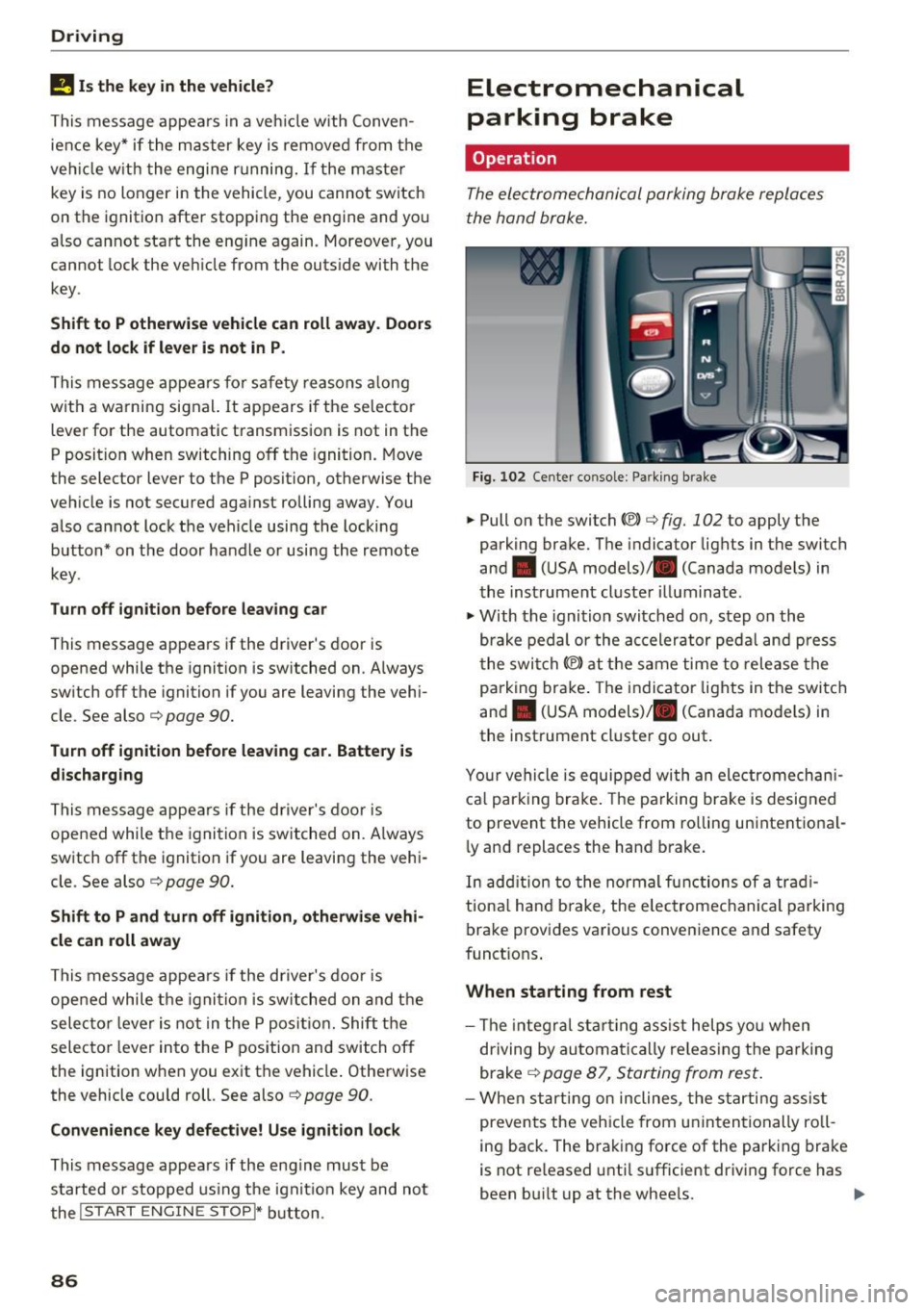
Fig. 102 Center co nsole : Pa rk ing brake
.. Pull on the switch (®) c::> fig. 102 to apply the
park ing brake. The indicator lights in the switch
and . (USA models)/ . (Canada models) in
the inst rument cluste r illuminat e.
.. With the ignition switched on, step on the
brake pedal or the ac celerator peda l and press
t he swi tch(®) at the same time to release the
p arking brake . The indicator lights in the switch
and . (USA models)/ . (Canada models) in
the instrument cluster go out .
Y our vehicle is equipped wi th an ele ctromechan i
ca l park ing brake . The parking brake is desig ned
to prevent the vehicle from ro lling unintentional
ly and replaces the hand b rake.
In add ition to the no rmal functions of a trad i
tiona l hand b rake, the e lectromechanical parking
brake provides various convenience and safety
funct ions .
When starting from rest
-The integra l st art ing ass ist helps yo u when
dr iving by automati ca lly re leas ing t he pa rking
brake
c::> page 87, Starting from rest .
-When starting on inclines, the starti ng assis t
prevents the vehicle from unintentionally ro ll
ing back. The brak ing force of the park ing brake
is not re leased unti l su fficient dr iving force has
been bu ilt up at the whee ls. ..,.
Page 89 of 296
CD
CD
.... N ,-... N .... 0 0 C<'. 00
Emergency brake function
An emergency brake ensures tha t the vehicle can
be slowed down even if the
normal brakes fai l
¢ page 88, Emergency braking.
A WARNING
If a drive range is engaged with t he vehicle
stat iona ry and the engine running, you must
in no instance accelerate care lessly . Other
w ise the vehicle will start to move immed iate
ly- risk of a n accide nt.
(D Tips
- If the parking brake is app lied with the igni
tion switched off, the indicator lights in the
switch and . (USA models)/ . (Cana-
da models) in the instrumen t cluster will go
out af ter a ce rtain per io d of t ime .
- Occasiona l noises when the park ing brake is
applied and re leased a re normal and a re not
a cause for conce rn.
- When the vehicle is parked, the park ing
brake goes th ro u gh a se lf-tes t cycle at regu
l a r i nte rva ls . Any associated noises a re no r
mal.
Parking
~ P ress the brake ped al to stop the vehicle.
~ Pull the switch c::> page 86, fig. 102 to set the
parking b rake.
~ Move the selecto r lever to P .
~ Turn the eng ine off c::> .&, .
-
~ When on incl ines or declines, turn the steering
wheel so that the veh icle w ill roll into the curb
if it beg ins to move .
A WARNING
-Whe n you leave your ve hicl e -even if onl y
br iefly- alw ays remove the ig nition key. Thi s
applies p articul arly when children rem ain i n
t h e ve hicle . Othe rwise the c hildren could
sta rt the eng ine, release t he parking brake
o r operate elect rical eq uipment (e.g. powe r
windows). There is the risk of an accident.
- When the vehicle is loc ke d , no one - part icu
larly not children shou ld remain in the vehi-
-
D riving
cle. Locked doors make it more d ifficult for
emergency wo rkers to get into the vehicle -
putting lives at r isk.
Starting from rest
The starting assist function ensures that the
parking brake is released automatically upon starting.
Stopping and applying parking brake
~ Pull the sw itch to app ly the parkin g brake.
Starting and automatically releasing the
parking brake
~ W he n you start to drive as usu a l, t he p ark ing
b rake is automa tic ally released and yo ur vehicle
beg ins to move.
When stop ping at a tr affic sig nal or sto pping in
c ity traff ic on vehicles wi th an aut omat ic t ra ns
mission, t he parking brake can be app lied . The
vehicle does not have to be held with the foot
bra ke. The pa rking brake e liminates the tendency
to c reep w ith a dr ive range engaged. As soon as
you drive off as usual, the parking brake is re leased a utomat ica lly and the vehicle starts to
move .
Starting on slopes
When starting on incl ines, the sta rting assist pre
vents the vehicle from un intent iona lly rolling
back. The b raking force of the parking brake is
not re leased unt il su ff icient dr iving force has
been buil t up at t he wheels .
(D Tips
For safety reasons, the park ing brake is re
l eased automatically on ly when t he d river's
safety be lt is engaged in t he buc kle.
Starting off with a trailer
To prevent rolling back unintentionally on an in
cline, do the following:
~ Keep the switch pulled and depress the acceler
ator . The parking brake stays applied and pre-
vents the veh icle from roll ing backward . .,,.
87