brake light AUDI Q5 2018 User Guide
[x] Cancel search | Manufacturer: AUDI, Model Year: 2018, Model line: Q5, Model: AUDI Q5 2018Pages: 392, PDF Size: 60.56 MB
Page 81 of 392

u co ..... N r--N ..... 0 <( 0 00
(D Tips
-Depending on the driving situation, the en
gine may already stop when
coasting before
the vehicle has come to a complete stop
ll.
- If you select the "D" selector lever position
after shifting into reverse, the vehicle must be driven faster than 6 mph (10 km/h) in or
der for the Start/Stop system to be active
again.
Stopping/starting the engine
Applies to: vehicles with Start/Stop system
"'Apply the brakes and keep your foot on the
brake pedal until the vehicle has stopped. The
rl1 indicator light appears in the instrument
cluster once the engine stops automatically .
"'The engine starts again when you take your
foot off the brake pedal. The indicator light
turns off.
(D Tips
-The ignition will turn off if you press the
I START ENGINE STOP I button during a stop
phase .
- You can determine for yourself if the engine
will stop or not by reducing or increasing
the amount of force you use to press the brake pedal. For example, if you only lightly
press on the brake pedal in stop-and-go
traffic or when turning, the engine will not
switch off when the vehicle is stationary. As
soon as you press the brake down harder,
the engine will switch off.
- Press the brake pedal during a Stop phase
to keep the vehicle from rolling.
Starting/stopping the engine automat
ically
Applies to: vehicles with Start/Stop system
The system checks if certain conditions are met
before and during the "stop" phase, and deter
mines if and how long the engine is stopped de
pending on the situation. For example, if power
usage is high, the engine will not be stopped .
ll Market-specific
Driving
Along with other conditions, the following fac
tors influence the automatic engine start or stop:
- Environmenta l conditions (slopes, inclines, ele-
vation, temperature)
- Battery (charge status, temperature, power us-
age)
- Engine temperature
- Assistance systems
- Driving behavior
If the
rid indicator light appears in the instru
ment cluster display, the engine will not be stop
ped.
Switching the ignition off automatically
Applies to: vehicles with Start/Stop system
If you leave the vehicle during a "stop" phase, the
engine can be restarted within approximately 30
seconds if the doors are closed, the driver's safe
ty belt is fastened and the brake pedal is pressed.
If you leave the vehicle longer than 30 seconds,
the ignition will switch off automatically to pre
vent the vehicle battery from draining. If this is
the case, the message
Start/stop system: igni
tion will be switched off in 30s
will appear in the
instrument cluster and, if the low beam head
lights are switched on, the parking lights will
switch on instead. The parking lights will switch
off after approximately 30 minutes or when you
lock the vehicle.
The ignition also switches off when you lock the
vehicle from the outside during a stop phase.
If the Start/Stop system has not turned off the
engine or if you have switched the Start/Stop sys
tem off manually, the ignition will not be auto matically switched off and the engine will contin
ue to run.
A WARNING
-To reduce the risk of poisoning, never allow
the engine to run in confined spaces.
-
79
Page 82 of 392
Drivin g
(D Tips
If you leave t he vehicle with the "D/S" or "R"
selector lever pos ition engaged, the parking
brake is automatically set.
Manually switching the Start/Stop system
off/on
A pp lies to: ve hicles w ith Sta rt/Stop system
The (A_) oFF button is located in the center conso le .
.. Press (A_) OfF to switch on or off. The LED in the
button turns on when the funct ion is switched
off.
@ Tips
If you switch the system off dur ing a stop
phase, the engine w ill start again automati
cally .
Messages
App lies to: ve hicles w ith Sta rt/Stop system
Start /stop system: deactivated . Please start
engin e manually
This message appea rs when specific conditions
are not met during a stop phase. The Sta rt/Stop
system wi ll not be ab le to restart the engine . The
engine must be started wit h the
I S TAR T ENGINE STOP I button.
Start /stop sy stem: malfunction! Function
una vailable . Please cont act Se rvice
There is a malfunction in the Start/Stop system .
Drive the vehicle to an authorized Audi dealer or
author ized Service Facility as soon as poss ible to
have the malfunction corrected.
80
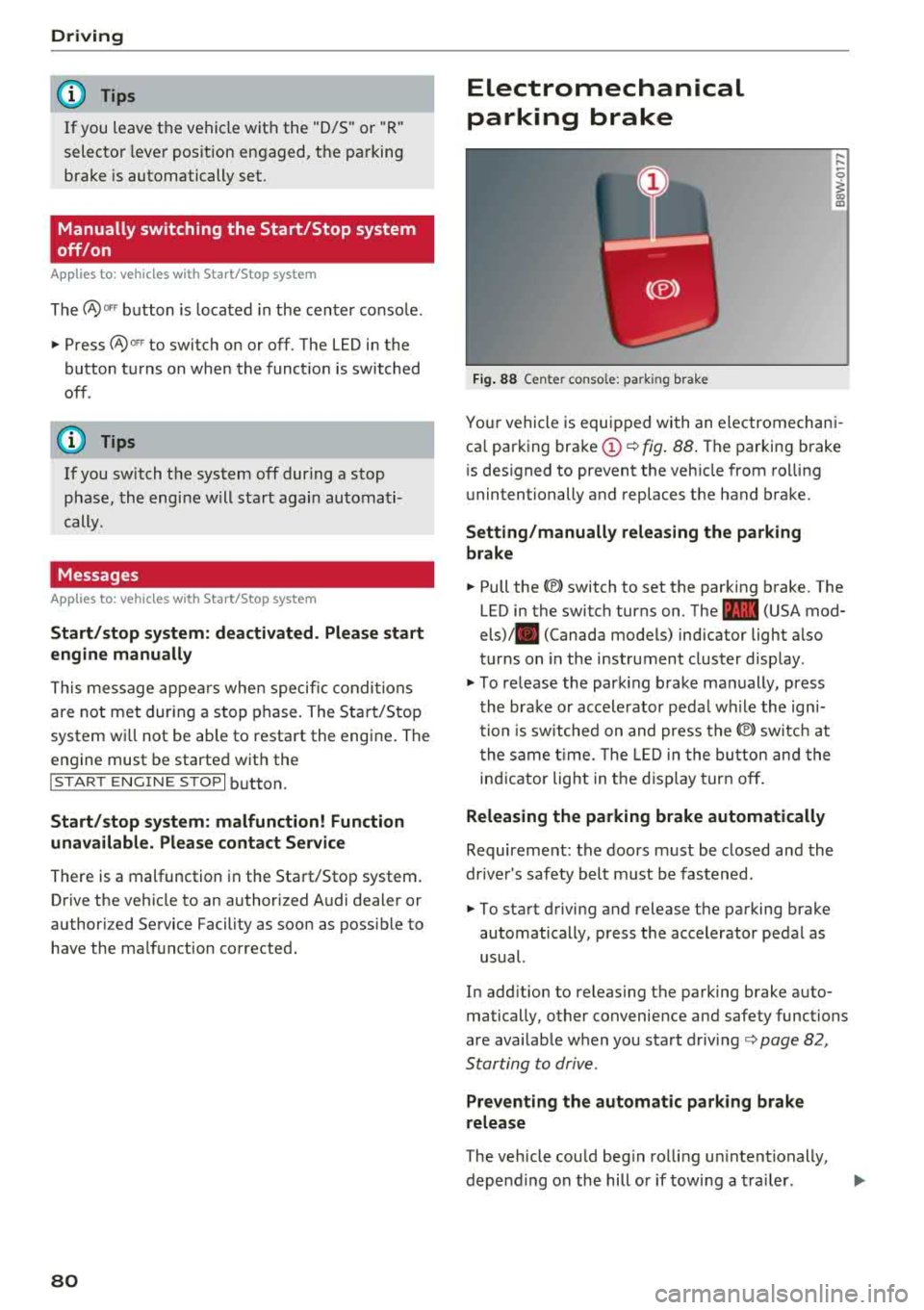
Electromechanical
parking brake
F ig . 88 Center console: parking brake
,-.. ,-..
0
1 m
Your vehicle is equipped with an electromechani
ca l parking
brake (!)¢ fig . 88 . The parking brake
is designed to prevent the vehicle from ro lling
unintentionally and replaces the hand brake.
Setting /manuall y re leasing the parking
br ake
.. Pull the®> switch to set the parking brake. The
LED in the switch turns on. The
-(USA mod
els)/ . (Canada models) indicator light also
turns on in the instrument cluster display .
.. To release the parking brake manually, press
the brake or accelerator peda l w hile the ign i
tion is switched on and press
the®) sw itc h at
the same t ime. The LED in the button and the
indicator light in t he disp lay turn off .
Releasing the parking brake automatically
Requirement: the doors m ust be closed and the
drive r's safety belt must be fastened.
.. To start driving and release the parking brake
automatically, press the accelerator pedal as
usual.
In add ition to releasing the parking brake auto
matically, other convenience and safety functions
are available when you start
driving¢ page 82,
Starting to drive .
Preventing the automatic parking br ake
release
The vehicle could beg in rolling un intentionally,
depend ing on the hill or if towi ng a tra iler.
.,.
Page 85 of 392
u co ..... N ,..._
N ..... 0 <( 0 00
-Clean the windows, headlights, tail lights and
the license plate if they are dirty.
-Perfo rm a brake test (especially a fter dr iving
t h rough water) .
A WARNING
-Be especia lly caut io us and aware when driv
ing under difficult conditions and when off
road. Vehicle damage and injur ies may occ ur
whe n drivi ng at excessively high speeds o r
w ith incorrect dr iv ing ma neuvers .
-Always adjust your speed and driv ing style
to the roads, te rra in, traffic and weather
co ndi tions. Dr ive espec ially slowly if the re is
low v is ibi lity when offroad .
-Please note that the wheels can spin more
and the vehicle can swe rve w hen in off road
mode, especially whe n the road is s lip pery
o r has loose su rface m ater ial.
- Driv ing stab ility is reduced w hen in off road
mode.
@ For the sake of the environment
Avoid harmi ng the enviro nment and show
considera tion for nature .
(D Tips
Only dr ive where it is permitted a nd a lways
stay on the provided roads a nd paths.
Explanation of technical terms
The follow ing data is based on ideal cond it io ns.
The val ues may d iffe r depend ing o n the vehicle
l oad, road character ist ics, and the a rea. The d riv
e r i s therefo re res ponsible for dec iding w hethe r a
ve hicl e can hand le a spe cific
s ituation ¢.&. .
Pitch angle
The amount of ver tica l elevation c hange (grade)
in a dis tances of 109 yards (100 mete rs) is speci
fied as a percentage o r in degrees. Spe cifica tion
of how s teep of a grade t he ve hicle can dr ive up
usi ng its own power (de pends on the road sur
face and the eng ine power, among other things) .
M axim um permitted pitch ang le : 3 1
°.
Driving
Ground clearance
T he dis ta n ce be tween the road surface and the
l owest point of the vehicle underbody. Gro und
clearance : 8 .1 in (205 mm)
A WARNING
= -
Exceeding the max imum specified va lues can
l ead to serious injuries or vehicle damage.
-A ll sp ec ificat ions were determine d base d on
a level, f irm, an d non -slippe ry road s urface
in dry weather conditions.
-The ideal cond itions do not apply in offroad
d riving. Do not always go a ll the way up to
the maximum val ues . Stay slightly below
them for safety .
Messages
There is only one motto when driving in difficult
condi tions and off road: drive slowly and with
caution!
Observe the following when driv ing on unpaved
roads :
.. Only dr ive in ter ra in tha t is sui table fo r the ve
hicle and yo ur dr iv ing ability . Never take any
unnecessa ry risks!
.. Dr ive slow ly and caref ully.
.. Pay attent ion to the ground clearance of your
veh icle .
.. Activa te the offroad mode as needed
¢ page 141 .
.. Use the hill de scent assist when d riving down
s teep
hills ¢ page 142 .
Difficult terrain and off-road
When driving in unfam iliar areas and off road,
dr ive slowly and keep o n the watch for unexpect
ed obstacles (such as pot ho les, rocks, tree
stumps , etc.).
To p reve nt the vehicle from bottom ing o ut and to
reduce the risk of underbody damage, you should
dr ive across uneven gro und o n only o ne si de of
t h e ve hicle so that on ly two of you r whee ls c ross
t h e u neven a re a, ins tead of drivin g ac ross the
cente r of the u neven area wit h all four wheels.
..,
83
Page 89 of 392
u co ..... N r--N ..... 0 <( 0 00
~ Release the brake pedal and press the acce lera-
tor pedal
~ ,&. .
Various conven ien ce fun ctions are ava ilable for
s tarting on hills
~page 82.
Stopping temporarily
~ Press the brake pedal to stop the vehicle, for
example at a t raff ic light . Do not press the ac
ce le rato r peda l w hen do ing th is.
~ T o p revent the vehicle from rolling when yo u
sta rt d riving, se t the pa rk ing brake when stop
ping on steep
hi lls¢ ,&..
~ The parking bra ke wi ll re lease automatically
and yo ur vehicle will begin to move when the
doors a re closed, the driver's safety belt is fas
tened, and you accelerate as usual.
Stopping /parking
If the se lector lever is not in the "P" position
when yo u ope n the driver's door, the ve hicle
could rol l.
~ Press and hold the b rake pedal ¢,&. .
~ Set the parking brake.
~ To se lect the "P" selector leve r position, press
the "P" button
@ on the selector lever
¢page 85, fig. 90.
Under certain conditions, such as driving in the
mo unta ins or when towing a trailer, it may be
he lpful to switch to manual mode temporarily
and sh ift
manually to adapt to the driving condi
tions
¢ page 88.
On hills, set the parking brake first and then s hift
into the "P" position
¢ page 80. This prevents too
much stress from being placed on the locking
mechanism .
A WARNING
- The veh icle can roll even when the engine is
switched off .
- Unintended veh icle movement can lead to
serious injur ies .
- To reduce the risk of an accident, do not
press the acce lera to r pedal when changing
the se lector lever posi tion while the vehi cle
is sta tionary an d the engine is running.
Driving
- To reduce the r is k of an accident, neve r se
lect the "R" or "P" pos itions wh ile d riving.
- Do not inadvertently press the accelerator
pedal when the vehicle is stationa ry. Other
wise the r is k of an accident increases be
cause the vehicle will start to move immedi
ately, even if the parking brake is set .
Hill descent control
The hill descent control system assists the driver
when driving down hills.
Hi ll d escent cont rol activates when the t ransmis
s ion is in the "D" or "S" pos ition and you press the
brake pedal. The transmission automatica lly se
lects a gear that is s uitable for the hill. Hill de
scent cont rol tr ies to maintain the speed ach
ieved a t the t ime of b raking, w it hi n physical a nd
tec hnical lim itations . If may still be necessary to
adjus t the speed w it h t he bra ke pedal.
Hill descent con trol switches off once the hill lev
els out or you press the accelerator pedal.
When operat ing the cru ise cont rol system*
¢ page 95, hill descent contro l is a lso activated
whe n the speed is set .
A WARNING
-
Hill descent cont rol cannot ove rcome physical
li mitat ions, so it may not be able to ma intain
a consta nt s pee d un der all conditions. A lways
b e ready to app ly the bra kes.
87
Page 91 of 392
u co ..... N ,..._
N ..... 0 <( 0 00
Launch control program
App lies to: ve hicles with S tro nic tra nsm issio n
The launch control program provides the best
possible acceleration when starting from a stop.
Requirement: the eng ine must be at operating
temperature and the steer ing whee l must not be
turned .
~ Deactivate the Start/Stop system* c:> page 80.
The LED in the 10~ ·1 button turns on.
~ With the engine runn ing, press the ~
l fl - O~FF =I but
ton briefly
c> page 141 . The Ill indicator light
tu rns o n and the message
Stabil ization control
( ESC ): offroad . Warning! Reduc ed stabilit y
ap
pears in the inst rumen t cluste r display.
~ Pull the selector lever back o ut of t he "D/S" po
s it ion briefly to select the "S " position or se lect
the
D ynamic driving mode in drive se -
lect* ¢ page 12 7.
~ Press the brake pedal firmly with your left foot
and hold it all the way down for at least one
second.
~ At the same t ime, press the gas pedal all the
way dow n with your right foot unt il the engi ne
reaches and stays at a h igh RPM level.
~ Remove yo ur foot from t he b rake pedal within
five seconds
c:> ,&. .
A WARNING
-Always adapt yo ur driving to the traffic flow.
- O nly use the La unch contro l prog ram when
road and traffic conditions allow it and ot h
er drivers wi ll not be endangered or both
ered by your driving and the vehicle's accel
eration.
- Please note that the drive whee ls can spin
and the vehicle can break away when off
road mode is switched on, espec ia lly when
the road is slippery.
- Once the vehicle has started moving, press the
I~ OF F! button briefly to turn the offroad
mode off .
(D Tips
-The transmiss ion temperature may increase
s ignificantly after using the launc h control
program. If that happens, the program may
Driving
not be ava ilab le for a few minutes. It will be
avai lab le agai n after a coo l-down period.
- Whe n accelerati ng usi ng the launch cont ro l
program, all vehicle parts are s ubject to
heavy loads. This can lead to increased
wear.
Transmission malfunction
• Tran smiss ion: too hot. Please stop vehicle
Do not continue driving. Se lect the "P" selector
l ever posit ion and contact an authorized A udi
dealer or authorized Audi Service Fac ility for as
s istance.
• Tran smiss ion: malfunction! Plea se stop ve
hicle and shift to P
Do not continue dr iv ing . Se lect t he "P" selec to r
l ever posit ion and contact an authori zed A udi
dealer or authorized Audi Service Facility for as
s istance.
[O] Selector lever : malfunction ! You can con tin
ue d riving. Please contact Se rvice
The re is a system malfu nction in t he transmis
s io n. Dr ive to an a uth orized Aud i de aler o r au
tho rized Aud i Serv ice Facili ty immedia tely to have
the mal function corrected.
[i'J P button : malfun ction! Auto P when engine
off . Pl ea se conta ct Servi ce
T here is a malfunct ion in the "P" button on the
selector lever . The transm ission automatically
engages "P " when you sw itch off t he engine.
D rive to an author ized A udi dealer or autho riz ed
Audi Se rvice Faci lity immed iate ly to have the
malfunction corrected.
[i'J Select or lever : malfun ction! Gear change on
l y pos sibl e using both paddl e le ver s. Plea se con
ta ct Service
T here is a system malfunction in the transmis
s io n. You can con tinue dr iv ing with restr icted
funct ion. The se lector lever is not wo rk ing . Gea rs
can on ly be selected by tapping bo th shift pad
dles at the same time when the vehicle is station
ary
c> page 88 , fig . 92 . Pay attention to these-
l ected transmission position in the instrument
.,.
89
Page 92 of 392
Driving
cluster display. The parking lock engages auto
matica lly when you turn off the engine. Drive to
an author ized Audi dealer or authorized Audi
Serv ice Facility immediately to have the malfunc
tion corrected .
[O] Transmission : Please p ress brake pedal and
select gear ag ain
Press the bra ke pedal and se lect the des ired se
lector lever position again. You can then continue
driving.
[il Tran smi ssion: too h ot. Please adapt driving
s tyle
The transm ission tempe rature has increased s ig
n ificant ly. Dr ive ve ry ca utiously or take a b reak
from dr iv ing unt il the tempera ture returns to the
normal range and the ind icator light turns off .
[O] Transmis sion : malfunction ! You can contin
ue driving . See owner' s manual
There is a system malfunct ion in the transm is
sion . You may continue dr iv ing . Drive to an au
thor ized A udi dealer or authorized Audi Service
F acility soon to have the malfunction co rrected.
[il T ransmission : malfunct ion! You can contin
ue dri ving in D until engine is off
There is a system malfunct ion in the transmis
sion . The transmission is switching to emergency
mode . If you tur n the engine off, you will not be
able to select any other selector lever pos it ions
after start ing the eng ine again . Drive to a n au
thor ized Audi dealer or author ized A udi Service
F a cility immediately to have the malfunc tion cor
rected.
[O] Tran smis sion: malfunction! You can contin
ue driving with limited function . Pl ea se conta ct
Service
There is a system malfunct ion i n the transm is
sion . The transmission is switching to emergency
mode. This mode only shifts into certa in gea rs o r
w ill no longer shift at all. The engine may stall.
Dr ive to an a utho rized Aud i dea ler or a uthorized
Audi Serv ice Facility immediately to have the
malfunction corrected .
90
[il Transmis sion: malfunction! You can contin
ue dri ving with limited fun ction. No reve rse
gear
There is a system malfunction in the tra nsmis
s ion . The transmission is switch ing to emergency
mode. This mode only s hifts into certain gears or
will no longer shift at a ll. The eng ine may sta ll.
You cannot engage the reverse gear. Drive to an
authori zed Audi dealer or authori zed Audi Service
Facility immediately to have the ma lfunction cor
rected .
[il Danger of rolling away! P not poss ible.
Plea se apply park ing bra ke
- The parking lock was re leased using the emer
gency re lease
c::> page 90 . Or
- The parking lock can no longer be engaged .
Dr ive to an authorized Audi dealer or author
ized Aud i Service Facility immed iately to have
the malfunction corrected.
[il Mo ve selector le ver to automatic position
There is a ma lf u nction in the tiptron ic mode. End
tiptroni c mode by pus hing the se lec tor lever to
the left into the "D/S " position .
Parking lock emergency release
The parking lock must be released with the
emergency release when driving through moun
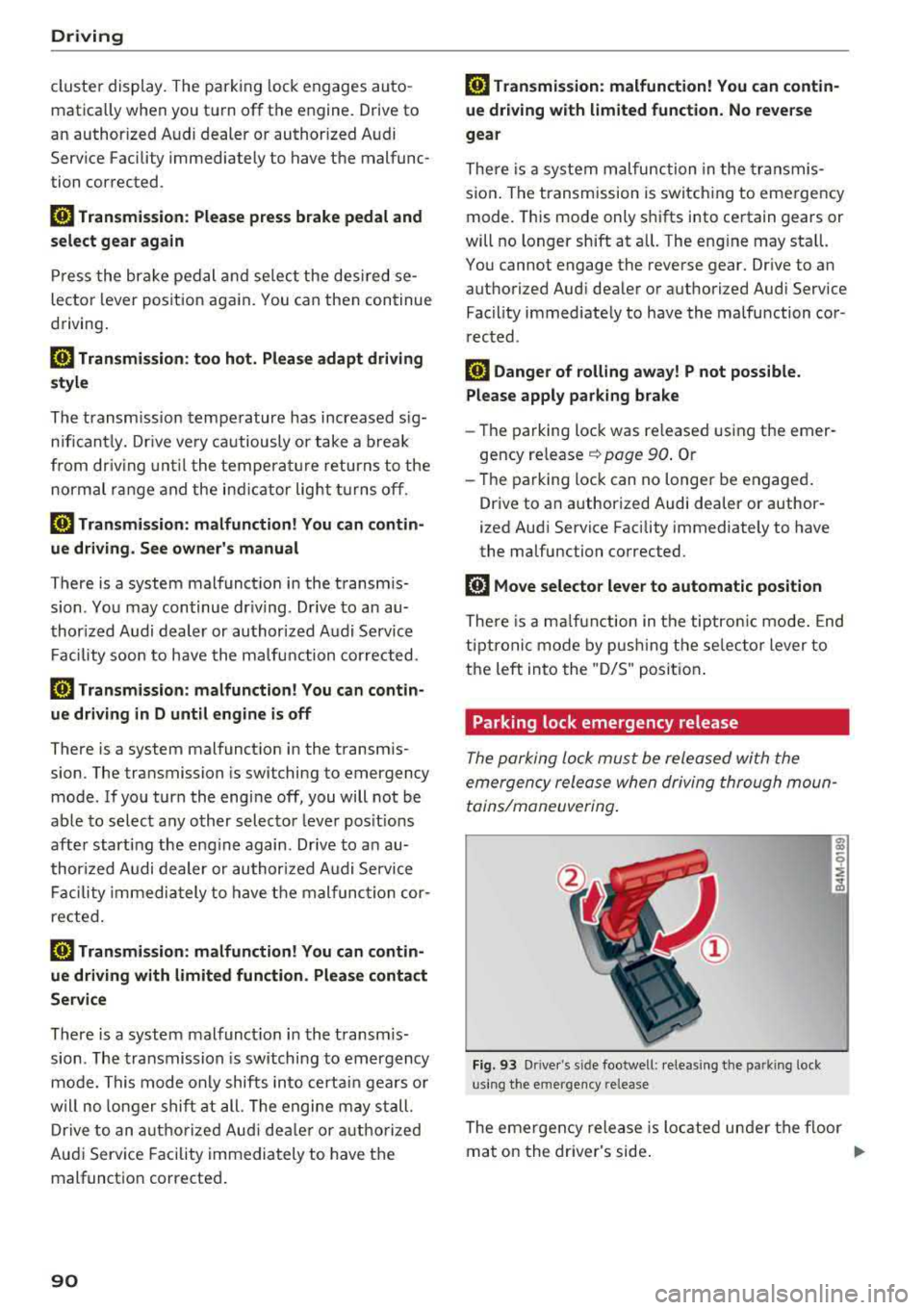
tains/maneuvering .
Fig. 93 Drive r's s ide footwell : relea sin g the parkin g lock
us ing the e mergency release
The emergen cy release is located under the f loor
mat on the dr iver's side .
.,.
Page 93 of 392
u co .... N r--N .... 0 <( 0 00
Releasing the parking lock using th e
e m erg enc y re leas e
~ To prevent the vehicle from ro lling unintention
ally, set the parking brake(®}
c> page 80 or
press the brake pedal.
~ There are two slits o n the cover . Position the
screwdriver from the vehicle tool kit in one of
the slits on the cover and pry the cover off .
~ Insert the socket wrench (from the vehicle tool
ki t) into the openi ng
c> fig. 93.
~ T urn the soc ket wrench all the way clockw ise (!)
and press it downward @unti l it locks into
place .
~ Leave the socket wrench inserted i::> .&_.
Re setting the parking lock
~ Press t he b rake peda l and sta rt the eng ine.
~ Keep the brake pedal pressed and engage the
f o llowing se lector lever positions one afte r the
other : "N", "D" and back to "N" .
~ Turn the engine off again .
~ Grasp the socket wrench w ith both hands and
pull it up and out carefully to remove
c> (D .
~ Install the cover .
When the parking lock emergency re lease is
used, the
[O] ind icator light and the "N" selector
lever position turn on in the instrument cluster.
The message
D ang er of rolling a way! P not pos
s ible . Plea se apply parking brake
also appears .
A WARNING
-Only activate the eme rgency re lease while
on a level s urface o r a s light slope.
- T he pa rking lock may only be released us ing
the emergency release if the parking brake
is set.
If i t i s no t fu nct ion ing, secure the ve
hicle from rolling using the brake ped al or
ot her s uitab le means, such as blocking a
front and a rear whee l. An unsec ured vehicle
may roll away, wh ich increases the r isk of an
acc ident.
- To reduce the risk of an accident, you m ust
not drive when the emergency re lease is ac
t ivated.
-
Driving
@ Note
- Read and follow the important instructions
about
tow ing ¢ page 365 .
-The risk of damage increases if yo u do not
remove the socket wrench caref ully w hen
resetting the parking lock.
91
Page 96 of 392
Trail er to wing
- Set the a ir suspension to the standard vehi
cle height, otherwise the applicab le tongue
weight no longer applies to your vehicle.
(D Tips
- Use chocks when parking on incl ines if the
trailer is loaded .
- We recommend also having the vehicle in
spected between the inspection intervals if
you are towing a trai ler frequent ly .
- Avo id driving with a trailer d uring the vehi
cle break-in period .
Driving with a trailer
Driving with a trailer requires extra caution .
Speed
Adhere to the legal speed limits. Follow the legal
regulat ions spec ific to the country.
As the speed increases, the driving stability of
the trailer decreases . Therefore you should not
exceed the maximum legal speed l imit whe n
there a re unfavorabl e road, weathe r and/or wind
conditions. This especially appl ies when dr iv ing
downhill.
You must always reduce you r speed as soon as
you not ice even the s lightest sw inging motion of
the t railer. Neve r try to "straighte n ou t" the t rail
e r by accelera ting.
The weight distribution is very poor if t he veh icle
is empty and the t railer is loaded . H oweve r if you
m ust dr ive under these c ircumstances, t hen d rive
espec ially slowly.
Brakes
Brake in a t imely manner . Downshift before driv
i n g downhill so that the engine can assist w ith
b raking
¢ ,&. .
When us ing a tra iler with overrun brakes, first
brake gently then qu ickly . This reduces the risk of
je rk ing w hile brak ing if the tra ile r w heels lock up .
Engine coolant temperature
Pay attention specif ica lly to the coolant tempera
ture display when there are h igh outside tempe r
atures, and when dr iv ing o n long inclines
94
¢ page 11. Shift to a higher gear in a timely man
ner .
A WARNING
Constant braking causes the brakes to over
heat and substantially reduces braking per
formance, increases braking distance or caus
es complete failure of the brake system.
-
Page 97 of 392
u co ..... N r-N .....
~ 0 co
Assistance systems Speed warning system
Description
App lies to: vehicles with speed warning system
The speed warning system helps you to stay be
low a specified maximum speed that can be set,
changed or deleted in the Infotainment system .
The speed warning system warns you if you are
exceeding the maximum speed that you have set .
A warning tone will sound as soon as your speed
exceeds the stored value slightly. The
(Ol (USA
models)/
(01 (Canada models) indicato r light
and a message appear i n the ins trumen t cluster
d isplay at the same time. The
(Sl / (Ol indicator
light and the message turn
off if the speed falls
back below the stored maximum speed .
Sett ing a threshold is recommended if you would
like to be reminded when yo u reach a certa in
maximum speed . Situations where you may want
to do so include driving in a country with a gener
al speed limit or if there is a specified maximum
speed for winter tires.
Setting the warning threshold
Select in the I nfotai nment system: IMENU I but
ton
> Ve hicle > le ft control button > Dri ver a ssis
tan ce
> Speed warning > Manual.
@ Tips
Regard less of the speed warning system, you
should always monitor your speed using the
speedometer and make sure you are following
the legal speed limit.
A ssi st a nce systems
Cruise control system
Switching on
Applies to: vehicles with cruise control system
The cruise control system makes it possible to
drive at a constant speed starting at 15 mph
(20 km/h).
0
f
~
0
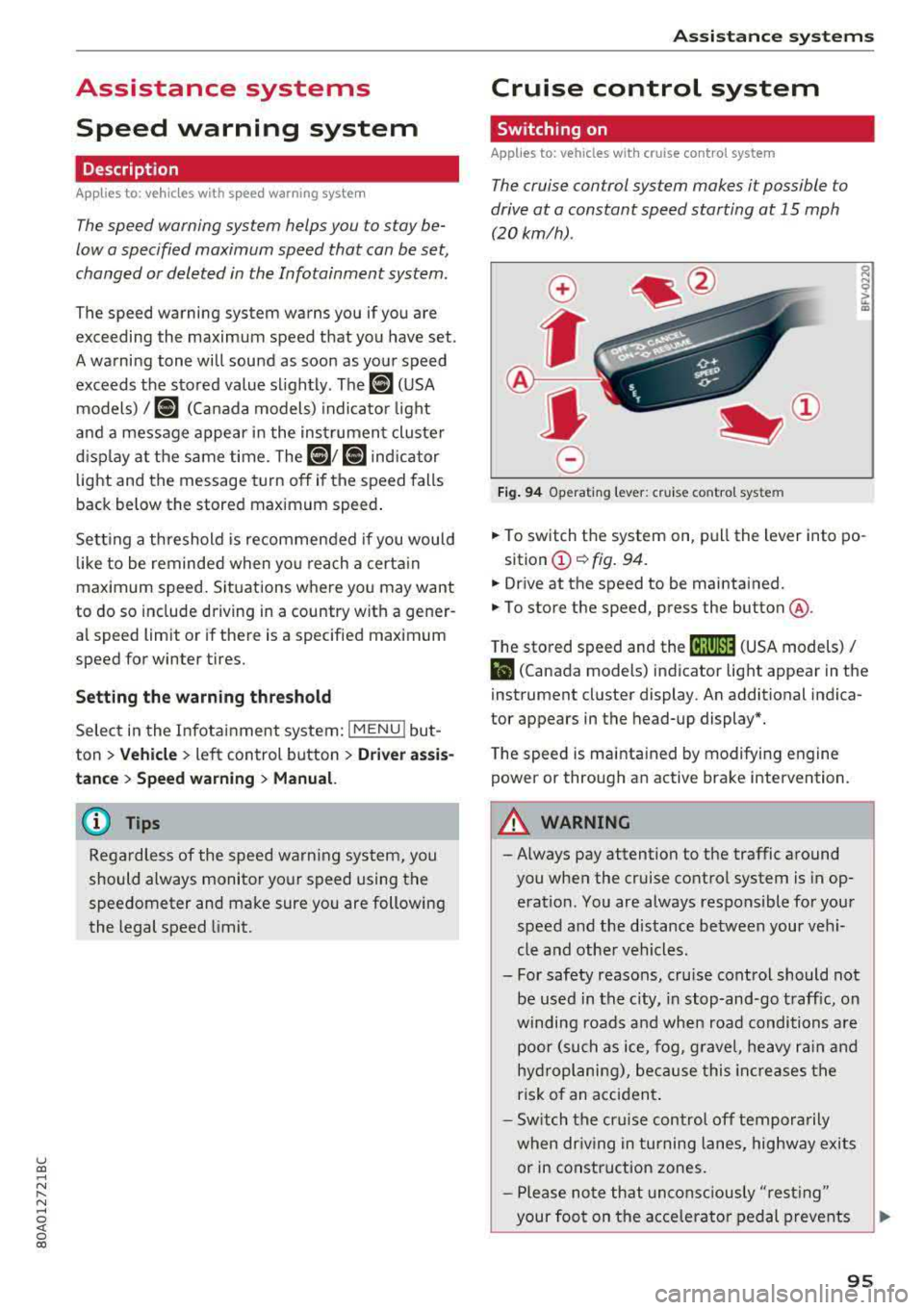
Fig . 94 Operat ing leve r: cru ise control system
.,. To switch t he system on, pull the lever into po-
sition
(D ¢ fig. 94.
.,. Drive at the speed to be maintained.
.,. To store the speed, press the button @.
T he stored speed and the
@jltJ~i, (USA models) /
l'I (Canada models) ind icator lig ht appear in the
instrument cluster display. An additional indica
tor appears in the head-up display*.
T he speed is mainta ined by modifyi ng engine
power or through an active brake intervention.
A WARNING
-Always pay attention to the traffic around
you when the cruise control system is in op
eration. You are always responsible for you r
speed and the distance between your vehi
cle and othe r vehicles .
- For safety reasons, cru ise control should not
be used in the city, in stop -and-go t raff ic, on
winding roads a nd when road conditions a re
poor (such as ice, fog, g rave l, heavy ra in and
hy droplani ng), bec ause this in cr eases the
risk of an acciden t.
- S witch the cr uise con trol
off tempor arily
when dr iv ing in turning lanes, highway exits
or in construction zones.
- P lease no te th at unconsc iously
"rest ing"
your foot on the accelerator ped al prevents
95
Page 98 of 392
Ass is tanc e system s
the cruise control from braking. This is be
cause pressing the accelerator pedal over
rides the cruise contro l system .
- If a brake system ma lfunction such as over
heating occurs when the cruise control sys
tem is sw itched on, the braking function in
the system may be switched off . The rest of
the cruise control system functions remain act ive as long as
the @;\l)~ij (USA models) /
Bl (Canada models) indicato r light is on.
@ Note
Before driving downhill a long distance on a
steep hill, decrease you r speed and select a
lower gear. This makes use of the eng ine
brak ing effect and re lieves the bra kes.
(D Tips
The b rake l ights turn on w hen the brakes a re
app lied automat ically .
Changing the speed
Applies to: vehicles with cruise control system
.,. T o inc rease/decrease the speed in 1 mph (1
k m/h) increments, br ie fly
tap the leve r toward
0 10 ¢ page 95, fig. 94 to the f irst leve l.
.,. To increase/decrease the speed in S mph (10
km/ h) increments, br iefly
tap the leve r toward
0 10 to the second level.
.,. To increase or decre ase the speed quickly, hold
the lever toward
0 10 to the first or second
level until the des ired speed is reached .
Overriding the speed
Applies to: vehicles with cruise control system
You can p ress t he accelerator pedal to inc rease
your speed, for examp le if you want to pass
someo ne. The speed yo u se t earlier w ill res ume
as soon as yo u release the accelerator peda l.
H oweve r, if you are exceeding the stored speed
by a cons ider able amo unt for a long time , the
cr uise con trol sys tem w ill tempo rar ily switch off.
The
[ij;\l)~ij (USA models) tBI (Canada models) in
dicator light in the instrument cluster turns off
and the stored speed is maintained .
96
Preselecting a speed
Applies to: vehicles with cruise control system
You can pre-select your desired speed when the
vehicle is stationary .
.,. Switch the ignition on.
.,. Pull the lever into pos ition (D ¢ page 95,
fig . 94 .
.,. To increase or decrease the speed, tap the leve r
toward
0 10 .
This function makes it possible , for example , to
save the speed you want before driving on the highway . Once you are on the expressway, acti
vate the c ruise control system by pull ing t he lev
e r in to position
(D .
Switching off
Applies to: vehicles with cruise control system
Deactivating temporarily
.,. Press the br ake pedal, or
.,. Press the lever towar d@ (not loc ke d in to
place)
¢ page 95, fig. 94.
Switching off completely
.,. Press the lever into position @(clicked into
place), or
.,. Switch the ignit io n off.
The speed you stored will be ma intained if the
c ruise contro l has been switched off tempora rily .
To resume the stored speed, re lease the bra ke
pedal and pull the lever to posi tion
(D .
Switc hing the ignit ion off w ill erase the stored
speed .
.&_ WARNING
You sho uld only resume the s to red speed if i t
i s no t too h igh fo r exis ting traff ic condi tions .
Ot herwise you can increase the risk of an acci
dent .