headlight AUDI Q5 2018 User Guide
[x] Cancel search | Manufacturer: AUDI, Model Year: 2018, Model line: Q5, Model: AUDI Q5 2018Pages: 392, PDF Size: 60.56 MB
Page 95 of 392
u co ..... N r--N ..... 0 <( 0 00
Tongue weight
The maximum permitt ed tongue weight of the
trailer drawbar on the trailer hitch ball head may
not be exceeded .
I f the tongue we ight is too low, th is affects t he
trailer's handling. For driv ing safety, we recom
mend to always utilize the maximum permitted
tongue weight, but not exceed it. You can reach
it, for example, by distributing the cargo in the
trailer correctly.
You can determine the tongue weight, for exam
p le, with a bathroom scale or a public weigh sta
tion .
The permitted tongue we ight of your veh icle can
be found in the vehicle documentation or in
¢page 370.
Load distribution
Poor cargo load and distribution can negatively
i mpact ve hicle handl ing .
-Store objects preferably in the vehicle luggage
compartment. The vehicle shou ld always carry
the heaviest possible load and the trailer
shou ld have the lightest possible load.
-Distribute the load in the tra iler so that the
heavy objects are as close to the axle as possi
ble.
-Secure objects from slid ing out of p lace.
-Utilize the maximum permitted tongue weight
if possible .
Tires
Set the tire pressure on your vehicle for a "full
load"; see the t ire pressure
sticker¢ page 335 .
If necessary, also adjust the tire pressure on the
trailer according to the manufacturer's recom
mendation .
W inter tires should be mounted on the vehicle
and on the trailer during winter temperatures .
Outside mirrors
If you cannot see the traffic behind the trailer
with the standard exterior mirrors, then you must attach addit ional exterior m irrors. Adjust
them so you have a sufficient visibility behind
you .
Trailer towing
Exterior lighting
Follow the legal regu lations rega rding the light
ing equipment on your trailer. Contact an author
ized Audi dea ler or authorized Audi Service Facili
ty for more information.
Before starting to drive , check all lighting eq uip
ment on the hitched trailer.
T he headlight range cont rol adjusts automat ica l
ly to the light range of the headlights .
Safety chains
Make sure the safety chains are correctly applied
when pulling a trailer . The cha ins should hang
enough so that the trailer can drive around
curves . Howeve r, th ey must not touch the
ground.
Air suspension
Applies to: vehicles with air suspension
The air suspens ion must be at the standard vehi
cle height before you set the tongue weight on
the tra iler and hitch the
trailer ¢@ , ¢page 128,
Raising/lowering the vehicle.
For vehicles with a factory-installed trailer hitch,
the a ir suspension trailer mode w ill automatically
switch on if you connect the trailer cable to the
socket.
For vehicles with a retrofitted trailer hitch, you
must sw itch on the a ir suspension trailer mode
manua lly . Select in the Infotainment system:
IMENU I button> Vehicle> left cont rol button>
Vehicle settings > Air suspension: trailer. Switch
i t off again after towing a tra iler .
You can also sw itch off trailer mode manually
wh ile dr iving, for example, whe n using a bicycle
rack system.
If you have to dr ive through d ifficult road cond i
tions, you can ra ise the vehicle again after hitch
i ng the tra iler o r after adjusting the tongue
we ight.
(UJ} Note
Applies to: vehicles with air suspension
-Changes in temperature or load can affect
the height of the vehicle .
93
Page 325 of 392
u co ..... N r-N .....
~ 0 co
Charging the vehicle battery
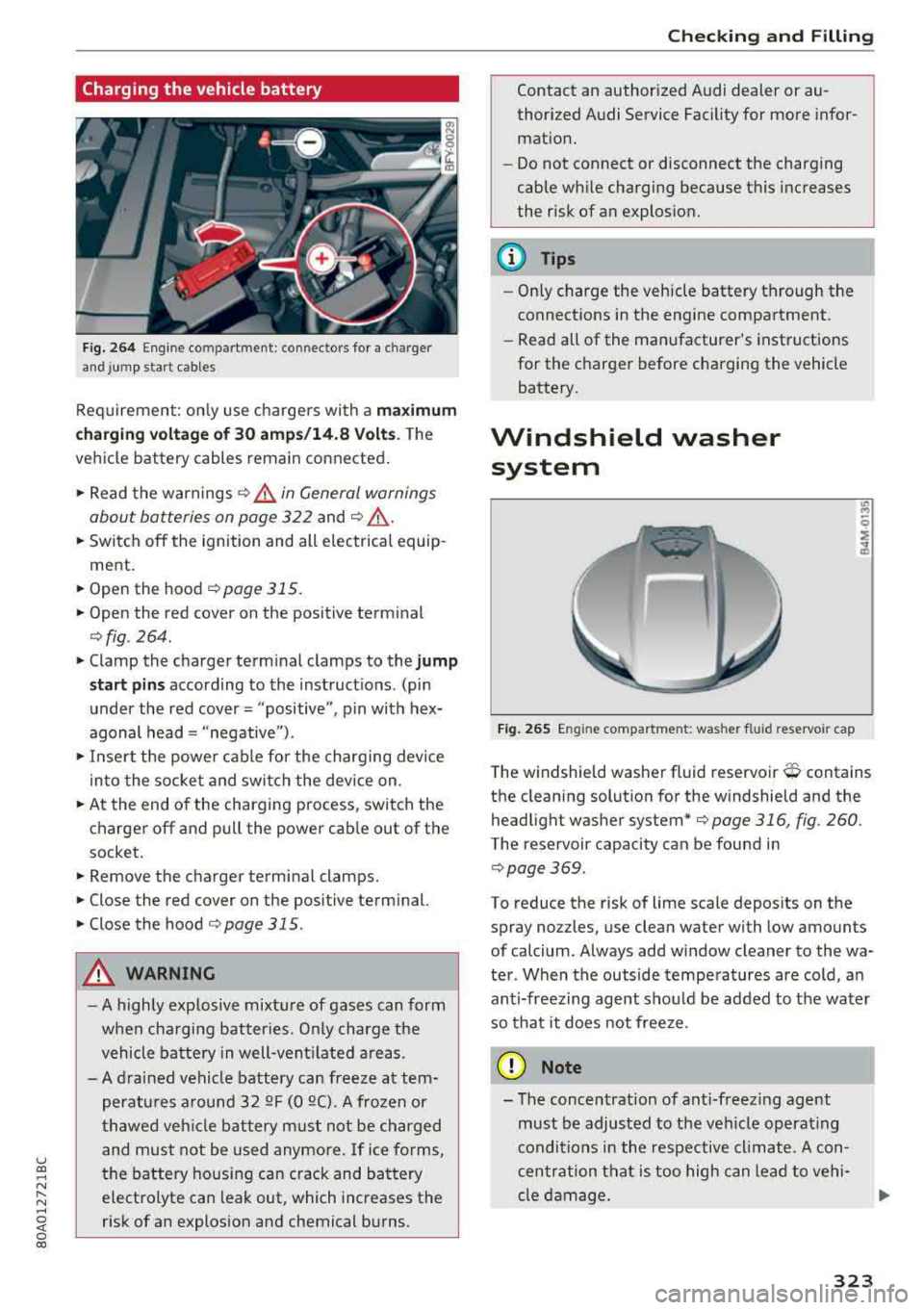
Fig. 264 Engine co mpartment : connec tor s fo r a charg er
and jump s ta rt cab les
Req uirement: on ly use charge rs with a maximum
c harging voltage of 30 amp s/14 .8 Volt s.
T he
vehicle battery cables remain connected .
.,. Read the warnings ¢ & in General warnings
about batteries on page 322
and ¢ ,& .
.,. Switch off the ignition and all e lectrical equip
ment .
.,. Open the hood ¢ page 315 .
.,. Open the red cover on the positive term inal
¢ fig . 264 .
.,. Clamp the charger term inal clamps to the jump
s tart pins
according to the instruct ions . (pin
under the red cover = "positive", p in with hex
agonal head= "negative ") .
.,. In se rt the powe r cable for the charging device
in to the socket and swi tch the device on .
.,. At the end of the charging process, switch the
charger off and pull the power cab le out of the
socket.
.,. Remove the charger terminal clamps .
.,. Close the red cover on the positive term inal.
.,. Close the hood ¢ page 315 .
A WARNING
-A highly explosive mixtu re of gases can form
whe n cha rging batter ies. O nly charge the
vehicle ba tte ry in well-ven tilated are as.
- A dra ined vehicle battery can freeze at tem
peratu res a round 3 2
QF (0 QC). A frozen or
t hawed veh icle bat tery m ust not be charged
and must not be used anymore. If ice forms,
the battery housing can crack and battery electrolyte can leak out, which increases the
risk of an explosion and chemical b urns .
Chec king and Filling
Contact an author ized Audi dealer or au
thorized Audi Service Facility for more infor
mat ion.
- Do not connect or disconnect the charging
cable wh ile charging because this increases
the risk of an explos ion.
(D Tips
- Only charge the veh icle battery through the
connect ions in the engine compartment .
- Read all of the manufacturer's instructions
for the charger before charging the vehicle battery.
Windshield washer system
F ig. 265 Engine compar tmen t: was her fluid reservo ir ca p
T he windshield washer fluid reservoir O contains
the clean ing solut ion for the w indshield and the
headlight washer system*
¢page 316, fig. 260 .
The reservoir capacity can be found in
¢page 369 .
To reduce the risk of lime scale deposits on the
spray no zzles, use clean water with low amounts
of calcium . Always add w indow cleaner to the wa
ter . When the outside tempe ratures are cold, an
anti-freez ing agent sho uld be added to t he water
so that it does not free ze.
@ Note
- The concentration of ant i-freez ing agent
must be adjusted to the ve hicle operat ing
conditio ns in the respective cl imate . A con
c en tration that is too high can lead to vehi
cle d am age .
323
Page 347 of 392
u co ..... N r--N ..... 0 <( 0 00
wash operator to reduce the risk of acci
dents.
- To reduce the risk of cuts, protect yourself
from sharp metal components when wash ing the underbody or the inside of the wheel
housings.
- After washing the vehicle, the braking effect may be delayed due to moisture on the
brake rotors or ice in the winter . This in
creases the risk of an accident. The brakes
must be dried first with a few careful brake
applications.
@ Note
- If you wash the vehicle in an automatic car
wash, you must fold the exterior mirrors in
to reduce the risk of damage to the mirrors.
Power folding exterior mirrors* must only
be folded in and out using the power folding
function.
- To reduce the risk of damage to the rims
and tires, compare the width between the
wheels on your vehicle with the distance be
tween the guide rails in the car wash.
- To reduce the risk of damage, compare the
height and width of your vehicle with the
Care and cleaning
height and width of the inside of the car
wash .
- T o reduce the risk of paint damage, do not
wash the vehicle in direct sunlight .
- To reduce the risk of damage to the surface,
do not use insect removing sponges, kitchen
sponges or similar items .
- Matte finish painted vehicle components:
- To reduce the risk of damage to the sur-
face, do not use polishing agents or hard
wax.
- Never use protective wax. It can destroy
the matte finish effect .
- Do not place any stickers or magnetic
signs on vehicle parts painted with matte
finish paint. The paint could be damaged
when the stickers or magnets are re
moved.
@ For the sake of the environment
Only wash the vehicle in facilities specially de
signed for that purpose. This will reduce the
risk of dirty water contaminated with oil from
entering the sewer system.
Cleaning and care information
When cleaning and caring for individual vehicle
components, refer to the following tables. The
information contained there is simply recom
mendations. For questions or for components that
are not listed, consult an authorized Audi
dealer or authorized Audi Service Facility. Also
follow the information found
in ¢.&. .
Exterior cleaning
Component Situation Solution
Windshield wiper
Deposits soft cloth with glass cleaner, ¢ page 52
blades
Headlights/
Deposits Soft sponge with a mild soap solution3>
Tail lights
Sensors/
Deposits Sensors: soft cloth with a solvent-free cleaning solution
camera lenses Camera lenses: soft cloth with an alcohol-free cleaning
solution
Snow/ice Hand brush/solvent-free de-icing spray
Wheels Road salt Water
Brake dust Acid-free special cleaning solution
345
Page 349 of 392
u co .... N ,..._
N .... 0 <( 0 00
Care and cleaning
Component Situation Solution
T ex tile s,
Deposits adhering to Vacuum cleaner
art ifi ci al l eat her, the surface
A lcan tara Water-based deposits Absorbent cloth and mild soap solutiona>
such
as coffee, tea,
b lood, etc.
O il-based deposits Apply a m ild soap solution
al, blot away the dissolved o il or
such as oil, make-up, dye, treat afterward with water, if necessary
etc.
Special deposits such
Special stain remover, blot with absorbent material, treat
as ink, nail polish, la-afterward with mild soap solution, if necessary
a)
tex paint, shoe pol-
ish, etc.
Natu ral leathe r Fresh stains Cotton cloth with a mi
ld soap so lution a>
Water-based deposits Fresh stains : absorbent cloth
such as coffee, tea, Dried stains: stain remover suitable for leather
b lood , etc.
Oi l-based deposits Fresh stains: absorbent cloth and stain remover suitable
such as oil, make-up, for leather
etc . Dried stains: oil clean ing spray
Special deposits such Spot
remove r suitable for leather
as ink, nai l polish, la-
tex paint, shoe pol-
ish, etc.
Care Regula rly apply cond it ion ing cream that p rotects from
lig ht and penet rates into the mater ia l. Use specia l co lored
conditioning cream, if necessary.
Carbon p art s Deposits clean the same way as plast ic parts
a) Mi ld soap solution: maximum two tablespoons of neutral soap in 1 quar t (1 liter) of water
.8, WARNING
The windsh ie ld may not be trea ted with wa
ter-repelling windshield coating agents. Un
favorable conditions such as wetness, dark
ness, or low sun can result in increased glare .
Wiper blade chatter is also possible.
@ Note
- Headlights /tail light s
-Never clean headlights or tail lights with a
dry clot h or sponge.
- Do not use any cleaning product that con
tains alcohol, because they could cause
cracks to form .
-Wheels
-
- Never use any pa int polish or other abra
sive materials .
- Damage to the protect ive layer o n the
rims such as stone ch ips or scratches must
be repaired immediately .
-Cam era lenses
- Neve r use warm or hot wa ter to remove
snow or ice from the camera lens . This
could ca use the lens to crack .
- Neve r use ab rasive cleaning m ate rials or
a lcohol to clean the camera lens . This
could ca use scratches and cracks .
-Door window s
-Remove snow and ice on windows and ex-
terior mirrors w ith a plast ic scraper . To
347
Page 362 of 392
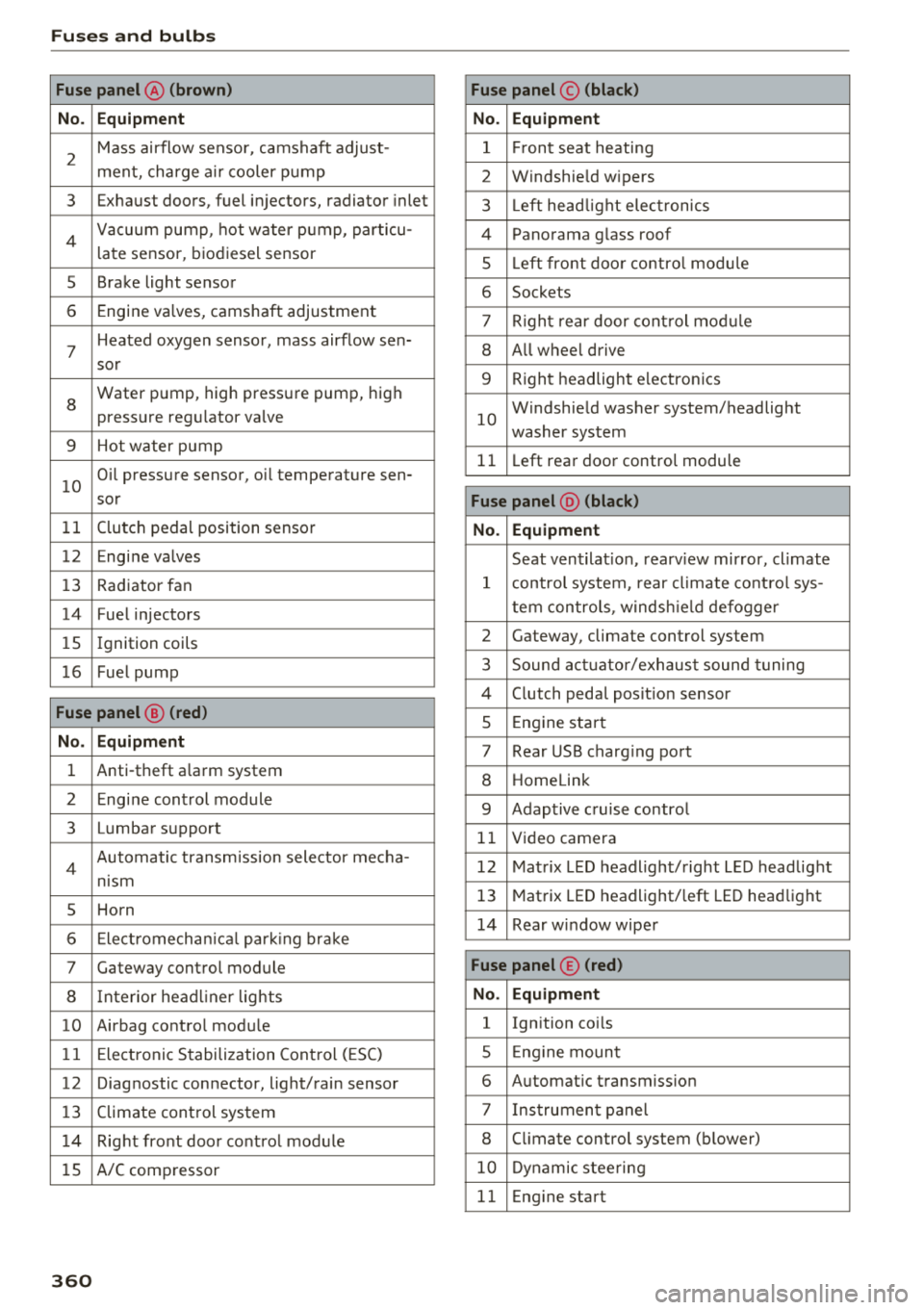
Fuses and bulb s
Fuse panel@ (brown ) Fuse panel© (blac k)
N o. E quip ment No. Equipmen t
2
Mass airflow sensor, camshaft adjust-
ment, charge air cooler pump 1 Fr ont seat heating
2 Windshie ld wipers
3 Exhaust doors, fuel injectors, radiator inlet 3 Left head light elect ronics
4 Vacuum pump , hot water p ump, particu-
late sensor, biodiesel sensor 4 Panorama glass roof
s L eft front doo r contro l modu le
5 Brake light sensor 6 Sockets
6 Engine valves, camshaft adjustment 7 Right rear door cont rol mod ule
7
Heated oxygen sensor, mass airflow sen-8 All wheel drive
sor
8
Water pump, high pressure pump, high
pressure regulator va lve
9 Hot water pump
9 R ight headlight electronics
10
Windshield washer system/headlight
washer system
1 1 Left rear door contro l module
10
Oil pressure sensor, oil temperature sen-
sor
Fu se p anel @ (blac k)
11 Clutch pedal position sensor No. Equipment
12 Engine valves
Seat ventilation, rearv iew mirror, cl imate
13 Radiator fan 1 control system, rear cl imate control sys-
14 Fuel injectors tern controls
, windsh ie ld defogger
15 Ignition coils 2 Gateway, climate control system
16 Fuel pump 3 Sound act uator/exhaust sound tuning
Fuse panel @ (red )
4 Clutch pedal posit ion sensor
5 Engine start
N o. Equipment 7 Rear USB charging port
1 Anti-theft a larm system 8 Homelink
2 Engine control module 9 Adaptive cruise control
3 Lumbar support 11 Video camera
4 Automatic transm ission selector mecha-
nism 12 Matrix LED headlight/right LED headlight
5 Horn
13 Matrix LED headlight/ left LED headlight
6 Electromechan ica l park ing brake
14 Rear window wiper
7 Gateway control module Fu se panel © (red )
8 Interior headliner lights No . Equipmen t
10 Airbag control module 1 Ignition coils
11 Electronic Stabilization Control (ESC) 5 E ng ine mount
12 Diagnostic connector, light/rain sensor 6 Automatic transmiss ion
13 Climate control system 7 I nstrument panel
1 4 Right front door control module 8 C limate control system (blower)
lS A/C compressor
10 Dynamic stee ring
11 Eng ine start
36 0
Page 364 of 392
Fuses and bulb s
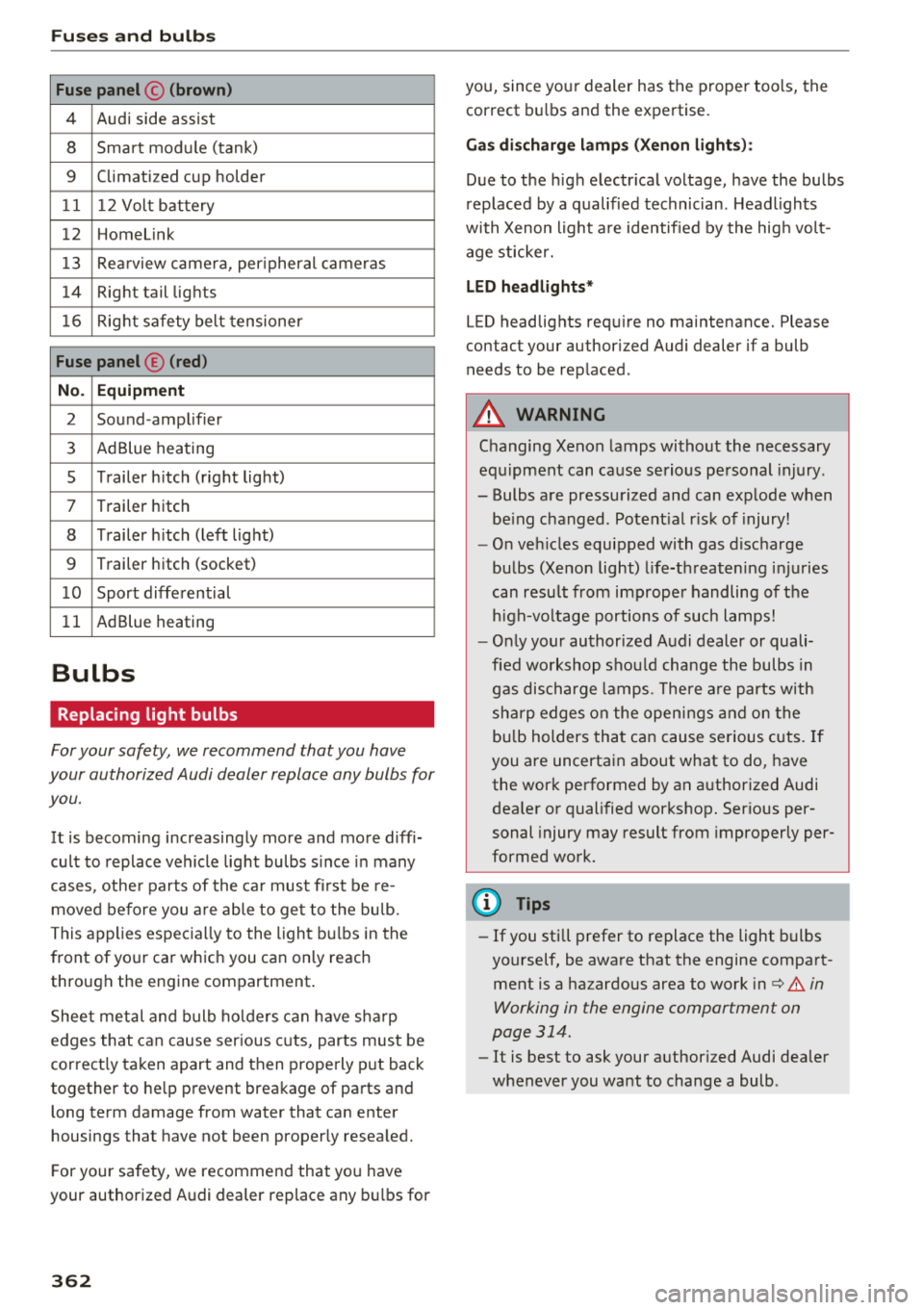
Fuse panel © (brown )
4 Audi side assist
8 Smart module (tank)
9 Climatized cup holder
11 12 Volt battery
12 Homelink
13 Rea rview camera, per ipheral cameras
14 Right tail lights
16 Right safety belt tensioner
Fu se panel ® (red )
No . Equipm ent
2 Sound-amplifier
3 AdBlue heating
s Trailer h itch (right light)
7 Trailer hitch
8 Trailer h itch (left lig ht)
9 Trailer hitch (socket)
1 0 Sport differential
11 AdBlue heating
Bulbs
Replacing light bulbs
For your safety, we recommend that you have
your authorized Audi dealer replace any bulbs for
you.
It is becoming increasingly more and more diff i
cult to replace vehicle light bulbs s ince in many
cases, other parts of the ca r must fi rst be re
moved before you a re able to get to the bu lb.
This applies espec ially to the light bu lbs in the
front of your car which you can only reach
through the engine compartment .
Sheet metal and bulb ho lde rs can have sha rp
edges that can cause ser ious cuts, parts must be
correct ly taken apart and then properly put back
together to he lp prevent breakage of parts and
long term damage from water that can enter
housings that have not been properly resea led.
F or your safety, we recommend that you have
your authorized Audi dealer replace any bu lbs for
3 6 2
you, since your dealer has the proper tools, the
correct bu lbs and the expertise.
Ga s di sc harg e lamp s (Xeno n ligh ts):
Due to the high electr ical voltage, have the bulbs
rep laced by a qualified technician . Headlights
with Xenon light a re identified by the hig h volt
age sticker.
L ED he adligh ts*
LED headlights requ ire no maintenance. Please
contact your author ized Audi dealer if a bulb
needs to be replaced .
A WARNING
Changing Xenon lamps without the necessary
equ ipment can cause serious personal injury.
-Bulbs are pressurized and can explode when
be ing changed. Potent ial r isk of injury!
-O n veh icles equipped with gas discharge
bulbs (Xenon light) l ife-threaten ing injuries
can resu lt from improper handling of the
h igh-vo ltage portions of such lamps!
-O nly your author ized Audi dealer or quali
fied wo rkshop shou ld change the bulbs in
gas discharge lamps. The re a re parts w ith
sha rp edges on the open ings and on the
bu lb holders that can cause serious cuts. If
you are uncertain about what to do, have the work performed by an authorized Audi
dea ler or qualified workshop. Serious per
sonal injury may result from improperly per
formed work.
(D Tips
-If you still prefer to replace the light bulbs
yourself, be aware that the engine compart ment is a hazardous area to work
i n c:> .&. in
Working in the engine compartment on
page 314.
-It is best to ask your authorized Audi dealer
whenever you want to change a bulb .
Page 371 of 392
u co ..... N r-N .....
~ 0 co
Technical data
Vehicle specifications
XXXXX XX -X -XXXX XXX XX
®-+ : ::::::. XXXXXXXX XX X XX XXX XXX
IYP /lffl XXX XXX
XX XXXXXXX XX X X XX
XXX KW XXX
®i ~=-:~~ XXXX XXX XXX
©+ ~ rur:i~ xxxx I xxxx XXX I xx
II. · AIJSlit I OPTIONS
EOA 7D 5 4U B 6XM SSG SR W
2 EH JO Z 1LB 1AS 1BA
3FC SM U 7Xl
F O A 9G3 OG7 O YH OJF
TL 6 3 KA 8EH UlA X 9B OZ7
l XW
803
908 8Z4 020
7 T6 CV7
71<0 4X3 21< 2
3L4 4 KC 3YO 413 5 02
1S A 7GB
01A 4GQ
XX . X XX X XX X XXXX
Fig. 293 Vehicl e ident ifica tion labe l
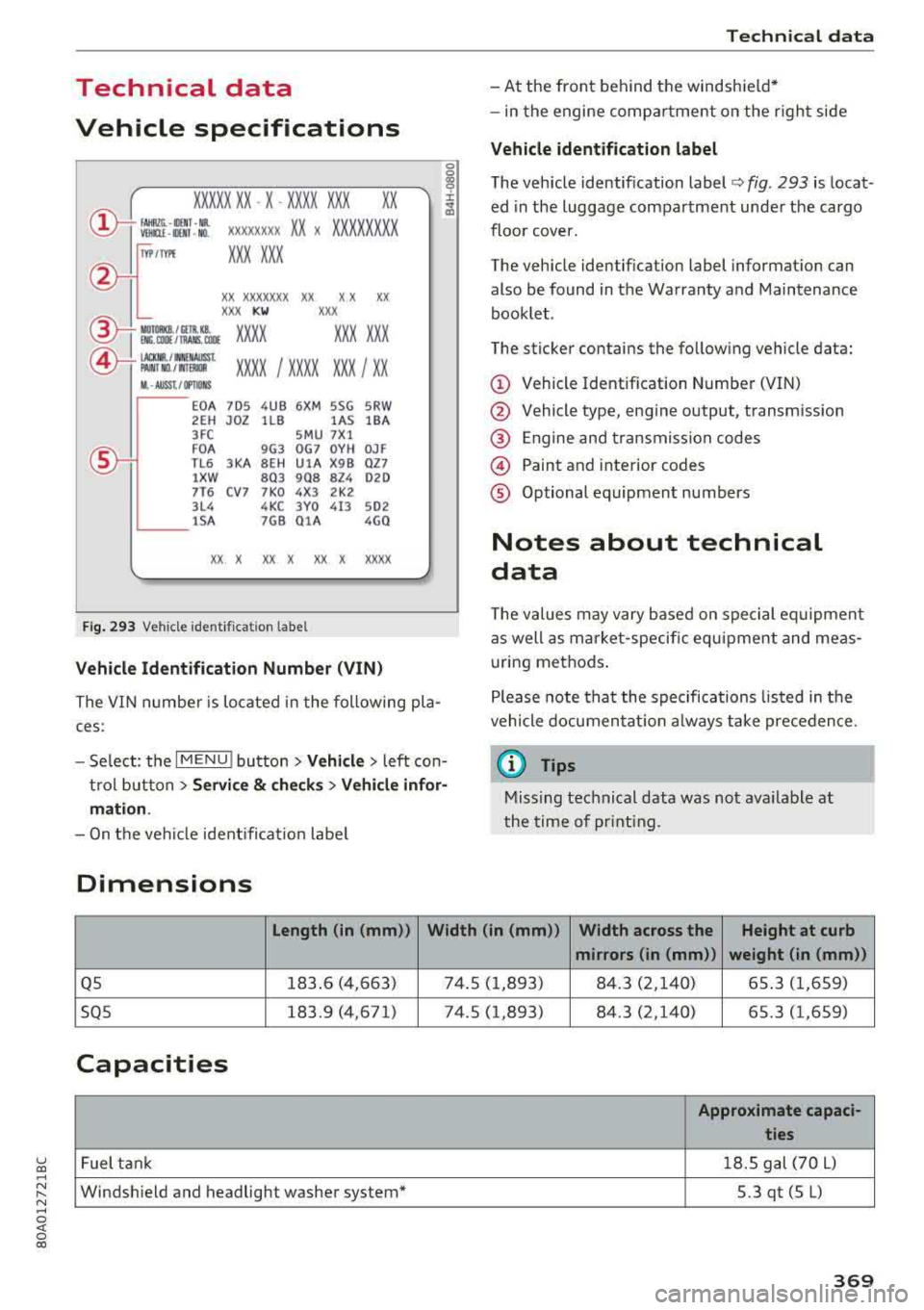
Vehicle Identification Number (VIN )
The VIN n umber is located in the following pla
ces :
0
0
~ :x:
t rol button
> Servi ce & check s > Vehicle infor·
mati on.
-On t he vehicle identificat io n labe l
Dimensions
Technical data
-At the front behind the windshield *
-in the engine comp artme nt on the r igh t side
Vehicle identification label
The vehicle identification label¢ fig. 293 is locat
ed in the luggage compartment under the cargo
floor cover.
The vehicle identification label informat ion can
also be found in the Warranty a nd Maintenance
booklet .
The sticker contains the fo llow ing vehicle data:
© Vehicle Identif ication Number (VIN)
@ Vehicle type, engine output, transm ission
@ Engine and transmiss ion codes
© Paint and interior codes
® Optional equipment numbers
Notes about technical
data
T he values may vary base d on special eq uipment
as well as m arket -specific equipment and meas
u ring methods .
Please note that the specifications listed in the
vehicle documen tat ion a lways take prece dence.
(D Tips
Missing technical data was not ava ilable at
the time of pr int ing.
Length (in (mm )) Width (in (mm ))
Width across the Height at curb
mirrors (in (mm )) weight (in (mm))
Q5 183.6 (4,663) 74 .5 (1 ,893) 84.3 (2,140) 65.3 (1 ,659)
SQ5 183.9 (4,671) 74.5 (1,893) 84 .3 (2,140) 65.3 (1,659)
Capacities
Approximate capaci·
ties
Fuel tank 1
8.5 gal (70 L)
Windsh ield and headlight washer system* 5.3qt(5L)
369
Page 378 of 392
Index
Audio player Bluetooth audio player . . . . . . . . . . . . . . . 228
Wi-Fi audio player . . . . . . . . . . . . . . . . . . . 229
Aud io track . . . . . . . . . . . . . . . . . . . . . . . . . . 237
Aud i pre sense . . . . . . . . . . . . . . . . . . . . . . . 112
Messages . . . . . . . . . . . . . . . . . . . . . . . . . . 116
Sett ings . . . . . . . . . . . . . . . . . . . . . . . . . . . 116
Audi Service Repair Manuals and Literature 371
Aud i side assist . . . . . . . . . . . . . . . . . . . . . . . 120
Rear cross-traffic assist . . . . . . . . . . . . . . . 124
Audi smartphone interface . . . . . . . . . 243, 247
Audi virtua l cockpit
refer to Instrument cluster . . . . . . . . . . . . . 10
AUTO Automatic headlights . . . . . . . . . . . . . . . . . 45
Auto Lock (central locking system) . . . . . . . . 30
Automatic belt retractor . . . . . . . . . . . . . . . 264
Automatic climate control . . . . . . . . . . . . . . . 69
Operation . . . . . . . . . . . . . . . . . . . . . . . . . . . 70
Automatic climate control system Audi drive select . . . . . . . . . . . . . . . . . . . . . 125
Setup . . . . . . . . . . . . . . . . . . . . . . . . . . . . . . 72
Automatic transmission . . . . . . . . . . . . . . . . . 84
Emergency program . . . . . . . . . . . . . . . . . . 89
Hill descent control . . . . . . . . . . . . . . . . . . . 87
Kick-down . . . . . . . . . . . . . . . . . . . . . . . . . . . 88
La unch control program . . . . . . . . . . . . . . . 89
Manual shiftin g . . . . . . . . . . . . . . . . . . . . . . 88
Parking lock emergency re lease . . . . . . . . . 90
Selector lever positions . . . . . . . . . . . . . . . . 85
Automatic wipe/wash system . . . . . . . . . . . . 51
Auto Safety Hotline . . . . . . . . . . . . . . . . . . . 259
AUTO (button) Automatic climate control system . . . . . . . 71
Auxiliary heater (automatic climate control) 72
AUX input . . . . . . . . . . . . . . . . . . . . . . . . . . . 232
Average consumption . . . . . . . . . . . . . . . . . . . 16
Average speed . . . . . . . . . . . . . . . . . . . . . . . . 16
B
BACK button 147
Balance (sound) . . . . . . . . . . . . . . . . . . . . . . 249
Bass (sound) . . . . . . . . . . . . . . . . . . . . . . . . . 249
Battery Jump starting . . . . . . . . . . . . . . . . . . . . . . . 363
also refer to Vehicle battery . . . . . . . . . . . 321
376 Before
driving . . . . . . . . . . . . . . . . . . . . . . . . 252
Belt tensioners . . . . . . . . . . . . . . . . . . . . . . . 267
Blended gasoline . . . . . . . . . . . . . . . . . . . . . 310
Blower (automat ic climate control system) . 71
Bluetooth Audio player . . . . . . . . . . . . . . . . . . . . . . . . 228
Connecting a cell phone . . . . . . . . . . . . . . 17 4
Settings . . . . . . . . . . . . . . . . . . . . . . . . . . . 248
Boost...... .. .. .. .. .. ............. ... 17
Booster seats . . . . . . . . . . . . . . . . . . . . . . . . 301
Boost pressure indicator . . . . . . . . . . . . . . . . 17
Brake fluid Checking the brake fluid level . . . . . . . . . . 321
Brakes . . . . . . . . . . . . . . . . . . . . . . . . . . . . . . 142
Brake assist . . . . . . . . . . . . . . . . . . . . . . . . 140
Brake fluid . . . . . . . . . . . . . . . . . . . . . . . . . 321
E lectromechanical parking brake . . . . . . . . 80
Emergency braking function . . . . . . . . . . . . 81
New brake pads . . . . . . . . . . . . . . . . . . . . . 142
Worn brake pads . . . . . . . . . . . . . . . . . . . . . 26
Break-in security feature . . . . . . . . . . . . . . . . 36
Breaking in
New brake pads . . . . . . . . . . . . . . . . . . . . . 142
New engine . . . . . . . . . . . . . . . . . . . . . . . . . 73
New tires . . . . . . . . . . . . . . . . . . . . . . . . . . 332
Browser
refer to Media center . . . . . . . . . . . . . . . . . 235
Bulbs . . . . . . . . . . . . . . . . . . . . . . . . . . . . . . . 362
Buttons Control panel (MMI) . . . . . . . . . . . . . . . . . 148
Multifunction steering wheel . . . . . . . . 12, 15
Switching the Infotainment system display
on/off . . . . . . . . . . . . . . . . . . . . . . . . . . . . . 148
C
Cable (USB adapter/ AUX connector cable) 231
California Proposition 65 Warning . . . . . . . 315
Battery specific . . . . . . . . . . . . . . . . . . . . . 322
Call list . . . . . . . . . . . . . . . . . . . . . . . . . . . . . 177
Call options . . . . . . . . . . . . . . . . . . . . . . . . . . 185
Capacities Fuel tank. . . . . . . . . . . . . . . . . . . . . . . . . . . 369
Washer fluid reservoir . . . . . . . . . . . . . . . . 369
Cargo area
refer to Loading the luggage compart-
ment..... .... .. .. .. ............. .. 257
Page 382 of 392
Index
Current consumption . . . . . . . . . . . . . . . . . . 16
F ue l gauge . . . . . . . . . . . . . . . . . . . . . . . 10 12
,
Fuel tank capacity . . . . . . . . . . . . . . . . . . . 369
Gasoline . . . . . . . . . . . . . . . . . . . . . . . . . . . 310
Gasoline additives . . . . . . . . . . . . . . . . . . . 311
Saving fuel . . . . . . . . . . . . . . . . . . . . . . 73 , 125
F ueling
Fuel filler door emergency rel eas e . . . . . . 313
Fuel gauge . . . . . . . . . . . . . . . . . . . . . . . . . . 12
Fuel tank capacity . . . . . . . . . . . . . . . . . . . 369
Opening the fuel filler door . . . . . . . . . . . . 311
F uses
Assignment . . . . . . . . . . . . . . . . . . . . . . . . 359
Replacing . . . . . . . . . . . . . . . . . . . . . . . . . . 358
G
Garage door opener
refer to Homelink . . . . . . . . . . . . . . . . . . . . 43
Garment hooks ... ............. .. .. .. . .
Gas discharge lamps .. .. ..... ... .. .. .. .
Gasoline Octane rating ................... ... .
Recommendation ............. .... .. .
GAWR 61
362
310
310
310
refer to Gross Axle Weight Rating (GAWR) 3.70
Glossary of tire and loading terminology . . 328
Glov e compartment . . . . . . . . . . . . . . . . . . . . 61
Gross Axle Weight Rating (GAWR) . . . . . . . 370
Gross Vehicle Weight Rating (GVWR) . . . . . 370
Ground clearance . . . . . . . . . . . . . . . . . . . . . . 83
GVWR
refer to Gross Vehicle Weight
Rating (GVWR) . . . . . . . . . . . . . . . . . . . . . . 370
H
Handsfree .......... .... ...... ....... 174
Head-up display . . . . . . . . . . . . . . . . . . . . . . . 18
H eadlight range control system . . . . . . . . . . 45
Headlights . . . . . . . . . . . . . . . . . . . . . . . . . . . 45
Cleaning . . . . . . . . . . . . . . . . . . . . . . . . . . . 345
H eadlight range control system . . . . . . . . . 45
Washer system . . . . . . . . . . . . . . . . . . . . . . 51
Head restraints . . . . . . . . . . . . . . . . . . . . 58, 255
Adjusting . . . . . . . . . . . . . . . . . . . . . . . . . . 255
Heating . . . . . . . . . . . . . . . . . . . . . . . . . . . . . . 69
H eavy clothing and safety belts . . . . . . . . . . 263
380
High beams . . . . . . . . . . . . . . . . . . . . . . . . . . . 46
Assistant . . . . . . . . . . . . . . . . . . . . . . . . . . . . 46
Hill descent assist . . . . . . . . . . . . . . . . . . . . . 142
Hill descent control . . . . . . . . . . . . . . . . . . . . 87
Hill hold assist . . . . . . . . . . . . . . . . . . . . . . . . 82
also refer to Hill hold assist . . . . . . . . . . . . 82
Home address ..... .. .. ........... 205,210
Homelink . . . . . . . . . . . . . . . . . . . . . . . . . . . . 43
Horn . . . . . . . . . . . . . . . . . . . . . . . . . . . . . . . . .
8
How are child restraint system anchors relat -
ed to child safety . . . . . . . . . . . . . . . . . . . . . 305
How many airbags does my vehicle have? . . 276
How safety belt pretensioners work 267
I
Imbalance (wheels) . . . . . . . . . . . . . . . . . . . 334
Immobili zer . . . . . . . . . . . . . . . . . . . . . . . . . . 31
Important things to do before driving . . . . 252
Importing and exporting (contacts) . . . . . . 184
Improperly worn safety belts . . . . . . . . . . . 267
Indicator lights . . . . . . . . . . . . . . . . . . . . . . . . 19
Airbag system . . . . . . . . . . . . . . . . . . . . . . 281
PASSENGER AIR BAG . . . . . . . . . . . . . . . . . 281
Infant seats
Input 297
Using the MMI touch . . . . . . . . . . . . . . . . . 151
Using the speller . . . . . . . . . . . . . . . . . . . . 155
Input level (media) . . . . . . . . . . . . . . . . . . . . 23 7
Inspection interval . . . . . . . . . . . . . . . . . . . . 324
Installing the upper tether strap on the an
chorage . . . . . . . . . . . . . . . . . . . . . . . . . . . . . 308
Instrument cluster . . . . . . . . . . . . . . . . . . . . . 10
Cleaning . . . . . . . . . . . . . . . . . . . . . . . . . . . 346
Messages . . . . . . . . . . . . . . . . . . . . . . . . . . . 19
Instrument illumination . . . . . . . . . . . . . . . . 49
Interior lighting . . . . . . . . . . . . . . . . . . . . . . . 48
Interior monitoring . . . . . . . . . . . . . . . . . . . . 36
Internet
refer to Aud i connect ( Infotainment) . . . . 187
Internet radio . . . . . . . . . . . . . . . . . . . . . . . . 230
Interval mode (wipers) . . . . . . . . . . . . . . . . . . 51
iPhone
refer to Audi music interface ....... 231, 232
Page 383 of 392
u co ..... N r--N ..... 0 <( 0 00
J
Jukebox . . . . . . . . . . . . . . . . . . . . . . . . . . . . . 227
Jump-starting . . . . . . . . . . . . . . . . . . . . . . . . 363
Jump start cable . . . . . . . . . . . . . . . . . . . . . . 364
K
Key.................................. 31
Key not recogni zed . . . . . . . . . . . . . . . . . . . 78
Key replacement . . . . . . . . . . . . . . . . . . . . . 31
Mechanical key ............... .. .. . 31, 32
Replacing the battery . . . . . . . . . . . . . . . . . 32
Unlocking/locking . . . . . . . . . . . . . . . . . 33, 35
Vehicle code . . . . . . . . . . . . . . . . . . . . . . . . . 31
Kick-down (automatic transmission) . . . . . . . 88
L
Lane assist
refer to Audi active lane assist . . . . . . . . . 117
La p timer . . . . . . . . . . . . . . . . . . . . . . . . . . . . . 98
Evaluating . . . . . . . . . . . . . . . . . . . . . . . . . . 99
Starting . . . . . . . . . . . . . . . . . . . . . . . . . . . . 99
L ATCH . . . . . . . . . . . . . . . . . . . . . . . . . . . . . . 305
Description . . . . . . . . . . . . . . . . . . . . . . . . . 306
Installing a child restraint . . . . . . . . . . . . . 307
L ocat ion . . . . . . . . . . . . . . . . . . . . . . . . . . . 306
Mounting and releasing the anchorage
hook .. .... .. ................ ..... . 307
Launch control program . . . . . . . . . . . . . . . . . 89
Leather care/cleaning . . . . . . . . . . . . . . . . . 347
L eft control button . . . . . . . . . . . . . . . . . . . . . 13
Licensing agreements (MMI) . . . . . . . . . . . . 250
Lifting points (vehicle jack) . . . . . . . . . . . . . 354
L ight/rain sensor
H eadlights . . . . . . . . . . . . . . . . . . . . . . . . . . 45
Interval mode (wipers) . . . . . . . . . . . . . . . . 51
L ight functions . . . . . . . . . . . . . . . . . . . . . . . . 45
High beam assistant . . . . . . . . . . . . . . . . . . 46
Instrument illumination . . . . . . . . . . . . . . . 49
I nter ior lighting . . . . . . . . . . . . . . . . . . . . . . 48
Lighting Exterior . . . . . . . . . . . . . . . . . . . . . . . . . . . . . 45
Interior . . . . . . . . . . . . . . . . . . . . . . . . . . . . . 48
Lights Headlight range control system . . . . . . . . . 45
Index
Listening to music
refer to Media . . . . . . . . . . . . . . . . . . 225, 234
Load....... .. .. .. .. ............... .. 370
Loading the luggage compartment . . . . . . . 257
Locking/unlocking By remote control . . . . . . . . . . . . . . . . . . . . 33
With the convenience key . . . . . . . . . . . . . . 33
With the lock cylinder . . . . . . . . . . . . . . . . . 35
Low beam headlights . . . . . . . . . . . . . . . . . . . 45
Lowering the rear of the vehicle . . . . . . . . . 128
Luggage compartment . . . . . . . . . . . . . . . . . . 62
Cover (manual) . . . . . . . . . . . . . . . . . . . . . . . 62
Power sources . . . . . . . . . . . . . . . . . . . . . . . 60
Storing cargo correctly . . . . . . . . . . . . . . . 257
Tie-downs . . . . . . . . . . . . . . . . . . . . . . . . . . . 65
also refer to Loading the luggage compart-
ment . . . . . . . . . . . . . . . . . . . . . . . . . . . . . . 257
Luggage compartment lid . . . . . . . . . . . . . . . 36
Emergency release . . . . . . . . . . . . . . . . . . . . 40
Lumbar support . . . . . . . . . . . . . . . . . . . . . . . 56
M
Maintenance . . . . . . . . . . . . . . . . . . . . . . . . . 371
Maintenance intervals . . . . . . . . . . . . . . . . . 324
Making an emergency call . . . . . . . . . . . . . . 179
Malfunction Indicator Lamp (MIL) . . . . . . . 313
Map Display . . . . . . . . . . . . . . . . . . . . . . . . . . . . 218
Operating . . . . . . . . . . . . . . . . . . . . . . . . . . 213
Settings . . . . . . . . . . . . . . . . . . . . . . . . . . . 214
Update . . . . . . . . . . . . . . . . . . . . . . . . . . . . 203
Map update . . . . . . . . . . . . . . . . . . . . . . . . . . 216
Mechan ical key .. .. .. ............... 31, 32
Mechanically locking the front passenger's
door . . . . . . . . . . . . . . . . . . . . . . . . . . . . . . . . . 35
Media . . . . . . . . . . . . . . . . . . . . . . . . . . 225, 234
Drives . . . . . . . . . . . . . . . . . . . . . . . . . . . . . 226
Supported formats . . . . . . . . . . . . . . . . . . 240
Media center . . . . . . . . . . . . . . . . . . . . . . . . . 235
Memory buttons
refer to Shortcut keys ............ 147, 155
Memory capacity Directory . . . . . . . . . . . . . . . . . . . . . . . . . . . 184
Jukebox . . . . . . . . . . . . . . . . . . . . . . . . . . . . 227
381