remote control AUDI Q5 2018 User Guide
[x] Cancel search | Manufacturer: AUDI, Model Year: 2018, Model line: Q5, Model: AUDI Q5 2018Pages: 392, PDF Size: 60.56 MB
Page 40 of 392
Opening and clo sing
Storin g th e luggag e comp artm ent lid
o pening posit ion
~ Bring the luggage compartment lid into the de
sired open position. The position must be at a
certain height or higher to store.
~ Press and hold the C> button in the luggage
compartment lid for at least four seconds to
store the new open position . A visual and audio
s ignal will follow .
~ To set a h igher open position, wait at least five
seconds and then caref ully press the luggage
compartment lid upward .
~ Press and hold the C> button again for at least
four seconds to store the desired opening posi
tion.
The opening/closing process wi ll stop immedi
ately if :
- Yo u pull/release the
C> switch in the driver's
door, or
- Applies to: vehicles with convenience key:
press/release the
C> button on the remote
contro l key, or
- Applies to:
vehicles with conveniern;e key: press
the C> button or the {n but ton in the luggage
compartment lid, or
- Yo u push the hand le in the luggage compart
ment lid, or
- When something b locks the luggage compa rt
ment lid or makes it difficu lt fo r the lid to
move .
I f you press the hand le or one of the
C> or {n but
tons (veh icles w it h conven ience key*) now, the
luggage compartment lid w ill either open or
close, depending on its angle .
A WARNING
-After closing the luggage compartment lid,
make s ure that it is latched. Otherwise, the
l uggage compartment lid could open sud
denly when driving, which increases the risk
of an accident .
- Pay careful attention when closing the lug
gage compartment lid. Otherw ise, you could
cause serious injury to yourself or others de
spite the pinch protection .
38
-To reduce the risk of pinching injuries, a l
ways make sure that no one is in the operat ing area of the luggage compartment lid, in
cluding the hinge areas and the upper and
lower edge of the luggage compartment lid .
- Never drive with the luggage compartment
lid ajar or open, because poisonous gases
can enter the vehicle inte rior and create the
risk of asphyx iat ion.
- If there is a luggage rack (such as a bicycle rack) on the luggage compartment lid, the
luggage compartment lid may not ope n
comp letely under cert ain ci rcumstan ces or it
co uld close by itself if open due to t he extra
weight. There fore, the open luggage com
partment lid must be given additional sup
port or the cargo must fi rst be removed
from the luggage rack.
@ Note
The l uggage compa rtment lid can bump into
objects s uch as the garage ceiling when open
i ng and become damaged .
(D Tips
- The settings in the Infotainment system de
termine if t he luggage compartment lid can
be opened using the
hand le ~ page 35.
- Th ere are audible signals when closing the
luggage compartment lid with the remote
contro l key (vehicles with conven ience key*)
or with the
C> button in the driver's door.
- When the vehicle is locked, the luggage
compartment lid can be unlocked sepa rately
by pressing the
C> button on the remote
control key . The luggage compartme nt lid
locks automat ically when it is closed again.
- Applies to: vehicles with convenience key:
The luggage compartment lid can be closed
w ith the conven ience from a distance up to
approximate ly 9 ft (3 m).
- T he luggage compartment lid can be oper
ated manua lly if the veh icle battery is low .
It is necessa ry to use mo re force when do ing
this. Move the lid s low ly to redu ce the
amou nt o f fo rce needed.
..,.
Page 43 of 392
u co ..... N ,..._
N ..... 0 <( 0 00
All power window switches are equipped with a
two-stage function *:
Opening and clo sing the windows
.,. T o open or close the w indow completely, p ress
the sw itc h down or p ull the sw itc h up br iefly to
the second level. The operation wi ll stop if the
switch is pressed/pu lled again.
.. To se lect a position in between opened and
closed, press/pull the switch to the first leve l
until the desired window position is reached.
Po wer window switch es
(D Left front door
@ R ight front door
@ L eft rea r door*
© Right rear door*
A WARNING
- If you leave the veh icle, switch the ignition
off and take the vehicle key with you. This
applies particularly when children remain in
the vehicle . Otherw ise children could start
the engine or operate elect rical equipment
(such as powe r windows), which inc reases
the risk of an acc ident. The power windows
c ontin ue to f unct ion until the driver's door
or front passenge r's door has been opened .
- Pay ca reful attent ion when closing the win
dows. Pin ching co uld cause serious injur ies.
- When loc king the veh icle from outside, the
vehicle mus t be unoccupied since the win
dows can no longer be opened in an emer
gency.
(D Tips
You can still open and close the w indows for
app roxima tely 10 minutes after tu rning the
ign it ion off. The power windows do no t switch
off until the driver's door or front passenger's
door has been opene d.
Opening and cl osing
Convenience opening/closing
Applies to: vehicles with convenience key
All of the windows and the roof* con be opened/
closed at the some time .
Convenience opening f eature
.. Press and hold the @ button on the remote con
trol key until a ll of the windows reach the de
sired position and the roof* is ti lted open .
Convenience closing feature
.. Press the t'fl button on the remote control key
until the roof* is closed
~ ,&. , or
.. Touch the sensor * on the door handle unti l all
of the windows and the roof* are closed. Do not place your hand in the door handle when doing
this .
Sett ing con ven ience opening in the
Infotainment system
.. Select in the Infotainment system: I MENU ! but
ton
> V ehicle > left control button > V ehicle
s etting s
> Central locking > Long press to
open windows .
A WARNING
-Never close the w indows o r the roof* ca re
lessly or in an uncon trolled manner, be
cause this increases the risk o f injury .
- For secur ity reasons, the win dows and the
roof* c an only be opened and closed with
the remote control key at a maxim um dis
tance of approximately 6.S feet (2 m) away
from the vehicle. Always pay attention when using the
t'fl button to close the windows
and the roof * so that no one is pinched. The
clos ing process will stop immediately when
the
t'fl button is released.
(D Tips
Applies to: vehicles with panorama glass roof:
the power sunshade also opens/closes when
opening/closing the roof .
-
41
Page 51 of 392
u co ..... N r-N .....
~ 0 co
Version 1
To adjust the brightness of individual zones, se
lect
Front brightness* , Door brightness or Foot
well brightness.
Turn the control knob to th e left
or to th e right. Pr ess the control knob to confirm
the b rightness.
Version 2
Select and confirm one of the displayed profiles
by pressing the control knob.
Individual: you can customize the brightness and
color of individual zones. Press the right control
button. Press the control knob again to confirm
the settings.
Audi drive select: the interior and contour light
ing color changes depending on the driving mode
selected in drive select*
r::?vpage 125.
(0) Tips
The setting is automatically stored and as
signed to the remote control key that is being
used.
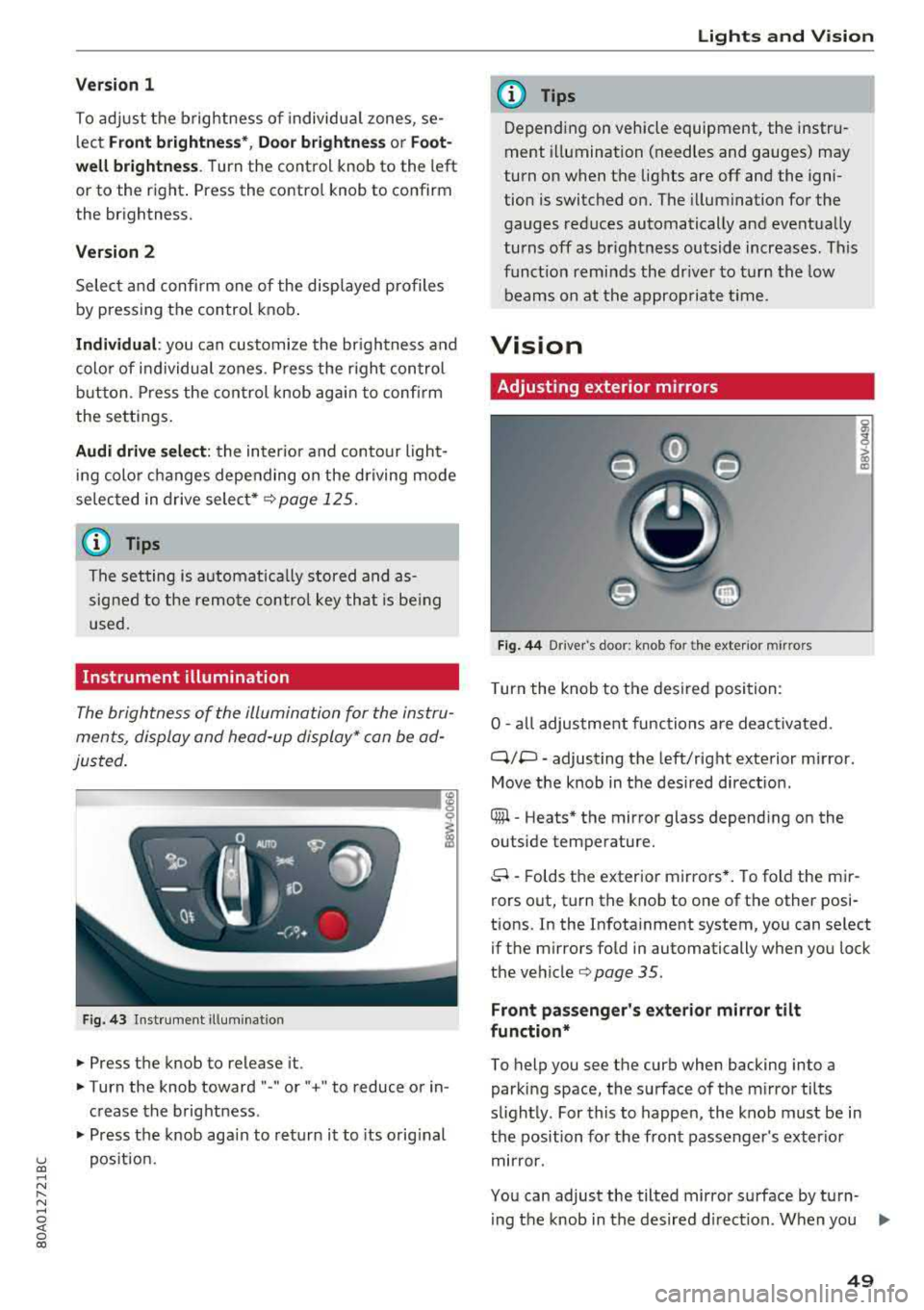
Instrument illumination
The brightness of the illumination for the instru
ments, display and head-up display* can be ad
justed.
--------... ~
i
Fig. 43 Instrument i llumination
.. Press the knob to release it.
.. Turn the knob toward "-" or" +" to reduce or in
crease the brightness .
.. Press the knob again to return it to its original
position.
Lights and Vision
(D Tips
Depending on vehicle equipment, the instru
ment illumination (needles and gauges) may
turn on when the lights are off and the igni
tion is switched on. The illumination for the
gauges reduces automatically and eventually
turns off as brightness outside increases . This
function reminds the driver to turn the low
beams on at the appropriate time.
Vision
Adjusting exterior mirrors
Fig. 44 D river 's doo r: knob fo r the ext erior mirr ors
Turn the knob to the desired position:
0
-all adjustment functions are deactivated .
q;p -adjusting the left/right exterior mirror.
Move the knob in the desired direction .
® -Heats* the mirror glass depending on the
outside temperature.
8 -Folds the exterior mirrors*. To fold the mir
rors out, turn the knob to one of the other posi
tions. In the Infotainment system, you can select if the mirrors fold in automatically when you lock
the
vehicle¢ page 35 .
Front passenger's exterior mirror tilt
function*
To help you see the curb when backing into a
parking space, the surface of the mirror tilts
slightly. For this to happen, the knob must be in
the position for the front passenger's exterior
mirror.
You can adjust the tilted mirror surface by turn- ing the knob in the desired direction. When you
.,.
49
Page 61 of 392
u co ..... N r-N .....
~ 0 co
Installing the head restraints
.,. Slide the posts on the head restraint dow n into
the gu ides unt il the posts click into place .
... Press the button -arrow-c::> fig. 60 and slide the
head restraint all th e way down. You should not
be able to remove the head restraint from the
backrest without pressing the button.
A WARNING
-Always read and follow the applicable warn
ings
c::> page 255 , Proper adjustment of
head restraints .
-Only remove the head restraints from the
rear seats when it is necessary for install ing
a ch ild safety sea t
c::> page 291, Child safe
ty. Install the head restra int aga in immedi
ately once the chi ld safety seat is removed .
Driv ing with the head restraints removed or
not in the upright position inc reases the risk
of serious inj ury.
Memory function
Description
Applies to: vehicles with memory function
Using the memo ry funct ion, you can qu ickly and
eas ily store a pe rsonal seat profile for the dr iver
and recall the setti ngs later. The memory f unc
tion is controlled by the remo te control key and
the memory buttons in the drive r's door.
The drive r's seat p rofile is stored again and as
signed to t he remote contro l key each time the
ve hicle is locked. When you open the door, the
seat prof ile is automatica lly reca lled . If two peo
p le use the vehicle, it is recommended that each
person always uses their
"own" remote control
key .
Two seat profiles can be stored each using the memory buttons . Once they are stored, these
seat profi les can be se lected at any time.
The fo llow ing settings are stored :
Seats and storag e
Remote con- Memory but-
trol key ton
Driver Driver
Seat X X
Both exterior
mirrors*
X X
Remote control key
Applies to: vehicles with memory function
The driver's seat profile can be assigned to the
remote control key when the vehicle is locked .
... Select in the Infotainment system: I MENU! but
ton
> Vehicle > left control button > Vehicle
setting s > Seat s > Driver's seat > Store set
ting s on remote control ke y.
(D Tips
If you do not wish to have the seat prof ile for
anothe r dr iver assigned to the remote control
k ey, sw itch the memory f unction off in the In
fotainment system.
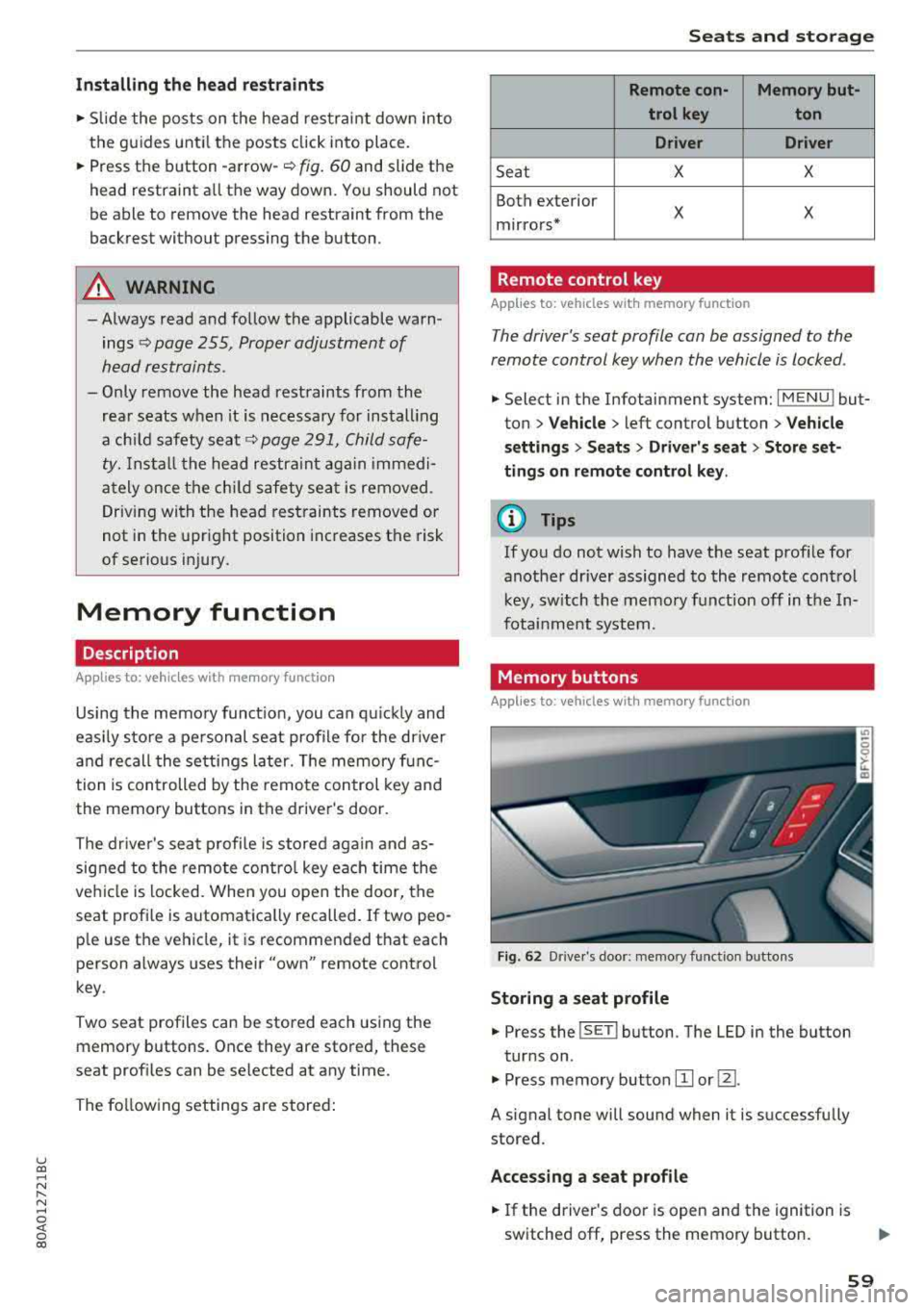
Memory buttons
Applies to: vehicles with memory function
Fig. 62 Drive r's doo r: memory funct io n bu ttons
Storing a seat p rofile
... Press the ISET I button. The LED in the button
tur ns on .
.,. Press memory button IT] or@.
A signal tone will sound when it is successfully
stored.
Acces sing a seat profile
... If the driver's door is open and the ignition is
switched off, press the memory button .
59
Page 71 of 392
u co ..... N r--N ..... 0 <( 0 00
Warm and cold Climate control system
Description
The climate control system warms , cools and re
moves humidity from the air in the vehicle inte ri
or. It is the most effective when the w indows and
sunroof* are closed . If there is a bu ild -up of heat
inside the ve hicle, ventilation can he lp to speed
up the cooling process.
I n all he ating mode f unct ions except for
defrost ,
the blower on ly switches to a higher speed once
the engine coolant has reached a sufficient tem
perature .
Pollutant filter
The pollutant filte r removes pollutants such as
d ust and pollen from the a ir.
Key recognition
The climate control settings are automatically
sto red and assig ned to the remote control key
that is i n use .
Warm and c old
@ For the sake of the environment
If you wo uld like to reduce fue l consumption,
switch the air conditioning off. T his w ill also
r educe em issions.
(D Tips
- To prevent interference with the heating
and cooling output and to prevent the win
dows from fogging over, the a ir intake in
fro nt of the w indshie ld must be free of ice,
snow o r leaves .
- Condensation from the coo ling system can
dr ip and form a pudd le of water under the
veh icle . Th is is norma l and does not mean
t here is a lea k.
- The e nergy management system may tem
pora rily switch off certa in functions, s uch as
the seat heati ng* o r rear window defogger .
Th ese sys tems are av ailable aga in as soon
as t he e nergy supply has been restore d.
69
Page 74 of 392
Warm and cold
SYNC Syn chr oniz ation
Use t he rocker sw itc h® to select the f unct ion.
When synchronization is switched on, the set
tings for the driver's side are applied to the front
passenger's side and the rear (except for seat
heating/venti lation*). When the settings on the
front passenger's side or in the rear are changed,
the synchron izat ion is automatically switched off
and
3 -z one appears in the display .
SET REAR function
Use the rocker switch ® to select the function .
When the function is switched on, you can adjust
all settings for the rear us ing the climate control
system controls in the cockpit . The rear climate
control system controls cannot be operated at
the same time . T his function switches off auto
mat ica lly after a ce rtain per iod of t ime or after
leav ing the menu.
Vents
You can open or close the center and rear vents in
the cockpit and the vents in the rear center con
sole us ing the r idged thumbwhee ls . T he levers
adjust the d irection of the airflow from the vents.
Re sidu al he at
You can activate the residual heat function when
the ignition is switched off by pressing the knob
(!) . The res idual heat from the coolant is used to
heat the vehicle interior. The residual heat func
tion switches off automatically afte r about 15
m inutes.
A WARNING
- Yo u should not use the re circulation mode
for an extended period of time, because no
fres h air is drawn in and the windows can
fog when cooling mode is sw itched off. This
increases the risk of an accident.
- Individuals with reduced sensitivity to pain
or temperature cou ld deve lop burns when
using the seat heating* funct ion. To reduce
the risk of injury, these ind iv iduals should
not use seat heati ng*.
72
@ Note
To avoid damaging the seat heating* ele
ments, do not knee l on the seats or p lace
heavy pressure on one area of the seat.
Setup
The climate control system basic settings ore ac
cessed in the Infotainment system .
.. Select in the Infotainment system : IMENU! but
ton
> Veh icle > left control button > Air condi
t ioning
Auto recirculation
When sw itched on, a utomat ic rec ircu lat ion con
tro ls the recircu lation mode automatically . If the
windows fog up, press
the® MAX button .
Automatic au xiliary heater *
The auxiliary heater he lps to wa rm the vehicle in
te rior more qu ic kl y.
Steering wheel heating
Applies to: vehicles with steering wheel heating
The steering wheel rim con be heated .
.. Press the lg\~ page 14, fig . 11 button on the
mu ltifu nction stee ring wheel to switch the
steer ing whee l heating on and off . The mes
sage
S teering wheel h eating : on /Ste ering
wheel heating: off
appears in the instrument
cluster display.
The tempe ra ture is ma inta ined at a constant lev
el when steering wheel heating is switc hed on .
The steer ing whee l heating sett ings are stored
automat ica lly and assigned to the remote control
k ey tha t is in use .
Page 79 of 392
u co ..... N r--N ..... 0 <( 0 00
@ Note
Avoid high engine speed, full throttle, and heavy engine load if the engine has not
reached operating temperature yet. You could
damage the engine.
@) For the sake of the environment
Do not let the engine run while parked to
warm up. Begin driving immediately. This re duces unnecessary emissions.
(D Tips
- Some noise after starting the engine is nor
mal and is no cause for concern.
- If you leave the vehicle with the ignition
switched on, the ignition will switch off af
ter a certain amount of time. Make sure that electrical equipment such as the exterior
lights are switched off.
Starting the engine
"'Bring the vehicle to a full stop.
"'Press the I START ENGI NE STO PI button
C? page 76, fig. 86.
Emergency off function*
If it is absolutely necessary, the engine can also
be turned off while driving at speeds starting at
4 mph (7 km/h). To switch the engine off, press
the
! START ENGINE STOPI button twice in a row
briefly or press and hold for longer than two sec
onds.
A WARNING
- Never turn off the engine before the vehicle
has come to a complete stop. The full func
tionality of the brake booster and the power steering is not guaranteed. You must use
more force to steer and brake the vehicle.
The fact that you cannot steer and brake as
usual can increase the risk of accidents and
serious injuries.
-If you leave the vehicle, switch the ignition
off and take the vehicle key with you .
If you
do not, the engine could be started and
electrical equipment such as the power win-
Driving
dows could be activated. This can lead to se
rious injuries.
- For safety reasons, always park the vehicle
with the selector lever in the "P" position.
Otherwise, there is the risk that the vehicle
could roll unintentionally.
@ Note
If the engine has been under heavy load for
an extended period of time, heat builds up in
the engine compartment after the engine is
switched off and there is a risk of damaging
the engine . For this reason, let the engine run
at idle for approximately two minutes before
shutting it off.
(D Tips
For up to 10 minutes after stopping the en
gine, the radiator fan may turn on again auto
matically or it may continue to run (even if
the ignition is switched off) for the following
reasons :
- The coolant temperature is increasing due
to
trapped heat.
- If the engine is warm and the engine com
partment also heats up from strong sun
light.
Messages
Engine running. Warning! Turn off ignition be
fore leaving vehicle
This message appears and a warning tone sounds
if you open the driver's door when the engine is
running.
Please press the brake pedal
This message appears if you do not press the brake pedal when starting the engine .
Ill Remote control key: key not detected. Is the
key still in the vehicle?
This indicator light turns on and this message ap
pears if the ignition key was removed from the
vehicle when the engine was running. If the igni
tion key is no longer in the vehicle, you cannot
switch on the ignition or start the engine once
..,.
77
Page 80 of 392
Driving
you stop it. You also cannot lock the vehicle from
the outside.
Shift to P, otherwise vehicle can roll away.
Doors do not lock if gearshift is not in
P
This message appears for safety reasons if the
selecto r lever is in the "N" position when you
switch the ignition off. Move the selector lever to
the "P" posit ion. Otherwise the vehicle is not pro
tected from rolling and it cannot be locked.
I) Remote control key : hold back of key
against the designated area. See owner's man
ual
I f the indicator light turns on and this message
appears, there is a malfunction
c:> page 78.
Shift to P before leaving vehicle, otherwise vehi
cle can roll away
This message appears if the driver's door is
opened while the ignition is switched on and the
transmission has not been shifted to the "P" posi
tion . Sh ift the transm iss ion into the "P" position
and turn off the ignition if you are leav ing the ve
h icle. Otherwise the vehicle could roll. Also see
<=:>page 79.
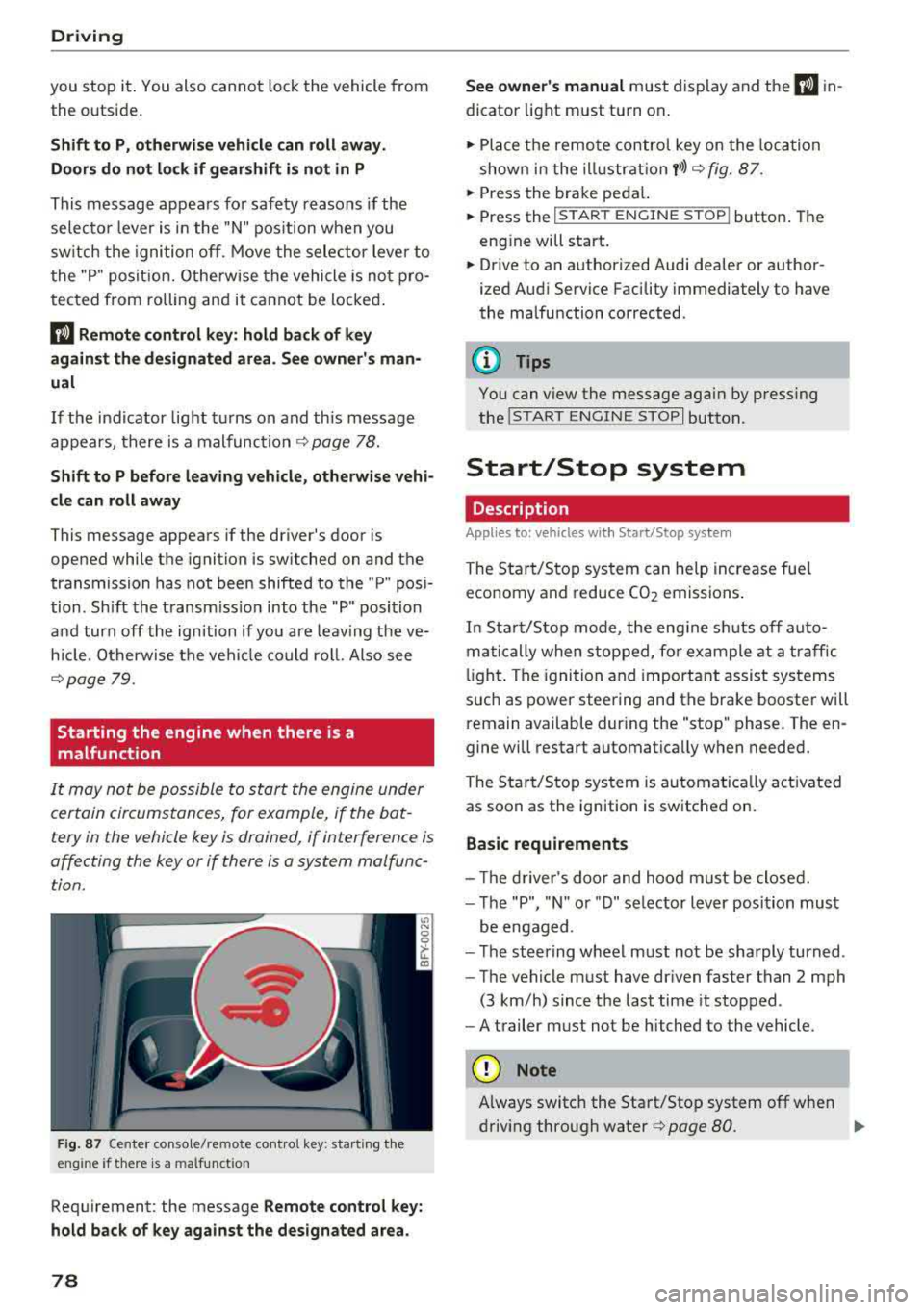
Starting the engine when there is a
malfunction
It may not be possible to start the engine under
certain circumstances, for example, if the bat
tery in the vehicle key is drained, if interference is
affecting the key or if there is a system malfunc tion.
F ig. 87 Center console/remote contro l key : start ing the
eng ine if there is a malfunct ion
Requirement: the message Remote control key:
hold back of key against the designated area.
78
See owner's manual must display and the I) in
dicator light must turn on .
.,. Place the remote control key on the loca tion
shown in the illu strat ion
y >l) c:> fig. 87.
... Press the brake pedal.
... Press the I START ENGINE STOPI button. The
eng ine will start.
... Drive to an authorized Audi dealer or author
ized Aud i Service Facility immediately to have
the malfunction corrected .
(!) Tips
You can view the message aga in by pressing
the lS TART
ENGINE STOP I button.
Start/Stop system
Description
Appl ies to : vehicles wi th Start/Stop sys te m
The Start/Stop system can help increase fue l
economy and reduce CO2 emissions.
In Sta rt/S top mode, the engine sh uts off auto
matically when stopped, for example at a traffic
li ght . The ignition and important assist systems
such as power steering and the brake booster will
remain available dur ing the "stop" phase. The en
gine will restart automatically when needed.
The Start/Stop system is automat ica lly act ivated
as soon as the ignition is switched on.
Basic requirements
- Th e driver's door and hood must be closed.
- The "P", "N " or "D" selector lever position must
be engaged .
- The steering wheel must not be sharply turned .
- The vehicle must have dr iven faster than
2 mph
(3 km/h) since the last time it stopped.
- A trailer must not be hitched to the vehicle.
(D Note
Always switch the Start/Stop system off when
driving through water
r=;, page 80.
Page 110 of 392

Assistance systems
The distances provided are specified values . De
pending on the driving situation and how the ve
h icle ahead is dr iv ing, the actual d istance may be
more or less than these target d istances.
If you change the time gaps, the newly set value
appears briefly in the instrument cluster disp lay,
for example
II for Distance 3. This only occurs if
the
D rive r assistance display is not currently
shown in the display
r=>page 104, fig. 104.
Distance 1: this setting corresponds to a distance
of 92 ft (28 m) when traveling at 62 mph (100 km/h), or a time d istance of 1 second.
Distance 2 : this setting corresponds to a distance
of 118 ft (36 m) when traveling at 62 mph (100
km/h), or a time d istance of 1.3 seconds .
Distance 3: this setting corresponds to a distance
of 164 ft (SO m) when traveling at 62 mph (100
km/h), or a time distance of 1.8 seconds .
Distance 4: this setting corresponds to a distance
of 219 ft (67 m) when traveling at 62 mph (100
km/h), or a time dista nce o f 2.4 seconds .
Distance 5 : this setting corresponds to a distance
of 328 ft (100 m) when traveling at 62 mph (100
km/h), or a time distance of 3.6 seco nds.
A WARNING
When setting the distance, the driver is re
sponsible for adhering to any applicab le lega l
regulations.
(D Tips
Depending on the selected driving mode in
drive se lect* and the set distance, the driving
behavior will vary from dynamic to comforta
ble when accelerating
9 page 12 7.
Setting Audi adaptive cruise control
Applies to: vehicles with Audi adaptive cruise control
-
.. Select in the Infotainment system: I MENU I but
ton
> Vehicle > left control button > Driver as
sistance
> Audi adaptive cruise control.
1) In prepa ra tio n at the t ime of print ing. T his funct ion is not
ava ilable in every vehicle .
108 Storing the last distance
1
)
The last distance that was set will be stored after
the ignition is switched off. If the distance is not
stored,
Distance 3 is a utomatica lly set eve ry time
the ignit ion is switched on.
Driving program
Applies to: vehicles without Audi drive select
Depending on the selected driving program and
distance, driving behavior when accelerating will
vary from dynamic to comfortable.
Selecting the driving mode
Applies to: vehicles with Audi drive select
For vehicles with drive select, refer to
r=>page 127.
(0 Tips
Your settings are automatically stored and as
signed to the remote control key being used.
Driver intervention request
Applies to: vehicles with Audi adaptive cruise control
Fig. 109 Instr umen t cluster: request for driver interve n
t ion
The request for driver intervention instructs you
to take over if the adaptive cruise control braking
funct ion is not able to maintain a suffic ient dis
tance to the veh icle dr iv in g ahead
r=> fig . 109 .
Page 122 of 392
Ass is tance sy stem s
Stee ring time
Earl y: in th is sett ing, the correct ive steering hap
pens continuously to help keep the vehicle in the
center of the lane.
La te : in this setting, the system provides correc
tive steering just before a w heel goes over a de
tected lane marker line .
Vibration warning
You can switch the additional vibration warning
i n the stee ring wheel on or off .
,&. WARNING
-
With the vibration warning switched off,
t here will also be no visual warn ing in the in
strument cluster display when crossing a lane
marker line.
© Tips
I n certain mar kets: you r settings are stored
automatically and ass igned to the remote
control key in use .
Audi side assist
Description
App lies to: ve hicles w it h Aud i side ass ist
F ig . 11 8 Sensor detect ion ra n ge
120
Fig. 119 D isp lay on the exterior mirror
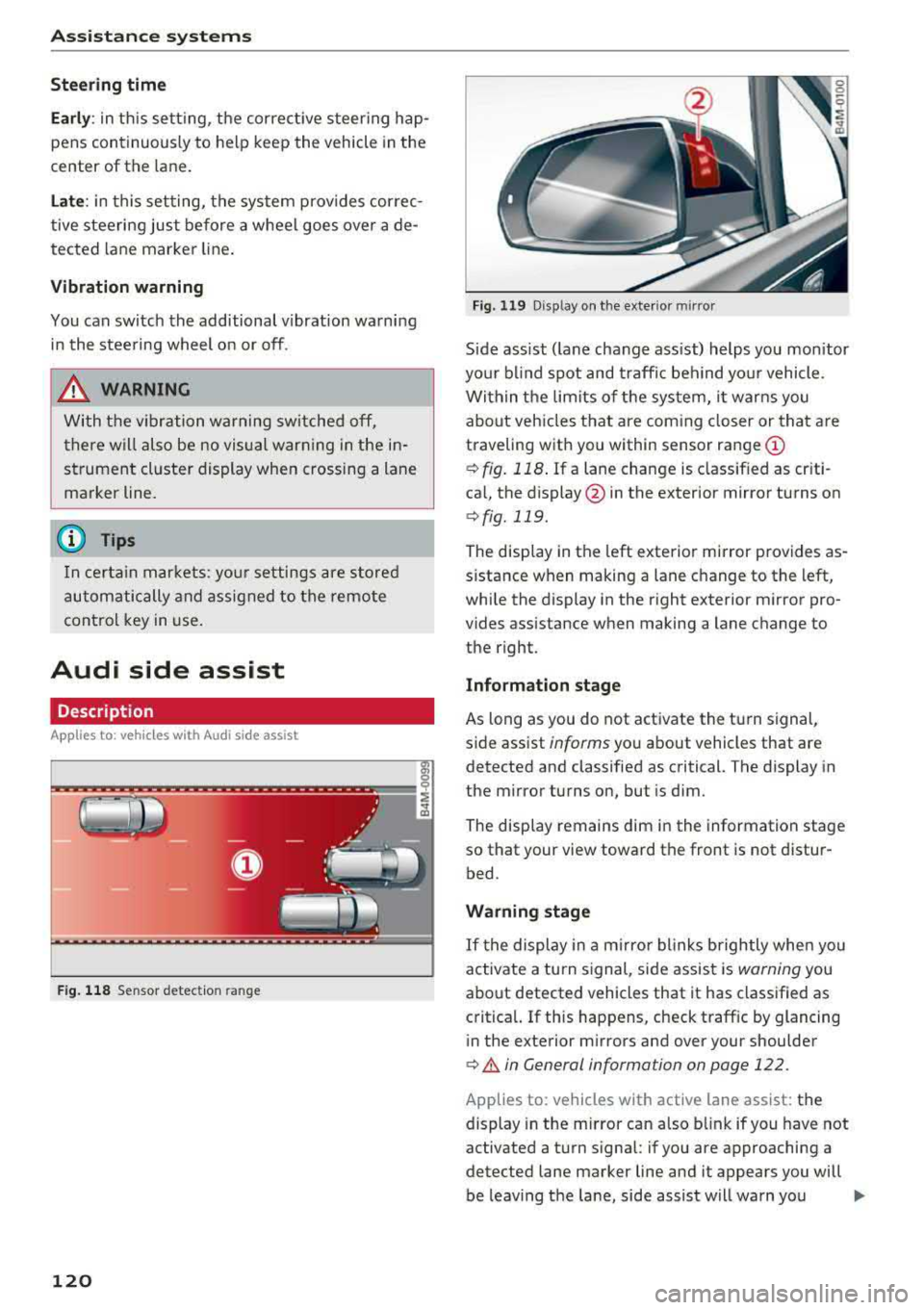
S ide ass ist ( lane change ass ist) helps you mon itor
you r bl ind spot and traff ic beh ind yo ur vehicle.
Within the limits of the system, it warns you about vehicles that are coming closer or that are
traveling with you within sensor range
(D
¢ fig. 118 . If a lane change is class ified as cr iti
ca l, the display @in the exterior mirror turns on
¢fig. 119.
The display in the left exterior mirror provides as
sistance when making a lane c hange to the left,
while the display in the r ight exterior m irror pro
vides assistance when making a lane change to
the right.
Information stage
As long as you do not activate the turn signal,
s ide assist
informs yo u about vehicles that are
detected and classified as critical. The display in
the mirror turns on, but is dim .
The disp lay remains dim in the information stage
so that your view toward the front is not distur
bed.
Warning stage
If t he display in a m irro r blinks brightly whe n you
activate a turn s ignal, side assist is
warning you
about detected vehicles that it has classified as
critica l. If this happens, check traff ic by glancing
in the exterior m irrors and over your shoulder
¢ A in General information on page 122 .
Applies to: vehicles with active lane assist: the
display in the m irror can also b link if you have not
activated a turn signal : if you are approaching a
detected lane marker line and it appears you will
be leaving the lane, side assist will warn you
..,.