transmission AUDI Q5 2018 User Guide
[x] Cancel search | Manufacturer: AUDI, Model Year: 2018, Model line: Q5, Model: AUDI Q5 2018Pages: 392, PDF Size: 60.56 MB
Page 88 of 392
Drivin g
from rolling in t he "N " selector lever position, so
you need to set the pa rking
brake<®> ¢ page 80.
You must use the parking lock emergency release
before towing the
vehicle ¢ page 90.
R-Reverse
The reverse gear is engaged in this pos ition . Only
select reverse gear when the veh icle is stationary
and the eng ine is running at idle
speed ¢.& . To
engage the "R" se lecto r lever posit ion, p ress the
brake pedal , press the lock ing button
CD on the
selector lever, and select the "R " position
¢ fig . 90.
A confirmation tone w ill sound when the reve rse
gear is engaged .
N
· N eutral (idle )
The transm ission is in idle in this pos ition . To en
gage the "N" selector lever position, press the loc king button
CD on the se lector lever and sh ift
into t he "N " posit io n
¢ fig. 90.
If you sw itch the engine off when the "N" selector
lever position is se lected, the transmission re
mains in "N " for app rox imately 30 minutes and
t hen "P " is engaged.
You cannot select the "N " pos ition when the ign i
tion is sw itched off. When d riving through an au
tomatic ca r wash, first select the "N " posi tion and
t hen t urn the engine off.
For safety reasons, the vehicle cannot be locked
when the transm ission is in the "N" pos ition .
DIS· Dr iving forward
When the transmission is in the "D/S" pos it ion, it
can be operated e ither in the normal "D " mode or
in the "S" sport mode . Move the selector lever
back to engage the "S" spo rt mode . You can o nly
select the "S" se lector lever position when the "D"
or " E" pos it io n is selected. To sele ct the "D" or " E"
position again w hen "S " is engaged, move these
lecto r leve r
back ¢.& . To shi ft from "N" to "D"
when traveling at speeds below 1 mph (2 km/h), pr ess th e brak e pedal and s hift into the "D" posi
tion ¢_& .
In t he normal mode "D" , the transmission a uto
matica lly selects the suitab le gear ratio . It de -
86
pends on engine load , vehicle speed and driving
sty le.
Se lect t he sport mod e "S " for sporty dr iv ing. The
vehicle makes f ull use of the eng ine's power.
S hi ft ing may become noticeable when accelerat
ing .
The "S" se lector lever posi tion engages automati
c all y w hen you select the dynam ic* mode in drive
select.
A WARNING
Read and fo llow all WARNINGS .
- The vehi cle can roll even i f the ig nit ion is
switched off .
- P owe r is s till tra nsmi tted to t he wheels
when t he engine is running at idle . To pre
vent the vehicle from "creeping", yo u must
keep your foot on the b rake in a ll selector
lever positions (except "P " and "N") when
the engine is ru nning.
- Before open ing the hood, select the "P " se
lector lever pos it ion and set the parking
brake. This reduces the risk of an acc ident .
Always read and follow the app licab le warn
ings ¢ page 314, Working in the engine
compartment.
(D Tips
If you accide nta lly select "N" while dr iv ing,
take your foot off the accelerator pedal and
wait fo r the e ng ine to slow down to idle be
fo re selecti ng "D " or "S" .
Driving tips
Starting the engine
.,. The "P" or "N " pos it io n m ust be selected.
St arting from a stop
.,. Press and hold the brake peda l.
.,. Start the engine ¢ page 76.
.,. Press the locking button CD on the selector lev
er a nd se lect the "D", "E", "S " or "R " pos it io n
¢ page 85.
.,. Wa it a mome nt until the t ransmiss ion sh ifts.
You will notice a slig ht movement when the
gear engages .
Page 89 of 392
u co ..... N r--N ..... 0 <( 0 00
~ Release the brake pedal and press the acce lera-
tor pedal
~ ,&. .
Various conven ien ce fun ctions are ava ilable for
s tarting on hills
~page 82.
Stopping temporarily
~ Press the brake pedal to stop the vehicle, for
example at a t raff ic light . Do not press the ac
ce le rato r peda l w hen do ing th is.
~ T o p revent the vehicle from rolling when yo u
sta rt d riving, se t the pa rk ing brake when stop
ping on steep
hi lls¢ ,&..
~ The parking bra ke wi ll re lease automatically
and yo ur vehicle will begin to move when the
doors a re closed, the driver's safety belt is fas
tened, and you accelerate as usual.
Stopping /parking
If the se lector lever is not in the "P" position
when yo u ope n the driver's door, the ve hicle
could rol l.
~ Press and hold the b rake pedal ¢,&. .
~ Set the parking brake.
~ To se lect the "P" selector leve r position, press
the "P" button
@ on the selector lever
¢page 85, fig. 90.
Under certain conditions, such as driving in the
mo unta ins or when towing a trailer, it may be
he lpful to switch to manual mode temporarily
and sh ift
manually to adapt to the driving condi
tions
¢ page 88.
On hills, set the parking brake first and then s hift
into the "P" position
¢ page 80. This prevents too
much stress from being placed on the locking
mechanism .
A WARNING
- The veh icle can roll even when the engine is
switched off .
- Unintended veh icle movement can lead to
serious injur ies .
- To reduce the risk of an accident, do not
press the acce lera to r pedal when changing
the se lector lever posi tion while the vehi cle
is sta tionary an d the engine is running.
Driving
- To reduce the r is k of an accident, neve r se
lect the "R" or "P" pos itions wh ile d riving.
- Do not inadvertently press the accelerator
pedal when the vehicle is stationa ry. Other
wise the r is k of an accident increases be
cause the vehicle will start to move immedi
ately, even if the parking brake is set .
Hill descent control
The hill descent control system assists the driver
when driving down hills.
Hi ll d escent cont rol activates when the t ransmis
s ion is in the "D" or "S" pos ition and you press the
brake pedal. The transmission automatica lly se
lects a gear that is s uitable for the hill. Hill de
scent cont rol tr ies to maintain the speed ach
ieved a t the t ime of b raking, w it hi n physical a nd
tec hnical lim itations . If may still be necessary to
adjus t the speed w it h t he bra ke pedal.
Hill descent con trol switches off once the hill lev
els out or you press the accelerator pedal.
When operat ing the cru ise cont rol system*
¢ page 95, hill descent contro l is a lso activated
whe n the speed is set .
A WARNING
-
Hill descent cont rol cannot ove rcome physical
li mitat ions, so it may not be able to ma intain
a consta nt s pee d un der all conditions. A lways
b e ready to app ly the bra kes.
87
Page 90 of 392
Driving
Shifting manually (tiptronic mode)
The tiptronic mode allows the driver to shift the
gears manually.
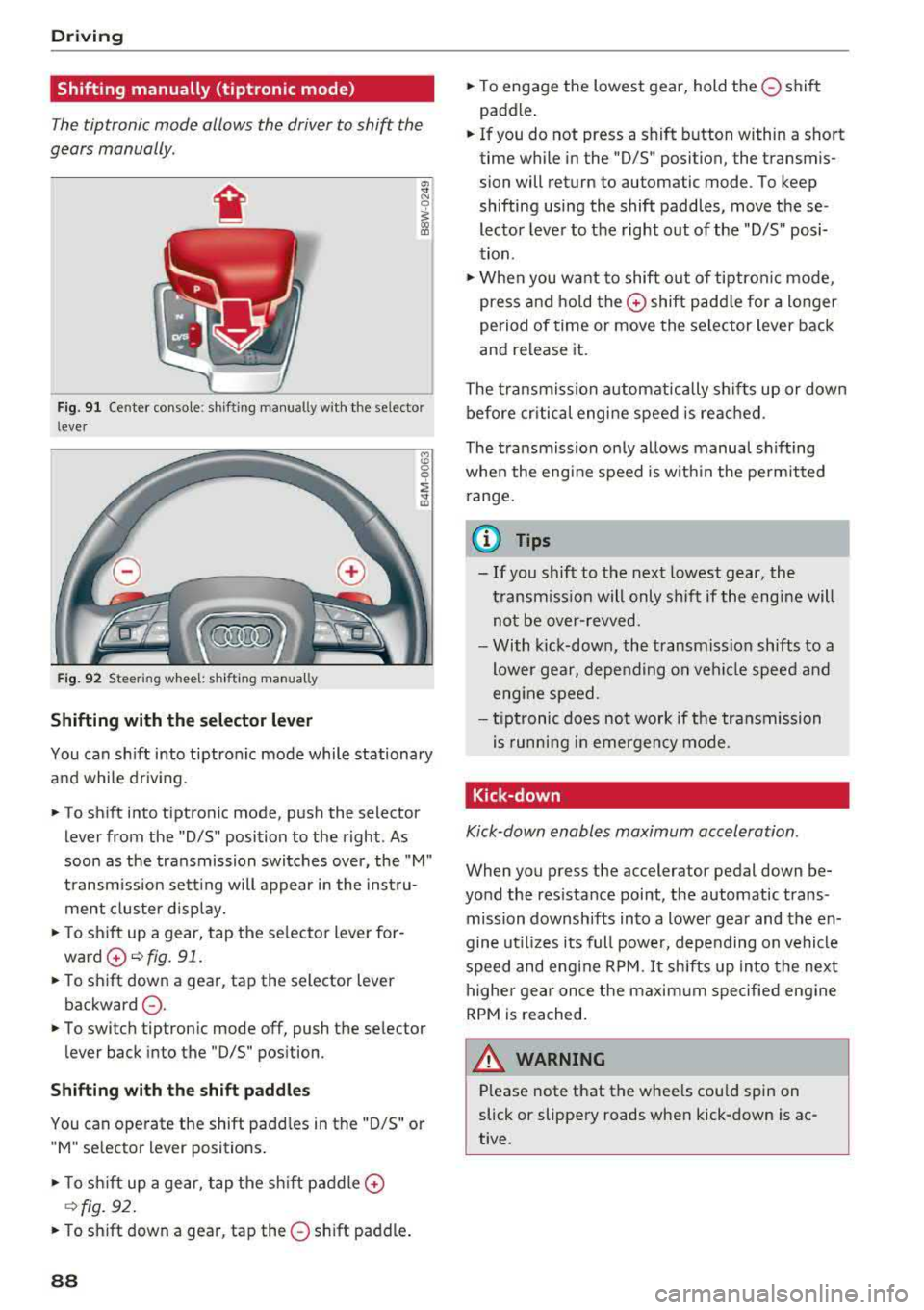
F ig. 9 1 Center co nsole : shifti ng manually w ith the se lector
l ever
Fi g. 9 2 Steer ing w heel: shifting manually
Shifting with the selector lever
You can sh ift into tiptronic mode while stationary
and while driv ing.
" To sh ift into tiptronic mode, push the selector
lever from the "D/S" position to the right . As
soon as the transmission switches over, the "M"
t ransm ission sett ing will appear in the inst ru
ment cluster d isp lay.
"T o shift up a gear, tap the se lector lever for
ward 0 ¢ ffg. 91 .
.. To sh ift down a gear, tap the selector lever
backward
0 -
.. To switch tiptronic mode off, push the selector
lever back into the "D/S " pos ition.
Shifting with the shift paddle s
You can operate the shift padd les in the "D/S" or
"M" se lector lever positions .
"To shi ft up a gear, tap the sh ift paddle 0
9 fig. 92 .
.. To sh ift down a gear, tap the 0 sh ift padd le .
88
.. To engage the lowest gear, hold the 0 shift
paddle .
.. If you do not press a shift b utton within a sho rt
time while in the "D/S " position , the transmis
sion will return to automatic mode . To keep
shifting using the shift paddles, move these
lector leve r to the right out of the "D/S" posi
tion .
"When you want to shift out of tiptronic mode,
press and ho ld the
0 shift padd le for a longer
period of time or move the se lector lever back
and release it.
The transmission a utomatica lly shifts up or dow n
before cr itical engi ne speed is reac hed.
The transmission on ly allows manual shifting
whe n the eng ine speed is w ith in the perm itted
r ange.
(D Tips
- If you shift to the next lowest gear, the
t ransmission will only s hift if the engi ne will
not be over-revved.
- With k ick-down, the t ransmiss ion shifts to a
lower gear, depen ding on vehi cle spee d and
eng ine speed.
- ti ptr onic does not work if the transmission
is runni ng in emergency mode .
Kick-down
Kick-down enables maximum acceleration .
When you press the accelerator pedal down be
yond the res istance point, t he automatic trans
mission downshifts into a lower gear and the en
gine ut il izes its full power, depending on vehicle
speed and engine RPM. It shifts up in to the next
highe r gear once the maximum specified engine
RPM is reached .
A WARNING
P lease note that the whee ls cou ld spin on
slick or slippery roads when kick-down is ac
tive.
Page 91 of 392
u co ..... N ,..._
N ..... 0 <( 0 00
Launch control program
App lies to: ve hicles with S tro nic tra nsm issio n
The launch control program provides the best
possible acceleration when starting from a stop.
Requirement: the eng ine must be at operating
temperature and the steer ing whee l must not be
turned .
~ Deactivate the Start/Stop system* c:> page 80.
The LED in the 10~ ·1 button turns on.
~ With the engine runn ing, press the ~
l fl - O~FF =I but
ton briefly
c> page 141 . The Ill indicator light
tu rns o n and the message
Stabil ization control
( ESC ): offroad . Warning! Reduc ed stabilit y
ap
pears in the inst rumen t cluste r display.
~ Pull the selector lever back o ut of t he "D/S" po
s it ion briefly to select the "S " position or se lect
the
D ynamic driving mode in drive se -
lect* ¢ page 12 7.
~ Press the brake pedal firmly with your left foot
and hold it all the way down for at least one
second.
~ At the same t ime, press the gas pedal all the
way dow n with your right foot unt il the engi ne
reaches and stays at a h igh RPM level.
~ Remove yo ur foot from t he b rake pedal within
five seconds
c:> ,&. .
A WARNING
-Always adapt yo ur driving to the traffic flow.
- O nly use the La unch contro l prog ram when
road and traffic conditions allow it and ot h
er drivers wi ll not be endangered or both
ered by your driving and the vehicle's accel
eration.
- Please note that the drive whee ls can spin
and the vehicle can break away when off
road mode is switched on, espec ia lly when
the road is slippery.
- Once the vehicle has started moving, press the
I~ OF F! button briefly to turn the offroad
mode off .
(D Tips
-The transmiss ion temperature may increase
s ignificantly after using the launc h control
program. If that happens, the program may
Driving
not be ava ilab le for a few minutes. It will be
avai lab le agai n after a coo l-down period.
- Whe n accelerati ng usi ng the launch cont ro l
program, all vehicle parts are s ubject to
heavy loads. This can lead to increased
wear.
Transmission malfunction
• Tran smiss ion: too hot. Please stop vehicle
Do not continue driving. Se lect the "P" selector
l ever posit ion and contact an authorized A udi
dealer or authorized Audi Service Fac ility for as
s istance.
• Tran smiss ion: malfunction! Plea se stop ve
hicle and shift to P
Do not continue dr iv ing . Se lect t he "P" selec to r
l ever posit ion and contact an authori zed A udi
dealer or authorized Audi Service Facility for as
s istance.
[O] Selector lever : malfunction ! You can con tin
ue d riving. Please contact Se rvice
The re is a system malfu nction in t he transmis
s io n. Dr ive to an a uth orized Aud i de aler o r au
tho rized Aud i Serv ice Facili ty immedia tely to have
the mal function corrected.
[i'J P button : malfun ction! Auto P when engine
off . Pl ea se conta ct Servi ce
T here is a malfunct ion in the "P" button on the
selector lever . The transm ission automatically
engages "P " when you sw itch off t he engine.
D rive to an author ized A udi dealer or autho riz ed
Audi Se rvice Faci lity immed iate ly to have the
malfunction corrected.
[i'J Select or lever : malfun ction! Gear change on
l y pos sibl e using both paddl e le ver s. Plea se con
ta ct Service
T here is a system malfunction in the transmis
s io n. You can con tinue dr iv ing with restr icted
funct ion. The se lector lever is not wo rk ing . Gea rs
can on ly be selected by tapping bo th shift pad
dles at the same time when the vehicle is station
ary
c> page 88 , fig . 92 . Pay attention to these-
l ected transmission position in the instrument
.,.
89
Page 92 of 392
Driving
cluster display. The parking lock engages auto
matica lly when you turn off the engine. Drive to
an author ized Audi dealer or authorized Audi
Serv ice Facility immediately to have the malfunc
tion corrected .
[O] Transmission : Please p ress brake pedal and
select gear ag ain
Press the bra ke pedal and se lect the des ired se
lector lever position again. You can then continue
driving.
[il Tran smi ssion: too h ot. Please adapt driving
s tyle
The transm ission tempe rature has increased s ig
n ificant ly. Dr ive ve ry ca utiously or take a b reak
from dr iv ing unt il the tempera ture returns to the
normal range and the ind icator light turns off .
[O] Transmis sion : malfunction ! You can contin
ue driving . See owner' s manual
There is a system malfunct ion in the transm is
sion . You may continue dr iv ing . Drive to an au
thor ized A udi dealer or authorized Audi Service
F acility soon to have the malfunction co rrected.
[il T ransmission : malfunct ion! You can contin
ue dri ving in D until engine is off
There is a system malfunct ion in the transmis
sion . The transmission is switching to emergency
mode . If you tur n the engine off, you will not be
able to select any other selector lever pos it ions
after start ing the eng ine again . Drive to a n au
thor ized Audi dealer or author ized A udi Service
F a cility immediately to have the malfunc tion cor
rected.
[O] Tran smis sion: malfunction! You can contin
ue driving with limited function . Pl ea se conta ct
Service
There is a system malfunct ion i n the transm is
sion . The transmission is switching to emergency
mode. This mode only shifts into certa in gea rs o r
w ill no longer shift at all. The engine may stall.
Dr ive to an a utho rized Aud i dea ler or a uthorized
Audi Serv ice Facility immediately to have the
malfunction corrected .
90
[il Transmis sion: malfunction! You can contin
ue dri ving with limited fun ction. No reve rse
gear
There is a system malfunction in the tra nsmis
s ion . The transmission is switch ing to emergency
mode. This mode only s hifts into certain gears or
will no longer shift at a ll. The eng ine may sta ll.
You cannot engage the reverse gear. Drive to an
authori zed Audi dealer or authori zed Audi Service
Facility immediately to have the ma lfunction cor
rected .
[il Danger of rolling away! P not poss ible.
Plea se apply park ing bra ke
- The parking lock was re leased using the emer
gency re lease
c::> page 90 . Or
- The parking lock can no longer be engaged .
Dr ive to an authorized Audi dealer or author
ized Aud i Service Facility immed iately to have
the malfunction corrected.
[il Mo ve selector le ver to automatic position
There is a ma lf u nction in the tiptron ic mode. End
tiptroni c mode by pus hing the se lec tor lever to
the left into the "D/S " position .
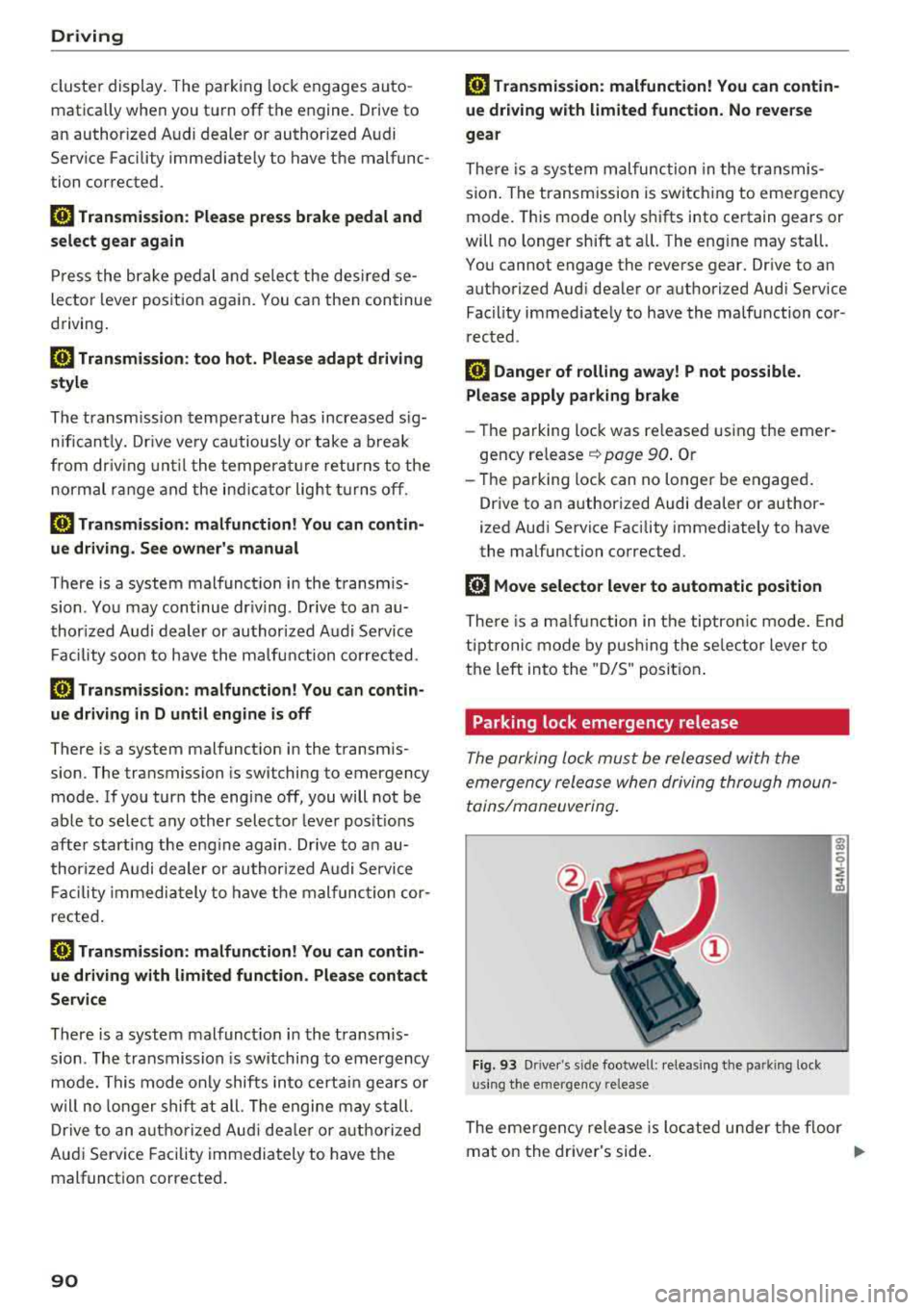
Parking lock emergency release
The parking lock must be released with the
emergency release when driving through moun
tains/maneuvering .
Fig. 93 Drive r's s ide footwell : relea sin g the parkin g lock
us ing the e mergency release
The emergen cy release is located under the f loor
mat on the dr iver's side .
.,.
Page 128 of 392
Assistance systems
Engine and automatic transmission
Depending on the mode , the engine and auto
matic transmission respond more quickly or in a
more balanced manner to accelerator peda l
movements. In the sporty
Dynamic mode, the
transmission shifts at higher speed ranges.
Air suspension*
The air suspension* is an electronically-control
led air suspension and damping system. The
ad
justment depends on the driving mode selected,
steering movements, the driver's braking and
ac
celeration, and as the road surface, vehicle speed
and load. The veh icle ground clearance depends
on the mode selected and the speed .
The ground clearance increases significantly
when the vehicle is in the
Allroad mode . At
speeds from approximate ly SO mph (80 km/h) to
75 mph (120 km/h), the ground clearance
re
duces in stages . When the speed decreases, the
ground clearance increases aga in automat ically .
The ground clearance is the lowest in
Dynamic
mode.
Suspension control*
The suspension control* uses sensors to record
information regard ing steering movements,
braking and acceleration operations by the driv
er, road surface, dr iv in g speed, and load. This
makes it possible to adapt damping to the driv
ing situation near ly in rea l time. With drive
se
lect, you can adjust the suspension contro l to be
sporty
( Dynamic ), comfortab le (C omfort ) or bal
anced
(A uto ).
Steering
The power steering adapts. Ind irect steer ing that
moves easi ly as in
Comfort mode is especia lly
suited to long drives on highways. The
Dynamic
mode provides sporty, direct steering.
The following applies to vehicles with dynamic
steering* : the steering ratio changes based on
vehicle speed in order to maintain optimum
steering effort for the driver at all times . This
sets the steering to be less sensitive at higher
speeds in order to prov ide improved vehicle con
trol. At reduced speeds, steering is more direct in
126
order to keep the steering effort as minima l as
possible when the driver is maneuvering the ve hi
cle. At low and average speeds, dynamic steer
i ng* addit iona lly prov ides more respons ive steer
i ng performance.
Sport differential*
As a component of the all whee l drive system
(quattro)
r=!> page 144, the sport differentia l dis
tributes the driving power to the rear axle
de
pending on the s ituation. The distr ibut ion of
power varies depending on the selected mode
from moderate
(C omfort ) to sporty (Dynamic ).
The goal is a high level of ag ility and ability to ac
celer ate on curves. The vehicle is very respons ive
to stee ring.
Adaptive cruise control (ACC)*
The behavior whe n accelerating can be adjusted
from comfortable to sporty, depending on the drive select mode . Adaptive cruise control also
r esponds to the driv in g behavior of the vehicle
ahead in a more conservative or sporty manner.
Engine sound*
The engine sound adapts to the current mode
and can be subtle to sporty .
@ Note
Applies to: vehicles with a ir suspension
- Make sure there is enough clearance above
and below the vehicle when pa rking. Th e
height of the vehicle (ground clearance) can
change once it is parked due to temperature
fluctuations, changes to the load conditions
and changes to the driving modes.
- When transporting the vehicle on a car
car
rier, train, ship or by other means, only tie
the vehicle down at the running sur face of
the tires, which is the outer c ircumference.
Securing the vehicle at the axle compo
nents, suspension struts or tow ing eyes is
not perm itted because the pressure in the
air suspens ion struts can change during
transport. The vehicle may not be secured
sufficiently if this happens .
Page 129 of 392
u co ..... N r--N ..... 0 <( 0 00
(D Tips
The "S" selector lever position automatically
engages when the
Dynamic mode is se lected .
Selecting the driving mode
Applies to: ve hicles with Audi drive select
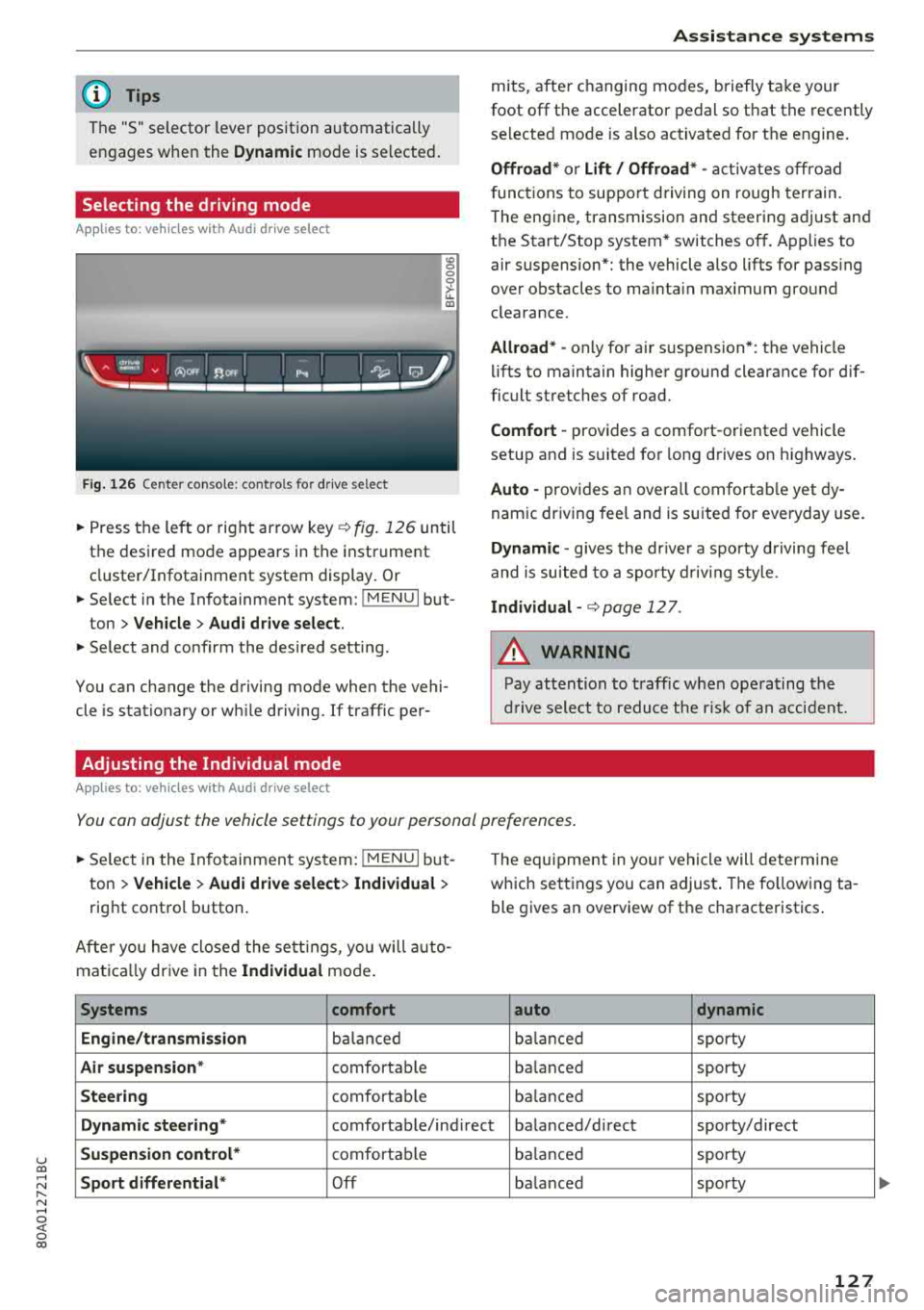
Fig. 126 Center conso le: controls for drive select
0 >'-LL ID
~ Press the left o r right arrow key¢ fig. 126 until
the desired mode appears in the instrument
cluster/Infotainment system display . Or
~ Se lect in the Infotainment system: !MENUI but-
ton
> Vehicle > Audi drive select.
~ Select and confirm the desired setting.
You can change the driving mode when the vehi
cle is stationary or wh ile driving. If traffic per-
Adjusting the Individual mode
Applies to: ve hicles with Audi drive select
Assistance systems
mits, after changing modes, briefly take your
foot
off the accelerator pedal so that the recently
selected mode is also activated for the engine.
Offroad* or Lift/ Offroad* -activates off road
f unct ions to support driving on rough terrain.
T he engine, transmission and steering adjust and
the Start/Stop system* switches
off. Applies to
air suspension*: the vehicle also lifts for pass ing
over obstacles to mainta in maximum ground
clearance.
Allroad * -only for ai r suspension *: the vehicle
lifts to maintain higher ground clearance for dif
ficult stretches of road.
Comfort -provides a comfort -oriented vehicle
setup and is suited fo r long d rives on h ighways .
Auto -provides an overall comfortable yet dy
namic driving feel and is suited for everyday use.
Dynamic -gives the drive r a sporty driving feel
and is suited to a sporty driving style .
Individual -¢ page 12 7.
A WARNING
-
Pay attention to traffic when operating the
drive select to reduce the risk of an accident.
You can adjust the vehicle settings to your personal preferences .
~ Select in the Infotainment system: !MENUI but
ton
> Vehicle > Audi drive select> Individual >
right contro l button.
Afte r you have closed the settings, you will auto
mat ica lly dr ive in the
Individual mode.
Systems comfort
Engine/transmission
balanced
Air suspension * comfortable
Steering comfortable Th
e equipment in yo ur vehicle will determine
which settings you can adjust . The fo llowing ta
ble gives an overview of the characteristics .
auto dynamic
balanced
sporty
ba lanced sporty
balanced sporty
Dynamic
steering* comfortable/ind irect ba lanced/direct sporty/direct
Suspension control* comfortab le balanced sporty
Sport differential* Off balanced sporty
127
...
Page 154 of 392
Multi Media Interface
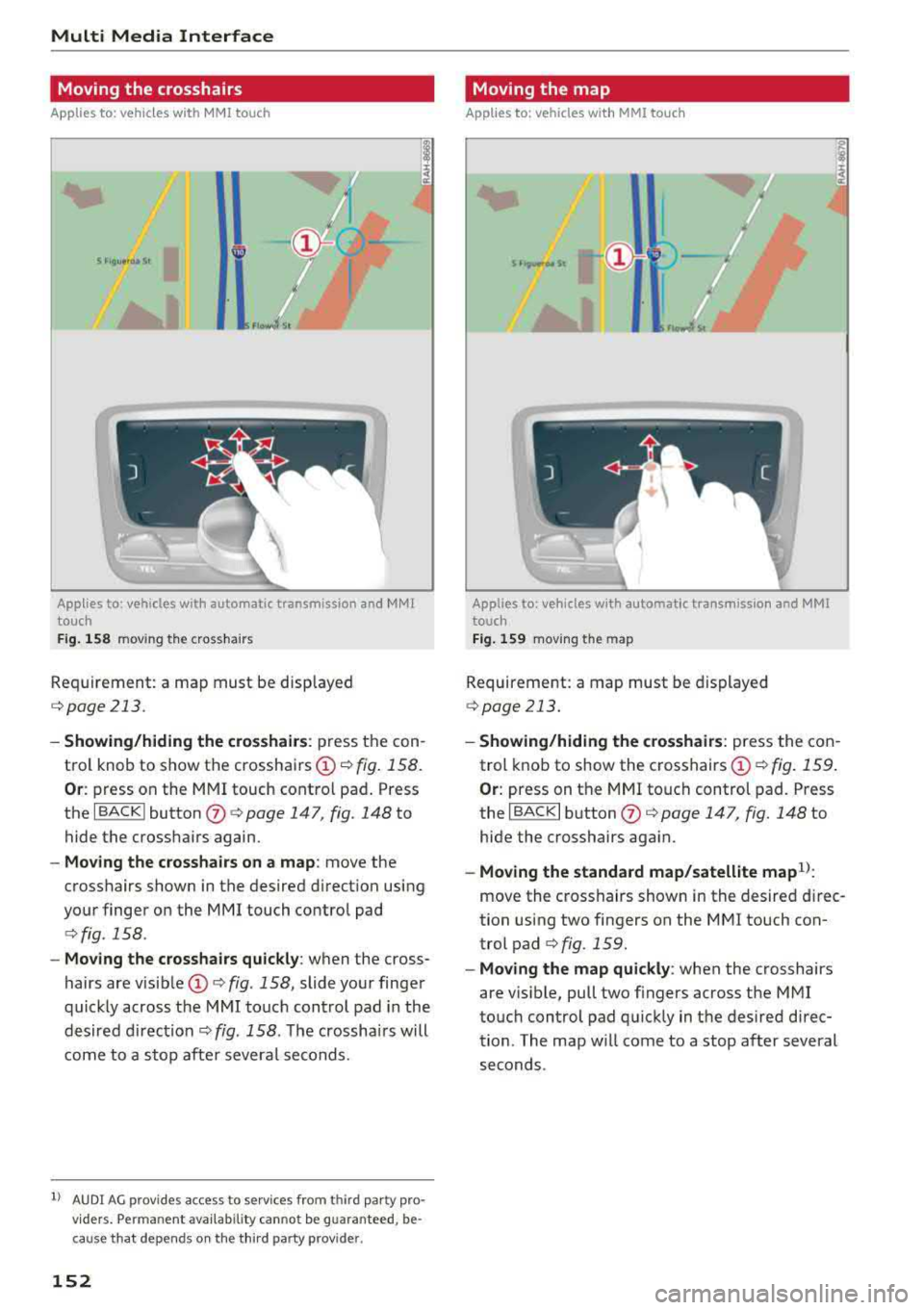
Moving the crosshairs
Applies to: vehicles with MMI touch
s nou•••• St I
l ..
Applies to: vehicles with automatic transmission and MMI
touch
Fig. 158 m ov ing the cross ha irs
Req uirement: a map must be d isp layed
<=> page 213.
- Showing/hiding the crosshairs : press t he con
tro l knob to show t he crossha irs @ <=>
fig. 158.
Or : press on the MM I touch cont ro l pa d. Press
the I B A CK I button
(J) <=> page 147 , fig. 148 to
hide the crosshairs again.
- Moving the crosshairs on a map : move the
c rosshairs shown in the desired d irect ion using
your finger on the
MMI touch contro l pad
<=> fig . 158 .
-Moving the crosshairs quickly : when the cross
hairs are
vis ib le @ <=> fig. 158, slide yo ur finge r
quic kly across the
MM I touch con trol pad in the
desired d irec tion
<=> fig . 158 . The crossha irs will
come to a stop af te r severa l seco nds.
l) AU DI A G provi des access to se rvice s fr om third party pro
v ider s. Perman ent av aila bili ty c ann ot be guaran teed , be
c a use that depen ds on th e thir d party prov ide r.
152
Moving the map
Applies to: vehicles with MMI touch
mt ··)-
1
Applies to: ve hicles w ith automatic transmission and MM[
touch
Fig. 159 moving t he m ap
Requirement: a map must be di splayed
<=>page 213.
- Showing/hiding the crosshairs: press the c on
trol knob to show the c rosshairs
(!) c> fig . 159 .
Or: press on t he MM I touch control pad. P ress
the I B ACK I b utton
(J) <=> page 147, fig. 148 to
hi de the crosshairs aga in.
- Moving the standa rd map/satellite map1l:
move the c ross hairs show n in the desire d direc
tion using two fingers on the
M MI touch con
trol
pad <=> fig. 159.
-Moving the map quickly : when the c rosshairs
are v is ible, pull two f ingers across the
M MI
to uch control pad q uick ly in t he des ired d irec
tion . The map w ill come to a stop after several
seconds .
Page 155 of 392
u co ..... N r-N .....
~ 0 co
Zooming in/out on the map
Applies to: vehicles with automatic transmission and MMI
touch
Fig. 16 0 zooming in/out on the map
Requirement: a map must be disp layed
¢page 213.
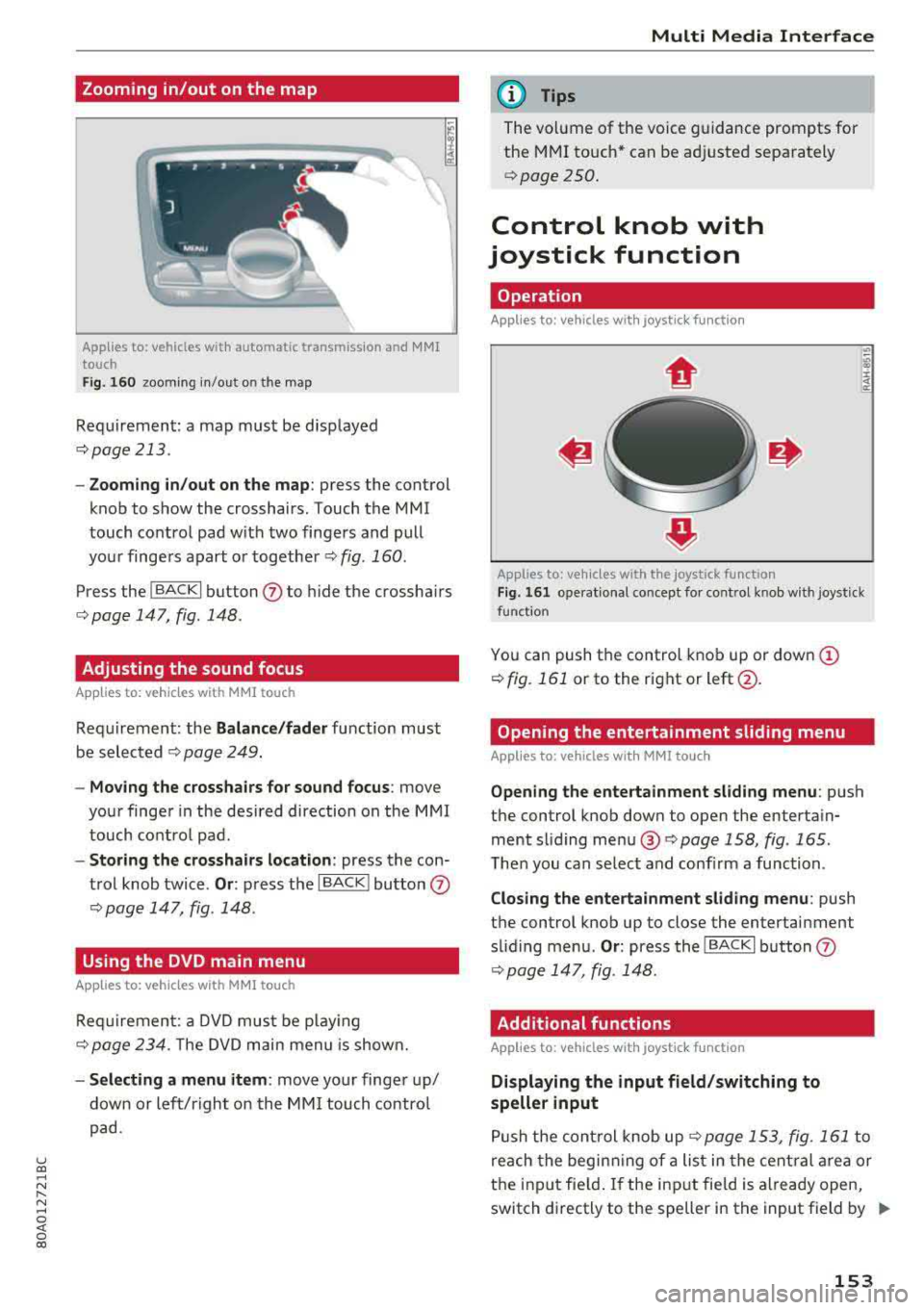
- Zooming in/out on the map : press the control
knob to show the crosshairs. Touch the MMI
touch contro l pad w it h two finge rs and pull
your finge rs apart o r
together¢ fig. 160.
Press the !BACKI button (J) to hide the crossha irs
¢ page 147 , fig. 148.
Adjusting the sound focus
App lies to: veh icles with MMI touch
Requirement: the Balance/fader fu nction must
b e selected
¢ pag e 24 9.
- Mo ving the crosshairs for sound focus : move
your finge r in the desired direction on the M MI
touch co ntro l pad.
- Storing the crosshairs location : press the con
trol knob twice.
Or : press the I BACK ! button (J)
¢ page 147, fig. 148.
Using the DVD main menu
Applies to: vehicles with MMI touch
R equi remen t: a D VD mus t be pl ay ing
¢ page 234. T he DVD m ain menu is show n.
- Selecting a menu item : move yo ur finger up/
down or le ft/right on th e MM I touch contro l
p ad.
Multi Media Inte rface
(D Tips
The vol ume of the voice guidance prompts for
the M MI to uch * can be a djusted sepa rately
¢ page 250.
Control knob with
joystick function
Operation
Applies to: vehicles with joystick function
Applies to: vehicles w ith the joystick function
Fi g. 16 1 operat ional concept for control kno b w ith joystick
function
Yo u can push the control kno b up or dow n (D
¢ fig. 161 or to the rig ht or left@.
Opening the entertainment sliding menu
Applies to: vehicles with MMI touch
Opening the ente rtainment sliding menu : push
the control knob down to open the enterta in
ment sli ding me nu®
¢page 158, fig . 165.
The n you can se lect and con firm a func tion.
Closing the entertainment sliding menu : push
t h e control knob up to close the entertainment
s lid ing me nu.
Or : press the IBACK I button (J)
¢ page 147, fig . 148.
Additional functions
Applies to: vehicles with joystick function
Displaying the input field/switching to
speller input
P ush the con trol knob up¢ page 153, fig. 16 1 to
r e ach the begin ning of a list in the cent ral area or
t h e inpu t field. If the in put fie ld is a lready open,
switch d irectly to the speller in the input field by
..,.
153
Page 203 of 392
u co ..... N r-N .....
~ 0 co
Emergency call
Introduction
Applies to: vehicles with emergency call fu nction
Depending on the country and the vehicle equip
ment, the following functions may be available.
W ith the
emergency call, you can call for he lp in
dangerous situat ions as quickly as possible. Use
this function when emergency he lp is needed
~ page 201.
W ith online roadside assistance, you can request
assistance if there is a breakdown or a minor acci
dent
q page 202.
(D Tips
- The services are provided through a SIM
card installed in the vehicle. The cost of the
ca ll and data connections is included in the
price for the services. Services are provided
assuming that the cell phone network re
quired for the installed SIM card is function
ing and ready to operate . The available serv
ices set by Audi AG are only available within
the cell phone network coverage area for
the cell phone service provider selected by
Audi AG.
- You can find what data will be transferred
at www.audiusa.com.
- These serv ices cannot be deactivated using
the settings in the Infotainment system.
Emergency call
Description
Applies to: vehicles with emergency call function
An emergency call is a combination of data trans
mission and a phone call. The data transmission
from your vehicle forwards important informa
tion, such as the vehicle and position data, to the
emergency call center .
Emergency call
Making an emergency call
Applies to: vehicles with emergency call function
The emergency call can be made two different
ways.
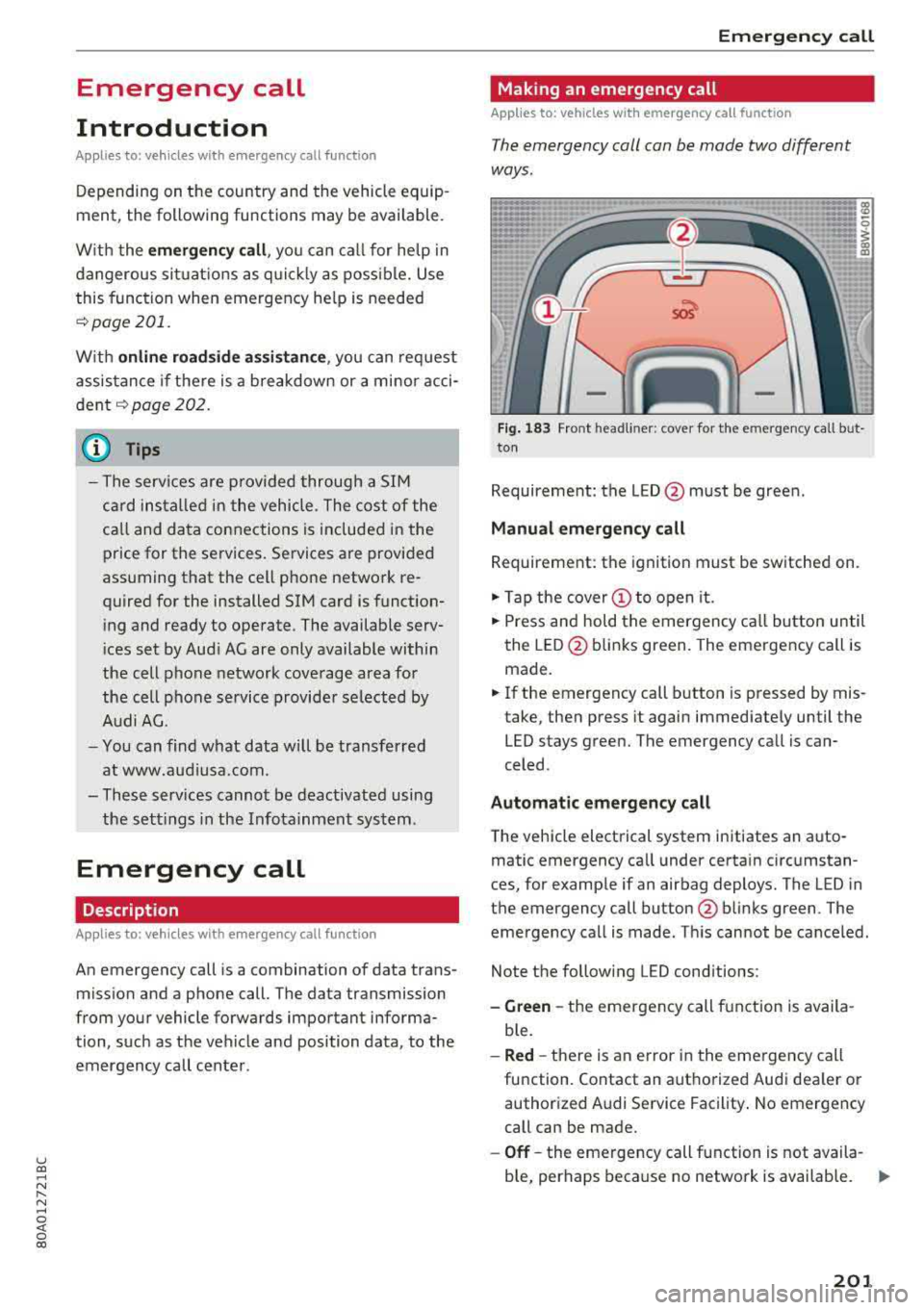
Fig. 183 Front headli ner : cover for the emergency call but
ton
Requirement: the L ED @ must be green.
Manual emergency call
Requirement: the ignition must be switched on.
.,. Tap the cover(!) to open it.
.,. Press and hold the emergency call button until
the LED @blinks green. The emergency call is
made.
.,. If the emergency call button is pressed by mis
take, then press it again immediately until the
LED stays green. The emergency call is can
celed .
Automatic emergency call
The vehicle electrical system initiates an auto
matic emergency call under certain circumstan
ces, for example if an airbag deploys. The LED in
the emergency call button @blinks green . The
emergency call is made . This cannot be canceled.
Note the following LED conditions :
-Green -the emergency call function is availa
ble.
- Red -there is an e rror in the emergency call
function. Contact an authorized Audi dealer or authorized Audi Service Facility. No emergency
call can be made.
-Off-the emergency call function is not availa-
ble, perhaps because no network is available.
.,..
201