page 95 AUDI Q5 2018 Service Manual
[x] Cancel search | Manufacturer: AUDI, Model Year: 2018, Model line: Q5, Model: AUDI Q5 2018Pages: 392, PDF Size: 60.56 MB
Page 63 of 392
u co ..... N r-N .....
~ 0 co
-Do not use any breakable beverage contain
ers (for example, made out of glass or por
celain). You could be injured by them in the
event of an accident .
(D Note
Beverage containers in the cup holders should
always have a lid. If not, beverages could sp ill
and cause damage to vehicle equipment, such
electronics or seat covers .
Climatized cup holder
Applies to: veh icles wit h clim atized cup holders
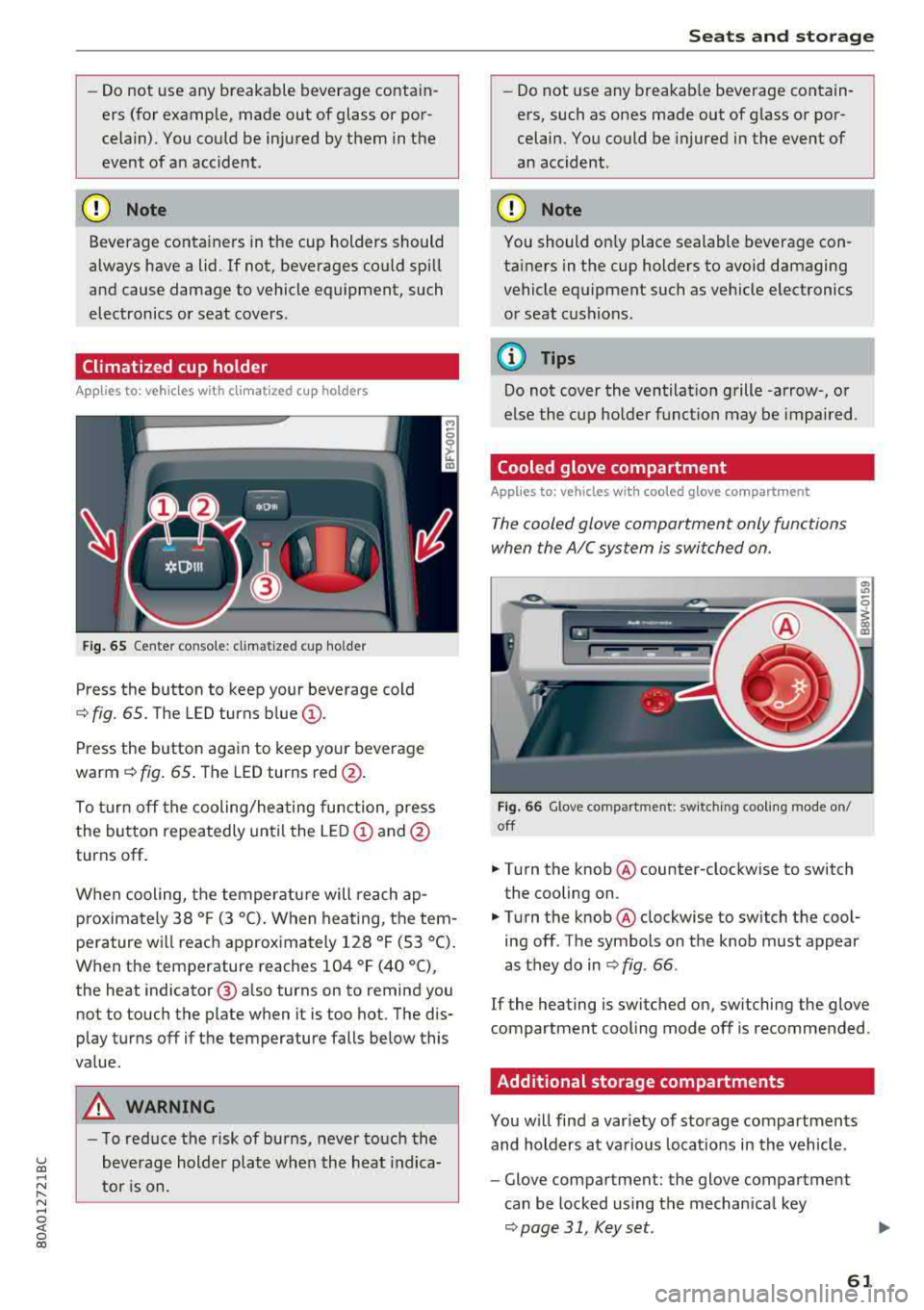
Fig. 65 Center co nsole: cl imatized cup holder
Press the button to keep your beverage cold
¢ fig. 65. The LED turns blue@.
Press the button again to keep your beverage
warm ¢ fig. 65 . The LED turns red @.
To turn off the cooling/heating function, press
the button repeatedly until the LED
(D and@
turns off .
When cooling, the temperature will reach
ap
p roximately 38 ° F (3 °C) . When heating, the tem
perature will reach approximately 128 ° F (53 °C).
When the temperature reaches 104 °F (40 °C),
the heat indicator @ also turns on to remind you
not to touch the plate when it is too hot. The dis
p lay turns off if the temperature falls below this
value.
_&, WARNING
- T o reduce the risk of burns, never touch the
beverage holder plate when the heat indica
tor is on.
Seats and storage
-Do not use any breakable beverage contain
ers, such as ones made out of glass or por
celain. You could be injured in the event of
an accident .
({I) Note
You should on ly place sealable beverage con
tainers in the cup holders to avoid damaging
vehicle equipment such as vehicle electronics
or seat cushions .
@ Tips
Do not cover the ventilation grille -arrow-, or
else the cup holder function may be impaired.
Cooled glove compartment
Applies to: vehicles with coo led glove compartment
The cooled glove compartment only functions
when the AIC system is switched on.
Fig . 66 G love compartment: switching cooling mode on/
off
.,. T ur n the knob @ counter-clockwise to switch
the cooling on .
.,. Turn the knob@ clockwise to switch the cool
ing off . The symbols on the knob must appear
as they do in
¢ fig. 66 .
If the heating is switched on, sw itching the glove
compartment cool ing mode off is recommended .
Additional storage compartments
You will find a var iety of storage compartments
and holders at various locat ions in the vehicle .
- Glove compartment: the glove compartment
can be locked using the mechan ical key
¢ page 31, Key set.
61
Page 65 of 392
u co ..... N r-N .....
~ 0 co
CD Note
Let the luggage compartment cover roll up
slowly to reduce the risk of damage.
Increasing the size of the vehicle interior
Applies to: ve hicles with fold ing backrests
The rear seat backrests con be folded forward ei
ther separately* or together.
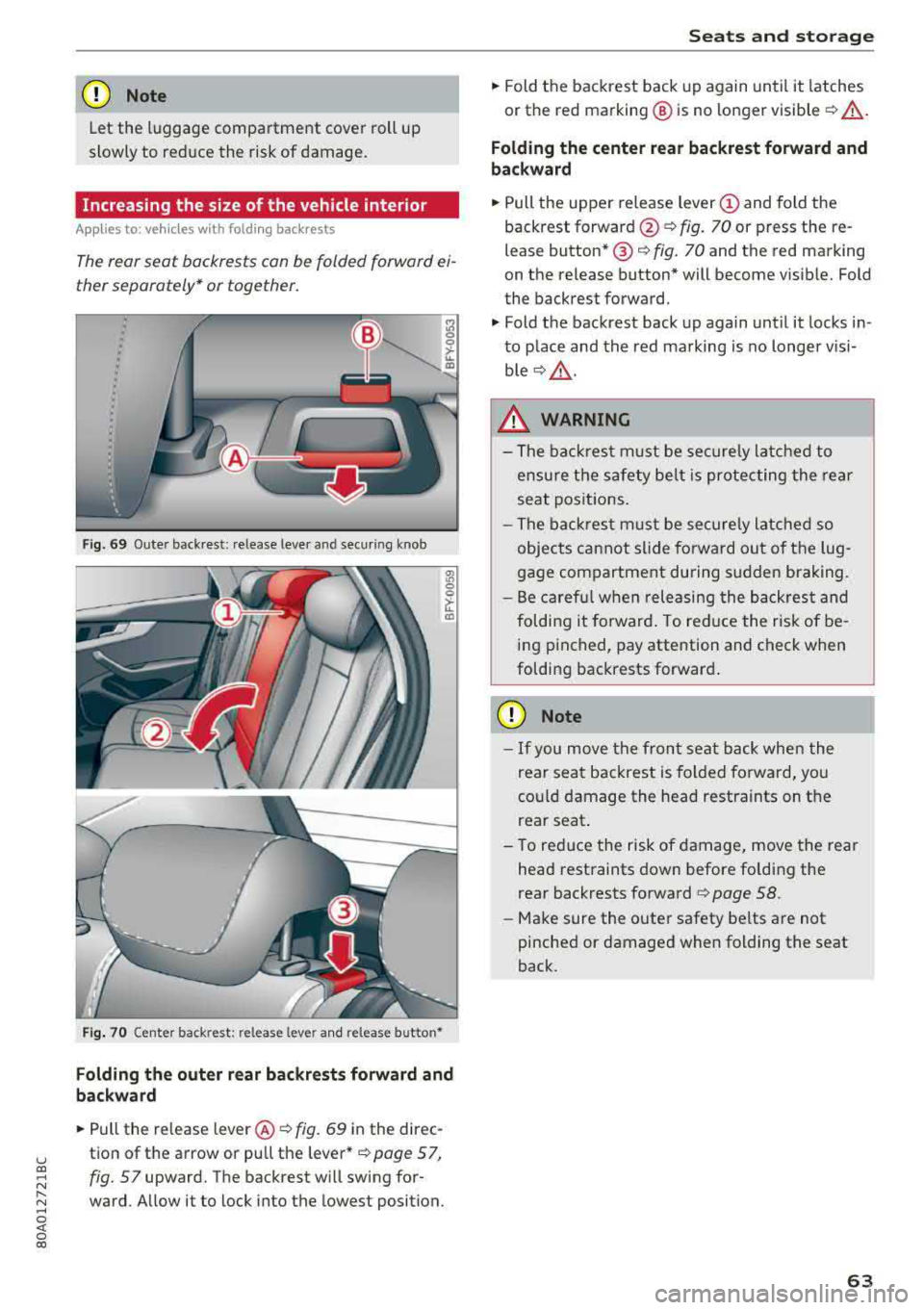
Fig . 69 Outer back rest: release lever and secu ring knob
Fig. 70 Center back rest: re lease leve r and release button •
Folding the outer rear backrests forward and
backward
"Pu ll the release lever @¢ fig. 69 in the direc
tion of the arrow or pull the lever*
¢page 57,
fig. 57
upward. The backrest will swing for
ward . Allow it to lock into the lowest position.
Seats and storage
"Fold the backrest back up again until it latches
or the red marking @ is no longer visible
¢ _& .
Folding the center rear backrest forward and
backward
" Pull the upper release lever (D and fold the
backrest
forward @¢ fig. 70 or press the re
lease button* @¢
fig. 70 and the red marking
on the release button* will become visib le. Fold
the backrest forward.
" Fold the backrest back up again until it locks in
to place and the red marking is no longer visi
b le ¢ _& .
_& WARNING
-The backrest must be securely latched to
ensure the safety belt is protecting the rear
seat positions.
- The backrest must be securely latched so
objects cannot slide forward out of the lug
gage compartment during sudden braking.
- Be careful when releasing the backrest and
folding it forward . To reduce the risk of be
ing pinched, pay attention and check when
folding backrests forward .
CD Note
-If you move the front seat back when the
rear seat backrest is folded forward, you
cou ld damage the head restraints on the
rear seat .
- To reduce the risk of damage, move the rear
head restraints down before folding the
rear backrests
forward ~ page 58.
-Make sure the outer safety be lts are not
pinched or damaged when folding the seat
back.
63
Page 66 of 392
Seats and stor age
Increasing the size of the luggage
compartment
The rear seat backrests can be folded forward ei
ther separa tely* or toge ther.
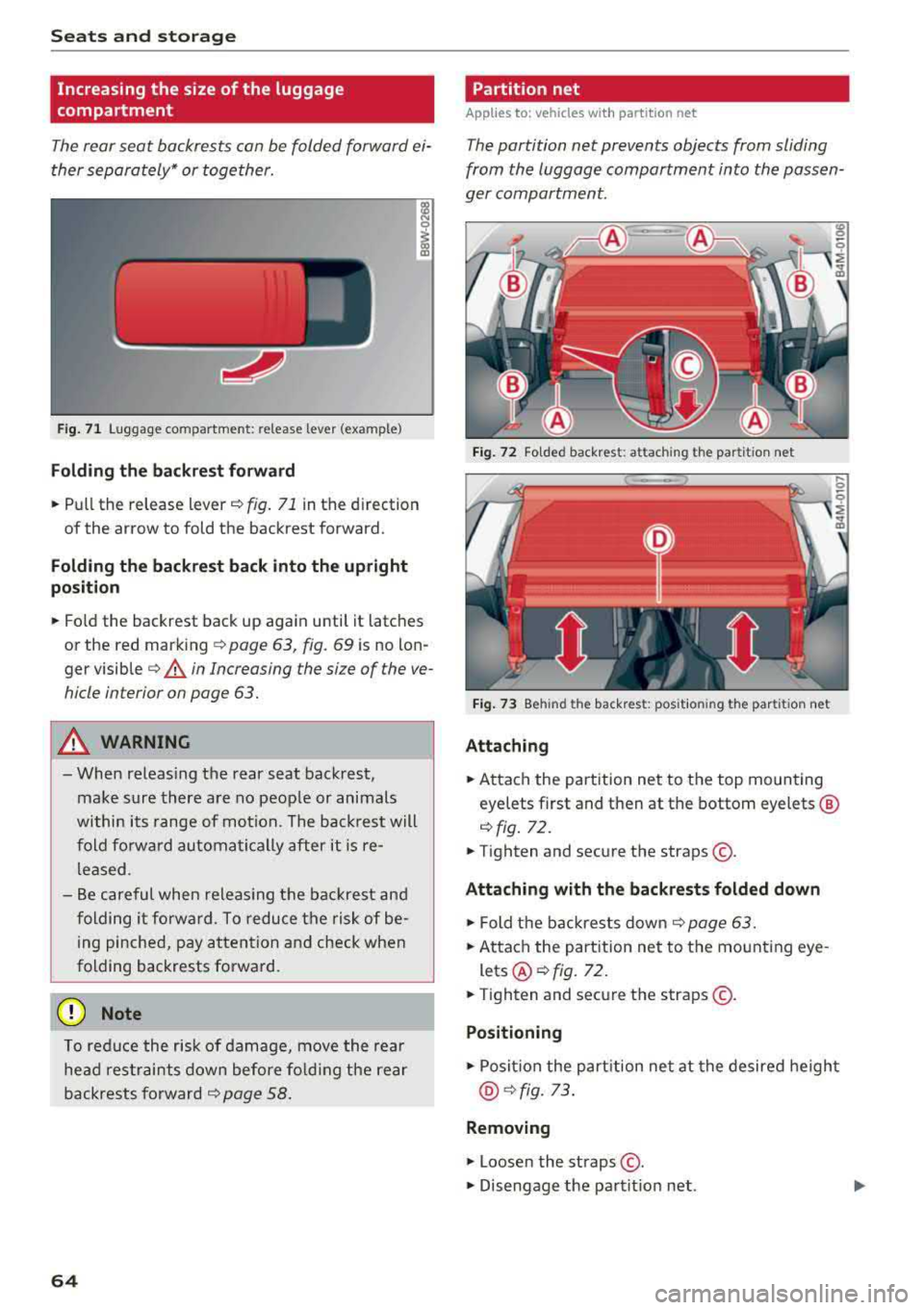
F ig . 71 Luggage compartment: release lever (example)
Folding the backre st forwa rd
.,. Pull the release lever .:!>fig. 71 in the d irection
of the arrow to fold the backrest forward.
F olding the backrest ba ck into the upr ight
po sit ion
.,. Fo ld the backrest back up aga in until it latches
or the red mark ing
c!> page 63, fig. 69 is no lon
ger
visible ¢ & in Increasing the size of the ve
hicle interior on page 63.
A WARNING
- When releas ing the rear seat backrest,
make sure there are no peop le or animals
within its range of motion. The back rest will
fold fo rw ard automatically after it
is re
leased.
- Be careful when releas ing the backrest and
folding it forward. To reduce the risk of be ing pinched, pay attention and check when
folding backrests forward.
(D Note
To reduce the risk of damage, move the rea r
he ad res traints down before f olding the rear
backrests forward
¢ page 58.
64
Partition net
App lies to : vehicles with partit ion net
The partition net prevents objects from sliding
from the luggage compartment into the passen
ger compartment.
F ig . 72 Fo lded backrest: attach ing the partit ion net
Fig . 73 Beh ind the backrest: pos it ion ing the partit ion net
Attaching
.,. Attach the part ition net to the top mounting
eyelets first and then at the bottom eyelets ®
c!> fig. 72.
.,. Tighten and secure the straps @.
Attaching with the backrests folded down
.,. Fold the backrests down ¢ page 63.
.,. Attach the part ition net to the mounting eye -
lets@¢ fig. 72 .
.,. Tighten and secure the straps @.
Positioning
.,. Posit ion the part ition net at the desired heigh t
@¢ fig. 73 .
Removing
.,. Loosen the straps @ .
.,. Disengage the partit ion net .
Page 67 of 392
u co ..... N r-N .....
~ 0 co
The height of the partition net can be adjusted.
This a llows you to transport long objects using
the cargo pass-through, wh ile keep ing the parti
tion net attached at the same time.
(D Tips
-The straps must face tow a rd the rear when
attaching the part ition net.
- You must disengage the part ition net before
fo lding the backrest back into the upright
position.
- The partition net can also be attached to the
adjustable
tie-downs* ~ page 65.
Tie-downs and luggage compartment net
A ppl ies to: ve hicles with tie -dow ns a nd l uggage compartment
n et
The cargo net prevents small objects from slid
tng .
liil
ell I
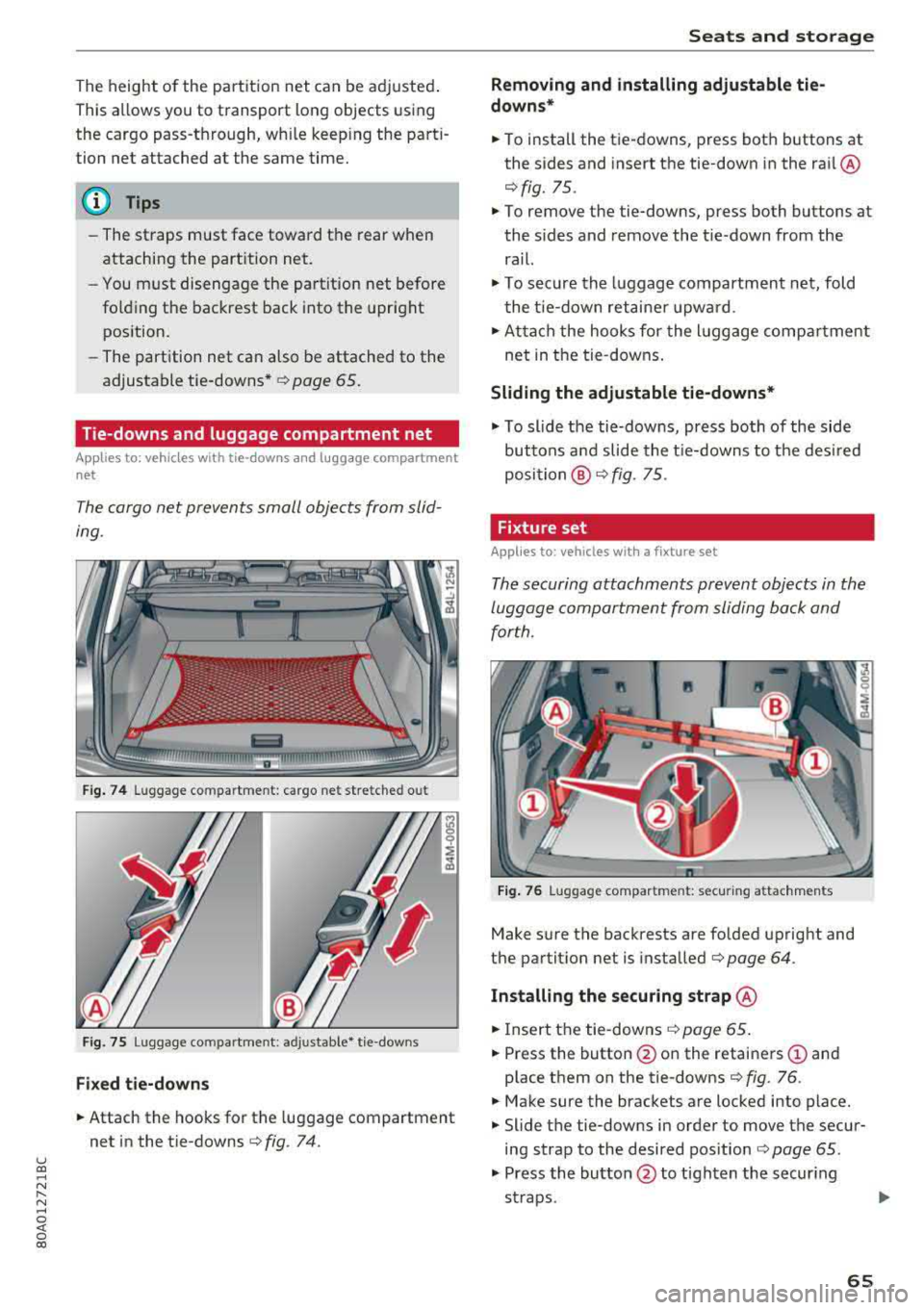
Fig. 74 Luggage compartment: cargo net stretched out
Fig. 75 Luggage compartment : adjusta ble* tie-downs
Fixed tie-downs
.. Attach the hooks for the luggage compartment
net in the tie-downs
c>fig . 74.
Seats and storage
Removing and installing adjustable tie
downs*
.. To install the tie-downs, press both buttons at
the sides and insert the tie-down in the rai l@
r=> fig. 75 .
.. To remove the tie-downs, press both buttons at
the sides and remove the tie-down from the
rail.
.. To secure the luggage compartment net, fold
the tie-down retaine r upward .
.. Attach the hooks for the lu ggage compa rtment
net in the tie-downs.
Sliding the adjustable tie-downs*
.. To slide the tie-downs, press both of the side
buttons a nd slide the tie-downs to the desired
position @r=>fig. 75.
Fixture set
A pp lies to: veh icles w ith a fixture se t
The securing attachments prevent objects in the
luggage compartment from sliding back and
for th.
Fig. 76 Luggage compartment: secur ing attachments
Make sure the backrests are folded upright and
the partit ion net is installed
c> page 64.
Installing the securing strap @
.. Insert the tie-downs c> page 65.
.. Press the button @on the retainers (D and
place them on the tie-downs
r::> fig. 76 .
.. Make sure the brackets are locked into place .
.. Slide the tie-downs in order to move the secur
ing strap to the desired pos ition
c> page 65.
.. Press the button @ to tighten the secur ing
straps .
1111>
65
Page 68 of 392
Seats and stor age
Install ing tel escoping rod @
.,. Inse rt the tie -downs ¢ page 65 .
.. Press the button @on the retainers (!) and
place them on the tie-downs
¢ fig. 76 .
.. Make sure the brackets are locked into place .
.. Slide the tie-downs in order to move the tele
scoping rod to the desired
posit ion¢ page 65 .
.,. Press the bracket (!) downward @and, using
you r other hand, slide the lower area to the de
sired position .
.,. Make sure the b rackets a re locked into p lace .
.&, WARNING
- The backrest must be securely latched so
objects cannot slide forward out of the l ug
gage compartment during sudden braking .
- Loose objects in the passenger compar t
ment can fly forward during abrupt mane u
vers or acc idents and can inju re occupants.
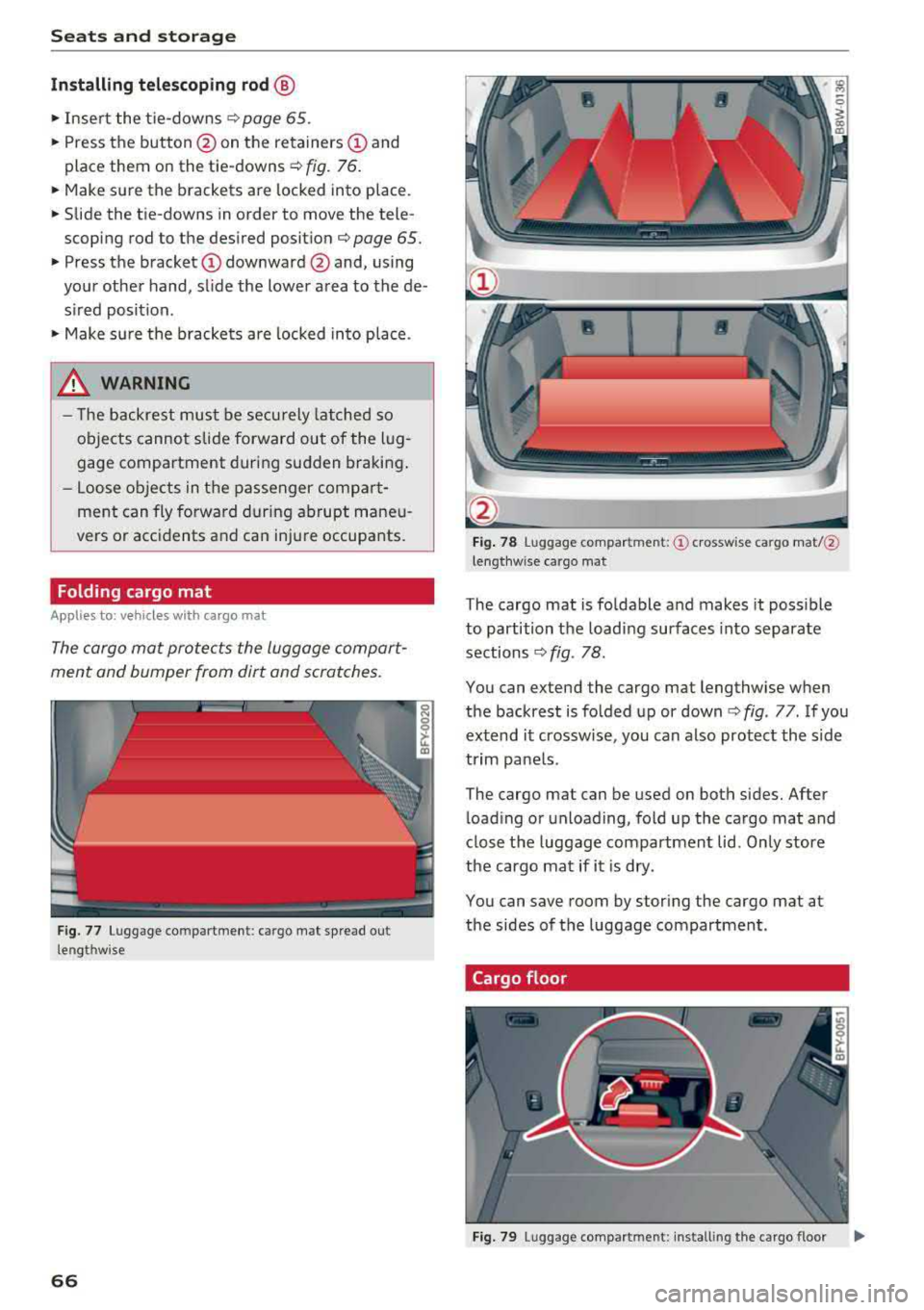
Folding cargo mat
Applies to: vehicles with cargo mat
The cargo mat protects the luggage compart
ment and bumper from dirt and scratches.
F ig. 77 Luggage compartment: cargo mat sp read out
lengthw ise
66
-
F ig . 78 Luggage compartment: © crosswise cargo mat/@
lengthw ise cargo mat
The cargo mat is fo ldable and makes it poss ible
to partition t he load ing surfaces into separate
sections
¢ fig . 78.
You can extend the cargo mat lengthw ise when
the backrest is fo lded up or
down ¢ fig. 77. If you
extend it crossw ise, you can also protect the s ide
trim panels.
The cargo mat can be used on both sides. After l oad ing or unloading, fold up the cargo mat and
close t he luggage compartment lid. Only store
the cargo mat if it is dry.
You can save room by stor ing the cargo mat at
the sides of the luggage compartment.
Cargo floor
Fig. 79 Luggage compartment: install ing the cargo floor
Page 74 of 392
Warm and cold
SYNC Syn chr oniz ation
Use t he rocker sw itc h® to select the f unct ion.
When synchronization is switched on, the set
tings for the driver's side are applied to the front
passenger's side and the rear (except for seat
heating/venti lation*). When the settings on the
front passenger's side or in the rear are changed,
the synchron izat ion is automatically switched off
and
3 -z one appears in the display .
SET REAR function
Use the rocker switch ® to select the function .
When the function is switched on, you can adjust
all settings for the rear us ing the climate control
system controls in the cockpit . The rear climate
control system controls cannot be operated at
the same time . T his function switches off auto
mat ica lly after a ce rtain per iod of t ime or after
leav ing the menu.
Vents
You can open or close the center and rear vents in
the cockpit and the vents in the rear center con
sole us ing the r idged thumbwhee ls . T he levers
adjust the d irection of the airflow from the vents.
Re sidu al he at
You can activate the residual heat function when
the ignition is switched off by pressing the knob
(!) . The res idual heat from the coolant is used to
heat the vehicle interior. The residual heat func
tion switches off automatically afte r about 15
m inutes.
A WARNING
- Yo u should not use the re circulation mode
for an extended period of time, because no
fres h air is drawn in and the windows can
fog when cooling mode is sw itched off. This
increases the risk of an accident.
- Individuals with reduced sensitivity to pain
or temperature cou ld deve lop burns when
using the seat heating* funct ion. To reduce
the risk of injury, these ind iv iduals should
not use seat heati ng*.
72
@ Note
To avoid damaging the seat heating* ele
ments, do not knee l on the seats or p lace
heavy pressure on one area of the seat.
Setup
The climate control system basic settings ore ac
cessed in the Infotainment system .
.. Select in the Infotainment system : IMENU! but
ton
> Veh icle > left control button > Air condi
t ioning
Auto recirculation
When sw itched on, a utomat ic rec ircu lat ion con
tro ls the recircu lation mode automatically . If the
windows fog up, press
the® MAX button .
Automatic au xiliary heater *
The auxiliary heater he lps to wa rm the vehicle in
te rior more qu ic kl y.
Steering wheel heating
Applies to: vehicles with steering wheel heating
The steering wheel rim con be heated .
.. Press the lg\~ page 14, fig . 11 button on the
mu ltifu nction stee ring wheel to switch the
steer ing whee l heating on and off . The mes
sage
S teering wheel h eating : on /Ste ering
wheel heating: off
appears in the instrument
cluster display.
The tempe ra ture is ma inta ined at a constant lev
el when steering wheel heating is switc hed on .
The steer ing whee l heating sett ings are stored
automat ica lly and assigned to the remote control
k ey tha t is in use .
Page 75 of 392
u co ..... N r--N ..... 0 <( 0 00
Driving
General information
Breaking in
A new vehicle must be broken in for the first
1,000 miles (1,500 km). Do not drive at speeds
that will exceed 2/3 of the maximum permitted
engine speed (RPM) for the first 600 miles
(1,000 km), and avoid full acceleration during
this period . You may gradually start increasing
the RPM and the speed between 600 miles
(1,000 km) and 1,000 miles (1,500 km) .
During the first hours of use, the engine has a
higher internal friction than later on when all
moving parts have settled into p lace with each
other.
How the vehicle is driven during the first 1,000
miles (1,500 km) also affects the engine quality .
Drive at moderate engine speeds after the initial
break-in per iod, part icu larly when running a cold
engine. This will reduce engine wear and improve
the m ileage .
Do not drive at too low of an engine speed (RPM).
Shift down if the engine stops running "smooth ly". Extremely high eng ine speeds are automati
cally reduced.
Reducing the risk of vehicle damage
@ Note
When driving on poor roads, by curbs and on
steep ramps, make sure that low-hang ing
components such as the spoiler and ex haust
system do not come into contact with these
or they cou ld be damaged. This especia lly ap
plies to vehicles with low ground clearance
and veh icles that are heavily loaded.
Driving through water on roads
Note the following to reduce the r isk of vehicle
damage when driv ing through water, for example
on flooded roads:
- The water must not be any higher than the bot
tom of the vehicle body .
Driving
-Do not drive faster than walking speed.
A WARNING
= -
After driving thro ugh water or m ud, the effec
tiveness of the brakes may be reduced due to
moisture on the brake rotors and brake pads.
A few careful brake applications shou ld dry
off the brakes and restore the fu ll braking ef
fect.
@ Note
- Vehicle components such as the engine, transmission, suspens ion or electrical sys-
tem can be severely damaged by driving
through water.
- Always switch the Start/Stop system* off
when driving through water
¢page 78.
(D Tips
-Determine the depth before driving through
water.
- Do not stop the vehicle, drive in reverse or
switch the engine off when driving through
water.
- Keep in mind that oncom ing vehicles may
create waves that raise the water level and
make it too deep for your vehicle to drive
through safely.
- Avoid dr iv in g through salt water, because
this can cause corrosion.
Economical and environmentally-friendly
driving
T he amount of fuel consumption, the environ
menta l impact and the wear to the engine,
brakes and tires depends most ly on your driving
sty le. With an anticipatory and economic driving
style, fuel consumption can be reduced by ap prox imately 10-15%. The following t ips will help
you conserve the environment and your money at the same time .
Anticipatory driving
A vehicle uses the most fuel when accelerating.
When you drive w ith anticipation, you do not
need to brake as often and so you accelerate less.
When poss ible, let your vehicle coast with a gear
.,.
73
Page 76 of 392

Drivin g
engaged, for examp le when you notice that the
next traffic light is red . This produces an engine
braking effect, which helps to protect the brakes
and tires and reduces the emissions and fuel con
sumpt ion to zero (fuel shut-off during decelera
tion) .
Shift effici entl y
Upshifting earlier is an effective way to save fuel.
Staying in a gear too long uses fue l unnecessari
ly .
Press down on the acce lerator peda l slowly and
avoid "kick -down".
Avoid full acceleration
You shou ld rare ly t ravel at the maximum vehicle
speed. High speeds cause a d isp ropor tionately
high increase in fuel consumption, emissions and
traffic noise . Driving more slowly saves fue l.
Reduce idling time
The Start/Stop system* helps to reduce the idling
time automatically. In vehicles witho ut the Start/
Stop system* , it is
efficient to switch the eng ine
off when stopped at rai lroad crossings and long
red lights . Stopping the engine for
30 -40 sec
onds already saves more fu el than the amount of
extra fuel needed to restart the engine.
It t akes a very long time in idle to wa rm the en
gine up to operating temperature . Wear and
emissions are especially high in the warm -up
phase. Therefore, you should begin driving im
mediately after starting the engine. Avoid high
RPMs while do ing th is .
Ha ve mainten anc e performed regularly
By having maintenance performed regu lar ly on
your veh icle, you can he lp to reduc e fuel con
sumpt ion before you even start to dr ive. The
maintenance condition of your vehicle not only
affects traffic safety and long -term value but al
so impacts fuel consumption . A poorly main
tained engine can lead to fuel consumpt ion that
is
1 0% hi gher tha n normal.
74
Avoid short trip s
The engine and exh aust clean ing system mus t
reach their optima l operating temperature to ef
fective ly reduce consumption and emissions.
A cold engine uses a d isp roportionately high
amoun t of fue l. The eng ine re aches opera ting
temperat ure and cons umption norma lizes on ly
after approximate ly 2.5 mi les (4 km) .
Check the tire pressure
To save fue l, ma ke sure the t ires are always in
flated to the correct
press ure~ page 335. The
fuel consumpt ion can increase by
5% if the pres
sure is on ly
0 .5 bar too low. Due to t he increased
rolling resistance, low tire pressures wi ll also
l ead to greater tire wear and will affect driving
behavior.
Do not drive on winter tires year -round, as this
will consume up to
10% more fue l.
Eliminat e unnecessary weight
Since eve ry po und of ext ra weight increases f uel
consump tion, a quick inspec tion of the luggage
compartment may be worth it to avoid unneces
sary weight .
When not be ing used , a roof rack sho uld be re
moved to decrease the w ind resis tance of the ve
hicle . This will save you approx imately
12% fue l
at speeds from
6 2 -75 mph (100 -120 km/h) .
Save energy
The eng ine d rives the generator, which generates
electr ic ity; the f uel consumpt ion also inc reases
wi th the demand for e lec tricity . T he refore, sw itch
electrica l eq uipment o ff when you no longe r
need it . Examples of eq uipment that uses a lot of
energy are air blowers at a high setting, the rear
window defogger and seat heating* .
@ Note
Do not leave engine idling unattended after
starting. If warning lights s houl d come on to
i ndicate improper operation, they would go
unheeded. Extended idling also produces
h eat, which could result in overheating or
other damage to the veh icle or othe r proper
ty .
Page 78 of 392
Driving
Power steering wheel position adjustment
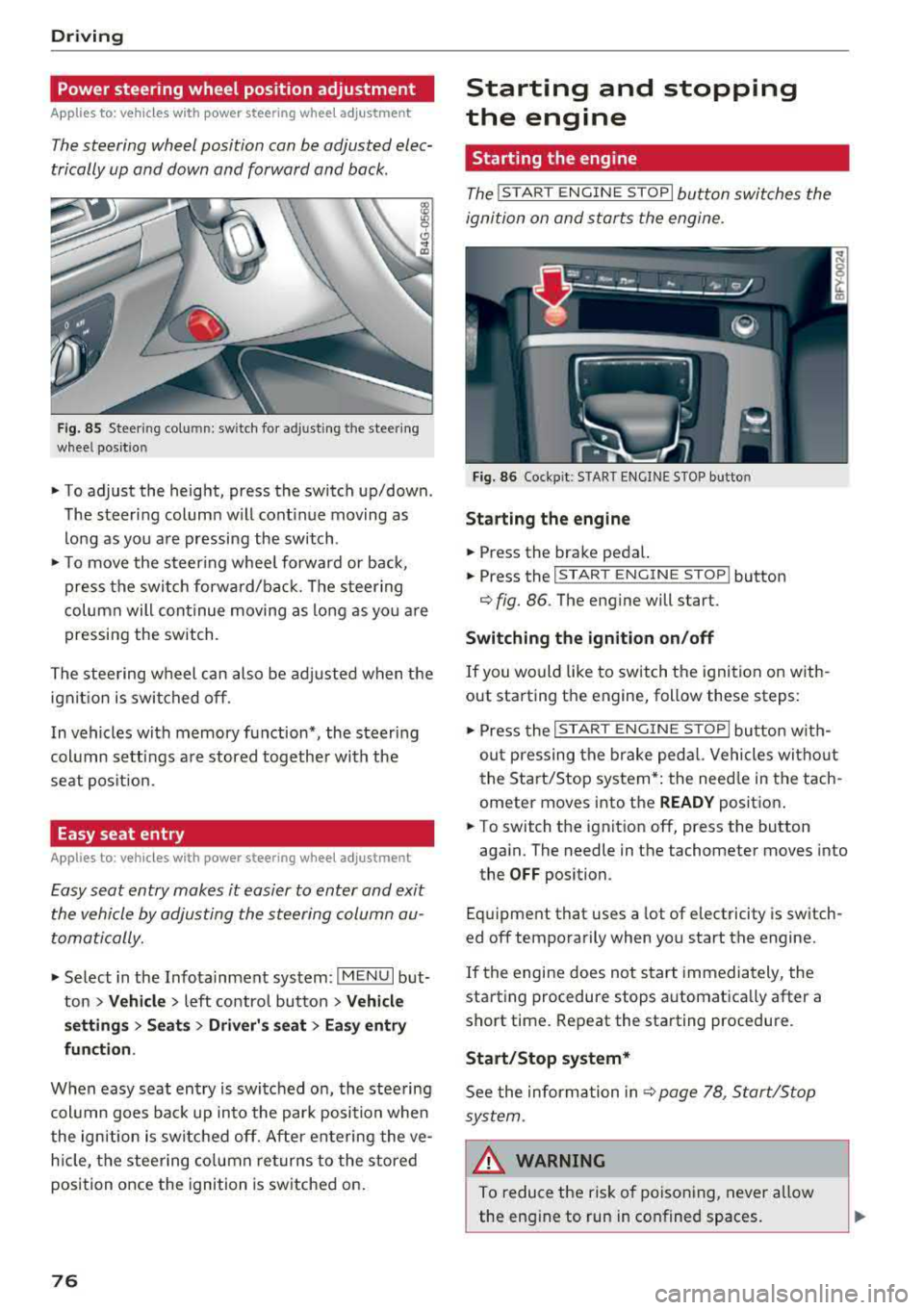
App lies to: vehicles with power stee ring whee l adjustme nt
The steering wheel position can be adjusted elec
trically up and down and forward and back.
F ig. 85 Steer ing co lu m n: sw itch for ad just ing the steering
whee l pos it io n
.. To adjust the height, press the switch up/down .
The steer ing column w ill cont inue moving as
long as you are pressing the switch .
"To move the steering whee l forward or back,
press the swi tc h forward/bac k. T he steer ing
column will continue moving as long as you a re
pressing the switch .
The steering wheel can also be adjusted when the ign it io n is swit ched off .
In vehicles with memory function*, the steering
col umn sett ings a re stored together wi th the
seat pos it ion.
Easy seat entry
Applies to : vehicles with power stee ring wheel adjustme nt
Easy seat entry makes it easier to enter and exit
the vehicle by adjusting the steering column au
tomatically.
" Se lect in the Infota inment system: IMENU I but
ton
> Vehicle > left contro l button > Vehicl e
setting s > Seats > Driver 's seat > Ea sy entry
fun ction .
When easy seat entry is swi tched o n, the stee ring
col umn goes bac k up into the par k posi tion whe n
the ign ition is switched off. After ente ring the ve
h icle, the steering co lumn re turns to the stored
position once the ignition is switched on.
76
Starting and stopping
the engine
Starting the engine
The ! STAR T ENGINE ST OPI button switches the
ignition on and s tarts the engine.
Fig. 86 Coc kp it: S TART ENGINE STOP b utto n
Starting the engine
.. Press the brake pedal.
.. Press the I START ENGINE STOP ! button
¢fig. 86. The eng ine will start.
Switching the ignition on /off
If you would like to sw itch the ignition on w ith
out starting the engine, follow these steps:
" Press the I ST AR T ENGINE ST OP ! butto n w ith
out p ressing the brake ped al. Vehicles wi tho ut
the Start/Stop system* : the need le in the tach
ometer moves into the
READY posit ion .
.. To switch the ignition off, press the button
aga in. The needle in the tachometer moves into
the
OFF position.
Eq uipment that uses a lot of e lectricity is switch
ed off temporarily when you start the engine.
If the engine does not s tart immedia tely, the
starting procedure stops automatically after a
short time . Repeat the starting procedure .
Start/Stop system*
See the information in c::;, page 78, Start/Stop
sys tem .
& WARNING
To reduce the ris k of poisoning, never allow
the eng ine to run in confined spaces.
-
Page 79 of 392
u co ..... N r--N ..... 0 <( 0 00
@ Note
Avoid high engine speed, full throttle, and heavy engine load if the engine has not
reached operating temperature yet. You could
damage the engine.
@) For the sake of the environment
Do not let the engine run while parked to
warm up. Begin driving immediately. This re duces unnecessary emissions.
(D Tips
- Some noise after starting the engine is nor
mal and is no cause for concern.
- If you leave the vehicle with the ignition
switched on, the ignition will switch off af
ter a certain amount of time. Make sure that electrical equipment such as the exterior
lights are switched off.
Starting the engine
"'Bring the vehicle to a full stop.
"'Press the I START ENGI NE STO PI button
C? page 76, fig. 86.
Emergency off function*
If it is absolutely necessary, the engine can also
be turned off while driving at speeds starting at
4 mph (7 km/h). To switch the engine off, press
the
! START ENGINE STOPI button twice in a row
briefly or press and hold for longer than two sec
onds.
A WARNING
- Never turn off the engine before the vehicle
has come to a complete stop. The full func
tionality of the brake booster and the power steering is not guaranteed. You must use
more force to steer and brake the vehicle.
The fact that you cannot steer and brake as
usual can increase the risk of accidents and
serious injuries.
-If you leave the vehicle, switch the ignition
off and take the vehicle key with you .
If you
do not, the engine could be started and
electrical equipment such as the power win-
Driving
dows could be activated. This can lead to se
rious injuries.
- For safety reasons, always park the vehicle
with the selector lever in the "P" position.
Otherwise, there is the risk that the vehicle
could roll unintentionally.
@ Note
If the engine has been under heavy load for
an extended period of time, heat builds up in
the engine compartment after the engine is
switched off and there is a risk of damaging
the engine . For this reason, let the engine run
at idle for approximately two minutes before
shutting it off.
(D Tips
For up to 10 minutes after stopping the en
gine, the radiator fan may turn on again auto
matically or it may continue to run (even if
the ignition is switched off) for the following
reasons :
- The coolant temperature is increasing due
to
trapped heat.
- If the engine is warm and the engine com
partment also heats up from strong sun
light.
Messages
Engine running. Warning! Turn off ignition be
fore leaving vehicle
This message appears and a warning tone sounds
if you open the driver's door when the engine is
running.
Please press the brake pedal
This message appears if you do not press the brake pedal when starting the engine .
Ill Remote control key: key not detected. Is the
key still in the vehicle?
This indicator light turns on and this message ap
pears if the ignition key was removed from the
vehicle when the engine was running. If the igni
tion key is no longer in the vehicle, you cannot
switch on the ignition or start the engine once
..,.
77