transmission AUDI Q5 2019 User Guide
[x] Cancel search | Manufacturer: AUDI, Model Year: 2019, Model line: Q5, Model: AUDI Q5 2019Pages: 392, PDF Size: 99.86 MB
Page 88 of 392
Driving
Hilldescentcontrol
Thehilldescentcontrolsystemassiststhedriver
whendrivingdownhills.
Hilldescentcontrolactivateswhenthetransmis-
sionisinthe"D" or"S"positionand youpressthe
brakepedal.Thetransmissionautomaticallyse-
lectsagearthatissuitableforthehill.Hillde-
scentcontroltriestomaintainthespeedthat
wasselectedatthetimeofbraking,withinphysi-
calandtechnicallimitations.Ifmaystill benec-
essarytoadjustthespeedwiththebrakepedal.
Hilldescentcontrolswitchesoffoncethehilllev-
elsoutorifyoupresstheacceleratorpedal.
Whenoperatingthecruisecontrolsystem*
=>page93,hilldescentcontrolisalsoactivated
when
thespeedisset.
ZXWARNING
Hilldescentcontrolmaynotbeabletomain-
tainaconstantspeedunderallconditions.Al-
waysbereadytoapplythebrakes.
Shiftingmanually(tiptronicmode)
Thetiptronicmodeallowsthedrivertoshiftthe
gearsmanually.
B8W-0249
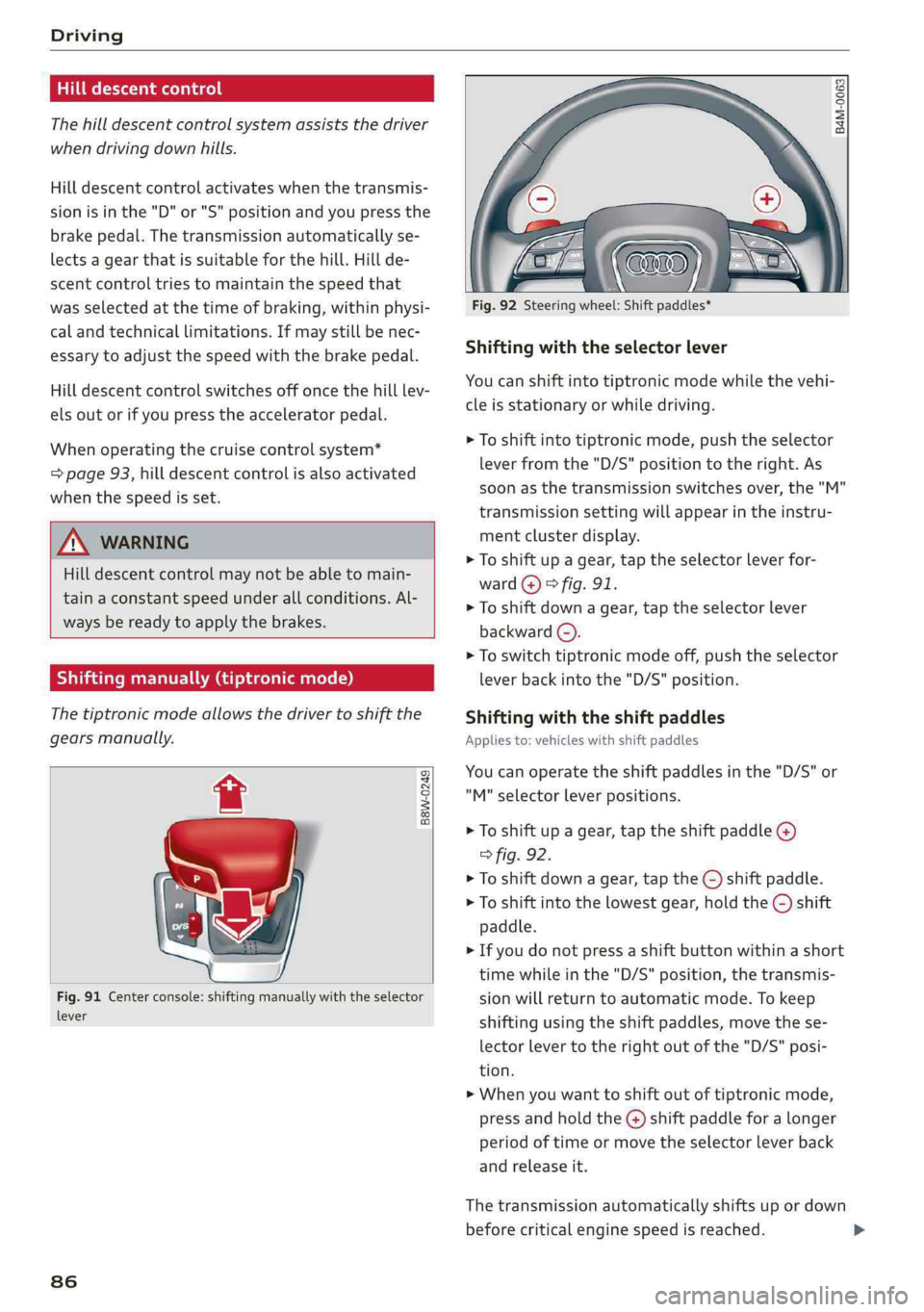
Fig.91Centerconsole:shiftingmanuallywiththeselector
lever
86
2SSs
s
=zza
Fig.92Steeringwheel:Shiftpaddles*
Shiftingwiththeselectorlever
Youcanshiftintotiptronicmodewhilethevehi-
cleisstationaryorwhiledriving.
>Toshiftintotiptronicmode,pushtheselector
leverfromthe"D/S"positiontotheright.As
soonasthetransmissionswitchesover,the"M"
transmissionsettingwillappearintheinstru-
mentclusterdisplay.
>Toshiftupagear,tap theselectorleverfor-
ward@)>fig.91.
>Toshiftdownagear,taptheselectorlever
backward©).
>Toswitchtiptronicmodeoff,pushtheselector
leverbackintothe"D/S"position.
Shiftingwiththeshiftpaddles
Appliesto:vehicleswithshiftpaddles
Youcanoperatetheshiftpaddlesinthe"D/S"or
"M"selectorlever positions.
>Toshiftupagear,tap theshiftpaddle@)
>fig.92.
>Toshiftdownagear,tap the©)shiftpaddle.
>Toshiftintothelowestgear,holdthe©shift
paddle.
>Ifyoudonotpressashiftbuttonwithinashort
timewhileinthe"D/S"position,the transmis-
sionwillreturn toautomaticmode.Tokeep
shiftingusingtheshiftpaddles,movethese-
lectorlevertotherightoutofthe"D/S"posi-
tion.
>Whenyouwanttoshiftoutoftiptronicmode,
pressandholdtheG@)shiftpaddleforalonger
periodoftimeormovetheselectorleverback
andreleaseit.
The
transmissionautomaticallyshiftsupordown
beforecriticalenginespeedisreached.
Page 89 of 392
80A012721BG
Driving
Thetransmissiononlyallowsmanualshifting
whentheenginespeediswithinthepermitted
range.
G)Tips
—Ifyoushifttothenextlowestgear,the
transmissionwillonlyshiftiftheenginewill
notbeover-revwved.
—Withkick-down,thetransmissionshiftstoa
lowergear,dependingonvehiclespeedand
enginespeed.
—tiptronicdoesnotworkifthetransmission
isrunninginemergencymode.
Kick-downenablesmaximumacceleration.
Whenyoupresstheacceleratorpedaldownbe-
yondtheresistancepoint,theautomatictrans-
missiondownshiftsintoalower gearandtheen-
gineutilizesitsfullpower,ifthevehiclespeed
andengineRPMpermit.Itshiftsupintothenext
highergearoncethemaximumpermittedengine
RPMisreached.
ZA\WARNING
Pleasenotethatthewheelscouldspinon
slickorslipperyroadswhenkick-downisac-
tive.
Launchcontrolprogram
Appliesto:vehicleswithStronictransmission
The launchcontrolprogramprovidesthebest
possibleaccelerationwhenstartingfromastop.
Requirement:theenginemustbeatoperating
temperatureandthesteeringwheelmustnot be
turned.
>DeactivatetheStart/Stopsystem*>page78.
TheLEDinthe[®«]buttonturnson.
>Withtheenginerunning,pressthe|&OFF]but-
tonbriefly>page145.TheBindicatorlight
turnsonandthemessageStabilizationcontrol
(ESC):offroad.Warning!Reducedstabilityap-
pearsintheinstrumentclusterdisplay.
> Pull
theselectorleverbackoutofthe"D/S"po-
sitionbrieflytoselectthe"S"positionorselect
theDynamicdrivingmodeindrivese-
lect*>page127.
>Pressthebrakepedalfirmlywithyourleftfoot
andholditallthewaydownforatleastone
second.
>Atthesametime,pressthegaspedalallthe
waydownwithyourrightfootuntiltheengine
reachesandstaysatahighRPMlevel.
>Removeyourfootfromthebrakepedalwithin
fiveseconds>/\.
ZA\WARNING
—Alwaysadaptyourdrivingtothetrafficflow.
—OnlyusetheLaunchcontrolprogramwhen
roadandtrafficconditionsallowitandother
driverswillnot beendangeredorbothered
byyourdrivingandthevehicle'saccelera-
tion.
—Pleasenotethatthedrivewheelscanspin
andthevehiclecanbreakawaywhenoffroad
modeisswitchedon,especiallywhenthe
roadisslippery.
—Oncethevehiclehasstartedmoving,press
the[&OFF]buttonbrieflytoturntheoffroad
modeoff.
CG)Note
WhenacceleratingusingLaunchControl,all
vehiclecomponentsaresubjecttoheavy
loads.Thiscanresultinincreasedwear.
G@)Tips
AfteracceleratingusingtheLaunchControl,
thetemperatureof somevehiclecomponents
mayincreasegreatly.Ifthathappens,the
functionwillnot beavailable forafewmi-
nutestoreduce theriskofdamage.Aftera
cool-downperiod,LaunchControlwillbe
availableagain.
Messages
[BiTransmission:toohot.Pleasestopvehicle
Donotcontinuedriving.Selectthe"P"selector
leverpositionandcontactanauthorizedAudi
dealerorauthorizedAudiServiceFacilityforas-
sistance.
87
>
Page 90 of 392
Driving
iTransmission:malfunction!Safelystopvehi-
cle
Donotcontinuedriving.Stopthevehicleassoon
aspossibleinasafelocationandsecureitsoit
doesnotroll.SeeanauthorizedAudidealeror
authorizedAudiServiceFacilityforassistance.
fs}Selectorlever:malfunction!Youcancontin-
uedriving.PleasecontactService
Thereisasystemmalfunctioninthetransmis-
sion.DriveimmediatelytoanauthorizedAudi
dealerorauthorizedAudiServiceFacilitytohave
themalfunctionrepaired.
fs}Pbutton:malfunction!AutoPwhenengine
off.PleasecontactService
Thereisamalfunctioninthe"P"buttononthe
selectorlever.Thetransmissionautomatically
engages"P"whenyouswitchofftheengine.
DrivetoanauthorizedAudidealerorauthorized
AudiServiceFacilityimmediatelytohavethe
malfunctioncorrected.
5Selectorlever:malfunction!Gearchangeon-
lypossibleusingbothpaddlelevers.Pleasecon-
tactService
Thereisasystemmalfunctioninthetransmis-
sion.Youcancontinuedrivingwithrestricted
function.Theselectorleverisnotworking.Gears
canonlybeselectedby tappingbothshiftpad-
dlesatthesametimewhenthevehicleisstation-
ary>page86,fig.92.Payattentiontothese-
lectedtransmissionpositionintheinstrument
clusterdisplay.Theparkinglockengagesauto-
maticallywhenyouturnofftheengine.Driveto
anauthorizedAudidealerorauthorizedAudi
ServiceFacilityimmediatelytohavethemalfunc-
tioncorrected.
fiTransmission:pleasepressbrake pedaland
selectgearagain
Pressthebrakepedalandselectthedesiredse-
lectorleverpositionagain.Youcanthencontinue
driving.
fs}Transmission:toohot.Pleaseadaptdriving
style
838
Thetransmissiontemperaturehasincreasedsig-
nificantly.Driveverycautiouslyortakeabreak
fromdrivinguntilthetemperaturereturnstothe
normalrangeandtheindicatorlightturnsoff.
iTransmission:malfunction!Youcancontin-
uedriving.Seeowner'smanual
Thereisasystemmalfunctioninthe transmis-
sion.Youmaycontinuedriving.Drivetoanau-
thorizedAudidealerorauthorizedAudiService
Facilitysoontohavethe malfunctioncorrected.
iTransmission:malfunction!Youcancontin-
uedrivinginDuntilengineisoff
Thereisasystemmalfunctioninthe transmis-
sion.Thetransmissionisswitchingtoemergency
mode.Ifyouturntheengineoff,youwillnotbe
abletoselectanyotherselectorleverpositions
afterstartingtheengineagain.Drivetoanau-
thorizedAudidealerorauthorizedAudiService
Facilityimmediatelytohave the malfunctioncor-
rected.
iTransmission:malfunction!Youcancontin-
uedrivingwithlimitedfunction.Pleasecontact
Service
Thereisasystemmalfunctioninthe transmis-
sion.Thetransmissionisswitchingtoemergency
mode.Thismodeonlyshiftsintocertaingearsor
maynolongershiftatall.Theenginemaystall.
DrivetoanauthorizedAudidealerorauthorized
AudiServiceFacilityimmediatelytohavethe
malfunctioncorrected.
i]Transmission:malfunction!Youcancontin-
uedrivingwithlimitedfunction.Noreverse
gear
Thereisasystemmalfunctioninthe transmis-
sion.Thetransmissionisswitchingtoemergency
mode.Thismodeonlyshiftsintocertaingearsor
maynolongershiftatall.Theenginemaystall.
You cannotengagethereversegear.Drivetoan
authorizedAudidealerorauthorizedAudiService
Facilityimmediatelytohavethe malfunctioncor-
rected.
flDangerofrollingaway!Pnotpossible.
Pleaseapplyparkingbrake
Page 128 of 392

Assistsystems
Engineandautomatictransmission
Dependingonthemode,theengineandauto-
matictransmissionrespondmorequicklyorina
morebalancedmannertoacceleratorpedal
movements.InthesportyDynamicmode,the
transmissionshiftsathigherspeedranges.
Airsuspension
Appliesto:vehicleswithairsuspension
Theairsuspensionisanelectronically-controlled
suspensionandlevelingsystem.Thefirmnessof
thesuspensionwilladapttothedrivingcondi-
tionsandthedrivingsituation.Thesystembalan-
cesoutchangesinload.Thevehiclelevelwillalso
adaptgraduallytothevehiclespeedinorderto
reducethewindresistanceathighspeedsandin-
creasethegroundclearanceatlowspeeds.The
settingsdependontheselectedAudidrivese-
lect*mode.
Suspensioncontrol*
Thesuspensioncontrol”usessensorsto record
informationregardingsteeringmovements,
brakingandaccelerationoperationsbythedriver,
roadsurface,drivingspeed,andload.Thismakes
itpossibletoadaptdampingtothedrivingsitua-
tionnearlyinrealtime.Withdriveselect,youcan
adjustthesuspensioncontrol tosporty(Dynam-
ic),comfortable(Comfort)orbalanced(Auto).
Steering
Thepowersteeringadapts.Indirectsteeringthat
moveseasilyasinComfortmodeisespecially
suitedtolongdrivesonhighways.TheDynamic
modeprovidessporty,directsteering.
Thefollowingapplies tovehicleswithdynamic
steering*:thesteeringratiochangesbasedonve-
hiclespeedinordertomaintainoptimumsteer-
ingeffort forthedriveratalltimes.This setsthe
steering tobelesssensitiveathigherspeedsin
ordertoprovideimprovedvehiclecontrol.Atre-
ducedspeeds,steeringismoredirectinorderto
keepthesteeringeffortasminimalaspossible
whenthe driverismaneuveringthevehicle.At
lowandaveragespeeds,dynamicsteering*addi-
tionallyprovidesmoreresponsivesteeringper-
formance.
126
Sportdifferential*
Dependingonthesetting,thedrivepoweratthe
rearaxlewillbedistributedwiththesportdiffer-
ential*tobemoresportyormoderate.
Adaptivecruisecontrol(ACC)*
Thebehaviorwhenacceleratingcanbeadjusted
fromcomfortabletosporty,dependingonthe
driveselectmode.Adaptivecruisecontrolalso
respondstothedrivingbehaviorofthevehicle
aheadinamoreconservativeorsportymanner.
Enginesound*
Theenginesoundadaptstothecurrentmode
andcan besubtletosporty.
@)Note
Appliesto:vehicleswithairsuspension
—Makesurethereisenoughclearanceabove
andbelowthevehiclewhenparking.The
heightofthevehicle(groundclearance)can
changeonceitisparkedduetotemperature
fluctuations,changestotheload condi-
tions,andchangestothedrivingmodes.
—
Whentransportingthevehicleonacarcar-
rier,train,ship,orbyothermeans,onlyse-
curethevehicleattheoutercircumference
ofthetires(thetreadsurface).Securingthe
vehicleattheaxlecomponents,suspension
struts,ortowingeyesisnotpermittedbe-
causethepressureintheairsuspension
strutscanchangeduringtransport.Theve-
hiclemightnot besecuredsufficientlyifthis
happens.
—Whentransportingthevehicleonaroad
carrier,railcarrier,shipcarrier,orothercar-
rier,itmayonlybesecuredatthe running
surfacesofthetires(circumference).Secur-
ingthevehicleattheaxlecomponents,sus-
pensionstruts,ortowingeyesisnotpermit-
tedbecausethepressureintheairsuspen-
sionstrutscanchangeduringtransport.The
vehiclemightnotbesecuredsufficientlyif
thishappens.
G)Tips
The"S"selectorleverpositionautomatically
engageswhentheDynamicmodeisselected.
Page 129 of 392
80A012721BG
Assistsystems
Selectingthedrivingmode
Appliesto:vehicleswithAudidriveselect
MONGaESd
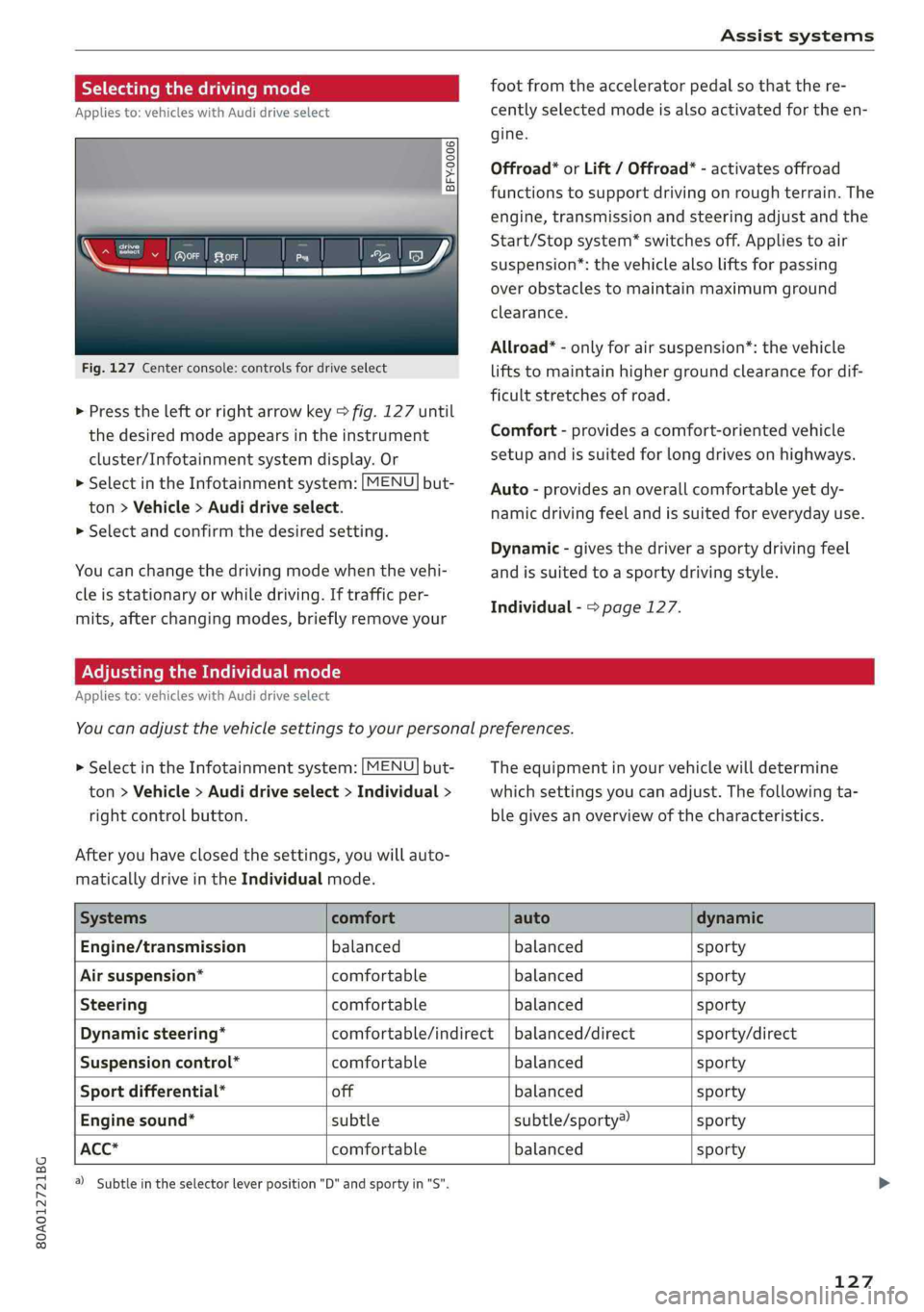
Fig.127Centerconsole:controlsfordriveselect
coy
footfromtheacceleratorpedalso thatthere-
centlyselectedmodeisalsoactivatedfortheen-
oO3 35
saoo
%
>Presstheleftorrightarrowkey>fig.127until
thedesiredmodeappearsintheinstrument
cluster/Infotainmentsystemdisplay.Or
>SelectintheInfotainmentsystem:[MENU]but-
ton>Vehicle>Audidriveselect.
> Selectandconfirmthedesiredsetting.
Youcanchangethedrivingmodewhenthevehi-
gine.
Offroad”orLift/Offroad*-activatesoffroad
functionstosupportdrivingonroughterrain.The
engine,transmissionandsteeringadjustandthe
Start/Stopsystem*switchesoff.Appliestoair
suspension”:thevehiclealsoliftsforpassing
overobstaclestomaintainmaximumground
clearance.
Allroad*-onlyforairsuspension”:thevehicle
liftstomaintainhighergroundclearancefordif-
ficultstretchesofroad.
Comfort-providesacomfort-orientedvehicle
setupandissuitedforlongdrivesonhighways.
Auto-providesanoverallcomfortableyetdy-
namicdrivingfeelandissuitedforeverydayuse.
Dynamic-givesthedriverasportydrivingfeel
cleisstationaryorwhiledriving.Iftrafficper-
mits,afterchangingmodes, brieflyremoveyour
Individual->page127.
andissuited toasportydrivingstyle.
AdjustingtheIndividualmode
Appliesto:vehicleswithAudidriveselect
Youcanadjustthevehiclesettingstoyourpersonalpreferences.
>SelectintheInfotainmentsystem:[MENU]but-
ton>Vehicle>Audidriveselect>Individual>
rightcontrolbutton.
Theequipmentinyourvehiclewilldetermine
whichsettingsyoucanadjust.Thefollowingta-
blegivesanoverviewofthecharacteristics.
Afteryouhaveclosedthesettings,youwillauto-
maticallydriveintheIndividualmode.
Systemscomfortautodynamic
Engine/transmissionbalanced balancedsporty
Airsuspension*comfortablebalancedsporty
Steeringcomfortablebalancedsporty
Dynamicsteering*comfortable/indirect|balanced/directsporty/direct
Suspensioncontrol*comfortablebalancedsporty
Sportdifferential*offbalancedsporty
Enginesound*subtlesubtle/sporty®sporty
ACC*comfortablebalancedsporty
@)Subtleintheselectorleverposition"D"andsportyin"S".
127
Page 158 of 392
MultiMediaInterface
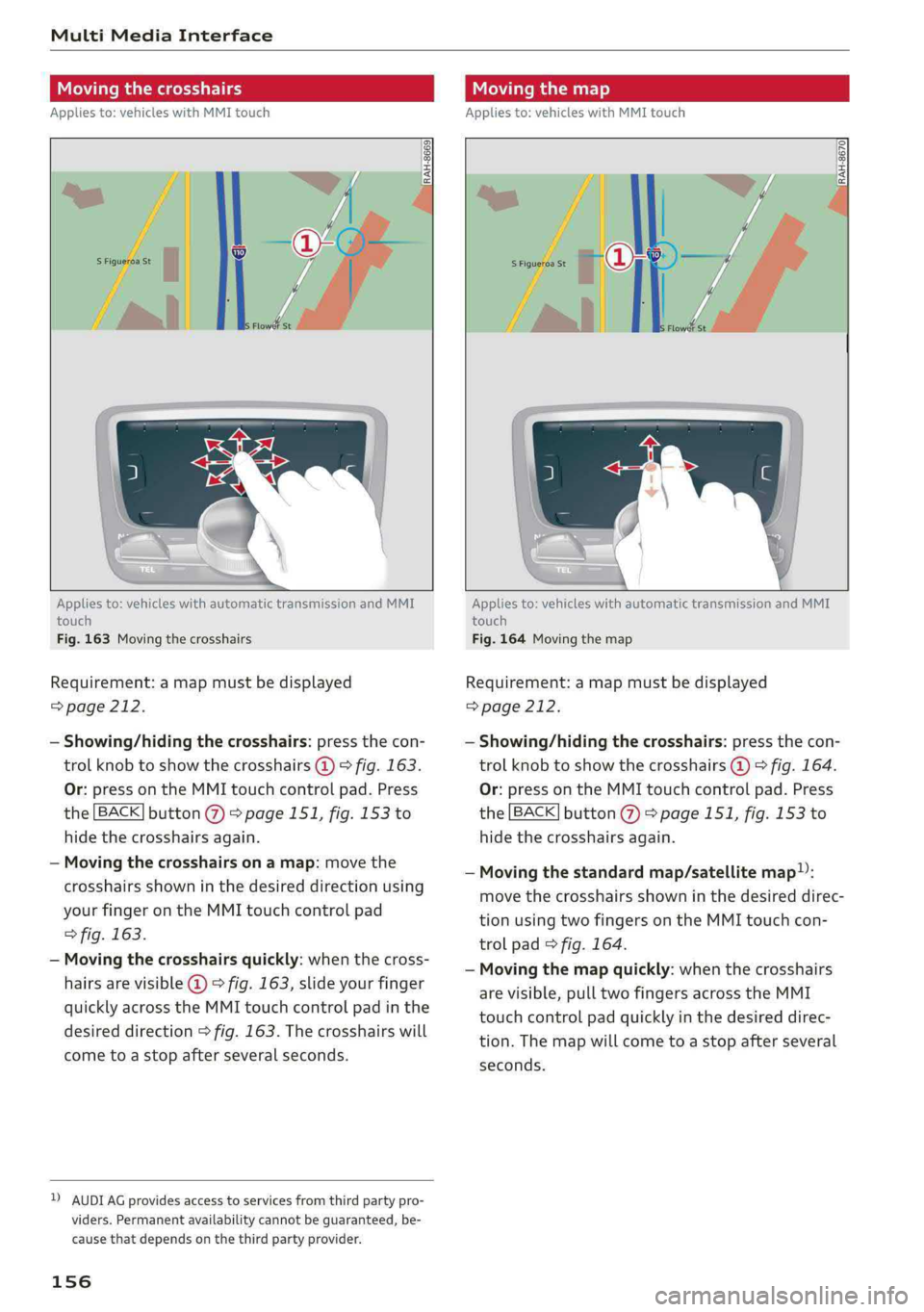
Movingthecrosshairs
Appliesto:vehicleswithMMItouch
Movingthemap
Appliesto:vehicleswithMMItouch
RAH-8670|
Appliesto:vehicleswithautomatictransmissionandMMI
touch
Fig.163Movingthecrosshairs
Requirement:amapmustbedisplayed
=>page212.
—Showing/hidingthecrosshairs:pressthecon-
trolknobtoshowthecrosshairs@)>fig.163.
Or:pressontheMMItouchcontrolpad.Press
the[BACK]button@>page151,fig.153to
hidethecrosshairsagain.
—Movingthecrosshairsonamap:movethe
crosshairsshowninthedesireddirectionusing
yourfingerontheMMItouchcontrolpad
>fig.163.
—Movingthecrosshairsquickly:whenthecross-
hairsarevisible@©fig.163,slideyourfinger
quicklyacrosstheMMItouchcontrolpadinthe
desireddirection>fig.163.Thecrosshairswill
cometoastopafterseveralseconds.
DAUDIAGprovidesaccesstoservicesfromthirdpartypro-
viders.Permanentavailabilitycannotbeguaranteed,be-
causethat dependsonthethirdpartyprovider.
156
Appliesto:vehicleswithautomatictransmissionandMMI
touch
Fig.164Movingthemap
Requirement:amapmustbedisplayed
=>page212.
—Showing/hidingthecrosshairs:pressthecon-
trolknobtoshowthecrosshairs@)©fig.164.
Or:pressontheMMItouchcontrolpad.Press
the[BACK]button@>page151,fig.153to
hidethecrosshairsagain.
—Movingthestandardmap/satellitemap):
movethecrosshairsshowninthedesireddirec-
tionusingtwofingersontheMMItouchcon-
trolpad>fig.164.
—Movingthemapquickly:whenthecrosshairs
arevisible,pulltwofingersacrosstheMMI
touchcontrolpadquicklyinthedesireddirec-
tion.Themapwillcometoastopafterseveral
seconds.
Page 159 of 392
80A012721BG
MultiMediaInterface
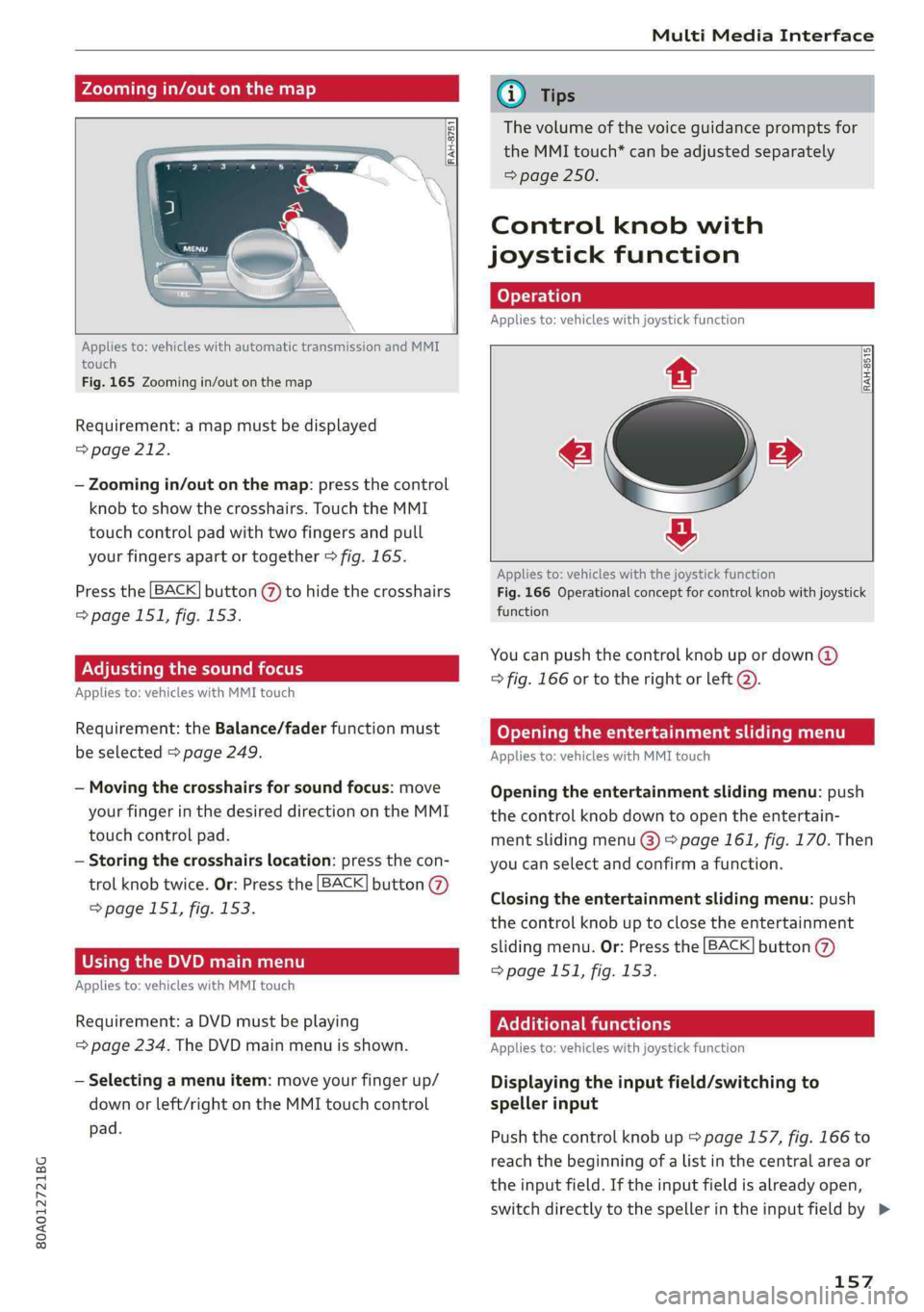
Zoomingin/outonthemap
RAH-875
Appliesto:vehicleswithautomatictransmissionandMMI
touch
Fig.165Zoomingin/outonthemap
Requirement:amapmustbedisplayed
=>page212.
—Zoomingin/outonthemap:pressthecontrol
knobtoshowthecrosshairs.TouchtheMMI
touchcontrolpadwithtwofingersandpull
yourfingersapartortogether>fig.165.
Pressthe[BACK]button(Y)tohidethecrosshairs
=>page151,fig.153.
Adjustingthesoundfocus
Appliesto:vehicleswithMMItouch
Requirement:theBalance/faderfunctionmust
beselected>page249.
—Movingthecrosshairsforsoundfocus:move
yourfingerinthedesireddirectionontheMMI
touchcontrolpad.
—Storingthecrosshairslocation:pressthecon-
trolknobtwice.Or:Pressthe[BACK]button
=>page151,fig. 153.
UsingtheDVDmainmenu
Appliesto:vehicleswithMMItouch
Requirement:aDVDmustbeplaying
=page234.TheDVDmainmenuisshown.
—Selectingamenuitem:moveyourfingerup/
downorleft/rightontheMMItouchcontrol
pad.
@Tips
Thevolumeofthevoiceguidancepromptsfor
theMMItouch*canbeadjustedseparately
=>page250.
Controlknobwith
joystickfunction
Appliesto:vehicleswithjoystickfunction
iy
[RAH-8515
e»
&
Appliesto:vehicleswiththejoystickfunction
Fig.166Operationalconceptforcontrolknobwithjoystick
function
Youcanpushthecontrolknobupordown(@)
>fig.166or totherightorleft@).
Openingtheentertainmentslidingmenu
Appliesto:vehicleswithMMItouch
Openingtheentertainmentslidingmenu:push
thecontrolknobdowntoopentheentertain-
mentslidingmenu@)>page161,fig. 170.Then
youcanselectandconfirmafunction.
Closingtheentertainmentslidingmenu:push
thecontrolknobuptoclosetheentertainment
slidingmenu.Or:Pressthe[BACK]button(@)
=page151,fig.153.
Additionalfunctions
Appliesto:vehicleswithjoystickfunction
Displayingtheinputfield/switchingto
spellerinput
Pushthecontrolknobup*page157,fig.166to
reachthe beginningofalistinthecentralareaor
theinputfield.Iftheinputfieldisalreadyopen,
switchdirectlytothespellerintheinputfieldby>
157
Page 183 of 392
80A012721BG
Telephone
—YouMUSTceaseoperatingthisdeviceim-
mediatelyifrequestedby theFCCora
licensedwirelessserviceprovider.
—WARNING:E911locationinformationmay
notbeprovidedormaybeinaccuratefor
callsservedbyusingthisdevice.
@)Note
ApplicabletoCanada
InCanada,operationofaZoneEnhancer,
suchasanAudiPhoneBox,issubjecttothe
followingrequirementsoftheInnovation,
ScienceandEconomicDevelopmentCanada
(ISED):
—ThisisaCONSUMERdevice.
—BEFOREUSE,youMUSTmeetallrequire-
mentssetoutinCPC-2-1-05.
—YouMUSToperatethisdevicewithapproved
antennas
andcablesasspecifiedbythe
manufacturer.AntennasMUSTNOTbein-
stalledwithin20cmofanyperson.
—YouMUSTceaseoperatingthisdeviceim-
mediatelyifrequestedbyISEDoralicensed
wirelessserviceprovider.
—WARNING:£911locationinformationmay
notbeprovidedormaybeinaccuratefor
callsservedbyusingthisdevice.
@Tips
— TheAudiphoneboxisnotavailableinall
countries.Foradditionalinformation,con-
tactanauthorizedAudidealership.
—Placingthemobiledeviceinabagorprotec-
tivesleeveinsidetheAudiphoneboxcanin-
terferewiththeconnectiontotheexternal
antenna*.
—Metallicobjectsinthe Audiphoneboxblock
thewirelesschargingofyourmobiledevice
andcallsmadeusingtheexteriorantenna’*.
—Thechargingtimeandtemperaturewillvary
dependingonthemobiledevicebeingused.
—Yourmobiledevicecanonlybechargedin
theAudiphoneboxwhentheignitionis
switchedon.
—Toreducetheriskofmalfunctions,make
surethemobiledeviceispositionedcorrect-
ly intheAudiphonebox.
—Themaximumchargingoutputis5watts.
—Strongtransmissionqualitycannot beguar-
anteedifmorethanonemobiledeviceisin
thebox.*
—Onlyonemobiledeviceatatimecan be
chargedwirelesslyintheAudiphonebox.
—AudirecommendsusingAudiGenuineAc-
cessories.Audihasverifiedtheirreliability,
safety,andsuitability.
—YoucanpurchaseaUSBadapterfromanau-
thorizedAudidealerorauthorizedAudi
ServiceFacility,oratspecialtystores.
Usingthetelephone
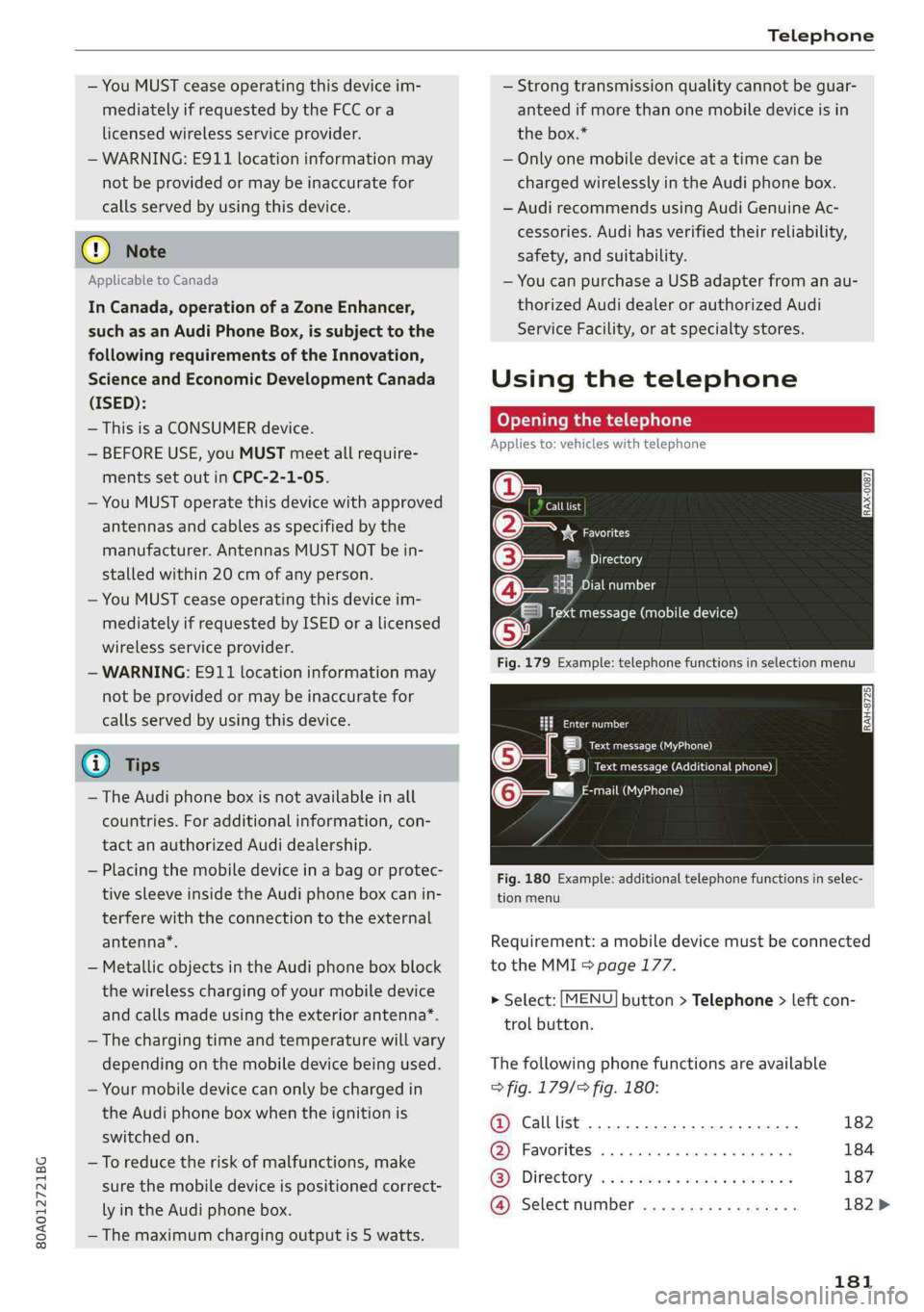
Openingthetelephone
Appliesto:vehicleswithtelephone
Calllist
(2*Favorites
©—:Directory
18Emaisle
Vamessage(mobiledevice)
Fig.179Example:telephonefunctionsinselectionmenu
Cmnal
LetaAa)
|ieeeACCneura)
mail(MyPhone)@-—"
Fig.180Example:additionaltelephonefunctionsinselec-
tionmenu
Requirement:amobiledevicemustbeconnected
totheMMI>page177.
>Select:[MENU]button>Telephone>leftcon-
trolbutton.
Thefollowingphonefunctionsareavailable
>fig.179/9fig.180:
@Calllist20.0.0...eee182
@®Favorites..............0.00008184
GS]Directory,wo:csamonswmm2 ymeeeas187
@Selectnumber..............0-.182>
181
Page 197 of 392
80A012721BG
Audiconnect
AboutAudiconnect
Hereyouwillfindlegalinformationregarding
AudiconnectInfotainmentusage.
Login
See>page193.
Connectionmanager
See>page246.
Licensesubscription
Thevalidityandexpirationdateofyourlicenses
aredisplayed.
Refresh
ThecontentoftheselectedAudiconnectInfo-
tainmentserviceortheentireAudiconnectInfo-
tainmentlistisupdated.
Dataprivacy
Requirement:theignitionmustbe switchedon.
Location,vehicle,andpersonal dataaretransmit-
tedwhenusingAudiconnectservices.
Allowingsendingofdata
—SelectandconfirmActivatedataconnection.
Thedatamoduleforthe useofallAudiconnect
serviceswillbeactive.
Restrictingsendingofdata
—SelectandconfirmActivateprivacy.Thedata
connectionislimitedordeactivateddepending
ontheequipment.ThemajorityofAudiconnect
serviceswillnot beavailable.
Thefollowinginterfacesarenotaffectedbythis
setting:Bluetooth,BluetoothLowEnergy(BLE),
Wi-Ficonnection,Audismartphoneinterface
(ASI),NearFieldCommunication(NFC),charging
communication(e-tron),ElectronicTollCollect
(ETC),ifequipped.
@)Note
Alwaysfollowtheinformationfoundin>@in
Generalinformationonpage192.
)Dependsonthecountryand equipment. Theseservices
are availableforalimitedtime.
@Tips
—Ifthetransmissionofdataislimited,data
willstillbetransmittedtoverifysubscrip-
tions.
—Ifthetransmissionofdataislimited,itwill
havethefollowingeffectsontheexchange
ofdataforAudiconnectservicesandemer-
gencycalls,ifequipped:
—Theemergencycallfunctionwillremain
availablewithoutrestrictionsandwillcon-
tinuetotransmitdata.
—Ifanonlineroadsideassistancecallisini-
tiated,nodatawillbetransmitted,buta
callwillbemade.
—IftheGeofencingAlert,SpeedAlert,
and/orValetAlertserviceshavebeenacti-
vatedbythekeyuser,thentheywillre-
mainavailablewithoutrestrictionsand
continuetotransmitdata.
Audiconnectvehicle
controlservices
Appliesto:vehicleswith Audiconnectvehiclecontrol
WithAudiconnectvehiclecontrolservices)),you
canutilizevariousservicesusingthemyAudiapp
oronlineatwww.audiusa.com/myaudi.
Z\WARNING
Alwaysfollowtheinformationfoundin>AV
inGeneralinformationonpage192.
@Tips
—Accessingspecificdataorcontrollingfunc-
tionsremotelydependsonthechargelevel
ofthevehiclebattery.Therefore,these
functionsonlyhavelimitedavailabilityafter
switchingofftheignition.
— AneSIMcardestablishestheInternetcon-
nectionforAudiconnectvehiclecontrol
services.Thecostsforthisareincludedin
thepriceofAudiconnectvehiclecontrol
195
>
Page 203 of 392
80A012721BG
Emergencycall
Emergencycall
Introduction
Appliesto:vehicleswithemergencycallfunction
Dependingonthe countryandthevehicleequip-
ment,thefollowing functionsmaybeavailable.
Withtheemergencycall,youcancallforhelpin
dangeroussituationsasquicklyaspossible.Use
thisfunctionwhenemergencyhelpisneeded
=>page201.
Withonlineroadsideassistance,youcanrequest
assistanceifthereisabreakdownoraminoracci-
dent>page202.
@Tips
— TheservicesareprovidedthroughaSIM
cardinstalledinthevehicle.Thecostofthe
callanddataconnectionsisincludedinthe
priceoftheservices.Servicesareprovided
assumingthatthecellphonenetworkre-
quiredfortheinstalledSIMcardisfunction-
ingandavailable foruse.Theavailableserv-
icessetbyAudiAGareonlyavailablewithin
thecellphonenetworkcoverageareafor
thecellphoneserviceprovider selectedby
AudiAG.
—Youcanfindwhatdatawillbetransferredat
www.audiusa.com.
—Theseservicescannot bedeactivatedusing
thesettingsintheInfotainmentsystem.
Emergencycall
Appliesto:vehicleswithemergencycallfunction
Anemergencycallisacombinationofdatatrans-
missionandaphonecall.Thedatatransmission
fromyourvehicleforwardsimportantinforma-
tion,suchasthevehicleandpositiondata,tothe
emergencycallcenter.
@)Tips
Theavailability oftheservicesofferedde-
pendsonthecountryandmaychangeinthe
future.
Makinganemergencycall
Appliesto:vehicleswithemergencycallfunction
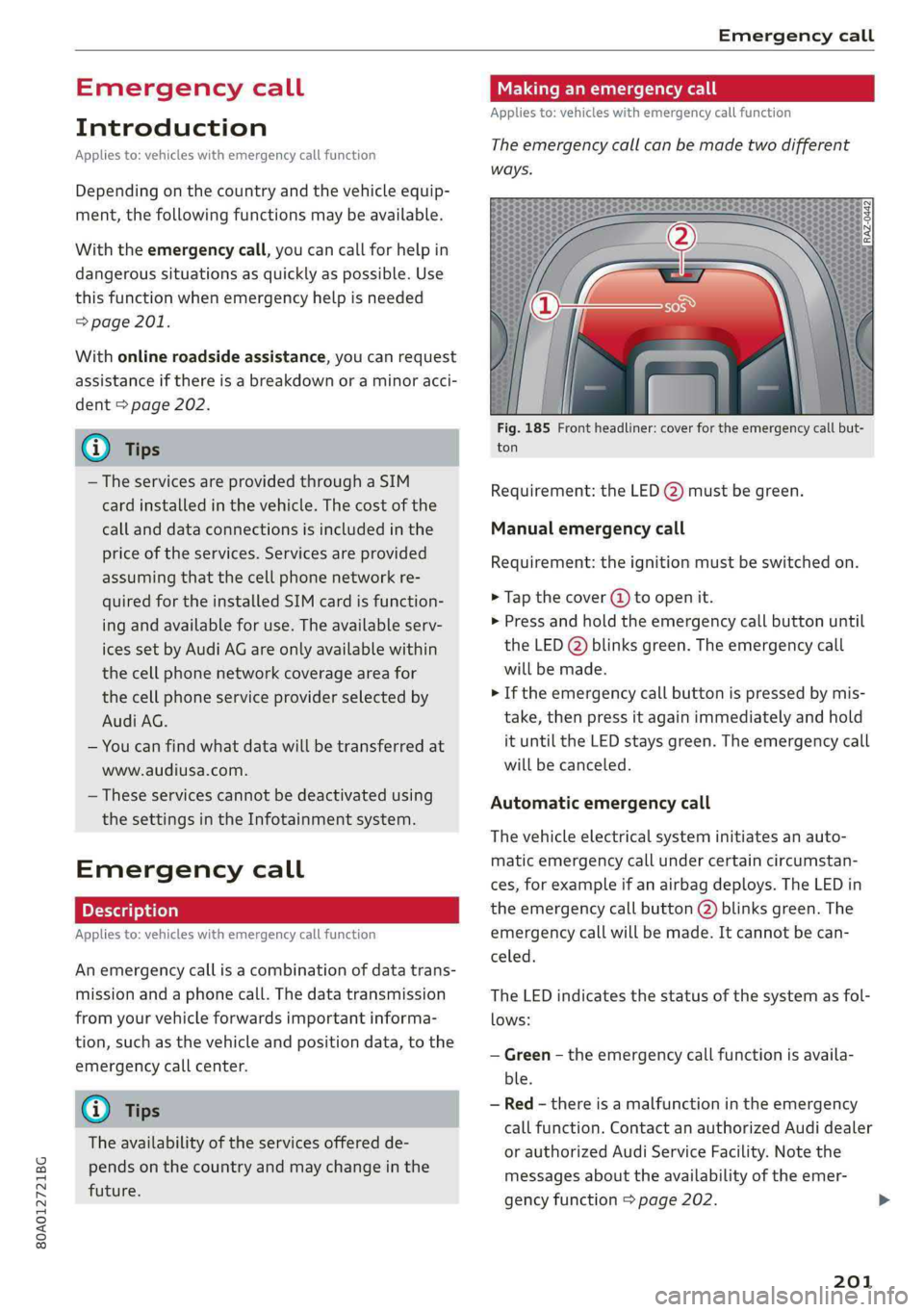
Theemergencycallcanbemadetwodifferent
ways.
Fig.185Frontheadliner:coverfortheemergencycallbut-
ton
Requirement:theLED@)mustbegreen.
Manualemergencycall
Requirement:theignitionmustbeswitchedon.
>Tapthecover(4)toopenit.
>Pressandholdthe emergencycallbuttonuntil
theLED()blinksgreen.Theemergencycall
willbemade.
>Iftheemergencycallbuttonispressedbymis-
take,thenpressitagainimmediatelyandhold
ituntiltheLEDstaysgreen.Theemergencycall
willbecanceled.
Automaticemergencycall
Thevehicleelectricalsysteminitiatesanauto-
matic emergencycallundercertaincircumstan-
ces,forexampleifanairbagdeploys.TheLEDin
the emergencycallbutton(2)blinksgreen.The
emergencycallwillbe made.Itcannot becan-
celed.
TheLEDindicatesthestatusofthesystemasfol-
lows:
—Green-theemergencycallfunctionisavaila-
ble.
—Red-thereisamalfunctionintheemergency
callfunction.ContactanauthorizedAudidealer
orauthorizedAudiServiceFacility.Notethe
messagesabouttheavailability oftheemer-
gencyfunction>page202.
201