ad blue AUDI Q5 2019 Owner's Manual
[x] Cancel search | Manufacturer: AUDI, Model Year: 2019, Model line: Q5, Model: AUDI Q5 2019Pages: 392, PDF Size: 99.86 MB
Page 189 of 392
80A012721BG
Telephone
Forward
Theselectede-mailcanbeforwardedtoadiffer-
entrecipient.
Deletethismessage*
Theselectede-mailcanbedeleted.
Readout»)
YoucanhavetheMMIreadanopene-mail.
E-mailsettings*
Todisplaywhenanewe-mailisreceived,activate
theE-mailnotifications.Newe-mailsareindicat-
edwithanenvelope&intheInfotainmentsys-
temdisplaystatusline.
Connectionmanager
See>page246.
Bluetoothsettings*
See>page248.
Onlinesettings*
See>page248.
Wi-Fisettings
See>page198.
Telephonesettings
See>page189.
@)Tips
—MessagesthataredeletedintheMMIare
alsoautomaticallydeletedintheconnected
cellphone.
—You cannotreadanymessageswhiledriv-
ing.
Listeningtovoicemail
Appliesto:vehicleswithtelephone
>Select:[MENU]button>Telephone>leftcon-
trolbutton.SelectandconfirmCalllist/Direc-
tory/Favorites>Voicemail.
Notavailableinalllanguages.
—Enteringthevoicemailnumber:enterthede-
sirednumber.SelectandconfirmOK.
—Dialingthevoicemailnumber:selectandcon-
firmVoicemail.
@)Tips
—Thisservicemustbesetupandactivatedin
advancebythecellphoneserviceprovider.
Youcanobtainmoreinformationfromyour
cellphoneserviceprovider.
— Thevoicemailnumberdependsonthecell
phoneserviceprovider.
Directory
Openingthedirectory
Appliesto:vehicleswithtelephone
Afterconnectingthecellphone,thecontactsinit
areautomaticallyimportedintotheMMI.
Pw
FYLaolecuirls
>Smith,John
Peet)
LaLe
Fig.183Directory
Requirement:youmusthaveatleastonecontact
storedinyourcellphone.
>Select:[MENU]button>Telephone>leftcon-
trolbutton>Directory.
—Calling acontact:selectandconfirmacontact
fromthedirectory.Thephonenumbersforthe
selectedcontactaredisplayed.Tomakethe
call,selectandconfirmaphonenumber.
—Freetextsearchforacontact:see>page160.
Contactsaredisplayedinalphabeticalorderand
canbesortedbyfirstorlastname>page190,
Sortorder.
ThedirectorycanbeopenedthroughtheTele-
phonemenuaswellasthroughtheNavigation*
menu.
187
Page 190 of 392
Telephone
@Tips
—Additionalinformationonfreetextsearches
canbefoundunder>page160.
—Checkforapossiblerequesttosynchronize
onyourcellphone.Requeststosynchronize
thedirectorymustbeconfirmedso that
yourcellphonecontactscan beloadedinto
theMMI.
— ThecontactdisplayintheMMIdependson
themobiledevicebeingused.Formorein-
formationonsupportedmobiledevices,vis-
itwww.audiusa.com/bluetoothorcontact
anauthorizedAudidealerorauthorizedAu-
diServiceFacility.
—Pleasenotethatonlythedirectoryfromthe
primaryphone*isalwaysdisplayed.
— Thecontactsfromthemobiledevicemay
notbetransferredinalphabeticalorder.If
therearetoomanyentries,contactswith
differentfirstlettersmaybemissinginthe
MMI.
—ThecontactsinthelocalMMImemoryare
alwaysvisibleandcan be accessedbyother
users.
Freetextsearchforacontact
Appliesto:vehicleswithtelephone
MENU >Select:button>Telephone>leftcon-
trolbutton>Directory.
>Tolimitthesearch,entertheinitialsofthecon-
tactbeingsearchedwitheachinitialseparated
byaspaceintheinputfield.Enteradditional
lettersifnecessary.
> Selectandconfirmacontactfromthedirectory.
Thephonenumbersfortheselectedcontactare
displayed.
>Tomakethecall,selectandconfirmaphone
number.
G)Tips
—Youcanscrollthroughlonglistsquicklyby
turningthecontrolknobquickly.Thescroll-
ingspeeddependsonthenumberoflisten-
tries.
—Additionalinformationonfreetextsearches
canbefoundunder>page160.
188
Showingcontactdetails*
Appliesto:vehicleswithtelephone
You canshowcontactdetailsdepending onthe
vehicleequipment.
aCeyealian)
"80049841123456
@001701239873
Paes)
{[email protected]
Fig.184Diagram:showingcontactdetails
>Select:[MENU
trolbutton.
>SelectandconfirmDirectory>acontactfrom
thedirectory.
>Select:rightcontrolbutton>Showcontactde-
tails.
button>Telephone>leftcon-
—Calling: selectandconfirmthedesiredtele-
phonenumber.
—Navigating:tostartnavigation,selectandcon-
firmthedesiredaddress.Selectandconfirm
Startrouteguidance.
Presstherightcontrolbuttontoopenadditional
optionsforthecontactdetails.
Adddestination
Tostartnavigation,selectandconfirmthede-
siredaddress.SelectandconfirmStartroute
guidance.
Storeasfavorite
See>page184,Favorites.
Sendtextmessage*
Youcansendatextmessage>page184tothe
selectedcontact.
Deletecontact
Theselectedcontactcan bedeleted.
Gi)Tips
—ContactseditedintheMMIdirectorycannot
beautomaticallyupdatedintheconnected>
Page 191 of 392
80A012721BG
Telephone
cellphone.Audirecommendseditingcell
phonecontactsdirectlyinthecellphone.
—OnlythecontactsinthelocalMMImemory
canbeeditedordeleted.
Importingandexportingcontacts
Appliesto:vehicleswithtelephone
ContactsinvCardformat(.vcf)canbeimported
intothedirectoryorexported.
Requirement:anSDcard mustbeinsertedinone
oftheSDcardreaders*>page226oraUSBstor-
agedevicemustbeconnectedtothe Audimusic
interface*>page231ortherequirementsfor
AudiconnectInfotainmentservices*mustbe
met>page192.
>Select:[MENU]button>Telephone>leftcon-
trolbutton>Directory.
>Select:rightcontrolbutton>Contactsettings.
—Importingcontactsfromastoragedevice:se-
lectandconfirmImportcontacts>SDcard
1/SDcard2orUSBdevice1/USBdevice2>
desiredcontacts>Startimport.
—Exportingcontactstoastoragedevice:select
andconfirmExportcontacts>SDcard1/SD
card2orUSBdevice1/USBdevice2>desired
contacts>Startexport.
—Selectingallcontactsatoncetoimport/
export:selectandconfirmImportcontacts/Ex-
port
contacts>SDcard1/SDcard2orUSBde-
vice1/USBdevice2> All >Startimport/Start
export.
G)Tips
—Alwaysreadthechapter>page192,Audi
connect.
—ForadditionalinformationonthemyAudi
account,visitwww.audiusa.com/myaudi.
— Theimportedcontactsarestoredinthelo-
calmemoryofthedirectory.
—Amaximumof1,000contactscanbeim-
ported.Youcancheckthedirectorymemory
capacityatanytime>page190.
+Dependsontheconnectedcellphone.
—Neversaveimportantdataonmemorycards
orUSBstoragedevices.Audiisnotresponsi-
blefordamagedorlostfilesandmedia.
—Contactsthatweredownloadedfromamo-
biledevicecannotbeexported.
—Thereshouldbenootherfilesor folderson
thestoragemediumcontainingthecontacts
tobeimported.
Additionalsettings
Telephonesettings
Appliesto:vehicleswithtelephone
>Select:[MENU]button>Telephone>rightcon-
trolbutton>Telephonesettings.
Calloptions*
Callforwarding:youcanswitchtheforwarding
ofincomingcallstoyourvoicemailortoanother
phonenumberonandoff.Youcan checkifthe
functionisactivatedordeactivatedwithCheck
status.
Callwaiting:youarealerted toanincomingcall
duringaphonecallwhenthefunctionisswitched
on[M.Youcancheckifthefunctionisactivated or
deactivatedwithCheckstatus.
Sendowntelephonenumber:sendingyour
phonenumberwithanoutgoingcallcanbeacti-
vatedanddeactivated.WiththeNetwork-de-
pendentsetting,thesettinglistedinthecon-
tractwiththecellphoneserviceproviderisused.
ThesettingsonlyapplytotheTelephonemenuin
theMMI.Pleasenotethatthesettingsonyour
mobiledevicewillapplyafterdisconnectingthe
Bluetoothconnection.Youcancheckifthefunc-
tionisactivated ordeactivatedwithChecksta-
tus.
Ringtoneandvolumesettings”)
UsingtheMutetelephonefunction,youcan
switchtheringtoneplaybackthroughtheMMI
speakeronandoff.Youcanplaytheringtonesus-
ingtheRingtonefunction.Selectandconfirm an
entryfromthelist.FortheRingtonevolume/
Messagevolumesettings,see>page250.The
189
Page 192 of 392
Telephone
Microphoneinputlevelcan beadjustedduringa
phonecallusingthecontrolknob.
iG)Tips
—Severalmobiledevicescan bepairedwith
theMMI,butonlytwo*mobiledevicescan
beactivelyconnected.
—TodeleteallpairedBluetoothdevices,the
Bluetoothfunctioncanberesettothefac-
torydefaultsettings>page246.
Additionaloptions
>Select:[MENU]button>Telephone>rightcon-
trolbutton.
Connectionmanager
See>page246.
Bluetoothsettings*
See>page248.
Onlinesettings*
See>page248.
Wi-Fisettings*
See>page198,Wi-Fisettings.
Directorysettings
Appliesto:vehicleswithtelephone
>Select:[MENU]button>Telephone>leftcon-
trolbutton>Directory>rightcontrolbutton>
Directorysettings.
Memorycapacity
ShowstheMemorycapacityforthedirectory.
Youcanmanageupto17,000contactswiththe
directory.Youcanloadupto4,000contactsfrom
yourcellphoneintoeachdirectory.Youcanalso
importupto1,000contactsfromastoragede-
vice.
Sortorder
Youcansortthecontactsinyourdirectoryalpha-
beticallyaccordingtoLastnameorFirstname.
Importcontacts/Exportcontacts
See>page189.
Downloaddirectory
ToupdatethecontactsintheMMI,youcanman-
uallydownloadyourmobiledevicecontacts.De-
pendingonthemobiledevice,youmayneedto
disconnectandreconnecttheBluetooth connec-
tiontoupdatethecontacts.
Hidecontactswithoutphonenumber
Whenthisfunctionisswitchedon,grayed-out
contacts thathavenophonenumbersstoredfor
themwillbehiddeninthedirectory.
Troubleshooting
Appliesto:vehicleswithtelephone
ProblemSolution
PairingthecellphonetotheMMI|Checkiftherequirementsforconnectingamobiledevicearemet
failed.=>page177.
=>page177.
Or:checkifyouaccidentallydeclinedthe connection setupPINon
yourcellphone.Ifnecessary,repeatthepairingprocess
Afterpairing,notallcontactsor
theMMI.
Avoidusingspecialcharactersinnames.
no
contactshavebeenloadedinto|Avoidusingcontactgroups onyourcellphone.
190
Page 193 of 392
80A012721BG
Telephone
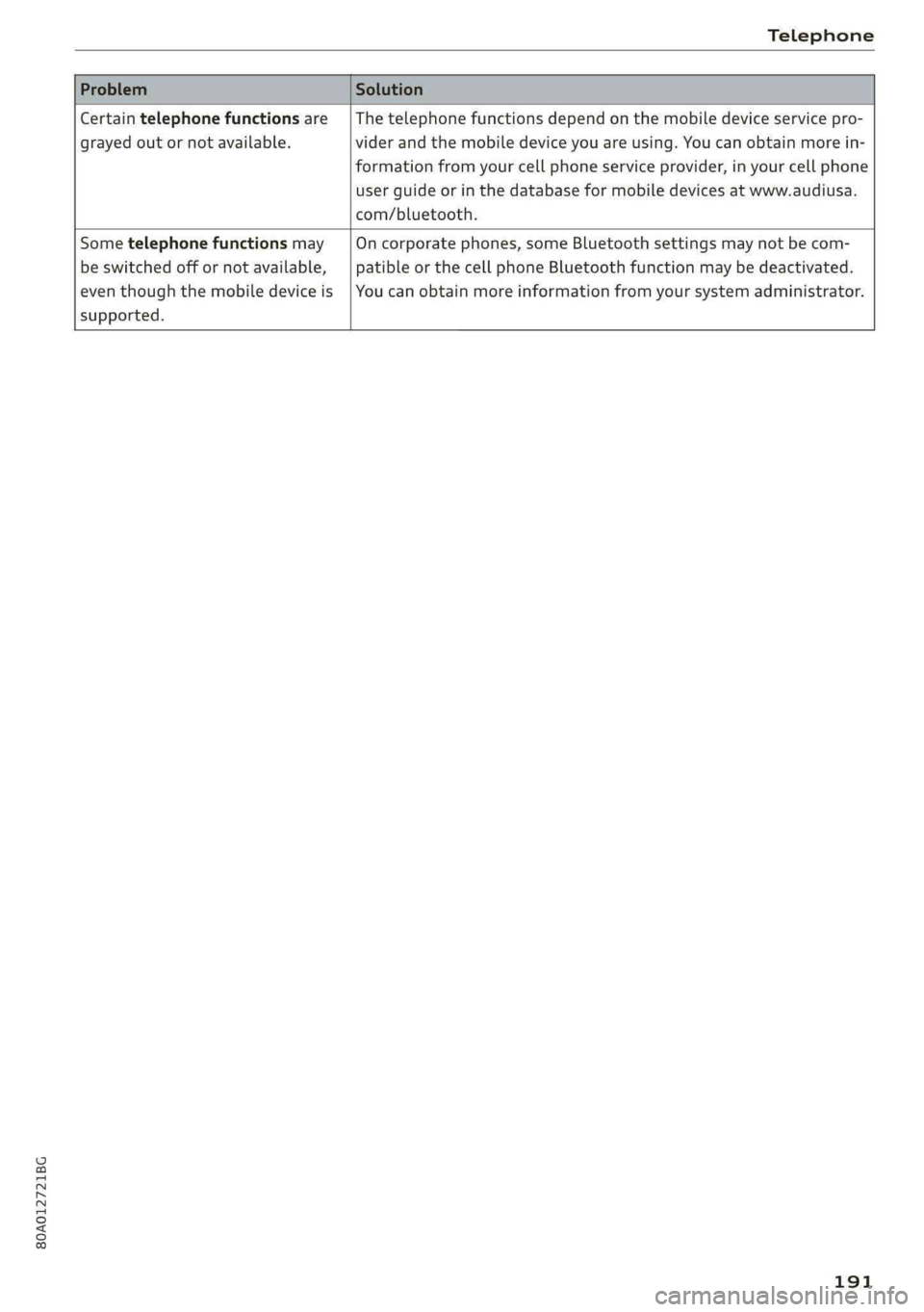
Certaintelephonefunctionsare
grayedoutornotavailable.
Thetelephonefunctionsdependonthemobiledeviceservicepro-
viderandthemobiledeviceyouareusing.Youcanobtainmorein-
formationfromyourcellphoneserviceprovider,inyourcellphone
userguideorinthedatabaseformobiledevicesatwww.audiusa.
com/bluetooth.
Sometelephonefunctionsmay
beswitchedoffornotavailable,
eventhoughthemobiledeviceis
supported.
Oncorporatephones,someBluetoothsettingsmaynot becom-
patibleorthecellphoneBluetoothfunctionmaybedeactivated.
Youcanobtainmoreinformationfromyoursystemadministrator.
191
Page 197 of 392
80A012721BG
Audiconnect
AboutAudiconnect
Hereyouwillfindlegalinformationregarding
AudiconnectInfotainmentusage.
Login
See>page193.
Connectionmanager
See>page246.
Licensesubscription
Thevalidityandexpirationdateofyourlicenses
aredisplayed.
Refresh
ThecontentoftheselectedAudiconnectInfo-
tainmentserviceortheentireAudiconnectInfo-
tainmentlistisupdated.
Dataprivacy
Requirement:theignitionmustbe switchedon.
Location,vehicle,andpersonal dataaretransmit-
tedwhenusingAudiconnectservices.
Allowingsendingofdata
—SelectandconfirmActivatedataconnection.
Thedatamoduleforthe useofallAudiconnect
serviceswillbeactive.
Restrictingsendingofdata
—SelectandconfirmActivateprivacy.Thedata
connectionislimitedordeactivateddepending
ontheequipment.ThemajorityofAudiconnect
serviceswillnot beavailable.
Thefollowinginterfacesarenotaffectedbythis
setting:Bluetooth,BluetoothLowEnergy(BLE),
Wi-Ficonnection,Audismartphoneinterface
(ASI),NearFieldCommunication(NFC),charging
communication(e-tron),ElectronicTollCollect
(ETC),ifequipped.
@)Note
Alwaysfollowtheinformationfoundin>@in
Generalinformationonpage192.
)Dependsonthecountryand equipment. Theseservices
are availableforalimitedtime.
@Tips
—Ifthetransmissionofdataislimited,data
willstillbetransmittedtoverifysubscrip-
tions.
—Ifthetransmissionofdataislimited,itwill
havethefollowingeffectsontheexchange
ofdataforAudiconnectservicesandemer-
gencycalls,ifequipped:
—Theemergencycallfunctionwillremain
availablewithoutrestrictionsandwillcon-
tinuetotransmitdata.
—Ifanonlineroadsideassistancecallisini-
tiated,nodatawillbetransmitted,buta
callwillbemade.
—IftheGeofencingAlert,SpeedAlert,
and/orValetAlertserviceshavebeenacti-
vatedbythekeyuser,thentheywillre-
mainavailablewithoutrestrictionsand
continuetotransmitdata.
Audiconnectvehicle
controlservices
Appliesto:vehicleswith Audiconnectvehiclecontrol
WithAudiconnectvehiclecontrolservices)),you
canutilizevariousservicesusingthemyAudiapp
oronlineatwww.audiusa.com/myaudi.
Z\WARNING
Alwaysfollowtheinformationfoundin>AV
inGeneralinformationonpage192.
@Tips
—Accessingspecificdataorcontrollingfunc-
tionsremotelydependsonthechargelevel
ofthevehiclebattery.Therefore,these
functionsonlyhavelimitedavailabilityafter
switchingofftheignition.
— AneSIMcardestablishestheInternetcon-
nectionforAudiconnectvehiclecontrol
services.Thecostsforthisareincludedin
thepriceofAudiconnectvehiclecontrol
195
>
Page 230 of 392
Media
—Thestatusofthedeletingprocessisshownin
theMMI.Jukeboxplaybackstopsduringthede-
letingprocessandstartsagainautomatically
oncethedeletioniscomplete.
@)Note
Donotimportaudio/videofileswhentheen-
gineisturnedoffbecausethiswilldrainthe
vehiclebattery.
@)Tips
—TracksfromaudioCDscannotbeimported
totheJukeboxforlegalreasons.
—Filesthathavealreadybeenimportedare
automaticallyrecognizedandcannotbe
copiedtotheJukeboxagain.
—Itisnotpossible toplay audio/video*files
intheCD/DVD*drivewhileimportingthem.
— TheJukeboxdoesnotprovidean export
functionduetolegalreasons.
—Filesortrackswithoutadditionalstoredin-
formationarelistedasUnknown.Audirec-
ommendsaddingadditionalinformation
(such asID3tags)toaudiofiles.
—ResettheJukeboxtothefactorydefaultset-
tingswhensellingyourvehicle>page246.
Bluetoothaudioplayer
Appliesto:vehicleswithBluetoothaudioplayer
WiththeBluetoothaudioplayer,youcanplay
musicwirelesslyfrom yourBluetooth-capable
device(suchasacellphone)throughtheMMI.
Requirement:thevehiclemustbestationaryand
theignitionmustbe switchedon.TheBluetooth
settingswillopenonyourmobiledeviceduring
theconnectionsetup.TheBluetoothfunctionand
visibilityoftheMMI>page248andmobilede-
vicemustbe switchedon.TheBluetoothaudio
player>page248mustbe switchedoninthe
MMI.
—ConnectingaBluetoothplayer:pressthe
MEDIA]button.Presstheleftcontrolbutton
untilthesourcesoverviewisdisplayed.Select
andconfirmBluetoothaudioplayer@)
=>page234,fig.211.
228
—Ifnecessary,selectandconfirm,Notconnected
>ConnectBluetoothaudioplayer.TheBlue-
toothdevicesearchstarts.Followtheinstruc-
tionsintheMMI.
—SelectandconfirmthedesiredBluetoothdevice
fromthelist.TheMMIgeneratesaPINforthe
connection.
—SelectandconfirmYes.
—EnterthePINforconnectingonyourBluetooth
device.Or:ifthePINisalreadydisplayedon
yourBluetoothdevice,confirmitintheBlue-
toothdeviceandintheMMI.Thetimeallowed
forenteringthePINislimitedtoapproximately
30seconds.
Themediaisstartedandoperatedthroughthe
mobiledeviceortheMMI,dependingonthede-
vicebeingused.
(i)Tips
—Checkforanyconnectionrequestsonyour
Bluetoothdevice.
—MultipleBluetoothaudioplayerscan be
connectedtotheMMI,butonlyonemobile
devicecanbeactive.
—BluetoothprotocolsAVRCP(1.0/1.3/1.4)
andA2DParesupported.
—NotethevolumesettingonyourBluetooth
device.Audirecommendssettingyourmo-
biledevicetothemaximumvolumewhen
usingitasaBluetoothaudioplayer.
— Thesupportedmediafunctions(suchas
shuffle)dependontheBluetoothdevicebe-
ingused.
—Formoreinformationonsupporteddevices,
visitwww.audiusa.com/bluetoothorcon-
tactanauthorizedAudidealerorauthorized
AudiServiceFacility.
Page 236 of 392
Media
UsingAudiGenuineAccessoriesisrecommended.
Audihasverifiedtheirreliability,safety,andsuit-
ability.
Wecannotevaluateorendorseotherproductsin
thisway,eveniftheproductisapprovedbyacer-
tifiedtestingagencyorgovernmentagency.
@)Note
Onlyusedevicesthatareapprovedforthe
Rear SeatEntertainmentpreparation.Unap-
provedequipmentcan causedamagetothe
vehicleelectricalsystem.
G)Tips
—Contact anauthorizedAudidealerorau-
thorizedAudiServiceFacilityforadditional
informationonAudiEntertainmentmo-
bile.
—Alwaysreadthechapter>page367.
—TheRear SeatEntertainmentpreparationis
notintendedtochargeexternalelectronic
devices.
Playingmedia
Accessingmedia
Youcanstartandoperatevariousmediathrough
theMMIcontrolpanel.
PNWTeatCeMial<1aile
fiiEeneN(ta
Fig.210Diagram:possiblesourcesintheMediamenu
Sis3<9 =|Z|
cc|
))DependingontheDVD,thismaynotbepossibleduring
playback.
234
Eltrones
SeeaerEg
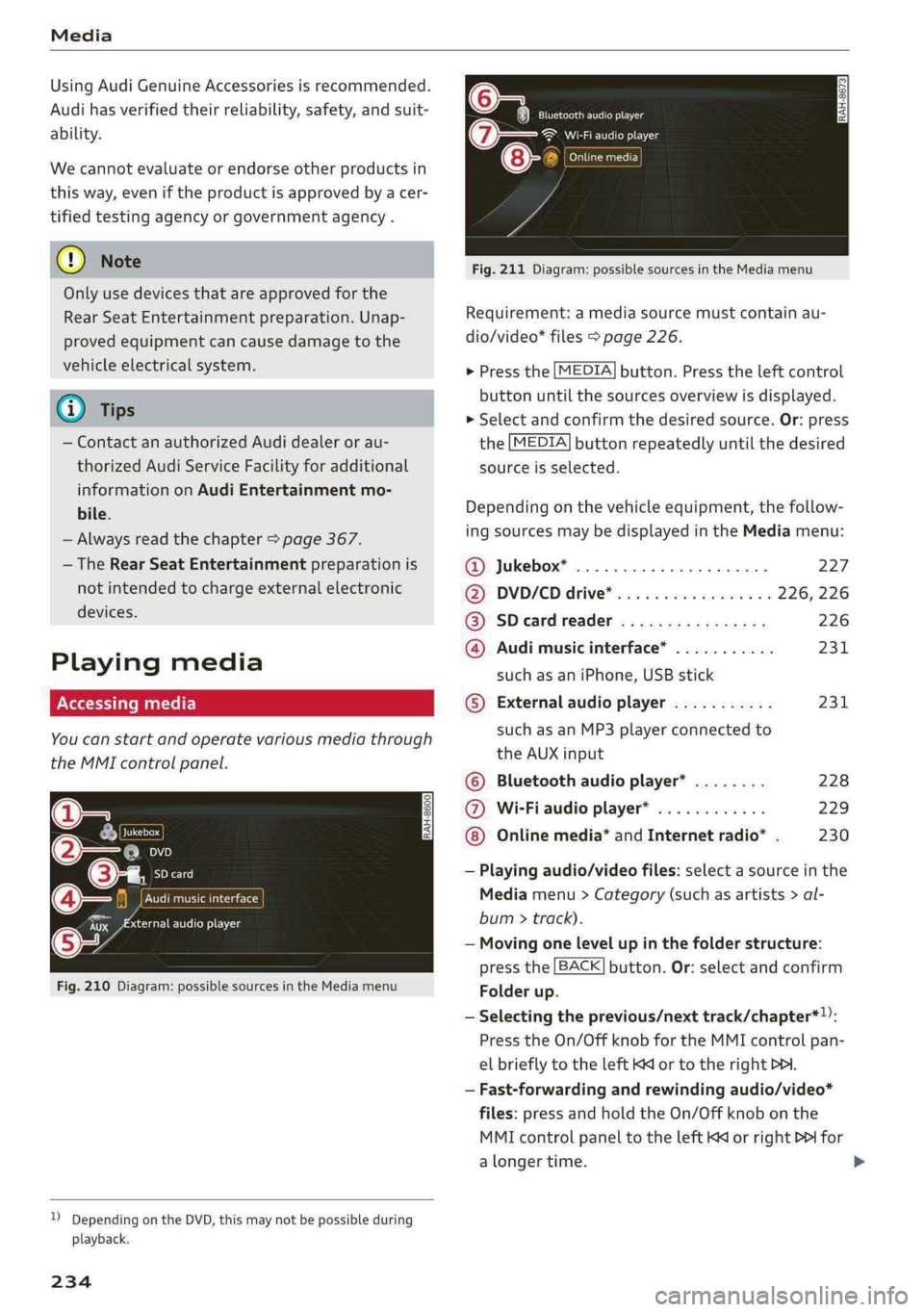
Cinetacic)
Fig.211Diagram:possiblesourcesintheMediamenu
Requirement:amediasourcemustcontainau-
dio/video*files>page226.
>Pressthe[MEDIA]button.Presstheleftcontrol
buttonuntilthesourcesoverviewisdisplayed.
>Selectandconfirmthedesiredsource.Or:press
the[MEDIA]buttonrepeatedlyuntilthedesired
sourceisselected.
Dependingonthevehicleequipment,thefollow-
ingsourcesmaybedisplayedintheMediamenu:
@Jukebox*...00...ee.227
DD,DVD/CDidtive®sinoscece¢wieones226,226
@SDeardreader................226
@Audimusicinterface*...........231
suchasaniPhone,USBstick
©®Externalaudioplayer...........231
suchasanMP3playerconnectedto
theAUXinput
©Bluetoothaudioplayer*........228
@Wi-Fiaudioplayer*............229
Onlinemedia*andInternetradio”.230
—Playingaudio/videofiles:selectasourceinthe
Mediamenu>Category(suchasartists>al-
bum>track).
—Movingonelevelupinthefolderstructure:
pressthe[BACK]button.Or:selectandconfirm
Folderup.
—Selectingtheprevious/nexttrack/chapter*)):
PresstheOn/OffknobfortheMMIcontrolpan-
elbrieflytotheleftKdor totherightPHI.
—Fast-forwardingandrewindingaudio/video*
files:pressandholdtheOn/Offknobonthe
MMIcontrolpaneltotheleftKdorrightPofor
alongertime.
Page 239 of 392
80A012721BG
Media
Playlist
ThebigB
5ke
Stories
kE
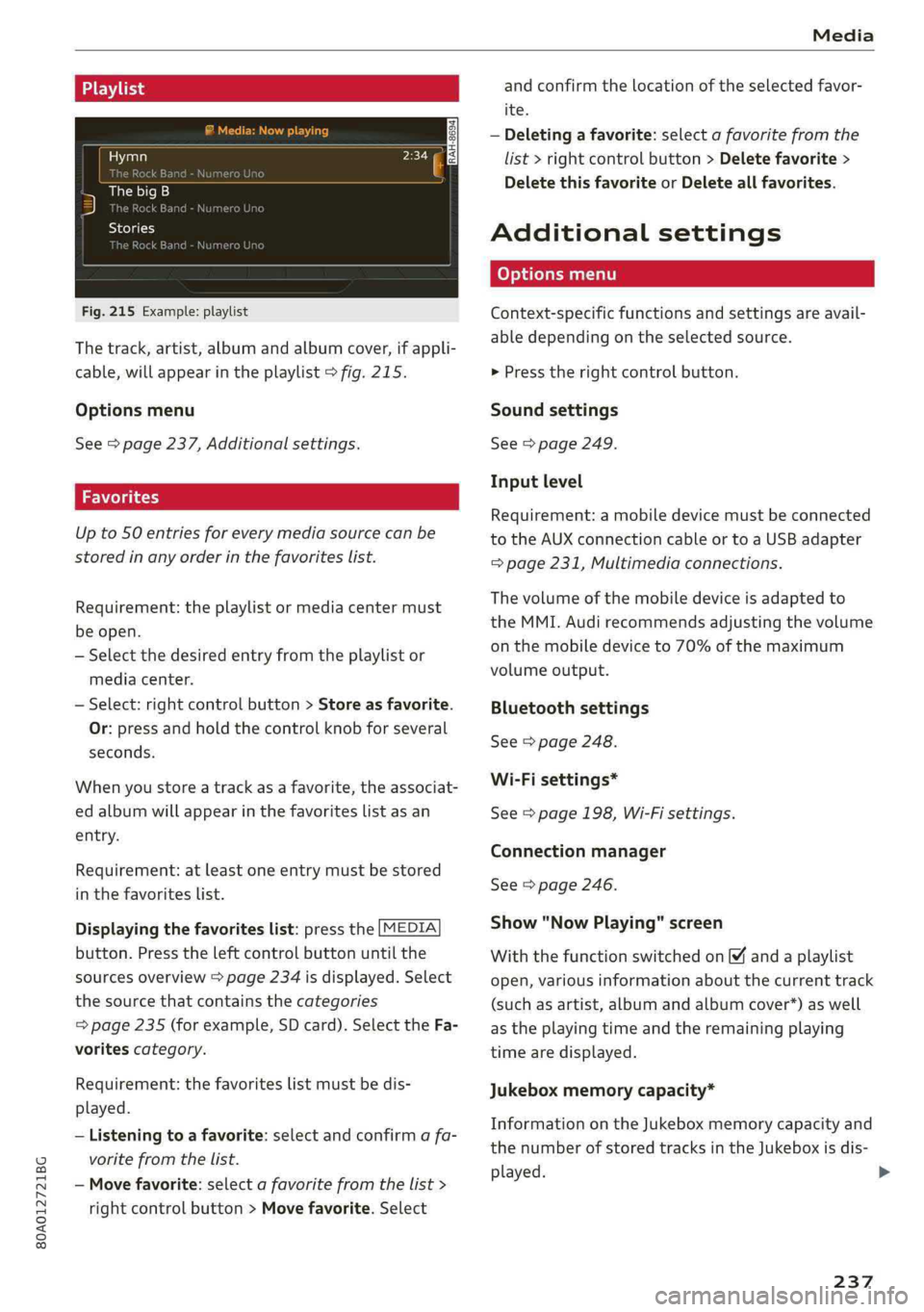
Fig.215Example:playlist
Thetrack,artist,albumandalbumcover,ifappli-
cable,willappearintheplaylist>fig.215.
Optionsmenu
See>page237,Additionalsettings.
Upto50entriesforeverymediasourcecanbe
storedinanyorderinthefavoriteslist.
Requirement:theplaylistormediacentermust
beopen.
—Selectthedesiredentryfromtheplaylistor
mediacenter.
—Select:rightcontrolbutton>Storeasfavorite.
Or:pressandholdthecontrolknobforseveral
seconds.
Whenyoustoreatrackasa favorite,theassociat-
edalbumwillappearinthefavoriteslistasan
entry.
Requirement:atleastoneentrymustbestored
inthefavoriteslist.
Displayingthefavoriteslist:pressthe[MEDIA
button.Presstheleftcontrolbuttonuntilthe
sourcesoverview>page234isdisplayed.Select
thesourcethat containsthecategories
=>page235(forexample,SDcard).SelecttheFa-
voritescategory.
Requirement:thefavoriteslistmustbedis-
played.
—Listeningtoafavorite:selectandconfirm afa-
voritefromthelist.
—Movefavorite:selectafavoritefromthelist>
rightcontrolbutton>Movefavorite.Select
andconfirm thelocationoftheselectedfavor-
ite.
—Deletingafavorite:selectafavoritefromthe
list>rightcontrolbutton>Deletefavorite>
DeletethisfavoriteorDeleteallfavorites.
Additionalsettings
Context-specificfunctionsandsettingsareavail-
abledependingontheselectedsource.
>Presstherightcontrolbutton.
Soundsettings
See>page249.
Inputlevel
Requirement:amobiledevicemustbeconnected
totheAUXconnectioncableortoaUSBadapter
=page231,Multimediaconnections.
Thevolumeofthemobiledeviceisadaptedto
theMMI.Audirecommendsadjustingthevolume
onthemobiledeviceto70%ofthemaximum
volumeoutput.
Bluetoothsettings
See>page248.
Wi-Fisettings*
See>page198,Wi-Fisettings.
Connectionmanager
See>page246.
Show"NowPlaying"screen
Withthefunctionswitchedon¥andaplaylist
open,variousinformationaboutthecurrenttrack
(suchasartist,albumandalbumcover*)aswell
astheplayingtimeandtheremainingplaying
timearedisplayed.
Jukeboxmemorycapacity*
InformationontheJukeboxmemorycapacityand
thenumberofstoredtracksintheJukeboxisdis-
played.
237
>
Page 243 of 392
80A012721BG
Media
notalwaysdisplay,dependingonthesys-
temlanguage.
— Themanufacturerofthestoragedevicecan
—SomeMTPplayerfunctionsarenotsupport-
ed,suchasratingmusictracksandvideo
provideinformationaboutits“USBDevice
Subclass”.
playback.
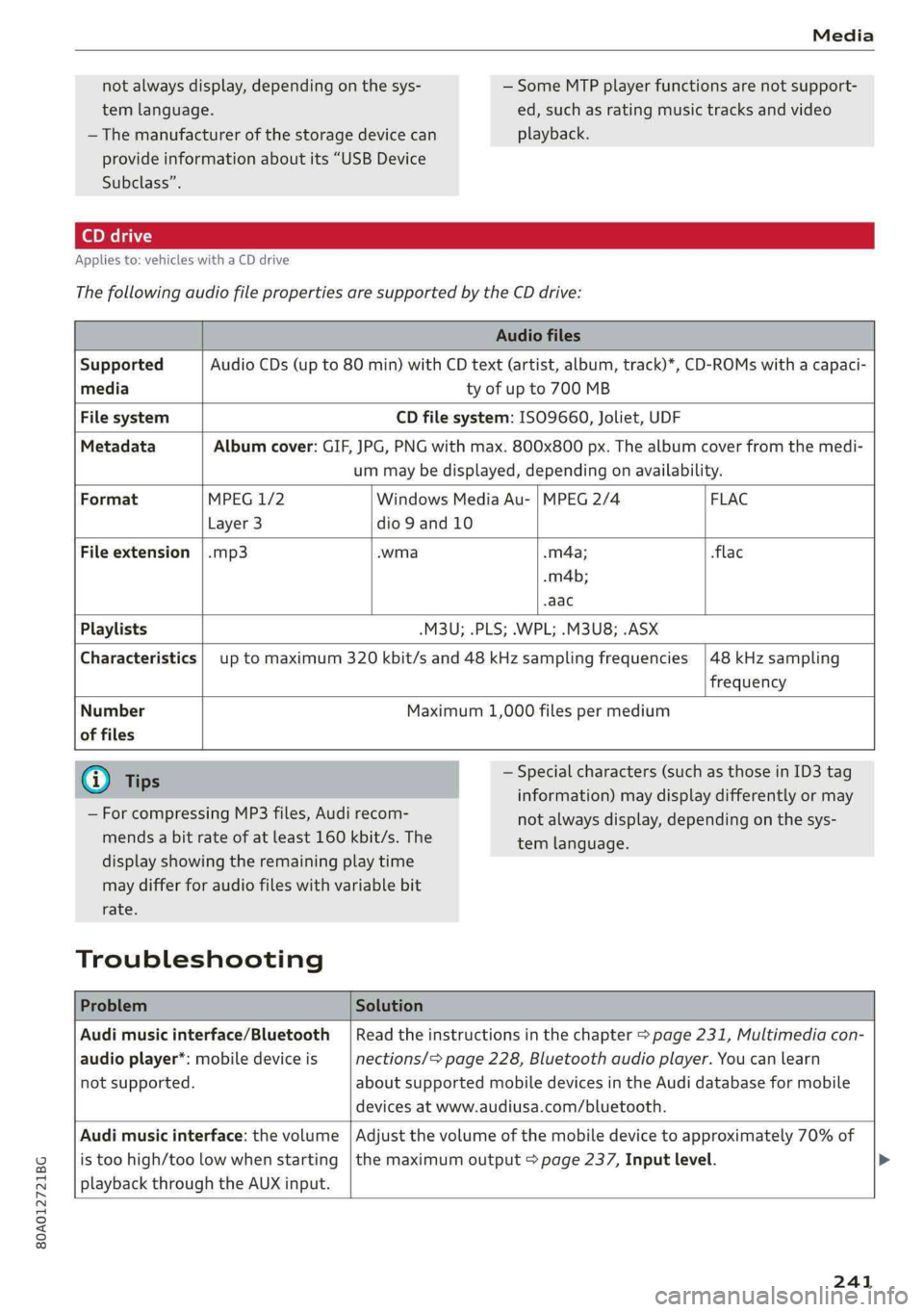
Appliesto:vehicleswithaCDdrive
ThefollowingaudiofilepropertiesaresupportedbytheCDdrive:
Audiofiles
SupportedAudioCDs(upto80min)withCDtext(artist,album,track)*,CD-ROMswithacapaci-
mediatyofupto700MB
FilesystemCDfilesystem:ISO9660,Joliet,UDF
MetadataAlbumcover:GIF,JPG,PNGwithmax.800x800px.Thealbumcoverfromthemedi-
ummaybedisplayed,dependingonavailability.
FormatMPEG1/2WindowsMediaAu-|MPEG2/4 FLAC
Layer3dio9and10
Fileextension|.mp3.wma-m4a;flac
.m4b;
-aac
Playlists-M3U;.PLS;.WPL;.M3U8;.ASX
Characteristicsuptomaximum320kbit/sand48kHzsamplingfrequencies
48kHzsampling
frequency
Number
offiles
Maximum1,000filespermedium
@Tips
—ForcompressingMP3files, Audirecom-
mendsabitrateofatleast160kbit/s.The
—Specialcharacters(such asthoseinID3tag
information)maydisplaydifferentlyormay
displayshowingtheremainingplaytime
maydifferforaudiofileswithvariablebit
rate.
Troubleshooting
notalwaysdisplay,dependingonthesys-
temlanguage.
ProblemSolution
Audimusicinterface/Bluetooth
audioplayer*:mobiledeviceis
notsupported.
Readtheinstructionsinthechapter>page231,Multimediacon-
nections/=page228,Bluetoothaudioplayer.Youcanlearn
aboutsupportedmobiledevicesinthe Audidatabaseformobile
devicesatwww.audiusa.com/bluetooth.
Audimusicinterface:thevolume
istoohigh/toolowwhenstarting
playbackthroughtheAUXinput.
Adjustthevolumeofthemobiledevicetoapproximately70%of
themaximumoutput>page237,Inputlevel.>
241