bluetooth AUDI Q5 2019 Owner's Manual
[x] Cancel search | Manufacturer: AUDI, Model Year: 2019, Model line: Q5, Model: AUDI Q5 2019Pages: 392, PDF Size: 99.86 MB
Page 197 of 392
80A012721BG
Audiconnect
AboutAudiconnect
Hereyouwillfindlegalinformationregarding
AudiconnectInfotainmentusage.
Login
See>page193.
Connectionmanager
See>page246.
Licensesubscription
Thevalidityandexpirationdateofyourlicenses
aredisplayed.
Refresh
ThecontentoftheselectedAudiconnectInfo-
tainmentserviceortheentireAudiconnectInfo-
tainmentlistisupdated.
Dataprivacy
Requirement:theignitionmustbe switchedon.
Location,vehicle,andpersonal dataaretransmit-
tedwhenusingAudiconnectservices.
Allowingsendingofdata
—SelectandconfirmActivatedataconnection.
Thedatamoduleforthe useofallAudiconnect
serviceswillbeactive.
Restrictingsendingofdata
—SelectandconfirmActivateprivacy.Thedata
connectionislimitedordeactivateddepending
ontheequipment.ThemajorityofAudiconnect
serviceswillnot beavailable.
Thefollowinginterfacesarenotaffectedbythis
setting:Bluetooth,BluetoothLowEnergy(BLE),
Wi-Ficonnection,Audismartphoneinterface
(ASI),NearFieldCommunication(NFC),charging
communication(e-tron),ElectronicTollCollect
(ETC),ifequipped.
@)Note
Alwaysfollowtheinformationfoundin>@in
Generalinformationonpage192.
)Dependsonthecountryand equipment. Theseservices
are availableforalimitedtime.
@Tips
—Ifthetransmissionofdataislimited,data
willstillbetransmittedtoverifysubscrip-
tions.
—Ifthetransmissionofdataislimited,itwill
havethefollowingeffectsontheexchange
ofdataforAudiconnectservicesandemer-
gencycalls,ifequipped:
—Theemergencycallfunctionwillremain
availablewithoutrestrictionsandwillcon-
tinuetotransmitdata.
—Ifanonlineroadsideassistancecallisini-
tiated,nodatawillbetransmitted,buta
callwillbemade.
—IftheGeofencingAlert,SpeedAlert,
and/orValetAlertserviceshavebeenacti-
vatedbythekeyuser,thentheywillre-
mainavailablewithoutrestrictionsand
continuetotransmitdata.
Audiconnectvehicle
controlservices
Appliesto:vehicleswith Audiconnectvehiclecontrol
WithAudiconnectvehiclecontrolservices)),you
canutilizevariousservicesusingthemyAudiapp
oronlineatwww.audiusa.com/myaudi.
Z\WARNING
Alwaysfollowtheinformationfoundin>AV
inGeneralinformationonpage192.
@Tips
—Accessingspecificdataorcontrollingfunc-
tionsremotelydependsonthechargelevel
ofthevehiclebattery.Therefore,these
functionsonlyhavelimitedavailabilityafter
switchingofftheignition.
— AneSIMcardestablishestheInternetcon-
nectionforAudiconnectvehiclecontrol
services.Thecostsforthisareincludedin
thepriceofAudiconnectvehiclecontrol
195
>
Page 230 of 392
Media
—Thestatusofthedeletingprocessisshownin
theMMI.Jukeboxplaybackstopsduringthede-
letingprocessandstartsagainautomatically
oncethedeletioniscomplete.
@)Note
Donotimportaudio/videofileswhentheen-
gineisturnedoffbecausethiswilldrainthe
vehiclebattery.
@)Tips
—TracksfromaudioCDscannotbeimported
totheJukeboxforlegalreasons.
—Filesthathavealreadybeenimportedare
automaticallyrecognizedandcannotbe
copiedtotheJukeboxagain.
—Itisnotpossible toplay audio/video*files
intheCD/DVD*drivewhileimportingthem.
— TheJukeboxdoesnotprovidean export
functionduetolegalreasons.
—Filesortrackswithoutadditionalstoredin-
formationarelistedasUnknown.Audirec-
ommendsaddingadditionalinformation
(such asID3tags)toaudiofiles.
—ResettheJukeboxtothefactorydefaultset-
tingswhensellingyourvehicle>page246.
Bluetoothaudioplayer
Appliesto:vehicleswithBluetoothaudioplayer
WiththeBluetoothaudioplayer,youcanplay
musicwirelesslyfrom yourBluetooth-capable
device(suchasacellphone)throughtheMMI.
Requirement:thevehiclemustbestationaryand
theignitionmustbe switchedon.TheBluetooth
settingswillopenonyourmobiledeviceduring
theconnectionsetup.TheBluetoothfunctionand
visibilityoftheMMI>page248andmobilede-
vicemustbe switchedon.TheBluetoothaudio
player>page248mustbe switchedoninthe
MMI.
—ConnectingaBluetoothplayer:pressthe
MEDIA]button.Presstheleftcontrolbutton
untilthesourcesoverviewisdisplayed.Select
andconfirmBluetoothaudioplayer@)
=>page234,fig.211.
228
—Ifnecessary,selectandconfirm,Notconnected
>ConnectBluetoothaudioplayer.TheBlue-
toothdevicesearchstarts.Followtheinstruc-
tionsintheMMI.
—SelectandconfirmthedesiredBluetoothdevice
fromthelist.TheMMIgeneratesaPINforthe
connection.
—SelectandconfirmYes.
—EnterthePINforconnectingonyourBluetooth
device.Or:ifthePINisalreadydisplayedon
yourBluetoothdevice,confirmitintheBlue-
toothdeviceandintheMMI.Thetimeallowed
forenteringthePINislimitedtoapproximately
30seconds.
Themediaisstartedandoperatedthroughthe
mobiledeviceortheMMI,dependingonthede-
vicebeingused.
(i)Tips
—Checkforanyconnectionrequestsonyour
Bluetoothdevice.
—MultipleBluetoothaudioplayerscan be
connectedtotheMMI,butonlyonemobile
devicecanbeactive.
—BluetoothprotocolsAVRCP(1.0/1.3/1.4)
andA2DParesupported.
—NotethevolumesettingonyourBluetooth
device.Audirecommendssettingyourmo-
biledevicetothemaximumvolumewhen
usingitasaBluetoothaudioplayer.
— Thesupportedmediafunctions(suchas
shuffle)dependontheBluetoothdevicebe-
ingused.
—Formoreinformationonsupporteddevices,
visitwww.audiusa.com/bluetoothorcon-
tactanauthorizedAudidealerorauthorized
AudiServiceFacility.
Page 236 of 392
Media
UsingAudiGenuineAccessoriesisrecommended.
Audihasverifiedtheirreliability,safety,andsuit-
ability.
Wecannotevaluateorendorseotherproductsin
thisway,eveniftheproductisapprovedbyacer-
tifiedtestingagencyorgovernmentagency.
@)Note
Onlyusedevicesthatareapprovedforthe
Rear SeatEntertainmentpreparation.Unap-
provedequipmentcan causedamagetothe
vehicleelectricalsystem.
G)Tips
—Contact anauthorizedAudidealerorau-
thorizedAudiServiceFacilityforadditional
informationonAudiEntertainmentmo-
bile.
—Alwaysreadthechapter>page367.
—TheRear SeatEntertainmentpreparationis
notintendedtochargeexternalelectronic
devices.
Playingmedia
Accessingmedia
Youcanstartandoperatevariousmediathrough
theMMIcontrolpanel.
PNWTeatCeMial<1aile
fiiEeneN(ta
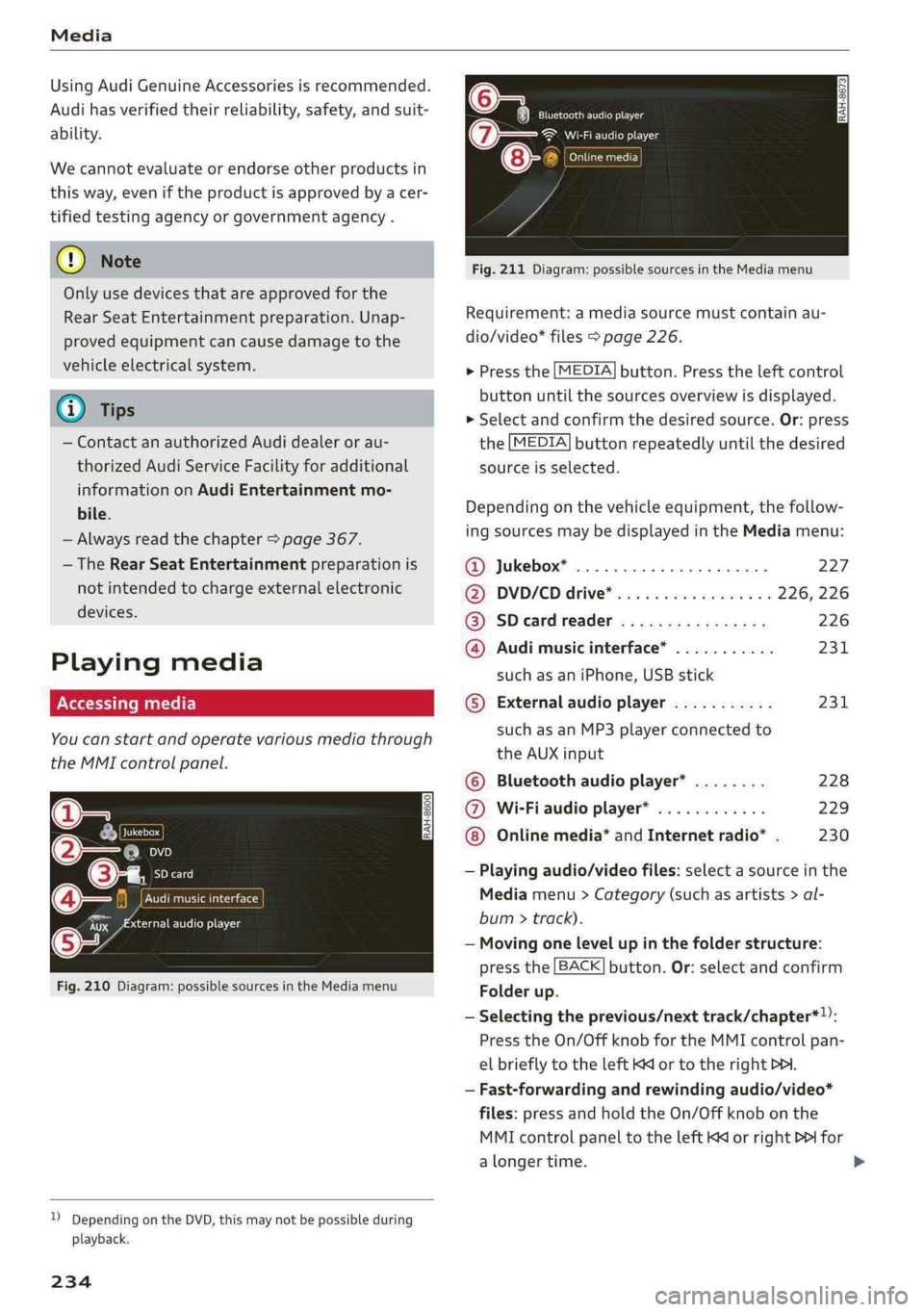
Fig.210Diagram:possiblesourcesintheMediamenu
Sis3<9 =|Z|
cc|
))DependingontheDVD,thismaynotbepossibleduring
playback.
234
Eltrones
SeeaerEg
Cinetacic)
Fig.211Diagram:possiblesourcesintheMediamenu
Requirement:amediasourcemustcontainau-
dio/video*files>page226.
>Pressthe[MEDIA]button.Presstheleftcontrol
buttonuntilthesourcesoverviewisdisplayed.
>Selectandconfirmthedesiredsource.Or:press
the[MEDIA]buttonrepeatedlyuntilthedesired
sourceisselected.
Dependingonthevehicleequipment,thefollow-
ingsourcesmaybedisplayedintheMediamenu:
@Jukebox*...00...ee.227
DD,DVD/CDidtive®sinoscece¢wieones226,226
@SDeardreader................226
@Audimusicinterface*...........231
suchasaniPhone,USBstick
©®Externalaudioplayer...........231
suchasanMP3playerconnectedto
theAUXinput
©Bluetoothaudioplayer*........228
@Wi-Fiaudioplayer*............229
Onlinemedia*andInternetradio”.230
—Playingaudio/videofiles:selectasourceinthe
Mediamenu>Category(suchasartists>al-
bum>track).
—Movingonelevelupinthefolderstructure:
pressthe[BACK]button.Or:selectandconfirm
Folderup.
—Selectingtheprevious/nexttrack/chapter*)):
PresstheOn/OffknobfortheMMIcontrolpan-
elbrieflytotheleftKdor totherightPHI.
—Fast-forwardingandrewindingaudio/video*
files:pressandholdtheOn/Offknobonthe
MMIcontrolpaneltotheleftKdorrightPofor
alongertime.
Page 239 of 392
80A012721BG
Media
Playlist
ThebigB
5ke
Stories
kE
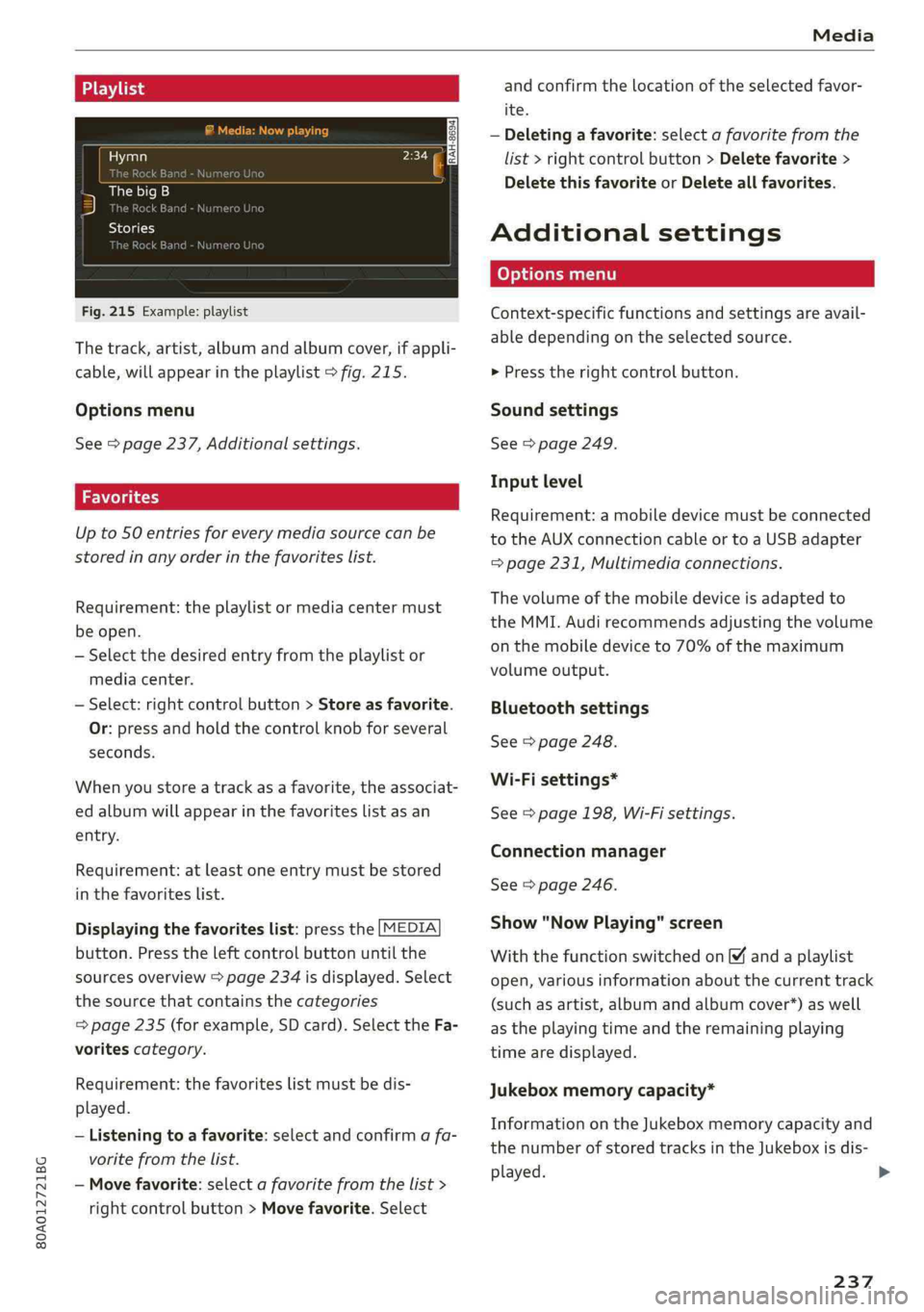
Fig.215Example:playlist
Thetrack,artist,albumandalbumcover,ifappli-
cable,willappearintheplaylist>fig.215.
Optionsmenu
See>page237,Additionalsettings.
Upto50entriesforeverymediasourcecanbe
storedinanyorderinthefavoriteslist.
Requirement:theplaylistormediacentermust
beopen.
—Selectthedesiredentryfromtheplaylistor
mediacenter.
—Select:rightcontrolbutton>Storeasfavorite.
Or:pressandholdthecontrolknobforseveral
seconds.
Whenyoustoreatrackasa favorite,theassociat-
edalbumwillappearinthefavoriteslistasan
entry.
Requirement:atleastoneentrymustbestored
inthefavoriteslist.
Displayingthefavoriteslist:pressthe[MEDIA
button.Presstheleftcontrolbuttonuntilthe
sourcesoverview>page234isdisplayed.Select
thesourcethat containsthecategories
=>page235(forexample,SDcard).SelecttheFa-
voritescategory.
Requirement:thefavoriteslistmustbedis-
played.
—Listeningtoafavorite:selectandconfirm afa-
voritefromthelist.
—Movefavorite:selectafavoritefromthelist>
rightcontrolbutton>Movefavorite.Select
andconfirm thelocationoftheselectedfavor-
ite.
—Deletingafavorite:selectafavoritefromthe
list>rightcontrolbutton>Deletefavorite>
DeletethisfavoriteorDeleteallfavorites.
Additionalsettings
Context-specificfunctionsandsettingsareavail-
abledependingontheselectedsource.
>Presstherightcontrolbutton.
Soundsettings
See>page249.
Inputlevel
Requirement:amobiledevicemustbeconnected
totheAUXconnectioncableortoaUSBadapter
=page231,Multimediaconnections.
Thevolumeofthemobiledeviceisadaptedto
theMMI.Audirecommendsadjustingthevolume
onthemobiledeviceto70%ofthemaximum
volumeoutput.
Bluetoothsettings
See>page248.
Wi-Fisettings*
See>page198,Wi-Fisettings.
Connectionmanager
See>page246.
Show"NowPlaying"screen
Withthefunctionswitchedon¥andaplaylist
open,variousinformationaboutthecurrenttrack
(suchasartist,albumandalbumcover*)aswell
astheplayingtimeandtheremainingplaying
timearedisplayed.
Jukeboxmemorycapacity*
InformationontheJukeboxmemorycapacityand
thenumberofstoredtracksintheJukeboxisdis-
played.
237
>
Page 243 of 392
80A012721BG
Media
notalwaysdisplay,dependingonthesys-
temlanguage.
— Themanufacturerofthestoragedevicecan
—SomeMTPplayerfunctionsarenotsupport-
ed,suchasratingmusictracksandvideo
provideinformationaboutits“USBDevice
Subclass”.
playback.
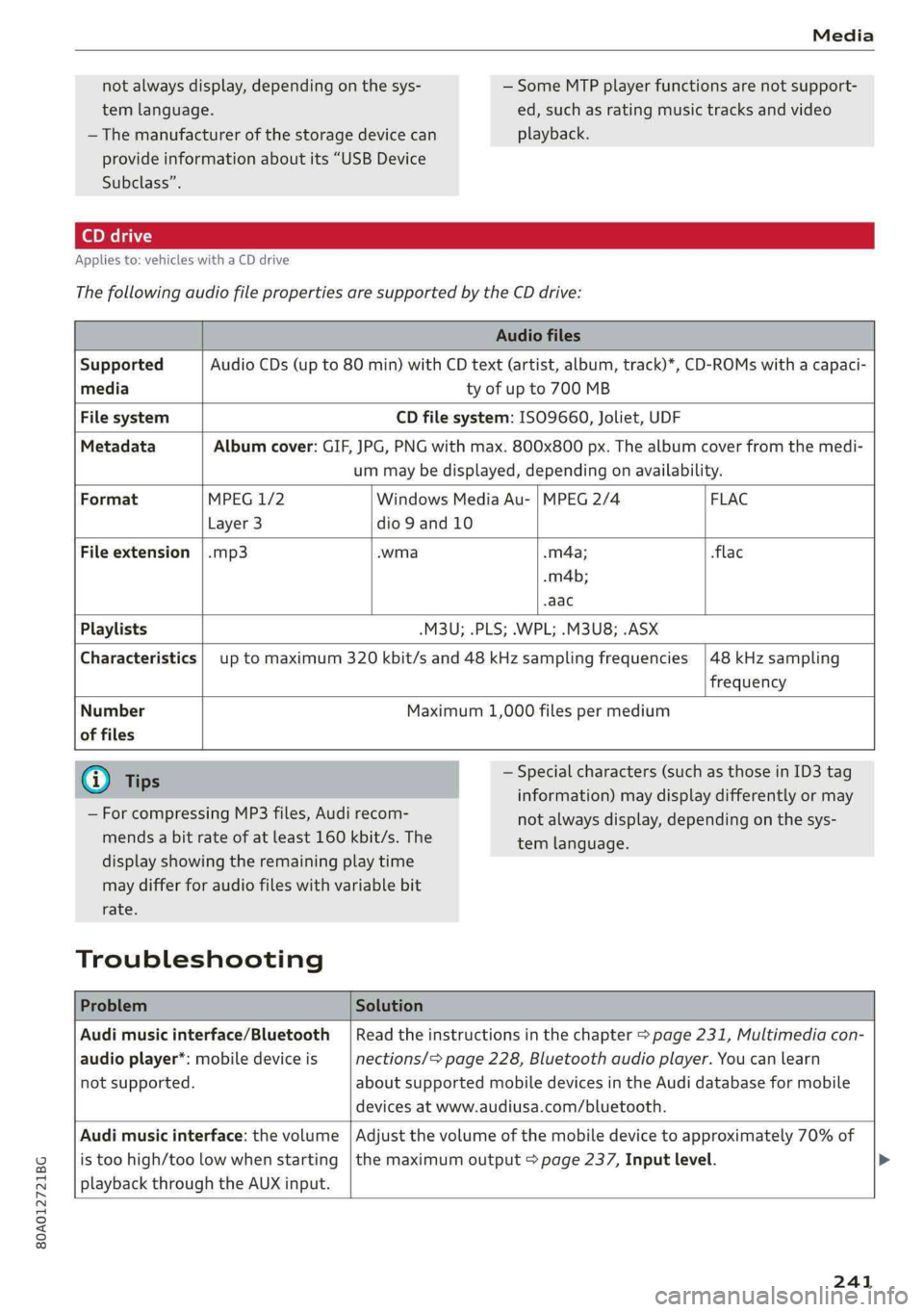
Appliesto:vehicleswithaCDdrive
ThefollowingaudiofilepropertiesaresupportedbytheCDdrive:
Audiofiles
SupportedAudioCDs(upto80min)withCDtext(artist,album,track)*,CD-ROMswithacapaci-
mediatyofupto700MB
FilesystemCDfilesystem:ISO9660,Joliet,UDF
MetadataAlbumcover:GIF,JPG,PNGwithmax.800x800px.Thealbumcoverfromthemedi-
ummaybedisplayed,dependingonavailability.
FormatMPEG1/2WindowsMediaAu-|MPEG2/4 FLAC
Layer3dio9and10
Fileextension|.mp3.wma-m4a;flac
.m4b;
-aac
Playlists-M3U;.PLS;.WPL;.M3U8;.ASX
Characteristicsuptomaximum320kbit/sand48kHzsamplingfrequencies
48kHzsampling
frequency
Number
offiles
Maximum1,000filespermedium
@Tips
—ForcompressingMP3files, Audirecom-
mendsabitrateofatleast160kbit/s.The
—Specialcharacters(such asthoseinID3tag
information)maydisplaydifferentlyormay
displayshowingtheremainingplaytime
maydifferforaudiofileswithvariablebit
rate.
Troubleshooting
notalwaysdisplay,dependingonthesys-
temlanguage.
ProblemSolution
Audimusicinterface/Bluetooth
audioplayer*:mobiledeviceis
notsupported.
Readtheinstructionsinthechapter>page231,Multimediacon-
nections/=page228,Bluetoothaudioplayer.Youcanlearn
aboutsupportedmobiledevicesinthe Audidatabaseformobile
devicesatwww.audiusa.com/bluetooth.
Audimusicinterface:thevolume
istoohigh/toolowwhenstarting
playbackthroughtheAUXinput.
Adjustthevolumeofthemobiledevicetoapproximately70%of
themaximumoutput>page237,Inputlevel.>
241
Page 244 of 392
Media
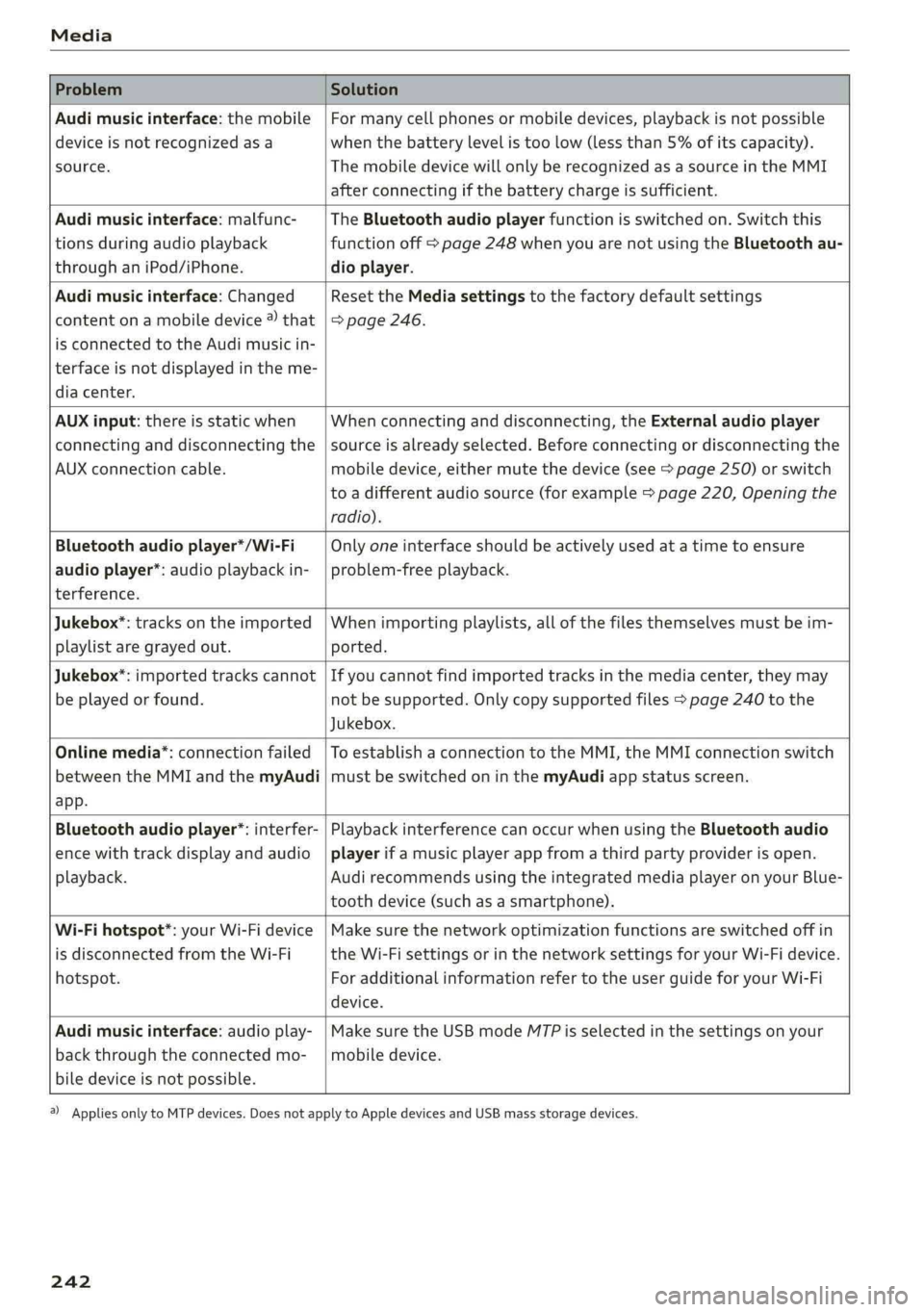
ProblemSolution
Audimusicinterface:themobile
deviceisnotrecognizedasa
source.
Formanycellphonesormobiledevices,playbackisnotpossible
when
thebatterylevelistoolow(lessthan5%ofitscapacity).
ThemobiledevicewillonlyberecognizedasasourceintheMMI
afterconnectingifthebatterychargeissufficient.
Audimusicinterface:malfunc-
tionsduringaudioplayback
throughaniPod/iPhone.
TheBluetoothaudioplayerfunctionisswitchedon.Switchthis
functionoff>page248whenyouarenotusingtheBluetoothau-
dioplayer.
Audimusicinterface:Changed
contentonamobiledevice®that
isconnectedtothe Audimusicin-
terfaceisnotdisplayedintheme-
diacenter.
Reset theMediasettingstothefactorydefaultsettings
=>page246.
AUXinput:thereisstaticwhen
connectinganddisconnectingthe
AUXconnectioncable.
Whenconnectinganddisconnecting,theExternalaudioplayer
sourceisalreadyselected.Beforeconnectingordisconnectingthe
mobiledevice,eithermutethedevice(see>page250)orswitch
toadifferentaudiosource(forexample>page220,Openingthe
radio).
Bluetoothaudioplayer*/Wi-Fi
audioplayer*:audioplaybackin-
terference.
Onlyoneinterfaceshouldbeactivelyusedatatimetoensure
problem-freeplayback.
Jukebox®*:tracks ontheimported
playlistaregrayedout.
Whenimportingplaylists,allofthefilesthemselvesmustbeim-
ported.
Jukebox*:importedtrackscannot
beplayedorfound.
Ifyoucannotfindimportedtracksinthemediacenter,theymay
notbesupported.Onlycopysupportedfiles>page240tothe
Jukebox.
Onlinemedia*:connectionfailed
betweentheMMIandthemyAudi
app.
ToestablishaconnectiontotheMMI,theMMIconnectionswitch
mustbe switchedoninthemyAudiappstatusscreen.
Bluetoothaudioplayer*:interfer-
encewithtrackdisplayandaudio
playback.
PlaybackinterferencecanoccurwhenusingtheBluetoothaudio
playerifamusicplayerappfromathirdpartyproviderisopen.
Audi
recommendsusingtheintegratedmediaplayeronyourBlue-
toothdevice(suchasasmartphone).
Wi-Fihotspot*:yourWi-Fidevice
isdisconnectedfromtheWi-Fi
hotspot.
Makesurethenetworkoptimizationfunctionsareswitchedoffin
theWi-FisettingsorinthenetworksettingsforyourWi-Fidevice.
ForadditionalinformationrefertotheuserguideforyourWi-Fi
device.
Audimusicinterface:audioplay-
backthroughtheconnectedmo-
biledeviceisnotpossible.
MakesuretheUSBmodeMTPisselectedinthesettingsonyour
mobiledevice.
2)Applies onlytoMTPdevices.DoesnotapplytoAppledevicesandUSBmassstoragedevices.
242
Page 245 of 392
80A012721BG
Audismartphoneinterface
Audismartphone
interface
Setup
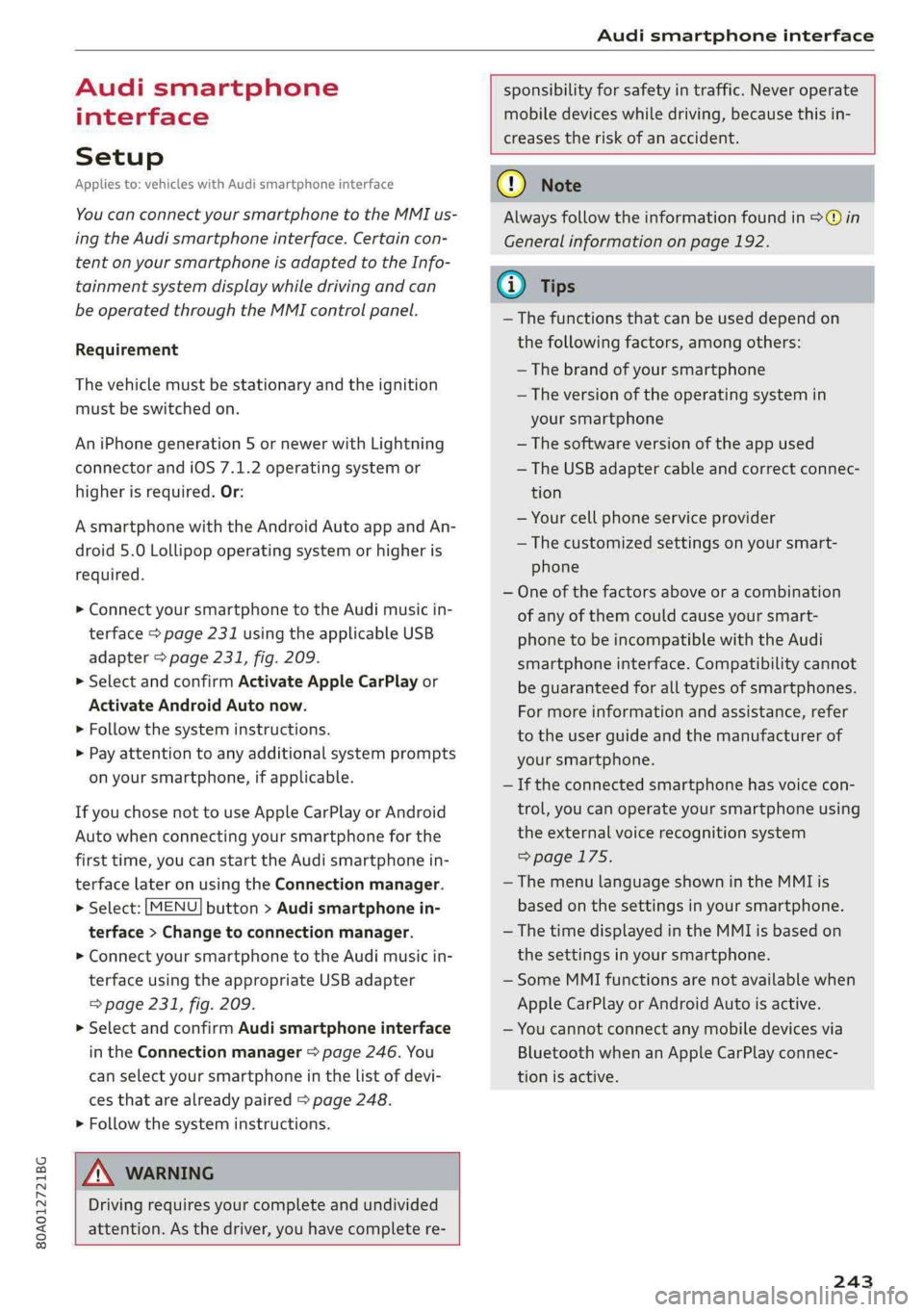
Appliesto:vehicleswithAudismartphoneinterface
YoucanconnectyoursmartphonetotheMMIus-
ingtheAudismartphoneinterface.Certaincon-
tenton yoursmartphoneisadaptedtotheInfo-
tainmentsystemdisplaywhiledrivingandcan
beoperatedthroughtheMMIcontrolpanel.
Requirement
Thevehiclemustbestationaryandtheignition
mustbe switchedon.
AniPhonegeneration5ornewerwithLightning
connectorandiOS7.1.2operatingsystemor
higherisrequired.Or:
AsmartphonewiththeAndroidAutoapp andAn-
droid5.0Lollipopoperatingsystemorhigheris
required.
>Connectyour smartphonetotheAudimusicin-
terface>page231usingtheapplicableUSB
adapter>page231,fig.209.
> SelectandconfirmActivateAppleCarPlayor
ActivateAndroidAutonow.
>Follow thesysteminstructions.
>Payattentiontoanyadditionalsystemprompts
onyoursmartphone,ifapplicable.
IfyouchosenottouseAppleCarPlayorAndroid
Autowhenconnectingyoursmartphoneforthe
firsttime,youcanstarttheAudismartphonein-
terfacelateronusingtheConnectionmanager.
>Select:[MENU]button>Audismartphonein-
terface>Changetoconnectionmanager.
>Connectyour smartphonetotheAudimusicin-
terfaceusingtheappropriateUSBadapter
=>page231,fig.209.
> SelectandconfirmAudismartphoneinterface
intheConnectionmanager>page246.You
canselectyoursmartphoneinthelistofdevi-
cesthatarealreadypaired>page248.
>Follow thesysteminstructions.
sponsibilityforsafetyintraffic.Neveroperate
mobiledeviceswhiledriving,becausethisin-
creasestheriskofanaccident.
ZAWARNING
Drivingrequiresyourcompleteandundivided
attention.Asthedriver,youhavecompletere-
@)Note
Alwaysfollowtheinformationfoundin>@in
Generalinformationonpage192.
G)Tips
—Thefunctionsthatcan beuseddependon
thefollowingfactors,amongothers:
—Thebrandofyoursmartphone
—Theversionoftheoperatingsystemin
yoursmartphone
—Thesoftwareversionoftheappused
—TheUSBadaptercableandcorrectconnec-
tion
—Yourcellphoneserviceprovider
—Thecustomizedsettingson yoursmart-
phone
— Oneofthefactorsaboveoracombination
ofanyofthemcouldcauseyoursmart-
phonetobe incompatiblewiththeAudi
smartphoneinterface.Compatibilitycannot
beguaranteedforalltypesofsmartphones.
Formoreinformationandassistance,refer
totheuserguideandthemanufacturerof
yoursmartphone.
—Iftheconnectedsmartphonehasvoicecon-
trol,youcan operateyoursmartphoneusing
theexternalvoicerecognitionsystem
=>page175.
—ThemenulanguageshownintheMMIis
basedonthesettingsinyoursmartphone.
—ThetimedisplayedintheMMIisbasedon
thesettingsinyoursmartphone.
—SomeMMIfunctionsarenotavailablewhen
AppleCarPlayorAndroidAutoisactive.
—Youcannotconnectanymobiledevicesvia
BluetoothwhenanAppleCarPlayconnec-
tionisactive.
243
Page 248 of 392
Systemsettings
Switchoffpop-up:whenthefunctionisswitched
on[¥,themessagesintheInfotainmentsystem
displayregardingthechargingstatusofyourcell
phoneinthe Audiphonebox*arehidden.There-
mindernottoforgetyourcellphonewhenleav-
ingthevehicleisalsoswitchedoff.
Tooltips
WhenthisfunctionisswitchedonM,yourMMI
showsyoutipsforinput.Thefrequencyofhow
oftenitdisplaysdecreaseswithtime.
Speechdialogsystem
Appliesto:vehicleswithvoicerecognitionsystem
Dependingonvehicleequipment,thefollowing
functions
maybeavailable:
Commanddisplay:whenthisfunctionisswitch-
edonM,theMMIwillshowyouthepossible
commandsforvoiceinputintherespective
menu.
Shortdialog:whenthisfunctionisswitchedon
,ashorterformofthepromptsisused.
Commandduringvoiceoutput*:thisfunctionis
switchedonatthefactory.Whenthisfunctionis
switchedon[M,youcansaynewcommandsdur-
ingannouncements.Youdonotneedtowaitfor
thesignaltone(beep)duringanannouncement.
Whenthefunctionisswitchedoff(J,youneedto
waitforthesignaltone(beep)tosayanewcom-
mand.
Volume:youcanadjustthevolumeofthe
promptsbyturningthecontrolknob.
Individualspeechtraining(onlywhenthevehi-
cleisstationary):youcanadaptthevoicerecog-
nitionsystemtoyourvoiceorpronunciationinor-
dertoimprovethesystem'sabilitytorecognize
yourspeech.Individualspeechtrainingiscom-
prisedof20speechentriesthatconsistofcom-
mandsandsequencesofnumbers.Youcande-
letetheprogrammedvoicetrainingwiththeRe-
setindividualspeechtrainingfunction.
Displaybrightness
YoucanadjustthebrightnessoftheInfotain-
mentsystemdisplaybyturningthecontrolknob.
246
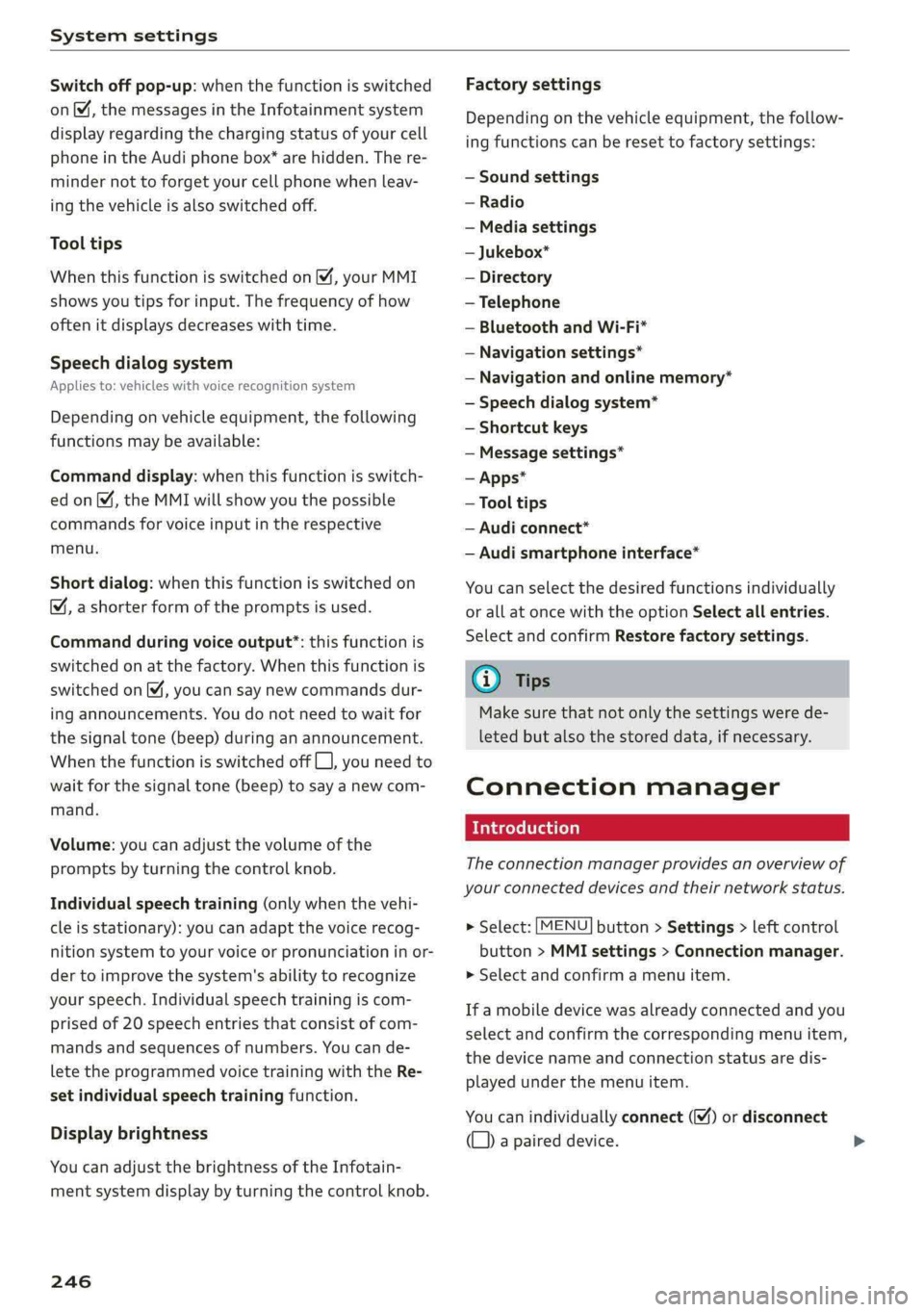
Factorysettings
Dependingonthevehicleequipment,thefollow-
ingfunctionscanberesettofactorysettings:
—Soundsettings
—Radio
—Mediasettings
—Jukebox*
—Directory
—Telephone
—BluetoothandWi-Fi*
—Navigationsettings*
—Navigationandonlinememory*
—Speechdialogsystem*
—Shortcutkeys
—Messagesettings*
—Apps*
—Tooltips
—Audiconnect*
—Audismartphoneinterface*
Youcanselectthedesiredfunctionsindividually
orallatoncewiththeoptionSelectallentries.
Selectandconfirm Restorefactorysettings.
Gi)Tips
Makesurethatnotonlythesettingswerede-
letedbutalsothestoreddata,ifnecessary.
Connectionmanager
Introduction
Theconnectionmanagerprovidesanoverviewof
yourconnecteddevicesandtheirnetworkstatus.
>Select:[MENU]button>Settings>leftcontrol
button>MMIsettings>Connectionmanager.
>Selectandconfirmamenuitem.
If amobiledevicewasalreadyconnectedandyou
selectandconfirmthecorrespondingmenuitem,
thedevicenameandconnectionstatusaredis-
playedunderthemenuitem.
Youcanindividuallyconnect(M)ordisconnect
(L))apaireddevice.
Page 249 of 392
80A012721BG
Systemsettings
Requirement:
—Thevehiclemustbestationaryandtheignition
mustbe switchedon.
—TheBluetoothsettingswillopenonyourmo-
biledeviceduringtheconnectionsetup.
—TheBluetoothfunctionandvisibility oftheMMI
=>page248andmobiledevicemustbeswitch-
edon.
—Themobiledevicetobeconnectedmustnot be
connectedtoanyotherBluetoothdevice.
aatutlevadarelit
Appliesto:vehicleswithtelephone
—Connectnewdevice:searchforandconnecta
cellphone.
—Listofdevicesalreadypaired:selectyourcell
phonefromthelistofallthedevicesthatare
alreadypaired.
YelleaveaCe
Appliesto:vehicleswithtelephone
—Connectnewdevice:searchforandconnecta
cellphone.
—Listofdevicesalreadypaired:selectyourcell
phonefromthelistofallthedevicesthatare
alreadypaired.
PELMeolaa-laaol)
Appliesto:vehicleswithAudiconnectInfotainment
—Thedataconnectionismadeusingtheembed-
dedSIMcard))>page193.Youdonotneedto
adjustanyadditionalsettings.
@)Note
Alwaysfollowtheinformationfoundin>@in
Generalinformationonpage192.
myAudiapp
Appliesto:vehicleswithAudiconnectInfotainment
Requirement:themyAudiappmustbeinstalled
andopenonyourmobiledevice.
2)SIMcardinstalledinthevehicleatthefactory.
—Connectnewdevice:searchforandconnecta
mobiledevice(such asasmartphone).
—Listofdevicesalreadypaired:selectyourmo-
biledevicefromthelistofallthedevicesthat
arealreadypaired.
Audioplayer
Appliesto:vehicleswithBluetoothorWi-Fiaudioplayer
Bluetoothplayer*
Requirement:theBluetoothfunctionandvisibili-
tymustbe switchedonintheMMI>page248
andontheBluetoothaudioplayer.
—Connectnewdevice:pressthecontrolknob.
SelectBluetoothaudioplayer.Searchforand
connectamobiledevice.
—Listofdevicesalreadypaired:selectaBlue-
toothdevicefromthelistofallthedevicesthat
arealreadypaired.
Wi-Fiaudioplayer*
Requirement:theWi-Fihotspot*ontheMMI
=page198andonyourWi-Fiaudioplayermust
be switchedon.
—Connectnewdevice:pressthecontrolknob.
SearchforandconnectaWi-Ficapabledevice.
—DisconnectWi-Fiaudioplayer:deactivatethe
Wi-FionyourWi-Ficapabledevice.Thedevice
willbeautomaticallyremovedfromthelist.
@)Note
Alwaysfollowtheinformationfoundin>@in
Generalinformationonpage192.
Appliesto:vehicleswithtelephone
Displaycontactsfromacellphone(oranaddi-
tionalcellphone).
Requirement:nocellphonescanbeconnectedto
theMMIusingtheHandsfreeprofile.
—Connectnewdevice:searchforandconnecta
newcellphone.
247
Page 250 of 392
Systemsettings
—Listofdevicesalreadypaired:selectyourcell
phonefromthelistofallthecellphonesthat
arealreadypaired.
Audismartphoneinterface
Appliesto:vehicleswithAudismartphoneinterface
—Connectyourcellphonetothe Audimusicin-
terface>page231usingaUSBadapter
=>page231,fig.209.
—Selectyourcellphonefromthelistofcell
phonesthathavealreadybeenconnected.
PelelaCe]MeyLatour
Dependingontheselectedfunction,youcanuse
therightcontrolbuttontoaccesstheavailable
additionaloptionsintheconnectionmanager.
DeleteBluetoothdevice*
Theselectedcellphone/mobiledeviceisdiscon-
nectedfromtheMMIandisremovedfromthe
listofalldevicesthatarealreadypaired.
ShowBluetoothprofiles*
YoucanConnectorDisconnecttheHandsfree,
Messages’,Directory/contactsandBluetooth
audioplayerprofilesseparately.
Bluetoothsettings*
—Bluetooth:selectandconfirmasettingforthe
Bluetooth
connectionvisibility.SelectVisible
fortheMMItobevisibletootherdevices.Se-
lectInvisiblefortheMMItonotbevisibleto
otherdevices.However,itisstillpossibletoes-
tablishaBluetoothconnectionwithpairedde-
viceswhenthevisibilityisswitchedoff.Select
Offtoturnvisibilityoff.ThenaBluetoothcon-
nectionisnotpossible.
—Bluetoothaudioplayer:whenthisfunctionis
switchedon,theBluetoothaudioplayeris
availableasasourceintheMediamenu.
—Bluetoothname:theMMIBluetoothname(for
example"AUDIMMI")isdisplayedandcanbe
changed.
Onlinesettings*
—Datausagecounter:theamountofdatapack-
etsthataresentandreceivedthroughtheMMI
248
isdisplayed.Youcanresetthedatausageinfor-
mationtozerousingtheResetdatacounter
option.
—Networkstatus:themobilenetworkprovider
fordataserviceaswellasthenetworkstatus
aredisplayed.
Wi-Fisettings*
See>page198,Wi-Fisettings.
Storingasadefaulttelephone
Appliesto:vehicleswithtelephone
Requirement:amobiledevicemustbeconnected
totheMMI>page177.
WhenthemobiledeviceisinrangeandtheBlue-
toothfunctiononthemobiledeviceandinthe
MMLisswitchedon,thismobiledevicewillbe
givenpriorityovertheotherBluetoothdevices
andwillbeconnecteddirectlytotheMMI.The
connectedmobiledeviceisdisplayedfirstinthe
devicelist.
Networksettings*
—Login:youcanchoseanAutomaticloginto
yourcellphoneserviceprovider'snetwork,or
youcanchooseaManualloginfromthelistof
availablenetworks.
—Networkselection:availablenetworksinthe
presentlocationcan beselectedundernetwork
selection.Thisfunctionisonlyavailableforthe
Manualloginsetting.
AppleCarPlaysoundsettings/AndroidAuto
soundsettings
Appliesto:vehicleswith Audismartphoneinterface
See>page249.
AboutAppleCarPlay/AboutAndroidAuto
Appliesto:vehicleswith Audismartphoneinterface
Hereyouwillfindlegalinformationregardingthe
useofAppleCarPlayorAndroidAutoandinfor-
mationaboutdevice-specificdataexchange.
DeleteAppleCarPlaydevice/DeleteAndroid
Autodevice
Appliesto:vehicleswithAudismartphoneinterface
Requirement:yourcellphonemustnotbecon-
nectedtotheAudimusicinterfacewithaUSB
adapter.