infotainment AUDI Q5 2019 Owner's Manual
[x] Cancel search | Manufacturer: AUDI, Model Year: 2019, Model line: Q5, Model: AUDI Q5 2019Pages: 392, PDF Size: 99.86 MB
Page 52 of 392

LightsandVision
thisliquidasquicklyaspossible,forexample
withawetsponge.
—Ifthelightreachingtherearviewmirroris
obstructed,theautomaticdimmingmirror
willnotfunctioncorrectly,
—Theautomaticdimmingmirrorsdonotdim
whentheinteriorlightingisturnedonor
thereversegearisselected.
Fig.45Sunvisor
Sunvisor
Thesunvisorsforthedriverandfrontpassenger
canbereleasedfromtheirmountsandturnedto-
wardthedoors>fig.45@).
Theycanalsobemovedbackandforthlength-
wiseinthisposition.
Vanitymirror
Themirrorlightswitchesonwhenthecoverover
thevanitymirror@)opens.
Appliesto:vehicleswithsunshade
<=
2 6 2
=7ao
Fig.46Reardoor:sunshade
sO
Reardoorsunshade
>Pullthesunshadeoutandattachittothere-
tainerontheupperdoorframe>fig.46.
Windshieldwipers
SeremeaROUeel
B4M-0018
B4M-0019
Fig.48Rearwindowwiperoperation
MovethewindshieldwiperleverS7tothecorre-
spondingposition:
@-Windshieldwipersoff
@-Rainsensormode.Thewindshieldwipers
switchononcethevehiclespeedexceedsapprox-
imately2mph(4km/h)anditisraining.The
higherthesensitivityoftherainsensorthatisset
(switch@)totheright),theearlierthewind-
shieldwipersreacttomoistureonthewind-
shield.Youcandeactivatetherainsensormode
intheInfotainmentsystem,whichswitchesthe
intermittentmodeon.Todothis,select:[MENU
button>Vehicle>leftcontrolbutton>Driveras-
sistance>Rainsensor.Inintermittentmode,
youcanadjusttheintervaltimeusingtheswitch
®.
@-Slowwiping
Page 54 of 392
LightsandVision
Replacingwiperblades
B8R-0379
a)
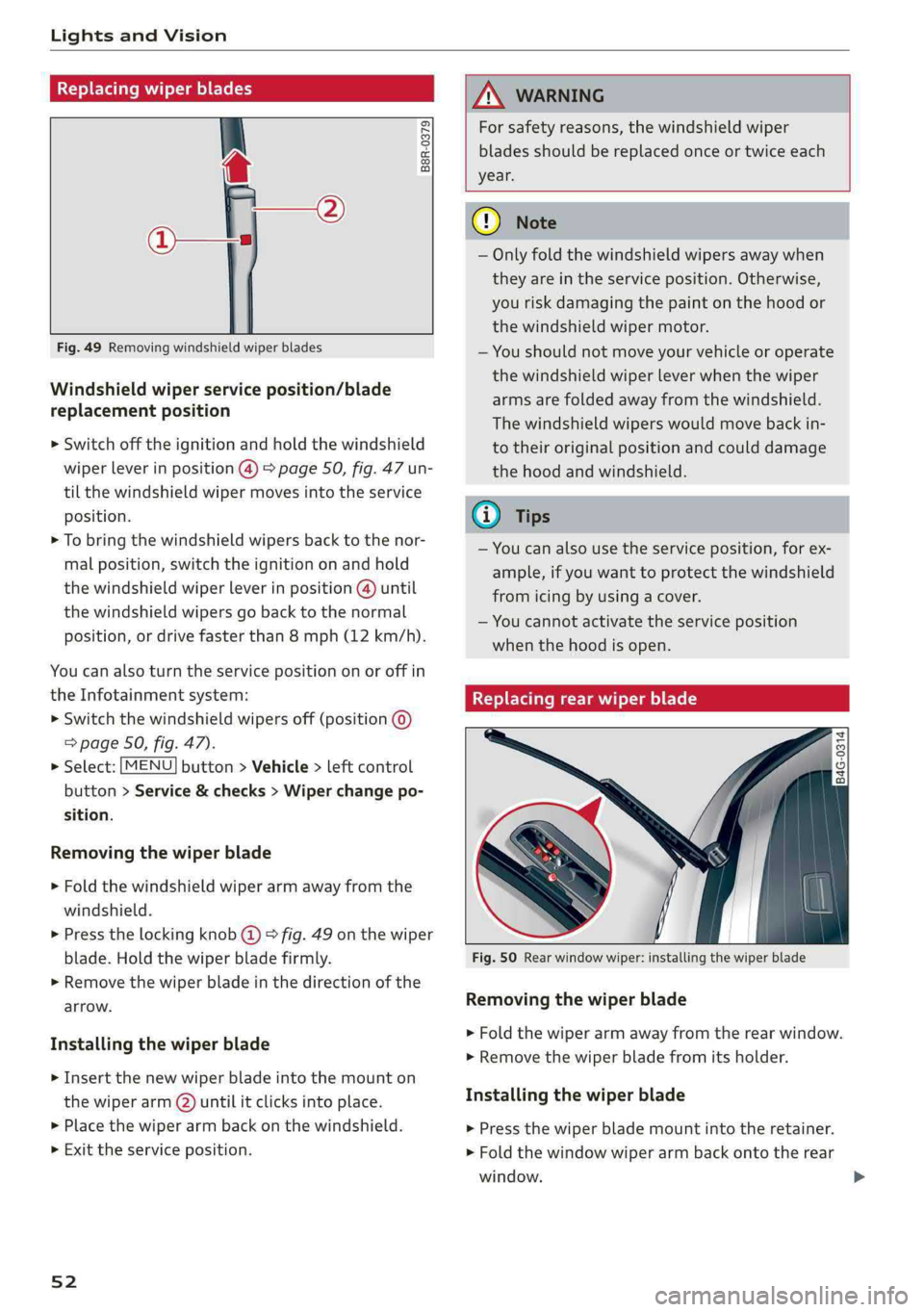
Fig.49Removingwindshieldwiperblades
Windshieldwiperserviceposition/blade
replacementposition
>Switchofftheignitionandholdthewindshield
wiperleverinposition@)>page50,fig.47un-
tilthewindshieldwipermovesintotheservice
position.
>Tobringthewindshieldwipersbacktothenor-
malposition,switchtheignitiononandhold
thewindshieldwiperleverinposition@)until
thewindshieldwipersgobacktothenormal
position,ordrivefasterthan8mph(12km/h).
Youcanalsoturntheservicepositiononoroffin
theInfotainmentsystem:
>Switchthewindshieldwipersoff(position@
=>page50,fig.47).
>Select:[MENU]button>Vehicle>leftcontrol
button>Service&checks>Wiperchangepo-
sition.
Removingthewiperblade
> Foldthewindshieldwiperarmawayfromthe
windshield.
>Pressthelockingknob@©fig.49onthewiper
blade.Holdthewiperbladefirmly.
>Removethewiperbladeinthedirectionofthe
arrow.
Installingthewiperblade
> Insertthenewwiperbladeintothemounton
thewiperarm(2)untilitclicksintoplace.
> Placethewiperarmbackonthewindshield.
>Exittheserviceposition.
52
ZAWARNING
Forsafetyreasons,thewindshieldwiper
bladesshouldbereplacedonceortwiceeach
year.
@)Note
—Onlyfoldthewindshieldwipersawaywhen
theyareintheserviceposition.Otherwise,
youriskdamagingthepaintonthehoodor
thewindshieldwipermotor.
—Youshouldnotmoveyourvehicleoroperate
thewindshieldwiperleverwhenthewiper
armsarefoldedawayfromthewindshield.
Thewindshieldwiperswouldmovebackin-
totheiroriginalpositionandcoulddamage
thehood andwindshield.
G)Tips
—Youcanalsousetheserviceposition,forex-
ample,ifyouwanttoprotectthewindshield
fromicingbyusingacover.
—Youcannotactivatetheserviceposition
whenthehoodisopen.
Replacingrearwiperblade
B4G-0314
Fig.50Rearwindowwiper:installingthewiperblade
Removingthewiperblade
>Foldthewiperarmawayfromtherearwindow.
>Removethewiperbladefromitsholder.
Installingthewiperblade
>Pressthewiperblademountintotheretainer.
> Foldthewindowwiperarmbackontotherear
window.
Page 57 of 392
80A012721BG
Seats
Seats
Generalinformation
ZAWARNING
See>page252,Drivingsafetyforimportant
information,tips,suggestionsandwarnings
thatyoushouldreadandfollowforyourown
safetyandthesafetyofyourpassengers.
Frontseats
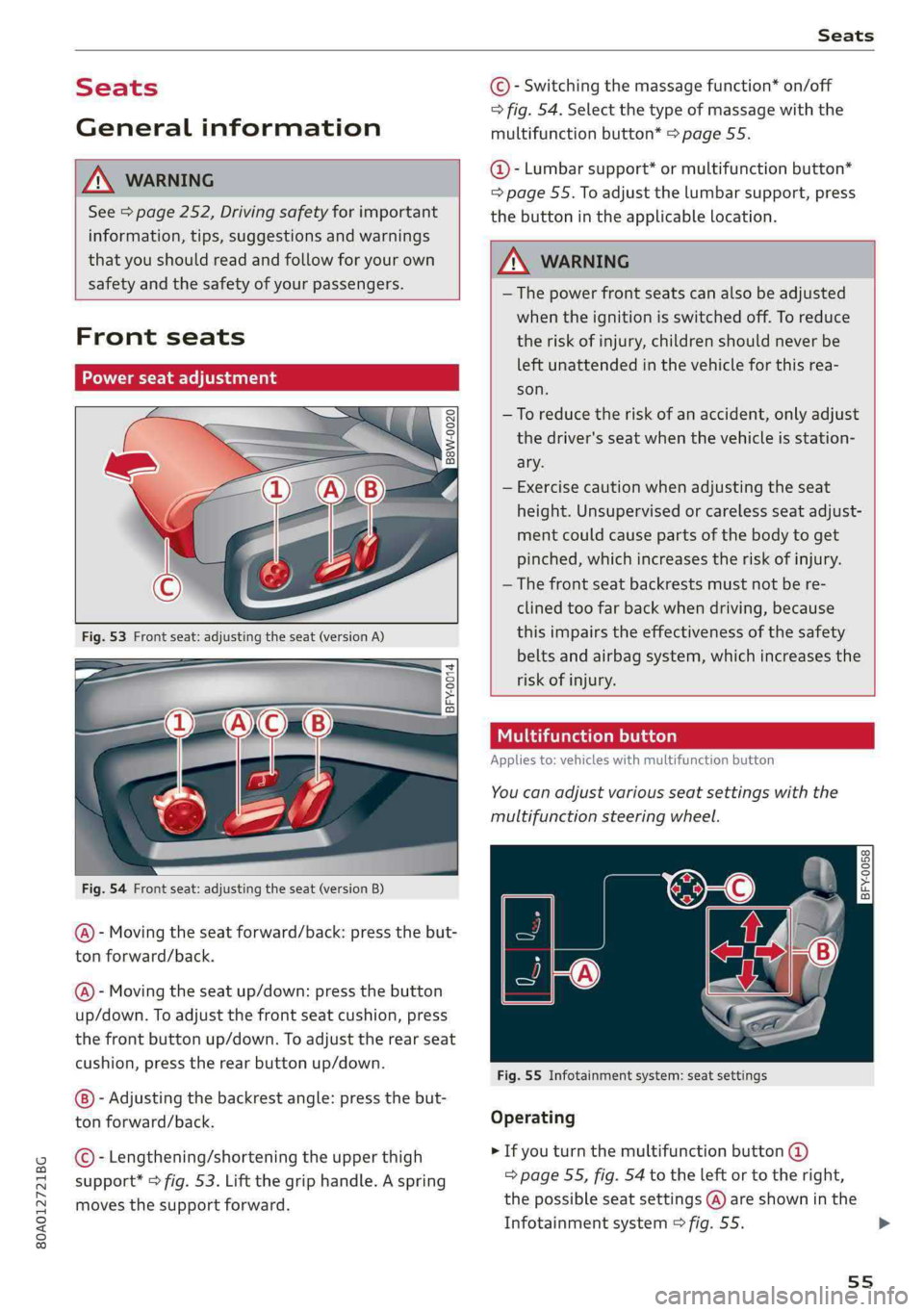
Powerseatadjustment
=
Ss
£>imo
Fig.54Frontseat:adjustingtheseat(versionB)
@-Movingtheseatforward/back:pressthebut-
ton forward/back.
@)-Movingtheseatup/down:pressthe button
up/down.Toadjustthefrontseatcushion,press
thefrontbuttonup/down.Toadjusttherearseat
cushion,presstherearbuttonup/down.
-Adjustingthebackrestangle:pressthebut-
tonforward/back.
©-Lengthening/shorteningtheupperthigh
support*>fig.53.Liftthegriphandle.Aspring
movesthesupportforward.
©-Switchingthemassagefunction*on/off
>fig.54.Selectthetypeofmassagewiththe
multifunctionbutton*>page55.
@-Lumbarsupport*ormultifunctionbutton*
=page55.Toadjustthelumbarsupport,press
thebuttonintheapplicablelocation.
Z\WARNING
— Thepowerfrontseatscanalsobeadjusted
whentheignitionisswitchedoff.To reduce
theriskofinjury,childrenshouldneverbe
leftunattendedinthevehicleforthisrea-
son.
—Toreducetheriskofanaccident,onlyadjust
thedriver'sseatwhenthevehicleisstation-
ary.
—Exercisecautionwhenadjustingtheseat
height.Unsupervisedorcarelessseatadjust-
mentcouldcausepartsofthebodytoget
pinched,whichincreasestheriskofinjury.
—Thefrontseatbackrestsmustnotbere-
clinedtoofarbackwhendriving,because
thisimpairstheeffectivenessofthesafety
beltsandairbagsystem,whichincreasesthe
riskofinjury.
Tatomelhace)
Appliesto:vehicleswithmultifunctionbutton
You canadjustvariousseatsettingswiththe
multifunctionsteeringwheel.
BFY-0058Om
C
Fig.55Infotainmentsystem:seatsettings
Operating
>Ifyouturnthemultifunctionbutton@
=>page55,fig.54totheleftortotheright,
thepossibleseatsettings@)areshowninthe
Infotainmentsystem>fig.55.>
55
Page 60 of 392
Seats
Installingtheheadrestraints
>Slidethepostsontheheadrestraintdowninto
theguidesuntilthepostsclickintoplace.
>Pressthebutton(arrow)©fig.60andslidethe
headrestraintallthewaydown.Youshould not
be
abletoremovetheheadrestraintfromthe
backrestwithoutpressingthebutton.
ZXWARNING
—Alwaysreadandfollowtheapplicablewarn-
ings>page255,Properadjustmentof
headrestraints.
—Onlyremovetheheadrestraintsfromthe
rearseatswhenitisnecessaryforinstalling
achildsafetyseat>page288,Childsafety.
Installtheheadrestraintagainimmediately
oncethechildsafetyseatisremoved.Driv-
ingwiththeheadrestraintsremovedornot
intheuprightpositionincreasestheriskof
seriousinjury.
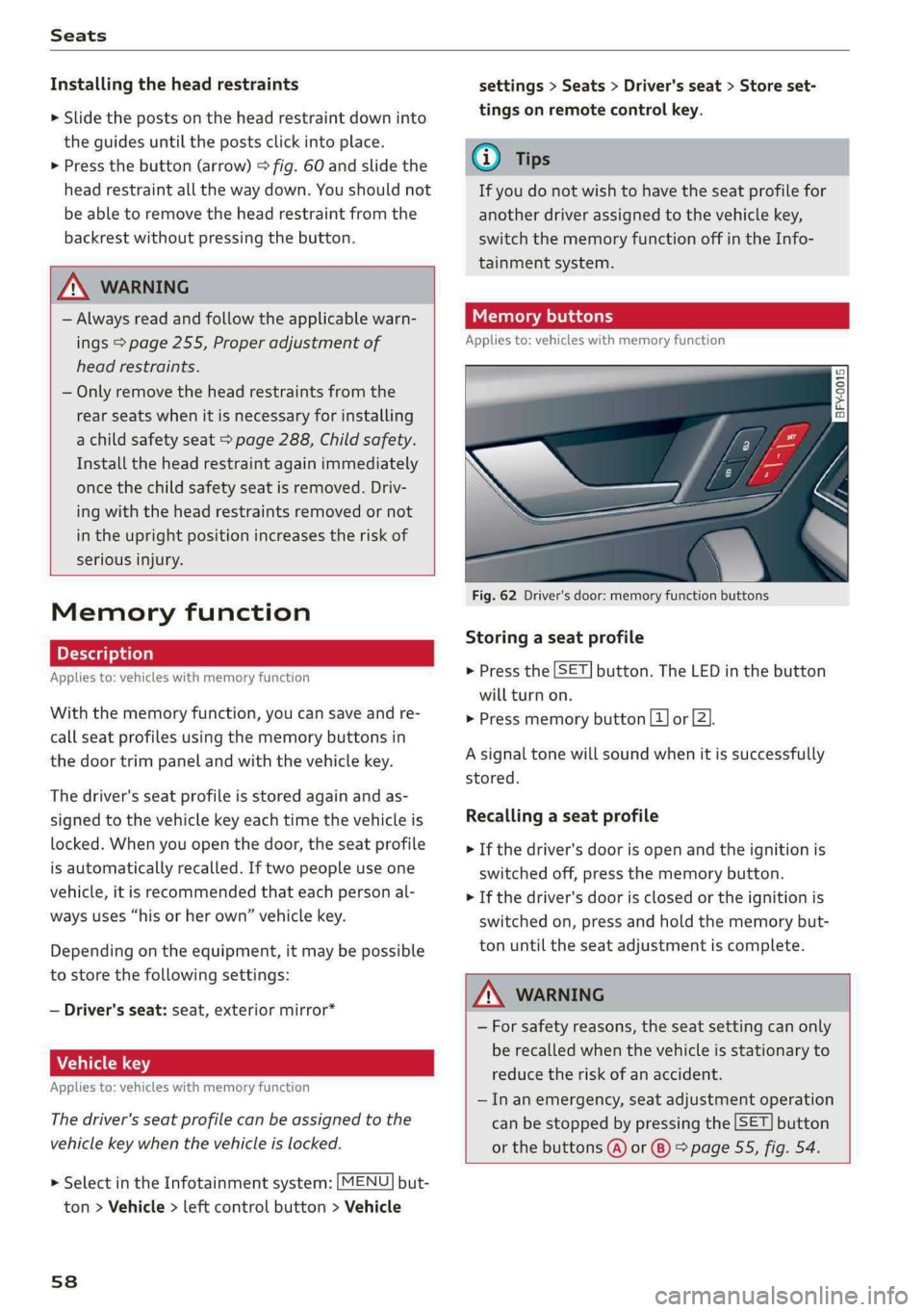
Memoryfunction
Appliesto:vehicleswithmemoryfunction
Withthememoryfunction,youcansaveandre-
call
seatprofilesusingthememorybuttonsin
thedoortrimpanelandwiththevehiclekey.
Thedriver'sseatprofileisstoredagainandas-
signedtothevehiclekeyeachtimethevehicleis
locked.Whenyouopenthedoor,theseatprofile
isautomaticallyrecalled.Iftwopeopleuseone
vehicle,itisrecommendedthateachpersonal-
waysuses“hisorherown”vehiclekey.
Dependingontheequipment,itmaybepossible
tostorethefollowingsettings:
—Driver'sseat:seat,exteriormirror*
Aaa]
Appliesto:vehicleswithmemoryfunction
Thedriver'sseatprofilecanbeassignedtothe
vehiclekeywhenthevehicleislocked.
> SelectintheInfotainmentsystem:[MENU]but-
ton>Vehicle> leftcontrolbutton>Vehicle
58
settings>Seats>Driver'sseat>Storeset-
tingsonremotecontrolkey.
@)Tips
Ifyoudonotwishtohavetheseatprofilefor
anotherdriverassignedtothevehiclekey,
switchthememoryfunctionoffintheInfo-
tainmentsystem.
iTaatelaaeliacelry
Appliesto:vehicleswithmemoryfunction
1D Ss
£ > ao
Fig.62Driver'sdoor:memoryfunctionbuttons
Storingaseatprofile
>Pressthe[SET]button.TheLEDinthe button
willturnon.
>Pressmemorybutton[1]or[2].
Asignaltonewillsoundwhenitissuccessfully
stored.
Recallingaseatprofile
>Ifthedriver's doorisopenandtheignitionis
switchedoff,pressthememorybutton.
>Ifthedriver'sdoorisclosedortheignitionis
switchedon, pressandholdthememorybut-
tonuntiltheseat adjustmentiscomplete.
Z\WARNING
—Forsafetyreasons,theseatsettingcanonly
berecalledwhenthevehicleisstationaryto
reducetheriskofanaccident.
—Inanemergency,seatadjustmentoperation
canbestoppedbypressingthe[SET]button
orthebuttons@)or®)>page55,fig.54.
Page 74 of 392
Warmandcold
&Defrosting
Thewindshieldandsidewindowsaredefrosted
orcleared ofcondensationasquicklyaspossible.
Themaximumamountofairflowsmainlyfrom
theventsbelowthewindshield.Recirculation
modeswitchesoff. Thetemperatureshouldbe
setat+72°F(+22°C)orhigher.Thetemperature
iscontrolledautomatically.
Youcanswitchthedefrosteronoroffusingthe
®button.Youcanswitchthefunctionoffby
pressingaknob(4).
@Rearwindowdefogger
Youcanswitchtherearwindowdefoggeronby
pressingthe&button.Itonlyoperateswhenthe
engineisrunning.Itswitchesoffautomatically
after10to20minutes,dependingontheoutside
temperature.
Topreventtherearwindowdefoggerfrom
switchingoffautomatically,pressandholdthe
®buttonformorethanthreeseconds.Thisis
storeduntiltheignitionisswitchedoff.
Vents
Youcanopenorclosethecenterandrearventsin
thecockpitandtheventsintherearcenter con-
soleusingtheridgedthumbwheels.Thelevers
adjustthedirectionoftheairflowfromthevents.
Residualheat
Youcanactivatetheresidualheatfunctionwhen
theignitionisswitchedoffbypressingtheknob
©.Theresidualheatfromthecoolantisusedto
heatthevehicleinterior.Theresidualheatfunc-
tionswitchesoffautomaticallyafterabout15
minutes.
Z\WARNING
—Youshouldnotuse therecirculationmode
foranextendedperiodoftime,becauseno
freshairisdrawninandthewindowscan
fogwhencoolingmodeisswitchedoff.This
increasestheriskofanaccident.
—Individualswithreducedsensitivityto pain
ortemperaturecoulddevelopburnswhen
usingtheseatheating*function.To reduce
72
theriskofinjury,theseindividualsshould
notuseseatheating*.
()Note
To reducetheriskofdamagetotheseatheat-
ing*elements,donotkneelontheseatsor
placeheavypressureononeareaoftheseat.
Basicsettings
Appliesto:Vehicleswith3-zonedeluxeautomaticclimate
control
>Toadjustbasicsettingsfortheclimatecontrol
system,selectintheInfotainmentsystem:
MENU]button>Vehicle>leftcontrolbutton>
Airconditioning
Autorecirculation
Whenswitchedon,automaticrecirculationcon-
trolstherecirculationmodeautomatically.You
mustpressthe§&buttoniffogformsonthewin-
dows.
Steeringwheelheating
Appliesto:vehicleswithsteeringwheelheating
>Pressthe@>page17,fig.11buttononthe
multifunctionsteeringwheeltoswitchthe
steeringwheelheatingonandoff.Themessage
Steeringwheelheating:on/Steeringwheel
heating:offappearsintheinstrumentcluster
display.
Thesteeringwheelheatingsettings arestored
automaticallyandassignedtothevehiclekey
thatisinuse.
Page 77 of 392
80A012721BG
Driving
Invehicleswithmemoryfunction*,thesteering
columnsettingsarestoredtogetherwiththe
seatposition.
VA
Appliesto:vehicleswithpowersteeringwheeladjustment
Easyseatentrymakesiteasiertoenterandexit
thevehiclebyadjustingthesteeringcolumnau-
tomatically.
> SelectintheInfotainmentsystem:[MENU]but-
ton>Vehicle> leftcontrolbutton>Vehicle
settings>Seats>Driver'sseat>Easyentry
function.
Wheneasyseatentryisswitchedon,thesteering
columngoesbackupintotheparkpositionwhen
theignitionisswitchedoff.Afterenteringtheve-
hicle,thesteeringcolumnreturnstothestored
positiononcetheignitionisswitchedon.
Startingandstopping
theengine
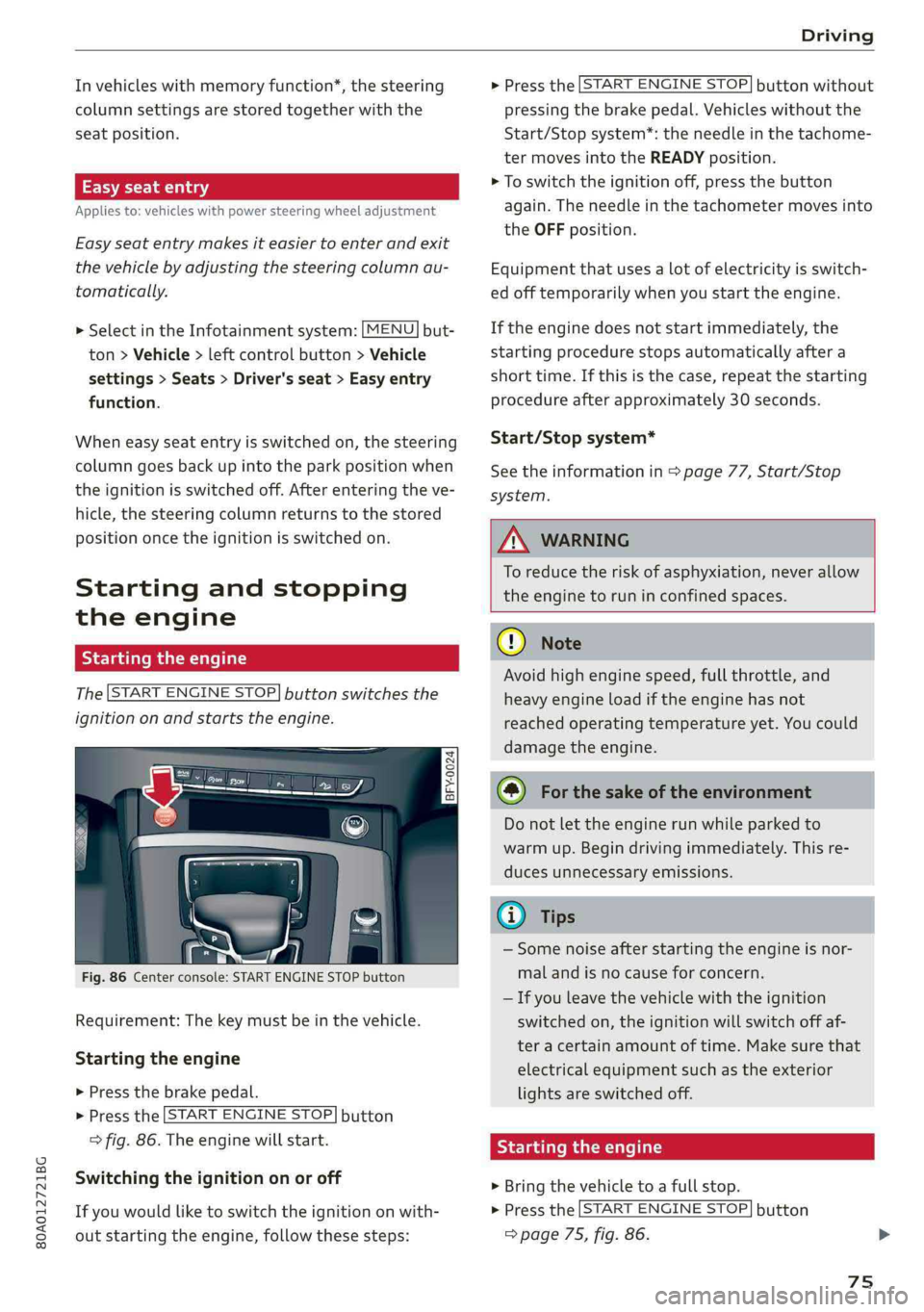
Startingtheengine
The[STARTENGINESTOP]buttonswitchesthe
ignitiononandstartstheengine.
= a 3S
poycoO
Fig.86Centerconsole:STARTENGINESTOPbutton
Requirement:Thekeymustbeinthevehicle.
Startingtheengine
>Pressthebrakepedal.
>Pressthe|STARTENGINESTOP]button
>fig.86.Theenginewillstart.
Switching theignitiononoroff
Ifyouwouldliketoswitchtheignitiononwith-
outstartingtheengine,followthesesteps:
>Pressthe[STARTENGINESTOP]buttonwithout
pressingthebrakepedal.Vehicleswithoutthe
Start/Stopsystem*:theneedleinthetachome-
termovesintotheREADYposition.
>Toswitchtheignitionoff,pressthe button
again.Theneedleinthetachometermovesinto
theOFFposition.
Equipmentthatusesalotofelectricityisswitch-
edofftemporarilywhenyoustarttheengine.
Iftheenginedoesnotstartimmediately,the
startingprocedurestopsautomaticallyaftera
shorttime.Ifthisisthecase,repeatthestarting
procedureafterapproximately30seconds.
Start/Stopsystem*
Seetheinformationin>page77,Start/Stop
system.
Z\WARNING
To reducetheriskofasphyxiation,never allow
theenginetoruninconfinedspaces.
CG)Note
Avoidhighenginespeed,fullthrottle,and
heavyengineloadiftheenginehasnot
reached
operatingtemperatureyet.Youcould
damagetheengine.
@)Forthesakeoftheenvironment
Donotlettheenginerunwhileparkedto
warmup.Begindrivingimmediately.Thisre-
ducesunnecessaryemissions.
Gi)Tips
—Somenoiseafterstartingtheengineisnor-
malandisnocauseforconcern.
—Ifyouleavethevehiclewiththeignition
switchedon,theignitionwillswitchoffaf-
teracertainamountoftime.Makesurethat
electricalequipmentsuchastheexterior
lightsareswitchedoff.
Startingtheengine
>Bringthevehicletoafullstop.
>Pressthe|STARTENGINESTOP]button
=>page75,fig.86.
75
Page 84 of 392
Driving
ZA\WARNING
Exceedingthemaximumspecifiedvaluescan
leadtoseriousinjuriesorvehicledamage.
—Allspecificationsweredeterminedbasedon
alevel,firm,andnon-slipperyroadsurface
indryweatherconditions.
—Theidealconditionsdonotapplyinoffroad
driving.Donotalwaysgoallthewayupto
themaximumvalues.Stayslightlybelow
themforsafety.
Messages
Thereisonlyonemottowhendrivingindifficult
conditionsandoffroad:driveslowlyandwith
caution!
Observethefollowingwhendrivingonunpaved
roads:
>Onlydriveinterrainthatissuitablefortheve-
hicleandyourdrivingability.Nevertakeanyun-
necessaryrisks!
>Driveslowlyandcarefully.
>Payattentiontothegroundclearanceofyour
vehicle.
>Activatetheoffroadmodeasneeded
=>page145.
>Usethehilldescentassistwhendrivingdown
steephills>page146.
Difficultterrainandoff-road
Whendrivinginunfamiliarareasandoffroad,
driveslowlyandkeeponthewatchforunexpect-
edobstacles(suchaspotholes,rocks,tree
stumps,etc.).
Topreventthevehiclefrombottomingoutandto
reducetheriskofunderbodydamage,youshould
driveacrossuneven groundononlyonesideof
thevehiclesothatonlytwoofyourwheelscross
theunevenarea,insteadofdrivingacrossthe
center oftheunevenareawithallfourwheels.
Drivequicklythroughsandyor marshyoff-road
sectionsanddonotstop,ifatallpossible.
Drivingthroughwater
Alsoreadtheinformationfoundin>page73.
82
Drivingonaslope
Ifyouareeverunabletodriveupahill,donottry
toturnaround.Drivebackdowninreversein-
stead.Otherwise youruntheriskof tippingover.
Ifthevehiclethreatenstotipoverwhendriving
acrossa slope,youmustimmediatelysteer
downhillinthedirectionoftheslope.
Donotparkyourvehicleonsteephills.
Toreducetheriskoftippingover,driveonhillsin
thedirectionofthedownwardslope(fallline)-
nevercrosswise.
Tiltangledisplay
Appliesto:vehicleswithatiltangledisplay
aireAdtic-Va
‘
tor
eesi
iesor}
Dara\
Peete
as
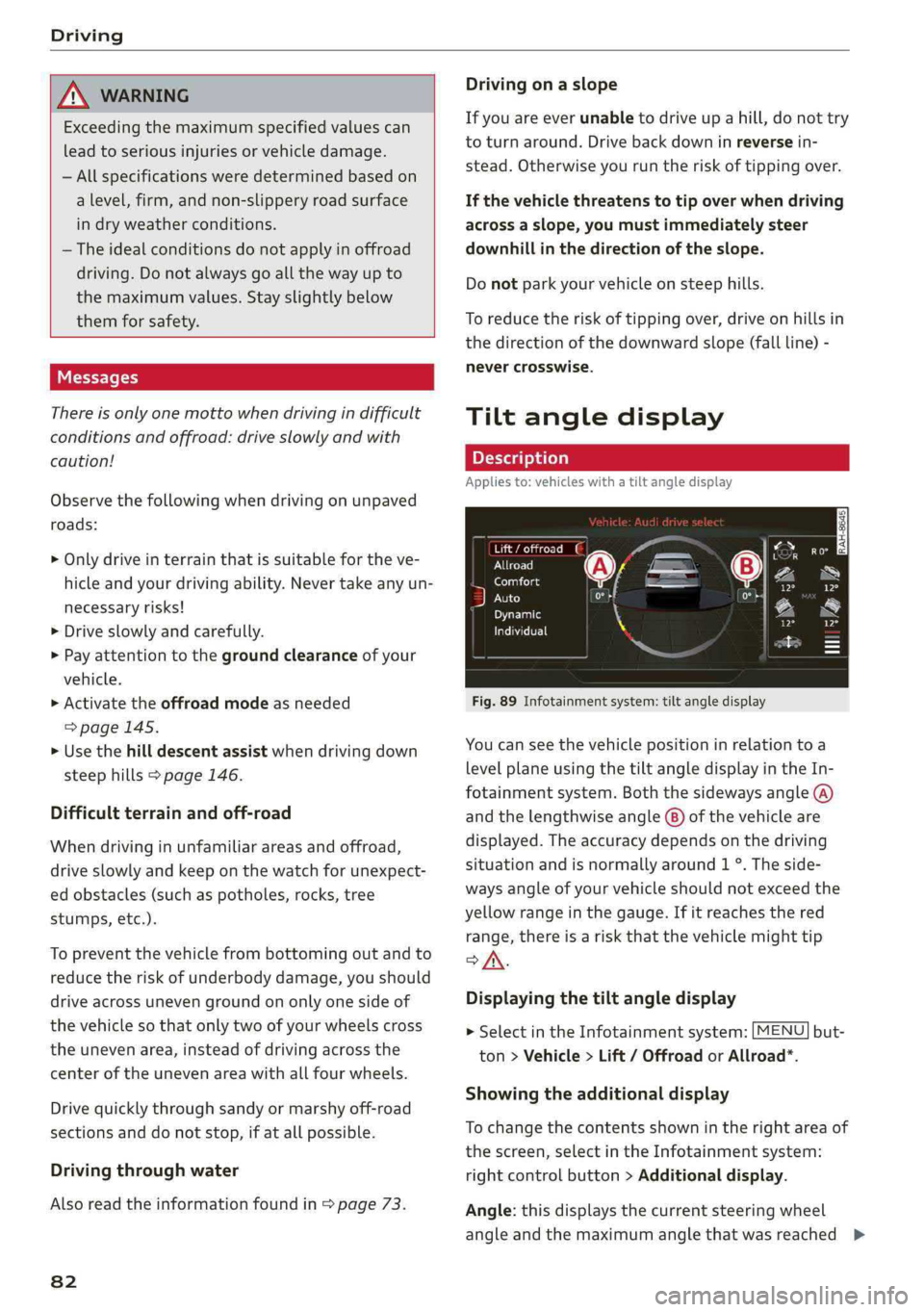
Fig.89Infotainmentsystem:tiltangledisplay
Youcanseethevehiclepositioninrelationtoa
levelplaneusingthetiltangledisplayintheIn-
fotainmentsystem.Boththesidewaysangle(A)
andthelengthwise angle(8)ofthevehicleare
displayed.Theaccuracydependsonthedriving
situationandisnormallyaround1°.Theside-
waysangleofyourvehicleshouldnotexceedthe
yellowrangeinthegauge.Ifitreachesthered
range,thereisa riskthatthevehiclemighttip
of.
Displayingthetiltangledisplay
>SelectintheInfotainmentsystem:[MENU]but-
ton>Vehicle> Lift/Offroador Allroad*.
Showingtheadditionaldisplay
Tochangethecontentsshownintherightareaof
thescreen,selectintheInfotainmentsystem:
rightcontrolbutton>Additionaldisplay.
Angle:thisdisplaysthecurrentsteeringwheel
angleandthemaximumanglethatwasreached>
Page 93 of 392
80A012721BG
Trailertowing
Tongueweight
Themaximumpermittedtongueweightofthe
trailerdrawbaronthetrailerhitchballheadmust
notbeexceeded.
Havingthetongueweighttoolowaffectstheve-
hicle'shandling.Fordrivingsafety,alwaysusing
themaximumpermittedtongueweightisrecom-
mended,butnotexceedit.Distributingthecargo
inthetrailercorrectlywillhelptoachievethis
weight.
Youcandeterminethetongueweightusinga
tongueweightscale,abathroomscale,orapub-
licweighstation,forexample.
Thepermittedtongueweightofyourvehiclecan
befoundinthevehicledocumentationorin
=>page373.
Loaddistribution
Poorcargoloadanddistributioncannegatively
impactvehiclehandling.Loadthetrailerbased
onthefollowingcriteriaasmuchaspossible:
—Storeobjectsinthevehicleluggagecompart-
ment,ifpossible.Thevehicleshould always
carrytheheaviestpossibleloadandthetrailer
shouldhavethelightestpossibleload.
—Distributetheloadinthetrailersothatthe
heavyobjectsareasclosetotheaxleaspossi-
ble.
—Secureobjectssothattheydonotslide.
—Utilizethemaximumpermittedtongueweight
ifpossible.
Tires
Set thetirepressureonyourvehiclefora“full
load”;seethetirepressuresticker>page334.If
necessary,alsoadjustthetirepressureonthe
traileraccordingtothemanufacturer'sspecifica-
tions.
Thetrailerandthevehicleshould beequipped
withwintertireswhendrivinginwintertempera-
tures.
Outsidemirrors
Ifyoucannotseethetrafficbehindthetrailer
withthestandardexterior mirrors,thenyou
mustattachadditionalexterior mirrors.Adjust
themsoyouhaveasufficientvisibilitybehind
you.
Exterior lighting
Followthelegalregulationsregardingthelight-
ingequipmentonyourtrailer.Contact anauthor-
izedAudidealerorauthorizedAudiServiceFacili-
tyformoreinformation.
Beforeyoustartdriving,checkalllightingequip-
mentonthetrailerwhileitishitchedtothevehi-
cle.
Theheadlightrangecontrolautomaticallyad-
juststhelightrangeoftheheadlights.
Safety chains
Makesurethesafetychainsarecorrectlyapplied
whenpullingatrailer.Thechainsshouldhang
enoughsothatthetrailercandrivearound
curves.However,theymustnottouchthe
ground.
Airsuspension
Appliesto:vehicleswithairsuspension
The
airsuspensionmustbeatthestandardvehi-
cleheight beforeyouadjustthetongueweight
onthetrailerandhitchthetrailer9,
=>page128,Liftingandloweringthevehicle.
Forvehicleswithafactory-installedtrailerhitch,
theairsuspensiontrailermodewillautomatically
switchonifyouconnectthetrailercabletothe
socket.
Forvehicleswitharetrofittedtrailerhitch,you
mustswitchontheairsuspensiontrailermode
manually.SelectintheInfotainmentsystem:
MENU}button>Vehicle>leftcontrolbutton>
Vehiclesettings>Airsuspension:trailer.Switch
itoffagainwhenyouarenolongertowingatrail-
er.
Youcanalsoswitchofftrailermodemanually
whiledriving,forexample,whenusingabicycle
racksystem.
Ifyouhavetodrivethroughdifficultroadcondi-
tions,youcanraisethevehicleagainafterhitch-
ingthetrailerorafteradjustingthetongue
weight.
91
Page 95 of 392
80A012721BG
Assistsystems
Assistsystems
Speedwarningsystem
Appliesto:vehicleswithspeedwarningsystem
Thespeedwarningsystemhelpsyoutostaybe-
lowaspecifiedmaximumspeedthatcanbeset,
changedordeletedintheInfotainmentsystem.
Thespeedwarningsystemwarnsyouifyouare
exceeding themaximumspeedthatyouhaveset.
Awarningtonewillsoundassoonasyourspeed
exceedsthestoredvalueslightly.Thewyin-
dicatorlightandamessageappearintheinstru-
mentclusterdisplayatthesametime.The
indicatorlightandthemessageturnoffifthe
speedfallsbackbelowthestoredmaximum
speed.
Settingathresholdisrecommendedifyouwould
liketoberemindedwhenyoureachacertain
maximumspeed.Situationswhereyoumaywant
todoso includedrivinginacountrywithagener-
alspeedlimitorifthereisaspecifiedmaximum
speedforwintertires.
Settingthewarningthreshold
>SelectintheInfotainmentsystem:[MENU]but-
ton>Vehicle> leftcontrolbutton>Driveras-
sistance>Speedwarning>Manual.
G)Tips
Regardlessofthespeedwarningsystem,you
shouldalwaysmonitoryourspeedusingthe
speedometerandmakesureyouarefollowing
thelegalspeedlimit.
Cruisecontrolsystem
Appliesto:vehicleswithcruisecontrolsystem
Thecruisecontrolsystemassiststhedriverin
maintainingaconstantspeedaboveapproxi-
mately15mph(20km/h).Thesystemmaintains
thedesiredspeedbybrakingandaccelerating.
ZAWARNING
—Alwayspayattentiontothetrafficaround
yourvehiclewhenthecruisecontrolsystem
isinoperation.Asthedriver,youarealways
responsibleforcontrollingyourvehicle
speedandthedistancebetweenyourvehicle
andothervehicles.
—Forsafetyreasons,cruisecontrolshould not
beusedinthecity,instop-and-gotraffic,on
windingroads,andwhenroadconditionsare
poor(suchasice,fog,gravel,heavyrain,
andconditionsthatcouldlead tohydroplan-
ing),becausethisincreasestheriskofanac-
cident.
—Switchthecruisecontrolofftemporarily
whendrivinginturninglanes,highwayexits,
orinconstructionzones.
—Toreducetheriskofanaccident,youshould
onlyresumethestoredspeedifitissuitable
forthecurrenttrafficconditions.
()Note
Beforedrivingdownhillalongdistanceona
steephill,decreaseyourspeedandselecta
lowergear.Thismakesuseoftheenginebrak-
ingeffectandreducestheloadplacedonthe
brakes.
@)Tips
Thebrakelightsturnonwhenthebrakesare
appliedautomatically.
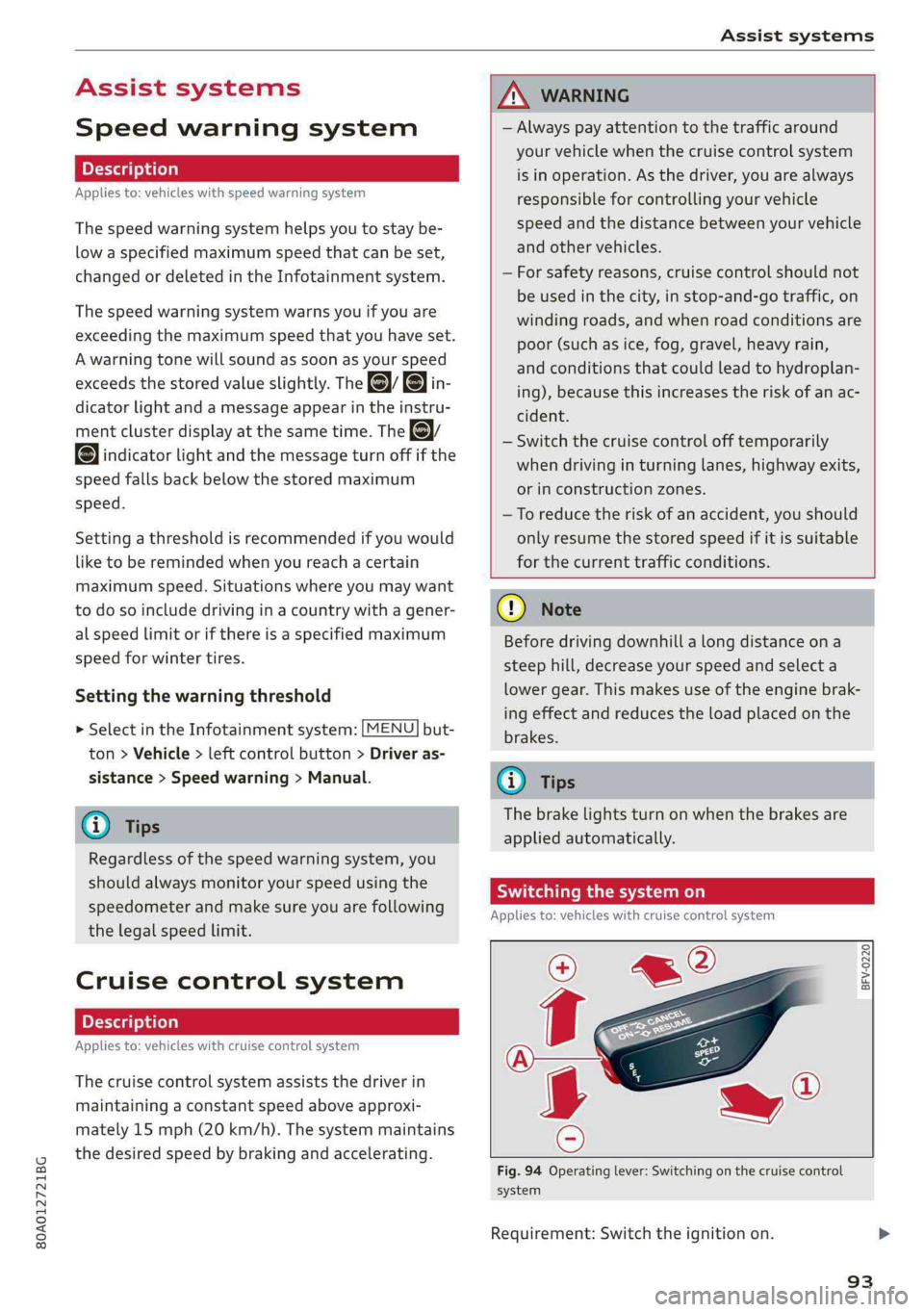
Switchingthesystemon
Appliesto:vehicleswithcruisecontrolsystem
BFV-0220
Fig.94Operatinglever:Switchingonthecruisecontrol
system
Requirement:Switchtheignitionon.
93
Page 98 of 392
Assistsystems
theinstrumentclustercanmeaneithermph
orkm/h,dependingonthecountry.
Operating
Appliesto:vehicleswithcamera-basedtrafficsignrecognition
©.aaq
|
==a
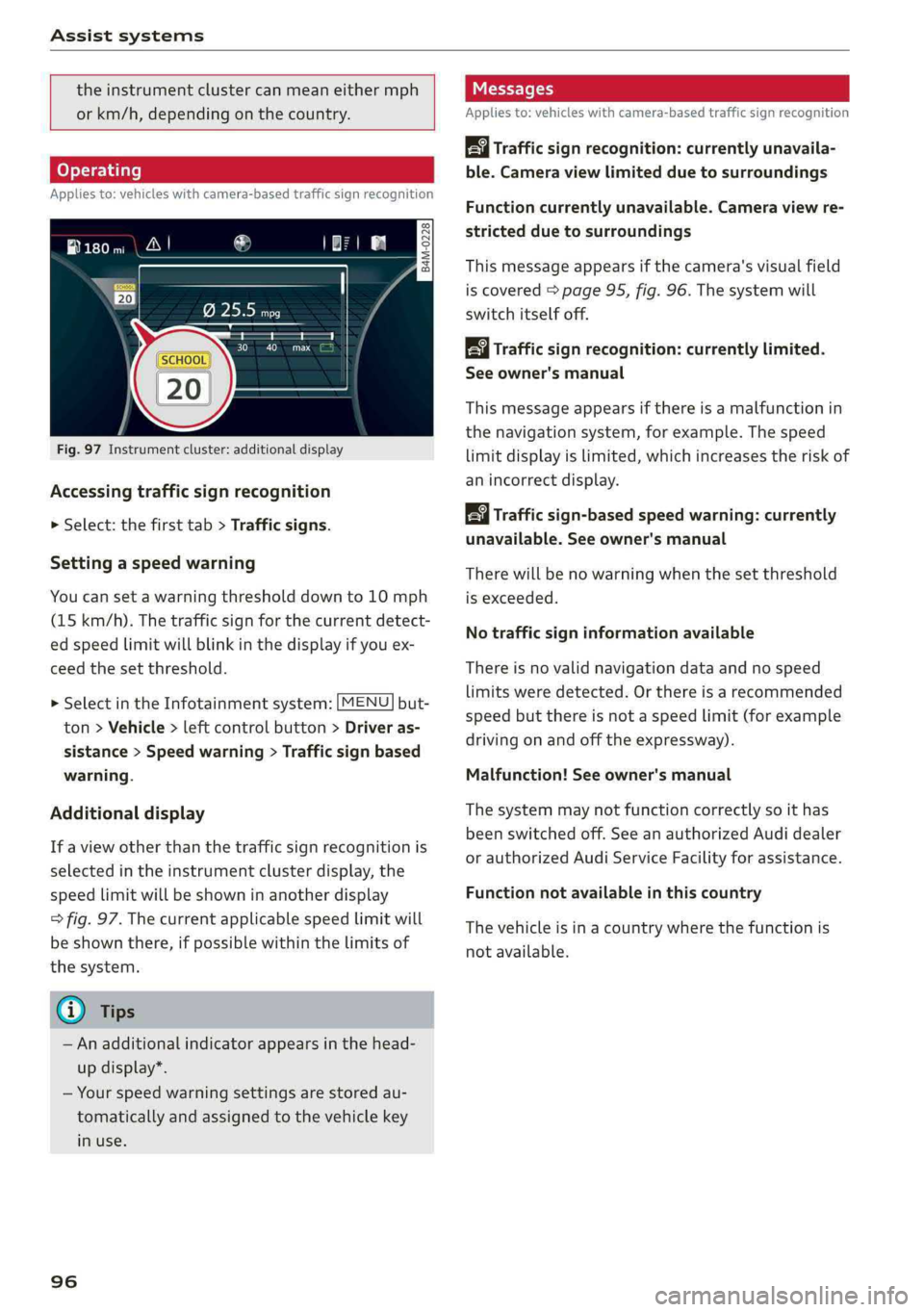
Fig.97Instrumentcluster:additionaldisplay
Accessingtrafficsignrecognition
>Select:thefirsttab>Trafficsigns.
Settingaspeedwarning
Youcansetawarningthresholddownto10mph
(15km/h).Thetrafficsignforthecurrentdetect-
edspeedlimitwillblinkinthedisplayifyouex-
ceed thesetthreshold.
> SelectintheInfotainmentsystem:[MENU]but-
ton>Vehicle>leftcontrolbutton>Driveras-
sistance>Speedwarning>Trafficsignbased
warning.
Additionaldisplay
If aviewotherthanthetrafficsignrecognitionis
selectedintheinstrumentclusterdisplay,the
speedlimitwillbeshowninanotherdisplay
=>fig.97.Thecurrentapplicablespeedlimitwill
beshownthere,ifpossiblewithinthelimitsof
thesystem.
G)Tips
—Anadditionalindicatorappearsinthehead-
updisplay*.
—Yourspeedwarningsettingsarestoredau-
tomaticallyandassignedtothevehiclekey
inuse.
96
Messages
Appliesto:vehicleswithcamera-basedtrafficsignrecognition
Trafficsign recognition:currently unavaila-
ble.Cameraviewlimitedduetosurroundings
Functioncurrentlyunavailable.Cameraviewre-
strictedduetosurroundings
Thismessageappearsifthecamera'svisualfield
iscovered>page95,fig.96.Thesystemwill
switchitselfoff.
Trafficsign recognition:currentlylimited.
Seeowner'smanual
Thismessageappearsifthereisamalfunctionin
thenavigationsystem,forexample.Thespeed
limitdisplayislimited,whichincreasestheriskof
anincorrectdisplay.
Trafficsign-basedspeedwarning:currently
unavailable.Seeowner'smanual
Therewillbenowarningwhenthesetthreshold
isexceeded.
Notrafficsigninformationavailable
Thereisnovalidnavigationdataandnospeed
limitsweredetected.Orthereisarecommended
speedbutthereisnotaspeedlimit(forexample
drivingonandoffthe expressway).
Malfunction!Seeowner'smanual
Thesystemmaynotfunctioncorrectlysoithas
beenswitchedoff.SeeanauthorizedAudidealer
orauthorizedAudiServiceFacilityforassistance.
Functionnotavailableinthiscountry
Thevehicleisinacountrywherethefunctionis
notavailable.