towing AUDI Q5 2019 Owner's Manual
[x] Cancel search | Manufacturer: AUDI, Model Year: 2019, Model line: Q5, Model: AUDI Q5 2019Pages: 392, PDF Size: 99.86 MB
Page 117 of 392
80A012721BG
Assistsystems
—Whenthedriver'sseatbeltisunfastened
—
Forseveralsecondsaftertheignitionis
switchedon
()Note
Impactsordamagetothecameramounton
thewindshieldcandisplacethesensor.Pre
sensecitycanbeimpairedbythis.Haveanau-
thorizedAudidealerorauthorizedAudiServ-
iceFacilitychecktheirfunction.
@Tips
—Youcancancelthesystembrakinginterven-
tionifyouaccelerateconsiderablyorswerve
away.
— Keepinmindthatpresensecitycanbrake
unexpectedly.Alwayssecureanycargoor
objects
thatyouaretransportingtoreduce
theriskofdamageorinjury.
—Specificpresensecityfunctionsswitchoff
whentheESCislimitedorswitchedoff
=page145orthehilldescentassistis
switchedon>page146.
—Whenthereisamalfunctioninthecamera,
thepresensecityfunctionsalsoswitchoff.
SettingsintheInfotainmentsystem
Appliesto:vehicleswithAudipresense
MENU >SelectintheInfotainmentsystem:but-
ton>Vehicle> leftcontrolbutton>Driveras-
sistance>Audipre sense.
TurnAudipresenseon/off-thepresensefunc-
tionscanbe turnedonandoff.
Ifthesystemisswitchedoff,itswitchesonagain
automaticallyoncetheignitionisswitchedon
again.
Prewarning-theearlywarningcan be switched
offorthepresensecity/frontwarningpointcan
beset(Early/Medium/Late).
Setthewarningtimefortheearlywarningto
Earlyatfirst.Ifthiscausesundesiredearlywarn-
ingstoappear,thensetthewarningtimetoMe-
dium. TheLatewarningtimeshouldonlybeset
inspecialcircumstances.
@Tips
Yoursettings areautomaticallystoredandas-
signedtothevehiclekeybeingused.
Messages
Appliesto:vehicleswithAudipresense
8Audipresense:malfunction!Pleasecontact
Service
Thismessageappearswhenthepresensefunc-
tionisaffected.Forexample,thiscouldbe
causedbyafaultysensor.Driveimmediatelyto
anauthorizedAudidealerorauthorizedAudi
ServiceFacilitytohavethe malfunctionrepaired.
Audipresense:currentlylimited.Sensor
viewlimitedduetosurroundings.Seeowner's
manual
Thismessageappearsiftheradarsensorand
cameraviewisobstructed,forexamplebyleaves,
snow,heavysprayordirt.Ifnecessary, cleanthe
sensorsandtheareaaroundthecamera
=>page102,fig.101or>page121,fig.122.
Audipresense:currentlylimited.Trailer
towingmode
Forvehicleswithatrailerhitchinstalledatthe
factory,thepresenserearfunctionsswitchoff
whentheelectricalconnectoratthesocketis
pluggedin.Thereisnoguaranteethefunctions
willswitchoffwhenusingaretrofittedtrailer
hitch.
Audipresense:currentlylimited
ThismessageappearsiftheESCisrestrictedor
switchedoff,forexample.
Audipresense:currentlylimited.Seeown-
er'smanual
Thismessageappearswhenthereisatemporary
failureinasubsystem,suchastheESC.Ifthis
messageappearsrepeatedly,drivetoanauthor-
izedAudidealerorauthorizedAudiServiceFacili-
tytohave themalfunctioncorrected.
Audipresense:emergencybrakingsystem
off
115
>
Page 124 of 392

Assistsystems
—Ifvehiclesareapproachingorbeingleft
behindveryquickly.Thedisplaymaynot
turnonintime.
—Inpoorweatherconditionssuchasheavy
rain,snoworheavymist.
—Onverywidelanes,intightcurves,orif
thereisariseintheroadsurface.Vehicles
intheadjacentlanemaynot be detected
becausetheyareoutsideofthesensor
range.
©)Note
Thesensorscanbedisplacedbyimpactsor
damagetothebumper,wheelhousingand
underbody.Thiscanimpair thesystem.Have
anauthorizedAudidealerorauthorizedAudi
ServiceFacilitychecktheirfunction.
@)Tips
—Thesesystemsarenotavailableintrailer
towingmode.Thereisnoguaranteethesys-
temswillswitchoffwhenusingaretrofitted
trailerhitch.Donot use thesefunctions
whentowingatrailer.
—Ifthewindowglassinthedriver'sdooror
frontpassenger'sdoorhasbeentinted,the
displayintheexteriormirrormaybeincor-
rect.
—Foranexplanationonconformitywiththe
FCCregulationsinthe UnitedStatesandthe
IndustryCanadaregulations,see
=>page370.
Switchingonandoff
Appliesto:vehicleswithAudisideassist
Thesystemcanbe switchedon/offintheInfo-
tainmentsystem.
>SelectintheInfotainmentsystem:[MENU]but-
ton>Vehicle>leftcontrolbutton>Driveras-
sistance>Audisideassist.Offswitchesthe
systemoff.
Ifthesystemisactivated,thedisplaysintheex-
terior
mirrorswillturnonbrieflywhentheigni-
tionisswitchedon.
122
G)Tips
Whenyouswitchsideassistonoroff,theexit
warningsystemactivatesordeactivates
=page123.
Settingthedisplaybrightness
Appliesto:vehicleswithAudisideassist
ThedisplaybrightnesscanbeadjustedintheIn-
fotainmentsystem.
>SelectintheInfotainmentsystem:[MENU]but-
ton>Vehicle> leftcontrolbutton>Driveras-
sistance>Audisideassist.
Thedisplaybrightnessadjustsautomaticallyto
thebrightnessofthesurroundings,bothinthe
informationandinthewarningstage.Invery
darkorverybrightsurroundings,theautomatic
adjustmentwillsetthedisplay totheminimum
ormaximumlevel.Insuchcases,youmaynotice
nochangewhenadjustingthebrightness, orthe
changemayonlybenoticeableoncethesur-
roundingschange.
Adjustthebrightnesstoalevelwherethedisplay
intheinformationstagewillnotdisruptyour
view
ahead.Ifyouchangethebrightness,thedis-
playintheexteriormirrorwillbrieflyshowthe
brightnesslevelintheinformationstage.The
brightnessofthewarningstageislinkedtothe
brightnessintheinformationstageandisadjust-
edalongwiththeinformationstage.
@)Tips
—Thesideassistfunctionsarenotactivedur-
ingtheadjustmentprocess.
— Theexitwarningindicatorsturnonduring
the
adjustmentprocess.
—Yoursettingsareautomaticallystoredand
assignedtothevehiclekeybeingused.
Page 125 of 392

80A012721BG
Assistsystems
Appliesto:vehicleswithexitwarningsystem
Fig.124Door:warninglight
Whenthevehicleisstationary,theexitwarning
system warnsthepassengersofapossiblecolli-
sionwhenopeningthedoor.Withinthelimitsof
thesystem,thesystemmonitorstheareasbe-
hindandnexttothevehicleusingtheradarsen-
sors>page121,fig.122.Movingobjectsthat
areapproachingfrombehind,suchascars,are
detected>fig.123.
Ifyouopenthedoorandacriticalsituationisde-
tected,thedoorhandleframeontheaffected
doorwillblink>fig.124andthedisplayinthe
outsidemirroronthesamesidealso appears.If
thedoorisalreadyopen andanotherroaduseris
detectedandthesituationisclassifiedascritical,
thenthecorrespondingdisplaysturnon.
ZAWARNING
—Alwayspayattentiontotrafficandtothe
areaaroundyourvehicle.Theexitwarning
systemdoesnotreplacetheattentionofthe
vehicleoccupants.Thevehicleoccupantsare
alwaysresponsibleforopeningthedoors
andexitingthevehicle.
— Theexitwarningsystemcanbeavailablefor
uptoapproximatelythreeminutesafterun-
lockingthevehicleandopeningthedooras
wellasafterswitchingofftheignition.Then
thedisplaysflashbrieflyandthesystem
switchesoff.
—Theexitwarningsystemdoesnotrespond
topeopleandcannotwarnyouaboutevery
typeofapproachingobjects,suchascyclists.
Alwaysmonitorthetrafficaswellastheve-
hicle'ssurroundingswithdirecteyecontact.
Z\WARNING
Theexitwarningsystemissubjecttolimita-
tionsandcannotwarnyoubeforeeveryim-
pendingcollision:
—Ifthevehicleistoowidefortheparking
spaceandcoveredby the neighboringvehi-
cles.
—Approachingobjectsorpeoplesuchascy-
clistsorskateboardersmaynot be detected
undercertaincircumstances.
—The systemdoesnotreacttostationaryob-
jects.
— Theviewoftheradarsensorsmaybeim-
pairedbyleaves,snow,heavysprayordirt.
Clean
theareainfrontofthesensors
=>page121,fig.122.
@)Note
Alsoreadtheinformationin>@inGeneral
informationonpage122.
@Tips
—Theexitwarningsystemisswitchedonand
offthroughthesideassist>page122.The
exitwarningindicatorsturnonduringthe
adjustmentprocess.
—Thedisplaybrightnessfortheexitwarning
systemcannotbeadjusted.
—The systemisnotavailablewhentowinga
trailer.
123
Page 127 of 392
80A012721BG
Assistsystems
@)Tips
—Youcancanceltheautomaticbrakeactiva-
tionwithincreasingbrakingforceifyouap-
plythe brakesyourselforaccelerateconsid-
erably.
—Insomesituations,rearcross-trafficassist
maywarnyouevenifthereisnocrosstraffic
ina criticalarea,forexamplewhenbacking
intoaparkingspaceormaneuvering.
—Therearcross-trafficassistalsoswitchesoff
whenyouswitchofftheESC.
— Thesystemisnotavailablewhentowinga
trailer.
—Foranexplanationonconformitywiththe
FCCregulationsintheUnitedStatesandthe
IndustryCanadaregulations,see
=>page370.
Messages
Appliesto:vehicleswithAudisideassist
Amessageappearsintheinstrumentclusterdis-
playifthesideassistswitchesoffautomatically.
BAudisideassist:malfunction!Pleasecontact
Service
eB]Audisideassistandexitwarning: malfunc-
tion!PleasecontactService
Thesystemcannotguaranteethatitwilldetect
vehiclescorrectlyandithasswitchedoff.The
sensorshavebeenmovedorarefaulty.Havethe
systemcheckedbyanauthorizedAudidealeror
authorizedAudiServiceFacilitysoon.
Audisideassist:currentlyunavailable.Sen-
sorvisionrestrictedduetosurroundings.See
owner'smanual
Audisideassistandexitwarning:currently
unavailable.Sensorvisionrestrictedduetosur-
roundings
Theradarsensorvisionisimpaired.Theareain
frontofthesensorsmustnot becoveredbybike
racks,stickers,leaves,snoworanyotherobjects.
Cleantheareacoveringthesensors,ifnecessary
=>page121,fig.122.
Audisideassist:currentlyunavailable.See
owner'smanual
Audisideassistandexitwarning:currently
unavailable.Seeowner'smanual
Sideassistcannotbe switchedonatthistimebe-
causethereisamalfunction(forexample,the
batterychargelevelmaybetoolow).
Audisideassist:unavailableintowingmode
Audisideassistandexitwarning:currently
unavailable.Towingmode
Sideassistswitchesoffautomaticallywhenthe
electricalconnectorinthefactory-installedtrail-
erhitchisconnected.Thereisnoguaranteethe
systemwillswitchoffwhenusingaretrofitted
trailerhitch.Donotusesideassistandtheexit
warningwhentowingatrailer.
Rearparkingaid:obstacledetectionrestrict-
ed
Therearcross-trafficassistisnotavailable.Ei-
thertheESCisswitchedoff,ortheradarsensors
maybecoveredbyabikerack,stickers,leaves,
snoworotherobjects.SwitchtheESCon,or
cleantheareainfront ofthesensorsifnecessary
=page121,fig.122.Ifthismessagecontinues
tobedisplayed,driveimmediatelytoanauthor-
izedAudidealerorauthorizedAudiServiceFacili-
tytohavethemalfunctionrepaired.
Audidriveselect
Introduction
Appliesto:vehicleswith Audidriveselect
Driveselectmakesitpossibletoexperiencedif-
ferenttypesofvehiclecharacteristicsinonevehi-
cle.YoucanselectthedrivingmodesOffroad*or
Lift/Offroad*,Allroad*,Comfort,AutoandDy-
namicintheInfotainmentsystem,forexample
toswitchfromasportytoacomfortabledriving
mode.IntheIndividualmode,thesettingscan
beadjustedtoyourpersonalpreferences.This
makesitpossibletocombinesettingssuchasa
sportyenginesettingwithlightsteering.
Appliesto:vehicleswith Audidriveselect
Thefollowingsystems,amongotherthings,are
influencedbydriveselect:
125
>
Page 128 of 392

Assistsystems
Engineandautomatictransmission
Dependingonthemode,theengineandauto-
matictransmissionrespondmorequicklyorina
morebalancedmannertoacceleratorpedal
movements.InthesportyDynamicmode,the
transmissionshiftsathigherspeedranges.
Airsuspension
Appliesto:vehicleswithairsuspension
Theairsuspensionisanelectronically-controlled
suspensionandlevelingsystem.Thefirmnessof
thesuspensionwilladapttothedrivingcondi-
tionsandthedrivingsituation.Thesystembalan-
cesoutchangesinload.Thevehiclelevelwillalso
adaptgraduallytothevehiclespeedinorderto
reducethewindresistanceathighspeedsandin-
creasethegroundclearanceatlowspeeds.The
settingsdependontheselectedAudidrivese-
lect*mode.
Suspensioncontrol*
Thesuspensioncontrol”usessensorsto record
informationregardingsteeringmovements,
brakingandaccelerationoperationsbythedriver,
roadsurface,drivingspeed,andload.Thismakes
itpossibletoadaptdampingtothedrivingsitua-
tionnearlyinrealtime.Withdriveselect,youcan
adjustthesuspensioncontrol tosporty(Dynam-
ic),comfortable(Comfort)orbalanced(Auto).
Steering
Thepowersteeringadapts.Indirectsteeringthat
moveseasilyasinComfortmodeisespecially
suitedtolongdrivesonhighways.TheDynamic
modeprovidessporty,directsteering.
Thefollowingapplies tovehicleswithdynamic
steering*:thesteeringratiochangesbasedonve-
hiclespeedinordertomaintainoptimumsteer-
ingeffort forthedriveratalltimes.This setsthe
steering tobelesssensitiveathigherspeedsin
ordertoprovideimprovedvehiclecontrol.Atre-
ducedspeeds,steeringismoredirectinorderto
keepthesteeringeffortasminimalaspossible
whenthe driverismaneuveringthevehicle.At
lowandaveragespeeds,dynamicsteering*addi-
tionallyprovidesmoreresponsivesteeringper-
formance.
126
Sportdifferential*
Dependingonthesetting,thedrivepoweratthe
rearaxlewillbedistributedwiththesportdiffer-
ential*tobemoresportyormoderate.
Adaptivecruisecontrol(ACC)*
Thebehaviorwhenacceleratingcanbeadjusted
fromcomfortabletosporty,dependingonthe
driveselectmode.Adaptivecruisecontrolalso
respondstothedrivingbehaviorofthevehicle
aheadinamoreconservativeorsportymanner.
Enginesound*
Theenginesoundadaptstothecurrentmode
andcan besubtletosporty.
@)Note
Appliesto:vehicleswithairsuspension
—Makesurethereisenoughclearanceabove
andbelowthevehiclewhenparking.The
heightofthevehicle(groundclearance)can
changeonceitisparkedduetotemperature
fluctuations,changestotheload condi-
tions,andchangestothedrivingmodes.
—
Whentransportingthevehicleonacarcar-
rier,train,ship,orbyothermeans,onlyse-
curethevehicleattheoutercircumference
ofthetires(thetreadsurface).Securingthe
vehicleattheaxlecomponents,suspension
struts,ortowingeyesisnotpermittedbe-
causethepressureintheairsuspension
strutscanchangeduringtransport.Theve-
hiclemightnot besecuredsufficientlyifthis
happens.
—Whentransportingthevehicleonaroad
carrier,railcarrier,shipcarrier,orothercar-
rier,itmayonlybesecuredatthe running
surfacesofthetires(circumference).Secur-
ingthevehicleattheaxlecomponents,sus-
pensionstruts,ortowingeyesisnotpermit-
tedbecausethepressureintheairsuspen-
sionstrutscanchangeduringtransport.The
vehiclemightnotbesecuredsufficientlyif
thishappens.
G)Tips
The"S"selectorleverpositionautomatically
engageswhentheDynamicmodeisselected.
Page 132 of 392
Parkingaid
Rearparkingsystem
Appliesto:vehicleswithrearparkingsystem
Therearparkingsystemisanaudibleparking
aid.
Description
Thereisasensorintherearbumpercover.If
thesedetectanobstacle,audiblesignalswarn
you.
Makesurethesensorsarenotcoveredbystick-
ers,depositsoranyotherobstructionsasitmay
impairthefunctionofthesystem.Forinforma-
tiononcleaning,see>page343.
Therangeatwhichthesensorsbegintomeasure
isapproximately:
Side
Center
3ft(0.90m)
5.2ft(1.60m)
Rear
Thecloseryougettotheobstacle,theshorter
theintervalbetweentheaudiblesignals.Acon-
tinuoustonesoundswhentheobstacleisless
thanapproximately1foot(0.30meters)away.
Donotcontinuebackingup>A\inGeneralinfor-
mationonpage129,>@inGeneralinformation
onpage129!
Switchingonautomatically
Thesystemswitchesonautomaticallywhenre-
versegearisengagedwhiletheengineisrun-
ning.Abrieftonewillsound.
@Tips
—Ifthedistancetoanobstacleremainscon-
stant,thevolumeofthedistancewarning
graduallylowersafterafewsecondsuntilit
ismuted(thisdoesnotapplytothecontinu-
oustone).Iftheobstaclecomescloserthan
itwasbeforethesoundwasmuted,the
tonewillsoundagain.Iftheobstaclebe-
comesfartherawaythanitwasbefore the
soundwasmuted,notonewillsound.Pay
attentiontothevehicle'ssurroundings
whenyoustarttodrive.
—Thereisnodistancewarningwhentrailer
towingmodeisdetected.Thereisnoguar-
130
anteethefunctionswillswitchoffwhenus-
ing aretrofittedtrailerhitch.
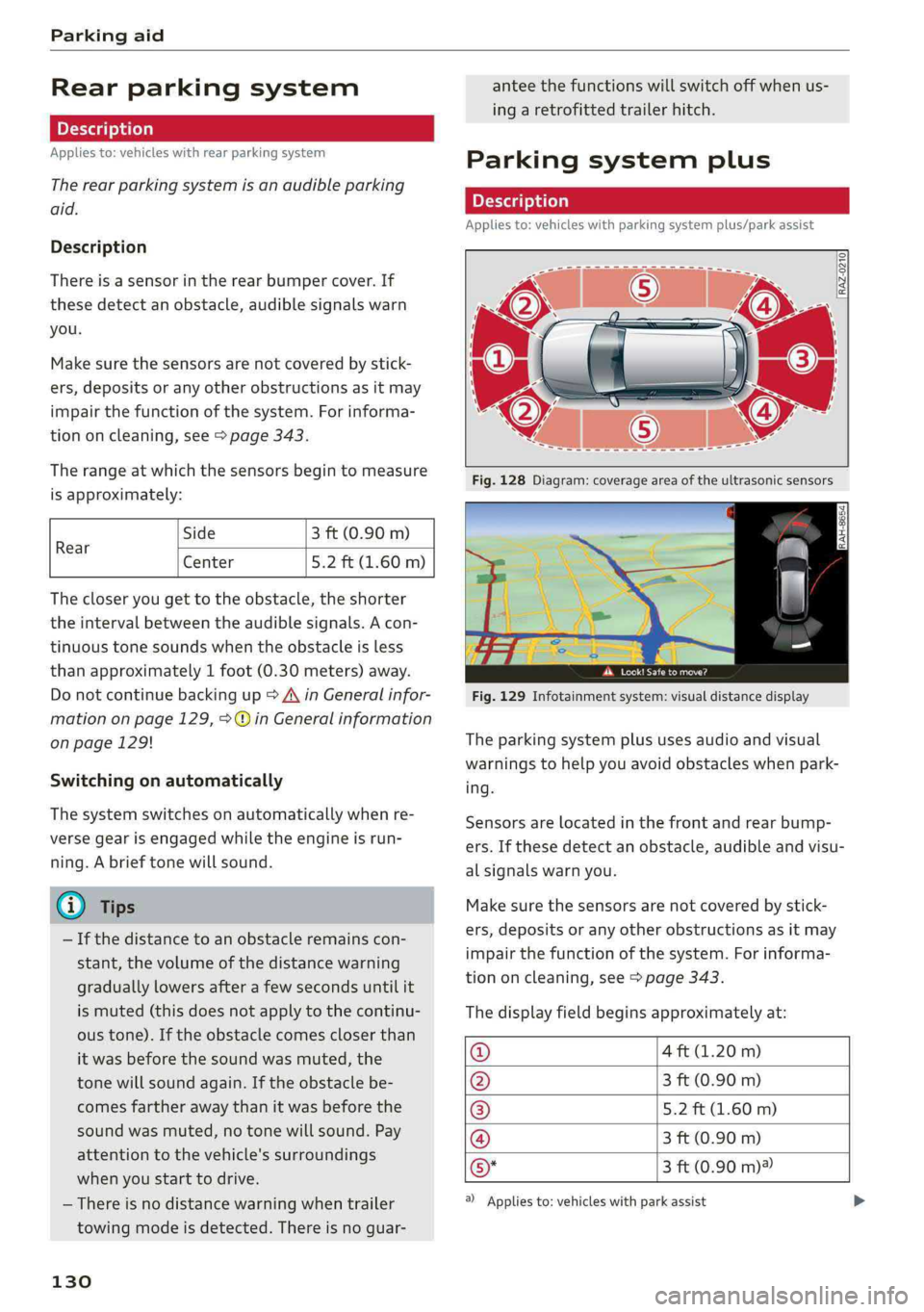
Parkingsystemplus
Description
Appliesto:vehicleswithparkingsystemplus/parkassist
»
\]
eet
Fig.129Infotainmentsystem:visualdistancedisplay
Theparkingsystemplususesaudioandvisual
warningstohelpyouavoidobstacleswhenpark-
ing.
Sensorsarelocatedinthefrontandrearbump-
ers. Ifthesedetectanobstacle,audibleandvisu-
alsignalswarnyou.
Makesurethesensorsarenotcoveredbystick-
ers,depositsoranyotherobstructionsasitmay
impairthefunctionofthesystem.Forinforma-
tiononcleaning,see>page343.
Thedisplayfieldbeginsapproximatelyat:
@4ft(1.20m)
()3ft(0.90m)
®5.2ft(1.60m)
@3ft(0.90m)
@*3ft(0.90m)?
)Appliesto:vehicleswith parkassist
Page 133 of 392
80A012721BG
Parkingaid
Audiosignals
Thecloseryourvehiclegetstoadetectedobsta-
cle,theshorterthetimebetweentheaudiblesig-
nals.Acontinuoustonesoundswhenanobstacle
islessthanapproximately1foot(0.30m) away
fromthefrontorrearofthevehicle.Acontinu-
oustonesoundswhenanobstacleislessthan
approximately0.7feet(0.20m)awayfromthe
sides*ofthevehicle.Donotcontinuedrivingfor-
wardorinreverse>A\inGeneralinformationon
page129,>@inGeneralinformationon
page129.
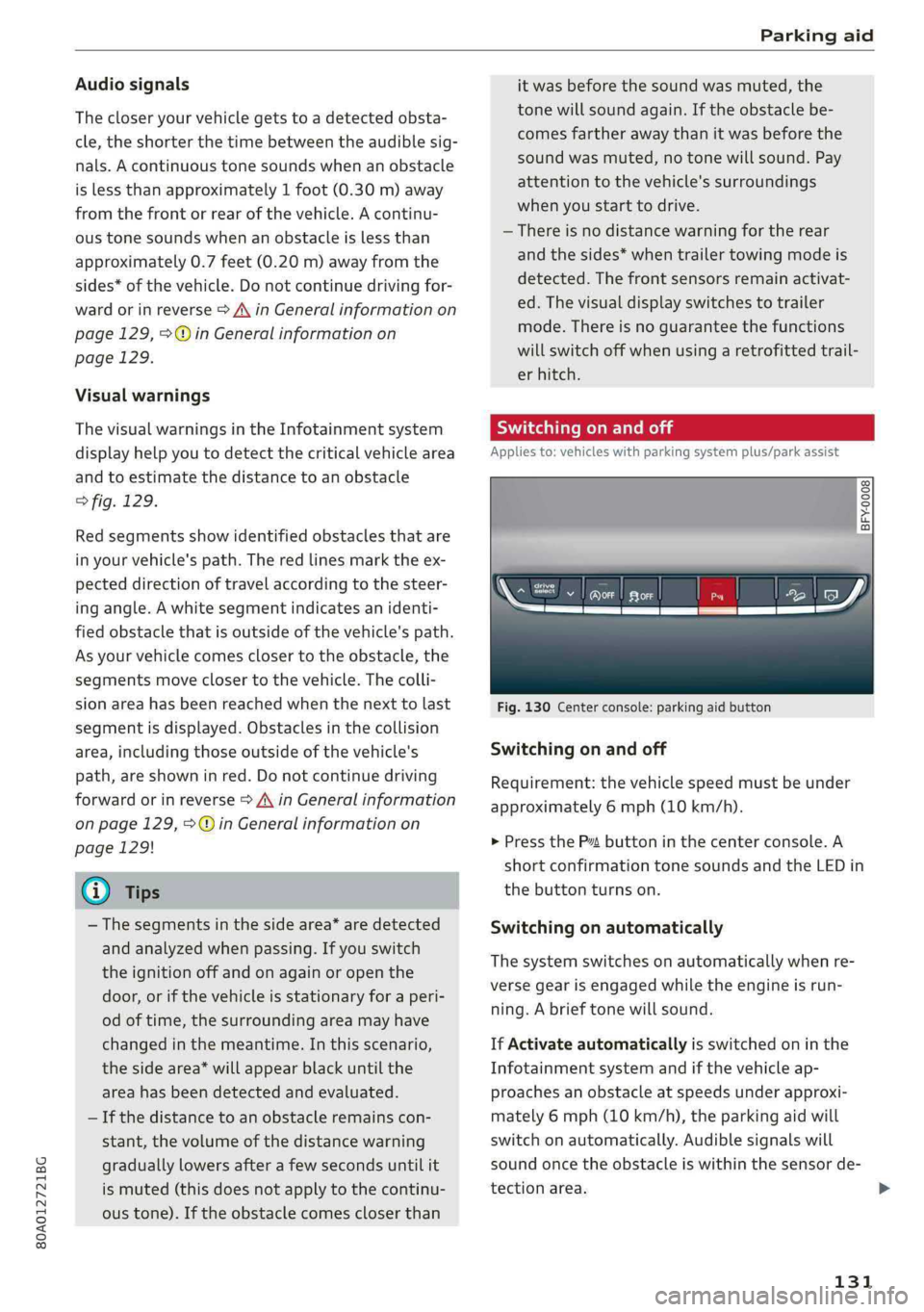
Visualwarnings
ThevisualwarningsintheInfotainmentsystem
displayhelpyoutodetectthecriticalvehiclearea
andtoestimatethedistancetoanobstacle
>fig.129.
Redsegmentsshowidentifiedobstaclesthatare
inyourvehicle'spath.Theredlinesmarktheex-
pecteddirectionoftravelaccordingtothesteer-
ing
angle.Awhitesegmentindicatesanidenti-
fiedobstaclethatisoutsideofthevehicle'spath.
Asyourvehiclecomesclosertotheobstacle,the
segmentsmoveclosertothevehicle.Thecolli-
sionareahasbeenreachedwhenthenexttolast
segmentisdisplayed.Obstaclesinthecollision
area,includingthoseoutsideofthevehicle's
path,areshowninred.Donotcontinuedriving
forwardorinreverse>A\inGeneralinformation
onpage129,>@inGeneralinformationon
page129!
@Tips
— Thesegmentsinthesidearea*aredetected
andanalyzedwhenpassing.Ifyouswitch
theignitionoffandonagainoropenthe
door,orifthevehicleisstationaryforaperi-
odoftime,thesurroundingareamayhave
changedinthemeantime.In thisscenario,
thesidearea*willappearblackuntilthe
areahasbeendetectedandevaluated.
—Ifthedistancetoanobstacleremainscon-
stant,thevolumeofthedistancewarning
graduallylowersafterafewsecondsuntilit
ismuted(thisdoesnotapplytothecontinu-
oustone).Iftheobstaclecomescloserthan
itwasbeforethesoundwasmuted,the
tonewillsoundagain.Iftheobstaclebe-
comesfartherawaythanitwasbeforethe
soundwasmuted,notonewillsound. Pay
attentiontothevehicle'ssurroundings
whenyoustarttodrive.
—Thereisnodistancewarningfortherear
andthesides*whentrailertowingmodeis
detected.Thefrontsensorsremainactivat-
ed.Thevisualdisplayswitchestotrailer
mode.Thereisnoguaranteethefunctions
willswitchoffwhenusingaretrofittedtrail-
erhitch.
SYieaiaremilieKeli
Appliesto:vehicleswithparkingsystemplus/parkassist
2)3 35
x a a
Fig.130Centerconsole:parkingaidbutton
Switchingonandoff
Requirement:thevehiclespeedmustbeunder
approximately6mph(10km/h).
>PressthePtbuttoninthecenterconsole.A
shortconfirmationtonesoundsandtheLEDin
thebuttonturnson.
Switchingonautomatically
The
systemswitchesonautomaticallywhenre-
versegearisengagedwhiletheengineisrun-
ning.Abrieftonewillsound.
IfActivateautomaticallyisswitchedoninthe
Infotainmentsystemandifthevehicleap-
proachesanobstacleatspeedsunderapproxi-
mately6mph(10km/h),theparkingaidwill
switchonautomatically.Audiblesignalswill
soundoncetheobstacleiswithinthesensorde-
tectionarea.
131
>
Page 135 of 392
80A012721BG
Parkingaid
—Onlyuse therearviewcameratoassistyouif
itshowsagood,clearpicture.Forexample,
theimagemaybeaffectedbythesunshin-
ingintothelens,dirtonthelens,orifthere
isamalfunction.
—Usetherearviewcameraonlyiftheluggage
compartmentlidiscompletelyclosed.Make
sureanyobjectsyoumayhavemountedon
theluggagecompartmentliddonotblock
therearviewcamera.
— Thecameralensenlargesanddistortsthe
fieldofvision.Theobjectappearsbothal-
teredandinaccurateonthescreen.
—Incertainsituations,peopleorobjectsin
thedisplayappearcloserorfartheraway:
—Forobjectsthatdonottouchtheground,
suchasthebumperofaparkedvehicle,a
trailerhitchortherearofatruck.Donot
use the
orientationlinesinthiscase.
—Ifdrivenfromalevelsurfaceontoanin-
cline,oradownwardslope.
—Ifdriventowardprotrudingobjects.
—Ifthevehicleiscarryingtoomuchloadin
therear.
—Appliesto:vehicleswithairsuspension:the
accuracyoftheorientationlinesandblue
surfacesdecreaseswhenthevehicleis
raised/lowered>page125.
@)Note
—Alwaysreadandfollowtheapplicablewarn-
ings>@inGeneralinformationon
page129.
— Theorange-coloredorientationlinesinthe
Infotainmentdisplayshowthevehiclepath
basedonthesteeringwheelangle.The
front ofthevehicleswingsoutmorethan
therearofthevehicle.Maintainplentyof
distanceso thatanexteriormirrororacor-
nerofthevehicledoesnotcollidewithany
obstacles.
@)Tips
Thereisnodistancewarningfortherearand
thesides*whentrailertowingmodeisdetect-
ed.Thefrontsensorsremainactivated.The
visualdisplayswitchestotrailermode.The
rearviewcameraimagewillnotshowtheori-
entationlinesandthebluesurfaces.Thereis
noguaranteethefunctionswillswitchoff
whenusingaretrofittedtrailerhitch.
SicaReRol
Appliesto:vehicleswithrearviewcamera
Switchingonandoff
Requirement:thevehiclespeedmustbeunder
approximately6mph(10km/h).
>PressthePvbuttoninthecenterconsole
=>page131,fig.130.Ashortconfirmation
tonesoundsandtheLEDinthebuttonturns
on.
Switchingonautomatically
Thesystemswitchesonautomaticallywhenre-
versegearisengagedwhiletheengineisrun-
ning.Abrieftonewillsound.
Switchingoffautomatically
Thesystemswitchesoffautomaticallywhendriv-
ingforwardfasterthan6mph(10km/h).
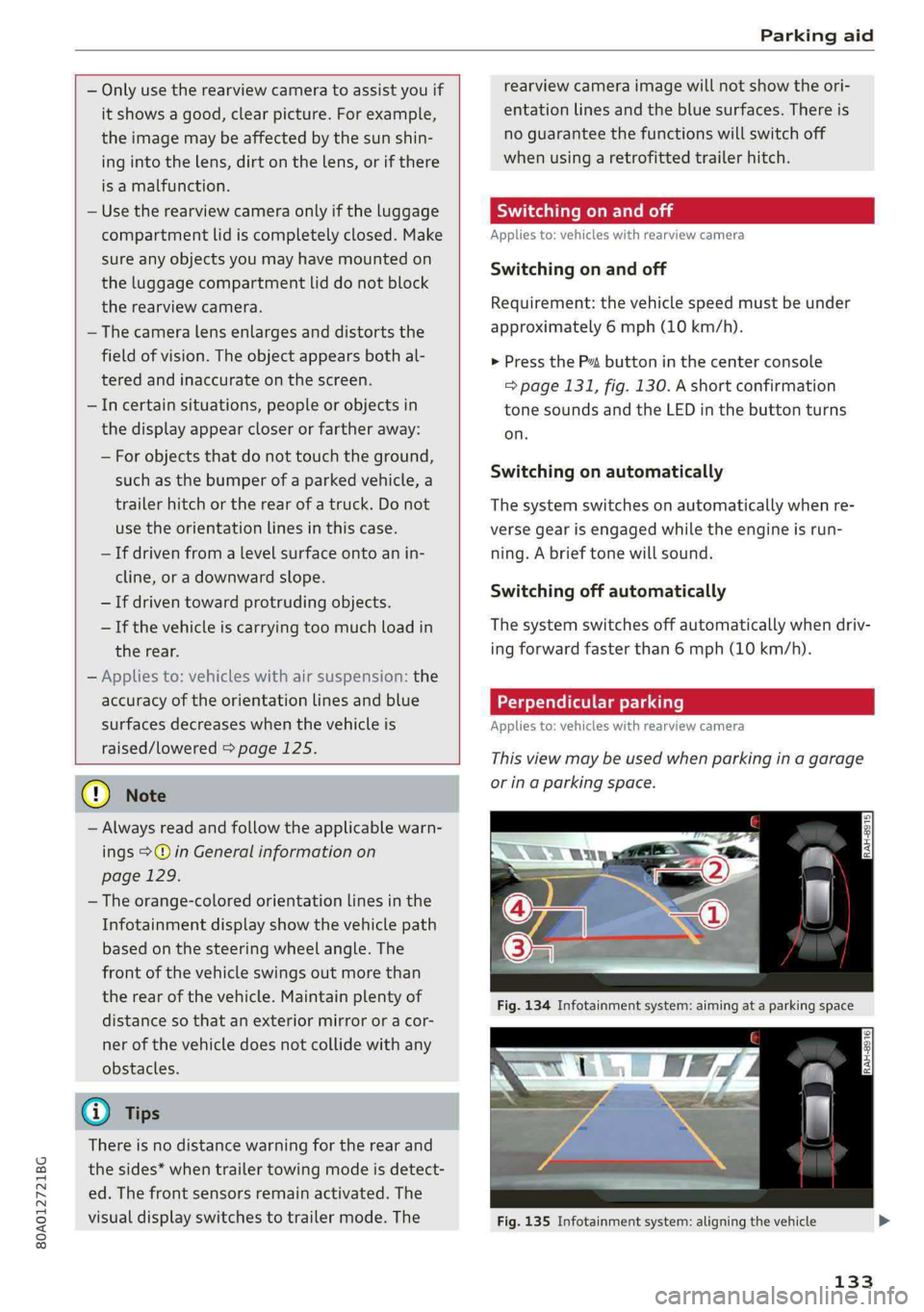
Perpendicularparking
Applies
to:vehicleswithrearviewcamera
Thisviewmaybeusedwhenparkinginagarage
orinaparkingspace.
Fig.135Infotainmentsystem:aligningthevehicle
133
Page 137 of 392
80A012721BG
Parkingaid
—Keepinmindthattheimageinthedisplayis
incorrectiftheexteriormirrorhousinghas
beenmovedoutofplace.
—Onlyuse theimagesprovidedby thecamera
ontherearofthevehiclewhentheluggage
compartmentlidiscompletelyclosed.Make
sureanyobjectsyoumayhavemountedon
theluggagecompartmentliddonotblock
therearviewcamera.
— Theareaaroundthevehicleisshownusing
thecameraimages.Thevehicleimageis
shownbythesystem.Objectsandobstacles
abovethecameraarenotdisplayed.
—Cameralensesenlargeanddistortthefield
ofvision.Theobjectsappearbothaltered
andinaccurateonthescreen.
—Appliesto:vehicleswithairsuspension:the
accuracyoftheorientationlinesandblue
surfacesdecreaseswhenthevehicleis
raised/lowered>page125.
@)Note
—Alwaysreadandfollowtheapplicablewarn-
ings>@inGeneralinformationon
page129.
— TheInfotainmentdisplayshowsthedirec-
tioninwhichtherearofthevehicleistravel-
ingbasedonthesteeringwheelangle.The
frontofthevehicleswings outmorethan
therearofthevehicle.Maintainplentyof
distanceso thatanexteriormirrororacor-
nerofthevehicledoesnotcollidewithany
obstacles.
G)Tips
—Ifthe2/&8/
grayedout,thenthepowerexteriormirrors
werefoldedinorthedriver'sdoor/front
passenger'sdoor/luggagecompartmentlid
wasopened.
—Thereisnodistancewarningfortherear
andthesides*whentrailertowingmodeis
detected.Thefrontsensorsremainactivat-
ed.Thevisualdisplayswitchestotrailer
mode.Therearviewcameraimagewillnot
showtheorientationlinesandthebluesur-
faces.Thereisnoguaranteethefunctions
willswitchoffwhenusingaretrofittedtrail-
erhitch.
ice
Appliesto:vehicleswithperipheralcameras
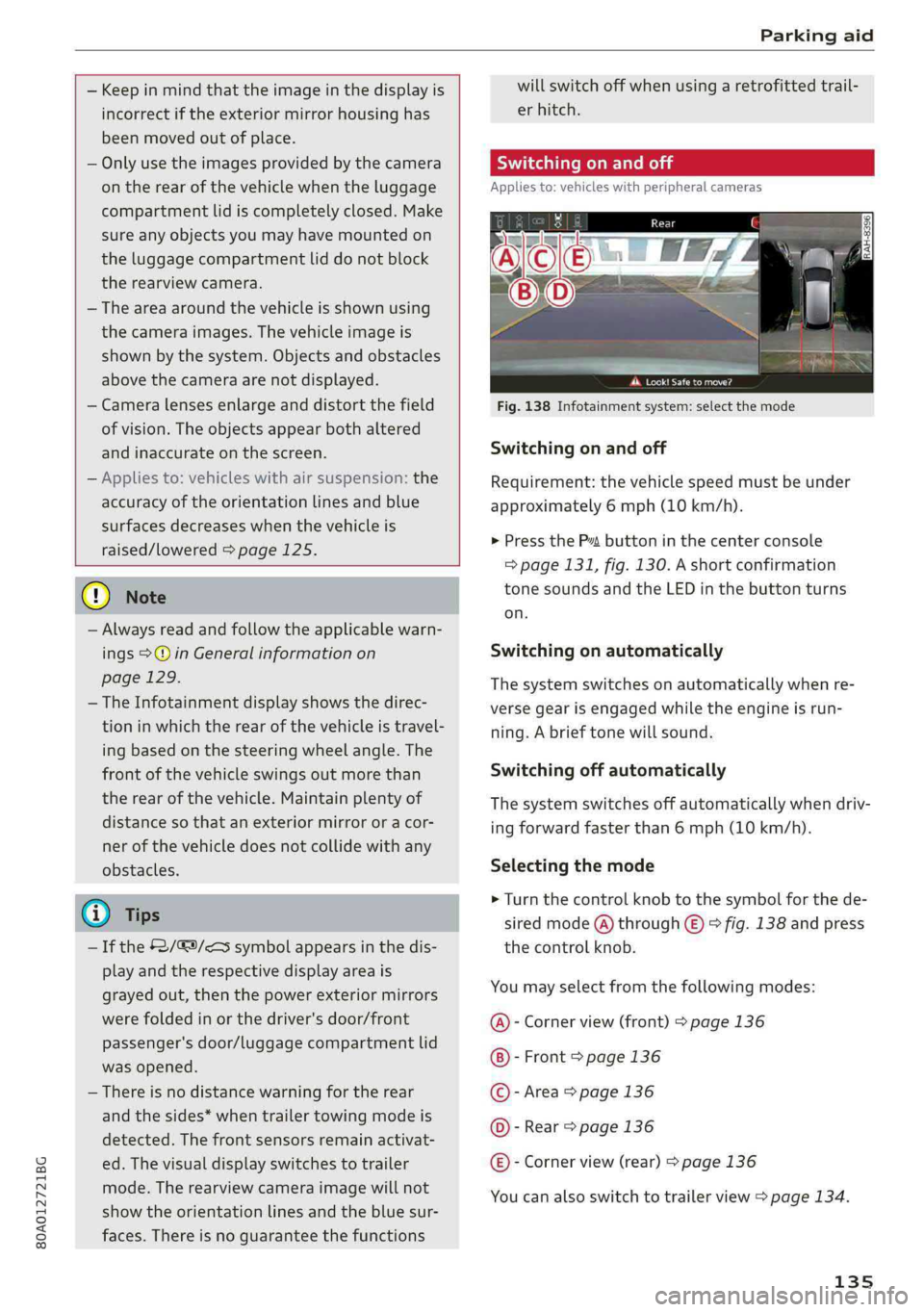
Fig.138Infotainmentsystem:selectthemode
Switchingonandoff
Requirement:thevehiclespeedmustbeunder
approximately6mph(10km/h).
>PressthePsbuttoninthecenterconsole
=>page131,fig.130.Ashortconfirmation
tonesoundsandtheLEDinthebuttonturns
on.
Switchingonautomatically
Thesystemswitchesonautomaticallywhenre-
versegearisengagedwhiletheengineisrun-
ning.Abrieftonewillsound.
Switchingoffautomatically
Thesystemswitchesoffautomaticallywhendriv-
ingforwardfasterthan6mph(10km/h).
Selectingthemode
>Turn thecontrolknobtothesymbolforthede-
siredmode(A)through©)>fig.138andpress
thecontrolknob.
Youmayselectfromthefollowingmodes:
@-Cornerview(front)>page136
-Front>page136
©-Area>page136
©-Rear>page136
@®-Cornerview(rear)>page136
Youcanalsoswitchtotrailerview>page134.
135
Page 140 of 392
Parkingaid
system.Forinformationoncleaning,see
=>page343.
Whenparkingspacesaresmall,theparkingsys-
temsignalsacontinuoustonewhenanobstacle
islessthanapproximately0.7feet(0.20m)
away.Donotcontinuedrivingfarther.
ZAWARNING
—Alwaysreadandfollowtheapplicablewarn-
ings>AinGeneralinformationon
page129.
—Pleasenotethat parkassistonlycontrols
thesteering.Thedriverisalwaysresponsi-
bleforbrakingandaccelerating.
— Thedrivermustdecideiftheparkingspace
displayedissuitableforthevehicle.
—Thevehiclewillchangepositionwhenpark-
ing.Makesureyoudonotendangeranyoth-
erdrivers.
—Whenusingparkassisttodriveintoorout
ofaparkingspace,thesteeringwheelturns
quicklyonitsown.Reachingintothesteer-
ing
wheelspokeswhilethisishappeningcan
resultininjury.
@)Note
—Alwaysreadandfollowtheapplicablewarn-
ings>@inGeneralinformationon
page129.
—Parkassistguidesthevehicleeitheraway
fromcurbsorontothemifothervehicles
areparkedonthecurb.Makesurethatyour
vehicle'stiresandrimsarenotdamaged.
Takeoversteeringattherighttime.
—Certainconditionsaroundtheparkingspace
mayresultinthevehiclenotbeingparked
asexpected.
—Objectssuchaspillarsorposts.
—Groundcoveringsuchasgravel,snowor
ice
G)Tips
— TheElectronicStabilizationControl(ESC)
mustnotbe switchedoffduringtheparking
process>page145.
—Parkingintightcurveswith parkassistis
notpossible.
138
—Youcannotparkwith parkassistwhenyou
aretowingatrailerorhavetheconnectorin-
sertedinthetrailersocket.
Sleemela
Appliesto:vehicleswithparkassist
3S
2 x a
oO
Fig.147Centerconsole:Parkassistbutton
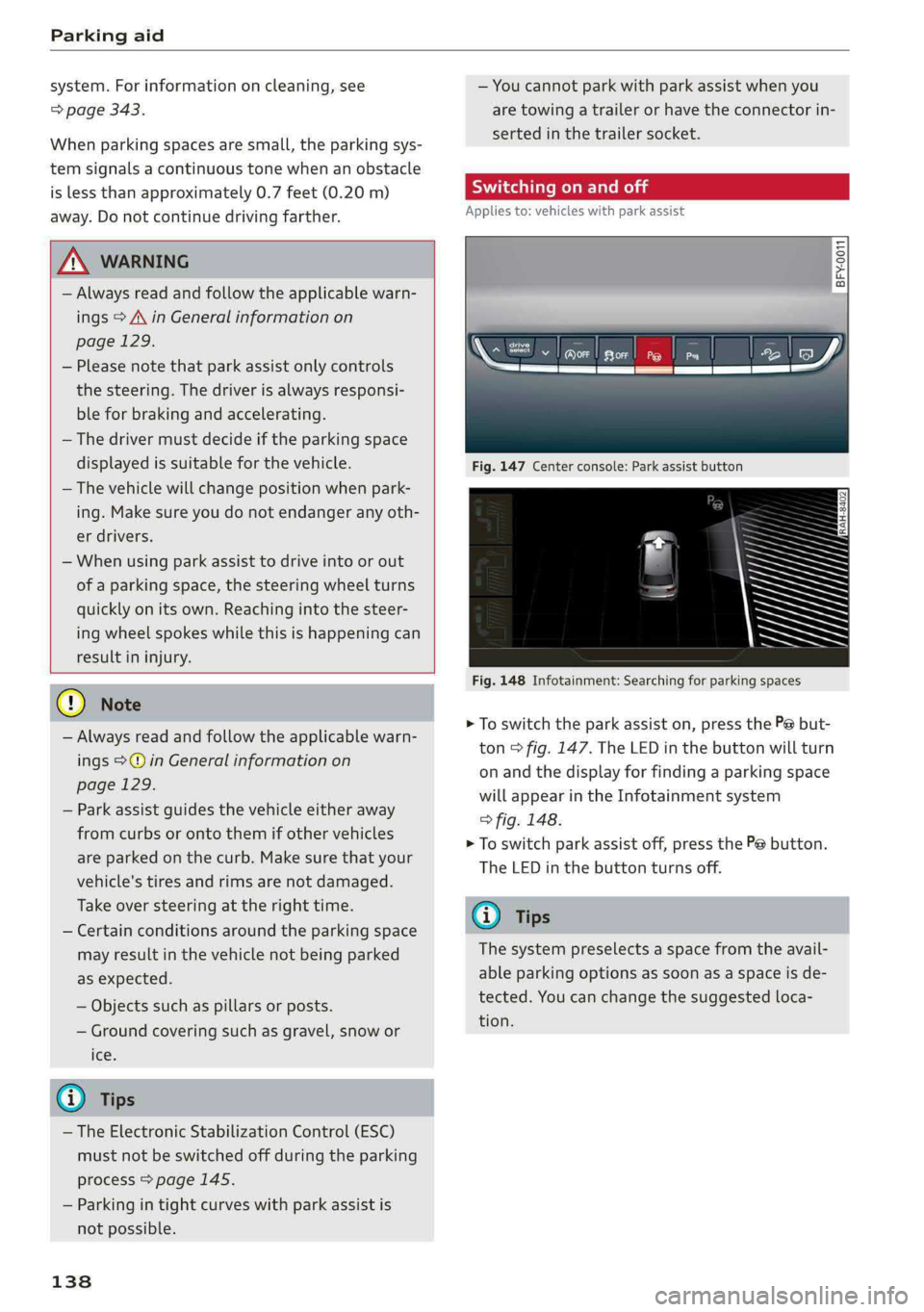
Fig.148Infotainment:Searchingforparkingspaces
>Toswitchtheparkassiston,pressthePebut-
ton>fig.147.The LEDinthebuttonwillturn
onandthedisplayforfindingaparkingspace
willappearintheInfotainmentsystem
>fig.148.
>Toswitchparkassistoff,pressthePebutton.
TheLEDinthebuttonturnsoff.
G)Tips
Thesystempreselectsaspacefromtheavail-
ableparkingoptionsassoonasaspaceisde-
tected.Youcanchangethesuggestedloca-
tion.