ignition AUDI Q5 2019 Service Manual
[x] Cancel search | Manufacturer: AUDI, Model Year: 2019, Model line: Q5, Model: AUDI Q5 2019Pages: 392, PDF Size: 99.86 MB
Page 86 of 392
Driving
Youmustpressthebrakepedaltoengagease-
lectorleverpositionwhentheengineisrunning
andthevehicleisstationary.
Youdonothavetopressthebrakepedalifyou
shiftfrom"D"to"R"withinonesecond.Thisal-
lowsyouto “rock”thevehicleto freeitwhenitis
stuck.
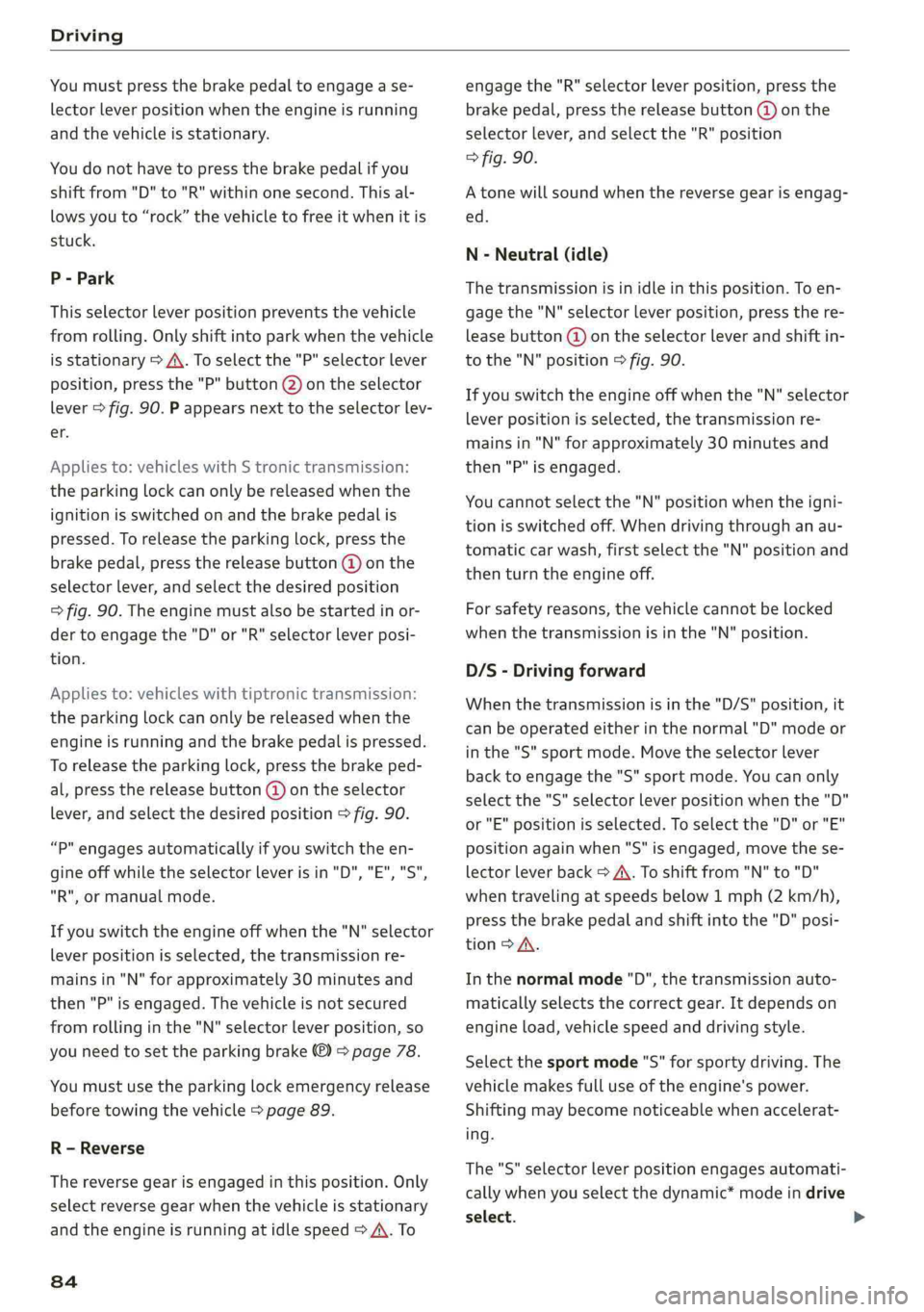
P-Park
Thisselectorleverpositionpreventsthevehicle
fromrolling.Onlyshiftintoparkwhenthevehicle
isstationary>A\.Toselectthe"P"selectorlever
position,pressthe"P"button()ontheselector
lever
>fig.90.Pappearsnexttotheselectorlev-
er.
Appliesto:vehicleswithStronictransmission:
theparkinglockcanonlybereleasedwhenthe
ignitionisswitchedonandthebrakepedalis
pressed.Toreleasetheparkinglock,pressthe
brakepedal,pressthereleasebutton(@)onthe
selectorlever,andselectthedesiredposition
=>fig.90.Theenginemust alsobestartedinor-
dertoengagethe"D" or"R"selectorleverposi-
tion.
Appliesto:vehicleswithtiptronictransmission:
theparkinglockcanonlybereleasedwhenthe
engineisrunningandthebrakepedalispressed.
Toreleasetheparkinglock,pressthebrakeped-
al,pressthereleasebutton@ontheselector
lever,andselectthedesiredposition>fig.90.
“P"engagesautomaticallyifyouswitchtheen-
gineoffwhiletheselectorleverisin"D","E", "S",
"R",ormanualmode.
Ifyouswitchtheengineoffwhenthe"N"selector
leverpositionisselected,thetransmissionre-
mainsin"N"forapproximately30minutesand
then"P"isengaged.Thevehicleisnotsecured
fromrollinginthe"N"selectorleverposition,so
youneedtosettheparkingbrake©>page78.
Youmustusetheparkinglockemergencyrelease
beforetowingthevehicle>page89.
R-Reverse
Thereversegearisengagedinthisposition.Only
selectreversegearwhenthevehicleisstationary
andtheengineisrunningatidlespeed>A\.To
84
engagethe"R"selectorleverposition,pressthe
brakepedal,pressthereleasebutton(@onthe
selectorlever,andselectthe"R"position
>fig.90.
Atonewillsoundwhenthereversegearisengag-
ed.
N-Neutral(idle)
Thetransmissionisinidleinthisposition.Toen-
gagethe"N"selectorleverposition,pressthere-
leasebutton@ontheselectorleverandshiftin-
tothe"N"position>fig.90.
Ifyouswitchtheengineoffwhenthe"N"selector
leverpositionisselected,thetransmissionre-
mainsin"N"forapproximately30minutesand
then"P"isengaged.
Youcannotselectthe"N"positionwhentheigni-
tionisswitchedoff.Whendrivingthroughanau-
tomaticcarwash,firstselectthe"N"positionand
thenturntheengineoff.
For safetyreasons,thevehiclecannotbelocked
whenthetransmissionisinthe"N"position.
D/S-Drivingforward
Whenthetransmissionisinthe"D/S"position,it
canbeoperatedeitherinthenormal"D"modeor
inthe"S"sportmode.Movetheselectorlever
backtoengagethe"S"sportmode.Youcanonly
selectthe"S"selectorleverpositionwhenthe"D"
or"E"positionisselected.Toselectthe"D"or"E"
positionagainwhen"S"isengaged,movethese-
lectorleverback>A\.Toshiftfrom"N"to"D"
when
travelingatspeedsbelow1mph(2km/h),
pressthebrakepedalandshiftintothe"D"posi-
tion>A.
Inthenormalmode"D",thetransmissionauto-
maticallyselectsthecorrectgear.Itdependson
engineload,vehiclespeedanddrivingstyle.
Selectthesportmode"S"forsportydriving.The
vehiclemakesfulluseoftheengine'spower.
Shiftingmaybecomenoticeablewhenaccelerat-
ing.
The"S"selectorleverpositionengagesautomati-
callywhenyouselectthedynamic*modeindrive
select.
Page 87 of 392
80A012721BG
Driving
ZA\WARNING
ReadandfollowallWARNINGS.
—Beforestartingtodrive,checkifthedesired
selectorleverpositionisdisplayednextto
theselectorlever.
—Thevehiclecanrolleveniftheignitionis
switchedoff.
—Powerisstilltransmittedtothewheels
whentheengineisrunningatidle.Topre-
vent thevehiclefrom“creeping”,youmust
keepyourfootonthebrakeinallselector
leverpositions(except"P"and"N")when
theengineisrunning.
—Beforeopeningthehood,selectthe"P"se-
lector
leverpositionandsettheparking
brake.Thisreducestheriskofanaccident.
Alwaysreadandfollowtheapplicablewarn-
ings>page311,Generalinformation.
@Tips
Ifyouaccidentallyselect"N"whiledriving,
takeyourfootofftheacceleratorpedaland
waitfortheenginetoslowdowntoidlebe-
fore
selecting"D"or"S".
Drivingtips
Startingtheengine
>The""P"or"N"positionmustbeselected.
Startingfromastop
>Pressandholdthebrakepedal.
>»Starttheengine>page75.
»Pressthelockingbutton@ontheselectorlev-
erandselectthe"D","E","S"or"R"position
=>page83.
>Waitamomentuntilthetransmissionshifts.
Youwillnoticeaslightmovementwhenthe
gearengages.
>Releasethebrake pedalandpresstheaccelera-
torpedal>A\.
Variousconveniencefunctionsareavailablefor
startingonhills>page80.
Stoppingtemporarily
>Pressthebrakepedaltostopthevehicle,for
exampleatatrafficlight.Donotpresstheac-
celeratorpedalwhendoingthis.
>Topreventthevehiclefromrollingwhenyou
startdriving,settheparkingbrakewhenstop-
pingonsteephills>/\.
>Theparkingbrakewillreleaseautomatically
andyourvehiclewillbegintomove whenthe
doorsareclosed,thedriver'ssafetybeltisfas-
tened,and youaccelerateasusual.
Stoppingorparking
Iftheselectorleverisnotinthe"P"position
whenyouopenthedriver’sdoor,thevehicle
couldroll.
>Pressandholdthebrakepedal>/\.
>Set theparkingbrake.
>Toselectthe"P"selectorleverposition,press
the"P"button@)ontheselectorlever
=>page83,fig.90.
Undercertainconditions,suchasdrivinginthe
mountains,itmaybehelpful toswitchtomanual
modetemporarilytoadapttothedrivingcondi-
tionsmanually>page86.
Onhills,settheparkingbrakefirstandthenshift
intothe"P"position>page78.Thispreventstoo
muchstressfrombeingplacedonthelocking
mechanism.
ZAWARNING
—Thevehiclecanrollevenwhentheengineis
switchedoff.
—Unintendedvehiclemovementcanleadto
seriousinjuries.
—Toreducetheriskofanaccident,donot
presstheacceleratorpedalwhenchanging
theselectorleverpositionwhilethevehicle
isstationaryandtheengineisrunning.
—Toreducetheriskofanaccident,neverse-
lectthe"R"or"P"positionswhiledriving.
—Donotinadvertentlypresstheaccelerator
pedalwhenthevehicleisstationary.Press-
ingthepedalincreasesriskof accidentbe-
causethevehiclewillmove,evenifparking
brakeisset.
8s
Page 95 of 392
80A012721BG
Assistsystems
Assistsystems
Speedwarningsystem
Appliesto:vehicleswithspeedwarningsystem
Thespeedwarningsystemhelpsyoutostaybe-
lowaspecifiedmaximumspeedthatcanbeset,
changedordeletedintheInfotainmentsystem.
Thespeedwarningsystemwarnsyouifyouare
exceeding themaximumspeedthatyouhaveset.
Awarningtonewillsoundassoonasyourspeed
exceedsthestoredvalueslightly.Thewyin-
dicatorlightandamessageappearintheinstru-
mentclusterdisplayatthesametime.The
indicatorlightandthemessageturnoffifthe
speedfallsbackbelowthestoredmaximum
speed.
Settingathresholdisrecommendedifyouwould
liketoberemindedwhenyoureachacertain
maximumspeed.Situationswhereyoumaywant
todoso includedrivinginacountrywithagener-
alspeedlimitorifthereisaspecifiedmaximum
speedforwintertires.
Settingthewarningthreshold
>SelectintheInfotainmentsystem:[MENU]but-
ton>Vehicle> leftcontrolbutton>Driveras-
sistance>Speedwarning>Manual.
G)Tips
Regardlessofthespeedwarningsystem,you
shouldalwaysmonitoryourspeedusingthe
speedometerandmakesureyouarefollowing
thelegalspeedlimit.
Cruisecontrolsystem
Appliesto:vehicleswithcruisecontrolsystem
Thecruisecontrolsystemassiststhedriverin
maintainingaconstantspeedaboveapproxi-
mately15mph(20km/h).Thesystemmaintains
thedesiredspeedbybrakingandaccelerating.
ZAWARNING
—Alwayspayattentiontothetrafficaround
yourvehiclewhenthecruisecontrolsystem
isinoperation.Asthedriver,youarealways
responsibleforcontrollingyourvehicle
speedandthedistancebetweenyourvehicle
andothervehicles.
—Forsafetyreasons,cruisecontrolshould not
beusedinthecity,instop-and-gotraffic,on
windingroads,andwhenroadconditionsare
poor(suchasice,fog,gravel,heavyrain,
andconditionsthatcouldlead tohydroplan-
ing),becausethisincreasestheriskofanac-
cident.
—Switchthecruisecontrolofftemporarily
whendrivinginturninglanes,highwayexits,
orinconstructionzones.
—Toreducetheriskofanaccident,youshould
onlyresumethestoredspeedifitissuitable
forthecurrenttrafficconditions.
()Note
Beforedrivingdownhillalongdistanceona
steephill,decreaseyourspeedandselecta
lowergear.Thismakesuseoftheenginebrak-
ingeffectandreducestheloadplacedonthe
brakes.
@)Tips
Thebrakelightsturnonwhenthebrakesare
appliedautomatically.
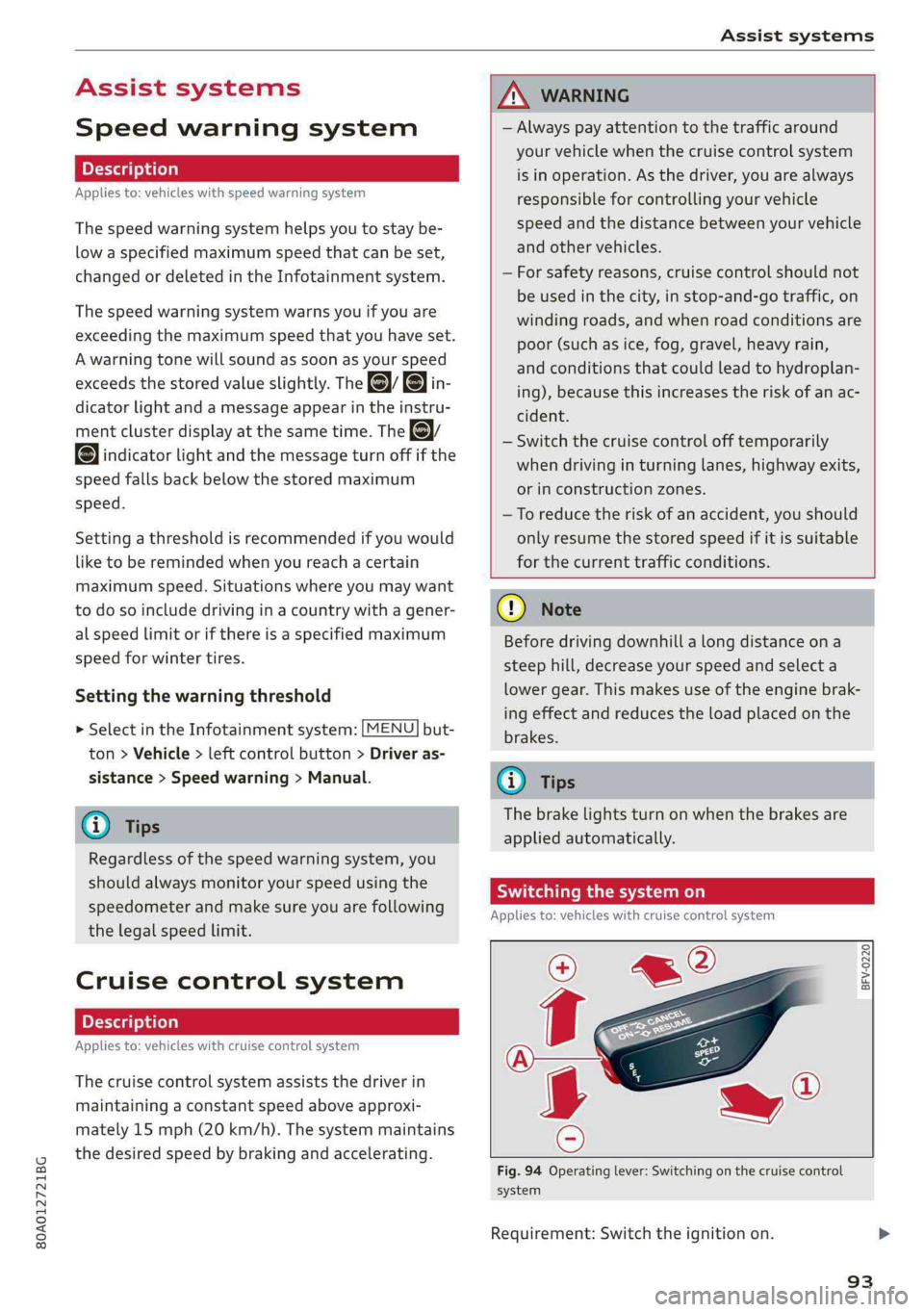
Switchingthesystemon
Appliesto:vehicleswithcruisecontrolsystem
BFV-0220
Fig.94Operatinglever:Switchingonthecruisecontrol
system
Requirement:Switchtheignitionon.
93
Page 96 of 392
![AUDI Q5 2019 Service Manual Assistsystems
>Toswitchthesystemon,pullthelevertoward
youtoposition().
TheGgor88]indicatorlightandthecorre-
spondingmessagewillappearintheinstrument
cluster.
ZXWARNING
Ifthebrakesaremalfunctioning(f](/img/6/57631/w960_57631-95.png "AUDI Q5 2019 Service Manual Assistsystems
>Toswitchthesystemon,pullthelevertoward
youtoposition().
TheGgor88]indicatorlightandthecorre-
spondingmessagewillappearintheinstrument
cluster.
ZXWARNING
Ifthebrakesaremalfunctioning(f")
Assistsystems
>Toswitchthesystemon,pullthelevertoward
youtoposition().
TheGgor88]indicatorlightandthecorre-
spondingmessagewillappearintheinstrument
cluster.
ZXWARNING
Ifthebrakesaremalfunctioning(forexample,
overheating)whilethecruisecontrolsystem
isswitchedon,itmayshutoffautomatically.
Preselectingoractivatingacruisecontrol
Cytst-t)
Appliesto:vehicleswithcruisecontrolsystem
Whenthevehicleisstationary,youcanpreselect
thecruisecontrolspeedoractivatethespeed
whiledriving.
Requirement:thesystemmustbe switchedon.
>Topreselectacruisecontrolspeedwhentheve-
hicleisstationary,tapthelevertoward@)/G)
=>page93,fig.94.
>Toactivatethecruisecontrolspeed,pullthe
levertowardposition@whiledriving,or
>
Tosetthecurrentdrivingspeedasthecruise
controlspeed,pressthebutton(@)onthelever.
Theactivecruisecontrolspeedisindicatedwith
theCRUISE]orklindicatorlightintheinstrument
cluster.
Anadditionalindicatorappearsinthehead-up
display”.
Changingthecruisecontrolspeed
Appliesto:vehicleswithcruisecontrolsystem
>Toincrease ordecreasethecruisecontrolspeed
insmallincrements,tap theleveruptothe
firstleveltoward@/@)>page93,fig.94.
>Toincrease ordecreasethecruisecontrolspeed
inlargerincrements,taptheleveruptothe
secondleveltoward@)/G).
>Toincrease ordecreasethecruisecontrolspeed
continuously,tapandholdtheleveratthefirst
orsecondleveltoward(#)/C).
94
Overridingordeactivatingthecruise
controlspeed
Appliesto:vehicleswithcruisecontrolsystem
Youcanoverride ordeactivatethecruisecontrol
system.Whenyoudeactivatethesystem,your
cruisecontrolspeedwillbestoredand youcan
resumethatspeed.
Requirement:thesystemmustbe switchedon
andactivated.
Overriding
>Totemporarilyoverridethecruisecontrol
speed,presstheacceleratorpedal.
>Onceyoureleasetheacceleratorpedal,thesys-
temwilladjustbacktothestoredcruisecontrol
speed.
Ifyouoverridethecruisecontrolsystemfora
longperiodoftime,thecruisecontrolsystem
willbedeactivated.Thesystemindicatorlight
willturnoffandthecruisecontrolspeedwillbe
stored.
Deactivating
>Todeactivatethecruisecontrolspeed,press
thelevertoward(2)(notlockedintoplace)
=>page93,fig.94.
>Pressthebrakepedal.
Z\WARNING
Restingyourfootontheacceleratorpedal
couldoverridethecruisecontrol.Thiswillpre-
ventbrakinginterventionsby the system.
Seema
Appliesto:vehicleswithcruisecontrolsystem
Whenyouswitchthesystemoffcompletely,the
cruisecontrolspeedwillbedeleted.
Requirement:thesystemmustbe switchedon.
>Toswitchthesystemoff,pressthelevertoward
@(lockedintoplace)>page93,fig.94,or
>Switchtheignitionoff.
Page 100 of 392
Assistsystems
menuitemisdisplayedintheinstrumentclus-
ter.
>Presstheleftthumbwheeltoconfirmtheselec-
tion.
Z\WARNING
Yourfocusshouldalways beondrivingyour
vehiclesafely.Asthedriver,youhavecom-
pleteresponsibilityforsafetyintraffic.Only
use thefunctionssuchasthelaptimerinsuch
awaythatyoualwaysmaintaincompletecon-
troloveryourvehicleinalltrafficsituations.
@Tips
Youcanretrieveinformationfromthetrip
computerwhilethelaptimerstopwatchis
running.
eyoReamial)
Appliesto:vehicleswithlaptimer
Requirement:thelaptimermustbeopen
=>page97.
Timinglaps
>Tostarttimingmanually,selectStartlap 1in
themenu.
>Tostarttimingautomaticallyassoonasyoube-
gintodrive,selectDriveofftostartlap1or
Startbydrivingoffinthemenu.
>Tomeasurethelaptime,selectNewlapinthe
menu.Thisstartstimingthenextlapatthe
sametime.
Aftercompletinga lap,thedifferencebetween
thelastlapandthepreviousbestlaptimewillbe
indicatedwitha“—”or“+”.
Pausingtiminganddisplayingasplittime
>ToinsertapauseflselectPauseinthemenu.
>Toresumetiming,selectResumeinthemenu.
>Todisplayasplittime,selectSplittimeinthe
menu.Thesplittimeappearsforapproxi-
mately10secondsintheinstrumentcluster.
Thetimingofthecurrentlapcontinues.
Resettingtiming
>Usingthemultifunctionsteeringwheel,select
Resettimesinthemenu.
98
G)Tips
—Amaximumof99laptimescanbemeas-
ured.
—Iftimingispaused,youcancontinueitlater
evenifyouswitchtheignitionoff.
—Savedlaptimescannotbeindividuallyde-
letedfromthetotalresults.
— Thesavedlaptimervalueswillremainafter
switchingtheignitionoff.
Lapstatistics
Appliesto:vehicleswithlaptimer
Displayinglapstatistics
Youcandisplaythenumberoflapsdriven,the
fastestlap“+”,theslowestlap“—”,andtheaver-
agetime“Q”intheinstrumentcluster.
>Onthemultifunctionsteeringwheel,selectthe
leftcontrolbutton>LapstatisticsorStatis-
tics.
>Turn thethumbwheeldownoruptodisplaythe
individuallaptimes.
>Toreturn tothelaptimingthatwasbegun,
presstheleftthumbwheel.
Resettinglapstatistics
>Onthemultifunctionsteeringwheel,select:
therightcontrolbutton>Resetstatistics.
(i)Tips
Thelapstatisticslistthelaptimesforthelast
30laps.Thefastestandslowestlaptimeout
ofupto99measuredlapsarealsodisplayed.
Predictiveefficiency
assist
Introduction
Thepredictiveefficiencyassisthelpsthedriverto
drivewithanticipationandthereforehelpsto
savefuel.Thesystemaccessespredictivetripda-
ta(includingspeedlimits,hills,andtheangleof
curves)fromthenavigationsystem*.Informa-
tionfromthe camera-basedtrafficsignrecogni-
tion*isalsoappliedtorecognizetrafficsigns
=>page95.
Page 103 of 392
80A012721BG
Assistsystems
—Afterswitchingontheignition,thesystem
initiallyadjuststoaspeedof80mph
(130km/h)whendrivingontohighways
withoutaspeedlimit.Thenthesystemad-
juststothelastspeedstoredbythedriver.
—Thereisnoadaptationtospeedlimitswhen
drivingthroughhighwayinterchangesand
whendrivingonorofftheexpressway.
—Thereisnopredictivecontrolatspeedlimits
under20mph(30 km/h).
—Ifaspeedlimitisonlydetectedby thecam-
eraandtheactualspeedissignificantly
higher,thenthespeedlimitwillblinkinthe
displayuntilyouhave reachedtherequired
speed>page96.
—Incorrectvaluesfromthecamera-based
trafficsignrecognition*oroutdatednaviga-
tionsystemmapdatacanleadtoincorrect
orimplausiblecontrol.
—Whenrouteguidanceisswitchedon,the
systemadaptstotherouteprovidedbythe
navigationsystem.Drivingwithoutroute
guidanceorleavingaroutecanresultinim-
plausiblecontrol.
— Thesystemswitchesoffwhenoutsideofa
roadsystemthatisrecordedinthenaviga-
tionsystemmapdata.
SettingsintheInfotainmentsystem
Appliesto:vehicleswithpredictiveefficiencyassist
Predictivemessages*
>IntheInfotainmentsystem,select:[MENU
button>Vehicle>leftcontrolbutton>Driver
assistance>Efficiencyassist.
Predictivemessagesareshownwhenthisfunc-
tionisswitchedon.
Predictivecontrol*
MENU]but- >SelectintheInfotainmentsystem:
ton>Vehicle> leftcontrolbutton>Driveras-
sistance>Audiadaptivecruisecontrol>Pre-
dictivecontrol.
Setspeedlimit-whenthisfunctionisswitched
on,thesystemadjuststothespeedlimits.This
canalsobedonewithattolerance,ifdesired.In
thisscenario,youmayfallbeloworexceedthe
setspeedinfavorofincreasedefficiency.
Adaptationtorouteahead-whenthisfunction
isswitchedon,thesystemadaptstotheroute
ahead, suchasreducingthespeedwhendriving
aroundcurves.
GTips
Nopredictivemessagesareshowninvehicles
withoutanavigationsystem.
Audiadaptivecruise
control
Appliesto:vehicleswithAudiadaptivecruisecontrol
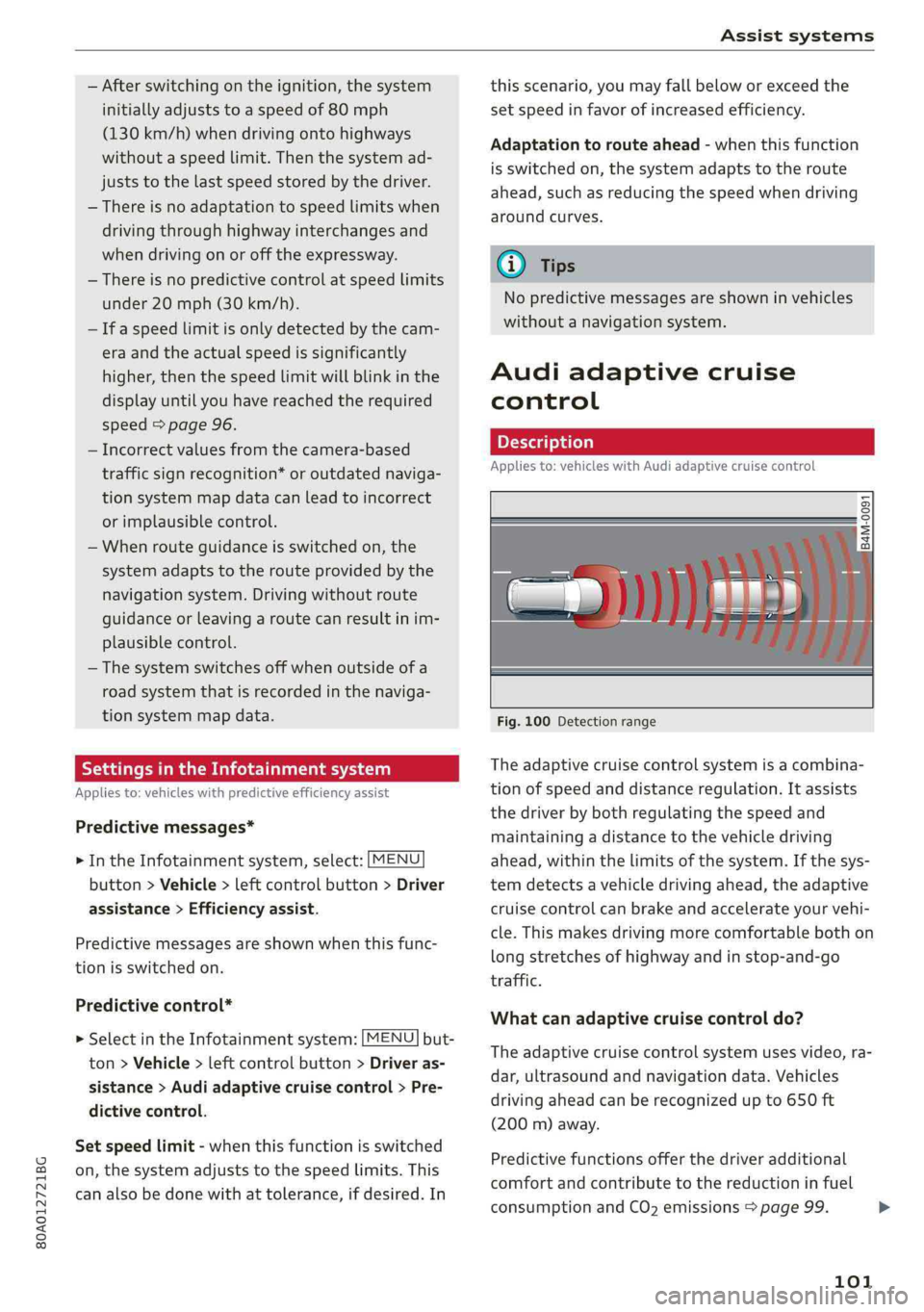
Fig.100Detectionrange
Theadaptivecruisecontrolsystemisacombina-
tionofspeedanddistanceregulation.Itassists
thedriverbybothregulatingthespeedand
maintainingadistancetothevehicledriving
ahead,withinthelimitsofthesystem.Ifthesys-
temdetectsavehicledrivingahead,theadaptive
cruisecontrolcanbrakeandaccelerateyourvehi-
cle.Thismakesdrivingmorecomfortablebothon
longstretchesofhighway andinstop-and-go
traffic.
Whatcanadaptivecruisecontroldo?
Theadaptivecruisecontrolsystemusesvideo,ra-
dar,ultrasoundandnavigationdata.Vehicles
drivingaheadcanberecognizedupto650ft
(200m)away.
Predictivefunctionsofferthedriveradditional
comfortandcontributetothereductioninfuel
consumptionandCO2emissions>page99.
101
>
Page 106 of 392
Assistsystems
Youcansetanyspeedbetween20mphand95
mph(30km/hand150km/h).
Indicatorlightsandmessagesintheinstrument
clusterdisplayinformyouaboutthecurrentsit-
uationandsetting.
Anadditionalindicatorappearsinthehead-up
display”.
Switchingadaptivecruisecontrolon
>Pullthelevertowardyouintoposition@
>fig.104.
Storingthespeedandactivatingregulation
>Tostorethecurrentspeed,pressthe[SET]but-
ton>fig.104.Thestoredspeedisshowninthe
speedometerintheLEDline(@)andappears
brieflyinthestatusline©)>fig.105.
>Toactivatecontrolwhenstationary,thebrake
pedalmustalsobepressed.
Switchingadaptivecruisecontroloff
>Pushtheleverawayfromyouintoposition©)
untilitclicksintoplace.ThemessageACC:off
appears.
Indicatorlights
B-Adaptivecruisecontrolisswitchedon.No
vehiclesaredetectedahead.Thestoredspeedis
maintained.
B-Avehicledrivingaheadwasdetected.The
adaptivecruisecontrolsystemregulatesthe
speedanddistancetothevehicledrivingahead
andaccelerates/brakesautomatically.
A-Adaptivecruisecontrolisswitchedon.Ave-
hiclewasdetectedahead.Yourvehicleisstation-
aryandwillnotstartdrivingautomatically.
EB-Adaptivecruisecontrolisswitchedon.No
vehiclesweredetectedahead.Yourvehicleissta-
tionaryandwillnotstartdrivingautomatically.
B-Theautomaticbrakingisnotenoughto
maintainasufficientdistancetoavehicledriving
ahead.Youmustintervene>page107,Driverin-
terventionrequest.
104
©Instrumentclusterdisplay
IftheDriverassistancedisplayisnotshownin
theinstrumentclusterdisplay,youcanopenit
usingthemultifunctionsteeringwheelbuttons
>page15.
Basedonthegraphicdisplay,youcandetermine
ifthesystemismaintainingadistancetotheve-
hicledrivingaheadandwhatthatdistanceis.
Novehicle-novehiclewasdetecteddriving
ahead.
Silvervehicle-avehiclewasdetecteddriving
ahead.
Redvehicle-requestfordriverintervention
=>page107.
Thefivedistance barsonthegauge(©represent
the
setdistance(referto>page105forinfor-
mationonhowtochangethedistance).Ifyou
fallbelowtheselecteddistance,thedistance
barsbecomeredfromthebottomupward.
ZXWARNING
Ifyoupressthe[SET]buttonwhendrivingat
speedsbelow20mph(30km/h),thevehicle
acceleratesautomaticallyupto20mph(30
km/h),whichistheminimumspeedthatcan
beset.
(i)Tips
—Ifyouswitchtheignitionortheadaptive
cruisecontrolsystemoff,thesetspeedis
erasedforsafetyreasons.
— TheElectronicStabilizationControl(ESC)
andtheAnti-Slip-Regulation(ASR)areauto-
maticallyswitchedonwhentheadaptive
cruisecontrolisswitchedon.
Page 109 of 392
80A012721BG
Assistsystems
Cancelingcruisecontrolwhiledriving
>Movetheleverintoposition@).Themessage
ACC:standbyappears.Or
>Pressthebrakepedal.
>Toresumethestoredspeed,movetheleverto-
wardyouintoposition(2).
Cancelingcruisecontrolwhenstopped
>Pushtheleverawayfromyouintoposition@).
ThemessageACC:standbyappears.
>Toresumecruisecontrol,pressthebrakepedal
andpulltheLevertowardyouintoposition(2).
Z\WARNING
—Itisdangeroustoactivatecruisecontroland
resumethestoredspeedwhenthecurrent
road,trafficorweatherconditionsdonot
permitthis.Thisincreasestheriskofanac-
cident.
—Restingyourfootontheacceleratorpedal
couldoverridethecruisecontrol.Brakingin-
terventionsandcorrectiveactionsbythe
systemmaynotoccur.
SettingAudiadaptivecruisecontrol
Appliesto:vehicleswithAudiadaptivecruisecontrol
>SelectintheInfotainmentsystem:[MENU]but-
ton>Vehicle> leftcontrolbutton>Driveras-
sistance>Audiadaptivecruisecontrol.
Storingthelastdistance!)
Thelastdistancethatwassetwillbestoredafter
theignitionisswitchedoff.Ifthedistanceisnot
stored,Distance3isautomaticallyseteverytime
theignitionisswitchedon.
Drivingprogram
Appliesto:vehicleswithoutAudidriveselect
Dependingontheselecteddrivingprogramand
distance,drivingbehaviorwhenacceleratingwill
varyfromdynamictocomfortable.
D_Thisisnotavailableinsomecountriesand onsomeequip-
mentversions.
Selectingthedrivingmode
Appliesto:vehicleswith Audidriveselect
Depending ontheselectedAudidriveselect
modeandthedistancethatisset,thedrivingbe-
haviorwillvaryfromdynamictocomfortable
whenaccelerating>page127.
(i)Tips
Yoursettings areautomaticallystoredandas-
signedtothevehiclekeybeingused.
Driverinterventionrequest
Appliesto:vehicleswithAudi adaptivecruisecontrol
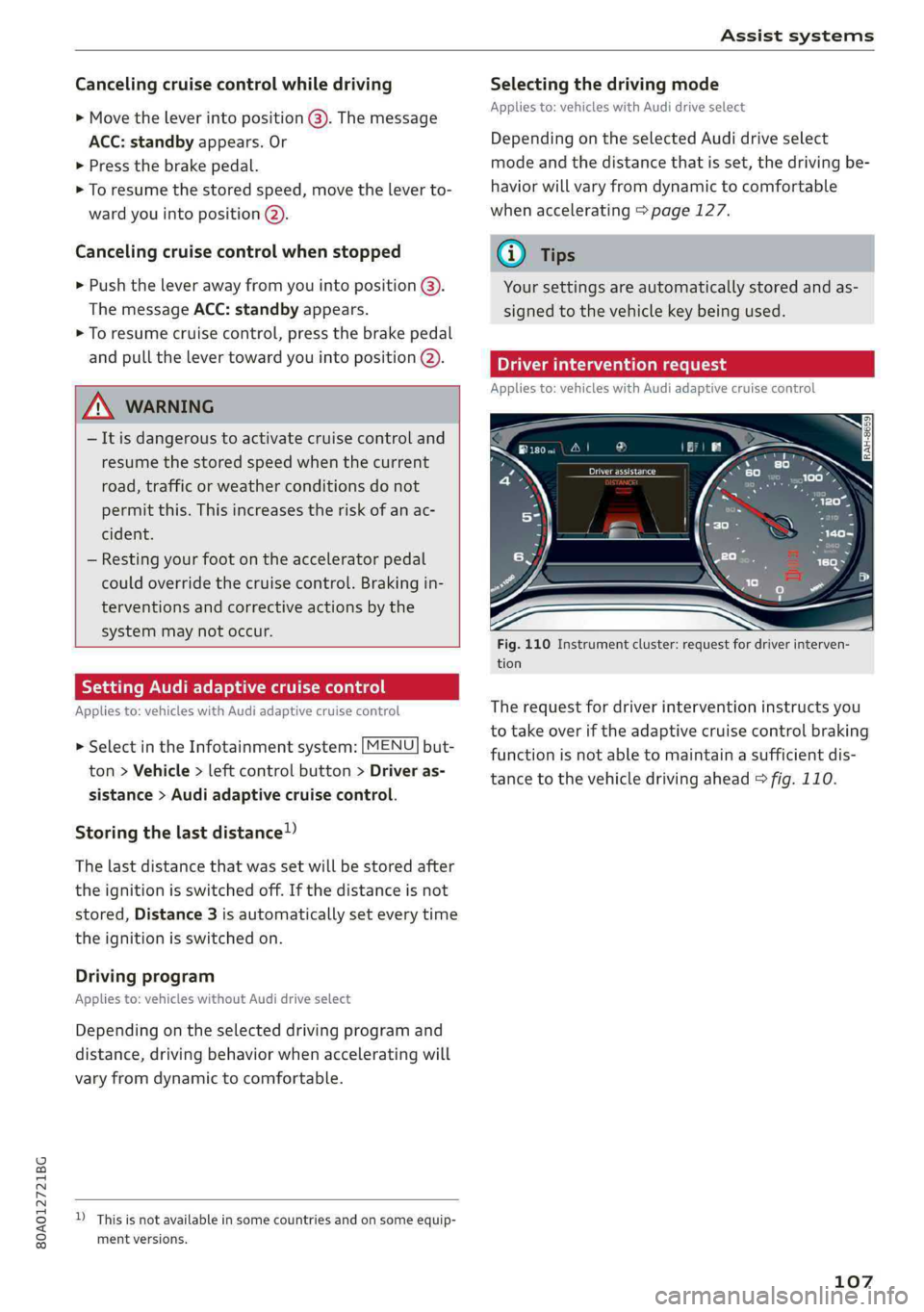
Fig.110Instrumentcluster:requestfordriverinterven-
tion
Therequestfordriverinterventioninstructsyou
totakeoveriftheadaptivecruisecontrolbraking
functionisnotabletomaintainasufficientdis-
tancetothevehicledrivingahead>fig.110.
107
Page 117 of 392
80A012721BG
Assistsystems
—Whenthedriver'sseatbeltisunfastened
—
Forseveralsecondsaftertheignitionis
switchedon
()Note
Impactsordamagetothecameramounton
thewindshieldcandisplacethesensor.Pre
sensecitycanbeimpairedbythis.Haveanau-
thorizedAudidealerorauthorizedAudiServ-
iceFacilitychecktheirfunction.
@Tips
—Youcancancelthesystembrakinginterven-
tionifyouaccelerateconsiderablyorswerve
away.
— Keepinmindthatpresensecitycanbrake
unexpectedly.Alwayssecureanycargoor
objects
thatyouaretransportingtoreduce
theriskofdamageorinjury.
—Specificpresensecityfunctionsswitchoff
whentheESCislimitedorswitchedoff
=page145orthehilldescentassistis
switchedon>page146.
—Whenthereisamalfunctioninthecamera,
thepresensecityfunctionsalsoswitchoff.
SettingsintheInfotainmentsystem
Appliesto:vehicleswithAudipresense
MENU >SelectintheInfotainmentsystem:but-
ton>Vehicle> leftcontrolbutton>Driveras-
sistance>Audipre sense.
TurnAudipresenseon/off-thepresensefunc-
tionscanbe turnedonandoff.
Ifthesystemisswitchedoff,itswitchesonagain
automaticallyoncetheignitionisswitchedon
again.
Prewarning-theearlywarningcan be switched
offorthepresensecity/frontwarningpointcan
beset(Early/Medium/Late).
Setthewarningtimefortheearlywarningto
Earlyatfirst.Ifthiscausesundesiredearlywarn-
ingstoappear,thensetthewarningtimetoMe-
dium. TheLatewarningtimeshouldonlybeset
inspecialcircumstances.
@Tips
Yoursettings areautomaticallystoredandas-
signedtothevehiclekeybeingused.
Messages
Appliesto:vehicleswithAudipresense
8Audipresense:malfunction!Pleasecontact
Service
Thismessageappearswhenthepresensefunc-
tionisaffected.Forexample,thiscouldbe
causedbyafaultysensor.Driveimmediatelyto
anauthorizedAudidealerorauthorizedAudi
ServiceFacilitytohavethe malfunctionrepaired.
Audipresense:currentlylimited.Sensor
viewlimitedduetosurroundings.Seeowner's
manual
Thismessageappearsiftheradarsensorand
cameraviewisobstructed,forexamplebyleaves,
snow,heavysprayordirt.Ifnecessary, cleanthe
sensorsandtheareaaroundthecamera
=>page102,fig.101or>page121,fig.122.
Audipresense:currentlylimited.Trailer
towingmode
Forvehicleswithatrailerhitchinstalledatthe
factory,thepresenserearfunctionsswitchoff
whentheelectricalconnectoratthesocketis
pluggedin.Thereisnoguaranteethefunctions
willswitchoffwhenusingaretrofittedtrailer
hitch.
Audipresense:currentlylimited
ThismessageappearsiftheESCisrestrictedor
switchedoff,forexample.
Audipresense:currentlylimited.Seeown-
er'smanual
Thismessageappearswhenthereisatemporary
failureinasubsystem,suchastheESC.Ifthis
messageappearsrepeatedly,drivetoanauthor-
izedAudidealerorauthorizedAudiServiceFacili-
tytohave themalfunctioncorrected.
Audipresense:emergencybrakingsystem
off
115
>
Page 125 of 392

80A012721BG
Assistsystems
Appliesto:vehicleswithexitwarningsystem
Fig.124Door:warninglight
Whenthevehicleisstationary,theexitwarning
system warnsthepassengersofapossiblecolli-
sionwhenopeningthedoor.Withinthelimitsof
thesystem,thesystemmonitorstheareasbe-
hindandnexttothevehicleusingtheradarsen-
sors>page121,fig.122.Movingobjectsthat
areapproachingfrombehind,suchascars,are
detected>fig.123.
Ifyouopenthedoorandacriticalsituationisde-
tected,thedoorhandleframeontheaffected
doorwillblink>fig.124andthedisplayinthe
outsidemirroronthesamesidealso appears.If
thedoorisalreadyopen andanotherroaduseris
detectedandthesituationisclassifiedascritical,
thenthecorrespondingdisplaysturnon.
ZAWARNING
—Alwayspayattentiontotrafficandtothe
areaaroundyourvehicle.Theexitwarning
systemdoesnotreplacetheattentionofthe
vehicleoccupants.Thevehicleoccupantsare
alwaysresponsibleforopeningthedoors
andexitingthevehicle.
— Theexitwarningsystemcanbeavailablefor
uptoapproximatelythreeminutesafterun-
lockingthevehicleandopeningthedooras
wellasafterswitchingofftheignition.Then
thedisplaysflashbrieflyandthesystem
switchesoff.
—Theexitwarningsystemdoesnotrespond
topeopleandcannotwarnyouaboutevery
typeofapproachingobjects,suchascyclists.
Alwaysmonitorthetrafficaswellastheve-
hicle'ssurroundingswithdirecteyecontact.
Z\WARNING
Theexitwarningsystemissubjecttolimita-
tionsandcannotwarnyoubeforeeveryim-
pendingcollision:
—Ifthevehicleistoowidefortheparking
spaceandcoveredby the neighboringvehi-
cles.
—Approachingobjectsorpeoplesuchascy-
clistsorskateboardersmaynot be detected
undercertaincircumstances.
—The systemdoesnotreacttostationaryob-
jects.
— Theviewoftheradarsensorsmaybeim-
pairedbyleaves,snow,heavysprayordirt.
Clean
theareainfrontofthesensors
=>page121,fig.122.
@)Note
Alsoreadtheinformationin>@inGeneral
informationonpage122.
@Tips
—Theexitwarningsystemisswitchedonand
offthroughthesideassist>page122.The
exitwarningindicatorsturnonduringthe
adjustmentprocess.
—Thedisplaybrightnessfortheexitwarning
systemcannotbeadjusted.
—The systemisnotavailablewhentowinga
trailer.
123