navigation AUDI Q5 2019 Service Manual
[x] Cancel search | Manufacturer: AUDI, Model Year: 2019, Model line: Q5, Model: AUDI Q5 2019Pages: 392, PDF Size: 99.86 MB
Page 220 of 392
![AUDI Q5 2019 Service Manual Navigation
>Pressthe LNAV/MAP]buttonrepeatedlyuntil
themapisdisplayed.
>Select:leftcontrolbutton>Trafficmessages.
Anoverviewofallthetrafficmessagesisdis-
playedintheInfotainmentsystem.
—Open](/img/6/57631/w960_57631-219.png "AUDI Q5 2019 Service Manual Navigation
>Pressthe LNAV/MAP]buttonrepeatedlyuntil
themapisdisplayed.
>Select:leftcontrolbutton>Trafficmessages.
Anoverviewofallthetrafficmessagesisdis-
playedintheInfotainmentsystem.
—Open")
Navigation
>Pressthe LNAV/MAP]buttonrepeatedlyuntil
themapisdisplayed.
>Select:leftcontrolbutton>Trafficmessages.
Anoverviewofallthetrafficmessagesisdis-
playedintheInfotainmentsystem.
—Openingadetailedviewoftrafficinformation:
selectandconfirmthetrafficinformationfrom
thelist.
G)Tips
—TMCtrafficreportsarenotavailableinCan-
ada.Formoreinformation,pleasecontact
SiriusCanada.
—Criticaltrafficinformation,suchaswarnings
aboutwrong-waydrivers,isautomatically
displayed.Tohidethetrafficinformation,
pressthe[BACK] buttonorthecontrolknob.
1X1tacoA)
Appliesto:vehicleswithnavigationsystem andbetterroute
ByreceivingtrafficinformationthroughTMC,
yourMMIcalculatesabetterrouteifavailable
andthepossibletimesavedcomparedtothe
currentroute.Youcandecidewhichrouteyou
wouldliketouse.
>Pressthe LNAV/MAP|buttonrepeatedlyuntil
themapisdisplayed.
Requirement:routeguidancemustbeactive.
IfyourMMIhascalculatedabetterroutethan
thecurrentrouteguidance,themessageAbetter
routeisavailable.appearsforseveralseconds
alongwiththetimethatmaybesaved.Abetter
routeisindicatedinthemapviewbythesymbol
"©page212,fig.195.
Amessagewillalsoappearinthetrafficinforma-
tionoverview@)>page217,fig. 199.
Applybetterroute
—Presstherightcontrolbutton.
2)AUDIAGprovidesaccesstoservicesfromthirdpartypro-
viders.Permanentavailabilitycannotbeguaranteed,be-
causethatdependsonthethirdpartyprovider.
218
—Selectandconfirmthebetterroute.Or:Select
andconfirmDetails todisplaydetailsaboutthe
betterroute.Youcanzoominoroutonthe
mapusingtheMMItouchcontrolpad.Require-
ment:theremustbemorethanoneoptimized
routecalculated.Pressthecontrolknobto
switchtothenextrouteinthedetailedview.
Closingthedetailedview:pressthe[BACK
button.
—Afteryouhaveselectedabetterroute,the
routewillberecalculated.
OnlinetraTeemulcd)
Appliesto:vehicleswithnavigationsystem andAudiconnect
Infotainment
TheMMIcanreceivereal-timeonlinetrafficin-
formationaboutcongestion,accidents,road
construction,andotherincidents.
Requirement:TherequirementsforAudiconnect
Infotainmentmustbemet>page193.
>Switchingonlinetrafficinformationonand
off:select[NAV/MAP]button>rightcontrol
button>Onlinetrafficdataon()oroff(
>Pressthe [NAV/MAP]buttonrepeatedlyuntil
themapisdisplayed.
>Select:leftcontrolbutton>Trafficmessages.
Theonlinetrafficinformationwillalsobedis-
playedonthesatellitemap»)>page215oron
thestandardmap>page212,fig. 194.
If[ONLINE]trafficinformationcannotbere-
ceived,thentrafficinformationwillautomatically
bereceivedthrough[TMC]>page217.
@Tips
—Onlinetrafficinformationisnotavailablein
Canada.
—Alwaysreadthechapter>page192,Audi
connect.
—HavingtheOnlinetrafficdatafunction
switchedonprovidesthemostaccuratere-
portsoftrafficsituationsaswellastraffic
forecasting.Yourvehicletransmitsand
Page 221 of 392
80A012721BG
Navigation
processesitsanonymous,encryptedposi-—Theonlinetrafficinformationnetworkis
tioninformationatregularintervalstothecurrentlynotavailableinallcountries,and
trafficdataprovider.Ifyoudonotwanttothecoverageisnotnationwide.Foraddi-
usethis,youcanswitchofftheonlinetraf-tionalinformation,visitwww.audiusa.com.
ficinformationfunctionatanytime.
Troubleshooting
Appliesto:vehicleswithnavigationsystem
ProblemSolution
Freetextsearch:thedesireddes-
tinationcannotbefound.
Thedestinationmightnotbeenteredinthenavigationdatabase.
Or:checkthespellingofthetermthatwassearched.Checkifthe
desiredcountry/statewasselectedforthefreetextsearchusing
theCountry/stateselection>page204orthe optionAllcoun-
tries/states.
219
Page 223 of 392
80A012721BG
Radio
Radiofunctions
etme)4at1a)
Appliesto:vehicleswithfreetextsearch
Usingthefreetextsearch,youcanselecttheor-
derthatthesearchtermsareenteredinthein-
putfield.Searchin allfrequencybandsforasta-
tionnameorprogramtype,suchasNews.
DTaP
Teaee
aTTaal)
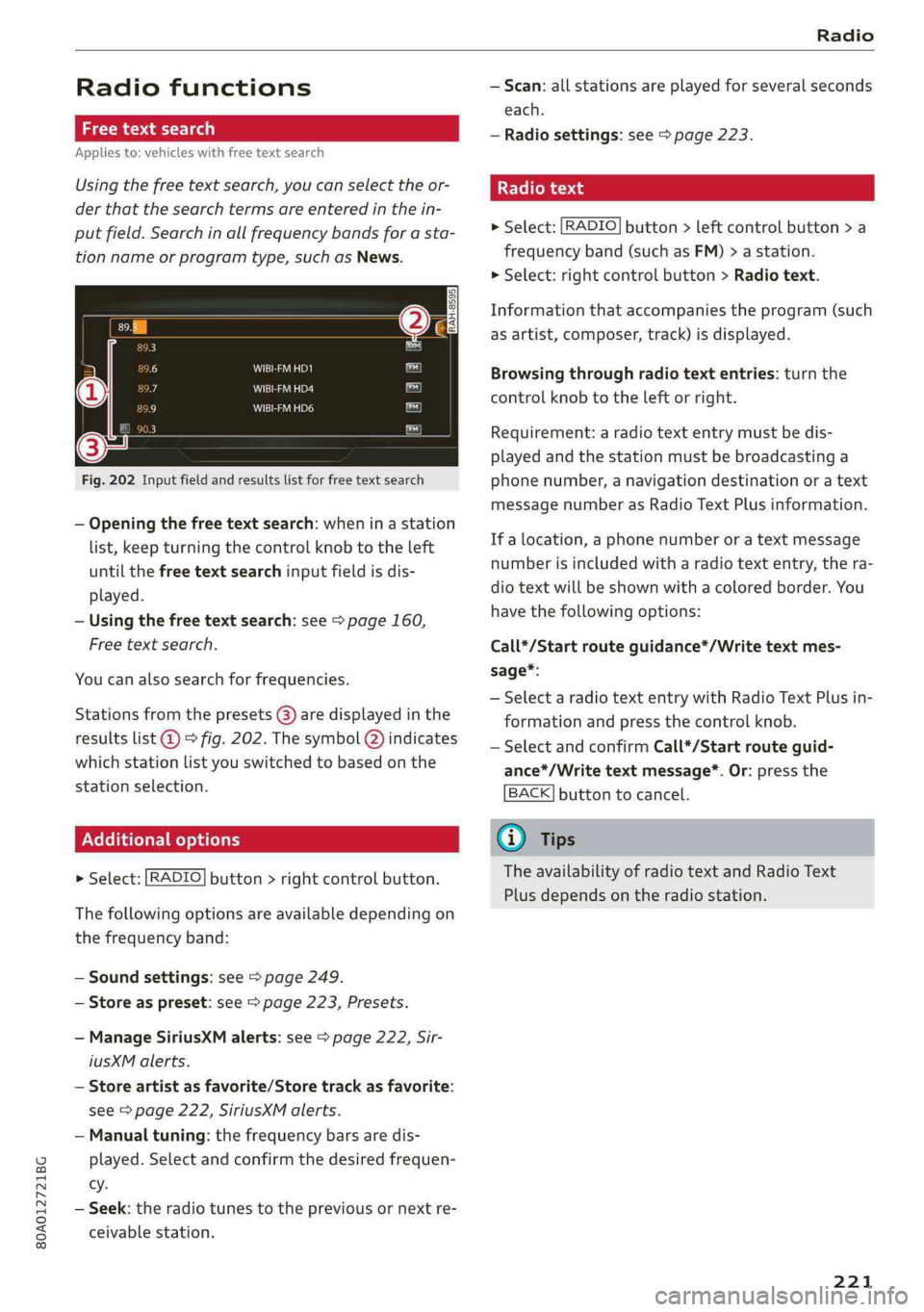
Fig.202Inputfieldandresultslistforfreetextsearch
—Openingthefreetextsearch: wheninastation
list,keepturningthecontrolknobtotheleft
untilthefreetextsearchinputfieldisdis-
played.
—Usingthefreetextsearch:see>page160,
Freetextsearch.
Youcanalsosearchforfrequencies.
Stationsfromthepresets(3)aredisplayedinthe
resultslist@)>fig.202.ThesymbolQ)indicates
whichstationlistyouswitchedtobasedonthe
stationselection.
EX]
naloptions
>Select:[RADIO]button>rightcontrolbutton.
Thefollowingoptionsareavailabledependingon
thefrequencyband:
—Soundsettings:see>page249.
—Storeaspreset:see>page223,Presets.
—ManageSiriusXMalerts:see>page222,Sir-
iusXMalerts.
—Storeartistasfavorite/Storetrackasfavorite:
see>page222,SiriusXMalerts.
—Manualtuning:thefrequencybarsaredis-
played.Selectandconfirmthedesiredfrequen-
cy.
—Seek:theradiotunestothepreviousornextre-
ceivablestation.
—Scan:allstationsareplayedforseveralseconds
each.
—Radiosettings:see>page223.
Radiotext
>Select:[RADIO]button>leftcontrolbutton>a
frequencyband(suchasFM)>astation.
>Select:rightcontrolbutton>Radiotext.
Informationthataccompaniestheprogram(such
asartist,composer,track)isdisplayed.
Browsingthroughradiotextentries:turnthe
controlknobtotheleftorright.
Requirement:aradiotextentrymustbedis-
playedandthestationmustbebroadcastinga
phonenumber,anavigationdestinationoratext
messagenumberasRadioTextPlusinformation.
If alocation,aphonenumberoratextmessage
numberisincludedwitharadiotextentry,thera-
diotextwillbeshownwithacoloredborder.You
havethefollowingoptions:
Call*/Startrouteguidance*/Writetextmes-
sage*:
—SelectaradiotextentrywithRadioTextPlusin-
formationandpressthecontrolknob.
—SelectandconfirmCall*/Startrouteguid-
ance*/Writetextmessage*.Or:pressthe
BACK]buttontocancel.
G)Tips
TheavailabilityofradiotextandRadioText
Plusdependsontheradiostation.
221
Page 224 of 392
Radio
SiriusXMalerts
Appliesto:vehicleswithSiriusXM
Youcandisplayanoverviewofyourfavoritear-
tistsortracksthatarecurrentlybeingplayedon
aSiriusXMchannel.
Vale
Tee)
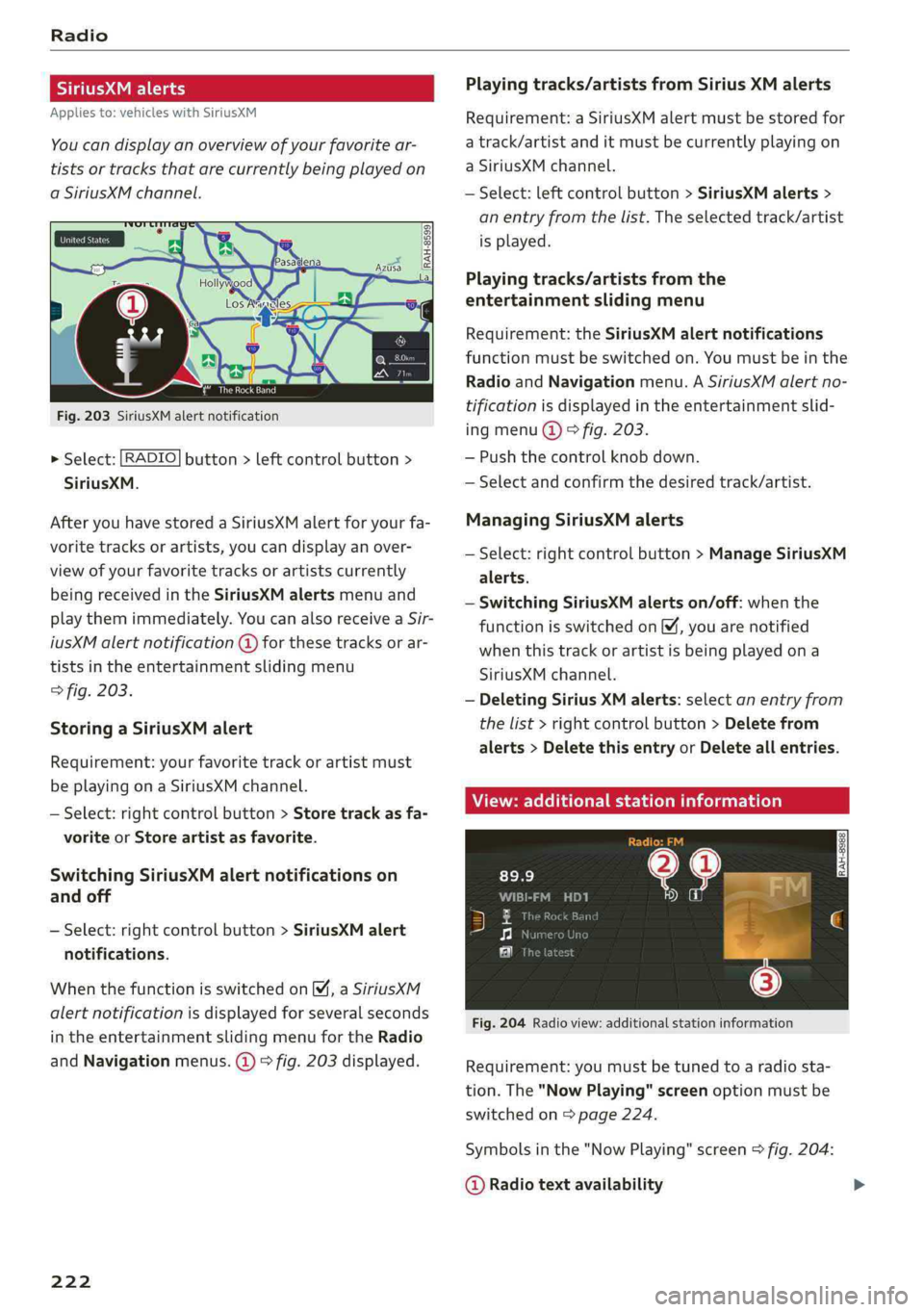
Fig.203SiriusXMalertnotification
>Select:[RADIO]button>leftcontrolbutton>
SiriusXM.
AfteryouhavestoredaSiriusXMalertforyourfa-
voritetracksorartists,youcandisplayanover-
viewofyourfavoritetracksorartistscurrently
beingreceivedintheSiriusXMalertsmenuand
playthemimmediately.YoucanalsoreceiveaSir-
iusXMalertnotification@forthesetracksorar-
tistsintheentertainmentslidingmenu
>fig.203.
StoringaSiriusXMalert
Requirement:yourfavoritetrackorartistmust
beplayingonaSiriusXMchannel.
—Select:rightcontrolbutton>Storetrackasfa-
voriteorStoreartistasfavorite.
SwitchingSiriusXMalertnotificationson
andoff
—Select:rightcontrolbutton>SiriusXMalert
notifications.
WhenthefunctionisswitchedonM,aSiriusXM
alertnotificationisdisplayedforseveralseconds
intheentertainmentslidingmenufortheRadio
andNavigationmenus.@)>fig.203displayed.
222
Playingtracks/artistsfromSiriusXMalerts
Requirement:aSiriusXMalertmustbestoredfor
atrack/artistanditmustbecurrentlyplayingon
aSiriusXMchannel.
—Select:leftcontrolbutton>SiriusXMalerts>
anentryfromthelist.Theselectedtrack/artist
isplayed.
Playingtracks/artistsfromthe
entertainmentslidingmenu
Requirement:theSiriusXMalertnotifications
functionmustbe switchedon.Youmustbeinthe
RadioandNavigationmenu.ASiriusXMalertno-
tificationisdisplayedintheentertainmentslid-
ingmenu@)©fig.203.
—Pushthecontrolknob down.
—Selectandconfirmthedesiredtrack/artist.
ManagingSiriusXMalerts
—Select:rightcontrolbutton>ManageSiriusXM
alerts.
—SwitchingSiriusXMalertson/off:whenthe
functionisswitchedon,youarenotified
whenthistrackorartistisbeingplayedona
SiriusXMchannel.
—DeletingSiriusXMalerts:selectanentryfrom
thelist>rightcontrolbutton>Deletefrom
alerts>DeletethisentryorDeleteallentries.
View:additionalstationinformation
Fig.204Radioview:additionalstationinformation
Requirement:youmustbetunedtoaradiosta-
tion.The"NowPlaying"screenoptionmustbe
switched
on>page224.
Symbolsinthe"NowPlaying"screen>fig.204:
@Radiotextavailability
Page 248 of 392
Systemsettings
Switchoffpop-up:whenthefunctionisswitched
on[¥,themessagesintheInfotainmentsystem
displayregardingthechargingstatusofyourcell
phoneinthe Audiphonebox*arehidden.There-
mindernottoforgetyourcellphonewhenleav-
ingthevehicleisalsoswitchedoff.
Tooltips
WhenthisfunctionisswitchedonM,yourMMI
showsyoutipsforinput.Thefrequencyofhow
oftenitdisplaysdecreaseswithtime.
Speechdialogsystem
Appliesto:vehicleswithvoicerecognitionsystem
Dependingonvehicleequipment,thefollowing
functions
maybeavailable:
Commanddisplay:whenthisfunctionisswitch-
edonM,theMMIwillshowyouthepossible
commandsforvoiceinputintherespective
menu.
Shortdialog:whenthisfunctionisswitchedon
,ashorterformofthepromptsisused.
Commandduringvoiceoutput*:thisfunctionis
switchedonatthefactory.Whenthisfunctionis
switchedon[M,youcansaynewcommandsdur-
ingannouncements.Youdonotneedtowaitfor
thesignaltone(beep)duringanannouncement.
Whenthefunctionisswitchedoff(J,youneedto
waitforthesignaltone(beep)tosayanewcom-
mand.
Volume:youcanadjustthevolumeofthe
promptsbyturningthecontrolknob.
Individualspeechtraining(onlywhenthevehi-
cleisstationary):youcanadaptthevoicerecog-
nitionsystemtoyourvoiceorpronunciationinor-
dertoimprovethesystem'sabilitytorecognize
yourspeech.Individualspeechtrainingiscom-
prisedof20speechentriesthatconsistofcom-
mandsandsequencesofnumbers.Youcande-
letetheprogrammedvoicetrainingwiththeRe-
setindividualspeechtrainingfunction.
Displaybrightness
YoucanadjustthebrightnessoftheInfotain-
mentsystemdisplaybyturningthecontrolknob.
246
Factorysettings
Dependingonthevehicleequipment,thefollow-
ingfunctionscanberesettofactorysettings:
—Soundsettings
—Radio
—Mediasettings
—Jukebox*
—Directory
—Telephone
—BluetoothandWi-Fi*
—Navigationsettings*
—Navigationandonlinememory*
—Speechdialogsystem*
—Shortcutkeys
—Messagesettings*
—Apps*
—Tooltips
—Audiconnect*
—Audismartphoneinterface*
Youcanselectthedesiredfunctionsindividually
orallatoncewiththeoptionSelectallentries.
Selectandconfirm Restorefactorysettings.
Gi)Tips
Makesurethatnotonlythesettingswerede-
letedbutalsothestoreddata,ifnecessary.
Connectionmanager
Introduction
Theconnectionmanagerprovidesanoverviewof
yourconnecteddevicesandtheirnetworkstatus.
>Select:[MENU]button>Settings>leftcontrol
button>MMIsettings>Connectionmanager.
>Selectandconfirmamenuitem.
If amobiledevicewasalreadyconnectedandyou
selectandconfirmthecorrespondingmenuitem,
thedevicenameandconnectionstatusaredis-
playedunderthemenuitem.
Youcanindividuallyconnect(M)ordisconnect
(L))apaireddevice.
Page 251 of 392
80A012721BG
Systemsettings
Select:Audismartphone>adevicefromthelist
>rightcontrolbutton.
Toremoveyourmobiledevicefromthelist,select
andconfirm DeleteAppleCarPlaydeviceorDe-
leteAndroidAutodevice.
Systemupdate
>Select:[MENU]button>Settings>leftcontrol
button>Systemmaintenance.
—Systemupdate:insertthestoragedevicewith
theupdatedataintotheappropriatedrive
=page226.Selectandconfirm thedrive>
Startupdate.Thelengthoftheprocessde-
pendsonthesizeoftheupdate.
—Resetdriverinstallation:theselectedmedia
driverpackageisresettothesettingsatthe
timeofdelivery.
—Versioninformation:informationontheMMI
softwareversionandthenavigationdatabase*
softwareversionisdisplayed.TheSoftwarein-
formationfunctionalsoprovidesinformation
onthesoftwarecontainedintheMMIandthe
licensingagreement.
Soundsettings
ThesounddistributionandvolumeoftheMMI
canbeadjustedindividually.Thesettingsdepend
onthevehicleequipment.
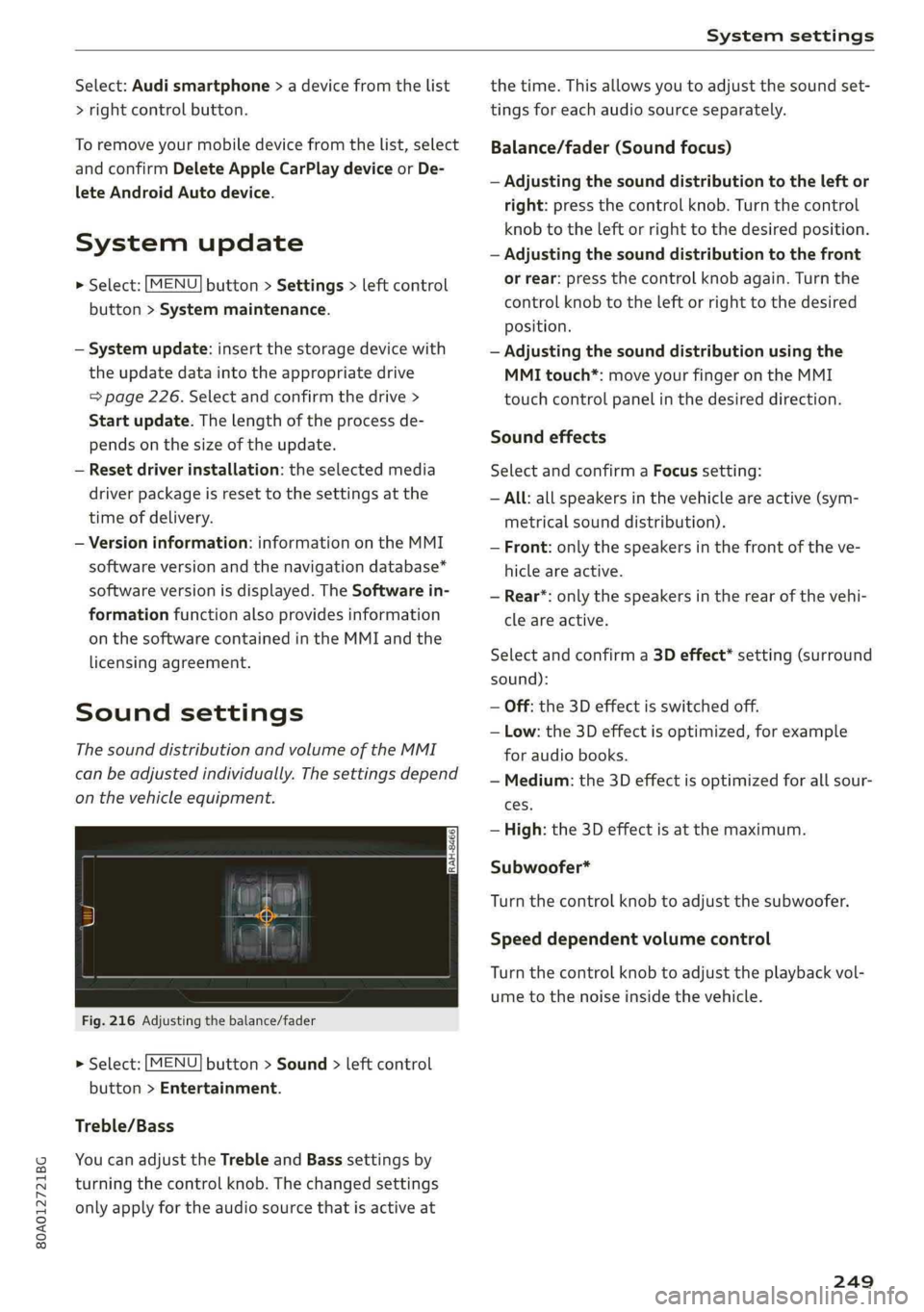
Fig.216Adjustingthebalance/fader
>Select:[MENU]button>Sound>leftcontrol
button>Entertainment.
Treble/Bass
YoucanadjusttheTrebleandBasssettingsby
turningthecontrolknob.Thechangedsettings
onlyapplyfortheaudiosourcethatisactiveat
thetime.Thisallowsyoutoadjustthesoundset-
tingsforeachaudiosourceseparately.
Balance/fader(Soundfocus)
—Adjustingthesounddistributiontotheleftor
right:pressthecontrolknob.Turnthecontrol
knobtotheleftorrighttothedesiredposition.
—Adjustingthesounddistributiontothefront
orrear:pressthecontrolknobagain.Turnthe
controlknobtotheleftorrighttothedesired
Position.
—Adjustingthesounddistributionusingthe
MMItouch*:moveyourfingerontheMMI
touchcontrolpanelinthedesireddirection.
Soundeffects
SelectandconfirmaFocussetting:
—All:allspeakersinthevehicleareactive(sym-
metricalsounddistribution).
—Front:onlythespeakersinthefrontoftheve-
hicleareactive.
—Rear*:onlythespeakersintherearofthevehi-
cleareactive.
Selectandconfirma3Deffect*setting(surround
sound):
—Off:the3Deffectisswitchedoff.
—Low:the3Deffectisoptimized,forexample
foraudiobooks.
—Medium:the3Deffectisoptimizedforallsour-
ces.
—High:the3Deffectisatthemaximum.
Subwoofer*
Turnthecontrolknobtoadjustthesubwoofer.
Speeddependentvolumecontrol
Turnthecontrolknobtoadjusttheplaybackvol-
umetothenoiseinsidethevehicle.
249
Page 252 of 392
Systemsettings
Volumesettings
Adjustingthevolume
Thevolumeofanaudiosourceorasystemmes-
sage(forexample,fromthevoicerecognition
system*)canbeadjusteddirectlywhilethe
soundisplayingusingtheOn/Offknob.
—Increasingordecreasingthevolume:turnthe
On/Offknob@)>page152,fig.154tothe
rightorleft.
—Mutingorpausing:presstheOn/Offknob
briefly.Or:turntheOn/Offknobtotheleftun-
tilthesymbol@>page161appears.Anactive
audio/videosourceisstopped.
—Unmutingorresuming:presstheOn/Offknob
briefly.Or:turntheOn/Offknobtotheright.
Z\,WARNING
To reducetheriskofanaccident,adjustthe
volumeoftheaudiosystemsothataudible
signalsfromoutsidethevehicle,suchas po-
liceandfiresirens,canbe heardeasilyatall
times.
G)Tips
Volumethatistoohighortoolowisautomat-
icallyadjustedtoasetlevelwhentheMMIis
switchedon.
Adjustingthesystemvolume
>Select:[MENU]button>Sound>leftcontrol
button.
Telephone
Appliesto:vehicleswithtelephone
Mutetelephone:messagesandringtonesareset
tomute.
Ringtone:see>page189,Ringtoneandvolume
settings.
Ringtonevolume:youcanadjustthevolumeof
theselectedringtone byturningthecontrol
knob.
Messagevolume:youcanadjustthevolumeof
thenotificationforanincomingtextmessageby
turningthecontrolknob.
250
Microphoneinputlevel:youcanadjustthecall
volumeduringaphonecallbyturningthecontrol
knob.
Navigation
Appliesto:vehicleswithnavigationsystem
Voiceguidance:see>page212.
Voiceguidanceduringphonecall:see
>page212.
Voiceguidancevolume:youcanadjustthevoice
guidancevolumebyturningthecontrolknob.Or:
youcanadjustthevoiceguidancevolumeduring
activerouteguidancebyturningtheOn/Offknob.
Entertainmentfader:thevolumeofaudioplay-
backcanbetemporarilyloweredwhenthepark-
ingsystemorvoiceguidanceisactive.
Voicerecognitionsystem
Appliesto:vehicleswithvoicerecognitionsystem
Commanddisplay:see>page246.
Shortdialog:see>page246.
Speechdialogsystemvolume:See>page246.
Individualspeechtraining:see>page246.
Parkingaid*
Youcanadjustthevolumeofthesignaltoneby
turningthecontrolknob.
—Adjustingthe Front volume:selectandcon-
firmHigh,MediumorLow.
—AdjustingtheRearvolume:selectandconfirm
High,MediumorLow.
MMItouch*
Turnthecontrolknobtoadjustthevolumeofthe
spokenpromptsfromtheMMItouch*.
Page 273 of 392

80A012721BG
Airbagsystem
—Neverholdthesteeringwheelatthe12
o'clockpositionorwithyourhandsany-
whereinsidethesteeringwheeloronthe
steeringwheelhub.Holding thesteering
wheelthewrongwayincreasestheriskof
severeinjurytothearms,hands,andheadif
thedriverairbagdeploys.
Z\WARNING
Objectsbetweenyouandtheairbagwillin-
creasetheriskofinjuryinacrashbyinterfer-
ingwiththewaytheairbagunfoldsand/orby
beingpushedintoyouastheairbaginflates.
—Alwaysmakesurenothingisinthefrontair-
bagdeploymentzonethatcouldbestruck
bytheairbagwhenitinflates.
—Objectsinthezoneofadeployingairbagcan
becomeprojectileswhentheairbagdeploys
andcauseseriouspersonalinjury.
—Neverholdthingsinyourhandsoronyour
lapwhenthevehicleisinuse.
—Neverplaceaccessoriesorotherobjects
(suchascupholders,telephonebrackets,
notepads,navigationsystems,orthings
thatarelarge,heavy,orbulky)onthedoors;
neverattachthemtothedoorsorthewind-
shield;neverplacethemoverornearorat-
tachthemtotheareamarked,,AIRBAG“on
thesteeringwheel,instrumentpanelorthe
seatbackrests;neverplacethembetween
theseareasandyouoranyotherpersonin
thevehicle.
—Neverattachobjectstothewindshield
abovethepassengerfrontairbag,suchas
accessoryGPSnavigationunitsormusic
players.Suchobjectscouldcauseseriousin-
juryinacollision,especiallywhentheair-
bagsinflate.
—Neverreclinethefrontpassengerseatto
transport
objects.Itemscanalsomoveinto
thedeploymentareaofthesideairbagsor
thefrontairbagduringbreakingorinasud-
denmaneuver.Objectsneartheairbagscan
flydangerouslythroughthepassengercom-
partmentandcauseinjury,particularly
whentheseatisreclinedandtheairbagsin-
flate.
ZAWARNING
Apersononthefrontpassengerseat,espe-
ciallyinfantsandsmallchildren,willreceive
seriousinjuriesandcanevenbekilledbybe-
ingtooclosetotheairbagwhenitinflates.
—AlthoughtheAdvancedAirbagSystemin
yourvehicleisdesignedtoturnoffthefront
passengerairbagifaninfantorasmallchild
isonthefrontpassengerseat,nobodycan
absolutelyguaranteethatdeploymentun-
derthesespecialconditionsisimpossiblein
allconceivablesituationsthatmayhappen
duringtheusefullife ofyourvehicle.
— TheAdvancedAirbagSystemcandeployin
accordancewiththe,,lowrisk“optionfor3-
and6-year-oldchildrenundertheU.S.Fed-
eralStandardifachildwithelectricalcapac-
itancegreaterthanthecombinedcapaci-
tanceofatypicalone-yearoldinfantre-
strainedinoneoftheforwardfacing orrear-
ward-facingchildseatswithwhichyourve-
hiclewascertifiedisonthefrontpassenger
seatandtheotherconditionsforairbagde-
ploymentaremet.
—Accidentstatisticshaveshownthatchildren
aregenerallysaferintherearseatareathan
inthefrontseatingposition.
—Fortheirownsafety,allchildren,especially
12yearsandyounger,shouldalwaysridein
the backproperlyrestrainedfortheirage
andsize.
Advancedfrontairbagsystem
YourvehicleisequippedwithafrontAdvanced
AirbagSystemincompliancewithUnitedStates
FederalMotorVehicleSafetyStandard(FMVSS)
208,aswellasCanadaMotorVehicleSafety
Standard(CMVSS)208asapplicableatthetime
yourvehiclewasmanufactured.
ThefrontAdvancedAirbagSystemsupplements
thesafetybeltstoprovideadditional protection
forthedriver'sandfrontpassenger'sheadsand
upperbodiesinfrontalcrashes.Theairbagsin-
flateonlyinfrontalimpactswhenthevehiclede-
celerationishighenough.>
271
Page 369 of 392
80A012721BG
Accessoriesandtechnicalchanges
Accessoriesand
technicalchanges
Warranty
Yourvehicleiscoveredbyvariouswarranties:
—NewVehicleLimitedWarranty
—LimitedWarrantyAgainstCorrosionPerforation
—EmissionsControlSystemWarranties:Federal
EmissionsControlSystemDefectWarranty,
FederalEmissionsPerformanceWarranty
—Appliesto:USAmodels:KansasSafetyBelt
LimitedWarranty
—Appliesto:USAmodels:CaliforniaEmissions
ControlWarranties:Short-termEmissionsDe-
fectsWarranty,Long-termEmissionsDefects
Warranty,TZEVmodelsEmissionsDefects
Warranty,CaliforniaEmissionsPerformance
Warranty
YoucanfinddetailedinformationinyourWarran-
ty&MaintenanceBookletandintheCalifornia
EmissionsBooklet*.
AudiLiteratureShop
Serviceinformationisavailableassoonaspossi-
bleafteramodelisintroducedandcanbeor-
deredintheAudiLiteratureShop:http://
literature.audiusa.com
Drivinginother
countries
GovernmentregulationsintheUnitedStatesand
Canadarequiremotorvehiclestocomplywith
emissionsregulationsandsafetystandards.
Therefore,vehiclesthatwereproducedforthe
U.S.andCanadianmarketsaredifferentfromve-
hiclesproducedforothercountries.
Ifyouplantouseyourvehicleoutsideofthe
UnitedStatesorCanada,itispossiblethat:
—Fuelmayhaveasignificantlyloweroctanerat-
ing.Unsuitablefuelscancauseenginedamage.
—Propermaintenanceandrepairworkmaynot
bepossiblebecausespecialserviceequipment,
tools,ormeasuringdevicesneededforyourve-
hiclemaynotbeavailable.
—Replacementpartsmaynotalwaysbeavaila-
ble.
—Navigationsystemsforvehiclesbuiltforthe
U.S.A.andCanadawillnotnecessarilyworkin
Europe,andmaynotworkinothercountries.
()Note
Audiisnotliablefordamagetothevehiclere-
sultingfromthesecountry-specificdifferen-
ces.
Maintenance,repairs,
andtechnicalmodifi-
cations
Notethesafetyprecautions>page311,General
informationand>page353,Raisingthevehicle.
Generalinformation
Duetotheincreasingcomplexityoftechnologyin
thesevehicles,aswellasthesafetyandenviron-
mentalstandardsthatapply,youcanonlyper-
formaverylimitedamountofrepairsandmodifi-
cationstothevehicleyourself.
Proofofmaintenanceworkmayberequiredto
submitaclaimwithinthewarrantyperiod.
Werecommendthatyouhaveyourvehicleserv-
icedby anauthorizedAudidealerorauthorized
AudiServiceFacilityandthatAudiGenuineParts
andAudiGenuineAccessoriesareused.This
helpstoensurethatyourvehicle'sfunctionality,
performance,andsafety arenotimpaired.
Maintenanceandrepairs
Yourvehiclewasdesignedtohelpkeepmainte-
nancerequirementstoaminimum.Someregular
maintenanceisrequiredtohelpensurethatyour
vehiclerunsina safe,economical,andreliable
manner.PleaserefertoyourWarranty&Mainte-
nanceBookletformoredetailedinformation
aboutvehiclemaintenance.
Whenoperatingthevehicleundermoreextreme
operatingconditions,forexamplewhenoutside
temperaturesareveryloworinverydustyenvi-
ronments,certainmaintenanceshouldbeper-
formedbetweenthespecifiedintervals.
367
Page 380 of 392
EDSkcsiiea 5commswosseeenevaaueweessoaeavane@ wames144
Electricalisystemm’s« «mesa< ¥nann«wean¥ve320
Electromechanicalparkingbrake..........78
Electromechanicalsteering..............147
Electronicimmobilizer................-..29
ElectronicStabilizationControl(ESC)
refertoESC¢secs¢newsxotes3eos144,145
EmbeddedSIMcard193
Emergencyassistance...349
Emergencybrakingfunction..............79
Emergencycall..........0.002ceeeeee201
Emergencyflashers...............00000.46
Emergencyoperation
DOOrS0...eeeeee33
Fueltillerdooris:=wow¢ 2xem« =amen52oe310
Luggagecompartmentlid...............38
Panoramicglassroof................--.42
Emergencystarting.................0-.362
Emissionscontrolsystem...............310
EnergyManageMentsx«cisesosureoseenevea »148
Engine
Breakingin..........0...cee eeeeee73
COOldNEsasx ssews5 ¢aes5 oPewEeHee318
Start/Stop'systeMevi.seceweasevereveees77
Starting/stopping................0000875
Startingwithjumpercables............362
Enginecompartment
Opening andclosingthehood..........312
OVERVIEWaviwies& ioamarea acnewensoeanawans6 wnwa314
Safetyprecautions.................-0.311
Engineoil
ACGINGsecs©»wae& ygetus& 2eeUeG£5nate¥314
CHANGINGi:5cicasweenaswesaecreea317
Checkingoillevel.............0.0 eeeee314
CONSUIMPUON:s¢ 5case4 5HeresFoBOS4bee314
Indicatorlight«sxx2 =semisoeee=seea314
Replacementinterval.................323
Temperaturedisplay.............-.....20
Enginesound.................eeeee eee125
EngineStart/Stopmode
refertoStart/Stopsystem...........77,78
Enginestop
refertoStart/Stopsystem...........77,78
EnhancedVieWsccm2seme2xromsseeeaeg17
Enteringcharacters/numbers(speller).....159
Enteringletters(speller)................159
378
Entertainmentslidingmenu.............157
Entry/exitliGhtingivia.+sswsseonesseorsee46
Environment
Unleadedgasoline....................307
ESese:2socncusvxagunanaswawawiieswoawawiswestew144
Hilldescentassist.............0.-000.146
OffroddMode’:=wage:xxmewssycame©see145
eSIM
refertoEmbeddedSIMcard............193
Evasive steeringsupport................112
EventDataRecorder(EDR)«ean« »esag «2149
Exteriorlighting.................022-00-44
ExteriorMirrors...1...eeeeeeeee48
FOlGinGSEttINGSspony=saceyg2pee& sdee&33
Externalvoiceoperation................175
F
Factorydefaultsettings
MultiMediaInterface.................246
Fader(Sound)wy:s¢seesseweesseeeeye ee249
Fastening
BOOStErS@atscows2 icewa wemenaowareneo8297
Convertiblechildsafetyseats...........296
ThifanitS€atSic.s5 ¢saves& &eae& &eas5ees 294
Fastforwardingandrewinding(audio/video
TIO)scree5 &aages5 epews3 oeesvycessHoe 234
Fastforwarding(audio/videofile).........234
FastfOUt@<©sees¢ 2sees¢soee83eee2BOs210
Favorites
Medidies= «cess+seeps¢weensoeeeoyeee
Navigation
Telephone
FederalCommunicationsCommission(FCC).370
Fileformats(mediadrives)...........00.240
FIXCUNEISEEsce<6omensooamu©6ce@acee65
FLOORIMAESss&sais2 xramen2omeoua©BE257
FOOtPedalSte:wsvec42sxwew2woamnaowreao256
Forthesakeoftheenvironment
Disposingofengineoil................317
Fueling.........ceceeeeeeeeeeeee308
L@AkSwus= »eee¢ oeeupeseeeeae oage312
Warminguptheengine.................75
Free'text'searchow:.iconeeeeeeeeeee160
Media......eeececeeeeeee236
NSVIGStIORiacs=ana8=maou5 xSevem55203