ECU AUDI Q5 2019 Repair Manual
[x] Cancel search | Manufacturer: AUDI, Model Year: 2019, Model line: Q5, Model: AUDI Q5 2019Pages: 392, PDF Size: 99.86 MB
Page 217 of 392
80A012721BG
Navigation
orientedtothedirectionoftravel.Atascaleof
62mi(100km)andlarger,themaporientation
istothenorth.
Overviewmap:theentireroutefromthevehicle
positiontothedestinationorthenextstopoveris
displayedonthemap.Themapscaledependson
the lengthoftherouteandadaptsautomatically.
Themapisorientedtothenorth.
Routeinformation
Thedisplayofrouteinformation,suchasthecur-
rentstreetbeingdrivenonorpointsofinterest
alongthecurrentroute>page212,fig.194,can
be switchedon/offorcanbeminimizedonthe
displayofupcomingmaneuvers.
Automaticzoom
On:themapscaleisadaptedautomaticallyde-
pendingonthetypeof roadbeingtraveled(ex-
pressway,highway,otherroads)sothatyoual-
wayshaveanoptimaloverviewoftheroadahead.
Thescalewillalsobeautomaticallyadapted
whenthereareupcomingmaneuverstoprovidea
betterdetailedview.
Intersection:whenrouteguidanceisactive,the
maptemporarilyzoomsintoadetailedscale
whenthereareupcomingmaneuverssothatyou
can seethestreetorturnbetter.
Off:themapscaleyouhavechosenismain-
tained.
MMImapcontents
Youcanswitchthedisplayofadditionalinforma-
tiononthemapintheInfotainmentsystemdis-
playonoroff.
Theweatherforecastisdisplayedona3mile(5
km)scaleonthemap.
Instrumentclustermapcontents
Youcanalsosetwhichmapcontentdisplaysin
theinstrumentcluster>page166.
))AUDIAGprovidesaccesstoservicesfromthirdpartypro-
viders.Permanentavailabilitycannotbeguaranteed,be-
causethatdependsonthethirdpartyprovider.
Satellitemap
Appliesto:vehicleswithnavigationsystem andAudiconnect
Infotainment
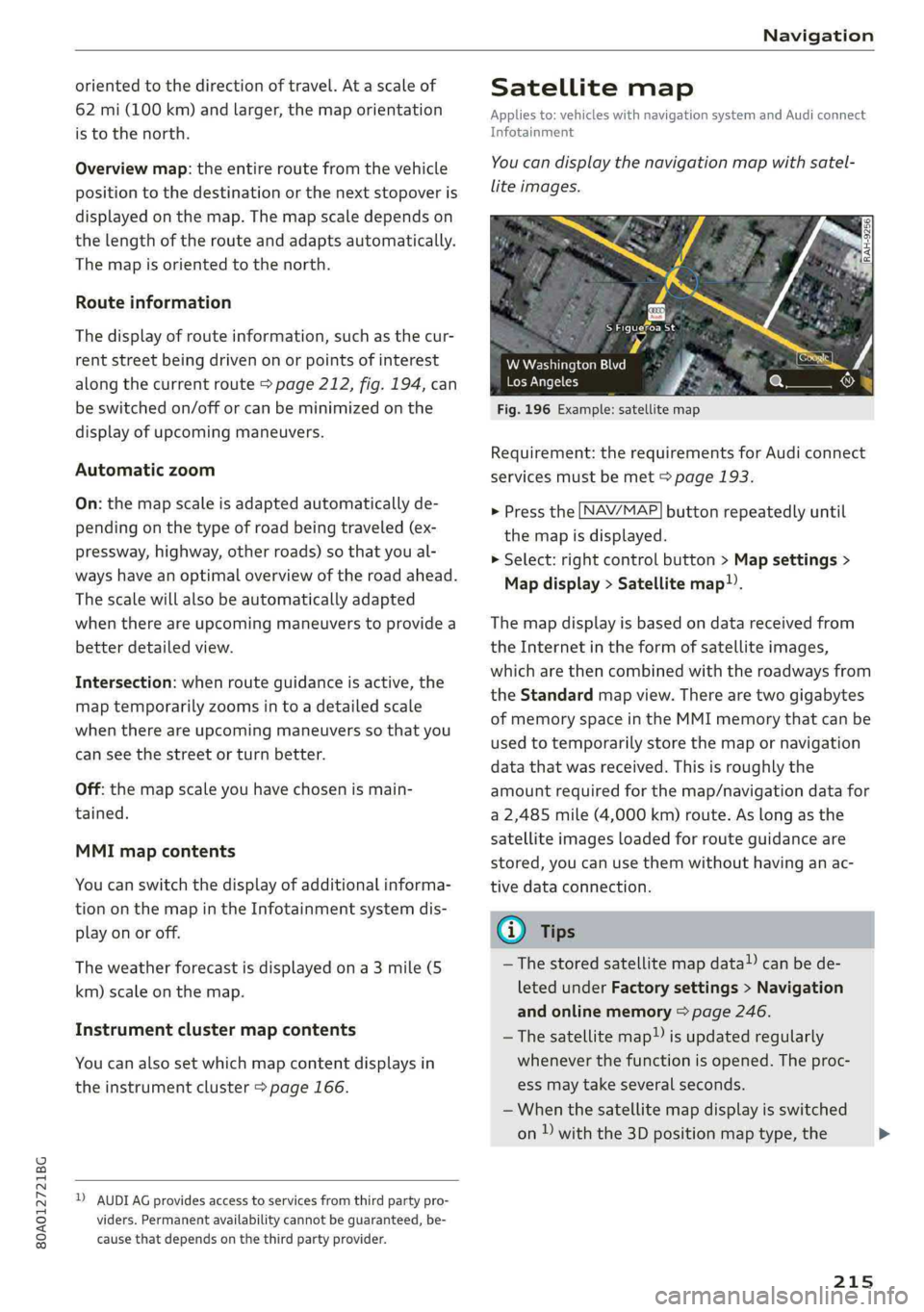
You candisplaythenavigationmapwithsatel-
liteimages.
SFigueroaSt
Fig.196Example:satellitemap
WWashingtonBlvd
LosAngeles
Requirement:therequirementsforAudiconnect
servicesmustbemet>page193.
>Pressthe [NAV/MAP]buttonrepeatedlyuntil
themapisdisplayed.
>Select:rightcontrolbutton>Mapsettings>
Mapdisplay>Satellitemap).
Themapdisplayisbasedondatareceivedfrom
theInternetintheformofsatelliteimages,
whicharethencombinedwiththeroadwaysfrom
theStandardmapview.Therearetwogigabytes
ofmemoryspaceintheMMImemorythatcanbe
usedtotemporarilystorethemapornavigation
datathatwasreceived.Thisisroughlythe
amountrequiredforthemap/navigationdatafor
a2,485mile(4,000km)route.Aslongasthe
satelliteimagesloadedforrouteguidanceare
stored,youcan usethemwithouthavinganac-
tivedataconnection.
GTips
—Thestoredsatellitemapdata!)canbede-
letedunderFactorysettings>Navigation
andonlinememory>page246.
~Thesatellitemap!)isupdatedregularly
wheneverthefunctionisopened.Theproc-
essmaytakeseveralseconds.
—Whenthesatellitemapdisplayisswitched
on)withthe3Dpositionmaptype,the
215
>
Page 218 of 392
Navigation
MMIdisplayautomaticallyswitchestothe
2Dmaptypewhendrivingthroughtunnels.
—Also readtheinformationinthechapter
=page192,Audiconnect.
—Foradditionalinformation,visitwww.
audiusa.com.
Mapupdate
Appliesto:vehicleswithnavigationsystem
Therearemultipleoptionsavailableforupdating
yourmapmaterial:
—Mapupdatesthroughthe onlinemapupdate*
>page216.
—ImportmapupdatesfromtheSDcard*toyour
MMI.Youcanfindadditionalinformationon-
lineatwww.audiusa.com/myaudi.
—MapupdateatanauthorizedAudidealeror au-
thorizedAudiServiceFacility.Thiscanresultin
additionalcosts.
Onlinemapupdate
Appliesto:vehicleswithnavigationsystemandAudiconnect
Infotainment
Usingtheonlinemapupdate,youcanupdate
themapmaterialinyournavigationsystemdi-
rectlyfromyourvehicle.
Recommendedregions->Confirmation
[RAH-8624]LOTRolRUTae
Cannelel
BTCCelTe)
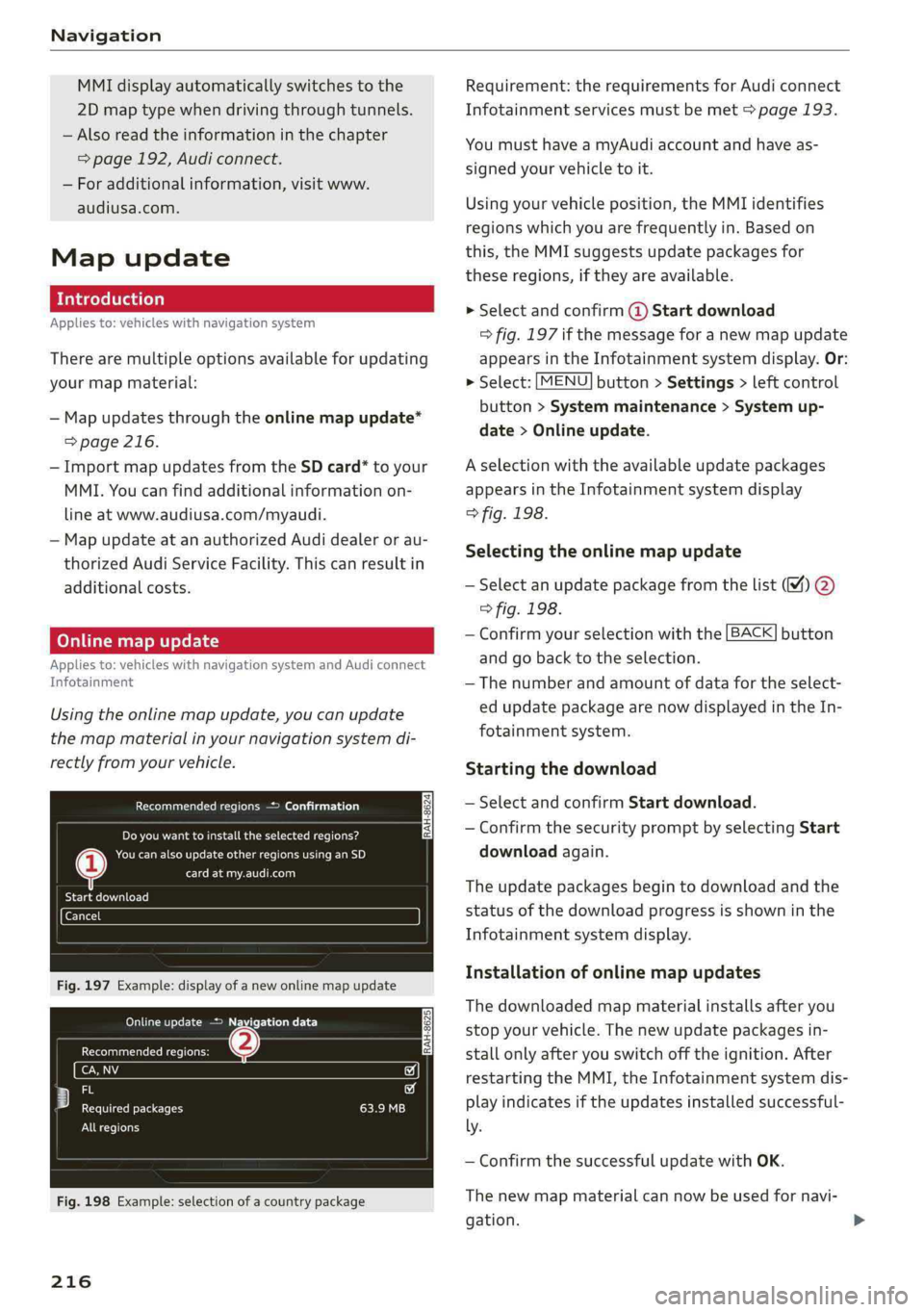
Fig.197Example:displayofanewonlinemapupdate
OMGriceetcare)
GecmaeuteCRiees
io
Fy)iecf
ereReteeleERI)
Allregions
Fig.198Example:selectionofacountrypackage
216
Requirement:therequirementsforAudiconnect
Infotainmentservicesmustbemet>page193.
YoumusthaveamyAudiaccountandhaveas-
signedyourvehicletoit.
Usingyourvehicleposition,theMMIidentifies
regionswhichyouarefrequentlyin.Basedon
this,theMMIsuggestsupdatepackagesfor
theseregions,iftheyareavailable.
»Selectandconfirm@Startdownload
=>fig.197ifthemessageforanewmapupdate
appearsintheInfotainmentsystemdisplay.Or:
>Select:[MENU]button>Settings>leftcontrol
button>Systemmaintenance>Systemup-
date>Onlineupdate.
Aselectionwiththeavailableupdatepackages
appearsintheInfotainmentsystemdisplay
>fig.198.
Selectingtheonlinemapupdate
—Selectanupdatepackagefromthelist%)@
>fig.198.
—Confirmyourselectionwiththe[BACK]button
and gobacktotheselection.
—Thenumberandamountofdatafortheselect-
edupdatepackagearenowdisplayedintheIn-
fotainmentsystem.
Startingthedownload
—SelectandconfirmStartdownload.
—ConfirmthesecuritypromptbyselectingStart
downloadagain.
Theupdatepackagesbegintodownloadandthe
statusofthedownloadprogressisshowninthe
Infotainmentsystemdisplay.
Installationofonlinemapupdates
Thedownloadedmapmaterialinstallsafteryou
stopyourvehicle.Thenewupdatepackagesin-
stallonlyafteryouswitchofftheignition.After
restartingtheMMI,theInfotainmentsystemdis-
playindicatesiftheupdatesinstalledsuccessful-
ly.
—ConfirmthesuccessfulupdatewithOK.
Thenewmapmaterialcannowbeusedfornavi-
gation.
Page 219 of 392
80A012721BG
Navigation
@Tips
—Alwaysreadthechapter>page192.
— Theamountofavailableonlinemapupdates
inthevehicleislimited.Toupdatemorere-
gions,usethemapupdateviaSDcardat
www.audiusa.com/myaudi.
—Alwaysreadthechapter>page192,Audi
connect.
Trafficinformation
Appliesto:vehicleswithnavigationsystem
Coeenaes@
®Westbound#>Eastbound
@)Northbound
©>-@serthvoun
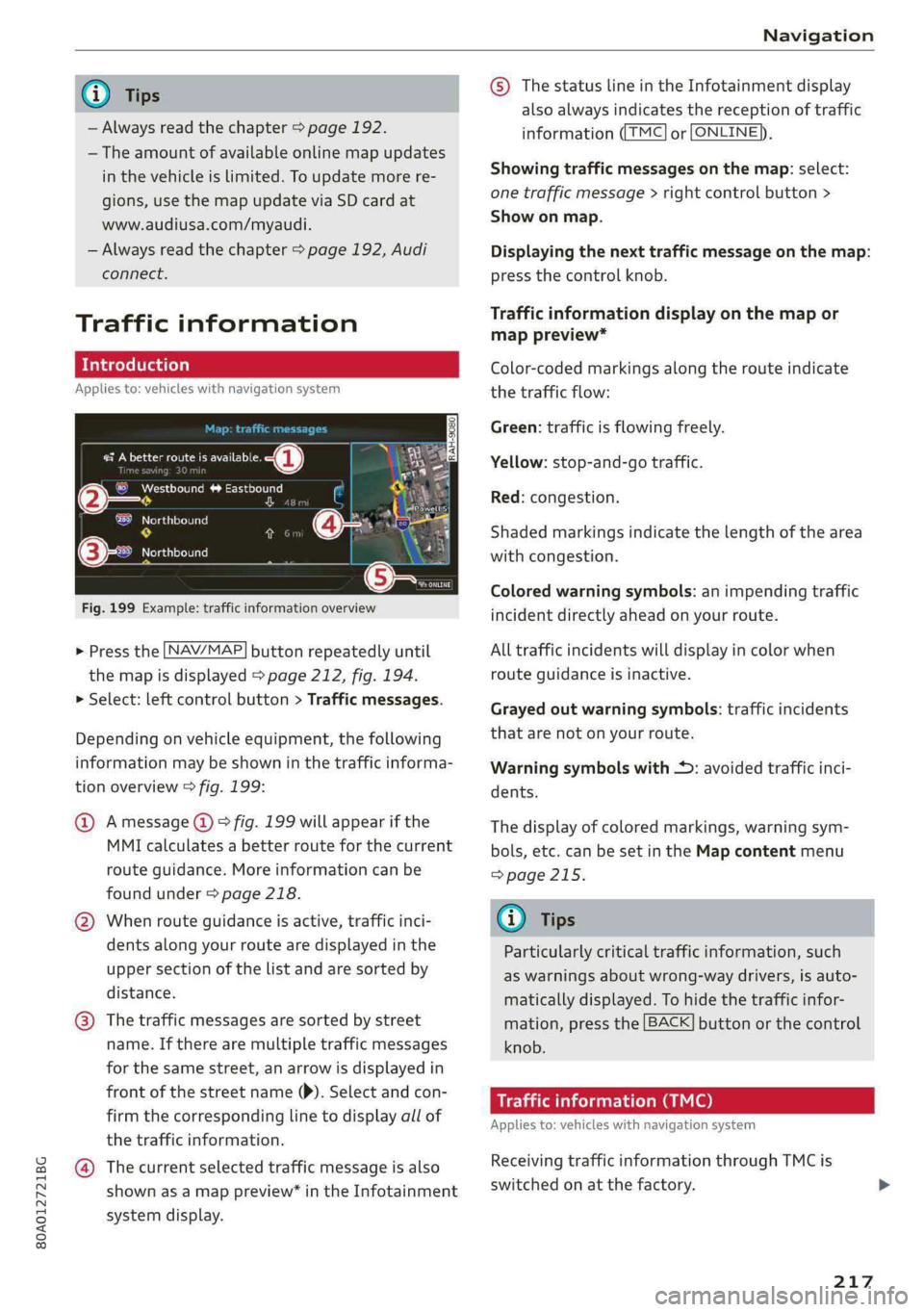
Fig.199Example:trafficinformationoverview
>Pressthe LNAV/MAP]buttonrepeatedlyuntil
themapisdisplayed>page212,fig.194.
>Select:leftcontrolbutton>Trafficmessages.
Dependingonvehicleequipment,thefollowing
informationmaybeshowninthetrafficinforma-
tionoverview>fig.199:
@Amessage(@)>fig.199willappearifthe
MMIcalculatesabetterrouteforthecurrent
routeguidance.Moreinformationcanbe
foundunder>page218.
@Whenrouteguidanceisactive,trafficinci-
dents along yourroutearedisplayedinthe
uppersectionofthelistandaresortedby
distance.
@®Thetrafficmessagesaresorted bystreet
name.Iftherearemultipletrafficmessages
forthesamestreet,anarrowisdisplayedin
frontofthestreetname()).Selectandcon-
firmthecorrespondinglinetodisplayallof
thetrafficinformation.
@Thecurrentselectedtrafficmessageisalso
shownasamappreview”intheInfotainment
systemdisplay.
©)ThestatuslineintheInfotainmentdisplay
alsoalwaysindicatesthereceptionoftraffic
informationTMC]orLONLINE}),
Showingtrafficmessagesonthemap:select:
onetrafficmessage>rightcontrolbutton>
Showonmap.
Displayingthe nexttrafficmessageonthemap:
pressthecontrolknob.
Trafficinformationdisplayonthemapor
mappreview*
Color-codedmarkingsalongtherouteindicate
thetrafficflow:
Green:trafficisflowingfreely.
Yellow:stop-and-gotraffic.
Red:congestion.
Shadedmarkingsindicatethelength ofthearea
withcongestion.
Coloredwarningsymbols:animpendingtraffic
incidentdirectlyaheadonyourroute.
Alltrafficincidentswilldisplayincolorwhen
routeguidanceisinactive.
Grayedoutwarningsymbols:trafficincidents
thatarenotonyourroute.
Warningsymbolswith*:avoidedtrafficinci-
dents.
Thedisplay ofcoloredmarkings,warningsym-
bols,etc.canbesetintheMapcontentmenu
=>page215.
G@)Tips
Particularlycriticaltrafficinformation,such
aswarningsaboutwrong-waydrivers,isauto-
maticallydisplayed.Tohidethetrafficinfor-
mation,pressthe[BACK]buttonorthecontrol
knob.
Trafficinformation(TMC)
Appliesto:vehicleswithnavigationsystem
ReceivingtrafficinformationthroughTMCis
switchedonatthefactory.
217
Page 220 of 392
![AUDI Q5 2019 Repair Manual Navigation
>Pressthe LNAV/MAP]buttonrepeatedlyuntil
themapisdisplayed.
>Select:leftcontrolbutton>Trafficmessages.
Anoverviewofallthetrafficmessagesisdis-
playedintheInfotainmentsystem.
—Open](/img/6/57631/w960_57631-219.png "AUDI Q5 2019 Repair Manual Navigation
>Pressthe LNAV/MAP]buttonrepeatedlyuntil
themapisdisplayed.
>Select:leftcontrolbutton>Trafficmessages.
Anoverviewofallthetrafficmessagesisdis-
playedintheInfotainmentsystem.
—Open")
Navigation
>Pressthe LNAV/MAP]buttonrepeatedlyuntil
themapisdisplayed.
>Select:leftcontrolbutton>Trafficmessages.
Anoverviewofallthetrafficmessagesisdis-
playedintheInfotainmentsystem.
—Openingadetailedviewoftrafficinformation:
selectandconfirmthetrafficinformationfrom
thelist.
G)Tips
—TMCtrafficreportsarenotavailableinCan-
ada.Formoreinformation,pleasecontact
SiriusCanada.
—Criticaltrafficinformation,suchaswarnings
aboutwrong-waydrivers,isautomatically
displayed.Tohidethetrafficinformation,
pressthe[BACK] buttonorthecontrolknob.
1X1tacoA)
Appliesto:vehicleswithnavigationsystem andbetterroute
ByreceivingtrafficinformationthroughTMC,
yourMMIcalculatesabetterrouteifavailable
andthepossibletimesavedcomparedtothe
currentroute.Youcandecidewhichrouteyou
wouldliketouse.
>Pressthe LNAV/MAP|buttonrepeatedlyuntil
themapisdisplayed.
Requirement:routeguidancemustbeactive.
IfyourMMIhascalculatedabetterroutethan
thecurrentrouteguidance,themessageAbetter
routeisavailable.appearsforseveralseconds
alongwiththetimethatmaybesaved.Abetter
routeisindicatedinthemapviewbythesymbol
"©page212,fig.195.
Amessagewillalsoappearinthetrafficinforma-
tionoverview@)>page217,fig. 199.
Applybetterroute
—Presstherightcontrolbutton.
2)AUDIAGprovidesaccesstoservicesfromthirdpartypro-
viders.Permanentavailabilitycannotbeguaranteed,be-
causethatdependsonthethirdpartyprovider.
218
—Selectandconfirmthebetterroute.Or:Select
andconfirmDetails todisplaydetailsaboutthe
betterroute.Youcanzoominoroutonthe
mapusingtheMMItouchcontrolpad.Require-
ment:theremustbemorethanoneoptimized
routecalculated.Pressthecontrolknobto
switchtothenextrouteinthedetailedview.
Closingthedetailedview:pressthe[BACK
button.
—Afteryouhaveselectedabetterroute,the
routewillberecalculated.
OnlinetraTeemulcd)
Appliesto:vehicleswithnavigationsystem andAudiconnect
Infotainment
TheMMIcanreceivereal-timeonlinetrafficin-
formationaboutcongestion,accidents,road
construction,andotherincidents.
Requirement:TherequirementsforAudiconnect
Infotainmentmustbemet>page193.
>Switchingonlinetrafficinformationonand
off:select[NAV/MAP]button>rightcontrol
button>Onlinetrafficdataon()oroff(
>Pressthe [NAV/MAP]buttonrepeatedlyuntil
themapisdisplayed.
>Select:leftcontrolbutton>Trafficmessages.
Theonlinetrafficinformationwillalsobedis-
playedonthesatellitemap»)>page215oron
thestandardmap>page212,fig. 194.
If[ONLINE]trafficinformationcannotbere-
ceived,thentrafficinformationwillautomatically
bereceivedthrough[TMC]>page217.
@Tips
—Onlinetrafficinformationisnotavailablein
Canada.
—Alwaysreadthechapter>page192,Audi
connect.
—HavingtheOnlinetrafficdatafunction
switchedonprovidesthemostaccuratere-
portsoftrafficsituationsaswellastraffic
forecasting.Yourvehicletransmitsand
Page 221 of 392
80A012721BG
Navigation
processesitsanonymous,encryptedposi-—Theonlinetrafficinformationnetworkis
tioninformationatregularintervalstothecurrentlynotavailableinallcountries,and
trafficdataprovider.Ifyoudonotwanttothecoverageisnotnationwide.Foraddi-
usethis,youcanswitchofftheonlinetraf-tionalinformation,visitwww.audiusa.com.
ficinformationfunctionatanytime.
Troubleshooting
Appliesto:vehicleswithnavigationsystem
ProblemSolution
Freetextsearch:thedesireddes-
tinationcannotbefound.
Thedestinationmightnotbeenteredinthenavigationdatabase.
Or:checkthespellingofthetermthatwassearched.Checkifthe
desiredcountry/statewasselectedforthefreetextsearchusing
theCountry/stateselection>page204orthe optionAllcoun-
tries/states.
219
Page 224 of 392
Radio
SiriusXMalerts
Appliesto:vehicleswithSiriusXM
Youcandisplayanoverviewofyourfavoritear-
tistsortracksthatarecurrentlybeingplayedon
aSiriusXMchannel.
Vale
Tee)
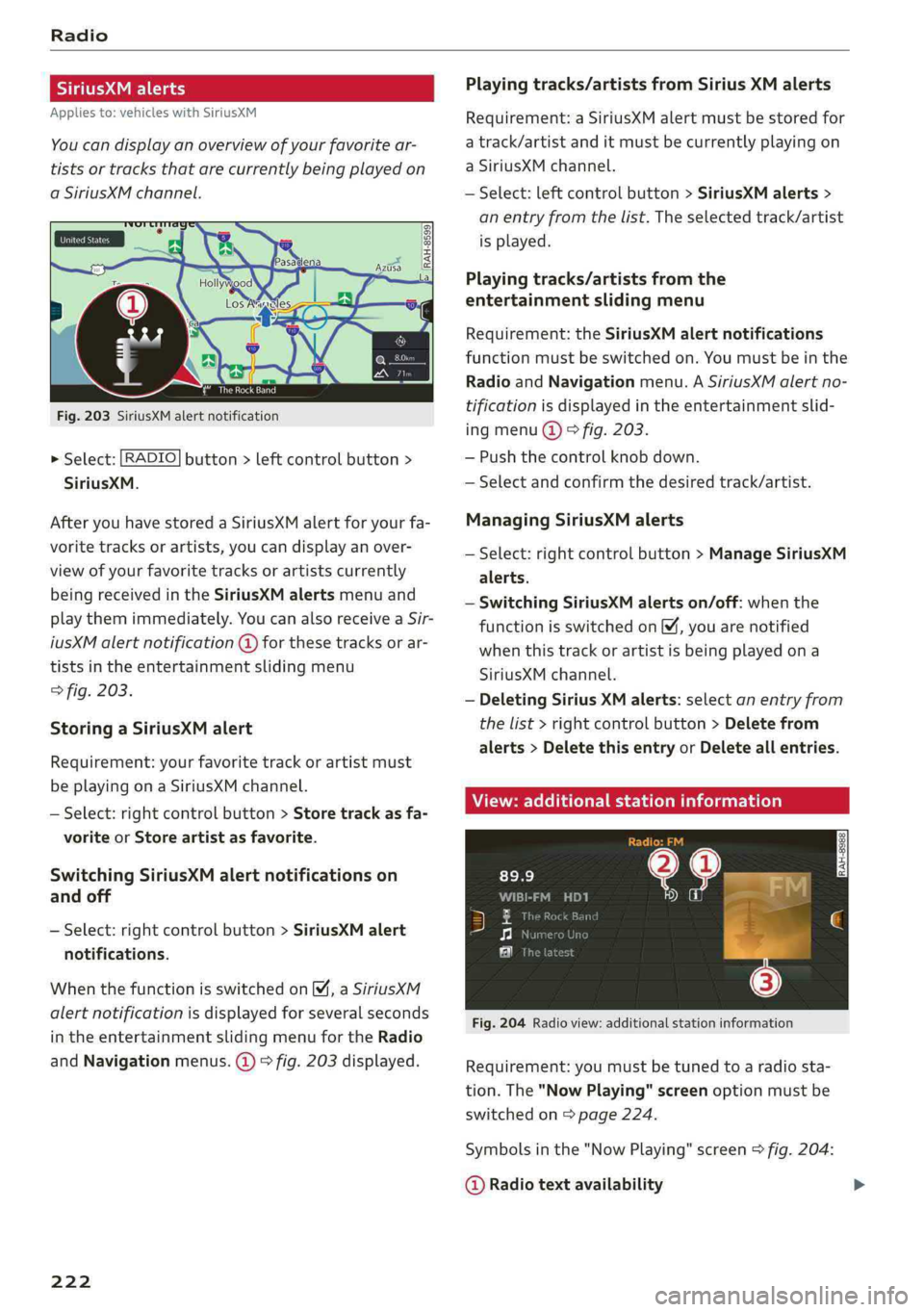
Fig.203SiriusXMalertnotification
>Select:[RADIO]button>leftcontrolbutton>
SiriusXM.
AfteryouhavestoredaSiriusXMalertforyourfa-
voritetracksorartists,youcandisplayanover-
viewofyourfavoritetracksorartistscurrently
beingreceivedintheSiriusXMalertsmenuand
playthemimmediately.YoucanalsoreceiveaSir-
iusXMalertnotification@forthesetracksorar-
tistsintheentertainmentslidingmenu
>fig.203.
StoringaSiriusXMalert
Requirement:yourfavoritetrackorartistmust
beplayingonaSiriusXMchannel.
—Select:rightcontrolbutton>Storetrackasfa-
voriteorStoreartistasfavorite.
SwitchingSiriusXMalertnotificationson
andoff
—Select:rightcontrolbutton>SiriusXMalert
notifications.
WhenthefunctionisswitchedonM,aSiriusXM
alertnotificationisdisplayedforseveralseconds
intheentertainmentslidingmenufortheRadio
andNavigationmenus.@)>fig.203displayed.
222
Playingtracks/artistsfromSiriusXMalerts
Requirement:aSiriusXMalertmustbestoredfor
atrack/artistanditmustbecurrentlyplayingon
aSiriusXMchannel.
—Select:leftcontrolbutton>SiriusXMalerts>
anentryfromthelist.Theselectedtrack/artist
isplayed.
Playingtracks/artistsfromthe
entertainmentslidingmenu
Requirement:theSiriusXMalertnotifications
functionmustbe switchedon.Youmustbeinthe
RadioandNavigationmenu.ASiriusXMalertno-
tificationisdisplayedintheentertainmentslid-
ingmenu@)©fig.203.
—Pushthecontrolknob down.
—Selectandconfirmthedesiredtrack/artist.
ManagingSiriusXMalerts
—Select:rightcontrolbutton>ManageSiriusXM
alerts.
—SwitchingSiriusXMalertson/off:whenthe
functionisswitchedon,youarenotified
whenthistrackorartistisbeingplayedona
SiriusXMchannel.
—DeletingSiriusXMalerts:selectanentryfrom
thelist>rightcontrolbutton>Deletefrom
alerts>DeletethisentryorDeleteallentries.
View:additionalstationinformation
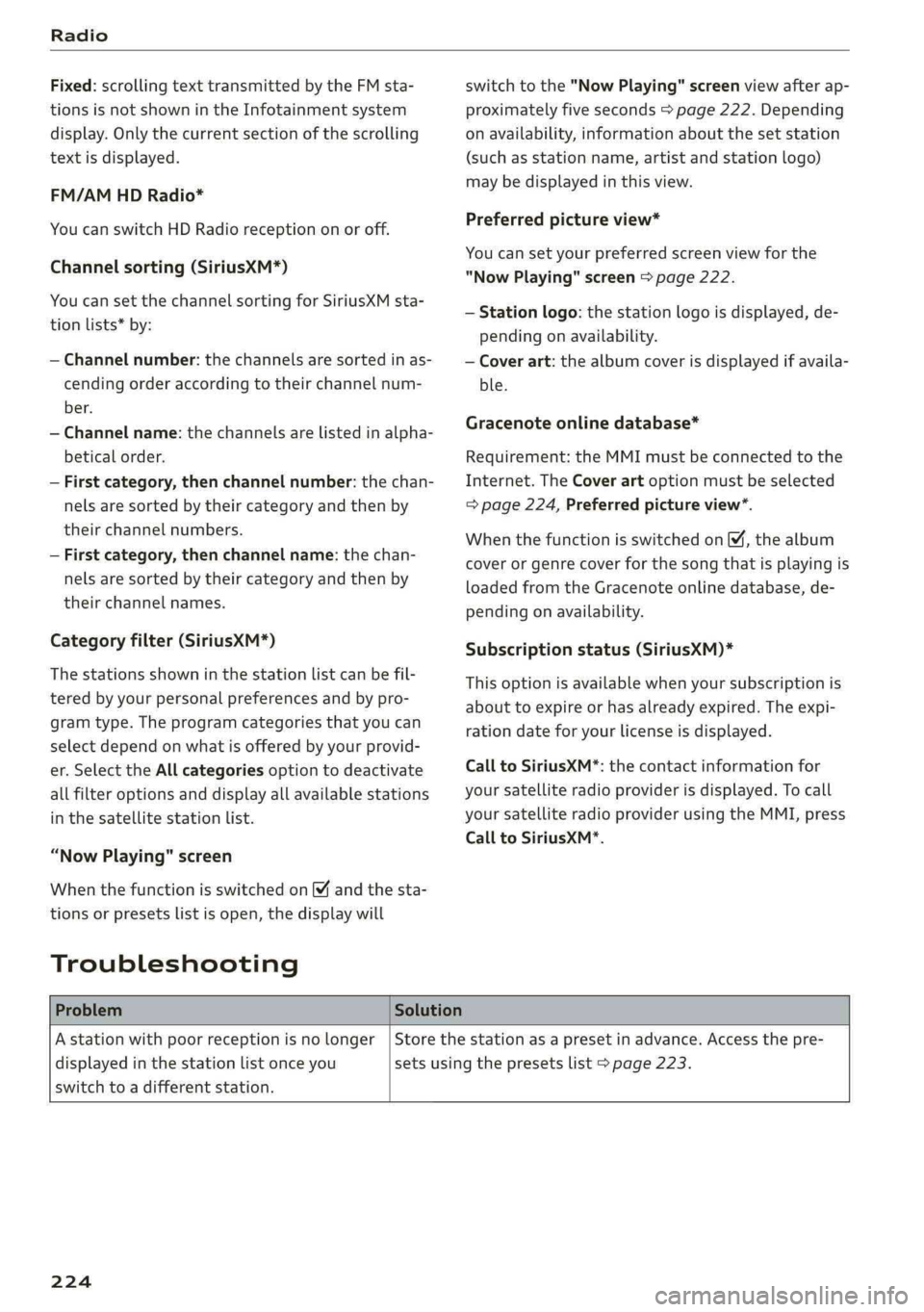
Fig.204Radioview:additionalstationinformation
Requirement:youmustbetunedtoaradiosta-
tion.The"NowPlaying"screenoptionmustbe
switched
on>page224.
Symbolsinthe"NowPlaying"screen>fig.204:
@Radiotextavailability
Page 226 of 392
Radio
Fixed:scrollingtexttransmittedby theFMsta-
tionsisnotshownintheInfotainmentsystem
display.Onlythecurrentsectionofthescrolling
textisdisplayed.
FM/AMHDRadio*
YoucanswitchHDRadioreceptiononoroff.
Channelsorting(SiriusXM*)
YoucansetthechannelsortingforSiriusXMsta-
tionlists*by:
—Channelnumber:thechannelsaresortedinas-
cendingorderaccordingtotheirchannelnum-
ber.
—Channelname:thechannelsarelistedinalpha-
beticalorder.
—Firstcategory,thenchannelnumber:thechan-
nelsaresorted bytheircategoryandthenby
theirchannelnumbers.
—Firstcategory,thenchannelname:thechan-
nelsaresorted bytheircategoryandthenby
theirchannelnames.
Categoryfilter(SiriusXM*)
Thestationsshowninthestationlistcanbefil-
teredby yourpersonalpreferencesandbypro-
gramtype.Theprogramcategoriesthatyoucan
selectdependonwhatisofferedbyyourprovid-
er.SelecttheAllcategoriesoptiontodeactivate
allfilteroptionsanddisplayallavailablestations
inthesatellitestationlist.
“NowPlaying" screen
Whenthefunctionisswitchedon¥andthesta-
tionsorpresetslistisopen,thedisplaywill
Troubleshooting
switchtothe"NowPlaying"screenviewafterap-
proximatelyfiveseconds>page222.Depending
onavailability,informationaboutthesetstation
(such asstationname,artistandstationlogo)
maybedisplayedinthisview.
Preferredpictureview*
Youcansetyourpreferredscreenviewforthe
"NowPlaying"screen>page222.
—Stationlogo:thestationlogoisdisplayed,de-
pendingonavailability.
—Coverart:thealbumcoverisdisplayedifavaila-
ble.
Gracenoteonlinedatabase*
Requirement:theMMImustbeconnectedtothe
Internet.TheCoverartoptionmustbeselected
=>page224,Preferredpictureview”.
Whenthefunctionisswitchedon M,thealbum
coverorgenrecoverforthesongthatisplayingis
loadedfromtheGracenoteonlinedatabase,de-
pendingonavailability.
Subscriptionstatus(SiriusXM)*
Thisoptionisavailablewhenyoursubscriptionis
abouttoexpireorhasalreadyexpired.Theexpi-
rationdateforyourlicenseisdisplayed.
CalltoSiriusXM*:thecontactinformationfor
yoursatelliteradioproviderisdisplayed.Tocall
yoursatelliteradioproviderusingtheMMI,press
CalltoSiriusXM*.
ProblemSolution
Astationwithpoorreceptionisnolonger
displayedinthestationlistonceyou
switchtoadifferentstation.
Storethestationasapresetinadvance.Accessthepre-
setsusingthepresetslist>page223.
224
Page 227 of 392
80A012721BG
Media
Media
Introduction
Therearevariousmediadrivesandconnections
availableintheMMI.Forexample,youcanplay
audio/video*filesfromtheJukebox*orconnect
yourmobiledevicetotheAudimusicinterface*
andoperateitthroughtheMMI.
Notes
Mediaandformatrestrictions:theMMI(includ-
ingtheSDcardreaderandtheUSBstoragede-
viceconnection*)wastestedwithavarietyof
productsandmediaavailableinthemarket.
However,theremaybecaseswhereindividualde-
vicesormediaandaudio/video*filesmaynot be
recognized,mayplayonlywithrestrictionsor
maynotplayatall.
DigitalRightsManagement:pleasenotethat
theaudio/video*filesaresubjecttocopyright
protection.
Themediadrivesdonotplayfilesthatarepro-
tectedbyDRMandthatareidentifiedwiththe
symbolfi.
Datasecurity:neverstoreimportantdataonSD
cards,theJukebox*,CDs/DVDsormobiledevices.
AudiAGisnotresponsiblefordamagedorlost
filesandmedia.
Loadingtimes:themorefiles/folders/playlists
thatareonastoragemedium,thelongeritwill
taketo loadtheaudio/video*files.Audirecom-
mendsusingstoragemediathatonlycontainau-
dio/videofiles*.To decreasethetimeittakesto
loadaudio/videofiles*,createsubfolders(forex-
ample,fortheartistoralbum).Theloadingtime
willalsoincreasewhenimportingfiles.
Additionalinformation:whenplaying,audio
filesareautomaticallydisplayedwithanyaddi-
tionalinformationthatisstored(suchasthear-
tist,trackandalbumcover).Ifthisinformationis
notavailableonthestoragemedium,theMMI
willchecktheGracenotemetadatadatabase.
However,insomecases,theadditionalinforma-
tionmaynotbedisplayed.
Restrictedfunctionality:resettheMediaset-
tingstothefactorydefaultsettingsiffunctional-
ityisrestricted>page246.
Iffunctionalityisrestricted,resettheJukebox*
tothefactorydefaultsettings>page246.
Forinformationaboutthepropertiesofsupport-
edmediaandfileformats,see>page240.
CG)Note
Alwaysfollowtheinformationfoundin>@in
Generalinformationonpage192.
CD/DVDoperation
CD/DVDandformatrestrictions:thefunctionali-
tyofindividualstoragemediamaybelimiteddue
tothevarietyofblankCDs/DVDsavailable and
thevariouscapacities.AudioCDsorvideoDVDs
withcopyprotection,CDs/DVDsthatdonotcon-
formtothestandard,andmultisessionCDsmay
havelimitedplaybackormaynotplayatall.Audi
recommendsfinalizingtherecordingprocess
whencreatingmultisession CDs.Multisession
DVDsarenotsupported.
UsingCDs/DVDs,theCDdrive ortheDVDdrive:
toensurecorrect,high-qualityplaybackandto
preventdamagetothedriveordiscreadinger-
rors,alwaysstoreCDs/DVDsinaprotective
sleeveanddonotexposethemtodirectsunlight.
Donotuse:
—Damaged,dirtyorscratchedCDs/DVDs
—
SingleCDs/DVDswith3in(8cm)diameter
—CD/DVDsthatarenotround
—CDs/DVDswithlabels
—Protectiverings
—CleaningCDs
Thermalprotectionswitch:CD/DVDplayback
maybetemporarilyunavailableifoutsidetem-
peraturesareextremelyhotorcold.Athermal
protectionswitchisinstalledtoprotectthe
CD/DVDandthelaser.
Laserdevices:laserdevicesare dividedintosafe-
tyclasses1to4inaccordancewithDINIEC76
225
>
Page 239 of 392
80A012721BG
Media
Playlist
ThebigB
5ke
Stories
kE
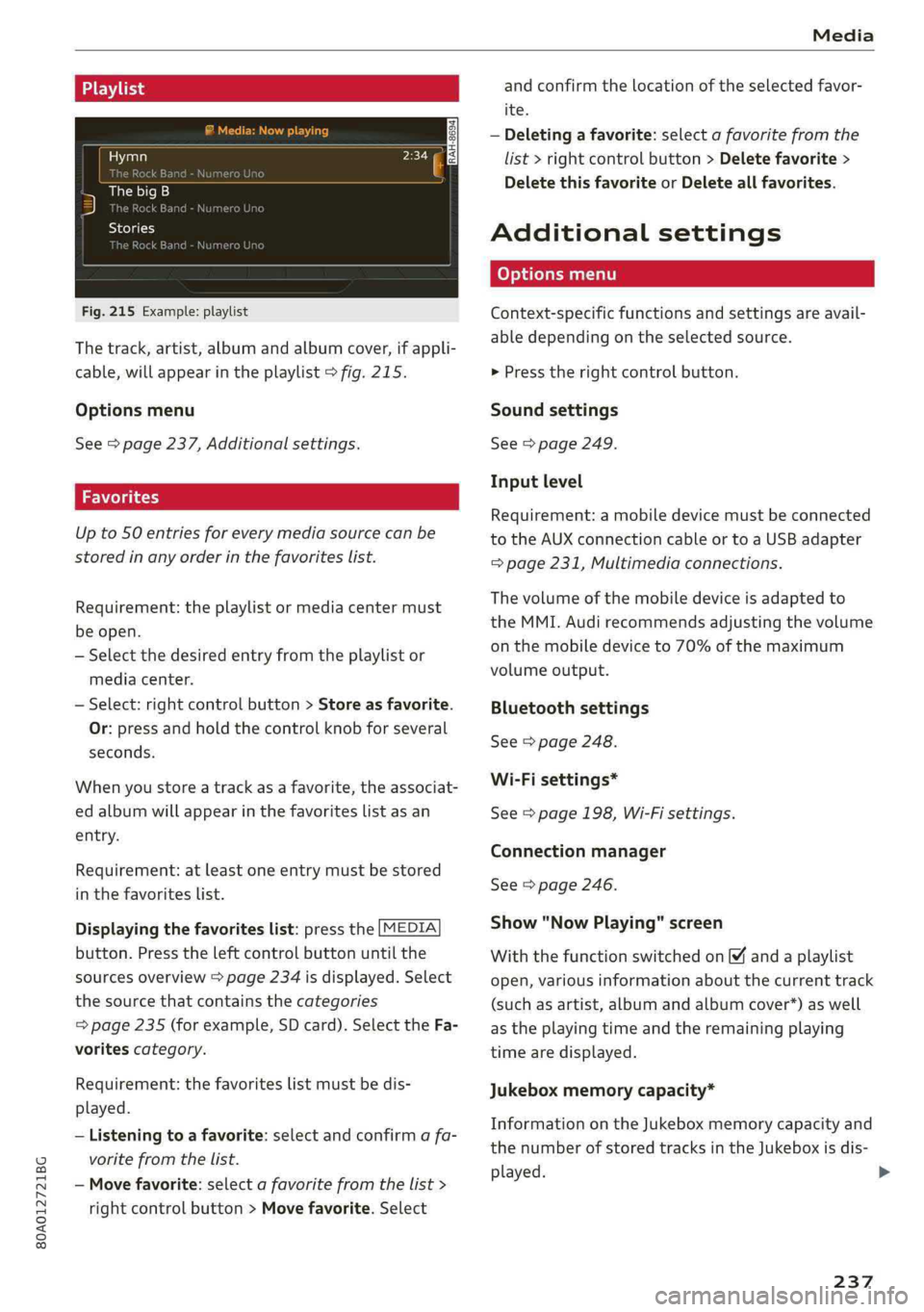
Fig.215Example:playlist
Thetrack,artist,albumandalbumcover,ifappli-
cable,willappearintheplaylist>fig.215.
Optionsmenu
See>page237,Additionalsettings.
Upto50entriesforeverymediasourcecanbe
storedinanyorderinthefavoriteslist.
Requirement:theplaylistormediacentermust
beopen.
—Selectthedesiredentryfromtheplaylistor
mediacenter.
—Select:rightcontrolbutton>Storeasfavorite.
Or:pressandholdthecontrolknobforseveral
seconds.
Whenyoustoreatrackasa favorite,theassociat-
edalbumwillappearinthefavoriteslistasan
entry.
Requirement:atleastoneentrymustbestored
inthefavoriteslist.
Displayingthefavoriteslist:pressthe[MEDIA
button.Presstheleftcontrolbuttonuntilthe
sourcesoverview>page234isdisplayed.Select
thesourcethat containsthecategories
=>page235(forexample,SDcard).SelecttheFa-
voritescategory.
Requirement:thefavoriteslistmustbedis-
played.
—Listeningtoafavorite:selectandconfirm afa-
voritefromthelist.
—Movefavorite:selectafavoritefromthelist>
rightcontrolbutton>Movefavorite.Select
andconfirm thelocationoftheselectedfavor-
ite.
—Deletingafavorite:selectafavoritefromthe
list>rightcontrolbutton>Deletefavorite>
DeletethisfavoriteorDeleteallfavorites.
Additionalsettings
Context-specificfunctionsandsettingsareavail-
abledependingontheselectedsource.
>Presstherightcontrolbutton.
Soundsettings
See>page249.
Inputlevel
Requirement:amobiledevicemustbeconnected
totheAUXconnectioncableortoaUSBadapter
=page231,Multimediaconnections.
Thevolumeofthemobiledeviceisadaptedto
theMMI.Audirecommendsadjustingthevolume
onthemobiledeviceto70%ofthemaximum
volumeoutput.
Bluetoothsettings
See>page248.
Wi-Fisettings*
See>page198,Wi-Fisettings.
Connectionmanager
See>page246.
Show"NowPlaying"screen
Withthefunctionswitchedon¥andaplaylist
open,variousinformationaboutthecurrenttrack
(suchasartist,albumandalbumcover*)aswell
astheplayingtimeandtheremainingplaying
timearedisplayed.
Jukeboxmemorycapacity*
InformationontheJukeboxmemorycapacityand
thenumberofstoredtracksintheJukeboxisdis-
played.
237
>
Page 240 of 392
Media
Rewind/Fastforward
Turnthecontrolknobtotheleftor totheright.
Or:Moveyourfingerfromlefttorightonthe
MMItouchcontrolpanel”.
Shuffle!)
Withthefunctionswitchedon,allfilesinthe
playlistareplayedandshowninrandomorder.
Repeattrack!)
Whenthefunctionisswitchedon M,thecurrent
trackrepeats.
Repeat*
Requirement:aniPod/iPhone*mustbeselected
asthemediasourceintheAudimusicinterface
=page234,Accessingmedia.
—Track:thecurrenttrackwillberepeated.
—Folder:thetracksinthecurrentfolder are
playedcontinuouslyinaloop.
—Off:thefunctionisswitchedoff.
Backto'Playback'
Theoptionsmenuisclosed.Thetrackcurrently
playingappearsintheplaylist.
Playsimilarmusic*
Thetrackcurrentlyplayingisquicklyanalyzedfor
featuressuchasartist,genres,mood,andbeat,
andasmartplaylistwithsimilartrackswillbe
shown.
Playmore...
Asmartplaylistisshownbasedonthetrackcur-
rently playing.Youcanselectbetweenaplaylist
withmoretracksbythisartist,fromthisalbum
orofthisgenre.
Copytojukebox*
See>page227,AddingfilestotheJukebox.
)Thefunctionautomaticallyswitchesoffwhenthesourceis
changed.
2)Thisfunctionisnotavailableforallcellphones.
238
Setasringtone*”)
Requirement:amobiledevicemustbeconnected
totheMMI.Thetrackcurrentlyplayingmustbe
intheJukebox*>page227.
Theselectedtrackwillbeusedastheringtone
forincomingcalls.
Gracenoteonlinedatabase*
Requirement:theMMImustbeconnectedtothe
Internet.
Dependingonavailability,variousinformation
willloadaboutthetrackcurrentlyplayingwhen
thisfunctionisswitchedon.
Favorites
See>page237.
Additionaloptions
Requirement:thevehiclemustbestationaryand
avideofile*oraDVD*mustbeplaying.
Parentalcontrol*
PlaybackofvideoDVDscanberestrictedusing
parentalcontrol.
Enterthepasswordforparentalcontrol.Pass-
wordsetatthefactory:1234.Youhavethefol-
lowingoptions:
—Protectionlevel:selectandconfirmtheprotec-
tionlevel(forexample,Level5).Eightdifferent
protectionlevelscanbesetforparentalcon-
trol.Ifyousettheparentalcontrollevelat Lev-
el5,allDVDsfromlevels1-5canbeplayed.
VideoDVDswithahigherlevelwillnotplay.Se-
lectUnrestrictedtoremovealloftherestric-
tions.
—Changepassword:editthecurrentpassword.
Switchtofullscreen
Thevideoimageisdisplayed.Turnthecontrol
knobtodisplaytheplaylist.Or:pressthe[BACK
button.