light AUDI Q5 2019 Manual Online
[x] Cancel search | Manufacturer: AUDI, Model Year: 2019, Model line: Q5, Model: AUDI Q5 2019Pages: 392, PDF Size: 99.86 MB
Page 205 of 392
80A012721BG
Navigation
Navigation
Openingnavigation
Appliesto:vehicleswithnavigationsystem
Thenavigationsystemdirectsyoutoyourdesti-
nation,aroundtrafficincidents,andonalterna-
tiveroutes,ifdesired.
Homeaddress
2)Gasstation
4
Senet
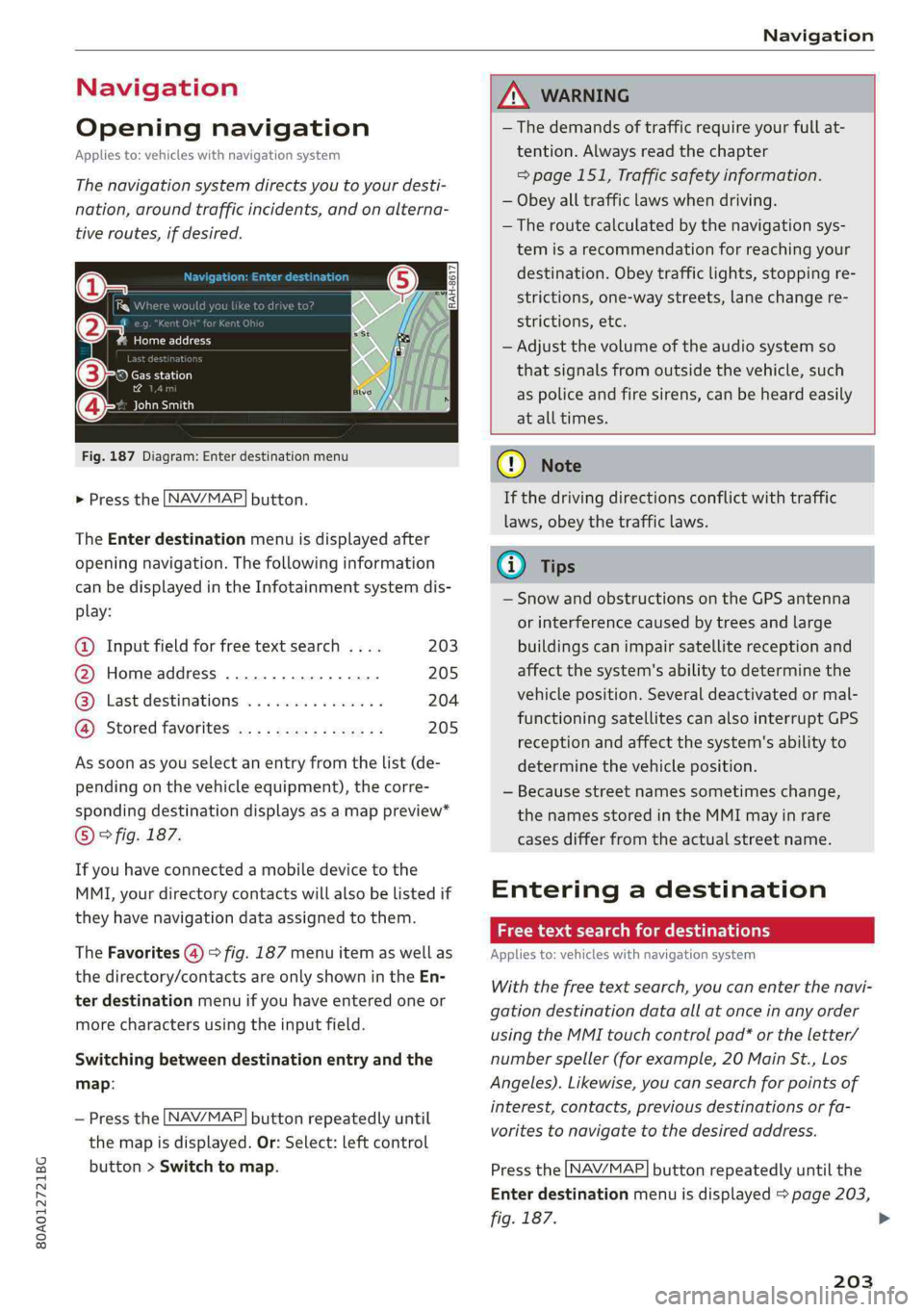
Fig.187Diagram:Enterdestinationmenu
>Pressthe [NAV/MAP]button.
TheEnterdestinationmenuisdisplayedafter
openingnavigation.Thefollowinginformation
canbedisplayedintheInfotainmentsystemdis-
play:
@Inputfieldforfreetextsearch....203
@Homeaddress.................205
@®Lastdestinations...............204
@Storedfavoritescos:ncesynewss205
Assoonasyouselectanentryfromthelist(de-
pendingonthevehicleequipment),thecorre-
spondingdestinationdisplaysasamappreview*
©fig.187.
Ifyouhaveconnectedamobiledevicetothe
MMI,yourdirectorycontactswillalsobelistedif
they havenavigationdataassignedtothem.
TheFavorites(4)>fig.187menuitemaswellas
thedirectory/contactsareonlyshowninthe En-
terdestinationmenuifyouhaveenteredoneor
morecharactersusingtheinputfield.
Switchingbetweendestinationentryandthe
map:
—Pressthe [NAV/MAP|buttonrepeatedlyuntil
themapisdisplayed.Or:Select:leftcontrol
button>Switchtomap.
ZAWARNING
— Thedemandsoftrafficrequireyourfullat-
tention.Alwaysreadthechapter
=page151,Trafficsafetyinformation.
—Obeyalltrafficlawswhendriving.
— Theroutecalculatedbythenavigationsys-
temisarecommendationforreachingyour
destination.Obeytrafficlights,stoppingre-
strictions,one-waystreets,lanechangere-
strictions,etc.
—Adjustthevolumeoftheaudiosystemso
thatsignalsfromoutsidethevehicle,such
aspoliceandfiresirens,can beheardeasily
atalltimes.
C)Note
Ifthedrivingdirectionsconflictwithtraffic
laws,obeythetrafficlaws.
G@)Tips
—SnowandobstructionsontheGPSantenna
or interferencecausedbytreesandlarge
buildingscanimpairsatellitereceptionand
affectthesystem'sabilitytodeterminethe
vehicleposition.Severaldeactivatedormal-
functioningsatellitescanalsointerruptGPS
receptionandaffectthesystem'sabilityto
determinethevehicleposition.
—Becausestreetnamessometimeschange,
thenamesstoredintheMMImayinrare
casesdifferfromtheactualstreetname.
Enteringadestination
Freetextsearchfordestinations
Appliesto:vehicleswithnavigationsystem
Withthefreetextsearch,youcanenterthenavi-
gationdestinationdataallatonceinanyorder
usingtheMMItouchcontrolpad*ortheletter/
numberspeller(forexample,20MainSt.,Los
Angeles).Likewise,youcansearchforpointsof
interest,contacts,previousdestinationsorfa-
voritestonavigatetothedesiredaddress.
Pressthe [NAV/MAP]buttonrepeatedlyuntilthe
Enterdestinationmenuisdisplayed>page203,
fig.187.
203
>
Page 216 of 392
Navigation
Routelist
Theroutelistcanonlybedisplayedwhenroute
guidanceisactiveandcontainsinformationre-
gardingtheroute,thenamesofthestreetsand
the lengthoftheroutesections.Whentraveling
onhighways,possibleparkinglotsandrestareas
areshown,whichyoucanselectasastopover.
POIsalongtheroute
Requirement:routeguidancemustbeactive.
Searchingforpointsofinterestalongyourcur-
rentrouteForadditionalinformation,see
=>page206.
Additionaloptionsonthemap
Appliesto:vehicleswithnavigationsystem
>Pressthe [NAV/MAP]buttonrepeatedlyuntil
themapisdisplayed>page212,fig.194.
>Presstherightcontrolbutton.
Dependingonthefunctionselected,thefollow-
ingoptionscanalsobeselectedundertheMap
menu:
Cancelrouteguidance:see>page208.
Mapsettings:see>page214.
Routecriteria:see>page212.
Voiceguidance:see>page212.
Navigationsettings:see>page211.
Showalternativeroutes:see>page210.
Parkingalongtheroute”:parkingoptionsnear
thevehiclearedisplayed.
Savecurrentposition:youcansaveyourcurrent
vehiclepositionasafavorite>page211orsave
itasacontactinthedirectory>page211.
Audiconnectatthislocation*:allowsyouto
searchforTravelinformationattheenteredlo-
cation(events,weatheratthedestination,etc.).
Onlinetrafficdata*:youcanswitchtheonline
trafficdataonoroff(M).
2)AUDIAGprovidesaccesstoservicesfromthirdpartypro-
viders.Permanentavailabilitycannotbeguaranteed,be-
causethatdependsonthethirdpartyprovider.
214
Countryinformation:see>page208.
Avoidroute*:whenrouteguidanceisactive,the
calculatedroutewillavoidtheareayouhave
specified(maximum:12mi(20km)),ifpossible.
Thenavigationsystemcalculatesanalternative
route.Theroutetobeavoidedthatyouhaveen-
teredappliesonlytothecurrentrouteandmust
besetagain,ifneeded.Theareasyouhavese-
lectedtoavoidwillappearwithredandwhite
shadingonthemap.
Moveroute*:moveyourfingerovertheMMI
touchcontrolpad*oruse thecontrolknobto ad-
justtherouteonthe overviewmap.
Mapsettings
Appliesto:vehicleswithnavigationsystem
>Pressthe LNAV/MAP]buttonrepeatedlyuntil
themapisdisplayed.
>Select:rightcontrolbutton>Mapsettings.
Dependingontheselectedfunction,thefollow-
ingsettingscanbeselected:
Mapcolors
Day/Night:themapisdisplayedwitha light/
darkbackground.
Automatic:themapdisplayadaptstothelight-
ingconditions(forexample,changingfromDay
toNightwhendrivingthroughatunnel).
Mapdisplay
Standard:see>page212,fig.195.
Satellitemap”:referto>page215,fig. 196.
Maporientation
Destinationmap:Themapshowsthedestination
andisorientedtothenorth.
2Dheading-upmap/2Dnorth-upmap:thecur-
rentvehiclepositionisdisplayed.Themapisori-
entedinthedirectionoftravelor tothenorth.
3Dheading-upmap”:thecurrentvehicleposi-
tionisshownonathree-dimensionalmapandis>
Page 227 of 392
80A012721BG
Media
Media
Introduction
Therearevariousmediadrivesandconnections
availableintheMMI.Forexample,youcanplay
audio/video*filesfromtheJukebox*orconnect
yourmobiledevicetotheAudimusicinterface*
andoperateitthroughtheMMI.
Notes
Mediaandformatrestrictions:theMMI(includ-
ingtheSDcardreaderandtheUSBstoragede-
viceconnection*)wastestedwithavarietyof
productsandmediaavailableinthemarket.
However,theremaybecaseswhereindividualde-
vicesormediaandaudio/video*filesmaynot be
recognized,mayplayonlywithrestrictionsor
maynotplayatall.
DigitalRightsManagement:pleasenotethat
theaudio/video*filesaresubjecttocopyright
protection.
Themediadrivesdonotplayfilesthatarepro-
tectedbyDRMandthatareidentifiedwiththe
symbolfi.
Datasecurity:neverstoreimportantdataonSD
cards,theJukebox*,CDs/DVDsormobiledevices.
AudiAGisnotresponsiblefordamagedorlost
filesandmedia.
Loadingtimes:themorefiles/folders/playlists
thatareonastoragemedium,thelongeritwill
taketo loadtheaudio/video*files.Audirecom-
mendsusingstoragemediathatonlycontainau-
dio/videofiles*.To decreasethetimeittakesto
loadaudio/videofiles*,createsubfolders(forex-
ample,fortheartistoralbum).Theloadingtime
willalsoincreasewhenimportingfiles.
Additionalinformation:whenplaying,audio
filesareautomaticallydisplayedwithanyaddi-
tionalinformationthatisstored(suchasthear-
tist,trackandalbumcover).Ifthisinformationis
notavailableonthestoragemedium,theMMI
willchecktheGracenotemetadatadatabase.
However,insomecases,theadditionalinforma-
tionmaynotbedisplayed.
Restrictedfunctionality:resettheMediaset-
tingstothefactorydefaultsettingsiffunctional-
ityisrestricted>page246.
Iffunctionalityisrestricted,resettheJukebox*
tothefactorydefaultsettings>page246.
Forinformationaboutthepropertiesofsupport-
edmediaandfileformats,see>page240.
CG)Note
Alwaysfollowtheinformationfoundin>@in
Generalinformationonpage192.
CD/DVDoperation
CD/DVDandformatrestrictions:thefunctionali-
tyofindividualstoragemediamaybelimiteddue
tothevarietyofblankCDs/DVDsavailable and
thevariouscapacities.AudioCDsorvideoDVDs
withcopyprotection,CDs/DVDsthatdonotcon-
formtothestandard,andmultisessionCDsmay
havelimitedplaybackormaynotplayatall.Audi
recommendsfinalizingtherecordingprocess
whencreatingmultisession CDs.Multisession
DVDsarenotsupported.
UsingCDs/DVDs,theCDdrive ortheDVDdrive:
toensurecorrect,high-qualityplaybackandto
preventdamagetothedriveordiscreadinger-
rors,alwaysstoreCDs/DVDsinaprotective
sleeveanddonotexposethemtodirectsunlight.
Donotuse:
—Damaged,dirtyorscratchedCDs/DVDs
—
SingleCDs/DVDswith3in(8cm)diameter
—CD/DVDsthatarenotround
—CDs/DVDswithlabels
—Protectiverings
—CleaningCDs
Thermalprotectionswitch:CD/DVDplayback
maybetemporarilyunavailableifoutsidetem-
peraturesareextremelyhotorcold.Athermal
protectionswitchisinstalledtoprotectthe
CD/DVDandthelaser.
Laserdevices:laserdevicesare dividedintosafe-
tyclasses1to4inaccordancewithDINIEC76
225
>
Page 233 of 392
80A012721BG
Media
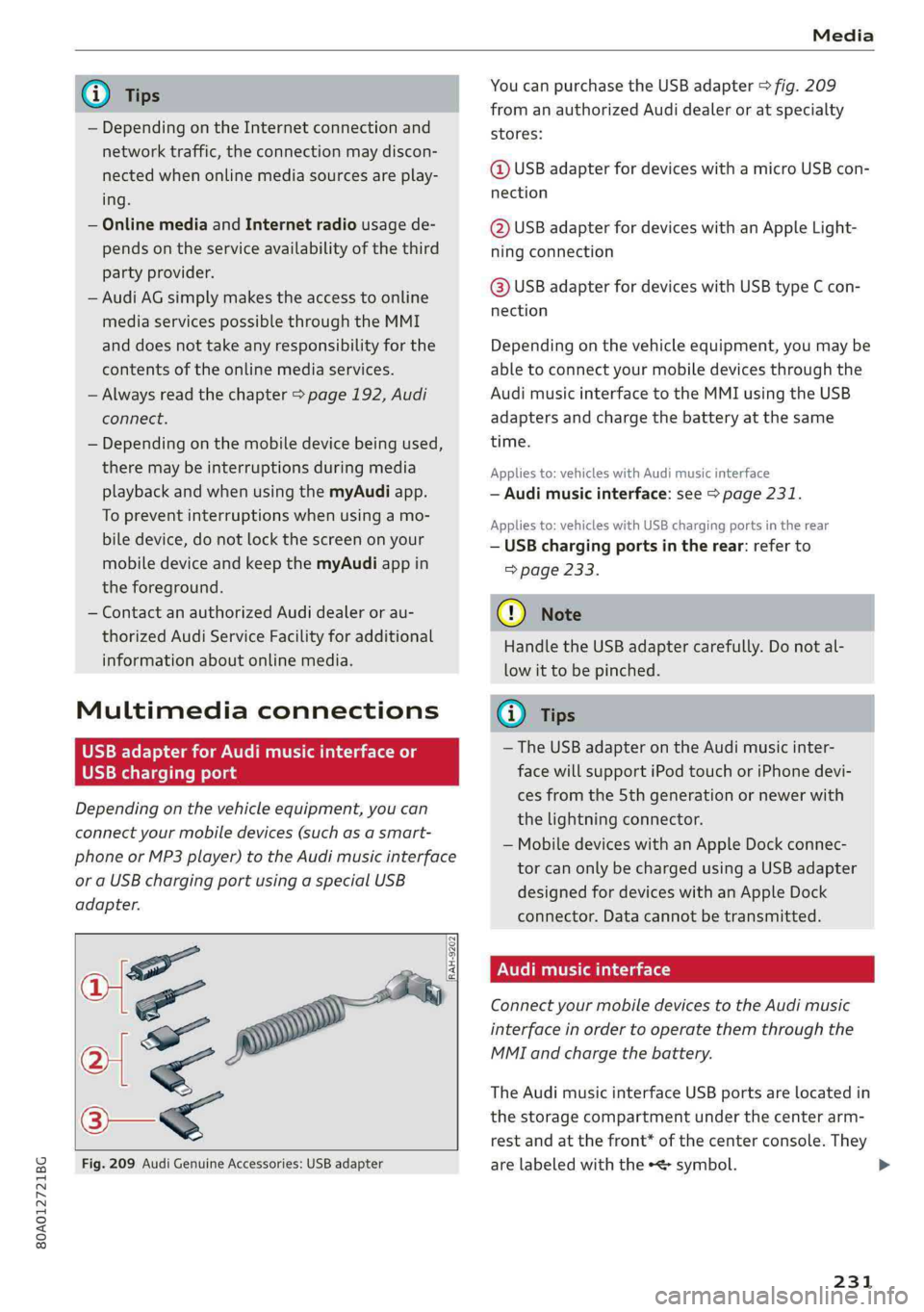
@TipsYoucanpurchasetheUSBadapter>fig.209
fromanauthorizedAudidealeroratspecialty
— Depending ontheInternetconnectionandstores:
networktraffic,the connectionmaydiscon-
nectedwhenonlinemediasourcesareplay-@USBadapterfordeviceswithamicroUSBcon-
ing.nection
—OnlinemediaandInternetradiousagede-@USBadapterfordeviceswithanAppleLight-
pendsontheserviceavailabilityofthethirdningconnection
partyprovider.
—AudiAGsimplymakestheaccesstoonlinehaaSeadsterfardevicesaitUSBGmeEcon
mediaservicespossiblethroughtheMMInection
anddoesnottakeanyresponsibilityfortheDepending onthevehicleequipment,youmaybe
contentsoftheonlinemediaservices.abletoconnectyourmobiledevicesthroughthe
—Alwaysreadthe chapter>page192,AudiAudimusicinterfacetotheMMIusingtheUSB
connect.adaptersandchargethebatteryatthesame
— Depending onthemobiledevicebeingused, time.
theremaybeinterruptionsduringmediaAppliesto:vehicleswithAudimusicinterface
playbackandwhenusingthemyAudiapp.—Audimusicinterface:see>page231.
TopreventinterruptionswhenSSeeAppliesto:vehicleswithUSBchargingportsintherear
biledevice,donotlockthescreenonyour—USBchargingportsintherear:referto
mobiledeviceandkeepthemyAudiappin>page233.
theforeground.
—ContactanauthorizedAudidealeror au-@)Note
thorizedAudiServiceFacilityforadditional
HandletheUSBadaptercarefully.Donotal-
informationaboutonlinemedia.
lowittobepinched.
MultimediaconnectionsG)Tips
—TheUSBadapteronthe Audimusicinter-
USBchargingportfacewillsupportiPodtouchoriPhonedevi-
cesfromthe 5thgenerationornewerwith
thelightningconnector.
—MobiledeviceswithanAppleDockconnec-
torcanonlybechargedusingaUSBadapter
designedfordeviceswithanAppleDock
connector.Datacannotbetransmitted.
Audimusicinterface
ConnectyourmobiledevicestotheAudimusic
interfaceinordertooperatethemthroughthe
MMIandchargethebattery.
Dependingonthevehicleequipment,youcan
connectyourmobiledevices(suchas asmart-
phoneorMP3player)totheAudimusicinterface
oraUSBchargingportusingaspecialUSB
adapter.
af
a|=
TheAudimusicinterfaceUSBportsarelocatedin
o—«thestoragecompartmentunderthecenterarm-
restandatthefront* ofthecenterconsole.They
Fig.209AudiGenuineAccessories:USBadapterarelabeledwiththe«
[RAH-9202
\
231
Page 235 of 392
80A012721BG
Media
thiscase,resettheMediasettingsbackto
Factorysettings>page246.
—VideoplaybackthroughtheAudimusicin-
terfaceisonlysupportediftheconnected
deviceisrecognizedasaUSBstoragedevice
(forexampleaUSBstick).Appledevicesand
MTPdevices(such assmartphones)arenot
recognizedasUSBstoragedevices.
—iPod oriPhonemalfunctionsalsoaffectthe
operationoftheMMI.ResetyouriPodor
iPhoneifthishappens.
—AudirecommendsupdatingtheiPod or
iPhonesoftwaretothelatestversion.For
importantinformationonoperatingyour
iPod oriPhone,refertotheuserguidefor
thedevice.
— TheUSBadapteronthe Audimusicinter-
facewillsupportiPodtouchoriPhonedevi-
cesfromthe5thgenerationornewerwith
thelightningconnector.
—Formoreinformationaboutthe Audimusic
interfaceandsupporteddevices,checkthe
Audidatabaseformobiledevicesatwww.
audiusa.com/mp3orcontactanauthorized
AudidealerorauthorizedAudiServiceFa-
cility.
USBchargingportsintherear
Appliesto:vehicleswithUSBchargingportsintherear
Youcanchargethebatteryon yourmobiledevice
throughaUSBchargingport.
TwoUSBchargingportsarelocatedatthebackof
thecenterconsole.
—USBadapter:referto>page231,USBadapter
forAudimusicinterfaceorUSBchargingport.
—ChargingamobiledeviceusingtheUSB
adapter:connectyourmobiledevice toaUSB
chargingportusingasuitableUSBadapter.
—Disconnectingamobiledevicefromthecharg-
ingport:removetheUSBadapterfromtheUSB
chargingport.
—Disconnectingmobiledeviceswith anApple
Dockconnector:removetheAppleDockcon-
nectorfromtheAppledevicewiththerelease
tabspressedin.
ZAWARNING
Drivingrequiresyourcompleteandundivided
attention.Asthedriver,youhavecompletere-
sponsibilityforsafetyintraffic.Neveroperate
yourmobiledeviceswhiledriving,because
thisincreasestheriskofanaccident.
@)Note
Extremelyhighorlowtemperaturesthatcan
occurinsidevehiclescandamagemobiledevi-
cesand/orimpairtheirperformance.Never
leavemobiledevicesinthevehicleinex-
tremelyhighorlowtemperatures.
G)Tips
—Inpreparationatthetimeofprinting.
—Alwaysfollowtheinformationfoundin
=>page59.
—Whenyouswitchtheignitionoff,theUSB
portsarestillsupplied withpoweruntilthe
energymanagementintervenes.
—DonotuseanyadditionalUSBextensionca-
blesoradapterstoconnectmobiledevices
totheUSBchargingport thathavealready
beenconnectedbyaUSBadapter.Usingan
additionaladapterorUSextensioncable
mayimpairfunctionality.
— USBhubsarenotsupported.
—Refertothemanufacturer'soperatingman-
ual forimportantinformationregardingthe
operationofyourmobiledevice.
—Correctfunctionofallmobiledevicescan-
notbeguaranteed.
—Thevehiclebatterydrainswhenmobilede-
vicesareturnedonbuttheengineisoff.
Tat)eaedeSelaCol
Appliesto:vehicleswith Rear SeatEntertainmentpreparation
TheRear SeatEntertainmentpreparationin-
cludescablesandamountforAudiEntertain-
mentmobileinthedriver'sandfrontpassenger's
seatbackrests.
ThesuitableAudiEntertainmentmobileRear
SeatEntertainmentpackageisavailablethrough
AudiGenuineAccessories.
233
>
Page 237 of 392
80A012721BG
Media
—Pausingorresumingplayback:pressthe
On/OffknobontheMMIcontrolpanelbriefly.
@Tips
—Youcanscrollthroughlong listsquicklyby
turningthecontrolknobquickly.Thescroll-
ingspeeddependsonthenumberoflisten-
tries.
—For safetyreasons,thevideoimageisonly
displayedwhenthevehicleisstationary.On-
lythesoundfromthevideoplayswhiledriv-
ing.
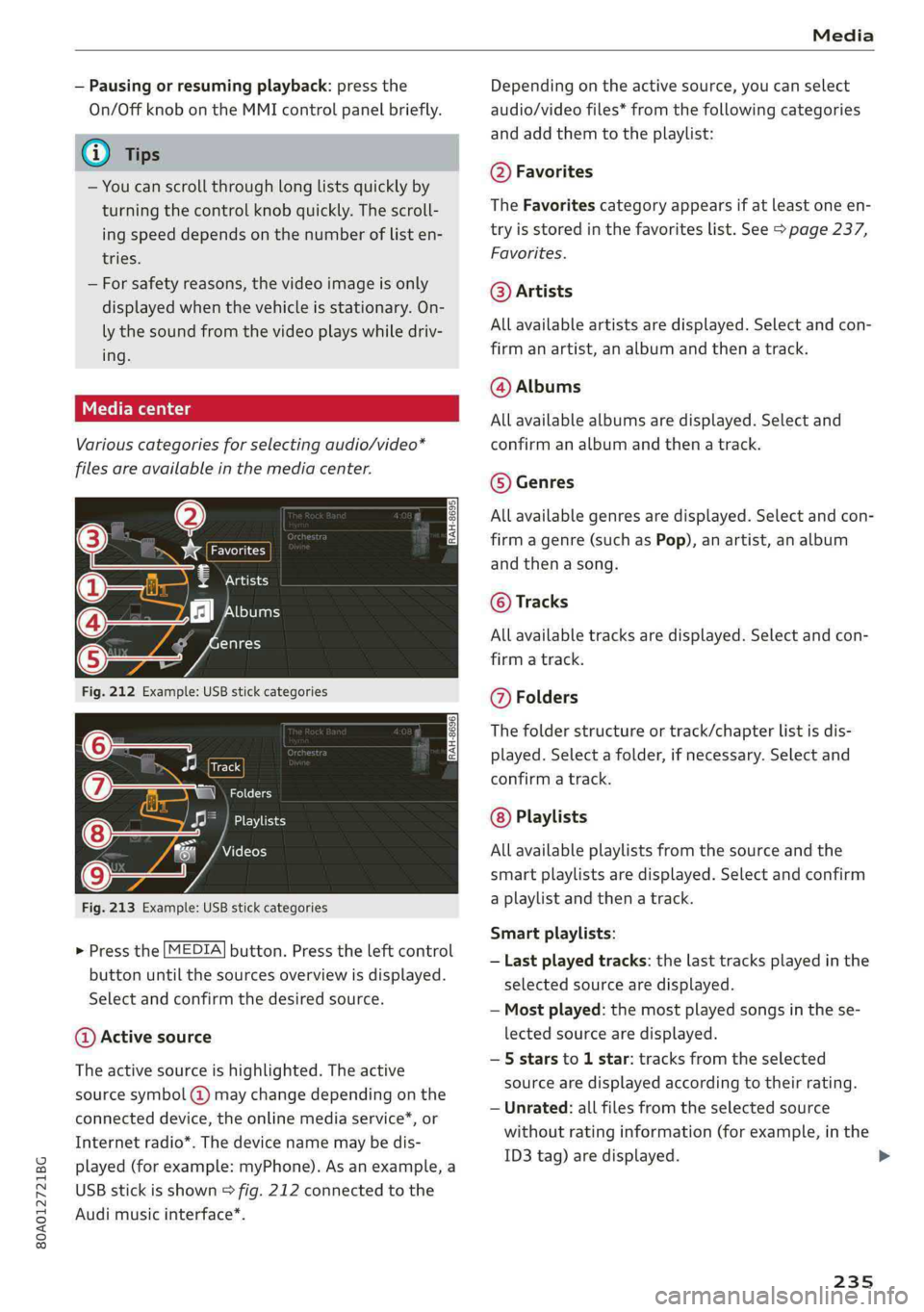
Variouscategoriesfor selectingaudio/video*
filesareavailableinthemediacenter.
3)Favorites
7‘Artists
‘alHeyTsar)
enres
Fig.212Example:USBstickcategories
Track
@|zat
Playlists
Videos
Fig.213Example:USBstickcategories
>Pressthe[MEDIA]button.Presstheleftcontrol
buttonuntilthesourcesoverviewisdisplayed.
Selectandconfirmthedesiredsource.
@Activesource
Theactivesourceishighlighted.Theactive
sourcesymbol(@)maychangedependingonthe
connecteddevice,theonlinemediaservice*,or
Internetradio*.Thedevicenamemaybedis-
played(forexample:myPhone).Asanexample,a
USBstickisshown>fig.212connectedtothe
Audimusicinterface*.
Depending ontheactivesource,youcanselect
audio/videofiles*fromthefollowingcategories
and addthemtotheplaylist:
@Favorites
TheFavoritescategoryappearsifatleastoneen-
tryisstoredinthefavoriteslist.See>page237,
Favorites.
@Artists
Allavailableartistsaredisplayed.Selectandcon-
firmanartist,analbumandthena track.
@Albums
Allavailablealbumsaredisplayed.Selectand
confirm analbumandthenatrack.
©Genres
Allavailablegenresaredisplayed.Selectandcon-
firm
agenre(suchasPop),anartist,analbum
andthenasong.
©Tracks
Allavailabletracksaredisplayed.Selectandcon-
firm
atrack.
@Folders
Thefolderstructureortrack/chapterlistisdis-
played.Selectafolder,ifnecessary. Selectand
confirmatrack.
Playlists
Allavailableplaylistsfromthesourceandthe
smartplaylistsaredisplayed.Selectandconfirm
aplaylistandthena track.
Smartplaylists:
—Lastplayedtracks:thelasttracksplayedinthe
selectedsourcearedisplayed.
— Mostplayed:themostplayedsongsinthese-
lectedsourcearedisplayed.
—5starsto 1star:tracksfromtheselected
sourcearedisplayedaccordingtotheirrating.
—Unrated:allfilesfromtheselectedsource
withoutratinginformation(forexample,inthe
ID3tag)aredisplayed.
235
>
Page 245 of 392
80A012721BG
Audismartphoneinterface
Audismartphone
interface
Setup
Appliesto:vehicleswithAudismartphoneinterface
YoucanconnectyoursmartphonetotheMMIus-
ingtheAudismartphoneinterface.Certaincon-
tenton yoursmartphoneisadaptedtotheInfo-
tainmentsystemdisplaywhiledrivingandcan
beoperatedthroughtheMMIcontrolpanel.
Requirement
Thevehiclemustbestationaryandtheignition
mustbe switchedon.
AniPhonegeneration5ornewerwithLightning
connectorandiOS7.1.2operatingsystemor
higherisrequired.Or:
AsmartphonewiththeAndroidAutoapp andAn-
droid5.0Lollipopoperatingsystemorhigheris
required.
>Connectyour smartphonetotheAudimusicin-
terface>page231usingtheapplicableUSB
adapter>page231,fig.209.
> SelectandconfirmActivateAppleCarPlayor
ActivateAndroidAutonow.
>Follow thesysteminstructions.
>Payattentiontoanyadditionalsystemprompts
onyoursmartphone,ifapplicable.
IfyouchosenottouseAppleCarPlayorAndroid
Autowhenconnectingyoursmartphoneforthe
firsttime,youcanstarttheAudismartphonein-
terfacelateronusingtheConnectionmanager.
>Select:[MENU]button>Audismartphonein-
terface>Changetoconnectionmanager.
>Connectyour smartphonetotheAudimusicin-
terfaceusingtheappropriateUSBadapter
=>page231,fig.209.
> SelectandconfirmAudismartphoneinterface
intheConnectionmanager>page246.You
canselectyoursmartphoneinthelistofdevi-
cesthatarealreadypaired>page248.
>Follow thesysteminstructions.
sponsibilityforsafetyintraffic.Neveroperate
mobiledeviceswhiledriving,becausethisin-
creasestheriskofanaccident.
ZAWARNING
Drivingrequiresyourcompleteandundivided
attention.Asthedriver,youhavecompletere-
@)Note
Alwaysfollowtheinformationfoundin>@in
Generalinformationonpage192.
G)Tips
—Thefunctionsthatcan beuseddependon
thefollowingfactors,amongothers:
—Thebrandofyoursmartphone
—Theversionoftheoperatingsystemin
yoursmartphone
—Thesoftwareversionoftheappused
—TheUSBadaptercableandcorrectconnec-
tion
—Yourcellphoneserviceprovider
—Thecustomizedsettingson yoursmart-
phone
— Oneofthefactorsaboveoracombination
ofanyofthemcouldcauseyoursmart-
phonetobe incompatiblewiththeAudi
smartphoneinterface.Compatibilitycannot
beguaranteedforalltypesofsmartphones.
Formoreinformationandassistance,refer
totheuserguideandthemanufacturerof
yoursmartphone.
—Iftheconnectedsmartphonehasvoicecon-
trol,youcan operateyoursmartphoneusing
theexternalvoicerecognitionsystem
=>page175.
—ThemenulanguageshownintheMMIis
basedonthesettingsinyoursmartphone.
—ThetimedisplayedintheMMIisbasedon
thesettingsinyoursmartphone.
—SomeMMIfunctionsarenotavailablewhen
AppleCarPlayorAndroidAutoisactive.
—Youcannotconnectanymobiledevicesvia
BluetoothwhenanAppleCarPlayconnec-
tionisactive.
243
Page 247 of 392
![AUDI Q5 2019 Manual Online 80A012721BG
Systemsettings
Systemsettings
Settingthedateand
time
Youcanset theclocktimemanuallyorusingthe
GPS*,
>Select:[MENU]button>Settings>leftcontrol
button>MMIsettings>Date&time.
>Or:select](/img/6/57631/w960_57631-246.png "AUDI Q5 2019 Manual Online 80A012721BG
Systemsettings
Systemsettings
Settingthedateand
time
Youcanset theclocktimemanuallyorusingthe
GPS*,
>Select:[MENU]button>Settings>leftcontrol
button>MMIsettings>Date&time.
>Or:select")
80A012721BG
Systemsettings
Systemsettings
Settingthedateand
time
Youcanset theclocktimemanuallyorusingthe
GPS*,
>Select:[MENU]button>Settings>leftcontrol
button>MMIsettings>Date&time.
>Or:select:[MENU]button>Vehicle>leftcon-
trolbutton>Vehiclesettings>Date&time.
Automaticsetting
Whenthisfunctionisswitchedon¥,thetime
anddateareautomaticallyset.
Time
Requirement:theAutomaticsettingmustbe
switchedoff.
Pressthecontrolknob.YoucansettheTime
manuallybyturningandpressingthecontrol
knob.
Date
Requirement:theAutomaticsettingmustbe
switchedoff.
Pressthecontrolknob.YoucansettheDate
manuallybyturningandpressingthecontrol
knob.
Timezone
Whenselectingtheappropriatetimezone,a
samplingofcountriesinthiszonewillbelisted.
Automatictimezone*
Whenthisfunctionisswitchedon@,thetime
willautomaticallyadjusttothecorresponding
timezone.
Automaticdaylightsavingtime*
WhenthisfunctionisswitchedonM,thetime
willautomaticallyswitchtodaylightsavingtime.
D_TheQistandardmakesitpossibletocharge yourmobile
devicewirelessly.
Timeformat
Ifyouselect24h,theclockwilldisplay,forexam-
ple,13:00.IfyouselectAM/PM,theclockwill
display,forexample,1:00PM.
Dateformat
IfyouselectDD.MM.YYYY,thedatedisplaywill
show,forexample,31.08.2018.Ifyouselect
MM/DD/YYVY,thedatedisplaywillshow,forex-
ample,08/31/2018.IfyouselectYYYY-MM-DD,
thedatedisplaywillshow,forexample,
2018-08-31.
MMIsettings
>Select:[MENU]button>Settings>leftcontrol
button>MMIsettings.
Language
Youcanchangethedisplaylanguageaswellas
thelanguageforthevoiceguidance*andvoice
recognitionsystem”*.
Thenumberoflanguagesavailabledependson
themarket.
Measurementunits
Thefollowingmeasurementunitscan besetde-
pendingonavailability:Speed,Distance,Tem-
perature,Fuelconsumption,Volume,Pressure.
Mobiledeviceremindersignal
Appliesto:vehicleswithAudiphonebox
Requirement:yourcellphonemustbeQi-capa-
ble)orconnectedtotheAudimusicinterface@
withaUSBadaptercable>page180,fig.178.
Whenthedeviceremindersignalisswitchedon,
youwillbenotifiedthatyourmobiledeviceisstill
intheAudiphonebox*whenyouleavethevehi-
cle.YoucanselectbetweenSpokencue,Signal
toneandOff.
Mobiledeviceremindersignalvolume:youcan
adjusttheremindersignalvolumebyturningthe
controlknob.
245
Page 254 of 392
Drivingsafety
Drivingsafety
Basics
Safedrivinghabits
Pleaseremember-safetyfirst!
Theindividualsafetyfeaturesofyourvehiclecan
worktogetherasasystemtohelpprotectyou
and
yourpassengersinawiderangeofaccidents.
Thesefeaturescannotworkasasystemifthey
arenot alwayscorrectlyadjustedandcorrectly
used.
Thischaptercontainsimportantinformation,
tips,instructionsandwarningsthatyouneedto
readandobserveforyourownsafety,thesafety
of
yourpassengersandothers.Wehavesummar-
izedherewhatyouneedtoknowaboutsafety
belts,airbags,childrestraintsaswellaschild
safety.Yoursafetyisforusprioritynumber1.Al-
waysobservetheinformationandwarningsin
thissection-foryourownsafetyaswellasthat
ofyourpassengers.
Theinformationinthissectionapplies toall
modelversionsofyourvehicle.Someofthefea-
turesdescribedinthissectionsmaybe standard
equipmentonsomemodels,ormaybeoptional
equipmentonothers.Ifyouarenotsure,ask
yourauthorizedAudidealer.
ZXWARNING
—Alwaysmakesurethatyoufollowthe in-
structionsandheedtheWARNINGSinthis
manual.Itisinyourinterestandinthein-
terestofyourpassengers.
—AlwayskeepalloftheOwner'sLiterature
manualsinyourAudiwhenyoulendorsell
yourvehiclesothatthisimportantinforma-
tionwillalwaysbeavailabletothedriver
andpassengers.
—AlwayskeeptheOwner'sLiteraturehandyso
thatyoucanfinditeasilyifyouhaveques-
tions.
252
Importantthingstodobeforedriving
Safetyiseverybody'sjob!Vehicleandoccupant
safetyalwaysdependsontheinformedandcare-
fuldriver.
Foryoursafetyandthesafety ofyourpassen-
gers,beforedrivingalways:
>Makesurethatalllightsandsignalsareoperat-
ingcorrectly.
> Makesurethatthetirepressureiscorrect.
>
Makesurethatallwindowsarecleanandafford
goodvisibility totheoutside.
>Secureallluggageandotheritemscarefully
=>page61.
>Makesurethatnothingcaninterferewiththe
pedals.
>Adjustfrontseat,headrestraintandmirrors
correctlyforyourheight.
>Instructpassengerstoadjusttheheadre-
straintsaccordingtotheirheight.
> Makesuretousetherightchildrestraintcor-
rectlytoprotectchildren>page288,Child
safety.
>Sitproperlyinyourseatandmakesurethat
yourpassengersdothesame>page55,Front
seats.
>Fastenyoursafetybeltandwearitproperly.Al-
soinstructyourpassengerstofastentheirsafe-
tybeltsproperly>page258.
Whatimpairsdrivingsafety?
Safedrivingisdirectlyrelatedtotheconditionof
thevehicle,thedriveraswellasthedriver’sabili-
tytoconcentrateontheroadwithoutbeingdis-
tracted.
Thedriverisresponsibleforthesafetyoftheve-
hicleandallofitsoccupants.If yourabilityto
driveisimpaired,safetyrisksforeverybodyinthe
vehicleincreaseand youalsobecomeahazardto
everyoneelseontheroad>/\.Therefore:
>Donotletyourselfbedistractedbypassengers
orbyusingacellulartelephone.
>NEVERdrivewhenyourdrivingabilityisim-
paired(bymedications,alcohol,drugs,etc.).
>Observealltrafficlaws,rulesoftheroadand
speedlimitsandplaincommonsense.
Page 255 of 392

80A012721BG
Drivingsafety
>ALWAYSadjustyourspeedtoroad,trafficand
weatherconditions.
>Take frequentbreaksonlongtrips.Donotdrive
formorethantwohoursatastretch.
>DoNOTdrivewhenyouaretired,underpres-
sureorwhenyouarestressed.
Z\WARNING
Impaireddrivingsafetyincreasestheriskof
seriouspersonalinjuryanddeathwhenevera
vehicleisbeingused.
Correctpassenger
seatingpositions
Properseatingpositionforthedriver
Theproperdriverseatingpositionisimportant
forsafe,relaxeddriving.
B4G-0374
Fig.218Correctseatingposition
Foryourownsafetyandtoreducetheriskofin-
juryinthe eventofanaccident,werecommend
thatyouadjustthedriver'sseattothefollowing
position:
>Adjustthedriver'sseatso thatyoucaneasily
pushthepedalsallthewaytothefloorwhile
keepingyourknee(s)slightlybent>A\.
>Adjusttheangleoftheseatbacksothatitisin
anuprightpositionsothatyourbackcomesin
fullcontactwithitwhenyoudrive.
>Adjustthesteeringwheelsothatthereisadis-
tanceofatleast10inches(25cm)betweenthe
steeringwheelandyourbreastbone&fig.218.
Ifnotpossible,seeyourauthorizedAudidealer
aboutadaptiveequipment.
>Adjust thesteeringwheelso thatthesteering
wheelandairbagcoverpointsatyourchestand
notatyourface.
>Graspthetopofthesteeringwheelwithyour
elbow(s)slightlybent.
>Adjusttheheadrestraintsotheupperedgeis
asevenas possiblewiththetopofyourhead.If
thatisnotpossible,trytoadjusttheheadre-
straintso thatitisasclosetothispositionas
possible.
>Fastenandwearsafetybeltscorrectly
=>page261.
>Alwayskeepbothfeetinthefootwell so that
youareincontrolofthevehicleatalltimes.
For detailedinformationonhowtoadjustthe
driver'sseat,see>page55.
ZAWARNING
Driverswhoareunbelted,outofpositionor
tooclosetotheairbagcanbeseriouslyinjured
by anairbagasitunfolds.Tohelpreduce the
riskofseriouspersonalinjury:
—Alwaysadjustthedriver'sseatandthe
steeringwheelsothatthereareatleast
10inches(25cm)betweenyourbreastbone
andthesteeringwheel.
—Alwaysholdthesteeringwheelontheout-
sideofthesteeringwheelrimwithyour
handsatthe9o'clockand3o'clockposi-
tionstohelpreducetheriskofpersonalin-
juryifthedriver'sairbaginflates.
—Neverholdthesteeringwheelatthe
12o'clockpositionorwithyourhandsat
otherpositionsinsidethesteeringwheel
rimoronthesteeringwheelhub.Holding
the
steeringwheelthewrongwaycancause
seriousinjuriestothehands,armsandhead
ifthedriver'sairbagdeploys.
—Pointingthesteeringwheeltowardyour
facedecreasestheabilityofthesupplemen-
taldriver'sairbagtoprotectyouinacolli-
sion.
—Alwayssitinanuprightpositionandnever
leanagainstor placeanypart ofyourbody
tooclosetotheareawheretheairbagsare
located.
253