capacity AUDI Q5 2019 Owners Manual
[x] Cancel search | Manufacturer: AUDI, Model Year: 2019, Model line: Q5, Model: AUDI Q5 2019Pages: 392, PDF Size: 99.86 MB
Page 17 of 392
80A012721BG
Instrumentcluster
Fuellevel
Thedisplay>page13,fig.3orpage13,
fig.4onlyfunctionswhentheignitionisswitch-
edon.Whenthedisplayhasreached thereserve
mark,aredLEDturnsonandthe EN}indicator
lightturnson>page24.
Forthetankcapacityinyourvehicle,refertothe
TechnicalData>page372.
(@)Note
Neverdriveuntilthetankiscompletelyemp-
ty.Theirregularsupplyoffuelthatresults
fromthatcancauseenginemisfires.Uncom-
bustedfuelwillthenentertheexhaustsys-
tem.Thiscancauseoverheatinganddamage
tothecatalyticconverter.
Odometer
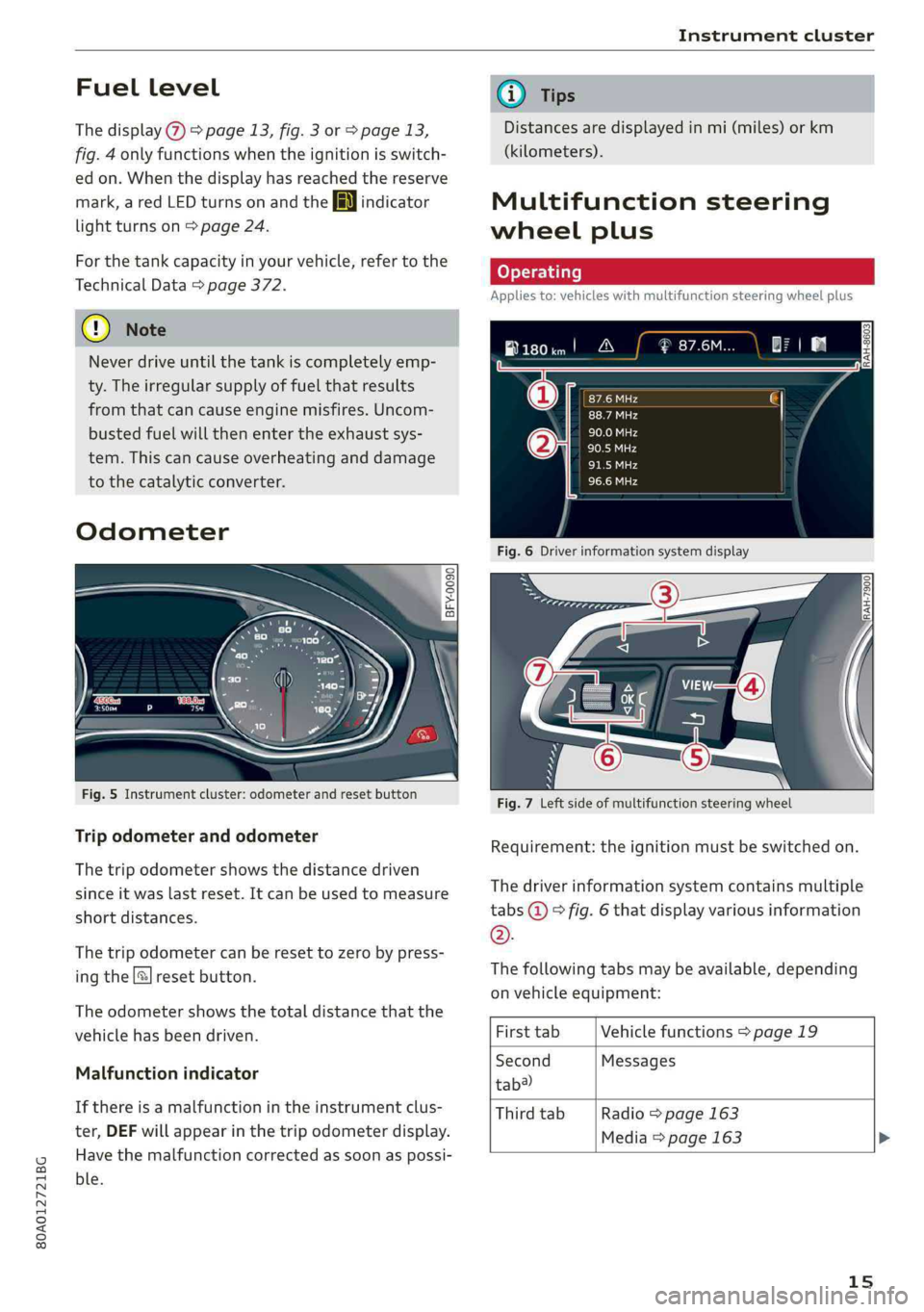
Fig.5Instrumentcluster: odometerandresetbutton
Tripodometerandodometer
Thetripodometershowsthedistancedriven
sinceitwaslastreset.Itcanbeusedtomeasure
shortdistances.
Thetripodometercanberesettozerobypress-
ingthe|]resetbutton.
Theodometershowsthetotaldistancethatthe
vehiclehasbeendriven.
Malfunctionindicator
Ifthereisamalfunctionintheinstrumentclus-
ter,DEFwillappearinthetripodometerdisplay.
Havethemalfunctioncorrectedassoonaspossi-
ble.
@Tips
Distancesaredisplayedinmi(miles)orkm
(kilometers).
Multifunctionsteering
wheelplus
Appliesto:vehicleswithmultifunctionsteeringwheelplus
Fig.7Leftsideofmultifunctionsteeringwheel
Requirement:theignitionmustbeswitchedon.
Thedriverinformationsystemcontains multiple
tabs@°fig.6thatdisplayvariousinformation
©.
Thefollowingtabsmaybeavailable,depending
onvehicleequipment:
FirsttabVehiclefunctions>page19
SecondMessages
tab?)
ThirdtabRadio>page163
Media>page 163>
15
Page 92 of 392
Trailertowing
Trailertowing
Drivingwithatrailer
eTreeeleurltela}
Yourvehicleisprimarilyintendedfortransport-
ingpeopleandluggage.However,ifyoudrive
withatrailer,followthetechnicalrequirements,
the operationanddrivingtips,andthelegalreg-
ulations.
Drivingwithatraileraffectsthevehicle'sfuel
consumption,performanceandwear.Italsore-
quireshigherconcentrationfromthedriver.
ZAWARNING
Donottransportanypeopleinatrailerdueto
theriskoffatalinjury.
Technicalrequirements
Certainrequirementsmustbemetwhentowing
atrailer.
Trailerhitch
Onlyuseatrailerhitchwitharemovableball
hitchmountandballhitch.Thetrailerhitchmust
bepermittedforthevehicle,thetrailerandthe
permittedtotalweightofthetrailerbeing
pulled.Aboveall,itmustbesecurelyandsafely
attachedtothevehicletrailer.
Nevermountatrailerhitchonthebumper.The
trailerhitchmustbemountedinawaythatdoes
notimpair thefunctionofthebumper.Donot
makeanychangestotheexhaustsystemandthe
brakesystem.
Checkregularlyifthetrailerhitchissecurely
mounted.Alwaysfollowtheinstructionsgivenby
thetrailerhitchmanufacturer.
Trailerbrakes
Ifthetrailerhasitsownbrakesystem,thenfol-
lowthemanufacturerspecifications.However,
thebrakesystemonthetrailermustneverbe
connectedtothevehiclebrakesystem.
90
Enginecoolingsystem
Drivingwithatrailermeansahigherloadonthe
engineandthecoolingsystem.Thecoolingsys-
temmustbedesignedforadditionalloadand
containenoughcoolant>©.
ZAWARNING
—Nevermounta"weight-distributing"or
"load-balancing"trailercouplerasthetrailer
hitch.Thevehiclewasnotdesignedfor
thesetypesoftrailerhitches.Thetrailer
hitchcanmalfunctionandthetrailercan
breakofffromthevehicle.
—Ifthetrailerisequippedwithelectronic
brakes,thesebrakescannotbeactivatedby
afactory-installedcontrolsystem,whichin-
creasestheriskofanaccident.
—Toreducetheriskofinjury,alwaysremove
theballhitchmountifnotrailerismount-
ed
@)Note
Longerinclinescannotbedrivenwithouta
suitablecoolingsystem,especiallyiftheout-
sidetemperaturesarehigh.Otherwise,this
increasestheriskofenginedamage.
Operatinginstructions
Towingcapacity
Thepermittedtowingcapacitymustnot beex-
ceededunderanycircumstances>page373.
Youcandriveuplargerinclinesifyouarenotus-
ingthemaximumtowingcapacity.
Thetowingcapacitiesgivenonlyapplytoeleva-
tionsupto3,200ft(1,000m)abovesealevel.As
theelevationincreases,theenginepowerde-
creasesduetothedecreasingairpressure.This
reducesthehillclimbingabilityandtowingca-
pacity.Foreveryadditional3,200ft(1,000m),
themaximumpermittedtowingweightmustbe
reducedbyapproximately10%.Thepermitted
towingweightisthecombinedweightofthe
(loaded)vehicleandthe(loaded)trailer.
Page 191 of 392
80A012721BG
Telephone
cellphone.Audirecommendseditingcell
phonecontactsdirectlyinthecellphone.
—OnlythecontactsinthelocalMMImemory
canbeeditedordeleted.
Importingandexportingcontacts
Appliesto:vehicleswithtelephone
ContactsinvCardformat(.vcf)canbeimported
intothedirectoryorexported.
Requirement:anSDcard mustbeinsertedinone
oftheSDcardreaders*>page226oraUSBstor-
agedevicemustbeconnectedtothe Audimusic
interface*>page231ortherequirementsfor
AudiconnectInfotainmentservices*mustbe
met>page192.
>Select:[MENU]button>Telephone>leftcon-
trolbutton>Directory.
>Select:rightcontrolbutton>Contactsettings.
—Importingcontactsfromastoragedevice:se-
lectandconfirmImportcontacts>SDcard
1/SDcard2orUSBdevice1/USBdevice2>
desiredcontacts>Startimport.
—Exportingcontactstoastoragedevice:select
andconfirmExportcontacts>SDcard1/SD
card2orUSBdevice1/USBdevice2>desired
contacts>Startexport.
—Selectingallcontactsatoncetoimport/
export:selectandconfirmImportcontacts/Ex-
port
contacts>SDcard1/SDcard2orUSBde-
vice1/USBdevice2> All >Startimport/Start
export.
G)Tips
—Alwaysreadthechapter>page192,Audi
connect.
—ForadditionalinformationonthemyAudi
account,visitwww.audiusa.com/myaudi.
— Theimportedcontactsarestoredinthelo-
calmemoryofthedirectory.
—Amaximumof1,000contactscanbeim-
ported.Youcancheckthedirectorymemory
capacityatanytime>page190.
+Dependsontheconnectedcellphone.
—Neversaveimportantdataonmemorycards
orUSBstoragedevices.Audiisnotresponsi-
blefordamagedorlostfilesandmedia.
—Contactsthatweredownloadedfromamo-
biledevicecannotbeexported.
—Thereshouldbenootherfilesor folderson
thestoragemediumcontainingthecontacts
tobeimported.
Additionalsettings
Telephonesettings
Appliesto:vehicleswithtelephone
>Select:[MENU]button>Telephone>rightcon-
trolbutton>Telephonesettings.
Calloptions*
Callforwarding:youcanswitchtheforwarding
ofincomingcallstoyourvoicemailortoanother
phonenumberonandoff.Youcan checkifthe
functionisactivatedordeactivatedwithCheck
status.
Callwaiting:youarealerted toanincomingcall
duringaphonecallwhenthefunctionisswitched
on[M.Youcancheckifthefunctionisactivated or
deactivatedwithCheckstatus.
Sendowntelephonenumber:sendingyour
phonenumberwithanoutgoingcallcanbeacti-
vatedanddeactivated.WiththeNetwork-de-
pendentsetting,thesettinglistedinthecon-
tractwiththecellphoneserviceproviderisused.
ThesettingsonlyapplytotheTelephonemenuin
theMMI.Pleasenotethatthesettingsonyour
mobiledevicewillapplyafterdisconnectingthe
Bluetoothconnection.Youcancheckifthefunc-
tionisactivated ordeactivatedwithChecksta-
tus.
Ringtoneandvolumesettings”)
UsingtheMutetelephonefunction,youcan
switchtheringtoneplaybackthroughtheMMI
speakeronandoff.Youcanplaytheringtonesus-
ingtheRingtonefunction.Selectandconfirm an
entryfromthelist.FortheRingtonevolume/
Messagevolumesettings,see>page250.The
189
Page 192 of 392
Telephone
Microphoneinputlevelcan beadjustedduringa
phonecallusingthecontrolknob.
iG)Tips
—Severalmobiledevicescan bepairedwith
theMMI,butonlytwo*mobiledevicescan
beactivelyconnected.
—TodeleteallpairedBluetoothdevices,the
Bluetoothfunctioncanberesettothefac-
torydefaultsettings>page246.
Additionaloptions
>Select:[MENU]button>Telephone>rightcon-
trolbutton.
Connectionmanager
See>page246.
Bluetoothsettings*
See>page248.
Onlinesettings*
See>page248.
Wi-Fisettings*
See>page198,Wi-Fisettings.
Directorysettings
Appliesto:vehicleswithtelephone
>Select:[MENU]button>Telephone>leftcon-
trolbutton>Directory>rightcontrolbutton>
Directorysettings.
Memorycapacity
ShowstheMemorycapacityforthedirectory.
Youcanmanageupto17,000contactswiththe
directory.Youcanloadupto4,000contactsfrom
yourcellphoneintoeachdirectory.Youcanalso
importupto1,000contactsfromastoragede-
vice.
Sortorder
Youcansortthecontactsinyourdirectoryalpha-
beticallyaccordingtoLastnameorFirstname.
Importcontacts/Exportcontacts
See>page189.
Downloaddirectory
ToupdatethecontactsintheMMI,youcanman-
uallydownloadyourmobiledevicecontacts.De-
pendingonthemobiledevice,youmayneedto
disconnectandreconnecttheBluetooth connec-
tiontoupdatethecontacts.
Hidecontactswithoutphonenumber
Whenthisfunctionisswitchedon,grayed-out
contacts thathavenophonenumbersstoredfor
themwillbehiddeninthedirectory.
Troubleshooting
Appliesto:vehicleswithtelephone
ProblemSolution
PairingthecellphonetotheMMI|Checkiftherequirementsforconnectingamobiledevicearemet
failed.=>page177.
=>page177.
Or:checkifyouaccidentallydeclinedthe connection setupPINon
yourcellphone.Ifnecessary,repeatthepairingprocess
Afterpairing,notallcontactsor
theMMI.
Avoidusingspecialcharactersinnames.
no
contactshavebeenloadedinto|Avoidusingcontactgroups onyourcellphone.
190
Page 229 of 392
80A012721BG
Media
TheCDispulledinagainautomaticallyifitisnot
removedfromtheslotwithin tensecondsof
ejectingit.
TheCDdriveisaccessedandoperatedthrough
theMMI>page234.
@)Note
—NeverforceaCDintothedrive.TheCDis
pulledinautomatically.
—DonotinsertCDswithlabelsintothedrive.
LabelscancomeloosefromtheCDand
damagethedrive.
i)Tips
CDplaybackcannotbeguaranteedwithaudio
filesthathaveahighdatarate.
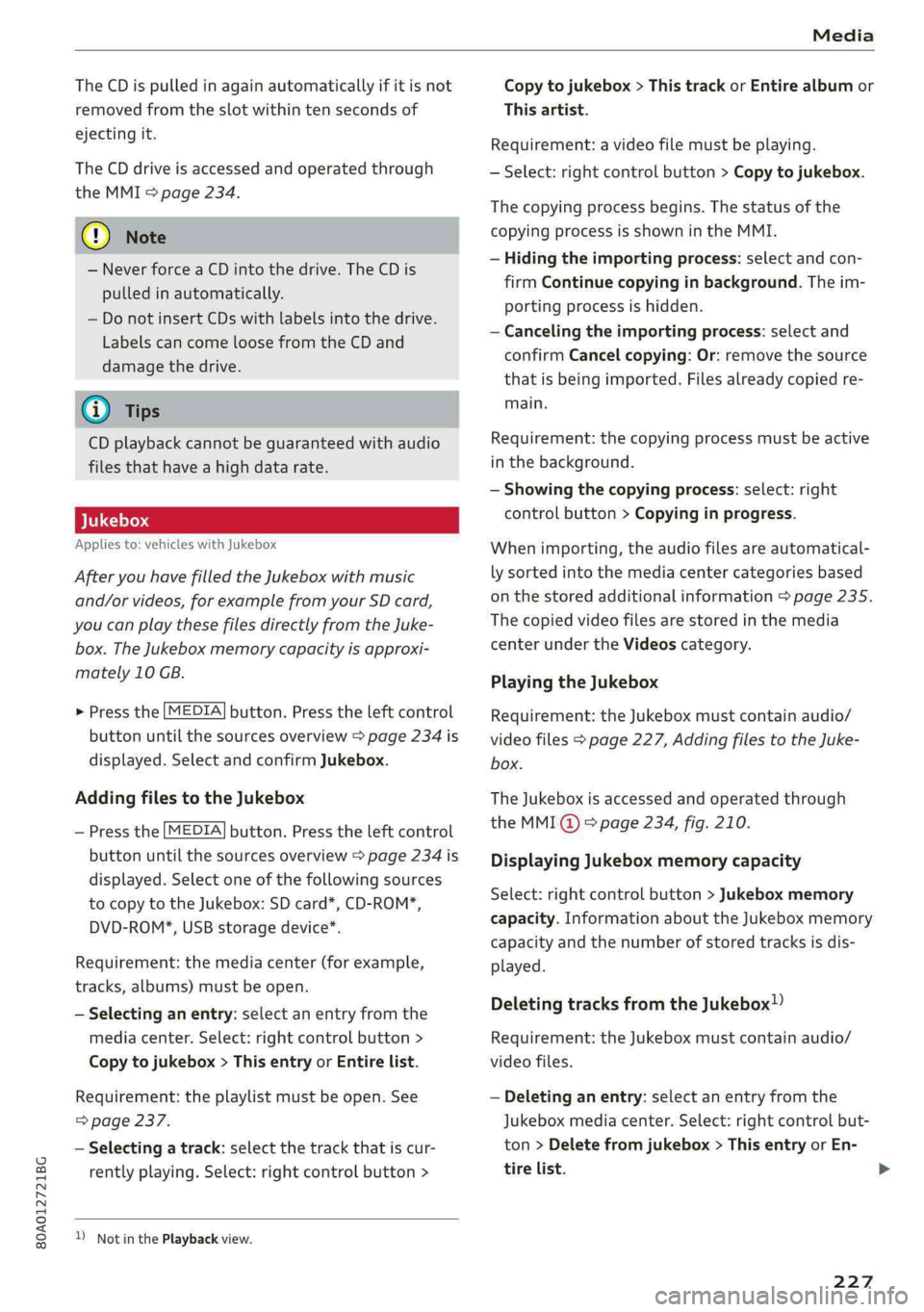
Appliesto:vehicleswithJukebox
AfteryouhavefilledtheJukeboxwithmusic
and/orvideos,forexamplefromyourSDcard,
youcanplaythesefilesdirectlyfromtheJuke-
box.TheJukeboxmemorycapacityisapproxi-
mately10GB.
>Pressthe[MEDIA]button.Presstheleftcontrol
buttonuntilthesourcesoverview>page234is
displayed.SelectandconfirmJukebox.
AddingfilestotheJukebox
—Pressthe[MEDIA]button.Presstheleftcontrol
buttonuntilthesourcesoverview>page234is
displayed.Selectoneofthefollowingsources
tocopytotheJukebox:SDcard*,CD-ROM*,
DVD-ROM*,USBstoragedevice*.
Requirement:themediacenter(forexample,
tracks,albums)mustbeopen.
—Selectinganentry: selectanentryfromthe
mediacenter.Select:rightcontrolbutton>
Copytojukebox>Thisentryor Entirelist.
Requirement:theplaylistmustbe open.See
=>page237.
—Selectingatrack:selectthetrackthatiscur-
rentlyplaying.Select:rightcontrolbutton>
NotinthePlaybackview.
Copytojukebox>ThistrackorEntirealbumor
Thisartist.
Requirement:avideofilemustbeplaying.
—Select:rightcontrolbutton>Copytojukebox.
Thecopyingprocessbegins.Thestatusofthe
copyingprocessisshownintheMMI.
—Hidingtheimportingprocess:selectandcon-
firm
Continuecopyinginbackground.Theim-
portingprocessishidden.
—Cancelingtheimportingprocess:selectand
confirmCancelcopying:Or:removethesource
thatisbeingimported.Filesalreadycopiedre-
main.
Requirement:thecopyingprocessmustbeactive
inthebackground.
—Showingthecopyingprocess:select:right
controlbutton>Copyinginprogress.
Whenimporting,theaudiofilesareautomatical-
lysortedintothemediacentercategoriesbased
onthestoredadditionalinformation>page235.
Thecopiedvideofilesarestoredinthemedia
centerundertheVideoscategory.
PlayingtheJukebox
Requirement:theJukeboxmustcontainaudio/
videofiles>page227,AddingfilestotheJuke-
box.
TheJukeboxisaccessedandoperatedthrough
theMMI@)&page234,fig.210.
DisplayingJukeboxmemorycapacity
Select:rightcontrolbutton>Jukeboxmemory
capacity.InformationabouttheJukeboxmemory
capacityandthenumberofstoredtracksisdis-
played.
DeletingtracksfromtheJukebox!)
Requirement:theJukeboxmustcontainaudio/
videofiles.
—Deletinganentry: selectanentryfromthe
Jukeboxmediacenter.Select:rightcontrolbut-
ton>Deletefromjukebox>ThisentryorEn-
tirelist.>
227
Page 239 of 392
80A012721BG
Media
Playlist
ThebigB
5ke
Stories
kE
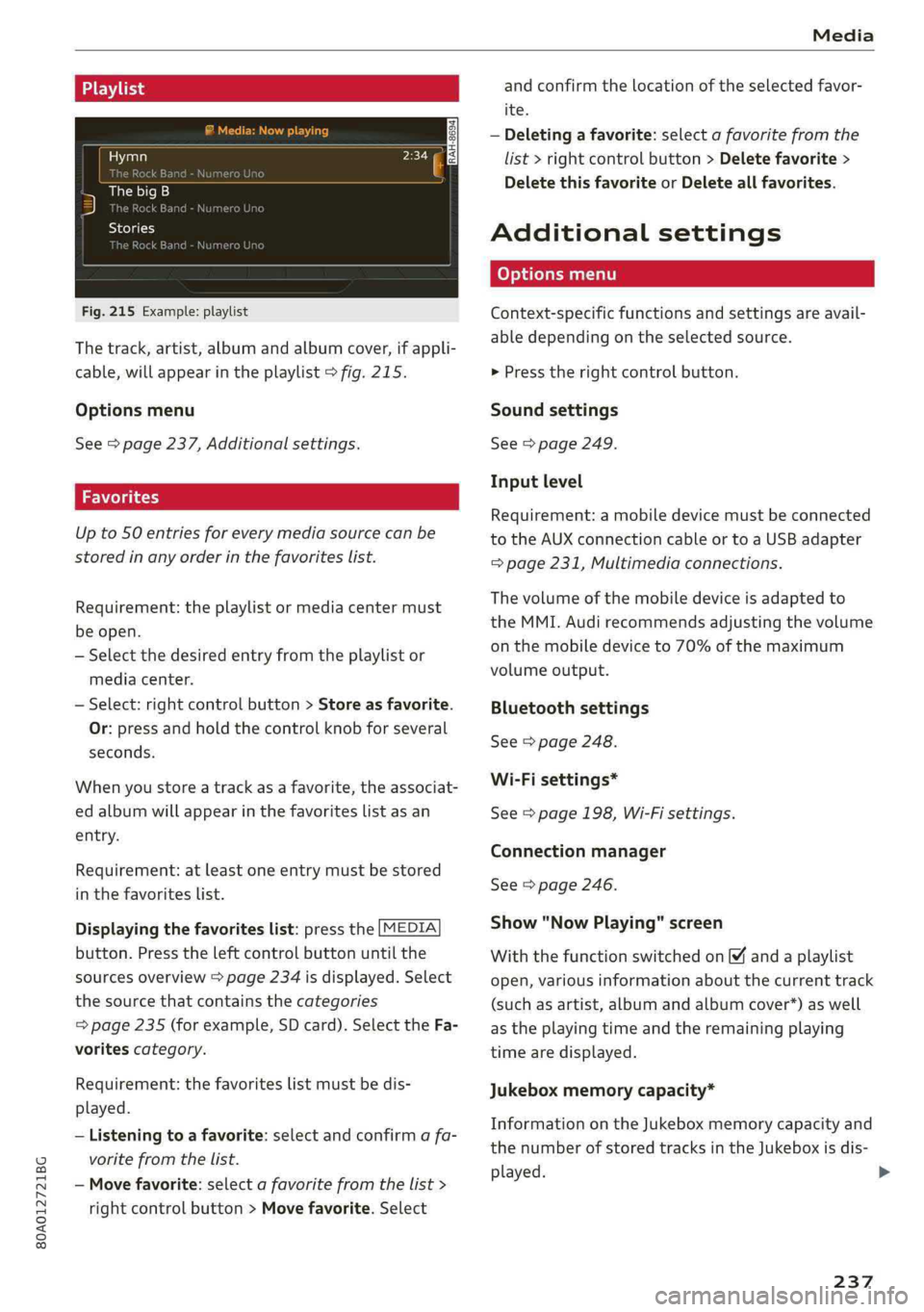
Fig.215Example:playlist
Thetrack,artist,albumandalbumcover,ifappli-
cable,willappearintheplaylist>fig.215.
Optionsmenu
See>page237,Additionalsettings.
Upto50entriesforeverymediasourcecanbe
storedinanyorderinthefavoriteslist.
Requirement:theplaylistormediacentermust
beopen.
—Selectthedesiredentryfromtheplaylistor
mediacenter.
—Select:rightcontrolbutton>Storeasfavorite.
Or:pressandholdthecontrolknobforseveral
seconds.
Whenyoustoreatrackasa favorite,theassociat-
edalbumwillappearinthefavoriteslistasan
entry.
Requirement:atleastoneentrymustbestored
inthefavoriteslist.
Displayingthefavoriteslist:pressthe[MEDIA
button.Presstheleftcontrolbuttonuntilthe
sourcesoverview>page234isdisplayed.Select
thesourcethat containsthecategories
=>page235(forexample,SDcard).SelecttheFa-
voritescategory.
Requirement:thefavoriteslistmustbedis-
played.
—Listeningtoafavorite:selectandconfirm afa-
voritefromthelist.
—Movefavorite:selectafavoritefromthelist>
rightcontrolbutton>Movefavorite.Select
andconfirm thelocationoftheselectedfavor-
ite.
—Deletingafavorite:selectafavoritefromthe
list>rightcontrolbutton>Deletefavorite>
DeletethisfavoriteorDeleteallfavorites.
Additionalsettings
Context-specificfunctionsandsettingsareavail-
abledependingontheselectedsource.
>Presstherightcontrolbutton.
Soundsettings
See>page249.
Inputlevel
Requirement:amobiledevicemustbeconnected
totheAUXconnectioncableortoaUSBadapter
=page231,Multimediaconnections.
Thevolumeofthemobiledeviceisadaptedto
theMMI.Audirecommendsadjustingthevolume
onthemobiledeviceto70%ofthemaximum
volumeoutput.
Bluetoothsettings
See>page248.
Wi-Fisettings*
See>page198,Wi-Fisettings.
Connectionmanager
See>page246.
Show"NowPlaying"screen
Withthefunctionswitchedon¥andaplaylist
open,variousinformationaboutthecurrenttrack
(suchasartist,albumandalbumcover*)aswell
astheplayingtimeandtheremainingplaying
timearedisplayed.
Jukeboxmemorycapacity*
InformationontheJukeboxmemorycapacityand
thenumberofstoredtracksintheJukeboxisdis-
played.
237
>
Page 242 of 392
Media
Supportedmediaandfileformats
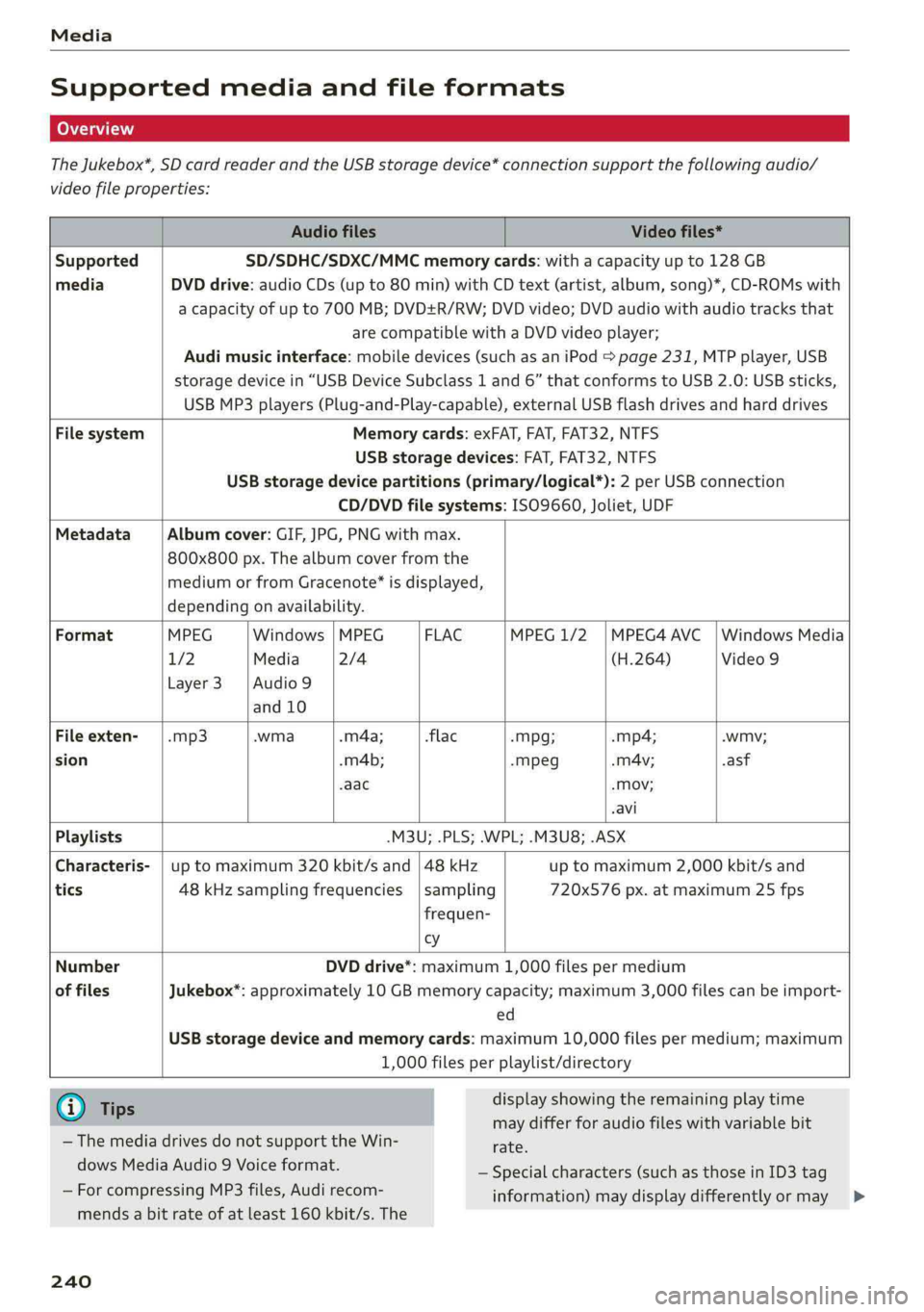
TheJukebox*,SDcardreaderandtheUSBstoragedevice*connectionsupportthefollowingaudio/
videofileproperties:
AudiofilesVideofiles*
SupportedSD/SDHC/SDXC/MMCmemorycards:withacapacityupto128GB
mediaDVDdrive:audioCDs(upto80min)withCDtext(artist,album,song)*,CD-ROMswith
acapacityofupto700MB;DVD+R/RW;DVDvideo;DVDaudiowithaudiotracksthat
arecompatiblewithaDVDvideoplayer;
Audimusicinterface:mobiledevices(suchasaniPod>page231,MTPplayer,USB
storagedevicein“USBDeviceSubclass1and6” thatconformstoUSB2.0:USBsticks,
USBMP3players(Plug-and-Play-capable), externalUSBflashdrivesandharddrives
FilesystemMemorycards:exFAT,FAT,FAT32,NTFS
USBstoragedevices:FAT,FAT32,NTFS
USBstoragedevicepartitions(primary/logical*):2perUSBconnection
CD/DVDfilesystems: ISO9660,Joliet,UDF
MetadataAlbumcover:GIF,JPG,PNGwithmax.
800x800px.Thealbumcoverfromthe
mediumorfromGracenote®isdisplayed,
dependingonavailability.
FormatMPEGWindows|MPEGFLACMPEG1/2|MPEG4AVC|WindowsMedia
1/2Media2/4(H.264)Video9
Layer3 |Audio9
and 10
Fileexten--mp3.wma.m4a;-flac-mMpg;-mp4;.wmv;
sion.m4b;-mpeg.mA4v;.asf
-aac-Mov;
avi
Playlists.M3U;.PLS;.WPL;.M3U8;.ASX
Characteris-|uptomaximum320kbit/sand|48kHzuptomaximum2,000kbit/sand
tics48kHzsamplingfrequencies|sampling720x576px.atmaximum25fps
frequen-
cy
Number
offiles
DVDdrive*:maximum1,000filespermedium
Jukebox*:approximately10GBmemorycapacity;maximum3,000filescanbeimport-
ed
USBstoragedeviceandmemorycards:maximum10,000filespermedium;maximum
1,000filesperplaylist/directory
G)Tips
displayshowingtheremainingplaytime
maydifferforaudiofileswithvariablebit
— ThemediadrivesdonotsupporttheWin-rate.
dowsMediaAudio9Voiceformat.
—ForcompressingMP3files, Audirecom-
—Specialcharacters(suchasthoseinID3tag
information)maydisplaydifferentlyormay
mendsabitrateofatleast160kbit/s.The
240
>
Page 244 of 392
Media
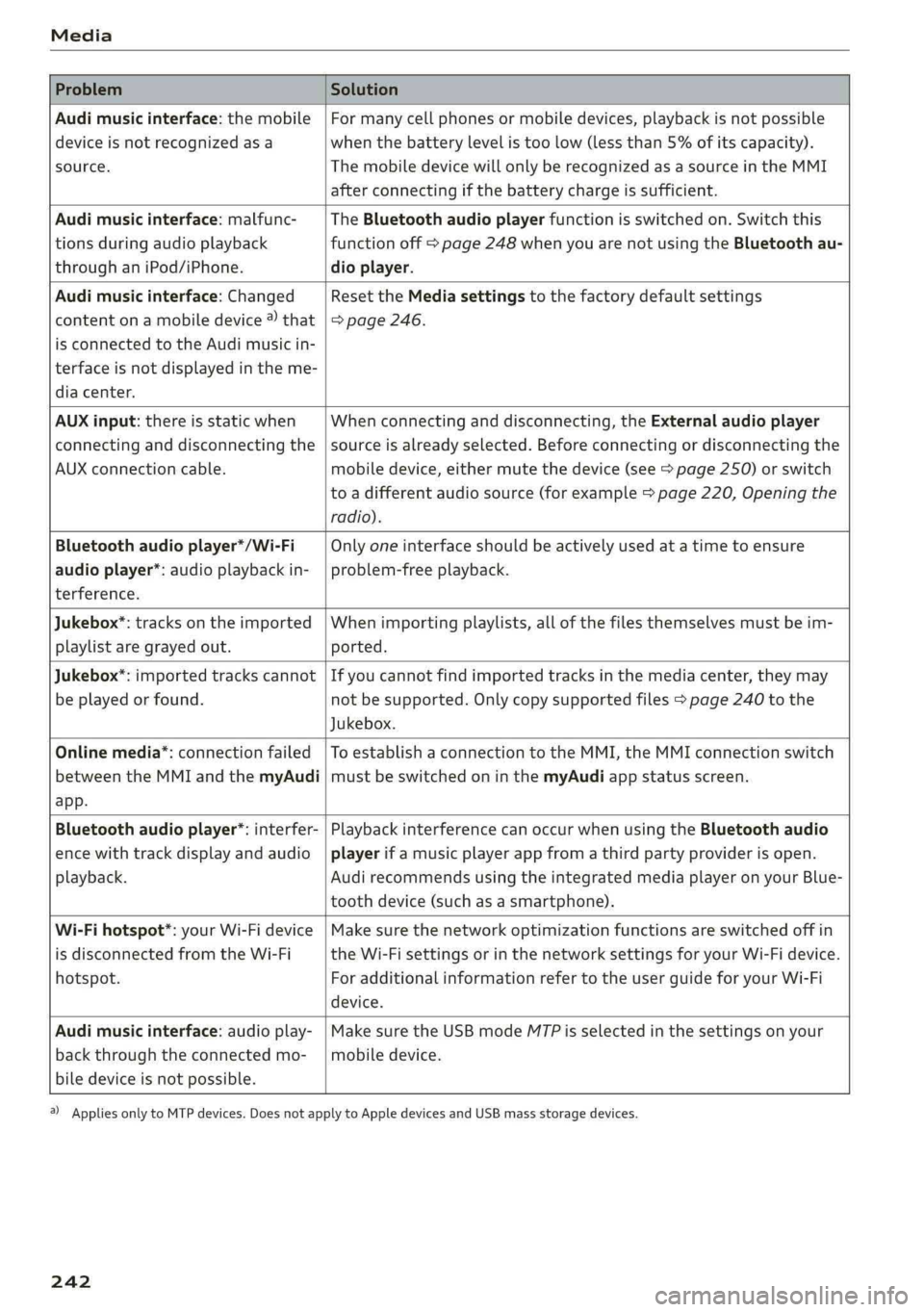
ProblemSolution
Audimusicinterface:themobile
deviceisnotrecognizedasa
source.
Formanycellphonesormobiledevices,playbackisnotpossible
when
thebatterylevelistoolow(lessthan5%ofitscapacity).
ThemobiledevicewillonlyberecognizedasasourceintheMMI
afterconnectingifthebatterychargeissufficient.
Audimusicinterface:malfunc-
tionsduringaudioplayback
throughaniPod/iPhone.
TheBluetoothaudioplayerfunctionisswitchedon.Switchthis
functionoff>page248whenyouarenotusingtheBluetoothau-
dioplayer.
Audimusicinterface:Changed
contentonamobiledevice®that
isconnectedtothe Audimusicin-
terfaceisnotdisplayedintheme-
diacenter.
Reset theMediasettingstothefactorydefaultsettings
=>page246.
AUXinput:thereisstaticwhen
connectinganddisconnectingthe
AUXconnectioncable.
Whenconnectinganddisconnecting,theExternalaudioplayer
sourceisalreadyselected.Beforeconnectingordisconnectingthe
mobiledevice,eithermutethedevice(see>page250)orswitch
toadifferentaudiosource(forexample>page220,Openingthe
radio).
Bluetoothaudioplayer*/Wi-Fi
audioplayer*:audioplaybackin-
terference.
Onlyoneinterfaceshouldbeactivelyusedatatimetoensure
problem-freeplayback.
Jukebox®*:tracks ontheimported
playlistaregrayedout.
Whenimportingplaylists,allofthefilesthemselvesmustbeim-
ported.
Jukebox*:importedtrackscannot
beplayedorfound.
Ifyoucannotfindimportedtracksinthemediacenter,theymay
notbesupported.Onlycopysupportedfiles>page240tothe
Jukebox.
Onlinemedia*:connectionfailed
betweentheMMIandthemyAudi
app.
ToestablishaconnectiontotheMMI,theMMIconnectionswitch
mustbe switchedoninthemyAudiappstatusscreen.
Bluetoothaudioplayer*:interfer-
encewithtrackdisplayandaudio
playback.
PlaybackinterferencecanoccurwhenusingtheBluetoothaudio
playerifamusicplayerappfromathirdpartyproviderisopen.
Audi
recommendsusingtheintegratedmediaplayeronyourBlue-
toothdevice(suchasasmartphone).
Wi-Fihotspot*:yourWi-Fidevice
isdisconnectedfromtheWi-Fi
hotspot.
Makesurethenetworkoptimizationfunctionsareswitchedoffin
theWi-FisettingsorinthenetworksettingsforyourWi-Fidevice.
ForadditionalinformationrefertotheuserguideforyourWi-Fi
device.
Audimusicinterface:audioplay-
backthroughtheconnectedmo-
biledeviceisnotpossible.
MakesuretheUSBmodeMTPisselectedinthesettingsonyour
mobiledevice.
2)Applies onlytoMTPdevices.DoesnotapplytoAppledevicesandUSBmassstoragedevices.
242
Page 311 of 392
80A012721BG
CheckingandFilling
Thecorrectfueltypeforyourvehiclecanbe
foundonalabellocatedontheinsideofthefuel
fillerdoor.Foradditionalinformationonfuel,see
=>page307.
Forthetankcapacityinyourvehicle,refertothe
TechnicalData>page372.
Toreducetheriskoffuelleakingoutorvapors
escaping,makesurethatthefueltankisclosed
correctly.OtherwisetheEyindicatorlightwill
turnon.
Ifthecentral lockingsystemmalfunctions,there
isafuelfillerdooremergencyrelease
=>page310.
Z\WARNING
Improperfuelingproceduresandimproper
handlingoffuelcanlead toexplosions,fires,
severeburns,andotherinjuries.
—Donotsmoke.Keepawayfrom openflames.
—Theignitionmustbeswitchedoffwhenre-
fueling.
—Mobiledevices,radiodevices,andotherra-
dioequipmentshouldalways be switched
offwhenrefueling.Electromagneticrays
couldcausesparksandstartafire.
—Ifyoudonotinsertthefuelpumpnozzleall
thewayintothefillertube,thenfuelcan
leakout.Spilledfuelcanigniteandstarta
fire.
—Nevergetintothevehiclewhenrefueling.If
thereisanexceptionalsituationwhereyou
mustenterthevehicle,closethedoorand
touchametalsurfacebeforetouching the
fuelpumpnozzleagain.Thiswillreducethe
riskofelectrostaticdischargethatcancause
flyingsparks.Sparks canstarta firewhen
refueling.
—Ifyoumusttransportfuelinafuelcontain-
er,notethefollowing:
—Alwaysplacethefuelcontaineronthe
groundbeforefilling.Neverfillthefuel
containerwithfuelwhileitisinsideoron
thevehicle.Electrostaticdischargecanoc-
curwhilerefuelingandthefuelvapors
couldignite.
—Whenusingfuelcontainersmadeofmet-
al,thefuelpumpnozzlemustalwaysre-
mainincontactwiththecontainertore-
ducetheriskofstaticcharge.
—Insertthefuelpumpnozzleasfaraspos-
sibleintothefilleropeningwhilerefuel-
ing.
—Followtheapplicablelegalregulationsin
thecountrywhereyouaredrivingwhen
using,storingandtransportingfuelcon-
tainers.
—Makesurethatthefuelcontainermeets
theindustrystandards,forexampleANSI
orASTMF852-86.
Z\WARNING
Transportingfuelcontainersinsidethevehicle
isnotrecommended.Fuelcouldleakoutof
thecontainerandignite,especiallyduringan
accident.Thiscan causeexplosions,fires,and
injuries.
))Dependingontheengineandcountry
()Note
—Removefuelthathasoverflowedontoany
vehiclecomponentsimmediatelytoreduce
theriskofdamagetothevehicle.
—Neverdriveuntilthefueltankiscompletely
empty.Theirregularsupplyoffuelthatre-
sultsfromthatcan causeenginemisfires.
Uncombustedfuelmayentertheexhaust
systemandincreasetheriskofdamageto
thecatalyticconverter.
(@)Forthesakeoftheenvironment
Donotoverfillthefueltank,orfuelcouldleak
outwhenthevehicleiswarmingup.
@)Tips
Thefuelfillerdoor onyourvehicledoesnot
lockifyoulockthevehiclefromtheinsideus-
ing
thecentral lockingswitch.
309
Page 325 of 392
80A012721BG
CheckingandFilling
Windshieldwasher
system
B4M-0135}
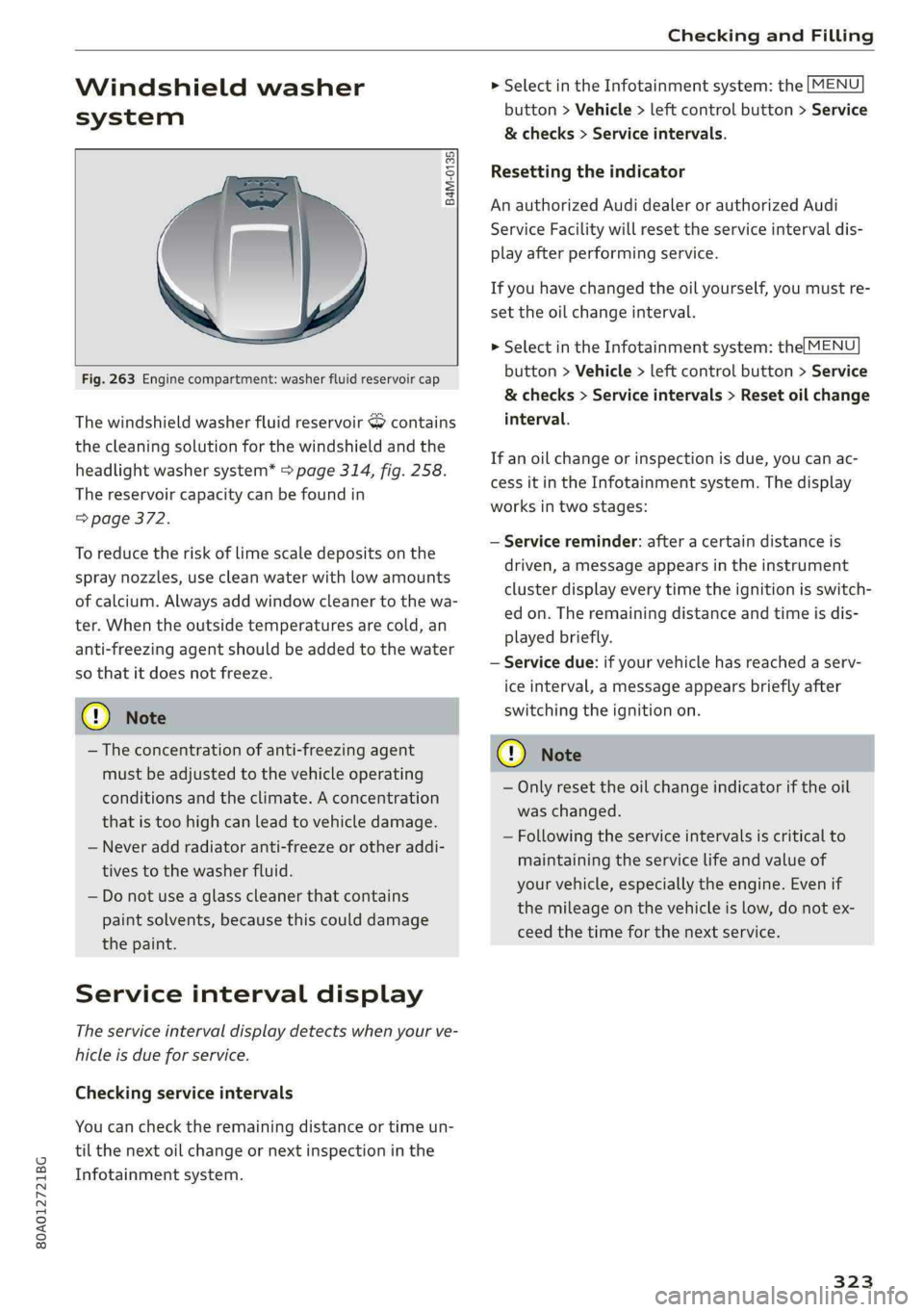
Fig.263Enginecompartment:washerfluidreservoircap
ThewindshieldwasherfluidreservoirScontains
thecleaningsolutionforthewindshieldandthe
headlightwashersystem*>page314,fig.258.
Thereservoircapacitycan befoundin
=>page372.
Toreducetheriskof limescaledepositsonthe
spraynozzles,usecleanwaterwithlowamounts
ofcalcium.Alwaysaddwindowcleanertothewa-
ter.Whentheoutsidetemperaturesarecold,an
anti-freezingagentshould beaddedtothewater
sothatitdoesnotfreeze.
@Note
—Theconcentrationofanti-freezingagent
mustbeadjustedtothevehicleoperating
conditionsandtheclimate.Aconcentration
thatistoohighcanleadtovehicledamage.
—Neveraddradiatoranti-freezeorotheraddi-
tivestothewasherfluid.
—Donotuseaglasscleanerthat contains
paintsolvents,becausethiscoulddamage
thepaint.
Serviceintervaldisplay
Theserviceintervaldisplaydetectswhenyourve-
hicleisdueforservice.
Checkingserviceintervals
Youcanchecktheremainingdistanceortimeun-
tilthenextoilchangeornextinspectioninthe
Infotainmentsystem.
>SelectintheInfotainmentsystem:the[MENU
button>Vehicle>leftcontrolbutton>Service
&checks>Serviceintervals.
Resettingtheindicator
AnauthorizedAudidealerorauthorizedAudi
ServiceFacilitywillresettheserviceintervaldis-
playafterperformingservice.
Ifyouhavechangedtheoilyourself,youmustre-
settheoilchangeinterval.
>SelectintheInfotainmentsystem:the[MENU
button>Vehicle>leftcontrolbutton>Service
&checks>Serviceintervals>Resetoilchange
interval.
Ifanoilchangeorinspectionisdue,youcanac-
cessitintheInfotainmentsystem.Thedisplay
worksintwostages:
—Servicereminder:afteracertaindistanceis
driven,amessageappearsintheinstrument
clusterdisplayeverytimetheignitionisswitch-
edon.Theremainingdistanceandtimeisdis-
playedbriefly.
—Servicedue:ifyourvehiclehasreachedaserv-
iceinterval,amessageappearsbrieflyafter
switchingtheignitionon.
CG)Note
—Onlyresettheoilchangeindicatoriftheoil
waschanged.
—Followingtheserviceintervalsiscriticalto
maintainingtheservicelifeandvalueof
yourvehicle,especiallytheengine.Evenif
themileageonthevehicleislow,donotex-
ceedthetimeforthenextservice.
323