wheel AUDI Q5 2021 Owner´s Manual
[x] Cancel search | Manufacturer: AUDI, Model Year: 2021, Model line: Q5, Model: AUDI Q5 2021Pages: 332, PDF Size: 118.86 MB
Page 292 of 332
Emergency assistance
> Switch the ignition on.
Inflating a tire
> Move the switch (8) > fig. 185 on the compres-
sor into position I.
> Inflate the tire to between 29 psi (200 kPA)
and 36 psi (250 kPA) and read the pressure on
the gauge.
> If this tire pressure is not reached, remove the
filler hose. Drive slowly approximately 33 feet
(10 m) forward or in reverse so that the sealant
can be distributed in the tire. Inflate the tire
again > A\.
ZA\ WARNING
— Read and follow the manufacturer's safety
precautions on the compressor and in the in-
structions on the bottle of sealant.
— Ifa tire pressure of 29 psi (200 kPA) cannot
reached after inflating for 6 minutes, then
the tire is too severely damaged. Do not con-
tinue driving.
— If the tire cannot be repaired with the tire
sealant, see an authorized Audi dealer or au-
thorized Audi Service Facility for assistance.
G@) Tips
Do not operate the compressor for more than
six minutes continuously, or it can overheat.
Once the compressor has cooled, you can con-
tinue to use it.
eet als}
Applies to: vehicles with tire mobility kit
> Affix the sticker that says "max. 50 mph (max.
80 km/h)" that is provided with the tire mobili-
ty kit within the driver's field of vision.
>» Stop the vehicle after driving for about 10 mi-
nutes and check the tire pressure.
> If the tire pressure is lower than 19 psi (130
kPA), then the tire is too severely damaged. Do
not continue driving.
Z\ WARNING
Pay attention to the following after repairing
the tire:
290
— Do not drive faster than 50 mph (80 km/h).
— Avoid hard acceleration or braking and driv-
ing fast around curves.
— The vehicle may become more difficult to
control.
— If the tire is too severely damaged, see an
authorized Audi dealer or authorized Audi
Service Facility for assistance.
(@) For the sake of the environment
You can give the used tire sealant bottle to an
authorized Audi dealer or authorized Audi
Service Facility for disposal.
Gi) Tips
Remember to obtain a new bottle of sealant
from an authorized Audi dealer or authorized
Audi Service Facility after repairing a tire.
Changing a tire
You must complete the preparation before
changing a tire.
> Read and follow the important safety precau-
tions > page 288.
> Set the parking brake.
> Select the “P” position.
» When towing a trailer: disconnect the trailer
from your vehicle.
> Lay out the vehicle tool kit > page 288 and the
spare tire > page 293.
> Applies to: vehicles with air suspension: Select
on the home screen: VEHICLE > Settings &
Service > Air suspension: wheel change.
> Switch the ignition off.
ZA\ WARNING
The vehicle must also be secured to prevent it
from rolling when using the vehicle jack*. Use
suitable objects to block the front and back of
the wheel that is diagonal from the wheel
with the flat tire.
Page 293 of 332
80B012721BA
Emergency assistance
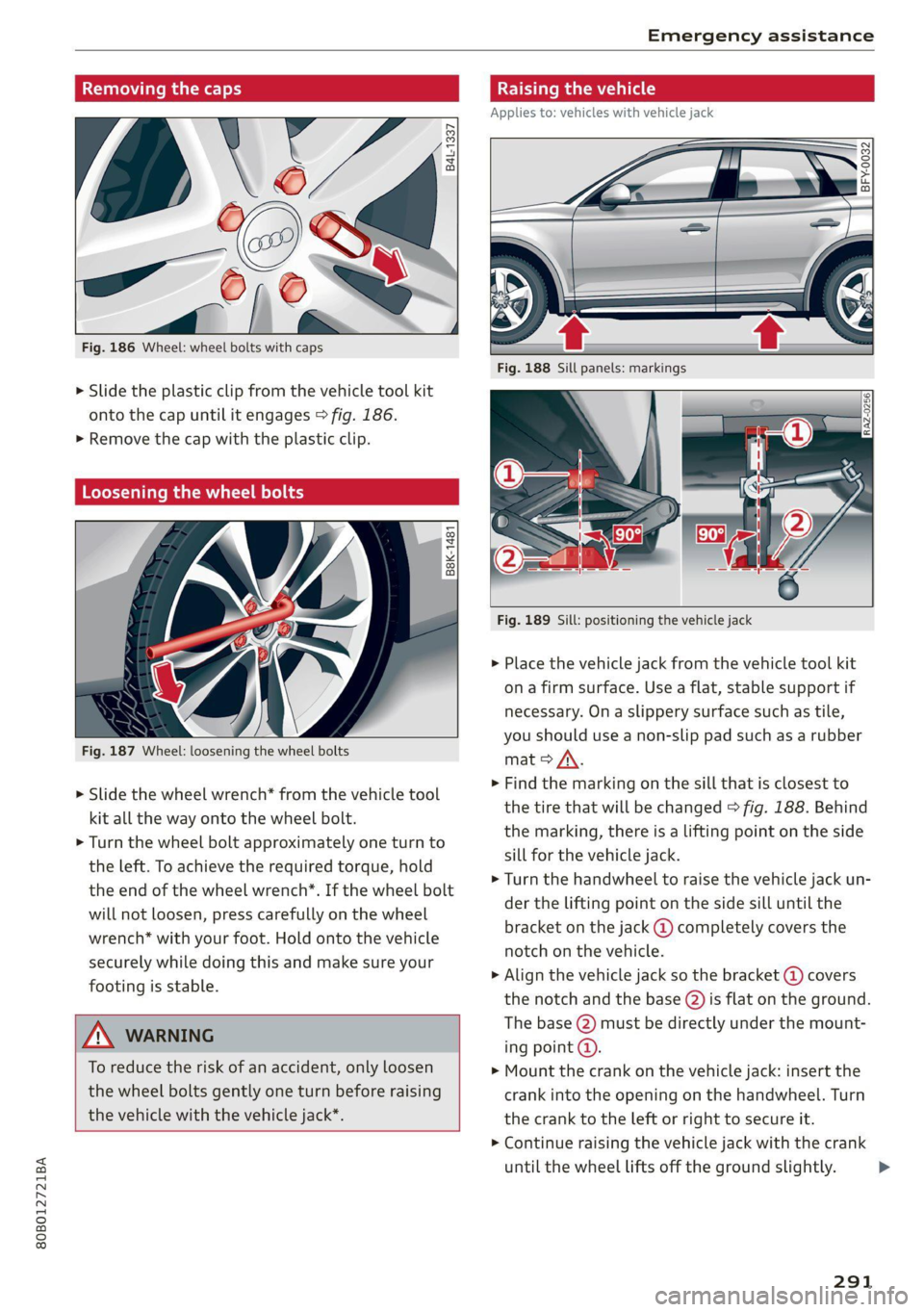
Removing the caps
B4L-1337
Fig. 186 Wheel: wheel bolts with caps
> Slide the plastic clip from the vehicle tool kit
onto the cap until it engages > fig. 186.
>» Remove the cap with the plastic clip.
Loosening the wheel bolts
B8K-1481
Fig. 187 Wheel: loosening the wheel bolts
> Slide the wheel wrench* from the vehicle tool
kit all the way onto the wheel bolt.
> Turn the wheel bolt approximately one turn to
the left. To achieve the required torque, hold
the end of the wheel wrench*. If the wheel bolt
will not loosen, press carefully on the wheel
wrench* with your foot. Hold onto the vehicle
securely while doing this and make sure your
footing is stable.
ZA WARNING
To reduce the risk of an accident, only loosen
the wheel bolts gently one turn before raising
the vehicle with the vehicle jack*.
Raising the vehicle
Applies to: vehicles with vehicle jack
BFY-0032
Fig. 189 Sill: positioning the vehicle jack
» Place the vehicle jack from the vehicle tool kit
ona firm surface. Use a flat, stable support if
necessary. On a slippery surface such as tile,
you should use a non-slip pad such as a rubber
mat > /\.
> Find the marking on the sill that is closest to
the tire that will be changed > fig. 188. Behind
the marking, there is a lifting point on the side
sill for the vehicle jack.
> Turn the handwheel to raise the vehicle jack un-
der the lifting point on the side sill until the
bracket on the jack @) completely covers the
notch on the vehicle.
> Align the vehicle jack so the bracket (@) covers
the notch and the base @) is flat on the ground.
The base (2) must be directly under the mount-
ing point @.
> Mount the crank on the vehicle jack: insert the
crank into the opening on the handwheel. Turn
the crank to the left or right to secure it.
> Continue raising the vehicle jack with the crank
until the wheel lifts off the ground slightly.
291
>
Page 294 of 332

Emergency assistance
ZA\ WARNING
—To reduce the risk of injury, make sure no
one is in the vehicle before raising it.
— Make sure the vehicle jack is stable. The risk
of injury is increased when the ground is
slippery or soft, because the vehicle jack
could slide or sink.
— Only raise your vehicle with the vehicle jack
provided by the factory. If you use a vehicle
jack designed for another vehicle, your vehi-
cle could slip and cause injury.
— Position the vehicle jack only at the desig-
nated mounting points on the side sill and
align the jack. Otherwise, the vehicle jack
could slip and cause an injury if it does not
have sufficient hold on the vehicle.
—To reduce the risk of injury, do not raise any
other vehicles or other loads using the vehi-
cle jack provided by the factory.
— Applies to: vehicles with air suspension:
Changes in temperature or load can affect
the height of the stopped vehicle.
— To reduce the risk of an accident, never start
the
engine when the vehicle is raised.
—To reduce the risk of injury, no work should
be performed under the vehicle while it is
raised.
@) Note
Do not lift the vehicle by the sill. Position the
vehicle jack only at the designated mounting
points on the side sill. Otherwise, your vehicle
could be damaged.
moving and installing a wheel
i B8k-1479|
~~
Fig. 190 Wheel: internal hex socket to turn the wheel bolts
292
6 + 4
0 oO
Fig. 191 Wheel: alignment pin in the top hole
Removing a wheel
> Remove the top wheel bolt completely using
the hex socket in the screwdriver handle from
the vehicle tool kit > fig. 190 and place it ona
clean surface.
> Then install the alignment pin from the vehicle
tool kit in the empty wheel bolt hole by hand
> fig. 191.
> Remove the rest of the wheel bolts.
> Remove the wheel >(). The alignment pin re-
mains in the hole while doing this.
Installing a wheel
Read the directions on > page 293 when instal-
ling unidirectional tires.
> Slide the wheel on over the alignment pin >@.
> Install the wheel bolts and tighten them gently
using the hex socket.
> Remove the alignment pin and tighten the re-
maining wheel bolt.
> Carefully lower the vehicle using the vehicle
jack*.
> Tighten the wheel bolts in a diagonal pattern
using the wheel wrench*.
The wheel bolts must be clean and loosen and
tighten easily. Check the contact surfaces for the
wheel and hub. Contaminants on these surfaces
must be removed before installing the wheel.
Z\ WARNING
— Read and follow the important information
and notes under > page 268.
— Never use the hex socket in the screwdriver
handle or the hex socket wrench with the
ratchet to loosen or tighten the wheel bolts.
This increases the risk of an accident, >
Page 295 of 332
80B012721BA
Emergency assistance
because you will not be able to achieve the
correct tightening specification.
() Note
When removing or installing the wheel, the
rim could hit the brake rotor and damage the
rotor. Work carefully and have a second per-
son help you.
Unidirectional tires
A unidirectional tire profile is identified by arrows
on the tire sidewall that point in the running di-
rection. You must always maintain the specified
running direction. This is necessary to ensure the
tire's optimal performance in regard to adhesion,
running noise, and friction, and to reduce the risk
of
hydroplaning.
To benefit fully from the advantages of the uni-
directional tire design, you should replace faulty
tires as soon as possible and restore the correct
running direction on all of the tires.
> Reinstall the caps on the wheel bolts if necessa-
ry.
> Store the vehicle tool kit in its designated
place.
> If the removed wheel does not fit in the spare
wheel well, store it securely in the luggage
compartment > page 84.
> Check the tire pressure on the installed wheel
as soon as possible.
> Correct the tire pressure and store it in the MMI
=> page 280.
> The wheel bolt tightening specification must be
100 ft lbs (140 Nm). Have it checked as soon as
possible with a torque wrench. Drive carefully
until then.
> Have the faulty wheel replaced as quickly as
possible.
Collapsible spare tire
Applies to: vehicles with collapsible spare tire
The collapsible spare tire is intended for short-
term use only. Have the damaged tire checked
and replaced if necessary by an authorized Audi
dealer or authorized Audi Service Facility as soon
as possible.
There are some restrictions on the use of the col-
lapsible spare tire. The collapsible spare tire has
been designed specifically for your type of vehi-
cle. Do not replace it with the collapsible spare
tire from another type of vehicle.
The collapsible spare tire is located in the lug-
gage compartment under the cargo floor cover.
Requirement: the vehicle tool kit > page 288 and
the compressor must be laid out.
Removing
> Lift the cargo floor using the handle.
> Turn the handwheel counter-clockwise and re-
move it.
> Remove the collapsible spare tire.
You must inflate the collapsible spare tire before-
hand in order to use it.
Inflating
> Remove the valve cap from the collapsible
spare tire.
> Tighten the compressor hose on the collapsible
spare tire valve.
> Connect the compressor hose to a vehicle sock-
et and switch it on.
» Let the compressor run until the specified value
on the tire pressure sticker is reached
> page 271, fig. 180 >©.
> Screw the valve cap back onto the valve.
Returning to storage
> To release air, turn the valve insert. See an au-
thorized Audi dealer or authorized Audi Service
Facility.
> Turn the valve insert back once the air has been
released.
> Wait several hours before placing the collapsi-
ble spare tire in the spare wheel well. Only then
will it fold down completely so that you can
store it securely.
> Then screw the valve cap back onto the valve.
> Secure the collapsible spare tire with the hand-
wheel.
> Fold the cargo floor cover back into place.
293
>
Page 299 of 332
80B012721BA
Emergency assistance
or when towing the vehicle. This can prevent
an undesired intervention from the pre
sense* system.
— Follow the local legal regulations for tow-
ing.
Read and follow the important information under
=> page 296.
Preparations
> Only secure the towing cable or tow bar at the
designated towing loops > page 297,
=> page 298.
> Make sure the towing cable is not twisted. Oth-
erwise it could disconnect from the towing loop
while towing.
> Switch the emergency flashers on in both
vehicles > page 52. However, do not do this if it
prohibited by law.
Towing vehicle (front)
> Only start to drive when the towing cable is
taut.
> Press the brake pedal very carefully.
> Avoid sudden braking or driving maneuvers.
Vehicle being towed (rear)
> Make sure the ignition is switched on so that
the steering wheel is not locked and so that you
can use the turn signals, the horn, and the
windshield wipers if needed > A\.
> Switching it off before the vehicle has stopped
may impair the function of the brake booster
and power steering. You would then need to
use more force to steer and brake the vehicle.
> Release the parking brake > page 111.
> Select the “N” selector lever position.
> Make sure the towing cable is always taut.
ZA WARNING
— Never tow a vehicle using a tow bar or tow-
ing cable if the vehicle does not have electri-
cal power.
— If the vehicle runs out of power while it is
being towed, stop towing the vehicle imme-
diately and consult an authorized Audi deal-
er or qualified repair facility.
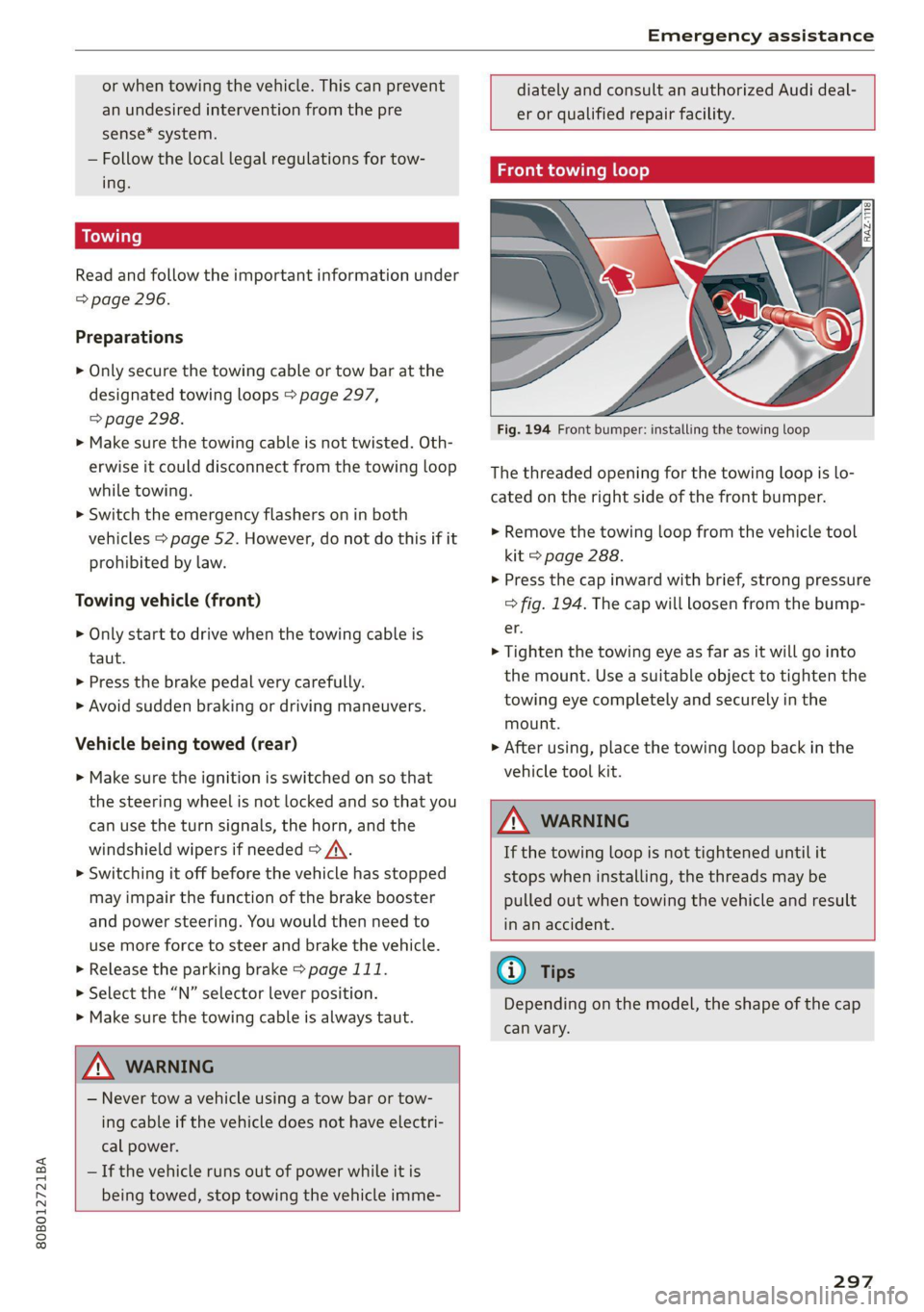
Front towing loop
BX
Fig. 194 Front bumper: installing the towing loop
The threaded opening for the towing loop is lo-
cated on the right side of the front bumper.
> Remove the towing loop from the vehicle tool
kit > page 288.
> Press the cap inward with brief, strong pressure
=> fig. 194. The cap will loosen from the bump-
er.
> Tighten the towing eye as far as it will go into
the mount. Use a suitable object to tighten the
towing eye completely and securely in the
mount.
> After using, place the towing loop back in the
vehicle tool kit.
Z\ WARNING
If the towing loop is not tightened until it
stops when installing, the threads may be
pulled out when towing the vehicle and result
in an accident.
@ Tips
Depending on the model, the shape of the cap
can vary.
297
Page 303 of 332
80B012721BA
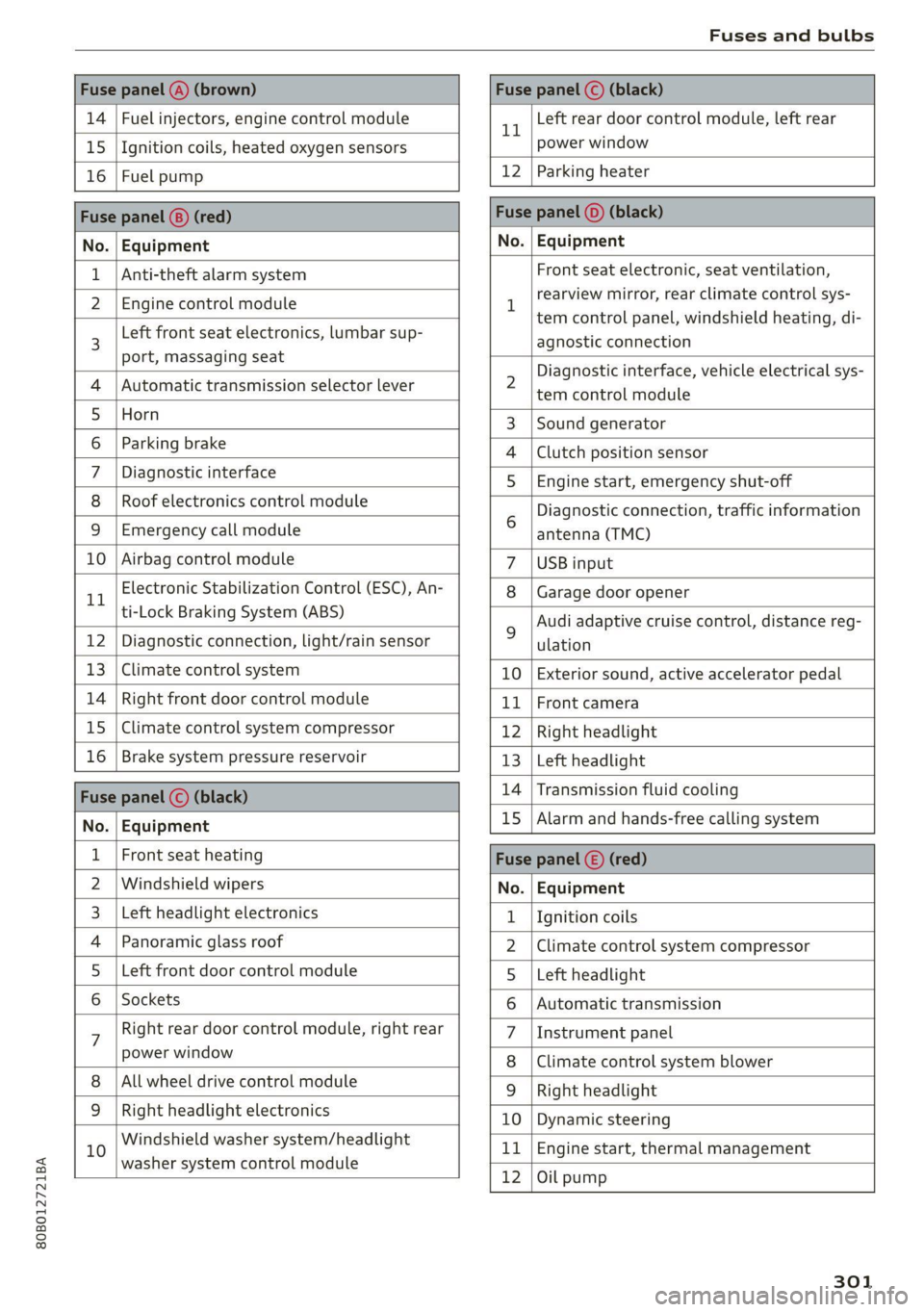
Fuses and bulbs
Fuse panel (4) (brown) Fuse panel © (black)
14 | Fuel injectors, engine control module 1 Left rear door control module, left rear
15 | Ignition coils, heated oxygen sensors power window
16 | Fuel pump 12 | Parking heater
Fuse panel (8) (red) Fuse panel (©) (black)
No. | Equipment No. | Equipment
Anti-theft alarm system Front seat electronic, seat ventilation,
2. [Engine control module 1 rearview mirror, testclimate control sys-
tem control panel, windshield heating, di-
3 Left front
seat electronics, lumbar sup- agnostic connection
port, massaging seat a A 7
Diagnostic interface, vehicle electrical sys-
4 |Automatic transmission selector lever 2 tem-control module
5 [Horn 3 |Sound generator
6 | Parking brake 4 |Clutch position sensor
7 | Diagnostic interface 5 | Engine start, emergency shut-off
8 | Roof electronics control module Diagnostic connection, traffic information
9 |Emergency call module 6 antenna (TMC)
10 | Airbag control module 7 |USB input
11 Electronic Stabilization Control (ESC), An- 8 | Garage door opener
ti-Lock Braking System (ABS) Audi adaptive cruise control, distance reg-
12 | Diagnostic connection, light/rain sensor 2 ulation
13 | Climate control system 10 | Exterior sound, active accelerator pedal
14 | Right front door control module 11 | Front camera
15 | Climate control system compressor 12 | Right headlight
16 | Brake system pressure reservoir 13 | Left headlight
Fuze panel © (black) 14 |Transmission fluid cooling
No. | Equipment 15 |Alarm and hands-free calling system
1 | Front seat heating Fuse panel (©) (red)
2 |Windshield wipers No. | Equipment
3 |Left headlight electronics 1 {Ignition coils
4 | Panoramic glass roof 2 |Climate control system compressor
5 |Left front door control module 5 |Left headlight
6 | Sockets 6 |Automatic transmission
7 Right rear door control module, right rear 7 |Instrument panel
power window 8 |Climate control system blower
All wheel drive control module 9 | Right headlight
9 |Right headlight electronics 10 | Dynamic steering
10 Windshield washer system/headlight 11 | Engine start, thermal management
washer system control module 7
12 |Oil pump
301
Page 304 of 332
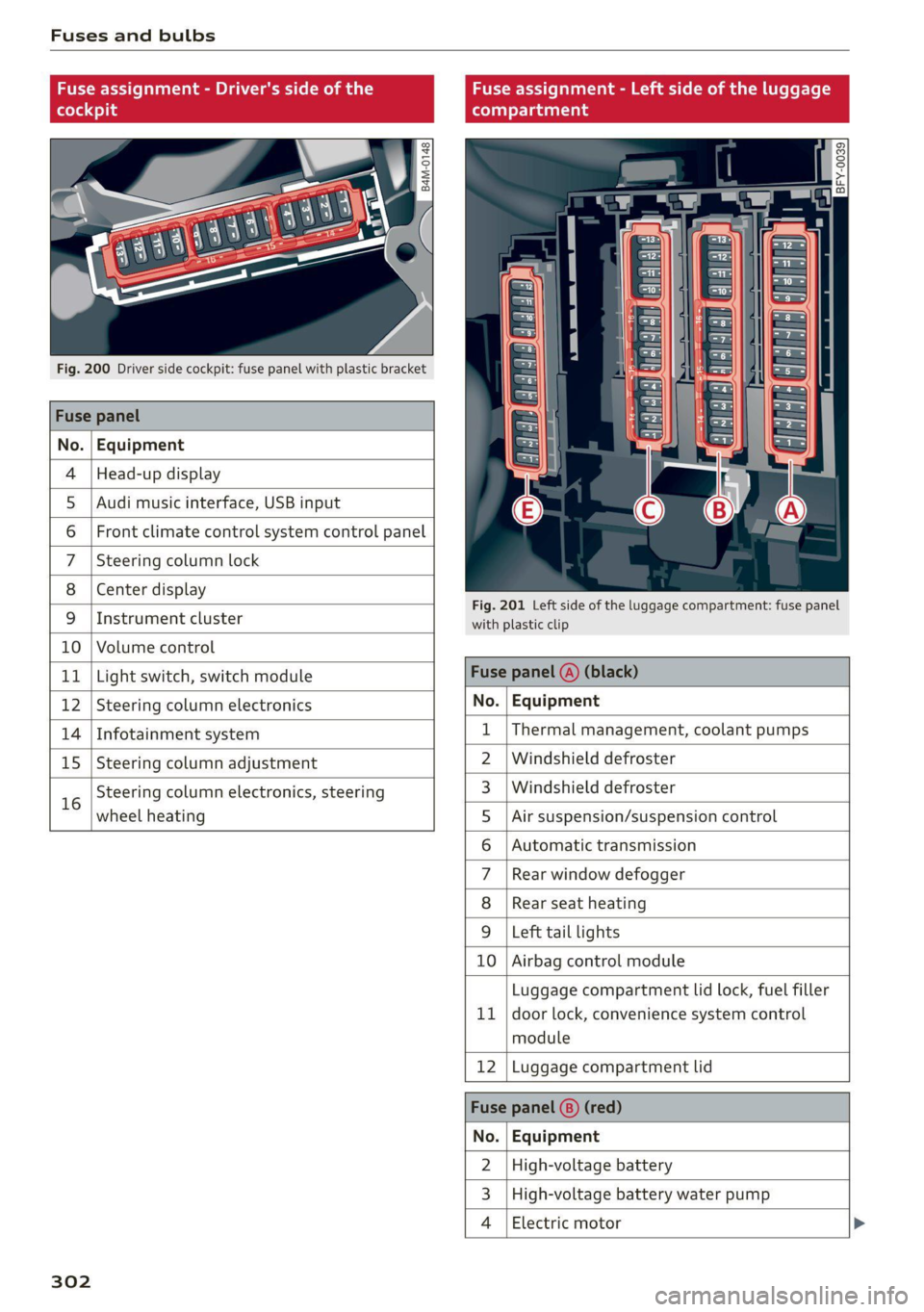
Fuses and bulbs
Fuse assignment - Driver's side of the Fuse assignment - Left side of the luggage
(ole 4) g (eT Tata ahg
Q oO
cy ¢
2
= = a
Fig. 200 Driver side cockpit: fuse panel with plastic bracket
Fuse panel
No. | Equipment
4 |Head-up display
5 |Audi music interface, USB input
6 | Front climate control system control panel
7 |Steering column lock
8 | Center display
Fig. 201 Left side of the luggage compartment: fuse panel
9 |Instrument cluster with plastic clip
10 | Volume control
11 | Light switch, switch module Fuse panel (@) (black)
12 | Steering column electronics No. | Equipment
14 | Infotainment system 1 |Thermal management, coolant pumps
15 | Steering column adjustment 2 | Windshield defroster
16 Steering column electronics, steering 3_|Windshield defroster
wheel heating 5 |Air suspension/suspension control
6 | Automatic transmission
7 |Rear window defogger
8 | Rear seat heating
9 |Left tail lights
10 | Airbag control module
Luggage compartment lid lock, fuel filler
11 | door lock, convenience system control
module
12 |Luggage compartment lid
Fuse panel (8) (red)
No. | Equipment
2 |High-voltage battery
3 | High-voltage battery water pump
4 | Electric motor
302
Page 305 of 332
80B012721BA
Fuses and bulbs
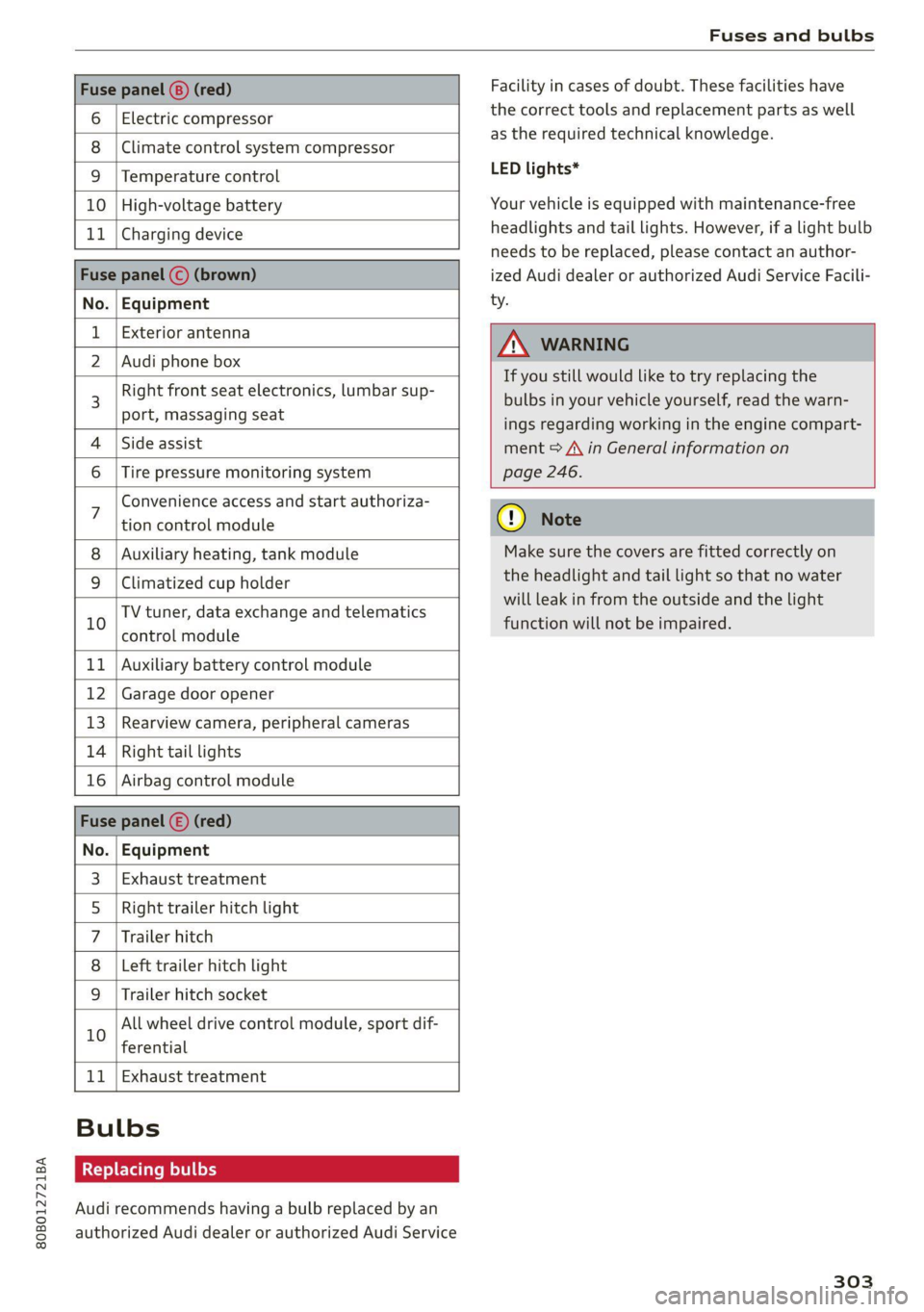
Fuse panel (8) (red)
6 | Electric compressor
8 |Climate control system compressor
9 |Temperature control
10 | High-voltage battery
11 | Charging device
Fuse panel © (brown)
No. | Equipment
Exterior antenna
2 | Audi phone box
Right front seat electronics, lumbar sup-
port, massaging seat
4 |Side assist
6 | Tire pressure monitoring system
Facility in cases of doubt. These facilities have
the correct tools and replacement parts as well
as the required technical knowledge.
LED lights*
Your vehicle is equipped with maintenance-free
headlights and tail lights. However, if a light bulb
needs to be replaced, please contact an author-
ized Audi dealer or authorized Audi Service Facili-
ty.
Z\ WARNING
If you still would like to try replacing the
bulbs in your vehicle yourself, read the warn-
ings regarding working in the engine compart-
ment > A\ in General information on
page 246.
Convenience access and start authoriza-
tion control module
Auxiliary heating, tank module
9 |Climatized cup holder
TV tuner, data exchange and telematics
” control module
11 | Auxiliary battery control module
12 | Garage door opener
13 | Rearview camera, peripheral cameras
14 | Right tail lights
16 | Airbag control module
Fuse panel (£) (red)
No. | Equipment
Exhaust treatment
Right trailer hitch light
Trailer hitch
Left trailer hitch light
WO)
O;N]/
Mm|w
Trailer hitch socket
All wheel drive control module, sport dif-
10
ferential
11 | Exhaust treatment
Bulbs
Replacing bulbs
Audi recommends having a bulb replaced by an
authorized Audi dealer or authorized Audi Service
cy Note
Make sure the covers are fitted correctly on
the headlight and tail light so that no water
will leak in from the outside and the light
function will not be impaired.
303
Page 317 of 332
80B012721BA
Index
Numbers and
Symbols
3-zone deluxe automatic climate control.... 92
A
AIC cooling MOde:. « « vesiare «sas © wrens 6 avers 92
A/C system refrigerant oil............005 314
Accelerator pedals sseis so esas x & eases 8 & exes 101
also refer to Accelerator pedal.......... 101
ACCESSORIES « sssiers oo: seaues + exsusunn + wane a 6 esine 310
Active lane assist
refer to Audi active lane assist.......... 165
Adaptive cruise control................. 154
Adaptive dampers ............-..2+-05- 116
Adjusting air distribution (automatic climate
control system) ...... 0.0.0. e cee eee eee 93
Adjusting the brightness................. 54
Adjusting the sound..............-..00- 236
Adjusting the temperature (automatic climate
control system) ......... 0.0.00. e ee ee eee 93
Adjusting the volume ............ eee ee eee 30
Adjusting the volume (announcements) .... 236
Adjusting the welcome sound............ 236
Airbag'system ; « eses s saves s eee ss veep eee 71
AICSUSPENSION ex « = som « = nee Hg Ses SE Be 116
Alarm system
refer to Anti-theft alarm system.......... 37
Alignment pin (changing the wheel)....... 288
All-weather lights...............-..20--- 50
Allseason tires............220202220005 276
All wheel drive
refer tOQUAtEOmms: 5 = woos + 5 ewe so ewe 118
Amazon Alexa integration
Media playback’. « oii. eons 6 6 cris 6 0 ow 226
Operating...............0..0 000.0000. 28
AMI
refer to Audi music interface........... 226
Android Auto
refer to Audi smartphone interface...... 234
Anti-lock braking system............0005 119
Anti-Slip Regulation.................05. 119
Anti-theft alarm system...............00 37
Apple CarPlay
refer to Audi smartphone interface...... 234 ASR
refer to Anti-Slip Regulation.........
Audi active lane assist................
Cleaning the camera area............
Audi adaptive cruise control
Cleaning the sensors...............
Predictive control..............0005
Traffic jam assist............00.-00.
Audi adaptive light..................
Audi connect
FefEr LO CONNEC: = « gaws + = eames v news
Audi drive select =: ss g2c8 ss peau s i deme
Audi e-tron compact charging system...
Adjusting the charging power level....
Changing or attaching the power cable... .
SeCUrINg.. 2... cee eee eee eee
Status and malfunction indicators ....
Audi music interface.................
Audio files..............00 eee eee ee
Safety measures........ 0.0... e ee ee
Audi side assist
refer to Side assist..............0..
Audi smartphone interface............
Legalinformation..................
Audi virtual cockpit
refer to Instrument cluster..........
AUTO
Automatic climate control system.....
Automatic headlights...............
Auto Lock (central locking) ............
Automatic climate control system......
Automatic luggage compartment lid....
Automatic transmission..............
Automatic wipe/wash system..........
Auxiliary climate control..............
Average consumption................
Average speed... ..... 2.2.02
315
Page 322 of 332
Index
Headlight range control................0. 50
Headlights: « scincs xo snes oe mms 2 o ones ow a0 50
Cleaning......... 0... e eee eee eee 283
Headlight range control................ 50
Washer'system « = ses09 + see ey eeru ee es 57
Washer system (filling washer fluid) ..... 259
Headsrestraints cies m + eassen wo iecwne © o aiemne so 3 67
Heated rear window.............0000 sees 94
Heated steering wheel................0.. 94
HOAtinG cer x = seas & s Kame Fe em ee ew ee 91
HFP
refer to Hands Free Profile............. 186
High:voltagebattery’s « ssw 4s asww s enews « 122
Audi e-tron compact charging system.... 131
Charging.............c eee eee eee 123,125
Charging display on the vehicle......... 127
Charging equipment.................. 129
Charging methods.................04. 123
Charging ports on the vehicle........... 123
Charging time iin: . aici ev eye 3 vere s vs 123
Connecting the charging cable.......... 125
Messages while driving................ 129
Not running for long periods of time..... 124
Opening the charging port door......... 125
Quick charginGiss « ¢ eas sv eee sy eee 2 we 123
Setting the timers. + circ a cane a a sane a ao 127
Transporting charging equipment....... 130
High-voltage system..............0000e 122
High beams
High beam assistant................... 51
Highway lights........ 0.0... eee eee ee eee 50
Hill descentiassist's ccciose oo scarce eo sonsee a a en 114
Hill descenticomtrol. « swssiwe sa ssaiia sv amen 112
Hill hold assist «cco so sewn 6 wane wv wea a oo 99
Home
refer to Home address................ 211
Hometaddnesss, « ws 4s isvawese i « onaseme ow ates 211
HomeLink
refer to Garage door opener............. 47
HOME:SEFEON:. 5 5 worn so cewtei « w veosen « wratess a oo 19
HORM w & ssccase oo asessie wo cecoans © or aoawne © stan B Bees 6
Hotspot
refer to Wi-Fi........ 0... cece eee eee 200
320
I
Idle
TOPE CO'GESISs ween x 3 wean a x woen se weeG ae 99
Ignition
Switching on and off................... 97
Imbalance (wheels) ...........00..00005 270
Immobilizer
refer to Electronic immobilizer........... 38
Tni¢linfometetios. « s eon so wenn vo womens oo nae L13
Indicator lights’; « ese. 5 ¢ eewe ee see se eee 7
Inspection interval..................00. 259
Instrument cluster.............0seeeeuee 12
Adjusting the layout................... 13
Cleaning... ... 2... ee eee eee eee eee ee 285
Failure... 0... eee eee eee eee 12,
MOtorcOdehis « sive « s wena o 2 wee a 2 wane 239
On-board computer............-..00-0- 17
Operating............... 0. cece ee eee 13
Service interval display................ 259
Software information.............0005 239
Switching
tabs......... 0... eee eee eee 13
Switching the VieWir. s + eses « eee xe exw» 13
Vehicle fUNGtIONS). 6 wiicaue as asiere sa uae ao ac 16
Version information.................. 239
Instruments
Adjusting illumination.............00005 55
Integrated Toll Module................. 149
Intelligent search
NaVigatiOticns + ney = yawe so mame x ¢ Hee 206
Interference-Causing Equipment Standard
CIGES) 5 0 mces so sami oe came oo somes 2 x one 312
Interior lighting... e.:3 secs s eee eee 53,54
INteriOr MONICOFING® ss ese « = eoee y 2 wees ae 37
Intermittent mode (windshield wipers) ..... 57
International travel.................5-5 201
Internet
refer to CONNECts « = secs es eeen ee eee ee: 197
Internet radio
refer to Online radio.............. 221, 222
iPhone
refer to Audi music interface........... 226
J
JUMpIStarting, ssw 6 vans a 6 aman w 6 sews ww ae 294